1
Media
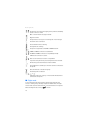
to resume the recording, select Continue; to stop the recording, select
Stop. The phone saves the video clips on the memory card.
Camera and video options
To use a filter, select Options > Effects > False colours, Greyscale, Sepia,
Negative, or Solarise.
To change the camera and video settings, select Options > Settings.
■ Media player
With the media player you can view, play, and download files, such as
images, audio, video, and animated images. You can also view
compatible streaming videos from a network server (network service).
Select Menu > Media > Media player > Open gallery, Bookmarks, Go to
address, or Media downloads to select or download media.
Select Menu > Media > Media player > FF/Rew interval to set the step
width for fast forward or rewind.
Configuration for a streaming service
You may receive the configuration settings required for streaming as a
configuration message from the service provider. See “Configuration
settings service,” p. 10. You can also enter the settings manually. See
“Configuration,” p. 54. To activate the settings, do the following:
1. Select Menu > Media > Media player > Streaming settings >
Configuration.
2. Select a service provider, Default, or Personal config. for streaming.
3. Select Account and a streaming service account contained in the
active configuration settings.
■ Music player
Your phone includes a music player for listening to music tracks or other
MP3 or AAC sound files that you have downloaded from the Web or
transferred to the phone with the Nokia Music Manager application,
which is part of Nokia PC Suite. See “Nokia PC Suite,” p. 84.
61