1
230
FAQ
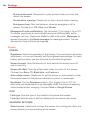
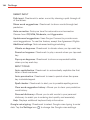
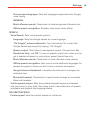
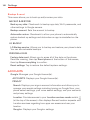
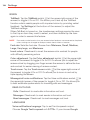
Please check to see if any issues you’ve encountered with your phone are
described in this section, before taking the phone in for service or calling a
service representative.
CATEGORY SUB-CATEGORY
QUESTION
ANSWER
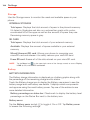
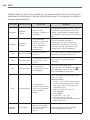
Bluetooth
Bluetooth
Devices
What are the
functions available via
Bluetooth?
Stereo/Mono Headset, Car Kit, and FTP
connections are available. When your
phone is connected to another phone
via Bluetooth, you can receive Contacts
data.
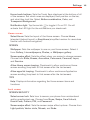
Bluetooth
Bluetooth
Headset
If my Bluetooth
headset is connected,
can I listen to my
music through my
3.5mm wired
headphones?
When a Bluetooth headset is
connected, all system sounds are
played over the headset. As a result,
you won't be able to listen to music
through your wired headphones.
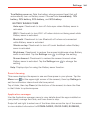
Data
Contacts Backup
How can I back up
Contacts?
The Contacts data can be synchronized
between your phone and Gmail™.
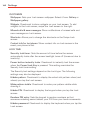
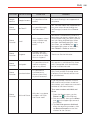
Data
Synchronization
Is it possible to set up
one-way-sync with
Gmail?
Only two-way synchronization is
available.
Data
Synchronization
Is it possible to
synchronize all of the
Email folders?
All of your Email folders are
(at
synchronized. Tap the Menu icon
the upper-right corner of the screen),
then tap Folders to view them.
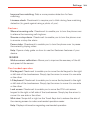
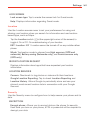
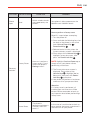
Synchronization
Is it possible to
transfer Contacts data
from a feature phone
to an Android™
phone?
Yes, if your contacts can be extracted
into a .CSV file.
How to transfer:
1. Create “.CSV” file with the contacts
on your current phone (you may be
able to use the PC suite software
provided by LGE).
2. Log into Gmail with your PC.
3. Click Contacts.
4. Click Import.
5. Attach the “.CSV” file.
6. Your contacts will then be
synchronized between your Android
phone and Gmail.
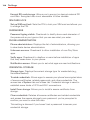
Gmail Log-In
Should I have to log
into Gmail whenever I
want to access
Gmail?
Once you log into Gmail, you don’t
need to log into Gmail again.
Data
Google™
Service