1
TNG USB BUFFER USER MANUAL
4.
CONNECTION
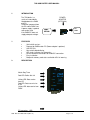
PABX Connection
Pin
2
Receive from PABX
7&4
Handshake to PABX
5
6&8
5.
Pin Description
Common ‘Ground’ signal
Handshake from PABX
DRIVER INSTALLATION
Follow the steps below on installing the USB High Speed Serial Converter for
the first time:
1.
Plug in the USB cable into the USB port and Windows will detect the new hardware:
SS Peripheral Run the Add New Hardware Wizard to assist you in setting up the
new Device.
2.
Insert the USB High Speed Serial Converter driver diskette into the floppy drive
and click Next to continue:
a.
Select Search for the best driver for your device and click Next.
b.
Select Specify a location and click Browse. Change the folder of your floppy drive
(e.g. A:\) and click OK.
c.
Double check the directory that Windows prompts. Click Next.
d.
Windows will detect the driver (FTDIBUS.inf) and show the USB High Speed Serial
Converter. Click NEXT to continue until installation is complete.
e.
Click NEXT to continue and let Windows copy the needed files to your hard disk.
f.
Follow further instructions for installing the USB serial port.
g.
Click Finish when installation is complete.
f.
After installing, the System will generate an additional COM Port, USB to Serial Port
(e.g. COM3) for the connection to RS232 Serial Device.
6.
CHANGING THE COM PORT NUMBER
1.
a.
b.
c.
It is possible to change the COM port number for the USB serial port:
From DeviceManager, select "View devices by type", then
"Ports (COM & LPT)".
Select the USB serial port and click Properties.
Select the "Port Settings" tab, then click Advanced. Choose the
DOC. NO: SST-TNG USB-14 (REV. 01)
Page 4 of 9