1
4.2. HANDLING ICONIC AND CONTROL DATA
47
simultaneously on all tuple members. For example, if you want to process a median filter on
six different images, you might call the operator median image six times with varying input
images. Or you might generate a tuple containing all six images and call median image once
with the tuple as input object. HALCON filters all tuple elements simultaneously and returns a
tuple containing six filtered images. We have seen another example before in chapter 3, where
several regions have been extracted from an input image. The regions became elements of one
region tuple. If you want to know the center of all regions, you simply have to pass this tuple to
the operator area center. HALCON then returns a tuple of integer pairs containing the pixel
positions of all centers.
Now that we know how tuples are processed we can have a closer look at the different object
classes of iconic data: images, regions, and XLD objects.
4.2.2
Image Objects
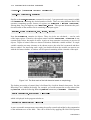
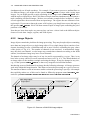
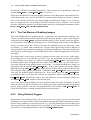
Image objects contain the pixel data for image processing. They may be tuple objects containing
more than one image object or a single image object. Every single image object consists of one
domain describing its area of definition and one or more channels containing the gray values
of the pixels (cf. Fig. 4.2). The number of channels is not restricted. A monochrome image
may only have one channel, a color image may contain three channels according to the RGB
scheme, a multisensor image may have several channels.
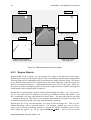
The domain of an image object may be of any size and is represented by a region. Thus, it can
have holes or may consist of several, unconnected areas (see Fig. 4.3). The default domain of
an image object is the smallest rectangle enclosing the image. It may be changed to any size,
e.g., via the operator reduce domain, so that every image has its individual domain.
Introducing an area of definition for an image has the following advantage: All image operators
work only within this image domain. This allows to focus the processing on a region of interest.
The amount of data to work on becomes smaller so that the processing is sped up. An example
that explicitly makes use of this can be found as HDevelop program named autobahn.dev
under the path %HALCONROOT%\examples\hdevelop\Applications\Sequences.
tuple image object
image object 1
domain
runlength
encoding
image object 2
channel 1
gray value
matrix
channel 2
gray value
matrix
Figure 4.2: Structure of HALCON image objects.
HALCON 6.0