1
Page 8
2 Introduction DC155
DC155
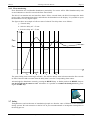
Preset
Actual value
100 %
Proportionalvalve
End value
of the falling ramp
Start value
of the rising ramp
0%
On
Report:
batch process
is running Off
time
Start
Stop
Preset1
Pause time
expired
Lag quantity
Start
Preset 2
Preset
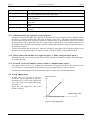
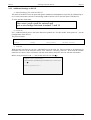
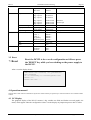
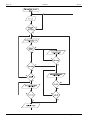
You can configure the analogous output to a 0 ..20 mA or to a 4 ..20 mA signal. To get the functionality as
shown in the diagram just configure the analogous output to “ Ramp shape”.
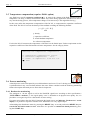
Any alternative functions for the analogous output are shown below:
Select the function of the analogous
put:
out-
0. No function
1. Flow prop. signal
2. Ramp shape
3. Flow feedback control
4. Counter p. sig.
5. Counter (max) p. sig.
. End
Figure 2 Functions of the analogous output
Gönnheimer Elektronic GmbH
phone.: +49 (6321) 49919-0, fax: -41
Email: [email protected]