1
PROGRAMMING
Set up configuration is done with the RPS (remote programming ) software provided on
http://www.arian.cl/downloads/arianrps.zip and running on windows PC.
Connection can be done from the RS485 lines using the ISO485 interface to the PC RS232 comm port .
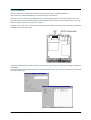
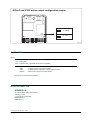
Also may be done using the RPS interface cable plugged to the internal connector, taking care of the “UP”
direction for the connector, as seen on the figure.
Remove the four top cover screws for accessing the RPS connector and other internal jumpers needed for
setting the input and output type.
UP
RPS Connector
The RPS software will recognize the device and load the proper driver for reading and writing configuration
parameters.
Since the din20 is functionally equivalent to the ind20 panel meters, you may refer to the id20 user manual
for further references.
BRO-DIN20-E-03-2009, http://www.arian.cl
3