1
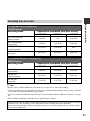
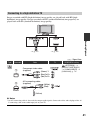
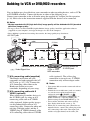
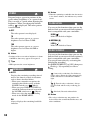
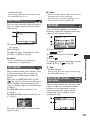
: Signal flow
Type
C
Camcorder
1
Cable
TV
Component video cable
(supplied)
(Green) Y
HOME MENU setting
(SETTINGS) t
[OUTPUT SETTINGS]
t [COMPONENT] t
[480i] (p. 74)
(Blue) PB/CB
(Red) PR/CR
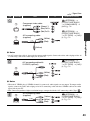
2
A/V connecting cable
(supplied)
(White)
(SETTINGS) t
[OUTPUT SETTINGS]
t [TV TYPE] t [16:9]/
[4:3] (p. 73)
(Yellow)
b Notes
• An A/V connecting cable is also needed to output audio signals. Connect the white and red plugs of the A/
V connecting cable to the audio input jack of your TV.
D
Recording/Playback
(Red)
(SETTINGS) t
[OUTPUT SETTINGS]
t [TV TYPE] t [16:9]/
[4:3] (p. 73)
A/V connecting cable with
S VIDEO (optional)
2
(White)
(Red)
(Yellow)
b Notes
• When the S VIDEO plug (S VIDEO channel) is connected, audio signals are not output. To output audio
signals, connect the white and red plugs of an A/V connecting cable with the S VIDEO cable to the audio
input jack of your TV.
• This connection produces higher resolution images compared with the A/V connecting cable (Type
).
E
2
A/V connecting cable
(supplied)
(Yellow)
(White)
(SETTINGS) t
[OUTPUT SETTINGS]
t [TV TYPE] t [16:9]/
[4:3] (p. 73)
(Red)
43