1
Multiple handset
Push-to-talk (PTT)
Change a one-to-one PTT call to an intercom call
You can convert a one-to-one PTT conversation to an intercom call.
Using a cordless handset or the telephone base:
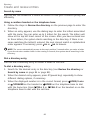
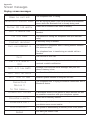
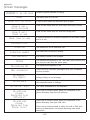
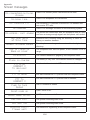
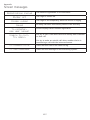
1. When your device displays Press and hold [PTT] to talk, press INTCOM.
The screen displays Switch to Intercom?
2. Press SELECT to confirm. Your device displays Calling BASE 0 or Calling
HANDSET X. The destination device briefly shows Push to talk Ended and
then HANDSET X is calling or BASE 0 is calling. The destination device
rings.
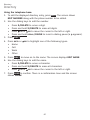
3. Press HOME/FLASH or any dialing key (0-9 or TONE ) on the destination
handset, or press HOME or any dialing keys (0-9 or TONE ) on the
telephone base to answer the intercom call. Both devices now show
Intercom.
4. To end the intercom call, press
OFF/CANCEL on your handset or place
the handset in the telephone base or charger, or press END on the
telephone base. Both screens show Intercom ended.
Answer an incoming call during PTT
When you receive an incoming outside call during PTT, there is an alert tone.
The caller ID is displayed with PTT screen, alternately.
Using a cordless handset or the telephone base:
• During a one-to-one PTT call, press HOME/FLASH, CELL 1 or
CELL 2 on the initiating or destination handset, or press HOME,
CELL 1 or CELL 2 on the telephone base. The PTT call ends
automatically and the outside call is answered.
• During a one-to-group PTT call, press HOME/FLASH, CELL 1 or
CELL 2 on the initiating handset, or press HOME, CELL 1 or CELL
2 on the telephone base. The PTT call ends automatically and the outside
call is answered.
• During a one-to-group PTT call, press HOME/FLASH, CELL 1 or
CELL 2 on any one of the destination handsets, or press HOME,
CELL 1 or CELL 2 on the destination telephone base. That handset or
telephone base answers the outside call. The PTT call continues for the rest
of the PTT participants.
• To leave the PTT call without answering the incoming call, press
OFF/CANCEL on the handset, or press CANCEL on the telephone base.
The telephone continues to ring.
76