1
If a homonymy issue is found, the system launches an OmniVista 8770 alarm. If a user has
several phones (DECT, FAX ), the administrator can manually associate these phones to the
same directory entry.
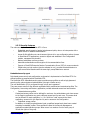
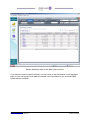
1.3.1 Web directory
Depending on their access profile, users can access and update the company directory via the
Intranet, through their browser.
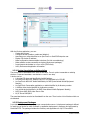
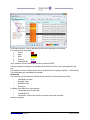
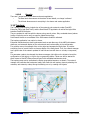
From the Home page of the web interface, the user can select between Directory Access and
Network Management.
The use of the keyboard instead of the mouse for the main feature (search, call, etc.), the “quick
search” and simplified navigation provide enhanced performance for intensive use (attendants,
assistants, etc.).
The bookmark feature provides direct accesses to a hierarchical level in the favorite list.
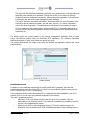
Web directory customization
The OmniVista 8770 Directory web pages can be fully customized for easy integration into the
company’s intranet: logo, background, fonts, fields and filters, names of the fields, number of lines in
one page, maximum number of answers for a search, etc.
Administrators can customize the interface with up to four themes: Classic, Azur, Silver, Custom.
These themes define a set of graphical properties used for graphical display (“skins”).
Users can choose between these four themes, and when they are logged, customize the way the
results are displayed, the search filters, the detailed view, etc.
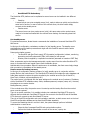
Automatic dialing from the web directory: "click to call"
A CTI (Computer Telephony Integration) feature is included in the OmniVista 8770 company
directory. The "Click to Call" feature allows an OmniPCX Enterprise user, when clicking on a phone
number (internal or external) in an entry or in a list, to automatically dial the number on the
associated phone set.
There is no need for specific equipment or link, apart from an OmniVista 8770 directory and a
telephone connected to the OmniPCX Enterprise. Because of the "STAP" protocol embedded in
OmniPCX Enterprise, the OmniVista 8770 directory controls the OmniPCX call handling, instructing
which number to call.
Note 1: For analog and DECT phones, the user must manually pick up. The click to call feature does
not work with SIP phones. Click to call is available from the OmniVista 8770 web client, not directory
administration.
Prefix management
The "Click to Call" feature automatically adds the carrier's prefix for an outgoing call.
For a multi-national company, or for a heterogeneous numbering plan, prefix management provides
tables where all the prefixes related to the location of the caller/called persons are managed.
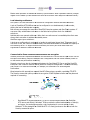
Linked fields
The OmniVista 8770 Directory provides an overall picture of the enterprise’s organization. There are
links between the entries: clicking on the fields “Assistant” or “Manager” triggers the pop up of the
assistant/manager’s entry. An entry may also be linked to another one via the “see also” field.
When the assistant or the manager cannot answer, the caller may ask the attendant to be put
through to someone in the same department. OmniVista 8770 provides two icons allowing quick
access to the list of people having the same assistant or manager.
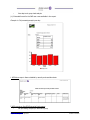
Print-out of selected entries
You want to print the result of the selection you have made in the web directory?
ENT_MLE_015926 ED01
Chapter 12: Management Operations
19/79
Alcatel-Lucent Enterprise Communication Solutions
October 2013 Offers