1
f.
No Answer Sec. Defined the wait seconds for redirect forward to another
IP(or URL).
g.
Delete: Delete this rule item on routing table.
h.
To add new rule item on routing table, please assign the item number you
want to insert before, input AREA CODE then press ADD button to add it on
the list. Then modify the necessary information on the routing table list.
Please remember to press the modify button to take it effect. For store back to
flash memory, please press Save Modification (/System Maintenance/Save
Modification/).
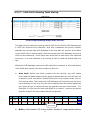
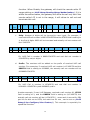
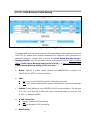
Example: if user set the VoIP Call in & Routing Profile like below:
Index Area Code Strip
Prefix
Maximum Minimum From To LineNo Gatekeeper
Alert
Profile
Forward
1
601
1
1
CF1
2
602
2
2
CF2
Delete
Delete
7
Delete
8
Other: 10.1.1.1/104
No.
Name
Always
1
CF1
hk.big.com/301
2
CF2
OnBusy
No Answer
No Answer Sec Delete
Delete
8
assist.big.com
assist.big.com/610
30
Delete
8
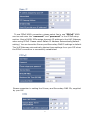
In this case, when the VoIP Gateway received a VoIP call in number with prefix
501 ( not 601 or 602 prefix defined on Call In Routing table), it will forward this
call to the IP& number defined on Other filed(in this case, 10.1.1.1/104, it
mean it will forward this call to IP 10.1.1.1 and calling number will change to
104).
When the line 1 user is going to have a tour to another location with same VoIP
Gateway equipment, user setup the called prefix number 601 forward to profile
name CF1, and in CF1 profile, the Always field is set to hk.big.com/301, that
51