1
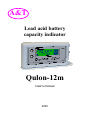
А&T
Lead acid battery
capacity indicator
Qulon-12m
User's manual
2005
-1Thank you for purchasing. Your lead acid battery capacity indicator Qulon-12m is destined for fast battery capacity estimation. With the help of the device, you can test new or
used 12-volt lead acid batteries. This will help you to condemn defective batteries or batteries that have lost capacity.
With Qulon-12m, you will always keep your battery systems in
perfect working order.
Qulon-12m is designed for years of reliable work and
does not need any service.
Please read this manual! It contains significant instructions for using battery capacity indicator. Following this
manual, you will keep device working and your batteries
ready to take critical loads.
Keep this manual! In contains important safety precautions and warranty information.
-2Contents
Introduction
4
1. Safety precautions
5
2. General description
6
3. Battery capacity estimation
7
3.1. What is battery capacity
7
3.1.1. Dependence between battery capacity and
discharge current
7
3.1.2. Battery capacity and battery state of charge
8
3.1.3. Temperature dependencies
8
3.1.4. New batteries
9
3.2. Battery capacity estimation with Qulon-12m
9
3.2.1. Device placement
9
3.2.2. Battery preparation
10
3.2.3. Connection to a battery
10
3.2.4. Battery state of charge
11
3.2.5. Battery capacity estimation
12
3.3. Qulon’s screen during battery capacity estimation13
3.3.1. Screen under “save by default” mode
13
3.3.2. Screen under “save by command” mode
15
4. Alarm messages
15
5. Memory
17
5.1. Memory organisation
17
5.2. Two save modes
18
5.3. Main menu
19
5.3.1. Close group
20
5.3.2. Records
21
5.3.3. Clear memory
22
5.3.4. Options
23
6. Adjusting Qulon
23
6.1. Options menu
24
6.2. Save mode
25
-36.2.1. Save by default
6.2.2. Save by command
6.3. Calibrate (coefficient adjustment)
6.4. Filtration
6.5. Language
7. Calibrating Qulon (coefficient determination)
7.1. Coefficient from the producer’s site
7.2. Measured discharge method
7.3. Method of average
7.4. Method of maximum
7.5. Method of battery history
8 Appendix: test cable checking
9. Specifications
Warranty
25
25
26
27
28
29
30
31
33
33
34
35
36
37
-4-
Introduction
The life of lead acid batteries is limited to several
years and while working batteries loose capacity. When the
battery capacity becomes unacceptably small, battery needs
to be replaced. It is exceptionally important to determine
correct time of battery replacement. If a battery is replaced
too early – the owner of a battery looses money. If a battery is
replaced too late, the loss could be even larger.
Qulon-12m - lead acid battery capacity indicator is a
device for battery capacity estimation. With Qulon, one can
sort 12-volt batteries by their capacity and reject batteries that
have lost capacity.
Memory for keeping test results helps user during
testing large amount of batteries.
The battery capacity estimation is based on the dependence between battery capacity and battery ability to conduct electric current. Battery capacity indicator sends a test
pulse to a battery and analyses the battery answer. Qulon12m utilises the most up-to-date method of battery capacity
estimation taking into account the multifrequency battery response to test pulses.
Different battery producers use different technologies
and battery designs. Therefore, the dependence between test
pulse form and value and battery answer form and value
could be slightly different. That is why Qulon-12m is not a
high precision device for capacity measurement. It estimates
battery capacity basing on electrical measurement and
-5some algorithm saved in Qulon’s microprocessor.
Qulon-12m is calibrated on factory. Using this calibration, you can estimate the capacity of any 12-volt lead acid
battery. Experienced user can reduce capacity estimation
error by device recalibration basing on the battery with known
capacity.
1. Safety precautions
Unpack Qulon-12m and check if there are any transport damages. If any, appeal to your dealer or the transport
company.
Attention! Lead acid battery under test is a source
of possible danger. Battery terminals shorted with any metal
detail could cause burn or fire. Please adhere to battery
maintenance and service rules.
If battery under test is a part of high voltage battery
system and battery test is conducted without battery disassembly be especially careful. Do not connect test clamps to
several 12-volt batteries connected in series. If such case,
device will not switch on. If summary voltage exceeds 400
volts device could be damaged.
Qulon-12m is a complicated device. Do not try to disassemble it. There are parts that need service inside. The
device should be repaired only by certified personal.
-6Attention! Do not use device with back lid opened.
2. General description
There is a LCD display in the center of Qulon’s front
panel. It is used to show ampere-hour capacity, battery voltage and additional information: adjustment coefficient, number of recorded measurements and current croup of records.
Qulon has memory for recording results of battery tests. The
maximum number of recorded results is 200. User is free to
separate recorded results to as many as 26 groups.
If it is impossible to estimate battery capacity because
of some reasons, alarms are shown at the display.
There are two control buttons on the front panel to the
left of display.
Right panel of Qulon is the place for test cable connector. Qulon is supplied with special test cables that use
four-wire (Kelvin) connection. This type of connection is used
in order to diminish contact resistance influence on the devise
results.
There is a connection diagram under the back lid of
the device.
-7-
3. Battery capacity estimation
3.1. What is battery capacity
Battery capacity is an electrical charge (quantity of
electricity) that battery can deliver under specified conditions.
Usually battery capacity is expressed in ampere-hours (A*h or
Ah). Capacity equals to discharge current (in amperes) multiplied by discharge time (in hours). Battery producers rate
nominal battery capacity for some standard conditions. Usually (but not necessary), these conditions are: 20-hour diso
charge time, 20 C discharge temperature and 1.75 V final
battery voltage (voltage limit at which discharge is considered
to be complete).
3.1.1. Dependence between battery capacity and
discharge current
Charge that a battery can deliver depends on the discharge current (discharge time). If discharge current grows
(discharge time decreases), the battery capacity decreases.
This dependence is an individual property of a specific battery. The dependence between relative battery capacity and
discharge time for LCL-12V33AP battery is given in the table
below.
Discharge time,
hours
0,1
0,3
Relative capacity, %
37
48
-8Discharge time, Relative capacity, %
hours
0,7
53
1,9
76
4,2
84
9,2
92
20
100
Qulon-12m always shows capacity for 20-hour discharge time. If you discharge your battery during smaller time,
the capacity will reduce.
3.1.2. Battery capacity and battery state of charge
We need to distinguish capacity and state of charge.
Capacity is the quantity of electricity that a fully charged battery can deliver. State of charge is a characteristic giving information on the degree to which the capacity is filled. For
example 33Ah battery can contain 33 A*h if a battery is fully
charged and 10 A*h if the battery charge is not full.
Qulon-12m estimates capacity of fully charged battery
and can’ be used to determine state of charge.
3.1.3. Temperature dependencies
While testing battery
under low or high temperature, dependence of battery capacity from the temperature should be taken into account. Qulon-12m always shows
the capacity that a battery could deliver during next discharge
under the same condition. That is why if you get estimated
o
capacity under plus 20 C as large as 20 A*h
-9you should not be surprised if the same battery will deliver
only 10 A*h during discharge under minus 20oC.
Factory calibration of Qulon-12m is conducted for use
o
under room temperature (about 20 C). Therefore, in order to
get most precise results of battery capacity estimation, keep
batteries under room temperature before test for the time
needed for temperature equalising.
3.1.4. New batteries
The majority of lead acid batteries increase capacity
after their first discharge-charge cycles. That is why while
testing absolutely new batteries (the batteries that never were
charged or discharged) you could get estimated capacity less
then rated (may be by 10 or 15 %). This is usual – the battery
will increase capacity after several cycles (or several months
under float charge).
3.2. Battery capacity estimation with Qulon-12m
3.2.1. Device placement
Qulon-12m can work in any position horizontal or vertical.
of
To avoid device errors do not use it near the sources
large electromagnetic noise.
.
-10-
3.2.2. Battery preparation
Correct estimation of battery capacity can be achieved
for fully charged batteries only. Therefore, the battery should
be fully charged before test.
Normally you need do disconnect battery circuit before
test. During test, the battery should be not connected to
charger or load. If a battery has been charging or a battery
was connected to some devices with automatic charger (e.g.
UPS), 15-20 minute pause should be made.
If battery terminals are dirty or oxidized – clean them.
3.2.3. Connection to a battery
Battery capacity indicator Qulon-12m is supplied with
special test cables that use four-wire (Kelvin) connection to a
battery. Two halves of one (red or black) clamps are insulated
from each other.
Verify that clamp halves do not have other connection
with each other except battery terminal.
Observe polarity when connecting to a battery. Connect red clamp to positive battery terminal and black clamp to
negative terminal. Qulon has reverse polarity protection –
device will not switch on if you mistake.
Attention! Applying voltage between clamp halves is
not allowed.
Capacity estimation is correct only in case if
-11device clamps have secure and reliable connection directly to
battery terminals. Connect test clamps directly to battery terminals. Never connect clamps to wires or nuts that have connection with the terminal. Do not connect clamp to a terminal
by touching it with a side surface of a clamp.
Correct
Not correct
Not correct
Fig. 1. Connecting clamp to a battery terminal
If the contact is not good, Qulon sends an appropriate
message to the screen (see section 4). When such message
appears, disconnect clamps from terminals, clean terminals
and connect clamps once more.
Attention! Qulon feeds from the battery under test. To
avoid battery discharge disconnect device from the battery
after test.
3.2.4. Battery state of charge
Qulon-12m estimates capacity for fully charged batteries only. The battery under test should have voltage not
less then 12.6 V.
If a battery is deeply discharged (voltage less the 9 V)
– device will not switch on.
.
-12If a battery is not fully charged (voltage is more then 9
V and less then 12.6 V), device shows a message “Voltage
low” and battery voltage at the screen. In this case, disconnect clamps from the battery and charge the battery in full
according to the battery manual.
If Qulon is connected to a battery with voltage larger
then 14 V, a “High voltage” warning and battery voltage would
be shown on the screen.
If a battery voltage is between 12.6 volt and 14 volt
Qulon shows a battery voltage on the screen and begins the
process of capacity estimation.
Attention! Qulon feeds from the battery under test.
That is why the battery voltage shown on the screen can differ from the open circuit voltage measured by multimeter.
3.2.5. Battery capacity estimation
If a battery voltage is between 12.6 volt and14 volt
Qulon automatically starts battery capacity estimation.
Capacity estimation needs time. The value appears on
the screen after 1-2 seconds (4-5 seconds if additional filtering is applied – see section 6.4). Please wait until capacity
value appears.
After capacity is estimated, Qulon shows the amperehour value of the battery and switches on the screen light for
10 seconds.
-13-
3.3. Qulon’s screen during battery capacity
estimation
If battery capacity estimation was successful, the capacity value is shown on the screen.
This result can be saved in memory. Qulon-12m has
two saving regimes (save modes): saving by default (result is
saved immediately after it appears) and saving by command
(one needs to push button for saving). Detailed description of
both saving options is made in section 5.2.
The screen view is shown on the following figures depending on chosen regime.
3.3.1. Screen under “save by default” mode
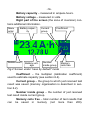
Figure 2 shows screen view for the case when “save
by default” mode is chosen.
Left part of the screen contains icons describing
button functions.
Menu enter – press upper button to enter menu (see
section 5).
Delete result – press lower button to delete just saved
result – you will be asked for delete confirmation.
The centre of the screen is occupied by estimated
capacity and battery voltage. If it was not possible to estimate
capacity, the alarm message is sent to this screen zone (see
section 4).
.
-14Battery capacity – measured in ampere-hours.
Battery voltage – measured in volts.
Right part of the screen (the zone of inversion) contains additional information.
Menu
enter
Battery capacity
Delete result
Battery voltage
Current
group
Coefficient
Number
inside group
Memory
cells free
Fig.2 Screen under “save by default” mode
Coefficient – the multiplier (calibration coefficient)
used to estimate capacity (see section 6.4).
Current group – the group to which just received test
result was saved (memory organisation is described in section 6.2).
Number inside group – the number of just received
test result inside current group.
Memory cells free – total number of test results that
can be saved in memory (not more then 200).
-15-
3.3.2. Screen under “save by command” mode
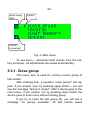
Figure 3 shows screen view for the case when “save
by command” mode is chosen.
When this mode is used, just received test result is not
saved. There is no battery name (group and number inside
group) on the screen. The function of the lower button is
changed.
Save result – press lower button to save just received
test result –you will be requested for save confirmation.
Save result
Fig. 3 Screen under “save by command” mode
4. Alarm messages
Sometimes (mainly if the battery is not properly prepared for testing), Qulon-12m fails to estimate capacity. If this
happens, alarm message appears on the screen describing
the reason for the fail.
.
-16All alarm messages with their possible causes and
recommended user actions are listed in the following table.
Message Possible cause
Recommended actions
Contact
Bad contact be- Disconnect
clamps,
tween any of test clean terminals and
clamps and bat- connect clamps once
tery terminal
more
Capacity Battery capacity is below 0.5 Ah, Qulon
low
can’t estimate it
Capacity
high
Battery capacity is too high (may larger
then 350 Ah), Qulon can’t estimate it
Voltage
low
Battery is
charged
Noise
Large noise –
capacity estimation is not possible
Voltage
high
dis- Charge battery in full
and try once more
If a battery is connected to a charger,
disconnect it. If you are
working in a room with
high level of electromagnetic noise change
the place or switch to
additional filtering
Battery voltage is Ensure that the battery
too high
is disconnected from
the charger
-17-
5. Memory
5.1. Memory organisation
Battery capacity indicator Qulon-12m has memory for
200 test results. For user’s convenience, test results can be
split to groups. Maximum number of groups is 26, each group
is identified with a letter of Latin alphabet – from A to Z. A
user arbitrarily manages the quantity of results inside group.
Each test result recorded is identified with a name that
consists of a group name and a number inside group. If the
whole memory were empty, the first test result recorded
would be named A-1. Next test result recorded will have a
name A-2 and so on. User can close current group at any
time. In this case, the next test result recorded will be the first
in the next group, which would be named in the alphabet order (e.g. B-1).
The following memory operations are possible.
A) Saving of test result just received (“save by command” mode);
B) Erasing of test result just saved (“save by default”
mode);
C) Closing current group (next group opens automatically), if current group is not “Z”;
D) Erasing all saved test results from memory.
The following memory operations are impossible.
-18A) Saving test result to arbitrary chosen group or arbitrary chosen number in the current group;
B) Erasing of part of saved test results from memory;
C) Recording test result to a closed group;
D) Opening closed group.
All memory operations are made with the help of main
menu.
5.2. Two save modes
Qulon-12m has two save modes: “save by default” and
“save by command”.
Under “save by default” mode just received test result
is saved automatically. It can be erased by pressing lower
button.
Under “save by command” mode just received test result is not saved automatically. It can be saved by pressing
lower button.
User can choose save mode with the help of options
menu. Chosen mode is valid for next tests until it is changed.
Under both modes saving is performed only if:
A. Battery capacity estimation was successful or
B. Qulon sent one of messages: “capacity low”,
”capacity high”, ”voltage low”, and “voltage high”.
If other messages appear, test result is not saved.
-19In “A” case (see above), the following information is
saved: estimated capacity, calibration coefficient (for current
test), battery voltage, group name and number inside group.
In “B” case, the appropriate message is saved instead
of estimated capacity.
If there are 200 test results saved in memory, a message “memory full” is displayed. After this message, saving is
impossible. During next test, the number of free cells in memory in the right bottom corner of the screen is “0”. User should
clean all memory in order to start saving test results again.
5.3. Main menu
After the battery capacity was estimated or alarm
message shown, the user can come into the main menu by
pressing the upper button.
If “save by default” mode is on user will be advised to
erase just received test result. The user can agree (and the
result will be erased) or disagree (and the result will be kept in
memory) before entering menu.
Main menu has four items. The view of main menu is
shown on figure 4.
Pressing lower button brings cursor to next line.
Pressing upper button enters the menu item specified by cursor.
First three menu items serve for memory operations,
the last one – for device adjustment.
-20Enter menu
item
Cursor
Cursor
movement
Fig. 4. Main menu
To exit menu – disconnect test clumps from the battery terminals - all adjustments are saved automatically.
5.3.1. Close group
This menu item is used for closing current group of
test results.
After entering item, a question “close group?” will appear. If you answer “yes” by pressing upper button – you will
see the message “Group X closed”. After it device goes to the
main menu. If you answer “no” by pressing lower button the
device goes to main menu without closing group.
If you try to close the last group (Z), you will see a
message “no groups available”. All test results saved
-21after it will be in Z group.
If you try to close the empty group, you will see the
appropriate message. The empty group cannot be closed.
5.3.2. Records
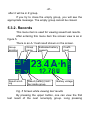
This menu item is used for viewing saved test results.
After entering this menu item the screen view is as in
figure 5.
There is an A-1 test result shown on the screen.
Group
scrolling
Result scrolling
Group
name
Estimated battery
capacity
Result (battery) number inside group
Coefficient
Battery voltage
Fig. 5 Screen while viewing test results
By pressing the upper button, one can view the first
test result of the next nonempty group. Long pressing
-22causes fast group scrolling. After last nonempty group is
reached result A-1 is shown once more.
By pressing lower button, one can view the next result
in the same group. Long pressing causes fast result scrolling.
After last result of the group is reached, the result number 1
of the same group is shown.
To exit the viewing mode disconnect test clamps from
battery terminals.
5.3.3. Clear memory
This menu item is used for complete erasing of test
results saved in memory.
Warning! Memory clearing is irreversible action. Thus,
all the results that have been saved in memory will be removed, and their restoration will be impossible.
Up to 200 test results can be stored in memory.
If you are going to save test results in memory, it is
necessary to correlate the number of empty memory cells
with prospective quantity of batteries that you wish to test.
The number of empty memory cells is displayed in the right
bottom corner of the display (see figure 1 and figure 2).
After entering this menu item, user is offered to press
four times device buttons in the specified sequence.
To avoid casual removal of saved results, the button
pressing
sequence,
necessary
for
clearing
-23memory, varies for each time the device is connected to a
battery.
5.3.4. Options
This menu item is used to change device operating
modes.
All adjustments are kept in the flash memory of the
device until their following change. Flash memory holds its
content without the need of a power supply.
Qulon-12m adjustment is described in the following
chapter of the manual.
6. Adjusting Qulon
Qulon-12m is issued completely adjusted and can be
used for lead acid batteries diagnostics right after purchases.
By manufacture, Qulon-12m is adjusted as follows.
Save mode - by default.
Calibrating coefficient k=1.00.
Filtration - basic filtering.
Language of messages - English.
The user can change factory adjustments. It is recommended to study the present manual before any adjustment of Qulon-12m.
-24-
6.1. Options menu
To change adjustments it is necessary to connect
Qulon to a battery and after the device will estimate its capacity or will give out the message, - press the top button
(icon "M" - menu entrance) to enter the main menu. In the
main menu – press lower button three times to note last menu
item “Options” and the top button to enter menu of adjustments.
The view of options menu is presented in figure 6.
Pressing lower button brings cursor to next line.
Pressing upper button enters the menu item specified by cursor.
Enter menu
item
Cursor
Cursor
movement
Fig. 6.Options menu
-25To exit menu – disconnect test clumps from the battery terminals.
6.2. Save mode
When you enter this menu item you are offered to
choose one of two save modes: save by default or save by
command. Move cursor to the desired line. Your adjustment
is saved automatically. Now you can go to the main menu by
pressing top button or disconnect Qulon from the battery.
6.2.1. Save by default
If you choose this save mode Qulon will save the test
result automatically, right after the result is received. Screen
view for this save mode is shown in figure 2. If you want to
delete just saved result press lower button – you will be asked
for delete confirmation. You can press the top button (“yes”) –
the recorded result will be deleted or press the lower button
(“no”) and the result will be kept in memory. In the last case,
you will return to the screen of fig. 2.
6.2.3. Save by command
If you choose this save mode Qulon will not save the
test result automatically. Screen view for this save mode is
shown in figure 3. If you need to save just received result –
press the lower button. You will be asked for confirmation to
save
the
result
to
a
designated
-26group and battery number inside group. You can press the
top button (“yes”) – the result will be saved - you will see
message with the group name and battery number inside
group and return to the screen of fig. 3. Alternatively, you can
press the lower button (“no”) and the result will not be saved.
You will return to the screen shown in fig. 3.
6.3. Calibrate (coefficient adjustment)
Warning! Lead acid battery capacity indicator Qulon12m is a complicated device. Therefore, its recalibration
should be made by the qualified user who studied the present
manual and who distinctly understands the sequence and
probable results of the action.
Qulon-12m is calibrated at the factory with the use of
average characteristics of 12-volt lead acid batteries. Some
specific battery may need some other calibration. To diminish
capacity estimation error user can recalibrate device for testing of some specific battery type or confirm the validity of
factory calibration.
User can do Qulon-12m recalibration by changing the
calibration coefficient.
Qulon-12m calculates the estimated battery capacity
according the following formula:
Е = Ео * К,
where: Ео – estimated capacity without user’s corrections, К – calibration coefficient.
When issued from the factory Qulon-12m has
-27calibration coefficient К = 1.
To recalibrate Qulon-12m you need: a) determine the
value of calibration coefficient for your batteries (see section
7) and b) adjust Qulon for work with this coefficient (save this
coefficient in Qulon’s memory).
To change calibration coefficient enter main menu,
select item “options”, enter options menu and select item
“Calibrate”. After entering this item, you will see the current
coefficient. You will be asked if you want to change coefficient.
After “no” answer (lower button), you will return to the
main menu.
After “yes” answer (upper button), you will see the
screen with current coefficient. Pressing upper button increases coefficient (you see the current value on the screen).
Pressing lower button decreases coefficient (again you see
on the screen the new value). Holding button causes fast
coefficient changing. After the desired coefficient is on the
screen, disconnect Qulon from the battery. The coefficient is
saved in memory. It will be used during further capacity estimations until it is changed once more. Any time you test a
battery, you see the coefficient value in the right top corner of
the screen.
6.4. Filtration
Qulon-12m is equipped with a very effective filter for
noise suppression. Nevertheless, under some circumstances
(very
low
signal
from
the
battery,
very
-28large noise level…) additional filtration may be needed.
Message “noise” (see section 4) may be the notification of such situation. In case you see this message, you can
switch additional filtering on.
To switch on additional filtering enter main menu, select item “options”, enter options menu and select item
“Filtering”. After entering this item move cursor (with the lower
button) to the item “advanced filtering” and disconnect Qulon
from the battery.
Switching additional filtering off is made similarly.
Warning. Advanced filtering needs time, so the capacity estimation under this mode takes about 4 seconds.
Therefore, do not use this mode if there is possibility to work
with basic filtering.
Warning. Advanced filtering influences the capacity
estimation. Therefore, under this mode the estimated capacity
may differ slightly from the value achieved under basic filtering.
6.5. Language
Qulon can issue messages using several (at least two)
languages. Consult your dealer concerning your particular
version.
To change message language enter main menu,
choose item options, choose item language. Now you see the
current
language.
Choose
desired
language
by
-29pressing lower button.
To exit menu disconnect Qulon from the battery.
7. Calibrating Qulon (how to determine
right coefficient value)
Qulon-12m is calibrated at the factory with the use of
average characteristics of 12-volt lead acid batteries. Some
specific battery may need some other calibration. To diminish
capacity estimation error user can recalibrate device for testing of some specific battery type or confirm the validity of
factory calibration.
User can do Qulon-12m recalibration by changing the
calibration coefficient.
Qulon-12m calculates the estimated battery capacity
according to the following formula:
Е = Е0 * К,
where: Е0 – estimated capacity without user’s corrections, К – calibration coefficient.
When issued from the factory Qulon-12m has calibration coefficient К = 1.
To recalibrate Qulon-12m you need: a) determine the
value of calibration coefficient for your batteries and b) adjust
Qulon for work with this coefficient (see section 6.3).
You have several following possibilities to determine
the calibration coefficient.
-30A) Get coefficient value from the Internet site
www.qulon.com, if there is data for your battery type (see
section 7.1).
B) Determine coefficient by testing your battery with
Qulon and the following measured discharge (see section
7.2).
В) Determine coefficient using “method of average”
after testing a group of batteries with Qulon (see section 7.3) .
C) Determine coefficient using “method of maximum”
after testing a group of batteries with Qulon (see section 7.4).
D) Determine coefficient using “method of battery history” after testing batteries with Qulon (see section 7.5).
7.1. Coefficient from the producer’s site
Recommended coefficients for some battery types are
placed in the Qulon producers Internet site www.qulon.com.
They are mainly received by comparing the estimated battery
capacity and measured discharge results.
Before use of such data check battery type for which
coefficient is recommended.
If there is no data for your battery type on the site, email the your battery information (Battery type,
-31producer, country of production) to [email protected]. May
be it would be possible to get newer information.
7.2. Measured discharge method
Warning. Measured discharge should be done by the
qualified user who studied the present manual and who distinctly understands the sequence and probable results of the
action.
Measured discharge method of Qulon adjustment is
based on the comparison of estimated battery capacity produced by Qulon with calibration coefficient K=1 and measured discharge data for the same battery. This method is the
most correct. Nevertheless the accuracy of the method is
strongly dependent on the accuracy of measured discharge.
Therefore you need to use a special device (device
set) for measured discharge with the characteristics not
worse then following: discharge current stabilization (error < 3
%) or discharge current registration (error < 1 %, sampling
rate < 1 minute); automatic cut off with cut off voltage 10.5 V;
automatic discharge time registration (error < 1 %).
To get the most accurate result keep the battery under
room temperature for time needed for temperature equalizing.
Charge battery in full and keep it under float charge at
least for 24 hours. Disconnect battery from the charger and
from
any
loads.
After
20-30
minutes
(or
-32later) connect Qulon-12m (adjusted for work with K=1) to the
battery (see section 3.2). Write down the estimated capacity
E0.
Connect the battery to your device for measured discharge. Set the discharge current to receive discharge time
about 15-20 hours and cut-off voltage 10.5 V. Switch discharge on. After battery is cut off write down the discharge
time and calculate battery capacity using one of two formulas:
a) for device set with stabilized current:
Em = I * T ,
(1)
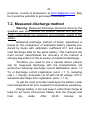
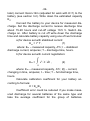
where: Em – measured capacity, A*h; I – stabilized
discharge current, amperes; T – discharge time, hours.
b) for device set with current registration:
T
Em =
∫
I t dt
,
(2)
0
where: Em – measured capacity, A*h; I(t) – current,
changing in time, amperes; t – time; T – full discharge time,
hours.
Calculate calibration coefficient for your battery according to formula:
К = Em/E0
Coefficient error could be reduced if you make measured discharge for several batteries of the same type and
take the average coefficient for the group of batteries.
-33-
7.3. Method of average
The method of average is used if making measured
discharge is impossible or inconvenient. This method is
based on the assumption, that batteries to be tested are part
of some group (for example, intended for connection in the
battery system or already connected in the battery system)
and on the average have known capacity (in the elementary
case - nominal capacity). This method is recommended for
use with the new or poorly worn out batteries.
Connect Qulon-12m (with K=1) to each battery of the
group and write down the estimated capacity. Calculate the
average estimated capacity for the group Eav then calculate
calibration coefficient for your battery according to formula:
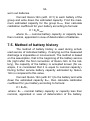
К = En/Eav,
where: En – nominal battery capacity or capacity less
then nominal, appointed in view of deterioration of batteries.
7.4. Method of maximum
The method of maximum is applied, if carrying out the
measured discharge is impossible or inconvenient. It is based
on the assumption, that in the group of testing batteries (for
example, intended for connection in the battery system or
already connected in the battery system) the least worn out
battery has known capacity (in the elementary case - nominal
capacity).
This method is recommended for use with the
34worn out batteries.
Connect Qulon-12m (with K=1) to each battery of the
group and write down the estimated capacity. Find the maximum estimated capacity for the group Emax, then calculate
calibration coefficient for your battery according to formula:
К = En/Emax,
where: En – nominal battery capacity or capacity less
then nominal, appointed in view of deterioration of batteries.
7.5. Method of battery history
The method of battery history is used during scheduled service of individual battery, if carrying out the measured
discharge is impossible or inconvenient. The method is based
on the assumption, that in the beginning of the battery service
life (right after the first connection of Qulon-12m to the battery), the capacity of the battery is accepted known (for example, it is considered that it is equal to nominal capacity).
During further service battery capacity estimated by Qulon12m is compared to this value.
Connect Qulon-12m (with K=1) to the battery and write
down the estimated capacity Em1, then calculate calibration
coefficient for your battery according to formula:
К = En/E1,
where: En – nominal battery capacity or capacity less then
nominal, appointed in view of deterioration of the battery.
-35-
8. Appendix: test cable checking
Qulon-12m is equipped with special cables with clips
utilizing four-wire (Kelvin) connection. At the negligent treatment - for example, a detachment from the device by pulling
by a cable, they could be damaged. If you have any doubts
about cables, it is possible to check them up, using a digital
tester as follows.
A. Attach cable to Qulon-12m.
B. Disconnect halves of both clamps from each other
(for example by installing a piece of cardboard or plastic between halves).
C. Switch tester to a diode testing.
D. Connect tester wires to the halves of black (negative) clamp – you should have from 0.4 to 0.7 V in both directions.
E. Switch tester to resistor testing.
F. Connect tester wires to the halves of red (positive)
clamp – you should have more then 20 kOhms in both directions.
-36-
9. Specifications
1. Working voltage range - 9 V to 15 V.
2. Recommended range of nominal capacity of batteries to test – 0.9 to 350 ampere-hours.
3. Battery voltage range for battery capacity estimation
– 12.6 to 13.9 В.
4. Battery testing time under basic filtering mode – up
to 1.5 s.
5. Powered – from the battery under test.
6. Test cable length – 0.6 m.
7. Weight – 0.3 kg.
8. Dimensions without cable - 135 x 70 x 23 mm.
9. Working temperature range from 10 to 35 oC.
10. Humidity up to 95 % without condensation.
11. Display type – graphical LCD.
-37-
Warranty
The manufacturer warrants Qulon-12m to be free of
defects in parts and workmanship for one year from date of
shipment (a two month limited warranty applies on test cables) and not more then 15 months from the date of production.
If it becomes necessary to return the device for service
during or beyond the warranty period, contact the Customer
Service at [email protected]. Describe your problem in
details (may be it would be possible to solve it by e-mail) and
request the address for shipment. The sender is responsible
for shipping charges, freight, insurance and proper packaging
to prevent damage in transit.
This warranty does not apply to defects resulting from
action of the user such as misuse, improper wiring, operation
outside of specification, improper maintenance, or unauthorized repair or modification.
The manufacturer is not being liable for any direct, indirect, incidental or consequential damages. The manufacturer's total liability is limited to repair or replacement of the
product. The warranty set forth above is inclusive and no
other warranty, whether written or oral, is expressed or implied.
-38-
Type: Qulon-12m.
Serial number ___________________
Manufactured: "____" ___________ 200__
Signature
_______________________