1
Continue through the rest of the score, repeating these steps for every staff you want to
playback through the Cinematic Strings 2 library.
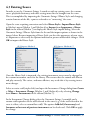
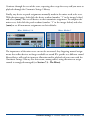
Finally, any device or patch assignments manually made in the mixer need to be reset.
With the mixer open, shift-click the device readout (number “1” in the images below)
and select (auto). This sets all devices to their automatic assignment. To complete the
mixer reset, shift-click the patch readout (number “2” in the images below) and select
(auto) to set all instrument assignments to their defaults.
Mixer, Sibelius 5 / 6
Mixer, Sibelius 7
The importance of the mixer reset can not be overstated. Any lingering manual assignments that reflect devices no longer available or sound IDs specific to a different sound
library/device will result in incorrect allocation and/or playback of your score with the
Cinematic Strings 2 library. For this reason, among others, using the mixer to assign
sounds is strongly discouraged (see Section 7.3 - The Mixer).
Cinematic Strings 2 - Sibelius Sound Set User Manual | 18