1
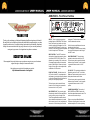
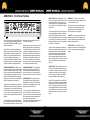
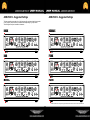
ABM-EVO-IV - Front Panel Facilities
BASS
INPUT
MIDDLE
TREBLE
D.I.
PUSH FLAT/SHAPE
OUTPUT
PRE/POST E.Q
INSTRUMENT
VALVE
9 BAND
DYNAMIC
SUB
DRIVE PLUS
EQUALISATION
COMPRESSION
HARMONICS
TUNER
LINE OUT
MUTE
PASSIVE/ACTIVE
INPUT LEVEL
OUTPUT MUTE
OUTPUTS
THANK YOU
Thank you for purchasing your Ashdown Engineering Amplifier and welcome to the family!
We really think you’ve made the right choice and know that this amplifier will give you years
of great tone and service. It is a machine though and needs to be looked after, please read
through this user manual which will help you get the most out of your new Amp and keep it
running as long as some of our happiest and very famous customers.
REGISTER ONLINE
Please register this product online so we can make sure we give you years of customer
support through our friendly in-house service centre.
Here is where you need to visit to register your product:
http://www.ashdownmusic.com/register
INPUTS - There is a single instrument input
provided linked to a PASSIVE/ACTIVE selector
switch. The Passive input (switch out) is high
sensitivity and also high impedance to suit the
output from PASSIVE basses. The Active input
(switch in) is low sensitivity and lower impedance
to suit the output from ACTIVE basses.
INPUT CONTROL - The INPUT control sets
the signal level through the preamp in conjunction with the INPUT LEVEL VU Meter. This is
adjusted to give a reading of 0VU on the meter
for average playing dynamics with occasional
peaks into the red region. Please note that the
setting of this may have to be re-adjusted after
modification of the EQ controls.
PUSH FLAT / SHAPE - With this button in its
OUT position a fixed E.Q. is superimposed on
the preamp to give a bright but punchy character
to the sound. Pushing this button IN returns the
preamp to a Flat frequency response.
This function may also be controlled from a
footswitch. For the footswitch to operate this
button must be in its OUT position.
VALVE DRIVE PLUS - This routes the signal
either through a clean Solid State amplification
section (control on zero) or through a Dual
Triode Tube amplification/overdrive section in
order to add either tonal character i.e. warmth
with the control set at 9 o’clock, a slight edge in
the sound at 12 0’clock through to an increas-
ing degree of Tube distortion/overdrive as the
control is advanced to maximum.
A Mix of these two amplification sections can
be achieved with this control.
N.B. The degree of tube distortion provided by
this control will also depend on the setting of
the INPUT control.
VALVE DRIVE IN/OUT - This push button
switches the valve drive section IN or OUT.
This function may also be controlled from the
Ashdown 4 way footswitch. For the footswitch
to operate this button must be in its OUT
position.
E.Q. IN / OUT - This push button switches the
Equalisation section IN or OUT i.e. the Bass,
Middle and Treble controls plus the two sets of
sliders placed between each of these.
This function may also be controlled from the
Ashdown 4 way footswitch. For the footswitch
to operate this button must be in its OUT
position.
9 BAND EQUALISATION - This consists of
BASS, MIDDLE and TREBLE controls with
three sliders placed between each control. This
can be used in a number of ways:
Firstly as a very simple Bass, Middle and
Treble tone control section as found on older
traditional amplifiers. This is done by leaving