1
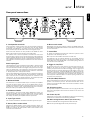
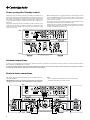
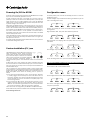
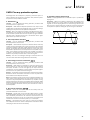
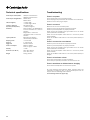
User’s manual 2 azur 851W Your music + our passion ENGLISH Power Amplifier Contents Introduction Introduction..................................................................................................2 Thank you for purchasing this Azur 851W Class XD™ power amplifier. We are confident that you will enjoy many years of listening pleasure from it. Like all Cambridge Audio products the Azur 851W adhere to our three core principles – stunning performance, ease of use and incredible value. Important safety instructions......................................................................3 Limited warranty...........................................................................................4 Rear panel connections...............................................................................5 Front panel...................................................................................................6 Connections..................................................................................................7 Unbalanced stereo connections.............................................................7 Balanced stereo connections..................................................................7 Power syncing (On/Standby control).......................................................8 Advanced connections.............................................................................8 Bi-wired stereo connections....................................................................8 Bi-amped dual mono connections..........................................................9 Bridged dual mono connections.............................................................9 Powering On/Off the 851W...................................................................... 10 Custom installation (C.I.) use................................................................... 10 Configuration menu.................................................................................. 10 CAP5: Five-way protection system............................................................ 11 Technical specifications............................................................................ 12 Troubleshooting......................................................................................... 12 The 851W features our unique proprietary amplifier topology; Class XD, designed to eliminate crossover distortion at low signal levels. By actively displacing the crossover point this technology creates a region of pure Class-A operation where the crossover zone would otherwise be before moving into an enhanced form of Class B at higher levels. It should not be confused with Class AB, which gives a small area of Class A, but at the cost of higher distortion as soon as the signal level moves outside the AB area. Class XD circuitry not only removes crossover distortion from the zero-crossing point but also joins the characteristics of the output transistors together in a way that reduces distortion in other parts of the amplifier’s output range. A white paper on this patented technology is available on our website: www.cambridge-audio.com Please note that because of the Class XD technology the 851W runs slightly warmer than a conventional Class B/AB amplifier and the ventilation slots on the top of the unit must not be obstructed. Other features include a low resonance acoustically damped chassis for freedom from distortion inducing vibrations. Four pairs of very high current output transistors per output are used for excellent load driving ability, plus the unique fifth output transistor pair per channel that provides the business end of the Class XD circuitry. High quality polypropylene signal capacitors are used throughout, whilst multiple copper bus-bars provide very low impedance conduits for the power circuits and all resistors are 1% tolerance metal-film types. Balanced audio input connections are fitted for the highest fidelity and all inputs have loop outputs. The loop outputs can be used with the 851W’s Bi-Amp Mono and Bridged-Mono modes to allow two or more 851Ws to be used in very high quality systems. The 851W features separate transformer secondaries for left and right channels, twin rectifiers and separate PSUs for dual mono operation of the left and right power amplifiers. Make sure you register your purchase. Visit: support.cambridgeaudio.com By registering, you’ll be the first to know about: Future product releases Software upgrades News, events and exclusive offers plus competitions! This guide is designed to make installing and using this product as easy as possible. Information in this document has been carefully checked for accuracy at the time of printing; however, Cambridge Audio’s policy is one of continuous improvement, therefore design and specifications are subject to change without prior notice. This document contains proprietary information protected by copyright. All rights are reserved. No part of this manual may be reproduced by any mechanical, electronic or other means, in any form, without prior written permission of the manufacturer. All trademarks and registered trademarks are the property of their respective owners. © Copyright Cambridge Audio Ltd 2013. Cambridge Audio and the Cambridge Audio logo are trademarks of Cambridge Audio. Other brands mentioned are trademarks of their respective owners and are used for reference purposes only. 2 Your power amplifier can only be as good as the system it is connected to. Please do not compromise on your pre-amplifier, source equipment, speakers or cabling. Naturally we recommend models from the Cambridge Audio Azur range, particularly the matching 851E preamplifier. These have been designed to the same exacting standards as this amplifier. Your dealer can also supply excellent quality Cambridge Audio interconnects to ensure your system realises its full potential. Thank you for taking the time to read this manual; we do recommend you keep it for future reference. Matthew Bramble, Cambridge Audio Technical Director and the 851W design team azur 851W ENGLISH Important safety instructions For your own safety please read the following important safety instructions carefully before attempting to connect this unit to the mains power supply. They will also enable you to get the best performance from and prolong the life of the unit: 1. Read these instructions. 2. Keep these instructions. 3. Heed all warnings. 4. Follow all instructions. 5. Do not use this apparatus near water. 6. Clean only with a dry cloth. 7. Do not block any ventilation openings. Install in accordance with the manufacturer’s instructions. 8. Do not install near any heat sources such as radiators, heat registers, stoves, or other apparatus (including other amplifiers) that produce heat. 9. Do not defeat the safety purpose of the polarized or grounding-type plug. A polarized plug has two blades with one wider than the other. A grounding-type plug has two blades and a third grounding prong. The wide blade or the third prong are provided for your safety. If the provided plug does not fit into your outlet, consult an electrician for replacement of the obsolete outlet. 10. Protect the power cord from being walked on or pinched, particularly at plugs, convenience receptacles and the point where they exit from the apparatus. 11. Only use attachments/accessories specified by the manufacturer. 12. Use with only the cart, stand, tripod, bracket, or table specified by the manufacturer, or sold with the apparatus. When a cart is used, use caution when moving the cart/ apparatus combination to avoid injury from tip-over. 13. Unplug this apparatus during lightning storms or when unused for long periods of time. 14. Refer all servicing to qualified service personnel. Servicing is required when the apparatus has been damaged in any way, such as the power-supply cord or plug having been damaged, liquid has been spilled or objects have fallen into the apparatus, the apparatus has been exposed to rain or moisture, does not operate normally, or has been dropped. WARNING – To reduce the risk of fire or electric shock, do not expose this unit to rain or moisture. – Batteries (battery pack or batteries installed) shall not be exposed to excessive heat such as sunshine, fire or the like. The unit is of Class 1 construction and must be connected to a mains socket outlet with a protective earthing connection. The unit must be installed in a manner that makes disconnection of the mains plug from the mains socket outlet (or appliance connector from the rear of the unit) possible. Where the mains plug is used as the disconnect device, the disconnect device shall remain readily operable. Only use the mains cord supplied with this unit. Please ensure there is ample ventilation. We recommend that you do not place the unit in an enclosed space; if you wish to place the unit on a shelf, use the top shelf to allow maximum ventilation. Do not put any objects on top of this unit. Do not situate it on a rug or other soft surface and do not obstruct any air inlets or outlet grilles. Do not cover the ventilation grilles with items such as newspapers, tablecloths, curtains, etc. This unit must not be used near water or exposed to dripping or splashing water or other liquids. No objects filled with liquid, such as vases, shall be placed on the unit. The lightning flash with the arrowhead symbol within an equilateral triangle is intended to alert the user to the presence of un-insulated ‘dangerous voltage’ within the product’s enclosure that may be of sufficient magnitude to constitute a risk of electric shock to persons. The exclamation point within an equilateral triangle is intended to alert the user to the presence of important operating and maintenance instructions in the service literature relevant to this appliance. WEEE symbol The crossed-out wheeled bin is the European Union symbol for indicating separate collection for electrical and electronic equipment. This product contains electrical and electronic equipment which should be reused, recycled or recovered and should not be disposed of with unsorted regular waste. Please return the unit or contact the authorised dealer from whom you purchased this product for more information. CE mark This product complies with European Low Voltage (2006/95/ EC), Electromagnetic Compatibility (2004/108/EC) and Environmentally-friendly design of Energy-related Products (2009/125/ EC) Directives when used and installed according to this instruction manual. For continued compliance only Cambridge Audio accessories should be used with this product and servicing must be referred to qualified service personnel. C-Tick mark This product meets the Australian Communications Authority’s Radio communications and EMC requirements. Gost-R Mark This product meets Russian electronic safety approvals. FCC regulations NOTE: THE MANUFACTURER IS NOT RESPONSIBLE FOR ANY RADIO OR TV INTERFERENCE CAUSED BY UNAUTHORIZED MODIFICATIONS TO THIS EQUIPMENT. SUCH MODIFICATIONS COULD VOID THE USER AUTHORITY TO OPERATE THE EQUIPMENT. This equipment has been tested and found to comply with the limits for a Class B digital device, pursuant to Part 15 of the FCC Rules. These limits are designed to provide reasonable protection against harmful interference in a residential installation. This equipment generates, uses and can radiate radio frequency energy and, if not installed and used in accordance with the instructions, may cause harmful interference to radio communications. However, there is no guarantee that interference will not occur in a particular installation. If this equipment does cause harmful interference to radio or television reception, which can be determined by turning the equipment off and on, the user is encouraged to try to correct the interference by one or more of the following measures: - Re-orient or relocate the receiving antenna. - Increase the separation between the equipment and receiver. - Connect the equipment into an outlet on a circuit different from that to which the receiver is connected. - Consult the dealer or an experienced radio/TV technician for help. 3 Limited warranty Ventilation IMPORTANT – The unit will become hot when in use. Do not stack multiple units on top of each other. Do not place in an enclosed area such as a bookcase or in a cabinet without sufficient ventilation. Do not remove the feet from this product they are required to ensure enough air flow. Ensure that small objects do not fall through any ventilation grille. If this happens, switch off immediately, disconnect from the mains supply and contact your dealer for advice. Positioning Choose the installation location carefully. Avoid placing it in direct sunlight or close to a source of heat. No naked flame sources, such as lighted candles, should be placed on the unit. Also avoid locations subject to vibration and excessive dust, cold or moisture. The unit can be used in a moderate climate. This unit must be installed on a sturdy, level surface. Do not place in a sealed area such as a bookcase or in a cabinet. Do not place the unit on an unstable surface or shelf. The unit may fall, causing serious injury to a child or adult as well as serious damage to the product. Do not place other equipment on top of the unit. Due to stray magnetic fields, turntables or CRT TVs should not be located nearby due to possible interference. Electronic audio components have a running in period of around a week (if used several hours per day). This will allow the new components to settle down and the sonic properties will improve over this time. Power sources The unit should be operated only from the type of power source indicated on the marking label. If you are not sure of the type of power-supply to your home, consult your product dealer or local power company. This unit can be left in Standby mode when not in use and will draw <0.5W in this state. To turn the unit off, switch off at the rear panel. If you do not intend to use this unit for a long period of time, unplug it from the mains socket. Overloading Do not overload wall outlets or extension cords as this can result in a risk of fire or electric shock. Overloaded AC outlets, extension cords, frayed power cords, damaged or cracked wire insulation and broken plugs are dangerous. They may result in a shock or fire hazard. Be sure to insert each power cord securely. To prevent hum and noise, do not bundle the interconnect leads with the power cord or speaker leads. Cleaning To clean the unit, wipe its case with a dry, lint-free cloth. Do not use any cleaning fluids containing alcohol, ammonia or abrasives. Do not spray an aerosol at or near the unit. Battery disposal Batteries may contain substances harmful to the environment. Please dispose of any discharged batteries with due consideration and in accordance with local environmental/electronic recycling guidelines. Loudspeakers Before making any connections to loudspeakers, make sure all power is turned off and only use suitable interconnects. Servicing These units are not user serviceable. Never attempt to repair, disassemble or reconstruct the unit if there seems to be a problem. A serious electric shock could result if this precautionary measure is ignored. In the event of a problem or failure, please contact your dealer. 4 Cambridge Audio warrants this product to be free from defects in materials and workmanship (subject to the terms set forth below). Cambridge Audio will repair or replace (at Cambridge Audio’s option) this product or any defective parts in this product. Warranty periods may vary from country to country. If in doubt consult your dealer and ensure that you retain proof of purchase. To obtain warranty service, please contact the Cambridge Audio authorised dealer from which you purchased this product. If your dealer is not equipped to perform the repair of your Cambridge Audio product, it can be returned by your dealer to Cambridge Audio or an authorised Cambridge Audio service agent. You will need to ship this product in either its original packaging or packaging affording an equal degree of protection. Proof of purchase in the form of a bill of sale or receipted invoice, which is evidence that this product is within the warranty period, must be presented to obtain warranty service. This Warranty is invalid if (a) the factory-applied serial number has been altered or removed from this product or (b) this product was not purchased from a Cambridge Audio authorised dealer. You may call Cambridge Audio or your local country Cambridge Audio distributor to confirm that you have an unaltered serial number and/or you made a purchase from a Cambridge Audio authorised dealer. This Warranty does not cover cosmetic damage or damage due to acts of God, accident, misuse, abuse, negligence, commercial use, or modification of, or to any part of, the product. This Warranty does not cover damage due to improper operation, maintenance or installation, or attempted repair by anyone other than Cambridge Audio or a Cambridge Audio dealer, or authorised service agent which is authorised to do Cambridge Audio warranty work. Any unauthorised repairs will void this Warranty. This Warranty does not cover products sold AS IS or WITH ALL FAULTS. REPAIRS OR REPLACEMENTS AS PROVIDED UNDER THIS WARRANTY ARE THE EXCLUSIVE REMEDY OF THE CONSUMER. CAMBRIDGE AUDIO SHALL NOT BE LIABLE FOR ANY INCIDENTAL OR CONSEQUENTIAL DAMAGES FOR BREACH OF ANY EXPRESS OR IMPLIED WARRANTY IN THIS PRODUCT. EXCEPT TO THE EXTENT PROHIBITED BY LAW, THIS WARRANTY IS EXCLUSIVE AND IN LIEU OF ALL OTHER EXPRESS AND IMPLIED WARRANTIES WHATSOEVER INCLUDING, BUT NOT LIMITED TO, THE WARRANTY OF MERCHANTABILITY AND FITNESS FOR A PRACTICAL PURPOSE. Some countries and US states do not allow the exclusion or limitation of incidental or consequential damages or implied warranties so the above exclusions may not apply to you. This Warranty gives you specific legal rights, and you may have other statutory rights, which vary from state to state or country to country. For any service, in or out of warranty, please contact your dealer. azur 851W 1 5 ENGLISH Rear panel connections 1 12 7 11 8 6 10 2 3 4 9 4 3 2 1. Loudspeaker terminals 6. Mono mode switch For normal wiring, connect the wires from your left channel loudspeaker to the LEFT + & - terminals, and the wires from the right channel loudspeaker to the RIGHT + & - terminals. In each case, the red terminal is the positive output and the black terminal is the negative output. When Mono mode has been selected, switches the 851W between BiAmped Mono and Bridged Mono. Refer to later sections of this manual for more information. Other dual mono schemes are also possible if two 851Ws are used. Refer to later sections of this manual for more information. Use speakers with a nominal impedance of between 4-8 ohms. Care should be taken to ensure no stray strands of wire short the loudspeaker outputs together. Please ensure that the loudspeaker terminals have been tightened completely to provide a good electrical connection. It is also possible for the sound quality to be affected if the screw terminals are loose. Audio input types The 851W features either unbalanced (phono/RCA) or balanced (XLR) input connections. Either type may be used but not both at the same time. The balanced connection is the higher quality option and can reject noise and interference in the cable when used with other equipment that supports this function. An XLR connector is wired Pin 1 - Ground; Pin 2 - Hot (in-phase); Pin 3 - Cold (phase-inverted). Use the Left and Right Input Type switch (Item 4) to select the connection type you wish to use. When using either the balanced or unbalanced input, make sure that no cables or equipment are connected to the unused input, as this may degrade operation. The unused input does not need to be terminated and this should not be done. 2. Balanced Audio For connection to the balanced XLR outputs of suitable pre-amplifiers that have this kind of output (such as our own 851E model). The preamplifier used should be capable of providing at least 1V rms of output per phase (i.e. at both of + and – terminals of the XLR, more is also fine). Nearly all modern pre-amplifiers fulfill this requirement. 3. Unbalanced Audio For connection to the normal (single ended) RCA/Phono outputs of a suitable pre-amplifier (such as our own 851E model). The pre-amplifier used should be capable of providing at least 1V rms of output (more is fine). Nearly all modern pre-amplifiers fulfil this requirement. 4. Input Type switch 7. Control Bus In - Allows un-modulated commands from multi-room systems or other components to be received by the unit. Out - Loop out for Control Bus commands to another unit. The 851W can also be switched between On and Standby mode by connecting the Control Bus output of an 851E pre-amplifier to the Control Bus input of the 851W. Refer to the ‘Power syncing’ section of this manual for more information. 8. Trigger In, Out/Thru For Custom Install use or with preamps and with trigger outputs, the 851W can be turned on and off (i.e. brought in and out of Standby mode) by the presence of 5-12V DC at the Trigger input. A trigger input will also produce an internally generated 12V DC trigger output at the Output/Thru connection. Turning the 851W on from the front panel also produces a 12V DC trigger output at the Output/Thru connection. This can be used to turn on/Standby other connected power amplifiers or other equipment if desired. Refer to the ‘Power syncing’ section of this manual for more information. 9. IR (Infra-Red) Emitter In Allows modulated IR commands from multi-room systems or IR repeater systems to be received by the unit. Commands received here are not looped out of the Control Bus. Refer to the ‘Custom installation’ section for more information. 10. AC power socket Once you have completed all connections to the unit, plug the AC power cable into an appropriate mains socket then switch on. Your unit is now ready for use. 11. Power On/Off Switches the unit on and off. If the 851W is not going to be used for long periods of time it should be turned off using this switch. Use to select a balanced or unbalanced connection type for the input. 12. Mains Voltage Selector Switch (CU version only) 5. Stereo/Mono mode switch Note: For use by Cambridge Audio service personnel only! Switches the 851W between ‘normal’ Stereo operation (where one 851W is used for a pair of speakers) and Mono operation (where two 851W’s are used one for each speaker). Refer to later sections of this manual for more information. Switches the 851W mains voltage between 100V and 115V. 5 Front panel azur 851W Class XD Power Amplifier 1 Standby / On 2 3 4 5 6 2 3 4 1. Standby/On 5. Bridged Switches the unit between Standby mode (indicated by dim power LED) and On (indicated by bright power LED). Standby mode is a low power mode where the power consumption is less than 0.5 Watts. The unit should be left in Standby mode when not in use. This LED indicates that the 851W is being used in Bridged mode. (The Mono LED will also be illuminated.) When the 851W is switched out of Standby mode it will automatically check for faults and allow the power amplifier stages to stabilise before un-muting the speaker outputs. This LED indicates that the 851W is being used in a Mono mode. Note: The protection LEDs will flash whilst this check is being done. Auto Power Down (APD) 6. Mono LED indicators Stereo output: This product has Auto Power Down enabled as default. After a period of inactivity, the product will automatically switch to Standby. See later section for further details. 2. Output Indicates that the Left or Right output is active. The LED (light-emitting diode) is on for an active output, off for inactive (i.e. muted). Mono output: 3. Protection If this LED is constantly on the 851W has detected a fault on either the Left or Right channel and is protecting itself. 4. Clipping This LED indicates that the 851W has detected that either the Left or Right channel is being overdriven or clipped. Clipping distortion is caused at high volume levels when the output signal attempts to go outside the maximum voltage that the amplifier can provide, causing the tops of the signal to flatten off. Clipping When the 851W detects clipping this LED will briefly flash. If the clipping reaches a dangerous amount that could damage the amplifier or attached speakers the unit will then go into protection. 6 Bridged Mono output: azur 851W The 851W features both balanced (XLR) and unbalanced (RCA/Phono) output connections. For the best quality we recommend you use a balanced output with pre-amplifiers that feature this connection (such as our own 851E Pre-Amplifier). Before making any connections to loudspeakers, make sure all power is turned off and only use suitable interconnects (e.g. banana plugs). Ensure that the positive (+) and negative (-) connections are matched. Your loudspeaker may have more than one pair of connecting terminals; LF (Low Frequency) and HF (High Frequency). For single-wiring it is recommended to connect to the LF terminals. The metal strip connecting the low-frequency terminals to the high-frequency terminals must not be removed (only to be removed for a bi-wiring system). Unbalanced stereo connections The diagram below shows the 851W connected to an 851E using the Unbalanced Audio inputs via phono/RCA connectors, single wired to a pair of loudspeakers. When using unbalanced (phono/RCA) connections, the Left and Right Input Type switches on the 851W must be in the ‘Unbalanced’ position. Note: In this configuration the 851W must be set to Stereo mode. 851E 851W Balanced stereo connections The diagram below shows the 851W connected to an 851E using the Balanced Audio inputs via three-pin XLR connectors, single wired to a pair of loudspeakers. When using balanced (XLR) connections, the Left and Right Input Type switches on the 851W must be in the ‘Balanced’ position. Note: In this configuration the 851W must be set to Stereo mode. 851E 851W 7 ENGLISH Connections Power syncing (On/Standby control) When going in/out of Standby mode the Azur 851E pre-amplifier can (if desired) automatically control the 851W when connected via the Control Bus sockets (the Control Bus sockets are colour-coded orange on the rear panels of compatible Azur models). For this feature to work the units must be connected together by RCA/phono leads. No further setup is necessary. Connect the Control Bus Out from the 851E to the Control Bus In on the 851W. Continue the chain to other Azur models if it is required to sync more units (refer to the 851E’s own manual for more information as this requires some setup). Note: The 851E features a Trigger Out which can alternatively be used to control the 851W’s Standby/On status if desired. Again, the procedure is simply to connect the two units together (using a 3.5mm to 3.5mm mono mini-jack lead in this case). Control Bus is the recommended method when using an 851E and other Cambridge Audio equipment with Control Bus In/Out. Trigger In/Out can be useful if the 851W (and indeed 851E) is desired to be controlled by other equipment that features trigger outputs (Custom install and/or Multi-Room Systems etc). 851E 851W Advanced connections As well as normal single-wired stereo operation (whether balanced or unbalanced), several other modes of operation are possible; Bi-wired Stereo, Bi-Amped Mono and Bridged Mono and others. In all of the following examples either balanced or unbalanced connections can be used, the principle is exactly the same for each type of connection. For simplicity, we will show only the balanced connections in each example. Bi-wired stereo connections The diagram below shows the 851W connected to an 851E bi-wired to a pair of loudspeakers. IMPORTANT! The metal strip connecting the low-frequency terminals to the high-frequency terminals must be removed for a bi-wiring system. 851E 851W 8 Note: – In this configuration the 851W must be set to Stereo mode. – Unbalanced connections can also be used. azur 851W ENGLISH Bi-amped dual mono connections The 851W features Mono and Bi-Amped Mono settings that allow two (or more) 851Ws to be used as mono-blocs for high end systems. Below is an example using two 851Ws in Bi-Amped Mono with an 851E. Important 851W settings In Bi-Amped Mono mode each 851W drives one speaker. In this configuration the Stereo/Mono switch on the 851W must be set to 'Mono' and the Mono mode switch must be set to 'Bi-Amp'. Note: Unbalanced connections can also be used. 851W Only use the Left Inputs on the 851W for Bi-Amped operation. The metal strip connecting the low-frequency terminals to the highfrequency loudspeaker terminals must be removed. 851W Stereo Stereo Mono Mono Mono Mode Mono Mode Bi-Amp Bi-Amp Bridged Bridged Bridged Bridged Use Left Input for Bridged / Bi-Amp operation. Use Left Input for Bridged / Bi-Amp operation. 851E Bridged dual mono connections The 851W features Mono and Bridged Mono settings that allow two (or more) 851Ws to be used as mono-blocs for high end systems. Below is an example using two 851W’s in Bridged Mono with an 851E. In Bridged Mono mode each 851W drives one speaker across its output channels acting as a 500W mono amplifier instead of a 200wpc stereo one. One 851W drives the left speaker and the other the right. Important 851W settings Only use the Left Inputs on the 851W for Bridged operation. In this configuration the Stereo/Mono switch on the 851W must be set to ‘Mono’ and the Mono mode switch must be set to ‘Bridged’. Note: Unbalanced connections can also be used. 851W 851W Stereo Stereo Mono Mono Mono Mode Mono Mode Bi-Amp Bi-Amp Bridged Bridged Bridged Bridged Use Left Input for Bridged / Bi-Amp operation. Use Left Input for Bridged / Bi-Amp operation. 851E 9 Powering On/Off the 851W Configuration menu As well as simply using the front panel button the 851W features multiple ways it can be automatically powered on and off. In Standby mode, press and hold the Standby/On button to enter the Configuration menu. A trigger 5-12V AC or DC input to the Trigger In on the rear panel can power up or down the unit from custom install systems or preamps with trigger outputs. This is an ‘edge triggered’ input so that the 851W will power on with a zero-to-positive voltage transition and power down with a positive voltage to zero transition. The Left and Right ‘Output’ LED will start blinking to indicate that you are now in the Configuration menu. Alternatively the 851W features a Control Bus Input for use with our matching 851E preamp that allows a single RCA/Phono to RCA/Phono cable to be connected between them that allows the 851E preamp to communicate with the 851W and automatically control its power status. Pressing the Standby/On button will shuffle through these different setting options: For custom install situations it is also possible to send Infra Red or Control Bus commands (see our website for the code table) to the 851W and also affect power control. Right ‘Protection’ LED - Auto power down enabled (by default). Lastly the 851W can sense its audio inputs and automatically power up if a signal is present and conversely Auto-Power Down if no signal has been present for 30 mins. To enable/disable Auto Power Up/Auto Power Down see the next section on the hidden configuration menu. Right ‘Protection’ and ‘Clipping’ LED - Auto power down and auto power up enabled. Custom installation (C.I.) use An IR Emitter Input is also provided that allows modulated IR remote control commands to be received electrically by the unit. Commands on this input operate the unit only and are not looped out demodulated on the Control Bus Output. The unit responds to ‘direct’ IR/Control codes as well as toggle codes for some features to simplify programming custom installation systems. Special direct On/Off and Mute commands can be accessed from the 851E pre-amplifier remote control for teaching into C.I. systems as follows: 1.Press and hold the Standby/On button. The remote first generates a standby (toggle) command. Keep the button held down, after 12 seconds an amplifier “On” command will be generated. If the button is kept held down for a further 12 seconds, an amplifier player “Off” command is generated. 2.Press and hold the Mute button. The remote first generates a mute (toggle) command. Keep the button held down, after 12 seconds a “Mute on” command will be generated. If the button is kept held down for a further 12 seconds, a “Mute off” command is generated. These commands are recognised by the 851W via the IR Emitter input. A code table for this product is available on the Cambridge Audio website: www.cambridge-audio.com 10 RS232C Control Bus The 851W features a Control Bus input/output that IR Emitter In In Out allow un-modulated remote control commands (positive logic, TTL level) to be received electrically by the unit and looped to another unit if desired. These control commands are typically generated by custom installation (multi-room) systems or remote IR receiver systems. The Control Bus sockets are colour-coded orange. Left and Right ‘Output’ LED - All features are now disabled. To exit the Configuration menu, press and hold the Standby/On button. Note: If a second 851W is added to the chain, the below configuration menu is applicable only to the second unit. Left ‘Protection’ LED - Second 851W enabled. Left and Right ‘Protection’ LED - Second 851W auto power down enabled. Left ‘Protect’ and Right ‘Protect and Clipping’ - Auto power down and auto power up enabled. azur 851W Cambridge Audio has developed a proprietary protection system to ensure reliability and long life of its amplifiers. This protection system comprises five main protection methods: 5. Intelligent clipping detection 1. DC detection Description – CAP5 has the ability to detect when the amplifier starts to clip or overdrive at its output, which can damage loudspeakers and degrade the sound. Clipping distortion is caused at high volume levels when the output signal briefly goes outside the maximum voltage that the amplifier can provide, causing the tops of the signal to flatten off. Indicator – Unit has switched off during operation, protection LED constantly flashes in single bursts. Description – CAP5 offers loudspeaker protection if the output of the amplifier goes to a high constant voltage (DC). This is a rare fault, although detecting it could just save those expensive loudspeakers. Remedy – Due to the necessary sensitivity of the DC protection circuit, hard clipping of the amplifier may cause DC protection to be triggered. If this fault occurs please switch the unit off, power up again and check operation with a reduced volume level. If the DC fault occurs again please contact your dealer for service. Indicator – Clipping LED will flash if the audio output is at/above the clipping level. Clipping 2. Over temperature detection Indicator – Unit has switched off during operation, protection LED constantly flashes in bursts of two. Description – CAP5 includes temperature detection which constantly monitors the heat generated by the output transistors. If the monitored temperature reaches a high level (suitably within the limits of the output devices) the amplifier will automatically switch into a fault mode. If the loudspeaker impedance is low, the temperature of the amplifier may rise faster as the amplifier is working harder. If the amplifier is mounted in a cabinet or the ventilation slots are obstructed, the over-temperature detection may activate/reactivate after a short listening time. Remedy – The unit is not damaged, although it should be left for 15 minutes to cool down before being switched out of Standby. 3. Overvoltage/overcurrent detection Indicator – Unit has switched off during operation, protection LED constantly flashes in bursts of three. Description – CAP5 offers V/I protection by constantly monitoring the output transistors to keep them working inside their Safe Operating Area (SOA). The SOA is a set of limits given by the output transistor manufacturer to ensure reliability. V/I also protects the amplifier against short-circuits on the speaker terminals during use. Remedy – The amplifier is being used outside its performance envelope. Reduce the volume. Also check to see if there is a short- or partial shortcircuit between the loudspeaker terminals. Note: If the indication remains the same and multiple loudspeakers are being used on each loudspeaker output, then please remove a pair and retry. If too many loudspeakers are connected to any amplifier, causing the load resistance to drop too low, the amplifier will be overdriven. CAP5 will detect this situation. If the indication remains the same with only one set of loudspeakers connected, there may be a fault with one or both of the loudspeakers. 4. Short-circuit detection Indicator – As the unit attempts to come out of Standby mode, the protection LED flashes in bursts of four. Description – During power up from Standby, CAP5 performs a check on the loudspeaker terminals to see if a short across the terminals has been accidentally introduced. If the resistance measured across the loudspeaker terminals is too low, the unit will remain in Standby mode until the fault has been removed and power up is re-attempted. Remedy – User-related fault. There may be a short-circuit between the loudspeaker terminals. Check all loudspeaker connections before attempting to switch the unit out of Standby. 11 ENGLISH CAP5: Five-way protection system Technical specifications Troubleshooting Power Output - Stereo/Mono 200W per channel 8 Ohms 350W per channel 4 Ohms There is no power Power Output - Bridged Mono 500W 8 Ohms 800W 4 Ohms Ensure the plug is fully inserted into the wall socket and is switched on. THD (unweighted) < 0.001% 1kHz < 0.005% 20Hz - 20kHz Frequency Response 5Hz - 80kHz ±1dB S/N ratio (ref 1W/8 Ohm) > 90 dB (unweighted) SensitivityStereo or Mono = (for 200W 8 Ohms) 1.5V rms unbalanced 1.5 + 1.5V rms balanced Bridged Mono = 0.775V rms unbalanced 0.775V + 0.775V rms balanced Input impedancesBalanced input 38 kOhm Unbalanced input 68 kOhm Damping factor > 125 at 1 kHz Ensure the AC power cord is connected securely. Check fuse in the mains plug or adaptor. There is no sound Make sure the unit is not in Standby mode. Check that your source component is properly connected. Check that your loudspeakers are properly connected. Check that the Left and Right Input Type switches are in the correct position (Balanced or Unbalanced). Check that the Stereo/Mono mode switch is in the correct position (Stereo or Mono). Check that the Mono mode switch is in the correct position (Bi-Amp or Bridged). Trigger In 5 - 12V AC or DC There is no sound on one channel Trigger Out 12V DC @ 100mA Check that your source component is properly connected. Power consumption Maximum 2400W Active (no signal) < 180W Check that your loudspeakers are properly connected. Standby < 0.5W Dimensions (H x W x D)148 x 430 x 365mm (5.8 x 16.9 x 14.4”) Weight 19.1kg (42.1lbs) Check that the Left and Right Input Type switches are in the correct position (Balanced or Unbalanced). Check that the Stereo/Mono mode switch is in the correct position (Stereo or Mono). Check that the Mono mode switch is in the correct position (Bi-Amp or Bridged). There is a loud buzz or hum Ensure that no interconnects are loose or defective. Ensure that your tape deck/turntable is not too close to the unit. There is weak bass or diffused stereo imaging Ensure that the loudspeakers are not wired out of phase. For more frequently asked questions (FAQs), technical advice and information on getting the most out of your 851W, please visit the Support section on Cambridge Audio’s website: www.cambridge-audio.com/support.php 12 Cambridge Audio is a brand of Audio Partnership Plc Registered Office: Gallery Court, Hankey Place London SE1 4BB, United Kingdom Registered in England No. 2953313 © 2013 Cambridge Audio Ltd AP32386/2 www.cambridge-audio.com