1
TUTORIAL
This tutorial is intended to explain basic menus and button functions, and to guide you through a small
introductory battle. For detailed information about the menus and options in PANZER GENERAL II, see the
“Basic Screens, Menus, and Buttons” section starting; for explanations of various aspects of play, see the
“Game Concepts” section starting; and for detailed strategy notes and game play hints, see the
README.TXT file located in your PANZER2 directory.
Starting the Tutorial
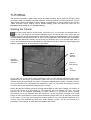
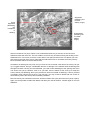
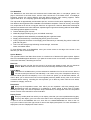
From the PANZER GENERAL II Start screen, click on the Play a Scenario button, the left-most button in
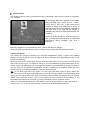
the row. This brings up the Scenario Selection screen. On the left side of the screen are two
windows; the upper window should be blank, and the lower contains an alphabetical listing of the scenarios.
Click repeatedly on the down arrow button, or click on the scroll bar slider, and hold down your mouse button
as you drag the slider down. Near the end of the list you should see the Tutorial scenario listed. Click on
Tutorial, and a description of the scenario appears in the upper window, along with the number of players the
scenario was designed for, and the number of turns it lasts.
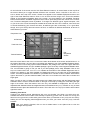
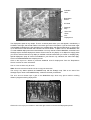
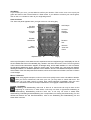
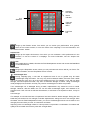
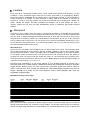
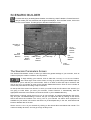
Player
Control
Buttons
Prestige
Adjustment
Windows
Return to
Start Screen
Play
Scenario
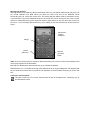
On the right side of the screen, flags indicating the Axis and the Spanish Republican forces have
appeared next to the Player Control buttons. Right now the Axis is selected for the human player,
indicated by the depressed gold-tone button. The Spanish Republican forces are controlled by the AI,
since the computer icon is depressed and highlighted in gold. You can switch the settings if you like,
but return them to the default before beginning the scenario.
Next to the flags are windows giving the prestige percentages for each side. Prestige is a measure of
how you are viewed as a commander by your superiors; the more prestige you have, the more
resources are at your disposal. Essentially, in PANZER GENERAL II it functions as money; prestige
points allow you to buy additional units and equipment, as well as restore damaged units. Arrow
buttons on the top and bottom of each Prestige Adjustment window allow you to adjust the percentage
up and down. If you lower your opponent’s prestige setting to 50%, the Spanish Republican army
receives half of the discretionary funds they would ordinarily receive. You do not need such an
advantage in this scenario, so leave the percentages at the default.