1
Contents
1.
Getting Started .................................................................................................... 7
1.1
1.1.1
1.2
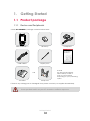
Product package............................................................................................... 7
Device and Peripherals ..................................................................................... 7
Battery .................................................................................................................. 8
1.2.1
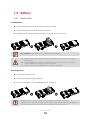
How to Use .......................................................................................................... 8
1.2.2
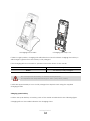
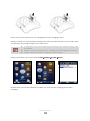
How to charge.................................................................................................... 9
1.3
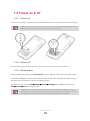
Power on & off .................................................................................................. 12
1.3.1
Power on ........................................................................................................... 12
1.3.2
Power off ........................................................................................................... 12
1.3.3
Sleep mode ....................................................................................................... 12
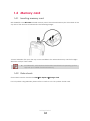
1.4
Memory card .................................................................................................... 13
1.4.1
Inserting memory card .................................................................................... 13
1.4.2
Data check ....................................................................................................... 13
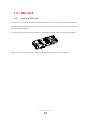
1.5
1.5.1
2.
SIM card ............................................................................................................. 14
Inserting SIM card ............................................................................................. 14
Basic usage ....................................................................................................... 15
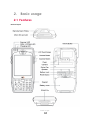
2.1
Features ............................................................................................................. 15
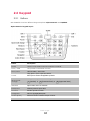
2.2
Keypad .............................................................................................................. 16
2.2.1
2.3
Buttons ............................................................................................................... 16
Screen ................................................................................................................ 18
2.3.1
Status bar........................................................................................................... 18
2.3.2
Today screen .................................................................................................... 19
2.3.3
Task bar .............................................................................................................. 19
2.4
Data input ......................................................................................................... 20
2.4.1
Stylus pen ........................................................................................................... 20
2.4.2
Keyboard ........................................................................................................... 20
2.5
Reset................................................................................................................... 22
2.5.1
Soft reset ............................................................................................................ 22
2.5.2
Clean boot ........................................................................................................ 22
2.6
Sync with PC ..................................................................................................... 23
Contents
5