1
User Manual of Standard Network Definition Camera V1.0 Thank you for purchasing our product. If there is any question or request, please do not feel hesitated to contact dealer. This manual may contain several technical incorrect places or printing errors, and the content is subject to change without notice. The updates will be added to the new version of this manual. We will readily improve or update the products or procedures described in the manual. DISCLAIMER STATEMENT “Underwriters Laboratories Inc. (“UL”) has not tested the performance or reliability of the security or signaling aspects of this product. UL has only tested for fire, shock or casualty hazards as outlined in UL’s Standard(s) for Safety, UL60950‐1. UL Certification does not cover the performance or reliability of the security or signaling aspects of this product. UL MAKES NO REPRESENTATIONS, WARRANTIES OR CERTIFICATIONS WHATSOEVER REGARDING THE PERFORMANCE OR RELIABILITY OF ANY SECURITY OR SIGNALING RELATED FUNCTIONS OF THIS PRODUCT.”
Safety Instruction These instructions are intended to ensure that user can use the product correctly to avoid danger or property loss. The precaution measure is divided into ‘Warnings’ and ‘Cautions’: Warnings: Serious injury or death may cause if any of the warnings is neglected. Cautions: Injury or equipment damage may cause if any of the cautions is neglected. Warnings Follow these safeguards to Cautions Follow these precautions to prevent serious injury or death. prevent potential injury or material damage. Warnings 1. In the use of the product, you must be strict compliance with the electrical safety regulations of the nation and region. 2. Input voltage should meet both the SELV(Safety Extra Low Voltage) and the Limited Power Source with AC 24V or DC 12V according to the IEC60950-1 standard. Please refer to technical specifications for more details. 3. Do not connect several devices to one power adapter as adapter overload may cause over‐heat or fire hazard. 4. Please make sure that the plug is firmly inserted into the power socket. 5. When the product is installed on wall or ceiling, the device shall be firmly fixed. 6. If smoke, odor or noise rise from the device, turn off the power at once and unplug the power cable, and then please contact the service center. 7. If the product does not work properly, please contact your dealer or the nearest service center. Never attempt to disassemble the camera yourself. (We shall not assume any responsibility for problems caused by unauthorized repair or maintenance.) 1
Notice: 1. Make sure the power supply voltage is correct before using the camera. 2. Do not drop the camera or subject it to physical shock. 3. Do not touch CCD (Charge Coupled Device) modules with fingers. If cleaning is necessary, use clean cloth with a bit of ethanol and wipe it gently. If the camera will not be used for an extended period, please turn on the lens cap to protect the CCD from dirt. 4. Do not aim the camera at the sun or extra bright places. A blooming or smear may occur otherwise (which is not a malfunction however), and affecting the endurance of CCD at the same time. 5. The CCD may be burned out by a laser beam, so when any laser equipment is on using, make sure that the surface of CCD will not be exposed to the laser beam. 6. Do not place the camera in extremely hot, cold (the operating temperature shall be-10℃~+
60℃ ), dusty or damp locations, and do not expose it to high electromagnetism radiation. 7. To avoid heat accumulation, good ventilation is required for operating environment. 8. Keep the camera away from liquid while on using. 9. While on a delivery, the camera shall be packed in its original packing, or packing of the same texture. 10. Regular part replacement: a few parts (e.g. electrolytic capacitor) of the equipment shall be replaced regularly according to their average enduring time. The average time varies because of differences between operating environment and using history, so regular checking is recommended for all the users. Please contact with your dealer for more details. 2
Index
Index ................................................................................................................................................................................... 3 Chapter 1 Introduction......................................................................................................................................................... 4 1.1 Network camera Functions and Features............................................................................................................................... 4 1.2 Applications............................................................................................................................................................................4 Chapter 2 Installation........................................................................................................................................................... 6 2.1 Panels Description ..................................................................................................................................................................6 2.1.1 Side Elevation of the Camera ..........................................................................................................................................6 2.1.2 Rear Panel Description ....................................................................................................................................................7 2.2 Product Installation ..............................................................................................................................................................11 2.2.1 Box camera Installation .................................................................................................................................................11 2.2.2 Dome camera Installation .............................................................................................................................................11 2.2.3 Topological graph of network camera ...........................................................................................................................13 2.3 Installation of Client software 4000(V2.0)............................................................................................................................13 Chapter 3 Parameter Configuration .................................................................................................................................... 15 3.1 Visit Network Camera in LAN ...............................................................................................................................................15 3.2 Configuration via Web browser ...........................................................................................................................................16 3.3 Configuration via Client Software ........................................................................................................................................19 3.4 Visit Network Camera in Internet ........................................................................................................................................24 3.4.1 Visit network camera with static IP............................................................................................................................... 24 3.4.2 Visit network camera with dynamic IP..........................................................................................................................25 Appendix 1 SADP Introduction ........................................................................................................................................... 29 Appendix 2 Port Map ......................................................................................................................................................... 31 Appendix 3 Product Specification ....................................................................................................................................... 33 DS‐2CD802 / 812 / PF (NF) (‐E) (‐W)...........................................................................................................................................33 Specification...........................................................................................................................................................................33 Dimension ..............................................................................................................................................................................34 DS‐2CD832F (‐E) .........................................................................................................................................................................35 Specification...........................................................................................................................................................................35 Dimension ..............................................................................................................................................................................36 DS‐2CD802 / 812 / 892P (N)‐IR1 (IR3) ........................................................................................................................................36 Specification...........................................................................................................................................................................36 Dimension ..............................................................................................................................................................................37 DS‐2CD702 / 712 / 792PF (NF) (‐E).............................................................................................................................................38 Specification...........................................................................................................................................................................38 Dimension ..............................................................................................................................................................................39 DS‐2CD732F (‐E) .........................................................................................................................................................................40 Specification...........................................................................................................................................................................40 Dimension ..............................................................................................................................................................................41 3
Chapter 1 Introduction Network camera is a kind of embedded digital surveillance product that combines the features of both traditional analog camera and net DVS (Digital Video Server). Due to the embedded Linux operation system and the latest Davinci hardware platform of TI, the system operates with high scheduling efficiency. Furthermore, the firmware is burned in the flash, which makes the product small, reliable and highly stable. 1.1 Network camera Functions and Features Functions: 1. Support H.264 or MPEG‐4 video Encoding techniques which provides high compact ratio and flexible processing 2. Heartbeat Function: The server can acquire real time operating performance of the network camera through the heartbeat function. 3. Alarm: The product includes 1 channel of alarm signal input and 1 channel of alarm on/off output, and supports motion detection, video missing, mask alarm and external alarm input. 4. Voice Talking: Support bidirectional voice talking and monomial voice broadcasting. 5. User Management: Support multilevel right management. The administrator can create up to 15 separate users with different right levels, which highly improves the system security. 6. “‐E” series cameras support PoE (power over ethernet). 7. Built‐in web server, support visiting through IE; 8. Supply open SDK and support secondary development. Compression Functions: 1. Support 1 channel video signal and 25fps in Pal (704 × 576) ,30fps in NTSC (704 × 480) real time H.264 or MPEG‐4 video Encoding standard compression, which supports both variable bit rate and variable frame rate; besides, you can self‐define both the video quality and its compressed bit rate. 2. Support resolution of 4CIF (PAL:704 × 576, NTSC:704 × 480), DCIF (PAL:528 × 384, NTSC:528 × 320), 2CIF (PAL:704 × 288, NTSC:704 × 240), CIF (PAL:352 × 288, NTSC:352 × 240),QCIF (PAL:176 × 144, NTSC:176 × 120). Remote Control: 1. The product offers a 10M/100M self‐adaptive Ethernet interface. 2. Support TCP / IP, HTTP, DHCP, DNS, RTP / RTCP, PPPoE protocols. 3. Set the parameters, browse real time videos or check the camera performance through software or IE, and get external alarming and store the compressed bit rate through network. 4. Support remote upgrades and maintenance. 5. RS‐485 supports monomial transparent channel function so that clients on remote PC can control the serial devices. 1.2 Applications This camera is ideal for remote control network applications. E.g.: 1. Network surveillance for ATM, bank counters, supermarkets and factories. 2. Remote surveillance for nursing homes, kindergartens and schools. 3. AI janitors. 4. AI building/district management systems. 4
5.
6.
7.
8.
9.
10.
Self‐service systems of power plants. Outdoor monitoring systems for bridges, tunnels and crossroad traffic. Pipelining and warehouse monitoring. 24‐hour monitoring for road traffic. Remote monitoring of forest and water resources. Surveillance for airdrome, railway station, bus stop etc. 5
Chapter 2 Installation Notes: 1.
2.
3.
4.
5.
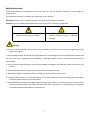
Please check if all the items on the package list have been included with your camera. Read the following contents carefully before the installation. Make sure that all the related equipment is power‐off during the installation. Check the power supply to prevent any damage caused by mismatching problems. If the product does not operate properly, please contact your dealer or the nearest service center. Never attempt to disassemble the camera yourself. Users are responsible for any problem caused by modification or repairing without authorization. 2.1 Panels Description 2.1.1 Side Elevation of the Camera Fig 2.1.1 Side Elevation of DS‐2CD832 series camera Fig 2.1.2 Side Elevation of DS‐2CD802, DS‐2CD812, DS‐2CD892 series camera 6
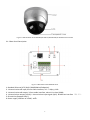
Fig 2.1.5 Side Elevation of DS‐2CD702,DS‐2CD712,DS‐2CD732,DS‐2CD792 series camera 2.1.2 Rear Panel Description Fig. 2.1.6 Rear Panel of DS‐2CD832 series 1. Standard Ethernet (UTP) RJ45 (10M/100M self‐adaptive). 2. 1 channel voice talk input,3.5mm audio interface, 2.0~2.4Vp‐p, 1kΩ. 3. 1 channel voice talk output, 3.5mm audio interface, electric line level, 600Ω. 4. 1 channel alarm output (1A 1B). 1 channel alarm input signal (IN,G). RS‐485 bus interface(T+ T‐). 5. SD card slot (Support SDHC ). 6. Power supply interface of 12VDC, ±10%. 7
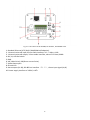
Fig. 2.1.7 Rear Panel of DS‐2CD802, DS‐2CD812 , DS‐2CD892 series 1. Standard Ethernet (UTP) RJ45 (10M/100M self‐adaptive). 2. 1 channel voice talk input,3.5mm audio interface, 2.0~2.4Vp‐p, 1kΩ. 3. 1 channel voice talk output, 3.5mm audio interface, electric line level, 600Ω. 4. BLC, AI, AES dial switch. 5. GND. 6. VD( Video Drive), DD(Direct current Drive). 7. Video Output port. 8. SD card slot. 9. alarm output (1A 1B); RS‐485 bus interface(T+ T‐); Alarm input signal (IN,G). 10. Power supply interface of 12VDC, ±10%. 8
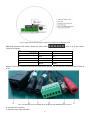
Fig. 2.1.9 Rear Panel of DS‐2CD702, DS‐2CD712, DS‐2CD732, DS‐2CD792 series Address& protocols dial switch, define for dial switch: , from 1 to 5 dial switch function as follows: Switch Function ON OFF 1 2 3 4 5 SHARP AES BLC FL NAGC SOFT AI OFF ON SAGC Notices: There are invalid dial switches for DS‐2CD702, DS‐2CD712, DS‐2CD792, DS‐2CD732 series from 6 to 10; Fig 2.1.10 Rear Panel of DS‐2CD802‐IR, DS‐2CD812‐IR, DS‐2CD892‐IR series camera 1. A means UTP interface; 2. B means voice input interface; 9
3. C means voice output interface; 4. D means, T+,T‐ means RS‐485 interface; G, IN means alarm input interface; 1A,1B means alarm output interface; 5. E means BNC video output interface; 6. F means DC12V±10% power supply input interface; Notice: Fig 2.1.11 Alarm output The alarm output is an on/off output that requires external power supply on connection. The external power supply shall be 12V DC/30mA, or use AC with external relays. Equipment damage or electric shock may cause if without relays. 10
2.2 Product Installation 2.2.1 Box camera Installation Box camera can be fixed in both metope and ceiling. Customers can choose whichever way according to their specific needs. Please follow the steps below:(Take fixing in ceiling as an example, fixing in metope follows the same rule).Choose the fixing method and fix the camera bracket accordingly. If it is metope, then you need to fix the expand bolt (note: the mounting hole of the expand bolt should align with the bracket) before fixing the bracket. If the wall surface is wooden, the first step can be ignored and you can use the self‐tapping screw to directly fix the bracket. Please note that the metope on which the camera is fixed should be able to bear at least three times the weight of the bracket and the camera. Fig 2.2.1 Fix Ceiling Bracket Fig 2.2.2 Fix Camera Fig 2.2.3 Fix Lens 2.2.2 Dome camera Installation Dome camera can be installed include hold equipment, ceiling mounted,cylinders and other styles. Client 11
can be installed in accordance with their own ways to achieve the installation.Please according the following specific steps to install (take ceiling mounted as example), when the wall is wood, use the self‐tapping screws to fix the ceiling plate to the wall surface. Fig 2.2.4 Fix card Fig 2.2.5 Fix in Ceiling Take the three columns of Dome camera insert in the three fix slot of the ceiling plate. Pay attention to the direction of insertion. Let the ceiling plate “I” logo and the Dome camera “I” logo in the same direction. Meanwhile, make the Dome camera along the counterclockwise Rotate 15 degrees until the switch to the fixed date. At the same time, the Dome camera on the “I” signs and ceiling plate on the locking screw plate alignment. Ceiling locking plate on the locking screw. Fig 2.2.6 Dome camera fixing Fig 2.2.7 Dome camera fixed 12
2.2.3 Topological graph of network camera Fig 2.2.8 Topological Graph of DS‐2CD832 Fig 2.2.9 Topological Graph of DS‐2CD802/812/892 Physical Interface UTP Network Interface Audio Input(AIN) Audio Output(AOUT) Power Supply(DC12V) Connection Connect to network devices, such as switch , HUB, etc. Please refer to Appendix B for pin Definition. Connect to audio input devices such as active tone (2.0~
2.4Vp‐p, 1kΩ) Connect to sounders like loudhailer 600Ω. Please refer to the appendix for specified types. Please use a matched regulator. Alarm Output(1A 1B) 1 channel alarm out. Please refer to Section 2.3.2 for connecting instructions. (external series‐wound power shall be under 12V DC / 30mA) Alarm Input(IN G) RS‐485 Interface(T+ T‐) SD card slot Video Output(VOUT) 1 channel alarm in. Connect to RS‐485 devices like PTZ. Insert an SD card for local storage. Standard BNC, connect to monitor. 2.3 Installation of Client software 4000(V2.0) Note: It is recommended that users computer adopted INTEL P3,P4,C4,Core4 CPU, and well‐known brands (Asus, Gigabyte, MSI,ECS,INTEL etc.)Intel chipset motherboard, to ensure the stability of the system. Tested the following models of the current graphics cards support the softwareinstalled,ATIRadeonX1650,X1600,X1550,X1300,X800,X600,X550,HD2400,HD2600,NVIDIA GeForce 8600GT,8500GT,8400GS,7600,7300LE,6600LE,6200LE,INTEL915/945G,pay attention to graphics driver must support hardware scaling function. 13
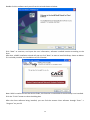
Double click the software and you will see the wizard shown as below: Click “Next” to continue, and input the user information, software installed location according to the hints. After that, a SADP installation wizard will pop up; click “Next” to start to install WinPcap, shown as below. If it is already installed, the installation can be canceled. Note: SADP is used as the on‐line device finder; this function is unavailable if the WinPcap is not installed. Click the “Finish” button to close the dialog box. After the client software being installed, you can find the remote client software through “Start” ‐> “Program” on your PC 14
Chapter 3 Parameter Configuration There are several network parameters of the camera which need to be set after the hardware installation. Those parameters including IP address, subnet mask and port number, etc. can be set through various kinds of methods, 2 of which are introduced as below. 1. Set the camera parameters via IE. 2. Set the camera parameters through the client software. Please make sure that the PC and network camera are connected and can ping successfully before the parameter setting. 3.1 Visit Network Camera in LAN There are two ways of connecting between IPC and PC as below: Fig. 3.1.1 Cross Line Connection Fig. 3.1.2 Direct Line Connection Before visiting network camera, user should detect its IP address. SADP is a tool software which can automatically detect hikvision’s network device in the LAN and give the device’s information like IP address, mask, port number, device serial number, software version and so on. 15
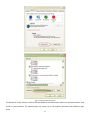
Fig. 3.1.3 Select the device, and set its IP address and mask at the same network segment with the PC. The detailed introduction of SADP, please refer to Appendix 1. 3.2 Configuration via Web browser Before visit the camera via web browser, user should adjust security level. Open the web browser, and enter the menu “Tool/ internet option/Security/Custom level”, then set the security level to Security Level –Low, or enable ActiveX Control and the Plug‐in directly. Figure 3.2.1 gives you a visual illustration. After you can see the camera video, recover the security level for security. 16
Fig. 3.2.1 Set the Security Level The default IP of the camera is 192.0.0.64 with 8000 as the default port, admin as the administrator, and 12345 as the password. The administrator can create up to 15 separate operators with different right levels. 17
To login the camera through IE, input the IP address in the address column, and the “Login” dialog box will pop‐up as Fig. 3.2.2. Input your user name and password, and then click “Login” to enter the “preview” page. Double click the “Camera 01” channel or “Preview” button to preview the video as Figure 3.2.3. Right click the “Camera 01” channel, and the “Main Stream”, “Sub Stream” and “Open sound” options will popup. Select the Open sound option if you connect a pickup to the camera. Fig. 3.2.2 Login Interface Fig 3.2.3 Preview Interface The “Playback” and “Log” functions can be used only in the condition of existing SD card. To set the camera parameters through IE browser, click “Config” and wait for the “Remote Parameters Config” dialog box to pop up, and then set the parameters like IP address, etc. for your demand as Fig. 3.2.4. Note: If plug the SD card into the camera, user should enter the “config” and select “other function” to format the SD card. 18
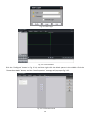
Fig. 3.2.4 Remote Parameters Configuration 3.3 Configuration via Client Software After the installation of client software 4000 V(2.0), click the “client software 4000 V(2.0)” in “Start”→ “Program”→ “client software 4000 V(2.0)”, a message box of “Register Administrator” as Fig. 3.3.1 will appear by then for the first time running. Password should be no less than 6 digits for registration. Note: Please keep the user name and password in mind .You may not be able to get access to the software if any of them is missing. Fig.3.3.1 Register Administrator Enter the registered user name and password as Fig. 3.3.2. Click “Login” to enter the “Preview” menu as Fig. 3.3.3. 19
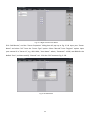
Fig. 3.3.2 User Login Fig. 3.3.3 Preview Menu Click the “Configure” button in Fig. 3.3.4, and then right click the blank spaces in the middle. Click the “Create Root Node” button, and the “Area Properties” message will pop up as fig 3.3.5. Fig. 3.3.4 Create Root Node 20
Fig. 3.3.5 Area Properties Input the area name (you can create whatever name you like) and click “OK” as Fig. 3.3.6. Then right click the area name you have just created as Fig. 3.3.7. Fig. 3.3.6 Area Name Adding Completed 21
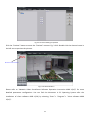
Fig. 3.3.7 Right Click the Area Name Click “Add Device”, and the “Server Properties” dialog box will pop up as Fig. 3.3.8. Input your “Server Name” and select “HC” from the “Server Type” option. Select “Normal” from “Register” option. Input your camera IP in “Server IP”, e.g. 192.0.0.64; “User Name”: admin, “Password”: 12345, and 8000 for the default “Port”, and then modify “Channel” to 1. Click the “OK” button as Fig. 3.3.8. Fig. 3.3.8 Add Device 22
Fig.3.3.9 Camera Adding Completed Click the “Preview” button to enter the “Preview” menu as Fig. 3.3.10. Double click the channel name in the left tree to preview the pictures. Double click the channel
Fig.3.3.10 Preview Menu Please refer to “Network Video Surveillance Software Operation Instruction 4000 V(2.0)” for more detailed parameters configuration. You can find the document in PC Operating System after the installation of client software 4000 V(2.0) by selecting “Start”‐> “Program”‐> “client software 4000 V(2.0)”. 23
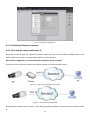
Fig.3.3.11 Remote Configuration 3.4 Visit Network Camera in Internet 3.4.1 Visit network camera with static IP When get a static IP from ISP operation business, open some ports (such as 80 and 8000 ports) in the router. Then user can visit it through web browser or client software. Note: Refer to Appendix 2 to know the detailed operation about Port Map. Of course, user can directly connect the network camera to internet without router. Fig.3.4.1 Static IP through Router access IPC Fig.3.4.2 Static IP access IPC directly If adopt client software to visit camera, in the adding equipment column, select the normal model, and fill IP. 24
Fig.3.4.3 Selecting Normal Mode 3.4.2 Visit network camera with dynamic IP Fig.3.4.4 Visit camera through PPPoE dail‐up This camera support PPPoE auto dial‐up function, connecting camera to Modem for dial‐up access the ADSL network and get an public IP address; First, through local network visiting network camera, select “Configure”Æ”Network Configuration” dialog box, enable “PPPoE”, fill PPPoE user name and password and confirm the password, as shown in Fig. 3.4.4. Please restart the network camera after completion of configuration. Then the network camera get a dynamic IP from ISP operation business. However, the obtained IP address is dynamically assigned via PPPoE, so the IP address always changes accompanying with modem rebooting. 25
Fig.3.4.5 PPPoE configuration dialog box It is very not convenient to visit network camera with dynamic IP, therefore, user should apply domain name towards domain name provider. Domain name resolution contains normal domain name resolution and private domain name resolution. Firstly, introduce normal domain name resolution. 26
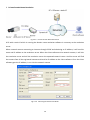
1. Normal Domain Name Resolution Fig.3.4.6 Normal Domain Name Resolution Apply a domain name from domain name provider, then visit camera via the applied domain name. If the camera via router connects to internet, user should do port map in the router. Please refer to Appendix 2. Input domain names in client software or IE to visit the network cameras. Take client software configuration as an example. Fig.3.4.7 Selecting Normal Domain Mode 27
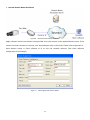
2. Private Domain Name Resolution Fig.3.4.8 Private Domain Name Resolution A PC with a static IP which is running the domain name resolution software is necessary as the resolution server. When network camera connecting to internet through PPPoE and obtaining an IP address, it will send its name and IP address to the resolution server. When the client software visits network camera, it will visit the resolution server and tell the resolution server the expected camera’s name. And the server will find the camera from all the registered cameras and send its IP address to the client software. Once the client software gets the IP address, it can visit the network camera. Fig.3.4.9 Selecting Private Domain Mode 28
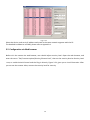
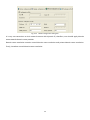
Appendix 1 SADP Introduction 1. Brief introduction SADP (Search Active Devices Protocol), can automatically search IP cameras in LAN. User can modify the IP address, subnet mask and port of the device without visiting IP address of the device. Additionally, password of the super user in this device can be recovered as default. SADP software needs to support sadp, so we should install WinPcap at first, which is placed at the directory of SADP software. 2. Searching active devices online After installing WinPcap, double click sadpdlg.exe. The software will start to search active devices in LAN, and device type, IP address, Port number, Device Serial No., subnet mask, MAC address, the number of channels, main control and encoding version and device initiating time are showed in the list, as following: 3. Modifying the information of active devices Select the device that needs modification in the device list, then basic information of the device will be demonstrated in the information column on the right. Click ‘modify’ button to activate IP address, subnet mask, device port editing and password validating box, as following: 29
Input new IP address, subnet mask, and port number, and click ‘save’ button. If a dialog pops up, showing ‘saved successfully’, that means you have modified the configuration information; if ‘saving failed’ turns up, click the ‘cancel’ button to quit it. 4. Recovering default password You can reset the password of the super user as ‘12345’ in case of can not remembering administrator’s password. Input certain validate code into ‘recover device default password’ column, and click ‘OK’ to finish the administrator’s password initiating. Note: validate code is sent by the technicians from hikvision after you provide the device Serial NO. 30
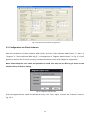
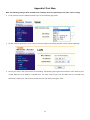
Appendix 2 Port Map Note: The following setting is about TP‐LINK router (TL‐R410), which is maybe distinct from other router’s setting. 1. Firstly, select the router’s WAN connection Type. As the following Fig. shows: 2. Set the “network parameter” of the router as the below figure. The setting includes subnet mask and gateway. 3. Set the port map in the virtual severs of Forwarding. The following figure gives the illustration. One camera’s ports are 80, 8000 and its IP address is 192.168.1.23. The other camera’s ports are 81, 8001 and IP is 192.168.1.24. Afterwards, enable all or TCP protocols. Enable the port map after pressing the ‘Save’. 31
As the above mentioned setting, we map the router’s port 80, 8000 to the network camera 192.168.1.23; and port 81, 8001 to the network camera 192.168.1.24. In this way, user can visit the 192.168.1.23 through visiting the router’s port 80, 8000. Note: The port of the network camera cannot conflict with other ports. For example, some router’s web management port is 80. User can amend the router’s or the camera’s port to solve this problem. 32
Appendix 3 Product Specification DS‐2CD802 / 812 / PF (NF) (‐E) (‐W) DS‐2CD892P (N) F (‐E) Specification Parameter Model DS‐2CD802PF (NF) (‐E) (‐W) DS‐2CD812PF (NF) (‐E) (‐W) DS‐2CD892PF (NF) (‐E) PAL: 500 (H) × 582 (V) PAL: 752 (H) × 582 (V) PAL: 752 (H) × 582 (V) NTSC: 510 (H) × 492 (V) NTSC: 768 (H) × 494 (V) NTSC: 768 (H) × 494 (V) 420 TVL, 1Vpp Composite Output 480TVL, 1Vpp Composite Output 540TVL, 1Vpp Composite Output (75Ω / BNC) (75Ω / BNC) (75Ω / BNC) Camera Image Sensor Effective Pixels 1/3 inch SONY Super HAD CCD Lens Mount C / CS mount Signal System PAL / NTSC Electronic shutter 1/50 (1/60)s ~ 1/100,000s Min. Illumination 0.1Lux @ F1.2 Day & Night Electronic Auto Iris Lens DC / Video Lens Option S/N Ratio More than 48dB Video Output Compression Standard Video Compression H.264 / MPEG‐4 Video Output 32 K ~ 2M, adjustable (8Mbps maximum) Audio Compression OggVorbis Image Image Resolution Frame Rate PAL: 704 × 576, 528 × 384, 704 × 288, 352 × 288, 176 × 144 NTSC: 704 × 480, 528 × 320, 704 × 240, 352 × 240, 176 × 120 25 fps (704 × 576), 30fps (704 × 480) Function Motion Detect Support Dual Stream Support SD Card Local Recording Support Heartbeat Support Password Protect Support Protocols TCP / IP, HTTP, DHCP, DNS, RTP / RTCP, PPPoE (FTP, SMTP, NTP, SNMP addible) ; (‐W) series support IEEE802.11g Wireless WLAN Criterion, 2.4GHz Frequency. Interface Audio Input 1 channel 3.5mm audio interface (2.0 ~ 2.4Vp‐p, 1kΩ) Audio Output 1 channel 3.5mm audio interface (line level, 600Ω) Communication 1 RJ45 10M/100M self‐adaptive Ethernet port and one RS‐485 interface Alarm Input 1 channel signal input 33
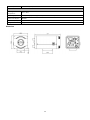
Alarm Output 1 channel relay output Others Working Temperature ‐10℃ ~ 60℃ Power Supply 12VDC, ±10%, (‐E) series support PoE (Power over Ethernet) Power Consumption 4W MAX Dimensions (mm) 63 × 59 × 114 Weight 650g Dimension 34
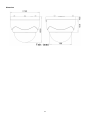
DS‐2CD832F (‐E) Specification Parameter Model DS‐2CD832F (‐E) (‐W) Camera Image Sensor 1/4 inch CMOS Effective Pixels 640 (H) × 480 (V) Lens Mount C / CS mount Lens Option Auto Iris Lens ‐‐‐ Min. Illumination 0.4Lux @ F1.2 Day & Night Electronic Compression Standard Video Compression H.264 / MPEG‐4 Video Output 32 K ~ 2M, adjustable (8Mbps maximum) Audio Compression OggVorbis Image Image Resolution 704 x 576, 640 x 480, 528 x 384, 704 x 288, 352 x 288, 176 x 144 Frame Rate 25fps (704 x 576), 30fps (704 x 480) Functions Motion Detect Support Dual Stream Support Heartbeat Support SD Card Local Recording Support Password Protect Support Protocols TCP / IP, HTTP, DHCP, DNS, RTP / RTCP, PPPoE (FTP, SMTP, NTP, SNMP addible); Interface Audio Input 1 channel 3.5mm audio interface (2.0~2.4Vp‐p, 1kΩ) Audio Output 1 channel 3.5mm audio interface (Line level, 600Ω) Communication 1 RJ45 10M / 100M self‐adapted Ethernet port and, 1 RS‐485 interface Alarm Input 1 channel signal input ( 0~12VDC ) Alarm Output 1 channel signal relay output Others Working Temperature ‐10℃ ~ 60℃ Power Supply 12VDC, ±10%, (‐E) series support PoE (Power over Ethernet) Power Consumption 3W MAX Dimensions (mm) 63 × 59 × 116 Weight 650g 35
Dimension DS‐2CD802 / 812 / 892P (N)‐IR1 (IR3) Specification Parameter Model DS‐2CD802P (N)‐IR1 (IR3) DS‐2CD812P (N)‐IR1 (IR3) DS‐2CD892 P(N)‐IR1 (IR3) PAL:500(H) × 582 (V) PAL:752 (H) × 582 (V) PAL:752 (H) × 582 (V) NTSC:510 (H) × 492 (V) NTSC:768 (H) × 494 (V) NTSC:768 (H) × 494 (V) Camera Image Sensor Effective Pixels 1/3 inch SONY Super HAD CCD Lens Mount M12×0.5 Signal System PAL / NTSC Electronic Shutter 1/50 (1/60)S ~ 1/50~1/100,000S Min. Illumination 0.1Lux @ F1.2 (0 Lux With IR) Lens S/N Ratio Video Output “‐IR1” series: 6mm (2.8mm, 3.6mm option) “‐IR3” series: 12mm (3.6mm, 6mm, 8mm,16mm option) More than 48dB 420 TVL,1Vpp Composite Output 480TVL, 1Vpp Composite Output 540TVL,1Vpp Composite Output (75Ω/BNC) (75Ω/BNC) (75Ω/BNC) Compression Standard Video Compression H.264 / MPEG‐4 Video Output 32 K ~ 2M, adjustable (8Mbps maximum) Audio Compression OggVorbis Image Image Resolution Frame Rate PAL: 704 × 576, 528 × 384, 704 × 288, 352 × 288, 176 × 144 NTSC: 704 × 480, 528 × 320, 704 × 240, 352 × 240, 176 × 120 25 fps (704 × 576), 30fps (704 × 480) Function Motion Detect Support Dual Stream Support Heartbeat Support Password Protect Support 36
Protocols TCP / IP,HTTP,DHCP,DNS,RTP / RTCP, PPPoE (FTP,SMTP,NTP,SNMP addible) Infrared Distance “‐IR1” series IR Illuminators up to 10 ~ 20 meters; “‐IR3” series IR Illuminators up to 30 ~ 40 meters Interface Audio Input 1 channel (2.0 ~ 2.4Vp‐p, 1kΩ) Audio Output 1 channel (Line level, 600Ω) Communication 1 RJ45 10M / 100M self‐adapted Ethernet port and one RS‐485 interface Alarm Input 1 channel signal input Alarm Output 1 channel relay output Others Working ‐10℃ ~ 60℃ Temperature Water and Dust Resistance Power Supply Power Consumption IP66 12VDC, ±10% “‐IR1” series: 5.5W MAX “‐IR3” series: 7W MAX Dimensions(mm) 86.5 × 83.2 × 228 Weight 1400g Dimension 37
DS‐2CD702 / 712 / 792PF (NF) (‐E) Specification Parameter Model DS‐2CD702PF (NF) (‐E) DS‐2CD712P F(NF) (‐E) DS‐2CD792PF (NF) (‐E) PAL:500 (H) × 582 (V) PAL:752 (H) × 582 (V) PAL:752 (H) × 582 (V) NTSC:510 (H) × 492 (V) NTSC:768 (H) × 494 (V) NTSC:768 (H) × 494 (V) Camera Image Sensor Effective Pixels 1/3 inch SONY Super HAD CCD Lens 3.5 ~ 9mm @ F1.2 / Φ14 / Fixed Iris lens Signal System PAL / NTSC Electronic Shutter 1/50 (1/60)s to 1/100,000s Min. Illumination 0.1Lux @ F1.2 Day&Night Electronic S/N Ratio More than 48dB Video Output 420 TVL, 1Vp‐p Composite 480 TVL, 1Vp‐p Composite Outpu t (75Ω/BNC) Output (75Ω/BNC) 540TVL, 1Vp‐p Composite Output (75Ω/BNC) Compression Standard Video Compression H.264 / MPEG‐4 Video Output 32 K ~ 2M, adjustable (8Mbps,maximum) Audio Compression OggVorbis Image Image Resolution Frame Rate PAL: 704 × 576, 528 × 384, 704 × 288, 352 × 288, 176 × 144 NTSC: 704 × 480, 528 × 320, 704 × 240, 352 × 240, 176 × 120 25fp s(704 × 576), 30fps (704 × 480) Functions Motion Detect Support Dual Stream Support SD Card Local Recording Support Heartbeat Support Password Protect Support Protocols TCP / IP, HTTP, DHCP, DNS, RTP / RTCP, PPPoE (FTP,SMTP,NTP,SNMP addible) Adjustment Range 355° Pan 90° Tilt Interface Audio Input 1channel (2.0 ~ 2.4Vp‐p, 1kΩ) Audio Output 1 channel (Line level, 600Ω) Communication 1 RJ45 10M / 100M self‐adapted Ethernet port and 1 RS‐485 interface Alarm Input 1 channel signal input Alarm Output 1 channel relay output Others 38
Working Temperature ‐10℃ ~ 60℃ Power Supply 12VDC, ±10%, (‐E) series support PoE (Power over Ethernet) Power Consumption 4W MAX Dimensions (mm) φ145 × 132.8 Weight 900g Dimension 39
DS‐2CD732F (‐E) Specification Parameter Model DS‐2CD732F(‐E) Camera Image Sensor 1/4 inch CMOS Effective Pixels 640 (H) × 480 (V) Lens 3.5‐8mm @ F1.6 / M12 / manual Iris lens Min. Illumination 0.4Lux @ F1.2 Video Output 1.0Vp‐p Composite Output (75Ω/BNC) Day&Night Electronic Compression Standard Video Compression H.264 / MPEG‐4 Video Output 32 K ~ 2M, adjustable (8Mbps maximum) Audio Compression OggVorbis Image Image Resolution 704 × 576, 640 × 480, 528 × 384, 704 × 288, 352 × 288, 176 × 144 Frame Rate 25fps (704 × 576) Functions Motion Detect Support Dual Stream Support SD Card Local Recording Support Heartbeat Support Password Protect Support Protocols TCP / IP, HTTP, DHCP, DNS, RTP / RTCP, PPPoE (FTP, SMTP, NTP, SNMP addible). Interface Audio Input 1 channel (2.0 ~ 2.4Vp‐p,1kΩ) Audio Output 1 channel (Line level, 600Ω) Communication 1 RJ45 10M / 100M self‐adaptive Ethernet port and 1 RS‐485 interface Alarm Input 1 channel signal input Alarm Output 1 channel signal relay output Others Working Temperature ‐10℃ ~ 60℃ Power Supply 12VDC, ±10%, (‐E) series support PoE (Power over Ethernet) Power Consumption 3W MAX Dimensions (mm) φ145 × 132.8 Weight 900g 40
Dimension 41