1
Battery storage and charging
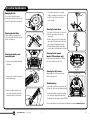
Your Roomba is powered by a rechargeable battery. Before using your Roomba
for the first time, you’ll need to charge the battery overnight.
• Make sure your Roomba is fully charged before each cleaning cycle.
• For maximum battery life, always store your Roomba plugged in.
• When your Roomba is on the Home Base, make sure the Home Base
power light is on.
• If you return your Roomba to the Home Base / battery charger after leaving
it off for a long time, it will start a special Refresh Charge mode and the battery
indicator will pulse quickly. If possible, don’t interrupt the Refresh Charge mode.
• For long-term storage, fully charge the battery, remove, and store it in a
cool, dry place.
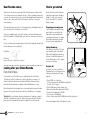
How to use the Lighthouse mode
Simply place a Lighthouse in the doorway
with the logo facing forward. When it has
completed the first room the Lighthouse
will help Roomba navigate around your
home allowing it to clean room-to-room.
When Roomba has completed cleaning,
the Lighthouse will direct Roomba back
to its Home Base for recharging.
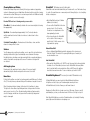
How to remove your battery
If you won’t be using your Roomba for an extended period, we recommend that you
remove the battery. To access the battery, turn Roomba over and remove the two
screws that hold Roomba’s battery cover in place.
You can use Lighthouses and Virtual Walls
at the same time, but avoid placing them
too close to each other, to the Home Base, or to furniture that could block the invisible
beams. Otherwise your Roomba might not recognize the Lighthouses or be able to
return to Home Base.
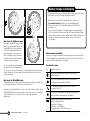
User Interface Icons
How to use the Virtual Wall mode
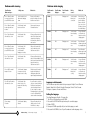
The Dirt Detect Indicator flashes when dirt is detected and
persistent pass cleaning pattern is initiated.
In Virtual Wall mode, the Lighthouse creates an invisible barrier that your Roomba won’t
cross. It automatically turns off when your Roomba is turned off.
Simply place the Virtual Wall Lighthouse in the center of the doorframe. Unlike a Virtual
Wall, a Virtual Wall Lighthouse features a range selector that you can use to adjust the
length of the barrier – up to 8 feet (2 meters) – (a longer range will drain the
battery faster).
Battery storage & charging |
Charging lights
5
Icon
What does it mean?
The Anti-tangle Indicator turns on while Roomba is freeing
itself from a tangle.
The Troubleshooting Light blinks when there is an issue
(see pages 11 and 12).
The Full Bin Indicator (models 770 and above) lets you know
when the dust bin is full and needs to be emptied.
The Battery Indicator shows the battery status.
Solid red --- Battery drained
Amber pulse --- Charging
Solid green --- Fully charged
Quick amber pulse --- Refresh Charge mode
6