1
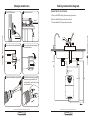
Change membrane
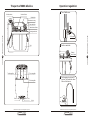
1 Turn off water source.
CONNECTING THE COLOR TUBING:
2 Switch off water tank.
A. Connect the WHITE tubing to the water supply connector.
B. Connect the BLUE tubing to the sink top faucet.
C. Connect the BLACK tubing to the drain saddle.
REVERSE OSMOSIS SYSTEM
REVERSE OSMOSIS SYSTEM
Tank ball
shut-off valve
To RO system
4 Remove the membrane housing
cap anticlockwise.
3 Loose the Jaco fitting anticlockwise.
PURE-PRO
06
PURE-PRO
09
Jaco
Faucet
B
6 Install the membrane by carefully
pushing the spigot end into the
socket at the far end of the housing
until completely in.
5 Remove the membrane by a pincer.
S8
IN
K IN
O
E PR
G
TE
WA
R
S
T
YS
EM
PU
DR
IN
R
K IN
E PR
G
TE
WA
R
SY
Drain
c PUREPRO USA CORP.,I LLINOIS,U .S.A.
S300RD
P URE PRO
S300ND
DRINKING WATER SYSTEM
DRAIN
UR
DR
Tubing connection diagram
OUTLET
S300ST
C
INLET
O
ST
EM
Input water
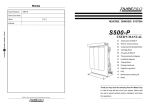
S800 Reverse Osmosis Drinking Water Systems
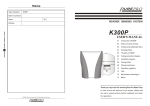
S800 Reverse Osmosis Drinking Water Systems
P URE PRO
P URE PRO
DRINKING WATER SYSTEM
DRINKING WATER SYSTEM
A