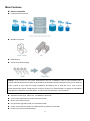
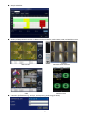
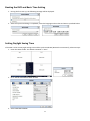
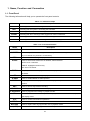
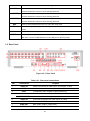
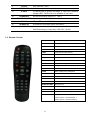
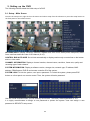
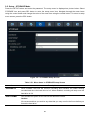
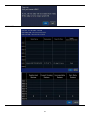
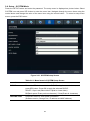
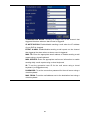
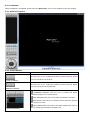
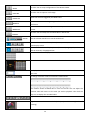
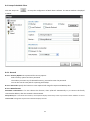
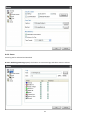
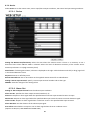
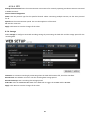
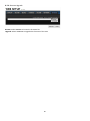
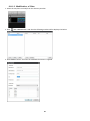
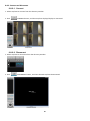
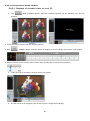
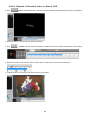
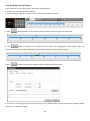
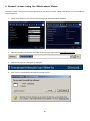
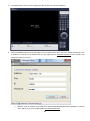
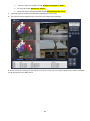
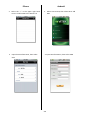
1
VT-HD2x8 2 Channel HD + 8 Channel D1 H.264 Digital Video Recorder VITEK • 2 Channel HD + 8 Channel D1 Hybrid • Record MegaPixel quality Video at 1080p or 720p • Digital Video Transmitted 100% Over Coax - Not IP • Simple plug and play, point-to-point connection from camera to DVR • H.264 Compression • HDMI, VGA, and BNC Spot Outputs • Quadplex Operation (Playback, Recording, Backup, Network) • 10 Audio Inputs & 1 Output • Up to 4TB Internal Storage (2 x 2TB HDD) + 1 eSATA for expansion • Dual RS-485 Ports for PTZ & Keyboard Control • Applications for iPhone, iPad, iPod Touch and Android Devices • Quick Search Function for automatic review • Mac OSX Client & CMS Central Management Software Included • Automatic Event notifications via email • Control locally via Front Panel, USB Mouse or with the Included IR Remote control Cautions Explanation of Graphical Symbols This symbol indicates the presence of important operating and maintenance (servicing) instructions in the literature accompanying the product. This symbol indicates the presence of “dangerous voltage” within the product’s enclosure that may be of sufficient magnitude to constitute a risk of electric shock, property damage, personal injury, or death. WARNING To reduce a risk of fire or electric shock, do not expose this product to rain or moisture. CAUTION Changes or modifications not approved by the manufacture will void the warranty of the product. Using an incompatible battery may increase the risk of fire or explosion. Replace only with the same or equivalent type battery recommended by the manufacture. Discard used batteries according to manufacturer’s instructions. 2 These precautions must be followed for safety reasons. Warning • • • • • • • • • Do not use if the unit emits smoke. Do not disassemble the unit. Do not place any heavy or sharp objects on the unit. Do not place on uneven surface. Do not expose to shock or vibration. Do not move the unit when the unit is powered on. Do not block, and allow dust to accumulate in the air vents. Do not restrict airflow of the unit; doing so can damage the unit. Installation and servicing should be performed only by qualified and experienced personnel. • Turn off the power of the DVR when connecting Cameras, Audio or Sensor Cables. • The manufacture is not responsible for any damage caused by improper use of the product or failure to follow instructions for the product. • The manufacture is not responsible for any problems caused by or resulting from the user physically opening the DVR for examination or attempting to repair the unit. • The manufacture may not be held liable for any issues with the unit if the warranty seal is removed. 3 Product Components Please make sure the following components are included as specified below. DVR Set DVD-RW (Option) Client Software CD, User Guide / Remote Control , Battery1.5V, Mouse / / Power Cable (110V or 220V)(1EA) HDD Capacity by Recording Quality (10 Channels, Continuous, Full-HD@15fps or HD@30fps and D1@30/25fps, Audio On) HDD Capacity LEVEL 5(H) LEVEL 4 LEVEL 3 LEVEL 2 LEVEL 1(L) day(s) hour(s) day(s) hour(s) day(s) hour(s) day(s) hour(s) day(s) hour(s) 250GB 0 15 0 19 1 2 1 7 1 14 320GB 0 20 1 1 1 10 1 16 2 2 500GB 1 9 1 17 2 6 2 17 3 8 1TB 2 19 3 12 4 15 5 12 6 20 1.5TB 4 6 5 7 7 0 8 8 10 8 2TB 5 16 7 2 9 9 11 4 13 20 4 Main Features HDcctv Compatible H.264 Video Compression Reliable File System HDMI Output 4 Channel Audio Recording NOTE: Under federal law, The Fourth Amendment to the U.S. Constitution, Title III of the Omnibus Crime Control and Safe Streets Act of 1968, as amended by the Electronic Communications Privacy Act of 1986 (18 U.S.C. § 2510, et seq.), and the Foreign Intelligence Surveillance Act of 1978 (50 U.S.C. 1801, et seq.) permit government agents, acting with the consent of a party to a communication, to engage in warrantless interceptions of telephone communications, as well as oral and electronic communications. Automatic Video Input, Video Loss, and HDD Error Detection Covert Camera Operation Provides Enhanced Security. Built-in PTZ Camera Control Easy Software Upgrade by USB port and Network SW. Instant and Convenient Backup via USB Flash Drive, Network or DVD-RW Exclusive File Format and AVI Backup 5 Individual Channel Operation Motion Detection Easy and Simple Graphic User Interface 6 Simple Scheduler Variety of Ways Network Access via Network Client Software, Web-Viewer, CMS, and Mobile Viewer Web-Viewer Network Client Software CMS Mobile Viewer S.M.A.R.T. (Self-Monitoring, Analysis, and Reporting Technology for HDD) 7 Booting the DVR and Basic Time Setting 1. During the first start up, the following message will be displayed. 2. After the system initializing is completed, select the language and set date and time as specified below. Setting Daylight Saving Time If the DVR is to be set Day Light Saving Time and be synchronized NTP (Network Time Protocol), take next steps. 1. Enter the SETUP mode. The default Password is “1111”. 2. Go to SETUP>SYSTEM>SET DATE & TIME 3. Select DAYLIGHT SAVING. 8 Setting NTP (Network Time Protocol) 1. When the DVR is connected with internet and the DVR need to be syncronized with NTP (Network Time Protocol), set SETUP>SYSTEM>NTP ON. 2. Select proper TIME ZONE time. Pacific Time Zone • Los Angles, CA, USA : GMT - 8:00 for Standard time / GMT - 7:00 for Daylight time Mountain Time Zone • Denver, CO, USA : GMT - 6:00 for Standard time / GMT - 5:00 for Daylight time Central Time Zone • Chicago, IL, USA : GMT - 7:00 for Standard time / GMT - 6:00 for Daylight time Eastern Time Zone • New York, NY, USA : GMT - 5:00 for Standard time / GMT - 4:00 for Daylight time 9 State Standard Time Daylight-Saving Time AL Alabama GMT-6 GMT-5 AK Alaska GMT-9 GMT-8 AK Alaska (Aleutian Islands) GMT-10 NA AZ Arizona GMT-7 NA AZ Arizona (Navajo) GMT-7 GMT-6 AR Arkansas GMT-6 GMT-5 CA California GMT-8 GMT-7 CO Colorado GMT-7 GMT-6 CT Connecticut GMT-5 GMT-4 DC District of Columbia GMT-5 GMT-4 DE Delaware GMT-5 GMT-4 FL Florida GMT-5 GMT-4 FL Florida (W) GMT-6 GMT-5 GA Georgia GMT-5 GMT-4 HI Hawaii GMT-10 NA ID Idaho (N) GMT-8 GMT-7 ID Idaho (S) GMT-7 GMT-6 IL Illinois GMT-6 GMT-5 IN Indiana GMT-5 GMT-4 IN Indiana (SW / NW) GMT-6 GMT-5 IA Iowa GMT-6 GMT-5 KS Kansas GMT-6 GMT-5 KS Kansas (W) GMT-7 GMT-6 KY Kentucky (E) GMT-5 GMT-4 KY Kentucky (W) GMT-6 GMT-5 LA Louisiana GMT-6 GMT-5 ME Maine GMT-5 GMT-4 MD Maryland GMT-5 GMT-4 MA Massachusetts GMT-5 GMT-4 MI Michigan GMT-5 GMT-4 MI Michigan (W) GMT-6 GMT-5 MN Minnesota GMT-6 GMT-5 MS Mississippi GMT-6 GMT-5 MO Missouri GMT-6 GMT-5 MT Montana GMT-7 GMT-6 NE Nebraska GMT-6 GMT-5 NE Nebraska (W) GMT-7 GMT-6 NV Nevada GMT-8 GMT-7 NH New Hampshire GMT-5 GMT-4 10 NJ New Jersey GMT-5 GMT-4 NM New Mexico GMT-7 GMT-6 NY New York GMT-5 GMT-4 NC North Carolina GMT-5 GMT-4 ND North Dakota GMT-6 GMT-5 ND North Dakota (W) GMT-7 GMT-6 OH Ohio GMT-5 GMT-4 OK Oklahoma GMT-6 GMT-5 OR Oregon GMT-8 GMT-7 OR Oregon (E) GMT-7 GMT-6 PA Pennsylvania GMT-5 GMT-4 RI Rhode Island GMT-5 GMT-4 SC South Carolina GMT-5 GMT-4 SD South Dakota (E) GMT-6 GMT-5 SD South Dakota (W) GMT-7 GMT-6 TN Tennessee (E) GMT-5 GMT-4 TN Tennessee (W) GMT-6 GMT-5 TX Texas GMT-6 GMT-5 TX Texas (W) GMT-7 GMT-6 UT Utah GMT-7 GMT-6 VT Vermont GMT-5 GMT-4 VA Virginia GMT-5 GMT-4 WA Washington GMT-8 GMT-7 WV West Virginia GMT-5 GMT-4 WI Wisconsin GMT-6 GMT-5 WY Wyoming GMT-7 GMT-6 NOTE: If you want the unit to automatically synchronize the local time, the Time Zone must be properly set according to your local time zone. 11 Table of Contents 1. Name, Function and Connection........................................................................................ 15 1-1. Front Panel...................................................................................................................................15 1-2. Rear Panel ...................................................................................................................................16 1-3. Remote Control ............................................................................................................................17 2. Setting up the DVR ............................................................................................................ 18 2-1. Setup – Main Screen ....................................................................................................................18 2-2. Setup – DISPLAY Mode ...............................................................................................................21 2-3. Setup – RECORD Mode ...............................................................................................................22 2-3-1. Recording Schedules ................................................................................................................24 2-4. Setup – DEVICE Mode .................................................................................................................25 2-4-1. Alarm Out ..................................................................................................................................26 2-4-2 Controller & PTZ Setup ..............................................................................................................27 2-4-3. Spot Out ....................................................................................................................................28 2-4-4. Motion Zone Setup ....................................................................................................................29 2-5. Setup – STORAGE Mode .............................................................................................................30 2-6. Setup – SYSTEM Mode ...............................................................................................................33 2-7. Setup – SECURITY Mode ............................................................................................................37 2-8. Setup – NETWORK Mode ............................................................................................................39 2-8-1. Port and Web Port .....................................................................................................................40 2-8-2. Network Types ..........................................................................................................................41 2-8-2-1. DHCP .....................................................................................................................................41 2-8-2-2.STATIC....................................................................................................................................41 2-8-3. DDNS ........................................................................................................................................41 2-8-4. NETWORK STREAM ................................................................................................................42 2-9. Setup - CONFIG Mode .................................................................................................................43 3. Saving Setup ..................................................................................................................... 44 4. Live, Search, and Playback ............................................................................................... 45 4-1. Live Viewing Screen .....................................................................................................................45 4-2. SEARCH Screen ..........................................................................................................................47 4-2-1. TIME-LINE Search ....................................................................................................................48 4-2-2. Event Search.............................................................................................................................49 4-2-3. Go To First Time ........................................................................................................................49 4-2-4. Go To Last Time ........................................................................................................................49 4-2-5. Go To Specific Time ...................................................................................................................50 4-2-6. Archive Search ..........................................................................................................................50 4-2-7. Log Search ................................................................................................................................51 4-3. Play mode ....................................................................................................................................52 5. PTZ Control .......................................................................................................................... 53 12 6. Back up ................................................................................................................................ 54 6-1. Still Image Backup onto USB Flash Memory ................................................................................ 54 6-2. Video Backup onto USB Flash Memory ........................................................................................54 6-3. Transferring Still Images or Video from the ARCHIVE list ............................................................. 55 6-4. Playback of Backup Video ............................................................................................................56 7. Network Access Using the Single Site Network Viewer ................................................................. 57 7-1. PC Requirements .............................................................................................................................57 7-2. Installing the Network Viewer ...........................................................................................................58 7-3. Live Monitoring Mode and Functions. ................................................................................................59 7-4. Bi-directional Audio .........................................................................................................................61 7-5. Remote Search Mode and Functions ..................................................................................................62 7-6. PC System Configuration...................................................................................................................64 8. Network Access Using the Multi-Sites Network Viewer ................................................................ 69 8-1. Overview ........................................................................................................................................69 8-2. Minimum PC Requirements ..............................................................................................................69 8-3. Installation of the Program ...............................................................................................................70 8-4. Live Window ...................................................................................................................................71 8-4-1. Main User Interface.......................................................................................................................71 8-4-2. Control Buttons ............................................................................................................................71 8-5. Search and Playback Window............................................................................................................73 8-5-1. Main User Interface.......................................................................................................................73 8-5-2. Main Control Panel .......................................................................................................................73 8-6. Setup of Multi Client ........................................................................................................................75 8-6-1. General .......................................................................................................................................75 8-6-2. Event ...........................................................................................................................................76 8-6-3. Record .........................................................................................................................................77 8-6-4. OSD.............................................................................................................................................78 8-6-5. Language .....................................................................................................................................79 8-7. Remote Setup .................................................................................................................................80 8-7-1. Setting the Display ........................................................................................................................81 8-7-2. Record .........................................................................................................................................82 8-7-3. Device .........................................................................................................................................83 8-7-4. Storage ........................................................................................................................................84 8-7-5. System.........................................................................................................................................85 8-7-6. Remote Upgrade ...........................................................................................................................87 8-8. Operation .......................................................................................................................................88 8-8-1. Addition, Delete, and Modify of DVR Sites .......................................................................................88 8-8-2. Connect and Disconnect ................................................................................................................90 8-8-4. Recording Video on Local PC during Live..........................................................................................92 8-8-5. Local Playback and Remote Playback ...............................................................................................93 9-8-6. AVI Backup During Playback ...........................................................................................................95 13 9. Network access using the Web-browser Viewer ........................................................................ ………...97 10. Network access using the Smart Phone Viewer ................................................................ 100 10-1. Installing the 3G App Viewer ..........................................................Error! Bookmark not defined. 10-2. Live Monitoring ...........................................................................................................................100 APPENDIX: How to Connect the Network ..................................................................................... 104 How to set the IP address of the DVR and open TCP port of the router? ..................................................... 104 How to access DVR from a Remote PC? .................................................................................................. 108 14 1. Name, Function and Connection 1-1. Front Panel The following information will help you to operate the front panel controls. Table1.1.1. Indication Lamps Name CH1~16 HDD RECORD ALARM NETWORK BACKUP Description Indicating that the channel is being recorded. Indicating that the system is accessing the hard disk. Indicating that the system is recording video data. Indicating that when sensor(s) is/are triggered or motion is detected. Indicating that when Network client connects through the network. Indicating that USB or DVD-RW storage device is stored images or video. Table 1.1.2. Front Panel Buttons Name POWER NUMBER Description POWER ON/ OFF Channel keys. For channel 10, press the 0 key. For channel 11, press the +10 and 1 key. For channel 16, press the +10 and 6 key. REW AUDIO Press to rewind the footage in playback mode. Press to select audio mode such as SINGLE, MIX and MUTE. MUTE- All of 4 channels. SINGLE- Highlighted channel only. MIX- All of 4 channels. F/REW Jump/Step backward. In playback mode, the playback position moves 60 seconds backward. FF ALARM F/ADV Press to fast forward the footage in playback mode. Press to enable/disable ALARM operation. Jump/Step forward. In playback mode, the playback position moves 60 seconds forward. REC SEARCH Press to start or stop manual recording. Press to go to SEARCH menu in live display mode. PLAY/PAUSE Press to play/pause the footage in playback mode. SEQ Enable/disable the automatic sequence of display of channels in full screen, quad, 9split display mode. PTZ SETUP Press to control Pan/Tilt/Zoom operations. Press to enter SETUP menu. BACKUP Press to capture video in jpeg format in live or playback mode. ◀(LEFT) Press to move left or to change the values in Setup mode. 15 It is also used as the number 4 when entering password. ▲(UP) Press to move up the menu in Setup mode. It is also used as the number 1 when entering password. ▶(RIGHT) Press to move right or to change the values in Setup mode. It is also used as the number 2 when entering password. ▼(DOWN) Press to move down the menu in Setup mode. It is also used as the number 3 when entering password. SEL Press to select desired menu item or to store the setup value. ESC Press for temporary storage of the changed value or to return to the previous menu screen. DVD drive To save video, insert a DVD-R USB Port To archive still-image or video into a USB flash drive or upgrade firmware with USB flash drive, connect a USB flash drive to the USB port on the front panel. 1-2. Rear Panel Figure 2.2.1. Rear Panel Table 2.2.1. Rear panel connections NO Connection Purpose 8 BNC connectors for video input. (NTSC/PAL 1~8ch) 1 VIDEO IN 2 LOOP 8 BNC connectors for video output. (Loop Back) 3 SPOT 4 composite video outputs for spot monitoring. 4 AUDIO IN AUDIO OUT 8 connectors for audio input. (1~10ch) 1 connector for audio output. 5 VIDEO IN 2 HD-SDI connectors for video input. (9~10ch) 6 VGA 7 HDMI OUT Main Video Output (1280x720P) 8 USB Port Connector for Mouse or Backup Connector for VGA monitor. 16 9 RS-232 10 ETHERNET 11 E-SATA POS Interface (TBD). RJ-45 connector for network function 2 e-SATA ports to archive still-image or video into a External Storage HDD . RAID Units to be available in the future RS-485 termination switch for 1st and 2nd. 12 TERMINATE 13 POWER SOCKET 14 RS-485 15 SENSOR IN 8 connectors for sensor device connection. 16 ALARM OUT 2 connectors for alarm device connection. Provides simple Connect for AC110V~250V 1st and 2nd ports for RS-485. (for camera and controller) On/Off switching by using relay. 0.5A/125V, 1A/30V 1-3. Remote Control RECORD Manual recording DISPLAY Display of Full, Quad,9 or 16 split screen F/REW Jump 60 seconds backward PLAY/PAUSE Play/Pause F/ADV Jump 60 seconds forward REW Rewind BACKUP Backup still or video data FF Fast Forward ALARM Disable alarm operation SETUP Setup menu screen ID DVR ID (ID Button + DVR ID number) AUDIO Mute, Single(1CH), MIX(4CH) LOCK Lock all of key functions SEQ Sequence of Full or Quad view PTZ PTZ menu screen SEARCH Search menu screen DIRECTION KEY Direction key SELECT Select or display of split screen ESC Esc NUMBER 1~9,0 Channel 1 to 9 / 10CH->press 0 +10 Channel 11 to16 11CH->press +10 and number 1 16CH->press +10 and number 6 17 2. Setting up the DVR The following sections detail the initial setup of a DVR. 2-1. Setup – Main Screen To enter the setup menu, right click on the mouse and select setup from the submenu or press the setup button on the front panel or the remote control. HD VIDEO INPUT: Display a channel, total time, elapsed time, error count, active pixels, total pixels, active lines, total lines and frame rate of HD channel (9~10). CONTROL BAR AUTO HIDE: Set to hide automatically or display continuously a control bar on the bottom side in a Live mode. CHANNEL INFORMATION: Display a channel number, channel name, resolution, frame rate, quality and recording type of each channel. SYSTEM INFORMATION: Display a software version, storage size, network type, IP address, MAC address, DDNS status, DVR ID and remote controller ID of the system. SYSTEM LOCK: To lock the system, user input a password. To unlock the system, please press ESC button on a front panel or a remote control. Then, the system will ask a password. Use the Virtual Keyboard when you use front key and mouse. The factory default password is 1111. It is highly recommended to assign a new password to protect the system. User can assign a new password in SECURITY setup menu. 18 Table 2.1.1. Setup Menu Tree DISPLAY – OSD – OSD CONTRAST – SEQUENCE – SEQ-DWELL TIME – CHANNEL – NAME - COVERT - BRIGHTNESS - CONTRAST - HUE - SATURATION VIDEO OPTION (HDMI/VGA) RECORD – - CHANNEL - RESOLUTION - FRAME RATE - QUALITY - RECORDING - SENSOR RECORDING - PRE RECORD - POST EVENT RECORD - AUDIO - SCHEDULE DEVICE – ALARM OUT – CONTROLLER & PTZ – SPOT OUT – CHANNEL - MOTION ZONE - MOTION SENSITIVITY – KEY TONE – REMOTE CONTROL ID – SENSOR - TYPE STORAGE – OVERWRITE – DISK FORMAT – DISK INFO – RECORDING LIMIT 19 – RECORDING LIMIT DAYS S.M.A.R.T SYSTEM – DVR-ID – DESCRIPTION – LANGUAGE – DATE FORMAT – SET DATE & TIME – CLIENT ACCESS – NTP – SEND EMAIL SECURITY – USER AUTHENTICATION – USER PASSOWRD – AUTHORITY OF PLAYBACK NETWORK – PORT – WEB PORT – NETWORK TYPE (DHCP, STATIC) – DNS (PRIMARY) – DNS (SECONDARY) – DDNS – NETWORK STREAM CONFIG – SAVE SETUP TO A USB – LOAD SETUP FROM A USB – LOAD DEFAULT – LOAD FACTORY DEFAULT 20 2-2. Setup – DISPLAY Mode In the SETUP menu, select the DISPLAY tab. Then, the DISPLAY menu is displayed as pictured below. Navigate through the menu items using the mouse or the control button on the remote control and change the value of the menu item. To return to the previous setup menu screen, press the ESC button. Figure 2.2.1. Display Mode Setup Screen Table 2.2.1. Menu Items in DISPLAY Mode Setup Item OSD Description Enable/disable on-screen-display. Select ON: show it on the screen, Select OFF: Disappear on the screen. OSD Set the visibility level of the On Screen Display (OSD).(0-100) CONTRAST SEQUENCE Enable/disable sequential display of video in full screen mode. SEQ-DWELL Set the dwell time of each, single channel display in sequential display mode TIME (3~60seconds) CHANNEL Select a channel for applying the following settings using the control button. Press SEL button to change the channel. NAME Set the channel name. Press SEL button and set the channel name and select OK using the control button. 21 COVERT Enable/disable display of the video channel in live display mode. BRIGHTNESS Change the brightness value of the specified channel.(0-100) It is for analog channels (1~8ch) only and HD channels (9,10ch) couldn’t control. CONTRAST Change the contrast value of the specified channel. (0-100) It is for analog channels (1~8ch) only and HD channels (9,10ch) couldn’t control. HUE Change the hue value of the specified channel. (0-100) It is for analog channels (1~8ch) only and HD channels (9,10ch) couldn’t control. SATURATION Change the saturation value of the specified channel. (0-100) It is for analog channels (1~8ch) only and HD channels (9,10ch) couldn’t control. VIDEO Select a video output type for HDMI/VGA. (720p 50Hz, 720p 60Hz, 1080i 50Hz, 1080i OUTPUT 60Hz, 1080p 50Hz, 1080p 60Hz). Default value is 720p 60Hz. If the monitor doesn’t (HDMI/VGA) support some output type, it would be returned to the previous value. 2-3. Setup – RECORD Mode Press the SETUP button and enter the password. The setup menu is displayed as picture below. Select RECORD icon and press SEL button to enter the setup menu item. Navigate through the menu items using the control button and change the value of the menu item using the control button. To return to setup menu screen, press the ESC button. Figure 2.3.1. Recording Mode Setup Screen 22 Table 2.3.1. Menu Items in Recording Mode Setup Menu item CHANNEL Description Select a channel for applying the following settings using the control button. Press SEL button to change the setting value of all channels at once. Once you select an item, then press SEL to set value for all channels. Use virtual keyboard for all setting on one screen as you want as bellow picture. RESOLUTION FRAME RATE Set the resolution for the specified channel. • D1, Half D1 and CIF for analog channels (1~8ch) • 1920x1080, 1920x540, 1280x720, 640x360 for HD channels (9~10ch) Set the frame rate for the specified channel. The sum of the frame rate values from each channel cannot exceed the maximum frame rates for a specific recording resolution. Typical values of the maximum frame rate for video are • D1@240/200 fps for 8 analog channels (1~8ch) • 1080p@30/25fps or 720p@60/50fps for 2 HDcctv channels (9~10ch) * It is not possible to use 1080p camera and 720p camera at the same time. QUALITY Select the recording quality for the specified channel. Options are: Economy, Standard, High and Super. RECORDING Assign the recording mode for each channel. Options are: Continuous, By Motion, By Sensor, By Schedule or Disable. SENSOR Enable setting up to 4 sensors for the specified channel using the control button. RECORDING PRE RECORD Enable/disable pre-event recording. Pre-event recording time is 15 seconds to 20 minutes(Selectable) POST EVENT Set the post event recording time duration for the specified channel. (10-30 seconds) RECORD AUDIO Enable/disable audio recording for the specified channel. SCHEDULE Set the recording schedule. Press SEL to go to schedule setup screen. 23 2-3-1. Recording Schedules To setup a recording schedule, select SCHEDULE in the RECORD menu. Navigate through the items using the mouse or the control button. Once the channel 1 is selected, SCHEDULE-CH1 screen is displayed. Select ALL or each day using the mouse or the control button and set the recording mode using the SEL button repeatedly . Figure 4.3.2. Schedule Recording Setup Screen NONE: Does not record CONTINUE: CONTINUOUS recording, when you select the color will change to Blue Color MOTION: MOTION recording, when you select the color will change to Yellow Color SENSOR: SENSOR recording, when you select the color will change to Red Color COPY SCHEDULE: Select the target channel to copy the schedule that is set as on the table. Press COPY button to apply. 24 2-4. Setup – DEVICE Mode Press the SETUP button and enter the password. The setup menu is displayed as picture below. Select DEVICE icon and press SEL button to enter the setup menu item. Navigate through the menu items using the control button and change the value of the menu item using the control button.To return to setup menu screen, press the ESC button. Figure 2.4.1. Device Mode Setup Screen Table 2.4.1. Menu Items in Device Setup Screen Item Description ALARM OUT Set the sensor, motion, and video loss for each alarm. CONTROLLER & PTZ Set the Controller and PTZ camera speed, number, type and ID. SPOT OUT Set the spot out CHANNEL Select specified channel for motion zone setup. MOTION ZONE Select either Full Zone or Partial Zone for motion sensing. MOTION SENSITIVITY Set the motion sensitivity for the specified channel. Control the motion sensitivity from 1 to 9. KEY TONE Enable/disable key tone. REMOTE CONTROL ID Select an ID of remote control. 25 1. Select ID. 2. Press the same number as ID set in DVR on a remote control. 3. Then icon will be displayed on Live screen of DVR that respond to the remote control. The options are from 00 to 99 SENSOR Select sensor NO from 1 to 10 TYPE Set the type of sensor for the specified channel. Options are: OFF, N/O (normal open), and N/C (normal closed). 2-4-1. Alarm Out Figure 2.4.2. ALARM-OUT Setup Screen Table 2.4.2. Menu Item in ALARM-OUT Setup Screen Item ALARM OUT Description Select an alarm out number. Available NO: 4 SENSOR IN Enable setting up to 4 sensors of 10 sensors for each alarm. MOTION ON Enable setting up to 4 cameras of 10 cameras for each alarm. VIDEO LOSS ON Enable setting up to 4 cameras of 10 cameras for each alarm. ALARM DURATION Set the alarm dwell time from 5 to 60 seconds. ERROR ALARM Set the error type for the alarm activation. The options are OFF, ALL, HDD ERROR and VIDEO LOSS. 26 2-4-2 Controller & PTZ Setup To control the controller and PTZ functions of the camera, connect a controller to the RS-485 port. ① Connect the RS-485 cables of Controller and PTZ camera to the RS-485 port on the rear panel. ② Press SEL button or double click to enter the menu. Then Controller and PTZ menu screen is displayed. Figure 2.4.3. Controller and PTZ Control Setup Screen Note: For speed dome cameras that support RS-485, connect them directly to the RS-485 port. If the camera is controlled with RS-232C, use an RS-485 to RS-232C signal converter. On the Controller and PTZ control setup screen, you can select or set the protocol type of the camera that is the same as the one installed on the site. If the camera has a specific camera ID, select the camera ID using the control button. The following options are available on the Controller and PTZ setup screen. CHANNEL (channel number that the Controller and PTZ is connected to) NAME (protocol type) SPEED (19200, 14400, 9600, 4800, 2400) ID (0-63) 27 2-4-3. Spot Out Item SPOT OUT Description Spot Out 1: from 1 channel to 4 channel Spot Out 2: from 5 channel to 8 channel Spot Out 3: for 9 channel Spot Out 4: for 10 channel SPOT TYPE Select Full screen or Quad screen mode. SPOT ON EVENT Enable/Disable display of the channel when an event is active. SPOT EVENT Set the dwell time for the display of the event activated channel. DWELL TIME (3-10sec) SEQUENCE Enable/disable sequential display of spot channel in full screen. If select ON, spot channel selection screen is displayed. SEQ-DWEL TIME Set the dwell time for the spot channel display.(3-10sec) SPOT CHANNEL Select a channel for spot monitoring using the mouse or the control button on the remote control and press OK button. 28 2-4-4. Motion Zone Setup Select MOTION ZONE using the control button and select either PARTIAL ZONE or FULL ZONE using the control button. And press the SEL button. If FULL ZONE is selected, the motion setting screen is not displayed. Only set the level of sensitivity for MOTION SENSITIVITY. FULL ZONE: The motion sensor is active on the whole screen. PARTIAL ZONE: The motion sensor is active in the set detection frame. Select the motion detection position using the control button and press the SEL button. Then the color of the position which is selected will be changed. Press ESC button or right click on the mouse to return to the DEVICE setup menu. Figure 2.4.4. Motion Zone Selection Screen 29 2-5. Setup – STORAGE Mode Press the SETUP button and enter the password. The setup menu is displayed as picture below. Select STORAGE icon and press SEL button to enter the setup menu item. Navigate through the menu items using the control button and change the value of the menu item using the control button. To return to setup menu screen, press the ESC button. Figure 2.5.1. STORAGE Setup Screen Table 2.5.1. Menu Items in STORAGE Setup Screen Item OVERWRITE Description When enabled, the DVR will continue recording and overwrite the oldest existing recorded data once the hard drive is full. When disabled, recording will stop once the hard drive is full. DISK FORMAT You will have an option YES or NO for the hard drive format. Caution: We recommend that you archive any data that you may need in the future before you format the hard drive. 30 DISK INFO Hard drive information 31 RECORDING Enable/disable recording limit. LIMIT RECORDING Set the recording limit days.(1- 90 days) LIMIT DAYS The data will remove by the hour. S.M.A.R.T. Set the alarm and buzzer by setting HDD temperature limit. 32 2-6. Setup – SYSTEM Mode Press the SETUP button and enter the password. The setup menu is displayed as picture below. Select SYSTEM icon and press SEL button to enter the menu item. Navigate through the menu items using the control button and change the value of the menu item using the control button. To return to setup menu screen, press the ESC button. Figure 2.6.1. SYSTEM Setup Screen Table 2.6.1. Menu Items in SYSTEM Setup Screen Item DVR ID Description Press the SEL button and select DVR ID using the control button, and press SEL button. Press OK to apply the selected DVR ID. SPACE / Caps Lock(Select either Capital or Lower letter) BS(Back space: Erase previous character) / Clear(Erase all characters) DESCRIPTION Press SEL button to view system information. (Software version, Storage size, IP address and MAC address.) 33 LANGUAGE Select the display language using the control button. Once a language is selected, the display language changes. DATE FORMAT Select the date display format using the control button. Options are: YYYY/MM/DD, MM/DD/YYYY, DD/MM/YYYY, YYYY-MM-DD, MM-DDYYYY, DD-MM-YYYY SET DATE&TIME Select the display date and time using the mouse or the control button on the remote control and press OK button to set the present date and time. DAY LIGHT SAVING Select DAYLIGHT SAVING using the mouse and the control button on the remote control and select the appropriate daylight saving time zone. If choosing EU or OTHERS, set the applicable conditions. The options are: OFF USA EU OTHERS 1. OFF: Daylight saving is not set. 2. USA: Applies the USA daylight saving time. 3. EU: Applies the EU daylight saving time. - Select the GMT AREA using the control button. - Set the time difference with the standard time using the control button. 4. OTHERS: If the time zone is neither USA nor EU, set the start 34 and end date of the daylight saving period. - Select BEGIN or END using the control button and press the SEL button. - Select the item using the control button, select the setting value using the control button and press the ESC button to return to SET DATE & TIME setup menu. CAUTION: - Do not set the start time to 23:00 for DLS. - DLS can’t be applied if the date of BEGIN and END is the same. CLIENT ACCESS Enable/Disable remote access through network client software. NTP NTP is an abbreviation for Network Time Protocol, which is for synchronizing the clocks of computer systems over variable-latency data networks. PRIMARY SNTP SERVER: Input the address of the primary NTP time server. SECONDARY SNTP SERVER: Input the address of the secondary NTP time server. TIME ZONE: Greenwich Mean Time(GMT) is a term originally referring to mean solar time at the Royal Observatory, Greenwich in London. Because NTP synchronizes with Greenwich Mean Time(GMT) regardless of geography, users must set their own time difference. (Ex.KOREA GMT+09:00) CONNECTON MODE: Select NTP time server connection mode. INTERVAL: Synchronize the clock by hours which is set on the connection period menu. TIME: Synchronize the clock at the time daily which is set on the connection period menu. CONNECTION PERIOD: 1~24 SEND EMAIL Enable/disable the send e-mail function.(ON/OFF) 35 TRANSMISSION MODE: Sending an image only of the channel that triggered the alarm when an alarm event is triggered. IP NOTIFICATION: Enable/disable sending e-mail when the IP address of your DVR is changed. EVENT ALARM: Enable/disable sending e-mail reports on the channel that triggered the alarm when an alarm event is triggered. MAIL TO: Enter the appropriate email address to enable sending e-mail reports using a virtual keyboard. MAIL SERVER: Enter the appropriate mail server information to enable sending daily e-mail reports using a virtual keyboard. ID: To set the connection user ID for the mail server using a virtual keyboard. ([email protected]) PASSWORD: To set the connection password for the mail server using a virtual keyboard. MAIL FROM: To set the mail address sent to the destination host using a virtual keyboard. 36 2-7. Setup – SECURITY Mode Press the SETUP button and enter the password. The setup menu is displayed as picture below. Select SECURITY icon and press SEL button to enter the setup menu item. Navigate through the menu items using the control button and change the value of the menu item using the control button. To return to setup menu screen, press the ESC button Figure 2.7.1. SECURITY Setup Screen Table 2.7.1. Menu Items in SECURITY Setup Screen Item Description USER PASSWORD CHECK: AUTHENTICATION Check either V or blank for the functions such as Setup, Playback(PB), PTZ, Record OFF(R/OFF), and Network. V: Ask for a password when the given function is selected for all users. Blank: Does not ask for a password when the given function is selected for all users. 37 USER PASSWORD ADMIN, NETWORK, USER1, USER2, USER3: Options are ADMIN, USER1, USER2 and USER3. Select USER PASSWORD using control button and press SEL button. Select user type using the control button and SEL button. Enter the current password and select OK. Enter the new password and select OK. Enter the same password again to confirm and select OK. Then the message “PASSWORD CHANGED” is displayed. The factory default password is 1111. AUTHORITY OF Enable/disable a covert function in playback mode. PLAYBACK V: No covert. Blank: Covert 38 2-8. Setup – NETWORK Mode Press the SETUP button and enter the password. The setup menu is displayed as picture below. Select NETWORK icon and press SEL button to enter the setup menu item. Navigate through the menu items using the control button and change the value of the menu item using the control button. To return to setup menu screen, press the ESC button Figure 2.8.1. NETWORK Setup Screen Table 2.8.1. Menu Items in Network Setup Screen Item Description PORT Port number (Default: 5445) WEB PORT Web Sever Port number (Default: 80) NETWORK TYPE Select a type of network connection. Options are: DHCP and STATIC Note. Other parts of the network setup screen change depending on what network type you select. DHCP DVR automatically get IP varying from time to time from network and does not therefore need to be set. STATIC Assigned to an Internet service provider (ISP) to be its permanent address on the Internet. 39 DNS (PRIMARY) The address for the primary DNS server DNS (SECONDARY) The address for the secondary DNS server DDNS Enable/disable using domain name address through DDNS server. “ON” mode, DDNS server name appears for domain registration. DDNS SERVER NAME: The DDNS sever name is bestddns.com. CAUTION: Do not change this sever name. If this is changed, the DDNS service cannot be available. DDNS INTERVAL: Set the connection interval (5-60minutes) NETWORK STREAM Set the value for network streaming. 2-8-1. Port and Web Port When you connect one or more DVRs to a network through an IP sharing device, each device must have a unique TCP port number for access to each unit from outside the LAN. Also, the IP sharing device must be configured for port forwarding so when each port is accessed on the IP sharing device, it will forward to the appropriate DVR. Note: This port number is listed next to the Port menu option in the Network Setup screen. If you plan to access the DVR units only from within the same LAN, the TCP port does not have to be changed. Network access beyond a router In order to access the DVR remotely beyond a router (firewall), the user must open TCP port for command level, live/storage channels. User need to open port number 5445. If the DVR supports remote setup and upgrade function over the network, user need to open additional port number 80. Web viewer Network access beyond Router In order to access beyond Router (Firewall), user must open 1 TCP port that is set on NETWORK > WEB PORT. If this port is not open properly, user can not access DVR using direct Web viewer (Example: When NETWORK > WEB PORT is set as 80, 80 TCP port of IP address of DVR must be open.) 40 2-8-2. Network Types 2-8-2-1. DHCP An IP address is automatically assigned by the DHCP server, which automatically assigns IP address and other parameters to new devices. When ADSL or other network being used adopts variable IP method, not fixed IP. This option is used as a way to automatically get IP address. 2-8-2-2.STATIC 1. For the use of fixed IP. (See your network administrator if you do not have this information.) 2. When DVR is installed in IP sharer that is connected with ADSL, a user can assign fixed IP to DVR from IP sharer itself using “DMZ” function out of such sharer. Input IP set in DMZ on “IP” field and Gateway of ADSL modem on “Gateway” field. Similarly, for Subnet Mask, DNS address, input relevant values in IP sharer. Table 2.8.2. LAN Item Description IP The fixed IP address of the DVR unit. SUBNET MASK The subnet mask for the LAN GATEWAY The IP address of the Gateway DNS (PRIMARY) The address for the DNS server DNS (SECONDARY) The address for the DNS server 2-8-3. DDNS User can use the function to connect to a network with a domain name. The user can select one type among three DDNS Servers which is supported for free service. The DDNS interval can be set from 5 to 60 minutes. To connect to a network with a domain name, the user must register a MAC address and serial number of the DVR, and create a unique domain name on http://www.ddnscenter.com. Select ddnscenter.com from the three DDNS servers. (If you select other DDNS server, the DVR cannot connect to the DDNS properly.) Please refer to Appendix: How to connect network section for the detail of the registration. Figure 2.8.4. Network Setup Screen – DDNS Server 1 41 If the user wants to use other general-purpose DDNS Server, select a Sever 2. Then, the user has to input the server name, ID and password using a virtual keyboard. Figure 2.8.5. Network Setup Screen – DDNS Server 2 2-8-4. NETWORK STREAM User can set the Resolution, the frame rate and the quality for a network stream classified by channel. It is recommended that user should adjust each item to proper level to get the network service smoothly. Figure 2.8.4. Network Setup Screen – Network Stream 42 2-9. Setup - CONFIG Mode Press the SETUP button and enter the password. The setup menu is displayed as picture below. Select CONFIG icon and press SEL button to enter the setup menu item. Navigate through the menu items using the control button and change the value of the menu item using the control button. To return to setup menu screen, press the ESC button Figure 2.9.1. Config Setup Screen Table 2.9.1. Config Setup Item Description SAVE SETUP User can save the current configuration (Setting values) of the DVR to the TO A USB USB flash drive. Plug in the USB flash on the front panel and press the button to start the saving process. LOAD SETUP User can upload the configuration of the DVR to another DVR using the USB FROM A USB Flash drive. Plug in the USB flash drive on the front panel and press the button to start the loading process. LOAD Press the button to reset the system to the default settings. DEFAULT (The follow settings such as Language, DVR ID, Security User Authentication, Security User P/W, Date format, DLS settings, Network 43 settings, HDD serial number, and HDD ERROR time will not be included.) LOAD Select ON to reset the system to the factory default settings. FACTORY DEFAULT 3. Saving Setup To preserve the setup values that you have changed, select YES. Figure 3.11.1. SAVE SETUP Screen 44 4. Live, Search, and Playback 4-1. Live Viewing Screen In the Live screen, video inputs from the cameras are displayed as they are configured in the Display Setup screen. Figure 4.1.1. Live Viewing Screen Table 4.1.1. Status Indicator Icons in Live Viewing Screen Icon Description Click the power icon when you want to shut it off by mouse Click the LOCK icon when you want to lock and unlock the DVR by a mouse Click the SETUP icon on the screen using the mouse to see menu items. Select menu item (SETUP, SEARCH, BACKUP, RECORD, PTZ, SEQUENCE, AUDIO or ALARM-OUT) using the mouse to enable/disable its functions Click the AUDIO icon when you want to activate the audio using a mouse Click this SEARCH icon when you want to play back and search from the recorded data using a mouse Click this BACKUP icon when you want to back up from the recorded data to USB Memory Stick Click this PTZ icon when you want to control the PTZ cams using a mouse 45 Click this SEQUENCE icon when you want to activate the sequential screen Click this MANUAL RECORD icon when you want to manually record Click this ALARM OUT icon when you want to activate alarm out Click the split screen icon to change the current split screen mode using the mouse or SEL button. Displays the current date and time Remote control ID display. If no remote ID is set the message “ALL” is displayed. Displays the amount of recording on the hard disk from 0-100%. Indicates that HDD is recycled. Continuous recording in progress. Manual recording in progress. To set the Manual recording mode, press the Record button on the front panel. Motion alarm recording in progress. Sensor recording in progress. Indicates that lock activated, this icon will be back to black color when unlock. Audio mute. To set audio mute, press the Audio button on the front panel. Single audio display. To set audio single for highlighted channel only, press the Audio button on the front panel. To mix audio display, press the Audio button on the left side. Indicates that alarm is set. To set the alarm function, press the Alarm button on the front panel. Indicates that alarm output is activated. Mixed audio display Alarm indicator. When there is an alarm (sensor or motion alarm) in the video channel, this icon will be highlighted bright blue. Indicates that a network client is connected to the DVR. Indicates that sequencing mode is enabled. 46 Table 4.1.2. Button Functions in Live Viewing Screen Button Description Select channel to be displayed in full screen mode. Switch between full screen and quad display mode. SEQ RECORD SEARCH ARCH SETUP ESC Press to start auto sequencing of the screen in full screen mode. (Toggle) Press to start and stop manual recording. Press to go to the search menu. Event search /Time line search /Log /Archive search Press to capture a still image. The still image will be stored into hard drive. It can be transferred to the USB device. Press to launch SETUP menu. Press for temporal storage of the changed value or to return to the previous menu screen. 4-2. SEARCH Screen To enter the search screen, select SEARCH menu on the screen using the mouse or press SEARCH icon on live screen. Figure 4.2.1. Search Screen There are 7 ways of search menu such as TIMELINE, EVENT, GO TO FIRST TIME, GO TO LAST TIME, GO TO SPECIFIC TIME, ARCHIVE and LOG on the screen. 47 4-2-1. TIME-LINE Search The TIME-LINE search window is used to find the stored video by using the time line bar. When it clicks a Timeline menu, user can see a calendar which has recording data. Select a specific date and time. Use a drag-and-drop function of the mouse control. User can select a specific minutes using a button in the above red box. Press a PLAY button after setting a specific time. Press the PREV to return to the SEARCH window. 48 4-2-2. Event Search The Event Search window is used to find stored video. Figure 4.2.2. Event Search Screen When it clicks an Event menu, user can see a calendar which has recording data. Select a specific date and then user can see all data. Press a PLAY button to playback the data or a SAVE button to save the data at once after selecting a specific data. User can find a data of the specific channel and event using a button in the above red box. Press the PREV to return to the SEARCH window. 4-2-3. Go To First Time You can access from the oldest recorded data on the DVR hard drive by selecting GO TO FIRST TIME on the SEARCH window. Press the PREV to return to the SEARCH window. 4-2-4. Go To Last Time You can access from the last minute recorded data on the DVR hard drive by selecting GO TO LAST TME on the SEARCH window. Press the PREV to return to the SEARCH window. 49 4-2-5. Go To Specific Time Figure 4.2.3. Go To Specific Time User can search for video data from a specific instance by setting the date and time in the Go To Specific Time menu. Use the mouse or the control button on the remote control to change the date and time value and press the PLAY button after setting. If there are no the video data in the set date and time, the DVR will play the latest video data. 4-2-6. Archive Search The ARCHIVE Search window is used to find previously stored video or images. Figure 4.2.4. Archive Search Screen When it clicks an Archive menu, user can see a calendar which has recording data. Select a specific date and then user can see all data. When it presses a Display button, the still image or the first frame of the selected video is opened and user can save the data. 50 4-2-7. Log Search You can access the LOG list search screen by selecting LOG on the SEARCH window. Figure 4.2.5. Log Search Screen When it clicks a Log menu, user can see a calendar which has recording data. Select a specific date and press NEXT button. Then user can see all log data. Press SAVE button to save the data and then the data is saved to text file format. 51 4-3. Play mode During playback of a recorded event, the mode changes from SEARCH to PLAY. While in PLAY mode, you may return to the SEARCH screen by pressing the X button on the status bar or the ESC button of a remote control. Figure 4.3.1. PLAY Mode Screen The following status bar hides automatically and appears again when putting a mouse pointer to the bar. Table 4.3.1. Button functions in PLAY Mode Button Description Return to the previous menu screen, search window, or exit from the Menu Press to rewind the footage at 1x, 2x and 4x speeds. Reverse playback ◀◀ speed is shown as -1x(normal), -2x (2 times normal) and -4x (4 times normal) at the bottom right of the screen. --◀ Jump/Step backward. The playback position moves 60 seconds backward. ▶/ II Press to play or pause recorded video. ▶-- Jump/Step forward. Playback position moves 60 seconds forward. Press to fast forward the footage at 1x, 2x and 4x speeds. Playback ▶▶ speed is indicated as +1x, +2x and +4x for normal, twice and 4 times of the regular speed at the bottom right of the screen. Press to backup the video. 52 5. PTZ Control To control the PTZ functions of the camera, select PTZ menu on the screen using the mouse. Select the item you wish to control the PTZ camera and control them using the mouse or the control button on the remote control. Please refer to the table 5.1. for the control. Figure 5.1. PTZ Control Screen Table 5.1. Button Functions in PTZ Control Item Description INITIALIZE Initialize the PTZ settings of the selected camera. PAN / TILT Select PAN/TILT using the mouse or the control button (◀ ▲ ▶ ▼) and press SEL button on the remote control. Adjust the tilt(UP/DOWN) / pan(LEFT/RIGHT) position using the mouse or the control button (◀ ▲ ▶ ▼) on the remote control. ZOOM / Select ZOOM/FOCUS using the mouse or the control button (◀ FOCUS ▲ ▶ ▼) and press SEL button on the remote control. Adjust the zoom(Mouse Wheel Down or Up/Down button of the remote control)/focus(Mouse Wheel Up or Left/Right button of the remote control)position. OSD Select the OSD to enter the menu. Control keys are Right, Left, UP, Down, Select, Far (REW KEY), and Near (FF KEY). Press the ESC button to return to the main menu. Press the PTZ button to escape from the OSD menu. AUTOSCAN Press the right key (▶) on the control button to start auto scan. Press the left key (◀) on the control button to stop auto scan. PRESET Select the PRESET and press the left key (◀) on the control button. Then, number input window will appear. Set the number (3 digits) using the number key and press the SEL to set the preset number for the current position. Press the right key (▶) on the control button and set the number (3 digits) to go to the preset number. TOUR Select the TOUR and press the right key (▶) on the control button. Then, number input window will appear. Set the number (1 digit) using the number key and press SEL to make the group number work. Press the left key (◀) on the control button to stop tour. User can set the preset number in the tour group of the OSD menu. NUMBER Availble only on the TOUR and PRESET menu. Press the ESC button to return to the main menu. Preset/ Tour/ OSD/ Autoscan function are available on the specific model AP8777 and PMA-200. (Select it in the NAME of PTZ setup menu) 53 6. Back up 6-1. Still Image Backup onto USB Flash Memory Still images can be captured and archived onto the USB flash drive or hard drive in live mode or while playing back recorded video. In live mode, press the BACKUP button to launch the archive function or select BACK UP menu on the screen using the mouse. 1. Select a specific channel which wants to backup on live screen. 2. When you press BACKUP button, the archiving screen will display as Figure 6.1.1. 3. Once you press Backup button, the system will start to archive the data to the selected media. Figure 6.1.1. Still Image Archiving and Backup Screen NOTICE For a backup using a USB flash drive, a format of the USB flash drive has to be set to FAT32. 6-2. Video Backup onto USB Flash Memory Video can be captured and archived onto the USB flash drive or hard drive while playing back recorded video. In playback mode, press the BACKUP button to launch the archiving function. 1. When you press BACKUP button, the DVR will ask whether to archive a Still Image or Video clip. 2. If the user selects VIDEO, the DVR will ask for the media. To use the huge backup, the external USB HDD has to be mounted. 3. After selecting the media, the DVR will ask for the channel and the setting of the archiving duration. If the huge Backup is selected, the duration is from 1 hour to 24 hours. 4. After selecting the channel and setting of the duration, the system will start to archive the data to the selected media. 54 Figure 6.2.1. Video Archiving and Backup Screen The DVR will convert the corresponding portion of the video into an AVI file. 6-3. Transferring Still Images or Video from the ARCHIVE list The stored data onto hard drive will be found in the ARCHIVE list in SEARCH window. User can back up still images or video into the storage device from the ARCHIVE list. 1. Select the date to begin searching and navigate through the days using the mouse or the control button on the remote control. 2. Once you have selected the date, press NEXT button to open the list of stored data. 3. Use the mouse or the control button on the remote control to scroll through the on-screen listings. 4. Select a list of stored events that happened previous to or after the current selection. 5. Once the desired event has been selected, press NEXT button to view the still image or the first frame of the selected video. 6. Press the BACKUP button to launch the archiving function in playback mode. 7. Press CLOSE button to return to the SEARCH window. 55 Figure 6.3.1. Archive Search Screen 6-4. Playback of Backup Video H.264 format: H.264 format video can be played back by the player (the HD player) that the DVR copies on USB thumb drive with video. Three files are copied on USB thumb drive - H.264 file: H.264 format video file. - INDEX file: Title file of date and time. - HD PLAYER: Exclusive video viewer. 56 7. Network Access Using the Single Site Network Viewer The DVR provides a live remote monitoring feature. Remote monitoring requires installation of the network viewer on your PC. NOTICE In a high bandwidth network, a maximum of four users can access one DVR simultaneously. In a low bandwidth network it is recommended that only one user access the DVR at a time. 7-1. PC Requirements Minimum PC Requirements CPU Intel Core 2 Duo 1.8Ghz Memory 1GB DDR2 VGA 256MB Resolution 1280x720 Disk Space 1GB OS Windows 2000, XP Professional, XP Home, Vista, 7 (NOTE: Not all versions of Vista and 7 are supported) Network 10/100Base T Others Direct X 8.1 or Higher Recommended PC Requirements CPU Intel Core 2 Duo 3Ghz or higher. Memory 2GB DDR2 or higher. VGA 512MB or higher. Resolution 1920x1080 Disk Space 1GB OS Windows 2000, XP Professional, XP Home, Vista, 7 (NOTE: Not all versions of Vista and 7 are supported) Network 10/100/1000Base T Others Direct X 9.0 or higher. 57 7-2. Installing the Network Viewer 1. Insert the provided CD in the CD drive and double-click “Single Client(XXXX).exe” 2. Select a destination folder and click “Next” 3. Select the Program Folder and click “Next” 4. The installation process will begin. After the installation is completed, “Single Client” icon is displayed on the desktop. 58 7-3. Live Monitoring Mode and Functions. Button Function Description DATE & TIME Displays the current date and time. CONNECT/DISCONNECT Connect/disconnect network connection. SEARCH Switches the live mode to search mode. DISPLAY MODE Select a channel and screen display mode. PAN/TILT/ZOOM/ FOCUS Control the PAN/TILT/ZOOM/FOCUS features on the remote camera. CAPTURE Capture a still image from the live screen. PLAY/PAUSE Play/pause live video. ALARM The ON/OFF button of the alarm output of the DVR. If the DVR has an alarm output, the button will be indicated red. SETUP Display the setup screen of the network viewer. 59 HDD USAGE DVR HDD storage Indicator. NETWORK BANDWIDTH Shows the transferred frames and network bandwidth. AUDIO Adjust the volume. The audio can be turned on or off by clicking the audio icon. LOG WINDOW Shows the even log, date, and time. DIGITAL ZOOM Digital Zoom Window in Live and Playback. (Only available in Single Channel Viewing) Operations of the display mode of the main screen Single channel display - Click the one of channel button or double-click the channel screen. Digital Zoom Feature – Enable digital zoom feature from single channel display. Use mouse scroll to digitally zoom in and out. 60 QUAD/-screen display - Click the QUAD button to switch to quad-screen display Full screen display - Click the maximize button to display only screen and hidden the operation panel. Image capture of live screen Still-image of live screen can be captured and saved as a BMP or JPEG file. 1. Click the channel to be captured. Then the selected channel will be highlighted red. 2. Click the CAPTURE button. Then the IMAGE CAPTURE dialog is displayed. 3. Set the SAVE PATH, FILE NAME, and FILE FORMAT and click the OK button to save the captured still image. 7-4. Bi-directional Audio The Single Client allows for bi-directional audio between the client and the DVR unit. The DVR must have an audio input connected, and the PC must have an audio output. 61 7-5. Remote Search Mode and Functions Button Function Description DATE & TIME Displays the recording time of the data selected on the time bar at the bottom of the main user interface. DISCONNECT Disconnect network connection. LIVE Switches the search mode to live mode. CAPTURE Capture a still image from live screen. MARK IN Set the start time for video backup. MARK OUT Set the ending time for video backup. BACKUP Backup the selected recorded video as AVI format. SEARCH CALENDAR The calendar shows dates with recorded video in a light blue and the selected date in dark blue. TIMELINE SCALE The timeline shows recorded data in dark blue on the bar. 62 PLAYBACK BUTTON The playback buttons. DISPLAY MODE Select a channel and screen display mode. DIGITAL ZOOM Digital Zoom Window in Live and Playback. (Only available in Single Channel Viewing) Searching and playing video in the remote DVR Video recorded in the remote DVR or Video recorded on the PC can be searched and played back. 1. Connect to the remote DVR and press the SEARCH button. The live mode will change to the search mode. Searching the video recorded in the remote DVR: Connect to the remote DVR. Searching the video recorded in the PC: Do not connect to the remote DVR. 2. Select the date to search the video. (NOTE: Dates highlighted blue are only available for playback) 3. Drag the marker on the timeline bar to select the hour. (NOTE: The marker can only be set on the solid blue bar, which indicates the recorded data) 4. Press the PLAY button to begin playback of the recorded data. Backing up video from the remote DVR Video recorded in the remote DVR can be backed up on the PC HDD as an AVI format or NSF format. 63 1. Connect to the remote DVR and play the video recorded in the remote DVR. 2. Drag the marker on the timeline scale and press the MARK IN button to mark the video backup starting point. 3. Drag the marker on the timeline scale and press the MARK OUT button to mark the video backup ending point. Then the selected marked time to backup will be highlighted in green. Press the BACKUP button to bring up the BACKUP window. 4. In the BACKUP window, select the channels, settings, file path, and the file format. Select the OK button to start the backup process. Select Channels: Select channels to backup. Start Time / Stop Time: Backup time can be changed. File Path: Shows the folder that the backup file is recorded. File Format: Select backup file format. (NOTE: File format selection may not be available depending on the firmware version, software version, and the DVR model) 7-6. PC System Configuration Click the SETUP button. Then the Setup dialog is displayed as below. 64 Setting General Set the Security Option, Save Path, and Miscellaneous. Security Option: Set a password for security options. When you access any of the selected functions, you will need to enter the password. Save Path: Specify the location to record for backup and still image capture. Automatic reconnection: If a user selects this function, the client S/W will automatically try to connect to the previously connected IP address if the network connection is lost. Display network statistics: If a user selects this function, the client S/W will display network status, Bit rate and Frame rate. Time Format: Change the mode the Client software displays the time. Setting Site The remote DVRs can be added, modified, and removed. 65 Setting Event Set the record path and the size of local disk space for the log files. LOG – Select to save event log into ‘log file’. ICON – Select to display the event on live video. EVENT LIST – Select to show the event in the ‘Event List” window of live mode. Search and check the recorded log data. 66 Setting Record Set the recording conditions and select channels to record. Select the local disk to use and the amount of disk space you want to allow the program to use for recording. 67 68 8. Network Access Using the Multi-Sites Network Viewer 8-1. Overview The Multi-Client is a multiple site monitoring client software with; video, audio, and alarm signals from the DVRs over networks. The Multi-Client does not limit the number of DVR units to register. The program displays to up 256 live videos on one display and even playback videos window on the same or another display monitor. On the program, user may control PTZF cameras on the DVRs. By attaching a microphone and speaker system to devices on site, user may make bi-directional audio communication over the network. 8-2. Minimum PC Requirements Minimum PC Requirements CPU Intel Core 2 Duo 1.8Ghz Memory 1GB DDR2 VGA 256MB Resolution 1280x720 Disk Space 1GB OS Windows 2000, XP Professional, XP Home, Vista, 7 (NOTE: Not all versions of Vista and 7 are supported) Network 10/100Base T Others Direct X 8.1 or Higher Recommended PC Requirements CPU Intel Core 2 Duo 3Ghz or higher. Memory 2GB DDR2 or higher. VGA 512MB or higher. Resolution 1920x1080 Disk Space 1GB OS Windows 2000, XP Professional, XP Home, Vista, 7 (NOTE: Not all versions of Vista and 7 are supported) Network 10/100/1000Base T Others Direct X 9.0 or higher. Before installing the program, check the PC specifications. The DVR remote software may not perform correctly if the PC does not meet the minimum requirements. 69 8-3. Installation of the Program 1. Insert the provided CD in the CD drive and double-click “MultiClient (XXXX).exe” 2. Select a destination folder and click “Next”. 3. Select the program folder and click “Next”. 4. The installation status screen is displayed. 5. After the installation is completed, “ Multi Client” icon displays on the desktop screen. 70 8-4. Live Window When installation is completed, double click the “Multi Client” icon on your desktop to start the program. 8-4-1. Main User Interface 8-4-2. Control Buttons Button Description Click this icon to run a playback window to search and play videos LOCAL PLAYBACK that are recorded in the local PC. Click this icon to run a playback window to search and play videos REMOTE PLAYBACK that are recorded in the remote DVR. THUMBNAIL REFRESH: Click this icon to refresh and renew thumbnail image of the connected sites. SITE ADDITION: Click this icon to open ‘Site Addition’ window. SITE DELETE: Click this icon to delete site from the index window, after disconnect a site. NET FINDER: Select the site from the index window and click this SITE MANAGEMENT icon to modify the information of specific site. 71 Click this icon to connect the selected site/sites. CONNECT DISCONNECT Click this icon to disconnect the selected site/sites. Click this icon to setup configuration of the MULTI CLIENT. SETUP Click this icon to capture a still image. CAPTURE Opens list of events logged by the Multi Client. EVENT LIST Click this icon to play/pause live video. PAUSE ALARM ON Enable or disable recording of live video to local disk which has set in RECORD ON setup menu. AUDIO MIC Use the volume control bar to set the audio level. Use the micro phone volume control bar to set the micro phone level. User can control PAN/TILT & ZOON/FOCUS. PAN left /right TILT up/down ZOOM in/out FOCUS in/out To select the numbers of display channel/channels (Single, quad, 9 CHANNEL SPLIT channels, and 16 channels) of highlighted site. To select the numbers of DVR/DVRs (1 DVR, 4 DVRs, 9 DVRs, 16 DVR SITE SPLIT DVRs) on main display screen. 72 8-5. Search and Playback Window 8-5-1. Main User Interface You can access to search window by clicking the search icon (Local Playback / Remote Playback) on the upper left of the Live Window. 8-5-2. Main Control Panel Button Description LOCAL PLAYBACK REMOTE PLAYBACK Click this icon to run a playback window to search and play videos that are recorded in the local PC. Click this icon to run a playback window to search and play videos that are recorded in the remote DVR. Directory window shows site/sites that are pre-registered. CONNECT DISCONNECT Click this icon to connect the selected site/sites. Click this icon to disconnect the selected site/sites. 73 Click this icon to setup configuration of the MULTI CLIENT. SETUP Click this icon to capture a still image. CAPTURE Opens list of events logged by the Multi Client. EVENT LIST Click this icon to set the beginning time for backup of the recorded video in MARK IN AVI format. Click this icon to set the ending time for backup of the recorded video in AVI MARK OUT format. Click this icon to backup the recorded video in AVI format. BACKUP AUDIO Use the volume control bar to set the audio level. To select the numbers of DVR/DVRs (1 DVR, 4 DVRs, 9 DVRs, 16 DVRs) on main display screen. To select the numbers of display channel/channels (Single, quad, 9 channels, and 16 channels) of highlighted site. To select the channel to playback. The calendar shows dates with recorded video in color. To display the recorded data of selected channel or all channels on a time line scale. To change a timeline scale from 24 hours to 60 minutes. The timeline shows recorded data in color on the bar. You can adjust the timeline scale and move it to the time you wish to playback. Then click the play icon to display the recorded video. Playback buttons. Digital Zoom Window in Live and Playback. (Only available in Single Channel Viewing) 74 8-6. Setup of the Multi Client Click the setup icon to setup the configuration of Multi Client software. The SETUP window is displayed as below. 8-6-1. General 8-6-1-1. Security Option: Set a password for security options. Select security options and set a password. Then when you access any of selected functions, you need to enter the password. You can also set the save path for capturing and backup. 8-6-1-2. Save Path: Specify the location to save captured still image for Capture and Backup data. 8-6-1-3. Miscellaneous Automatic reconnection: If a user selects this function, client S/W will automatically try to connect the finally connected IP address, after the network is disconnected. Always On Top: If a user selects this function, client S/W will display continuously at the very front than other software on the PC. Time Format: Change the way the Client software displays the time. 75 8-6-2. Event Event log can be archived and searched. 8-6-2-1. Archiving Event Log: Specify the location to save event logs and select event to archive. 76 8-6-2-2. Archiving Event Log: Event log can be searched from selected time. 8-6-3. Record 8-6-3-1. Record Setup: You can set the recording conditions as the following; Always, Event, or Auto record. And you can also select target DVR/DVRs and channel/channels. When you set the recording condition to event, you can set event for motion or alarm with duration. 77 8-6-3-2. Record Local Storage Setup: You can select the local disk to record and the amount of disk space you want to allow the program to use for recording. You can also select the option to overwrite data or stop recording when the maximum amount of disk space is full. 8-6-4. OSD You can select the OSD (On Screen Display) to be displayed. 78 8-6-5. Language You can select a language to be display. 8-6-6. About “About” provides network client version information. 79 8-7. Remote Setup The menu settings for the DVR unit can be set from a PC, via network. Put the cursor of the mouse on the channel which is connected to the site and right click on the mouse to open the submenu. Then the following window is displayed as below. Select the REMOTE SETUP. Then the setup window is displayed. The specified menu screen is displayed on the upper left of the screen. Setting is the same as with the DVR menu setting. Refer to the corresponding pages for details on the setting items. Enter the password of the DVR when prompted. (NOTE: The default password is 1111) 80 8-7-1. Setting the Display Select the DISPLAY tab to set the DISPLAY conditions. These settings apply to all channels. OSD: Sets whether to display or not date and time as well as channel number on the screen. OSD Contrast: Adjust the character contrast on the screen. Sequence: Setting for automatically switching the displayed video. Sequence-Dwell Time: Sets the interval for automatically switching the screens. These settings apply to the specified channel only. Channel designation Channel Name: Sets a channel name. Covert: Sets whether to display or not video from the channel on the monitor. Apply: Click APPLY to save the changes of the value. 81 8-7-2. Record Select RECORD tab to set the recording conditions. These settings apply to the specified channel only. Channel Designation Resolution: Sets the resolution for the recordings. The set value applies to an individual channel. Frame Rate: Sets the recording rate. Quality: Sets the image quality in 5 levels. Recording: Sets the recording mode. Sensor Recording: Sensor recording is performed when an external sensor signal is input to the specified external sensor input terminal. Pre Record: Sets whether to perform or not pre recording. Post Event Record: Sets the duration of the event recording. Audio: Sets whether to perform or not audio recording. Apply: Click APPLY to save the changes of the value. 82 8-7-3. Device Select Device to set the motion zone, sensor input/alarm output conditions, PTZ control and spot setting conditions. 8-7-3-1. Device Setting the Motion Zone/Sensitivity: Select the zone where the motion sensor is active. It is necessary to set a detection frame when PARTIAL ZONE is selected. Select the level of detection sensitivity of the motion sensor. Sensitivity selections: 1~9 (High sensitivity level) Partial Zone: If selecting Partial Zone, a button is displayed to the right. Click the button and click (or drag) a grid cell in the desired detection frame. Key Tone: Sets On or Off of Key Tone. Remote Controller ID: Sets an ID number on the supplied remote control for its identification. Setting a Sensor Input Terminal: Specify a sensor input terminal number and set the type. SUBMIT: Saves the changes of the setting values. 8-7-3-2. Alarm Out Setting an Alarm Output Terminal: Sets the alarm output conditions. Alarm out No.: Specifies the alarm output terminal number (1~4) Sensor In: Outputs an alarm signal when the specified external sensor input terminal receives an input. Motion On: Outputs an alarm signal when the specified video input terminal receives a motion detection signal. Video Loss On: Outputs an alarm signal when a video loss occurs in the specified video input terminal. Alarm Duration: Sets the duration of the alarm output signal. Error Alarm: Sets whether to output or not an alarm signal when the error condition occurs. (Options are OFF, ALL, HDD ERROR and VIDEO LOSS.) 83 8-7-3-3. PTZ Setting the PTZ Control: Sets the communication environment for remotely operating PTZ dome cameras connected to RS485 terminals. Camera channel designation Name: Sets the protocol type for the specified channel. When connecting multiple cameras, set the same protocol for all. Speed: Sets the communication speed. The set value applies to all channels. ID: Sets the camera ID. Apply: Click APPLY to save the changes of the value. 8-7-4. Storage Select Storage to configure continued recording settings by overwriting the hard disk and the storage period for the recording data. Overwrite: To continue recording by overwriting when the hard disk becomes full, check the checkbox. Record Limit: Sets whether to limit or not the recording data storage period. Record Limit Days: Sets a recording data storage period. S.M.A.R.T.: Sets the TEMPERATURE LIMIT of the Hard Disk to trigger the ALARM and the BUZZER. Apply: Click APPLY to save the changes of the value. 84 8-7-5. System Select System to set system and time settings. 8-7-5-1. System Setting the System DVR ID: Sets individual designation to DVRs. Date Format: Select the date display format (YYYY/MM/DD, MM/DD/YYYY, DD/MM/YYYY, YYYY-MM-DD, MM-DDYYYY, DD-MM-YYYY) NTP: Sets whether to synchronize the time using NTP server or not. Primary SNTP Server: Input the NTP primary server address. Secondary SNTP Server: Input the NTP secondary server address. Time Zone: Select the time zone. Connection Mode: Select the connection mode to NTP time server. Time: Synchronize the time at the time that is set. Interval: Synchronize the time by hours that is set Connection Period: Set the connection period. Send E-Mail: Sets whether to enable/disable e-mail sending function. Transmission Mode: Enables sending image of the channel that triggered the alarm when an alarm event is triggered. IP Notification: To send a notification e-mail when the DVR IP address is changed, check the checkbox. Event Alarm: Sets whether to enable/disable sending e-mail reports on the channel that triggered the alarm when an alarm event is triggered. 85 Mail Address: Input the destination address. Mail Server Name: Input the SMTP server name as well as the user ID and password. Return Mail Address: Set the source e-mail address to be notified to the destination. Apply: Click APPLY to save the changes of the value. 8-7-7-1. Network Port: When connecting multiple DVRs to the network, set a unique port number to each DVR. Web Port: Set a web server port number. Network Type STATIC: The address setting mode is manual. Input IP, Gateway, Subnet Mask, and DNS server IP. DHCP: The address setting mode is automatic. Addresses and other information do not need to be set. DDNS: Set whether to use DDNS service or not. Network Stream: Set the Resolution, Frame Rate, and the Quality. Apply: Click APPLY to save the changes of the value. 86 8-7-6. Remote Upgrade Browse: Select BROWSE to locate the firmware file. Upgrade: Select UPGRADE to upgrade the firmware of the DVR. 87 8-8. Operation 8-8-1. Addition, Delete, and Modify of DVR Sites 8-8-1-1. Addition of Sites 1. Click SITE ADDITION button. And then the following window will be displayed as below. o Model: User has to select the proper DVR model. SDVR series, H series DVR N series DVR, HD DVR: Select this Model. If you select other Model, Network protocol does not match and network cannot be connected. IP Camera o Site Name: Input a name that properly describes a site. o IP Address: Input IP address (Public IP address of a router that DVR is connected.) or Domain name that is registered at www.ddnscenter.com o Port No.: Input port number of DVR. Default Port Number is “5445”. o ID: Input ID of DVR. Default ID is “admin”. o Password: Input network password of DVR. Default Password is “1111”. 2. Click OK button. And then the registered site is added on the directory window. 8-8-1-2. Deleting a Site 1. Select the site/sites to delete from the directory window. 2. Click SITE DELETE button. And then the selected site/sites is/are deleted. 88 8-8-1-3. Modification of Sites 1. Select the site/sites to modify from the directory window. 2. Click NET FINDER button. And then the following window will be displayed as below. 3. Click MODIFY button. And then the modified information is applied. 89 8-8-2. Connect and Disconnect 8-8-2-1. Connect 1. Select site/sites to connect from the directory window. 2. Click CONNECT button, and then site/sites displays/display as connected. 8-8-2-2. Disconnect 1. Select site/sites to disconnect from the directory window. 2. Click DISCONNECT button, and then selected site/sites disconnected. 90 8-8-3. Still-image Capture During Live 1. Double-click a channel to capture from the display screen. (Otherwise all channels will be captured.). 2. Click CAPTURE button. And then a Capture window will be displayed as below. 3. Set Save path, File Name, and File Format. And then click OK button. 4. Still image is saved as set in Capture window. 91 8-8-4. Recording Video on Local PC during Live 1. Click SETUP button. And then a setup window will be displayed as below. 2. Select Record and set the values. 3. Select Disk and set the values. 4. Click RECORD ON button. And the color of button is changed. 5. Live video data is recorded as set in Record and Disk setup. These video data can be searched and play-backed with Local Playback. 92 8-8-5. Local Playback and Remote Playback 8-8-5-1. Playback of recorded video on local PC 1. Click LOCAL PLAYBACK button. And then Playback Window will be displayed over the Live Window. 2. Select site/sites to connect from the directory window. 3. Click CONNECT button. And then Green bar displays on Search calendar and timeline scale window. 4. Move the marker on the timeline scale to where there is video data and press the PLAY button. 5. Video data that is recorded on local PC will be play-backed. 6. Use the mouse scroll to digitally zoom in and out from a single channel display. 93 8-8-5-2. Playback of Recorded Video on Remote DVR 1. Click REMOTE PLAYBACK button. And then Playback Window will be displayed over the Live Window. 2. Select the site to connect from the directory window. 3. Click CONNECT button. And then Green bar displays on Search calendar and timeline scale window. 4. Move the marker on the timeline scale to where there is video data and press the PLAY button. 5. Video data that is recorded on the remote DVR is play-backed. 94 9-8-6. AVI Backup During Playback You can back up the recorded videos in AVI format during playback. 1. Double-click the target channel to backup. 2. Select the beginning time by using the search calendar and timeline scale bar. 3. Click MARK IN button on the timeline scale to select the beginning point of the backup. 4. Click MARK OUT button on the timeline scale to select the ending point of the backup. Then, the selected starting point and the ending point on the timeline scale bar will be marked in green. 5. Click BACKUP. And then the BACKUP window will be displayed as below. 6. You can also set the beginning time and ending time on this window. After selecting a channel for backup, click the OK button. The backup will begin. 95 7. AVI video data is recorded as set in AVI Backup window. AVI format video can be played back by Window Media Player™ or other media player that is compatible with AVI format video. Notice When backing up as a NSF format, the user can playback using the HD Player, which is downloaded into the USB flash drive or DVD-R with the backup data. 96 9. Network access using the Web-browser Viewer The DVR provides a live remote monitoring feature by web-browser viewer. (NOTE: Web-Brower is only available for Internet Explorer) 1. Check the IP address of the DVR from SETUP>SYSTEM>DESCRIPTION>IP ADDRESS. 2. Input the IP address or Domain name address that you pre-registered on www.ddnscenter.com . 3. Click this bar. Then the dialog box is displayed. 4. Click “Install” to download and install the ActiveX control. 97 5. The Web Browser Viewer will be displayed as below after the ActiveX installation 6. Click the CONNECT button on the Left upper corner of web-viewer. Then “Connect” dialog is displayed. Enter IP address (or Domain name address that you pre-registered on www.ddnscenter.com, Port number and Password and click “Connect” • Address: Input IP address of the DVR from SETUP>SYSTEM>DESCRIPTION>IP ADDRESS or Domain name address that you pre-registered on www.ddnscenter.com 98 • Port No.: Input port number of DVR. Default Port Number is “5445”. • ID: Input ID of DVR. Default ID is “admin”. • Password: Input network password of DVR. Default Password is “1111”. 7. Then the cameras connected to the DVR are displayed on the screen. 8. Use mouse scroll to digitally zoom in and out from a single channel display. 8. SETUP: The menu settings for the DVR unit can be set from a PC, via network. Refer to the detail of Remote Setup description of the Multi Client. 99 10. Network access using the Smart Phone Viewer 10-1. Installing the 3G App Viewer iPhone Android 1. Enter the Apple App Store 1. Enter the Android Market 2. Search “Vitek HD” in the App Store 2. Search “Vitek HD” in the Android Market 3. Install the “HD Connect” app. The Vitek Install the “HD Connect” App HD icon will then be displayed on the phone. 10-2. Live Monitoring / Adding DVR 1. Open the installed “HD Connect” App 1. Open the installed “HD Connect” App. Assign an account name /password, then select Register 100 iPhone 2. Select the “+” in the upper right hand Android 2. Select Live Preview, then select OK to add corner to add a DVR to the Device List 3. Input the Site Information, then select DVR 3. Input Site Information, then select ADD Save 101 Connecting to DVR iPhone 4. Select the saved site from My Devices 5. Select the channels to view. (Max. 4 Android 4. Select the saved site from the Devices list 5. Select the channels to view Channels) After selecting the channel (Max. 4 Channels). After selecting the press the connection icon to view the channels, press Select. channels 102 Live View iPhone 6. Double tap a single channel to switch to Android 6. Double tap a single channel to switch to single channel display. single channel display. 103 Pinch and Zoom 7. Use the pinch-zoom to digitally zoom. (Only available in single channel display) Notice 3G Data Usage applied without Wi-Fi connection. Please check with your Phone Carrier. APPENDIX: How to Connect the Network How to set the IP address of the DVR and open TCP port of the router? The port forwarding steps will vary depending on the brand and model of the router. Port Forwarding is required to access the DVR remotely. (NOTE: Please check your router’s User’s Manual for detailed instructions on Port Forwarding) Connect network cable between DVR and Router or ADSL modem. 104 1. 2. Default network setting on DVR are - Port: 5445 - WEB Port : 80 - Network : DHCP From a PC connected to the same Router as the DVR, select start>run>cmd to open the command prompt. In the command prompt, type “ipconfig” to find the following information; IP Address, Subnet Mask, and Default Gateway. 3. Open the default DVR port 5445 and the Default Web Port 80 on the router if the DVR’s NETWORK TYPE is set to DHCP. If the DVR’s NETWORK TYPE is set the LAN, input the following information in the DVR; IP Address, Subnet Mask, and Default Gateway. 105 Open your web browser. Enter the router IP address in the address bar and press enter. (NOTE: The routers gateway will vary depending on the brand and model of the router, please refer to your routers user’s manual) 4. Enter the user name and password and press the OK button. (NOTE: The username and password will vary depending on the brand and model of the router, please refer to your routers user’s manual) 5. Select the Port Range Forwarding tab. 106 6. Enter the each field. i. Application: Enter a description of the DVR (Example: store1) ii. Start: Enter the first number of the port you need to port forward (Example: 5445) iii. End: Enter the last number of the port you need to port forward (Example: 5445) iv. Protocol: Select Both. v. IP address: Enter the IP address of the DVR on SETUP>NETWORK>LAN>IP ADDRESS. vi. Enable: Check the enable box. 7. Select the Save settings button located on the bottom of the window. Then Port forwarding is finished. The site below shows steps for port forwarding for specific router models. http://www.portforward.com/english/routers/port_forwarding/routerindex.htm 107 How to access DVR from a Remote PC? LAN Connection – Using a Switching Hub Connect an Ethernet cable (10BASE-T/100BASE-TX CAT 5 LAN Cable) from the system to a router (hub) 1. Run the pre-install the network client software on the supplied CD. 2. Check the IP address from SETUP>SYSTEM>DESCRIPTION of DVR. 3. Run network client software and click button. 108 4. Input Site Name, Site Address (IP address), Port No., and Password on the connect window. • Model: User has to select the proper DVR model. o SDVR series, H series DVR o N series DVR, HD DVR: Select this Model. If you select other Model, Network protocol does not match and network cannot be connected. o IP Camera • Site Name: Input a name that properly describes a site. • IP Address: Input IP address (Public IP address of a router that DVR is connected.) or Domain name that is registered at www.ddnscenter.com 5. • Port No.: Input port number of DVR. Default Port Number is “5445”. • ID: Input ID of DVR. Default ID is “admin”. • Password: Input network password of DVR. Default Password is “1111”. And select the OK button. Then, press button after checking the left check box. 109 Internet (ADSL) Connection Using DDNS Connect an Ethernet cable (10BASE-T/100BASE-TX CAT 5 LAN Cable) from the system to a router (hub) 1. Go to SETUP>NETWORK. Set NETWORK TYPE as DHCP or LAN and set the DDNS SERVER to ON. And select ddnscenter.com on DDNS1. (If a different DDNS server is selected, the DVR will not communicate with the DDNS server) 2. Open the TCP port 5445 and the Web Port 80 in the router. (Refer to A. How to set IP address of the DVR and open TCP port of the router?) 3. Confirm the Mac address and Serial Number from the DVR. (NOTE: The Mac Address and the Serial Number of the DVR can be found on the DVR unit’s label) 4. Open the web browser and log on http://www.ddnscenter.com 110 MAC Address: Input the Mac address of the unit (EX. 0002690XXXXX) without any spaces. Serial Number: Input the Serial Number of the unit (EX. N1640Mxxxxxxxxx) without any spaces. Domain Name: Input Domain Name for your DVR system (NOTE: Letters A-Z, numbers 0-9 are only applicable. Do not enter symbols or spaces) 5. Click the DUPLICATION CHECK button to see if the domain name is available. 6. If you see the screen “You can use the Domain name you entered” then click RETURN and click REGISTER button to complete the registration. 7. Run the pre-install the network client software on the supplied CD. 8. Click SITE ADDITION button to add the DVR. 111 • Model: User has to select the proper DVR model. o SDVR series, H series DVR o N series DVR, HD DVR: Select this Model. If you select other Model, Network protocol does not match and network cannot be connected. o IP Camera • Site Name: Input a name that properly describes a site. • IP Address: Input IP address (Public IP address of a router that DVR is connected.) or Domain name that is registered at www.ddnscenter.com 9. • Port No.: Input port number of DVR. Default Port Number is “5445”. • ID: Input ID of DVR. Default ID is “admin”. • Password: Input network password of DVR. Default Password is “1111”. Press CONNECT button after checking the left check box of the site that you will access. 112 Specification 2 Channel HDcctv + 8 Channel Full D1 ITEM Video Compression Video Input H.264 (Main Profile) 2 HD-SDI (1080p25/30, 1080i50/60, 720p25/30/50/60 Auto Detection) 8 Composite (NTSC/PAL Auto Detection) 1 HDMI (Max. 1920x1080p60 and Various Resolution) Video Output 1 VGA (Max. 1920x1080p60 and Various Resolution) 1 CVBS , 4 SPOT OUT Audio Compression G.711 Audio Input 10 RCA Audio Output 1 RCA, 1 HDMI Sensor Input 10 TTL, NC/NO Selectable Alarm Output 4 Relay Out by Sensor, Motion and Video Loss POS 1 RS-232C (DSUB 9) PTZ 2 HD-SDI, 1 RS-485 Keyboard Controller 1 RS-485 USB 3 USB 2.0 (2 Front Panel and 1 Rear Panel) Network 1 Gigabit Ethernet (RJ-45), Auto MDI/MDIX Multiple Operation Quadplex (Live/Recording/Backup/Network) Live Zoom Digital Zoom (Zoom-in of specific area) Motion Detection Yes (22x15) HD 1920x1080, 1920x540, 1280x720 or 640x360 per Channel Recording Resolution NTSC(704x480, 704x240, 352x240) or PAL(704x576, 704x288, 352x288) per Channel Recording Quality 4 Levels (Super/High/Standard/Economy) Recording Mode Continuous, Schedule, Motion, Sensor, Manual Pre-Recording Min. 15 seconds and Max. 20 minutes Post-Recording Min. 10 seconds and Max. 30 seconds Watermarking Yes Search Mode Timeline, Event, Archive, Log and First/Last/Specific Time Playback Zoom Digital Zoom (Zoom-in of specific area) Playback Speed x0.25, x0.5, x2, x4, x8, x16, x32 Instant Playback Yes (TBD) Backup File Format JPEG(Snap Shot), Proprietary Format(Video Clip) Backup Media USB Stick/HDD(using by USB Port)/DVD Huge Backup Yes Backup Player Built-in Player for PC Internal Storage 4 SATA HDDs (without ODD) 113 External Storage 1 e-SATA (up to 16TB) SMART HDD Error Check and Reporting using by Alarm and e-Mail File system Self-developed, Reliable and Stable File system User Interface Graphic User Interface, Mouse, IR Remote Controller and Keypad Dual Streaming Resolution, Frame Rate and Quality Control per Channel PC Client Live, Search/Playback, Backup and PTZF Web Client Live, Search/Playback, Backup and PTZF Remote Setup Yes Remote Upgrade Yes 3G Mobile Yes (iPhone, Android, Blackberry) DST (Daylight Saving Time) Yes Multiple Language Yes NTP Yes DDNS Yes Protocols RTP, RTSP, RTCP, HTTP, DDNS, NTP, SMTP, DHCP Operational Condition 0 Power AC 100~127V/200~240V, 50~60Hz, 280W Net Weight (Gross Weight) 6Kgs (9.5Kgs) / 13.2Lbs (20.9Lbs) Unit Dimension (W x D x H) 432mm x 430mm x 98mm (17.00” x 16.92 ” x 38.58”) Certifications CE, FCC, KCC ℃~ 40℃(32℉~ 104℉), Hum idity 20~ 80% Please note that specifications and unit exterior design are subject to change without notification. 114 VITEK LIMITED PRODUCT WARRANTY VITEK products carry a three (3) year limited warranty. Digital recording and storage products are also warranted for 3 years except for the hard drives which carry their own independent factory warranty from the hard drive manufacturer. VITEK warrants to the purchaser that products manufactured by VITEK are free of any rightful claim of infringement or the like, and when used in the manner intended, will be free of defects in materials and workmanship for a period of three (3) years, or as otherwise stated above, from the date of purchase by the end user. This warranty is non-transferable and extends only to the original buyer or end user customer of a Vitek Authorized Reseller. “Alpha Series by VITEK” products carry a three (3) year limited warranty. All other factors of the standard VITEK warranty will apply as stated above. ** Three Year “Alpha Series by VITEK” Warranty effective September 1st 2010. “Alpha Series by VITEK” products purchased prior to September 1st 2010 carry a one (1) year warranty. ** Three Year Warranty on all products except Alpha Series became effective on April 1st 2009. Legacy Products purchased prior to April 1st 2009 carry a two (2) year warranty. This warranty shall not apply to repairs or replacements necessitated by any cause beyond the control of VITEK, including but not limited to, acts of nature, improper installation, excess moisture, misuse, lack of proper maintenance, accident, voltage fluctuations, or any unauthorized tampering, repairs or modifications. This warranty becomes VOID in the event of alteration, defacement, or removal of serial numbers. Within the first 6 months of purchase, VITEK will replace or credit any defective product at the request of the customer (subject to availability) with a new product that equals or exceeds the performance of the original product purchased. Within the first 6 months of purchase, at its sole discretion, VITEK may issue an advance replacement for a defective product; however, all related costs including, but not limited to shipping and/or delivery charges will be the responsibility of the customer. If upon return inspection a product is determined to be in good working order or shows evidence of misuse, the customer will be responsible for full payment of the original product purchased as well as the replacement product. Beyond the first 6 month period for the remainder of the warranty, VITEK’S responsibility shall be limited to repairing the defective product, including all necessary parts and related labor costs. At its sole discretion, VITEK may choose to either exchange a defective product or issue a merchandise credit towards future product purchases. Any replacement parts furnished in connection with this warranty shall be warranted for a period not to exceed the remaining balance of the original equipment warranty. A Return Authorization number or “RA” number must be obtained prior to the return of any item for repair, replacement, or credit. VITEK requires that this “RA” number be clearly printed on the outside of the shipping carton to avoid refusal of said shipment. The Return Authorization number expires after 30 days. Products returned after the 30 day period will be subject to refusal. Shipping charges, if any, must be prepaid. A copy of the bill of sale (or invoice of purchase), together with a complete written explanation of the problem must accompany all returns. Vitek makes no warranty or guarantee whatsoever with respect to products sold or purchased through unauthorized sales channels. Warranty support is available only if product is purchased through a Vitek Authorized Reseller. 28492 Constellation Road Valencia, ca 91355 WWW.VITEKCCTV.COM | 888-VITEK-70