1
OVERVIEW
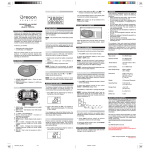
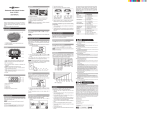
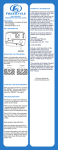
FRONT VIEW
Pedometer with PC download
Model: FB322
INDEX
Introduction .........................................................1
Overview .............................................................1
Front view.......................................................1
Back view – battery compartment ..................1
LCD screen ....................................................1
Getting started ....................................................2
Setting the device ...............................................2
Carrying the pedometer ......................................2
Important for accuracy....................................2
Calculate stride length....................................2
Switching between modes ..................................2
Daily mode ..........................................................3
Target mode........................................................3
Timer mode.........................................................3
Memory mode .....................................................3
View total weekly records...............................3
View daily records ..........................................4
Connecting to your pc .........................................4
Software Functions .............................................4
Battery replacement............................................4
Water resistance .................................................4
Specifications......................................................4
Precautions .........................................................4
EU declaration of conformity ...............................5
INTRODUCTION
TM
Thank you for selecting the Fitbug Pedometer
with PC download (FB322). This unique product
is ideal for monitoring your exercise routine. The
pedometer counts the number of steps taken
from one location to another, calculating the total
distance covered and calories expended. This
information can be downloaded onto your PC
using our specially designed software.
1.
2.
3.
+: increase value of the setting;
setting option; toggle displays
MODE/SET: toggle between modes;
confirm setting
-: decrease value of the setting;
setting option; reset pedometer;
through memory records
toggle
enter /
toggle
toggle
BACK VIEW – BATTERY COMPARTMENT
1.
2.
3.
Belt clip
Battery compartment
USB connection port
LCD SCREEN
Please keep this manual handy as you use your
new product. It contains practical step-by-step
instructions, as well as technical specifications
and warnings you should know.
IMPORTANT The measurement functions built
into the FB322 are not meant to substitute
professional measurement or industrial precision
devices. Values produced by this device should
be considered as reasonable representations
only.
1.
2.
3.
4.
: target mode is displayed
: timer mode is displayed; stopwatch is
running
: alarm is activated
: minutes and seconds
5.
6.
7.
8.
Steps, distance, calories, clock, alarm,
stopwatch and user profile units
Memory mode is displayed
Bar shows the weekday for which the data
relates to and target status
Dot matrix shows various icons to indicate
the mode / display you are in
USER
PROFILE
TARGET
Weight unit + weight
Gender
Age
Stride unit + stride length
Step
Distance
Calories
Count-up
Countdown
GETTING STARTED
TIMER
Pull out the insulation tape away from battery
compartment to activate pedometer for the first
time. Pedometer will prompt you to set the clock
and user profile. (Go directly to “Setting the
device” section, step 3).
* To silence the alarm sound, press any button.
NOTE
•
To ensure accurate calculations with your
exercise, you are strongly recommended to
set the pedometer and user profiles.
•
Remember to set the profiles after every
battery replacement or reset.
CARRYING THE PEDOMETER
Attach the pedometer to your belt or training
attire at waist level. Secure it in a horizontal
position. Improper positioning may result in
incorrect data collection.
SETTING THE DEVICE
If the device is being activated for the first time or
after battery change, the unit will automatically
prompt you to do initial set up. (Go directly to
step 3).
For normal setting procedures:
1. Press MODE/SET to navigate to desired
settings.
• Extra step for entering alarm mode: once
inside clock setting mode, press + to
toggle to alarm mode.
2. Press and hold MODE/SET to enter desired
option.
3. Press +/- to change values and then
MODE/SET to confirm.
4. Repeat step 3 for all options within that
setting.
IMPORTANT FOR ACCURACY
The following conditions may cause incorrect
reading of steps taken:
1. Uneven walking pace, such as walking in
crowded areas or on uneven floor.
2. Frequent up and down movements, such as
standing up and/or sitting down; running,
jumping or ascending/descending stairs or
steep slopes.
CALCULATE STRIDE LENGTH
Individual stride length varies.
Input an
appropriate length for an average stride. To
determine the average stride length, walk 10
paces and divide the distance traveled by 10.
Continue setting the other settings by repeating
steps 1-3.
Settings
CLOCK
Options (Press + or - and
MODE/SET to confirm)
12/24 hour format
Hour
Minute
Day of the week
ALARM*
Hour
(press + to Minute
toggle)
On/Off
SWITCHING BETWEEN MODES
Press MODE/SET to switch between the 6
operation modes:
•
Daily
•
Target
•
Timer
•
Memory (7-day)
•
•
User Profile
Clock
DAILY MODE
4.
5.
Press + to change the display from the EFT
to show the remaining steps, distance or
calories left until target is reached.
When target walk is complete, FINISH will
appear and a beep will sound.
To view the step, distance and calorie display:
1. Press MODE/SET to navigate to daily mode.
2. Press + to switch between the 3 displays.
STEP
To reset target while in target mode (will also
clear daily records):
Press and hold -.
TIMER MODE
DISTANCE
When the timer is running, it will measure steps,
distance and calories. These measurements are
not linked to the daily measurements and are
only related to the time spent walking while the
timer is on.
To set timer:
1. Press MODE/SET to navigate to timer mode.
CALORIE
TARGET MODE
2.
3.
Once the target has been set (refer to “Setting
the device” section above), you can start using
this function.
To use target:
1. Press MODE/SET to navigate to target mode.
2. Start walking to activate the pedometer. The
“GO!” screen will appear to confirm that the
unit is starting to monitor your progress.
Press and hold MODE/SET to enter.
Press +/- to select countdown or count-up
timer and press MODE/SET to confirm.
•
Extra step for countdown timer: Press
+/- to set the hr:min:sec and then
MODE/SET to confirm.
To use timer:
•
Press – to start / stop the timer.
•
Press and hold – to reset the timer.
•
Press + repeatedly to view timer, step,
distance and calorie.
NOTE When you are in the timer display,
will
show. While timer is on, if you press MODE/SET
will flash to indicate
and enter another mode,
timer is still running.
3.
While you are walking, the Estimated Finish
Time (EFT) will periodically appear to advise
you how long it will take to complete your
target, based on your current pace.
NOTE The target bar will move from left to right
(start to finish) to show your progress.
MEMORY MODE
The pedometer has a 7-day memory function.
You can view total weekly or daily step, distance
and calorie records.
VIEW TOTAL WEEKLY RECORDS
1.
Press MODE/SET to navigate to memory
mode.
NOTE If connection is interrupted, please remove
the USB cable from your PC and re-insert.
SOFTWARE FUNCTIONS
2.
Press + to toggle between the total weekly
step, distance and calorie display.
VIEW DAILY RECORDS
1.
2.
Press MODE/SET to navigate to memory
mode.
Press – repeatedly until you reach the day
you wish to view.
A screen will appear informing you if you reached
that day’s target or not:
Number of steps
walked
Target achieved
(high pitched
beep)
Number of steps
walked
Target not
achieved
(low pitched
beep)
3.
Press + to view other data for that particular
day (step, distance and calorie).
IMPORTANT At midnight all accumulated daily
data will be stored for a period of 7 days.
Therefore, memory that has been stored for 7
days will be replaced with new data.
NOTE The bar at the bottom indicates which
day’s memory record is being displayed.
For detailed information on the function of the
TM
Fitbug bug manager software, please refer to
fitbug.com.
BATTERY REPLACEMENT
The FB322 uses 1 x CR2032 battery which has
already been installed.
appears when the battery is low and needs
replacing.
To replace battery:
1. Slide open the battery compartment cover.
2. Remove the old battery and insert a new
battery.
3. Replace battery compartment cover.
WATER RESISTANCE
The FB322 is splash proof only.
SPECIFICATIONS
Step counter
Distance
Stride
distance
Calorie
Body weight
range
Power
Operating
temperature
Storage
temperature
0 – 99,999 steps
0 - 999.99 km / miles
28 -152 cm
(11 – 60 in)
0.1 – 9999.9 kcal
29 – 154 kg
(64 – 340 lbs)
1x CR2032 lithium battery
-10 °C to 50 °C
(14 °F to 120 °F)
-15°C to 70 °C
(1 °F to 158 °F)
PRECAUTIONS
To clear all records while in memory mode:
Press and hold-.
CONNECTING TO YOUR PC
Data can be transferred to a PC directly from the
pedometer.
To connect the pedometer to a PC:
1. Insert the USB cable provided into your PC.
2. Lift the soft cover of the USB port on the
pedometer.
3. Insert the USB cable into the port of the
pedometer.
When connected, “PC” will appear on the LCD
screen.
To ensure you use your product correctly and
safely, read these warnings and the entire user
manual before using the product:
•
Use a soft, slightly moistened cloth. Do not
use abrasive or corrosive cleaning agents,
as these may cause damage. Use luke
warm water and mild soap to clean the unit
thoroughly after each training session. Never
use the products in hot water or store them
when wet.
•
Do not subject the product to excessive force,
shock, dust, temperature changes, or
humidity. Never expose the product to direct
sunlight for extended periods. Such
treatment may result in malfunction.
•
Do not tamper with the internal components.
Doing so will terminate the product warranty
•
•
•
•
•
•
•
•
•
•
and may cause damage. The main unit
contains no user-serviceable parts.
Do not scratch hard objects against the LCD
display as this may cause damage.
Take precautions when handling all battery
types.
Remove the batteries whenever you are
planning to store the product for a long
period of time.
When replacing batteries, use new batteries
as specified in this user manual.
The product is a precision instrument. Never
attempt to take this device apart. Contact the
retailer or our customer service department if
the product requires servicing.
Do not touch the exposed electronic circuitry,
as there is a danger of electric shock.
Check all major functions if the device has
not been used for a long time. Maintain
regular internal testing and cleaning of your
device. Have your watch serviced by an
approved service center annually.
When disposing of this product, ensure it is
collected separately for special treatment
and not as normal household waste.
Due to printing limitations, the displays
shown in this manual may differ from the
actual display.
The contents of this manual may not be
reproduced without the permission of the
manufacturer.
NOTE The technical specifications for this
product and the contents of the user manual are
subject to change without notice.
NOTE Features and accessories will not be
available in all countries. For more information,
please contact your local retailer.
EU DECLARATION OF CONFORMITY