1
VIVOTEK
Installation
Hardware Installation
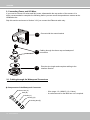
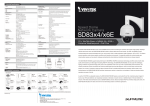
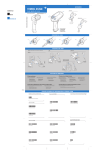
1. Connecting RJ45 Ethernet Cable
RJ45 Cable Dimension (unit: mm)
Use CAT5e cables only.
Components of the Waterproof
Connector
Sealing Nut (A)
Seal (B)
Screw Nut (C)
Housing (D)
Gasket (E)
100
Assembling Steps
1
Prepare an Ethernet cable
and strip part of the sheath.
2
Insert the housing into the
screw nut.
(C)
3
(D)
Insert the seal into the housing.
(B)
Recommended cable gauge: O.D. 5.5~7
4
Insert the stripped Ethernet
cable through the sealing nut
and the housing.
5
Clamp the cable with
an RJ45 plug.
6
Push the RJ45 plug into
the housing, then secure
the sealing nut tightly.
(A)
7
Attach the gasket to the
front of the housing.
8
Connect the Ethernet cable to the RJ45 cable and secure
the connectors tightly.
(E)
User's Manual - 9