1
IR illuminator (AI-101) Quick Installation Guide
2012/04/05
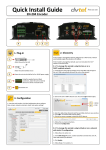
Step 15:
a. Once you complete the steps above, attach the
camera to the stand plate and fix it on the wall
(as shown on the left).
3. Setting
Step 1:
a. As shown in the QIG (User’s Manual), log on to the
homepage.
b. Enter ”Configuration”, then click “Advanced mode.”
c. Enter ”Audio and video” setting page.
d. Unfold ”Day/Night settings:”, check
and save
the setting, then in the night mode, the AI-101
should be activated.
6
V1.0