1
(PC Connection Manual)
Viewing Your Digital
Camera Images
On Your PC
Introduction
This booklet explains how to view the images you took with the
PENTAX Optio S4i on your PC. Keep this manual in a safe place.
Regarding copyrights
Images taken using the Optio S4i that are for anything other than personal
enjoyment cannot be used without permission according to the rights as
specified in the Copyright Act. Please take care, as there are even cases
where limitations are placed on taking pictures even for personal enjoyment
during demonstrations, industrial enterprise or as items for display. Images
taken with the purpose of obtaining copyrights also cannot be used outside
the scope of use of the copyright as laid out in the Copyright Act, and care
should be taken here also.
Regarding trademarks
• The SD logo
is a trademark.
• PENTAX is a trademark of PENTAX Corporation.
• Optio is a trademark of PENTAX Corporation.
• All other brands or product names are trademarks or registered
trademarks of their respective companies.
• Apple, the Apple logo, AppleScript, the Apple Store, Mac, the Mac logo,
Mac OS, Macintosh, and QuickTime are trademarks of Apple Computer,
Inc., registered in the U.S. and other countries.
• This product supports PRINT Image Matching II.
When used in combination, PRINT Image Matching II enables digital still
cameras, printers and software help photographers to produce images
more faithful to their intentions.
Copyright 2001 Seiko Epson Corporation. All Rights Reserved.
PRINT Image Matching is a trademark of Seiko Epson Corporation.
• “PictBridge” allows the user to connect the printer and digital camera
directly, using the unified standard for the direct printout of images. You
can print images directly from the camera through a few simple operations.
• Symbols used in this manual have the following meanings:
1
Gives page numbers explaining related operations.
Gives information that is useful to know.
Gives cautions and notes about the operation.
The PC screenshots in this booklet may differ from your PC, depending on
your model.
Contents
How to Use the Captured Images
2
Viewing Digital Camera Images on a Windows PC
4
System Requirements ............................................................... 4
Installing the Software............................................................... 6
Copying Images to your PC ...................................................... 9
Disconnecting the Camera from your PC .............................. 14
Viewing Digital Camera Images on a Macintosh
16
System Requirements ............................................................. 16
Installing the Software............................................................. 17
Installing ACD Photostitcher .................................................. 20
Copying Images to your Macintosh ....................................... 21
Disconnecting the Camera from your Macintosh ................. 22
About ACDSee for PENTAX
23
Launching ACDSee for PENTAX ............................................ 23
Viewing Using the Browser
24
About the Browser ................................................................... 24
Viewing Images in Other Folders ........................................... 28
Sorting Image Files .................................................................. 29
Setting Detailed Display Categories....................................... 30
Viewing a Large Version of an Image (Viewer)
31
About the Viewer...................................................................... 31
Panorama Image Stitching with ACD Photostitcher
33
Panorama Image Stitching on a Windows PC....................... 33
Panorama Image Stitching on a Macintosh........................... 36
Printing an Image
39
Printing from the Browser....................................................... 39
Printing from the Viewer.......................................................... 39
Creating and Printing Contact Sheets ................................... 40
E-mailing your Images from ACDSee for PENTAX
41
About ACDInTouch
42
1
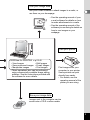
How to Use the Captured Images
Here are some ways to use the images captured with your digital camera.
Direct Print
Connect your camera and a printer that
is compatible with "PictBridge" directly
with the USB cable, and print images.
1Camera Operating Manual (p.103)
View images on a TV
Connect your camera and TV with
the AV cable and display images
on the TV.
1Camera Operating Manual (p.99)
Use your photo shop
Have prints made from your
card images at a photo shop.
• Set DPOF settings on your
camera, and get prints from
your photo shop.
1Camera Operating Manual
(p.100)
• Select the images for prints.
2
Is your computer…
• equipped with a standard USB interface?
• using Windows 98/98 SE/Me/2000/XP as
your OS? Or Mac OS 9.0-9.2/10.1 or later?
Connect your camera
and computer with the
USB cable, and copy
the camera images.
Is your computer…
• using Windows 95/NT,
Mac OS 8.6
Transfer your images using
a built-in card slot + PC card
adapter or a card reader.
• Remove the card from the
camera. When transferring
images on the card to a PC
with another device, make
sure to review the user
manual accompanying
that device.
Use your image data
Use your e-mail software to attach images to e-mails, or
use them on your homepage.
• See the operating manual of your
e-mail software for details on how
to make attachments to e-mails.
• See the operating manual of the
software you are using for details on
how to use images on your
webpage.
Use your printer
ACDSee for PENTAX 1p.23-42
• View Images
• Edit Images
• Save processed images • E-mail Images
• Manipulate images
• Print images
• These operations also can be performed
using commercially available image editing
software. See the instructions provided with
the software for more details.
Print images from your
computer to your printer.
Some printers can print
directly from cards.
• For details, see the
operating manual of the
printer you are using.
Save your image data
Images sent to the computer can be
saved onto a CD-R or other media.
3
Viewing Digital Camera Images on a
Windows PC
You can use the provided USB cable (I-USB7) or a card reader to
transfer your digital camera’s images to the PC, and you can edit and
print your images using the image viewing software. Here, the
method for viewing images with the provided software (S-SW20) is
explained.
Software Provided
The following software is included in the CD-ROM (S-SW20)
provided.
• USB driver
• Image viewing / editing software (ACDSee for PENTAX)
• QuickTime
System Requirements
USB connection
• USB mass storage class
• USB 1.1
• OS: Windows 98 / 98 SE / Me / 2000
Windows XP Home Edition / Professional
• USB port must be standard equipment
Application Software
<ACDSee for PENTAX>
(9 languages: English, German, French, Spanish, Italian, Russian,
Chinese [traditional and simplified], Korean, Japanese)
• OS: Windows 98 / 98 SE / Me /
NT (latest version) / 2000
Windows XP Home Edition / Professional
• CPU: Pentium or higher recommended
• Memory:64MB minimum
• Hard Disk space:40MB minimum
4
• Display adapter capable of displaying a minimum of 256
colors
• Internet Explorer 4.0.2 or later
* Some formats may require viewing with QuickTime 6.0 or later and
DirectX 8.0 or later.
* To install ACDSee for PENTAX, Windows Installer Service
Version 2.0 may be required.
i
You can download DirectX and Windows Installer Service from
the following website.
http://www.microsoft.com/windows/directx
http://www.microsoft.com/windows2000/techinfo/
howitworks/management/installer.asp
<QuickTime>
(6 languages: English, German, French, Spanish, Italian, Japanese)
• OS: Windows 98 / 98 SE / Me /
NT (latest version) / 2000
Windows XP Home Edition / Professional
• CPU: Pentium or higher recommended
• Memory:128MB minimum
* Operation is not guaranteed on all PCs meeting the system
requirements.
You may play moving pictures using the provided software
[ACDSee for PENTAX] (QuickTime 6.0 or later required).
• The software cannot be used on Windows 95.
• We recommend using the AC Adapter D-AC8 (optional) when
connecting your camera to your PC. Your image data could be
corrupted if your batteries run out during image transfer.
5
Installing the Software
The procedures for installing the necessary software are explained.
If you are using Windows 2000 or Windows XP, please login as an
administrator user before starting installation. Refer to your PC’s
operating manual for instructions on how to login.
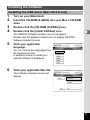
Installing the USB Driver
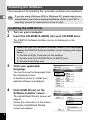
1
2
Turn on your computer.
Insert the CD-ROM (S-SW20) into your CD-ROM drive.
The PENTAX Software Installer screen is displayed on the
desktop.
• When the PENTAX Software Installer screen is not displayed
Display the PENTAX Software Installer screen following the steps
below.
1) Double-click [My Computer] on the desktop.
2) Double-click the [CD-ROM Drive (S-SW20)] icon.
3) Double-click [Setup.exe].
3
Click your applicable
language.
You can choose the languages from
the displayed screen.
A selection screen to install your
desired software is displayed.
4
Click [USB Driver] on the
Software Installer screen.
The InstallShield Wizard screen will
appear.
Follow the instruction on the screen.
Complete InstallShield Wizard
screen will appear.
6
5
Click [Finish].
Reboot your computer after the screen closes.
6
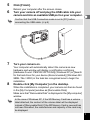
Turn your camera off and plug the USB cable into your
camera and into an available USB port on your computer.
Confirm that the USB Connection mode is set to [PC] before
connecting the USB cable. (1p.9)
7
8
Turn your camera on.
Your computer will automatically detect the camera as new
hardware and window will display a notification confirming
[Hardware Found : PENTAX OPTIO S4i] (Windows XP) or [Search
for the best driver for your device (Recommended)] (Windows 98 /
98SE / Me / 2000) in the task bar recognized area to begin the
installation.
Double-click [My Computer] on the desktop.
When the installation is completed, your camera can then be found
in the [My Computer] window as [Removable Disk].
Make sure that “Removable Disk” is displayed in the [My computer]
window.
In the case of Windows XP, if the SD Memory Card has a volume
label attached, the content of the volume label will be displayed
instead of [Removable Disk]. If the SD Memory Card is new and has
not been formatted, the manufacturer and capacity of the card may
be displayed.
7
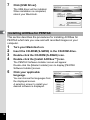
Installing the image processing software (ACDSee for PENTAX)
This section describes the procedures for installing ACDSee for PENTAX
which lets you view and edit recorded images on your computer.
If you are using Windows 2000 or Windows XP, please login as an
administrator user before starting installation. Refer to your PC’s
operating manual for instructions on how to login.
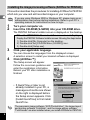
1
2
Turn your computer on.
Insert the CD-ROM (S-SW20) into your CD-ROM drive.
The PENTAX Software Installer screen is displayed on the desktop.
• When the PENTAX Software Installer screen is not displayed
Display the PENTAX Software Installer screen following the steps below.
1) Double-click [My Computer] on the desktop.
2) Double-click the [CD-ROM drive (S-SW20)] icon.
3) Double-click [Setup.exe].
3
4
Click your applicable language.
You can choose the languages from the displayed screen.
A selection screen to install your desired software is displayed.
Click [ACDSee™].
The Setup screen will appear.
Follow the on-screen guidance and
enter the registration information.
Reboot your PC after installation is
finished.
• If QuickTime or later is not
already installed in your PC, a
message such as the one shown
on the right is displayed before
the Setup screen appears. Click
[Install QuickTime] to first install
QuickTime.
The panoramic image software “ACD Photostitcher”, the image layout
and printing software “FotoSlate”, and the image editing software
“FotoCanvas” are also installed when you install ACDSee for PENTAX.
8
Product Registration on the Internet
Please click [Product Registration] on
the CD-ROM screen in step 4 on page 6
of this PC manual.
A world map for Internet Product
Registration is displayed.
If your PC is connected to the Internet,
click the displayed country or region and
then follow the instructions to register
your product.
Thank you very much for your cooperation.
Only customers in displayed countries and regions can register their
products on the Internet Product Registration.
Copying Images to your PC
An explanation of how to display/copy images using ACDSee for
PENTAX is shown below.
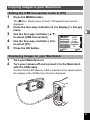
Setting the USB Connection mode to [PC]
1
Press the MENU button.
The [A Rec. Mode] menu or the [Q Playback] menu will be
displayed.
2
Press the four-way controller (5) to display [B Set-up]
menu.
9
3
Use the four-way controller (23)
to select [USB Connection].
4
Use the four-way controller (45)
to select [PC] .
5
Press the OK button.
Set-up
Video Out
NTSC
1 min
Sleep Timeout
3 min
Auto Power Off
Custom Function EV Compensation
Quick Button Green mode
PC
USB Connection
MENU
Exit
OK
OK
Copying Images to your PC
1
2
Turn your computer on.
Turn your camera off and connect it to the PC with the
USB cable.
Confirm that the SD Memory Card is inserted in the camera when
the images in the SD Memory Card are copied.
3
Turn your camera on.
The Device Detector screen is displayed automatically.
If the Device Detector screen is not displayed, display / copy the
images following the steps in “When the Device Detector screen is
not displayed” on page 12.
10
4
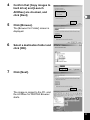
Confirm that [Copy images to
hard drive] and [Launch
ACDSee] are checked, and
click [Next].
5
Click [Browse].
The [Browse For Folder] screen is
displayed.
6
Select a destination folder and
click [OK].
7
Click [Next].
The image is copied to the PC, and
the ACDSee for PENTAX Browser
starts.
11
When the Device Detector screen is not displayed
12
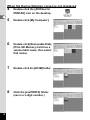
4
Double-click the [ACDSee for
PENTAX] icon on the desktop.
5
Double-click [My Computer].
6
Double-click [Removable Disk]
(If the SD Memory Card has a
volume label name, then select
that name).
7
Double-click the [DCIM] folder.
8
Click the [xxxPENTX] folder.
(xxx is a 3-digit number.)
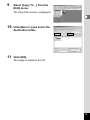
9
Select [Copy To…] from the
[Edit] menu.
The Copy Files screen is displayed.
10
Click [More>>] and select the
destination folder.
11
Click [OK].
The image is copied to the PC.
13
Disconnecting the Camera from your PC
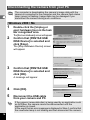
The computer is downloading the camera’s image data with the
camera is connected to the computer and the camera flash status
lamp (green) is flashing. Image data may be damaged if you
disconnect the camera during such conditions.
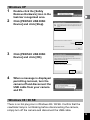
Windows 2000 / Me
1
2
Double-click the [Unplug or
eject hardware] icon in the task
bar recognized area.
The [Remove Hardware] screen will appear.
Confirm that [PENTAX USB
DISK Device] is selected and
click [Stop].
The [Stop Hardware Device] screen
will appear.
3
Confirm that [PENTAX USB
DISK Device] is selected and
click [OK].
A message will appear.
4
Click [OK].
5
Disconnect the USB cable
from your camera and PC.
If the camera (removable disc) is being used by an application such
as ACDSee, the camera cannot be disconnected until the
application is closed.
In the event that an error message is displayed in Step 4, confirm that
the viewfinder lamp is not blinking and then disconnect the camera.
14
Windows XP
1
Double-click the [Safely
Remove Hardware] icon in the
task bar recognized area.
2
Click [PENTAX USB DISK
Device] and click [Stop].
3
Click [PENTAX USB DISK
Device] and click [OK].
4
When a message is displayed
permitting removal, turn the
camera off and disconnect the
USB cable from your camera
and PC.
Windows 98 / 98 SE
There is no hot plug icon in Windows 98 / 98 SE. Confirm that the
viewfinder lamp is not blinking before disconnecting the camera,
simply turn off the camera and disconnect the USB cable.
15
Viewing Digital Camera Images on a
Macintosh
You can use the provided USB cable (I-USB7) or a card reader to
transfer your digital camera’s images to the Mac, and you can edit
and print your images using the image viewing/editing software.
Here, the method for viewing images with the provided software
(S-SW20) is explained.
Software Provided
The following software is included in the CD-ROM (S-SW20) provided.
• Image viewing / editing software (ACDSee for PENTAX)
• USB driver
System Requirements
USB connection
•
•
•
•
USB mass storage class
USB 1.1
OS: Mac OS 8.6 or higher
Installation of the driver is necessary for Mac OS 8.6
Application Software
<ACDSee for PENTAX and ACD Photostitcher>
(6 languages: English, German, French, Spanish, Italian, Japanese)
• OS: Mac OS 8.6 or higher
(requires the latest version of CarbonLib)
• CPU: Power Macintosh 266MHz or higher
• Memory:8MB minimum
• Hard Disk space:6MB minimum
• QuickTime 4.0 or higher
Moving Pictures
• AVI (Motion JPEG) compliant
• You may play moving pictures taken using the provided
software [ACDSee for PENTAX] (QuickTime required).
We recommend using the AC Adapter D-AC8 (optional) when
connecting your camera to your PC. Your image data could be
corrupted if your batteries run out during image transfer.
16
Installing the Software
Installing the USB driver (Mac OS 8.6 only)
1
2
Turn on your Macintosh.
3
4
Double-click the [CD-ROM (S-SW20)] icon.
Insert the CD-ROM (S-SW20) into your Mac’s CD-ROM
drive.
Double-click the [Install ACDSee] icon.
The PENTAX Software Installer screen will appear.
Double-click the [Master Installer] icon to display [PENTAX
Software Installer] screen.
5
Click your applicable
language.
You can choose the languages from
the displayed screen.
A selection screen to install your
desired software is displayed.
6
Click your applicable Mac OS.
The software selection screen will
appear.
17
7
Click [USB Driver].
The USB driver will be installed.
When installation is completed,
reboot your Macintosh.
Installing ACDSee for PENTAX
This section describes the procedures for installing ACDSee for
PENTAX which lets you view and edit recorded images on your
computer.
1
2
3
4
Turn your Macintosh on.
Insert the CD-ROM (S-SW20) in the CD-ROM drive.
Double-click the CD-ROM (S-SW20) icon.
Double-click the [Install ACDSee™] icon.
The PENTAX Software Installer screen will appear.
Double-click the [Master Installer] icon to display [PENTAX
Software Installer] screen.
5
Click your applicable
language.
You can choose the languages from
the displayed screen.
A selection screen to install your
desired software is displayed.
18
6
Click your applicable Mac OS.
The software selection screen will
appear.
7
Click [ACDSee™].
The setup screen will appear.
Follow the on-screen guidance to
input registration information and
install the software.
If the message [CarbonLib-xxxxx could not be found] is displayed
during installation, you must add the function expansion file called
“CarbonLib” to the function expansion folder in the system folder in
order to install the provided software in Mac OS 8.6 - 9.2.
This error message is appeared when this function expansion file is
not present or when an old version of the file is present.
The latest version of the Carbon Lib is available on the Apple
website. Download the file and then install it onto Mac OS.
Apple website: http://www.Apple.com
*Contact Apple for detailed information on how to use CarbonLib.
19
Installing ACD Photostitcher
This section describes the procedures for installing ACD
Photostitcher which lets you join a number of images together to
form a panorama picture.
1
Double-click
[ACD Photostitcher].
The licensing agreement will appear
on the screen. When you have read
it, click [Agree] to accept the terms of
the agreement.
2
Choose a destination for the
software and click [Install].
Installation starts. When the
message appears telling you that
the software has been successfully
installed, click [Quit].
Product Registration on the Internet
Please click [Product Registration] on
the CD-ROM screen in step 7 on page
19 of this PC manual.
A world map for Internet Product
Registration is displayed.
If your PC is connected to the Internet,
click the displayed country or region and then follow the instructions
to register your product.
Thank you very much for your cooperation.
Only customers in displayed countries and regions can register their
products on the Internet Product Registration.
20
Copying Images to your Macintosh
Setting the USB Connection mode to [PC]
1
Press the MENU button.
The [A Rec. Mode] menu or the [Q Playback] menu will be
displayed.
2
Press the four-way controller (5) to display [B Set-up]
menu.
3
Use the four-way controller (23)
to select [USB Connection].
4
Use the four-way controller (45)
to select [PC] .
5
Press the OK button.
Set-up
Video Out
NTSC
1 min
Sleep Timeout
3 min
Auto Power Off
Custom Function EV Compensation
Quick Button Green mode
PC
USB Connection
MENU
Exit
OK
OK
Displaying images on your Macintosh
1
2
Turn your Macintosh on.
Turn your camera off and connect it to the Macintosh
with the USB cable.
Confirm that the SD Memory Card is inserted in the camera when
the images in the SD Memory Card are displayed.
21
3
Turn your camera on.
The camera is recognized as [untitled] ([NO_NAME] in
Mac OS X) on the desktop. The folder name can be
changed.
4
5
Double-click the [ACDSee™] folder on the desktop.
Double-click the [ACDSee™] program icon.
An image list (Browser) is displayed.
6
Open the camera folder.
The camera images are in the [untitled] (or volume label name if
the SD Memory Card has one) → [DCIM] → [XXXPENTX] (XXX is
a three-digit number) folder.
An image list of the camera is displayed.
7
Select the image to view from the image list.
Double-click the image you selected. A full-size image is displayed
(Viewer).
If the SD Memory Card has a volume label, the volume label name
will be displayed instead of “untitled”. A new SD Memory Card
unformatted may show the manufacturer name or model number.
Copying images to your Macintosh
See your Macintosh user’s manual for how to copy or move files.
Please copy images to your Macintosh before editing them.
Disconnecting the Camera from your Macintosh
22
1
Drag [untitled] (or the volume label name on the SD
Memory Card) to your trash.
2
Disconnect the USB cable from your camera and your
Macintosh.
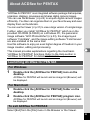
About ACDSee for PENTAX
“ACDSee for PENTAX” is an integrated software package that acquires,
organizes, displays, processes and shares digital camera images.
You can use the Browser (1p.24) to acquire digital camera images
efficiently. You then can organize them in your favorite way and even
display them as thumbnails.
You can use the Viewer (1p.31) to view a large version of a single image.
Further, when you install “ACDSee for PENTAX” which is on the
provided CD-ROM (S-SW20) on a Windows PC, the panoramic
image software “ACD Photostitcher”(1p.33), the image layout
software “FotoSlate”, and the image editing software “FotoCanvas”
are also installed at the same time.
Use this software to enjoy an even higher degree of freedom in your
image creation, editing and processing.
This manual provides explanations regarding the most basic
“ACDSee for PENTAX” functions. Refer to the Help section in
“ACDSee for PENTAX” for detailed information.
Launching ACDSee for PENTAX
For Windows
1
Double-click the [ACDSee for PENTAX] icon on the
desktop.
ACDSee for PENTAX will launch and an image list (Browser) will
be displayed.
For Macintosh
1
2
Double-click the [ACDSee for PENTAX] folder on the
desktop.
Double-click the [ACDSee for PENTAX] program icon.
ACDSee for PENTAX will launch and an image list (Browser) will
be displayed.
To exit ACDSee for PENTAX
Select [Exit] from the [File] menu in the Browser or the Viewer.
23
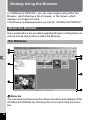
Viewing Using the Browser
In “ACDSee for PENTAX”, you can view images using either the
Browser, which displays a list of images, or the Viewer, which
displays one image at a time.
The Browser is displayed when you launch “ACDSee for PENTAX.”
About the Browser
Here, explanations are provided regarding Browser configuration as
well as names and functions within the Browser.
For Windows
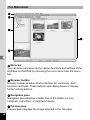
c
d
g
h
e
i
f
j
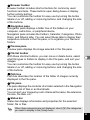
c Menu bar
You can select and execute the various functions and settings of the
ACDSee for PENTAX by choosing the menu items from the menu
bar.
24
d Browser toolbar
Browser toolbar includes shortcut buttons for commonly used
functions and tools. These buttons open dialog boxes or display
further activity buttons.
You can customize the toolbar for easy use by turning the button
labels on or off, adding or removing buttons, and changing the size
of the buttons.
e Navigation pane
Navigation pane displays a folder tree of the folders on your
computer, extra drive, or peripheral device.
Navigation pane includes the Folders, Calendar, Categories, Photo
Discs, and Albums tabs. You can select these tabs to display their
respective contents in the File pane, or to organize your files and
folders.
f Preview pane
Preview pane displays the image selected in the File pane.
g File list toolbar
With these shortcut buttons, you can move or delete items, select
what file types or folders to display in the File pane, and sort your
images.
You can customize the toolbar for easy use by turning the button
labels on or off, adding or removing buttons, and changing the size
of the buttons.
h Path box
Path box describes the location of the folder of images currently
displayed in the File pane.
i File pane
File pane displays the contents of a folder selected in the Navigation
pane as a list of files or as thumbnails.
You can sort your images by such criteria as file name, file extension,
file size, file date, etc.
j Status bar
Status bar displays information and properties for the selected
folder, file or files.
When these categories are not displayed, check (
you want to display in the [View] menu.
) the categories
25
For Macintosh
c
d
e
g
f
c Menu bar
You can select and execute the various functions and settings of the
ACDSee for PENTAX by choosing the menu items from the menu
bar.
d Browser toolbar
Browser toolbar includes shortcut buttons for commonly used
functions and tools. These buttons open dialog boxes or display
further activity buttons.
e Navigation pane
Navigation pane displays a folder tree of the folders on your
computer, extra drive, or peripheral device.
f Preview pane
Preview pane displays the image selected in the File pane.
26
g File pane
File pane displays the contents of a folder selected in the Navigation
pane as a list of files or as thumbnails.
You can sort your images by such criteria as file name, file size, file
date, etc.
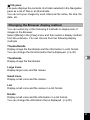
Changing the Browser display method
You can select any of the following 6 methods to display lists of
images in the Browser.
Select [Mode] in the [View] menu and then select a display method
from the submenu. You can choose from the following display
methods.
Thumb+Details
Display image file thumbnails and file information in a list format.
You can change the file information that is displayed. (1p.30)
Thumbnails
Display image file thumbnails.
Large Icons
Display large icons and file names.
Small Icons
Display small icons and file names.
List
Display small icons and file names in a list format.
Details
Display small icons and file information in a list format.
You can change file information that is displayed. (1p.30)
27
Viewing Images in Other Folders
To view images stored in other folders, select a folder from the folder
tree in the Browser Navigation pane or directly specify a folder in the
path box.
Selecting a different folder in the folder tree
Folders selected from the folder tree are designated as the current
folder and images from that folder are displayed in the File pane.
To display a subfolder
is displayed next to the folder icon of folders that contain
subfolders. Click
to display the subfolders.
is displayed next to
folders when subfolders are displayed. Click
to hide the subfolders.
Use the buttons on the Browser toolbar to select a
different folder.
You can view the contents of the folder one level above the current
folder by clicking
in the Browser toolbar.
You can view the contents of the folder displayed prior to the current
folder by clicking
in the Browser toolbar.
Click
to return to the folder displayed before you used
in the
Browser toolbar to change the displayed folder.
Specifying a different folder using the Path box
Select [Path Box] from the [View] menu to display the path box in the
File pane. Directly enter in the path box the path of the folder
containing images you want to view. Images in that folder are
displayed in the File pane.
Also, click
to the right of the path box to display a dropdown list
containing a history of recently used folders. Select from the list a
folder with images you want to view. Images from that folder are
displayed in the File pane.
28
Sorting Image Files
You can change the order of image files displayed in the File pane.
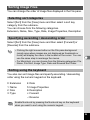
Selecting sort categories
Select [Sort] from the [View] menu and then select a sort key
category from the submenu.
You can choose from the following categories.
Extension, Name, Size, Type, Date, Image Properties, Description
Specifying ascending / descending order
Select [Sort] from the [View] menu and then select [Forward] or
[Reverse] from the submenu.
• Clicking the right mouse button on the File pane background
(empty area where images are not displayed as thumbnails or
icons) will display the menu in the location of the cursor. You can
use the same step to rearrange the menus.
• For Macintosh, you can choose from the following categories: File
Name, File Size, Image Type, Date and Reverse Sort Order.
Sorting using the keyboard
You also can sort image files and specify ascending / descending
order using the numeric keypad on the keyboard.
0: Extension
1: Name
2: Size
3: Type
4: Date
5: Image Properties
6: Description
+: Forward
–: Reverse
Enable NumLock by pressing the NumLock key on the keyboard
when you want to sort using the numeric keypad.
29
Setting Detailed Display Categories
You can specify items displayed in the list as well as change the
category order when the File pane is set to Details display.
Settings display categories
Select [Columns] from the [View] menu and then select a display
category from the submenu.
You can choose the following categories from the submenu.
Size, Type, Date, Image Properties, Description
Select another categories to remove checks when you do not want
to display details.
Clicking the right mouse button on the file list row header (portion
where name, size, and other categories are written) will display the
menu. You can use the same step to set the display categories.
Adjusting the width of display category rows
You can adjust the row width to match the amount of text for each
item displayed in the list. Align the cursor with the edge of the row
header. Click on the edge when the cursor changes to a left-right
arrow head and drag the edge to adjust the row width.
Double-clicking the left mouse button on the row header separator
will automatically adjust the row width to match the length of the list
text.
30
Viewing a Large Version of an Image
(Viewer)
Double-click on a single image file selected in the Browser to display
a full-screen view of that image.
About the Viewer
Here, explanations are provided regarding Viewer configuration as
well as names and functions within the Viewer.
c
d
e
f
c Menu bar
You can select and execute the various functions and settings of the
ACDSee for PENTAX by choosing the menu items from the menu
bar.
31
d Viewer toolbar
Viewer toolbar includes shortcut buttons for commonly used
functions and tools such as the Zoom tools.
You can customize the toolbar for easy use by turning the button
labels on or off, adding or removing buttons, and changing the size
of the buttons.
e Viewer pane
Viewer pane displays your images one at a time in full resolution.
f Status bar
Status bar displays information and properties for the selected
folder, file or files.
When the viewer is displayed, you can close the viewer and switch
to the browser by performing any of the following.
• Click the
(close) button.
• Double-click on the viewer pane border.
• Press the [Esc] key on the keyboard.
32
Panorama Image Stitching with ACD
Photostitcher
With ACD photostitcher installed on a Windows PC, you can
panorama stitch the images you took in Panorama Assist mode.
The folder and image names displayed on the explanatory
screenshots will differ according to the setup of your PC.
• If you are using Windows 2000 or Windows XP, please login as an
administrator user before starting installation.
• Install ACD Photostitcher and ACDSee for PENTAX separately
when using a Macintosh.
• Panorama stitching cannot be performed on images of varying
save sizes.
Panorama Image Stitching on a Windows PC
1
Run ACDSee for PENTAX.
An image list is displayed.
2
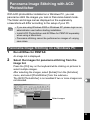
Select the images for panorama stitching from the
image list.
Press the [Ctrl] key on the keyboard while clicking on pictures to
select multiple images.
After selecting the images, select [Extras] from the [Activities]
menu, and select [PhotoStitcher] from the submenu.
The [ACD Photostitcher] is not enabled if two or more images are
not selected.
Select images
33
3
Correct the image positioning.
ACD photostitcher starts, and the selected images are displayed in
panorama format.
Move the mouse pointer onto the image. It changes into a e symbol.
Hold down the left mouse button and drag the images to adjust the
stitching position.
When the position is adjusted, click the [STITCH] button.
2 Click the
[STITCH] button.
1 Click and drag to
adjust position.
4
Select the stitching method.
You can choose the stitching method from [Big Plane] and [Cylinder].
Here, you will create a flat panorama. Click the [Big Plane] button.
A confirmation message is displayed. Click [OK].
Click [Big Plane].
• Click [OK] and continue if a screen like
the one shown left is displayed.
34
5
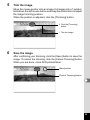
Trim the image.
Move the mouse pointer onto an image. It changes into a symbol.
Hold down the left mouse button and drag the dotted lines to adjust
the image trimming position.
When the position is adjusted, click the [Trimming] button.
2 Click the [Trimming]
button.
1 Trim the image.
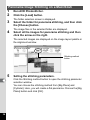
6
Save the image.
After confirming your trimming, click the [Save] button to save the
image. To cancel the trimming, click the [Cancel Trimming] button.
When you are done, close ACD photostitcher.
[Save] button
[Cancel Trimming] button
35
Panorama Image Stitching on a Macintosh
1
2
Run ACD Photostitcher.
Click the [Load] button.
The folder selection screen is displayed.
3
Select the folder for panorama stitching, and then click
the [Choose] button.
The image files in the selected folder are displayed.
4
Select all the images for panorama stitching and then
click the arrow on the right.
The selected images are displayed on the image layout palette in
the alignment window.
Stitching method
button
5
Setting the stitching parameters.
Click the Stitching method button to open the stitching parameter
selection window.
You can choose the stitching method from [Big Plane] and
[Cylinder]. Here, you will create a flat panorama. Choose the [Big
Plane] button and click [OK].
36
6
Click the [Automatic alignment] button.
The selected images are displayed in panorama format.
7
Correct the image positioning.
Click the image you want to move and display it in a red frame.
Hold down the mouse button and drag the image to adjust the
stitching position.
For easier adjustment of two images that are next to each other,
click the [Align 2 images] tab to enlarge the section where the
images overlap.
Hold down the mouse
button to adjust the
stitching position.
8
Click the [Stitch] button.
Stitching starts. When finished, the stitched picture is displayed.
37
9
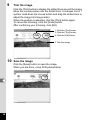
Trim the image.
Click the [Trim] button to display the dotted lines around the image.
Move the mouse pointer onto the dotted lines. It changes into a symbol. Hold down the mouse button and drag the dotted lines to
adjust the image trimming position.
When the position is adjusted, click the [Trim] button again.
To cancel the trimming, click the [Undo] button.
After confirming your trimming, click [OK].
1 Click the [Trim] button.
3 Click the [Trim] button.
4 Click the [OK] button.
2 Trim the image.
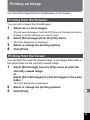
10
Save the image.
Click the [Save] button to save the image.
When you are done, close ACD photostitcher.
38
Printing an Image
You can print image files from the Browser or the Viewer.
Printing from the Browser
You can print images from the Browser.
1
Select one or more images.
To print several images, hold the [Ctrl] key on the keyboard while
clicking on all the pictures you want to print.
2
Select [Print Images] from the [File] menu.
The Print dialog box is displayed.
3
4
Select or change the printing options.
Click [Print].
Printing from the Viewer
You can print the currently viewed image, or all images that reside in
the same folder as the currently viewed image.
1
Select [Print Image] from the [File] menu to print the
currently viewed image.
or
Select [Print All Images] to print all images in the same
folder.
The Print dialog box is displayed.
2
3
Select or change the printing options.
Click [Print].
39
To insert the date and print images
You can insert the date into an image file
and print it. Date insertion settings are
done in the Print dialog box.
1
Select the [Caption] tab in the
Print dialog box.
2
Check the [Print image capture
date in the corner of images]
check box.
Creating and Printing Contact Sheets
You can create and print contact sheets (thumbnails) of your images.
You can add captions to each image, page headers and footers, and
control thumbnails size.
1
In the Browser, select a group of images.
Hold the [Ctrl] key on the keyboard while clicking on all the pictures
you want to print.
2
Select [Print Contact Sheet] from the [File] menu.
The Print Contact Sheet dialog box is displayed.
3
4
Select or change the printing options.
Click [OK].
For more information about creating and printing contact sheets,
click the Help button in the Print Contact Sheet dialog box.
40
E-mailing your Images from ACDSee for
PENTAX
You can send images directly from the ACDSee for PENTAX without
using an external e-mail application. Image files are converted to
JPEG format then attached to an e-mail and sent. Images are
compressed before transmission when the file size is large but no
changes are made to the original image.
E-mail account setup is required before e-mailing images. See the
ACDSee for PENTAX Help section for details.
E-mail function of ACDSee for PENTAX is not compatible with
Macintosh.
1
In the Browser, select an
image or a group of images.
To select several images, hold the
[Ctrl] key on the keyboard while
clicking on all the pictures you want
to send.
2
Select [Share] from the
[Activities] menu, then select
[E-mail].
The Send E-mail dialog box is displayed.
3
4
Input the required information.
Click [Send].
For more information about e-mailing your images, click the Help
button in the Send E-mail dialog box.
An error message may be displayed and you may not be able to
send mail if your mail server security is set to a high level.
41
About ACDInTouch
ACDInTouch is a service that provides the latest information about
ACDSee for PENTAX using the Internet. You can access the latest
news and TIPS as well as information related to special offers, free
digital imaging resources and more.
To connect to ACDInTouch
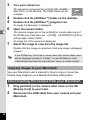
1
Select [ACDInTouch] from the [Help] menu.
The Connect to ACDInTouch dialog box is displayed.
2
Click [Connect Now].
About the ACDInTouch services
ACDInTouch is a data exchange service. When you connect,
information is sent to you so that you can read up-to-date information
directly in the ACDInTouch pane. This information is relevant to your
product, such as upgrades, add-ons and related software from ACD
Systems that may also be of interest to you.
For information on ACD Systems’ Privacy Policy, visit Web site at:
http://www.ACDSYSTEMS.com/english/company/privacy.htm
42
Memo
Memo
Memo
2-36-9,Maeno-cho, Itabashi-ku, Tokyo 174-8639, JAPAN
(http://www.pentax.co.jp/)
PENTAX Europe GmbH (European Headquarters)
Julius-Vosseler-Strasse, 104, 22527 Hamburg, GERMANY
(HQ - http://www.pentaxeurope.com)
(Germany - http://www.pentax.de)
PENTAX U.K. Limited
PENTAX House, Heron Drive, Langley, Slough, Berks
SL3 8PN, U.K.
(http://www.pentax.co.uk)
PENTAX France S.A.S.
12/14, rue Jean Poulmarch, 95106 Argenteuil Cedex,
FRANCE
PENTAX Benelux B.V.
(for Netherlands)
Spinveld 25, 4815 HR Breda, NETHERLANDS
(http://www.pentax.nl)
(for Belgium & Luxembourg)
Weiveldlaan 3-5, 1930 Zaventem, BELGIUM
(http://www.pentax.be)
PENTAX (Schweiz) AG
Widenholzstrasse 1 Postfach 367 8305 Dietlikon,
SWITZERLAND (http://www.pentax.ch)
PENTAX Scandinavia AB P.O. Box 650, 75127 Uppsala, SWEDEN
(http://www.pentax.se)
PENTAX U.S.A., Inc
600 12th Street, Suite 300
Golden, Colorado 80401, U.S.A.
(http://www.pentax.com)
PENTAX Canada Inc.
1770 Argentia Road Mississauga, Ontario L5N 3S7,
CANADA
(http://www.pentaxcanada.ca)
PENTAX Corporation
• Printed on recycled paper
• Specifications and external dimensions are subject to change without notice.
57347
Copyright © PENTAX Corporation 2004
01-200402 Printed in Japan