1
Frequently Asked Questions - FAQ’s
We strongly recommend that you carefully read the User Manual, shipped with the device or available for download on our website before contacting us for
technical support. There are no ‘Back Doors’ to our products, we cannot retrieve a forgotten PIN or retrieve any data off the drives unless the PIN is known.
Below are answers for the most frequently asked questions:
Q: How do I use the diskAshur for the first time?
A: You can use it in one of the following ways:
(1) Change the Admin Password or create a User Password:
• Connect the iStorage diskAshur to your computer’s USB port, you will get a solid RED light.
• Hold down the 0 & Padlock keys for 5 seconds, RED light flashes.
• Enter the Admin Mode with 123456 & Padlock (default administrator password), the BLUE light then appears signalling the
iStorage diskAshur is in Admin mode.
• You are now able to change the Admin Password or create a User Password in Admin mode.
(2) Directly enter the User Mode to start using the iStorage diskAshur:
• Connect the iStorage diskAshur to your computer’s USB port and then connect the supplied power supply to the mains, you will get a solid RED light.
• Enter the Admin code 123456 & Padlock (default administrator password), now GREEN light appears and iStorage diskAshur is ready to use.
Q: What length does my new Admin or User PIN need to be?
A: Any new Admin or User code that is setup has to be a minimum of 6 digits and be no more than 16 digits long (6-16 digits).
Q: What can I do if I forget the User PIN?
A: Use your Admin PIN to enter Admin Mode, and then create another User PIN in Admin Mode.
Q: What can I do if I forget the Admin PIN?
A: There is no other way to retrieve the Admin PIN except a complete reset of the iStorage diskAshur. After a complete reset, all data will be lost and you will
need to initialize, allocate and format the iStorage diskAshur manually. You then will be able to use the default Admin Password 123456.
Q: Why did the operating system not recognize the iStorage diskAshur after I enter the User Mode after complete reset of the
diskAshur?
A: You need to initialize, allocate and format the diskAshur drive manually. For more information, refer to “Initializing and formatting the Hard Drive after a
complete reset” in the product manual.
Q: Can I initialise and format the diskAshur with Windows user account?
A: No, this is a Windows limitation, you must use the Admin account to initialize and format the iStorage diskAshur.
Q: How do I use the iStorage diskAshur without a password?
A: As a full disk encryption product, the iStorage diskAshur can never be used without a password.
Q: What encryption algorithm is used in this product?
A: The iStorage diskAshur uses either AES 128-bit or AES 256-bit algorithm.
Q: Why could I not change my User PIN which has the same digits as the Admin PIN?
A: You can change it only in the Admin Mode. In the User Mode, the User PIN which has the same digits is created in the Admin Mode cannot be changed
or deleted.
1
iStorage Limited, iStorage House
13 Alperton Lane, Perivale, Middlesex, UB6 8DH
Tel: +44 (0) 20 8991 6260 | Fax: +44 (0) 20 8991 6277
e-mail: [email protected] | web: www.istorage-uk.com
Q: Why could I not initialize, partition or format the iStorage diskAshur?
A: Ensure that you have administrator privileges for your computer. You can use only the administrator account to initialize partition or format the iStorage
diskAshur in the User Mode.
Q: How many unique User ID’s can I create?
A: The Administrator feature allows enrolment of up to FIVE (5) unique User ID’s and ONE (1) Administrator. If a User forgets their PIN, the diskAshur can be
unlocked using the Admin PIN.
Q: Do I require “Admin Rights” for the iStorage diskAshur to work?
A: No, since the iStorage diskAshur does not require any software to be installed and the encryption/decryption is performed in Hardware on the drive itself,
“Admin Rights” are not required.
Q: I’m getting a continuously flashing RED light - what is wrong?
A: You may have entered an incorrect PIN too many times and have triggered the Brute Force Attack Protection; you can reset this counter by referring to the
`Brute Force Attack Protection` section of the iStorage diskAshur manual.
Q: My diskAshur locks for no reason when connected to my computer whilst I am using it, what is causing this?
A: The issue you are having is being caused by power saving settings on your computer so please see below and make the appropriate changes to your
computer and this will stop the iStorage diskAshur from locking.
Microsoft Windows
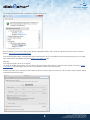
Doing the following will prevent Windows from switching off the diskAshur, go to `Control Panel` & `Power Options` , the easier option is to disable power
saving which means stopping the computer from `Sleeping` see below;
In addition go into Advanced Settings in Power Option to disable the following:
Ensure the computer is set to sleep: Never (as above)
Turn off hard disk after: 999999 Minutes
USB selective suspend setting: Disabled
2
iStorage Limited, iStorage House
13 Alperton Lane, Perivale, Middlesex, UB6 8DH
Tel: +44 (0) 20 8991 6260 | Fax: +44 (0) 20 8991 6277
e-mail: [email protected] | web: www.istorage-uk.com
This will keep any iStorage hard drive connected to the computer continuously on.
Note: For Windows 8.1 users You will need to install a Windows update (KB2919355) as well as follow the steps above. Please go to this link and choose
Method 2: http://support.microsoft.com/kb/2919355.
Once the download option appears select KB2919355 and then download and install. For more detailed information and required fix please go to our support
page, under the tab Firmware Updates and download Win8.1 USB suspend issue folder.
Apple Mac
Drives keep locking after 5-10 minutes on the Macs.
This will be due the Mac’s power saving as there is a setting to switch off hard drives that are idle after a fix period of time see below. The settings in Energy
Saver preferences affect what happens when your Mac is left unattended for a period of time that you specify.
Disable Put the hard disk(s) to sleep when possible to prevent the diskAshur going to sleep and not locking. You will also need to stop the computer sleeping
to prevent the diskAshur from locking.
3
iStorage Limited, iStorage House
13 Alperton Lane, Perivale, Middlesex, UB6 8DH
Tel: +44 (0) 20 8991 6260 | Fax: +44 (0) 20 8991 6277
e-mail: [email protected] | web: www.istorage-uk.com
Q: My iStorage diskAshur locks when my computer sleeps/hibernates. How can I stop this?
A: The only way to prevent this is by changing the power settings (Windows computers) of the computer so that it only switches of the monitor on
hibernation/sleep and keeps power to hard drives and USB. On Apple MAC computers going to the power settings in `System Preferences` and clicking the
do not suspend USB will keep the drive alive even if the MAC goes into full hibernation
Q: I’m not getting a RED light from iStorage diskAshur when connected to my computer?
A: Your computer may not have enough power going through to the USB to power the iStorage diskAshur. Use the supplied USB Y-Power cable to ensure
full power to the iStorage diskAshur.
Q: I want to use my iStorage diskAshur with different Operating Systems how can that be done?
A: To make the iStorage diskAshur universally compatible with all the most common Operating Systems requires the drive to be formatted using the FAT file
system. This is done by using `Disk Management` in Windows, `Disk Utility` on MAC OS/x or MKFS in Linux. in Windows and Disk Utility on MAC OS/x or
MKFS in Linux.
Q: What is BadUSB and are iStorage devices susceptible to this exploit?
A: BadUSB is a theoretical exploit that was presented by SR Labs at the Black Hat conference in August of 2014. SR Labs demonstrated a vulnerability in one
USB device that allowed malicious code to be programmed into the USB controller through a firmware update process.
The attack described is very sophisticated and in the case of iStorage products would require advanced knowledge of our USB controller, a leaked version
of our firmware, the programming tool to update our controller, the password used for our programming tool, and an in depth understanding of the device’s
functionality, etc.
According to SR Labs, the failsafe method to eliminate this threat is to simply disable the ability to update the controller’s firmware.
iStorage devices shipping today, including all of our USB 3.0 security products already have the firmware locked which prevents field updates to the USB
controller.
As a continuous improvement, iStorage is locking down the firmware on all USB controllers used in iStorage devices to safeguard against this vulnerability.
We recommend checking our website periodically for notices regarding BadUSB and Security Updates.
4
iStorage Limited, iStorage House
13 Alperton Lane, Perivale, Middlesex, UB6 8DH
Tel: +44 (0) 20 8991 6260 | Fax: +44 (0) 20 8991 6277
e-mail: [email protected] | web: www.istorage-uk.com