1
5. Using the Viewer
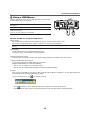
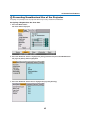
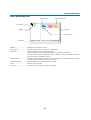
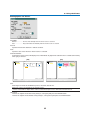
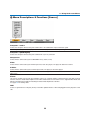
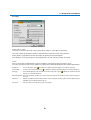
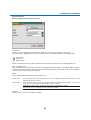
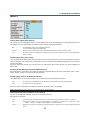
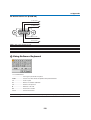
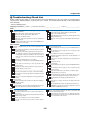
Viewer Window Elements
Thumbnail/file name
Number of files
List of folders
Slot 1
RECYCLED
PICTURE
?
3 Files
0000.jpg
0001.jpg
0002.jpg
Scroll bar
Highlight
Cursor (orange)
Information
1/3 0000.jpg
60KB
08/21/2005 06/29 263KB
select : ENTER
Highlight .................................. Indicates the selected folder or drive.
List of folders .......................... Indicates folders contained on a PC card or USB memory.
Information .............................. Indicates information of the selected file or folder.
Folder: folder name, creation date (month/day/year), creation time (hour/minute).
File: slide number/number of displayable slides in a folder, file name, creation date (month/day/
year), creation time (hour/minute), file size.
Number of files ........................ Indicates number of displayable slides in the selected folder. The maximum number of images
recognized as slides within one directory is about 250.
Thumbnail/file name ................ Indicates thumbnails and names contained in a folder.
Cursor ..................................... Indicates the selected slide.
Scroll bar ................................. Used to view folders or files not visible in the window.
61