1
Instruction Manual
Auto Multimedia System
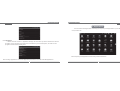
You can open new window, switch window, turn off window in “Windows” option.
The method for setting your Tablet PC browser is similar to setting computer browser, Press “Menu key”
in browser screen, select “More//settings” to enter browser setup. You can set browser home page, password
management etc. or restore to factory default settings directly.
Figure 5.2 Browser settings
26
Instruction Manual
Auto Multimedia System
1.2.4 Connecting to your computer
You can manage the files in SD card (add/delete files etc.) through USB connection,
1. Connect the Tablet PC to your computer by USB cable.
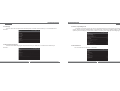
2. Place the cursor in the upper of the screen, press and hold down the left mouse button to drag the
cursor down, then the notice bar will appear. There are two options in this menu: “USB connected”,
“USB debugging connected”
3. Click “USB connected” and then Click “Turn on USB storage”, select “Yes” in popup prompt, then you
can manage the files in SD card or copy files to SD card.
3