1
8. USB HID Setup Instructions
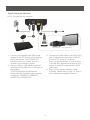
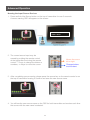
You can conveniently control your computer connected to the transmitter from the receiver
side wirelessly via the GWHDMS52 USB connections.
(1) Transmitter – Using a Mini USB to USB
Type A USB cable, Plug the mini USB
side into the transmitter and the USB
type A into the computer you wish to
control.
1
(2) Receiver – You can connect either a
USB based Keyboard or Mouse to the
USB port on the back of the receiver.
*(IOGEAR Wireless AV Multimedia
Keyboards with trackball makes
a perfect companion: GKM561R,
GKM681R, GKM581R and GKM571R)
2
*
21