1
Zilog Developer Studio II—
Z8 Encore!®
User Manual
UM013033-0508
Warning: DO NOT USE IN LIFE SUPPORT
LIFE SUPPORT POLICY
ZILOG'S PRODUCTS ARE NOT AUTHORIZED FOR USE AS CRITICAL COMPONENTS IN LIFE
SUPPORT DEVICES OR SYSTEMS WITHOUT THE EXPRESS PRIOR WRITTEN APPROVAL OF
THE PRESIDENT AND GENERAL COUNSEL OF ZILOG CORPORATION.
As used herein
Life support devices or systems are devices which (a) are intended for surgical implant into the body, or (b)
support or sustain life and whose failure to perform when properly used in accordance with instructions for
use provided in the labeling can be reasonably expected to result in a significant injury to the user. A
critical component is any component in a life support device or system whose failure to perform can be
reasonably expected to cause the failure of the life support device or system or to affect its safety or
effectiveness.
Document Disclaimer
©2008 by Zilog, Inc. All rights reserved. Information in this publication concerning the devices,
applications, or technology described is intended to suggest possible uses and may be superseded. ZILOG,
INC. DOES NOT ASSUME LIABILITY FOR OR PROVIDE A REPRESENTATION OF ACCURACY
OF THE INFORMATION, DEVICES, OR TECHNOLOGY DESCRIBED IN THIS DOCUMENT.
Z I L O G A L S O D O E S N O T A S S U M E L I A B I L I T Y F O R I N T E L L E C T U A L P R O P E RT Y
INFRINGEMENT RELATED IN ANY MANNER TO USE OF INFORMATION, DEVICES, OR
TECHNOLOGY DESCRIBED HEREIN OR OTHERWISE. The information contained within this
document has been verified according to the general principles of electrical and mechanical engineering.
Z8, Z8 Encore!, and Z8 Encore! XP are registered trademarks of Zilog, Inc. All other product or service names are the property of
their respective owners.
UM013033-0508
Zilog Developer Studio II
Z8 Encore!® User Manual
iii
Revision History
Date
Revision
Level
Section
Description
May 2008 33
All
Updated for the ZDS II 4.11.0 release.
December 32
2006
“Using the Command Processor” appendix
on page 408
Updated.
“Firmware Upgrade (Selected Debug Tool)” Added path for Ethernet Smart Cable upgrade
information.
on page 118
July 2006
31
September 30
2005
“Uarts” on page 79
Described new Place ISR into PRAM check
boxes.
“New Project” on page 39 and “Debugger
Page” on page 96
Added description of the Use Page Erase
Before Flashing check
“Flash Loader” on page 110
Added description of the Use Page Erase
check box.
“Using the Macro Assembler” chapter and
“Compatibility Issues” appendix
Deleted PL, PW, PAGEWIDTH, and
PAGELENGTH.
Appendix D, “Using the Command
Processor”
Added the checksum, fillmem,
loadmem, and savemem commands.
“Structures and Unions in Assembly Code”
on page 243
Added new section.
“ORG” on page 238
Updated section.
“Memory Window” on page 314
Updated the note about PRAM.
All
Updated for the ZDS II 4.10.0 release.
“Optimizer Warning and Error Messages” on Added new section.
page 207
“Front-End Warning and Error Messages” on Updated section.
page 197
UM013033-0508
“Debug Tool” on page 100
Added Ethernet target.
“Setup” on page 97
Added Ethernet target.
Revision History
Zilog Developer Studio II
Z8 Encore!® User Manual
iv
Table of Contents
Introduction. . . . . . . . . . . . . . . . . . . . . . . . . . . . . . . . . . . . . . . . . . . . . . . . . . . . . . . . . . . . . . xvi
ZDS II System Requirements . . . . . . . . . . . . . . . . . . . . . . . . . . . . . . . . . . . . . . . . . . . . . xvi
Supported Operating Systems . . . . . . . . . . . . . . . . . . . . . . . . . . . . . . . . . . . . . . . . . . xvi
Recommended Host System Configuration . . . . . . . . . . . . . . . . . . . . . . . . . . . . . . . xvi
Minimum Host System Configuration . . . . . . . . . . . . . . . . . . . . . . . . . . . . . . . . . . xvii
When Using the Serial Smart Cable . . . . . . . . . . . . . . . . . . . . . . . . . . . . . . . . . . . . xvii
When Using the USB Smart Cable . . . . . . . . . . . . . . . . . . . . . . . . . . . . . . . . . . . . . xvii
When Using the Opto-Isolated USB Smart Cable . . . . . . . . . . . . . . . . . . . . . . . . . xvii
When Using the Ethernet Smart Cable . . . . . . . . . . . . . . . . . . . . . . . . . . . . . . . . . .xviii
When Using the Z8 Encore! MC Emulator . . . . . . . . . . . . . . . . . . . . . . . . . . . . . .xviii
Z8 Encore! Product Support . . . . . . . . . . . . . . . . . . . . . . . . . . . . . . . . . . . . . . . . . .xviii
Zilog Technical Support . . . . . . . . . . . . . . . . . . . . . . . . . . . . . . . . . . . . . . . . . . . . . . . . . xx
Getting Started . . . . . . . . . . . . . . . . . . . . . . . . . . . . . . . . . . . . . . . . . . . . . . . . . . . . . . . . . . . . 1
Installing ZDS II . . . . . . . . . . . . . . . . . . . . . . . . . . . . . . . . . . . . . . . . . . . . . . . . . . . . . . . . 1
Developer’s Environment Tutorial . . . . . . . . . . . . . . . . . . . . . . . . . . . . . . . . . . . . . . . . . . 1
Create a New Project . . . . . . . . . . . . . . . . . . . . . . . . . . . . . . . . . . . . . . . . . . . . . . . . . 2
Add a File to the Project . . . . . . . . . . . . . . . . . . . . . . . . . . . . . . . . . . . . . . . . . . . . . . . 6
Set Up the Project . . . . . . . . . . . . . . . . . . . . . . . . . . . . . . . . . . . . . . . . . . . . . . . . . . . . 8
Save the Project . . . . . . . . . . . . . . . . . . . . . . . . . . . . . . . . . . . . . . . . . . . . . . . . . . . . . 14
Using the Integrated Development Environment . . . . . . . . . . . . . . . . . . . . . . . . . . . . . . . 15
Toolbars . . . . . . . . . . . . . . . . . . . . . . . . . . . . . . . . . . . . . . . . . . . . . . . . . . . . . . . . . . . . . . 16
File Toolbar . . . . . . . . . . . . . . . . . . . . . . . . . . . . . . . . . . . . . . . . . . . . . . . . . . . . . . . . 16
Build Toolbar . . . . . . . . . . . . . . . . . . . . . . . . . . . . . . . . . . . . . . . . . . . . . . . . . . . . . . 18
Find Toolbar . . . . . . . . . . . . . . . . . . . . . . . . . . . . . . . . . . . . . . . . . . . . . . . . . . . . . . . 21
Command Processor Toolbar . . . . . . . . . . . . . . . . . . . . . . . . . . . . . . . . . . . . . . . . . . 22
Bookmarks Toolbar . . . . . . . . . . . . . . . . . . . . . . . . . . . . . . . . . . . . . . . . . . . . . . . . . 22
Debug Toolbar . . . . . . . . . . . . . . . . . . . . . . . . . . . . . . . . . . . . . . . . . . . . . . . . . . . . . 23
Debug Windows Toolbar . . . . . . . . . . . . . . . . . . . . . . . . . . . . . . . . . . . . . . . . . . . . . 27
Windows . . . . . . . . . . . . . . . . . . . . . . . . . . . . . . . . . . . . . . . . . . . . . . . . . . . . . . . . . . . . . 29
Project Workspace Window . . . . . . . . . . . . . . . . . . . . . . . . . . . . . . . . . . . . . . . . . . . 29
Edit Window . . . . . . . . . . . . . . . . . . . . . . . . . . . . . . . . . . . . . . . . . . . . . . . . . . . . . . . 30
Output Windows . . . . . . . . . . . . . . . . . . . . . . . . . . . . . . . . . . . . . . . . . . . . . . . . . . . . 35
Menu Bar . . . . . . . . . . . . . . . . . . . . . . . . . . . . . . . . . . . . . . . . . . . . . . . . . . . . . . . . . . . . . 37
File Menu . . . . . . . . . . . . . . . . . . . . . . . . . . . . . . . . . . . . . . . . . . . . . . . . . . . . . . . . . 38
Edit Menu . . . . . . . . . . . . . . . . . . . . . . . . . . . . . . . . . . . . . . . . . . . . . . . . . . . . . . . . . 47
View Menu . . . . . . . . . . . . . . . . . . . . . . . . . . . . . . . . . . . . . . . . . . . . . . . . . . . . . . . . 53
Project Menu . . . . . . . . . . . . . . . . . . . . . . . . . . . . . . . . . . . . . . . . . . . . . . . . . . . . . . . 54
Build Menu . . . . . . . . . . . . . . . . . . . . . . . . . . . . . . . . . . . . . . . . . . . . . . . . . . . . . . . 102
UM013033-0508
Table of Contents
Zilog Developer Studio II
Z8 Encore!® User Manual
v
Debug Menu . . . . . . . . . . . . . . . . . . . . . . . . . . . . . . . . . . . . . . . . . . . . . . . . . . . . . .
Tools Menu . . . . . . . . . . . . . . . . . . . . . . . . . . . . . . . . . . . . . . . . . . . . . . . . . . . . . . .
Window Menu . . . . . . . . . . . . . . . . . . . . . . . . . . . . . . . . . . . . . . . . . . . . . . . . . . . .
Help Menu . . . . . . . . . . . . . . . . . . . . . . . . . . . . . . . . . . . . . . . . . . . . . . . . . . . . . . .
Shortcut Keys . . . . . . . . . . . . . . . . . . . . . . . . . . . . . . . . . . . . . . . . . . . . . . . . . . . . . . . .
File Menu Shortcuts . . . . . . . . . . . . . . . . . . . . . . . . . . . . . . . . . . . . . . . . . . . . . . . .
Edit Menu Shortcuts . . . . . . . . . . . . . . . . . . . . . . . . . . . . . . . . . . . . . . . . . . . . . . . .
Project Menu Shortcuts . . . . . . . . . . . . . . . . . . . . . . . . . . . . . . . . . . . . . . . . . . . . . .
Build Menu Shortcuts . . . . . . . . . . . . . . . . . . . . . . . . . . . . . . . . . . . . . . . . . . . . . . .
Debug Menu Shortcuts . . . . . . . . . . . . . . . . . . . . . . . . . . . . . . . . . . . . . . . . . . . . . .
Using the ANSI C-Compiler. . . . . . . . . . . . . . . . . . . . . . . . . . . . . . . . . . . . . . . . . . . . . . . .
Language Extensions . . . . . . . . . . . . . . . . . . . . . . . . . . . . . . . . . . . . . . . . . . . . . . . . . . .
Additional Keywords for Storage Specification . . . . . . . . . . . . . . . . . . . . . . . . . . .
Memory Models . . . . . . . . . . . . . . . . . . . . . . . . . . . . . . . . . . . . . . . . . . . . . . . . . . .
Call Frames . . . . . . . . . . . . . . . . . . . . . . . . . . . . . . . . . . . . . . . . . . . . . . . . . . . . . . .
Interrupt Support . . . . . . . . . . . . . . . . . . . . . . . . . . . . . . . . . . . . . . . . . . . . . . . . . . .
Monitor Function Support . . . . . . . . . . . . . . . . . . . . . . . . . . . . . . . . . . . . . . . . . . . .
String Placement . . . . . . . . . . . . . . . . . . . . . . . . . . . . . . . . . . . . . . . . . . . . . . . . . . .
Inline Assembly . . . . . . . . . . . . . . . . . . . . . . . . . . . . . . . . . . . . . . . . . . . . . . . . . . .
Placement Directives . . . . . . . . . . . . . . . . . . . . . . . . . . . . . . . . . . . . . . . . . . . . . . .
Char and Short Enumerations . . . . . . . . . . . . . . . . . . . . . . . . . . . . . . . . . . . . . . . . .
Setting Flash Option Bytes in C . . . . . . . . . . . . . . . . . . . . . . . . . . . . . . . . . . . . . . .
Program RAM Support (Z8 Encore! XP 16K Series Only) . . . . . . . . . . . . . . . . . .
Preprocessor #warning Directive Support . . . . . . . . . . . . . . . . . . . . . . . . . . . . . . .
Supported New Features from the 1999 Standard . . . . . . . . . . . . . . . . . . . . . . . . .
Type Sizes . . . . . . . . . . . . . . . . . . . . . . . . . . . . . . . . . . . . . . . . . . . . . . . . . . . . . . . . . . .
Predefined Macros . . . . . . . . . . . . . . . . . . . . . . . . . . . . . . . . . . . . . . . . . . . . . . . . . . . . .
Examples . . . . . . . . . . . . . . . . . . . . . . . . . . . . . . . . . . . . . . . . . . . . . . . . . . . . . . . . .
Macros Generated by the IDE . . . . . . . . . . . . . . . . . . . . . . . . . . . . . . . . . . . . . . . . .
Calling Conventions . . . . . . . . . . . . . . . . . . . . . . . . . . . . . . . . . . . . . . . . . . . . . . . . . . .
Function Call Mechanism: Dynamic Frame . . . . . . . . . . . . . . . . . . . . . . . . . . . . . .
Function Call Mechanism: Static Frame . . . . . . . . . . . . . . . . . . . . . . . . . . . . . . . . .
Function Call Mechanism: Register Parameter Passing . . . . . . . . . . . . . . . . . . . . .
Return Value . . . . . . . . . . . . . . . . . . . . . . . . . . . . . . . . . . . . . . . . . . . . . . . . . . . . . .
Special Cases . . . . . . . . . . . . . . . . . . . . . . . . . . . . . . . . . . . . . . . . . . . . . . . . . . . . .
Calling Assembly Functions from C . . . . . . . . . . . . . . . . . . . . . . . . . . . . . . . . . . . . . . .
Function Naming Convention . . . . . . . . . . . . . . . . . . . . . . . . . . . . . . . . . . . . . . . . .
Argument Locations . . . . . . . . . . . . . . . . . . . . . . . . . . . . . . . . . . . . . . . . . . . . . . . .
Return Values . . . . . . . . . . . . . . . . . . . . . . . . . . . . . . . . . . . . . . . . . . . . . . . . . . . . .
Preserving Registers . . . . . . . . . . . . . . . . . . . . . . . . . . . . . . . . . . . . . . . . . . . . . . . .
Calling C Functions from Assembly . . . . . . . . . . . . . . . . . . . . . . . . . . . . . . . . . . . . . . .
UM013033-0508
106
110
127
128
129
129
129
130
130
131
132
132
134
137
138
140
141
142
143
143
144
145
146
147
147
148
149
151
151
151
152
153
155
156
157
157
158
158
159
159
159
Table of Contents
Zilog Developer Studio II
Z8 Encore!® User Manual
vi
Assembly File . . . . . . . . . . . . . . . . . . . . . . . . . . . . . . . . . . . . . . . . . . . . . . . . . . . . .
Referenced C Function Prototype . . . . . . . . . . . . . . . . . . . . . . . . . . . . . . . . . . . . . .
Command Line Options . . . . . . . . . . . . . . . . . . . . . . . . . . . . . . . . . . . . . . . . . . . . . . . .
Run-Time Library . . . . . . . . . . . . . . . . . . . . . . . . . . . . . . . . . . . . . . . . . . . . . . . . . . . . .
Zilog Header Files . . . . . . . . . . . . . . . . . . . . . . . . . . . . . . . . . . . . . . . . . . . . . . . . . .
Zilog Functions . . . . . . . . . . . . . . . . . . . . . . . . . . . . . . . . . . . . . . . . . . . . . . . . . . . .
Startup Files . . . . . . . . . . . . . . . . . . . . . . . . . . . . . . . . . . . . . . . . . . . . . . . . . . . . . . . . . .
Customizing Startup Files . . . . . . . . . . . . . . . . . . . . . . . . . . . . . . . . . . . . . . . . . . . .
Segment Naming . . . . . . . . . . . . . . . . . . . . . . . . . . . . . . . . . . . . . . . . . . . . . . . . . . . . . .
Linker Command Files for C Programs . . . . . . . . . . . . . . . . . . . . . . . . . . . . . . . . . . . .
Linker Referenced Files . . . . . . . . . . . . . . . . . . . . . . . . . . . . . . . . . . . . . . . . . . . . .
Linker Symbols . . . . . . . . . . . . . . . . . . . . . . . . . . . . . . . . . . . . . . . . . . . . . . . . . . . .
Sample Linker Command File . . . . . . . . . . . . . . . . . . . . . . . . . . . . . . . . . . . . . . . .
ANSI Standard Compliance . . . . . . . . . . . . . . . . . . . . . . . . . . . . . . . . . . . . . . . . . . . . .
Freestanding Implementation . . . . . . . . . . . . . . . . . . . . . . . . . . . . . . . . . . . . . . . . .
Deviations from ANSI C . . . . . . . . . . . . . . . . . . . . . . . . . . . . . . . . . . . . . . . . . . . .
Warning and Error Messages . . . . . . . . . . . . . . . . . . . . . . . . . . . . . . . . . . . . . . . . . . . .
Preprocessor Warning and Error Messages . . . . . . . . . . . . . . . . . . . . . . . . . . . . . .
Front-End Warning and Error Messages . . . . . . . . . . . . . . . . . . . . . . . . . . . . . . . .
Optimizer Warning and Error Messages . . . . . . . . . . . . . . . . . . . . . . . . . . . . . . . . .
Code Generator Warning and Error Messages . . . . . . . . . . . . . . . . . . . . . . . . . . . .
Using the Macro Assembler . . . . . . . . . . . . . . . . . . . . . . . . . . . . . . . . . . . . . . . . . . . . . . . .
Address Spaces and Segments . . . . . . . . . . . . . . . . . . . . . . . . . . . . . . . . . . . . . . . . . . . .
Allocating Processor Memory . . . . . . . . . . . . . . . . . . . . . . . . . . . . . . . . . . . . . . . .
Address Spaces . . . . . . . . . . . . . . . . . . . . . . . . . . . . . . . . . . . . . . . . . . . . . . . . . . . .
Segments . . . . . . . . . . . . . . . . . . . . . . . . . . . . . . . . . . . . . . . . . . . . . . . . . . . . . . . . .
Assigning Memory at Link Time . . . . . . . . . . . . . . . . . . . . . . . . . . . . . . . . . . . . . .
Output Files . . . . . . . . . . . . . . . . . . . . . . . . . . . . . . . . . . . . . . . . . . . . . . . . . . . . . . . . . .
Source Listing (.lst) Format . . . . . . . . . . . . . . . . . . . . . . . . . . . . . . . . . . . . . . . . . .
Object Code (.obj) File . . . . . . . . . . . . . . . . . . . . . . . . . . . . . . . . . . . . . . . . . . . . . .
Source Language Structure . . . . . . . . . . . . . . . . . . . . . . . . . . . . . . . . . . . . . . . . . . . . . .
General Structure . . . . . . . . . . . . . . . . . . . . . . . . . . . . . . . . . . . . . . . . . . . . . . . . . .
Assembler Rules . . . . . . . . . . . . . . . . . . . . . . . . . . . . . . . . . . . . . . . . . . . . . . . . . . .
Expressions . . . . . . . . . . . . . . . . . . . . . . . . . . . . . . . . . . . . . . . . . . . . . . . . . . . . . . . . . .
Arithmetic Operators . . . . . . . . . . . . . . . . . . . . . . . . . . . . . . . . . . . . . . . . . . . . . . .
Relational Operators . . . . . . . . . . . . . . . . . . . . . . . . . . . . . . . . . . . . . . . . . . . . . . . .
Boolean Operators . . . . . . . . . . . . . . . . . . . . . . . . . . . . . . . . . . . . . . . . . . . . . . . . .
HIGH and LOW Operators . . . . . . . . . . . . . . . . . . . . . . . . . . . . . . . . . . . . . . . . . . .
HIGH16 and LOW16 Operators . . . . . . . . . . . . . . . . . . . . . . . . . . . . . . . . . . . . . . .
.FTOL Operator . . . . . . . . . . . . . . . . . . . . . . . . . . . . . . . . . . . . . . . . . . . . . . . . . . .
.LTOF Operator . . . . . . . . . . . . . . . . . . . . . . . . . . . . . . . . . . . . . . . . . . . . . . . . . . .
UM013033-0508
160
160
160
160
162
164
177
178
181
181
183
186
187
189
189
190
193
194
197
207
209
210
211
211
211
211
214
214
214
215
215
216
217
220
221
221
221
222
222
222
223
Table of Contents
Zilog Developer Studio II
Z8 Encore!® User Manual
vii
Decimal Numbers . . . . . . . . . . . . . . . . . . . . . . . . . . . . . . . . . . . . . . . . . . . . . . . . . .
Hexadecimal Numbers . . . . . . . . . . . . . . . . . . . . . . . . . . . . . . . . . . . . . . . . . . . . . .
Binary Numbers . . . . . . . . . . . . . . . . . . . . . . . . . . . . . . . . . . . . . . . . . . . . . . . . . . .
Octal Numbers . . . . . . . . . . . . . . . . . . . . . . . . . . . . . . . . . . . . . . . . . . . . . . . . . . . .
Character Constants . . . . . . . . . . . . . . . . . . . . . . . . . . . . . . . . . . . . . . . . . . . . . . . .
Operator Precedence . . . . . . . . . . . . . . . . . . . . . . . . . . . . . . . . . . . . . . . . . . . . . . . .
Automatic Working Register Definitions . . . . . . . . . . . . . . . . . . . . . . . . . . . . . . . .
Directives . . . . . . . . . . . . . . . . . . . . . . . . . . . . . . . . . . . . . . . . . . . . . . . . . . . . . . . . . . . .
ALIGN . . . . . . . . . . . . . . . . . . . . . . . . . . . . . . . . . . . . . . . . . . . . . . . . . . . . . . . . . .
.COMMENT . . . . . . . . . . . . . . . . . . . . . . . . . . . . . . . . . . . . . . . . . . . . . . . . . . . . . .
CPU . . . . . . . . . . . . . . . . . . . . . . . . . . . . . . . . . . . . . . . . . . . . . . . . . . . . . . . . . . . . .
Data Directives . . . . . . . . . . . . . . . . . . . . . . . . . . . . . . . . . . . . . . . . . . . . . . . . . . . .
DEFINE . . . . . . . . . . . . . . . . . . . . . . . . . . . . . . . . . . . . . . . . . . . . . . . . . . . . . . . . .
DS . . . . . . . . . . . . . . . . . . . . . . . . . . . . . . . . . . . . . . . . . . . . . . . . . . . . . . . . . . . . . .
END . . . . . . . . . . . . . . . . . . . . . . . . . . . . . . . . . . . . . . . . . . . . . . . . . . . . . . . . . . . .
EQU . . . . . . . . . . . . . . . . . . . . . . . . . . . . . . . . . . . . . . . . . . . . . . . . . . . . . . . . . . . .
INCLUDE . . . . . . . . . . . . . . . . . . . . . . . . . . . . . . . . . . . . . . . . . . . . . . . . . . . . . . . .
LIST . . . . . . . . . . . . . . . . . . . . . . . . . . . . . . . . . . . . . . . . . . . . . . . . . . . . . . . . . . . .
NEWPAGE . . . . . . . . . . . . . . . . . . . . . . . . . . . . . . . . . . . . . . . . . . . . . . . . . . . . . . .
NOLIST . . . . . . . . . . . . . . . . . . . . . . . . . . . . . . . . . . . . . . . . . . . . . . . . . . . . . . . . .
ORG . . . . . . . . . . . . . . . . . . . . . . . . . . . . . . . . . . . . . . . . . . . . . . . . . . . . . . . . . . . .
SEGMENT . . . . . . . . . . . . . . . . . . . . . . . . . . . . . . . . . . . . . . . . . . . . . . . . . . . . . . .
SUBTITLE . . . . . . . . . . . . . . . . . . . . . . . . . . . . . . . . . . . . . . . . . . . . . . . . . . . . . . .
TITLE . . . . . . . . . . . . . . . . . . . . . . . . . . . . . . . . . . . . . . . . . . . . . . . . . . . . . . . . . . .
VAR . . . . . . . . . . . . . . . . . . . . . . . . . . . . . . . . . . . . . . . . . . . . . . . . . . . . . . . . . . . .
VECTOR . . . . . . . . . . . . . . . . . . . . . . . . . . . . . . . . . . . . . . . . . . . . . . . . . . . . . . . . .
XDEF . . . . . . . . . . . . . . . . . . . . . . . . . . . . . . . . . . . . . . . . . . . . . . . . . . . . . . . . . . .
XREF . . . . . . . . . . . . . . . . . . . . . . . . . . . . . . . . . . . . . . . . . . . . . . . . . . . . . . . . . . .
Structures and Unions in Assembly Code . . . . . . . . . . . . . . . . . . . . . . . . . . . . . . .
Structured Assembly . . . . . . . . . . . . . . . . . . . . . . . . . . . . . . . . . . . . . . . . . . . . . . . . . . .
Structured Assembly Inputs . . . . . . . . . . . . . . . . . . . . . . . . . . . . . . . . . . . . . . . . . .
Structured Assembly Processing . . . . . . . . . . . . . . . . . . . . . . . . . . . . . . . . . . . . . . .
Conditional Assembly . . . . . . . . . . . . . . . . . . . . . . . . . . . . . . . . . . . . . . . . . . . . . . . . . .
IF . . . . . . . . . . . . . . . . . . . . . . . . . . . . . . . . . . . . . . . . . . . . . . . . . . . . . . . . . . . . . . .
IFDEF . . . . . . . . . . . . . . . . . . . . . . . . . . . . . . . . . . . . . . . . . . . . . . . . . . . . . . . . . . .
IFSAME . . . . . . . . . . . . . . . . . . . . . . . . . . . . . . . . . . . . . . . . . . . . . . . . . . . . . . . . .
IFMA . . . . . . . . . . . . . . . . . . . . . . . . . . . . . . . . . . . . . . . . . . . . . . . . . . . . . . . . . . . .
Macros . . . . . . . . . . . . . . . . . . . . . . . . . . . . . . . . . . . . . . . . . . . . . . . . . . . . . . . . . . . . . .
Macro Definition . . . . . . . . . . . . . . . . . . . . . . . . . . . . . . . . . . . . . . . . . . . . . . . . . . .
Concatenation . . . . . . . . . . . . . . . . . . . . . . . . . . . . . . . . . . . . . . . . . . . . . . . . . . . . .
Macro Invocation . . . . . . . . . . . . . . . . . . . . . . . . . . . . . . . . . . . . . . . . . . . . . . . . . .
UM013033-0508
223
223
223
224
224
224
225
226
227
227
228
228
233
235
235
236
236
237
237
237
238
238
239
239
239
241
242
243
243
248
250
254
256
257
258
258
259
259
259
260
260
Table of Contents
Zilog Developer Studio II
Z8 Encore!® User Manual
viii
Local Macro Labels . . . . . . . . . . . . . . . . . . . . . . . . . . . . . . . . . . . . . . . . . . . . . . . .
Optional Macro Arguments . . . . . . . . . . . . . . . . . . . . . . . . . . . . . . . . . . . . . . . . . .
Exiting a Macro . . . . . . . . . . . . . . . . . . . . . . . . . . . . . . . . . . . . . . . . . . . . . . . . . . . .
Delimiting Macro Arguments . . . . . . . . . . . . . . . . . . . . . . . . . . . . . . . . . . . . . . . . .
Labels . . . . . . . . . . . . . . . . . . . . . . . . . . . . . . . . . . . . . . . . . . . . . . . . . . . . . . . . . . . . . .
Anonymous Labels . . . . . . . . . . . . . . . . . . . . . . . . . . . . . . . . . . . . . . . . . . . . . . . . .
Local Labels . . . . . . . . . . . . . . . . . . . . . . . . . . . . . . . . . . . . . . . . . . . . . . . . . . . . . .
Importing and Exporting Labels . . . . . . . . . . . . . . . . . . . . . . . . . . . . . . . . . . . . . . .
Label Spaces . . . . . . . . . . . . . . . . . . . . . . . . . . . . . . . . . . . . . . . . . . . . . . . . . . . . . .
Label Checks . . . . . . . . . . . . . . . . . . . . . . . . . . . . . . . . . . . . . . . . . . . . . . . . . . . . . .
Source Language Syntax . . . . . . . . . . . . . . . . . . . . . . . . . . . . . . . . . . . . . . . . . . . . . . . .
Compatibility Issues . . . . . . . . . . . . . . . . . . . . . . . . . . . . . . . . . . . . . . . . . . . . . . . . . . .
Warning and Error Messages . . . . . . . . . . . . . . . . . . . . . . . . . . . . . . . . . . . . . . . . . . . .
Using the Linker/Locator . . . . . . . . . . . . . . . . . . . . . . . . . . . . . . . . . . . . . . . . . . . . . . . . . .
Linker Functions . . . . . . . . . . . . . . . . . . . . . . . . . . . . . . . . . . . . . . . . . . . . . . . . . . . . . .
Invoking the Linker . . . . . . . . . . . . . . . . . . . . . . . . . . . . . . . . . . . . . . . . . . . . . . . . . . . .
Linker Commands . . . . . . . . . . . . . . . . . . . . . . . . . . . . . . . . . . . . . . . . . . . . . . . . . . . . .
<outputfile>=<module list> . . . . . . . . . . . . . . . . . . . . . . . . . . . . . . . . . . . . . . . . . .
CHANGE . . . . . . . . . . . . . . . . . . . . . . . . . . . . . . . . . . . . . . . . . . . . . . . . . . . . . . . .
COPY . . . . . . . . . . . . . . . . . . . . . . . . . . . . . . . . . . . . . . . . . . . . . . . . . . . . . . . . . . .
DEBUG . . . . . . . . . . . . . . . . . . . . . . . . . . . . . . . . . . . . . . . . . . . . . . . . . . . . . . . . . .
DEFINE . . . . . . . . . . . . . . . . . . . . . . . . . . . . . . . . . . . . . . . . . . . . . . . . . . . . . . . . .
FORMAT . . . . . . . . . . . . . . . . . . . . . . . . . . . . . . . . . . . . . . . . . . . . . . . . . . . . . . . .
GROUP . . . . . . . . . . . . . . . . . . . . . . . . . . . . . . . . . . . . . . . . . . . . . . . . . . . . . . . . . .
HEADING . . . . . . . . . . . . . . . . . . . . . . . . . . . . . . . . . . . . . . . . . . . . . . . . . . . . . . .
LOCATE . . . . . . . . . . . . . . . . . . . . . . . . . . . . . . . . . . . . . . . . . . . . . . . . . . . . . . . . .
MAP . . . . . . . . . . . . . . . . . . . . . . . . . . . . . . . . . . . . . . . . . . . . . . . . . . . . . . . . . . . .
MAXHEXLEN . . . . . . . . . . . . . . . . . . . . . . . . . . . . . . . . . . . . . . . . . . . . . . . . . . . .
MAXLENGTH . . . . . . . . . . . . . . . . . . . . . . . . . . . . . . . . . . . . . . . . . . . . . . . . . . . .
NODEBUG . . . . . . . . . . . . . . . . . . . . . . . . . . . . . . . . . . . . . . . . . . . . . . . . . . . . . . .
NOMAP . . . . . . . . . . . . . . . . . . . . . . . . . . . . . . . . . . . . . . . . . . . . . . . . . . . . . . . . .
NOWARN . . . . . . . . . . . . . . . . . . . . . . . . . . . . . . . . . . . . . . . . . . . . . . . . . . . . . . . .
ORDER . . . . . . . . . . . . . . . . . . . . . . . . . . . . . . . . . . . . . . . . . . . . . . . . . . . . . . . . . .
RANGE . . . . . . . . . . . . . . . . . . . . . . . . . . . . . . . . . . . . . . . . . . . . . . . . . . . . . . . . . .
SEARCHPATH . . . . . . . . . . . . . . . . . . . . . . . . . . . . . . . . . . . . . . . . . . . . . . . . . . .
SEQUENCE . . . . . . . . . . . . . . . . . . . . . . . . . . . . . . . . . . . . . . . . . . . . . . . . . . . . . .
SORT . . . . . . . . . . . . . . . . . . . . . . . . . . . . . . . . . . . . . . . . . . . . . . . . . . . . . . . . . . .
SPLITTABLE . . . . . . . . . . . . . . . . . . . . . . . . . . . . . . . . . . . . . . . . . . . . . . . . . . . . .
UNRESOLVED IS FATAL . . . . . . . . . . . . . . . . . . . . . . . . . . . . . . . . . . . . . . . . . .
WARN . . . . . . . . . . . . . . . . . . . . . . . . . . . . . . . . . . . . . . . . . . . . . . . . . . . . . . . . . .
WARNING IS FATAL . . . . . . . . . . . . . . . . . . . . . . . . . . . . . . . . . . . . . . . . . . . . . .
UM013033-0508
261
261
262
262
263
263
263
264
264
264
264
268
269
275
275
276
277
278
278
279
281
281
281
282
282
282
282
283
283
284
284
284
284
285
285
286
286
286
287
287
288
Table of Contents
Zilog Developer Studio II
Z8 Encore!® User Manual
ix
WARNOVERLAP . . . . . . . . . . . . . . . . . . . . . . . . . . . . . . . . . . . . . . . . . . . . . . . . .
Linker Expressions . . . . . . . . . . . . . . . . . . . . . . . . . . . . . . . . . . . . . . . . . . . . . . . . . . . .
+ (Add) . . . . . . . . . . . . . . . . . . . . . . . . . . . . . . . . . . . . . . . . . . . . . . . . . . . . . . . . . .
& (And) . . . . . . . . . . . . . . . . . . . . . . . . . . . . . . . . . . . . . . . . . . . . . . . . . . . . . . . . . .
BASE OF . . . . . . . . . . . . . . . . . . . . . . . . . . . . . . . . . . . . . . . . . . . . . . . . . . . . . . . .
COPY BASE . . . . . . . . . . . . . . . . . . . . . . . . . . . . . . . . . . . . . . . . . . . . . . . . . . . . . .
COPY TOP . . . . . . . . . . . . . . . . . . . . . . . . . . . . . . . . . . . . . . . . . . . . . . . . . . . . . . .
/ (Divide) . . . . . . . . . . . . . . . . . . . . . . . . . . . . . . . . . . . . . . . . . . . . . . . . . . . . . . . . .
FREEMEM . . . . . . . . . . . . . . . . . . . . . . . . . . . . . . . . . . . . . . . . . . . . . . . . . . . . . . .
HIGHADDR . . . . . . . . . . . . . . . . . . . . . . . . . . . . . . . . . . . . . . . . . . . . . . . . . . . . . .
LENGTH . . . . . . . . . . . . . . . . . . . . . . . . . . . . . . . . . . . . . . . . . . . . . . . . . . . . . . . . .
LOWADDR . . . . . . . . . . . . . . . . . . . . . . . . . . . . . . . . . . . . . . . . . . . . . . . . . . . . . .
* (Multiply) . . . . . . . . . . . . . . . . . . . . . . . . . . . . . . . . . . . . . . . . . . . . . . . . . . . . . . .
Decimal Numeric Values . . . . . . . . . . . . . . . . . . . . . . . . . . . . . . . . . . . . . . . . . . . .
Hexadecimal Numeric Values . . . . . . . . . . . . . . . . . . . . . . . . . . . . . . . . . . . . . . . .
| (Or) . . . . . . . . . . . . . . . . . . . . . . . . . . . . . . . . . . . . . . . . . . . . . . . . . . . . . . . . . . . .
<< (Shift Left) . . . . . . . . . . . . . . . . . . . . . . . . . . . . . . . . . . . . . . . . . . . . . . . . . . . . .
>> (Shift Right) . . . . . . . . . . . . . . . . . . . . . . . . . . . . . . . . . . . . . . . . . . . . . . . . . . . .
- (Subtract) . . . . . . . . . . . . . . . . . . . . . . . . . . . . . . . . . . . . . . . . . . . . . . . . . . . . . . .
TOP OF . . . . . . . . . . . . . . . . . . . . . . . . . . . . . . . . . . . . . . . . . . . . . . . . . . . . . . . . . .
^ (Bitwise Exclusive Or) . . . . . . . . . . . . . . . . . . . . . . . . . . . . . . . . . . . . . . . . . . . . .
~ (Not) . . . . . . . . . . . . . . . . . . . . . . . . . . . . . . . . . . . . . . . . . . . . . . . . . . . . . . . . . . .
Sample Linker Map File . . . . . . . . . . . . . . . . . . . . . . . . . . . . . . . . . . . . . . . . . . . . . . . .
Warning and Error Messages . . . . . . . . . . . . . . . . . . . . . . . . . . . . . . . . . . . . . . . . . . . .
Using the Debugger. . . . . . . . . . . . . . . . . . . . . . . . . . . . . . . . . . . . . . . . . . . . . . . . . . . . . . .
Status Bar . . . . . . . . . . . . . . . . . . . . . . . . . . . . . . . . . . . . . . . . . . . . . . . . . . . . . . . . . . . .
Code Line Indicators . . . . . . . . . . . . . . . . . . . . . . . . . . . . . . . . . . . . . . . . . . . . . . . . . . .
Debug Windows . . . . . . . . . . . . . . . . . . . . . . . . . . . . . . . . . . . . . . . . . . . . . . . . . . . . . .
Registers Window . . . . . . . . . . . . . . . . . . . . . . . . . . . . . . . . . . . . . . . . . . . . . . . . . .
Special Function Registers Window . . . . . . . . . . . . . . . . . . . . . . . . . . . . . . . . . . . .
Clock Window . . . . . . . . . . . . . . . . . . . . . . . . . . . . . . . . . . . . . . . . . . . . . . . . . . . .
Memory Window . . . . . . . . . . . . . . . . . . . . . . . . . . . . . . . . . . . . . . . . . . . . . . . . . .
Watch Window . . . . . . . . . . . . . . . . . . . . . . . . . . . . . . . . . . . . . . . . . . . . . . . . . . . .
Locals Window . . . . . . . . . . . . . . . . . . . . . . . . . . . . . . . . . . . . . . . . . . . . . . . . . . . .
Call Stack Window . . . . . . . . . . . . . . . . . . . . . . . . . . . . . . . . . . . . . . . . . . . . . . . . .
Symbols Window . . . . . . . . . . . . . . . . . . . . . . . . . . . . . . . . . . . . . . . . . . . . . . . . . .
Disassembly Window . . . . . . . . . . . . . . . . . . . . . . . . . . . . . . . . . . . . . . . . . . . . . . .
Simulated UART Output Window . . . . . . . . . . . . . . . . . . . . . . . . . . . . . . . . . . . . .
Using Breakpoints . . . . . . . . . . . . . . . . . . . . . . . . . . . . . . . . . . . . . . . . . . . . . . . . . . . . .
Inserting Breakpoints . . . . . . . . . . . . . . . . . . . . . . . . . . . . . . . . . . . . . . . . . . . . . . .
Viewing Breakpoints . . . . . . . . . . . . . . . . . . . . . . . . . . . . . . . . . . . . . . . . . . . . . . .
UM013033-0508
288
288
289
289
290
291
291
291
291
291
292
292
292
292
293
293
293
293
293
293
294
294
294
305
309
310
311
311
312
313
313
314
320
322
323
324
325
326
326
327
328
Table of Contents
Zilog Developer Studio II
Z8 Encore!® User Manual
x
Moving to a Breakpoint . . . . . . . . . . . . . . . . . . . . . . . . . . . . . . . . . . . . . . . . . . . . .
Enabling Breakpoints . . . . . . . . . . . . . . . . . . . . . . . . . . . . . . . . . . . . . . . . . . . . . . .
Disabling Breakpoints . . . . . . . . . . . . . . . . . . . . . . . . . . . . . . . . . . . . . . . . . . . . . . .
Removing Breakpoints . . . . . . . . . . . . . . . . . . . . . . . . . . . . . . . . . . . . . . . . . . . . . .
Zilog Standard Library Notes and Tips . . . . . . . . . . . . . . . . . . . . . . . . . . . . . . . . . . . . . .
What is ZSL? . . . . . . . . . . . . . . . . . . . . . . . . . . . . . . . . . . . . . . . . . . . . . . . . . . . . . . . . .
Which on-chip peripherals are supported? . . . . . . . . . . . . . . . . . . . . . . . . . . . . . . . . . .
Where can I find the header files related to Zilog Standard Libraries? . . . . . . . . . . . . .
What is the zsldevinit.asm file? . . . . . . . . . . . . . . . . . . . . . . . . . . . . . . . . . . . . . . . . . . .
What initializations are performed in the zsldevinit.asm file? . . . . . . . . . . . . . . . . . . .
What calls the open_periphdevice() function? . . . . . . . . . . . . . . . . . . . . . . . . . . . . . . .
When I use Zilog Standard Libraries in my application and build
from the command line, why do I see unresolved errors? . . . . . . . . . . . . . . . . . . .
I do not use the standard boot-up module, but I have manually included
Zilog Standard Libraries. When I link my code with the library, why
do I get an unresolved symbols error? . . . . . . . . . . . . . . . . . . . . . . . . . . . . . . . . . .
Where can I get the ZSL source files? . . . . . . . . . . . . . . . . . . . . . . . . . . . . . . . . . . . . . .
I need to change the ZSL source code. How can I generate a new library
with these changes included? . . . . . . . . . . . . . . . . . . . . . . . . . . . . . . . . . . . . . . . . .
How can I use standard I/O calls like printf() and getch()? . . . . . . . . . . . . . . . . . . . . .
What is the difference between the Interrupt mode and the Poll mode
in the UARTs? . . . . . . . . . . . . . . . . . . . . . . . . . . . . . . . . . . . . . . . . . . . . . . . . . . . .
What are the default settings for the UART device? . . . . . . . . . . . . . . . . . . . . . . . . . . .
How can I change the default UART settings for my application? . . . . . . . . . . . . . . . .
I am using the UART in the interrupt mode. Why do I seem to lose some
of the data when I try to print or try to receive a large amount of data? . . . . . . . . .
When I call open_UARTx() function by configuring it in INTERRUPT mode,
the control never comes back to my program and my program behaves
indifferently. Why is this? . . . . . . . . . . . . . . . . . . . . . . . . . . . . . . . . . . . . . . . . . . . .
Where can I find sample applications that demonstrate the use of ZSL? . . . . . . . . . . .
I have used init_uart() and other functions provided in the RTL. Do I
need to change my source code because of ZSL? . . . . . . . . . . . . . . . . . . . . . . . . . .
C Standard Library . . . . . . . . . . . . . . . . . . . . . . . . . . . . . . . . . . . . . . . . . . . . . . . . . . . . . .
Standard Header Files . . . . . . . . . . . . . . . . . . . . . . . . . . . . . . . . . . . . . . . . . . . . . . . . . .
Diagnostics <assert.h> . . . . . . . . . . . . . . . . . . . . . . . . . . . . . . . . . . . . . . . . . . . . . .
Character Handling <ctype.h> . . . . . . . . . . . . . . . . . . . . . . . . . . . . . . . . . . . . . . . .
Errors <errno.h> . . . . . . . . . . . . . . . . . . . . . . . . . . . . . . . . . . . . . . . . . . . . . . . . . . .
Floating Point <float.h> . . . . . . . . . . . . . . . . . . . . . . . . . . . . . . . . . . . . . . . . . . . . .
Limits <limits.h> . . . . . . . . . . . . . . . . . . . . . . . . . . . . . . . . . . . . . . . . . . . . . . . . . .
Mathematics <math.h> . . . . . . . . . . . . . . . . . . . . . . . . . . . . . . . . . . . . . . . . . . . . . .
Nonlocal Jumps <setjmp.h> . . . . . . . . . . . . . . . . . . . . . . . . . . . . . . . . . . . . . . . . . .
UM013033-0508
328
328
329
329
331
332
332
332
332
332
332
333
333
333
333
334
335
335
335
335
335
335
336
337
338
338
339
340
340
342
343
345
Table of Contents
Zilog Developer Studio II
Z8 Encore!® User Manual
xi
Variable Arguments <stdarg.h> . . . . . . . . . . . . . . . . . . . . . . . . . . . . . . . . . . . . . . .
Standard Definitions <stddef.h> . . . . . . . . . . . . . . . . . . . . . . . . . . . . . . . . . . . . . . .
Input/Output <stdio.h> . . . . . . . . . . . . . . . . . . . . . . . . . . . . . . . . . . . . . . . . . . . . . .
General Utilities <stdlib.h> . . . . . . . . . . . . . . . . . . . . . . . . . . . . . . . . . . . . . . . . . . .
String Handling <string.h> . . . . . . . . . . . . . . . . . . . . . . . . . . . . . . . . . . . . . . . . . . .
Standard Functions . . . . . . . . . . . . . . . . . . . . . . . . . . . . . . . . . . . . . . . . . . . . . . . . . . . .
abort . . . . . . . . . . . . . . . . . . . . . . . . . . . . . . . . . . . . . . . . . . . . . . . . . . . . . . . . . . . .
abs . . . . . . . . . . . . . . . . . . . . . . . . . . . . . . . . . . . . . . . . . . . . . . . . . . . . . . . . . . . . . .
acos . . . . . . . . . . . . . . . . . . . . . . . . . . . . . . . . . . . . . . . . . . . . . . . . . . . . . . . . . . . . .
asin . . . . . . . . . . . . . . . . . . . . . . . . . . . . . . . . . . . . . . . . . . . . . . . . . . . . . . . . . . . . .
atan . . . . . . . . . . . . . . . . . . . . . . . . . . . . . . . . . . . . . . . . . . . . . . . . . . . . . . . . . . . . .
atan2 . . . . . . . . . . . . . . . . . . . . . . . . . . . . . . . . . . . . . . . . . . . . . . . . . . . . . . . . . . . .
atof . . . . . . . . . . . . . . . . . . . . . . . . . . . . . . . . . . . . . . . . . . . . . . . . . . . . . . . . . . . . .
atoi . . . . . . . . . . . . . . . . . . . . . . . . . . . . . . . . . . . . . . . . . . . . . . . . . . . . . . . . . . . . . .
atol . . . . . . . . . . . . . . . . . . . . . . . . . . . . . . . . . . . . . . . . . . . . . . . . . . . . . . . . . . . . . .
bsearch . . . . . . . . . . . . . . . . . . . . . . . . . . . . . . . . . . . . . . . . . . . . . . . . . . . . . . . . . .
calloc . . . . . . . . . . . . . . . . . . . . . . . . . . . . . . . . . . . . . . . . . . . . . . . . . . . . . . . . . . . .
ceil . . . . . . . . . . . . . . . . . . . . . . . . . . . . . . . . . . . . . . . . . . . . . . . . . . . . . . . . . . . . . .
cos . . . . . . . . . . . . . . . . . . . . . . . . . . . . . . . . . . . . . . . . . . . . . . . . . . . . . . . . . . . . . .
cosh . . . . . . . . . . . . . . . . . . . . . . . . . . . . . . . . . . . . . . . . . . . . . . . . . . . . . . . . . . . . .
div . . . . . . . . . . . . . . . . . . . . . . . . . . . . . . . . . . . . . . . . . . . . . . . . . . . . . . . . . . . . . .
exp . . . . . . . . . . . . . . . . . . . . . . . . . . . . . . . . . . . . . . . . . . . . . . . . . . . . . . . . . . . . . .
fabs . . . . . . . . . . . . . . . . . . . . . . . . . . . . . . . . . . . . . . . . . . . . . . . . . . . . . . . . . . . . .
floor . . . . . . . . . . . . . . . . . . . . . . . . . . . . . . . . . . . . . . . . . . . . . . . . . . . . . . . . . . . . .
fmod . . . . . . . . . . . . . . . . . . . . . . . . . . . . . . . . . . . . . . . . . . . . . . . . . . . . . . . . . . . .
free . . . . . . . . . . . . . . . . . . . . . . . . . . . . . . . . . . . . . . . . . . . . . . . . . . . . . . . . . . . . .
frexp . . . . . . . . . . . . . . . . . . . . . . . . . . . . . . . . . . . . . . . . . . . . . . . . . . . . . . . . . . . .
getchar . . . . . . . . . . . . . . . . . . . . . . . . . . . . . . . . . . . . . . . . . . . . . . . . . . . . . . . . . . .
gets . . . . . . . . . . . . . . . . . . . . . . . . . . . . . . . . . . . . . . . . . . . . . . . . . . . . . . . . . . . . .
isalnum . . . . . . . . . . . . . . . . . . . . . . . . . . . . . . . . . . . . . . . . . . . . . . . . . . . . . . . . . .
isalpha . . . . . . . . . . . . . . . . . . . . . . . . . . . . . . . . . . . . . . . . . . . . . . . . . . . . . . . . . . .
iscntrl . . . . . . . . . . . . . . . . . . . . . . . . . . . . . . . . . . . . . . . . . . . . . . . . . . . . . . . . . . . .
isdigit . . . . . . . . . . . . . . . . . . . . . . . . . . . . . . . . . . . . . . . . . . . . . . . . . . . . . . . . . . . .
isgraph . . . . . . . . . . . . . . . . . . . . . . . . . . . . . . . . . . . . . . . . . . . . . . . . . . . . . . . . . . .
islower . . . . . . . . . . . . . . . . . . . . . . . . . . . . . . . . . . . . . . . . . . . . . . . . . . . . . . . . . . .
isprint . . . . . . . . . . . . . . . . . . . . . . . . . . . . . . . . . . . . . . . . . . . . . . . . . . . . . . . . . . .
ispunct . . . . . . . . . . . . . . . . . . . . . . . . . . . . . . . . . . . . . . . . . . . . . . . . . . . . . . . . . . .
isspace . . . . . . . . . . . . . . . . . . . . . . . . . . . . . . . . . . . . . . . . . . . . . . . . . . . . . . . . . . .
isupper . . . . . . . . . . . . . . . . . . . . . . . . . . . . . . . . . . . . . . . . . . . . . . . . . . . . . . . . . . .
isxdigit . . . . . . . . . . . . . . . . . . . . . . . . . . . . . . . . . . . . . . . . . . . . . . . . . . . . . . . . . . .
labs . . . . . . . . . . . . . . . . . . . . . . . . . . . . . . . . . . . . . . . . . . . . . . . . . . . . . . . . . . . . .
UM013033-0508
345
346
346
347
349
351
352
352
353
353
353
354
354
355
355
355
356
357
357
358
358
359
359
360
360
360
361
361
362
362
363
363
363
364
364
364
365
365
365
366
366
Table of Contents
Zilog Developer Studio II
Z8 Encore!® User Manual
xii
ldexp . . . . . . . . . . . . . . . . . . . . . . . . . . . . . . . . . . . . . . . . . . . . . . . . . . . . . . . . . . . .
ldiv . . . . . . . . . . . . . . . . . . . . . . . . . . . . . . . . . . . . . . . . . . . . . . . . . . . . . . . . . . . . .
log . . . . . . . . . . . . . . . . . . . . . . . . . . . . . . . . . . . . . . . . . . . . . . . . . . . . . . . . . . . . . .
log10 . . . . . . . . . . . . . . . . . . . . . . . . . . . . . . . . . . . . . . . . . . . . . . . . . . . . . . . . . . . .
longjmp . . . . . . . . . . . . . . . . . . . . . . . . . . . . . . . . . . . . . . . . . . . . . . . . . . . . . . . . . .
malloc . . . . . . . . . . . . . . . . . . . . . . . . . . . . . . . . . . . . . . . . . . . . . . . . . . . . . . . . . . .
memchr . . . . . . . . . . . . . . . . . . . . . . . . . . . . . . . . . . . . . . . . . . . . . . . . . . . . . . . . . .
memcmp . . . . . . . . . . . . . . . . . . . . . . . . . . . . . . . . . . . . . . . . . . . . . . . . . . . . . . . . .
memcpy . . . . . . . . . . . . . . . . . . . . . . . . . . . . . . . . . . . . . . . . . . . . . . . . . . . . . . . . . .
memmove . . . . . . . . . . . . . . . . . . . . . . . . . . . . . . . . . . . . . . . . . . . . . . . . . . . . . . . .
memset . . . . . . . . . . . . . . . . . . . . . . . . . . . . . . . . . . . . . . . . . . . . . . . . . . . . . . . . . .
modf . . . . . . . . . . . . . . . . . . . . . . . . . . . . . . . . . . . . . . . . . . . . . . . . . . . . . . . . . . . .
pow . . . . . . . . . . . . . . . . . . . . . . . . . . . . . . . . . . . . . . . . . . . . . . . . . . . . . . . . . . . . .
printf . . . . . . . . . . . . . . . . . . . . . . . . . . . . . . . . . . . . . . . . . . . . . . . . . . . . . . . . . . . .
putchar . . . . . . . . . . . . . . . . . . . . . . . . . . . . . . . . . . . . . . . . . . . . . . . . . . . . . . . . . . .
puts . . . . . . . . . . . . . . . . . . . . . . . . . . . . . . . . . . . . . . . . . . . . . . . . . . . . . . . . . . . . .
qsort . . . . . . . . . . . . . . . . . . . . . . . . . . . . . . . . . . . . . . . . . . . . . . . . . . . . . . . . . . . . .
rand . . . . . . . . . . . . . . . . . . . . . . . . . . . . . . . . . . . . . . . . . . . . . . . . . . . . . . . . . . . . .
realloc . . . . . . . . . . . . . . . . . . . . . . . . . . . . . . . . . . . . . . . . . . . . . . . . . . . . . . . . . . .
scanf . . . . . . . . . . . . . . . . . . . . . . . . . . . . . . . . . . . . . . . . . . . . . . . . . . . . . . . . . . . .
setjmp . . . . . . . . . . . . . . . . . . . . . . . . . . . . . . . . . . . . . . . . . . . . . . . . . . . . . . . . . . .
sin . . . . . . . . . . . . . . . . . . . . . . . . . . . . . . . . . . . . . . . . . . . . . . . . . . . . . . . . . . . . . .
sinh . . . . . . . . . . . . . . . . . . . . . . . . . . . . . . . . . . . . . . . . . . . . . . . . . . . . . . . . . . . . .
sprintf . . . . . . . . . . . . . . . . . . . . . . . . . . . . . . . . . . . . . . . . . . . . . . . . . . . . . . . . . . .
sqrt . . . . . . . . . . . . . . . . . . . . . . . . . . . . . . . . . . . . . . . . . . . . . . . . . . . . . . . . . . . . . .
srand . . . . . . . . . . . . . . . . . . . . . . . . . . . . . . . . . . . . . . . . . . . . . . . . . . . . . . . . . . . .
sscanf . . . . . . . . . . . . . . . . . . . . . . . . . . . . . . . . . . . . . . . . . . . . . . . . . . . . . . . . . . . .
strcat . . . . . . . . . . . . . . . . . . . . . . . . . . . . . . . . . . . . . . . . . . . . . . . . . . . . . . . . . . . .
strchr . . . . . . . . . . . . . . . . . . . . . . . . . . . . . . . . . . . . . . . . . . . . . . . . . . . . . . . . . . . .
strcmp . . . . . . . . . . . . . . . . . . . . . . . . . . . . . . . . . . . . . . . . . . . . . . . . . . . . . . . . . . .
strcpy . . . . . . . . . . . . . . . . . . . . . . . . . . . . . . . . . . . . . . . . . . . . . . . . . . . . . . . . . . . .
strcspn . . . . . . . . . . . . . . . . . . . . . . . . . . . . . . . . . . . . . . . . . . . . . . . . . . . . . . . . . . .
strlen . . . . . . . . . . . . . . . . . . . . . . . . . . . . . . . . . . . . . . . . . . . . . . . . . . . . . . . . . . . .
strncat . . . . . . . . . . . . . . . . . . . . . . . . . . . . . . . . . . . . . . . . . . . . . . . . . . . . . . . . . . .
strncmp . . . . . . . . . . . . . . . . . . . . . . . . . . . . . . . . . . . . . . . . . . . . . . . . . . . . . . . . . .
strncpy . . . . . . . . . . . . . . . . . . . . . . . . . . . . . . . . . . . . . . . . . . . . . . . . . . . . . . . . . . .
strpbrk . . . . . . . . . . . . . . . . . . . . . . . . . . . . . . . . . . . . . . . . . . . . . . . . . . . . . . . . . . .
strrchr . . . . . . . . . . . . . . . . . . . . . . . . . . . . . . . . . . . . . . . . . . . . . . . . . . . . . . . . . . .
strspn . . . . . . . . . . . . . . . . . . . . . . . . . . . . . . . . . . . . . . . . . . . . . . . . . . . . . . . . . . . .
strstr . . . . . . . . . . . . . . . . . . . . . . . . . . . . . . . . . . . . . . . . . . . . . . . . . . . . . . . . . . . . .
strtod . . . . . . . . . . . . . . . . . . . . . . . . . . . . . . . . . . . . . . . . . . . . . . . . . . . . . . . . . . . .
UM013033-0508
366
367
367
368
368
369
369
370
370
371
371
371
372
372
375
376
376
377
377
378
381
382
382
382
383
383
384
384
385
385
385
386
386
387
387
388
388
389
389
389
390
Table of Contents
Zilog Developer Studio II
Z8 Encore!® User Manual
xiii
strtok . . . . . . . . . . . . . . . . . . . . . . . . . . . . . . . . . . . . . . . . . . . . . . . . . . . . . . . . . . . .
strtol . . . . . . . . . . . . . . . . . . . . . . . . . . . . . . . . . . . . . . . . . . . . . . . . . . . . . . . . . . . .
tan . . . . . . . . . . . . . . . . . . . . . . . . . . . . . . . . . . . . . . . . . . . . . . . . . . . . . . . . . . . . . .
tanh . . . . . . . . . . . . . . . . . . . . . . . . . . . . . . . . . . . . . . . . . . . . . . . . . . . . . . . . . . . . .
tolower . . . . . . . . . . . . . . . . . . . . . . . . . . . . . . . . . . . . . . . . . . . . . . . . . . . . . . . . . .
toupper . . . . . . . . . . . . . . . . . . . . . . . . . . . . . . . . . . . . . . . . . . . . . . . . . . . . . . . . . .
va_arg . . . . . . . . . . . . . . . . . . . . . . . . . . . . . . . . . . . . . . . . . . . . . . . . . . . . . . . . . . .
va_end . . . . . . . . . . . . . . . . . . . . . . . . . . . . . . . . . . . . . . . . . . . . . . . . . . . . . . . . . . .
va_start . . . . . . . . . . . . . . . . . . . . . . . . . . . . . . . . . . . . . . . . . . . . . . . . . . . . . . . . . .
vprintf . . . . . . . . . . . . . . . . . . . . . . . . . . . . . . . . . . . . . . . . . . . . . . . . . . . . . . . . . . .
vsprintf . . . . . . . . . . . . . . . . . . . . . . . . . . . . . . . . . . . . . . . . . . . . . . . . . . . . . . . . . .
Running ZDS II from the Command Line . . . . . . . . . . . . . . . . . . . . . . . . . . . . . . . . . . . .
Building a Project from the Command Line . . . . . . . . . . . . . . . . . . . . . . . . . . . . . . . . .
Running the Assembler from the Command Line . . . . . . . . . . . . . . . . . . . . . . . . . . . . .
Running the Compiler from the Command Line . . . . . . . . . . . . . . . . . . . . . . . . . . . . . .
Running the Linker from the Command Line . . . . . . . . . . . . . . . . . . . . . . . . . . . . . . . .
Assembler Command Line Options . . . . . . . . . . . . . . . . . . . . . . . . . . . . . . . . . . . . . . .
Compiler Command Line Options . . . . . . . . . . . . . . . . . . . . . . . . . . . . . . . . . . . . . . . .
Librarian Command Line Options . . . . . . . . . . . . . . . . . . . . . . . . . . . . . . . . . . . . . . . . .
Linker Command Line Options . . . . . . . . . . . . . . . . . . . . . . . . . . . . . . . . . . . . . . . . . . .
Using the Command Processor . . . . . . . . . . . . . . . . . . . . . . . . . . . . . . . . . . . . . . . . . . . . .
Sample Command Script File . . . . . . . . . . . . . . . . . . . . . . . . . . . . . . . . . . . . . . . . . . . .
Supported Script File Commands . . . . . . . . . . . . . . . . . . . . . . . . . . . . . . . . . . . . . . . . .
add file . . . . . . . . . . . . . . . . . . . . . . . . . . . . . . . . . . . . . . . . . . . . . . . . . . . . . . . . . .
batch . . . . . . . . . . . . . . . . . . . . . . . . . . . . . . . . . . . . . . . . . . . . . . . . . . . . . . . . . . . .
bp . . . . . . . . . . . . . . . . . . . . . . . . . . . . . . . . . . . . . . . . . . . . . . . . . . . . . . . . . . . . . . .
build . . . . . . . . . . . . . . . . . . . . . . . . . . . . . . . . . . . . . . . . . . . . . . . . . . . . . . . . . . . .
cancel all . . . . . . . . . . . . . . . . . . . . . . . . . . . . . . . . . . . . . . . . . . . . . . . . . . . . . . . . .
cancel bp . . . . . . . . . . . . . . . . . . . . . . . . . . . . . . . . . . . . . . . . . . . . . . . . . . . . . . . . .
cd . . . . . . . . . . . . . . . . . . . . . . . . . . . . . . . . . . . . . . . . . . . . . . . . . . . . . . . . . . . . . . .
checksum . . . . . . . . . . . . . . . . . . . . . . . . . . . . . . . . . . . . . . . . . . . . . . . . . . . . . . . . .
crc . . . . . . . . . . . . . . . . . . . . . . . . . . . . . . . . . . . . . . . . . . . . . . . . . . . . . . . . . . . . . .
debugtool copy . . . . . . . . . . . . . . . . . . . . . . . . . . . . . . . . . . . . . . . . . . . . . . . . . . . .
debugtool create . . . . . . . . . . . . . . . . . . . . . . . . . . . . . . . . . . . . . . . . . . . . . . . . . . .
debugtool get . . . . . . . . . . . . . . . . . . . . . . . . . . . . . . . . . . . . . . . . . . . . . . . . . . . . . .
debugtool help . . . . . . . . . . . . . . . . . . . . . . . . . . . . . . . . . . . . . . . . . . . . . . . . . . . . .
debugtool list . . . . . . . . . . . . . . . . . . . . . . . . . . . . . . . . . . . . . . . . . . . . . . . . . . . . . .
debugtool save . . . . . . . . . . . . . . . . . . . . . . . . . . . . . . . . . . . . . . . . . . . . . . . . . . . .
debugtool set . . . . . . . . . . . . . . . . . . . . . . . . . . . . . . . . . . . . . . . . . . . . . . . . . . . . . .
debugtool setup . . . . . . . . . . . . . . . . . . . . . . . . . . . . . . . . . . . . . . . . . . . . . . . . . . . .
defines . . . . . . . . . . . . . . . . . . . . . . . . . . . . . . . . . . . . . . . . . . . . . . . . . . . . . . . . . . .
UM013033-0508
391
392
393
393
393
394
394
395
396
397
397
399
399
400
400
401
402
404
407
407
408
412
413
413
414
414
414
414
415
415
415
415
416
416
416
416
417
417
417
418
418
Table of Contents
Zilog Developer Studio II
Z8 Encore!® User Manual
xiv
delete config . . . . . . . . . . . . . . . . . . . . . . . . . . . . . . . . . . . . . . . . . . . . . . . . . . . . . .
examine (?) for Expressions . . . . . . . . . . . . . . . . . . . . . . . . . . . . . . . . . . . . . . . . . .
examine (?) for Variables . . . . . . . . . . . . . . . . . . . . . . . . . . . . . . . . . . . . . . . . . . . .
exit . . . . . . . . . . . . . . . . . . . . . . . . . . . . . . . . . . . . . . . . . . . . . . . . . . . . . . . . . . . . . .
fillmem . . . . . . . . . . . . . . . . . . . . . . . . . . . . . . . . . . . . . . . . . . . . . . . . . . . . . . . . . .
go . . . . . . . . . . . . . . . . . . . . . . . . . . . . . . . . . . . . . . . . . . . . . . . . . . . . . . . . . . . . . . .
list bp . . . . . . . . . . . . . . . . . . . . . . . . . . . . . . . . . . . . . . . . . . . . . . . . . . . . . . . . . . . .
loadmem . . . . . . . . . . . . . . . . . . . . . . . . . . . . . . . . . . . . . . . . . . . . . . . . . . . . . . . . .
log . . . . . . . . . . . . . . . . . . . . . . . . . . . . . . . . . . . . . . . . . . . . . . . . . . . . . . . . . . . . . .
makfile or makefile . . . . . . . . . . . . . . . . . . . . . . . . . . . . . . . . . . . . . . . . . . . . . . . . .
new project . . . . . . . . . . . . . . . . . . . . . . . . . . . . . . . . . . . . . . . . . . . . . . . . . . . . . . .
open project . . . . . . . . . . . . . . . . . . . . . . . . . . . . . . . . . . . . . . . . . . . . . . . . . . . . . . .
option . . . . . . . . . . . . . . . . . . . . . . . . . . . . . . . . . . . . . . . . . . . . . . . . . . . . . . . . . . .
print . . . . . . . . . . . . . . . . . . . . . . . . . . . . . . . . . . . . . . . . . . . . . . . . . . . . . . . . . . . . .
pwd . . . . . . . . . . . . . . . . . . . . . . . . . . . . . . . . . . . . . . . . . . . . . . . . . . . . . . . . . . . . .
quit . . . . . . . . . . . . . . . . . . . . . . . . . . . . . . . . . . . . . . . . . . . . . . . . . . . . . . . . . . . . .
rebuild . . . . . . . . . . . . . . . . . . . . . . . . . . . . . . . . . . . . . . . . . . . . . . . . . . . . . . . . . . .
reset . . . . . . . . . . . . . . . . . . . . . . . . . . . . . . . . . . . . . . . . . . . . . . . . . . . . . . . . . . . . .
savemem . . . . . . . . . . . . . . . . . . . . . . . . . . . . . . . . . . . . . . . . . . . . . . . . . . . . . . . . .
set config . . . . . . . . . . . . . . . . . . . . . . . . . . . . . . . . . . . . . . . . . . . . . . . . . . . . . . . . .
step . . . . . . . . . . . . . . . . . . . . . . . . . . . . . . . . . . . . . . . . . . . . . . . . . . . . . . . . . . . . .
stepin . . . . . . . . . . . . . . . . . . . . . . . . . . . . . . . . . . . . . . . . . . . . . . . . . . . . . . . . . . . .
stepout . . . . . . . . . . . . . . . . . . . . . . . . . . . . . . . . . . . . . . . . . . . . . . . . . . . . . . . . . . .
stop . . . . . . . . . . . . . . . . . . . . . . . . . . . . . . . . . . . . . . . . . . . . . . . . . . . . . . . . . . . . .
target copy . . . . . . . . . . . . . . . . . . . . . . . . . . . . . . . . . . . . . . . . . . . . . . . . . . . . . . . .
target create . . . . . . . . . . . . . . . . . . . . . . . . . . . . . . . . . . . . . . . . . . . . . . . . . . . . . . .
target get . . . . . . . . . . . . . . . . . . . . . . . . . . . . . . . . . . . . . . . . . . . . . . . . . . . . . . . . .
target help . . . . . . . . . . . . . . . . . . . . . . . . . . . . . . . . . . . . . . . . . . . . . . . . . . . . . . . .
target list . . . . . . . . . . . . . . . . . . . . . . . . . . . . . . . . . . . . . . . . . . . . . . . . . . . . . . . . .
target options . . . . . . . . . . . . . . . . . . . . . . . . . . . . . . . . . . . . . . . . . . . . . . . . . . . . . .
target save . . . . . . . . . . . . . . . . . . . . . . . . . . . . . . . . . . . . . . . . . . . . . . . . . . . . . . . .
target set . . . . . . . . . . . . . . . . . . . . . . . . . . . . . . . . . . . . . . . . . . . . . . . . . . . . . . . . .
target setup . . . . . . . . . . . . . . . . . . . . . . . . . . . . . . . . . . . . . . . . . . . . . . . . . . . . . . .
wait . . . . . . . . . . . . . . . . . . . . . . . . . . . . . . . . . . . . . . . . . . . . . . . . . . . . . . . . . . . . .
wait bp . . . . . . . . . . . . . . . . . . . . . . . . . . . . . . . . . . . . . . . . . . . . . . . . . . . . . . . . . . .
Running the Flash Loader from the Command Processor . . . . . . . . . . . . . . . . . . . . . . .
Displaying Flash Help . . . . . . . . . . . . . . . . . . . . . . . . . . . . . . . . . . . . . . . . . . . . . . .
Setting Up Flash Options . . . . . . . . . . . . . . . . . . . . . . . . . . . . . . . . . . . . . . . . . . . .
Executing Flash Commands . . . . . . . . . . . . . . . . . . . . . . . . . . . . . . . . . . . . . . . . . .
Examples . . . . . . . . . . . . . . . . . . . . . . . . . . . . . . . . . . . . . . . . . . . . . . . . . . . . . . . . .
UM013033-0508
418
419
420
420
420
421
421
421
421
422
422
423
423
429
429
429
430
430
430
430
431
431
431
431
431
432
432
432
432
433
433
433
434
434
434
434
435
435
435
436
Table of Contents
Zilog Developer Studio II
Z8 Encore!® User Manual
xv
Compatibility Issues . . . . . . . . . . . . . . . . . . . . . . . . . . . . . . . . . . . . . . . . . . . . . . . . . . . . . .
Assembler Compatibility Issues . . . . . . . . . . . . . . . . . . . . . . . . . . . . . . . . . . . . . . . . . .
Compiler Compatibility Issues . . . . . . . . . . . . . . . . . . . . . . . . . . . . . . . . . . . . . . . . . . .
Index. . . . . . . . . . . . . . . . . . . . . . . . . . . . . . . . . . . . . . . . . . . . . . . . . . . . . . . . . . . . . . . . . . .
UM013033-0508
437
437
440
445
Table of Contents
Zilog Developer Studio II
Z8 Encore!® User Manual
xvi
Introduction
The following sections provide an introduction to the Zilog Developer Studio II:
•
•
“ZDS II System Requirements” on page xvi
“Zilog Technical Support” on page xx
ZDS II SYSTEM REQUIREMENTS
To effectively use Zilog Developer System II, you need a basic understanding of the C and
assembly languages, the device architecture, and Microsoft Windows.
The following sections describe the ZDS II system requirements:
•
•
•
•
•
•
•
•
•
“Supported Operating Systems” on page xvi
“Recommended Host System Configuration” on page xvi
“Minimum Host System Configuration” on page xvii
“When Using the Serial Smart Cable” on page xvii
“When Using the USB Smart Cable” on page xvii
“When Using the Opto-Isolated USB Smart Cable” on page xvii
“When Using the Ethernet Smart Cable” on page xviii
“When Using the Z8 Encore! MC Emulator” on page xviii
“Z8 Encore! Product Support” on page xviii
Supported Operating Systems
•
•
•
•
Windows Vista Business**
Windows XP Professional
Windows 2000 SP4
Windows 98 SE
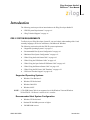
NOTE: **The USB Smart Cable is not supported on 64-bit Windows Vista and Windows
XP for ZDS II—Z8 Encore! versions 4.10.1 or earlier.
Recommended Host System Configuration
•
•
•
UM013033-0508
Windows XP Professional
Pentium III 500-MHz processor or higher
128 MB RAM or more
Introduction
Zilog Developer Studio II
Z8 Encore!® User Manual
xvii
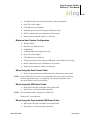
•
•
•
•
•
•
135 MB hard disk space (includes application and documentation)
Super VGA video adapter
CD-ROM drive for installation
USB high-speed port (when using the USB Smart Cable)
RS232 communication port with hardware flow control
Internet browser (Internet Explorer or Netscape)
Minimum Host System Configuration
•
•
•
•
•
•
•
•
•
Windows 98 SE
Pentium II 233-MHz processor
96 MB RAM
35 MB hard disk space (application only)
Super VGA video adapter
CD-ROM drive for installation
USB full-speed port (when using the USB Smart Cable; Windows 98 SE only)
RS232 communication port with hardware flow control
Internet browser (Internet Explorer or Netscape)
When Using the Serial Smart Cable
•
RS-232 communication port with hardware flow and modem control signals
NOTE: Some USB to RS-232 devices are not compatible because they lack the necessary
hardware signals and/or they use proprietary auto-sensing mechanisms which
prevent the Smart Cable from connecting.
When Using the USB Smart Cable
•
•
High-speed USB (fully compatible with original USB)
Root (direct) or self-powered hub connection
NOTE: The USB Smart Cable is a high-power USB device.
Windows NT is not supported.
When Using the Opto-Isolated USB Smart Cable
•
•
UM013033-0508
High-speed USB (fully compatible with original USB)
Root (direct) or self-powered hub connection
Introduction
Zilog Developer Studio II
Z8 Encore!® User Manual
xviii
NOTE: The USB Smart Cable is a high-power USB device.
Windows NT is not supported.
When Using the Ethernet Smart Cable
•
Ethernet 10Base-T compatible connection
When Using the Z8 Encore! MC Emulator
•
•
•
Internet browser (Internet Explorer or Netscape)
Ethernet 10Base-T compatible connection
One or more RS-232 communication ports with hardware flow control
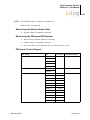
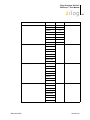
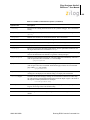
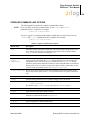
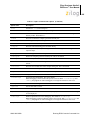
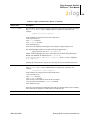
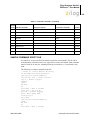
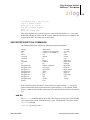
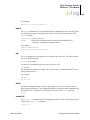
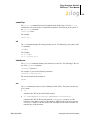
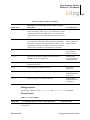
Z8 Encore! Product Support
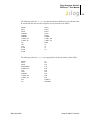
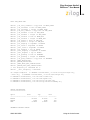
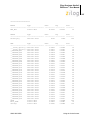
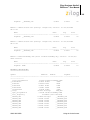
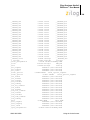
CPU Family
CPU
Z8Encore_F0830_Series
Z8F013x
Pin Count
Evaluation Kit Name
20, 28
Not applicable
20, 28
Z8F083A0128ZCOG
Z8F1621
40, 44
Z8F64200100KITG
Z8F1622
64, 68
Z8F2421
40, 44
Z8F2422
64, 68
Z8F3221
40, 44
Z8F3222
64, 68
Z8F4821
40, 44
Z8F4822
64, 68
Z8F4823
80
Z8F6421
40, 44
Z8F6422
64, 68
Z8F6423
80
Z8F023x
Z8F043x
Z8F083x
Z8F123x
Z8Encore_F083A_Series
Z8F043A
Z8F083A
Z8Encore_XP_64XX_Series
UM013033-0508
Introduction
Zilog Developer Studio II
Z8 Encore!® User Manual
xix
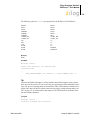
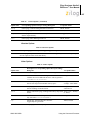
CPU Family
CPU
Z8Encore_XP_F0822_Series
Z8F0411
20
Z8F0412
28
Z8F0421
20
Z8F0422
28
Z8F0811
20
Z8F0812
28
Z8F0821
20
Z8F0822
28
Z8F0113XB
8
Z8F04A08100KITG
20, 28
Z8F04A28100KITG
8
Z8F04A08100KITG
Z8Encore_XP_F0823_8Pin_Series
Pin Count
Evaluation Kit Name
Z8F08200100KITG
Z8F0123XB
Z8F0213XB
Z8F0223XB
Z8F0413XB
Z8F0423XB
Z8F0813XB
Z8F0823XB
Z8Encore_XP_F0823_Series
Z8F0113
Z8F0123
Z8F0213
Z8F0223
Z8F0413
Z8F0423
Z8F0813
Z8F0823
Z8Encore_XP_F082A_8Pin_Series
Z8F011AXB
Z8F012AXB
Z8F021AXB
Z8F022AXB
Z8F041AXB
Z8F042AXB
Z8F081AXB
Z8F082AXB
UM013033-0508
Introduction
Zilog Developer Studio II
Z8 Encore!® User Manual
xx
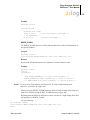
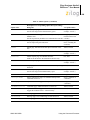
CPU Family
CPU
Z8Encore_XP_F082A_Series
Z8F011A
Pin Count
20, 28
Evaluation Kit Name
Z8F04A28100KITG
Z8F012A
Z8F021A
Z8F022A
Z8F041A
Z8F042A
Z8F081A
Z8F08A28100KITG
Z8F082A
Z8Encore_XP_F1680_Series_16K
Z8F1680X
Z8F1681X
20, 28, 40, 44 Z8F16800128ZCOG
Z8F16800144ZCOG
Z8Encore_XP_F1680_Series_24K
Z8F2480X
Z8F2481X
20, 28, 40, 44 Z8F16800128ZCOG
Z8F16800144ZCOG
Z8Encore_XP_F1680_Series_8K
Z8F0880X
Z8F0881X
20, 28, 40, 44 Z8F16800128ZCOG
Z8F16800144ZCOG
Z8Encore_Z8FMC16100_Series
Z8FMC04100
28, 32
Z8FMC160100KITG
Z8FMC08100
Z8FMC16100
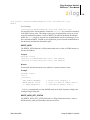
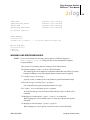
ZILOG TECHNICAL SUPPORT
For technical questions about our products and tools or for design assistance, please use
our web page:
http://www.zilog.com
You must provide the following information in your support ticket:
•
•
•
•
•
Product release number (Located in the heading of the toolbar)
Product serial number
Type of hardware you are using
Exact wording of any error or warning messages
Any applicable files attached to the e-mail
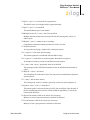
Before Using Technical Support
Before you use technical support, consult the following documentation:
•
UM013033-0508
readme.txt file
Introduction
Zilog Developer Studio II
Z8 Encore!® User Manual
xxi
Refer to the readme.txt file in the following directory for last minute tips and
information about problems that might occur while installing or running ZDS II:
ZILOGINSTALL\ZDSII_product_version\
where
– ZILOGINSTALL is the ZDS II installation directory. For example, the default
installation directory is C:\Program Files\ZiLOG.
– product is the specific Zilog product. For example, product can be Z8Encore!,
ZNEO, eZ80Acclaim!, Crimzon, or Z8GP.
– version is the ZDS II version number. For example, version might be 4.11.0 or
5.0.0.
•
FAQ.html file
The FAQ.html file contains answers to frequently asked questions and other
information about good practices for getting the best results from ZDS II. The
information in this file does not generally go out of date from release to release as
quickly as the information in the readme.txt file. You can find the FAQ.html file in
the following directory:
ZILOGINSTALL\ZDSII_product_version\
where
– ZILOGINSTALL is the ZDS II installation directory. For example, the default
installation directory is C:\Program Files\ZiLOG.
– product is the specific Zilog product. For example, product can be Z8Encore!,
ZNEO, eZ80Acclaim!, Crimzon, or Z8GP.
– version is the ZDS II version number. For example, version might be 4.11.0 or
5.0.0.
•
UM013033-0508
Troubleshooting section
– “Zilog Standard Library Notes and Tips” on page 331
Introduction
Zilog Developer Studio II
Z8 Encore!® User Manual
1
Getting Started
This section provides a tutorial of the developer’s environment, so you can be working
with the ZDS II graphical user interface in a short time. The following topics are covered:
•
•
“Installing ZDS II” on page 1
“Developer’s Environment Tutorial” on page 1
INSTALLING ZDS II
There are two ways to install ZDS II:
•
From a CD
a. Insert the CD in your CD-ROM drive.
b. Follow the setup instructions on your screen.
The installer displays a default location for ZDS II. You can change the location if
you want to.
•
From www.zilog.com
a. Navigate to http://www.zilog.com/software/zds2.asp.
b. Click on the link for the version that you want to download.
c. Click Download.
d. In the File Download dialog box, click Save.
e. Navigate to where you want to save ZDS II.
f.
Click Save.
g. Double-click the executable file.
h. Follow the setup instructions on your screen.
The installer displays a default location for ZDS II. You can change the location if
you want to.
DEVELOPER’S ENVIRONMENT TUTORIAL
This tutorial shows you how to use the Zilog Developer Studio II. To begin this tour, you
need a basic understanding of Microsoft Windows. Estimated time for completing this
exercise is 15 minutes.
In this tour, you do the following:
•
•
UM013033-0508
“Create a New Project” on page 2
“Add a File to the Project” on page 6
Getting Started
Zilog Developer Studio II
Z8 Encore!® User Manual
2
•
•
“Set Up the Project” on page 8
“Save the Project” on page 14
When you complete this tour, you have a sample.lod file that is used in debugging.
NOTE: Be sure to read “Using the Integrated Development Environment” on page 15 to learn more
about all the dialog boxes and their options discussed in this tutorial.
For the purpose of this quick tour, your Z8 Encore! developer’s environment directory will
be referred to as <ZDS Installation Directory>, which equates to the following path:
<ZILOGINSTALL>\ZDSII_Z8Encore!_<version>\
where
•
ZILOGINSTALL is the ZDS II installation directory. For example, the default
installation directory is C:\Program Files\ZiLOG.
•
version is the ZDS II version number. For example, version might be 4.11.0 or
5.0.0.
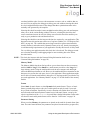
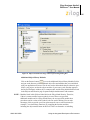
Create a New Project
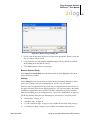
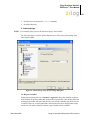
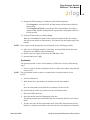
1. To create a new project, select New Project from the File menu.
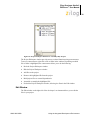
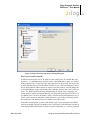
The New Project dialog box is displayed.
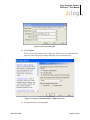
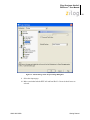
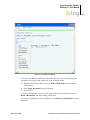
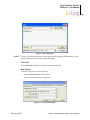
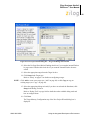
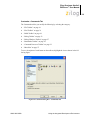
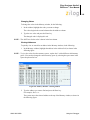
Figure 1. New Project Dialog Box
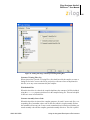
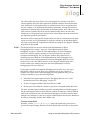
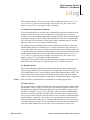
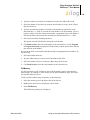
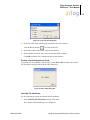
2. From the New Project dialog box, click on the Browse button (
directory where you want to save your project.
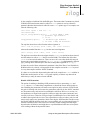
) to navigate to the
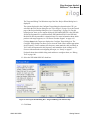
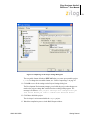
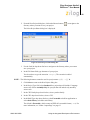
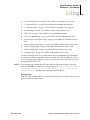
The Select Project Name dialog box is displayed.
UM013033-0508
Getting Started
Zilog Developer Studio II
Z8 Encore!® User Manual
3
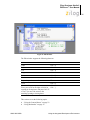
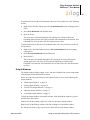
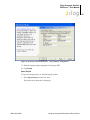
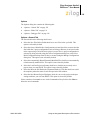
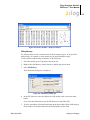
Figure 2. Select Project Name Dialog Box
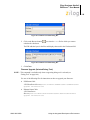
3. Use the Look In drop-down list box to navigate to the directory where you want to
save your project. For this tutorial, place your project in the following directory:
<ZDS Installation Directory>\samples\Tutorial
If Zilog Developer Studio was installed in the default directory, the following is the
actual path:
C:\Program Files\ZiLOG\ZDSII_Z8Encore!_4.11.0\samples\Tutorial
NOTE: You can create a new folder where you want to save your project. For example:
C:\<New Folder>
4. In the File Name field, type sample for the name of your project.
The Z8 Encore! developer’s environment creates a project file. Project files have the
.zdsproj extension (for example, <project name>.zdsproj). You do not have to
type the extension .zdsproj. It is added automatically.
5. Click Select to return to the New Project dialog box.
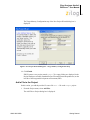
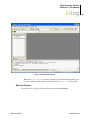
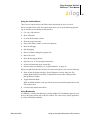
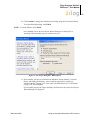
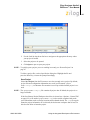
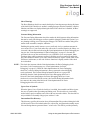
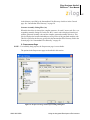
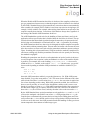
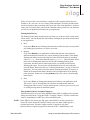
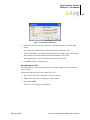
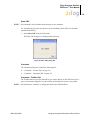
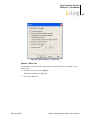
6. In the Project Type field, select Standard because the sample project uses .c files.
7. In the CPU Family drop-down list box, select Z8Encore_XP_F1680_Series_16K.
8. In the CPU drop-down list box, select Z8F1680XJ.
9. In the Build Type drop-down list box, select Executable to build an application.
UM013033-0508
Getting Started
Zilog Developer Studio II
Z8 Encore!® User Manual
4
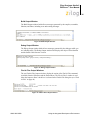
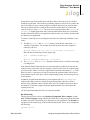
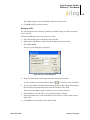
Figure 3. New Project Dialog Box
10. Click Continue.
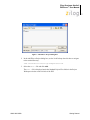
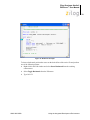
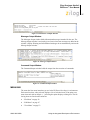
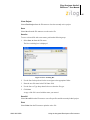
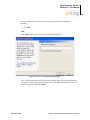
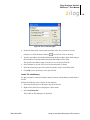
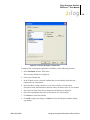
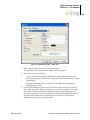
The New Project Wizard dialog box is displayed. It allows you to modify the initial
values for some of the project settings during the project creation process.
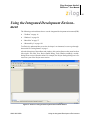
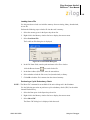
Figure 4. New Project Wizard Dialog Box—Build Options Step
11. Accept the defaults by clicking Next.
UM013033-0508
Getting Started
Zilog Developer Studio II
Z8 Encore!® User Manual
5
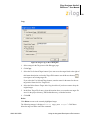
The Target and Debug Tool Selection step of the New Project Wizard dialog box is
displayed.
The options displayed in the Configure Target dialog box depend on the CPU you
selected in the New Project dialog box (see “New Project” on page 39) or the General
page of the Project Settings dialog box (see “General Page” on page 56). For this
tutorial project, there are two targets displayed. Z8F16800128ZCOG is the Z8F1680
28-Pin Development Kit’s evaluation board; Z8F16800144ZCOG is the Z8F1680
Dual 44-Pin Development Kit’s evaluation board. For more information about which
products each target supports, see “Z8 Encore! Product Support” on page xviii.
Clicking Setup in the Target area displays the Configure Target dialog box. The
Configure Target dialog box allows you to select the clock source and the appropriate
clock frequency. For the emulator, this frequency must match the clock oscillator on
Y4. For the development kit, this frequency must match the clock oscillator on Y1.
For more information about configuring the target, see “Setup” on page 97.
For details about the available debug tools and how to configure them, see “Debug
Tool” on page 100.
12. Select the Z8F16800128ZCOG check box.
Figure 5. New Project Wizard Dialog Box—Target and Debug Tool Selection Step
13. Click Next.
UM013033-0508
Getting Started
Zilog Developer Studio II
Z8 Encore!® User Manual
6
The Target Memory Configuration step of the New Project Wizard dialog box is
displayed.
Figure 6. New Project Wizard Dialog Box—Target Memory Configuration Step
14. Click Finish.
ZDS II creates a new project named sample. Two empty folders are displayed in the
Project Workspace window (Standard Project Files and External Dependencies) on the
left side of the integrated development environment (IDE).
Add a File to the Project
In this section, you add the provided C source file main.c file to the sample project.
1. From the Project menu, select Add Files.
The Add Files to Project dialog box is displayed.
UM013033-0508
Getting Started
Zilog Developer Studio II
Z8 Encore!® User Manual
7
Figure 7. Add Files to Project Dialog Box
2. In the Add Files to Project dialog box, use the Look In drop-down list box to navigate
to the tutorial directory:
<ZDS Installation Directory>\samples\Tutorial
3. Select the main.c file and click Add.
The main.c file is displayed under the Standard Project Files folder in the Project
Workspace window on the left side of the IDE.
UM013033-0508
Getting Started
Zilog Developer Studio II
Z8 Encore!® User Manual
8
Figure 8. Sample Project
NOTE: To view any of the files in the Edit window during the quick tour, double-click on
the file in the Project Workspace window.
Set Up the Project
Before you save and build the sample project, check the settings in the Project Settings
dialog box.
1. From the Project menu, select Settings.
The Project Settings dialog box is displayed. It provides various project configuration
pages that can be accessed by selecting the page name in the pane on the left side of
the dialog box. There are several pages grouped together for the C (Compiler) and
Linker that allow you to set up subsettings for those tools. For more information, see
“Settings” on page 55.
UM013033-0508
Getting Started
Zilog Developer Studio II
Z8 Encore!® User Manual
9
2. In the Configuration drop-down list box, make sure that the Debug build
configuration is selected.
For your convenience, the Debug configuration is a predefined configuration of
defaults set for debugging. For more information on project configurations such as
adding your own configuration, see “Set Active Configuration” on page 103.
Figure 9. General Page of the Project Settings Dialog Box
3. Select the Assembler page.
4. Make sure that the Generate Assembly Listing Files (.lst) check box is selected.
UM013033-0508
Getting Started
Zilog Developer Studio II
Z8 Encore!® User Manual
10
Figure 10. Assembler Page of the Project Settings Dialog Box
5. Select the Code Generation page.
6. Make sure that the Limit Optimizations for Easier Debugging check box is selected.
UM013033-0508
Getting Started
Zilog Developer Studio II
Z8 Encore!® User Manual
11
Figure 11. Code Generation Page of the Project Settings Dialog Box
7. Select the Advanced page.
8. Make certain that the Generate Printfs Inline check box is selected.
UM013033-0508
Getting Started
Zilog Developer Studio II
Z8 Encore!® User Manual
12
Figure 12. Advanced Page of the Project Settings Dialog Box
9. Select the Output page.
10. Make certain that both the IEEE 695 and Intel Hex32 - Records check boxes are
selected.
UM013033-0508
Getting Started
Zilog Developer Studio II
Z8 Encore!® User Manual
13
Figure 13. Output Page of the Project Settings Dialog Box
The executable format defaults to IEEE 695 when you create an executable project
(.lod). To change the executable format, see “Linker: Output Page” on page 93.
11. Click OK to save all the settings on the Project Settings dialog box.
The Development Environment prompts you to build the project when changes are
made to the project settings that would effect the resulting build program. The
message is as follows: “The project settings have changed since the
last build. Would you like to rebuild the affected files?”
12. Click Yes to build the project.
The developer’s environment builds the sample project.
13. Watch the compilation process in the Build Output window.
UM013033-0508
Getting Started
Zilog Developer Studio II
Z8 Encore!® User Manual
14
Figure 14. Build Output Window
When the Build completed message is displayed in the Build Output window, you
have successfully built the sample project and created a sample.lod file to debug.
Save the Project
You need to save your project. From the File menu, select Save Project.
UM013033-0508
Getting Started
Zilog Developer Studio II
Z8 Encore!® User Manual
15
Using the Integrated Development Environment
The following sections discuss how to use the integrated development environment (IDE):
•
•
•
•
“Toolbars” on page 16
“Windows” on page 29
“Menu Bar” on page 37
“Shortcut Keys” on page 129
To effectively understand how to use the developer’s environment, be sure to go through
the tutorial in “Getting Started” on page 1.
After the discussion of the toolbars and windows, this section discusses the menu bar from
left to right—File, Edit, View, Project, Build, Debug, Tools, Window, and Help—and the
dialog boxes accessed from the menus. For example, the Project Settings dialog box is discussed as a part of the Project menu section.
Figure 15. Z8 Encore! Integrated Development Environment Window
UM013033-0508
Using the Integrated Development Environment
Zilog Developer Studio II
Z8 Encore!® User Manual
16
For a table of all the shortcuts used in the Z8 Encore! developer’s environment, see
"Shortcut Keys" on page 129.
TOOLBARS
The toolbars give you quick access to most features of the Z8 Encore! developer’s environment. You can use these buttons to perform any task.
NOTE: There are cue cards for the toolbars. As you move the mouse pointer across the toolbars,
the main function of the button is displayed. Also, you can drag and move the toolbars to
different areas on the screen.
The following toolbars are available:
•
•
•
•
•
•
•
“File Toolbar” on page 16
“Build Toolbar” on page 18
“Find Toolbar” on page 21
“Command Processor Toolbar” on page 22
“Bookmarks Toolbar” on page 22
“Debug Toolbar” on page 23
“Debug Windows Toolbar” on page 27
NOTE: For more information on Debugging, see “Using the Debugger” on page 309.
File Toolbar
The File toolbar allows you to perform basic functions with your files using the following
buttons:
•
•
•
•
•
•
•
•
•
•
UM013033-0508
“New Button” on page 17
“Open Button” on page 17
“Save Button” on page 17
“Save All Button” on page 17
“Cut Button” on page 17
“Copy Button” on page 17
“Paste Button” on page 17
“Delete Button” on page 17
“Print Button” on page 17
“Workspace Window Button” on page 17
Using the Integrated Development Environment
Zilog Developer Studio II
Z8 Encore!® User Manual
17
•
“Output Window Button” on page 18
Figure 16. File Toolbar
New Button
The New button creates a new file.
Open Button
The Open button opens an existing file.
Save Button
The Save button saves the active file.
Save All Button
The Save All button saves all open files and the currently loaded project.
Cut Button
The Cut button deletes selected text from the active file and puts it on the Windows clipboard.
Copy Button
The Copy button copies selected text from the active file and puts it on the Windows clipboard.
Paste Button
The Paste button pastes the current contents of the clipboard into the active file at the current cursor position.
Delete Button
The Delete button deletes selected text from the active file.
Print Button
The Print button prints the active file.
Workspace Window Button
The Workspace Window button shows or hides the Project Workspace window.
UM013033-0508
Using the Integrated Development Environment
Zilog Developer Studio II
Z8 Encore!® User Manual
18
Output Window Button
The Output Window button shows or hides the Output window.
Build Toolbar
The Build toolbar allows you to build your project, set breakpoints, and select a project
configuration with the following controls and buttons:
•
•
•
•
•
•
•
•
•
•
•
•
“Select Build Configuration List Box” on page 18
“Compile/Assemble File Button” on page 18
“Build Button” on page 18
“Rebuild All Button” on page 18
“Stop Build Button” on page 19
“Connect to Target Button” on page 19
“Download Code Button” on page 19
“Reset Button” on page 25
“Go Button” on page 20
“Insert/Remove Breakpoint Button” on page 21
“Enable/Disable Breakpoint Button” on page 21
“Remove All Breakpoints Button” on page 21
Figure 17. Build Toolbar
Select Build Configuration List Box
The Select Build Configuration drop-down list box lets you activate the build configuration for your project. See “Set Active Configuration” on page 103 for more information.
Compile/Assemble File Button
The Compile/Assemble File button compiles or assembles the active source file.
Build Button
The Build button builds your project by compiling and/or assembling any files that have
changed since the last build and then links the project.
Rebuild All Button
The Rebuild All button rebuilds all files and links the project.
UM013033-0508
Using the Integrated Development Environment
Zilog Developer Studio II
Z8 Encore!® User Manual
19
Stop Build Button
The Stop Build button stops a build in progress.
Connect to Target Button
The Connect to Target button starts a debug session using the following process:
1. Initializes the communication to the target hardware.
2. Resets the device.
3. Configures the device using the settings in the Configure Target dialog box.
4. Configures and executes the debugger options selected in the Debugger tab of the
Options dialog box. The following options are ignored if selected:
–
Reset to Symbol 'main' (Where Applicable) check box
–
Verify File Downloads—Read After Write check box
–
Verify File Downloads—Upon Completion check box
This button does not download the software. Use this button to access target registers,
memory, and so on without loading new code or to avoid overwriting the target’s code
with the same code. This button is not enabled when the target is the simulator. This button
is available only when not in Debug mode.
For the Serial Smart Cable, ZDS II performs an on-chip debugger reset and resets the CPU
at the vector reset location.
Download Code Button
The Download Code button downloads the executable file for the currently open project to
the target for debugging. The button also initializes the communication to the target hardware if it has not been done yet. Starting in version 4.10.0, the Download Code button can
also program Flash memory. A page erase is done instead of a mass erase for both internal
and external Flash memory. Use this button anytime during a debug session. This button is
not enabled when the target is the simulator.
NOTE: The current code on the target is overwritten.
If ZDS II is not in Debug mode when the Download Code button is clicked, the following
process is executed:
1. Initializes the communication to the target hardware.
2. Resets the device with a hardware reset by driving pin #2 of the debug header low.
3. Configures the device using the settings in the Configure Target dialog box.
4. Downloads the program.
5. Issues a software reset through the debug header serial interface.
UM013033-0508
Using the Integrated Development Environment
Zilog Developer Studio II
Z8 Encore!® User Manual
20
6. Configures and executes the debugger options selected in the Debugger tab of the
Options dialog box. If it is a C project, ZDS II resets to the main function if it is found.
If ZDS II is already in Debug mode when the Download Code button is clicked, the following process is executed:
1. Resets the device using a software reset.
2. Downloads the program.
You might need to reset the device before execution because the program counter might
have been changed after the download.
Reset Button
Click the Reset button in the Build or Debug toolbar to reset the program counter to the
beginning of the program.
If ZDS II is not in Debug mode, the Reset button starts a debug session using the following process:
1. Initializes the communication to the target hardware.
2. Resets the device.
3. Configures the device using the settings in the Configure Target dialog box.
4. Downloads the program.
5. Configures and executes the debugger options selected in the Debugger tab of the
Options dialog box. If it is a C project, ZDS II resets to the main function if it is found.
If ZDS II is already in Debug mode, the Reset button uses the following process:
1. ZDS II performs a hardware reset.
2. Configures the device using the settings in the Configure Target dialog box.
3. If files have been modified, ZDS II asks, “Would you like to rebuild the project?”
before downloading the modified program. If there has been no file modification, the
code is not reloaded.
For the Serial Smart Cable, ZDS II performs an on-chip debugger reset.
Go Button
Click the Go button to execute project code from the current program counter.
If not in Debug mode when the Go button is clicked, the following process is executed:
1. Initializes the communication to the target hardware.
2. Resets the device.
3. Configures the device using the settings in the Configure Target dialog box.
UM013033-0508
Using the Integrated Development Environment
Zilog Developer Studio II
Z8 Encore!® User Manual
21
4. Downloads the program.
5. Configures and executes the debugger options selected in the Debugger tab of the
Options dialog box. If it is a C project, ZDS II resets to the main function if it is found.
6. Executes the program from the reset location.
Insert/Remove Breakpoint Button
The Insert/Remove Breakpoint button sets a new breakpoint or removes an existing breakpoint at the line containing the cursor in the active file or the Disassembly window. A
breakpoint must be placed on a valid code line (a C source line with a blue dot displayed
in the gutter or any instruction line in the Disassembly window). For more information on
breakpoints, see “Using Breakpoints” on page 326.
Enable/Disable Breakpoint Button
The Enable/Disable Breakpoint button activates or deactivates the existing breakpoint at
the line containing the cursor in the active file or the Disassembly window. A red octagon
indicates an enabled breakpoint; a white octagon indicates a disabled breakpoint. For more
information on breakpoints, see “Using Breakpoints” on page 326.
Remove All Breakpoints Button
The Remove All Breakpoints button deletes all breakpoints in the currently loaded project.
To deactivate breakpoints in your program, use the Disable All Breakpoints button.
Find Toolbar
The Find toolbar provides access to text search functions with the following controls:
•
•
“Find in Files Button” on page 21
“Find Field” on page 21
Figure 18. Find Toolbar
Find in Files Button
This button opens the Find in Files dialog box, allowing you to search for text in multiple
files.
Find Field
To locate text in the active file, type the text in the Find field and press the Enter key. The
search term is highlighted in the file. To search again, press the Enter key again.
UM013033-0508
Using the Integrated Development Environment
Zilog Developer Studio II
Z8 Encore!® User Manual
22
Command Processor Toolbar
The Command Processor toolbar allows you to execute IDE and debugger commands with
the following controls:
•
•
•
“Run Command Button” on page 22
“Stop Command Button” on page 22
“Command Field” on page 22
Figure 19. Command Processor Toolbar
See “Supported Script File Commands” on page 413 for a list of supported commands.
Run Command Button
The Run Command button executes the command in the Command field. Output from the
execution of the command is displayed in the Command tab of the Output window.
Stop Command Button
The Stop Command button stops any currently running commands.
Command Field
The Command field allows you to enter a new command. Click the Run Command button
or press the Enter key to execute the command. Output from the execution of the command is displayed in the Command tab of the Output window.
To modify the width of the Command field, do the following:
1. Select Customize from the Tools menu.
2. Click in the Command field.
A hatched rectangle highlights the Command field.
3. Use your mouse to select and drag the side of the hatched rectangle.
The new size of the Command field is saved with the project settings.
Bookmarks Toolbar
The Bookmarks toolbar allows you to set, remove, and find bookmarks with the following
buttons:
•
•
UM013033-0508
“Set Bookmark Button” on page 23
“Next Bookmark Button” on page 23
Using the Integrated Development Environment
Zilog Developer Studio II
Z8 Encore!® User Manual
23
•
•
“Previous Bookmark Button” on page 23
“Delete Bookmarks Button” on page 23
Figure 20. Bookmarks Toolbar
NOTE: This toolbar is not displayed in the default IDE window.
Set Bookmark Button
Click the Set Bookmark button to insert a bookmark in the active file for the line where
your cursor is located.
Next Bookmark Button
Click the Next Bookmark button to position the cursor at the line where the next bookmark in the active file is located.
Previous Bookmark Button
Click the Previous Bookmark button to position the cursor at the line where the next bookmark in the active file is located.
Delete Bookmarks Button
Click the Delete Bookmarks button to remove all of the bookmarks in the currently loaded
project.
Debug Toolbar
The Debug toolbar allows you to perform debugger functions with the following buttons:
•
•
•
•
•
•
•
•
•
UM013033-0508
“Download Code Button” on page 24
“Verify Download Button” on page 25
“Reset Button” on page 25
“Stop Debugging Button” on page 25
“Go Button” on page 25
“Run to Cursor Button” on page 26
“Break Button” on page 26
“Step Into Button” on page 26
“Step Over Button” on page 26
Using the Integrated Development Environment
Zilog Developer Studio II
Z8 Encore!® User Manual
24
•
•
•
•
•
•
“Step Out Button” on page 26
“Set Next Instruction Button” on page 26
“Insert/Remove Breakpoint Button” on page 21
“Enable/Disable Breakpoint Button” on page 21
“Disable All Breakpoints Button” on page 27
“Remove All Breakpoints Button” on page 27
Figure 21. Debug Toolbar
Download Code Button
The Download Code button downloads the executable file for the currently open project to
the target for debugging. The button also initializes the communication to the target hardware if it has not been done yet. Starting in version 4.10.0, the Download Code button can
also program Flash memory. A page erase is done instead of a mass erase for both internal
and external Flash memory. Use this button anytime during a debug session. This button is
not enabled when the target is the simulator.
NOTE: The current code on the target is overwritten.
If ZDS II is not in Debug mode when the Download Code button is clicked, the following
process is executed:
1. Initializes the communication to the target hardware.
2. Resets the device with a hardware reset by driving pin #2 of the debug header low.
3. Configures the device using the settings in the Configure Target dialog box.
4. Downloads the program.
5. Issues a software reset through the debug header serial interface.
6. Configures and executes the debugger options selected in the Debugger tab of the
Options dialog box. If it is a C project, ZDS II resets to the main function if it is found.
If ZDS II is already in Debug mode when the Download Code button is clicked, the following process is executed:
1. Resets the device using a software reset.
2. Downloads the program.
NOTE: You might need to reset the device before execution because the program counter
might have been changed after the download.
UM013033-0508
Using the Integrated Development Environment
Zilog Developer Studio II
Z8 Encore!® User Manual
25
Verify Download Button
The Verify Download button determines download correctness by comparing executable
file contents to target memory.
Reset Button
Click the Reset button in the Build or Debug toolbar to reset the program counter to the
beginning of the program.
If ZDS II is not in Debug mode, the Reset button starts a debug session using the following process:
1. Initializes the communication to the target hardware.
2. Resets the device.
3. Configures the device using the settings in the Configure Target dialog box.
4. Downloads the program.
5. Configures and executes the debugger options selected in the Debugger tab of the
Options dialog box. If it is a C project, ZDS II resets to the main function if it is found.
If ZDS II is already in Debug mode, the Reset button uses the following process:
1. ZDS II performs a hardware reset.
2. Configures the device using the settings in the Configure Target dialog box.
3. If files have been modified, ZDS II asks, “Would you like to rebuild the project?”
before downloading the modified program. If there has been no file modification, the
code is not reloaded.
For the Serial Smart Cable, ZDS II performs an on-chip debugger reset.
Stop Debugging Button
The Stop Debugging button ends the current debug session.
To stop program execution, click the Break button.
Go Button
Click the Go button to execute project code from the current program counter.
If not in Debug mode when the Go button is clicked, the following process is executed:
1. Initializes the communication to the target hardware.
2. Resets the device.
3. Configures the device using the settings in the Configure Target dialog box.
4. Downloads the program.
UM013033-0508
Using the Integrated Development Environment
Zilog Developer Studio II
Z8 Encore!® User Manual
26
5. Configures and executes the debugger options selected in the Debugger tab of the
Options dialog box. If it is a C project, ZDS II resets to the main function if it is found.
6. Executes the program from the reset location.
Run to Cursor Button
The Run to Cursor button executes the program code from the current program counter to
the line containing the cursor in the active file or the Disassembly window. The cursor
must be placed on a valid code line (a C source line with a blue dot displayed in the gutter
or any instruction line in the Disassembly window).
Break Button
The Break button stops program execution at the current program counter.
Step Into Button
The Step Into button executes one statement or instruction from the current program
counter, following the execution into function calls. When complete, the program counter
resides at the next program statement or instruction unless a function was entered, in
which case the program counter resides at the first statement or instruction in the function.
Step Over Button
The Step Over button executes one statement or instruction from the current program
counter without following the execution into function calls. When complete, the program
counter resides at the next program statement or instruction.
Step Out Button
The Step Out button executes the remaining statements or instructions in the current function and returns to the statement or instruction following the call to the current function.
Set Next Instruction Button
The Set Next Instruction button sets the program counter to the line containing the cursor
in the active file or the Disassembly window.
Insert/Remove Breakpoint Button
The Insert/Remove Breakpoint button sets a new breakpoint or removes an existing breakpoint at the line containing the cursor in the active file or the Disassembly window. A
breakpoint must be placed on a valid code line (a C source line with a blue dot displayed
in the gutter or any instruction line in the Disassembly window). For more information on
breakpoints, see “Using Breakpoints” on page 326.
UM013033-0508
Using the Integrated Development Environment
Zilog Developer Studio II
Z8 Encore!® User Manual
27
Enable/Disable Breakpoint Button
The Enable/Disable Breakpoint button activates or deactivates the existing breakpoint at
the line containing the cursor in the active file or the Disassembly window. A red octagon
indicates an enabled breakpoint; a white octagon indicates a disabled breakpoint. For more
information on breakpoints, see “Using Breakpoints” on page 326.
Disable All Breakpoints Button
The Disable All Breakpoints button deactivates all breakpoints in the currently loaded
project. To delete breakpoints from your program, use the Remove All Breakpoints button.
Remove All Breakpoints Button
The Remove All Breakpoints button deletes all breakpoints in the currently loaded project.
To deactivate breakpoints in your program, use the Disable All Breakpoints button.
Debug Windows Toolbar
The Debug Windows toolbar allows you to display the Debug windows with the following
buttons:
•
•
•
•
•
•
•
•
•
•
“Registers Window Button” on page 27
“Special Function Registers Window Button” on page 28
“Clock Window Button” on page 28
“Memory Window Button” on page 28
“Watch Window Button” on page 28
“Locals Window Button” on page 28
“Call Stack Window Button” on page 28
“Symbols Window Button” on page 28
“Disassembly Window Button” on page 28
“Simulated UART Output Window Button” on page 28
Figure 22. Debug Windows Toolbar
Registers Window Button
The Registers Window button displays or hides the Registers window. This window is
described in “Registers Window” on page 312.
UM013033-0508
Using the Integrated Development Environment
Zilog Developer Studio II
Z8 Encore!® User Manual
28
Special Function Registers Window Button
The Special Function Registers Window button displays or hides the Special Function
Registers window. This window is described in “Special Function Registers Window” on
page 313.
Clock Window Button
The Clock Window button displays or hides the Clock window. This window is described
in “Clock Window” on page 313.
Memory Window Button
The Memory Window button displays or hides the Memory window. This window is
described in “Memory Window” on page 314.
Watch Window Button
The Watch Window button displays or hides the Watch window. This window is described
in “Watch Window” on page 320.
Locals Window Button
The Locals Window button displays or hides the Locals window. This window is
described in “Locals Window” on page 322.
Call Stack Window Button
The Call Stack Window button displays or hides the Call Stack window. This window is
described in “Call Stack Window” on page 323.
Symbols Window Button
The Symbols Window button displays or hides the Symbols window. This window is
described in “Symbols Window” on page 324.
Disassembly Window Button
The Disassembly Window button displays or hides the Disassembly window. This window is described in “Disassembly Window” on page 325.
Simulated UART Output Window Button
The Simulated UART Output Window button displays or hides the Simulated UART Output window. This window is described in “Simulated UART Output Window” on
page 326.
UM013033-0508
Using the Integrated Development Environment
Zilog Developer Studio II
Z8 Encore!® User Manual
29
WINDOWS
The following ZDS II windows allow you to see various aspects of the tools while working with your project:
•
•
•
“Project Workspace Window” on page 29
“Edit Window” on page 30
“Output Windows” on page 35
Project Workspace Window
The Project Workspace window on the left side of the developer’s environment allows you
to view your project files.
Figure 23. Project Workspace Window for Standard Projects
UM013033-0508
Using the Integrated Development Environment
Zilog Developer Studio II
Z8 Encore!® User Manual
30
Figure 24. Project Workspace Window for Assembly Only Projects
The Project Workspace window provides access to related functions using context menus.
To access context menus, right-click a file or folder in the window. Depending on which
file or folder is highlighted, the context menu allows you to do the following:
•
•
•
•
•
•
•
Dock the Project Workspace window
Hide the Project Workspace window
Add files to the project
Remove the highlighted file from the project
Build project files or external dependencies
Assemble or compile the highlighted file
Undock the Project Workspace window, allowing it to float in the Edit window
Edit Window
The Edit window on the right side of the developer’s environment allows you to edit the
files in your project.
UM013033-0508
Using the Integrated Development Environment
Zilog Developer Studio II
Z8 Encore!® User Manual
31
Figure 25. Edit Window
The Edit window supports the following shortcuts:
Function
Shortcuts
Undo
Ctrl + Z
Redo
Ctrl + Y
Cut
Ctrl + X
Copy
Ctrl + C
Paste
Ctrl + V
Find
Ctrl + F
Repeat the previous search
F3
Go to
Ctrl + G
Go to matching { or }.
Ctrl + E
Place your cursor at the right or left of an
Ctrl + ]
opening or closing brace and press Ctrl + E
or Ctrl +] to move the cursor to the
matching opening or closing brace.
This section covers the following topics:
•
•
UM013033-0508
“Using the Context Menus” on page 32
“Using Bookmarks” on page 32
Using the Integrated Development Environment
Zilog Developer Studio II
Z8 Encore!® User Manual
32
Using the Context Menus
There are two context menus in the Edit window, depending on where you click.
When you right-click in a file, the context menu allows you to do the following (depending on whether you are running in Debug mode):
•
•
•
•
•
•
•
•
•
•
•
•
•
Cut, copy, and paste text
Show whitespace
Go to the Disassembly window
Show the program counter
Insert, edit, enable, disable, or remove breakpoints
Reset the debugger
Stop debugging
Start or continue running the program (Go)
Run to the cursor
Pause the debugging (Break)
Step into, over, or out of program instructions
Set the next instruction at the current line
Insert or remove bookmarks (see “Using Bookmarks” on page 32)
When you right-click outside of all files, the context menu allows you to do the following:
•
Show or hide the Output windows, Project Workspace window, status bar, File
toolbar, Build toolbar, Find toolbar, Command Processor toolbar, Debug toolbar,
Debug Windows toolbar
•
Toggle Workbook Mode
When in Workbook Mode, each open file has an associated tab along the bottom of the
Edit windows area.
•
Customize the buttons and toolbars
Using Bookmarks
A bookmark is a marker that identifies a position within a file. Bookmarks appear as cyan
boxes in the gutter portion (left) of the file window. The cursor can be quickly positioned
on a lines containing bookmarks.
UM013033-0508
Using the Integrated Development Environment
Zilog Developer Studio II
Z8 Encore!® User Manual
33
Figure 26. Bookmark Example
To insert a bookmark, position the cursor on the desired line of the active file and perform
one of the following actions:
•
Right-click in the Edit window and select Insert Bookmark from the resulting
context menu.
•
•
Select Toggle Bookmark from the Edit menu.
UM013033-0508
Type Ctrl+F2.
Using the Integrated Development Environment
Zilog Developer Studio II
Z8 Encore!® User Manual
34
Figure 27. Inserting a Bookmark
To remove a bookmark, position the cursor on the line of the active file containing the
bookmark to be removed and perform one of the following actions:
•
Right-click in the Edit window and select Remove Bookmark from the resulting
context menu.
•
•
Select Toggle Bookmark from the Edit menu.
Type Ctrl+F2.
To remove all bookmarks in the active file, right-click in the Edit window and select
Remove Bookmarks from the resulting context menu.
To remove all bookmarks in the current project, select Remove All Bookmarks from the
Edit menu.
UM013033-0508
Using the Integrated Development Environment
Zilog Developer Studio II
Z8 Encore!® User Manual
35
To position the cursor at the next bookmark in the active file, perform one of the following
actions:
•
Right-click in the Edit window and select Next Bookmark from the resulting context
menu.
•
•
Select Next Bookmark from the Edit menu.
Press the F2 key.
The cursor moves forward through the file, starting at its current position and
beginning again when the end of file is reached, until a bookmark is encountered. If no
bookmarks are set in the active file, this function has no effect.
To position the cursor at the previous bookmark in the active file, perform one of the following actions:
•
Right-click in the Edit window and select Previous Bookmark from the resulting
context menu.
•
•
Select Previous Bookmark from the Edit menu.
Press Shift+F2.
The cursor moves backwards through the file, starting at its current position and
starting again at the end of the file when the file beginning is reached, until a
bookmark is encountered. If no bookmarks are set in the active file, this function has
no effect.
Output Windows
The Output windows display output, errors, and other feedback from various components
of the Integrated Development Environment.
Select one of the tabs at the bottom of the Output window to select one of following the
Output windows:
•
•
•
•
•
“Build Output Window” on page 36
“Debug Output Window” on page 36
“Find in Files Output Windows” on page 36
“Messages Output Window” on page 37
“Command Output Window” on page 37
To dock the Output window with another window, click and hold the window’s grip bar
and then move the window.
Double-click on the window's grip bar to cause it to become a floating window.
Double-click on the floating window's title bar to change it to a dockable window.
Use the context menu to copy text from or to delete all text in the Output window.
UM013033-0508
Using the Integrated Development Environment
Zilog Developer Studio II
Z8 Encore!® User Manual
36
Build Output Window
The Build Output window holds all text messages generated by the compiler, assembler,
librarian, and linker, including error and warning messages.
Figure 28. Build Output Window
Debug Output Window
The Debug Output window holds all text messages generated by the debugger while you
are in Debug mode. The Debug Output window also displays the chip revision identifier
and the Smart Cable firmware version.
Figure 29. Debug Output Window
Find in Files Output Windows
The two Find in Files Output windows display the results of the Find in Files command
(available from the Edit menu and the Find toolbar). The File in Files 2 window is used
when the Output to Pane 2 check box is selected in the Find in File dialog box (see “Find
in Files” on page 49).
Figure 30. Find in Files Output Window
UM013033-0508
Using the Integrated Development Environment
Zilog Developer Studio II
Z8 Encore!® User Manual
37
Figure 31. Find in Files 2 Output Window
Messages Output Window
The Messages Output window holds informational messages intended for the user. The
Message Output window is activated (given focus) when error messages are added to the
window’s display. Warning and informational messages do not automatically activate the
Message Output window.
Figure 32. Messages Output Window
Command Output Window
The Command Output window holds the output from the execution of commands.
Figure 33. Command Output Window
MENU BAR
The menu bar lists menu items that you use in the Z8 Encore! developer’s environment.
Each menu bar item, when selected, displays a list of selection items. If an option on a
menu item ends with an ellipsis (...), selecting the option displays a dialog box. The following items are listed on the menu bar:
•
•
•
UM013033-0508
“File Menu” on page 38
“Edit Menu” on page 47
“View Menu” on page 53
Using the Integrated Development Environment
Zilog Developer Studio II
Z8 Encore!® User Manual
38
•
•
•
•
•
•
“Project Menu” on page 54
“Build Menu” on page 102
“Debug Menu” on page 106
“Tools Menu” on page 110
“Window Menu” on page 127
“Help Menu” on page 128
File Menu
The File menu enables you to perform basic commands in the developer’s environment:
•
•
•
•
•
•
•
•
•
•
•
•
•
•
•
•
“New File” on page 38
“Open File” on page 38
“Close File” on page 39
“New Project” on page 39
“Open Project” on page 43
“Save Project” on page 44
“Close Project” on page 45
“Save” on page 45
“Save As” on page 45
“Save All” on page 45
“Print” on page 45
“Print Preview” on page 46
“Print Setup” on page 47
“Recent Files” on page 47
“Recent Projects” on page 47
“Exit” on page 47
New File
Select New File from the File menu to create a new file in the Edit window.
Open File
Select Open File from the File menu to display the Open dialog box, which allows you to
open the files for your project.
UM013033-0508
Using the Integrated Development Environment
Zilog Developer Studio II
Z8 Encore!® User Manual
39
Figure 34. Open Dialog Box
NOTE: To delete a file from your project, use the Open Project dialog box. Highlight the file and
press the Delete key. Answer the prompt accordingly.
Close File
Select Close File from the File menu to close the selected file.
New Project
To create a new project, do the following:
1. Select New Project from the File menu.
The New Project dialog box is displayed.
Figure 35. New Project Dialog Box
UM013033-0508
Using the Integrated Development Environment
Zilog Developer Studio II
Z8 Encore!® User Manual
40
2. From the New Project dialog box, click on the Browse button (
directory where you want to save your project.
) to navigate to the
The Select Project Name dialog box is displayed.
Figure 36. Select Project Name Dialog Box
3. Use the Look In drop-down list box to navigate to the directory where you want to
save your project.
4. In the File Name field, type the name of your project.
You do not have to type the extension .zdsproj. The extension is added
automatically.
NOTE: The following characters cannot be used in a project name: ( ) $ , . - + [ ] ' &
5. Click Select to return to the New Project dialog box.
6. In the Project Type field, select Standard for a project that will include C language
source code. Select Assembly Only for a project that will include only assembly
source code.
7. In the CPU Family drop-down list box, select a product family.
8. In the CPU drop-down list box, select a CPU.
9. In the Build Type drop-down list box, select Executable to build an application or
select Static Library to build a static library.
The default is Executable, which creates an IEEE 695 executable format (.lod). For
more information, see “Linker: Output Page” on page 93.
UM013033-0508
Using the Integrated Development Environment
Zilog Developer Studio II
Z8 Encore!® User Manual
41
10. Click Continue to change the default project settings using the New Project Wizard.
To accept all default settings, click Finish.
NOTE: For static libraries, click Finish.
For a Standard project, the New Project Wizard dialog box is displayed. For
Assembly-Only executable projects, continue to step 12.
Figure 37. New Project Dialog Box—Build Options
11. Select whether your project is linked to the standard C startup module, C run-time
library, and floating-point library; select a small or large memory model (see
“Memory Models” on page 137); select static or dynamic frames (see “Call Frames”
on page 138); and click Next.
For executable projects, the Target and Debug Tool Selection step of the New Project
Wizard dialog box is displayed.
UM013033-0508
Using the Integrated Development Environment
Zilog Developer Studio II
Z8 Encore!® User Manual
42
Figure 38. New Project Wizard Dialog Box—Target and Debug Tool Selection
12. Select the Use Page Erase Before Flashing check box if you want the internal Flash to
be page-erased. Deselect this check box if you want the internal Flash to be masserased.
13. Select the appropriate target from the Target list box.
14. Click Setup in the Target area.
Refer to “Setup” on page 97 for details on configuring a target.
NOTE: Click Add to create a new target (see “Add” on page 98) or click Copy to copy an
existing target (see “Copy” on page 99).
15. Select the appropriate debug tool and (if you have not selected the Simulator) click
Setup in the Debug Tool area.
Refer to “Debug Tool” on page 100 for details about the available debug tools and
how to configure them.
16. Click Next.
The Target Memory Configuration step of the New Project Wizard dialog box is
displayed.
UM013033-0508
Using the Integrated Development Environment
Zilog Developer Studio II
Z8 Encore!® User Manual
43
Figure 39. New Project Wizard Dialog Box—Target Memory Configuration
17. Enter the memory ranges appropriate for the target CPU.
18. Click Finish.
Open Project
To open an existing project, use the following procedure:
1. Select Open Project from the File menu.
The Open Project dialog box is displayed.
UM013033-0508
Using the Integrated Development Environment
Zilog Developer Studio II
Z8 Encore!® User Manual
44
Figure 40. Open Project Dialog Box
2. Use the Look In drop-down list box to navigate to the appropriate directory where
your project is located.
3. Select the project to be opened.
4. Click Open to open to open your project.
NOTE: To quickly open a project you were working in recently, see “Recent Projects” on
page 47.
To delete a project file, use the Open Project dialog box. Highlight the file and
press the Delete key. Answer the prompt accordingly.
Save Project
Select Save Project from the File menu to save the currently active project. By default,
project files and configuration information are saved in a file named <project
name>.zdsproj. An alternate file extension is used if provided when the project is created.
NOTE: The <project name>.zdsproj.file contains all project data. If deleted, the project is no
longer available.
If the Save/Restore Project Workspace check box is selected (see “Options—General Tab”
on page 122), a file named <project name>.wsp is also created or updated with workspace information such as window locations and bookmark details. The .wsp file supplements the project information. If it is deleted, the last known workspace data is lost, but
this does not affect or harm the project.
UM013033-0508
Using the Integrated Development Environment
Zilog Developer Studio II
Z8 Encore!® User Manual
45
Close Project
Select Close Project from the File menu to close the currently active project.
Save
Select Save from the File menu to save the active file.
Save As
To save a selected file with a new name, perform the following steps:
1. Select Save As from the File menu.
The Save As dialog box is displayed.
Figure 41. Save As Dialog Box
2. Use the Save In drop-down list box to navigate to the appropriate folder.
3. Enter the new file name in the File Name field.
4. Use the Save as Type drop-down list box to select the file type.
5. Click Save.
A copy of the file is saved with the name you entered.
Save All
Select Save All from the File menu to save all open files and the currently loaded project.
Print
Select Print from the File menu to print the active file.
UM013033-0508
Using the Integrated Development Environment
Zilog Developer Studio II
Z8 Encore!® User Manual
46
Print Preview
Select Print Preview from the File menu to display the file you want to print in Preview
mode in a new window.
1. In the Edit window, highlight the file you want to show a Print Preview.
2. From the File menu, select Print Preview.
The file is shown in Print Preview in a new window. As shown in the following figure,
main.c is in Print Preview mode.
Figure 42. Print Preview Window
3. To print the file, click Print.
To cancel the print preview, click Close. The file returns to its edit mode in the Edit
window.
UM013033-0508
Using the Integrated Development Environment
Zilog Developer Studio II
Z8 Encore!® User Manual
47
Print Setup
Select Print Setup from the File menu to display the Print Setup dialog box, which allows
you to determine the printer’s setup before you print the file.
Recent Files
Select Recent Files from the File menu and then select a file from the resulting submenu
to open a recently opened file.
Recent Projects
Select Recent Projects from the File menu and then select a project file from the resulting
submenu to quickly open a recently opened project.
Exit
Select Exit from the File menu to exit the application.
Edit Menu
The Edit menu provides access to basic editing, text search, and breakpoint and bookmark
manipulation features. The following options are available:
•
•
•
•
•
•
•
•
•
•
•
•
•
•
•
•
UM013033-0508
“Undo” on page 48
“Redo” on page 48
“Cut” on page 48
“Copy” on page 48
“Paste” on page 48
“Delete” on page 48
“Select All” on page 48
“Show Whitespaces” on page 48
“Find” on page 48
“Find Again” on page 49
“Find in Files” on page 49
“Replace” on page 50
“Go to Line” on page 51
“Manage Breakpoints” on page 52
“Toggle Bookmark” on page 53
“Next Bookmark” on page 53
Using the Integrated Development Environment
Zilog Developer Studio II
Z8 Encore!® User Manual
48
•
•
“Previous Bookmark” on page 53
“Remove All Bookmarks” on page 53
Undo
Select Undo from the Edit menu to undo the last edit made to the active file.
Redo
Select Redo from the Edit menu to redo the last edit made to the active file.
Cut
Select Cut from the Edit menu to delete selected text from the active file and put it on the
Windows clipboard.
Copy
Select Copy from the Edit menu to copy selected text from the active file and put it on the
Windows clipboard.
Paste
Select Paste from the Edit menu to paste the current contents of the clipboard into the
active file at the current cursor position.
Delete
Select Delete from the Edit menu to delete selected text from the active file.
Select All
Select Select All from the Edit menu to highlight all text in the active file.
Show Whitespaces
Select Show Whitespaces from the Edit menu to display all whitespace characters like
spaces and tabs in the active file.
Find
To find text in the active file, use the following procedure:
1. Select Find from the Edit menu.
The Find dialog box is displayed.
UM013033-0508
Using the Integrated Development Environment
Zilog Developer Studio II
Z8 Encore!® User Manual
49
Figure 43. Find Dialog Box
2. Enter the text to search for in the Find What field or select a recent entry from the Find
What drop-down list box. (By default, the currently selected text in a source file or the
text where your cursor is located in a source file is displayed in the Find What field.)
3. Select the Match Whole Word Only check box if you want to ignore the search text
when it occurs as part of longer words.
4. Select the Match Case check box if you want the search to be case sensitive
5. Select the Regular Expression check box if you want to use regular expressions.
6. Select the direction of the search with the Up or Down button.
7. Click Find Next to jump to the next occurrence of the search text or click Mark All to
display a cyan box next to each line containing the search text.
NOTE: After clicking Find Next, the dialog box closes. You can press the F3 key or use
the Find Again command to find the next occurrence of the search term without
displaying the Find dialog box again.
Find Again
Select Find Again from the Edit menu to continue searching in the active file for text previously entered in the Find dialog box.
Find in Files
NOTE: This function searches the contents of the files on disk; therefore, unsaved data in
open files are not searched.
To find text in multiple files, use the following procedure:
1. Select Find in Files from the Edit menu.
The Find in Files dialog box is displayed.
UM013033-0508
Using the Integrated Development Environment
Zilog Developer Studio II
Z8 Encore!® User Manual
50
Figure 44. Find in Files Dialog Box
2. Enter the text to search for in the Find field or select a recent entry from the Find dropdown list box. (If you select text in a source file before displaying the Find dialog box,
the text is displayed in the Find field.)
3. Select or enter the file type(s) to search for in the In File Types drop-down list box.
Separate multiple file types with semicolons.
4. Use the Browse button (
) or the In Folder drop-down list box to select where the
files are located that you want to search.
5. Select the Match Whole Word Only check box if you want to ignore the search text
when it occurs as part of longer words.
6. Select the Match Case check box if you want the search to be case sensitive.
7. Select the Look in Subfolders check box if you want to search within subfolders.
8. Select the Output to Pane 2 check box if you want the search results displayed in the
Find in Files 2 Output window. If this button is not selected, the search results are
displayed in the Find in Files Output window.
9. Click Find to start the search.
Replace
To find and replace text in an active file, use the following procedure:
1. Select Replace from the Edit menu.
The Replace dialog box is displayed.
UM013033-0508
Using the Integrated Development Environment
Zilog Developer Studio II
Z8 Encore!® User Manual
51
Figure 45. Replace Dialog Box
2. Enter the text to search for in the Find What field or select a recent entry from the Find
What drop-down list box. (By default, the currently selected text in a source file or the
text where your cursor is located in a source file is displayed in the Find What field.)
3. Enter the replacement text in the Replace With field or select a recent entry from the
Replace With drop-down list box.
4. Select the Match Whole Word Only check box if you want to ignore the search text
when it occurs as part of longer words.
5. Select the Match Case check box if you want the search to be case sensitive.
6. Select the Regular Expression check box if you want to use regular expressions.
7. Select whether you want the text to be replaced in text currently selected or in the
whole file.
8. Click Find Next to jump to the next occurrence of the search text and then click
Replace to replace the highlighted text or click Replace All to automatically replace
all instances of the search text.
Go to Line
To position the cursor at a specific line in the active file, select Go to Line from the Edit
menu to display the Go to Line Number dialog box.
Figure 46. Go to Line Number Dialog Box
Enter the desired line number in the edit field and click Go To.
UM013033-0508
Using the Integrated Development Environment
Zilog Developer Studio II
Z8 Encore!® User Manual
52
Manage Breakpoints
To view, go to, or remove breakpoints, select Manage Breakpoints from the Edit menu.
You can access the dialog box during Debug mode and Edit mode.
Figure 47. Breakpoints Dialog Box
The Breakpoints dialog box lists all existing breakpoints for the currently loaded project.
A check mark in the box to the left of the breakpoint description indicates that the breakpoint is enabled.
Go to Code
To move the cursor to a particular breakpoint you have set in a file, highlight the breakpoint in the Breakpoints dialog box and click Go to Code.
Enable All
To make all listed breakpoints active, click Enable All. Individual breakpoints can be
enabled by clicking in the box to the left of the breakpoint description. Enabled breakpoints are indicated by a check mark in the box to the left of the breakpoint description.
Disable All
To make all listed breakpoints inactive, click Disable All. Individual breakpoints can be
disabled by clicking in the box to the left of the breakpoint description. Disabled breakpoints are indicated by an empty box to the left of the breakpoint description.
Remove
To delete a particular breakpoint, highlight the breakpoint in the Breakpoints dialog box
and click Remove.
Remove All
To delete all of the listed breakpoints, click Remove All.
UM013033-0508
Using the Integrated Development Environment
Zilog Developer Studio II
Z8 Encore!® User Manual
53
NOTE: For more information on breakpoints, see “Using Breakpoints” on page 326.
Toggle Bookmark
Select Toggle Bookmark from the Edit menu to insert a bookmark in the active file for
the line where your cursor is located or to remove the bookmark for the line where your
cursor is located.
Next Bookmark
Select Next Bookmark from the Edit menu to position the cursor at the line where the
next bookmark in the active file is located.
NOTE: The search for the next bookmark does not stop at the end of the file; the next
bookmark might be the first bookmark in the file.
Previous Bookmark
Select Previous Bookmark from the Edit menu to position the cursor at the line where the
previous bookmark in the active file is located.
NOTE: The search for the previous bookmark does not stop at the beginning of the file; the
previous bookmark might be the last bookmark in the file.
Remove All Bookmarks
Select Remove All Bookmarks from the Edit menu to delete all of the bookmarks in the
currently loaded project.
View Menu
The View menu allows you to select the windows you want on the Z8 Encore! developer’s
environment.
The View menu contains these options:
•
•
•
•
“Debug Windows” on page 53
“Workspace” on page 54
“Output” on page 54
“Status Bar” on page 54
Debug Windows
When you are in Debug mode (running the debugger), you can select any of the ten Debug
windows. From the View menu, select Debug Windows and then the appropriate Debug
window.
The Debug Windows submenu contains the following:
•
UM013033-0508
“Registers Window” on page 312
Using the Integrated Development Environment
Zilog Developer Studio II
Z8 Encore!® User Manual
54
•
•
•
•
•
•
•
•
•
“Special Function Registers Window” on page 313
“Clock Window” on page 313
“Memory Window” on page 314
“Watch Window” on page 320
“Locals Window” on page 322
“Call Stack Window” on page 323
“Symbols Window” on page 324
“Disassembly Window” on page 325
“Simulated UART Output Window” on page 326
Workspace
Select Workspace from the View menu to display or hide the Project Workspace window.
Output
Select Output from the View menu to display or hide the Output windows.
Status Bar
Select Status Bar from the View menu to display or hide the status bar, which resides
beneath the Output windows.
Project Menu
The Project menu allows you to add to your project, remove files from your project, set
configurations for your project, and export a make file.
The Project menu contains the following options:
•
•
•
•
“Add Files” on page 54
“Remove Selected File(s)” on page 55
“Settings” on page 55
“Export Makefile” on page 101
Add Files
To add files to your project, use the following procedure:
1. From the Project menu, select Add Files.
The Add Files to Project dialog box is displayed.
UM013033-0508
Using the Integrated Development Environment
Zilog Developer Studio II
Z8 Encore!® User Manual
55
Figure 48. Add Files to Project Dialog Box
2. Use the Look In drop-down list box to navigate to the appropriate directory where the
files you want to add are saved.
3. Click on the file you want to add or highlight multiple files by clicking on each file
while holding down the Shift or Ctrl key.
4. Click Add to add these files to your project.
Remove Selected File(s)
Select Remove Selected File(s) from the Project menu to delete highlighted files in the
Project Workspace window.
Settings
Select Settings from the Project menu to display the Project Settings dialog box, which
allows you to change your active configuration as well as set up your project.
Select the active configuration for the project in the Configuration drop-down list box in
the upper left corner of the Project Settings dialog box. For your convenience, the Debug
and Release configurations are predefined. For more information on project configurations such as adding your own configuration, see “Set Active Configuration” on page 103.
The Project Settings dialog box has different pages you must use to set up the project:
•
•
•
•
UM013033-0508
“General Page” on page 56
“Assembler Page” on page 59
“C: Code Generation Page” on page 61 (not available for Assembly Only projects)
“C: Listing Files Page” on page 65 (not available for Assembly Only projects)
Using the Integrated Development Environment
Zilog Developer Studio II
Z8 Encore!® User Manual
56
•
•
•
•
•
•
•
“C: Preprocessor Page” on page 67 (not available for Assembly Only projects)
•
•
•
•
“Linker: Address Spaces Page” on page 89 (available for Executable projects only)
“C: Advanced Page” on page 69 (not available for Assembly Only projects)
“C: Deprecated Page” on page 72 (not available for Assembly Only projects)
“Librarian Page” on page 77 (available for Static Library projects only)
“ZSL Page” on page 78 (not available for Assembly Only projects)
“Linker: Commands Page” on page 80 (available for Executable projects only)
“Linker: Objects and Libraries Page” on page 84 (available for Executable projects
only)
“Linker: Warnings Page” on page 91 (available for Executable projects only)
“Linker: Output Page” on page 93 (available for Executable projects only)
“Debugger Page” on page 96 (available for Executable projects only)
The Project Settings dialog box provides various project configuration pages that can be
accessed by selecting the page name in the pane on the left side of the dialog box. There
are several pages grouped together for the C (Compiler) and Linker that allow you to set
up subsettings for those tools.
NOTE: If you change project settings that affect the build, the following message is displayed
when you click OK to exit the Project Settings dialog box: “The project settings
have changed since the last build. Would you like to rebuild the
affected files?” Click Yes to save and then rebuild the project.
General Page
From the Project Settings dialog box, select the General page. The options on the General
page are described in this section.
UM013033-0508
Using the Integrated Development Environment
Zilog Developer Studio II
Z8 Encore!® User Manual
57
Figure 49. General Page of the Project Settings Dialog Box
CPU Family
The CPU Family drop-down list box allows you to select the appropriate Z8 Encore! family. For a list of CPU families, see “Z8 Encore! Product Support” on page xviii.
CPU
The CPU drop-down list box defines which CPU you want to define for the target. For a
list of CPUs, see “Z8 Encore! Product Support” on page xviii.
To change the CPU for your project, select the appropriate CPU in the CPU drop-down list
box.
NOTE: Selecting a CPU does not automatically select include files for your C or assembly source
code. Include files must be manually included in your code. Selecting a new CPU
automatically updates the compiler preprocessor defines, assembler defines, and, where
necessary, the linker address space ranges and selected debugger target based on the
selected CPU.
UM013033-0508
Using the Integrated Development Environment
Zilog Developer Studio II
Z8 Encore!® User Manual
58
Show Warnings
The Show Warnings check box controls the display of warning messages during all phases
of the build. If the check box is enabled, warning messages from the assembler, compiler,
librarian, and linker are displayed during the build. If the check box is disabled, all these
warnings are suppressed.
Generate Debug Information
The Generate Debug Information check box makes the build generate debug information
that can be used by the debugger to allow symbolic debugging. Enable this option if you
are planning to debug your code using the debugger. The check box enables debug information in the assembler, compiler, and linker.
Enabling this option usually increases your overall code size by a moderate amount for
two reasons. First, if your code makes any calls to the C run-time libraries, the library version used is the one that was built using the Limit Optimizations for Easier Debugging setting (see the “Limit Optimizations for Easier Debugging” on page 63). Second, the
generated code sets up the stack frame for every function in your own program. Many
functions (those whose parameters and local variables are not too numerous and do not
have their addresses taken in your code) would not otherwise require a stack frame in the
Z8 Encore! architecture, so the code for these functions is slightly smaller if this check
box is disabled.
NOTE: This check box interacts with the Limit Optimizations for Easier Debugging check
box on the Code Generation page (see “Limit Optimizations for Easier
Debugging” on page 63). When the Limit Optimizations for Easier Debugging
check box is selected, debug information is always generated so that debugging
can be performed. The Generate Debug Information check box is grayed out
(disabled) when the Limit Optimizations for Easier Debugging check box is
selected. If the Limit Optimizations for Easier Debugging check box is later
deselected (even in a later ZDS II session), the Generate Debug Information check
box returns to the setting it had before the Limit Optimizations for Easier
Debugging check box was selected.
Ignore Case of Symbols
When the Ignore Case of Symbols check box is enabled, the assembler and linker ignore
the case of symbols when generating and linking code. This check box is occasionally
needed when a project contains source files with case-insensitive labels. This check box is
only available for Assembly Only projects with no C code.
Intermediate Files Directory
This directory specifies the location where all intermediate files produced during the build
will be located. These files include make files, object files, and generated assembly source
files and listings that are generated from C source code. This field is provided primarily
UM013033-0508
Using the Integrated Development Environment
Zilog Developer Studio II
Z8 Encore!® User Manual
59
for the convenience of users who might want to delete these files after building a project,
while retaining the built executable and other, more permanent files. Those files are placed
into a separate directory specified in the Output page (see “Linker: Output Page” on
page 93).
Assembler Page
In the Project Settings dialog box, select the Assembler page. The assembler uses the contents of the Assembler page to determine which options are to be applied to the files
assembled.
The options on the Assembler page are described in this section.
Figure 50. Assembler Page of the Project Settings Dialog Box
Includes
The Includes field allows you to specify the series of paths for the assembler to use when
searching for include files. The assembler first checks the current directory, then the paths
in the Includes field, and finally on the default ZDS II include directories.
UM013033-0508
Using the Integrated Development Environment
Zilog Developer Studio II
Z8 Encore!® User Manual
60
The following is the ZDS II default include directory:
<ZDS Installation Directory>\include\std
where <ZDS Installation Directory> is the directory in which Zilog Developer Studio was
installed. By default, this is
C:\Program Files\ZiLOG\ZDSII_Z8Encore!_<version>
where <version> might be 4.11.0 or 5.0.0.
Defines
The Defines field is equivalent to placing <symbol> EQU <value> in your assembly source
code. It is useful for conditionally built code. Each defined symbol must have a corresponding value (<name>=<value>). Multiple symbols can be defined and must be separated by commas.
Generate Assembly Listing Files (.lst)
When selected, the Generate Assembly Listing Files (.lst) check box tells the assembler to
create an assembly listing file for each assembly source code module. This file displays
the assembly code and directives, as well as the hexadecimal addresses and op codes of
the generated machine code. The assembly listing files are saved in the directory specified
by the Intermediate Files Directory field in the General page (see “Intermediate Files
Directory” on page 58). By default, this check box is selected.
Expand Macros
When selected, the Expand Macros check box tells the assembler to expand macros in the
assembly listing file.
Page Width
When the assembler generates the listing file, the Page Width field sets the maximum
number of characters on a line. The default is 80; the maximum width is 132.
Page Length
When the assembler generates the listing file, the Page Length field sets the maximum
number of lines between page breaks. The default is 56.
Jump Optimization
When selected, the Jump Optimization check box allows the assembler to replace relative
jump instructions (JR and DJNZ) with absolute jump instructions when the target label is
either
•
outside of the +127 to –128 range
For example, when the target is out of range, the assembler changes
UM013033-0508
Using the Integrated Development Environment
Zilog Developer Studio II
Z8 Encore!® User Manual
61
DJNZ r0, lab
to
DJNZ r0, lab1
JR lab2
lab1:JP lab
lab2:
•
external to the assembly file
When the target label is external to the assembly file, the assembler always assumes
that the target address is out of range.
It is usually preferable to allow the assembler to make these replacements because if the
target of the jump is out of range, the assembler would otherwise not be able to generate
correct code for the jump. However, if you are very concerned about monitoring the code
size of your assembled application, you can deselect the Jump Optimization check box.
You will then get an error message (from the assembler if the target label is in the same
assembly file or from the linker if it is not) every time the assembler is unable to reach the
target label with a relative jump. This might give you an opportunity to try to tune your
code for greater efficiency.
The default is checked.
C: Code Generation Page
NOTE: For Assembly Only projects, the Code Generation page is not available.
The options in the Code Generation page are described in this section.
UM013033-0508
Using the Integrated Development Environment
Zilog Developer Studio II
Z8 Encore!® User Manual
62
Figure 51. Code Generation Page of the Project Settings Dialog Box
When this page is selected, the fundamental options related to code generation are shown
at the bottom of the dialog box: Limit Optimizations for Easier Debugging, Memory
Model, and Frames. For convenience, three of the most commonly used combinations of
these options can be obtained by clicking one of the radio buttons: Safest, Small and
Debuggable, or Smallest Possible. When one of these radio button settings is selected, the
fundamental options in the bottom of the dialog box are updated to show their new values,
but they are not available for individual editing. To edit the fundamental options individually, select the User Defined button. You can then update the fundamental settings to any
combination you like.
Safest
The Safest configuration sets the following values for the individual options: the Limit
Optimizations for Easier Debugging check box is selected; the large memory model is
used, if available (see “Memory Model” on page 64); the frames are dynamic. This is the
“safest possible” configuration in that using the large model avoids possible problems
with running out of data space in the small model, and using dynamic frames avoids
UM013033-0508
Using the Integrated Development Environment
Zilog Developer Studio II
Z8 Encore!® User Manual
63
potential problems with static frames due to the use of recursion or function pointers.
Also, because the optimizations are limited, you can proceed to debug your application
with ease. However, this configuration definitely produces larger code than other combinations. Many users select this configuration initially when porting applications to Z8
Encore! so that they do not have to worry immediately about whether their projects can
meet the requirements for using the small model or static frames. Particularly large and
complex applications also often must use this configuration (perhaps deselecting the Limit
Optimizations for Easier Debugging check box for production builds).
Small and Debuggable
The Small and Debuggable configuration sets the following values for the individual
options: Limit Optimizations for Easier Debugging check box is selected; the memory
model is small; the frames are static. This is the same as the Smallest Possible configuration, except that optimizations are reduced to allow easier debugging. The other caveats to
using the Smallest Possible configuration also apply to this configuration. If you can meet
the other restrictions required by the Smallest Possible configuration, you might find it
useful to work with this configuration when you are debugging the code and then switch to
the Smallest Possible configuration for a production build.
Smallest Possible
This configuration sets the following values for the individual options: Limit Optimizations for Easier Debugging check box is deselected; the memory model is small; the
frames are static. This configuration generates the smallest possible code size, but this
configuration does not work for every project. It is your responsibility to make sure these
settings will work for you.
There are three issues to be aware of. First, all optimizations are applied, which can make
debugging somewhat confusing; if this becomes troublesome, try changing to the Small
But Debuggable configuration. Second, the use of the small model restricts the amount of
data space that is available, which could cause problems; see “Memory Models” on
page 137 for details. Third, static frames can only be used if your entire application obeys
certain restrictions, which are described in “Call Frames” on page 138.
User Defined
When the User Defined configuration is selected, the individual settings for the Limit
Optimizations for Easier Debugging, Memory Model, and Frames options can be changed
individually. This gives you the maximum freedom to set up your project as you choose
and to experiment with all possible settings.
Limit Optimizations for Easier Debugging
Selecting this check box causes the compiler to generate code in which certain optimizations are turned off. These optimizations can cause confusion when debugging. For example, they might rearrange the order of instructions so that they are no longer exactly
UM013033-0508
Using the Integrated Development Environment
Zilog Developer Studio II
Z8 Encore!® User Manual
64
correlated with the order of source code statements or remove code or variables that are
not used. You can still use the debugger to debug your code without selecting this check
box, but it might difficult because of the changes that these optimizations make in the
assembly code generated by the compiler.
Selecting this check box makes it more straightforward to debug your code and interpret
what you see in the various Debug windows. However, selecting this check box also
causes a moderate increase in code size. Many users select this check box until they are
ready to go to production code and then deselect it.
Selecting this check box can also increase the data size required by your application. This
happens because this option turns off the use of register variables (see “Use Register Variables” on page 69). The variables that are no longer stored in registers must instead be
stored in memory (and on the stack if dynamic frames are in use), thereby increasing the
overall data storage requirements of your application. Usually this increase is fairly small.
You can debug your application when this check box is deselected. The debugger continues to function normally, but debugging might be more confusing due to the factors
described earlier.
NOTE: This check box interacts with the Generate Debug Information check box (see
“Generate Debug Information” on page 58).
Memory Model
The Memory Model drop-down list box allows you to choose between the two memory
models, Small or Large. Select Small for a small memory model or select Large for a
large memory model. Using the small model results in more compact code and might
reduce the RAM requirements as well. However, the small model places constraints on the
data space size (not on the code space size) of your application. Some applications might
not be able to fit into the small model’s data space size; the large model is provided to support such applications. See “Memory Models” on page 137 for full details of the memory
models.
Frames
Select Static for static frames or select Dynamic for dynamic frames. The use of static
frames generally helps reduce code size, but this option can only be used if your code
obeys certain restrictions. Specifically, recursive function calls (either direct or indirect)
and calls made with function pointers cannot be used with static frames, except by the
selective application of the reentrant keyword. More detailed information on the tradeoffs between static and dynamic frames can be found in “Call Frames” on page 138.
Parameter Passing
When you select Memory, the parameters are placed on the stack for dynamic frame functions. For static frame functions, the parameters are placed in static memory (register file).
UM013033-0508
Using the Integrated Development Environment
Zilog Developer Studio II
Z8 Encore!® User Manual
65
See “Function Call Mechanism: Dynamic Frame” on page 152 and “Function Call Mechanism: Static Frame” on page 153 for further details.
When you select Register, the working registers R8-R13 are used to place the scalar
parameters of function. The rest of the parameters are placed in memory. See “Function
Call Mechanism: Register Parameter Passing” on page 155 for further details.
In most cases, selecting Register results in a smaller overall code size for your application, but this is not guaranteed; check your results using the map file to make certain. Also,
if your application uses both C and assembly code, and the assembly code accesses any
parameters to a C function, you must make sure that the location of those C parameters
that is assumed in the assembly code continues to match the option you have selected for
Parameter Passing. See “Calling Conventions” on page 151 for more details.
C: Listing Files Page
NOTE: For Assembly Only projects, the Listing Files page is not available.
The options in the Listing Files page are described in this section.
UM013033-0508
Using the Integrated Development Environment
Zilog Developer Studio II
Z8 Encore!® User Manual
66
Figure 52. Listing Files Page of the Project Settings Dialog Box
Generate C Listing Files (.lis)
When selected, the Generate C Listing Files (.lis) check box tells the compiler to create a
listing file for each C source code file in your project. All source lines are duplicated in
this file, as are any errors encountered by the compiler.
With Include Files
When this check box is selected, the compiler duplicates the contents of all files included
using the #include preprocessor directive in the compiler listing file. This can be helpful
if there are errors in included files.
Generate Assembly Source Code
When this check box is selected, the compiler generates, for each C source code file, a corresponding file of assembler source code. In this file (which is a legal assembly file that
the assembler will accept), the C source code (commented out) is interleaved with the generated assembly code and the compiler-generated assembly directives. This file is placed
UM013033-0508
Using the Integrated Development Environment
Zilog Developer Studio II
Z8 Encore!® User Manual
67
in the directory specified by the Intermediate Files Directory check box in the General
page. See “Intermediate Files Directory” on page 58.
Generate Assembly Listing Files (.lst)
When this check box is selected, the compiler generates, for each C source code file, a corresponding assembly listing file. In this file, the C source code is displayed, interleaved
with the generated assembly code and the compiler-generated assembly directives. This
file also displays the hexadecimal addresses and op codes of the generated machine code.
This file is placed in the directory specified by the Intermediate Files Directory field in the
General page. See “Intermediate Files Directory” on page 58.
C: Preprocessor Page
NOTE: For Assembly Only projects, the Preprocessor page is not available.
The options in the Preprocessor page are described in this section.
Figure 53. Preprocessor Page of the Project Settings Dialog Box
UM013033-0508
Using the Integrated Development Environment
Zilog Developer Studio II
Z8 Encore!® User Manual
68
Preprocessor Definitions
The Preprocessor Definitions field is equivalent to placing #define preprocessor directives before any lines of code in your program. It is useful for conditionally compiling
code. Do not put a space between the symbol\name and equal sign; however, multiple
symbols can be defined and must be separated by commas.
Standard Include Path
The Standard Include Path field allows you to specify the series of paths for the compiler
to use when searching for standard include files. Standard include files are those included
with the #include <file.h> preprocessor directive. If more than one path is used, the
paths are separated by semicolons (;). For example:
c:\rtl;c:\myinc
In this example, the compiler looks for the include file in
1. the project directory
2. the c:\rtl directory
3. the c:\myinc directory
4. the default directory
The default standard includes are located in the following directories:
<ZDS Installation Directory>\include\std
<ZDS Installation Directory>\include\zilog
where <ZDS Installation Directory> is the directory in which Zilog Developer Studio was
installed. By default, this is C:\Program Files\ZiLOG\ZDSII_Z8Encore!_<version>, where <version> might be 4.11.0 or 5.0.0.
User Include Path
The User Include Path field allows you to specify the series of paths for the compiler to
use when searching for user include files. User include files are those included with the
#include "file.h" in the compiler. If more than one path is used, the paths are separated by semicolons (;). For example:
c:\rtl;c:\myinc"
In this example, the compiler looks for the include file in
1. the project directory
2. the c:\rtl directory
3. the c:\myinc directory
4. the directory of the file from where the file is included
UM013033-0508
Using the Integrated Development Environment
Zilog Developer Studio II
Z8 Encore!® User Manual
69
5. the directories listed under the -stdinc command
6. the default directory
C: Advanced Page
NOTE: For Assembly Only projects, the Advanced page is not available.
The Advanced page is used for options that most users will rarely need to change from
their default settings.
Figure 54. Advanced Page of the Project Settings Dialog Box
Use Register Variables
Setting this drop-down list box to Normal or Aggressive allows the compiler to allocate
local variables in registers, rather than on the stack, when possible. This usually makes the
resulting code smaller and faster and, therefore, the default is that this drop-down list box
is enabled. However, in some applications, this drop-down list box might produce larger
and slower code when a function contains a large number of local variables.
UM013033-0508
Using the Integrated Development Environment
Zilog Developer Studio II
Z8 Encore!® User Manual
70
The effect of this drop-down list box on overall program size and speed can only be
assessed globally across the entire application, which the compiler cannot do automatically. Usually the overall application size is smaller but there can be exceptions to that
rule. For example, in an application that contains 50 functions, this drop-down list box
might make 2 functions larger and the other 48 functions smaller. Also, if those two functions run slower with the drop-down list box enabled but the others run faster, then
whether the overall program speed is improved or worsened depends on how much time
the application spends in each function.
Because the effect of applying this drop-down list box must be evaluated across an application as a whole, user experimentation is required to test this for an individual application. Only a small fraction of applications benefit from setting the Use Register Variables
drop-down list box to Off.
NOTE: This drop-down list box interacts with the Limit Optimizations for Easier
Debugging check box on the C page (see “Limit Optimizations for Easier
Debugging” on page 63). When the Limit Optimizations for Easier Debugging
check box is selected, register variables are not used because they can cause
confusion when debugging. The Use Register Variables drop-down list box is
disabled (grayed out) when the Limit Optimizations for Easier Debugging check
box is selected. If the Limit Optimizations for Easier Debugging check box is later
deselected (even in a later ZDS II session), the Use Register Variables drop-down
list box returns to the setting it had before the Limit Optimizations for Easier
Debugging check box was selected.
Using register variables can complicate debugging in at least two ways. One way is
that register variables are more likely to be optimized away by the compiler. If
variables you want to observe while debugging are being optimized away, you can
usually prevent this by any of the following actions:
•
Select the Limit Optimizations for Easier Debugging check box (see “Limit
Optimizations for Easier Debugging” on page 63).
•
•
Set the Use Register Variables drop-down list box to Off.
Rewrite your code so that the variables in question become global rather than local.
The other way that register variables can lead to confusing behavior when debugging is
that the same register can be used for different variables or temporary results at different
times in the execution of your code. Because the debugger is not always aware of these
multiple uses, sometimes a value for a register variable might be shown in the Watch window that is not actually related to that variable at all.
Generate Printfs Inline
Normally, a call to printf() or sprintf() parses the format string at run time to
generate the required output. When the Generate Printfs Inline check box is selected, the
UM013033-0508
Using the Integrated Development Environment
Zilog Developer Studio II
Z8 Encore!® User Manual
71
format string is parsed at compile time, and direct inline calls to the lower level helper
functions are generated. This results in significantly smaller overall code size because the
top-level routines to parse a format string are not linked into the project, and only those
lower level routines that are actually used are linked in, rather than every routine that
could be used by a call to printf. The code size of each routine that calls printf() or
sprintf() is slightly larger than if the Generate Printfs Inline check box is deselected,
but this is more than offset by the significant reduction in the size of library functions that
are linked to your application.
To reduce overall code size by selecting this check box, the following conditions are necessary:
•
All calls to printf() and sprintf() must use string literals, rather than char*
variables, as parameters. For example, the following code allows the compiler to
reduce the code size:
sprintf ("Timer will be reset in %d seconds", reset_time);
But code like the following results in larger code:
char * timerWarningMessage;
...
sprintf (timerWarningMessage, reset_time);
•
The vprintf() and vsprintf() functions cannot be used, even if the format string
is a string literal.
If the Generate Printfs Inline check box is selected and these conditions are not met, the
compiler warns you that the code size cannot be reduced. In this case, the compiler generates correct code, and the execution is significantly faster than with normal printf calls.
However, there is a net increase in code size because the generated inline calls to lower
level functions require more space with no compensating savings from removing the toplevel functions.
In addition, an application that makes over 100 separate calls of printf or sprintf
might result in larger code size with the Generate Printfs Inline check box selected
because of the cumulative effect of all the inline calls. The compiler cannot warn about
this situation. If in doubt, simply compile the application both ways and compare the
resulting code sizes.
The Generate Printfs Inline check box is selected by default.
Bit-field Packing
This drop-down list box can be set to Backward Compatible, Most Compact, or Normal. The Most Compact setting, which is the default for new projects, packs the bit-fields
as tightly as possible. This packing saves data space in your application. The Normal setting preserves the declared type of all the individual bit-fields. That is, in an example like
the following:
typedef struct {
UM013033-0508
Using the Integrated Development Environment
Zilog Developer Studio II
Z8 Encore!® User Manual
72
char bf1:6;
short bf2:9;
long bf3:17;
} bf_struct;
the Normal setting sets aside 1 byte (the size of a char) for bf1, 2 bytes (the size of a
short) for bf2, and 4 bytes (the size of a long) for bf3. This packing is sometimes easier to
use when writing both C and assembly code to access the same bit-field structures because
the sizes and offsets are more readily predictable. Finally, the Backward Compatible setting preserves a somewhat more complicated packing scheme that was used by the Z8
Encore! compiler before release 4.11.0. That previous scheme remains unchanged when
Backward Compatible is selected, except to correct a problem in the handling of mixed
bit-fields (that is, those in which bit-fields of different nominal types are included in the
same structure, as in the example above). If you have a legacy application in which you
access the same bit-fields using both C and assembly code, you need to either use the
Backward Compatible setting or rewrite your assembly code to access the bit-fields
using one of the new bit-field packing options.
C: Deprecated Page
NOTE: For Assembly Only projects, the Deprecated page is not available.
The Deprecated page contains options from older releases of ZDS II that, because of
issues found in extended experience with those particular options across many applications, are no longer recommended for use. Zilog strongly recommends that you not use
these features in new projects. If you have older projects that use these options, they will
continue to be supported as in previous applications. However, Zilog recommends removing them from your projects over time to avoid the issues that have caused these features
to be deprecated.
UM013033-0508
Using the Integrated Development Environment
Zilog Developer Studio II
Z8 Encore!® User Manual
73
Figure 55. Deprecated Page of the Project Settings Dialog Box
Place Const Variables in ROM
In ZDS II releases before 4.10.0, an option was provided to place all variables that were
declared const in ROM memory (in other words, in the ROM address space; see “Linker:
Address Spaces Page” on page 89). This option has now been deprecated. The heart of the
problem with this feature lies in the nature of Z8 Encore! as a Harvard architecture, that is,
one in which different address spaces are used for read-only memory (used for things like
code and ROM data storage) and memory that is writable (used for most “data” in the program). The ANSI Standard, and more fundamentally the design of the C language, was
written with the implicit assumption that only von Neumann architectures (in which a single address space is used for all memory) will be considered. Harvard architectures are, of
course, quite common in embedded system processors to give better performance within
the constraints of the limited resources available to these processors.
In the Harvard architecture, pointers to the normal “data” space and pointers into ROM
space are generally required to be distinct types. In Z8 Encore!, this difference can also be
seen at the machine instruction level where a separate instruction, LDC, must be generated
UM013033-0508
Using the Integrated Development Environment
Zilog Developer Studio II
Z8 Encore!® User Manual
74
by the compiler to load data from the ROM space. That means that if constants are placed
in ROM, a different function must be called if a const pointer is used as a function
parameter than the function that is called for a non-const pointer type. For example, consider the following code:
char const *quote = “Ask not ...”;
char buffer[80];
rom_src_strcpy(buffer,quote);
// OK if CONST = ROM;
// parameter type mismatch
// if not
strcpy(buffer,quote);
// Parameter type mismatch
// if const = ROM, OK otherwise.
The top form shown here calls a function whose signature is
char * rom_src_strcpy (void * dest, rom
void * source)
whereas the standard function strcpy has the more usual signature
char * strcpy (void * dest, const
void * source)
The top form succeeds in this code snippet when the const=ROM option has been selected,
and fails otherwise (when const data is stored in RAM). The bottom form fails when
const=ROM but succeeds otherwise. There can never be a case when both calls succeed,
because the second pointer argument of rom_src_strcpy() is a fundamentally different
type, pointing into a different space, than the second pointer argument of strcpy().
In short, the result of these architectural constraints is that if the Place Const Variables in
ROM check box is selected, it is impossible for the compiler to treat the const keyword
in a way that complies with the ANSI C Standard.
It is better to not select this deprecated option and let the compiler use const variables in
RAM when needed and to use the rom keyword explicitly to declare any data such as
tables that you really do want to locate in ROM.
Disable ANSI Promotions
The option of enabling or disabling ANSI promotions refers to promoting char and
short values to ints when doing computations, as described in more detail in this section. Disabling the promotions was made a user option in earlier releases of ZDS II with
the goal of reducing code size because the promotions called for by the ANSI C standard
are often unnecessary and can lead to considerable code bloat. However, over time, several problems were found in the compiler’s ability to apply this option consistently and
correctly in all cases. Therefore, Zilog no longer recommends the use of this feature and,
to address the original code size issue, has expended more effort to reduce code size and
remove truly unnecessary promotions while observing the ANSI standard. For this reason,
the Disable ANSI Promotions check box is now available only as a deprecated feature. It
remains available because some users have carefully created working code that might
depend on the old behavior and might have to expend additional effort now to keep their
code working without the deprecated feature.
UM013033-0508
Using the Integrated Development Environment
Zilog Developer Studio II
Z8 Encore!® User Manual
75
When the Disable ANSI Promotions check box is deselected, the compiler performs integer type promotions when necessary so that the program’s observed behavior is as defined
by the ANSI C Standard. Integer type promotions are conversions that occur automatically
when a smaller (for example, 8 bits) variable is used in an expression involving larger (for
example, 16 bits) variables. For example, when mixing chars and ints in an expression, the
compiler casts the chars into ints. Conversions of this kind are always done, regardless of
the setting of the Disable ANSI Promotions check box.
The ANSI Standard has special rules for the handling of chars (and shorts), and it is the
application of these special rules that is disabled when the check box is selected. The special rules dictate that chars (both signed and unsigned) must always be promoted to ints
before being used in arithmetic or relational (such as < and ==) operations. By selecting
the ANSI Promotions check box, these rules are disregarded, and the compiler can operate
on char entities without promoting them. This can make for smaller code because the compiler does not have to create extra code to do the promotions and then to operate on larger
values. In making this a deprecated feature, Zilog has worked to make the compiler more
efficient at avoiding truly needless promotions so that the code size penalty for observing
the standard is negligible.
Disabling the promotions can often be a safe optimization to invoke, but this is subject to
several exceptions. One exception is when an arithmetic overflow of the smaller variable
is possible. (For example, the result of adding (char)10 to (char) 126 does not fit
within an 8-bit char variable, so the result is (char) -120.) In such cases, you get different results depending on whether ANSI promotions are enabled or disabled. If you
write
char a = 126;
char b = 10;
int i = a + b:
then with ANSI promotions enabled, you get the right answer: 136. With ANSI promotions disabled, you get the wrong answer: -120. The reason for the different result is that
while in both cases there is a conversion from char to int, the conversion is applied earlier or later depending on this setting. With ANSI promotions enabled, the conversion is
done as soon as possible, so it occurs before the addition, and the result is correct even
though it is too large to fit into a char. With ANSI promotions disabled, the conversion is
not done until a larger type is explicitly called for in the code. Therefore, the addition is
done with chars, the overflow occurs, and only after that is the result converted to int.
By the ANSI Standard, these special promotions are only applied to chars and shorts. If
you have the analogous code with the sum of two ints being assigned into a long, the
compiler does not automatically promote the ints to longs before adding them, and if the
sum overflows the int size, then the result is always wrong whether ANSI promotions are
in effect or not. In this sense, the ANSI promotions make the handling of char types inconsistent compared to the treatment of other integer types.
UM013033-0508
Using the Integrated Development Environment
Zilog Developer Studio II
Z8 Encore!® User Manual
76
It is better coding practice to show such promotions explicitly, as in the following:
int i = (int) a + (int) b;
Then, you get the same answer whether promotions are enabled or disabled. If instead,
you write:
char c = a + b;
then even with ANSI promotions enabled, you do not get the right answer. You did not
anticipate that the arithmetic operation can overflow an 8-bit value. With ANSI promotions disabled, the value of the expression (136) is truncated to fit into the 8-bit result,
again yielding the value (char) -120. With ANSI promotions enabled, the expression evaluates directly to (char) -120.
There are two more types of code constructs that behave differently from the ANSI Standard when the ANSI promotions are disabled. These occur when an expression involving
unsigned chars is then assigned to a signed int result and when relational operators are
used to compare an unsigned char to a signed char. Both of these are generally poor programming practice due to the likelihood of operand signs not being handled consistently.
The following code illustrates the cases where the code behaves differently depending on
the setting of the Disable ANSI Promotions check box. When ANSI promotions are on,
the code prints the following:
START
EQUAL
SIGNED
DONE
When ANSI promotions are off, the code prints the following:
START
NOT EQUAL
UNSIGNED
DONE
In every case, the difference occurs because when promotions are on, the unsigned chars
are first promoted to signed ints, and then the operation occurs; with promotions off, the
operations occur first, and then the promotion happens afterward. In every case except the
second test, the code with promotions off has to invoke the ANSI Standard’s rules for how
to convert a negative result into an unsigned type—another indication that it is generally
poorly written code for which this setting makes a difference in program behavior.
#include <stdio.h>
unsigned char uch1 = 1;
unsigned char uch2 = 2;
unsigned char uch3 = 128;
int int1;
char ch1 = -2;
UM013033-0508
Using the Integrated Development Environment
Zilog Developer Studio II
Z8 Encore!® User Manual
77
int main(void)
{
puts("START");
int1 = uch1 - uch2;
if (int1 != -1)
puts("NOT EQUAL");
else
puts("EQUAL");
if (uch3 < ch1)
puts("UNSIGNED");
else
puts("SIGNED");
//nopromote:00FFh != FFFFh
//promote:
FFFFh == FFFFh
//nopromote:(uchar)80h < (uchar)FEh
//promote:
(int)
128 > (int)
-2
puts("DONE.");
}
The following recommended programming practices are good practice in any case for producing code that is both correct and efficient. These practices are especially important to
avoid trouble if you are using the deprecated Disable ANSI Promotions option:
•
Use variables of type char or unsigned char wherever the expected range of values for
the variable is [-128..127] or [0..255], respectively.
•
Use explicit casts (to int, unsigned int, long or unsigned long) where the result of an
expression is expected to overflow the larger of the two operand types. (Even with
ANSI promotions disabled, the compiler automatically promotes a smaller operand so
that the types of the operands match.)
•
It is good programming practice to use explicit casts, even where automatic
promotions are expected.
•
Explicitly cast constant expressions that you want to be evaluated as char (for
example, (char)0xFF).
Librarian Page
NOTE: This page is available for Static Library projects only.
The options in the Librarian page are described in this section.
To configure the librarian, use the following procedure:
1. Select Settings from the Project menu.
The Project Settings dialog box is displayed.
2. Select the Librarian page.
UM013033-0508
Using the Integrated Development Environment
Zilog Developer Studio II
Z8 Encore!® User Manual
78
Figure 56. Librarian Page of the Project Settings Dialog Box
3. Use the Output File Name field to specify where your static library file is saved.
ZSL Page
In the Project Settings dialog box, select the ZSL page. The ZSL page allows you to use
the Zilog Standard Library (ZSL) in addition to the run-time library (described in “Using
the ANSI C-Compiler” on page 132). The ZSL page contains functions for controlling the
UART device driver and GPIO ports.
The options on the ZSL page are described in this section.
UM013033-0508
Using the Integrated Development Environment
Zilog Developer Studio II
Z8 Encore!® User Manual
79
Figure 57. ZSL Page (Z8 Encore! XP F1680 Series) of the Project Settings Dialog Box
Include Zilog Standard Library (Peripheral Support)
Select the Include Zilog Standard Library (Peripheral Support) check box to use the functions contained in the Zilog Standard Library. Some of the functions in the C Standard
Library, especially I/O functions like printf(), rely on lower-level functions that they
call to eventually interact with hardware devices such as UARTs. The Zilog Standard
Library provides these lower-level support functions, specialized to Z8 Encore!. Therefore, if you choose to deselect this check box and avoid using the functions of the ZSL,
you must provide your own replacements for them or else rewrite the calling functions in
the C run-time library so that the ZSL functions are not called.
Ports
In the Ports area, select the check boxes for the ports that you are going to use.
Uarts
In the Uarts area, select the check boxes for the UARTs that you are going to use.
UM013033-0508
Using the Integrated Development Environment
Zilog Developer Studio II
Z8 Encore!® User Manual
80
The Z8 Encore! XP F1680 Series has a user-controlled Program RAM (PRAM) area to
store interrupt service routines (ISRs) of high-frequency interrupts. Program RAM
ensures low average current and a quick response for high-frequency interrupts. To use
this feature, the ISRs in the ZSL UART must be provided with the option of being placed
in the PRAM segment. When you select the Place ISR into PRAM check box, ZDS II
addresses the zslF1680U0XXX.lib library, zslF1680U1XXX.lib library, or both
libraries to place ISRs for UART0 and UART1 in PRAM.
You can place ISRs in PRAM only when the UART is set in interrupt mode. To set the
UART in interrupt mode, edit the include\zilog\uartcontrol.h header file by
defining the UART0_MODE/UART1_MODE symbol as MODE_INTERRUPT and
rebuilding the libraries. For more information on rebuilding the ZSL, see the Zilog Standard Library API Reference Manual (RM0038).
For the Z8 Encore! XP F1680 Series, the default ZSL libraries are in the
zslF1680XXX.lib files.
The following functions are placed in PRAM segment within each library:
zslF1680U0XXX.lib
•
•
VOID isr_UART0_RX( VOID )
VOID isr_UART0_TX( VOID )
zslF1680U1XXX.lib
•
•
VOID isr_UART1_RX( VOID )
VOID isr_UART1_TX( VOID )
Linker: Commands Page
The options in the Commands page are described in this section.
UM013033-0508
Using the Integrated Development Environment
Zilog Developer Studio II
Z8 Encore!® User Manual
81
Figure 58. Commands Page of the Project Settings Dialog Box
Always Generate from Settings
When this button is selected, the linker command file is generated afresh each time you
build your project; the linker command file uses the project settings that are in effect at the
time. This button is selected by default, which is the preferred setting for most users.
Selecting this button means that all changes you make in your project, such as adding
more files to the project or changing project settings, are automatically reflected in the
linker command file that controls the final linking stage of the build. If you do not want
the linker command file generated each time your project builds, select the Use Existing
button (see “Use Existing” on page 83).
NOTE: Even though selecting the Always Generate from Settings check box causes a new
linker command file to be generated when you build your project, any directives
that you have specified in the Additional Linker Directives dialog box are not
erased or overridden.
UM013033-0508
Using the Integrated Development Environment
Zilog Developer Studio II
Z8 Encore!® User Manual
82
Additional Directives
To specify additional linker directives that are to be added to those that the linker generates from your settings when the Always Generate from Settings button is selected, do the
following:
1. Select the Additional Directives check box.
2. Click Edit.
The Additional Linker Directives dialog box is displayed.
Figure 59. Additional Linker Directives Dialog Box
3. Add new directives or edit existing directives.
4. Click OK.
You can use the Additional Directives check box if you need to make some modifications
or additions to the settings that are automatically generated from your project settings, but
you still want all your project settings and newly added project files to take effect automatically on each new build.
You can add or edit your additional directives in the Additional Linker Directives dialog
box. The manually inserted directives are always placed in the same place in your linker
command file: after most of the automatically generated directives and just before the final
directive that gives the name of the executable to be built and the modules to be included
in the build. This position makes your manually inserted directives override any conflicting directives that occur earlier in the file, so it allows you to override particular directives
that are autogenerated from the project settings. (The RANGE and ORDER linker
directives are exceptions to this rule; they do not override earlier RANGE and ORDER
UM013033-0508
Using the Integrated Development Environment
Zilog Developer Studio II
Z8 Encore!® User Manual
83
directives but combine with them.) Use caution with this override capability because some
of the autogenerated directives might interact with other directives and because there is no
visual indication to remind you that some of your project settings might not be fully taking
effect on later builds. If you need to create a complex linker command file, contact Zilog
Technical Support for assistance. See “Zilog Technical Support” on page xx.
If you have selected the Additional Directives check box, your manually inserted directives are not erased when you build your project. They are retained and re-inserted into the
same location in each newly created linker command file every time you build your
project.
NOTE: In earlier releases of ZDS II, it was necessary to manually insert a number of
directives if you had a C project and did not select the Standard C Startup Module.
This is no longer necessary. The directives needed to support a C startup module
are now always added to the linker command file. The only time these directives
are not added is if the project is an Assembly Only project.
Use Existing
Use the following procedure if you do not want a new linker command file to be generated
when you build your project:
1. Select the Use Existing button.
2. Click on the Browse button (
).
The Select Linker Command File dialog box is displayed.
Figure 60. Select Linker Command File Dialog Box
3. Use the Look In drop-down list box to navigate to the linker command file that you
want to use.
UM013033-0508
Using the Integrated Development Environment
Zilog Developer Studio II
Z8 Encore!® User Manual
84
4. Click Select.
The Use Existing button is the alternative to the Always Generate from Settings button
(see “Always Generate from Settings” on page 81). When this button is selected, a new
linker command file is not generated when you build your project. Instead, the linker command file that you specify in this field is applied every time.
When the Use Existing button is selected, many project settings are grayed out, including
all the settings on the Linker pages. These settings are disabled because when you have
specified that an existing linker command file is to be used, those settings have no effect.
NOTE: When the Use Existing button is selected, some other changes that you make in
your project such as adding new files to the project also do not automatically take
effect. To add new files to the project, you must not only add them to the Project
Workspace window (see “Project Workspace Window” on page 29), but you must
also edit your linker command file to add the corresponding object modules to the
list of linked modules at the end of the linker command file.
Linker: Objects and Libraries Page
The options in the Objects and Libraries page are described in this section.
UM013033-0508
Using the Integrated Development Environment
Zilog Developer Studio II
Z8 Encore!® User Manual
85
Figure 61. Objects and Libraries Page of the Project Settings Dialog Box
Additional Object/Library Modules
Click on the Browse button (
) next to the Additional Object/Library Modules field to
navigate to the directory where additional object files and modules that you want linked
with your application are located. You do not need to add modules that are otherwise specified in your project, such as the object modules of your source code files that appear in
the Project Workspace window, the C startup module, and the Zilog default libraries listed
in the Objects and Libraries page. Separate multiple module names with commas.
NOTE: Modules listed in this field are linked before the Zilog default libraries. Therefore,
if there is a name conflict between symbols in one of these user-specified
additional modules and in a Zilog default library, the user-specified module takes
precedence and its version of the symbol is the one used in linking. You can take
advantage of this to provide your own replacement for one or more functions (for
example, C run-time library functions) by compiling the function and then
including the object module name in this field. This is an alternative to including
UM013033-0508
Using the Integrated Development Environment
Zilog Developer Studio II
Z8 Encore!® User Manual
86
the source code for the revised function explicitly in your project, which would
also override the function in the default run-time library.
C Startup Module
The buttons and check box in this area (which are not available for Assembly Only
projects) control which startup module is linked to your application. All C programs
require some initialization before the main function is called, which is typically done in a
startup module.
Standard
If the Standard button is selected, the precompiled startup module shipped with ZDS II is
used. This standard startup module performs a minimum amount of initialization to prepare the run-time environment as required by the ANSI C Standard and also does some
Z8 Encore!-specific configuration such as interrupt vector table initialization. See “Language Extensions” on page 132 for full details of the operations performed in the standard
startup module.
Some of these steps carried out in the standard startup module might not be required for
every application, so if code space is extremely tight, you might want to make some judicious modifications to the startup code. The source code for the startup module is located
in the following file:
<ZDS Installation Directory>\src\boot\common\startupX.asm
Here, <ZDS Installation Directory> is the directory in which Zilog Developer Studio was
installed. By default, this is C:\Program Files\ZiLOG\ZDSII_Z8Encore!_<version>, where <version> might be 4.11.0 or 5.0.0. The X in startupX.asm is s for
the small model or l for the large model.
Included in Project
If the Included in Project button is selected, then the standard startup module is not linked
to your application. In this case, you are responsible for including suitable startup code,
either by including the source code in the Project Workspace window or by including a
precompiled object module in the Additional Object/Library Modules field. If you modify
the standard startup module to tailor it to your project, you need to select the Included in
Project button for your changes to take effect.
While you are responsible for writing your own startup code when selecting this option,
ZDS II automatically inserts some needed linker commands into your linker command
file. These commands are helpful in getting your project properly configured and initialized because all C startup modules have to do many of the same tasks.
The standard startup commands define a number of linker symbols that are used in the
standard startup module for initializing the C run-time environment. You do not have to
refer to those symbols in your own startup module, but many users will find it useful to do
so, especially since user-customized startup modules are often derived from modifying the
UM013033-0508
Using the Integrated Development Environment
Zilog Developer Studio II
Z8 Encore!® User Manual
87
standard startup module. There are also a few linker commands (such as CHANGE, COPY,
ORDER, and GROUP) that are used to configure your memory map. See “Linker Commands” on page 277 for a description of these commands.
Use Standard Startup Linker Commands
If you select this check box, the same linker commands that support the standard startup
module are inserted into your linker command file, even though you have chosen to
include your own, nonstandard startup module in the project. This option is usually helpful
in getting your project properly configured and initialized because all C startup modules
have to do most of the same tasks. Formerly, these linker commands had to be inserted
manually when you were not using the standard startup.
The standard startup commands define a number of linker symbols that are used in the
standard startup module for initializing the C run-time environment. You do not have to
refer to those symbols in your own startup module, but many users will find it useful to do
so, especially since user-customized startup modules are often derived from modifying the
standard startup module. There are also a few linker commands (such as CHANGE, COPY,
ORDER, and GROUP) that are used to configure your memory map. See “Linker Commands” on page 277 for a description of these commands.
This option is only available when the Included in Project button has been selected. The
default for newly created projects is that this check box, if available, is selected.
Use Default Libraries
These controls determine whether the available default libraries that are shipped with
Zilog Developer Studio II are to be linked with your application. For Z8 Encore!, there are
two available libraries, the C run-time library and the Zilog Standard Library (ZSL). The
subset of the run-time library dedicated to floating-point operations also has a separate
control to allow for special handling, as explained in “Floating Point Library” on page 88.
NOTE: None of the libraries mentioned here are available for Assembly Only projects.
C Runtime Library
The C run-time library included with ZDS II provides selected functions and macros from
the Standard C Library. Zilog’s version of the C run-time library supports a subset of the
Standard Library adapted for embedded applications, as described more fully in “Using
the ANSI C-Compiler” on page 132. If your project makes any calls to standard library
functions, you need to select the C Runtime Library check box unless you prefer to provide your own code for all library functions that you call. As noted in “Additional Object/
Library Modules” on page 85, you can also set up your application to call a mixture of
Zilog-provided functions and your own customized library functions. To do so, select the
C Runtime Library check box. Calls to standard library functions will then call the functions in the Zilog default library except when your own customized versions exist.
UM013033-0508
Using the Integrated Development Environment
Zilog Developer Studio II
Z8 Encore!® User Manual
88
Zilog’s version of the C run-time library is organized with a separate module for each
function or, in a few cases, for a few closely related functions. Therefore, the linker links
only those functions that you actually call in your code. This means that there is no unnecessary code size penalty when you select the C Runtime Library check box; only functions
you call in your application are linked into your application.
Floating Point Library
The Floating Point Library drop-down list box allows you to choose which version of the
subset of the C run-time library that deals with the floating-point operations will be linked
to your application:
•
Real
If you select Real, the true floating-point functions are linked in, and you can perform
any floating-point operations you want in your code.
•
Dummy
If you select Dummy, your application is linked with alternate versions that are
stubbed out and do not actually carry out any floating-point operations. This dummy
floating-point library has been developed to reduce code bloat caused by including
calls to printf() and related functions such as sprintf(). Those functions in turn
make calls to floating-point functions for help with formatting floating-point
expressions, but those calls are unnecessary unless you actually need to format
floating-point values. For most users, this problem has now been resolved by the
Generate Printfs Inline check box (see “Generate Printfs Inline” on page 70 for a full
discussion). You only need to select the dummy floating-point library if you have to
disable the Generate Printfs Inline check box and your application uses no floatingpoint operations. In that case, selecting Dummy keeps your code size from bloating
unnecessarily.
•
None
If you select None, no floating-point functions are linked to your application at all.
This can be a way of ensuring that your code does not inadvertently make any
floating-point calls, because, if it does and this option is selected, you receive an error
or warning message about an undefined symbol.
Zilog Standard Library (Peripheral Support)
Select this check box to use the Zilog Standard Library (ZSL) in addition to the run-time
library (described in the “Using the ANSI C-Compiler” chapter). The ZSL contains functions for controlling the UART device driver and GPIO ports.
NOTE: In the ZDS II 4.10.0 release, the ZSL page is unavailable if you have selected one
of the CPUs in the F1680 CPU family. For these parts, only basic UART support is
available at this time. This basic support consists of support for only those
functions that are required to support I/O functions in the C standard library such
UM013033-0508
Using the Integrated Development Environment
Zilog Developer Studio II
Z8 Encore!® User Manual
89
as printf(). If you need this type of UART support for the F1680 family of
CPUs, select the C Runtime Library check box (see “C Runtime Library” on
page 87).
Linker: Address Spaces Page
The options on the Address Spaces page are described in this section.
Figure 62. Address Spaces Page of the Project Settings Dialog Box
Memory ranges are used to determine the amount of memory available on your target system. Using this information, Z8 Encore! developer’s environment lets you know when
your code or data has grown beyond your system’s capability. The system also uses memory ranges to automatically locate your code or data.
The Address Spaces fields define the memory layout of your target system. The Address
Spaces page of the Project Settings dialog box allows you to configure the ranges of memory available on your target Z8 Encore! microcontroller. These ranges vary from processor
to processor, as well as from target system to target system.
UM013033-0508
Using the Integrated Development Environment
Zilog Developer Studio II
Z8 Encore!® User Manual
90
ZDS II divides Z8 Encore! memory into several spaces, some of which are available only
on selected processor types:
•
ROM
The ROM space is used for code storage and can also be used for the storage of
constant data. The ROM memory is located at program addresses 0000H–xxxxH,
where xxxxH is the highest location in program memory.
•
RData (register data)
The RData memory is located in 00H–FFH and is used for a small memory model.The
low boundary is set to 10H by default. The low boundary needs to be set by 10H
higher for one level of interrupts. For example, for a non-nesting interrupt, set the low
boundary to 20H; for two levels of interrupts, set the low boundary to 30H; and so on.
For more information about interrupts, see “SET_VECTOR” on page 172.
•
EData (extended data)
EData is used for default data storage in the large memory model. The EData memory
begins at data address 100H and extends to a maximum of EFFH. Some CPUs provide
less data memory, so the upper bound of this range will be less than EFFH. This
reduced upper bound is displayed by default in the GUI when one of those parts is
selected as the CPU in your project. See the product specification for your particular
CPU to find out how much on-chip RAM is provided.
NOTE: If your CPU is one of the Z8 Encore! XP F1680 Series devices that has PRAM and
you choose not to use the PRAM memory (by deselecting the Use PRAM check
box), then the 512 or 1024 bytes that could have been used for PRAM will instead
be available as additional EData memory and will be mapped onto the end of
EData. If you want to use this additional data storage, you must modify the upper
bound of your EData range to add the extra memory. For example, if your upper
EData bound previously was 3FF and you choose not to use the available 512
bytes (200H) of PRAM, you can increase the upper bound of your EData range to
5FF.
•
NVDS
The Z8 Encore! XP 4K and 16K devices contain a Non-Volatile Data Storage (NVDS)
element with a size of up to 128 bytes. This memory features an endurance of 100,000
write cycles. For more information about NVDS, see the “Non-Volatile Data Storage”
chapter of the Z8 Encore! XP 4K Series Product Specification.
•
PRAM (Program RAM)
The Z8 Encore! XP F1680 Series devices feature an area of Program RAM that can be
used for storing some code in RAM. This area can be used to help keep device
operating power low by, for example, storing interrupt service routines here that
would activate the code in Flash memory when some external event has occurred.
UM013033-0508
Using the Integrated Development Environment
Zilog Developer Studio II
Z8 Encore!® User Manual
91
PRAM, when available, is an optional feature. If you want to use this memory as
Program RAM, select the Use PRAM check box and then adjust the address range in
the PRAM field. PRAM begins at data address E000 and can have a maximum size of
512 or 1024 bytes, depending on your device. If you deselect the PRAM check box,
this memory is not available as PRAM but instead can be mapped as additional EData
memory (see the EData memory discussion).
NOTE: It is your responsibility to set the Flash option bytes to reflect whether you are
using this memory as PRAM or as EData. This needs to be done inside your
program so that the part will still get configured correctly even when the hex file is
downloaded outside of ZDS II. The PRAM_M bit is bit 1 of Flash option byte 1
(see the product specification). Writing to the Flash option bytes must be done only
once and takes effect when your hex file is downloaded to Flash. Therefore, if you
wanted to set all the other bits of Flash option byte 1 to their default value of 1, but
set the PRAM_M bit to 0 to indicate that you will not be using this memory as
Program RAM, use the following code in your program:
#include <eZ8.h>
FLASH_OPTION1 = 0xFD;
This example is only for illustration, of course; it is your responsibility to make sure that
all bits of the Flash option bytes are set as you need them for your application.
NOTE: Data addresses F00 through FFF are reserved for special function registers (SFRs).
Address ranges are set in the Address Spaces fields. The following is the syntax of a memory range:
<low address> – <high address> [,<low address> – <high address>] ...
where <low address> is the hexadecimal lower boundary of a range and <high address> is
the hexadecimal higher boundary of the range. The following are legal memory ranges:
00-df
0000-ffff
0000-1fff,4000-5fff
Holes in your memory can be defined for the linker using this mechanism. The linker does
not place any code or data outside of the ranges specified here. If your code or data cannot
be placed within the ranges, a range error is generated.
Linker: Warnings Page
The options in the Warnings page are described in this section.
UM013033-0508
Using the Integrated Development Environment
Zilog Developer Studio II
Z8 Encore!® User Manual
92
Figure 63. Warnings Page of the Project Settings Dialog Box
Treat All Warnings as Fatal
When selected, this check box causes the linker to treat all warning messages as fatal
errors. When the check box is selected, the linker does not generate output file(s) if there
are any warnings while linking. By default, this check box is deselected, and the linker
proceeds with generating output files even if there are warnings.
NOTE: Selecting this check box displays any warning (as errors), regardless of the state of
the Show Warnings check box in the General page (see “Show Warnings” on
page 58).
Treat Undefined Symbols as Fatal
When selected, this check box causes the linker to treat “undefined external symbol”
warnings as fatal errors. If this check box is selected, the linker quits generating output
files and terminates with an error message immediately if the linker cannot resolve any
undefined symbol. By default, this check box is selected because a completely valid
executable cannot be built when the program contains references to undefined external
UM013033-0508
Using the Integrated Development Environment
Zilog Developer Studio II
Z8 Encore!® User Manual
93
symbols. If this check box is deselected, the linker proceeds with generating output files
even if there are undefined symbols.
NOTE: Selecting this check box displays any warning (as errors), regardless of the state of
the Show Warnings check box in the General page (see “Show Warnings” on
page 58).
Warn on Segment Overlap
This check box enables or disables warnings when overlap occurs while binding segments. By default, the check box is selected, which is the recommended setting for Z8
Encore!. An overlap condition usually indicates an error in project configuration that must
be corrected; however, the linker creates deliberate overlays for some functions when
using static frames, and these overlays are not reported as warnings. These errors in Z8
Encore! can be caused either by user assembly code that erroneously assigns two or more
segments to overlapping address ranges or by user code defining the same interrupt vector
segment in two or more places.
Linker: Output Page
The options in the Output page are described in this section.
UM013033-0508
Using the Integrated Development Environment
Zilog Developer Studio II
Z8 Encore!® User Manual
94
Figure 64. Output Page of the Project Settings Dialog Box
Output File Name
You can change the name of your executable (including the full path name) in the Output
File Name field. After your program is linked, the appropriate extension is added.
Generate Map File
This check box determines whether the linker generates a link map file each time it is run.
The link map file is named with your project’s name with the .map extension and is
placed in the same directory as the executable output file. See “MAP” on page 282. Inside
the map file, symbols are listed in the order specified by the Sort Symbols By area (see
“Sort Symbols By” on page 95).
NOTE: The link map is an important place to look for memory restriction or layout
problems.
UM013033-0508
Using the Integrated Development Environment
Zilog Developer Studio II
Z8 Encore!® User Manual
95
Sort Symbols By
You can choose whether to have symbols in the link map file sorted by name or address.
Show Absolute Addresses in Assembly Listings
When this check box is selected, all assembly listing files that are generated in your build
are adjusted to show the absolute addresses of the assembly code statements. If this check
box is deselected, assembly listing files use relative addresses beginning at zero.
For this option to be applied to listing files generated from assembly source files, the Generate Assembly Listing Files (.lst) check box in the Assembler page of the Project Settings
dialog box must be selected.
For this option to be applied to listing files generated from C source files, both the Generate Assembly Source Code and Generate Assembly Listing Files (.lst) check boxes in the
Listing Files page of the Project Settings dialog box must be selected.
Executable Formats
These check boxes determine which object format is used when the linker generates an
executable file. The linker supports the following formats: IEEE 695 (.lod) and Intel
Hex32 (.hex), which is a backward-compatible superset of the Intel Hex16 format. IEEE
695 is the default format for debugging in ZDS II, and the Intel hex format is useful for
compatibility with some third-party tools. You can also select both check boxes, which
produces executable files in both formats.
Fill Unused Hex File Bytes with 0xFF
This check box is available only when the Intel Hex32 Records executable format is
selected. When the Fill Unused Hex File Bytes with 0xFF check box is selected, all
unused bytes of the hex file are filled with the value 0xFF. This option is sometimes
required for compatibility with other tools that set otherwise uninitialized bytes to 0xFF so
that the hex file checksum calculated in ZDS II matches the checksum calculated in the
other tools.
NOTE: Use caution when selecting this option. The resulting hex file begins at the first hex
address (0x0000) and ends at the last page address that the program requires. This
significantly increases the programming time when using the resulting output hex
file. The hex file might try to fill nonexistent external memory locations with
0xFF.
Maximum Bytes per Hex File Line
This option is available only when the Intel Hex32 Records executable format is selected.
This drop-down list box sets the maximum length of a hex file record. This option is provided for compatibility with third-party or other tools that might have restrictions on the
length of hex file records. This option is available only when the Intel Hex32 Records executable format is selected.
UM013033-0508
Using the Integrated Development Environment
Zilog Developer Studio II
Z8 Encore!® User Manual
96
Debugger Page
In the Project Settings dialog box, select the Debugger page.
Figure 65. Debugger Page of the Project Settings Dialog Box
The source-level debugger is a program that allows you to find problems in your code at
the C or assembly level. The Windows interface is quick and easy to use. You can also
write batch files to automate debugger tasks.
Your understanding of the debugger design can improve your productivity because it
affects your view of how things work. The debugger requires target and debug tool settings that correspond to the physical hardware being used during the debug session. A target is a logical representation of a target board. A debug tool represents debug
communication hardware such as the USB Smart Cable or an emulator. A simulator is a
software debug tool that does not require the existence of physical hardware. Currently,
the debugger supports debug tools for the Z8 Encore! simulator, the USB Smart Cable, the
serial Smart Cable, and the Ethernet Smart Cable.
UM013033-0508
Using the Integrated Development Environment
Zilog Developer Studio II
Z8 Encore!® User Manual
97
Use Page Erase Before Flashing
Select the Use Page Erase Before Flashing check box if you want the internal Flash to be
page-erased. Deselect this check box if you want the internal Flash to be mass-erased.
Target
Select the appropriate target from the Target list box. The selected target name is displayed
in the Debug output window after you click the Reset button (available from the Build
toolbar or Debug toolbar).
Setup
Click Setup in the Target area to display the Configure Target dialog box.
Figure 66. Configure Target Dialog Box
NOTE: The options displayed in the Configure Target dialog box depend on the CPU you selected
in the New Project dialog box (see “New Project” on page 39) or the General page of the
Project Settings dialog box (see “General Page” on page 56).
1. Select the internal or external clock source.
2. Select the appropriate clock frequency in the Clock Frequency (MHz) area or enter the
clock frequency in the Other field. For the emulator, this frequency must match the
clock oscillator on Y4. For the development kit, this frequency must match the clock
oscillator on Y1. The emulator clock cannot be supplied from the target application
board.
NOTE: The clock frequency value is used even when the Simulator is selected as the
debug tool. The frequency is used when converting clock cycles to elapsed times in
UM013033-0508
Using the Integrated Development Environment
Zilog Developer Studio II
Z8 Encore!® User Manual
98
seconds, which can be viewed in the Debug Clock window when running the
simulator.
3. Click OK.
Add
Click Add to display the Create New Target Wizard dialog box.
Figure 67. Create New Target Wizard Dialog Box
Type a unique target name in the field, select the Place Target File in Project Directory
check box if you want your new target file to be saved in the same directory as the currently active project, and click Finish.
UM013033-0508
Using the Integrated Development Environment
Zilog Developer Studio II
Z8 Encore!® User Manual
99
Copy
Figure 68. Target Copy or Move Dialog Box
1. Select a target in the Target area of the Debugger page.
2. Click Copy.
3. Select the Use Selected Target button if you want to use the target listed to the right of
this button description or select the Target File button to use the Browse button (
to navigate to an existing target file.
)
If you select the Use Selected Target button, enter the name for the name for the new
target in the Name for New Target field.
4. Select the Delete Source Target After Copy check box if you do not want to keep the
original target.
5. In the Place Target File In area, select the location where you want the new target file
saved: in the project directory, ZDS default directory, or another location.
6. Click OK.
Delete
Click Delete to remove the currently highlighted target
The following message is displayed: “Delete target_name Target?”. Click Yes to
delete the target or No to cancel the command.
UM013033-0508
Using the Integrated Development Environment
Zilog Developer Studio II
Z8 Encore!® User Manual
100
Debug Tool
Select the appropriate debug tool from the Current drop-down list box:
•
If you select EthernetSmartCable and click Setup in the Debug Tool area, the Setup
Ethernet Smart Cable Communication dialog box is displayed.
NOTE: If a Windows Security Alert is displayed with the following message: “Do you
want to keep blocking this program?”, click Unblock.
Figure 69. Setup Ethernet Smart Cable Communication Dialog Box
–
–
–
•
UM013033-0508
Click Refresh to search the network and update the list of available Ethernet
Smart Cables. The number in the Broadcast Address field is the destination
address to which ZDS sends the scan message to determine which Ethernet Smart
Cables are accessible. The default value of 255.255.255.255 can be used if the
Ethernet Smart Cable is connected to your local network. Other values such as
192.168.1.255 or 192.168.1.50 can be used to direct or focus the search.
ZDS uses the default broadcast address if the Broadcast Address field is empty.
Select an Ethernet Smart Cable from the list of available Ethernet Smart Cables by
checking the box next to the Smart Cable you want to use. Alternately, select the
Ethernet Smart Cable by entering a known Ethernet Smart Cable IP address in the
IP Address field.
Type the port number in the TCP Port field.
Click OK.
If you select SerialSmartCable and click Setup in the Debug Tool area, the Setup
Serial Communication dialog box is displayed.
Using the Integrated Development Environment
Zilog Developer Studio II
Z8 Encore!® User Manual
101
Figure 70. Setup Serial Communication Dialog Box
–
–
Use the Baud Rate drop-down list box to select the appropriate baud rate: 19200,
38400, 57600, or 115200. The default is 57600.
Select the host COM port connected to your target.
NOTE: ZDS II sets the COM port settings for data, parity, stop, and flow control. You do
not need to set these.
–
•
Click OK.
If you select USBSmartCable and click Setup in the Debug Tool area, the Setup USB
Communication dialog box is displayed.
Figure 71. Setup USB Communication Dialog Box
–
–
Use the Serial Number drop-down list box to select the appropriate serial number.
Click OK.
Export Makefile
Export Makefile exports a buildable project in external make file format. To do this, complete the following procedure:
1. From the Project menu, select Export Makefile.
The Save As dialog box is displayed.
UM013033-0508
Using the Integrated Development Environment
Zilog Developer Studio II
Z8 Encore!® User Manual
102
Figure 72. Save As Dialog Box
2. Use the Save In drop-down list box to navigate to the directory where you want to
save your project.
The default location is in your project directory.
3. Type the make file name in the File Name field.
You do not have to type the extension .mak. The extension is added automatically.
4. Click Save
The project is now available as an external make file.
Build Menu
With the Build menu, you can build individual files as well as your project. You can also
use this menu to select or add configurations for your project.
The Build menu has the following commands:
•
•
•
•
•
•
•
UM013033-0508
“Compile” on page 103
“Build” on page 103
“Rebuild All” on page 103
“Stop Build” on page 103
“Clean” on page 103
“Update All Dependencies” on page 103
“Set Active Configuration” on page 103
Using the Integrated Development Environment
Zilog Developer Studio II
Z8 Encore!® User Manual
103
•
“Manage Configurations” on page 104
Compile
Select Compile from the Build menu to compile or assemble the active file in the Edit
window.
Build
Select Build from the Build menu to build your project. The build compiles and/or assembles any files that have changed since the last build and then links the project.
Rebuild All
Select Rebuild All from the Build menu to rebuild all of the files in your project. This
option also links the project.
Stop Build
Select Stop Build from the Build menu to stop a build in progress.
Clean
Select Clean from the Build menu to remove intermediate build files.
Update All Dependencies
Select Update All Dependencies from the Build menu to update your source file dependencies.
Set Active Configuration
You can use the Select Configuration dialog box to select the active build configuration
you want.
1. From the Build menu, select Set Active Configuration to display the Select
Configuration dialog box.
Figure 73. Select Configuration Dialog Box
2. Highlight the configuration that you want to use and click OK.
UM013033-0508
Using the Integrated Development Environment
Zilog Developer Studio II
Z8 Encore!® User Manual
104
There are two standard configuration settings:
•
Debug
This configuration contains all the project settings for running the project in Debug
mode.
•
Release
This configuration contains all the project settings for creating a Release version of
the project.
For each project, you can modify the settings, or you can create your own configurations.
These configurations allow you to easily switch between project setting types without having to remember all the setting changes that need to be made for each type of build that
might be necessary during the creation of a project. All changes to project settings are
stored in the current configuration setting.
NOTE: To add your own configuration(s), see “Manage Configurations” on page 104.
Use one of the following methods to activate a build configuration:
•
Using the Select Configuration dialog box
See “Set Active Configuration” on page 103.
•
Using the Build toolbar
See “Select Build Configuration List Box” on page 18.
Use the Project Settings dialog box to modify build configuration settings. See “Settings”
on page 55.
Manage Configurations
For your specific needs, you can add or copy different configurations for your projects. To
add a customized configuration, do the following:
1. From the Build menu, select Manage Configurations.
The Manage Configurations dialog box is displayed.
Figure 74. Manage Configurations Dialog Box
UM013033-0508
Using the Integrated Development Environment
Zilog Developer Studio II
Z8 Encore!® User Manual
105
2. From the Manage Configurations dialog box, click Add.
The Add Project Configuration dialog box is displayed.
Figure 75. Add Project Configuration Dialog Box
3. Type the name of the new configuration in the Configuration Name field.
4. Select a similar configuration from the Copy Settings From drop-down list box.
5. Click OK.
Your new configuration is displayed in the configurations list in the Manage
Configurations dialog box.
6. Click Close.
The new configuration is the current configuration as shown in the Select Build
Configuration drop-down list box on the Build toolbar.
Now that you have created a blank template, you are ready to select the settings for
this new configuration.
7. From the Project menu, select Settings.
The Project Settings dialog box is displayed.
8. Select the settings for the new configuration and click OK.
9. From the File menu, select Save All.
To copy the settings from an existing configuration to an existing configuration, do the
following:
1. From the Build menu, select Manage Configurations.
The Manage Configurations dialog box is displayed.
UM013033-0508
Using the Integrated Development Environment
Zilog Developer Studio II
Z8 Encore!® User Manual
106
Figure 76. Manage Configurations Dialog Box
2. From the Manage Configurations dialog box, click Copy.
The Copy Configuration Settings dialog box is displayed.
Figure 77. Copy Configuration Settings Dialog Box
3. Select the configuration with the desired settings from the Copy Settings From dropdown list box.
4. Highlight the configuration(s) in the Copy Settings To field that you want to change.
5. Click Copy.
Debug Menu
Use the Debug menu to access the following functions for the debugger:
•
•
•
•
•
•
UM013033-0508
“Connect to Target” on page 107
“Download Code” on page 107
“Verify Download” on page 108
“Stop Debugging” on page 108
“Reset” on page 108
“Go” on page 109
Using the Integrated Development Environment
Zilog Developer Studio II
Z8 Encore!® User Manual
107
•
•
•
•
•
•
“Run to Cursor” on page 109
“Break” on page 109
“Step Into” on page 109
“Step Over” on page 110
“Step Out” on page 110
“Set Next Instruction” on page 110
NOTE: For more information on the debugger, see “Using the Debugger” on page 309.
Connect to Target
The Connect to Target command starts a debug session using the following process:
1. Initializes the communication to the target hardware.
2. Resets the device.
3. Configures the device using the settings in the Configure Target dialog box.
4. Configures and executes the debugger options selected in the Debugger tab of the
Options dialog box. The following options are ignored if selected:
–
Reset to Symbol 'main' (Where Applicable) check box
–
Verify File Downloads—Read After Write check box
–
Verify File Downloads—Upon Completion check box
This command does not download the software. Use this command to access target registers, memory, and so on without loading new code or to avoid overwriting the target’s
code with the same code. This command is not enabled when the target is the simulator.
This command is available only when not in Debug mode.
For the Serial Smart Cable, ZDS II performs an on-chip debugger reset and resets the CPU
at the vector reset location.
Download Code
The Download Code command downloads the executable file for the currently open
project to the target for debugging. The command also initializes the communication to the
target hardware if it has not been done yet. Starting in version 4.10.0, the Download Code
command can also program Flash memory. A page erase is done instead of a mass erase
for both internal and external Flash memory. Use this command anytime during a debug
session. This command is not enabled when the debug tool is the simulator.
NOTE: The current code on the target is overwritten.
UM013033-0508
Using the Integrated Development Environment
Zilog Developer Studio II
Z8 Encore!® User Manual
108
If ZDS II is not in Debug mode when the Download Code command is selected, the following process is executed:
1. Initializes the communication to the target hardware.
2. Resets the device with a hardware reset by driving pin #2 of the debug header low.
3. Configures the device using the settings in the Configure Target dialog box.
4. Downloads the program.
5. Issues a software reset through the debug header serial interface.
6. Configures and executes the debugger options selected in the Debugger tab of the
Options dialog box. If it is a C project, ZDS II resets to the main function if it is found.
If ZDS II is already in Debug mode when the Download Code command is selected, the
following process is executed:
1. Resets the device using a software reset.
2. Downloads the program.
You might need to reset the device before execution because the program counter might
have been changed after the download.
Verify Download
Select Verify Download from the Debug menu to determine download correctness by
comparing executable file contents to target memory.
Stop Debugging
Select Stop Debugging from the Debug menu to exit Debug mode.
To stop program execution, select the Break command.
Reset
Select Reset from the Debug menu to reset the program counter to the beginning of the
program.
If ZDS II is not in Debug mode, the Reset command starts a debug session using the following process:
1. Initializes the communication to the target hardware.
2. Resets the device.
3. Configures the device using the settings in the Configure Target dialog box.
4. Downloads the program.
5. Configures and executes the debugger options selected in the Debugger tab of the
Options dialog box. If it is a C project, ZDS II resets to the main function if it is found.
UM013033-0508
Using the Integrated Development Environment
Zilog Developer Studio II
Z8 Encore!® User Manual
109
If ZDS II is already in Debug mode, the Reset command uses the following process:
1. ZDS II performs a hardware reset.
2. Configures the device using the settings in the Configure Target dialog box.
3. If files have been modified, ZDS II asks, “Would you like to rebuild the project?”
before downloading the modified program. If there has been no file modification, the
code is not reloaded.
The Serial Smart Cable performs an on-chip debugger reset.
Go
Select Go from the Debug menu to execute project code from the current program counter.
If not in Debug mode when the Go command is selected, the following process is executed:
1. Initializes the communication to the target hardware.
2. Resets the device.
3. Configures the device using the settings in the Configure Target dialog box.
4. Downloads the program.
5. Configures and executes the debugger options selected in the Debugger tab of the
Options dialog box. If it is a C project, ZDS II resets to the main function if it is found.
6. Executes the program from the reset location.
Run to Cursor
Select Run to Cursor from the Debug menu to execute the program code from the current
program counter to the line containing the cursor in the active file or the Disassembly window. The cursor must be placed on a valid code line (a C source line with a blue dot displayed in the gutter or any instruction line in the Disassembly window).
Break
Select Break from the Debug menu to stop program execution at the current program
counter.
Step Into
Select Step Into from the Debug menu to execute one statement or instruction from the
current program counter, following execution into function calls. When complete, the program counter resides at the next program statement or instruction unless a function was
entered, in which case the program counter resides at the first statement or instruction in
the function.
UM013033-0508
Using the Integrated Development Environment
Zilog Developer Studio II
Z8 Encore!® User Manual
110
Step Over
Select Step Over from the Debug menu to execute one statement or instruction from the
current program counter without following execution into function calls. When complete,
the program counter resides at the next program statement or instruction.
Step Out
Select Step Out from the Debug menu to execute the remaining statements or instructions
in the current function and returns to the statement or instruction following the call to the
current function.
Set Next Instruction
Select Set Next Instruction from the Debug menu to set the program counter to the line
containing the cursor in the active file or the Disassembly window.
Tools Menu
The Tools menu lets you set up the Flash Loader, calculate a file checksum, update the
firmware, and customize of the Z8 Encore! developer’s environment.
The Tools menu has the following options:
•
•
•
•
•
•
“Flash Loader” on page 110
“Calculate File Checksum” on page 117
“Firmware Upgrade (Selected Debug Tool)” on page 118
“Show CRC” on page 119
“Customize” on page 119
“Options” on page 122
Flash Loader
NOTE: The Flash Loader dialog box needs to be closed and then opened again whenever a
new chip is inserted or the power is cycled on the target board.
Use the following procedure to program internal Flash for the Z8 Encore!:
1. Ensure that the target board is powered up and the Z8 Encore! target hardware is
connected and operating properly.
2. Select Flash Loader from the Tools menu.
The Flash Loader connects to the target and sets up communication. The Flash Loader
Processor dialog box is displayed with the appropriate Flash target options for the
selected CPU.
UM013033-0508
Using the Integrated Development Environment
Zilog Developer Studio II
Z8 Encore!® User Manual
111
Figure 78. Flash Loader Processor Dialog Box
3. Click on the Browse button (
) to navigate to the hex file to be flashed.
NOTE: The Flash Loader is unable to identify, erase, or write to a page of Flash that is
protected through hardware. For example, a target might have a write enable
jumper to protect the boot block. In this case, the write enable jumper must be set
before flashing the area of Flash. The Flash Loader displays this page as disabled.
4. Select the Internal Flash check box in the Flash Options area.
The internal Flash memory configuration is defined in the CpuFlashDevice.xml
file. The device is the currently selected microcontroller or microprocessor. When the
internal Flash is selected, the address range is displayed in the Flash Configuration
area with an INT extension.
5. To perform a cyclic redundancy check on the whole internal Flash memory, click
CRC.
The 16-bit CRC-CCITT polynomial (x16 + x12 + x5 + 1) is used for the CRC. The
CRC is preset to all 1s. The least-significant bit of the data is shifted through the
UM013033-0508
Using the Integrated Development Environment
Zilog Developer Studio II
Z8 Encore!® User Manual
112
polynomial first. The CRC is inverted when it is transmitted. If the device is not in
Debug mode, this command returns FFFFH for the CRC value. The on-chip debugger
reads the program memory, calculates the CRC value, and displays the result in the
Status area.
6. Select the pages to erase before flashing in the Flash Configuration area.
Pages that are grayed out are not available.
7. Type the appropriate offset values in the File Offset field to offset the base address of
the hex file.
NOTE: The hex file address is shifted by the offset defined in the Start Address area. You need to
allow for the shift in any defined jump table index. This offset value also shifts the erase
range for the Flash.
8. To check the memory, click Memory.
The View/Edit Memory dialog box is displayed. In the View/Edit Memory window,
you can do the following:
– Select the appropriate memory space from the Space drop-down list box.
– Move to a different address by typing the address in the address field and pressing
the Enter key.
– “Fill Memory” on page 114
– “Save Memory to a File” on page 115
– “Load a File into Memory” on page 116
– “Perform a Cyclic Redundancy Check” on page 117
9. Select the Erase Before Flashing check box to erase all Flash memory before writing
the hex file to Flash memory.
You can also delete the Flash memory by clicking ERASE. Clicking ERASE
deletes only the pages that are selected.
10. Select the Use Page Erase check box if you want the internal Flash to be page-erased.
Deselect this check box if you want the internal Flash to be mass-erased.
11. Select the Close Dialog When Flash Complete check box to close the dialog box after
writing the hex file to Flash memory.
12. If you want to use the serialization feature or want to check a serial number that has
already been programmed at an address, see “Serialization” on page 113.
UM013033-0508
Using the Integrated Development Environment
Zilog Developer Studio II
Z8 Encore!® User Manual
113
13. Program the Flash memory by clicking one of the following buttons:
– Click Program to write the hex file to Flash memory and perform no checking
while writing.
– Click Program and Verify to write the hex file to Flash memory by writing a
segment of data and then reading back the segment and verifying that it has been
written correctly.
14. Verify the Flash memory by clicking Verify.
When you click Verify, the Flash Loader reads and compares the hex file contents
with the current contents of Flash memory. This function does not change target Flash
memory.
NOTE: If you want to run the program that you just flashed, use the following procedure:
15. After you see “Flashing complete” in the Status area of the Flash Loader Processor
dialog box, click Close to close the dialog box.
16. Remove the power supply, followed by the USB Smart Cable.
17. Reconnect the power supply.
Serialization
The general procedure to write a serial number to a Flash device involves the following
steps:
1. Choose a location for the serial number inside or outside of the address range defined
in the hex file.
NOTE: The serial number must be written to a location that is not being written to by the
hex file.
2. Erase the Flash device.
3. Write the hex file to the Flash device and then write the serial number
or
write the serial number to the Flash device and then write the hex file.
Use the following procedure if you want to use the serialization feature:
1. Select the Enable check box.
2. Select the Include Serial in Programming check box.
This option programs the serial number after the selected hex file has been written to
Flash.
3. Type the start value for the serial number in the Serial Value field and select the Dec
button for a decimal serial number or the Hex button for a hexadecimal serial number.
UM013033-0508
Using the Integrated Development Environment
Zilog Developer Studio II
Z8 Encore!® User Manual
114
4. Type the location you want the serial number located in the Address Hex field.
5. Select the number of bytes that you want the serial number to occupy in the # Bytes
drop-down list box.
6. Type the decimal interval that you want the serial number incremented by in the
Increment Dec (+/-) field. If you want the serial number to be decremented, type in a
negative number. After the current serial number is programmed, the serial number is
then incremented or decremented by the amount in the Increment Dec (+/-) field.
7. Select the Erase Before Flashing check box.
This option erases the Flash before writing the serial number.
8. Click Burn Serial to write the serial number to the current device or click Program
or Program and Verify to program the Flash memory with the specified hex file and
then write the serial number.
If you want to check a serial number that has already been programmed at an address, do
the following:
1. Select the Enable check box.
2. Type the address that you want to read in the Address Hex field.
3. Select the number of bytes to read from # Bytes drop-down list box.
4. Click Read Serial to check the serial number for the current device.
Fill Memory
Use this procedure to write a common value in all the memory spaces in the specified
address range, for example, to clear memory for the specified address range. This operation actually flashes the device.
To fill a specified address range of memory, do the following:
1. Select the memory space in the Space drop-down list box.
2. Right-click in the list box to display the context menu.
3. Select Fill Memory.
The Fill Memory dialog box is displayed.
UM013033-0508
Using the Integrated Development Environment
Zilog Developer Studio II
Z8 Encore!® User Manual
115
Figure 79. Fill Memory Dialog Box
4. In the Fill Value area, select the characters to fill memory with or select the Other
button.
If you select the Other button, type the fill characters in the Other field.
5. Type the start address in hexadecimal format in the Start Address (Hex) field and type
the end address in hexadecimal format in the End Address (Hex) field.
This address range is used to fill memory with the specified value.
6. Click OK to fill the selected memory.
Save Memory to a File
Use this procedure to save memory specified by an address range to a binary, hexadecimal, or text file.
Perform the following steps to save memory to a file:
1. Select the memory space in the Space drop-down list box.
2. Right-click in the list box to display the context menu.
3. Select Save to File.
The Save to File dialog box is displayed.
UM013033-0508
Using the Integrated Development Environment
Zilog Developer Studio II
Z8 Encore!® User Manual
116
Figure 80. Save to File Dialog Box
4. In the File Name field, enter the path and name of the file you want to save the
memory to or click the Browse button (
) to search for a file or directory.
5. Type the start address in hexadecimal format in the Start Address (Hex) field and type
the end address in hexadecimal format in the End Address (Hex) field.
This specifies the address range of memory to save to the specified file.
6. Select whether to save the file as text, hex (hexadecimal), or binary.
7. Select how many bytes per line or enter the number of bytes in the Other field.
8. Click OK to save the memory to the specified file.
Load a File into Memory
Use this procedure to load or to initialize memory from an existing binary, hexadecimal, or
text file.
Perform the following steps to load a file into memory:
1. Select the memory space in the Space drop-down list box.
2. Right-click in the list box to display the context menu.
3. Select Load from File.
The Load from File dialog box is displayed.
UM013033-0508
Using the Integrated Development Environment
Zilog Developer Studio II
Z8 Encore!® User Manual
117
Figure 81. Load from File Dialog Box
4. In the File Name field, enter the path and name of the file to load or
click the Browse button (
) to search for the file.
5. In the Start Address (Hex) field, enter the start address.
6. Select whether to load the file as text, hex (hexadecimal), or binary.
Click OK to load the file’s contents into the selected memory.
Perform a Cyclic Redundancy Check
To perform a cyclic redundancy check (CRC), select Show CRC from the context menu.
The checksum is displayed in the Show CRC dialog box.
Figure 82. Show CRC Dialog Box
Calculate File Checksum
Use the following procedure to calculate the file checksum:
1. Select Calculate File Checksum from the Tools menu.
The Calculate Checksum dialog box is displayed.
UM013033-0508
Using the Integrated Development Environment
Zilog Developer Studio II
Z8 Encore!® User Manual
118
Figure 83. Calculate Checksum Dialog Box
2. Click on the Browse button (
calculate the checksum.
) to select the .hex file for which you want to
The IDE adds the bytes in the files and displays the result in the Checksum field.
Figure 84. Calculate Checksum Dialog Box
3. Click Close.
Firmware Upgrade (Selected Debug Tool)
NOTE: This command is available only when a supporting debug tool is selected (see
“Debug Tool” on page 100).
Use one of the following files for instructions on how to upgrade your firmware:
•
USB Smart Cable
<ZDS Installation Directory>\bin\firmware\USBSmartCable\USBSmartCable
upgrade information.txt
•
Ethernet Smart Cable
<ZDS Installation
Directory>\bin\firmware\EthernetSmartCable\EthernetSmartCable
upgrade information.txt
UM013033-0508
Using the Integrated Development Environment
Zilog Developer Studio II
Z8 Encore!® User Manual
119
Show CRC
NOTE: This command is only available when the target is not a simulator.
Use the following procedure to perform a cyclic redundancy check (CRC) for the whole
internal Flash memory:
1. Select Show CRC from the Tools menu.
The Show CRC dialog box is displayed with the result.
Figure 85. Show CRC Dialog Box
Customize
The Customize dialog box contains the following tabs:
•
•
“Customize—Toolbars Tab” on page 119
“Customize—Commands Tab” on page 121
Customize—Toolbars Tab
The Toolbars tab lets you select the toolbars you want to display on the Z8 Encore! developer’s environment, change the way the toolbars are displayed, or create a new toolbar.
NOTE: You cannot delete, customize, or change the name of the default toolbars.
UM013033-0508
Using the Integrated Development Environment
Zilog Developer Studio II
Z8 Encore!® User Manual
120
Figure 86. Customize Dialog Box–Toolbars Tab
To display, hide, or change the appearance of toolbars, use the following procedure:
1. Select Customize from the Tools menu.
The Customize dialog box is displayed.
2. Click on the Toolbars tab.
3. In the Toolbars list box, select the toolbars that you want displayed and deselect
toolbars that you want hidden.
4. Select the Show Tooltips check box if you want to display cue cards (short
descriptions of the main function of buttons) when your mouse cursor is over a button.
5. Select the Cool Look check box to change how the buttons are displayed.
6. Select the Large Buttons check box to increase the size of the buttons.
7. Click Reset to restore the defaults.
8. Click OK to apply your changes or Cancel to close the dialog box without making
any changes.
UM013033-0508
Using the Integrated Development Environment
Zilog Developer Studio II
Z8 Encore!® User Manual
121
Customize—Commands Tab
The Commands tab lets you modify the following by selecting the category:
•
•
•
•
•
•
•
•
“File Toolbar” on page 16
“Find Toolbar” on page 21
“Build Toolbar” on page 18
“Debug Toolbar” on page 23
“Debug Windows Toolbar” on page 27
“Bookmarks Toolbar” on page 22
“Command Processor Toolbar” on page 22
“Menu Bar” on page 37
To see a description of each button on the toolbars, highlight the icon as shown in the following figure.
Figure 87. Customize Dialog Box—Commands Tab
UM013033-0508
Using the Integrated Development Environment
Zilog Developer Studio II
Z8 Encore!® User Manual
122
Options
The Options dialog box contains the following tabs:
•
•
•
“Options—General Tab” on page 122
“Options—Editor Tab” on page 123
“Options—Debugger Tab” on page 126
Options—General Tab
The General tab has the following check boxes:
•
Select the Save Files Before Build check box to save files before you build. This
option is selected by default.
•
Select the Always Rebuild After Configuration Activated check box to ensure that the
first build after a project configuration (such as Debug or Release) is activated results
in the reprocessing of all of the active project’s source files. A project configuration is
activated by being selected (using the Select Configuration dialog box or the Select
Build Configuration drop-down list box) or created (using the Manage Configurations
dialog box). This option is not selected by default.
•
Select the Automatically Reload Externally Modified Files check box to automatically
reload externally modified files. This option is not selected by default.
•
Select the Load Last Project on Startup check box to load the most recently active
project when you start ZDS II. This option is not selected by default.
•
Select the Show the Full Path in the Document Window’s Title Bar check box to add
the complete path to the name of each file open in the Edit window.
•
Select the Save/Restore Project Workspace check box to save the project workspace
settings each time you exit from ZDS II. This option is selected by default.
Select a number of commands to save in the Commands to Keep field or click Clear to
delete the saved commands.
UM013033-0508
Using the Integrated Development Environment
Zilog Developer Studio II
Z8 Encore!® User Manual
123
Figure 88. Options Dialog Box—General Tab
Options—Editor Tab
Use the Editor tab to change the default settings of the editor for your assembly, C, and
default files:
1. From the Tools menu, select Options.
The Options dialog box is displayed.
2. Click on the Editor tab.
UM013033-0508
Using the Integrated Development Environment
Zilog Developer Studio II
Z8 Encore!® User Manual
124
Figure 89. Options Dialog Box—Editor Tab
3. Select a file type from the File Type drop-down list box.
You can select C files, assembly files, or other files and windows.
4. In the Tabs area, do the following:
– Use the Tab Size field to change the number of spaces that a tab indents code.
– Select the Insert Spaces button or the Keep Tabs button to indicate how to format
indented lines.
– Select the Auto Indent check box if you want the IDE to automatically add
indentation to your files.
5. If you want to change the color for any of the items in the Color list box, click the
item, make sure the Use Default check boxes are not selected, and then click on the
color in the Foreground or Background field to display the Color dialog box (see
following figure). If you want to use the default foreground or background color for
the selected item, enable the Use Default check box next to the Foreground or
Background check box (see preceding figure).
UM013033-0508
Using the Integrated Development Environment
Zilog Developer Studio II
Z8 Encore!® User Manual
125
Figure 90. Color Dialog Box
6. Click OK to close the Color dialog box.
7. To change the default font and font size, click Select Font.
The Font dialog box is displayed.
UM013033-0508
Using the Integrated Development Environment
Zilog Developer Studio II
Z8 Encore!® User Manual
126
Figure 91. Font Dialog Box
You can change the font, font style, font size, and script style.
8. Click OK to close the Font dialog box.
9. Click OK to close the Options dialog box.
Options—Debugger Tab
The Debugger tab contains the following check boxes:
•
Select the Save Project Before Start of Debug Session check box to save the current
project before entering the Debug mode. This option is selected by default.
•
Select the Reset to Symbol 'main' (Where Applicable) check box to skip the startup
(boot) code and start debugging at the main function for a project that includes a C
language main function. When this check box is selected, a user reset (clicking the
Reset button on the Build and Debug toolbars, selecting Reset from the Debug menu,
or using the reset script command) results in the program counter (PC) pointing to
the beginning of the main function. When this check box is not selected, a user reset
results in the PC pointing to the first line of the program (the first line of the startup
code).
•
When the Show DataTips Pop-Up Information check box is selected, holding the
cursor over a variable in a C file in the Edit window in Debug mode displays the
value.
UM013033-0508
Using the Integrated Development Environment
Zilog Developer Studio II
Z8 Encore!® User Manual
127
•
•
•
Select the Hexadecimal Display check box to change the values in the Watch and
Locals windows to hexadecimal format. Deselect the check box to change the values
in the Watch and Locals windows to decimal format.
Select the Verify File Downloads—Read After Write check box to perform a read
after write verify of the Code Download function. Selecting this check box increases
the time taken for the code download to complete.
Select the Verify File Downloads—Upon Completion check box to verify the code
that you downloaded after it has downloaded.
•
Select the Load Debug Information (Current Project) check box to load the debug
information for the currently open project when the Connect to Target command is
executed (from the Debug menu or from the Connect to Target button). This option is
selected by default.
•
Select the Activate Breakpoints check box for the breakpoints in the current project to
be active when the Connect to Target command is executed (from the Debug menu or
from the Connect to Target button). This option is selected by default.
Select the Disable Warning on Flash Optionbits Programming check box to prevent
messages from being displayed before programming Flash option bits.
•
Figure 92. Options Dialog Box—Debugger Tab
Window Menu
The Window menu allows you to select the ways you want to arrange your files in the Edit
window and allows you to activate the Project Workspace window or the Output window.
UM013033-0508
Using the Integrated Development Environment
Zilog Developer Studio II
Z8 Encore!® User Manual
128
The Window menu contains the following options:
•
•
•
•
•
•
“New Window” on page 128
“Close” on page 128
“Close All” on page 128
“Cascade” on page 128
“Tile” on page 128
“Arrange Icons” on page 128
New Window
Select New Window to create a copy of the file you have active in the Edit window.
Close
Select Close to close the active file in the Edit window.
Close All
Select Close All to close all the files in the Edit window.
Cascade
Select Cascade to cascade the files in the Edit window. Use this option to display all open
windows whenever you cannot locate a window.
Tile
Select Tile to tile the files in the Edit window so that you can see all of them at once.
Arrange Icons
Select Arrange Icons to arrange the files alphabetically in the Edit window.
Help Menu
The Help menu contains the following options:
•
•
•
“Help Topics” on page 128
“Technical Support” on page 129
“About” on page 129
Help Topics
Select Help Topics to display the ZDS II online help.
UM013033-0508
Using the Integrated Development Environment
Zilog Developer Studio II
Z8 Encore!® User Manual
129
Technical Support
Select Technical Support to access Zilog’s Technical Support web site.
About
Select About to display installed product and component version information.
SHORTCUT KEYS
The following sections list the shortcut keys for the Zilog Developer Studio II:
•
•
•
•
•
“File Menu Shortcuts” on page 129
“Edit Menu Shortcuts” on page 129
“Project Menu Shortcuts” on page 130
“Build Menu Shortcuts” on page 130
“Debug Menu Shortcuts” on page 131
File Menu Shortcuts
These are the shortcuts for the options on the File menu.
Option
Shortcut
Description
New File
Ctrl+N
To create a new file in the Edit window.
Open File
Ctrl+O
To display the Open dialog box for you to find the appropriate file.
Save
Ctrl+S
To save the file.
Save All
Ctrl+Alt+L
To save all files in the project.
Print
Ctrl+P
To print a file.
Edit Menu Shortcuts
These are the shortcuts for the options on the Edit menu.
Option
Shortcut
Description
Undo
Ctrl+Z
To undo the last command, action you performed.
Redo
Ctrl+Y
To redo the last command, action you performed.
Cut
Ctrl+X
To delete selected text from a file and put it on the clipboard.
Copy
Ctrl+C
To copy selected text from a file and put it on the clipboard.
Paste
Ctrl+V
To paste the current contents of the clipboard into a file.
UM013033-0508
Using the Integrated Development Environment
Zilog Developer Studio II
Z8 Encore!® User Manual
130
Option
Shortcut
Description
Select All
Ctrl+A
To highlight all text in the active file.
Show
Ctrl+Shift+8
Whitespaces
To display all whitespace characters like spaces and tabs.
Find
Ctrl+F
To find a specific value in the designated file.
Find Again
F3
To repeat the previous search.
Find in Files Ctrl+Shift+F3 To find text in multiple files.
Replace
Ctrl+H
To replace a specific value to the designated file.
Go to Line
Ctrl+G
To jump to a specified line in the current file.
Toggle
Bookmark
Ctrl+F2
To insert a bookmark in the active file for the line where your cursor
is located or to remove the bookmark for the line where your cursor
is located.
Next
Bookmark
F2
To position the cursor at the line where the next bookmark in the
active file is located. The search for the next bookmark does not stop
at the end of the file; the next bookmark might be the first bookmark
in the file.
Previous
Bookmark
Shift+F2
To position the cursor at the line where the previous bookmark in the
active file is located. The search for the previous bookmark does not
stop at the beginning of the file; the previous bookmark might be the
last bookmark in the file.
Remove All Ctrl+Shift+F2 To delete all of the bookmarks in the currently loaded project.
Bookmarks
Project Menu Shortcuts
There is one shortcut for the options on the Project menu.
Option
Shortcut
Description
Settings
Alt+F7
To display the Project Settings dialog box.
Build Menu Shortcuts
These are the shortcuts for the options on the Build menu.
Option
Shortcut
Description
Build
F7
To build your file and/or project.
Stop Build Ctrl+Break To stop the build of your file and/or project.
UM013033-0508
Using the Integrated Development Environment
Zilog Developer Studio II
Z8 Encore!® User Manual
131
Debug Menu Shortcuts
These are the shortcuts for the options on the Debug menu.
Option
Shortcut
Description
Stop Debugging
Shift+F5
To stop debugging of your program.
Reset
Ctrl+Shift+F5 To reset the debugger.
Go
F5
To invoke the debugger (go into Debug mode).
Run to Cursor
Ctrl+F10
To make the debugger run to the line containing the cursor.
Break
Ctrl+F5
To break the program execution.
Step Into
F11
To execute the code one statement at a time.
Step Over
F10
To step to the next statement regardless of whether the
current statement is a call to another function.
Step Out
Shift+F11
To execute the remaining lines in the current function and
return to execute the next statement in the caller function.
Set Next Instruction
Shift+F10
To set the next instruction at the current line.
UM013033-0508
Using the Integrated Development Environment
Zilog Developer Studio II
Z8 Encore!® User Manual
132
Using the ANSI C-Compiler
The following sections provide you information on writing C programs with the ANSI CCompiler:
•
•
•
•
•
•
•
•
•
•
•
•
•
“Language Extensions” on page 132
“Type Sizes” on page 148
“Predefined Macros” on page 149
“Calling Conventions” on page 151
“Calling Assembly Functions from C” on page 157
“Calling C Functions from Assembly” on page 159
“Command Line Options” on page 160
“Run-Time Library” on page 160
“Startup Files” on page 177
“Segment Naming” on page 181
“Linker Command Files for C Programs” on page 181
“ANSI Standard Compliance” on page 189
“Warning and Error Messages” on page 193
For more information on using the compiler in the developer’s environment, refer to “Getting Started” on page 1 and “Using the Integrated Development Environment” on page 15.
NOTE: The Command Processor allows you to use commands or script files to automate
the execution of a significant portion of the IDE’s functionality. For more
information about using the Command Processor, see “Using the Command
Processor” on page 408.
LANGUAGE EXTENSIONS
To give you additional control over the way the Z8 Encore! C-Compiler allocates storage
and to enhance its ability to handle common real-time constructs, the compiler implements
the following extensions to the ANSI C standard:
•
“Additional Keywords for Storage Specification” on page 134
The compiler divides the Z8 Encore! CPU memory into three memory spaces: ROM,
RData (near RAM), and EData (far RAM). It provides the following keywords with
which you can control the storage location of data in these memory spaces:
– near
UM013033-0508
Using the ANSI C-Compiler
Zilog Developer Studio II
Z8 Encore!® User Manual
133
–
–
far
rom
These keywords can also be used to specify the memory space to which a pointer is
pointing to.
•
“Memory Models” on page 137
The compiler supports two memory models: small and large. These models allow you
to control where data are stored by default. Each application can only use one model.
The model can affect the efficiency of your application. Some of the memory
allocation defaults associated with a memory model can be overridden using the
keywords for storage specification.
•
“Call Frames” on page 138
Call frames hold the arguments, local variables, and other pertinent information of an
instantiation of a procedure or function at a time. The Zilog Z8 Encore! compiler
supports two types of call frames: static and dynamic. Dynamic call frames are
allocated on the run-time stack. Static call frames are allocated in static memory. The
call frame can affect the efficiency of your application.
•
“Interrupt Support” on page 140
The Z8 Encore! CPU supports various interrupts. The C-Compiler provides language
extensions to designate a function as an interrupt service routine and provides features
to set each interrupt vector.
•
“Monitor Function Support” on page 141
The C-Compiler provides a special function type to be used in monitor applications to
support efforts to create a real-time operating system kernel for Z8 Encore!.
•
“String Placement” on page 142
Because the Z8 Encore! CPU has multiple address spaces, the C-Compiler provides
language extensions to specify the storage for string constants.
•
“Inline Assembly” on page 143
The C-Compiler provides directives for embedding assembly instructions and
directives into the C program.
•
“Placement Directives” on page 143
The placement directives allow users to place objects at specific hardware addresses
and align objects at a given alignment.
•
“Char and Short Enumerations” on page 144
The enumeration data type is defined as int as per ANSI C. The C-Compiler provides
language extensions to specify the enumeration data type to be other than int.
UM013033-0508
Using the ANSI C-Compiler
Zilog Developer Studio II
Z8 Encore!® User Manual
134
•
“Setting Flash Option Bytes in C” on page 145
The Z8 Encore! CPU has two Flash option bytes. The C-Compiler provides language
extensions to define these Flash option bytes.
•
“Program RAM Support (Z8 Encore! XP 16K Series Only)” on page 146
The Z8 Encore! XP 16K Series devices have additional RAM that can be used as
Program RAM (PRAM) optionally. The Z8 Encore! C-Compiler provides syntax to
place code for a function in PRAM.
•
“Preprocessor #warning Directive Support” on page 147
The C-Compiler supports #warning directives in addition to #error directives for
diagnostic message generation.
•
“Supported New Features from the 1999 Standard” on page 147
The Z8 Encore! C-Compiler is based on the 1989 ANSI C standard. Some new
features from the 1999 standard are supported in this compiler for ease of use.
Additional Keywords for Storage Specification
The near, far, and rom keywords are storage class specifiers and are used to control the
allocation of data objects by the compiler. They can be used on individual data objects
similar to the const and volatile keywords in the ANSI C standard. The storage specifiers can only be used to control the allocation of global and static data. The allocation of
local data (nonstatic local) and function parameters is decided by the compiler and is
described in later sections. Any storage specifier used on local and parameter data is
ignored by the compiler.
The data allocation for various storage class specifiers is as follows:
•
near
A variable declared with the near storage specifier is allocated in the 8-bit
addressable RData (near RAM) address space. The address range for these variables is
00-FF. The corresponding assembler address space for these variables is RData. You
can set this address range within 00-FF based on device type and application
requirement. For example:
near int ni;
•
/* ni is placed in RData address space */
far
A variable declared with the far storage specifier is allocated in the 12-bit
addressable EData (far RAM) address space. The address range for these variables is
100-FFF. The corresponding assembler address space for these variables is EData.
You can set this address range within 100-FFF based on device type and application
requirement. For example:
far int fi;
UM013033-0508
/* fi is placed in EData address space */
Using the ANSI C-Compiler
Zilog Developer Studio II
Z8 Encore!® User Manual
135
NOTE: In the Z8 Encore! compiler, the peripheral registers (address: F00-FFF) are also
mapped to the far storage specifier; no separate keyword is provided. For
example:
#define T0CTL0
(*(unsigned char volatile far*)0xF06)
T0CTL0 = 0x12;
•
rom
A variable declared with the rom storage specifier is allocated in the 16-bit
addressable nonvolatile memory. The address range for these variables is 0000-FFFF.
The lower portion of this address space is used for the Flash option bytes and interrupt
vector table. The corresponding assembler address space for these variables is ROM.
You can set this address range within 0000-FFFF based on his device type and
application requirement. For example:
rom int ri;
/* ri is placed in ROM address space */
Flash
FFFF
Register File
rom
FFF
far
100
FF
00
near
0000
Figure 93. Z8 Encore! Memory Layout
Storage Specification for Pointers
To properly access near, far, and rom objects using a pointer, the compiler provides the
ability to associate the storage specifier with the pointer type:
•
near pointer
A near pointer points to near data.
•
far pointer
A far pointer points to far data.
UM013033-0508
Using the ANSI C-Compiler
Zilog Developer Studio II
Z8 Encore!® User Manual
136
•
rom pointer
A rom pointer points to rom data.
For example:
char *p;
char far *fp;
char far * far fpf;
char * near pn;
char near * far npf;
char rom * near cpn;
/* p is a pointer to a :
near char : small model
far char : large model. */
/* fp is a pointer to a far char,
fp itself is stored in:
near memory for small model
far memory for large model. */
/* fpf is a pointer to a far char,
fpf itself is stored in far
memory. */
/* pn is a pointer to a:
near char : small model
far char : large model
pn itself is stored in near
memory. */
/* npf is a pointer to a near char,
npf itself is stored in far
memory. */
/* cpn is a pointer to a rom char,
cpn itself is stored in near
memory. */
Default Storage Specifiers
The default storage specifier is applied if none is specified. The default storage specifier
for a given type of data depends on the memory model chosen. See the following table for
the default storage specifiers for each model type.
Table 1. Default Storage Specifiers
Function
Globals
Locals
String
Const
Parameters Pointer
Small (S)
rom
near
near
near
near
near
near
Large (L)
rom
far
far
far
far
far
far
When the deprecated –const=ROM option is selected, the default storage specifier for
const qualified variables is rom in both the small and large models. Zilog recommends
that you use the rom keyword to explicitly place a variable in the rom address space when
desired, rather than use that deprecated option (see “Place Const Variables in ROM” on
page 73).
UM013033-0508
Using the ANSI C-Compiler
Zilog Developer Studio II
Z8 Encore!® User Manual
137
Space Specifier on Structure and Union Members Ignored
The space specifier for a structure or union takes precedence over any space specifier
declared for an individual member of the structure. When the space specifier of a member
does not match the space specifier of its structure or union, the space specifier of the member is ignored. For example:
struct{
near char num;
/* Warning: near space specifier is ignored. */
near char * ptr; /* Correct: ptr points to a char in near memory.
ptr itself is stored in the memory space of structure (far). */
} far mystruct; /* All of mystruct is allocated in far memory.*/
Memory Models
The Z8 Encore! C-Compiler provides two memory models:
•
•
“Small Memory Model” on page 137
“Large Memory Model” on page 138
Each of these models directs the compiler where to place data in memory by default, to
maximize the efficiency of an application. This feature allows you to control where global
and static data are allocated, as well as where frames containing local and parameter data
are stored.
Small Memory Model
In the small memory model, global variables are allocated in the RData address space. The
address of these variables is 8 bits. The locals and parameters are allocated on the stack,
which is also located in the RData address space. The address of a local or parameter is an
8-bit address. Global variables can be manually placed into the EData or ROM address
space by using the address specifiers far and rom, respectively. Local (nonstatic) variables and parameters are always allocated in the RData address space, and any address
specifiers used in their declarations are ignored. Use of the small memory model does not
impose any restriction on your code size; only data memory is affected by the choice of
model.
The small memory model always produces more efficient code than the large model if
your application can use it. The use of the small model places stringent limits on the data
space available for the stack and data. It does help to produce smaller code, by enabling
the compiler to use shorter instructions with more compact addressing modes. If you are
near but slightly over the data-space limits of the small model, you might still be able to
use the small model by declaring enough selected global or static variables as far to get
your use of RData down to the available space. The code used to access those far variables is less efficient than the default data-access code, so, if you follow this plan, you
need to choose variables that are seldom accessed to be far.
NOTE: printf() usually cannot be used with the small model because the stack grows
too large and corrupts the data.
UM013033-0508
Using the ANSI C-Compiler
Zilog Developer Studio II
Z8 Encore!® User Manual
138
Large Memory Model
In the large memory model, global variables are allocated in the EData address space. The
address of these variables is 16 bits. The locals and parameters are allocated on the stack,
which is also located in the EData address space. The address of a local or parameter is a
16-bit address. Global variables can be manually placed into the RData or ROM address
space by using the address specifiers near or rom, respectively. Local (nonstatic) variables and parameters are always allocated in the EData address space, and any address
specifiers used in their declarations are ignored.
If you are forced to use the large model because of your data space and stack requirements,
you can still get some of the benefit of the more efficient code that is typical of the small
model. To do so, carefully choose the most frequently used global or static variables and
declare them near. This helps with both code size and even more so with execution speed
because more frequently executed code is more efficient.
One way of minimizing the amount of data space (RData and EData) your application
needs is to allocate a single buffer in data space to hold, for example, the largest of a number of strings you might need to display. The numerous strings are stored permanently in
ROM where space is often less limited. Each string, in turn, is then copied from ROM to
data space at the moment when it is needed.
Another way of saving space when data space (RData and EData) is at a premium is to
declare initialized tables that are not modified in the code with the rom keyword. The
tradeoff here is that the execution speed is likely to be somewhat slower because the number of addressing modes available to the compiler for accessing rom variables is very
small.
Call Frames
Call frames hold the arguments, local variables, and other pertinent information of an
instantiation of a procedure or function at a time. The Zilog Z8 Encore! C-Compiler supports two types of call frames:
•
•
“Static Frames” on page 138
“Dynamic Frames” on page 139
Static Frames
In the static frames scheme, for each function in the program, a single frame is statically
allocated at compile time for storing the call frame containing the parameters and local
variables of the function.
Static call frames can significantly increase code efficiency. However, this is a restrictive
call-frame scheme. This option must be used with some care because errors ensue if it is
applied blindly and your code uses either recursion or calls through function pointers.
You can avoid those errors by finding the functions that use those language features and
UM013033-0508
Using the ANSI C-Compiler
Zilog Developer Studio II
Z8 Encore!® User Manual
139
declaring them reentrant. In the case of function pointers, it is the functions to which the
pointers refer, not the functions that make the calls that must be marked as reentrant.
The advantage of static frames is that because the compiler knows the absolute address of
each function parameter, it can generate more compact code to access parameters than in
dynamic frames where they must be accessed by offsetting from the stack pointer. For the
Z8 Encore! instruction set architecture, this code size savings is substantial. The savings
comes primarily not from using less space for frames, but from using less code to access
data in the frames. Thus, it is primarily a savings in code space, not in data space. It could
actually require more data space, although to mitigate this, the Z8 Encore! linker uses callgraph techniques to overlay some function frames that cannot be simultaneously active.
The disadvantages of static frames are that they do not support two features of the C language: recursion and making calls through function pointers. To allow a broader range of
applications to get the benefits of using static frames, the Z8 Encore! compiler provides
the reentrant keyword as another C language extension.
Dynamic Frames
The most familiar type of call frames, used exclusively by most desktop-oriented compilers, are dynamic frames: when a function is called, space is dynamically allocated on the
stack to hold its return address, function parameters, and local variables.
Dynamic frames hold arguments and local variables on the run-time stack, allow recursion, and allow reentrancy. Dynamic frames are the usual way of storing information
about an instance of a function call. Passing argument in dynamic frames is done by pushing the arguments on the stack in reverse (right to left) order.
Reentrant Keyword
This keyword notifies the compiler that in an application that otherwise uses static frames,
a dynamic frame must be used for any function declared reentrant. For example, to declare
the recursive_fn function as using a dynamic call frame, use the following syntax:
reentrant int recursive_fn (int k)
{
if (k == 0)
return 1;
return ( k * recursive_fn (k-1));
}
When the static call frame option is selected, all call frames are assumed static by the compiler unless the reentrant storage class is used in the function declaration. Obviously, if
large numbers of functions in an application must be declared reentrant, the benefit of
using static frames diminishes proportionately.
When the dynamic call frame option is selected, all call frames are assumed reentrant by
the compiler.
UM013033-0508
Using the ANSI C-Compiler
Zilog Developer Studio II
Z8 Encore!® User Manual
140
Interrupt Support
To support interrupts, the Z8 Encore! C-Compiler provides the following features:
•
•
“interrupt Keyword” on page 140
“Interrupt Vector Setup” on page 140
interrupt Keyword
Functions that are preceded by #pragma interrupt or are associated with the interrupt
storage class are designated as interrupt handlers. These functions should neither take
parameters nor return a value. The compiler stores the machine state at the beginning of
these functions and restores the machine state at the end of these functions. Also, the compiler uses the iret instruction to return from these functions. For example:
void interrupt isr_timer0(void)
{
}
or
#pragma interrupt
void isr_timer0(void)
{
}
Interrupt Vector Setup
The compiler provides two mechanisms for interrupt vector setup:
•
•
“SET_VECTOR Intrinsic Function” on page 140
“_At Keyword” on page 141
SET_VECTOR Intrinsic Function
SET_VECTOR can be used to specify the address of an interrupt handler for an interrupt
vector. Because the interrupt vectors of the Z8 Encore! microcontroller are usually in
ROM, they cannot be modified at run time. The SET_VECTOR function works by switching to a special segment and placing the address of the interrupt handler in the vector table.
No executable code is generated for this statement.
The following is the SET_VECTOR intrinsic function prototype:
intrinsic void SET_VECTOR(int vectnum,void (*hndlr)(void));
An example of the use of SET_VECTOR is as follows:
#include <eZ8.h>
extern void interrupt isr_timer0(void);
void main(void)
{
UM013033-0508
Using the ANSI C-Compiler
Zilog Developer Studio II
Z8 Encore!® User Manual
141
SET_VECTOR(TIMER0, isr_timer0);
}
See “SET_VECTOR” on page 172 for supported values of vectnum.
_At Keyword
The _At keyword (described in “Placement Directives” on page 143) can be used in conjunction with the interrupt keyword to associate an interrupt handler with an interrupt
vector. Because the interrupt vectors of the Z8 Encore! microcontroller are usually in
ROM, only one handler can be associated with an interrupt vector. For example:
#include <eZ8.h>
void interrupt isr_timer0(void)
{
}
_At TIMER0
Monitor Function Support
A special function qualifier type is provided to support users who are interested in creating
a real-time operating system (RTOS) kernel for the Z8 Encore!. Functions defined with
this qualifier are treated differently from other functions at the point of function entry and
function exit. At function entry, the global interrupt status is saved on the stack and interrupts are then disabled, before any other action is taken including the setup of the normal
stack frame, if any. Upon exit from a monitor function, the last thing that happens before
returning from the function is that the previous interrupt state is restored from the stack.
These operations are useful or perhaps even critical in designing an RTOS and also provide the fastest possible way of disabling interrupts in a critical section of kernel code.
To define a function of this type, use the _monitor pragma, as in the following code:
#pragma _monitor
void my_kernel_fn (void)
{ … }
This feature does not work properly for functions that are also declared as interrupt service
routines. Avoid combining the use of the _monitor and interrupt qualifiers for the same
function.
NOTE: The #pragma _monitor declaration has function scope and will affect the next
function definition (as opposed to a function declaration, that is, a function
prototype) that the compiler encounters. For this reason, quite unexpected results
can ensue if this pragma is used in a function prototype, especially when function
declarations and definitions are grouped separately as is common practice. In the
case of _monitor, these results might cause serious problems in your application
by disabling interrupts in a function where this was not your intention. Therefore, it
is recommended that you avoid using this #pragma in function prototypes.
UM013033-0508
Using the ANSI C-Compiler
Zilog Developer Studio II
Z8 Encore!® User Manual
142
String Placement
When string constants (literals) like "mystring" are used in a C program, they are stored
by the C-Compiler in the RData address space for the small memory model and in the
EData address space for the large memory model. However, sometimes this default placement of string constants does not allow you adequate control over your memory use.
Therefore, language extensions are provided to give you more control over string placement:
•
N"mystring"
This defines a near string constant. The string is stored in RData. The address of the
string is a near pointer.
•
F"mystring"
This defines a far string constant. The string is stored in EData. The address of the
string is a far pointer.
•
R"mystring"
This defines a rom string constant. The string is stored in ROM. The address of the
string is a rom pointer.
The following is an example of string placement:
#include <sio.h>
void funcn (near char *str)
{
while (*str)
putch (*str++);
putch ('\n');
}
void funcf (far char *str)
{
while (*str)
putch (*str++);
putch ('\n');
}
void funcr (rom char *str)
{
while (*str)
putch (*str++);
putch ('\n');
}
void main (void)
{
UM013033-0508
Using the ANSI C-Compiler
Zilog Developer Studio II
Z8 Encore!® User Manual
143
funcn (N"nstr");
funcf (F"fstr");
funcr (R"rstr");
}
Inline Assembly
There are two methods of inserting assembly language within C code:
•
•
“Inline Assembly Using the Pragma Directive” on page 143
“Inline Assembly Using the asm Statement” on page 143
Inline Assembly Using the Pragma Directive
The first method uses the #pragma feature of ANSI C with the following syntax:
#pragma asm "<assembly line>"
This #pragma can be inserted anywhere within the C source file. The contents of
<assembly line> must be legal assembly language syntax. The usual C escape sequences
(such as \n, \t, and \r) are properly translated. The compiler does not process the
<assembly line>. Except for escape sequences, it is passed through the compiler verbatim.
Inline Assembly Using the asm Statement
The second method of inserting assembly language uses the asm statement:
asm("<assembly line>");
The asm statement cannot be within an expression and can be used only within the body of
a function.
The <assembly line> can be any string.The compiler does not check the legality of the
string.
As with the #pragma asm form, the compiler does not process the <assembly line>
except for translating the standard C escape sequences.
The compiler prefixes the name of every global variable with “_”. Global variables can
therefore be accessed in inline assembly by prefixing their name with “_ ”. The local variables and parameters cannot be accessed in inline assembly.
Placement Directives
The Zilog C-Compiler provides language extensions for the following:
•
•
•
UM013033-0508
“Placement of a Variable” on page 144
“Placement of Consecutive Variables” on page 144
“Alignment of a Variable” on page 144
Using the ANSI C-Compiler
Zilog Developer Studio II
Z8 Encore!® User Manual
144
Placement of a Variable
The following syntax can be used to declare a global or static variable at an address:
char placed_char _At 0xff; // placed_char is assigned an address 0xff.
far struct {
char ch;
int ii;
} ss _At 0xeff;
// ss is assigned an address 0xeff
rom char init_char _At 0xffff = 33;
// init_char is in rom and initialized to 33
NOTE: Only placed variables with rom storage class specifier can be initialized. The
placed variables with near and far storage class specifier cannot be initialized.
The uninitialized placed variables are not initialized to zero by the compiler startup
routine.
Placement of Consecutive Variables
The compiler also provides syntax to place several variables at consecutive addresses. For
example:
char ch1 _At 0xef0;
char ch2 _At …;
char ch3 _At …;
This places ch1 at address 0xef0, ch2 at the next address (0xef1) after ch1, and ch3 at
the next address (0xef2) after ch2. The _At … directive can only be used after a previous
_At or _Align directive.
Alignment of a Variable
The following syntax can be used to declare a global or static variable aligned at a specified alignment:
char ch2 _Align 2;
char ch4 _Align 4;
// ch2 is aligned at even boundary
// ch4 is aligned at a four byte boundary
NOTE: Only aligned variables with the rom storage class specifier can be initialized. The
aligned variables with the near and far storage class specifiers cannot be
initialized. The uninitialized aligned variables are not initialized to zero by the
compiler startup routine.
Char and Short Enumerations
The enumeration data type is defined as int as per ANSI C. The C-Compiler provides
language extensions to specify the enumeration data type to be other than int to save
UM013033-0508
Using the ANSI C-Compiler
Zilog Developer Studio II
Z8 Encore!® User Manual
145
space. The following syntax is provided by the C-Compiler to declare them as char or
short:
char enum
{
RED = 0,
YELLOW,
BLUE,
INVALID
} color;
short enum
{
NEW= 0,
OPEN,
FIXED,
VERIFIED,
CLOSED
} status;
void main(void)
{
if (color == RED)
status = FIXED;
else
status = OPEN;
}
Setting Flash Option Bytes in C
The Z8 Encore! CPU provides up to two Flash option bytes to configure the device. These
Flash option bytes can be set in C, using the following syntax:
#include <eZ8.h>
FLASH_OPTION1 = val;
FLASH_OPTION2 = val;
where
•
•
FLASH_OPTION1 is the Flash option byte at address 0
FLASH_OPTION2 is the Flash option byte at address 1
For example:
#include <eZ8.h>
FLASH_OPTION1 = 0xFF;
FLASH_OPTION2 = 0xFF;
UM013033-0508
Using the ANSI C-Compiler
Zilog Developer Studio II
Z8 Encore!® User Manual
146
void main (void)
{
}
This example sets the Flash option bytes at addresses 0 and 1 as 0xFF. The Flash option
bytes can be written only once in a program. They are set at load time. When you set these
bytes, you need to make sure that the settings match the actual hardware.
Program RAM Support (Z8 Encore! XP 16K Series Only)
The Z8 Encore! XP 16K Series devices have additional RAM that can optionally be used
as Program RAM (PRAM). The Z8 Encore! C-Compiler provides syntax to place code for
a function in PRAM. This feature can be useful for keeping device power consumption
low by arranging that frequently activated code be placed in PRAM so that the main body
of code, which often only needs to be executed at rare intervals, remains in the more
power-intensive Flash memory.
The compiler provides a pragma (#pragma PRAM) for this purpose. This pragma has
function scope and can only be used just before a function definition. The code for such
functions is then placed in a special segment called PRAMSEG. For example:
#pragma PRAM
int func(void)
{
return 2;
}
The code for the func function is placed in the PRAMSEG segment. Multiple functions in a
program can be designated as PRAM functions by preceding each of them with #pragma
PRAM. A copy of the PRAMSEG is kept in ROM and copied to PRAM by the C startup
module. For more details, see “Linker Command Files for C Programs” on page 181 and
“Startup Files” on page 177.
Only the code for the function designated as PRAM is placed by the compiler in PRAMSEG. Any functions called by such function are not automatically placed by the compiler
in PRAMSEG. For example:
#pragma PRAM
int func(void)
{
return anotherfunc();
}
In the preceding example, only the code for func is placed in PRAMSEG. The code for
anotherfunc is placed in a segment in ROM. To place anotherfunc in PRAM, you
need to precede it with #pragma PRAM also. For example:
#pragma PRAM
int anotherfunc(void)
UM013033-0508
Using the ANSI C-Compiler
Zilog Developer Studio II
Z8 Encore!® User Manual
147
{
return 2;
}
The same is true for any library functions called from such functions. If you want to avoid
having these functions executed from Flash (which might partially defeat the power-saving goal of placing the functions that call them in PRAM), you need to include the source
for the library function in your project and precede the library function with #pragma
PRAM if it is a C function or if it is an assembly function, change the segment of the function to PRAMSEG using the segment PRAMSEG assembler directive.
NOTE: The #pragma PRAM declaration has function scope and will affect the next
function definition (as opposed to a function declaration, that is, a function
prototype) that the compiler encounters. For this reason, quite unexpected results
can ensue if this pragma is used in a function prototype, especially when function
declarations and definitions are grouped separately as is common practice.
Therefore it is recommended that you avoid using this #pragma in function
prototypes.
Preprocessor #warning Directive Support
A preprocessor line of the form
#warning token-sequence
causes the compiler to write a warning message consisting of the token-sequence. The
compiler continues the compilation process with #warning as opposed to #error. For
example, the following line in the C source
#warning
This is a test message
causes the compiler to generate the following warning:
Test.c
(2,9) :
WARNING (38) "This is a test message"
Supported New Features from the 1999 Standard
The Z8 Encore! compiler implements the following new features introduced in the ANSI
1999 standard, also known as ISO/IEC 9899:1999:
•
•
•
•
“C++ Style Comments” on page 147
“Trailing Comma in Enum” on page 148
“Empty Macro Arguments” on page 148
“Long Long Int Type” on page 148
C++ Style Comments
Comments preceded by // and terminated by the end of a line, as in C++, are supported.
UM013033-0508
Using the ANSI C-Compiler
Zilog Developer Studio II
Z8 Encore!® User Manual
148
Trailing Comma in Enum
A trailing comma in enum declarations is allowed. This essentially allows a common syntactic error that does no harm. Thus, a declaration such as
enum color {red, green, blue,} col;
is allowed (note the extra comma after blue).
Empty Macro Arguments
Preprocessor macros that take arguments are allowed to be invoked with one or more
arguments empty, as in this example:
#define cat3(a,b,c) a b c
printf("%s\n", cat3("Hello ", ,”World"));
// ^ Empty arg
Long Long Int Type
The long long int type is allowed. (In the Z8 Encore! C-Compiler, this type is treated
as the same as long, which is allowed by the standard.)
TYPE SIZES
The type sizes for the basic data types on the Z8 Encore! C-Compiler are as follows:
int
short int
char
long
float
double
16 bits
16 bits
8 bits
32 bits
32 bits
32 bits
The type sizes for the pointer data types on the Z8 Encore! C-Compiler are as follows:
near pointer
far pointer
rom pointer
8 bits
16 bits
16 bits
All data are aligned on a byte boundary. Avoid writing code that depends on how data are
aligned.)
UM013033-0508
Using the ANSI C-Compiler
Zilog Developer Studio II
Z8 Encore!® User Manual
149
PREDEFINED MACROS
The Z8 Encore! C-Compiler comes with the following standard predefined macro names:
__AUS_SIZED_BY_TYPE__
Defined on all Zilog compilers and set to 0 or 1
as to whether the size of a bitfield depends on
the type(s) of the bitfield members.
__BACKWARD_COMPATIBLE_BITFIELDS__ Defined on all Zilog compilers and set to 0 or 1
as to whether the implementation of bitfields is
compatible with that used before January 2007.
__BITFIELDS_OVERLAP_AUS__
Defined on all Zilog compilers and set to 0 or 1
as to whether a bitfield member that requires
more bits than remains in the current byte must
begin a new byte. (A 0 indicates that it does.)
__BITFIELDS_PACK_L2R__
Defined on all Zilog compilers and set to 0 or 1
as to whether bitfields back left to right, that is,
from most significant to least significant bit.
__CONST_IN_RAM__
Defined if const objects are placed in RAM
memory.
__CONST_IN_ROM__
Defined if const objects are placed in ROM
memory.
__CPU_NAME__
Defined on all Zilog compilers and expands to
the CPU name as passed on the compile line.
__DATE__
This macro expands to the current date in the
format “Mmm dd yyyy” (a character string
literal), where the names of the months are the
same as those generated by the asctime
function and the first character of dd is a space
character if the value is less than 10.
__FILE__
This macro expands to the current source file
name (a string literal).
__LINE__
This macro expands to the current line number
(a decimal constant).
__NEW_AU_AT_TYPE_CHANGE__
Defined on all Zilog compilers and set to 0 or 1
as to whether a change in the type of bit field
members requires beginning a new byte in the
bitfield packing. (A 1 indicates that it does.)
__STDC__
This macro is defined as the decimal constant 1
and indicates conformance with ANSI C.
__TIME__
This macro expands to the compilation time in
the format “hh:mm:ss” (a string literal).
UM013033-0508
Using the ANSI C-Compiler
Zilog Developer Studio II
Z8 Encore!® User Manual
150
__UNSIGNED_CHARS__
Defined if the type char is equivalent to the
type unsigned char.
None of these macro names can be the subject of a #define or a #undef preprocessing
directive. The values of these predefined macros (except for __LINE__ and __FILE__)
remain constant throughout the translation unit.
The following additional macros are predefined by the Z8 Encore! C-Compiler:
__CONST_IN_RAM__
This macro is defined if the –const=ram command line
compilation option is used.
__CONST_IN_ROM__
This macro is defined if the –const=rom command line
compilation option is used.
__ENCORE__
This macro is defined and set to 1 for the Z8 Encore! compiler and is
otherwise undefined.
__EZ8__
This macro is defined and set to 1 for the Z8 Encore! compiler and is
otherwise undefined.
__FPLIB__
This macro is defined on all Zilog compilers and indicates whether
the floating-point library is available. If the floating-point library is
available, the macro expands to 1; otherwise, it expands to 0.
__MODEL__
This macro indicates the memory model used by the compiler as
follows:
0
3
Small model
Large model
__ZDATE__
This macro expands to the build date of the compiler in the format
YYYYMMDD. For example, if the compiler were built on May 31,
2006, then __ZDATE__ expands to 20060531. This macro gives a
means to test for a particular Zilog release or to test that you are using
a version of the compiler that was released after a particular new
feature has been added.
__ZILOG__
This macro is defined and set to 1 on all Zilog compilers to indicate
that the compiler is provided by Zilog.
All predefined macro names begin with two underscores and end with two underscores.
The following sections describe predefined macros:
•
•
UM013033-0508
“Examples” on page 151
“Macros Generated by the IDE” on page 151
Using the ANSI C-Compiler
Zilog Developer Studio II
Z8 Encore!® User Manual
151
Examples
The following program illustrates the use of some of these predefined macros:
#include <stdio.h>
void main()
{
#ifdef __ZILOG__
printf("Zilog Compiler ");
#endif
#ifdef __ENCORE__
printf("for Z8 Encore! ");
#endif
#ifdef __EZ8__
printf("with eZ8 Cpu ");
#endif
#ifdef __ZDATE__
printf("built on %d.\n", __ZDATE__);
#endif
}
Macros Generated by the IDE
In addition to the above predefined macros, the ZDS II IDE generates the following macros:
_DEBUG
Generated for DEBUG builds. This macro can be tested to insert additional
code in debug builds for sanity checking or to simplify debugging.
NDEBUG
Generated for release builds. This macro, if defined, prevents the assert
macro from generating any code.
_<cpu>
Where <cpu> is the CPU name, for example, _Z8F1680 or _Z8F0830.
_<variant>
Where <variant> is the specific variant of the CPU, for example,
_Z8F2480XX20XXSG or _Z8F0880XX20XXEG.
The macros generated by the IDE can be checked, and added to, by going to the Preprocessor page of the Project Settings dialog box (see “C: Preprocessor Page” on page 67).
CALLING CONVENTIONS
The Z8 Encore! C-Compiler imposes a strict set of rules on function calls. Except for special run-time support functions, any function that calls or is called by a C function must
follow these rules. Failure to adhere to these rules can disrupt the C environment and
cause a C program to fail.The following sections describe the calling conventions:
•
UM013033-0508
“Function Call Mechanism: Dynamic Frame” on page 152
Using the ANSI C-Compiler
Zilog Developer Studio II
Z8 Encore!® User Manual
152
•
•
•
•
“Function Call Mechanism: Static Frame” on page 153
“Function Call Mechanism: Register Parameter Passing” on page 155
“Return Value” on page 156
“Special Cases” on page 157
Function Call Mechanism: Dynamic Frame
A function (caller function) performs the following tasks when it calls another function
that has a dynamic call frame (called function):
1. Push parameters on the stack in reverse order (the rightmost declared argument is
pushed first, and the leftmost is pushed last). This places the leftmost argument on top
of the stack when the function is called.
2. Then call the function. The call instruction pushes the return address on the top of the
stack.
3. On return from the called function, caller pops the arguments off the stack or
increments the stack pointer.
The called function performs the following tasks:
1. If the called function is a monitor function only, push the existing value of the
interrupt control register IRQCTL on the stack and disable interrupts.
2. Push the frame pointer onto the stack and allocate the local frame:
a. Set the frame pointer to the current value of the stack pointer.
b. Decrement the stack pointer by the size of locals and temporaries, if required.
3. Execute the code for the function.
4. If the function returns a scalar value, place it in the return value registers. For
functions returning an aggregate, see “Special Cases” on page 157.
5. Deallocate the local frame (set the stack pointer to the current value of frame pointer)
and restore the frame pointer from stack.
6. If the called function is a monitor function only, restore the interrupt control register
IRQCTL from the stack.
7. Return.
All registers, other than the return register, are considered as “caller” save; that is, they are
saved and restored by the caller function. The flag register is not saved and restored by the
caller function.
The function call mechanism described in this section is a dynamic call mechanism. In a
dynamic call mechanism, each function allocates memory on the stack for its locals and
temporaries during the run time of the program. When the function has returned, the
UM013033-0508
Using the ANSI C-Compiler
Zilog Developer Studio II
Z8 Encore!® User Manual
153
memory that it was using is freed from the stack. The following figure shows a diagram of
the Z8 Encore! C-Compiler dynamic call frame layout.
NOTE: For functions that are declared to be monitor functions by the use of #pragma
_monitor, the saved value of the interrupt control register (IRQCTL) will be
inserted on the stack between the caller’s frame pointer and the return address.
Run Time Stack
SP
Temporaries
Locals
FP
Callers Frame Pointer
Small Model: 8:0
Large Model: 16:0
Low Address
Return Address 16:0
Parameter 0
Parameter 1
…
High Address
Parameter N
Figure 94. Dynamic Call Frame Layout
Function Call Mechanism: Static Frame
A function (caller function) performs the following tasks when it calls another function
which has a static call frame (called function):
1. For a non-varargs function, load parameters into the corresponding static locations
for the function. For a varargs function, a dynamic frame is always used, and all
parameters are pushed on the stack in reverse order.
2. Then call the function. The call instruction pushes the return address on the top of the
stack.
3. On return from the function, the return address is automatically popped from the stack
by the ret instruction.
The called function performs the following tasks:
1. If the called function is a monitor function only, push the existing value of the
interrupt control register IRQCTL on the stack and disable interrupts.
UM013033-0508
Using the ANSI C-Compiler
Zilog Developer Studio II
Z8 Encore!® User Manual
154
2. Push the frame pointer onto the stack and set the frame pointer to the current value of
the stack pointer.
3. Execute the code for the function.
4. If the function returns a scalar value, place it in the return registers. For functions
returning an aggregate, see “Special Cases” on page 157.
5. Set the stack pointer to the current value of the frame pointer and restore the frame
pointer from the stack.
6. If the called function is a monitor function only, restore the interrupt control register
IRQCTL from the stack.
7. Return.
For a static frame function, steps 2 and 5 are only done if the –debug (Debug) or
–reduceopt (Limit Optimizations for Easier Debugging) option is selected. All registers,
other than the return register, are considered as “caller” save, that is, they are saved and
restored by the caller function. The flag register is not saved and restored by the caller
function.
The preceding function call mechanism is a static call mechanism. The structure of a static
call frame is described in “Structure of a Static Call Frame” on page 154.
Structure of a Static Call Frame
For the static frame function fun, the local variables and parameters are allocated in a
frame labeled _f_fun for a large model and _n_fun for a small model. The parameters
are numbered from left to right and are named as _x_fun, where x indicates the number
associated with the parameter. In the following example, _0_fun represents the leftmost
parameter (ch1), and _1_fun represents the next parameter (ch2).
C Source, Small Model
void fun(char ch1, char ch2) { }
Static Frame in Generated Assembly
.FRAME _n_fun,?_n_fun,RDATA
_1_fun:
DS 1
_0_fun:
DS 1
The .FRAME directive defines the beginning of the static call frame of a function. It continues to the next segment directive in assembly and has the following form:
.FRAME <framename>, <segname>, <space>
UM013033-0508
Using the ANSI C-Compiler
Zilog Developer Studio II
Z8 Encore!® User Manual
155
where
•
•
•
<framename> is the name of the frame being declared.
<segname> is the name of the local and parameter segment.
<space> is the address space that holds the static frame.
If the static frame function calls other functions, then they must be referred to within the
.FRAME segment of the static frame function. This reference is done by including the
.FCALL directive. The .FCALL directive helps the linker to optimally allocate the static
call frames using the call-graph technique.
.FCALL <framename>
where <framename> is the name of the frame of the function called from the static frame
function.
For example:
void fun(char ch1, char ch2) {
fun1(ch1);
}
.FRAME _n_fun,?_n_fun,RDATA
.FCALL _n_fun1
_1_fun:
DS 1
_0_fun:
DS 1
Function Call Mechanism: Register Parameter Passing
A function (caller function) performs the following tasks when it calls another function
using the register parameter passing scheme with a dynamic or static frame:
1. For a non-varargs function, place the scalar parameters (not structures or unions) of
the called function in registers R8–R13 starting from left to right. Push the remaining
parameters including the non-scalar parameters on the stack for dynamic frame
functions or load into the static locations for static frame functions.
For a varargs function, a dynamic frame is always used, no parameter is passed in
register, and all parameters are pushed on the stack in reverse order.
2. Then call the function. The call instruction pushes the return address on the top of the
stack.
3. On return from the function, the return address is automatically popped from the stack
by the ret instruction.
4. On return from the called function, if there were any stack parameters, caller pops
them off the stack or increments the stack pointer.
UM013033-0508
Using the ANSI C-Compiler
Zilog Developer Studio II
Z8 Encore!® User Manual
156
The called function performs the following tasks:
1. If the called function is a monitor function only, push the existing value of the
interrupt control register IRQCTL on the stack and disable interrupts.
2. Push the frame pointer onto the stack and allocate the local frame:
a. Set the frame pointer to the current value of the stack pointer.
b. Decrement the stack pointer by the size of locals and temporaries on stack, if
required.
3. Execute the code for the function.
4. If the function returns a scalar value, place it in the return value registers. For
functions returning an aggregate, see “Special Cases” on page 157.
5. Deallocate the local frame (set the stack pointer to the current value of frame pointer),
if required, and restore the frame pointer from stack.
6. If the called function is a monitor function only, restore the interrupt control register
IRQCTL from the stack.
7. Return.
All registers, other than the return register, are considered as “caller” save; that is, they are
saved and restored by the caller function. The flag register is not saved and restored by the
caller function. For a static frame function, steps 2 and 5 are only done if the –debug
(Debug) or –reduceopt (Limit Optimizations for Easier Debugging) option is selected.
NOTE: In the case of a monitor function, add (-1) to the offsets of all arguments on the
stack to take into account the insertion of the saved interrupt control register
IRQCTL on the stack.
Return Value
The compiler places the return values of a function in the following registers:
Return Type
Return Value Registers
char
R0
short
R0,R1
int
R0,R1
long
R0,R1,R2,R3
float
R0,R1,R2,R3
double
R0,R1,R2,R3
UM013033-0508
Using the ANSI C-Compiler
Zilog Developer Studio II
Z8 Encore!® User Manual
157
Return Type
Return Value Registers
near *
R0
far *
R0,R1
rom *
R0,R1
For functions returning an aggregate, see “Special Cases” on page 157 for details on how
they are returned.
Special Cases
Some function calls do not follow the mechanism described in “Function Call Mechanism:
Dynamic Frame” on page 152. Such cases are described in the following sections:
•
•
“Returning Structure” on page 157
“Not Allocating a Local Frame” on page 157
Returning Structure
If the function returns a structure, the caller allocates the space for the structure and then
passes the address of the return space to the called function as an additional and first argument. To return a structure, the called function then copies the structure to the memory
block pointed to by this argument.
Not Allocating a Local Frame
The compiler does not allocate a local frame for a function in the following case:
•
The function does not have any local stack variables, stack arguments, or compilergenerated temporaries.
and
•
The function does not return a structure.
and
•
The function is compiled without the debug option.
CALLING ASSEMBLY FUNCTIONS FROM C
The Z8 Encore! C-Compiler allows mixed C and assembly programming. A function written in assembly can be called from C if the assembly function follows the C calling conventions as described in “Calling Conventions” on page 151.
This section covers the following topics:
•
UM013033-0508
“Function Naming Convention” on page 158
Using the ANSI C-Compiler
Zilog Developer Studio II
Z8 Encore!® User Manual
158
•
•
•
“Argument Locations” on page 158
“Return Values” on page 159
“Preserving Registers” on page 159
Function Naming Convention
Assembly function names must be preceded with an _ (underscore). The compiler prefixes
the function names with an underscore in the generated assembly. For example, a call to
myfunc() in C is translated to a call to _myfunc in generated assembly by the compiler.
Argument Locations
The assembly function must assign the location of the arguments following the C calling
conventions as described in “Calling Conventions” on page 151.
For example, if you are using the following C prototype:
void myfunc(short arga, long argb, char argc, short * argd)
The location of the arguments must be as follows for a static frame function:
arga : _0_myfunc
argb: _1_myfunc
argc: _2_myfunc
argd: _3_myfunc
The location of the arguments must be as follows for a static frame function with register
parameter passing:
arga: R8, R9
argb: R10, R11, R12, R13
argc: _0_myfunc
argd: _1_myfunc
For a dynamic frame function, the arguments will be on stack. Their offsets from the stack
pointer at the entry point of the assembly function are as follows:
arga: -2
argb: -4
argc: -8
argd: -9
UM013033-0508
Using the ANSI C-Compiler
Zilog Developer Studio II
Z8 Encore!® User Manual
159
For a dynamic frame function with register parameter passing, some of the arguments will
be in registers and some on stack. Their registers/offsets from the stack pointer at the entry
point of the assembly function are as follows:
arga: R8, R9
argb: R10, R11, R12, R13
argc: -2
argd: -3
Return Values
The assembly function must return the value in the location specified by the C calling convention as described in “Calling Conventions” on page 151.
For example, if you are using the following C prototype:
long
myfunc(short arga, long argb, short *argc)
The assembly function must return the long value in registers R0, R1, R2, and R3.
Preserving Registers
The Z8 Encore! C-Compiler implements a caller save scheme. The caller function preserves the registers, and the called assembly function is not expected to save and restore
any registers that it uses.
CALLING C FUNCTIONS FROM ASSEMBLY
The C functions that are provided with the compiler library can also be used to add functionality to an assembly program. You can also create your own C functions and call them
from an assembly program.
In the C functions, all registers, other than return registers, are considered as “caller” save.
Therefore, the caller assembly function must make sure that it saves on the stack any registers that are in use before calling the C function and which also need to be available after
the call. The caller assembly procedure then restores those registers after the return from
the C function. The flag register need not be saved and restored by the caller assembly
function.
The following example (“Assembly File” on page 160 and “Referenced C Function Prototype” on page 160) shows an assembly source file referencing the sin function written in
the large, dynamic model. The sin function is defined in the C run-time library
(crtldd.lib).
NOTE: The C-Compiler precedes the function names with an underscore in the generated
assembly. See “Function Naming Convention” on page 158.
UM013033-0508
Using the ANSI C-Compiler
Zilog Developer Studio II
Z8 Encore!® User Manual
160
Assembly File
globals on
xref _sin
segment far_data
val:dl %3F060A96
; 0.523599
res:dl 0
segment code
_main:
PUSHX
PUSHX
PUSHX
PUSHX
CALL
POP
POP
POP
POP
LDX
LDX
LDX
LDX
ret
_val+3
_val+2
_val+1
_val
_sin
R4
R4
R4
R4
_res,R0
_res+1,R1
_res+2,R2
_res+3,R3
; Load the argument, LSB first, MSB last
; Call the function, the result is in R0, R1, R2, R3
; Pop the argument from stack
; Save the result, MSB from R0, LSB from R3
Referenced C Function Prototype
double sin(double arg);
// double is the same as float on Z8 Encore! C-Compiler
COMMAND LINE OPTIONS
The compiler, like the other tools in ZDS II, can be run from the command line for processing inside a script, and so on. See “Compiler Command Line Options” on page 404
for the list of compiler commands that are available from the command line.
RUN-TIME LIBRARY
The C-Compiler provides a collection of run-time libraries. The largest section of these
libraries consists of an implementation of much of the C Standard Library. A small library
of functions specific to Zilog or to Z8 Encore! is also provided.
You can run the buildrtl.bat batch file to generate the libraries from the RTL source
(that might have been modified by you) directly into the following directory:
ZILOGINSTALL\ZDSII_product_version\lib\std
where
UM013033-0508
Using the ANSI C-Compiler
Zilog Developer Studio II
Z8 Encore!® User Manual
161
•
ZILOGINSTALL is the ZDS II installation directory. For example, the default
installation directory is C:\Program Files\ZiLOG.
•
version is the ZDS II version number. For example, version might be 4.11.0 or
5.0.0.
The Z8 Encore! C-Compiler is a conforming freestanding 1989 ANSI C implementation
with some exceptions. In accordance with the definition of a freestanding implementation,
the compiler supports the required standard header files <float.h>, <limits.h>,
<stdarg.h>, and <stddef.h>. It also supports additional standard header files and
Zilog-specific nonstandard header files.
The standard header files and functions are, with minor exceptions, fully compliant with
the ANSI C Standard. They are described in detail in “C Standard Library” on page 337.
The deviations from the ANSI Standard in these files are summarized in “Library Files
Not Required for Freestanding Implementation” on page 193.
The ZDS II for Z8 Encore! microcontrollers comes with additional Zilog-specific functions to program the Z8 Encore! peripherals. These additional functions together form the
Zilog Standard Library (ZSL) and are described in the Z8 Encore! Using Zilog Standard
Library (ZSL) White Paper (WP0010).
The following sections describe the use and format of the nonstandard, Zilog-specific runtime libraries:
•
•
“Zilog Header Files” on page 162
“Zilog Functions” on page 164
The Zilog-specific header files provided with the compiler are listed in the following table
and described in “Zilog Header Files” on page 162.
Table 2. Nonstandard Header Files
Header
Description
<eZ8.h>
Z8 Encore! defines and functions
<sio.h>
Serial input/output functions
NOTE: The Zilog-specific header files are located in the following directory:
<ZDS Installation Directory>\include\zilog
where <ZDS Installation Directory> is the directory in which Zilog Developer Studio was
installed. By default, this is C:\Program Files\ZiLOG\ZDSII_Z8ENCORE!_<version>, where <version> might be 4.11.0 or 5.0.0.
NOTE: All external identifiers declared in any of the headers are reserved, whether or not
the associated header is included. All external identifiers and macro names that
UM013033-0508
Using the ANSI C-Compiler
Zilog Developer Studio II
Z8 Encore!® User Manual
162
begin with an underscore are also reserved. If the program redefines a reserved
external identifier, even with a semantically equivalent form, the behavior is
indeterminate.
Zilog Header Files
The Zilog header files are described in the following sections:
•
•
“Architecture-Specific Functions <eZ8.H>” on page 162
“Nonstandard I/O Functions <sio.h>” on page 163
Architecture-Specific Functions <eZ8.H>
A Z8 Encore!-specific header file <eZ8.h> is provided that has prototypes for Zilog-specific C library functions and macro definitions.
Macros
<eZ8.h> has the macro definitions for all Z8 Encore! microcontroller peripheral registers.
For example:
T0H
Expands to (*(unsigned char volatile near*)0xF00)
Refer to the Z8 Encore! product specifications for the list of peripheral registers supported.
<eZ8.h> also has the macro definition for the Z8 Encore! Flash option bytes:
FLASH_OPTION1
FLASH_OPTION2
Expands to a rom char at address 0x0.
Expands to a rom char at address 0x1.
<eZ8.h> also has a macro for interrupt vector addresses:
RESET
Expands to Reset vector number.
Refer to the Z8 Encore! product specifications for the list of interrupt vectors supported.
UM013033-0508
Using the ANSI C-Compiler
Zilog Developer Studio II
Z8 Encore!® User Manual
163
Functions
intrinsic void EI(void);
Enable interrupts.
intrinsic void DI(void);
Disable interrupts.
intrinsic SET_VECTOR(int,void (* func) (void));
Set interrupt vector.
void reentrant INIT_FLASH(unsigned short freq);
Initialize Flash frequency.
char reentrant READ_FLASH(rom const void *addr);
Read Flash memory.
void reentrant WRITE_FLASH(rom const void *addr,char val);
Write Flash memory.
char reentrant READ_NVDS(char addr);
Read NVDS memory.
int reentrant WRITE_NVDS(char value, char addr);
Write NVDS memory.
int reentrant READ_NVDS_GET_STATUS(char addr);
Read NVDS, get status.
char reentrant WRITE_NVDS_GET_STATUS(char value, char addr);
Write NVDS, get status.
intrinsic void RI(unsigned char istat);
Restores interrupts.
intrinsic unsigned char TDI(void);
Tests and disables interrupts.
Nonstandard I/O Functions <sio.h>
This header contains nonstandard Z8 Encore! specific input/output macros and functions.
Macros
_DEFFREQ
Expands to unsigned long default frequency.
_DEFBAUD
Expands to unsigned long default baud rate.
_UART0
Expands to an integer indicating UART0.
_UART1
Expands to an integer indicating UART1.
Functions
int getch( void ) ;
Returns the data byte available in the selected
UART.
int init_uart(int port,unsigned long freq, unsigned long baud);
Initializes the selected UART for specified settings
and returns the error status.
unsigned char kbhit(void);
Checks the receive data available on selected
UART.
reentrant unsigned char putch( char ) ;
Sends a character to the selected UART and returns
the error status.
int select_port(int port);
Selects the UART. Default is _UART0.
UM013033-0508
Using the ANSI C-Compiler
Zilog Developer Studio II
Z8 Encore!® User Manual
164
NOTE: These I/O functions are provided in each of two libraries:
•
•
A limited C Serial IO library
A full-fledged Zilog Standard Library (ZSL)
When you select ZSL, these functions are linked from ZSL; otherwise, these functions are
linked from the C Serial IO library.
Zilog Functions
The following functions are Zilog specific:
•
•
•
•
•
•
•
•
•
•
•
•
•
•
•
•
•
“DI” on page 164
“EI” on page 165
“getch” on page 165
“INIT_FLASH” on page 166
“init_uart” on page 167
“kbhit” on page 167
“putch” on page 168
“READ_FLASH” on page 168
“READ_NVDS” on page 169
“READ_NVDS_GET_STATUS” on page 170
“RI” on page 171
“select_port” on page 171
“SET_VECTOR” on page 172
“TDI” on page 174
“WRITE_FLASH” on page 175
“WRITE_NVDS” on page 176
“WRITE_NVDS_GET_STATUS” on page 176
DI
The DI function is a Zilog function that disables all interrupts. This is an intrinsic function
and is inline expanded.
Synopsis
#include <eZ8.h>
intrinsic void DI(void);
UM013033-0508
Using the ANSI C-Compiler
Zilog Developer Studio II
Z8 Encore!® User Manual
165
Example
#include <eZ8.h>
void main(void)
{
DI(); /* Disable interrupts */
}
EI
The EI function is a Zilog function that enables all interrupts. This is an intrinsic function
and is inline expanded.
Synopsis
#include <eZ8.h>
intrinsic void EI(void);
Example
#include <eZ8.h>
void main(void)
{
EI(); /* Enable interrupts */
}
getch
The getch function is a ZILOG function that waits for the next character to appear at the
serial port and returns its value. This function does not wait for end-of-line to return as
getchar does. getch does not echo the character received.
Synopsis
#include <sio.h>
int getch(void) ;
Returns
The next character that is received at the selected UART.
Example
#include <sio.h>
int val;
void main()
{
init_uart(_UART0,_DEFFREQ,_DEFBAUD);
val = getch(); // Get character from _UART0
}
UM013033-0508
Using the ANSI C-Compiler
Zilog Developer Studio II
Z8 Encore!® User Manual
166
NOTE: Before using this function, the init_uart() function needs to be called to
initialize and select the UART. The default UART is _UART0.
INIT_FLASH
The INIT_FLASH function is a Zilog function that sets the target clock frequency for
Flash write. The following target clock frequencies are predefined in eZ8.h for convenience:
FREQ20000
/* for 20 MHz
*/
FREQ18432
/* for 18.432 MHz */
FREQ16000
/* for 16 MHz
*/
FREQ14000
/* for 14 MHz
*/
FREQ12000
/* for 12 MHz
*/
FREQ08000
/* for 8 MHz
*/
FREQ04000
/* for 4 MHz
*/
Synopsis
#include <eZ8.h>
void reentrant INIT_FLASH(unsigned short freq);
Returns
None.
Example
#include <eZ8.h>
char x;
void main()
{
INIT_FLASH(FREQ18432);
/* Target clock frequency */
WRITE_FLASH((rom const *)0x2f00,x); /* write to Flash */
X = READ_FLASH((rom const *)0x2f00); /* read from Flash */
}
NOTE: Do not write to Flash memory more than twice. To write to Flash memory more
than twice, you need to do a page erase.
Beginning with the ZDS II for Z8 Encore! release 4.8, there is a slight change in
the function prototype for INIT_FLASH.
UM013033-0508
Using the ANSI C-Compiler
Zilog Developer Studio II
Z8 Encore!® User Manual
167
Previous Prototype
#if
defined(_Z8F642)
void reentrant INIT_FLASH(unsigned short freq);
#else
void intrinsic reentrant INIT_FLASH(unsigned short freq);
#endif
New Prototype
void reentrant INIT_FLASH(unsigned short freq);
For most Z8 Encore! microcontroller variants, the intrinsic keyword has been deleted
in the ZDS II release 4.8.0. This change is taken care of automatically as long as you are
using the standard Zilog library version of INIT_FLASH and including the standard
header file ez8.h. However, since the new standard header uses the new prototype, if you
have customized INIT_FLASH in your application, you need to make modifications so
that the header and function declarations agree.
init_uart
The init_uart function is a Zilog function that selects the specified UART and initializes it for specified settings and returns the error status.
Synopsis
#include <sio.h>
int init_uart(int port, unsigned long freq, unsigned long baud);
Returns
Returns 0 if initialization is successful and 1 otherwise.
Example
#include <stdio.h>
#include <sio.h>
void main()
{
init_uart(_UART0,_DEFFREQ,_DEFBAUD);
printf("Hello UART0\n"); // Write to _UART0
}
_DEFFREQ is automatically set from the IDE based on the clock frequency setting in the
Configure Target dialog box. See “Setup” on page 97.
kbhit
The kbhit function is a Zilog function that determines whether there is receive data available on the selected UART.
UM013033-0508
Using the ANSI C-Compiler
Zilog Developer Studio II
Z8 Encore!® User Manual
168
Synopsis
#include <sio.h>
unsigned char kbhit( void ) ;
Returns
Returns 1 if there is receive data available on the selected UART; otherwise, it returns 0.
Example
#include <sio.h>
unsigned char hit;
void main()
{
init_uart(_UART0,_DEFFREQ,_DEFBAUD);
hit = kbhit( ) ; // Check if any character available on _UART0
}
NOTE: Before using this function, the init_uart() function needs to be called to
initialize and select the UART. The default UART is _UART0.
putch
The putch function is a Zilog function that sends a character to the selected UART and
returns the error status.
Synopsis
#include <sio.h>
reentrant unsigned char putch( char ch ) ;
Returns
A zero is returned on success; a nonzero is returned on failure.
Example
#include <sio.h>
char ch = 'c' ;
unsigned char err;
void main()
{
init_uart(_UART0,_DEFFREQ,_DEFBAUD);
err = putch( ch ) ;
// Send character to _UART0
}
NOTE: Before using this function, the init_uart() function needs to be called to
initialize and select the UART. The default UART is _UART0.
READ_FLASH
The READ_FLASH function is a Zilog function that reads a value from Flash memory at
the specified address.
UM013033-0508
Using the ANSI C-Compiler
Zilog Developer Studio II
Z8 Encore!® User Manual
169
Synopsis
#include <eZ8.h>
char reentrant READ_FLASH(rom const void *addr);
Returns
The function returns data read from the specified address addr.
Example
#include <eZ8.h>
char x;
void main()
{
INIT_FLASH(_DEFFREQ); /* Target clock frequency */
WRITE_FLASH((rom const *)0x2f00,x); /* write to Flash */
x = READ_FLASH((rom const *)0x2f00); /* read from Flash */
}
NOTE: Beginning with the ZDS II for Z8 Encore! release 4.8, there is a slight change in
the function prototype for READ_FLASH.
Previous Prototype
#if
defined(_Z8F642)
char reentrant READ_FLASH(rom const void *addr);
#else
char intrinsic reentrant READ_FLASH(rom const void *addr);
#endif
New Prototype
char reentrant READ_FLASH(rom const void *addr);
For most Z8 Encore! processor variants, the intrinsic keyword has been deleted in the
ZDS II release 4.8.0. This change is taken care of automatically as long as you are using
the standard Zilog library version of READ_FLASH and including the standard header
file ez8.h. However, since the new standard header uses the new prototype, if you have
customized READ_FLASH in your application, you need to make modifications so that
the header and function declarations agree.
READ_NVDS
The READ_NVDS function is a Zilog function that reads a value from NVDS memory at
the specified address.
UM013033-0508
Using the ANSI C-Compiler
Zilog Developer Studio II
Z8 Encore!® User Manual
170
Synopsis
#include <ez8.h>
reentrant char READ_NVDS(char address)
reentrant char nvds_read(char address)
Returns
The function returns the character read from NVDS at the address specified.
Example
#include <eZ8.h>
char x;
void main()
{
INIT_FLASH(_DEFFREQ);
WRITE_NVDS(x, 0x10);
x = READ_NVDS(0x10);
}
/* Target clock frequency */
/* write x to NVDS at address 0x10 */
/* read NVDS at address 0x10 */
_DEFFREQ is automatically set from the IDE based on the clock frequency setting in the
Configure Target dialog box.
READ_NVDS_GET_STATUS
The READ_NVDS_GET_STATUS function is a Zilog function that reads a value from
NVDS memory at the specified address and gets the status.
Synopsis
#include <ez8.h>
int reentrant READ_NVDS_GET_STATUS(char addr);
int reentrant nvds_read_get_status (char addr);
Returns
The function returns the value read and the status of NVDS read as per the device specification. The status is in the lower byte of the return value. The upper byte of the return
value contains the data read.
Example
#include <eZ8.h>
char x, wstatus, rstatus;
unsigned int val;
void main()
{
UM013033-0508
Using the ANSI C-Compiler
Zilog Developer Studio II
Z8 Encore!® User Manual
171
wstatus = WRITE_NVDS_GET_STATUS(x, 0x10);
/* write x to NVDS at address 0x10, and get the status */
val = READ_NVDS_GET_STATUS(0x10); /* read NVDS at address 0x10 */
x = (val >> 8) & 0xFF;
/* extract data */
rstatus = val & 0xFF;
/* extract read status */
}
RI
RI (restore interrupt) is a Zilog intrinsic function that restores interrupt status. It is
intended to be paired with an earlier call to TDI(), which has previously saved the existing
interrupt status. See “TDI” on page 174 for a discussion of that function. The interrupt status to be restored is passed as a parameter to RI(). This function is an intrinsic function and
is inline expanded.
Synopsis
#include <eZ8.h>
intrinsic void RI(unsigned char istat);
Example
#include <eZ8.h>
void main(void)
{
unsigned char istat;
istat = TDI();
/* Test and Disable Interrupts */
/* Do Something */
RI(istat);
/* Restore Interrupts */
}
select_port
The select_port function is a Zilog function that selects the UART. The default is
_UART0. The init_uart function can be used to configure either _UART0 or _UART1
and select the UART passed as the current one for use. All calls to putch, getch, and
kbhit use the selected UART. You can also change the selected UART using the
select_port function without having to reinitialize the UART.
Synopsis
#include <sio.h>
int select_port( int port ) ;
Returns
A zero is returned on success; a nonzero is returned on failure.
UM013033-0508
Using the ANSI C-Compiler
Zilog Developer Studio II
Z8 Encore!® User Manual
172
Example
#include <stdio.h>
#include <sio.h>
void main(void)
{
init_uart(_UART0,_DEFFREQ,_DEFBAUD);
init_uart(_UART1,_DEFFREQ,_DEFBAUD);
select_port(_UART0);
printf("Hello UART0\n"); // Write to uart0
select_port(_UART1);
printf("Hello UART1\n"); // Write to uart1
}
SET_VECTOR
SET_VECTOR is a Zilog intrinsic function provided by the compiler to specify the address
of an interrupt handler for an interrupt vector. Because the interrupt vectors of the Z8
Encore! microcontroller are usually in ROM, they cannot be modified at run time. The
SET_VECTOR function works by switching to a special segment and placing the address of
the interrupt handler in the vector table. No executable code is generated for this statement. Calls to the SET_VECTOR intrinsic function must be placed within a function body.
Synopsis
#include <eZ8.h>
intrinsic void SET_VECTOR(int vectnum,void (*hndlr)(void));
where
•
•
UM013033-0508
vectnum is the interrupt vector number for which the interrupt handler hndlr is to be
set.
hndlr is the interrupt handler function pointer. The hndlr function must be declared
to be of type interrupt with no parameters and return void (no parameters and no
return).
Using the ANSI C-Compiler
Zilog Developer Studio II
Z8 Encore!® User Manual
173
The following values for vectnum are supported for most Z8 Encore! parts (all those that
do not fall into the more specific categories covered in the next two tables):
RESET
WDT
TRAP
TIMER2
TIMER1
TIMER0
UART0_RX
UART0_TX
I2C
SPI
ADC
P7AD
P6AD
P5AD
P4AD
P3AD
P2AD
P1AD
P0AD
TIMER3
UART1_RX
UART1_TX
DMA
C3
C2
C1
C0
The following values for vectnum are supported for Z8 Encore! Motor Control CPUs:
RESET
WDT
TRAP
PWMTIMER
PWMFAULT
ADC
CMP
TIMER0
UART0_RX
UART0_TX
SPI
I2C
UM013033-0508
C0
PB
P7A
P3A
P6A
P2A
P5A
P1A
P4A
P0A
POTRAP
WOTRAP
Using the ANSI C-Compiler
Zilog Developer Studio II
Z8 Encore!® User Manual
174
The following values for vectnum are supported for the Z8 Encore! XP 16K Series:
RESET
WDT
TRAP
TIMER2
TIMER1
TIMER0
UART0_RX
UART0_TX
I2C
SPI
ADC
P7AD
P6AD
P5AD
P4AD
P3AD
P2AD
P1AD
P0AD
MCT
UART1_RX
UART1_TX
C3
C2
C1
C0
POTRAP
WOTRAP
Returns
None
Example
#include <eZ8.h>
extern void interrupt
isr_timer0(void);
void main(void)
{
SET_VECTOR(TIMER0, isr_timer0); /* setup TIMER0 vector */
}
TDI
TDI (test and disable interrupts) is a Zilog intrinsic function that supports users creating
their own critical sections of code. It saves the previous interrupt status and disables interrupts. The previous interrupt status is returned from TDI(). This function is intended to be
paired with a later call to RI(), which restores the previously existing interrupt status. See
“RI” on page 171 for a discussion of that function. The TDI function is an intrinsic function and is inline expanded.
Synopsis
#include <eZ8.h>
intrinsic unsigned char TDI(void);
UM013033-0508
Using the ANSI C-Compiler
Zilog Developer Studio II
Z8 Encore!® User Manual
175
Example
#include <eZ8.h>
void main(void)
{
unsigned char istat;
istat = TDI();
/* Test and Disable Interrupts */
/* Do Something */
RI(istat);
/* Restore Interrupts */
}
WRITE_FLASH
The WRITE_FLASH function is a Zilog function that writes a value to Flash memory at
the specified address.
Synopsis
#include <ez8.h>
void reentrant WRITE_FLASH(rom const void *addr,char val);
Returns
If successful, the function returns zero; otherwise, it returns a nonzero value.
Example
#include <eZ8.h>
char x;
void main()
{
INIT_FLASH(_DEFFREQ); /* Target clock frequency */
WRITE_FLASH((rom const *)0x2f00,x); /* write to Flash */
x = READ_FLASH((rom const *)0x2f00); /* read from Flash */
}
NOTE: Do not write to Flash memory more than twice. To write to Flash memory more
than twice, you need to do a page erase.
When you use the WRITE_FLASH function to write to Flash, the target clock frequency
needs to be initialized using the INIT_FLASH function (see page 166).
Beginning with the ZDS II for Z8 Encore! release 4.8, there is a slight change in the function prototype for WRITE_FLASH.
Previous Prototype
#if defined(_Z8F642)
void reentrant WRITE_FLASH(rom const void *addr,char val);
#else
UM013033-0508
Using the ANSI C-Compiler
Zilog Developer Studio II
Z8 Encore!® User Manual
176
void intrinsic reentrant WRITE_FLASH(rom const void *addr,char val);
#endif
New Prototype
void reentrant WRITE_FLASH(rom const void *addr,char val);
For most Z8 Encore! microcontroller variants, the intrinsic keyword has been deleted
in the ZDS II release 4.8.0. This change is taken care of automatically as long as you are
using the standard Zilog library version of WRITE_FLASH and including the standard
header file ez8.h. However, since the new standard header uses the new prototype, if you
have customized WRITE_FLASH in your application, you need to make modifications so
that the header and function declarations agree.
WRITE_NVDS
The WRITE_NVDS function is a Zilog function that writes a value to NVDS memory at
the specified address.
Synopsis
#include <ez8.h>
reentrant int WRITE_NVDS(char value, char address)
reentrant int nvds_write(char value, char address)
Returns
If successful, the function returns zero; otherwise, it returns a nonzero value.
Example
#include <eZ8.h>
char x;
void main()
{
INIT_FLASH(_DEFFREQ);
WRITE_NVDS(x, 0x10);
x = READ_NVDS(0x10);
}
/* Target clock frequency */
/* write x to NVDS at address 0x10 */
/* read NVDS at address 0x10 */
_DEFFREQ is automatically set from the IDE based on the clock frequency setting in the
Configure Target dialog box.
WRITE_NVDS_GET_STATUS
The WRITE_NVDS_GET_STATUS function is a Zilog function that writes a value to
NVDS memory at the specified address and gets the status.
UM013033-0508
Using the ANSI C-Compiler
Zilog Developer Studio II
Z8 Encore!® User Manual
177
Synopsis
#include <ez8.h>
char reentrant WRITE_NVDS_GET_STATUS(char value, char addr);
char reentrant nvds_write_get_status (char value, char addr);
Returns
The function returns the status of NVDS write as per the device specification.
Example
#include <eZ8.h>
char x, wstatus, rstatus;
unsigned int val;
void main()
{
wstatus = WRITE_NVDS_GET_STATUS(x, 0x10);
/* write x to NVDS at address 0x10, and get the status */
val = READ_NVDS_GET_STATUS(0x10); /* read NVDS at address 0x10 */
x = (val >> 8) & 0xFF;
/* extract data */
rstatus = val & 0xFF;
/* extract read status */
}
STARTUP FILES
The startup or C run-time initialization file is an assembly program that performs required
startup functions and then calls main, which is the C entry point. The startup program performs the following C run-time initializations:
•
•
•
•
•
•
•
Initialize the register pointer and stack pointer.
Clear the near and far uninitialized variables to zero.
Set the initialized near and far variables to their initial value from rom.
For Z8 Encore! XP 16K only, initialize the segment pramseg from rom.
Set the initial value of the interrupt register pointer.
Allocate space for interrupt vectors and Flash option bytes.
Allocate space for the errno variable used by the C run-time libraries.
The following table lists the startup files provided with the Z8 Encore! C-Compiler.
UM013033-0508
Using the ANSI C-Compiler
Zilog Developer Studio II
Z8 Encore!® User Manual
178
Table 3. Z8 Encore! Startup Files
Name
Description
lib\zilog\startups.obj
C startup object file for small model
src\boot\common\startups.asm
C startup source file for small model
lib\zilog\startupl.obj
C startup object file for large model
src\boot\common\startupl.asm
C startup source file for large model
lib\zilog\startupf01as.obj
C Startup object file for 1K XP small model
lib\zilog\startupf01al.obj
C Startup object file for 1K XP large model
lib\zilog\startupf04as.obj
C Startup object file for 4K XP small model
lib\zilog\startupf04al.obj
C Startup object file for 4K XP large model
lib\zilog\startupf1680s.obj
C Startup object file for 16K XP small model
lib\zilog\startupf1680l.obj
C Startup object file for 16K XP large model
Customizing Startup Files
The C startup object files provided with the Z8 Encore! C Compiler are generic files and
can be tailored to meet the application requirements. Before modifying the C startup module, perform the following steps:
1. Copy the corresponding C startup source file to a new file in your project directory.
For the small model, use startups.asm as the file from which you copy; for the
large model, use startupl.asm.
2. Add the newly copied C startup file to your project files by using the Add Files
command from the Project menu.
3. Select the Settings command from the Project menu.
The Project Settings dialog box is displayed.
4. Select the Objects and Libraries page.
5. Select the Included in Project and Use Standard Startup Linker Commands check
boxes.
Use the following guidelines when customizing the C startup file:
•
If you do not have any uninitialized global or static variables in near memory, the
startup file does not have to clear the near uninitialized variables to zero.
For example, for the large model:
near int val; // Not OK to skip clearing uninitialized near data:
// Uninitialized global in near memory
UM013033-0508
Using the ANSI C-Compiler
Zilog Developer Studio II
Z8 Encore!® User Manual
179
int val ; // OK to skip clearing uninitialized near data:
// Uninitialized global in far memory
For the small model:
int val; // Not OK to skip clearing uninitialized near data:
// Uninitialized global in near memory
far int val ; // OK to skip clearing uninitialized near data:
// Uninitialized global in far memory
Alternatively, if your application does not assume that the near uninitialized global or
static variables are initialized to zero by the C startup module, the startup code does
not have to perform this function.
This can be achieved by adding the following code just before segment startup:
CLRRRAM SET FALSE
•
If you do not have any initialized global or static variables in near memory, the startup
code does not have to set the initialized global and static near variables to their initial
value from rom.
For example, for the large model:
near int val = 20; // Not OK to skip initializing near data:
// Initialized global in near memory
int val = 20; // OK to skip initializing near data:
// Initialized global in far memory
For the small model:
int val = 20; // Not
// Initialized
far int val = 20; //
// Initialized
OK to skip initializing near data:
global in near memory
OK to skip initializing near data:
global in far memory
Alternatively, if your application does require global or static variables in near
memory to have initialized values and you perform the initialization in your program
as part of the code, the startup code does not have to perform this function. For
example:
near int val;
void main (void)
{
val = 20; // Initialization performed as part of the code
}
This can be achieved by adding the following just before segment startup.
COPYRRAM SET FALSE
•
UM013033-0508
If you do not have any uninitialized global or static variables in far memory, the
startup code does not have to clear the far uninitialized variables to zero.
Using the ANSI C-Compiler
Zilog Developer Studio II
Z8 Encore!® User Manual
180
For example, for the small model:
far int val; // Not OK to skip clearing uninitialized far data:
// Uninitialized global in far memory
int val ; // OK to skip clearing uninitialized far data:
// Uninitialized global in near memory
For the large model:
int val;
//
near int
//
// Not OK to skip clearing un-initialized far data:
Uninitialized global in far memory
val ; // OK to skip clearing un-initialized far data:
Uninitialized global in near memory
Alternatively, if your application does not assume that the far uninitialized global or
static variables are initialized to zero by the C startup module, the startup code does
not have to perform this function.
This can be achieved by adding the following code just before segment startup.
CLRERAM SET FALSE
•
If you do not have any initialized global or static variables in far memory, the startup
code does not have to set the initialized global and static far variables to their initial
value from rom.
For example, for the small model:
far int val = 20; // Not OK
// Initialized global
int val = 20; // OK to skip
// Initialized global
to skip initializing far data:
in far memory
initializing far data:
in near memory
For the large model:
int val = 20; // Not OK to skip initializing far data:
// Initialized global in far memory
near int val = 20; // OK to skip initializing far data:
// Initialized global in near memory
Alternatively, if your application does require global or static variables in far memory
to have initialized values and you perform the initialization in your program as part of
the code, the startup code does not have to perform this function. For example:
far int val;
void main (void)
{
val = 20; // Initialization performed as part of the code
}
This can be achieved by adding the following code just before segment startup:
COPYERAM SET FALSE
UM013033-0508
Using the ANSI C-Compiler
Zilog Developer Studio II
Z8 Encore!® User Manual
181
•
For the Z8 Encore! 16K XP Series CPUs, if you do not have any code in PRAM, the
startup code does not have to copy the PRAM code from rom to its PRAM location.
This can be achieved by adding the following code just before segment startup:
COPYPRAM SET FALSE
For Z8 Encore! microcontroller devices with small Flash memory sizes especially, the preceding steps can be very useful to reduce the code size of the C startup module.
SEGMENT NAMING
The compiler places code and data into separate segments in the object file. The different
segments used by the compiler are listed in the following table.
Table 4. Segments
Segment
Description
NEAR_DATA
near initialized global and static data
NEAR_BSS
near uninitialized global and static data
NEAR_TEXT
near constant strings
FAR_DATA
far initialized global and static data
FAR_BSS
far uninitialized global and static data
FAR_TEXT
far constant strings
ROM_DATA
rom global and static data
ROM_TEXT
rom constant strings
PRAMSEG
Program ram code
fname_TEXT
rom code for file fname (fname is translated in some cases)
__VECTORS_nnn
rom interrupt vector at address nnn
STARTUP
rom C startup
LINKER COMMAND FILES FOR C PROGRAMS
This section describes how the Z8 Encore! linker is used to link a C program. For a more
detailed description of the linker and the various commands it supports, see “Using the
Linker/Locator” on page 275. A C program consists of compiled and assembled object
module files, compiler libraries, user-created libraries, and special object module files
used for C run-time initializations. These files are linked based on the commands given in
the linker command file. Because the linker command file coordinates the actions of the
compiler and linker, it is appropriate to discuss this topic in this section.
UM013033-0508
Using the ANSI C-Compiler
Zilog Developer Studio II
Z8 Encore!® User Manual
182
The default linker command file is automatically generated by the ZDS II IDE whenever a
build command is issued. It has information about the ranges of various address spaces
for the selected device, the assignment of segments to spaces, order of linking, and so on.
The default linker command file can be overridden by the user.
The linker processes the object modules (in the order in which they are specified in the
linker command file), resolves the external references between the modules, and then
locates the segments into the appropriate address spaces as per the linker command file.
The linker depicts the memory of the Z8 Encore! CPU using a hierarchical memory model
containing spaces and segments. Each memory region of the CPU is associated with a
space. Multiple segments can belong to a given space. Each space has a range associated
with it that identifies valid addresses for that space. The hierarchical memory model for
the Z8 Encore! CPU is shown in the following figure. The next figure depicts how the
linker links and locates segments in different object modules.
Z8 Encore!
Memory Spaces
PRAM Space*
(Program RAM)
PRAMSEG*
Segment
fname_TEXT
Segment
ROM Space
(Flash)
ROM_DATA
Segment
__VECTORS
Segment
RData Space
(Register File)
ROM_TEXT
Segment
STARTUP
Segment
NEAR_BSS
Segment
EData Space
(Register File)
NEAR_DATA
Segment
FAR_BSS
Segment
NEAR_TEXT
Segment
FAR_DATA
Segment
FAR_TEXT
Segment
Note: * PRAM and PRAMSEG are only available on Z8 Encore! 16K XP devices.
Figure 95. Z8 Encore! Hierarchical Memory Model
UM013033-0508
Using the ANSI C-Compiler
Zilog Developer Studio II
Z8 Encore!® User Manual
183
Module one.obj
U1
V1
Module two.obj
X1
Y1
U2
V2
Module three.obj
X2
Y2
U3
V3
X3
X1
X2
X3
Linker
U1
U2
U3
V1
V2
Space ROM
Space PRAM*
V3
Y1
Y2
Space RData
Space EData
Note: * PRAM is only available on Z8 Encore! 16K XP devices.
Figure 96. Multiple File Linking
Linker Referenced Files
The default linker command file generated by the ZDS II IDE references system object
files and libraries based on the compilation memory model that you selected. A list of the
system object files and libraries is given in the following table. The linker command file
automatically selects and links to the appropriate version of the C run-time and (if necessary) floating-point libraries from the list shown in the following table, based on your
project settings.
Table 5. Linker Referenced Files
File
Description
startups.obj
C startup for small model.
startupl.obj
C startup for large model.
startupf01as.obj
C startup object file for 1K XP small model.
startupf01al.obj
C startup object file for 1K XP large model.
startupf04as.obj
C startup object file for 4K XP small model.
startupf04al.obj
C startup object file for 4K XP large model.
Startupf1680s.obj
C startup object file for 16K XP small model.
Startupf1680l.obj
C startup object file for 16K XP large model.
UM013033-0508
Using the ANSI C-Compiler
Zilog Developer Studio II
Z8 Encore!® User Manual
184
Table 5. Linker Referenced Files (Continued)
File
Description
fpdumyl.lib
Floating-point do-nothing stubs for large model, no debug information.
fpdumyld.lib
Floating-point do-nothing stubs for large model, with debug information.
fpdumys.lib
Floating-point do-nothing stubs for small model, no debug information.
fpdumysd.lib
Floating-point do-nothing stubs for small model, with debug information.
chelp.lib
Code generator helper routines, no debug information.
chelpd.lib
Code generator helper routines, with debug information.
pchelp.lib
Code generator helper routines in pram, no debug information.
pchelpd.lib
Code generator helper routines in pram, with debug information.
crtld.lib
C run-time library for large dynamic model, no debug information.
crtldd.lib
C run-time library for large dynamic model, with debug information.
crtls.lib
C run-time library for large static model, no debug information.
crtlsd.lib
C run-time library for large static model, with debug information.
crtsd.lib
C run-time library for small dynamic model, no debug information.
crtsdd.lib
C run-time library for small dynamic model, with debug information.
crtss.lib
C run-time library for small static model, no debug information.
crtssd.lib
C run-time library for small static model, with debug information.
fpld.lib
Floating point library for large dynamic model, no debug information.
fpldd.lib
Floating-point library for large dynamic model, with debug information.
fpls.lib
Floating-point library for large static model, no debug information.
fplsd.lib
Floating-point library for large static model, with debug information.
fpsd.lib
Floating-point library for small dynamic model, no debug information.
fpsdd.lib
Floating-point library for small dynamic model, with debug information.
fpss.lib
Floating-point library for small static model, no debug information.
fpssd.lib
Floating-point library for small static model, with debug information.
csiold.lib
C serial IO library for large dynamic model, no debug information.
csioldd.lib
C serial IO library for large dynamic model, with debug information.
csiols.lib
C serial IO library for large static model, no debug information.
csiolsd.lib
C serial IO library for large static model, with debug information.
csiosd.lib
C serial IO library for small dynamic model, no debug information.
csiosdd.lib
C serial IO library for small dynamic model, with debug information.
UM013033-0508
Using the ANSI C-Compiler
Zilog Developer Studio II
Z8 Encore!® User Manual
185
Table 5. Linker Referenced Files (Continued)
File
Description
csioss.lib
C serial IO library for small static model, no debug information.
csiossd.lib
C serial IO library for small static model, with debug information.
crtf04ald.lib
C run-time library for XP large dynamic model, no debug information.
crtf04aldd.lib
C run-time library for XP large dynamic model, with debug information.
crtf04als.lib
C run-time library for XP large static model, no debug information.
crtf04alsd.lib
C run-time library for XP large static model, with debug information.
crtf04asd.lib
C run-time library for XP small dynamic model, no debug information.
crtf04asdd.lib
C run-time library for XP small dynamic model, with debug information.
crtf04ass.lib
C run-time library for XP small static model, no debug information.
crtf04assd.lib
C run-time library for XP small static model, with debug information.
csiof1680ld.lib
C serial IO library for 16K XP large dynamic model, no debug information.
csiof1680ldd.lib
C serial IO library for 16K XP large dynamic model, with debug information.
csiof1680ls.lib
C serial IO library for 16K XP large static model, no debug information.
csiof1680lsd.lib
C serial IO library for 16K XP large static model, with debug information.
csiof1680sd.lib
C serial IO library for 16K XP small dynamic model, no debug information.
csiof1680sdd.lib
C serial IO library for 16K XP small dynamic model, with debug information.
csiof1680ss.lib
C serial IO library for 16K XP small static model, no debug information.
csiof1680ssd.lib
C serial IO library for 16K XP small static model, with debug information.
csiofmcld.lib
C serial IO library for MC large dynamic model, no debug information.
csiofmcldd.lib
C serial IO library for MC large dynamic model, with debug information.
csiofmcls.lib
C serial IO library for MC large static model, no debug information.
csiofmclsd.lib
C serial IO library for MC large static model, with debug information.
csiofmcsd.lib
C serial IO library for MC small dynamic model, no debug information.
csiofmcsdd.lib
C serial IO library for MC small dynamic model, with debug information.
csiofmcss.lib
C serial IO library for MC small static model, no debug information.
csiofmcssd.lib
C serial IO library for MC small static model, with debug information.
csiof8pinld.lib
C serial IO library for 8-pin large dynamic model, no debug information.
csiof8pinldd.lib
C serial IO library for 8-pin large dynamic model, with debug information.
csiof8pinls.lib
C serial IO library for 8-pin large static model, no debug information.
csiof8pinlsd.lib
C serial IO library for 8-pin large static model, with debug information.
UM013033-0508
Using the ANSI C-Compiler
Zilog Developer Studio II
Z8 Encore!® User Manual
186
Table 5. Linker Referenced Files (Continued)
File
Description
csiof8pinsd.lib
C serial IO library for 8-pin small dynamic model, no debug information.
csiof8pinsdd.lib
C serial IO library for 8-pin small dynamic model, with debug information.
csiof8pinss.lib
C serial IO library for 8-pin small static model, no debug information.
csiof8pinssd.lib
C serial IO library for 8-pin small static model, with debug information.
Linker Symbols
The default linker command file defines some system symbols, which are used by the C
startup file to initialize the stack pointer, clear the uninitialized variables to zero, set the
initialized variables to their initial value, set the heap base, and so on. The following table
shows the list of symbols that might be defined in the linker command file, depending on
the compilation memory model that you selected.
Table 6. Linker Symbols
Symbol
Description
_low_neardata
Base of near_data segment after linking
_len_neardata
Length of near_data segment after linking
_low_near_romdata
Base of the rom copy of near_data segment after linking
_low_fardata
Base of far_data segment after linking
_len_fardata
Length of far_data segment after linking
_low_far_romdata
Base of the rom copy of far_data segment after linking
_low_pramseg
Base of pramseg segment after linking
_len_pramseg
Length of pramseg segment after linking
_low_pram_romdata
Base of the rom copy of pramseg segment after linking
_low_nearbss
Base of near_bss segment after linking
_len_nearbss
Length of near_bss segment after linking
_low_farbss
Base of far_bss segment after linking
_len_farbss
Length of far_bss segment after linking
_far_stack
Top of stack for large model is set as highest address of EData
_near_stack
Top of stack for small model is set as highest address of RData
_far_heapbot
Base of heap for large model is set as highest allocated EData address
_near_heapbot
Base of heap for small model is set as highest allocated RData address
UM013033-0508
Using the ANSI C-Compiler
Zilog Developer Studio II
Z8 Encore!® User Manual
187
Table 6. Linker Symbols (Continued)
Symbol
Description
_far_heaptop
Top of heap for large model is set as highest address of EData
_near_heaptop
Top of heap for small model is set as highest address of RData
Sample Linker Command File
The sample default linker command file for a project using the large dynamic compilation
model is discussed here as a good example of the contents of a linker command file in
practice and how the linker commands it contains work to configure your load file. The
default linker command file is automatically generated by the ZDS II IDE. If the project
name is test.zdsproj, for example, the default linker command file name is
test_debug.linkcmd. You can add additional directives to the linking process by specifying them in the Additional Linker Directives dialog box (see “Additional Directives” on
page 82). Alternatively, you can define your own linker command file by selecting the Use
Existing button (see “Use Existing” on page 83).
The most important of the linker commands and options in the default linker command file
are now discussed individually, in the order in which they are typically found in the linker
command file:
-FORMAT=OMF695, INTEL32
-map -maxhexlen=64 -quiet -warnoverlap -NOxref -unresolved=fatal
-sort NAME=ascending -warn –debug -NOigcase
In this command, the linker output file format is selected to be OMF695, which is based
on the IEEE 695 object file format, and INTEL32, which is the Intel Hex 32 format. This
setting is generated from options selected in the Output page (see “Linker: Output Page”
on page 93). The –map (Generate Map File), -sort (Sort Symbols By Address), and maxhexlen (Maximum Bytes per Hex File Line) settings are also generated from options
selected in the Output page.
The –warnoverlap (Warn on Segment Overlap) and –unresolved (Treat Undefined
Symbols as Fatal) options are generated from options selected in the Warnings page (see
“Linker: Warnings Page” on page 91).
The other options shown here are all generated from the settings selected in the General
page of the Project Settings dialog box (see “General Page” on page 56).
RANGE ROM $0 : $FFFF
RANGE RDATA $20 : $FF
RANGE EDATA $100 : $EFF
The ranges for the three address spaces are defined here. These ranges are taken from the
settings in Address Spaces page (see “Linker: Address Spaces Page” on page 89).
UM013033-0508
Using the ANSI C-Compiler
Zilog Developer Studio II
Z8 Encore!® User Manual
188
CHANGE NEAR_TEXT=NEAR_DATA
CHANGE FAR_TEXT=FAR_DATA
The NEAR_TEXT and FAR_TEXT segments are renamed to NEAR_DATA and
FAR_DATA segments, respectively, by the preceding commands. The NEAR_TEXT and
FAR_TEXT segments contain constant strings in RData and EData, respectively. This
reduces the number of initialized segments from four to two, and the C startup then only
needs to initialize two segments.
ORDER FAR_BSS, FAR_DATA
ORDER NEAR_BSS,NEAR_DATA
These ORDER commands specify the link order of these segments. The FAR_BSS segment is placed at lower addresses with the FAR_DATA segment immediately following it
in the EData space. Similarly, NEAR_DATA follows after NEAR_BSS in the RData
space.
COPY NEAR_DATA ROM
COPY FAR_DATA ROM
This COPY command is a linker directive to make the linker place a copy of the initialized
data segments NEAR_DATA and FAR_DATA into the ROM address space. At run time,
the C startup module then copies the initialized data back from the ROM address space to
the RData (NEAR_DATA segment) and EData (FAR_DATA segment) address spaces.
This is the standard method to ensure that variables get their required initialization from a
nonvolatile stored copy in a typical embedded application where there is no offline memory such as disk storage from which initialized variables can be loaded.
define
define
define
define
define
define
define
define
define
define
define
define
define
define
define
define
define
define
define
UM013033-0508
_low_near_romdata = copy base of NEAR_DATA
_low_neardata = base of NEAR_DATA
_len_neardata = length of NEAR_DATA
_low_far_romdata = copy base of FAR_DATA
_low_fardata = base of FAR_DATA
_len_fardata = length of FAR_DATA
_low_pram_romdata = copy base of PRAMSEG
_low_pramseg = base of PRAMSEG
_len_pramseg = length of PRAMSEG
_low_nearbss = base of NEAR_BSS
_len_nearbss = length of NEAR_BSS
_low_farbss = base of FAR_BSS
_len_farbss = length of FAR_BSS
_far_heapbot = top of EData
_far_heaptop = highaddr of EData
_far_stack = highaddr of EData
_near_heapbot = top of RData
_near_heaptop = highaddr of RData
_near_stack = highaddr of RData
Using the ANSI C-Compiler
Zilog Developer Studio II
Z8 Encore!® User Manual
189
These are the linker symbol definitions described in Table 6. They allow the compiler to
know the bounds of the different memory areas that must be initialized in different ways
by the C startup module.
"c:\sample\test"= \
C:\PROGRA~1\ZiLOG\ZD3E4C~1.0\lib\startupl.obj, \
.\foo.obj, \
C:\PROGRA~1\ZiLOG\ZD3E4C~1.0\lib\chelpd.lib, \
C:\PROGRA~1\ZiLOG\ZD3E4C~1.0\lib\crtldd.lib, \
C:\PROGRA~1\ZiLOG\ZD3E4C~1.0\lib\fpldd.lib, \
C:\PROGRA~1\ZiLOG\ZD3E4C~1.0\zilog\csioldd.lib
This final command shows that, in this example, the linker output file is named
test.lod. The source object file (foo.obj) is to be linked with the other modules that
are required to make a complete executable load file. In this case, those other modules are
the C startup modules for the large model (startupl.obj), the code generator helper
library (chelpd.lib), the C run-time library for the large dynamic model with debug
(crtldd.lib), the floating-point library (fpldd.lib), and the C Serial IO library for
that same configuration (csioldd.lib).
An important point to understand in using the linker is that the linker intelligently links in
only those object modules that are necessary to resolve its list of unresolved symbols.
Also, the Zilog version of the C Standard Library is organized so that each module contains only a single function or, in a few cases, a few closely related functions. So, although
the C run-time library contains a very large number of functions from the C Standard
Library, if your application only calls two of those functions, then only those two are
linked into your application (plus any functions that are called by those two functions in
turn). This means it is safe for you to simply link in a large library, like crtldd.lib and
fpldd.lib in this example. No unnecessary code is linked in, and you avoid the extra work
of painstakingly finding the unresolved symbols and linking only to those specific functions.
ANSI STANDARD COMPLIANCE
The Zilog Z8 Encore! C-Compiler is a freestanding ANSI C compiler (see “Freestanding
Implementation” on page 189), complying with the 1989 ISO standard, which is also
known as ANSI Standard X3.159-1989 with some deviations, which are described in
“Deviations from ANSI C” on page 190.
Freestanding Implementation
A “freestanding” implementation of the C language is a concept defined in the ANSI standard itself, to accommodate the needs of embedded applications that cannot be expected to
provide all the services of the typical desktop execution environment (which is called a
hosted environment in the terms of the standard). In particular, it is presumed that there are
no file system and no operating system. The use of the standard term “freestanding implementation” means that the compiler must contain, at least, a specific subset of the full
UM013033-0508
Using the ANSI C-Compiler
Zilog Developer Studio II
Z8 Encore!® User Manual
190
ANSI C features. This subset consists of those basic language features appropriate to
embedded applications. Specifically, the list of required header files and associated library
functions is minimal, namely <float.h>, <limits.h>, <stdarg.h>, and
<stddef.h>. A freestanding implementation is allowed to additionally support all or
parts of other standard header files but is not required to. The Z8 Encore! C-Compiler, for
example, supports a number of additional headers from the standard library, as specified in
“Library Files Not Required for Freestanding Implementation” on page 193.
A “conforming implementation” (that is, compiler) is allowed to provide extensions, as
long as they do not alter the behavior of any program that uses only the standard features
of the language. The Zilog Z8 Encore! C-Compiler uses this concept to provide language
extensions that are useful for developing embedded applications and for making efficient
use of the resources of the Z8 Encore! CPU. These extensions are described in “Language
Extensions” on page 132.
Deviations from ANSI C
The differences between the Zilog Z8 Encore! C-Compiler and the freestanding implementation of ANSI C Standard consist of both extensions to the ANSI standard and deviations from the behavior described by the standard. The extensions to the ANSI standard
are explained in “Language Extensions” on page 132.
There are a small number of areas in which the Z8 Encore! C-Compiler does not behave as
specified by the standard. These areas are described in the following sections:
•
•
•
•
•
•
“Prototype of Main” on page 190
“Double Treated as Float” on page 191
“const Keyword and ROM” on page 191
“Const Correctness in the Standard Header Files” on page 192
“ANSI Promotions Disabled” on page 192
“Library Files Not Required for Freestanding Implementation” on page 193
Prototype of Main
As per ANSI C, in a freestanding environment, the name and type of the function called at
program startup are implementation defined. Also, the effect of program termination is
implementation defined.
For compatibility with hosted applications, the Z8 Encore! C-Compiler uses main() as
the function called at program startup. Because the Z8 Encore! compiler provides a freestanding execution environment, there are a few differences in the syntax for main(). The
most important of these is that, in a typical small embedded application, main() never
executes a return because there is no operating system for a value to be returned to and it is
UM013033-0508
Using the ANSI C-Compiler
Zilog Developer Studio II
Z8 Encore!® User Manual
191
also not intended to terminate. If main() does terminate and the standard Zilog Z8
Encore! C startup module is in use, control simply goes to the following statement:
_exit:
JR _exit
For this reason, in the Z8 Encore! C-Compiler, main() needs to be of type void; any
returned value is ignored. Also, main() is not passed any arguments. In short, the following is the prototype for main():
void main (void);
Unlike the hosted environment in which the closest allowed form for main is as follows:
int main (void);
Double Treated as Float
The Z8 Encore! C-Compiler does not support a double-precision floating-point type. The
type double is accepted but is treated as if it were float.
const Keyword and ROM
The Z8 Encore! C-Compiler by default assumes const in RAM and places const variables without any storage qualifications in RData for the small model and EData for the
large model. With the const in RAM option in affect, the C-Compiler follows the ANSI
C standard rules for const parameters.
However, the C-Compiler also provides a deprecated option to place such const variables
in ROM memory instead. When this option is selected, the treatment of the const keyword is emphatically non-ANSI. Specifically, when this option is selected, the const keyword is treated as equivalent to rom. Then, the function prototype
void foo (const char* src);
implies that the src string is in ROM memory, and any code that calls foo should pass
only a const or rom string as src string argument. This restriction comes because the Z8
Encore! microcontroller has different machine instructions for accessing its different
memory spaces (LDC, LD, and LDX). This is a deviation from ANSI C. The compiler
reports an “Incompatible data types” error for code that does not follow the preceding
restriction.
Under the ANSI standard, the const qualification on a parameter merely implies that the
function cannot modify the parameter and a non-const qualified argument can be passed
as the corresponding parameter.
The effect of this deviation from the standard is primarily that, in code that must be portable for all options of the compiler and linker (such as the source code for library functions
provided by the compiler), parameters cannot be declared const.
On new applications, Zilog discourages this use of the const keyword to place data in
ROM. Zilog recommends declaring constant data (such as tables) using the rom keyword
UM013033-0508
Using the ANSI C-Compiler
Zilog Developer Studio II
Z8 Encore!® User Manual
192
instead. Where portability is a consideration, this can easily be done by preprocessor macros. For example:
#ifdef __EZ8__
# define ROM rom
#else
# define ROM const
#endif
ROM struct TableElement[] table = { /* stuff */};
Const Correctness in the Standard Header Files
In general, Zilog header files are not const correct due to the issue raised in “const Keyword and ROM” on page 191. For example, in the Zilog library, strcpy is (effectively)
declared as
char* strcpy( char* dst, char* src);
but the ANSI standard requires
char* strcpy( char* dst, const char* src);
As noted, this is done to avoid compile-time errors if the deprecated const variables in
ROM compilation option were selected and then strcpy() was called with an argument
for src that had not been declared const.
ANSI Promotions Disabled
The ANSI standard requires that integer variables smaller than int (such as char) always
be promoted to int before any computation.
The Z8 Encore! C-Compiler is ANSI compliant in this regard when ANSI promotions are
enabled. The C-Compiler analyzes and promotes variables smaller than int to int, only
where necessary to mimic the ANSI behavior. For example, for the following statement:
char ch1, ch2, ch3;
ch1 = ch2 * ch3;
The compiler does not promote ch2 and ch3 to int before the multiplication operation,
so the char result is not affected.
For the following statement:
char ch2, ch3;
int ii;
ii = ch2 * ch3;
The compiler promotes ch2 and ch3 to int before the multiplication operation, so the
result is of type int.
UM013033-0508
Using the ANSI C-Compiler
Zilog Developer Studio II
Z8 Encore!® User Manual
193
The Z8 Encore! C-Compiler also provides a deprecated option to disable ANSI promotions. The ANSI behavior is not guaranteed when this option is selected, and Zilog does
not recommend using this option.
Library Files Not Required for Freestanding Implementation
As noted in “Freestanding Implementation” on page 189, only four of the standard library
header files are required by the standard to be supported in a freestanding compiler such as
the Z8 Encore! C-Compiler. However, the compiler does support many of the other standard library headers as well. The supported headers are listed here. The support offered in
the Zilog libraries is fully compliant with the standard except as noted here:
•
•
•
•
<assert.h>
<ctype.h>
<errno.h>
<math.h>
The Zilog implementation of this library is not fully ANSI compliant in the general
limitations of the handling of floating-point numbers: namely, Zilog does not fully
support floating-point NANs, INFINITYs, and related special values. These special
values are part of the full ANSI/IEEE 754-1985 floating-point standard that is
referenced in the ANSI C Standard.
•
•
<stddef.h>
<stdio.h>
Zilog supports only the portions of stdio.h that make sense in the embedded
environment. Specifically, Zilog defines the ANSI required functions that do not
depend on a file system. For example, printf and sprintf are supplied but not
fprintf.
•
<stdlib.h>
This header is ANSI compliant in the Zilog library except that the following functions
of limited or no use in an embedded environment are not supplied:
strtoul()
_Exit()
atexit()
WARNING AND ERROR MESSAGES
NOTE: If you see an internal error message, please report it to Technical Support at
http://support.zilog.com. Zilog staff will use the information to diagnose
or log the problem.
UM013033-0508
Using the ANSI C-Compiler
Zilog Developer Studio II
Z8 Encore!® User Manual
194
This section covers the following:
•
•
•
•
“Preprocessor Warning and Error Messages” on page 194
“Front-End Warning and Error Messages” on page 197
“Optimizer Warning and Error Messages” on page 207
“Code Generator Warning and Error Messages” on page 209
Preprocessor Warning and Error Messages
000 Illegal constant expression in directive.
A constant expression made up of constants and macros that evaluate to constants can
be the only operands of an expression used in a preprocessor directive.
001 Concatenation at end-of-file. Ignored.
An attempt was made to concatenate lines with a backslash when the line is the last
line of the file.
002 Illegal token.
An unrecognizable token or non-ASCII character was encountered.
003 Illegal redefinition of macro <name>.
An attempt was made to redefine a macro, and the tokens in the macro definition do
not match those of the previous definition.
004 Incorrect number of arguments for macro <name>.
An attempt was made to call a macro, but too few or too many arguments were given.
005 Unbalanced parentheses in macro call “<name>”.
An attempt was made to call <name> macro with a parenthesis embedded in the
argument list that did not match up.
006 Cannot redefine <name> keyword.
An attempt was made to redefine a keyword as a macro.
007 Illegal directive.
The syntax of a preprocessor directive is incorrect.
008 Illegal "#if" directive syntax.
The syntax of a #if preprocessor directive is incorrect.
009 Bad preprocessor file. Aborted.
An unrecognizable source file was given to the compiler.
UM013033-0508
Using the ANSI C-Compiler
Zilog Developer Studio II
Z8 Encore!® User Manual
195
010 Illegal macro call syntax.
An attempt was made to call a macro that does not conform to the syntax rules of the
language.
011 Integer constant too large.
An integer constant that has a binary value too large to be stored in 32 bits was
encountered.
012 Identifier <name> is undefined
The syntax of the identifier is incorrect.
013 Illegal #include argument.
The argument to a #include directive must be of the form "pathname" or
<filename>.
014 Macro "<name>" requires arguments.
An attempt was made to call a macro defined to have arguments and was given none.
015 Illegal "#define" directive syntax.
The syntax of the #define directive is incorrect.
016 Unterminated comment in preprocessor directive.
Within a comment, an end of line was encountered.
017 Unterminated quoted string.
Within a quoted string, an end of line was encountered.
018 Escape sequence ASCII code too large to fit in char.
The binary value of an escape sequence requires more than 8 bits of storage.
019 Character not within radix.
An integer constant was encountered with a character greater than the radix of the
constant.
020 More than four characters in string constant.
A string constant was encountered having more than four ASCII characters.
021 End of file encountered before end of macro call.
The end of file is reached before right parenthesis of macro call.
022 Macro expansion caused line to be too long.
The line needs to be shortened.
023 "##" cannot be first or last token in replacement string.
The macro definition cannot have “##” operator in the beginning or end.
UM013033-0508
Using the ANSI C-Compiler
Zilog Developer Studio II
Z8 Encore!® User Manual
196
024 "#" must be followed by an argument name.
In a macro definition, “#” operator must be followed by an argument.
025 Illegal "#line" directive syntax.
In #line <linenum> directive, <linenum> must be an integer after macro expansion.
026 Cannot undefine macro "name".
The syntax of the macro is incorrect.
027 End-of-file found before "#endif" directive.
#if directive was not terminated with a corresponding #endif directive.
028 "#else" not within #if and #endif directives.
#else directive was encountered before a corresponding #if directive.
029 Illegal constant expression.
The constant expression in preprocessing directive has invalid type or syntax.
030 Illegal macro name <name>.
The macro name does not have a valid identifier syntax.
031 Extra "#endif" found.
#endif directive without a corresponding #if directive was found.
032 Division by zero encountered.
Divide by zero in constant expression found.
033 Floating point constant over/underflow.
In the process of evaluating a floating-point expression, the value became too large to
be stored.
034 Concatenated string too long.
Shorten the concatenated string.
035 Identifier longer than 32 characters.
Identifiers must be 32 characters or shorter.
036 Unsupported CPU "name" in pragma.
An unknown CPU encountered.
037 Unsupported or poorly formed pragma.
An unknown #pragma directive encountered.
UM013033-0508
Using the ANSI C-Compiler
Zilog Developer Studio II
Z8 Encore!® User Manual
197
038 (User-supplied text)
A user-created #error or #warning directive has been encountered. The usersupplied text from the directive is printed with the error/warning message.
039 Unexpected end of file
An end of file encountered with in a comment, string or character.
040 Unmatched "#else" found
#else directive without a corresponding #if directive was found.
041 Unmatched "#elif" found
#elif directive without a corresponding #if directive was found.
042 "#" preceded by non whitespace character
The preprocessor line has characters other than white space (blanks, tabs, new lines,
comments etc) before ‘#’.
043 Unterminated quoted character
An end of line was encountered within a quoted character.
044 Empty file encountered
The source file contains only white spaces (blanks, tabs, new lines, comments, and so
on) after preprocessing.
Front-End Warning and Error Messages
100 Syntax error.
A syntactically incorrect statement, declaration, or expression was encountered.
101 Function "<name>" already declared.
An attempt was made to define two functions with the same name.
102 Constant integer expression expected.
A non-integral expression was encountered where only an integral expression can be.
103 Constant expression overflow.
In the process of evaluating a constant expression, value became too large to be stored
in 32 bits.
104 Function return type mismatch for "<name>".
A function prototype or function declaration was encountered that has a different
result from a previous declaration.
UM013033-0508
Using the ANSI C-Compiler
Zilog Developer Studio II
Z8 Encore!® User Manual
198
105 Argument type mismatch for argument <name>.
The type of an actual parameter does not match the type of the formal parameter of the
function called.
106 Cannot take address of un-subscripted array.
An attempt was made to take the address of an array with no index. The address of the
array is already implicitly calculated.
107 Function call argument cannot be void type.
An attempt was made to pass an argument to a function that has type void.
108 Identifier "<name>" is not a variable or enumeration constant name.
In a declaration, a reference to an identifier was made that was not a variable name or
an enumeration constant name.
109 Cannot return a value from a function returning "void".
An attempt was made to use a function defined as returning void in an expression.
110 Expression must be arithmetic, structure, union or pointer type.
The type of an operand to a conditional expression was not arithmetic, structure, union
or pointer type.
111 Integer constant too large
Reduce the size of the integer constant.
112 Expression not compatible with function return type.
An attempt was made to return a value from function that cannot be promoted to the
type defined by the function declaration.
113 Function cannot return value of type array or function.
An attempt was made to return a value of type array or function.
114 Structure or union member may not be of function type.
An attempt was made to define a member of structure or union that has type function.
115 Cannot declare a typedef within a structure or union.
An attempt was made to declare a typedef within a structure or union.
116 Illegal bit field declaration.
An attempt was made to declare a structure or union member that is a bit field and is
syntactically incorrect.
117 Unterminated quoted string
Within a quoted string, an end of line was encountered.
UM013033-0508
Using the ANSI C-Compiler
Zilog Developer Studio II
Z8 Encore!® User Manual
199
118 Escape sequence ASCII code too large to fit in char
The binary value of an escape sequence requires more than 8 bits of storage.
119 Character not within radix
An integer constant was encountered with a character greater than the radix of the
constant.
120 More than one character in string constant
A string constant was encountered having more than one ASCII character.
121 Illegal declaration specifier.
An attempt was made to declare an object with an illegal declaration specifier.
122 Only type qualifiers may be specified with a struct, union, enum, or typedef.
An attempt was made to declare a struct, union, enum, or typedef with a declaration
specifier other than const and volatile.
123 Cannot specify both long and short in declaration specifier.
An attempt was made to specify both long and short in the declaration of an object.
124 Only "const" and "volatile" may be specified within pointer declarations.
An attempt was made to declare a pointer with a declaration specifier other than const
and volatile.
125 Identifier "<name>" already declared within current scope.
An attempt was made to declare two objects of the same name in the same scope.
126 Identifier "<name>" not in function argument list, ignored.
An attempt was made to declare an argument that is not in the list of arguments when
using the old style argument declaration syntax.
127 Name of formal parameter not given.
The type of a formal parameter was given in the new style of argument declarations
without giving an identifier name.
128 Identifier "<name>" not defined within current scope.
An identifier was encountered that is not defined within the current scope.
129 Cannot have more than one default per switch statement.
More than one default statements were found in a single switch statement.
130 Label "<name>" is already declared.
An attempt was made to define two labels of the same name in the same scope.
UM013033-0508
Using the ANSI C-Compiler
Zilog Developer Studio II
Z8 Encore!® User Manual
200
131 Label "<name> not declared.
A goto statement was encountered with an undefined label.
132 "continue" statement not within loop body.
A continue statement was found outside a body of any loop.
133 "break" statement not within switch body or loop body.
A break statement was found outside the body of any loop.
134 "case" statement must be within switch body.
A case statement was found outside the body of any switch statement.
135 "default" statement must be within switch body.
A default statement was found outside the body of any switch statement.
136 Case value <name> already declared.
An attempt was made to declare two cases with the same value.
137 Expression is not a pointer.
An attempt was made to dereference value of an expression whose type is not a
pointer.
138 Expression is not a function locator.
An attempt was made to use an expression as the address of a function call that does
not have a type pointer to function.
139 Expression to left of "." or "->" is not a structure or union.
An attempt was made to use an expression as a structure or union, or a pointer to a
structure or union, whose type was neither a structure or union, or a pointer to a
structure or union.
140 Identifier "<name>" is not a member of <name> structure.
An attempt was made to reference a member of a structure that does not belong to the
structure.
141 Object cannot be subscripted.
An attempt was made to use an expression as the address of an array or a pointer that
was not an array or pointer.
142 Array subscript must be of integral type.
An attempt was made to subscript an array with a non integral expression.
143 Cannot dereference a pointer to "void".
An attempt was made to dereference a pointer to void.
UM013033-0508
Using the ANSI C-Compiler
Zilog Developer Studio II
Z8 Encore!® User Manual
201
144 Cannot compare a pointer to a non-pointer.
An attempt was made to compare a pointer to a non-pointer.
145 Pointers to different types may not be compared.
An attempt was made to compare pointers to different types.
146 Pointers may not be added.
It is not legal to add two pointers.
147 A pointer and a non-integral may not be subtracted.
It is not legal to subtract a non-integral expression from a pointer.
148 Pointers to different types may not be subtracted.
It is not legal to subtract two pointers of different types.
149 Unexpected end of file encountered.
In the process of parsing the input file, end of file was reached during the evaluation of
an expression, statement, or declaration.
150 Unrecoverable parse error detected.
The compiler became confused beyond the point of recovery.
151 Operand must be a modifiable lvalue.
An attempt was made to assign a value to an expression that was not modifiable.
152 Operands are not assignment compatible.
An attempt was made to assign a value whose type cannot be promoted to the type of
the destination.
153 "<name>" must be arithmetic type.
An expression was encountered whose type was not arithmetic where only arithmetic
types are allowed.
154 "<name>" must be integral type.
An expression was encountered whose type was not integral where only integral types
are allowed.
155 "<name>" must be arithmetic or pointer type.
An expression was encountered whose type was not pointer or arithmetic where only
pointer and arithmetic types are allowed.
156 Expression must be an lvalue.
An expression was encountered that is not an lvalue where only an lvalue is allowed.
UM013033-0508
Using the ANSI C-Compiler
Zilog Developer Studio II
Z8 Encore!® User Manual
202
157 Cannot assign to an object of constant type.
An attempt was made to assign a value to an object defined as having constant type.
158 Cannot subtract a pointer from an arithmetic expression.
An attempt was made to subtract a pointer from an arithmetic expression.
159 An array is not a legal lvalue.
Cannot assign an array to an array.
160 Cannot take address of a bit field.
An attempt was made to take the address of a bit field.
161 Cannot take address of variable with register storage class.
An attempt was made to take the address of a variable with register storage class.
162 Conditional expression operands are not compatible.
One operand of a conditional expression cannot be promoted to the type of the other
operand.
163 Casting a non-pointer to a pointer.
An attempt was made to promote a non-pointer to a pointer.
164 Type name of cast must be scalar type.
An attempt was made to cast an expression to a non-scalar type.
165 Operand to cast must be scalar type.
An attempt was made to cast an expression whose type was not scalar.
166 Expression is not a structure or union.
An expression was encountered whose type was not structure or union where only a
structure or union is allowed.
167 Expression is not a pointer to a structure or union.
An attempt was made to dereference a pointer with the arrow operator, and the
expression’s type was not pointer to a structure or union.
168 Cannot take size of void, function, or bit field types.
An attempt was made to take the size of an expression whose type is void, function, or
bit field.
169 Actual parameter has no corresponding formal parameter.
An attempt was made to call a function whose formal parameter list has fewer
elements than the number of arguments in the call.
UM013033-0508
Using the ANSI C-Compiler
Zilog Developer Studio II
Z8 Encore!® User Manual
203
170 Formal parameter has no corresponding actual parameter.
An attempt was made to call a function whose formal parameter list has more
elements than the number of arguments in the call.
171 Argument type is not compatible with formal parameter.
An attempt was made to call a function with an argument whose type is not
compatible with the type of the corresponding formal parameter.
172 Identifier "<name>" is not a structure or union tag.
An attempt was made to use the dot operator on an expression whose type was not
structure or union.
173 Identifier "<name>" is not a structure tag.
The tag of a declaration of a structure object does not have type structure.
174 Identifier "<name>" is not a union tag.
The tag of a declaration of a union object does not have type union.
175 Structure or union tag "<name>" is not defined.
The tag of a declaration of a structure or union object is not defined.
176 Only one storage class may be given in a declaration.
An attempt was made to give more than one storage class in a declaration.
177 Type specifier cannot have both "unsigned" and "signed".
An attempt was made to give both unsigned and signed type specifiers in a
declaration.
178 "unsigned" and "signed" may be used in conjunction only with "int", "long" or "char".
An attempt was made to use signed or unsigned in conjunction with a type specifier
other than int, long, or char.
179 "long" may be used in conjunction only with "int" or "double".
An attempt was made to use long in conjunction with a type specifier other than int or
double.
180 Illegal bit field length.
The length of a bit field was outside of the range 0-32.
181 Too many initializers for object.
An attempt was made to initialize an object with more elements than the object
contains.
UM013033-0508
Using the ANSI C-Compiler
Zilog Developer Studio II
Z8 Encore!® User Manual
204
182 Static objects can be initialized with constant expressions only.
An attempt was made to initialize a static object with a non-constant expression.
183 Array "<name>" has too many initializers.
An attempt was made to initialize an array with more elements than the array contains.
184 Structure "<name>" has too many initializers.
An attempt was made to initialize a structure with more elements than the structure
has members.
185 Dimension size may not be zero, negative or omitted.
An attempt was made to omit the dimension of an array, which is not the rightmost
dimension, or any dimension of the array was set as less than or equal to zero.
186 First dimension of "<name>" may not be omitted.
An attempt was made to omit the first dimension of an array which is not external and
is not initialized.
187 Dimension size must be greater than zero.
An attempt was made to declare an array with a dimension size of zero.
188 Only "register" storage class is allowed for formal parameter.
An attempt was made to declare a formal parameter with storage class other than
register.
189 Cannot take size of array with missing dimension size.
An attempt was made to take the size of an array with an omitted dimension.
190 Identifier "<name>" already declared with different type or linkage.
An attempt was made to declare a tentative declaration with a different type than a
declaration of the same name; or, an attempt was made to declare an object with a
different type from a previous tentative declaration.
191 Cannot perform pointer arithmetic on pointer to void.
An attempt was made to perform pointer arithmetic on pointer to void.
192 Cannot initialize object with "extern" storage class.
An attempt was made to initialize variable with extern storage class.
193 Missing "<name>" detected.
An attempt was made to use a variable without any previous definition or declaration.
194 Recursive structure declaration.
A structure member cannot be of same type as the structure itself.
UM013033-0508
Using the ANSI C-Compiler
Zilog Developer Studio II
Z8 Encore!® User Manual
205
195 Initializer is not assignment compatible.
The initializer type does not match with the variable being initialized.
196 Empty parameter list is an obsolescent feature.
Empty parameter lists are not allowed.
197 No function prototype "<name>" in scope.
The function <name> is called without any previous definition or declaration.
198 "old style" formal parameter declarations are obsolescent.
Change the parameter declarations.
201 Only one memory space can be specified
An attempt was made to declare a variable with multiple memory space specifier.
202 Unrecognized/invalid type specifier
A type specifier was expected, and something different (like a label or symbol) was
read. Or, a valid type specifier was read but cannot be used in this context.
204 Ignoring space specifier (e.g. near, far, rom) on local, parameter or struct member
An attempt was made to declare a local, parameter, or struct member with a memory
space specifier. The space specifier for a local or parameter is decided based on the
memory model chosen. The space specifier for a struct member is decided based on
the space specifier of the entire struct. Any space specifier on local, parameter, or
struct member is ignored.
205 Ignoring const or volatile qualifier
An attempt was made to assign a pointer to a type with const qualifier to a pointer to a
type with no const qualifier.
or
An attempt was made to assign a pointer to a type with volatile qualifier to a pointer to
a type with no volatile qualifier.
206 Cannot initialize typedef
An attempt was made to initialize a typedef.
207 Aggregate or union objects may be initialized with constant expressions only
An attempt was made to initialize an array element, a structure, or union member with
an expression that cannot be evaluated at compile time.
208 Operands are not cast compatible
An attempt was made to cast an operand to an incompatible type, for example, casting
a rom pointer to a far pointer.
UM013033-0508
Using the ANSI C-Compiler
Zilog Developer Studio II
Z8 Encore!® User Manual
206
209 Ignoring space specifier (e.g. near, far) on function
An attempt was made to declare a function as near or far.
210 Invalid use of placement or alignment option
An attempt was made to use a placement or alignment option on a local or parameter.
212 No previous use of placement or alignment options
An attempt was made to use the _At … directive without any previous use of the _At
address directive.
213 Function "<name>" must return a value
An attempt was made to return from a non void function without providing a return
value.
214 Function return type defaults to int
The return type of the function was not specified so the default return type was
assumed. A function that does not return anything should be declared as void.
215 Signed/unsigned mismatch
An attempt was made to assign a pointer to a signed type with a pointer to an unsigned
type and vice versa.
216 “<name>” Initialization needs curly braces
An attempt is made to initialize a structure of union without enclosing the
initialization in curly braces ‘{’ and ‘}’.
217 Cannot open include file “<name>”
An attempt to open the include file <name> failed. Check the path of <name> in
combination with the –usrinc and -stdinc command line options for the existence
of the file.
218 Function definition declared auto
An attempt is made to define a function with auto storage class.
219 Parameter type given in both old style and new style
While defining a function, an attempt is made to specify the parameter type in both old
style and new style.
220 Cannot perform pointer arithmetic on function pointer
An attempt is made to perform pointer arithmetic (+, -) on function pointer.
221 Type defaults to int
A variable declared with no type is treated as of type int. A function declared with no
return type is treated as a function returning int.
UM013033-0508
Using the ANSI C-Compiler
Zilog Developer Studio II
Z8 Encore!® User Manual
207
222 Statement has no effect
If the statement is not modifying any variables and only reading them, this warning is
generated. If the variable read is a volatile variable, this warning is not generated.
223 Indirectly called function must be of reentrant type
In Static frame applications, any indirectly called function must be specified as the
reentrant type using the reentrant keyword.
224 Conflicting string placement directive in string constant
There are multiple string placement directives in a string constant that attempt to
direct the placement of the string in different address spaces.
Optimizer Warning and Error Messages
250 Missing format parameter to (s)printf
This message is generated when a call to printf or sprintf is missing the format
parameter and the inline generation of printf calls is requested. For example, a call of
the form
printf();
251 Can't preprocess format to (s)printf
This message is generated when the format parameter to printf or sprintf is not a string
literal and the inline generation of printf calls is requested. For example, the following
code causes this warning:
static char msg1 = "x = %4d";
char buff[sizeof(msg1)+4];
sprintf(buff,msg1,x); // WARNING HERE
This warning is generated because the line of code is processed by the real printf or
sprintf function, so that the primary goal of the inline processing, reducing the code
size by removing these functions, is not met.
When this message is displayed, you have three options:
– Deselect the Generate Printfs Inline check box (see “C: Advanced Page” on
page 69) so that all calls to printf and sprintf are handled by the real printf
or sprintf functions.
– Recode to pass a string literal. For example, the code in the example can be
revised as follows:
define MSG1 "x = %4d"
char buff[sizeof(MSG1)+4];
sprintf(buff,MSG1,x);
// OK
–
UM013033-0508
Keep the Generate Printfs Inline check box selected and ignore the warning. This
loses the primary goal of the option but results in the faster execution of the calls
Using the ANSI C-Compiler
Zilog Developer Studio II
Z8 Encore!® User Manual
208
to printf or sprintf that can be processed at compile time, a secondary goal of the
option.
252 Bad format string passed to (s)printf
This warning occurs when the compiler is unable to parse the string literal format and
the inline generation of printf calls is requested. A normal call to printf or
sprintf is generated (which might also be unable to parse the format).
253 Too few parameters for (s)printf format
This error is generated when there are fewer parameters to a call to printf or sprintf
than the format string calls for and the inline generation of printf calls is requested.
For example:
printf("x = %4d\n");
254 Too many parameters for (s)printf format
This warning is generated when there are more parameters to a call to printf or sprintf
than the format string calls for and the inline generation of printf calls is requested.
For example:
printf("x = %4d\n", x, y);
The format string is parsed, and the extra arguments are ignored.
255 Missing declaration of (s)printf helper function, variable, or field
This warning is generated when the compiler has not seen the prototypes for the printf
or sprintf helper functions it generates calls to. This occurs if the standard include file
stdio.h has not been included or if stdio.h from a different release of ZDS II has been
included.
256 Can't preprocess calls to vprintf or vsprintf
This message is generated when the code contains calls to vprintf or vsprintf and the
inline generation of printf calls is requested. The reason for this warning and the
solutions are similar to the ones for message 201: Can’t preprocess format to (s)printf.
257 Not all paths through “<name>” return a value
The function declared with a return type is not returning any value at least on one path
in the function.
258 Variable "<name>" may be used before it is defined
If there is at least one path through the function that uses a local variable before it is
defined, this warning is reported.
UM013033-0508
Using the ANSI C-Compiler
Zilog Developer Studio II
Z8 Encore!® User Manual
209
Code Generator Warning and Error Messages
303 Case value <number> already defined.
If a case value consists of an expression containing a sizeof, its value is not known
until code generation time. Thus, it is possible to have two cases with the same value
not caught by the front end. Review the switch statement closely.
308 Excessive Registers required at line <num> of function <func>.
Excessive Page 0 registers are required at line number <num>. The compiler does not
perform register spilling, so complex expressions that generate this error must be
factored into two or more expressions.
309 Interrupt function <name> cannot have arguments.
A function declared as an interrupt function cannot have function arguments.
310 Index out of range, truncating index of <num> to 255.
The compiler detected an array access outside of the 0.255 byte range. Use a
temporary variable if you need to access an array element outside of this range.
312 Aggregate Copy out of range, truncating copy size of <num> to 255.
The compiler limits structure sizes to 255 bytes. An attempt was made to copy
structures greater than 255 bytes. Use the memcpy library function if structures greater
than 255 bytes are required.
313 Bitfield Length exceeds x bits.
The compiler only accepts bit-field lengths of 8 bits or less for char bit-fields, 16 bits
or less for short and int bit-fields, and 32 bits or less for long bit-fields.
UM013033-0508
Using the ANSI C-Compiler
Zilog Developer Studio II
Z8 Encore!® User Manual
210
Using the Macro Assembler
You use the Macro Assembler to translate Z8 Encore! assembly language files with the
.asm extension into relocatable object modules with the .obj extension. After your relocatable object modules are complete, you convert them into an executable program using
the linker/locator. The Macro Assembler can be configured using the Assembler page of
the Project Settings dialog box (see “Assembler Page” on page 59).
NOTE: The Command Processor allows you to use commands or script files to automate the
execution of a significant portion of the IDE’s functionality. For more information about
the Command Processor, see the “Using the Command Processor” appendix on page 408.
The following topics are covered in this section:
•
•
•
•
•
•
•
•
•
•
•
•
“Address Spaces and Segments” on page 211
“Output Files” on page 214
“Source Language Structure” on page 215
“Expressions” on page 220
“Directives” on page 226
“Structured Assembly” on page 248
“Conditional Assembly” on page 256
“Macros” on page 259
“Labels” on page 263
“Source Language Syntax” on page 264
“Compatibility Issues” on page 268
“Warning and Error Messages” on page 269
NOTE: For more information about Z8 Encore! CPU instructions, see the “eZ8 CPU Instruction
Set Description” section in the eZ8 CPU User Manual (UM0128).
UM013033-0508
Using the Macro Assembler
Zilog Developer Studio II
Z8 Encore!® User Manual
211
ADDRESS SPACES AND SEGMENTS
You access the memory regions of the Z8 Encore! microcontroller by using segment directives. A segment is a contiguous set of memory locations. All segments are attached to
exactly one memory space. The Z8 Encore! Assembler has predefined spaces and segments. The following sections describe address spaces and segments:
•
•
•
•
“Allocating Processor Memory” on page 211
“Address Spaces” on page 211
“Segments” on page 211
“Assigning Memory at Link Time” on page 214
Allocating Processor Memory
All memory locations, whether data or code, must be defined within a segment. There are
two types of segments:
•
Absolute segments
An absolute segment is any segment with a fixed origin. The origin of a segment can
be defined with the ORG directive. All data and code in an absolute segment are
located at the specified physical memory address.
•
Relocatable segments
A relocatable segment is a segment without a specified origin. At link time, linker
commands are used to specify where relocatable segments are to be located within
their space. Relocatable segments can be assigned to different physical memory
locations without re-assembling.
Address Spaces
The memory regions for the Z8 Encore! microprocessor are represented by the address
spaces listed in “Linker: Address Spaces Page” on page 89. Briefly, the main address
spaces are the ROM space (used for program storage and some constant data) and the data
spaces RData and EData. Both RData and EData are used to store nonconstant data;
RData is 8-bit addressable memory with a maximum range of 00H-FFH, and EData is 12bit addressable memory with a maximum range of 100H-EFFH. Some CPUs also have
specialized NVDS (Non-Volatile Data Storage) and PRAM (Program RAM) spaces,
which are described more fully in “Linker: Address Spaces Page” on page 89.
Code and data are allocated to these spaces by using segments attached to the space.
Segments
Segments are used to represent regions of memory. Only one segment is considered active
at any time during the assembly process. A segment must be defined before setting it as
the current segment. Every segment is associated with one and only one address space.
UM013033-0508
Using the Macro Assembler
Zilog Developer Studio II
Z8 Encore!® User Manual
212
The following sections describe segments:
•
•
“Predefined Segments” on page 212
“User-Defined Segments” on page 213
Predefined Segments
For convenience, the segments listed in the following table are predefined by the assembler. Each segment gets assigned to one of the address spaces. All of the predefined segments listed here can be aligned on any byte boundary.
Table 7. Predefined Segments
Segment ID
Space
Contents
Default Origin
near_bss
RData
Uninitialized data
Relocatable
far_bss
EData
Uninitialized data
Relocatable
near_data
RData
Initialized data
Relocatable
far_data
EData
Initialized data
Relocatable
rom_data
ROM
Initialized data
Relocatable
near_txt
RData
String constants
Relocatable
far_txt
EData
String constants
Relocatable
rom_text
ROM
String constants
Relocatable
code
ROM
Code
Relocatable
text
RData
Initialized data
Relocatable
__vectors_nnn
ROM
Interrupt vectors
Absolute
pramseg
PRAM
Code
Relocatable
NOTE: Initialized segments in RDATA or EDATA, such as NEAR_BSS or FAR_DATA,
require startup code to initialize them because only segments in ROM or EROM
can actually be initialized by the assembler/linker. For an example of how to do
this, study the C startup code, in
ZILOGINSTALL\ZDSII_product_version\src\rtl\common\
startups.asm, and the linker command files automatically generated for a C
project.
The predefined segment text is generated by the compiler, which moves it to either the
near_data or far_data segment, depending on the memory model that is in use. See
“Memory Models” on page 137.
UM013033-0508
Using the Macro Assembler
Zilog Developer Studio II
Z8 Encore!® User Manual
213
NOTE: For every vector directive that locates an interrupt vector at address nnn (where n
represents a hexadecimal digit), the assembler generates an absolute segment in
ROM named __vectors_nnn.
NOTE: The pramseg segment is available only for the subset of Z8 Encore! CPUs that
support the PRAM (Program RAM) address space.
User-Defined Segments
You can define a new segment using the following directives:
DEFINE MYSEG,SPACE=ROM
SEGMENT MYSEG
MYSEG becomes the current segment when the assembler processes the SEGMENT directive, and MYSEG remains the current segment until a new SEGMENT directive appears.
MYSEG can be used as a segment name in the linker command file.
You can define a new segment in RAM using the following directives:
DEFINE MYDATA,SPACE=RDATA
SEGMENT MYDATA
or
DEFINE MYDATA,SPACE=EDATA
SEGMENT MYDATA
The DEFINE directive creates a new segment and attaches it to a space. For more information about using the DEFINE directive, see “DEFINE” on page 233. The SEGMENT directive attaches code and data to a segment. The SEGMENT directive makes that segment the
current segment. Any code or data following the directive resides in the segment until
another SEGMENT directive is encountered. For more information about the SEGMENT
directive, see “SEGMENT” on page 238.
A segment can also be defined with a boundary alignment and/or origin.
•
Alignment
Aligning a segment tells the linker to place all instances of the segment in your
program on the specified boundary.
NOTE: Although a module can enter and leave a segment many times, each module still has only
one instance of a segment.
•
Origin
When a segment is defined with an origin, the segment becomes an absolute segment,
and the linker places it at the specified physical address in memory.
UM013033-0508
Using the Macro Assembler
Zilog Developer Studio II
Z8 Encore!® User Manual
214
Assigning Memory at Link Time
At link time, the linker groups those segments of code and data that have the same name
and places the resulting segment in the address space to which it is attached. However, the
linker handles relocatable segments and absolute segments differently:
•
Relocatable segments
If a segment is relocatable, the linker decides where in the address space to place the
segment.
•
Absolute segments
If a segment is absolute, the linker places the segment at the absolute address specified
as its origin.
NOTE: At link time, you can redefine segments with the appropriate linker commands. For
more information about link commands, see “Linker Commands” on page 277.
OUTPUT FILES
The assembler creates the following files and names them the name of the source file but
with a different extension:
•
<source>.lst contains a readable version of the source and object code generated by
the assembler. The assembler creates <source>.lst unless you deselect the Generate
Assembly Listing Files (.lst) check box in the Assembler page of the Project Settings
dialog box. See “Generate Assembly Listing Files (.lst)” on page 67.
•
<source>.obj is an object file in relocatable OMF695 format. The assembler creates
<source>.obj.
Do not use source input files with .lst or .obj extensions. The assembler
does not assemble files with these extensions; therefore, the data contained in
the files is lost.
Source Listing (.lst) Format
The listing file name is the same as the source file name with a .lst file extension.
Assembly directives allow you to tailor the content and amount of output from the assembler.
Each page of the listing file (.lst) contains the following:
•
•
•
UM013033-0508
Heading with the assembler version number
Source input file name
Date and time of assembly
Using the Macro Assembler
Zilog Developer Studio II
Z8 Encore!® User Manual
215
Source lines in the listing file are preceded by the following:
•
•
•
•
•
Include level
Plus sign (+) if the source line contains a macro
Line number
Location of the object code created
Object code
The include level starts at level A and works its way down the alphabet to indicate nested
includes. The format and content of the listing file can be controlled with directives
included in the source file:
•
•
•
•
•
•
NEWPAGE
TITLE
NOLIST
LIST
MACLIST ON/OFF
CONDLIST ON/OFF
NOTE: Error and warning messages follow the source line containing the error(s). A count of the
errors and warnings detected is included at the end of the listing output file.
The addresses in the assembly listing are relative. To convert the relative addresses into
absolute addresses, select the Show Absolute Addresses in Assembly Listings check box
on the Output page (see “Show Absolute Addresses in Assembly Listings” on page 95).
This option uses the information in the .src file (generated by the compiler when the keepasm option is used or when the Generate Assembly Source check box is selected [see
“Generate Assembly Source Code” on page 66]) and the .map file to change all of the relative addresses in the assembly listing into absolute addresses.
Object Code (.obj) File
The object code output file name is the same as the source file name with an .obj extension. This file contains the relocatable object code in OMF695 format and is ready to be
processed by the linker and librarian.
SOURCE LANGUAGE STRUCTURE
The following sections describe the form of an assembly source file:
•
•
UM013033-0508
“General Structure” on page 216
“Assembler Rules” on page 217
Using the Macro Assembler
Zilog Developer Studio II
Z8 Encore!® User Manual
216
General Structure
Every nonblank line in an assembly source file is either a source line or a comment line.
The assembler ignores blank lines. Each line of input consists of ASCII characters terminated by a carriage return. An input line cannot exceed 512 characters.
A backslash (\) at the end of a line is a line continuation. The following line is concatenated onto the end of the line with the backslash, as in the C programming language. Place
a space or any other character after the backslash if you do not want the line to be continued.
The following sections describe the general source language structure:
•
•
•
•
•
•
“Source Line” on page 216
“Comment Line” on page 216
“Label Field” on page 216
“Instruction” on page 217
“Directive” on page 217
“Case Sensitivity” on page 217
Source Line
A source line is composed of an optional label followed by an instruction or a directive. It
is possible for a source line to contain only a label field.
Comment Line
A semicolon (;) terminates the scanning action of the assembler. Any text following the
semicolon is treated as a comment. A semicolon that appears as the first character causes
the entire line to be treated as comment.
Label Field
A label must meet at least one of the following conditions:
•
•
It must be followed by a colon.
•
It can be defined by an EQU directive using the following syntax:
It must start at the beginning of the line with no preceding white space (start in column
1).
<label> EQU <expression>
See “EQU” on page 236 for more information on this type of label definition.
NOTE:
•
UM013033-0508
Any instruction followed by a colon is treated as a label.
Using the Macro Assembler
Zilog Developer Studio II
Z8 Encore!® User Manual
217
•
Any instruction not followed by a colon is treated as an instruction, even if it starts in
the first column.
The first character of a label can be a letter, an underscore _ , a dollar sign ($), a question
mark (?), a period (.), or pound sign (#). Following characters can include letters, digits,
underscores, dollar signs ($), question marks (?), periods (.), or pound signs (#). The label
can be followed by a colon (:) that completes the label definition. A label can only be
defined once. The maximum label length is 129 characters.
Labels that can be interpreted as hexadecimal numbers are not allowed. For example,
ADH:
ABEFH:
cannot be used as labels.
See “Labels” on page 263 and “Hexadecimal Numbers” on page 223 for more information.
Instruction
An instruction contains one valid assembler instruction that consists of a mnemonic and its
arguments. When an instruction is in the first column, it is treated as an instruction and not
a label. Use commas to separate the operands. Use a semicolon or carriage return to terminate the instruction. For more information about Z8 Encore! CPU instructions, see the
“eZ8 CPU Instruction Set Description” section in the eZ8 CPU User Manual (UM0128).
Directive
A directive tells the assembler to perform a specified task. Use a semicolon or carriage
return to terminate the directive. Use spaces or tabs to separate the directive from its operands. See “Directives” on page 226 for more information.
Case Sensitivity
In the default mode, the assembler treats all symbols as case sensitive. Select the Ignore
Case of Symbols check box of the General page in the Project Settings dialog box to
invoke the assembler and ignore the case of user-defined identifiers (see “Ignore Case of
Symbols” on page 58). Assembler reserved words are not case sensitive.
Assembler Rules
The following sections describe the assembler rules:
•
•
•
UM013033-0508
“Reserved Words” on page 218
“Assembler Numeric Representation” on page 219
“Character Strings” on page 220
Using the Macro Assembler
Zilog Developer Studio II
Z8 Encore!® User Manual
218
Reserved Words
The following list contains reserved words that the assembler uses. You cannot use these
words as symbol names or variable names. Also, reserved words are not case sensitive.
.align
.ascii
.asciz
.ASECT
.ASG
.assume
.bes
.block
.bss
.byte
.copy
.data
.def
.ELIF
.ELSE
.ELSEIF
.emsg
.ENDIF
.ENDM
.ENDMAC
.ENDMACRO
.ENDSTRUCT
.ENDWITH
.EQU
.ER
.even
.extern
.FCALL
.file
.FRAME
.global
.IF
.include
.int
.LIST
.long
.MACEND
.MACRO
.MLIST
.mmsg
.MNOLIST
.NEWBLOCK
.ORG
.PAGE
.public
.R
.ref
.RR
.SBLOCK
.sect
.SET
.space
.STRING
.STRUCT
.TAG
.text
.UNION
.USECT
.VAR
.WITH
.wmsg
.word
.WRG
_ER
_R
_RR
_WRG
ADC
ALIGN
ASCII
ASCIZ
ASECT
ASSUME
BES
BFRACT
BLKB
BLKL
BLKP
BLKW
BSS
byte
C
C0
C1
C2
C3
CHIP
COMMENT
CONDLIST
COPY
CPU
DATA
DB
DBYTE
DD
DEFB
DEFINE
DF
DL
DMA
DOT_IDENT
DPTR
DS
DW
DW24
ELSEIF
END
ENDC
ENDM
ENDMACRO
ENDMODULE
ENDS
ENDSTRUCT
EQ
ERROR
ESECT
EXIT
F
FCALL
FCB
FILE
FLAGS
FRACT
FRAME
GE
GLOBAL
GLOBALS
GREGISTER
GT
HIGH
I2C
IFDIFF
IFE
IFFALSE
IFNDEF
IFNDIFF
IFNMA
IFNSAME
IFNTRUE
IFZ
IGNORE
INCLUDE
LE
LEADZERO
LFRACT
LIST
long
LONGREG
LOW
LT
MACCNTR
MACDELIM
MACEND
MACEXIT
MACFIRST
MACLIST
MACNOTE
MESSAGE
MI
MLIST
UM013033-0508
Using the Macro Assembler
Zilog Developer Studio II
Z8 Encore!® User Manual
219
MNOLIST
MODULE
NC
NE
NEWBLOCK
NEWPAGE
NOCONDLIST
NOLIST
NOMACLIST
NOSPAN
NOV
NZ
OFF
ON
ORG
ORIGIN
OV
PAGELENGTH
PAGEWIDTH
PL
POPSEG
PP_ASG
PP_CONCAT
PP_DEF
PP_ELIF
PP_ELSE
PP_ENDIF
PP_ENDMAC
PP_EQU
PP_EVAL
PP_EXPRESSION PP_GREG
PP_IF
PP_IFDEF
PP_IFMA
PP_IFNDEF
PP_IFNMA
PP_LOCAL
PP_MACEXIT
PP_MACRO
PP_NOSAME
PP_NIF
PP_SAME
PP_SBLOCK
PP_VAR
PRINT
PT
PUSHSEG
PW
r0
r10
r11
r12
r13
r14
r15
r2
r3
r4
r5
r6
r7
r8
r9
RESET
RP
rr0
rr10
rr12
rr14
rr2
rr4
rr6
rr8
SCOPE
SEGMENT
SET
SHORTREG
SPH
SPI
STRING
STRUCT
SUBTITLE
T
TAG
TEXT
TIMER0
TIMER1
TIMER2
TIMER3
TITLE
TRAP
UART0_RX
UART0_TX
UART1_RX
UART1_TX
UBFRACT
UFRACT
UGE
UGT
ULE
ULFRACT
ULT
UN_IF
UNSUPPORTED
USER_ERROR
USER_EXIT
USER_WARNING
VAR
VECTOR
WARNING
WDT
word
XDEF
XREF
Z
ZBREAK
ZCONTINUE
ZELSE
ZELSEIF
ZENDIF
ZIF
ZIGNORE
ZREPEAT
ZSECT
ZUSECT
ZWEND
ZWHILE
ZUNTIL
NOTE: Additionally, do not use the instruction mnemonics or assembler directives as symbol or
variable names.
Assembler Numeric Representation
Numbers are represented internally as signed 32-bit integers. Floating-point numbers are
32-bit IEEE standard single-precision values. The assembler detects an expression operand that is out of range for the intended field and generates appropriate error messages.
UM013033-0508
Using the Macro Assembler
Zilog Developer Studio II
Z8 Encore!® User Manual
220
Character Strings
Character strings consist of printable ASCII characters enclosed by double (") or single
(') quotes. A double quote used within a string delimited by double quotes and a single
quote used within a string delimited by single quotes must be preceded by a back slash (\).
A single quoted string consisting of a single character is treated as a character constant.
The assembler does not automatically insert null character (0's) at the end of a text string.
A character string cannot be used as an operand. For example:
DB
DB
DB
DB
"STRING" ; a string
'STRING',0 ; C printable string
"STRING\"S" ; embedded quote
'a','b','c' ; character constants
EXPRESSIONS
In most cases, where a single integer or float value can be used as an operand, an expression can also be used. The assembler evaluates expressions in 32-bit signed arithmetic or
64-bit floating-point arithmetic. Logical expressions are bitwise operators.
The assembler detects overflow and division-by-zero errors. The following sections
describe the syntax of writing an expression:
•
•
•
•
•
•
•
•
•
•
•
•
•
•
UM013033-0508
“Arithmetic Operators” on page 221
“Relational Operators” on page 221
“Boolean Operators” on page 221
“HIGH and LOW Operators” on page 222
“HIGH16 and LOW16 Operators” on page 222
“.FTOL Operator” on page 222
“.LTOF Operator” on page 223
“Decimal Numbers” on page 223
“Hexadecimal Numbers” on page 223
“Binary Numbers” on page 223
“Octal Numbers” on page 224
“Character Constants” on page 224
“Operator Precedence” on page 224
“Automatic Working Register Definitions” on page 225
Using the Macro Assembler
Zilog Developer Studio II
Z8 Encore!® User Manual
221
Arithmetic Operators
<<
Left Shift
>>
Arithmetic Right Shift
**
Exponentiation
*
Multiplication
/
Division
%
Modulus
+
Addition
-
Subtraction
NOTE: You must put spaces before and after the modulus operator to separate it from the rest of
the expression.
Relational Operators
For use only in conditional assembly expressions.
==
Equal
Synonyms: .eq., .EQ.
!=
Not Equal
Synonyms: .ne., .NE.
>
Greater Than
Synonyms: .gt., .GT.
<
Less Than
Synonyms: .lt., .LT.
>=
Greater Than or Equal
Synonyms: .ge., .GE.
<=
Less Than or Equal
Synonyms: .le., .LE.
Boolean Operators
&
Bitwise AND
Synonyms: .and., .AND.
|
Bitwise inclusive OR
Synonyms: .or., .OR.
^
Bitwise exclusive XOR
Synonyms: .xor., .XOR.
~
Complement
!
Boolean NOT
UM013033-0508
Synonyms: .not., .NOT.
Using the Macro Assembler
Zilog Developer Studio II
Z8 Encore!® User Manual
222
HIGH and LOW Operators
The HIGH and LOW operators can be used to extract specific bytes from an integer
expression. The LOW operator extracts the byte starting at bit 0 of the expression, while
the HIGH operator extracts the byte starting at bit 8 of the expression.
HIGH and LOW can also be used to extract portions of a floating-point value.
For example:
# LOW (X) ; 8 least significant bits of X
# HIGH (X) ; 8 most significant bits of X
NOTE: The following is the syntax of these operators:
<operator> <expression>
For example:
HIGH <expression>
HIGH (and LOW) takes the entire expression to the right of it as its operand. This means that
an expression such as
HIGH(PAOUT)|LOW(PAOUT&%f0)
is parsed as, in effect,
HIGH((PAOUT | LOW(PAOUT & %f0)))
If HIGH is only intended to operate on PAOUT in this example, its operation must be
restricted with parentheses. For example:
(HIGH(PAOUT))|LOW(PAOUT&%f0)
HIGH16 and LOW16 Operators
The HIGH16 and LOW16 operators can be used to extract specific 16-bit words from an
integer expression. The LOW16 operator extracts the word starting at bit 0 of the expression; the HIGH16 operator extracts the word starting at bit 16 of the expression.
HIGH16 and LOW16 can also be used to extract portions of a floating-point value.
For example:
# LOW16 (X) ; 16 least significant bits of X
# HIGH16 (X) ; 16 most significant bits of X
.FTOL Operator
The .FTOL operator can be used to convert a floating-point value to an integer. For example:
fval equ 12.34
UM013033-0508
Using the Macro Assembler
Zilog Developer Studio II
Z8 Encore!® User Manual
223
segment CODE
LD r0,#.FTOL(fval)
; 12 is loaded into r0.
.LTOF Operator
The .LTOF operator can be used to convert an integer value to a floating-point value. For
example:
val equ 12
fval DF .LTOF(val)
Decimal Numbers
Decimal numbers are signed 32-bit integers consisting of the characters 0–9 inclusive
between -2147483648 and 2147483647. Positive numbers are indicated by the absence
of a sign. Negative numbers are indicated by a minus sign (-) preceding the number.
Underscores (_) can be inserted between digits to improve readability. For example:
1234 ; decimal
-123_456 ; negative decimal
1_000_000; decimal number with underscores
_123_; NOT an integer but a name. Underscore can be neither first
nor last character.
12E-45 ; decimal float
-123.456 ; decimal float
123.45E6 ; decimal float
Hexadecimal Numbers
Hexadecimal numbers are signed 32-bit integers ending with the h or H suffix (or starting
with the % prefix) and consisting of the characters 0–9 and A–F. A hexadecimal number
can have 1 to 8 characters. Positive numbers are indicated by the absence of a sign. Negative numbers are indicated by a minus sign (-) preceding the number. Underscores (_) can
be inserted between hexadecimal digits to improve readability, but only when the % prefix
is used instead of the H suffix. For example:
ABCDEFFFH ; hexadecimal
%ABCDEFFF ; hexadecimal
-0FFFFh ; negative hexadecimal
%ABCD_EFFF; hexadecimal number with underscore
ADC0D_H; NOT a hexadecimal number but a name
; underscores not allowed with the H suffix
Binary Numbers
Binary numbers are signed 32-bit integers ending with the character b or B and consisting
of the characters 0 and 1. A binary number can have 32 characters. Positive numbers are
indicated by the absence of a sign. Negative numbers are indicated by a minus sign (-)
UM013033-0508
Using the Macro Assembler
Zilog Developer Studio II
Z8 Encore!® User Manual
224
preceding the number. Underscores (_) can be inserted between binary digits to improve
readability. For example:
-0101b ; negative binary number
0010_1100_1010_1111B; binary number with underscores
Octal Numbers
Octal numbers are signed 32-bit integers ending with the character o or O and consisting of
the characters 0–7. An octal number can have 1 to 11 characters. Positive numbers are
indicated by the absence of a sign. Negative numbers are indicated by a minus sign (-)
preceding the number. Underscores (_) can be inserted between octal digits to improve
readability. For example:
1234o ; octal number
-1234o ; negative octal number
1_234o; octal number with underscore
Character Constants
A single printable ASCII character enclosed by single quotes (') can be used to represent
an ASCII value. This value can be used as an operand value. For example:
'A' ; ASCII code for "A"
'3' ; ASCII code for "3"
Operator Precedence
The following table shows the operator precedence in descending order, with operators of
equal precedence on the same line. Operators of equal precedence are evaluated left to
right. Parentheses can be used to alter the order of evaluation.
Table 8. Operator Precedence
Level 1
()
Level 2
~
unary- !
high low
Level 3
**
*
/
%
Level 4
+
-
&
|
^
>>
Level 5
<
>
<=
>=
==
!=
<<
NOTE: Shift Left (<<) and OR (|) have the same operator precedence and are evaluated
from left to right. If you need to alter the order of evaluation, add parentheses to
ensure the desired operator precedence. For example:
ld a,
UM013033-0508
1<<2 | 1<<2 | 1<<1
Using the Macro Assembler
Zilog Developer Studio II
Z8 Encore!® User Manual
225
The constant expression in the preceding instruction evaluates to 2A H.
If you want to perform the Shift Left operations before the OR operation, use parentheses
as follows:
ld a, #(1<<2)|(1<<2)|(1<<1)
The modified constant expression evaluates to 6 H.
Automatic Working Register Definitions
Z8 Encore! supports 4-, 8-, and 12-bit addressing of registers. Automatic working register
definitions allow you to specify which mode the assembler uses. The default is 12-bit
mode.
.ER
Indicates that the enclosed address is to be encoded as a 8-bit register pair address. Only
valid in ldx instruction.
.R
Indicates that the lower nibble of the enclosed label has to be encoded in the instruction.
.RR
Indicates that the enclosed label is at the even boundary and the lower nibble is to be
encoded in the instruction.
.WRG
Computes the value to store in the RP register so that the given label can be accessed
using the 4- or 8-bit addressing mode.
The following examples show how to use automatic working register definitions:
lab equ %54
ldx @r1,@.ER(lab) is encoded as 8754E1
ldx @.ER(lab),@r2 is encoded as 97E254
ldx rp, #.WRG(wbase)
If wbase is at %234, this is equivalent to the following:
ldx rp, #%32
ld r0,.R(reg)
If reg is at %43, this is equivalent to the following:
ld r0, r3
ldc r2,@.RR(rreg)
If rreg is at %46, this is equivalent to the following:
ldc r2,@rr6
UM013033-0508
Using the Macro Assembler
Zilog Developer Studio II
Z8 Encore!® User Manual
226
Define Bank0, Space = RData, org =0
segment Bank0
testme
ds
1
segment Code
srp #.WRG(testme)
incw .RR(testme)
NOTE: You must be careful if you want to use escaped mode addressing with 8-bit
addresses in extended addressing instructions such as LDX, ADDX, and ANDX, as
described in the eZ8 CPU User Manual (UM0128). This is sometimes referred to
as RP-based page addressing because the upper 4 bits of the address are taken from
RP[0:3] and a “page” from 00H to FFH of addressing is taken from the low 8 bits
of the operand. The point to be careful about is that to use this type of addressing,
you have to use the hexadecimal digit E as the top nibble of your instruction. For
example,
LDX %E25,%213
writes to a destination address whose lower 8 bits are 25H and whose upper 4 bits are
taken from the RP, as intended. Conversely, if you write
LDX %25,%213
this latter instruction is converted by the assembler into the only accepted form of LDX that
matches the operands that are given; specifically, %25 is taken to be the 12-bit operand
025H, and that is used as the destination of the load.
DIRECTIVES
Directives control the assembly process by providing the assembler with commands and
information. These directives are instructions to the assembler itself and are not part of the
microprocessor instruction set. The following sections provide details for each of the supported assembler directives:
•
•
•
•
•
•
•
•
UM013033-0508
“ALIGN” on page 227
“.COMMENT” on page 227
“CPU” on page 228
“Data Directives” on page 228
“DEFINE” on page 233
“DS” on page 235
“END” on page 235
“EQU” on page 236
Using the Macro Assembler
Zilog Developer Studio II
Z8 Encore!® User Manual
227
•
•
•
•
•
•
•
•
•
•
•
•
•
“INCLUDE” on page 236
“LIST” on page 237
“NEWPAGE” on page 237
“NOLIST” on page 237
“ORG” on page 238
“SEGMENT” on page 238
“SUBTITLE” on page 239
“TITLE” on page 239
“VAR” on page 239
“VECTOR” on page 241
“XDEF” on page 242
“XREF” on page 243
“Structures and Unions in Assembly Code” on page 243
ALIGN
Forces the object following to be aligned on a byte boundary that is a multiple of <value>.
Synonym
align
Syntax
<align_directive> = > ALIGN <value>
Example
ALIGN 2
DW EVEN_LABEL
.COMMENT
The .COMMENT assembler directive classifies a stream of characters as a comment.
The .COMMENT assembler directive causes the assembler to treat an arbitrary stream of
characters as a comment. The delimiter can be any printable ASCII character. The assembler treats as comments all text between the initial and final delimiter, as well as all text on
the same line as the final delimiter.
You must not use a label on this directive.
UM013033-0508
Using the Macro Assembler
Zilog Developer Studio II
Z8 Encore!® User Manual
228
Synonym
COMMENT
Syntax
.COMMENT delimiter [ text ] delimiter
Example
.COMMENT $ An insightful comment
of great meaning $
This text is a comment, delimited by a dollar sign, and spanning multiple source lines. The
dollar sign ($) is a delimiter that marks the line as the end of the comment block.
CPU
Defines to the assembler which member of the Z8 Encore! family is targeted. From this
directive, the assembler can determine which instructions are legal as well as the locations
of the interrupt vectors within the CODE space.
NOTE: The CPU directive is used to determine the physical location of the interrupt vectors.
Syntax
<cpu_definition> = > CPU = <cpu_name>
Example
CPU = Z8F6423
Data Directives
Data directives allow you to reserve space for specified types of data. The following data
directives are available:
•
•
•
•
•
•
•
•
•
UM013033-0508
“BFRACT and UBFRACT Declaration Types” on page 229
“FRACT and UFRACT Declaration Types” on page 230
“BLKB Declaration Type” on page 230
“BLKL Declaration Type” on page 230
“BLKW Declaration Type” on page 230
“DB Declaration Type” on page 231
“DD Declaration Type” on page 231
“DF Declaration Type” on page 231
“DL Declaration Type” on page 232
Using the Macro Assembler
Zilog Developer Studio II
Z8 Encore!® User Manual
229
•
•
“DW Declaration Type” on page 232
“DW24 Declaration Type” on page 232
Syntax
<data directive> = > <type> <value_list>
<type> => BFRACT
=>
=>
=>
=>
=>
=>
=>
=>
=>
=>
=>
=>
BLKB
BLKL
BLKW
DB
DD
DF
DL
DW
DW24
FRACT
UBFRACT
UFRACT
<value_list> => <value>
=> <value_list>,<value>
<value> => <expression>|<string_const>
The BLKB, BLKL, and BLKW directives can be used to allocate a block of byte, long, or
word data, respectively.
BFRACT and UBFRACT Declaration Types
Syntax
BFRACT
signed fractional (8 bits)
UBFRACT
unsigned fractional (8 bits)
Examples
BFRACT [3]0.1, [2]0.2 ; Reserve space for five 8-bit
; signed fractional numbers.
; Initialize first 3 with 0.1,
; last 2 with a 0.2.
UBFRACT [50]0.1,[50]0.2 ; Reserve space for 100 8-bit
; unsigned fractional numbers.
; Initialize first 50 with a
; 0.1, second 50 with a 0.2
BFRACT 0.5 ; Reserve space for one 8-bit signed, fractional number
; and initialize it to 0.5.
UM013033-0508
Using the Macro Assembler
Zilog Developer Studio II
Z8 Encore!® User Manual
230
FRACT and UFRACT Declaration Types
Syntax
FRACT
signed fractional (8 bits)
UFRACT
unsigned fractional (8 bits)
Examples
FRACT [3]0.1, [2]0.2 ; Reserve space for five 16-bit
; signed fractional numbers.
; Initialize first 3 with 0.1,
; last 2 with a 0.2.
UFRACT [50]0.1,[50]0.2 ; Reserve space for 100 16-bit
; unsigned fractional numbers.
; Initialize first 50 with a
; 0.1, second 50 with a 0.2
FRACT 0.5 ; Reserve space for one 16-bit signed, fractional number
; and initialize it to 0.5.
BLKB Declaration Type
Syntax
BLKB
number of bytes (8 bits each) [, <init_value>]
Examples
BLKB 16 ; Allocate 16 uninitialized bytes.
BLKB 16, -1 ; Allocate 16 bytes and initialize them to -1.
BLKL Declaration Type
Syntax
BLKL
number of longs (32 bits each) [, <init_value>]
Examples
BLKL 16 ; Allocate 16 uninitialized longs.
BLKL 16, -1 ; Allocate 16 longs and initialize them to -1.
BLKW Declaration Type
Syntax
BLKW
UM013033-0508
number of words (16 bits each) [, <init_value>]
Using the Macro Assembler
Zilog Developer Studio II
Z8 Encore!® User Manual
231
Examples
BLKW 16 ; Allocate 16 uninitialized words.
BLKW 16, -1 ; Allocate 16 words and initialize them to -1.
DB Declaration Type
Synonyms
.byte, .ascii, .asciz, DEFB, FCB, STRING, .STRING, byte
Syntax
DB
byte data (8 bits)
Examples
DB "Hello World" ; Reserve and initialize 11 bytes.
DB 1,2 ; Reserve 2 bytes. Initialize the
; first word with a 1 and the second with a 2.
DB %12 ; Reserve 1 byte. Initialize it with ; %12.
NOTE: There is no trailing null for the DB declaration type, except that a trailing null is
added for the otherwise identical .asciz declaration type.
DD Declaration Type
Synonym
.double
Syntax
DD
double signed floating-point value (32 bits)
Example
DD 0.1, -16.42 ; Reserve space for 2 64-bit double-precision
; signed floating-point numbers. Initialize the
; first with 0.1 and the last with -16.42.
DF Declaration Type
Synonym
.float
Syntax
DF
UM013033-0508
word signed floating-point constant (32 bits)
Using the Macro Assembler
Zilog Developer Studio II
Z8 Encore!® User Manual
232
Example
DF 0.1,0.2 ; Reserve space for 2 32-bit single-precision signed
; floating-point numbers. Initialize the
; first with 0.1 and the last with 0.2.
DF .5 ; Reserve space for 1 word signed
; floating-point number and initialize it to 0.5.
DL Declaration Type
Synonyms
.long, long
Syntax
DL long (32 bits)
Examples
DL 1,2 ; Reserve 2 long words. Initialize the
; first with a 1 and last with a 2.
DL %12345678 ; Reserve space for 1 long word and
; initialize it to %12345678.
DW Declaration Type
Synonyms
.word, word, .int
Syntax
DW
word data (16 bits)
Examples
DW "Hello World" ; Reserve and initialize 11 words.
DW 1,2 ; Reserve 2 words. Initialize the
; first word with a 1 and the second with a 2.
DW %1234 ; Reserve 1 word and initialize it with %1234.
NOTE: There is no trailing null for the DW declaration type. When used for an ASCII character
string as in the first example here, each letter gets 16 bits with the upper 8 bits zero.
DW24 Declaration Type
Synonyms
.word24, .trio, .DW24
UM013033-0508
Using the Macro Assembler
Zilog Developer Studio II
Z8 Encore!® User Manual
233
Syntax
word data (24 bits)
DW24
Examples
dw24 %123456
.trio %789abc
; Reserve one 24-bit entity and initialize it with %123456
; Reserve one 24-bit entity and initialize it with %798abc
DEFINE
Defines a segment with its associated address space, alignment, and origin. You must
define a segment before you can use it, unless it is a predefined segment. If a clause is not
given, use the default for that definition. For more information on the SEGMENT directive,
see “SEGMENT” on page 238; for a list of predefined segments, see “Predefined Segments” on page 212.
The following sections describe the supported clauses:
•
•
•
•
“ALIGN Clause” on page 233
“MAYINIT Clause” on page 234
“ORG Clause” on page 234
“SPACE Clause” on page 235
Synonym
.define
Syntax
<segment_definition> =>
DEFINE<ident>[<space_clause>][align_clause>][<org_clause>][<mayinit_clause>]
Examples
DEFINE near_code ; Uses the defaults of the current
; space, byte alignment and relocatable.
DEFINE irq_table,ORG=%FFF8 ; Uses current space, byte alignment,
; and absolute starting address at
; memory location %FFF8.
ALIGN Clause
Allows you to select the alignment boundary for a segment. The linker places modules in
this segment on the defined boundary. The boundary, expressed in bytes, must be a power
of two (1, 2, 4, 8, and so on).
UM013033-0508
Using the Macro Assembler
Zilog Developer Studio II
Z8 Encore!® User Manual
234
Syntax
<align_clause> => ,ALIGN = <int_const>
Example
DEFINE fdata,SPACE = EData,ALIGN = 2
; Aligns on 2-byte boundary, relocatable.
MAYINIT Clause
A MAYINIT clause explicitly allows data in the segment to be initialized by, for example,
DB directives. Only segments in ROM or EROM can be directly initialized by assembler,
and the MAYINIT clause is not necessary for segments in these spaces. The initialization
of segments in RDATA or EDATA requires coordination of the assembler, linker, and startup code. If you need to initialize data in a segment in RDATA or EDATA, use the MAYINIT clause to enable the initialization directives in that segment. See the note in
“Predefined Segments” on page 212 on how to use startup code to complete the initialization.
Syntax
<mayinit_clause> => , MAYINIT
Example
DEFINE mySeg, SPACE=EDATA, MAYINIT
ORG Clause
Allows you to specify where the segment is to be located, making the segment an absolute
segment. The linker places the segment at the memory location specified by the ORG
clause. The default is no ORG, and thus the segment is relocatable.
Syntax
<org_clause> => ,ORG = <int_const>
Synonym
ORIGIN
Example
DEFINE near_code,ORG = %FFF8
; Uses current space, byte alignment, and absolute starting
; address at memory location %FFF8.
UM013033-0508
Using the Macro Assembler
Zilog Developer Studio II
Z8 Encore!® User Manual
235
SPACE Clause
A SPACE clause defines the address space in which the segment resides. The linker groups
together segments with the same space identification. See “Address Spaces” on page 211
for available spaces.
Syntax
<space_clause> => ,SPACE = <ident>
Examples
DEFINE fdata,SPACE = EData,ALIGN = 2
; Aligns on 2-byte boundary, relocatable.
DS
Defines storage locations that do not need to be initialized.
Synonym
.block
Syntax
<define_storage> => DS <value>
Examples
NAME:
DS 22
DS 10 ; Reserve 10 bytes of storage.
; Reserve 22 bytes of storage.
END
Informs the assembler of the end of the source input file. If the operand field is present, it
defines the start address of the program. During the linking process, only one module can
have a start address; otherwise, an error results. The END directive is optional for those
modules that do not need a start address.
NOTE: Any text found after an END directive is ignored.
Synonym
.end
Syntax
<end_directive> => END[<expression>]
UM013033-0508
Using the Macro Assembler
Zilog Developer Studio II
Z8 Encore!® User Manual
236
Example
END start ; Use the value of start as the program start address.
EQU
Assigns symbolic names to numeric or string values. Any name used to define an equate
must not have been previously defined. Other equates and label symbols are allowed in the
expression, provided they are previously defined. Labels are not allowed in the expression.
NOTE: There are restrictions on exporting EQU-defined symbolic names using the XDEF
directive or importing them using XREF. Specifically, a floating-point, string or
symbolic register name EQU cannot be exported. In the following example,
length, width, and area can be exported, but myreg cannot.
Synonyms
.equ, .EQU, EQUAL, .EQUAL
Syntax
<label> EQU <expression>
Examples
length EQU 6 ; first dimension of rectangle
width EQU 11; second dimension of rectangle
area
EQU length * width; area of the rectangle
myreg EQU rr4 ; symbolic name of a register pair
INCLUDE
Allows the insertion of source code from another file into the current source file during
assembly. The included file is assembled into the current source file immediately after the
directive. When the EOF (End of File) of the included file is reached, the assembly
resumes on the line after the INCLUDE directive.
The file to include is named in the string constant after the INCLUDE directive. The file
name can contain a path. If the file does not exist, an error results and the assembly is
aborted. A recursive INCLUDE also results in an error.
INCLUDE files are contained in the listing (.lst) file unless a NOLIST directive is active.
Synonyms
.include, .copy, copy
Syntax
<include_directive> => INCLUDE[<string_const>]
UM013033-0508
Using the Macro Assembler
Zilog Developer Studio II
Z8 Encore!® User Manual
237
Examples
INCLUDE "calc.inc" ; include calc header file
INCLUDE "\test\calc.inc" ; contains a path name
INCLUDE calc.inc ; ERROR, use string constant
LIST
Instructs the assembler to send output to the listing file. This mode stays in effect until a
NOLIST directive is encountered. No operand field is allowed. This mode is the default
mode.
Synonyms
.list, .LIST
Syntax
<list_directive> => LIST
Example
LIST
NOLIST
NEWPAGE
Causes the assembler to start a new page in the output listing. This directive has no effect
if NOLIST is active. No operand is allowed.
Synonyms
.page, PAGE
Syntax
<newpage_directive> => NEWPAGE
Example
NEWPAGE
NOLIST
Turns off the generation of the listing file. This mode remains in effect until a LIST directive is encountered. No operand is allowed.
Synonym
.NOLIST
UM013033-0508
Using the Macro Assembler
Zilog Developer Studio II
Z8 Encore!® User Manual
238
Syntax
<nolist_directive> => NOLIST
Example
LIST
NOLIST
ORG
The ORG assembler directive sets the assembler location counter to a specified value in the
address space of the current segment.
The ORG directive must be followed by an integer constant, which is the value of the new
origin.
Synonyms
ORIGIN, .ORG
Syntax
<org_directive> => ORG <int_const>
Examples
ORG %1000
ORG LOOP
; Sets the location counter at %1000 in the address space of current segment
; ERROR, use an absolute constant
On encountering the ORG assembler directive, the assembler creates a new absolute segment with a name starting with $$$org. This new segment is placed in the address space
of the current segment, with origin at the specified value and alignment as 1.
NOTE: Zilog recommends that segments requiring the use of ORG be declared as absolute segments
from the outset by including an ORG clause in the DEFINE directive for the segment.
SEGMENT
Specifies entry into a previously defined segment.
The SEGMENT directive must be followed by the segment identifier. The default segment is
used until the assembler encounters a SEGMENT directive. The internal assembler program
counter is reset to the previous program counter of the segment when a SEGMENT directive
is encountered. See Table 7, “Predefined Segments,” on page 212 for the names of predefined segments.
Synonyms
.section, SECTION
UM013033-0508
Using the Macro Assembler
Zilog Developer Studio II
Z8 Encore!® User Manual
239
Syntax
<segment_directive> => SEGMENT <ident>
Example
SEGMENT code ; predefined segment
DEFINE data ; user-defined
SUBTITLE
Causes a user-defined subtitle to be displayed below the TITLE on each page of the listing
file. The new subtitle remains in effect until the next SUBTITLE directive. The operand
must be a string constant.
Syntax
<subtitle_directive> => SUBTITLE <string_const>
Example
SUBTITLE "My Project Subtitle"
TITLE
Causes a user-defined TITLE to be displayed in the listing file. The new title remains in
effect until the next TITLE directive. The operand must be a string constant.
Synonym
.title
Syntax
<title_directive> => TITLE <string_const>
Example
TITLE "My Title"
VAR
The VAR directive works just like an EQU directive except you are allowed to change the
value of the label. In the following example, STRVAR is assigned three different values.
This causes an error if EQU was used instead of VAR.
Synonym
.VAR, SET, .SET
UM013033-0508
Using the Macro Assembler
Zilog Developer Studio II
Z8 Encore!® User Manual
240
Syntax
<label> VAR <expression>
Example
000000FF
000000 FF
000000
000000 4641494C 4544
000006 00
00000000
000002
000002 00
000007
000007 50415353 4544
00000D 00
00000007
000004
000004 07
UM013033-0508
A
A
A
A
A
A
A
A
A
A
A
A
A
A
A
A
A
A
A
A
A
A
A
6
7
8
9
10
11
12
13
14
15
16
17
18
19
20
21
22
23
24
25
26
27
28
STRVAR
SEGMENT NEAR_DATA
ALIGN 2
VAR FFH
DB
STRVAR
SEGMENT TEXT
L__0:
DB
"FAILED"
DB
0
SEGMENT NEAR_DATA
ALIGN 2
STRVAR VAR L__0
_fail_str:
DB
STRVAR
SEGMENT TEXT
L__1:
DB
"PASSED"
DB
0
STRVAR VAR L__1
SEGMENT NEAR_DATA
ALIGN 2
_pass_str:
DB
STRVAR
Using the Macro Assembler
Zilog Developer Studio II
Z8 Encore!® User Manual
241
VECTOR
Initializes an interrupt or reset vector to a program address. <vector name> specifies
which vector is being selected. Except for Z8 Encore! MCTM or 16K XP parts, which are
covered in the succeeding tables, <vector name> must be one of the following:
RESET
WDT
TRAP
TIMER2
TIMER1
TIMER0
UART0_RX
UART0_TX
I2C
SPI
ADC
P7AD
P6AD
P5AD
P4AD
P3AD
P2AD
P1AD
P0AD
TIMER3
UART1_RX
UART1_TX
DMA
C3
C2
C1
C0
POTRAP (primary oscillator fail trap—for Z8F04A series)
WOTRAP (watchdog oscillator fail trap—for Z8F04A series)
For Z8 Encore! MCTM (Motor Control) CPUs, <vector name> must be one of the following:
RESET
WDT
TRAP
PWMTIMER
PWMFAULT
ADC
CMP
TIMER0
UART0_RX
UART0_TX
UM013033-0508
SPI
12C
C0
PB
P7A, P31
P6A, P2A
P5A, P1A
P4A, P0A
POTRAP
WOTRAP
Using the Macro Assembler
Zilog Developer Studio II
Z8 Encore!® User Manual
242
For the Z8 Encore! 16K XP CPUs, <vector name> must be one of the following:
RESET
WDT
TRAP
TIMER2
TIMER1
TIMER0
UART0_RX
UART0_TX
I2C
SPI
ADC
P7AD
P6AD
P5AD
P4AD
P3AD
P2AD
P1AD
P0AD
MCT
UART1_RX
UART1_TX
C3
C2
C1
C0
POTRAP
WOTRAP
Syntax
<vector_directive> => VECTOR <vector name> = <expression>
Examples
VECTOR WDT = irq0_handler
VECTOR TRAP = irq1_handler
XDEF
Defines a list of labels in the current module as an external symbol that are to be made
publicly visible to other modules at link time. The operands must be labels that are defined
somewhere in the assembly file.
Synonyms
.global, GLOBAL, .GLOBAL, .public, .def, public
Syntax
<xdef_directive> => XDEF <ident list>
Examples
XDEF label
XDEF label1,label2,label3
UM013033-0508
Using the Macro Assembler
Zilog Developer Studio II
Z8 Encore!® User Manual
243
XREF
Specifies that a list of labels in the operand field are defined in another module. The reference is resolved by the linker. The labels must not be defined in the current module. This
directive optionally specifies the address space in which the label resides.
Synonyms
.extern, EXTERN, EXTERNAL, .ref
Syntax
<xref_directive> => XREF <ident_space_list>
<ident_space_list> => <ident_space>
=> <ident_space_list>, <ident_space>
<ident_space> => <ident> [:<space>]
Examples
XREF label
XREF label1,label2,label3
XREF label:ROM
Structures and Unions in Assembly Code
The assembler provides a set of directives to group data elements together, similar to highlevel programming language constructs like a C structure or a Pascal record. These directives allow you to declare a structure or union type consisting of various elements, assign
labels to be of previously declared structure or union type, and provide multiple ways to
access elements at an offset from such labels.
The assembler directives associated with structure and union support are listed in the following table:
Assembler Directive
Description
.STRUCT
Group data elements in a structure type
.ENDSTRUCT
Denotes end of structure or union type
.UNION
Group data elements in a union type
.TAG
Associate label with a structure or union type
.WITH
A section in which the specified label or structure tag is implicit
.ENDWITH
Denotes end of with section
The structure and union directives are described in the following sections:
•
UM013033-0508
“.STRUCT and .ENDSTRUCT Directives” on page 244
Using the Macro Assembler
Zilog Developer Studio II
Z8 Encore!® User Manual
244
•
•
•
“.TAG Directive” on page 245
“.UNION Directive” on page 247
“.WITH and .ENDWITH Directives” on page 247
.STRUCT and .ENDSTRUCT Directives
A structure is a collection of various elements grouped together under a single name for
convenient handling. The .STRUCT and .ENDSTRUCT directives can be used to define the
layout for a structure in assembly by identifying the various elements and their sizes. The
.STRUCT directive assigns symbolic offsets to the elements of a structure. It does not allocate memory. It merely creates a symbolic template that can be used repeatedly.
The .STRUCT and .ENDSTRUCT directives have the following form:
[stag] .STRUCT [offset | : parent]
[name_1] DS count1
[name_2] DS count2
[tname] .TAG stagx [count]
...
[name_n] DS count3
[ssize] .ENDSTRUCT [stag]
The label stag defines a symbol to use to reference the structure; the expression offset, if
used, indicates a starting offset value to use for the first element encountered; otherwise,
the starting offset defaults to zero.
If parent is specified rather than offset, the parent must be the name of a previously
defined structure, and the offset is the size of the parent structure. In addition, each name
in the parent structure is inserted in the new structure.
Each element can have an optional label, such as name_1, which is assigned the value of
the element’s offset into the structure and which can be used as the symbolic offset. If stag
is missing, these element names become global symbols; otherwise, they are referenced
using the syntax stag.name. The directives following the optional label can be any space
reserving directive such as DS, or the .TAG directive (defined below), and the structure
offset is adjusted accordingly.
The label ssize, if provided, is a label in the global name space and is assigned the size of
the structure.
If a label stag is specified with the .ENDSTRUCT directive, it must match the label that is
used for the .STRUCT directive. The intent is to allow for code readability with some
checking by the assembler.
UM013033-0508
Using the Macro Assembler
Zilog Developer Studio II
Z8 Encore!® User Manual
245
An example structure definition is as follows:
DATE
.STRUCT
MONTH DS 1
DAY
DS 1
YEAR
DS 2
DSIZE
.ENDSTRUCT DATE
NOTE: Directives allowed between .STRUCT and .ENDSTRUCT are directives that specify
size, principally DS, ALIGN, ORG, and .TAG and their aliases. Also, BLKB, BLKW,
and BLKL directives with one parameter are allowed because they indicate only
size.
The following directives are not allowed within .STRUCT and .ENDSTRUCT:
•
•
•
•
•
•
•
Initialization directives (DB, DW, DL, DF, and DD) and their aliases
BLKB, BLKW, and BLKL with two parameters because they perform initialization
Equates (EQU and SET)
Macro definitions (MACRO)
Segment directives (SEGMENT and FRAME)
Nested .STRUCT and .UNION directives
CPU instructions (for example, LD and NOP)
.TAG Directive
The .TAG assembler declares or assigns a label to have a structure type. This directive can
also be used to define a structure/union element within a structure. The .TAG directive
does not allocate memory.
The .TAG directive to define a structure/union element has the following form:
[stag] .STRUCT [offset | : parent]
[name_1] DS count1
[name_2] DS count2
...
[tname] .TAG stagx [count]
...
[ssize] .ENDSTRUCT [stag]
UM013033-0508
Using the Macro Assembler
Zilog Developer Studio II
Z8 Encore!® User Manual
246
The .TAG directive to assign a label to have a structure type has the following form:
[tname] .TAG stag
; Apply stag to tname
[tname] DS ssize
; Allocate space for tname
Once applied to label tname, the individual structure elements are applied to tname to produce the desired offsets using tname as the structure base. For example, the label
tname.name_2 is created and assigned the value tname + stag.name_2. If there are
any alignment requirements with the structure, the .TAG directive attaches the required
alignment to the label. The optional count on the .TAG directive is meaningful only inside
a structure definition and implies an array of the .TAG structure.
NOTE: Keeping the space allocation separate allows you to place the .TAG declarations
that assign structure to a label in the header file in a similar fashion to the .STRUCT
and XREF directives. You can then include the header file in multiple source files
wherever the label is used. Make sure to perform the space allocation for the label
in only one source file.
Examples of the .TAG directive are as follows:
DATE .STRUCT
MONTH DS 1
DAYDS 1
YEAR
DS 2
DSIZE .ENDSTRUCT DATE
NAMELEN EQU 30
EMPLOYEE .STRUCT
NAME
DS NAMELEN
SOCIAL DS 10
START
.TAG DATE
SALARY DS 1
ESIZE .ENDSTRUCT EMPLOYEE
NEWYEARS .TAG DATE
NEWYEARS DS DSIZE
The .TAG directive in the last example above creates the symbols NEWYEARS.MONTH,
NEWYEARS.DAY, and NEWYEARS.YEAR. The space for NEWYEARS is allocated by the DS
directive.
UM013033-0508
Using the Macro Assembler
Zilog Developer Studio II
Z8 Encore!® User Manual
247
.UNION Directive
The .UNION directive is similar to the .STRUCT directive, except that the offset is reset to
zero on each label. A .UNION directive cannot have an offset or parent union. The keyword to terminate a .UNION definition is .ENDSTRUCT.
The .UNION directive has the following form:
[stag] .UNION
[name_1] DS count1
[name_2] DS count2
[tname] .TAG stagx [count]
...
[name_n] DS count3
[ssize] .ENDSTRUCT [stag]
An example of the .UNION directive usage is as follows:
BYTES
B0 DS
B1 DS
B2 DS
B3 DS
BSIZE
.STRUCT
1
1
1
1
.ENDSTRUCT BYTES
LONGBYTES .UNION
LDATA BLKL 1
BDATA .TAG BYTES
LSIZE .ENDSTRUCT LONGBYTES
.WITH and .ENDWITH Directives
Using the fully qualified names for fields within a structure can result in very long names.
The .WITH directive allows the initial part of the name to be dropped.
The .WITH and .ENDWITH directives have the following form:
.WITH name
; directives
.ENDWITH [name]
The identifier name may be the name of a previously defined .STRUCT or .UNION, or an
ordinary label to which a structure has been attached using a .TAG directive. It can also be
the name of an equate or label with no structure attached. Within the .WITH section, the
assembler attempts to prepend “name.” to each identifier encountered, and selects the
UM013033-0508
Using the Macro Assembler
Zilog Developer Studio II
Z8 Encore!® User Manual
248
modified name if the result matches a name created by the .STRUCT, .UNION, or .TAG
directives.
The .WITH directives can be nested, in which case the search is from the deepest level of
nesting outward. In the event that multiple names are found, a warning is generated and
the first such name is used.
If name is specified with the .ENDWITH directive, the name must match that used for the
.WITH directive. The intent is to allow for code readability with some checking by the
assembler.
For example, the COMPUTE_PAY routine below:
COMPUTE_PAY:
; Enter with pointer to an EMPLOYEE in R2, days in R1
; Return with pay in R0,R1
LD
MULT
RET
R0,EMPLOYEE.SALARY(R2)
RR0
could be written using the .WITH directive as follows:
COMPUTE_PAY:
; Enter with pointer to an EMPLOYEE in R2, days in R1
; Return with pay in R0,R1
.WITH EMPLOYEE
LD
R0, SALARY(R2)
MULT
RR0
RET
.ENDWITH EMPLOYEE
STRUCTURED ASSEMBLY
Structured assembly supports execution-time selection of sequences of source statements
based on execution-time conditions. The structured assembly directives test for a specified
condition and execute a block of statements only if the condition is true.
The structured assembly directives, when used in conjunction with the ability to assembly
and link modules independently, facilitate structured programming in assembly language.
It can be difficult to assimilate the logical structure of a traditional, nonstructured assembly language program. Structured assembly language programs are generally easier to read
and understand than nonstructured programs. They might also be easier to debug and
change. The following sections describe structured assembly:
•
•
UM013033-0508
“Structured Assembly Inputs” on page 250
“Structured Assembly Processing” on page 254
Using the Macro Assembler
Zilog Developer Studio II
Z8 Encore!® User Manual
249
The assembler directives associated with structured assembly are summarized in the following table.
Table 9. Assembler Directives for Structured Assembly
Assembler Directive
Description
.$IF, .$REPEAT, .$WHILE
Structured assembly test primary
$ELSEIF
Structured assembly test alternate
.$ELSE
Structured assembly test default
.$BREAK, .$CONTINUE
Structured assembly test control
.$ENDIF, .$UNTIL, .$WEND
Structured assembly test end
The assembler directives shown in the table are known collectively as structured assembly
test directives and are always used together to form a homogeneous structured assembly
block. The assembler supports one decision structure (.$IF) and two looping structures
(.$WHILE and .$REPEAT).
The assembler supports a decision structure with the .$IF, .$ELSEIF, .$ELSE, and
.$ENDIF directives. These directives generate code to test one or more execution-time
conditions and execute a block of statements based on the result of the tests.
For example, for the following decision structure:
.$if (r0 == #0)
ld r0,r1
.$else
ld r0,r2
.$endif
the assembler generates the following code:
000000
000003
000005
000008
00000A
00000D
A6E000
EB 05
E4E1E0
8B 03
E4E2E0
A
2
.$if (r0 == #0)
A
A
A
A
3
4
5
6
ld
r0,r1
.$else
ld
r0,r2
.$endif
The assembler supports two types of looping structures with the .$WHILE, .$WEND, and
.$REPEAT, .$UNTIL directive pairs. The .$WHILE directive generates code to test an
execution-time condition and executes a block of statements while the condition is true.
Since the test is performed before executing the block, the block might not be executed.
For example, for the following looping structure:
.$while (r0 != #0)
ld r2,@r0
UM013033-0508
Using the Macro Assembler
Zilog Developer Studio II
Z8 Encore!® User Manual
250
dec r0
.$wend
the assembler generates the following code:
00000D
000010
000012
000014
000016
000018
A6E000
6B 06
E320
30E0
8B F5
A
10
.$while (r0 == #0)
A
A
A
A
11
12
13
14
ld
r2,@r0
dec
r0
.$wend
The .$REPEAT directive generates code to test an execution-time condition after executing a block of statements and repeatedly executes the block until the condition is true.
Because the test is performed after executing the block, the block is executed at least once.
For example, for the following looping structure:
.$repeat
ld r1,@r0
dec r0
.$until (eq)
the assembler generates the following code:
000018
000018
00001A
00001C
00001E
A6E000
6B 06
E320
30E0
8B F5
A
A
A
A
A
17
18
19
20
21
.$repeat
ld
r1,@r0
dec
r0
.$until (eq)
Structured Assembly Inputs
The following sections describe the structured assembly input requirements:
•
•
•
“IF Structured Assembly Block Inputs” on page 250
“REPEAT Structured Assembly Block Inputs” on page 252
“WHILE Structured Assembly Block Inputs” on page 253
IF Structured Assembly Block Inputs
The .$IF, .$ELSEIF, .$ELSE, and .$ENDIF assembler directives are used to test execution-time conditions and conditionally execute object code based on the results of the test.
Syntax
.$IF condition1 [; comment]
statements
[ .$ELSEIF condition2 [; comment ] ]
[ statements ]
.
UM013033-0508
Using the Macro Assembler
Zilog Developer Studio II
Z8 Encore!® User Manual
251
.
.
[ .$ELSE [; comment ] ]
[ statements ]
.$ENDIF [; comment ]
The following qualifications elaborate the syntax and semantics of the structured assembly
test directives. Unless otherwise specified, violations of these qualifications cause the
assembly to fail.
•
The .$IF, .$ELSEIF, .$ELSE, and .$ENDIF assembler directives must be specified
in that order.
•
The .$ELSEIF assembler directive is optional. It can be specified an arbitrary number
of times between the .$IF and .$ENDIF assembler directives.
•
The .$ELSE assembler directive is optional. It can be specified at most once between
the .$IF and .$ENDIF directives.
•
If used, the .$ELSE assembler directive must be coded after any .$ELSEIF
directives.
•
Any valid assembler statement can appear in the statements sections of the structured
assembly test directives. This means, among other things, that structured assembly test
directives can be nested. The structured assembly test directives can be nested up to
255 levels.
•
Nested .$ELSEIF and .$ELSE directives are associated with the most recent .$IF
directive.
•
There is no preset limit on the number of statements that can appear in the statements
sections; there can be any number of assembler statements in each statements section,
including zero. The operating system file system might impose limitations on file
sizes, and the user needs to consult the appropriate operating system users guide for
such limitations.
•
•
Each expression must be a conditional expression. See “Expressions” on page 220.
The .$IF and .$ENDIF directives must be coded in matching pairs. That is, it is not
legal to code an .$IF directive without a matching .$ENDIF directive appearing later
in the source module; nor is it legal to code an .$ENDIF directive without a matching
.$IF directive appearing earlier in the source module.
•
The .$ELSEIF and .$ELSE assembler directives can only appear between enclosing
.$IF and .$ENDIF directives. It is not valid for the .$ELSEIF and .$ELSE
directives to appear in any other context.
•
•
The .$ELSE directive does not have any parameters.
UM013033-0508
The .$ENDIF directive does not have any parameters.
Using the Macro Assembler
Zilog Developer Studio II
Z8 Encore!® User Manual
252
•
None of the .$IF, .$ELSEIF, .$ELSE, and .$ENDIF assembler directives can be
labeled. If a label is specified, a warning message is issued, and the label is discarded.
REPEAT Structured Assembly Block Inputs
The .$REPEAT, .$BREAK, .$CONTINUE, and .$UNTIL assembler directives are used to
test execution-time conditions and conditionally execute object code based on the results
of the test.
Syntax
.$REPEAT [; comment]
statements
[ .$BREAK [ .$IF condition2 ] [; comment ] ]
[ statements ]
[ .$CONTINUE [ .$IF condition3 ] [; comment ] ]
[ statements ]
.$UNTIL condition1 [; comment ]
The following qualifications elaborate the syntax and semantics of the structured assembly
test directives. Unless otherwise specified, violations of these qualifications cause the
assembly to fail.
•
•
The .$REPEAT and .$UNTIL assembler directives must be specified in that order.
•
The .$CONTINUE assembler directive is optional. It can be specified an arbitrary
number of times between the .$REPEAT and .$UNTIL directives.
•
Any valid assembler statement can appear in the statements sections of the structured
assembly test directives. This means, among other things, that structured assembly test
directives can be nested. The structured assembly test directives can be nested up to
255 levels.
•
Nested .$BREAK and .$CONTINUE directives are associated with the most recent
.$REPEAT directive.
•
There is no preset limit on the number of statements that can appear in the statements
sections; there can be any number of assembler statements in each statements section,
including zero. The operating system file system might impose limitations on file
sizes, and the user needs to consult the appropriate operating system users guide for
such limitations.
•
The .$REPEAT and .$UNTIL directives must be coded in matching pairs. That is, it is
not legal to code a .$REPEAT directive without a matching .$UNTIL directive
appearing later in the source module nor is it legal to code an .$UNTIL directive
without a matching .$REPEAT directive appearing earlier in the source module.
UM013033-0508
The .$BREAK assembler directive is optional. It can be specified an arbitrary number
of times between the .$REPEAT and .$UNTIL assembler directives.
Using the Macro Assembler
Zilog Developer Studio II
Z8 Encore!® User Manual
253
•
The .$BREAK and .$CONTINUE assembler directives can only appear between
enclosing .$REPEAT and .$UNTIL directives (or between .$WHILE and .$WEND
directives). It is not valid for the .$BREAK and .$CONTINUE directives to appear in
any other context.
•
•
•
The .$BREAK directive has an optional .$IF conditional parameter.
The .$CONTINUE directive has an optional .$IF conditional parameter.
None of the .$REPEAT, .$BREAK, .$CONTINUE, and .$UNTIL assembler directives
can be labeled. If a label is specified, a warning message is issued, and the label is
discarded.
WHILE Structured Assembly Block Inputs
The .$WHILE, .$BREAK, .$CONTINUE, and .$WEND assembler directives are used to test
execution-time conditions and conditionally execute object code based on the results of
the test.
Syntax
.$WHILE condition1 [; comment]
statements
[ .$BREAK [ .$IF condition2 ] [; comment ] ]
[ statements ]
[ .$CONTINUE [ .$IF condition3 ] [; comment ] ]
[ statements ]
.$WEND [; comment ]
The following qualifications elaborate the syntax and semantics of the structured assembly
test directives. Unless otherwise specified, violations of these qualifications cause the
assembly to fail.
•
•
The .$WHILE and .$WEND assembler directives must be specified in that order.
•
The .$CONTINUE assembler directive is optional. It can be specified an arbitrary
number of times between the .$WHILE and .$WEND directives.
•
Any valid assembler statement can appear in the statements sections of the structured
assembly test directives. This means, among other things, that structured assembly test
directives can be nested. The structured assembly test directives can be nested up to
255 levels.
UM013033-0508
The .$BREAK assembler directive is optional. It can be specified an arbitrary number
of times between the .$WHILE and .$WEND assembler directives.
Using the Macro Assembler
Zilog Developer Studio II
Z8 Encore!® User Manual
254
•
Nested .$BREAK and .$CONTINUE directives are associated with the most recent
.$WHILE directive.
•
There is no preset limit on the number of statements that can appear in the statements
sections; there can be any number of assembler statements in each statements section,
including zero. The operating system file system might impose limitations on file
sizes, and the user needs to consult the appropriate operating system users guide for
such limitations.
•
The .$WHILE and .$WEND directives must be coded in matching pairs. That is, it is
not legal to code a .$WHILE directive without a matching .$WEND directive appearing
later in the source module nor is it legal to code an .$WEND directive without a
matching .$WHILE directive appearing earlier in the source module.
•
The .$BREAK and .$CONTINUE assembler directives can only appear between
enclosing .$WHILE and .$WEND directives (or between .$REPEAT and .$UNTIL
directives). It is not valid for the .$BREAK and .$CONTINUE directives to appear in
any other context.
•
•
•
The .$BREAK directive has an optional .$IF conditional parameter.
The .$CONTINUE directive has an optional .$IF conditional parameter.
None of the .$WHILE, .$BREAK, .$CONTINUE, and .$WEND assembler directives can
be labeled. If a label is specified, a warning message is issued, and the label is
discarded.
Structured Assembly Processing
The following sections describe the assembly-time processing of structured assembly
directives:
•
•
“Validity Checks” on page 254
“Sequence of Operations” on page 255
Validity Checks
The following validity checks are performed on the structured assembly block input data.
Unless otherwise specified, violations cause the assembly to fail.
•
The syntax of the structured assembly block must conform to the requirements
specified in “Structured Assembly Inputs” on page 250.
•
The .$IF and .$ENDIF directives must be properly balanced, that is, there must be
exactly one .$ENDIF directive for each .$IF directive, and the .$IF directive must
precede its corresponding .$ENDIF directive.
•
The .$REPEAT and .$UNTIL directives must be properly balanced, that is, there must
be exactly one .$UNTIL directive for each .$REPEAT directive, and the .$REPEAT
directive must precede its corresponding .$UNTIL directive.
UM013033-0508
Using the Macro Assembler
Zilog Developer Studio II
Z8 Encore!® User Manual
255
•
The .$WHILE and .$WEND directives must be properly balanced, that is, there must be
exactly one .$WEND directive for each .$WHILE directive, and the .$WHILE directive
must precede its corresponding .$WEND directive.
•
The structured assembly block must be completely specified with a single assembly
unit. An assembly unit is a single source file or a single macro definition.
Sequence of Operations
The following sequences of operations are performed in processing structured assembly
test directives:
•
•
•
“.$IF Sequence of Operations” on page 255
“.$REPEAT Sequence of Operations” on page 255
“.$WHILE Sequence of Operations” on page 256
.$IF Sequence of Operations
The following sequence of operations is performed in processing the .$IF structured
assembly test directives:
1. The assembler generates object code to evaluate the conditions specified on the .$IF
directive and on any optional .$ELSEIF directives. If the condition is true at
execution time, the object code generated from the statements associated with the
.$IF directive are executed.
2. If the condition specified on the .$IF directive is false at execution-time, the
assembler-generated object code successively evaluates the conditions specified on
the .$ELSEIF directives, if there are any, until a true condition is evaluated. On
evaluating a true .$ELSEIF condition, the object code generated from the statements
associated with the .$ELSEIF directive are executed.
3. If all conditions on the .$IF and .$ELSEIF directives are false at execution-time, and
an .$ELSE directive is present, the object code generated from the statements
associated with the .$ELSE directive are executed.
4. If no tested condition is true, and if no .$ELSE directive is specified, no statements in
the structured assembly block are executed.
.$REPEAT Sequence of Operations
The following sequence of operations is performed in processing the .$REPEAT structured assembly test directives:
1. The assembler generates object code to evaluate the conditions specified on the
.$UNTIL directive and on any optional .$BREAK and .$CONTINUE directives.
2. At execution-time, the object code generated from statements in the structured
assembly block are executed until the specified condition is true.
UM013033-0508
Using the Macro Assembler
Zilog Developer Studio II
Z8 Encore!® User Manual
256
3. At execution time, object code generated from .$BREAK directives is executed at the
point where it appears in the block. If no condition is specified on the .$BREAK
condition, or if the condition is true, the .$REPEAT loop is exited.
4. At execution time, object code generated from .$CONTINUE directives is executed at
the point where it appears in the block. If no condition is specified on the
.$CONTINUE condition, or if the condition is true, execution of code generated from
statements in the block resumes at the beginning of the block.
.$WHILE Sequence of Operations
The following sequence of operations is performed in processing the .$WHILE structured
assembly test directives:
1. The assembler generates object code to evaluate the conditions specified on the
.$WHILE directive and on any optional .$BREAK and .$CONTINUE directives.
2. At execution time, the object code generated from statements in the structured
assembly block are executed while the specified condition is true.
3. At execution time, object code generated from .$BREAK directives is executed at the
point where it appears in the block. If no condition is specified on the .$BREAK
condition or if the condition is true, the .$WHILE loop is exited.
4. At execution time, object code generated from .$CONTINUE directives is executed at
the point where it appears in the block. If no condition is specified on the
.$CONTINUE condition or if the condition is true, execution of code generated from
statements in the block resumes at the beginning of the block.
CONDITIONAL ASSEMBLY
Conditional assembly is used to control the assembly of blocks of code. Entire blocks of
code can be enabled or disabled using conditional assembly directives.
The following conditional assembly directives are allowed:
•
•
•
•
“IF” on page 257
“IFDEF” on page 258
“IFSAME” on page 258
“IFMA” on page 259
Any symbol used in a conditional directive must be previously defined by an EQU or VAR
directive. Relational operators can be used in the expression. Relational expressions evaluate to 1 if true, and 0 if false.
If a condition is true, the code body is processed. Otherwise, the code body after an ELSE
is processed, if included.
The ELIF directive allows a case-like structure to be implemented.
UM013033-0508
Using the Macro Assembler
Zilog Developer Studio II
Z8 Encore!® User Manual
257
NOTE: Conditional assembly can be nested.
IF
Evaluates a Boolean expression. If the expression evaluates to 0, the result is false; otherwise, the result is true.
Synonyms
.if, .IF, IFN, IFNZ, COND, IFTRUE, IFNFALSE, $.IF, .$if, .IFTRUE
Syntax
IF [<cond_expression> <code_body>]
[ELIF <cond_expression> <code_body>]
[ELSE <code_body>]
ENDIF
Example
IF XYZ ; process code body 0 if XYZ is not 0
.
.
.
<Code Body 0>
.
.
ENDIF
IF XYZ !=3 ; process code body 1 if XYZ is not 3
.
.
.
<Code Body 1>
.
.
.
ELIF ABC ; process code body 2 if XYZ=3 and ABC is not 0
.
.
.
<Code Body 2>
.
.
.
ELSE ; otherwise process code body 3
.
.
UM013033-0508
Using the Macro Assembler
Zilog Developer Studio II
Z8 Encore!® User Manual
258
.
<Code Body 3>
.
.
.
ENDIF
IFDEF
Checks for label definition. Only a single label can be used with this conditional. If the
label is defined, the result is true; otherwise, the result if false.
Syntax
IFDEF <label>
<code_body>
[ELSE
<code_body>]
ENDIF
Example
IFDEF XYZ ; process code body if XYZ is defined
.
.
.
<Code Body>
.
.
.
ENDIF
IFSAME
Checks to see if two string constants are the same. If the strings are the same, the result is
true; otherwise, the result is false. If the strings are not enclosed by quotes, the comma is
used as the separator.
Syntax
IFSAME <string_const> , <string_const>
<code_body>
[ELSE
<code_body>]
ENDIF
UM013033-0508
Using the Macro Assembler
Zilog Developer Studio II
Z8 Encore!® User Manual
259
IFMA
Used only within a macro, this directive checks to determine if a macro argument has been
defined. If the argument is defined, the result is true. Otherwise, the result is false. If
<arg_number> is 0, the result is TRUE if no arguments were provided; otherwise, the
result is FALSE.
Syntax
IFMA <arg_number>
<code_body>
[ELSE
<code_body>]
ENDIF
MACROS
Macros allow a sequence of assembly source lines to be represented by a single assembler
symbol. In addition, arguments can be supplied to the macro in order to specify or alter the
assembler source lines generated once the macro is expanded. The following sections
describe how to define and invoke macros:
•
•
•
•
•
•
•
“Macro Definition” on page 259
“Concatenation” on page 260
“Macro Invocation” on page 260
“Local Macro Labels” on page 261
“Optional Macro Arguments” on page 261
“Exiting a Macro” on page 262
“Delimiting Macro Arguments” on page 262
Macro Definition
A macro definition must precede the use of the macro. The macro name must be the same
for both the definition and the ENDMACRO line. The argument list contains the formal arguments that are substituted with actual arguments when the macro is expanded. The arguments can be optionally prefixed with the substitution character (\) in the macro body.
During the invocation of the macro, a token substitution is performed, replacing the formal
arguments (including the substitution character, if present) with the actual arguments.
Syntax
<macroname>[:]MACRO[<arg>(,<arg>)...]
<macro_body>
ENDMAC[RO]<macroname>
UM013033-0508
Using the Macro Assembler
Zilog Developer Studio II
Z8 Encore!® User Manual
260
Example
store: MACRO reg1,reg2,reg3
ADD reg1,reg2
LD reg3,reg1
ENDMAC store
Concatenation
To facilitate unambiguous symbol substitution during macro expansion, the concatenation
character (&) can be suffixed to symbol names. The concatenation character is a syntactic
device for delimiting symbol names that are points of substitution and is devoid of semantic content. The concatenation character, therefore, is discarded by the assembler, when
the character has delimited a symbol name. For example:
val_part1 equ 55h
val_part2 equ 33h
The assembly is:
value
macro par1, par2
DB par1&_&par2
macend
value val,part1
value val,part2
The generated list file is:
000000 55
000001 33
A
A+
A+
A
A+
A+
9
9
9
10
10
10
value val,part1
DB val_part1
macend
value val,part2
DB val_part2
macend
Macro Invocation
A macro is invoked by specifying the macro name, and following the name with the
desired arguments. Use commas to separate the arguments.
Syntax
<macroname>[<arg>[(,<arg>)]...]
Example
store R1,R2,R3
This macro invocation, when used after the macro is defined as in “Macro Definition” on
page 259, causes registers R1 and R2 to be added and the result stored in register R3.
UM013033-0508
Using the Macro Assembler
Zilog Developer Studio II
Z8 Encore!® User Manual
261
Local Macro Labels
Local macro labels allow labels to be used within multiple macro expansions without
duplication. When used within the body of a macro, symbols preceded by two dollar signs
($$) are considered local to the scope of the macro and therefore are guaranteed to be
unique. The two dollars signs are replaced by an underscore followed by a macro invocation number.
Syntax
$$ <label>
Example
LJMP: MACRO cc,label
JR cc,$$lab
JP label
$$lab: ENDMAC
Optional Macro Arguments
A macro can be defined to handle omitted arguments using the IFMA (if macro argument)
conditional directive within the macro. The conditional directive can be used to detect if
an argument was supplied with the invocation.
Example
MISSING_ARG: MACRO ARG0,ARG1,ARG2
IFMA 2
LD ARG0,ARG1
ELSE
LD ARG0,ARG2
ENDIF
ENDMACRO MISSING_ARG
Invocation
MISSING_ARG R1, ,@R2 ; missing second arg
Result
LD R1,@R2
NOTE: IFMA refers to argument numbers that are one based (that is, the first argument is
numbered one).
UM013033-0508
Using the Macro Assembler
Zilog Developer Studio II
Z8 Encore!® User Manual
262
Exiting a Macro
The MACEXIT directive is used to immediately exit a macro. No further processing is performed. However, the assembler checks for proper if-then conditional directives. A
MACEXIT directive is normally used to terminate a recursive macro.
The following example is a recursive macro that demonstrates using MAXEXIT to terminate the macro.
Example
RECURS_MAC: MACRO ARG1,ARG2
IF ARG1==0
MACEXIT
ELSE
RECURS_MAC ARG1-1, ARG2
DB ARG2
ENDIF
ENDMACRO RECURS_MAC
RECURS_MAC 1, ’a’
Delimiting Macro Arguments
Macro arguments can be delimited by using the current macro delimiter characters defined
using the MACDELIM directive. The delimiters can be used to include commas and spaces
that are not normally allowed as part of an argument. The default delimiters are brackets
{ }, but braces [ ] and parentheses ( ) are also allowed.
Example 1
; Delimiter changed to [
MACDELIM [
BRA: MACRO ARG1
JP ARG1
ENDMACRO
LAB: BRA [NE,LAB]
Example 2
; Using default delimiter
BRA: MACRO ARG1
JP ARG1
ENDMACRO
LAB: BRA {NE,LAB}
UM013033-0508
Using the Macro Assembler
Zilog Developer Studio II
Z8 Encore!® User Manual
263
LABELS
Labels are considered symbolic representations of memory locations and can be used to
reference that memory location within an expression. See “Label Field” on page 216 for
the form of a legal label.
The following sections describe labels:
•
•
•
•
•
“Anonymous Labels” on page 263
“Local Labels” on page 263
“Importing and Exporting Labels” on page 264
“Label Spaces” on page 264
“Label Checks” on page 264
Anonymous Labels
The ZDS II assembler supports anonymous labels. The following table lists the reserved
symbols provided for this purpose.
Table 10. Anonymous Labels
Symbol
Description
$$
Anonymous label. This symbol can be used as a label an arbitrary number of times.
$B
Anonymous label backward reference. This symbol references the most recent anonymous label
defined before the reference.
$F
Anonymous label forward reference. This symbol references the next anonymous label defined after
the reference.
Local Labels
Any label beginning with a dollar sign ($) or ending with a question mark (?) is considered to be a local label. The scope of a local label ends when a SCOPE directive is encountered, thus allowing the label name to be reused. A local label cannot be imported or
exported.
Example
$LOOP:
LAB?:
$LOOP:
LAB?:
UM013033-0508
JP $LOOP
JP LAB?
SCOPE
JP $LOOP
JP LAB?
;
;
;
;
;
Infinite branch to $LOOP
Infinite branch to LAB?
New local label scope
Reuse $LOOP
Reuse LAB?
Using the Macro Assembler
Zilog Developer Studio II
Z8 Encore!® User Manual
264
Importing and Exporting Labels
Labels can be imported from other modules using the EXTERN or XREF directive. A space
can be provided in the directive to indicate the label’s location. Otherwise, the space of the
current segment is used as the location of the label.
Labels can be exported to other modules by use of the PUBLIC or XDEF directive.
Label Spaces
The assembler makes use of a label’s space when checking the validity of instruction operands. Certain instruction operands require that a label be located in a specific space
because that instruction can only operate on data located in that space. A label is assigned
to a space by one of the following methods:
•
•
•
The space of the segment in which the label is defined.
The space provided in the EXTERN or XREF directive.
If no space is provided with the EXTERN or XREF directive, the space of the segment
where the EXTERN directive was encountered is used as the location of the label.
Label Checks
The assembler performs location checks when a label is used as an operand, including forward referenced labels. Thus, when a label that is not located in the proper space is used as
an operand, the assembler flags a warning.
Example
EXTERN label1:ROM
JP label1 ; valid
ld r0, label1 ; invalid
SOURCE LANGUAGE SYNTAX
The syntax description that follows is given to outline the general assembler syntax. It
does not define assembly language instructions.
<source_line>
=>
=>
=>
=>
=>
<if_statement>
[<Label_field>]<instruction_field><EOL>
[<Label_field>]<directive_field><EOL>
<Label_field><EOL>
<EOL>
<if_statement>
=>
=>
=>
<if_section>
[<else_statement>]
ENDIF
<if_section>
=>
<if_conditional>
<code-body>
UM013033-0508
Using the Macro Assembler
Zilog Developer Studio II
Z8 Encore!® User Manual
265
<if_conditional>
=>
IF<cond_expression>|
IFDEF<ident>|
IFSAME<string_const>,<string_const>|
IFMA<int_const>
<else_statement>
=>
ELSE <code_body>|
ELIF<cond_expression>
<code_body>
[<else_statement>]
<cond_expression>
=>
<expression>|
<expression><relop><expression>
<relop>
=>
== | < | > | <= | => | !=
<code_body>
=>
<source_line>@
<label_field>
=>
<ident>:
<instruction_field>
=>
<mnemonic>[<operand>]@
<directive_field>
=>
<directive>
<mnemonic>
=>
valid instruction mnemonic
<operand>
=>
=>
<addressing_mode>
<expression>
<addressing_mode>
=>
valid instruction addressing mode
UM013033-0508
Using the Macro Assembler
Zilog Developer Studio II
Z8 Encore!® User Manual
266
<directive>
=>
=>
=>
=>
=>
=>
=>
=>
=>
=>
=>
=>
=>
=>
=>
=>
=>
=>
=>
=>
=>
=>
=>
=>
=>
=>
=>
=>
=>
=>
=>
=>
=>
=>
=>
ALIGN<int_const>
<array_definition>
CONDLIST(ON|OFF)
END[<expression>]
ENDWITH [<ident> ]
ENDSTRUCT <ident>
<ident>EQU<expression>
ERROR<string_const>
EXIT<string_const>
.FCALL<ident>
FILE<string_const>
.FRAME<ident>,<ident>,<space>
GLOBALS (ON|OFF)
INCLUDE<string_const>
LIST (ON|OFF)
<macro_def>
<macro_invoc>
MACDELIM<char_const>
MACLIST (ON|OFF)
NEWPAGE
NOLIST
ORG<int_const>
<public_definition>
<scalar_definition>
SCOPE
<segment_definition>
SEGMENT<ident>
SUBTITLE<string_const>
SYNTAX=<target_microprocessor>
TAG <ident> [<int_const>]
TITLE<string_const>
UNION
<ident>VAR<expression>
WARNING<string_const>
WITH <ident>
<array_definition>
=>
=>
<type>'['<elements>']'
[<initvalue>(,<initvalue>)@]
UM013033-0508
Using the Macro Assembler
Zilog Developer Studio II
Z8 Encore!® User Manual
267
<type>
=>
=>
=>
=>
=>
=>
=>
=>
=>
=>
=>
=>
=>
BFRACT
BLKB
BLKL
BLKW
DB
DD
DF
DL
DW
DW24
FRACT
UBFRACT
UFRACT
<elements>
=>
[<int_const>]
<initvalue>
=>
['['<instances>']']<value>
<instances>
=>
<int_const>
<value>
=>
<expression>|<string_const>
<expression>
=>
=>
=>
=>
=>
=>
=>
=>
=>
'('<expression>')'
<expression><binary_op><expression>
<unary_op><expression>
<int_const>
<float_const>
<label>
HIGH<expression>
LOW<expression>
OFFSET<expression>
<binary_op>
=>
=>
=>
=>
=>
=>
=>
=>
=>
+
*
/
>>
<<
&
|
^
<unary_op>
=>
=>
=>
~
!
<int_const>
=>
=>
=>
=>
digit(digit|'_')@
hexdigit(hexdigit|'_')@H
bindigit(bindigit|'_')@B
<char_const>
<char_const>
=>
'any'
UM013033-0508
Using the Macro Assembler
Zilog Developer Studio II
Z8 Encore!® User Manual
268
<float_const>
=>
<decfloat>
<decfloat>
=>
<float_frac>|<float_power>
<float_frac>
=>
<float_const>[<exp_part>]
<frac_const>
=>
digit|'_') . (digit|'_')@
<exp_part>
=>
E['+'|-]digit+
<float_power>
=>
digit(digit|'_')@<exp_part>
<label>
=>
<ident>
<string_const>
=>
"('\"'|any)@"
<ident>
=>
(letter|'_')(letter|'_'|digit|'.')@
<ident_list>
=>
<ident>(,<ident>)@
<macro_def>
=>
<ident>MACRO[<arg>(<arg>)]
<code_body>
ENDMAC[RO]<macname>
<macro_invoc>
=>
<macname>[<arg>](,<arg>)]
<arg>
=>
macro argument
<public_definition>
=>
PUBLIC<ident list>
EXTERN<ident list>
<scalar_definition>
=>
<type>[<value>]
<segment_definition>
=>
DEFINE<ident>[<space_clause>]
[<align_clause>][<org_clause>]
<space_clause>
=>
,SPACE=<space>
<align_clause>
=>
,ALIGN=<int_const>
<org_clause>
=>
,ORG=<int_const>
<mayinit_clause>
=>
,MAYINIT
<space>
=>
(RDATA|EDATA|ROM|PRAM)
COMPATIBILITY ISSUES
Compatibility between Z8 Encore! assembler directives and those of other assemblers
supported by the Z8 Encore! assembler are listed in “Compatibility Issues” on page 437. If
you are developing new code for the Z8 Encore!, Zilog recommends that you use the Z8
Encore! directives described previously in this chapter because the behavior of these
directives is thoroughly validated with each release of the Z8 Encore! assembler.
UM013033-0508
Using the Macro Assembler
Zilog Developer Studio II
Z8 Encore!® User Manual
269
WARNING AND ERROR MESSAGES
This section covers warning and error messages for the assembler.
400 Symbol already defined.
The symbol has been previously defined.
401 Syntax error.
General-purpose error when the assembler recognizes only part of a source line. The
assembler might generate multiple syntax errors per source line.
402 Symbol XREF'd and XDEF'd.
Label previously marked as externally defined or referenced. This error occurs when
an attempt is made to both XREF and XDEF a label.
403 Symbol not a segment.
The segment has not been previously defined or is defined as some other symbol type.
404 Illegal EQU.
The name used to define an equate has been previously defined or equates and label
symbols in an equate expression have not been previously defined.
405 Label not defined.
The label has not been defined, either by an XREF or a label definition.
406 Illegal use of XREF's symbol.
XDEF defines a list of labels in the current module as an external symbol that are to be
made publicly visible to other modules at link time; XREF specifies that a list of
labels in the operand field are defined in another module.
407 Illegal constant expression.
The constant expression is not valid in this particular context. This error normally
occurs when an expression requires a constant value that does not contain labels.
408 Memory allocation error.
Not enough memory is available in the specified memory range.
409 Illegal .elif directive.
There is no matching .if for the .elif directive.
410 Illegal .else directive.
There is no matching .if for the .else directive.
411 Illegal .endif directive.
There is no matching .if for the .endif directive.
UM013033-0508
Using the Macro Assembler
Zilog Developer Studio II
Z8 Encore!® User Manual
270
412 EOF encountered within an .if
End-of-file encountered within a conditional directive.
413 Illegal floating point expression.
An illegal value was found in a floating-point expression. This error is normally
caused by the use of labels in the expression.
414 Illegal floating point initializer in scalar directive.
You cannot use floating-point values in scalar storage directives.
415 Illegal relocatable initialization in float directive.
You cannot use relocatable labels in a float storage directive.
416 Unsupported/illegal directives.
General-purpose error when the assembler recognizes only part of a source line. The
assembler might generate multiple errors for the directive.
417 Unterminated quoted string.
You must terminate a string with a double quote.
418 Illegal symbol name.
There are illegal characters in a symbol name.
419 Unrecognized token.
The assembler has encountered illegal/unknown character(s).
420 Constant expression overflow.
A constant expression exceeded the range of –2147483648 to 2147483648.
421 Division by zero.
The divisor equals zero in an expression.
422 Address space not defined.
The address space is not one of the defined spaces.
423 File not found.
The file cannot be found in the specified path, or, if no path is specified, the file cannot
be located in the current directory.
424 XREF or XDEF label in const exp.
You cannot use an XREF or XDEF label in an EQU directive.
425 EOF found in macro definition
End of file encountered before ENDMAC(RO) reached.
UM013033-0508
Using the Macro Assembler
Zilog Developer Studio II
Z8 Encore!® User Manual
271
426 MACRO/ENDMACRO name mismatch.
The declared MACRO name does not match the ENDMAC(RO) name.
427 Invalid MACRO arguments.
The argument is not valid in this particular instance.
428 Nesting same segment.
You cannot nest a segment within a segment of the same name.
429 Macro call depth too deep.
You cannot exceed a macro call depth of 25.
430 Illegal ENDMACRO found.
No macro definition for the ENDMAC(RO) encountered.
431 Recursive macro call.
Macro calls cannot be recursive.
432 Recursive include file.
Include directives cannot be recursive.
433 ORG to bad address.
The ORG clause specifies an invalid address for the segment.
434 Symbol name too long.
The maximum symbol length (33 characters) has been exceeded.
435 Operand out-of-range error.
The assembler detects an expression operand that is out of range for the intended field
and generates appropriate error messages.
437 Invalid array index.
A negative number or zero has been used for an array instance index. You must use
positive numbers.
438 Label in improper space.
Instruction requires label argument to be located in certain address space. The most
common error is to have a code label when a data label is needed or vice versa.
439 Vector not recognized.
The vector name must be among those listed under the VECTOR directive.
442 Missing delay slot instruction.
Add a delay slot instruction such as BRANCH or LD.
UM013033-0508
Using the Macro Assembler
Zilog Developer Studio II
Z8 Encore!® User Manual
272
444 Too many initializers.
Initializers for array data allocation exceeds array element size.
445 Missing .$endif at EOF.
There is no matching .$endif for the .$if directive.
446 Missing .$wend at EOF.
There is no .$wend directive.
447 Missing .$repeat at EOF.
There is no matching .$repeat for the .$while directive.
448 Segment stack overflow.
Do not allocate returned structures on the stack.
450 Floating point precision error.
The floating-point value cannot be represented to the precision given. The value is
rounded to fit within the allowed precision.
451 Floating point over/under flow.
The floating-point value cannot be represented.
452 General floating point error.
The assembler detects an expression operand that is out of range for the intended field
and generates appropriate error messages.
453 Fractional number too big/small.
The fractional number cannot be represented.
461 Unexpected end-of-file in comment.
End-of-file encountered in a multi-line comment
462 Macro redefinition.
The macro has been redefined.
464 Obsolete feature encountered.
An obsolete feature was encountered.
470 Missing token error.
A token needs to be added.
475 User error.
General-purpose error.
UM013033-0508
Using the Macro Assembler
Zilog Developer Studio II
Z8 Encore!® User Manual
273
476 Reference to external label may not always fit in the offset field of that jump instruction.
You have used a jump instruction to jump to an external label, but the type of jump
instruction you have used might not provide a large enough displacement. If you want
to keep this type of jump instruction, you must check manually to make sure that the
desired jump is within the available range. Alternatively, you can either change to a
different type of jump instruction or enable jump optimization, which will
automatically change the type of jump instruction when the destination is an external
label.
480 Relist map file error.
A map file will not be generated.
481 Relist file not found error.
The map file cannot be found in the specified path, or, if no path is specified, the map
file cannot be located in the current directory.
482 Relist symbol not found.
Any symbol used in a conditional directive must be previously defined by an EQU or
VAR directive.
483 Relist aborted.
A map file will not be generated.
490 Stall or hazard conflict found.
A stall or hazard conflict was encountered.
499 General purpose switch error.
There was an illegal or improperly formed command line option.
500 Instruction not supported.
The instruction is not supported on the specified CPU.
501 CPU not specified.
The CPU has not been specified.
502 Symbol not a struct/union.
The name of a structure of union is required.
503 STRUCT/ENDSTRUCT name mismatch.
The optional name on a ENDSTRUCT or ENDWITH directive does not match the
name on the opening STRUCT or WITH directive.
UM013033-0508
Using the Macro Assembler
Zilog Developer Studio II
Z8 Encore!® User Manual
274
504 Directive not permitted in struct.
Attempt to use a directive not permitted inside a STRUCT or UNION definition.
505 Nested STRUCT directive.
Attempt to nest STRUCT directives.
506 No active WITH statement.
ENDWITH directive does not have a matching WITH directive.
507 WITH symbol resolves ambiguously.
A symbol matches more than one name inside a nested WITH directive.
508 Unused COUNT on TAG directive.
Attempt to specify a repeat count on a TAG directive used outside of a STRUCT or
UNION directive.
509 Label previously declared in different space.
A label has been previously declared (on an XREF directive) in a different space than
it is being defined in.
UM013033-0508
Using the Macro Assembler
Zilog Developer Studio II
Z8 Encore!® User Manual
275
Using the Linker/Locator
The linker/locator in the Z8 Encore! developer’s environment creates a single executable
file from a set of object modules and object libraries. It acts as a linker by linking together
object modules and resolving external references to public symbols. It also acts as a locator because it allows you to specify where code and data is stored in the target processor at
run time. The executable file generated by the linker can be loaded onto the target system
and debugged using the Zilog Developer Studio II.
This section describes the following:
•
•
•
•
•
•
“Linker Functions” on page 275
“Invoking the Linker” on page 276
“Linker Commands” on page 277
“Linker Expressions” on page 288
“Sample Linker Map File” on page 294
“Warning and Error Messages” on page 305
LINKER FUNCTIONS
The following five major types of objects are manipulated during the linking process:
•
Libraries
Object libraries are collections of object modules created by the Librarian.
•
Modules
Modules are created by assembling a file with the assembler or compiling a file with
the compiler.
•
Address spaces
Each module consists of various address spaces. Address spaces correspond to either a
physical or logical block of memory on the target processor. For example, a Harvard
architecture that physically divides memory into program and data stores has two
physical blocks—each with its own set of addresses. Logical address spaces are often
used to divide a large contiguous block of memory in order to separate data and code.
In this case, the address spaces partition the physical memory into two logical address
spaces. The memory range for each address space depends on the particular Z8
Encore! family member. For more information about address spaces, see “Address
Spaces” on page 211.
UM013033-0508
Using the Linker/Locator
Zilog Developer Studio II
Z8 Encore!® User Manual
276
•
Groups
A group is a collection of logical address spaces. They are typically used for
convenience of locating a set of address spaces.
•
Segments
Each address space consists of various segments. Segments are named logical
partitions of data or code that form a continuous block of memory. Segments with the
same name residing in different modules are concatenated together at link time.
Segments are assigned to an address space and can be relocatable or absolute.
Relocatable segments can be randomly allocated by the linker; absolute segments are
assigned a physical address within its address space. See “Segments” on page 211 for
more information about using predefined segments, defining new segments, and
attaching code and data to segments.
The linker performs the following functions:
•
•
•
•
•
Reads in relocatable object modules and library files and linker commands.
Resolves external references.
Assigns absolute addresses to relocatable segments of each address space and group.
Generates a single executable module to download into the target system.
Generates a map file.
INVOKING THE LINKER
The linker is automatically invoked when your project is open and you click the Build button or Rebuild All button on the Build toolbar (see “Build Toolbar” on page 18). The
linker then links the corresponding object modules of the various source files in your
project and any additional object/library modules specified in the Objects and Libraries
page of the Project Settings dialog box (see “Linker: Objects and Libraries Page” on
page 84).The linker uses the linker command file to control how these object modules and
libraries are linked. The linker command file is automatically generated by ZDS II if the
Always Generate from Settings button is selected (see “Always Generate from Settings”
on page 81). You can add additional linker commands by selecting the Additional Directives check box and clicking Edit (see “Additional Directives” on page 82). If you want to
override the automatically generated linker command file, select the Use Existing button
(see “Use Existing” on page 83).
The linker can also be invoked from the DOS command line or through the ZDS II Command Processor. For more information on invoking the linker from the DOS command
line, see “Running ZDS II from the Command Line” on page 399. To invoke the linker
through the ZDS II Command Processor, see “Using the Command Processor” on
page 408.
UM013033-0508
Using the Linker/Locator
Zilog Developer Studio II
Z8 Encore!® User Manual
277
LINKER COMMANDS
The following sections describe the commands of a linker command file:
•
•
•
•
•
•
•
•
•
•
•
•
•
•
•
•
•
•
•
•
•
•
•
•
•
“<outputfile>=<module list>” on page 278
“CHANGE” on page 278
“COPY” on page 279
“DEBUG” on page 281
“DEFINE” on page 281
“FORMAT” on page 281
“GROUP” on page 282
“HEADING” on page 282
“LOCATE” on page 282
“MAP” on page 282
“MAXHEXLEN” on page 283
“MAXLENGTH” on page 283
“NODEBUG” on page 284
“NOMAP” on page 284
“NOWARN” on page 284
“ORDER” on page 284
“RANGE” on page 285
“SEARCHPATH” on page 285
“SEQUENCE” on page 286
“SORT” on page 286
“SPLITTABLE” on page 286
“UNRESOLVED IS FATAL” on page 287
“WARN” on page 287
“WARNING IS FATAL” on page 288
“WARNOVERLAP” on page 288
NOTE: Only the <outputfile>=<module list> and the FORMAT commands are required. All
commands and operators are not case sensitive.
UM013033-0508
Using the Linker/Locator
Zilog Developer Studio II
Z8 Encore!® User Manual
278
<outputfile>=<module list>
This command defines the executable file, object modules, and libraries involved in the
linking process. The default extension is .lod as specified by the FORMAT command.
<module list> is a list of object module or library path names to be linked together to create the output file.
Example
sample=c:\ZDSII_Z8 Encore!_4.11.0\lib\zilog\startups.obj, \
test.obj, \
c:\ZDSII_Z8 Encore!_4.11.0\lib\std\chelpd.lib, \
c:\ZDSII_Z8 Encore!_4.11.0\lib\std\crtsdd.lib, \
c:\ZDSII_Z8 Encore!_4.11.0\lib\std\fpsdd.lib
The preceding command links the two object modules and three library modules to generate the linked output file sample.lod in IEEE 695 format when the format=OMF695
command is present.
NOTE: In the preceding example, the \ (backslash) at the end of the first line allows the <module
list> to extend over several lines in a linker command file.
The backslash to continue the <module list> over multiple lines is not supported when this
command is entered on the DOS command line.
CHANGE
The CHANGE command is used to rename a group, address space, or segment. The CHANGE
command can also be used to move an address space to another group or to move a segment to another address space.
Syntax
CHANGE <name> = <newname>
<name> can be a group, address space, or segment.
<newname> is the new name to be used in renaming a group, address space, or segment;
the name of the group where an address space is to be moved; or the name of the address
space where a segment is to be moved.
NOTE: The linker recognizes the special space NULL. NULL is not one of the spaces that an object
file or library can reside in. If a segment name is changed to NULL using the CHANGE
command to the linker, the segment is deleted from the linking process. This can be useful
if you need to link only part of an executable or not write out a particular part of the
executable. The predefined space NULL can also be used to prevent initialization of data
while reserving the segment in the original space using the COPY command. See also the
examples for the COPY command (“COPY” on page 279).
UM013033-0508
Using the Linker/Locator
Zilog Developer Studio II
Z8 Encore!® User Manual
279
Examples
To change the name of a segment (for example, strseg) to another segment name (for
example, codeseg), use the following command:
CHANGE strseg=codeseg
To move a segment (for example, dataseg) to a different address space (for example,
EDATA), use the following command:
CHANGE dataseg=EDATA
To not allocate a segment (for example, dataseg), use the following command:
CHANGE dataseg=NULL
COPY
The COPY command is used to make a copy of a segment into a specified address space.
This is most often used to make a copy of initialized RAM (RDATA, EDATA) in ROM so
that it can be initialized at run time.
Syntax
COPY <segment> <name>[at<expression>]
<segment> can only be a segment.
<name> can only be an address space.
NOTE: The linker recognizes the special space NULL. NULL is not one of the spaces that an
object file or library can reside in. If a segment name is changed to NULL using the
CHANGE command to the linker, the segment is deleted from the linking process.
This can be useful if you need to link only part of an executable or not write out a
particular part of the executable. The predefined space NULL can also be used to
prevent initialization of data while reserving the segment in the original space
using the COPY command.
Examples
Example 1
To make a copy of a data segment in ROM, use the following procedure:
1. In the assembly code, define a data segment (for example, dataseg) to be a segment
located in RDATA. This is the run-time location of dataseg.
2. Use the following linker command:
COPY dataseg ROM
The linker places the actual contents associated with dataseg in ROM (the load time
location) and associates RDATA (the run-time location) addresses with labels in
dataseg.
UM013033-0508
Using the Linker/Locator
Zilog Developer Studio II
Z8 Encore!® User Manual
280
NOTE: You need to copy the dataseg contents from ROM to RDATA at run time as part of the
startup routine. You can use the COPY BASE OF and COPY TOP OF linker expressions to
get the base address and top address of the contents in ROM. You can use the BASE OF
and TOP OF linker expressions to get the base address and top address of dataseg.
Example 2
To copy multiple segments to ROM, use the following procedure:
1. In the assembly code, define the segments (for example, strseg, text, and
dataseg) to be segments located in RDATA. This is the run-time location of the
segments.
2. Use the following linker commands:
CHANGE strseg=dataseg
CHANGE text=dataseg
COPY dataseg ROM
The linker renames strseg and text as dataseg and performs linking as described
in the previous example. You need to write only one loop to perform the copy from
ROM to RDATA at run time, instead of three (one loop each for strseg, text, and
dataseg).
Example 3
To allocate a string segment in ROM but not generate the initialization:
1. In the assembly code, define the string segment (for example, strsect) to be a
segment located in ROM.
2. Use the following linker command:
COPY strsect NULL
The linker associates all the labels in strsect with an address in ROM and does not
generate any loadable data for strsect. This is useful when ROM is already
programmed separately, and the address information is needed for linking and
debugging.
Example 4
To generate debug information without generating code:
Use the COPY command in the linker to copy the segment to the predefined NULL space.
If you copy the segment to the NULL space, the region is still allocated but no data is written for it.
COPY
UM013033-0508
myseg
NULL
Using the Linker/Locator
Zilog Developer Studio II
Z8 Encore!® User Manual
281
DEBUG
The DEBUG command causes the linker to generate debug information for the debugger.
This option is applicable only if the executable file is IEEE 695.
Syntax
-DEBUG
DEFINE
The DEFINE command creates a user-defined public symbol at link time. This command is
used to resolve external references (XREF) used in assemble time.
Syntax
DEFINE <symbol name> = <expression>
<symbol name> is the name assigned to the public symbol.
<expression> is the value assigned to the public symbol.
Example
DEFINE copy_size = copy top of data_seg - copy base of data_seg
NOTE: Refer to “Linker Expressions” on page 288 for the format to write an expression.
FORMAT
The FORMAT command sets the executable file of the linker according to the following
table.
File Type
Option
File Extension
IEEE 695 format
OMF695
.lod
Intel 32-bit format
INTEL32
.hex
The default setting is IEEE 695.
Syntax
[-]FORMAT=<type>
Example
FORMAT = OMF695, INTEL32
UM013033-0508
Using the Linker/Locator
Zilog Developer Studio II
Z8 Encore!® User Manual
282
GROUP
The GROUP command provides a method of collecting multiple address spaces into a
single manageable entity.
Syntax
GROUP <groupname> = <name>[,<name>]
<groupname> can only be a group.
<name> can only be an address space.
HEADING
The HEADING command enables or disables the form feed (\f) characters in the map file
output.
Syntax
-[NO]heading
LOCATE
The LOCATE command specifies the address where a group, address space, or segment is
to be located. If multiple locates are specified for the same space, the last specification
takes precedence. A warning is flagged on a LOCATE of an absolute segment.
NOTE: The LOCATE of a segment overrides the LOCATE of an address space. A LOCATE does not
override an absolute segment.
Syntax
LOCATE <name> AT <expression>
<name> can be a group, address space, or segment.
<expression> is the address to begin loading.
Example
LOCATE ROM AT $10000
NOTE: Refer to “Linker Expressions” on page 288 for the format to write an expression.
MAP
The MAP command causes the linker to create a link map file. The link map file contains
the location of address spaces, segments, and symbols. The default is to create a link map
file. NOMAP suppresses the generation of a link map file.
UM013033-0508
Using the Linker/Locator
Zilog Developer Studio II
Z8 Encore!® User Manual
283
Syntax
[-]MAP [ = <mapfile>]
mapfile has the same name as the executable file with the .map extension unless an
optional <mapfile> is specified.
Example
MAP = myfile.map
Link Map File
A sample map file is shown in “Sample Linker Map File” on page 294.
NOTE: The link map file base name is the same as your executable file with the .map
extension and resides in the same directory as the executable file. The link map has
a wealth of information about the memory requirements of your program. Views of
memory use from the space, segment, and module perspective are given as are the
names and locations of all public symbols. For the Z8 Encore! link map file, the C
prefix indicates ROM, the E prefix indicates EDATA, the R prefix indicates
RDATA, and the P prefix indicates PRAM. For additional information, see also
“Generate Map File” on page 94.
MAXHEXLEN
The MAXHEXLEN command causes the linker to fix the maximum data record size for the
Intel hex output. The default is 64 bytes.
Syntax
[-]MAXHEXLEN < IS | = >
< 16 | 32 | 64 | 128 | 255 >
Examples
-maxhexlen=16
or
MAXHEXLEN IS 16
MAXLENGTH
The MAXLENGTH command causes a warning message to be issued if a group, address
space, or segment is longer than the specified size. The RANGE command sets address
boundaries. The MAXLENGTH command allows further control of these boundaries.
Syntax
MAXLENGTH <name> <expression>
<name> can be a group, address space, or segment.
UM013033-0508
Using the Linker/Locator
Zilog Developer Studio II
Z8 Encore!® User Manual
284
<expression> is the maximum size.
Example
MAXLENGTH CODE $FF
NOTE: Refer to “Linker Expressions” on page 288 for the format to write an expression.
NODEBUG
The NODEBUG command suppresses the linker from generating debug information. This
option is applicable only if the executable file is IEEE 695.
Syntax
[-]NODEBUG
NOMAP
The NOMAP command suppresses generation of a link map file. The default is to generate a
link map file.
Syntax
[-]NOMAP
NOWARN
The NOWARN command suppresses warning messages. The default is to generate warning
messages.
Syntax
[-]NOWARN
ORDER
The ORDER command establishes a linking sequence and sets up a dynamic RANGE for
contiguously mapped address spaces. The base of the RANGE of each consecutive address
space is set to the top of its predecessor.
Syntax
ORDER <name>[,<name-list>]
<name> can be a group, address space, or segment. <name-list> is a comma-separated list
of other groups, address spaces, or segments. However, a RANGE is established only for an
address space.
UM013033-0508
Using the Linker/Locator
Zilog Developer Studio II
Z8 Encore!® User Manual
285
Example
ORDER GDATA,GTEXT
where GDATA and GTEXT are groups.
In this example, all address spaces associated with GDATA are located before (that is, at
lower addresses than) address spaces associated with GTEXT.
RANGE
The RANGE command sets the lower and upper bounds of a group, address space, or segment. If an address falls outside of the specified RANGE, the system displays a message.
NOTE: You must use white space to separate the colon from the RANGE command operands.
Syntax
RANGE <name><expression> : <expression>[,<expression> : <expression>...]
<name> can be a group, address space, or segment. The first <expression> marks the
lower boundary for a specified address RANGE. The second <expression> marks the upper
boundary for a specified address RANGE.
Example
RANGE ROM $0000 : $0FFF,$4000 : $4FFF
If a RANGE is specified for a segment, this range must be within any RANGE specified by
that segment’s address space.
NOTE: Refer to “Linker Expressions” on page 288 for the format to write an expression.
SEARCHPATH
The SEARCHPATH command establishes an additional search path to be specified in locating files. The search order is as follows:
1. Current directory
2. Environment path
3. Search path
Syntax
SEARCHPATH ="<path>"
Example
SEARCHPATH="C:\ZDSII_Z8Encore!_4.11.0\lib\std"
UM013033-0508
Using the Linker/Locator
Zilog Developer Studio II
Z8 Encore!® User Manual
286
SEQUENCE
The SEQUENCE command forces the linker to allocate a group, address space, or segment
in the order specified.
Syntax
SEQUENCE <name>[,<name_list>]
<name> is either a group, address space, or segment.
<name_list> is a comma-separated list of group, address space, or segment names.
Example
SEQUENCE NEAR_DATA,NEAR_TEXT,NEAR_BSS
NOTE: If the sequenced segments do not all receive space allocation in the first pass through the
available address ranges, then the sequence of segments is not maintained.
SORT
The SORT command sorts the external symbol listing in the map file by name or address
order. The default is to sort in ascending order by name.
Syntax
[-]SORT
<ADDRESS | NAME> [IS | =] <ASCENDING | UP | DESCENDING | DOWN>
NAME indicates sorting by symbol name.
ADDRESS indicates sorting by symbol address.
Examples
The following examples show how to sort the symbol listing by the address in ascending
order:
SORT ADDRESS ASCENDING
or
-SORT ADDRESS = UP
SPLITTABLE
The SPLITTABLE command allows (but does not force) the linker to split a segment into
noncontiguous pieces to fit into available memory slots. Splitting segments can be helpful
in reducing the overall memory requirements of the project. However, problems can arise
if a noncontiguous segment is copied from one space to another using the COPY command.
The linker issues a warning if it is asked to COPY any noncontiguous segment.
UM013033-0508
Using the Linker/Locator
Zilog Developer Studio II
Z8 Encore!® User Manual
287
If SPLITTABLE is not specified for a given segment, the linker allocates the entire segment contiguously.
The SPLITTABLE command takes precedence over the ORDER and SEQUENCE commands.
By default, ZDS II segments are nonsplittable. When multiple segments are made splittable, the linker might re-order segments regardless of what is specified in the ORDER (or
SEQUENCE) command. In this case, you need to do one of following actions:
•
Modify the memory map of the system so there is only one discontinuity and only one
splittable segment in which case the ORDER command is followed.
•
Modify the project so a specific ordering of segments is not needed, in which case
multiple segments can be marked splittable.
Syntax
SPLITTABLE segment_list
Example
SPLITTABLE CODE, ROM_TEXT
UNRESOLVED IS FATAL
The UNRESOLVED IS FATAL command causes the linker to treat “undefined external
symbol” warnings as fatal errors. The linker quits generating output files immediately if
the linker cannot resolve any undefined symbol. By default, the linker proceeds with generating output files if there are any undefined symbols.
Syntax
[-] < UNRESOLVED > < IS | = > <FATAL>
Examples
-unresolved=fatal
or
UNRESOLVED IS FATAL
WARN
The WARN command specifies that warning messages are to be generated. An optional
warning file can be specified to redirect messages. The default setting is to generate warning messages on the screen and in the map file.
Syntax
[-]WARN = [<warn filename>]
UM013033-0508
Using the Linker/Locator
Zilog Developer Studio II
Z8 Encore!® User Manual
288
Example
-WARN=warnfile.txt
WARNING IS FATAL
The WARNING IS FATAL command causes the linker to treat all warning messages as
fatal errors. The linker does not generate output file(s) if there are any warnings while
linking. By default, the linker proceeds with generating output files even if there are warnings.
Syntax
[-]< WARNING | WARN> < IS | = > <FATAL>
Examples
-warn=fatal
or
WARNING IS FATAL
WARNOVERLAP
The WARNOVERLAP command enables or disables the warnings when overlap occurs while
binding segments. The default is to display the warnings whenever a segment gets overlapped.
Syntax
-[NO]warnoverlap
LINKER EXPRESSIONS
This section describes the operators and their operands that form legal linker expressions:
•
•
•
•
•
•
•
•
•
UM013033-0508
“+ (Add)” on page 289
“& (And)” on page 289
“BASE OF” on page 290
“COPY BASE” on page 291
“COPY TOP” on page 291
“/ (Divide)” on page 291
“FREEMEM” on page 291
“HIGHADDR” on page 291
“LENGTH” on page 292
Using the Linker/Locator
Zilog Developer Studio II
Z8 Encore!® User Manual
289
•
•
•
•
•
•
•
•
•
•
•
“LOWADDR” on page 292
“* (Multiply)” on page 292
“Decimal Numeric Values” on page 292
“Hexadecimal Numeric Values” on page 293
“| (Or)” on page 293
“<< (Shift Left)” on page 293
“>> (Shift Right)” on page 293
“- (Subtract)” on page 293
“TOP OF” on page 293
“^ (Bitwise Exclusive Or)” on page 294
“~ (Not)” on page 294
The following note applies to many of the <expression> commands discussed in this section.
NOTE: To use BASE, TOP, COPY BASE, COPY TOP, LOWADDR, HIGHADDR, LENGTH, and
FREEMEM <expression> commands, you must have completed the calculations on the
expression. This is done using the SEQUENCE and ORDER commands. Do not use an
expression of the segment or space itself to locate the object in question.
Examples
/* Correct example using segments */
SEQUENCE seg2, seg1 /* Calculate seg2 before seg1 */
LOCATE seg1 AT TOP OF seg2 + 1
/* Do not do this: cannot use expression of seg1 to locate seg1 */
LOCATE seg1 AT (TOP OF seg2 - LENGTH OF seg1)
+ (Add)
The + (Add) operator is used to perform addition of two expressions.
Syntax
<expression> + <expression>
& (And)
The & (And) operator is used to perform a bitwise & of two expressions.
UM013033-0508
Using the Linker/Locator
Zilog Developer Studio II
Z8 Encore!® User Manual
290
Syntax
<expression> & <expression>
BASE OF
The BASE OF operator provides the lowest used address of a group, address space, or segment, excluding any segment copies when <name> is a segment. The value of BASE OF
is treated as an expression value.
Syntax
BASE OF <name>
<name> can be a group, address space, or segment.
BASE OF Versus LOWADDR OF
By default, allocation for a given memory group, address space, or segment starts at the
lowest defined address for that memory group, address space, or segment. If you explicitly
define an assignment within that memory space, allocation for that space begins at that
defined point and then occupies subsequent memory locations; the explicit allocation
becomes the default BASE OF value. BASE OF <name> gives the lowest allocated
address in the space; LOWADDR OF <name> gives the lowest physical address in the
space.
For example:
RANGE ROM $0 : $7FFF
RANGE EDATA $800 : $BFF
/* RAM
LOCATE
LOCATE
DEFINE
allocation */
s_uninit_data at $800
s_nvrblock at $900
__low_data = BASE OF s_uninit_data
Using
LOCATE s_uninit_data at $800
or
LOCATE s_uninit_data at LOWADDR OF EDATA
gives the same address (the lowest possible address) when RANGE EDATA $800:$BFF.
If
LOCATE s_uninit_data at $800
is changed to
LOCATE s_uninit_data at BASE OF EDATA
UM013033-0508
Using the Linker/Locator
Zilog Developer Studio II
Z8 Encore!® User Manual
291
the lowest used address is $900 (because LOCATE s_nvrblock at $900 and
s_nvrblock is in EDATA).
COPY BASE
The COPY BASE operator provides the lowest used address of a copy segment, group, or
address space. The value of COPY BASE is treated as an expression value.
Syntax
COPY BASE OF <name>
<name> can be either a group, address space, or segment.
COPY TOP
The COPY TOP operator provides the highest used address of a copy segment, group, or
address space. The value of COPY TOP is treated as an expression value.
Syntax
COPY TOP OF <name>
<name> can be a group, address space, or segment.
/ (Divide)
The / (Divide) operator is used to perform division.
Syntax
<expression> / <expression>
FREEMEM
The FREEMEM operator provides the lowest address of unallocated memory of a group,
address space, or segment. The value of FREEMEM is treated as an expression value.
Syntax
FREEMEM OF <name>
<name> can be a group, address space, or segment.
HIGHADDR
The HIGHADDR operator provides the highest possible address of a group, address
space, or segment. The value of HIGHADDR is treated as an expression value.
UM013033-0508
Using the Linker/Locator
Zilog Developer Studio II
Z8 Encore!® User Manual
292
Syntax
HIGHADDR OF <name>
<name> can be a group, address space, or segment.
LENGTH
The LENGTH operator provides the length of a group, address space, or segment. The
value of LENGTH is treated as an expression value.
Syntax
LENGTH OF <name>
<name> can be a group, address space, or segment.
LOWADDR
The LOWADDR operator provides the lowest possible address of a group, address space,
or segment. The value of LOWADDR is treated as an expression value.
Syntax
LOWADDR OF <name>
<name> can be a group, address space, or segment.
NOTE: See “BASE OF Versus LOWADDR OF” on page 290 for an explanation of the
difference between these two operators.
* (Multiply)
The * (Multiply) operator is used to multiply two expressions.
Syntax
<expression> * <expression>
Decimal Numeric Values
Decimal numeric constant values can be used as an expression or part of an expression.
Digits are collections of numeric digits from 0 to 9.
Syntax
<digits>
UM013033-0508
Using the Linker/Locator
Zilog Developer Studio II
Z8 Encore!® User Manual
293
Hexadecimal Numeric Values
Hexadecimal numeric constant values can be used as an expression or part of an expression. Hex digits are collections of numeric digits from 0 to 9 or A to F.
Syntax
$<hexdigits>
| (Or)
The | (Or) operator is used to perform a bitwise inclusive | (Or) of two expressions.
Syntax
<expression> | <expression>
<< (Shift Left)
The << (Shift Left) operator is used to perform a left shift. The first expression to the left
of << is the value to be shifted. The second expression is the number of bits to the left the
value is to be shifted.
Syntax
<expression> << <expression>
>> (Shift Right)
The >> (Shift Right) operator is used to perform a right shift. The first expression to the
left of >> is the value to be shifted. The second expression is the number of bits to the right
the value is to be shifted.
Syntax
<expression> >> <expression>
- (Subtract)
The - (Subtract) operator is used to subtract one expression from another.
Syntax
<expression> - <expression>
TOP OF
The TOP OF operator provides the highest allocated address of a group, address space, or
segment, excluding any segment copies when <name> is a segment. The value of TOP OF
is treated as an expression value.
UM013033-0508
Using the Linker/Locator
Zilog Developer Studio II
Z8 Encore!® User Manual
294
Syntax
TOP OF <name>
<name> can be a group, address space, or segment.
If you declare a segment to begin at TOP OF another segment, the two segments share one
memory location. TOP OF give the address of the last used memory location in a segment,
not the address of the next available memory location. For example,
LOCATE segment2 at TOP OF segment1
starts segment2 at the address of the last used location of segment1. To avoid both segments sharing one memory location, use the following syntax:
LOCATE segment2 at (TOP OF segment1) + 1
^ (Bitwise Exclusive Or)
The ^ operator is used to perform a bitwise exclusive OR on two expressions.
Syntax
<expression> ^ <expression>
~ (Not)
The ~ (Not) operator is used to perform a one’s complement of an expression.
Syntax
~ <expression>
SAMPLE LINKER MAP FILE
IEEE 695 OMF Linker Version 6.21 (06050201_eng)
Copyright (C) 1999-2004 ZiLOG, Inc. All Rights Reserved
LINK MAP:
DATE:
Wed May 03 10:58:46 2006
PROCESSOR: assembler
FILES:
C:\PROGRA~1\ZiLOG\ZDSII_~3.0\lib\zilog\startupL.obj
.\main.obj
C:\PROGRA~1\ZiLOG\ZDSII_~3.0\lib\std\chelpD.lib
C:\PROGRA~1\ZiLOG\ZDSII_~3.0\lib\std\crtLDD.lib
C:\PROGRA~1\ZiLOG\ZDSII_~3.0\lib\std\fpLDD.lib
C:\PROGRA~1\ZiLOG\ZDSII_~3.0\lib\zilog\csioLDD.lib
C:\PROGRA~1\ZiLOG\ZDSII_~3.0\lib\zilog\zsldevinitdummy.obj
UM013033-0508
Using the Linker/Locator
Zilog Developer Studio II
Z8 Encore!® User Manual
295
COMMAND LIST:
=============
/* Linker Command File - sample Debug */
/* Generated by: */
/* ZDS II - Z8 Encore! Family 4.10.0 (Build 06050301_eng) */
/* IDE component: b:4.10:06050201_eng */
/* compiler options */
/* -const:RAM -define:_Z8F6423 -define:_Z8ENCORE_64K_SERIES */
/* -define:_Z8ENCORE_F642X -define:_SIMULATE -genprintf -NOkeepasm */
/* -NOkeeplst -NOlist -NOlistinc -model:L -NOoptlink -promote */
/* -regvar:8 -reduceopt */
/* stdinc:"C:\PROGRA~1\ZiLOG\ZDSII_~3.0\include\std;C:\PROGRA~1\ZiLOG\ZDSII_~3.0\
include\zilog;C:\PROGRA~1\ZiLOG\ZDSII_~3.0\include\zilog\Z8ENCO~2" */
/* -debug -NOrevaa -cpu:Z8F6423 */
/* -asmsw:" -cpu:Z8F6423 -define:_Z8F6423=1 -define:_Z8ENCORE_64K_SERIES=1 define:_Z8ENCORE_F642X=1 -define:_SIMULATE=1 include:C:\PROGRA~1\ZiLOG\ZDSII_~3.0\include\std;C:\PROGRA~1\ZiLOG\ZDSII_~3.0\
include\zilog;C:\PROGRA~1\ZiLOG\ZDSII_~3.0\include\zilog\Z8Encore_F642X NOrevaa" */
/* assembler options */
/* -define:_Z8F6423=1 -define:_Z8ENCORE_64K_SERIES=1 */
/* -define:_Z8ENCORE_F642X=1 -define:_SIMULATE=1 */
/* include:"C:\PROGRA~1\ZiLOG\ZDSII_~3.0\include\std;C:\PROGRA~1\ZiLOG\ZDSII_~3.0
\include\zilog;C:\PROGRA~1\ZiLOG\ZDSII_~3.0\include\zilog\Z8ENCO~2" */
/* -list -NOlistmac -name -pagelen:56 -pagewidth:80 -quiet -sdiopt */
/* -warn -debug -NOigcase -NOrevaa -cpu:Z8F6423 */
-FORMAT=OMF695,INTEL32
-map -maxhexlen=64 -NOquiet -sort name=ascending -unresolved=fatal
-NOwarnoverlap -NOxref -warn -debug -NOigcase
RANGE ROM $000000 : $00FFFF
RANGE RDATA $000020 : $0000FF
RANGE EDATA $000100 : $000EFF
CHANGE TEXT=EDATA
CHANGE TEXT=FAR_DATA
change NEAR_TXT=NEAR_DATA
change FAR_TXT=FAR_DATA
ORDER FAR_BSS, FAR_DATA
ORDER NEAR_BSS,NEAR_DATA
COPY NEAR_DATA ROM
UM013033-0508
Using the Linker/Locator
Zilog Developer Studio II
Z8 Encore!® User Manual
296
COPY FAR_DATA ROM
define
define
define
define
define
define
define
define
define
define
define
define
define
define
define
define
define
define
define
define
define
define
define
/* Set
define
_low_near_romdata = copy base of NEAR_DATA
_low_neardata = base of NEAR_DATA
_len_neardata = length of NEAR_DATA
_low_far_romdata = copy base of FAR_DATA
_low_fardata = base of FAR_DATA
_len_fardata = length of FAR_DATA
_low_nearbss = base of NEAR_BSS
_len_nearbss = length of NEAR_BSS
_low_farbss = base of FAR_BSS
_len_farbss = length of FAR_BSS
_far_heaptop = highaddr of EDATA
_far_stack = highaddr of EDATA
_near_stack = highaddr of RDATA
_far_heapbot = top of EDATA
_near_heaptop = highaddr of RDATA
_near_heapbot = top of RDATA
_low_pramseg = base of PRAMSEG
_len_pramseg = length of PRAMSEG
_low_pram_romdata = copy base of PRAMSEG
_READ_NVDS=$1000
_WRITE_NVDS=$10B3
_READ_NVDS_GET_STATUS=$1000
_WRITE_NVDS_GET_STATUS=$10B3
frequency to 18432000 Hz */
__user_frequency = 18432000
"C:\sample\sample"= C:\PROGRA~1\ZiLOG\ZDSII_~3.0\lib\zilog\startupL.obj,
.\main.obj, C:\PROGRA~1\ZiLOG\ZDSII_~3.0\lib\std\chelpD.lib,
C:\PROGRA~1\ZiLOG\ZDSII_~3.0\lib\std\crtLDD.lib,
C:\PROGRA~1\ZiLOG\ZDSII_~3.0\lib\std\fpLDD.lib,
C:\PROGRA~1\ZiLOG\ZDSII_~3.0\lib\zilog\csioLDD.lib,
C:\PROGRA~1\ZiLOG\ZDSII_~3.0\lib\zilog\zsldevinitdummy.obj
SPACE ALLOCATION:
=================
Space
Base
Top
Size
------------------ ----------- ----------- --------EDATA
E:0100
E:0102
3h
RDATA
R:E0
R:EF
10h
ROM
C:0000
C:00E7
e8h
SEGMENTS WITHIN SPACE:
UM013033-0508
Using the Linker/Locator
Zilog Developer Studio II
Z8 Encore!® User Manual
297
======================
EDATA
Type
Base
Top
Size
------------------ ------------------- ----------- ----------- --------FAR_BSS
normal data
E:0100
E:0102
3h
RDATA
Type
Base
Top
Size
------------------ ------------------- ----------- ----------- --------workingreg
absolute data
R:E0
R:EF
10h
ROM
-----------------___flash_option1_s
___flash_option2_s
__VECTORS_002
__VECTORS_004
__VECTORS_006
__VECTORS_008
__VECTORS_00A
__VECTORS_00C
__VECTORS_00E
__VECTORS_010
__VECTORS_012
__VECTORS_014
__VECTORS_016
__VECTORS_018
__VECTORS_01A
__VECTORS_01C
__VECTORS_01E
__VECTORS_020
__VECTORS_022
__VECTORS_024
__VECTORS_026
__VECTORS_028
__VECTORS_02A
__VECTORS_02C
__VECTORS_02E
__VECTORS_030
__VECTORS_032
__VECTORS_034
__VECTORS_036
CODE
main_TEXT
startup
UM013033-0508
Type
Base
Top
Size
------------------- ----------- ----------- --------absolute data
C:0000
C:0000
1h
absolute data
C:0001
C:0001
1h
absolute data
C:0002
C:0003
2h
absolute data
C:0004
C:0005
2h
absolute data
C:0006
C:0007
2h
absolute data
C:0008
C:0009
2h
absolute data
C:000A
C:000B
2h
absolute data
C:000C
C:000D
2h
absolute data
C:000E
C:000F
2h
absolute data
C:0010
C:0011
2h
absolute data
C:0012
C:0013
2h
absolute data
C:0014
C:0015
2h
absolute data
C:0016
C:0017
2h
absolute data
C:0018
C:0019
2h
absolute data
C:001A
C:001B
2h
absolute data
C:001C
C:001D
2h
absolute data
C:001E
C:001F
2h
absolute data
C:0020
C:0021
2h
absolute data
C:0022
C:0023
2h
absolute data
C:0024
C:0025
2h
absolute data
C:0026
C:0027
2h
absolute data
C:0028
C:0029
2h
absolute data
C:002A
C:002B
2h
absolute data
C:002C
C:002D
2h
absolute data
C:002E
C:002F
2h
absolute data
C:0030
C:0031
2h
absolute data
C:0032
C:0033
2h
absolute data
C:0034
C:0035
2h
absolute data
C:0036
C:0037
2h
normal data
C:0038
C:006B
34h
normal data
C:00E1
C:00E7
7h
normal data
C:006C
C:00E0
75h
Using the Linker/Locator
Zilog Developer Studio II
Z8 Encore!® User Manual
298
SEGMENTS WITHIN MODULES:
========================
Module: ..\..\src\boot\common\startupl.asm (File: startupL.obj) Version: 1:0
05/03/2006 09:11:37
Name
Base
Top
Size
--------------------------------------- ----------- ----------- --------Segment: __VECTORS_002
C:0002
C:0003
2h
Segment: FAR_BSS
E:0100
E:0102
3h
Segment: startup
C:006C
C:00E0
75h
Segment: workingreg
R:E0
R:EF
10h
Module: .\MAIN.C (File: main.obj) Version: 1:0 05/03/2006 10:58:46
Name
Base
Top
Size
--------------------------------------- ----------- ----------- --------Segment: main_TEXT
C:00E1
C:00E7
7h
Module: COMMON\FLASH1.C (Library: chelpD.lib) Version: 1:0 05/03/2006 09:17:42
Name
Base
Top
Size
--------------------------------------- ----------- ----------- --------Segment: ___flash_option1_segment
C:0000
C:0000
1h
Module: COMMON\FLASH2.C (Library: chelpD.lib) Version: 1:0 05/03/2006 09:17:42
Name
Base
Top
Size
--------------------------------------- ----------- ----------- --------Segment: ___flash_option2_segment
C:0001
C:0001
1h
Module: common\frame.asm (Library: chelpD.lib) Version: 1:0 05/03/2006
09:17:42
Name
Base
Top
Size
--------------------------------------- ----------- ----------- --------Segment: CODE
C:0039
C:005C
24h
Module: common\framer.asm (Library: chelpD.lib) Version: 1:0 05/03/2006
09:17:42
Name
Base
Top
Size
--------------------------------------- ----------- ----------- ---------
UM013033-0508
Using the Linker/Locator
Zilog Developer Studio II
Z8 Encore!® User Manual
299
Segment: CODE
C:005D
C:006B
fh
Module: common\vect04.asm (Library: chelpD.lib) Version: 1:0 05/03/2006
09:17:43
Name
Base
Top
Size
--------------------------------------- ----------- ----------- --------Segment: __VECTORS_004
C:0004
C:0005
2h
Module: common\vect06.asm (Library: chelpD.lib) Version: 1:0 05/03/2006
09:17:43
Name
Base
Top
Size
--------------------------------------- ----------- ----------- --------Segment: __VECTORS_006
C:0006
C:0007
2h
Module: common\vect08.asm (Library: chelpD.lib) Version: 1:0 05/03/2006
09:17:43
Name
Base
Top
Size
--------------------------------------- ----------- ----------- --------Segment: __VECTORS_008
C:0008
C:0009
2h
Module: common\vect0a.asm (Library: chelpD.lib) Version: 1:0 05/03/2006
09:17:43
Name
Base
Top
Size
--------------------------------------- ----------- ----------- --------Segment: __VECTORS_00A
C:000A
C:000B
2h
Module: common\vect0c.asm (Library: chelpD.lib) Version: 1:0 05/03/2006
09:17:43
Name
Base
Top
Size
--------------------------------------- ----------- ----------- --------Segment: __VECTORS_00C
C:000C
C:000D
2h
Module: common\vect0e.asm (Library: chelpD.lib) Version: 1:0 05/03/2006
09:17:43
Name
Base
Top
Size
--------------------------------------- ----------- ----------- ---------
UM013033-0508
Using the Linker/Locator
Zilog Developer Studio II
Z8 Encore!® User Manual
300
Segment: __VECTORS_00E
C:000E
C:000F
2h
Module: common\vect10.asm (Library: chelpD.lib) Version: 1:0 05/03/2006
09:17:43
Name
Base
Top
Size
--------------------------------------- ----------- ----------- --------Segment: __VECTORS_010
C:0010
C:0011
2h
Module: common\vect12.asm (Library: chelpD.lib) Version: 1:0 05/03/2006
09:17:43
Name
Base
Top
Size
--------------------------------------- ----------- ----------- --------Segment: __VECTORS_012
C:0012
C:0013
2h
Module: common\vect14.asm (Library: chelpD.lib) Version: 1:0 05/03/2006
09:17:43
Name
Base
Top
Size
--------------------------------------- ----------- ----------- --------Segment: __VECTORS_014
C:0014
C:0015
2h
Module: common\vect16.asm (Library: chelpD.lib) Version: 1:0 05/03/2006
09:17:43
Name
Base
Top
Size
--------------------------------------- ----------- ----------- --------Segment: __VECTORS_016
C:0016
C:0017
2h
Module: common\vect18.asm (Library: chelpD.lib) Version: 1:0 05/03/2006
09:17:43
Name
Base
Top
Size
--------------------------------------- ----------- ----------- --------Segment: __VECTORS_018
C:0018
C:0019
2h
Module: common\vect1a.asm (Library: chelpD.lib) Version: 1:0 05/03/2006
09:17:43
Name
Base
Top
Size
--------------------------------------- ----------- ----------- ---------
UM013033-0508
Using the Linker/Locator
Zilog Developer Studio II
Z8 Encore!® User Manual
301
Segment: __VECTORS_01A
C:001A
C:001B
2h
Module: common\vect1c.asm (Library: chelpD.lib) Version: 1:0 05/03/2006
09:17:43
Name
Base
Top
Size
--------------------------------------- ----------- ----------- --------Segment: __VECTORS_01C
C:001C
C:001D
2h
Module: common\vect1e.asm (Library: chelpD.lib) Version: 1:0 05/03/2006
09:17:43
Name
Base
Top
Size
--------------------------------------- ----------- ----------- --------Segment: __VECTORS_01E
C:001E
C:001F
2h
Module: common\vect20.asm (Library: chelpD.lib) Version: 1:0 05/03/2006
09:17:43
Name
Base
Top
Size
--------------------------------------- ----------- ----------- --------Segment: __VECTORS_020
C:0020
C:0021
2h
Module: common\vect22.asm (Library: chelpD.lib) Version: 1:0 05/03/2006
09:17:43
Name
Base
Top
Size
--------------------------------------- ----------- ----------- --------Segment: __VECTORS_022
C:0022
C:0023
2h
Module: common\vect24.asm (Library: chelpD.lib) Version: 1:0 05/03/2006
09:17:43
Name
Base
Top
Size
--------------------------------------- ----------- ----------- --------Segment: __VECTORS_024
C:0024
C:0025
2h
Module: common\vect26.asm (Library: chelpD.lib) Version: 1:0 05/03/2006
09:17:43
Name
Base
Top
Size
--------------------------------------- ----------- ----------- ---------
UM013033-0508
Using the Linker/Locator
Zilog Developer Studio II
Z8 Encore!® User Manual
302
Segment: __VECTORS_026
C:0026
C:0027
2h
Module: common\vect28.asm (Library: chelpD.lib) Version: 1:0 05/03/2006
09:17:43
Name
Base
Top
Size
--------------------------------------- ----------- ----------- --------Segment: __VECTORS_028
C:0028
C:0029
2h
Module: common\vect2a.asm (Library: chelpD.lib) Version: 1:0 05/03/2006
09:17:43
Name
Base
Top
Size
--------------------------------------- ----------- ----------- --------Segment: __VECTORS_02A
C:002A
C:002B
2h
Module: common\vect2c.asm (Library: chelpD.lib) Version: 1:0 05/03/2006
09:17:43
Name
Base
Top
Size
--------------------------------------- ----------- ----------- --------Segment: __VECTORS_02C
C:002C
C:002D
2h
Module: common\vect2e.asm (Library: chelpD.lib) Version: 1:0 05/03/2006
09:17:43
Name
Base
Top
Size
--------------------------------------- ----------- ----------- --------Segment: __VECTORS_02E
C:002E
C:002F
2h
Module: common\vect30.asm (Library: chelpD.lib) Version: 1:0 05/03/2006
09:17:43
Name
Base
Top
Size
--------------------------------------- ----------- ----------- --------Segment: __VECTORS_030
C:0030
C:0031
2h
Module: common\vect32.asm (Library: chelpD.lib) Version: 1:0 05/03/2006
09:17:43
Name
Base
Top
Size
--------------------------------------- ----------- ----------- ---------
UM013033-0508
Using the Linker/Locator
Zilog Developer Studio II
Z8 Encore!® User Manual
303
Segment: __VECTORS_032
C:0032
C:0033
2h
Module: common\vect34.asm (Library: chelpD.lib) Version: 1:0 05/03/2006
09:17:43
Name
Base
Top
Size
--------------------------------------- ----------- ----------- --------Segment: __VECTORS_034
C:0034
C:0035
2h
Module: common\vect36.asm (Library: chelpD.lib) Version: 1:0 05/03/2006
09:17:43
Name
Base
Top
Size
--------------------------------------- ----------- ----------- --------Segment: __VECTORS_036
C:0036
C:0037
2h
Module: zsldevinitdummy.asm (File: zsldevinitdummy.obj) Version: 1:0 05/03/
2006 09:26:51
Name
Base
Top
Size
--------------------------------------- ----------- ----------- --------Segment: CODE
C:0038
C:0038
1h
EXTERNAL DEFINITIONS:
=====================
Symbol
Address
Module
Segment
-------------------------------- ----------- --------------- ------------------------------__close_periphdevice
C:0038 zsldevinitdummy CODE
__framereset
C:005D framer
CODE
__frameset
C:0045 frame
CODE
__frameset0
C:0043 frame
CODE
__frameset00
C:0041 frame
CODE
__iframeset00
C:0039 frame
CODE
__intrp
E:0102 startupl
FAR_BSS
__open_periphdevice
C:0038 zsldevinitdummy CODE
__user_frequency
01194000 (User Defined)
__VECTOR_002
C:0000 startupl
__VECTORS_002
__VECTOR_004
C:0004 vect04
__VECTORS_004
__VECTOR_006
C:0006 vect06
__VECTORS_006
__VECTOR_008
C:0008 vect08
__VECTORS_008
__VECTOR_00A
C:000A vect0a
__VECTORS_00A
__VECTOR_00C
C:000C vect0c
__VECTORS_00C
__VECTOR_00E
C:000E vect0e
__VECTORS_00E
UM013033-0508
Using the Linker/Locator
Zilog Developer Studio II
Z8 Encore!® User Manual
304
__VECTOR_010
__VECTOR_012
__VECTOR_014
__VECTOR_016
__VECTOR_018
__VECTOR_01A
__VECTOR_01C
__VECTOR_01E
__VECTOR_020
__VECTOR_022
__VECTOR_024
__VECTOR_026
__VECTOR_028
__VECTOR_02A
__VECTOR_02C
__VECTOR_02E
__VECTOR_030
__VECTOR_032
__VECTOR_034
__VECTOR_036
__VECTOR_reset
_c_startup
_close_periphdevice
_errno
_exit
_far_heapbot
_far_heaptop
_far_stack
_flash_option1
_flash_option2
_len_farbss
_len_fardata
_len_nearbss
_len_neardata
_len_pramseg
_low_far_romdata
_low_farbss
_low_fardata
_low_near_romdata
_low_nearbss
_low_neardata
_low_pram_romdata
_low_pramseg
_main
_near_heapbot
_near_heaptop
_near_stack
_open_periphdevice
UM013033-0508
C:0010 vect10
__VECTORS_010
C:0012 vect12
__VECTORS_012
C:0014 vect14
__VECTORS_014
C:0016 vect16
__VECTORS_016
C:0018 vect18
__VECTORS_018
C:001A vect1a
__VECTORS_01A
C:001C vect1c
__VECTORS_01C
C:001E vect1e
__VECTORS_01E
C:0020 vect20
__VECTORS_020
C:0022 vect22
__VECTORS_022
C:0024 vect24
__VECTORS_024
C:0026 vect26
__VECTORS_026
C:0028 vect28
__VECTORS_028
C:002A vect2a
__VECTORS_02A
C:002C vect2c
__VECTORS_02C
C:002E vect2e
__VECTORS_02E
C:0030 vect30
__VECTORS_030
C:0032 vect32
__VECTORS_032
C:0034 vect34
__VECTORS_034
C:0036 vect36
__VECTORS_036
C:0000 startupl
__VECTORS_002
C:006C startupl
startup
C:0038 zsldevinitdummy CODE
E:0100 startupl
FAR_BSS
C:00DF startupl
startup
00000102 (User Defined)
00000EFF (User Defined)
00000EFF (User Defined)
C:0000 FLASH1 flash_option1_segment
C:0001 FLASH2
flash_option2_segment
00000003 (User Defined)
00000000 (User Defined)
00000000 (User Defined)
00000000 (User Defined)
00000000 (User Defined)
00000000 (User Defined)
00000100 (User Defined)
00000000 (User Defined)
00000000 (User Defined)
00000000 (User Defined)
00000000 (User Defined)
00000000 (User Defined)
00000000 (User Defined)
C:00E1 MAIN
main_TEXT
000000EF (User Defined)
000000FF (User Defined)
000000FF (User Defined)
C:0038 zsldevinitdummy CODE
Using the Linker/Locator
Zilog Developer Studio II
Z8 Encore!® User Manual
305
_READ_NVDS
_READ_NVDS_GET_STATUS
_WRITE_NVDS
_WRITE_NVDS_GET_STATUS
00001000
00001000
000010B3
000010B3
(User
(User
(User
(User
Defined)
Defined)
Defined)
Defined)
68 external symbol(s).
START ADDRESS:
==============
(C:006C) set in module ..\..\src\boot\common\startupl.asm.
END OF LINK MAP:
================
0 Errors
0 Warnings
WARNING AND ERROR MESSAGES
NOTE: If you see an internal error message, please report it to Technical Support at
http://support.zilog.com. Zilog staff will use the information to diagnose
or log the problem.
This section covers warning and error messages for the linker/locator.
700 Absolute segment "<name>" is not on a MAU boundary.
The named segment is not aligned on a minimum addressable unit (MAU) of memory
boundary. Padding or a correctly aligned absolute location must be supplied.
701 <address range error message>.
A group, section, or address space is larger than is specified maximum length.
704 Locate of a type is invalid. Type "<typename>".
It is not permitted to specify an absolute location for a type.
708 "<name>" is not a valid group, space, or segment.
An invalid record type was encountered. Most likely, the object or library file is
corrupted.
710 Merging two located spaces "<space1> <space2>" is not allowed.
When merging two or more address spaces, at most one of them can be located
absolutely.
711 Merging two located groups "<group1> <group2>".
When merging two or more groups, at most one can be located absolutely.
UM013033-0508
Using the Linker/Locator
Zilog Developer Studio II
Z8 Encore!® User Manual
306
712 Space "<space>" is not located on a segment base.
The address space is not aligned with a segment boundary.
713 Space "<space>" is not defined.
The named address space is not defined.
714 Multiple locates for "<name>" have been specified.
Multiple absolute locations have been specified for the named group, section, or
address space.
715 Module "<name>" contains errors or warnings.
Compilation of the named module produced a nonzero exit code.
717 Invalid expression.
An expression specifying a symbol value could not be parsed.
718 "<segment>" is not in the specified range.
The named segment is not within the allowed address range.
719 "<segment>" is an absolute or located segment. Relocation was ignored.
An attempt was made to relocate an absolutely located segment.
720 "<name> calls <name>" graph node which is not defined.
This message provides detailed information on how an undefined function name is
called.
721 Help file "<name>" not found.
The named help file could not be found. You may need to reinstall the development
system software.
723 "<name>" has not been ordered.
The named group, section, or address space does not have an order assigned to it.
724 Symbol <name> (<file>) is not defined.
The named symbol is referenced in the given file, but not defined. Only the name of
the file containing the first reference is listed within the parentheses; it can also be
referenced in other files.
726 Expression structure could not be stored. Out of memory.
Memory to store an expression structure could not be allocated.
727 Group structure could not be stored. Out of memory.
Memory to store a group structure could not be allocated.
UM013033-0508
Using the Linker/Locator
Zilog Developer Studio II
Z8 Encore!® User Manual
307
730 Range structure could not be stored. Out of memory.
Memory to store a range structure could not be allocated.
731 File "<file>" is not found.
The named input file or a library file name or the structure containing a library file
name was not found.
732 Error encountered opening file "<file>".
The named file could not be opened.
736 Recursion is present in call graph.
A loop has been found in the call graph, indicating recursion.
738 Segment "<segment>" is not defined.
The referenced segment name has not been defined.
739 Invalid space "<space>" is defined.
The named address space is not valid. It must be either a group or an address space.
740 Space "<space>" is not defined.
The referenced space name is not defined.
742 <error message>
A general-purpose error message.
743 Vector "<vector>" not defined.
The named interrupt vector could not be found in the symbol table.
745 Configuration bits mismatch in file <file>.
The mode bit in the current input file differs from previous input files.
746 Symbol <name> not attached to a valid segment.
The named symbol is not assigned to a valid segment.
747 <message>
General-purpose error message for reporting out-of-range errors. An address does not
fit within the valid range.
748 <message>
General-purpose error message for OMF695 to OMF251 conversion. The requested
translation could not proceed.
749 Could not allocate global register.
A global register was requested, but no register of the desired size remains available.
UM013033-0508
Using the Linker/Locator
Zilog Developer Studio II
Z8 Encore!® User Manual
308
751 Error opening output file "<outfile>".
The named load module file could not be opened.
753 Segment '<segment>' being copied is splittable
A segment, which is to be copied, is being marked as splittable, but startup code might
assume that it is contiguous.
UM013033-0508
Using the Linker/Locator
Zilog Developer Studio II
Z8 Encore!® User Manual
309
Using the Debugger
The source-level debugger is a program that allows you to find problems in your code at
the C or assembly level. You can also write batch files to automate debugger tasks (see
“Using the Command Processor” on page 408). The following topics are covered in this
section:
•
•
•
•
“Status Bar” on page 310
“Code Line Indicators” on page 311
“Debug Windows” on page 311
“Using Breakpoints” on page 326
From the Debug menu, select Reset (or any other execution command) to enter Debug
mode.
You are now in Debug mode as shown in the Output window (Debug tab). The Debug
toolbar and Debug Windows toolbar are displayed as shown in the following figure.
UM013033-0508
Using the Debugger
Zilog Developer Studio II
Z8 Encore!® User Manual
310
Figure 97. Debug and Debug Window Toolbars
NOTE: Project code cannot be rebuilt while in Debug mode. The Development Environment will
prompt you if you request a build during a debug session. If you edit code during a debug
session and then attempt to execute the code, the Development Environment will stop the
current debug session, rebuild the project, and then attempt to start a new debug session if
you elect to do so when prompted.
STATUS BAR
The status bar displays the current status of your program’s execution. The status can be
STOP, STEP, or RUN. The STOP mode indicates that your program is not executing. The
STEP mode indicates that a Step operation (using the Step Into, Step Over, or Step Out
command) is in progress. The RUN mode indicates that the program is executing after a
Go command has been issued. In RUN mode, the following debug operations are available: Reset, Stop Debugging, and Break.
UM013033-0508
Using the Debugger
Zilog Developer Studio II
Z8 Encore!® User Manual
311
NOTE: When the program is in RUN mode, disabling a breakpoint temporarily stops and
resumes program execution. If a breakpoint is reached before it is disabled,
program execution does not resume. When the program is in RUN mode, enabling
the breakpoint also temporarily stops and resumes program execution but, if the
program reaches a breakpoint after you enable it, the program stops or breaks. You
must press the Go button again to continue the program execution. See “Using
Breakpoints” on page 326 for more information about breakpoints.
View/read memory, Step Into, Step Over, Step Out, and Go are disabled in RUN mode.
NOTE: The status bar is either a box displayed in the upper right corner under the title bar or a
horizontal bar under the buttons, depending on your screen resolution.
CODE LINE INDICATORS
The Edit window displays your source code with line numbers and code line indicators.
The debugger indicates the status of each line visually with the following code line indicators:
•
A red octagon indicates an active breakpoint at the code line; a white octagon
indicates a disabled breakpoint.
•
Blue dots are displayed to the left of all valid code lines; these are lines where
breakpoints can be set, the program can be run to, and so on.
NOTE: Some source lines do not have blue dots because the code has been optimized out of the
executable (and the corresponding debug information).
•
A program counter code line indicator (yellow arrow) indicates a code line at which
the program counter is located.
•
A program counter code line indicator on a breakpoint (yellow arrow on a red
octagon) indicates the program counter has stopped on a breakpoint.
If the program counter steps into another file in your program, the Edit window switches
to the new file automatically.
DEBUG WINDOWS
The Debug Windows toolbar allows you to display the following Debug windows:
•
•
•
•
•
UM013033-0508
“Registers Window” on page 312
“Special Function Registers Window” on page 313
“Clock Window” on page 313
“Memory Window” on page 314
“Watch Window” on page 320
Using the Debugger
Zilog Developer Studio II
Z8 Encore!® User Manual
312
•
•
•
•
•
“Locals Window” on page 322
“Call Stack Window” on page 323
“Symbols Window” on page 324
“Disassembly Window” on page 325
“Simulated UART Output Window” on page 326
Figure 98. Debug Windows Toolbar
Registers Window
NOTE: You cannot modify the registers or memory while in run mode.
Click the Registers Window button to show or hide the Registers window. The Registers
window displays all the registers in the standard Z8 Encore! architecture.
Figure 99. Registers Window
To change register values, do the following:
1. In the Registers window, highlight the value you want to change.
2. Type the new value and press the Enter key.
The changed value is displayed in red.
UM013033-0508
Using the Debugger
Zilog Developer Studio II
Z8 Encore!® User Manual
313
Special Function Registers Window
Click the Special Function Registers Window button to open one of ten Special Function
Registers windows. The Special Function Registers window displays all the special function registers in the standard Z8 Encore! architecture. Addresses F00 through FFF are
reserved for special function registers (SFRs).
Use the Group drop-down list to view a particular group of SFRs.
Figure 100. Special Function Registers Window
NOTE: There are several SFRs that when read are cleared or clear an associated register.
To prevent the debugger from changing the behavior of the code, a special group of
SFRs was created that groups these state changing registers. The group is called
SPECIAL_CASE. If this group is selected, the behavior of the code changes, and
the program must be reset.
To use the FLASH_OPTIONBITS group, you need to reset the device for the
changes to take effect. Use the FLASH_OPTIONBITS group to view the values of
all of the Flash option bit registers except the following:
–
–
–
Temperature sensor trim registers
Precision oscillator trim registers
Flash capacity configuration registers
To change special function register values, do the following:
1. In the Special Function Registers window, highlight the value you want to change.
2. Type the new value and press the Enter key.
The changed value is displayed in red.
Clock Window
Click the Clock Window button to show or hide the Clock window.
The Clock window displays the number of states executed since the last reset. You can
reset the contents of the Clock window at any time by selecting the number of cycles
UM013033-0508
Using the Debugger
Zilog Developer Studio II
Z8 Encore!® User Manual
314
(3172251 in the following figure), type 0, and press the Enter key. Updated values are
displayed in red.
NOTE: The Clock window will only display clock data when the Simulator is the active
debug tool.
Figure 101. Clock Window
Memory Window
Click the Memory Window button to open one of ten Memory windows.
Figure 102. Memory Window
Each Memory window displays data located in the target’s memory. The ASCII text for
memory values is shown in the last column. The address is displayed in the far left column
with a C# to denote the code address space, with an R# to denote the RData address space,
or with an N# to denote the NVDS address space.
NOTE: For RData, the Memory window shows the whole internal data memory.
The Z8 Encore! XP F082A Series and non-24K F1680 devices contain a NonVolatile Data Storage (NVDS) element with a size of up to 128 bytes. This memory
features an endurance of 100,000 write cycles. For more information about NVDS,
see the “Non-Volatile Data Storage” chapter of the Z8 Encore! XP F082A Series
UM013033-0508
Using the Debugger
Zilog Developer Studio II
Z8 Encore!® User Manual
315
Product Specification (PS0228).
The Z8 Encore! XP F1680 Series devices feature an area of Program RAM that can
be used for storing some code in RAM. This area can be used to help keep device
operating power low by, for example, storing interrupt service routines here that
would activate the code in Flash memory when some external event has occurred.
PRAM, when available, is an optional feature. If you want to use this memory as
Program RAM, set the desired address range in the PRAM field in the Address
Spaces page of the Project Settings dialog box. PRAM begins at data address E000
and can have a maximum size of 512 or 1024 bytes, depending on your device. If
you deselect the PRAM check box, this memory is not available to the compiler.
Also, the compiler does not know if this memory is reconfigured as additional
Register RAM memory without the user expanding the Linker Address EData
range as described below.
The PRAM can be used as additional on-chip Register RAM by setting the
PRAM_M option bit low in the device option bits. When the PRAM_M option bit
is set the low, the PRAM at 0xE000 is no longer available and the memory is used
as additional Register RAM. If you want to map PRAM to Register RAM, you
need to increase the range for EData (in the Address Spaces page) to include the
appropriate amount of PRAM and set the option bit low. For example:
FLASH_OPTION1 = 0xFD;
Then, if your device supports 0x800 bytes of Register RAM and 0x400 bytes of
PRAM, the EData range can be extended to 0xBFF by mapping the PRAM to
Register RAM. In this example, the new address range for Rdata is 0x0-0xFF, and
the new address range for Edata is 0x100-0xBFF. When the address range is
extended, the complier takes full advantage of the extra memory.
The following sections describe how to use the Memory window:
•
•
•
•
•
•
“Changing Values” on page 316
“Viewing Addresses” on page 316
“Filling Memory” on page 317
“Saving to a File” on page 318
“Loading from a File” on page 319
“Performing a Cyclic Redundancy Check” on page 319
NOTE: The Page Up and Page Down keys (on your keyboard) are not functional in the Memory
window. Instead, use the up and down arrow buttons to the right of the Space and Address
fields.
UM013033-0508
Using the Debugger
Zilog Developer Studio II
Z8 Encore!® User Manual
316
Changing Values
To change the values in the Memory window, do the following:
1. In the window, highlight the value you want to change.
The values begin in the second column after the Address column.
2. Type the new value and press the Enter key.
The changed value is displayed in red.
NOTE: The ASCII text for the value is shown in the last column.
Viewing Addresses
To quickly view or search for an address in the Memory window, do the following:
1. In the Memory window, highlight the address in the Address field, as shown in the
following figure.
NOTE: To view the values for other memory spaces, replace the C with a different valid memory
prefix. You can also change the current memory space by selecting the space name in the
Space drop-down list box.
Figure 103. Memory Window—Starting Address
2. Type the address you want to find and press the Enter key.
For example, find 0395.
The system moves the selected address to the top of the Memory window, as shown in
the following figure.
UM013033-0508
Using the Debugger
Zilog Developer Studio II
Z8 Encore!® User Manual
317
Figure 104. Memory Window—Requested Address
Filling Memory
Use this procedure to write a common value in all the memory spaces in the specified
address range, for example, to clear memory for the specified address range.
To fill a specified address range of memory, do the following:
1. Select the memory space in the Space drop-down list.
2. Right-click in the Memory window list box to display the context menu.
3. Select Fill Memory.
The Fill Memory dialog box is displayed.
Figure 105. Fill Memory Dialog Box
4. In the Fill Value area, select the characters to fill memory with or select the Other
button.
If you select the Other button, type the fill characters in the Other field.
5. Type the start address in hexadecimal format in the Start Address (Hex) field and type
the end address in hexadecimal format in the End Address (Hex) field.
UM013033-0508
Using the Debugger
Zilog Developer Studio II
Z8 Encore!® User Manual
318
This address range is used to fill memory with the specified value.
6. Click OK to fill the selected memory.
Saving to a File
Use this procedure to save memory specified by an address range to a binary, hexadecimal, or text file.
Perform the following steps to save memory to a file:
1. Select the memory space in the Space drop-down list.
2. Right-click in the Memory window list box to display the context menu.
3. Select Save to File.
The Save to File dialog box is displayed.
Figure 106. Save to File Dialog Box
4. In the File Name field, enter the path and name of the file you want to
save the memory to or click the Browse button (
) to search for a file or directory.
5. Type the start address in hexadecimal format in the Start Address (Hex) field and type
the end address in hexadecimal format in the End Address (Hex) field.
This specifies the address range of memory to save to the specified file.
6. Select whether to save the file as text, hex (hexadecimal), or binary.
7. If the file format is text, select the number of bytes per line or enter a number in the
Other field.
8. Click OK to save the memory to the specified file.
UM013033-0508
Using the Debugger
Zilog Developer Studio II
Z8 Encore!® User Manual
319
Loading from a File
Use this procedure to load or to initialize memory from an existing binary, hexadecimal,
or text file.
Perform the following steps to load a file into the code’s memory:
1. Select the memory space in the Space drop-down list.
2. Right-click in the Memory window list box to display the context menu.
3. Select Load from File.
The Load from File dialog box is displayed.
Figure 107. Load from File Dialog Box
4. In the File Name field, enter the path and name of the file to load or
click the Browse button (
) to search for the file.
5. In the Start Address (Hex) field, enter the start address.
6. Select whether to load the file as text, hex (hexadecimal), or binary.
7. Click OK to load the file's contents into the selected memory.
Performing a Cyclic Redundancy Check
NOTE: The Show CRC command is not available if the active debug tool is the Simulator.
Use the following procedure to perform a cyclic redundancy check (CRC) for the whole
internal Flash memory:
1. Select the Rom space in the Space drop-down list.
2. Right-click in the Memory window list box to display the context menu.
3. Select Show CRC.
The Show CRC dialog box is displayed with the result.
UM013033-0508
Using the Debugger
Zilog Developer Studio II
Z8 Encore!® User Manual
320
Figure 108. Show CRC Dialog Box
Watch Window
Click the Watch Window button to show or hide the Watch window.
Figure 109. Watch Window
The Watch window displays all the variables and their values defined using the WATCH
command. If the variable is not in scope, the variable is not displayed. The values in the
Watch window change as the program executes. Updated values appear in red.
UM013033-0508
Using the Debugger
Zilog Developer Studio II
Z8 Encore!® User Manual
321
The 0x prefix indicates that the values are displayed in hexadecimal format. If you want
the values to be displayed in decimal format, select Hexadecimal Display from the context menu.
NOTE: If the Watch window displays unexpected values, deselect the Use Register Variables check
box on the Advanced page of the Project Settings dialog box. See “Use Register Variables”
on page 69.
The following sections describe how to use the Watch window:
•
•
•
•
•
•
•
“Adding New Variables” on page 321
“Changing Values” on page 321
“Removing an Expression” on page 321
“Viewing a Hexadecimal Value” on page 322
“Viewing a Decimal Value” on page 322
“Viewing an ASCII Value” on page 322
“Viewing a NULL-Terminated ASCII (ASCIZ) String” on page 322
Adding New Variables
To add new variables in the Watch window, select the variable in the source file, drag, and
drop it into the window. Another way to add new variables is to use the following procedure:
1. Click once on <new watch> in the Expression column.
This activates the column so that you can type the expression accurately.
2. Type the expression and press the Enter key.
The value is displayed in the Value column.
Changing Values
To change values in the Watch window, do the following:
1. In the window, highlight the value you want to change.
2. Type the new value and press the Enter key.
The changed value is displayed in red.
Removing an Expression
To remove an expression from the Watch window, do the following:
1. In the Expression column, click once on the expression you want to remove.
2. Press the Delete key to clear both columns.
UM013033-0508
Using the Debugger
Zilog Developer Studio II
Z8 Encore!® User Manual
322
Viewing a Hexadecimal Value
To view the hexadecimal values of an expression, type hex expression in the Expression
column and press the Enter key. For example, type hex tens. The hexadecimal value displays in the Value column.
To view the hexadecimal values for all expressions, select Hexadecimal Display from the
context menu.
NOTE: You can also type just the expression (for example, type tens) to view the hexadecimal
value of any expression. Hexadecimal format is the default.
Viewing a Decimal Value
To view the decimal values of an expression, type dec expression in the Expression column and press the Enter key. For example, type dec huns. The decimal value displays in
the Value column.
To view the decimal values for all expressions, select Hexadecimal Display from the context menu.
Viewing an ASCII Value
To view the ASCII values of an expression, type ascii expression in the Expression column and press the Enter key. For example, type ascii ones. The ASCII value displays
in the Value column.
Viewing a NULL-Terminated ASCII (ASCIZ) String
To view the NULL-terminated ASCII (ASCIZ) values of an expression, type asciz
expression in the Expression column and press the Enter key. For example, type asciz
ones. The ASCIZ value displays in the Value column.
Locals Window
Click the Locals Window button to show or hide the Locals window. The Locals window
displays all local variables that are currently in scope. Updated values appear in red.
The 0x prefix indicates that the values are displayed in hexadecimal format. If you want
the values to be displayed in decimal format, select Hexadecimal Display from the context menu.
NOTE: If the Locals window displays unexpected values, deselect the Use Register
Variables check box on the Advanced page of the Project Settings dialog box. See
“Use Register Variables” on page 69.
UM013033-0508
Using the Debugger
Zilog Developer Studio II
Z8 Encore!® User Manual
323
Figure 110. Locals Window
Call Stack Window
Click the Call Stack Window button to show or hide the Call Stack window. If you want to
copy text from the Call Stack Window, select the text and then select Copy from the context menu.
Figure 111. Call Stack Window
The Call Stack window allows you to view function frames that have been pushed onto the
stack. Information in the Call Stack window is updated every time a debug operation is
processed.
UM013033-0508
Using the Debugger
Zilog Developer Studio II
Z8 Encore!® User Manual
324
Symbols Window
Click the Symbols Window button to show or hide the Symbols window.
Figure 112. Symbols Window
NOTE: Close the Symbols window before running a command script.
The Symbols window displays the address for each symbol in the program.
UM013033-0508
Using the Debugger
Zilog Developer Studio II
Z8 Encore!® User Manual
325
Disassembly Window
Click the Disassembly Window button to show or hide the Disassembly window.
Figure 113. Disassembly Window
The Disassembly window displays the assembly code associated with the code shown in
the Code window. For each line in this window, the address location, the machine code,
the assembly instruction, and its operands are displayed.
After performing a reset, the Disassembly window is sometimes displayed for one of the
following reasons:
•
The project was not built with debug information enabled. You can enable the debug
information with the Generate Debug Information check box on the General page of
the Project Settings dialog box.
•
An Assembly Only project includes VECTOR RESET = xxx, which has no associated
debug information.
When you right-click in the Disassembly window, the context menu allows you to do the
following:
•
•
•
Copy text
Go to the source code
Insert, edit, enable, disable, or remove breakpoints
For more information on breakpoints, see “Using Breakpoints” on page 326.
•
•
•
•
UM013033-0508
Reset the debugger
Stop debugging
Start or continue running the program (Go)
Run to the cursor
Using the Debugger
Zilog Developer Studio II
Z8 Encore!® User Manual
326
•
•
•
•
Pause the debugging (Break)
Step into, over, or out of program instructions
Set the next instruction at the current line
Enable and disable source annotation and source line numbers
Simulated UART Output Window
Click the Simulated UART Output Window button to show or hide the Simulated UART
Output window.
Figure 114. Simulated UART Output Window
The Simulated UART Output window displays the simulated output of the selected UART.
Use the drop-down list to view the output for a particular UART.
Right-clicking in the Simulated UART Output window displays a context menu that provides access to the following features:
•
•
Clear the buffered output for the selected UART.
Copy selected text to the Windows clipboard.
NOTE: The Simulated UART Output window is available only when the Simulator is the
active debug tool.
USING BREAKPOINTS
This section to describes how to work with breakpoints while you are debugging. The following topics are covered:
•
•
•
UM013033-0508
“Inserting Breakpoints” on page 327
“Viewing Breakpoints” on page 328
“Moving to a Breakpoint” on page 328
Using the Debugger
Zilog Developer Studio II
Z8 Encore!® User Manual
327
•
•
•
“Enabling Breakpoints” on page 328
“Disabling Breakpoints” on page 329
“Removing Breakpoints” on page 329
Inserting Breakpoints
There are three ways to place a breakpoint in your file:
•
Click on the line of code where you want to insert an active breakpoint. You can set an
active breakpoint in any line with a blue dot displayed to the left of the line (the blue
dots are displayed after clicking the Reset button to enter Debug mode).
Click the Insert/Remove Breakpoint button (
) on the Build or Debug toolbar.
•
Click on the line where you want to add an active breakpoint, right-click to display the
context menu, and select Insert Breakpoint. You can set an active breakpoint in any
line with a blue dot displayed to the left of the line (the blue dots are displayed after
clicking the Reset button to enter Debug mode).
•
Double-click in the gutter to the left of the line where you want to add an active
breakpoint. You can set an active breakpoint in any line with a blue dot displayed to
the left of the line (the blue dots are displayed after clicking the Reset button to enter
Debug mode). Inactive breakpoints can be placed on any line but cannot be made
active.
A red octagon shows that you have set a breakpoint at that location.
Figure 115. Setting a Breakpoint
UM013033-0508
Using the Debugger
Zilog Developer Studio II
Z8 Encore!® User Manual
328
Viewing Breakpoints
There are two ways to view breakpoints in your project:
•
Select Manage Breakpoints from the Edit menu to display the Breakpoints dialog
box.
•
Right-click in the Edit window to display the context menu; select Edit Breakpoints
to display the Breakpoints dialog box.
You can use the Breakpoints dialog box to view, go to, enable, disable, or remove breakpoints in an active project when in or out of Debug mode.
Figure 116. Viewing Breakpoints
Moving to a Breakpoint
To quickly move the cursor to a breakpoint you have previously set in your project, do the
following:
1. Select Manage Breakpoints from the Edit menu.
The Breakpoints dialog box is displayed.
2. Highlight the breakpoint you want.
3. Click Go to Code.
Your cursor moves to the line where the breakpoint is set.
Enabling Breakpoints
To make all breakpoints in a project active, do the following:
1. Select Manage Breakpoints from the Edit menu.
The Breakpoints dialog box is displayed.
2. Click Enable All.
UM013033-0508
Using the Debugger
Zilog Developer Studio II
Z8 Encore!® User Manual
329
Check marks are displayed to the left of all enabled breakpoints.
3. Click OK.
There are three ways to enable one breakpoint:
•
Double-click on the white octagon to remove the breakpoint and then double-click
where the octagon was to enable the breakpoint.
•
Place your cursor in the line in the file where you want to activate a disabled
breakpoint and click the Enable/Disable Breakpoint button on the Build or Debug
toolbar.
•
Place your cursor in the line in the file where you want to activate a disabled
breakpoint, right-click to display the context menu, and select Enable Breakpoint.
The white octagon becomes a red octagon to indicate that the breakpoint is enabled.
Disabling Breakpoints
There are two ways to make all breakpoints in a project inactive:
•
Select Manage Breakpoints from the Edit menu to display the Breakpoints dialog
box. Click Disable All. Disabled breakpoints are still listed in the Breakpoints dialog
box. Click OK.
•
Click the Disable All Breakpoints button on the Debug toolbar.
There are two ways to disable one breakpoint:
•
Place your cursor in the line in the file where you want to deactivate an active
breakpoint and click the Enable/Disable Breakpoint button on the Build or Debug
toolbar.
•
Place your cursor in the line in the file where you want to deactivate an active
breakpoint, right-click to display the context menu, and select Disable Breakpoint.
The red octagon becomes a white octagon to indicate that the breakpoint is disabled.
Removing Breakpoints
There are two ways to delete all breakpoints in a project:
•
Select Manage Breakpoints from the Edit menu to display the Breakpoints dialog
box. Click Remove All and then click OK. All breakpoints are removed from the
Breakpoints dialog box and all project files.
•
Click the Remove All Breakpoints button on the Build or Debug toolbar.
There are four ways to delete a single breakpoint:
•
UM013033-0508
Double-click on the red octagon to remove the breakpoint.
Using the Debugger
Zilog Developer Studio II
Z8 Encore!® User Manual
330
•
Select Manage Breakpoints from the Edit menu to display the Breakpoints dialog
box. Click Remove and then click OK. The breakpoint is removed from the
Breakpoints dialog box and the file.
•
Place your cursor in the line in the file where there is a breakpoint and click the Insert/
Remove Breakpoint button on the Build or Debug toolbar.
•
Place your cursor in the line in the file where there is a breakpoint, right-click to
display the context menu, and select Remove Breakpoint.
UM013033-0508
Using the Debugger
Zilog Developer Studio II
Z8 Encore!® User Manual
331
Zilog Standard Library Notes and Tips
Review these questions to learn more about the Zilog Standard Library (ZSL):
•
•
•
•
•
•
•
“What is ZSL?” on page 332
•
“I do not use the standard boot-up module, but I have manually included Zilog
Standard Libraries. When I link my code with the library, why do I get an unresolved
symbols error?” on page 333
•
•
“Where can I get the ZSL source files?” on page 333
•
•
“How can I use standard I/O calls like printf() and getch()?” on page 334
•
•
•
“What are the default settings for the UART device?” on page 335
•
“When I call open_UARTx() function by configuring it in INTERRUPT mode, the
control never comes back to my program and my program behaves indifferently. Why
is this?” on page 335
•
•
“Where can I find sample applications that demonstrate the use of ZSL?” on page 335
UM013033-0508
“Which on-chip peripherals are supported?” on page 332
“Where can I find the header files related to Zilog Standard Libraries?” on page 332
“What is the zsldevinit.asm file?” on page 332
“What initializations are performed in the zsldevinit.asm file?” on page 332
“What calls the open_periphdevice() function?” on page 332
“When I use Zilog Standard Libraries in my application and build from the command
line, why do I see unresolved errors?” on page 333
“I need to change the ZSL source code. How can I generate a new library with these
changes included?” on page 333
“What is the difference between the Interrupt mode and the Poll mode in the UARTs?”
on page 335
“How can I change the default UART settings for my application?” on page 335
“I am using the UART in the interrupt mode. Why do I seem to lose some of the data
when I try to print or try to receive a large amount of data?” on page 335
“I have used init_uart() and other functions provided in the RTL. Do I need to change
my source code because of ZSL?” on page 336
Zilog Standard Library Notes and Tips
Zilog Developer Studio II
Z8 Encore!® User Manual
332
WHAT IS ZSL?
The Zilog Standard Library (ZSL) is a set of library files that provides an interface
between the user application and the on-chip peripherals of the ZDS II microprocessors/
controllers.
WHICH ON-CHIP PERIPHERALS ARE SUPPORTED?
Version 1.0 of ZSL supports UARTs and GPIO peripherals.
WHERE CAN I FIND THE HEADER FILES RELATED TO ZILOG STANDARD
LIBRARIES?
The header files related to Zilog Standard Libraries can be found under the following
directory:
ZILOGINSTALL\ZDSII_product_version\include\zilog
where
•
ZILOGINSTALL is the ZDS II installation directory. For example, the default
installation directory is C:\Program Files\ZiLOG.
•
product is the specific Zilog product. For example, product can be Z8Encore!, ZNEO,
eZ80Acclaim!, Crimzon, or Z8GP.
•
version is the ZDS II version number. For example, version might be 4.11.0 or
5.0.0.
WHAT IS THE ZSLDEVINIT.ASM FILE?
zsldevinit.asm is a device initialization file. It contains routines to initialize the
devices you have selected in the ZSL page of the Project Settings dialog box.
WHAT INITIALIZATIONS ARE PERFORMED IN THE ZSLDEVINIT.ASM FILE?
The open_periphdevice() routine in zsldevinit.asm initializes the GPIO ports
and UART devices. The functions in the file also initialize other dependent parameters
like the clock speeds and UART FIFO sizes.
WHAT CALLS THE OPEN_PERIPHDEVICE() FUNCTION?
If the standard startup files are used, the open_periphdevice() function is called by
the startup routine just before calling the main function.
UM013033-0508
Zilog Standard Library Notes and Tips
Zilog Developer Studio II
Z8 Encore!® User Manual
333
WHEN I USE ZILOG STANDARD LIBRARIES IN MY APPLICATION AND
BUILD FROM THE COMMAND LINE, WHY DO I SEE UNRESOLVED
ERRORS?
Include zsldevinit.asm in your project.
The open_periphdevice() function has some external definitions (for example, clock
speed) that are used to calculate the baud rate for the UARTs.
I DO NOT USE THE STANDARD BOOT-UP MODULE, BUT I HAVE MANUALLY INCLUDED ZILOG STANDARD LIBRARIES. WHEN I LINK MY CODE
WITH THE LIBRARY, WHY DO I GET AN UNRESOLVED SYMBOLS ERROR?
Include zsldevinit.asm in your project.
The open_periphdevice() function has some external definitions (for example, clock
speed) that are used to calculate the baud rate for the UARTs.
WHERE CAN I GET THE ZSL SOURCE FILES?
The source files for ZSL can be found under the following directory:
ZILOGINSTALL\ZDSII_product_version\src
where
•
ZILOGINSTALL is the ZDS II installation directory. For example, the default
installation directory is C:\Program Files\ZiLOG.
•
product is the specific Zilog product. For example, product can be Z8Encore!, ZNEO,
eZ80Acclaim!, Crimzon, or Z8GP.
•
version is the ZDS II version number. For example, version might be 4.11.0 or
5.0.0.
I NEED TO CHANGE THE ZSL SOURCE CODE. HOW CAN I GENERATE A
NEW LIBRARY WITH THESE CHANGES INCLUDED?
The installation contains the batch file buildallzsl.bat under the following directory:
ZILOGINSTALL\ZDSII_product_version\src
where
•
ZILOGINSTALL is the ZDS II installation directory. For example, the default
installation directory is C:\Program Files\ZiLOG.
•
product is the specific Zilog product. For example, product can be Z8Encore!, ZNEO,
eZ80Acclaim!, Crimzon, or Z8GP.
UM013033-0508
Zilog Standard Library Notes and Tips
Zilog Developer Studio II
Z8 Encore!® User Manual
334
•
version is the ZDS II version number. For example, version might be 4.11.0 or
5.0.0.
Generate a new set of libraries by building the project using ZDS II and copy the library
files generated under the project directory to the following directory:
ZILOGINSTALL\ZDSII_product_version\lib\zilog
Alternatively, you can run the batch file buildallzsl.bat to generate the libraries
directly into the following directory:
ZILOGINSTALL\ZDSII_product_version\lib\zilog
Refer to the Zilog Standard Library API Reference Manual (RM0038) for more details.
HOW CAN I USE STANDARD I/O CALLS LIKE PRINTF() AND GETCH()?
The standard I/O calls—such as printf(), getch(), and putch()—are routed to
UART0 by default. You can route them to UART1 by setting the UART1 as the default
device.
To do so, open the uartcontrol.h file and change the macro value for
DEFAULT_UART from UART0 to UART1 and rebuild the library. The uartcontrol.h
file is in the following directory:
ZILOGINSTALL\ZDSII_product_version\include\zilog
where
•
ZILOGINSTALL is the ZDS II installation directory. For example, the default
installation directory is C:\Program Files\ZiLOG.
•
product is the specific Zilog product. For example, product can be Z8Encore!, ZNEO,
eZ80Acclaim!, Crimzon, or Z8GP.
•
version is the ZDS II version number. For example, version might be 4.11.0 or
4.11.0.
You can run the buildallzsl.bat batch file to generate the libraries directly into the
following directory:
ZILOGINSTALL\ZDSII_product_version\lib\zilog
The buildallzsl.bat batch file is in the following directory:
ZILOGINSTALL\ZDSII_product_version\src
Refer to the Zilog Standard Library API Reference Manual (RM0038) for more details.
UM013033-0508
Zilog Standard Library Notes and Tips
Zilog Developer Studio II
Z8 Encore!® User Manual
335
WHAT IS THE DIFFERENCE BETWEEN THE INTERRUPT MODE AND THE
POLL MODE IN THE UARTS?
In INTERRUPT mode, the API uses UART interrupts to transmit and receive characters to
and from the UARTs, so the operation is asynchronous. In POLL mode, the API polls the
UART device for the transmission and reception of data, so the operation is synchronous
(blocking) in nature.
WHAT ARE THE DEFAULT SETTINGS FOR THE UART DEVICE?
UART devices are initialized with 38400 baud, 8 data bits, 1 stop bit and no parity. Also,
the UART by default is configured to work in poll mode.
HOW CAN I CHANGE THE DEFAULT UART SETTINGS FOR MY APPLICATION?
UARTs can be initialized to the required settings by passing the appropriate parameters in
the control_UARTx() API. Refer to the Zilog Standard Library API Reference Manual
(RM0038) for more details.
I AM USING THE UART IN THE INTERRUPT MODE. WHY DO I SEEM TO
LOSE SOME OF THE DATA WHEN I TRY TO PRINT OR TRY TO RECEIVE A
LARGE AMOUNT OF DATA?
One of the reasons could be that the software FIFO buffer size is small. Try increasing the
size to a bigger value. The default size of the software FIFO is 64. The software FIFO size
is defined in the zsldevinit.asm file as the BUFF_SIZE macro.
WHEN I CALL OPEN_UARTX() FUNCTION BY CONFIGURING IT IN INTERRUPT MODE, THE CONTROL NEVER COMES BACK TO MY PROGRAM AND
MY PROGRAM BEHAVES INDIFFERENTLY. WHY IS THIS?
The open_UARTx() function calls the control_UARTx() function, which enables the
UART interrupt. As a result of this, the UARTx transmit empty interrupt is generated
immediately. If the ISR for UART is not installed, the control on the program might be
lost. So install the ISR before calling open_UARTx() in the INTERRUPT mode. This is
not a problem when the standard boot module is used.
WHERE CAN I FIND SAMPLE APPLICATIONS THAT DEMONSTRATE THE
USE OF ZSL?
The ZDS II installation includes two different directories called Applications and Samples. In both of these directories, all projects using devices supported by ZSL are configured to use it. The main difference between the directories is that the applications
UM013033-0508
Zilog Standard Library Notes and Tips
Zilog Developer Studio II
Z8 Encore!® User Manual
336
demonstrate the use of direct ZSL APIs, and the samples demonstrate the indirect use of
ZSL using RTL calls.
I HAVE USED INIT_UART() AND OTHER FUNCTIONS PROVIDED IN THE
RTL. DO I NEED TO CHANGE MY SOURCE CODE BECAUSE OF ZSL?
No. The sio.c file of RTL has been modified to call ZSL APIs, so you can continue to
use the run-time library (RTL) without changing your source code. But Zilog advises you
to change your source code to make direct calls to ZSL. This is recommended for the following reasons:
•
The calls in RTL support only one UART (UART0 or UART1) at any given time in
the library. You cannot switch between the UARTs dynamically.
•
There is a small code size increase in the RTL due to the additional overhead of
calling ZSL APIs from sio.c.
•
Future releases of RTL might or might not continue to support this method of
indirectly accessing the UARTs via ZSL.
UM013033-0508
Zilog Standard Library Notes and Tips
Zilog Developer Studio II
Z8 Encore!® User Manual
337
C Standard Library
The ANSI C-Compiler provides a collection of run-time libraries for use with your C programs. The largest section of these libraries consists of an implementation of much of the
C Standard Library.
The Z8 Encore! C-Compiler is a conforming freestanding 1989 ANSI C implementation
with some exceptions. In accordance with the definition of a freestanding implementation,
the compiler supports the required standard header files <float.h>, <limits.h>,
<stdarg.h>, and <stddef.h>. It also supports additional standard header files and
Zilog-specific nonstandard header files. The latter are described in “Run-Time Library” on
page 160.
The standard header files and functions are, with minor exceptions, fully compliant with
the ANSI C Standard. The deviations from the ANSI Standard in these files are summarized in “Library Files Not Required for Freestanding Implementation” on page 193. The
standard header files provided with the compiler are listed in the following table and
described in detail in “Standard Header Files” on page 338. The following sections
describe the use and format of the standard portions of the run-time libraries:
•
•
“Standard Header Files” on page 338
“Standard Functions” on page 351
Table 11. Standard Headers
Header
Description
<assert.h>
Diagnostics
<ctype.h>
Character-handling functions
<errno.h>
Error numbers
<float.h>
Floating-point limits
<limits.h>
Integer limits
<math.h>
Math functions
<setjmp.h>
Nonlocal jump functions
<stdarg.h>
Variable arguments functions
<stddef.h>
Standard defines
<stdio.h>
Standard input/output functions
<stdlib.h>
General utilities functions
<string.h>
String-handling functions
UM013033-0508
C Standard Library
Zilog Developer Studio II
Z8 Encore!® User Manual
338
NOTE: The standard include header files are located in the following directory:
<ZDS Installation Directory>\include\std
where <ZDS Installation Directory> is the directory in which Zilog Developer Studio
was installed. By default, this would be C:\Program
Files\ZiLOG\ZDSII_Z8Encore!_<version>, where <version> might be
4.11.0 or 5.0.0.
STANDARD HEADER FILES
The following sections describe the standard header files:
•
•
•
•
•
•
•
•
•
•
•
•
“Diagnostics <assert.h>” on page 338
“Character Handling <ctype.h>” on page 339
“Errors <errno.h>” on page 340
“Floating Point <float.h>” on page 340
“Limits <limits.h>” on page 342
“Mathematics <math.h>” on page 343
“Nonlocal Jumps <setjmp.h>” on page 345
“Variable Arguments <stdarg.h>” on page 345
“Standard Definitions <stddef.h>” on page 346
“Input/Output <stdio.h>” on page 346
“General Utilities <stdlib.h>” on page 347
“String Handling <string.h>” on page 349
Diagnostics <assert.h>
The <assert.h> header declares one macro and refers to another macro.
Macro
void assert(int expression);
The behavior of the assert() macro depends on whether the NDEBUG macro has been
defined or not. On Debug builds (those for which NDEBUG is not defined), the assert
macro puts diagnostics into programs. When it is executed, if expression is false (that
is, evaluates to zero), the assert macro writes information about the particular call that
failed (including the text of the argument, the name of the source file, and the source line
number—the latter are respectively the values of the preprocessing macros __FILE__ and
__LINE__) on the serial port. It then calls abort(), which calls exit(). If expression
is true (that is, evaluates to nonzero), the assert macro returns no value.
UM013033-0508
C Standard Library
Zilog Developer Studio II
Z8 Encore!® User Manual
339
On Release builds (strictly speaking, when NDEBUG is defined on the compile line), the
assert macro has no effect.
Example
#include <assert.h>
char str[] = "COMPASS";
int main(void)
{
assert(str[0] == 'C');
assert(str[0] == 'B');
return 0;
}
// OK, nothing happens
// Oops, something wrong here
Character Handling <ctype.h>
The <ctype.h> header declares several macros and functions useful for testing and mapping characters. In all cases, the argument is an int, the value of which is represented as
an unsigned char or equals the value of the EOF macro. If the argument has any other
value, the behavior is undefined.
Macros
TRUE
Expands to a constant 1.
FALSE
Expands to a constant 0.
Functions
The functions in this section return nonzero (true) if, and only if, the value of the argument
c conforms to that in the description of the function. The term printing character refers to
a member of a set of characters, each of which occupies one printing position on a display
device. The term control character refers to a member of a set of characters that are not
printing characters.
Character Testing
int isalnum(int c);
Tests for alphanumeric character.
int isalpha(int c);
Tests for alphabetic character.
int iscntrl(int c);
Tests for control character.
int isdigit(int c);
Tests for decimal digit.
int isgraph(int c);
Tests for printable character except space.
int islower(int c);
Tests for lowercase character.
int isprint(int c);
Tests for printable character.
int ispunct(int c);
Tests for punctuation character.
UM013033-0508
C Standard Library
Zilog Developer Studio II
Z8 Encore!® User Manual
340
int isspace(int c);
Tests for white-space character.
int isupper(int c);
Tests for uppercase character.
int isxdigit(int c);
Tests for hexadecimal digit.
Character Case Mapping
int tolower(int c);
Tests character and converts to lowercase if uppercase.
int toupper(int c);
Tests character and converts to uppercase if lowercase.
Errors <errno.h>
The <errno.h> header defines macros relating to the reporting of error conditions.
Macros
EDOM
Expands to a distinct nonzero integral constant expression.
ERANGE
Expands to a distinct nonzero integral constant expression.
errno
A modifiable value that has type int. Several libraries set errno to a positive value to
indicate an error. errno is initialized to zero at program startup, but it is never set to
zero by any library function. The value of errno can be set to nonzero by a library
function even if there is no error, depending on the behavior specified for the library
function in the ANSI Standard.
Additional macro definitions, beginning with E and an uppercase letter, can also be specified by the implementation.
Floating Point <float.h>
The <float.h> header defines macros that expand to various limits and parameters.
Macros
DBL_DIG
Number of decimal digits of precision.
DBL_MANT_DIG
Number of base-FLT_RADIX digits in the floating-point mantissa.
DBL_MAX
Maximum represented floating-point numbers.
DBL_MAX_EXP
Maximum integer such that FLT_RADIX raised to that power
approximates a floating-point number in the range of represented
numbers.
DBL_MAX_10_EXP
Maximum integer such that 10 raised to that power approximates a
floating-point number in the range of represented value
((int)log10(DBL_MAX), and so on).
DBL_MIN
Minimum represented positive floating-point numbers.
UM013033-0508
C Standard Library
Zilog Developer Studio II
Z8 Encore!® User Manual
341
DBL_MIN_EXP
Minimum negative integer such that FLT_RADIX raised to that power
approximates a positive floating-point number in the range of represented
numbers.
DBL_MIN_10_EXP
Minimum negative integer such that 10 raised to that power approximates
a positive floating-point number in the range of represented values
((int)log10(DBL_MIN), and so on).
FLT_DIG
Number of decimal digits of precision.
FLT_MANT_DIG
Number of base-FLT_RADIX digits in the floating-point mantissa.
FLT_MAX
Maximum represented floating-point numbers.
FLT_MAX_EXP
Maximum integer such that FLT_RADIX raised to that power
approximates a floating-point number in the range of represented
numbers.
FLT_MAX_10_EXP
Maximum integer such that 10 raised to that power approximates a
floating-point number in the range of represented value
((int)log10(FLT_MAX), and so on).
FLT_MIN
Minimum represented positive floating-point numbers.
FLT_MIN_EXP
Minimum negative integer such that FLT_RADIX raised to that power
approximates a positive floating-point number in the range of represented
numbers
FLT_MIN_10_EXP
Minimum negative integer such that 10 raised to that power approximates
a positive floating-point number in the range of represented values
((int)log10(FLT_MIN), and so on).
FLT_RADIX
Radix of exponent representation.
FLT_ROUND
Rounding mode for floating-point addition.
-1 indeterminable
0 toward zero
1 to nearest
2 toward positive infinity
3 toward negative infinity
LDBL_DIG
Number of decimal digits of precision.
LDBL_MANT_DIG
Number of base-FLT_RADIX digits in the floating-point mantissa.
LDBL_MAX
Maximum represented floating-point numbers.
LDBL_MAX_EXP
Maximum integer such that FLT_RADIX raised to that power
approximates a floating-point number in the range of represented
numbers.
LDBL_MAX_10_EXP Maximum integer such that 10 raised to that power approximates a
floating-point number in the range of represented value
((int)log10(LDBL_MAX), and so on).
LDBL_MIN
UM013033-0508
Minimum represented positive floating-point numbers.
C Standard Library
Zilog Developer Studio II
Z8 Encore!® User Manual
342
LDBL_MIN_EXP
Minimum negative integer such that FLT_RADIX raised to that power
approximates a positive floating-point number in the range of represented
numbers.
LDBL_MIN_10_EXP Minimum negative integer such that 10 raised to that power approximates
a positive floating-point number in the range of represented values
((int)log10(LDBL_MIN), and so on).
NOTE: The limits for the double and long double data types are the same as that for
the float data type for the Z8 Encore! C-Compiler.
Limits <limits.h>
The <limits.h> header defines macros that expand to various limits and parameters.
Macros
CHAR_BIT
Maximum number of bits for smallest object that is not a bit-field (byte).
CHAR_MAX
Maximum value for an object of type char.
CHAR_MIN
Minimum value for an object of type char.
INT_MAX
Maximum value for an object of type int.
INT_MIN
Minimum value for an object of type int.
LONG_MAX
Maximum value for an object of type long int.
LONG_MIN
Minimum value for an object of type long int.
SCHAR_MAX
Maximum value for an object of type signed char.
SCHAR_MIN
Minimum value for an object of type signed char.
SHRT_MAX
Maximum value for an object of type short int.
SHRT_MIN
Minimum value for an object of type short int.
UCHAR_MAX
Maximum value for an object of type unsigned char.
UINT_MAX
Maximum value for an object of type unsigned int.
ULONG_MAX
Maximum value for an object of type unsigned long int.
USHRT_MAX
Maximum value for an object of type unsigned short int.
MB_LEN_MAX
Maximum number of bytes in a multibyte character.
If the value of an object of type char sign-extends when used in an expression, the value
of CHAR_MIN is the same as that of SCHAR_MIN, and the value of CHAR_MAX is the
same as that of SCHAR_MAX. If the value of an object of type char does not sign-extend
when used in an expression, the value of CHAR_MIN is 0, and the value of CHAR_MAX
is the same as that of UCHAR_MAX.
UM013033-0508
C Standard Library
Zilog Developer Studio II
Z8 Encore!® User Manual
343
Mathematics <math.h>
The <math.h> header declares several mathematical functions and defines one macro.
The functions take double-precision arguments and return double-precision values. Integer
arithmetic functions and conversion functions are discussed later.
NOTE: The double data type is implemented as float in the Z8 Encore! C-Compiler.
Macro
HUGE_VAL Expands to a positive double expression, not necessarily represented as a float.
Treatment of Error Conditions
The behavior of each of these functions is defined for all values of its arguments. Each
function must return as if it were a single operation, without generating any externally visible exceptions.
For all functions, a domain error occurs if an input argument to the function is outside the
domain over which the function is defined. On a domain error, the function returns a specified value; the integer expression errno acquires the value of the EDOM macro.
Similarly, a range error occurs if the result of the function cannot be represented as a double value. If the result overflows (the magnitude of the result is so large that it cannot be
represented in an object of the specified type), the function returns the value of the
HUGE_VAL macro, with the same sign as the correct value of the function; the integer
expression errno acquires the value of the ERANGE macro. If the result underflows (the
magnitude of the result is so small that it cannot be represented in an object of the specified type), the function returns zero.
Functions
The following sections list and briefly describe the mathematics functions:
•
•
•
•
•
UM013033-0508
“Trigonometric” on page 344
“Hyperbolic” on page 344
“Exponential and Logarithmic” on page 344
“Power” on page 345
“Nearest Integer” on page 345
C Standard Library
Zilog Developer Studio II
Z8 Encore!® User Manual
344
Trigonometric
double acos(double x);
Calculates arc cosine of x.
double asin(double x)
Calculates arc sine of x.
double atan(double x);
Calculates arc tangent of x.
double atan2(double y, double x);
Calculates arc tangent of y/x.
double cos(double x);
Calculates cosine of x.
double sin(double x);
Calculates sine of x.
double tan(double x);
Calculates tangent of x.
Hyperbolic
double cosh(double x);
Calculates hyperbolic cosine of x.
double sinh(double x);
Calculates hyperbolic sine of x.
double tanh(double x);
Calculates hyperbolic tangent of x.
Exponential and Logarithmic
double exp(double x);
Calculates exponential function of x.
double frexp(double value, int *exp);
Shows x as product of mantissa (the value returned by
frexp) and 2 to the n.
double ldexp(double x, int exp);
Calculates x times 2 to the exp.
double log(double x);
Calculates natural logarithm of x.
double log10(double x);
Calculates base 10 logarithm of x.
double modf(double value,
double *iptr);
Breaks down x into integer (the value returned by modf)
and fractional (n) parts.
UM013033-0508
C Standard Library
Zilog Developer Studio II
Z8 Encore!® User Manual
345
Power
double pow(double x, double y);
Calculates x to the y.
double sqrt(double x);
Finds square root of x.
Nearest Integer
double ceil(double x);
Finds integer ceiling of x.
double fabs(double x);
Finds absolute value of x.
double floor(double x);
Finds largest integer less than or equal to x.
double fmod(double x,double y);
Finds floating-point remainder of x/y.
Nonlocal Jumps <setjmp.h>
The <setjmp.h> header declares two functions and one type for bypassing the normal
function call and return discipline.
Type
jmp_buf An array type suitable for holding the information needed to restore a calling
environment.
Functions
int setjmp(jmp_buf env);
Saves a stack environment.
void longjmp(jmp_buf env, int val);
Restores a saved stack environment.
Variable Arguments <stdarg.h>
The <stdarg.h> header declares a type and a function and defines two macros for
advancing through a list of arguments whose number and types are not known to the called
function when it is translated.
A function can be called with a variable number of arguments of varying types. The
“Function Definitions” parameter list contains one or more parameters. The rightmost
parameter plays a special role in the access mechanism and is designated parmN in this
description.
Type
va_list
UM013033-0508
An array type suitable for holding information needed by the macro va_arg and the
va_end function. The called function declares a variable (referred to as ap in this
section) having type va_list. The variable ap can be passed as an argument to another
function.
C Standard Library
Zilog Developer Studio II
Z8 Encore!® User Manual
346
Variable Argument List Access Macros and Function
The va_start and va_arg macros described in this section are implemented as macros, not
as real functions. If #undef is used to remove a macro definition and obtain access to a
real function, the behavior is undefined.
Functions
void va_start(va_list ap, parmN);
Sets ap to the beginning of argument list.
type va_arg (va_list ap, type);
Returns the next argument from list.
void va_end(va_list ap);
Should mark the end of usage of ap (but has no effect in
Zilog implementation).
Standard Definitions <stddef.h>
The following types and macros are defined in several headers referred to in the descriptions of the functions declared in that header, as well as the common <stddef.h> standard header.
Macros
NULL
Expands to a null pointer constant.
offsetof (type, identifier) Expands to an integral constant expression that has type size_t and
provides the offset in bytes, from the beginning of a structure designated
by type to the member designated by identifier.
Types
ptrdiff_t
Signed integral type of the result of subtracting two pointers.
size_t
Unsigned integral type of the result of the sizeof operator.
wchar_t
Integral type whose range of values can represent distinct codes for all members of
the largest extended character set specified among the supported locales.
Input/Output <stdio.h>
The <stdio.h> header declares input and output functions.
Macro
EOF
UM013033-0508
Expands to a negative integral constant. Returned by functions to indicate end of
file.
C Standard Library
Zilog Developer Studio II
Z8 Encore!® User Manual
347
Functions
Formatted Input/Output
int printf(char *format, ...);
Writes formatted data to stdout.
int scanf(char *format, ...);
Reads formatted data from stdin.
int sprintf(char *s, char *format, ...);
Writes formatted data to string.
int sscanf(char *s, char *format, ...);
Reads formatted data from string.
int vprintf(char *format, va_list arg);
Writes formatted data to stdout.
int vsprintf(char *s, char *format, va_list arg);
Writes formatted data to a string.
Character Input/Output
int getchar(void);
Reads a character from stdin.
char *gets(char *s);
Reads a line from stdin.
int putchar(int c);
Writes a character to stdout.
int puts(char *s);
Writes a line to stdout.
General Utilities <stdlib.h>
The <stdlib.h> header declares several types, functions of general utility, and macros.
Types
div_t
Structure type that is the type of the value returned by the div function.
ldiv_t
Structure type that is the type of the value returned by the ldiv function.
size_t
Unsigned integral type of the result of the sizeof operator.
wchar_t
Integral type whose range of values can represent distinct codes for all members
of the largest extended character set specified among the supported locales.
UM013033-0508
C Standard Library
Zilog Developer Studio II
Z8 Encore!® User Manual
348
Macros
EDOM
Expands to distinct nonzero integral constant expressions.
ERANGE
Expands to distinct nonzero integral constant expressions.
EXIT_SUCCESS
Expands to integral expression that indicates successful termination status.
EXIT_FAILURE
Expands to integral expression that indicates unsuccessful termination status.
HUGE_VAL
Expands to a positive double expression, not necessarily represented as a
float.
NULL
Expands to a null pointer constant.
RAND_MAX
Expands to an integral constant expression, the value of which is the
maximum value returned by the rand function.
Functions
The general utilities are listed and briefly described in the following sections:
•
•
•
•
•
•
“String Conversion” on page 348
“Pseudorandom Sequence Generation” on page 348
“Memory Management” on page 349
“Searching and Sorting Utilities” on page 349
“Integer Arithmetic” on page 349
“Miscellaneous” on page 349
String Conversion
The atof, atoi, and atol functions do not affect the value of the errno macro on an
error. If the result cannot be represented, the behavior is undefined.
double atof(char *nptr);
Converts string to double.
int atoi(char *nptr);
Converts string to int.
long int atol(char *nptr);
Converts string to long.
double strtod(char *nptr, char **endptr);
Converts string pointed to by nptr to a
double.
long int strtol(char *nptr, char **endptr, int base);
Converts string to a long decimal integer
that is equal to a number with the
specified radix.
Pseudorandom Sequence Generation
int rand(void)
Gets a pseudorandom number.
void srand(unsigned int seed);
Initializes pseudorandom series.
UM013033-0508
C Standard Library
Zilog Developer Studio II
Z8 Encore!® User Manual
349
Memory Management
The order and contiguity of storage allocated by successive calls to the calloc, malloc,
and realloc functions are unspecified. The pointer returned if the allocation succeeds is
suitably aligned so that it can be assigned to a pointer to any type of object and then used
to access such an object in the space allocated (until the space is explicitly freed or reallocated).
void *calloc(size_t nmemb, size_t size); Allocates storage for array.
void free(void *ptr);
Frees a block allocated with calloc, malloc, or realloc.
void *malloc(size_t size);
Allocates a block.
void *realloc(void *ptr, size_t size);
Reallocates a block.
Searching and Sorting Utilities
void *bsearch(void *key, void *base, size_t nmemb, size_t size, int
(*compar)(void *, void *));
Performs binary search.
void qsort(void *base, size_t nmemb, size_t size, int (*compar)(void *, Performs a quick sort.
void *));
Integer Arithmetic
int abs(int j);
Finds absolute value of integer value.
div_t div(int numer, int denom);
Computes integer quotient and remainder.
long int labs(long int j);
Finds absolute value of long integer value.
ldiv_t ldiv(long int numer, long int denom);
Computes long quotient and remainder.
Miscellaneous
void abort(void)
Abnormal program termination.
String Handling <string.h>
The <string.h> header declares several functions useful for manipulating character
arrays and other objects treated as character arrays. Various methods are used for determining the lengths of arrays, but in all cases a char* or void* argument points to the initial
(lowest addressed) character of the array. If an array is written beyond the end of an object,
the behavior is undefined.
Type
size_t
UM013033-0508
Unsigned integral type of the result of the sizeof operator.
C Standard Library
Zilog Developer Studio II
Z8 Encore!® User Manual
350
Macro
NULL
Expands to a null pointer constant.
Functions
The string-handling functions are listed and briefly described in the following sections:
•
•
•
•
•
“Copying” on page 350
“Concatenation” on page 350
“Comparison” on page 350
“Search” on page 351
“Miscellaneous” on page 351
Copying
void *memcpy(void *s1, void *s2, size_t n);
Copies a specified number of characters
from one buffer to another.
void *memmove(void *s1, void *s2, size_t n);
Moves a specified number of characters
from one buffer to another.
char *strcpy(char *s1, char *s2);
Copies one string to another.
char *strncpy(char *s1, char *s2, size_t n);
Copies n characters of one string to another.
Concatenation
char *strcat(char *s1, char *s2);
Appends a string.
char *strncat(char *s1, char *s2, size_t n);
Appends n characters of string.
Comparison
The sign of the value returned by the comparison functions is determined by the sign of
the difference between the values of the first pair of characters that differ in the objects
being compared.
int memcmp(void *s1, void *s2, size_t n);
Compares the first n characters.
int strcmp(char *s1, char *s2);
Compares two strings.
int strncmp(char *s1, char *s2, size_t n);
Compares n characters of two strings.
UM013033-0508
C Standard Library
Zilog Developer Studio II
Z8 Encore!® User Manual
351
Search
void *memchr(void *s, int c, size_t n);
Returns a pointer to the first occurrence, within a
specified number of characters, of a given
character in the buffer.
char *strchr(char *s, int c);
Finds first occurrence of a given character in
string.
size_t strcspn(char *s1, char *s2);
Finds first occurrence of a character from a given
character in string.
char *strpbrk(char *s1, char *s2);
Finds first occurrence of a character from one
string to another.
char *strrchr(char *s, int c);
Finds last occurrence of a given character in
string.
size_t strspn(char *s1, char *s2);
Finds first substring from a given character set in
string.
char *strstr(char *s1, char *s2);
Finds first occurrence of a given string in another
string.
char *strtok(char *s1, char *s2);
Finds next token in string.
Miscellaneous
void *memset(void *s, int c, size_t n); Uses a given character to initialize a specified number of
bytes in the buffer.
size_t strlen(char *s);
Finds length of string.
STANDARD FUNCTIONS
The following functions are standard functions:
abort
atan2
calloc
exp
frexp
iscntrl
ispunct
ldexp
malloc
memset
UM013033-0508
abs
atof
ceil
fabs
getchar
isdigit
isspace
ldiv
memchr
modf
acos
atoi
cos
floor
gets
isgraph
isupper
log
memcmp
pow
asin
atol
cosh
fmod
isalnum
islower
isxdigit
log10
memcpy
printf
atan
bsearch
div
free
isalpha
isprint
labs
longjmp
memmove
putchar
C Standard Library
Zilog Developer Studio II
Z8 Encore!® User Manual
352
puts
setjmp
srand
strcpy
strncpy
strtod
tolower
vprintf
qsort
sin
sscanf
strcspn
strpbrk
strtok
toupper
vsprintf
rand
sinh
strcat
strlen
strrchr
strtol
va_arg
realloc
sprintf
strchr
strncat
strspn
tan
va_end
scanf
sqrt
strcmp
strncmp
strstr
tanh
va_start
abort
Causes an abnormal termination of the program.
Synopsis
#include <stdlib.h>
void abort(void);
TIP: The abort function is usually called by the assert macro. If you use asserts in
your application, you might want to permanently place a breakpoint in abort() to simplify debugging when asserts fail.
abs
Computes the absolute value of an integer j. If the result cannot be represented, the behavior is undefined.
Synopsis
#include <stdlib.h>
int abs(int j);
Returns
The absolute value.
Example
int I=-5632;
int j;
j=abs(I);
UM013033-0508
C Standard Library
Zilog Developer Studio II
Z8 Encore!® User Manual
353
acos
Computes the principal value of the arc cosine of x. A domain error occurs for arguments
not in the range [-1,+1].
Synopsis
#include <math.h>
double acos(double x);
Returns
The arc cosine in the range [0, pi].
Example
double y=0.5635;
double x;
x=acos(y)
asin
Computes the principal value of the arc sine of x. A domain error occurs for arguments not
in the range [-1,+1].
Synopsis
#include <math.h>
double asin(double x);
Returns
The arc sine in the range [-pi/2,+pi/2].
Example
double y=.1234;
double x;
x = asin(y);
atan
Computes the principal value of the arc tangent of x.
Synopsis
#include <math.h>
double atan(double x);
UM013033-0508
C Standard Library
Zilog Developer Studio II
Z8 Encore!® User Manual
354
Returns
The arc tangent in the range (-pi/2, +pi/2).
Example
double y=.1234;
double x;
x=atan(y);
atan2
Computes the principal value of the arc tangent of y/x, using the signs of both arguments
to determine the quadrant of the return value. A domain error occurs if both arguments are
zero.
Synopsis
#include <math.h>
double atan2(double y, double x);
Returns
The arc tangent of y/x, in the range [-pi, +pi].
Example
double y=.1234;
double x=.4321;
double z;
z=atan2(y,x);
atof
Converts the string pointed to by nptr to double representation. Except for the behavior on
error, atof is equivalent to strtod (nptr, (char **)NULL).
Synopsis
#include <stdlib.h>
double atof(char *nptr);
Returns
The converted value.
UM013033-0508
C Standard Library
Zilog Developer Studio II
Z8 Encore!® User Manual
355
Example
char str []="1.234";
double x;
x= atof(str);
atoi
Converts the string pointed to by nptr to int representation. Except for the behavior on
error, it is equivalent to (int)strtol(nptr, (char **)NULL, 10).
Synopsis
#include <stdlib.h>
int atoi(char *nptr);
Returns
The converted value.
Example
char str []="50";
int x;
x=atoi(str);
atol
Converts the string pointed to by nptr to long int representation. Except for the behavior on error, it is equivalent to strtol(nptr, (char **)NULL, 10).
Synopsis
#include <stdlib.h>
long int atol(char *nptr);
Returns
The converted value.
Example
char str[]="1234567";
long int x;
x=atol(str);
bsearch
Searches an array of nmemb objects, the initial member of which is pointed to by base, for
a member that matches the object pointed to by key. The size of each object is specified by
size.
UM013033-0508
C Standard Library
Zilog Developer Studio II
Z8 Encore!® User Manual
356
The array has been previously sorted in ascending order according to a comparison function pointed to by compar, which is called with two arguments that point to the objects
being compared. The compar function returns an integer less than, equal to, or greater
than zero if the first argument is considered to be respectively less than, equal to, or
greater than the second.
Synopsis
#include <stdlib.h>
void *bsearch(void *key, void *base,
size_t nmemb, size_t size,
int (*compar)(void *, void *));
Returns
A pointer to the matching member of the array or a null pointer, if no match is found.
Example
#include <stdlib.h>
int list[]={2,5,8,9};
int k=8;
int compare (void * x, void * y);
int main(void)
{
int *result;
result = bsearch(&k, list, 4, sizeof(int), compare);
}
int compare (void * x, void * y)
{
int a = *(int *) x;
int b = *(int *) y;
if (a < b) return -1;
if (a == b)return 0;
return 1;
}
The compare function prototype is, as shown in the preceding example:
int compare (void * x, void * y);
calloc
Allocates space for an array of nmemb objects, each of whose size is size. The space is
initialized to all bits zero.
UM013033-0508
C Standard Library
Zilog Developer Studio II
Z8 Encore!® User Manual
357
Synopsis
#include <stdlib.h>
void *calloc(size_t nmemb, size_t size);
Returns
A pointer to the start (lowest byte address) of the allocated space. If the space cannot be
allocated, or if nmemb or size is zero, the calloc function returns a null pointer.
Example
char *buf;
buf = (char*)calloc(40, sizeof(char));
if (buf != NULL)
/*success*/
else
/*fail*/
ceil
Computes the smallest integer not less than x.
Synopsis
#include <math.h>
double ceil(double x);
Returns
The smallest integer not less than x, expressed as a double.
Example
double y=1.45;
double x;
x=ceil(y);
cos
Computes the cosine of x (measured in radians). A large magnitude argument can yield a
result with little or no significance.
Synopsis
#include <math.h>
double cos(double x);
Returns
The cosine value.
UM013033-0508
C Standard Library
Zilog Developer Studio II
Z8 Encore!® User Manual
358
Example
double y=.1234;
double x;
x=cos(y)
cosh
Computes the hyperbolic cosine of x. A range error occurs if the magnitude of x is too
large.
Synopsis
#include <math.h>
double cosh(double x);
Returns
The hyperbolic cosine value.
Example
double y=.1234;
double x
x=cosh(y);
div
Computes the quotient and remainder of the division of the numerator numer by the
denominator denom. If the division is inexact, the sign of the quotient is that of the mathematical quotient, and the magnitude of the quotient is the largest integer less than the magnitude of the mathematical quotient.
Synopsis
#include <stdlib.h>
div_t div(int numer, int denom);
Returns
A structure of type div_t, comprising both the quotient and the remainder. The structure
contains the following members, in either order:
int quot;
int rem;
/* quotient */
/* remainder */
Example
int x=25;
int y=3;
div_t t;
UM013033-0508
C Standard Library
Zilog Developer Studio II
Z8 Encore!® User Manual
359
int q;
int r;
t=div (x,y);
q=t.quot;
r=t.rem;
exp
Computes the exponential function of x. A range error occurs if the magnitude of x is too
large.
Synopsis
#include <math.h>
double exp(double x);
Returns
The exponential value.
Example
double y=.1234;
double x;
x=exp(y)
fabs
Computes the absolute value of a floating-point number x.
Synopsis
#include <math.h>
double fabs(double x);
Returns
The absolute value of x.
Example
double y=6.23;
double x;
x=fabs(y);
UM013033-0508
C Standard Library
Zilog Developer Studio II
Z8 Encore!® User Manual
360
floor
Computes the largest integer not greater than x.
Synopsis
#include <math.h>
double floor(double x);
Returns
The largest integer not greater than x, expressed as a double.
Example
double y=6.23;
double x;
x=floor(y);
fmod
Computes the floating-point remainder of x/y. If the quotient of x/y cannot be represented,
the behavior is undefined.
Synopsis
#include <math.h>
double fmod(double x, double y);
Returns
The value of x if y is zero. Otherwise, it returns the value f, which has the same sign as x,
such that x - i * y + f for some integer i, where the magnitude of f is less than the magnitude of y.
Example
double y=7.23;
double x=2.31;
double z;
z=fmod(y,x);
free
Causes the space pointed to by ptr to be deallocated, that is, made available for further
allocation. If ptr is a null pointer, no action occurs. Otherwise, if the argument does not
match a pointer earlier returned by the calloc, malloc, or realloc function, or if the
space has been deallocated by a call to free or realloc, the behavior is undefined. If
freed space is referenced, the behavior is undefined.
UM013033-0508
C Standard Library
Zilog Developer Studio II
Z8 Encore!® User Manual
361
Synopsis
#include <stdlib.h>
void free(void *ptr);
Example
char *buf;
buf=(char*) calloc(40, sizeof(char));
free(buf);
frexp
Breaks a floating-point number into a normalized fraction and an integral power of 2. It
stores the integer in the int object pointed to by exp.
Synopsis
#include <math.h>*
double frexp(double value, int *exp);
Returns
The value x, such that x is a double with magnitude in the interval [1/2, 1] or zero, and
value equals x times 2 raised to the power *exp. If value is zero, both parts of the result are
zero.
Example
double y, x=16.4;
int n;
y=frexp(x,&n);
getchar
Waits for the next character to appear at the serial port and return its value.
Synopsis
#include <stdio.h>
int getchar(void);
Returns
The next character from the input stream pointed to by stdin. If the stream is at end-of-file,
the end-of-file indicator for the stream is set and getchar returns EOF. If a read error
occurs, the error indicator for the stream is set, and getchar returns EOF.
UM013033-0508
C Standard Library
Zilog Developer Studio II
Z8 Encore!® User Manual
362
Example
int i;
i=getchar();
NOTE: The UART needs to be initialized using the Zilog init_uart() function. See
“init_uart” on page 167.
gets
Reads characters from a UART into the array pointed to by s, until end-of-file is encountered or a new-line character is read. The new-line character is discarded and a null character is written immediately after the last character read into the array.
Synopsis
#include <stdio.h>
char *gets(char *s);
Returns
The value of s if successful. If a read error occurs during the operation, the array contents
are indeterminate, and a null pointer is returned.
Example
char *r;
char buf [80];
r=gets(buf);
if (r==NULL)
/*No input*/
NOTE: The UART needs to be initialized using the Zilog init_uart() function. See
“init_uart” on page 167.
isalnum
Tests for any character for which isalpha or isdigit is true.
Synopsis
include <ctype.h>
int isalnum(int c);
Example
int r;
char c='a';
r=isalnum(c)
UM013033-0508
C Standard Library
Zilog Developer Studio II
Z8 Encore!® User Manual
363
isalpha
Tests for any character for which isupper or islower is true.
Synopsis
#include <ctype.h>
int isalpha(int c);
Example
int r;
char c='a';
r=isalpha(c)
iscntrl
Tests for any control character.
Synopsis
#include <ctype.h>
int iscntrl(int c);
Example
int r;
char c=NULL;
r=iscntrl(c);
isdigit
Tests for any decimal digit.
Synopsis
#include <ctype.h>
int isdigit(int c);
Example
int r;
char c='4';
r=isdigit(c);
UM013033-0508
C Standard Library
Zilog Developer Studio II
Z8 Encore!® User Manual
364
isgraph
Tests for any printing character except space (' ').
Synopsis
#include <ctype.h>
int isgraph(int c);
Example
int r;
char c='';
r=isgraph(c);
islower
Tests for any lowercase letter 'a' to 'z'.
Synopsis
#include <ctype.h>
int islower(int c);
Example
int r;
char c='a';
r=islower(c);
isprint
Tests for any printing character including space (' ').
Synopsis
#include <ctype.h>
int isprint(int c);
Example
int r;
char c='1';
r=isprint(c);
UM013033-0508
C Standard Library
Zilog Developer Studio II
Z8 Encore!® User Manual
365
ispunct
Tests for any printing character except space (' ') or a character for which isalnum is true.
Synopsis
#include <ctype.h>
int ispunct(int c);
Example
int r;
char c='a';
r=ispunct(c);
isspace
Tests for the following white-space characters: space (' '), form feed ('\f'), new line ('\n'),
carriage return ('\r'), horizontal tab ('\t'), or vertical tab ('\v').
Synopsis
#include <ctype.h>
int isspace(int c);
Example
int r;
char c='';
r=isspace(c);
isupper
Tests for any uppercase letter 'A' to 'Z'.
Synopsis
#include <ctype.h>
int isupper(int c);
Example
int r;
char c='a';
r=isupper(c);
UM013033-0508
C Standard Library
Zilog Developer Studio II
Z8 Encore!® User Manual
366
isxdigit
Tests for any hexadecimal digit '0' to '9' and 'A' to 'F'.
Synopsis
#include <ctype.h>
int isxdigit(int c);
Example
int r;
char c='f';
r=isxdigit(c)
labs
Computes the absolute value of a long j.
Synopsis
#include <stdlib.h>
long labs(long j);
Example
long i=-193250;
long j
j=labs(i);
ldexp
Multiplies a floating-point number by an integral power of 2. A range error can occur.
Synopsis
#include <math.h>
double ldexp(double x, int exp);
Returns
The value of x times 2 raised to the power of exp.
Example
double x=1.235
int exp=2;
double y;
y=ldexp(x,exp);
UM013033-0508
C Standard Library
Zilog Developer Studio II
Z8 Encore!® User Manual
367
ldiv
Computes the quotient and remainder of the division of the numerator numer by the
denominator denom. If the division is inexact, the sign of the quotient is that of the mathematical quotient, and the magnitude of the quotient is the largest integer less than the magnitude of the mathematical quotient.
Synopsis
#include <stdlib.h>
ldiv_t ldiv(long numer, long denom);
Example
long x=25000;
long y=300;
div_t t;
int q;
int r;
t=ldiv(x,y);
q=t.quot;
r=t.rem;
log
Computes the natural logarithm of x. A domain error occurs if the argument is negative. A
range error occurs if the argument is zero.
Synopsis
#include <math.h>
double log(double x);
Returns
The natural logarithm.
Example
double x=2.56;
double y;
y=log(x);
UM013033-0508
C Standard Library
Zilog Developer Studio II
Z8 Encore!® User Manual
368
log10
Computes the base-ten logarithm of x. A domain error occurs if the argument is negative.
A range error occurs if the argument is zero.
Synopsis
#include <math.h>
double log10(double x);
Returns
The base-ten logarithm.
Example
double x=2.56;
double y;
y=log10(x);
longjmp
Restores the environment saved by the most recent call to setjmp in the same invocation
of the program, with the corresponding jmp_buf argument. If there has been no such call,
or if the function containing the call to setjmp has executed a return statement in the
interim, the behavior is undefined.
All accessible objects have values as of the time longjmp was called, except that the values of objects of automatic storage class that do not have volatile type and have been
changed between the setjmp and longjmp call are indeterminate.
As it bypasses the usual function call and returns mechanisms, the longjmp function executes correctly in contexts of interrupts, signals, and any of their associated functions.
However, if the longjmp function is invoked from a nested signal handler (that is, from a
function invoked as a result of a signal raised during the handling of another signal), the
behavior is undefined.
Synopsis
#include <setjmp.h>
void longjmp(jmp_buf env, int val);
Returns
After longjmp is completed, program execution continues as if the corresponding call to
setjmp had just returned the value specified by val. The longjmp function cannot cause
setjmp to return the value 0; if val is 0, setjmp returns the value 1.
UM013033-0508
C Standard Library
Zilog Developer Studio II
Z8 Encore!® User Manual
369
Example
int i;
jmp_buf (env)
i=setjmp(env)
longjmp(env,i);
malloc
Allocates space for an object whose size is specified by size.
NOTE: The existing implementation of malloc() depends on the heap area being located from
the bottom of the heap (referred to by the symbol __heapbot) to the top of the stack (SP).
Care must be taken to avoid holes in this memory range. Otherwise, the malloc()
function might not be able to allocate a valid memory object.
Synopsis
#include <stdlib.h>
void *malloc(size_t size);
Returns
A pointer to the start (lowest byte address) of the allocated space. If the space cannot be
allocated, or if size is zero, the malloc function returns a null pointer.
Example
char *buf;
buf=(char *) malloc(40*sizeof(char));
if(buf !=NULL)
/*success*/
else
/*fail*/
memchr
Locates the first occurrence of c (converted to an unsigned char) in the initial n characters of the object pointed to by s.
Synopsis
#include <string.h>
void *memchr(void *s, int c, size_t n);
Returns
A pointer to the located character or a null pointer if the character does not occur in the
object.
UM013033-0508
C Standard Library
Zilog Developer Studio II
Z8 Encore!® User Manual
370
Example
char *p1;
char str[]="COMPASS";
c='p';
p1=memchr(str,c,sizeof(char));
memcmp
Compares the first n characters of the object pointed to by s2 to the object pointed to by s1.
Synopsis
#include <string.h>
int memcmp(void *s1, void *s2, size_t n);
Returns
An integer greater than, equal to, or less than zero, according as the object pointed to by s1
is greater than, equal to, or less than the object pointed to by s2.
Example
char s1[]="COMPASS";
char s2[]="IDE";
int res;
res=memcmp(s1, s2, sizeof (char));
memcpy
Copies n characters from the object pointed to by s2 into the object pointed to by s1. If the
two regions overlap, the behavior is undefined.
Synopsis
#include <string.h>
void *memcpy(void *s1, void *s2, size_t n);
Returns
The value of s1.
Example
char s1[10];
char s2[10] = "COMPASS";
memcpy(s1, s2, 8);
UM013033-0508
C Standard Library
Zilog Developer Studio II
Z8 Encore!® User Manual
371
memmove
Moves n characters from the object pointed to by s2 into the object pointed to by s1.
Copying between objects that overlap takes place correctly.
Synopsis
#include <string.h>
void *memmove(void *s1, void *s2, size_t n);
Returns
The value of s1.
Example
char s1[10];
char s2[]="COMPASS";
memmove(s1, s2, 8*sizeof(char));
memset
Copies the value of c (converted to an unsigned char) into each of the first n characters
of the object pointed to by s.
Synopsis
#include <string.h>
void *memset(void *s, int c, size_t n);
Returns
The value of s.
Example
char str[20];
char c='a';
memset(str, c, 10*sizeof(char));
modf
Breaks the argument value into integral and fractional parts, each of which has the same
sign as the argument. It stores the integral part as a double in the object pointed to by iptr.
Synopsis
#include <math.h>
double modf(double value, double *iptr);
UM013033-0508
C Standard Library
Zilog Developer Studio II
Z8 Encore!® User Manual
372
Returns
The signed fractional part of value.
Example
double x=1.235;
double f;
double I;
i=modf(x, &f);
pow
Computes the x raised to the power of y. A domain error occurs if x is zero and y is less
than or equal to zero, or if x is negative and y is not an integer. A range error can occur.
Synopsis
#include <math.h>
double pow(double x, double y);
Returns
The value of x raised to the power y.
Example
double x=2.0;
double y=3.0;
double=res;
res=pow(x,y);
printf
Writes output to the stream pointed to by stdout, under control of the string pointed to by
format that specifies how subsequent arguments are converted for output.
A format string contains two types of objects: plain characters, which are copied
unchanged to stdout, and conversion specifications, each of which fetch zero or more subsequent arguments. The results are undefined if there are insufficient arguments for the
format. If the format is exhausted while arguments remain, the excess arguments are evaluated but otherwise ignored. The printf function returns when the end of the format
string is encountered.
Each conversion specification is introduced by the character %. After the %, the following
appear in sequence:
•
•
UM013033-0508
Zero or more flags that modify the meaning of the conversion specification.
An optional decimal integer specifying a minimum field width. If the converted value
has fewer characters than the field width, it is padded on the left (or right, if the left
C Standard Library
Zilog Developer Studio II
Z8 Encore!® User Manual
373
adjustment flag, described later, has been given) to the field width. The padding is
with spaces unless the field width integer starts with a zero, in which case the padding
is with zeros.
•
An optional precision that gives the minimum number of digits to appear for the d, i,
o, u, x, and X conversions, the number of digits to appear after the decimal point for e,
E, and f conversions, the maximum number of significant digits for the g and G
conversions, or the maximum number of characters to be written from a string in s
conversion. The precision takes the form of a period (.) followed by an optional
decimal integer; if the integer is omitted, it is treated as zero. The amount of padding
specified by the precision overrides that specified by the field width.
•
An optional h specifies that a following d, i, o, u, x, or X conversion character applies
to a short_int or unsigned_short_int argument (the argument has been promoted
according to the integral promotions, and its value is converted to short_int or
unsigned_short_int before printing). An optional l (ell) specifies that a following d, i,
o, u, x or X conversion character applies to a long_int or unsigned_long_int argument.
An optional L specifies that a following e, E, f, g, or G conversion character applies to
a long_double argument. If an h, l, or L appears with any other conversion character, it
is ignored.
•
•
A character that specifies the type of conversion to be applied.
A field width or precision, or both, can be indicated by an asterisk * instead of a digit
string. In this case, an int argument supplies the files width or precision. The
arguments specifying field width or precision displays before the argument (if any) to
be converted. A negative field width argument is taken as a - flag followed by a
positive field width. A negative precision argument is taken as if it were missing.
NOTE: For more specific information on the flag characters and conversion characters for the
printf function, see “printf Flag Characters” on page 374 and “printf Conversion
Characters” on page 374.
Synopsis
#include <stdio.h>
int printf(char *format, ...);
Returns
The number of characters transmitted or a negative value if an output error occurred.
Example
int i=10;
printf("This is %d",i);
By default, Zilog compilers parse printf and sprintf format strings and generate calls
to lower level support routines instead of generating calls to printf and sprintf. For
UM013033-0508
C Standard Library
Zilog Developer Studio II
Z8 Encore!® User Manual
374
more information, see the description of the -genprintf option in “Generate Printfs
Inline” on page 70.
NOTE: The UART needs to be initialized using the Zilog init_uart() function. See
“init_uart” on page 167.
printf Flag Characters
-
The result of the conversion is left-justified within the field.
+
The result of a signed conversion always begins with a plus or a minus sign.
space
If the first character of a signed conversion is not a sign, a space is added before the result.
If the space and + flags both appear, the space flag is ignored
#
The result is to be converted to an ''alternate form''. For c, d, i, s, and u conversions, the
flag has no effect. For o conversion, it increases the precision to force the first digit of the
result to be a zero. For x (or X) conversion, a nonzero result always contains a decimal
point, even if no digits follow the point (normally, a decimal point appears in the result of
these conversions only if a digit follows it). For g and G conversions, trailing zeros are not
removed from the result, as they normally are.
printf Conversion Characters
d,i,o,u,x,X
The int argument is converted to signed decimal (d or i), unsigned octal (o),
unsigned decimal (u), or unsigned hexadecimal notation (x or X); the letters
abcdef are used for x conversion and the letters ABCDEF for X conversion. The
precision specifies the minimum number of digits to appear; if the value being
converted can be represented in fewer digits, it is expanded with leading zeros.
The default precision is 1. The result of converting a zero value with a precision of
zero is no characters.
f
The double argument is converted to decimal notation in the style [-]ddd.ddd,
where the number of digits after the decimal point is equal to the precision
specification. If the precision is missing, it is taken as 6; if the precision is
explicitly zero, no decimal point appears. If a decimal point appears, at least one
digit appears before it. The value is rounded to the appropriate number of digits.
e,E
The double argument is converted in the style [-]d.ddde+dd, where there is one
digit before the decimal point and the number of digits after it is equal to the
precision; when the precision is missing, six digits are produced; if the precision is
zero, no decimal point appears. The value is rounded to the appropriate number of
digits. The E conversion character produces a number with E instead of e
introducing the exponent. The exponent always contains at least two digits.
However, if the magnitude to be converted is greater than or equal to lE+100,
additional exponent digits are written as necessary.
UM013033-0508
C Standard Library
Zilog Developer Studio II
Z8 Encore!® User Manual
375
g,G
The double argument is converted in style f or e (or in style E in the case of a G
conversion character), with the precision specifying the number of significant
digits. The style used depends on the value converted; style e is used only if the
exponent resulting from the conversion is less than -4 or greater than the
precision. Trailing zeros are removed from the result; a decimal point appears
only if it is followed by a digit.
c
The int argument is converted to an unsigned char, and the resulting character is
written.
s
The argument is taken to be a (const char *) pointer to a string. Characters from
the string are written up to, but not including, the terminating null character, or
until the number of characters indicated by the precision are written. If the
precision is missing it is taken to be arbitrarily large, so all characters before the
first null character are written.
p
The argument is taken to be a (const void) pointer to an object. The value of the
pointer is converted to a sequence of hex digits.
n
The argument is taken to be an (int) pointer to an integer into which is written the
number of characters written to the output stream so far by this call to printf.
No argument is converted.
%
A % is written. No argument is converted.
In no case does a nonexistent or small field width cause truncation of a field. If the result
of a conversion is wider than the field width, the field is expanded to contain the conversion result.
putchar
Writes a character to the serial port.
Synopsis
#include <stdio.h>
int putchar(int c);
Returns
The character written. If a write error occurs, putchar returns EOF.
Example
int i;
charc='a';
i=putchar(c);
NOTE: The UART needs to be initialized using the Zilog init_uart() function. See
“init_uart” on page 167.
UM013033-0508
C Standard Library
Zilog Developer Studio II
Z8 Encore!® User Manual
376
puts
Writes the string pointed to by s to the serial port and appends a new-line character to the
output. The terminating null character is not written.
Synopsis
#include <stdio.h>
int puts(char *s);
Returns
EOF if an error occurs; otherwise, it is a nonnegative value.
Example
int i;
char strp[]="COMPASS";
i=puts(str);
NOTE: The UART needs to be initialized using the Zilog init_uart() function. See
“init_uart” on page 167.
qsort
Sorts an array of nmemb objects, the initial member of which is pointed to by any base.
The size of each object is specified by size.
The array is sorted in ascending order according to a comparison function pointed to by
compar, which is called with two arguments that point to the objects being compared. The
compar function returns an integer less than, equal to, or greater than zero if the first argument is considered to be respectively less than, equal to, or greater than the second.
If two members in the array compare as equal, their order in the sorted array is unspecified.
Synopsis
#include <stdlib.h>
void qsort(void *base, size_t nmemb, size_t size,
int (*compar)(void *, void *));
Example
int lst[]={5,8,2,9};
int compare (void * x, void * y);
qsort (lst, sizeof(int), 4, compare);
int compare (void * x, void * y)
{
int a = *(int *) x;
UM013033-0508
C Standard Library
Zilog Developer Studio II
Z8 Encore!® User Manual
377
int b = *(int *) y;
if (a < b) return -1;
if (a == b)return 0;
return 1;
}
The compare function prototype is, as shown in the preceding example:
int compare (void * x, void * y);
rand
Computes a sequence of pseudorandom integers in the range 0 to RAND_MAX.
Synopsis
#include <stdlib.h>
int rand(void)
Returns
A pseudorandom integer.
Example
int i;
srand(1001);
i=rand();
realloc
Changes the size of the object pointed to by ptr to the size specified by size. The contents
of the object are unchanged up to the lesser of the new and old sizes. If ptr is a null pointer,
the realloc function behaves like the malloc function for the specified size. Otherwise,
if ptr does not match a pointer earlier returned by the calloc, malloc, or realloc function, or if the space has been deallocated by a call to the free or realloc function, the
behavior is undefined. If the space cannot be allocated, the realloc function returns a
null pointer and the object pointed to by ptr is unchanged. If size is zero, the realloc
function returns a null pointer and, if ptr is not a null pointer, the object it points to is freed.
Synopsis
#include <stdlib.h>
void *realloc(void *ptr, size_t size);
Returns
Returns a pointer to the start (lowest byte address) of the possibly moved object.
UM013033-0508
C Standard Library
Zilog Developer Studio II
Z8 Encore!® User Manual
378
Example
char *buf;
buf=(char *) malloc(40*sizeof(char));
buf=(char *) realloc(buf, 80*sizeof(char));
if(buf !=NULL)
/*success*/
else
/*fail*/
scanf
Reads input from the stream pointed to by stdin, under control of the string pointed to by
format that specifies the admissible input sequences and how they are to be converted for
assignment, using subsequent arguments as pointers to the object to receive the converted
input. If there are insufficient arguments for the format, the behavior is undefined. If the
format is exhausted while arguments remain, the excess arguments are evaluated but otherwise ignored.
The format is composed of zero or more directives from the following list:
•
•
•
one or more white-space characters
an ordinary character (not %)
a conversion specification
Each conversion specification is introduced by the character %. After the %, the following
appear in sequence:
•
•
•
An optional assignment-suppressing character *.
•
A character that specifies the type of conversion to be applied. The valid conversion
characters are described in the following paragraphs.
An optional decimal integer that specifies the maximum field width.
An optional h, l or L indicating the size of the receiving object. The conversion
characters d, l, n, o, and x can be preceded by h to indicate that the corresponding
argument is a pointer to short_int rather than a pointer to int, or by l to indicate that it
is a pointer to long_int. Similarly, the conversion character u can be preceded by h to
indicate that the corresponding argument is a pointer to unsigned_short_int rather than
a pointer to unsigned_int, or by l to indicate that it is a pointer to unsigned_long_int.
Finally, the conversion character e, f, and g can be preceded by l to indicate that the
corresponding argument is a pointer to double rather than a pointer to float, or by L to
indicate a pointer to long_double. If an h, l, or L appears with any other conversion
character, it is ignored.
The scanf function executes each directive of the format in turn. If a directive fails, as
detailed below, the scanf function returns. Failures are described as input failures (due to
the unavailability of input characters), or matching failures (due to inappropriate input).
UM013033-0508
C Standard Library
Zilog Developer Studio II
Z8 Encore!® User Manual
379
A directive composed of white space is executed by reading input up to the first nonwhite-space character (which remains unread), or until no more characters can be read. A
white-space directive fails if no white-space character can be found.
A directive that is an ordinary character is executed by reading the next character of the
stream. If the character differs from the one comprising the directive, the directive fails,
and the character remains unread.
A directive that is a conversion specification defines a set of matching input sequences, as
described below for each character. A conversion specification is executed in the following steps:
•
Input white-space characters (as specified by the isspace function) are skipped,
unless the specification includes a ’[’, ’c,’ or ’n’ character.
•
An input item is read from the stream, unless the specification includes an n character.
An input item is defined as the longest sequence of input characters (up to any
specified maximum field width) which is an initial subsequence of a matching
sequence. The first character, if any, after the input item remains unread. If the length
of the input item is zero, the execution of the directive fails: this condition is a
matching failure, unless an error prevented input from the stream, in which case it is
an input failure.
•
Except in the case of a % character, the input item (or, in the case of a %n directive, the
count of input characters) is converted to a type appropriate to the conversion
character. If the input item is not a matching sequence, the execution of the directive
fails: this condition is a matching failure. Unless assignment suppression was
indicated by a *, the result of the conversion is placed in the object pointed to by the
first argument following the format argument that has not already received a
conversion result. If this object does not have an appropriate type, or if the result of
the conversion cannot be represented in the space provided, the behavior is undefined.
NOTE: See “scanf Conversion Characters” for valid input information.
Synopsis
#include <stdio.h>
int scanf(char *format, ...);
Returns
The value of the macro EOF if an input failure occurs before any conversion. Otherwise,
the scanf function returns the number of input items assigned, which can be fewer than
provided for, or even zero, in the event of an early conflict between an input character and
the format.
UM013033-0508
C Standard Library
Zilog Developer Studio II
Z8 Encore!® User Manual
380
Examples
int i
scanf("%d", &i);
The following example reads in two values. var1 is an unsigned char with two decimal
digits, and var2 is a float with three decimal place precision.
scanf("%2d,%f",&var1,&var2);
scanf Conversion Characters
d
Matches an optionally signed decimal integer, whose format is the same as expected for
the subject sequence of the strtol function with the value 10 for the base argument. The
corresponding argument is a pointer to integer.
i
Matches an optionally signed integer, whose format is the same as expected for the
subject sequence of the strtol function with the value 0 for the base argument. The
corresponding argument is a pointer to integer.
o
Matches an optionally signed octal integer, whose format is the same as expected for the
subject sequence of the strtol function with the value 8 for the base argument. The
corresponding argument is a pointer to integer.
u
Matches an unsigned decimal integer, whose format is the same as expected for the
subject sequence of the strtol function with the value 10 for the base argument. The
corresponding argument is a pointer to unsigned integer.
x
Matches an optionally signed hexadecimal integer, whose format is the same as expected
for the subject sequence of the strtol function with the value of 16 for the base argument.
The corresponding argument is a pointer to integer.
e,f,g
Matches an optionally signed floating-point number, whose format is the same as
expected for the subject string of the strtod function. The corresponding argument is a
pointer to floating.
s
Matches a sequence of non-white-space characters. The corresponding argument is a
pointer to the initial character of an array large enough to accept the sequence and a
terminating null character, which is added automatically.
[
Matches a sequence of expected characters (the scanset). The corresponding argument is a
pointer to the initial character of an array large enough to accept the sequence and a
terminating null character, which is added automatically. The conversion character
includes all subsequent characters is the format string, up to and including the matching
right bracket ( ] ). The characters between the brackets (the scanlist) comprise the scanset,
unless the character after the left bracket is a circumflex ( ^ ), in which case the scanset
contains all characters that do not appear in the scanlist between the circumflex and the
right bracket. As a special case, if the conversion character begins with [] or [^], the right
bracket character is in the scanlist and next right bracket character is the matching right
bracket that ends the specification. If a - character is in the scanlist and is neither the first
nor the last character, the behavior is indeterminate.
UM013033-0508
C Standard Library
Zilog Developer Studio II
Z8 Encore!® User Manual
381
c
Matches a sequence of characters of the number specified by the field width (1 if no field
width is present in the directive). The corresponding argument is a pointer to the initial
character of an array large enough to accept the sequence. No null character is added.
p
Matches a hexadecimal number. The corresponding argument is a pointer to a pointer to
void.
n
No input is consumed. The corresponding argument is a pointer to integer into which is to
be written the number of characters read from the input stream so far by this call to the
scanf function. Execution of a %n directive does not increment the assignment count
returned at the completion of execution of the scanf function.
%
Matches a single %; no conversion or assignment occurs.
If a conversion specification is invalid, the behavior is undefined.
The conversion characters e, g, and x can be capitalized. However, the use of upper case is
ignored.
If end-of-file is encountered during input, conversion is terminated. If end-of-file occurs
before any characters matching the current directive have been read (other than leading
white space, where permitted), execution of the current directive terminates with an input
failure; otherwise, unless execution of the current directive is terminated with a matching
failure, execution of the following directive (if any) is terminated with an input failure.
If conversion terminates on a conflicting input character, the offending input character is
left unread in the input stream. Trailing white space (including new-line characters) is left
unread unless matched by a directive. The success of literal matches and suppressed
assignments is not directly determinable other than using the %n directive.
setjmp
Saves its calling environment in its jmp_buf argument, for later use by the longjmp function.
Synopsis
#include<setjmp.h>
int setjmp(jmp_buf env);
Returns
If the return is from a direct invocation, the setjmp function returns the value zero. If the
return is from a call to the longjmp function, the setjmp function returns a nonzero
value.
UM013033-0508
C Standard Library
Zilog Developer Studio II
Z8 Encore!® User Manual
382
Example
int i;
jmp_buf(env);
i=setjmp(env);
longjmp(env, i);
sin
Computes the sine of x (measured in radians). A large magnitude argument can yield a
result with little or no significance.
Synopsis
#include <math.h>
double sin(double x);
Returns
The sine value.
Example
double x=1.24;
double y;
y=sin[x];
sinh
Computes the hyperbolic sine of x. A range error occurs if the magnitude of x is too large.
Synopsis
#include <math.h>
double sinh(double x);
Returns
The hyperbolic sine value.
Example
double x=1.24;
double y;
y=sinh(x);
sprintf
The sprintf function is equivalent to printf, except that the argument s specifies
an array into which the generated output is to be written, rather than to a stream. A null
UM013033-0508
C Standard Library
Zilog Developer Studio II
Z8 Encore!® User Manual
383
character is written at the end of the characters written; it is not counted as part of the
returned sum.
Synopsis
#include <stdio.h>
int sprintf(char *s, char *format, ...);
Returns
The number of characters written in the array, not counting the terminating null character.
Example
int d=51;
char buf [40];
sprint(buf,"COMPASS/%d",d);
sqrt
Computes the nonnegative square root of x. A domain error occurs if the argument is negative.
Synopsis
#include <math.h>
double sqrt(double x);
Returns
The value of the square root.
Example
double x=25.0;
double y;
y=sqrt(x);
srand
Uses the argument as a seed for a new sequence of pseudorandom numbers to be returned
by subsequent calls to rand. If srand is then called with the same seed value, the
sequence of pseudorandom numbers is repeated. If rand is called before any calls to
srand have been made, the same sequence is generated as when srand is first called with
a seed value of 1.
Synopsis
#include <stdlib.h>
void srand(unsigned int seed);
UM013033-0508
C Standard Library
Zilog Developer Studio II
Z8 Encore!® User Manual
384
Example
int i;
srand(1001);
i=rand();
sscanf
Reads formatted data from a string.
Synopsis
#include <stdio.h>
int sscanf(char *s, char *format, ...);
Returns
The value of the macro EOF if an input failure occurs before any conversion. Otherwise,
the sscanf function returns the number of input items assigned, which can be fewer than
provided for, or even zero, in the event of an early conflict between an input character and
the format.
Example
char buf [80];
int i;
sscanf(buf,"&d",&i);
strcat
Appends a copy of the string pointed to by s2 (including the terminating null character) to
the end of the string pointed to by s1. The initial character of s2 overwrites the null character at the end of s1.
Synopsis
#include <string.h>
char *strcat(char *s1, char *s2);
Returns
The value of s1.
Example
char *ptr;
char s1[80]="Production";
char s2[]="Languages";
ptr=strcat(s1,s2);
UM013033-0508
C Standard Library
Zilog Developer Studio II
Z8 Encore!® User Manual
385
strchr
Locates the first occurrence of c (converted to a char) in the string pointed to by s. The
terminating null character is considered to be part of the string.
Synopsis
#include <string.h>
char *strchr(char *s, int c);
Returns
A pointer to the located character, or a null pointer if the character does not occur in the
string.
Example
char *ptr;
char str[]="COMPASS";
ptr=strchr(str,'p');
strcmp
Compares the string pointed to by s1 to the string pointed to by s2.
Synopsis
#include <string.h>
int strcmp(char *s1, char *s2);
Returns
An integer greater than, equal to, or less than zero, according as the string pointed to by s1
is greater than, equal to, or less than the string pointed to by s2.
Example
char s1[]="Production";
char s2[]="Programming";
int res;
res=strcmp(s1,s2);
strcpy
Copies the string pointed to by s2 (including the terminating null character) into the array
pointed to by s1. If copying takes place between objects that overlap, the behavior is undefined.
UM013033-0508
C Standard Library
Zilog Developer Studio II
Z8 Encore!® User Manual
386
Synopsis
#include <string.h>
char *strcpy(char *s1, char *s2);
Returns
The value of s1.
Example
char s1[80], *s2;
s2=strcpy(s1,"Production");
strcspn
Computes the length of the initial segment of the string pointed to by s1 that consists
entirely of characters not from the string pointed to by s2. The terminating null character is
not considered part of s2.
Synopsis
#include <string.h>
size_t strcspn(char *s1, char *s2);
Returns
The length of the segment.
Example
int pos;
char s1[]="xyzabc";
char s2[]="abc";
pos=strcspn(s1,s2);
strlen
Computes the length of the string pointed to by s.
Synopsis
#include <string.h>
size_t strlen(char *s);
Returns
The number of characters that precede the terminating null character.
UM013033-0508
C Standard Library
Zilog Developer Studio II
Z8 Encore!® User Manual
387
Example
char s1[]="COMPASS";
int i;
i=strlen(s1);
strncat
Appends no more than n characters of the string pointed to by s2 (not including the terminating null character) to the end of the string pointed to by s1. The initial character of s2
overwrites the null character at the end of s1. A terminating null character is always
appended to the result.
Synopsis
#include <string.h>
char *strncat(char *s1, char *s2, size_t n);
Returns
The value of s1.
Example
char *ptr;
char strl[80]="Production";
char str2[]="Languages";
ptr=strncat(str1,str2,4);
strncmp
Compares no more than n characters from the string pointed to by s1 to the string pointed
to by s2.
Synopsis
#include <string.h>
int strncmp(char *s1, char *s2, size_t n);
Returns
An integer greater than, equal to, or less than zero, according as the string pointed to by s1
is greater than, equal to, or less than the string pointed to by s2.
Example
char s1[]="Production";
char s2[]="Programming";
int res;
res=strncmp(s1,s2,3);
UM013033-0508
C Standard Library
Zilog Developer Studio II
Z8 Encore!® User Manual
388
strncpy
Copies not more than n characters from the string pointed to by s2 to the array pointed to
by s1. If copying takes place between objects that overlap, the behavior is undefined.
If the string pointed to by s2 is shorter than n characters, null characters are appended to
the copy in the array pointed to by s1, until n characters in all have been written.
Synopsis
#include <string.h>
char *strncpy(char *s1, char *s2, size_t n);
Returns
The value of s1.
Example
char *ptr;
char s1[40]="Production";
char s2[]="Languages";
ptr=strncpy(s1,s2,4);
strpbrk
Locates the first occurrence in the string pointed to by s1 of any character from the string
pointed to by s2.
Synopsis
#include <string.h>
char *strpbrk(char *s1, char *s2);
Returns
A pointer to the character, or a null pointer if no character from s2 occurs in s1.
Example
char *ptr;
char s1[]="COMPASS";
char s2[]="PASS";
ptr=strpbrk(s1,s2);
UM013033-0508
C Standard Library
Zilog Developer Studio II
Z8 Encore!® User Manual
389
strrchr
Locates the last occurrence of c (converted to a char) in the string pointed to by s. The
terminating null character is considered to be part of the string.
Synopsis
#include <string.h>
char *strrchr(char *s, int c);
Returns
A pointer to the character, or a null pointer if c does not occur in the string.
Example
char *ptr;
char s1[]="COMPASS";
ptr=strrchr(s1,'p');
strspn
Finds the first substring from a given character set in a string.
Synopsis
#include <string.h>
size_t strspn(char *s1, char *s2);
Returns
The length of the segment.
Example
char s1[]="cabbage";
char s2[]="abc";
size_t res;
res=strspn(s1,s2);
strstr
Locates the first occurrence of the string pointed to by s2 in the string pointed to by s1.
Synopsis
#include <string.h>
char *strstr(char *s1, char *s2);
UM013033-0508
C Standard Library
Zilog Developer Studio II
Z8 Encore!® User Manual
390
Returns
A pointer to the located string or a null pointer if the string is not found.
Example
char *ptr;
char s1[]="Production Languages";
char s2[]="Lang";
ptr=strstr(s1,s2);
strtod
Converts the string pointed to by nptr to double representation. The function recognizes
an optional leading sequence of white-space characters (as specified by the isspace
function), then an optional plus or minus sign, then a sequence of digits optionally containing a decimal point, then an optional letter e or E followed by an optionally signed
integer, then an optional floating suffix. If an inappropriate character occurs before the
first digit following the e or E, the exponent is taken to be zero.
The first inappropriate character ends the conversion. If endptr is not a null pointer, a
pointer to that character is stored in the object endptr points to; if an inappropriate character occurs before any digit, the value of nptr is stored.
The sequence of characters from the first digit or the decimal point (whichever occurs
first) to the character before the first inappropriate character is interpreted as a floating
constant according to the rules of this section, except that if neither an exponent part or a
decimal point appears, a decimal point is assumed to follow the last digit in the string. If a
minus sign appears immediately before the first digit, the value resulting from the conversion is negated.
Synopsis
#include <stdlib.h>
double strtod(char *nptr, char **endptr);
Returns
The converted value, or zero if an inappropriate character occurs before any digit. If the
correct value would cause overflow, plus or minus HUGE_VAL is returned (according to
the sign of the value), and the macro errno acquires the value ERANGE. If the correct
value causes underflow, zero is returned and the macro errno acquires the value
ERANGE.
Example
char *ptr;
char s[]="0.1456";
UM013033-0508
C Standard Library
Zilog Developer Studio II
Z8 Encore!® User Manual
391
double res;
res=strtod(s,&ptr);
strtok
A sequence of calls to the strtok function breaks the string pointed to by s1 into a
sequence of tokens, each of which is delimited by a character from the string pointed to by
s2. The first call in the sequence has s1 as its first argument, and is followed by calls with
a null pointer as their first argument. The separator string pointed to by s2 can be different
from call to call.
The first call in the sequence searches s1 for the first character that is not contained in the
current separator string s2. If no such character is found, there are no tokens in s1, and the
strtok function returns a null pointer. If such a character is found, it is the start of the
first token.
The strtok function then searches from there for a character that is contained in the current separator string. If no such character is found, the current token extends to the end of
the string pointed to by s1, and subsequent searches for a token fail. If such a character is
found, it is overwritten by a null character, which terminates the current token. The
strtok function saves a pointer to the following character, from which the next search for
a token starts.
Each subsequent call, with a null pointer as the value of the first argument, starts searching
from the saved pointer and behaves as described in the preceding paragraphs.
Synopsis
#include <string.h>
char *strtok(char *s1, char *s2);
Returns
A pointer to the first character of a token or a null pointer if there is no token.
Example
#include <string.h>
static char str[] = "?a???b, , ,#c";
char *t;
t = strtok(str,"?"); /* t points to the token "a" */
t = strtok(NULL,","); /* t points to the token
"??b " */
t = strtok(NULL,"#,"); /* t points to the token "c" */
t = strtok(NULL,"?"); /* t is a null pointer */
UM013033-0508
C Standard Library
Zilog Developer Studio II
Z8 Encore!® User Manual
392
strtol
Converts the string pointed to by nptr to long int representation. The function recognizes
an optional leading sequence of white-space characters (as specified by the isspace function), then an optional plus or minus sign, then a sequence of digits and letters, then an
optional integer suffix.
The first inappropriate character ends the conversion. If endptr is not a null pointer, a
pointer to that character is stored in the object endptr points to; if an inappropriate character occurs before the first digit or recognized letter, the value of nptr is stored.
If the value of base is 0, the sequence of characters from the first digit to the character
before the first inappropriate character is interpreted as an integer constant according to
the rules of this section. If a minus sign appears immediately before the first digit, the
value resulting from the conversion is negated.
If the value of base is between 2 and 36, it is used as the base for conversion. Letters from
a (or A) through z (or Z) are ascribed the values 10 to 35; a letter whose value is greater
than or equal to the value of base ends the conversion. Leading zeros after the optional
sign are ignored, and leading 0x or 0X is ignored if the value of base is 16. If a minus sign
appears immediately before the first digit or letter, the value resulting from the conversion
is negated.
Synopsis
#include <stdlib.h>
long strtol(char *nptr, char **endptr, int base);
Returns
The converted value, or zero if an inappropriate character occurs before the first digit or
recognized letter. If the correct value would cause overflow, LONG_MAX or
LONG_MIN is returned (according to the sign of the value), and the macro errno
acquires the value ERANGE.
Example
char *ptr;
char s[]="12345";
long res;
res=strtol(s,&ptr,10);
UM013033-0508
C Standard Library
Zilog Developer Studio II
Z8 Encore!® User Manual
393
tan
The tangent of x (measured in radians). A large magnitude argument can yield a result
with little or no significance.
Synopsis
#include <math.h>
double tan(double x);
Returns
The tangent value.
Example
double x=2.22;
double y;
y=tan(x);
tanh
Computes the hyperbolic tangent of x.
Synopsis
#include <math.h>
double tanh(double x);
Returns
The hyperbolic tangent of x.
Example
double x=2.22;
double y;
y=tanh(x);
tolower
Converts an uppercase letter to the corresponding lowercase letter.
Synopsis
#include <ctype.h>
int tolower(int c);
UM013033-0508
C Standard Library
Zilog Developer Studio II
Z8 Encore!® User Manual
394
Returns
If the argument is an uppercase letter, the tolower function returns the corresponding
lowercase letter, if any; otherwise, the argument is returned unchanged.
Example
char c='A';
int i;
i=tolower(c);
toupper
Converts a lowercase letter to the corresponding uppercase letter.
Synopsis
#include <ctype.h>
int toupper(int c);
Returns
If the argument is a lowercase letter, the toupper function returns the corresponding
uppercase letter, if any; otherwise, the argument is returned unchanged.
Example
char c='a';
int i;
i=toupper(c);
va_arg
Expands to an expression that has the type and value of the next argument in the call. The
parameter ap is the same as the va_list ap initialized by va_start. Each invocation of
va_arg modifies ap so that successive arguments are returned in turn. The parameter type
is a type name such that the type of a pointer to an object that has the specified type can be
obtained simply by fixing a * to type. If type disagrees with the type of the actual next
argument (as promoted, according to the default argument conversions, into int, unsigned
int, or double), the behavior is undefined.
Synopsis
#include <stdarg.h>
type va_arg(va_list ap, type);
UM013033-0508
C Standard Library
Zilog Developer Studio II
Z8 Encore!® User Manual
395
Returns
The first invocation of the va_arg macro after that of the va_start macro returns the
value of the argument after that specified by parmN. Successive invocations return the values of the remaining arguments in succession.
Example
The function f1 gathers into an array a list of arguments that are pointers to strings (but not
more than MAXARGS arguments), then passes the array as a single argument to function
f2. The number of pointers is specified by the first argument to f1.
#include <stdarg.h>
extern void f2(int n, char *array[]);
#define MAXARGS 31
void f1(int n_ptrs,...) {
va_list ap;
char *array[MAXARGS];
int ptr_no = 0;
if (n_ptrs > MAXARGS)
n_ptrs = MAXARGS;
va_start(ap, n_ptrs);
while (ptr_no < n_ptrs)
array[ptr_no++] = va_arg(ap, char *);
va_end(ap);
f2(n_ptrs, array);
}
Each call to f1 has in scope the definition of the function of a declaration such as void
f1(int, ...);
va_end
Facilitates a normal return from the function whose variable argument list was referenced
by the expansion of va_start that initialized the va_list ap. The va_end function
can modify ap so that it is no longer usable (without an intervening invocation of
va_start). If the va_end function is not invoked before the return, the behavior is undefined.
Synopsis
#include <stdarg.h>
void va_end(va_list ap);
Example
The function f1 gathers into an array a list of arguments that are pointers to strings (but not
more than MAXARGS arguments), then passes the array as a single argument to function
f2. The number of pointers is specified by the first argument to f1.
UM013033-0508
C Standard Library
Zilog Developer Studio II
Z8 Encore!® User Manual
396
#include <stdarg.h>
extern void f2(int n, char *array[]);
#define MAXARGS 31
void f1(int n_ptrs,...) {
va_list ap;
char *array[MAXARGS];
int ptr_no = 0;
if (n_ptrs > MAXARGS)
n_ptrs = MAXARGS;
va_start(ap, n_ptrs);
while (ptr_no < n_ptrs)
array[ptr_no++] = va_arg(ap, char *);
va_end(ap);
f2(n_ptrs, array);
}
Each call to f1 has in scope the definition of the function of a declaration such as void
f1(int, ...);
va_start
Is executed before any access to the unnamed arguments.
The parameter ap points to an object that has type va_list. The parameter parmN is the
identifier of the rightmost parameter in the variable parameter list in the function definition (the one just before the , ...). The va_start macro initializes ap for subsequent use
by va_arg and va_end.
Synopsis
#include <stdarg.h>
void va_start(va_list ap, parmN);
Example
The function f1 gathers into an array a list of arguments that are pointers to strings (but not
more than MAXARGS arguments), then passes the array as a single argument to function
f2. The number of pointers is specified by the first argument to f1.
#include <stdarg.h>
extern void f2(int n, char *array[]);
#define MAXARGS 31
void f1(int n_ptrs,...) {
va_list ap;
char *array[MAXARGS];
int ptr_no = 0;
if (n_ptrs > MAXARGS)
n_ptrs = MAXARGS;
va_start(ap, n_ptrs);
while (ptr_no < n_ptrs)
UM013033-0508
C Standard Library
Zilog Developer Studio II
Z8 Encore!® User Manual
397
array[ptr_no++] = va_arg(ap, char *);
va_end(ap);
f2(n_ptrs, array);
}
Each call to f1 has in scope the definition of the function of a declaration such as void
f1(int, ...);
vprintf
Equivalent to printf, with the variable argument list replaced by arg, which has been initialized by the va_start macro (and possibly subsequent va_arg calls). The vprintf
function does not invoke the va_end function.
Synopsis
#include <stdarg.h>
#include <stdio.h>
int vprintf(char *format, va_list arg);
Returns
The number of characters transmitted or a negative value if an output error occurred.
Example
va_list va;
/* initialize the variable argument va here */
vprintf("%d %d %d",va)
vsprintf
Equivalent to sprintf, with the variable argument list replaced by arg, which has been
initialized by the va_start macro (and possibly subsequent va_arg calls). The
vsprintf function does not invoke the va_end function.
Synopsis
#include <stdarg.h>
#include <stdio.h>
int vsprintf(char *s, char *format, va_list arg);
Returns
The number of characters written in the array, not counting the terminating null character.
Example
va_list va;
char buf[80];
UM013033-0508
C Standard Library
Zilog Developer Studio II
Z8 Encore!® User Manual
398
/*initialize the variable argument va here*/
vsprint("%d %d %d",va);
UM013033-0508
C Standard Library
Zilog Developer Studio II
Z8 Encore!® User Manual
399
Running ZDS II from the Command Line
You can run ZDS II from the command line. ZDS II generates a make file
(project_Debug.mak or project_Release.mak, depending on the project configuration)
every time you build or rebuild a project. For a project named test.zdsproj set up in
the Debug configuration, ZDS II generates a make file named test_Debug.mak in the
project directory. You can use this make file to run your project from the command line.
The following sections describe how to run ZDS II from the command line:
•
•
•
•
•
•
•
•
“Building a Project from the Command Line” on page 399
“Running the Assembler from the Command Line” on page 400
“Running the Compiler from the Command Line” on page 400
“Running the Linker from the Command Line” on page 401
“Assembler Command Line Options” on page 402
“Compiler Command Line Options” on page 404
“Librarian Command Line Options” on page 407
“Linker Command Line Options” on page 407
BUILDING A PROJECT FROM THE COMMAND LINE
To build a project from the command line, use the following procedure:
1. To see the current path, type the following in a DOS window:
PATH
2. To set up the ZDS II bin directory (for example,
C:\PROGRA~1\ZiLOG\ZDSII_Z8Encore!_4.11.0\bin) in the path, type the
following:
SET PATH=%PATH%;C:\Program
Files\ZiLOG\ZDSII_Z8Encore!_4.11.0\bin
The make utility is available in this directory.
3. Type PATH again to see the new path.
4. Open the project using the IDE.
UM013033-0508
Running ZDS II from the Command Line
Zilog Developer Studio II
Z8 Encore!® User Manual
400
5. Export the make file for the project using the Export Makefile command in the Project
menu.
6. Open a DOS window and change to the intermediate files directory.
7. Build the project using the make utility on the command line in a DOS window.
To build a project by compiling only the changed files, use the following command:
make -f sampleproject_Debug.mak
To rebuild the entire project, use the following command:
make rebuildall -f sampleproject_Debug.mak
RUNNING THE ASSEMBLER FROM THE COMMAND LINE
To run the assembler from the command line:
1. To see the current path, type the following in a DOS window:
PATH
2. To set up the ZDS II bin directory (for example,
C:\PROGRA~1\ZiLOG\ZDSII_Z8Encore!_4.11.0\bin) in the path, type the
following:
C:\>SET PATH=%PATH%;C:\Program
Files\ZiLOG\ZDSII_Z8Encore!_4.11.0\bin
The make utility is available in this directory.
3. Type PATH again to see the new path.
4. Open the make file in a text editor.
5. Copy the options in the ASFLAGS section.
6. In a Command Prompt window, type the path to the assembler, the options from the
ASFLAGS section (on a single line and without backslashes), and your assembly file.
For example:
ez8asm -include:"..\include" -cpu:Z8F6423 test.asm
RUNNING THE COMPILER FROM THE COMMAND LINE
To run the compiler from the command line:
1. To see the current path, type the following in a DOS window:
PATH
UM013033-0508
Running ZDS II from the Command Line
Zilog Developer Studio II
Z8 Encore!® User Manual
401
2. To set up the ZDS II bin directory (for example,
C:\PROGRA~1\ZiLOG\ZDSII_Z8Encore!_4.11.0\bin) in the path, type the
following:
SET PATH=%PATH%;C:\Program
Files\ZiLOG\ZDSII_Z8Encore!_4.11.0\bin
The make utility is available in this directory.
3. Type PATH again to see the new path.
4. Open the make file in a text editor.
5. Copy the options in the CFLAGS section.
6. In a Command Prompt window, type the path to the compiler, the options from the
CFLAGS section (on a single line and without backslashes), and your C file. For
example:
ez8cc -cpu:Z8F6423 -define _Z8F6423 -asmsw:"-cpu:Z8F6423" test.c
NOTE: If you use DOS, use double quotation marks for the -stdinc and -usrinc
commands for the C-Compiler. For example:
-stdinc:"C:\ez8\include"
If you use cygwin, use single quotation marks on both sides of a pair of braces for the
-stdinc and -usrinc commands for the C-Compiler. For example:
-stdinc:'{C:\ez8\include}'
RUNNING THE LINKER FROM THE COMMAND LINE
To run the linker from the command line:
1. To see the current path, type the following in a DOS window:
PATH
2. To set up the ZDS II bin directory (for example,
C:\PROGRA~1\ZiLOG\ZDSII_Z8Encore!_4.11.0\bin) in the path, type the
following:
SET PATH=%PATH%;C:\Program
Files\ZiLOG\ZDSII_Z8Encore!_4.11.0\bin
The make utility is available in this directory.
3. Type PATH again to see the new path.
4. Open the make file in a text editor.
UM013033-0508
Running ZDS II from the Command Line
Zilog Developer Studio II
Z8 Encore!® User Manual
402
5. In a Command Prompt window, type the path to the linker and your linker file. For
example:
ez8link @"C:\Program
Files\ZiLOG\ZDSII_Z8Encore!_4.11.0\samples\F083A\F083A_ledBlink
\src\ledblink_Debug.linkcmd"
ASSEMBLER COMMAND LINE OPTIONS
The following table describes the assembler command line options.
NOTE: If you use DOS, use double quotation marks for the -stdinc and -usrinc
commands for the C compiler. For example:
-stdinc:"C:\ez8\include"
If you use cygwin, use single quotation marks on both sides of a pair of braces for the
-stdinc and -usrinc commands for the C compiler. For example:
-stdinc:'{C:\ez8\include}'
Table 8. Assembler Command Line Options
Option Name
Description
-cpu:name
Sets the CPU.
-debug
Generates debug information for the symbolic debugger. The default setting is
-nodebug.
-define:name[=value]
Defines a symbol and sets it to the constant value. For example:
-define:DEBUG=0
This option is equivalent to the C #define statement. The alternate syntax,
-define:myvar, is the same as -define:myvar=1.
-genobj
Generates an object file with the .obj extension. This is the default setting.
-help
Displays the assembler help screen.
-igcase
Suppresses case sensitivity of user-defined symbols. When this option is used, the
assembler converts all symbols to uppercase. The default setting is -noigcase.
-include:path
Allows the insertion of source code from another file into the current source file during
assembly.
-list
Generates an output listing with the .lst extension. This is the default setting.
-listmac
Expands macros in the output listing. This is the default setting.
-listoff
Does not generate any output in list file until a directive in assembly file sets the listing
as on.
-metrics
Keeps track of how often an instruction is used. This is a static rather than a dynamic
measure of instruction frequency.
-name
Displays the name of the source file being assembled.
UM013033-0508
Running ZDS II from the Command Line
Zilog Developer Studio II
Z8 Encore!® User Manual
403
Table 8. Assembler Command Line Options (Continued)
Option Name
Description
-nodebug
Does not create a debug information file for the symbolic debugger. This is the default
setting.
-nogenobj
Does not generate an object file with the .obj extension. The default setting is
genobj.
-noigcase
Enables case sensitivity of user-defined symbols. This is the default.
-nolist
Does not create a list file. The default setting is list.
-nolistmac
Does not expand macros in the output listing. The default setting is listmac.
-noquiet
Displays title and other information. This is the default.
-nosdiopt
Does not perform span-dependent optimizations. All size optimizable instructions use
the largest instruction size. The default is sdiopt.
-nowarns
Suppresses the generation of warning messages to the screen and listing file. A warning
count is still maintained. The default is to generate warning messages.
-pagelength:n
Sets the new page length for the list file. The page length must immediately follow the =
(with no space between). The default is 56. For example:
-pagelength=60
-pagewidth:n
Sets the new page width for the list file. The page width must immediately follow the =
(with no space between). The default and minimum page width is 80. The maximum
page width is 132. For example:
-pagewidth=132
-quiet
Suppresses title information that is normally displayed to the screen. Errors and
warnings are still displayed. The default setting is to display title information.
-relist:mapfile
Generates an absolute listing by making use of information contained in a linker map
file. This results in a listing that matches linker-generated output. mapfile is the name of
the map file created by the linker. For example:
-relist:product.map
-sdiopt
Performs jump optimizations. Translates any relative jumps to absolute jumps if the
target is out of range. This is the default setting.
-version
Prints the version number of the assembler.
-warns
Allows the generation of warning messages to the screen and listing file. This is the
default.
UM013033-0508
Running ZDS II from the Command Line
Zilog Developer Studio II
Z8 Encore!® User Manual
404
COMPILER COMMAND LINE OPTIONS
The following table describes the compiler command line options.
NOTE: If you use DOS, use double quotation marks for the -stdinc and -usrinc
commands for the C compiler. For example:
-stdinc:"C:\ez8\include"
If you use cygwin, use single quotation marks on both sides of a pair of braces for the
-stdinc and -usrinc commands for the C compiler. For example:
-stdinc:'{C:\ez8\include}'
Table 9. Compiler Command Line Options
Option Name
Description
-asm
Assembles compiler-generated assembly file. This switch results in the generation of an
object module. The assembly file is deleted if no assemble errors are detected and the
keepasm switch is not given. The default is asm.
-asmsw:"sw"
Passes sw to the assembler when assembling the compiler-generated assembly file.
-bfpack:[tight | Selects the bit-field packing algorithm. The tight setting produces the most compact
normal |
packing, which is the default. The normal setting allocates space in the structure that
compatible]
corresponds exactly to the declared type of each bit-field. The compatible setting
produces a packing that is compatible with the less efficient algorithm that was used before
ZDS II release 4.11.0. If you have an older project that uses both C and assembly code to
access bit-fields, you probably need to use -bfpack:compatible.
-const:[ram|rom] Selects where const variables are placed. The default is to place const variables in ram.
This is a depreciated option; use the rom keyword instead of const to place const data in
rom.
-cpu:cpu
Sets the CPU.
-debug
Generates debug information for the symbolic debugger. This is the default.
-define:def
Defines a symbol and sets it to the constant value. For example:
-define:myvar=0
The alternate syntax, -define:myvar, is the same as -define:myvar=1.
-fastcall
Pass parameters in registers.
-fplib
Links with the floating-point emulation library.
-genprintf
The format string is parsed at compile time, and direct inline calls to the lower level helper
functions are generated. The default is genprintf.
-help
Displays the compiler help screen.
-jmpopt
Turns on application of branch optimizations.
-keepasm
Keeps the compiler-generated assembly file.
-keeplst
Keeps the assembly listing file (.lst).
UM013033-0508
Running ZDS II from the Command Line
Zilog Developer Studio II
Z8 Encore!® User Manual
405
Table 9. Compiler Command Line Options (Continued)
Option Name
Description
-list
Generates a .lis source listing file.
-listinc
Displays included files in the compiler listing file.
-model:model
Selects the memory model. Select S for the small memory model or L for the large
memory model. The default is L.
-noasm
Does not assemble the compiler-generated assembly file.
-nodebug
Does not generate symbol debug information.
-nofastcall
Pass parameters in memory.
-nofplib
Does not link with floating-point emulation library.
-nogenprint
A call to printf() or sprintf() parses the format string at run time to generate the
required output.
-nojmpopt
Turns off application of branch optimizations.
-nokeepasm
Deletes the compiler-generated assembly file. This is the default.
-nokeeplst
Does not keep the assembly listing file (.lst). This is the default.
-nolist
Does not produce a source listing. All errors are identified on the console. This is the
default.
-nolistinc
Does not show include files in the compiler listing file. This is the default.
-nooptlink
Sets the call frame as dynamic. This is the default.
-nopromote
Turns off ANSI promotion. The –nopromote option is deprecated.
-noquiet
Displays the title information. This is the default.
-noreduceopt
Perform all the optimizations. This is the default.
Note: Debugging is allowed when this option is selected. With -noredeuceopt and
–debug, the program can still be debugged, but it might be limited for some cases
-noregvar
Turns off the use of register variables.
-optlink
Sets the call frame as static.
-promote
Turns on ANSI promotion. This is the default.
-quiet
Suppresses title information that is normally displayed to the screen. Errors and warnings
are still displayed.
-reduceopt
Reduces optimization for easier debugging. The default is noreduceopt.
Note: Debugging is allowed when this option is not selected. With -noredeuceopt and
–debug, the program can still be debugged, but it might be limited for some cases.
-regvar[:val]
Specifies the number of registers used for variables. The default is 8 registers.
UM013033-0508
Running ZDS II from the Command Line
Zilog Developer Studio II
Z8 Encore!® User Manual
406
Table 9. Compiler Command Line Options (Continued)
Option Name
Description
-stdinc:"path"
Sets the path for the standard include files. This defines the location of include files using
the #include <file.h> syntax. Multiple paths are separated by semicolons. For
example:
-stdinc:"c:\rtl;c:\myinc"
In this example, the compiler looks for the include file in
1. the project directory
2. the c:\rtl directory
3. the c:\myinc directory
4. the default directory
If the file is not found after searching the entire path, the compiler flags an error.
The default standard includes are located in the following directories:
<ZDS Installation Directory>\include\zilog
where <ZDS Installation Directory> is the directory in which Zilog Developer
Studio was installed. By default, this is C:\Program
Files\ZiLOG\ZDSII_Z8Encore!_<version>, where <version> might be
4.11.0 or 5.0.0.
Omitting this switch tells the compiler to search only the current and default directories.
-usrinc:"path"
Sets the search path for user include files. This defines the location of include files using
the #include "file.h" syntax. Multiple paths are separated by semicolons. For
example:
-usrinc:"c:\rtl;c:\myinc"
In this example, the compiler looks for the include file in
1. the project directory
2. the c:\rtl directory
3. the c:\myinc directory
4. the directory of the file from where the file is included
5. the directories listed under the -stdinc command
6. the default directory
If the file is not found after searching the entire path, the compiler flags an error. Omitting
this switch tells the compiler to search only the current directory.
-version
UM013033-0508
Prints the version number of the compiler.
Running ZDS II from the Command Line
Zilog Developer Studio II
Z8 Encore!® User Manual
407
LIBRARIAN COMMAND LINE OPTIONS
The following table describes the librarian command line options.
Table 10. Librarian Command Line Options
Option Name
Description
@file
Takes options from a file. (This option can be used only on the command line, not inside a file.)
-help
Displays the librarian help screen.
Libfile=
Specifies the library to create, modify, or extract from. This must precede any commands to
modify or read from a library.
List
Instructs the librarian to list the contents of the library. Note: The command is list, or LIST,
not -list.
-noquiet
Displays the title information.
-nowarn
Suppresses warning messages.
+objectfile
Instructs the librarian to add objectfile to the library. (If object file is already there, generates a
message and ignores the command.)
-+objectfile Instructs the librarian to remove objectfile from the library if necessary, then to add the new
version.
-objectfile
Instructs the librarian to mark objectfile for removal from the library. (Removal does not actually
occur until a rebuild command.)
*objectfile
Instructs the librarian to extract objectfile from the library.
-quiet
Suppresses title information that is normally displayed to the screen. Errors and warnings are still
displayed. The default setting is to display title information.
Rebuild
Instructs the librarian to rebuild the library, removing any object files marked for removal and
otherwise compacting the library.
-version
Displays the version number of the librarian.
-warn
Displays warnings.
LINKER COMMAND LINE OPTIONS
See “Using the Linker/Locator” on page 275 for the structure of the command file.
UM013033-0508
Running ZDS II from the Command Line
Zilog Developer Studio II
Z8 Encore!® User Manual
408
Using the Command Processor
The Command Processor allows you to use commands or script files to automate the execution of a significant portion of the integrated development environment (IDE). This section covers the following topics:
•
•
•
“Sample Command Script File” on page 412
“Supported Script File Commands” on page 413
“Running the Flash Loader from the Command Processor” on page 434
You can run commands in one of the following ways:
•
Using the Command Processor toolbar in the IDE.
Commands entered into the Command Processor toolbar are executed after you press
the Enter (or Return) key or click the Run Command button. The toolbar is described
in “Command Processor Toolbar” on page 22.
•
Using the batch command to run a command script file from the Command
Processor toolbar.
For example:
batch "c:\path\to\command\file\runall.cmd"
batch "commands.txt"
•
Passing a command script file to the IDE when it is started.
You need to precede the script file with an at symbol (@) when passing the command
file to the IDE on the command line. For example:
zds2ide @c:\path\to\command\file\runall.cmd
zds2ide @commands.txt
Processed commands are echoed, and associated results are displayed in the Command
Output window in the IDE and, if logging is enabled (see “log” on page 421), in the log
file as well.
Commands are not case sensitive.
In directory or path-based parameters, you can use \, \\, or / as separators as long as you
use the same separator throughout a single parameter. For example, the following examples are legal:
cd "..\path\to\change\to"
cd "..\\path\\to\\change\\to"
cd "../path/to/change/to"
The following examples are illegal:
cd "..\path/to\change/to"
cd "..\\path\to\change\to"
UM013033-0508
Using the Command Processor
Zilog Developer Studio II
Z8 Encore!® User Manual
409
The following table lists ZDS II menu commands and dialog box options that have corresponding script file commands.
Table 11. Script File Commands
ZDS II
Menus ZDS II Commands
File
Edit
Dialog Box Options
Script File Commands
Location
New Project
new project
page 422
Open Project
open project
page 423
Exit
exit
page 420
list bp
page 421
cancel bp
cancel all
page 415
page 414
add file
page 413
Manage Breakpoints
Go to Code
Enable All
Disable All
Remove
Remove All
Project Add Files
Project Settings (General
page)
CPU Family
CPU
Show Warnings
Generate Debug Information
Ignore Case of Symbols (only
available for Assembly Only
projects)
Intermediate Files Directory
page 426
option general cpu
option general warn
option general debug
option general igcase
option general outputdir
Project Settings (Assembler Includes
page)
Defines
Generate Listing Files (.lst)
Expand Macros
Page Width
Page Length
Jump Optimization
option assembler include
option assembler define
option assembler list
option assembler listmac
option assembler pagewidth
option assembler pagelen
option assembler sdiopt
page 424
Project Settings (Code
Generation page)
option compiler codegen
option compiler codegen
option compiler codegen
option compiler codegen
option compiler reduceopt
page 425
UM013033-0508
Safest
Small and Debuggable
Smallest Possible
User Defined
Limit Optimizations for Easier
Debugging
Memory Model
Frames
Parameter Passing
option compiler model
option compiler optlink
option compiler fastcall
Using the Command Processor
Zilog Developer Studio II
Z8 Encore!® User Manual
410
Table 11. Script File Commands (Continued)
ZDS II
Menus ZDS II Commands
Dialog Box Options
Script File Commands
Location
Project Settings (Listing
Files page)
Generate C Listing Files (.lis)
With Include Files
Generate Assembly Source Code
Generate Assembly Listing Files
(.lst)
option compiler list
option compiler listinc
option compiler keepasm
option compiler keeplst
page 425
Project Settings
(Preprocessor page)
Preprocessor Definitions
Standard Include Path
User Include Path
option compiler define
option compiler stdinc
option compiler usrinc
page 425
Project Settings (Advanced Use Register Variables
page)
Generate Printfs Inline
Bit-Field Packing
option compiler regvar
option compiler genprintf
option compiler bfpack
page 425
Project Settings (Deprecated Place Const Variables in ROM
page)
Disable ANSI Promotions
option compiler const
option compiler promote
page 425
Project Settings (Librarian
page)
option librarian outfile
page 427
Project Settings (ZSL page) Include Zilog Standard Library
(Peripheral Support)
Ports
Uarts
option middleware usezsl
page 429
Project Settings (Commands Always Generate from Settings
page)
Additional Directives
Edit (Additional Linker
Directives dialog box)
Use Existing
page 427
option linker createnew
option linker useadddirective
option linker directives
Project Settings (Objects
and Libraries page)
(only available for Static
Library projects)
UM013033-0508
Output File Name
Additional Object/Library Modules
Standard
Included in Project
Use Standard Startup Linker
Commands
C Runtime Library
Floating Point Library
Zilog Standard Library (Peripheral
Support)
option middleware zslports
option middleware zsluarts
option linker linkctlfile
page 427
option linker objlibmods
option linker startuptype
option linker startuptype
option linker startuplnkcmds
option linker usecrun
option linker fplib
option middleware usezsl
page 429
Using the Command Processor
Zilog Developer Studio II
Z8 Encore!® User Manual
411
Table 11. Script File Commands (Continued)
ZDS II
Menus ZDS II Commands
Dialog Box Options
Script File Commands
Location
ROM
RData
EData
NVDS (only available for Z8
Encore! XP 4K and 16K devices)
Use PRAM checkbox
Use PRAM field
(PRAM is only available for the Z8
Encore! XP F1680 series)
option linker rom
option linker rdata
option linker edata
option linker nvds
page 427
Project Settings (Warnings
page)
Treat All Warnings as Fatal
Treat Undefined Symbols as Fatal
Warn on Segment Overlap
option linker warnisfatal
option linker undefisfatal
option linker warnoverlap
page 427
Project Settings (Output
page)
Output File Name
Generate Map File
Sort Symbols By
Show Absolute Addresses in
Assembly
Executable Formats
Fill Unused Hex File Bytes with
0xFF
Maximum Bytes per Hex File Line
option linker of
option linker map
option linker sort
option linker relist
page 427
Project Settings (Address
Spaces page)
Project Settings (Debugger
page)
Build
Use Page Erase Before Flashing
Target
Setup
Add
Copy
Delete
Debug Tool
Setup
option linker praminuse
option linker pram
option linker exeform
option linker padhex
option linker maxhexlen
target set
target options
target create
target copy
page 433
page 433
page 432
page 431
debugtool set
debugtool set
page 417
page 417
Export Makefile
makfile
makefile
page 422
page 422
Build
build
page 414
Rebuild All
rebuild
page 430
Stop Build
stop
page 431
Set Active Configuration
set config
page 430
Manage Configurations
set config
delete config
page 430
quit
page 429
Debug Stop Debugging
UM013033-0508
Using the Command Processor
Zilog Developer Studio II
Z8 Encore!® User Manual
412
Table 11. Script File Commands (Continued)
ZDS II
Menus ZDS II Commands
Tools
Dialog Box Options
Script File Commands
Location
Reset
reset
page 430
Go
go
page 421
Break
stop
page 431
Step Into
stepin
page 431
Step Over
step
page 431
Step Out
stepout
page 431
Flash Loader
page 434
Calculate File Checksum
checksum
page 415
Show CRC
crc
page 415
SAMPLE COMMAND SCRIPT FILE
A script file is a text-based file that contains a collection of commands. The file can be
created with any editor that can save or export files in a text-based format. Each command
must be listed on its own line. Anything following a semicolon (;) is considered a comment.
The following is a sample command script file:
; change to correct default directory
cd "m:\Z8Encore\test\focustests"
open project "focus1.zdsproj"
log "focus1.log" ; Create log file
log on ; Enable logging
rebuild
reset
bp done
go
wait 2000 ; Wait 2 seconds
print "pc = %x" reg PC
log off ; Disable logging
quit ; Exit debug mode
close project
wait 2000
open project "focus2.zdsproj"
reset
bp done
go
wait 2000 ; Wait 2 seconds
UM013033-0508
Using the Command Processor
Zilog Developer Studio II
Z8 Encore!® User Manual
413
log "focus2.log" ; Open log file
log on ; Enable logging
print "pc = %x" reg PC
log off ; Disable logging
quit
exit; Exit debug mode
This script consecutively opens two projects, sets a breakpoint at label done, runs to the
breakpoint, and logs the value of the PC register. After the second project is complete, the
script exits the IDE. The first project is also rebuilt.
SUPPORTED SCRIPT FILE COMMANDS
The Command Processor supports the following script file commands:
add file
batch
bp
build
cancel all
cancel bp
cd
checksum
crc
debugtool copy
debugtool create
debugtool get
debugtool help
debugtool list
debugtool save
debugtool set
debugtool setup
defines
delete config
examine (?) for Expressions
examine (?) for Variables
exit
fillmem
go
list bp
loadmem
log
makfile or makefile
new project
open project
option
print
pwd
quit
rebuild
reset
savemem
set config
step
stepin
stepout
stop
target copy
target create
target get
target help
target list
target options
target save
target set
target setup
wait
wait bp
In the following syntax descriptions, items enclosed in angle brackets (< >) need to be
replaced with actual values, items enclosed in square brackets ([ ]) are optional, double
quotes (") indicate where double quotes must exist, and all other text needs to be included
as is.
add file
The add file command adds the given file to the currently open project. If the full path
is not supplied, the current working directory is used. The following is the syntax of the
add file command:
add file "<[path\]<filename>"
UM013033-0508
Using the Command Processor
Zilog Developer Studio II
Z8 Encore!® User Manual
414
For example:
add file "c:\project1\main.c"
batch
The batch command runs a script file through the Command Processor. If the full path is
not supplied, the current working directory is used. The following is the syntax of the
batch command:
batch [wait] "<[path\]<filename>"
<wait>
blocks other executing batch files until the invoked batch file is
completed—useful when nesting batch files
For example:
BATCH "commands.txt"
batch wait "d:\batch\do_it.cmd"
bp
The bp command sets a breakpoint at a given label in the active file. The syntax can take
one of the following forms:
bp line <line number>
sets/removes a breakpoint on the given line of the active file.
bp <symbol>
sets a breakpoint at the given symbol. This version of the bp command can only be used
during a debug session.
For example:
bp main
bp line 20
build
The build command builds the currently open project based on the currently selected
project build configuration. This command blocks the execution of other commands until
the build process is complete. The following is the syntax of the build command:
build
cancel all
The cancel all command clears all breakpoints in the active file. The following is the
syntax of the cancel all command:
cancel all
UM013033-0508
Using the Command Processor
Zilog Developer Studio II
Z8 Encore!® User Manual
415
cancel bp
The cancel bp command clears the breakpoint at the bp list index. Use the list bp
command to retrieve the index of a particular breakpoint. The following is the syntax of
the cancel bp command:
cancel bp <index>
For example:
cancel bp 3
cd
The cd command changes the working directory to dir. The following is the syntax of the
cd command:
cd "<dir>"
For example:
cd "c:\temp"
cd "../another_dir"
checksum
The checksum command calculates the checksum of a hex file. The following is the syntax of the checksum command:
checksum "<filename>"
For example, if you use the following command:
checksum "ledblink.hex"
The file checksum for the example is:
0xCEA3
crc
The CRC command performs a cyclic redundancy check (CRC). The syntax can take one
of two forms:
•
crc
calculates the CRC for the whole Flash memory.
•
crc STARTADDRESS="<address>" ENDADDRESS="<endaddress>"
calculates the CRC for 4K-increment blocks. STARTADDRESS must be on a 4K
boundary; if the address is not on a 4K boundary, ZDS II produces an error message.
ENDADDRESS must be a 4K increment; if the end address is not a 4K increment, it is
rounded up to a 4K increment.
UM013033-0508
Using the Command Processor
Zilog Developer Studio II
Z8 Encore!® User Manual
416
For example:
crc STARTADDRESS="1000" ENDADDRESS="1FFF"
debugtool copy
The debugtool copy command creates a copy of an existing debug tool with the given
new name. The syntax can take one of two forms:
•
debugtool copy NAME="<new debug tool name>"
creates a copy of the active debug tool named the value given for NAME.
•
debugtool copy NAME="<new debug tool name>" SOURCE="<existing
debug tool name>"
creates a copy of the SOURCE debug tool named the value given for NAME.
For example:
debugtool copy NAME="Sim3" SOURCE="eZ80190"
debugtool create
The debugtool create command creates a new debug tool with the given name and
using the given communication type: usb, tcpip, ethernet, or simulator. The following is the syntax of the debugtool create command:
debugtool create NAME="<debug tool name>" COMMTYPE="<comm type>"
For example:
debugtool create NAME="emulator2" COMMTYPE="ethernet"
debugtool get
The debugtool get command displays the current value for the given data item for the
active debug tool. Use the debugtool setup command to view available data items and
current values. The following is the syntax of the debugtool get command:
debugtool get "<data item>"
For example:
debugtool get "ipAddress"
debugtool help
The debugtool help command displays all debugtool commands. The following is the
syntax of the debugtool help command:
debugtool help
UM013033-0508
Using the Command Processor
Zilog Developer Studio II
Z8 Encore!® User Manual
417
debugtool list
The debugtool list command lists all available debug tools. The syntax can take one
of two forms:
•
debugtool list
displays the names of all available debug tools.
•
debugtool list COMMTYPE="<type>"
displays the names of all available debug tools using the given communications type:
usb, tcpip, ethernet, or simulator.
For example:
debugtool list COMMTYPE="ethernet"
debugtool save
The debugtool save command saves a debug tool configuration to disk. The syntax can
take one of two forms:
•
debugtool save
saves the active debug tool.
•
debugtool save NAME ="<Debug Tool Name>"
saves the given debug tool.
For example:
debugtool save NAME="USBSmartCable"
debugtool set
The debugtool set command sets the given data item to the given data value for the
active debug tool or activates a particular debug tool. The syntax can take one of two
forms:
•
debugtool set "<data item>" "<new value>"
sets data item to new value for the active debug tool. Use debugtool setup to view
available data items and current values.
For example:
debugtool set "ipAddress" "123.456.7.89"
•
debugtool set "<debug tool name>"
activates the debug tool with the given name. Use debugtool list to view
available debug tools.
UM013033-0508
Using the Command Processor
Zilog Developer Studio II
Z8 Encore!® User Manual
418
debugtool setup
The debugtool setup command displays the current configuration of the active debug
tool. The following is the syntax of the debugtool setup command:
debugtool setup
defines
The defines command provides a mechanism to add to, remove from, or replace define
strings in the compiler preprocessor defines and assembler defines options. This command
provides a more flexible method to modify the defines options than the option command, which requires that the entire defines string be set with each use. Each defines
parameter is a string containing a single define symbol, such as "TRACE" or
"_SIMULATE=1". The defines command can take one of three forms:
•
defines <compiler|assembler> add "<new define>"
adds the given define to the compiler or assembler defines, as indicated by the first
parameter.
•
defines <compiler|assembler> replace "<new define>" "<old
define>"
replaces <old define> with <new define> for the compiler or assembler defines, as
indicated by the first parameter. If <old define> is not found, no change is made.
•
defines <compiler|assembler> remove "<define to be removed>"
removes the given define from the compiler or assembler defines, as indicated by the
first parameter.
For example:
defines
defines
defines
defines
defines
compiler add "_TRACE"
assembler add "_TRACE=1"
assembler replace "_TRACE" "_NOTRACE"
assembler replace "_TRACE=1" "_TRACE=0"
compiler remove "_NOTRACE"
delete config
The delete config command deletes the given existing project build configuration.
The following is the syntax of the delete config command:
delete config "<config_name>"
If <config_name> is active, the first remaining build configuration, if any, is made active.
If <config_name> does not exist, no action is taken.
For example:
delete config "MyDebug"
UM013033-0508
Using the Command Processor
Zilog Developer Studio II
Z8 Encore!® User Manual
419
examine (?) for Expressions
The examine command evaluates the given expression and displays the result. It accepts
any legal expression made up of constants, program variables, and C operators. The examine command takes the following form:
? [<data_type>] [<radix>] <expr> [:<count>]
<data_type> can consist of one of the following types:
short
int[eger]
long
ascii
asciz
<radix> can consist of one of the following types:
dec[imal]
hex[adecimal]
oct[al]
bin[ary]
Omitting a <data_type> or <radix> results in using the $data_type or $radix pseudovariable, respectively.
[:<count>] represents the number of items to display.
The following are examples:
? x
shows the value of x using $data_type and $radix.
? ascii STR
shows the ASCII string representation of STR.
? 0x1000
shows the value of 0x1000 in the $data_type and $radix.
? *0x1000
shows the byte at address 0x1000.
? *0x1000 :25
shows 25 bytes at address 0x1000.
? L0
shows the value of register D0:0 using $data_type and $radix.
? asciz D0:0
shows the null-terminated string pointed to by the contents of register D0:0.
UM013033-0508
Using the Command Processor
Zilog Developer Studio II
Z8 Encore!® User Manual
420
examine (?) for Variables
The examine command displays the values of variables. This command works for values
of any type, including arrays and structures. The following is the syntax:
? <expression>
The following are examples:
To see the value of z, enter
?z
To see the nth value of array x, enter
? x[n]
To see all values of array x, enter
?x
To see the nth through the n+5th values of array x, enter
?x[n]:5
If x is an array of pointers to strings, enter
? asciz *x[n]
NOTE: When displaying a structure's value, the examine command also displays the
names of each of the structure’s elements.
exit
The exit command exits the IDE. The following is the syntax of the exit command:
exit
fillmem
The fillmem command fills a block of a specified memory space with the specified
value. The functionality is similar to the Fill Memory command available from the context
menu in the Memory window (see “Filling Memory” on page 317). The following is the
syntax of the fillmem command:
fillmem SPACE="<displayed spacename>" FILLVALUE="<hexcadecimal value>"
[STARTADDRESS="<hexadecimal address>"] [ENDADDRESS="<hexadecimal address>"]
If STARTADDRESS and ENDADDRESS are not specified, all the memory contents of a specified space are filled.
For example:
fillmem SPACE="ROM" VALUE="AA"
fillmem SPACE="ROM" VALUE="AA" STARTADDRESS="1000" ENDADDRESS="2FFF"
UM013033-0508
Using the Command Processor
Zilog Developer Studio II
Z8 Encore!® User Manual
421
go
The go command executes the program code from the current program counter until a
breakpoint or, optionally, a symbol is encountered. This command starts a debug session if
one has not been started. The go command can take one of the following forms:
•
go
Resumes execution from the current location.
•
go <symbol>
Resumes execution from the current location and stops at the address associated with
the given symbol, assuming the given symbol is valid and available. If the symbol is
not found, the command has no effect. This version of the go command can only be
used during a debug session.
The following are examples:
go
go myfunc
list bp
The list bp command displays a list of all of the current breakpoints of the active file.
The following is the syntax of the list bp command:
list bp
loadmem
The loadmem command loads the data of an Intel hex file, a binary file, or a text file to a
specified memory space at a specified address. The functionality is similar to the Load
from File command available from the context menu in the Memory window (see “Loading from a File” on page 319). The following is the syntax of the loadmem command:
loadmem SPACE="<displayed spacename>" FORMAT=<HEX | BIN |TEXT> "<[PATH\]name>"
[STARTADDRESS="<hexadecimal address>"]
If STARTADDRESS is not specified, the data is loaded at the memory lower address.
For example:
loadmem SPACE="RDATA" FORMAT=BIN "c:\temp\file.bin" STARTADDRESS="20"
loadmem SPACE="ROM" FORMAT=HEX "c:\temp\file.hex"
loadmem SPACE="ROM" FORMAT=TEXT "c:\temp\file.txt" STARTADDRESS="1000"
log
The log command manages the IDE’s logging feature. The log command can take one of
three forms:
•
UM013033-0508
log "<[path\]filename>" [APPEND]
Using the Command Processor
Zilog Developer Studio II
Z8 Encore!® User Manual
422
sets the file name for the script file. If APPEND is not provided, an existing log file
with the same name is truncated when the log is next activated.
•
log on
activates the logging of data.
•
log off
deactivates the logging of data.
For example:
log "buildall.log"
log on
log off
makfile or makefile
The makfile and makefile commands export a make file for the current project. The
syntax can take one of two forms:
•
•
makfile "<[path\]file name>"
makefile "<[path\]file name>"
If path is not provided, the current working directory is used.
For example:
makfile "myproject.mak"
makefile "c:\projects\test.mak"
new project
The new project command creates a new project designated by project_name, target,
and the type supplied. If the full path is not supplied, the current working directory is used.
By default, existing projects with the same name are replaced. Use NOREPLACE to prevent
the overwriting of existing projects. The syntax can take one of the following forms:
•
new project "<[path\]name>" "<target>" "<exe|lib>" ["<cpu>"]
[NOREPLACE]
new project "<[path\]name>" "<target>" "<project type>"
"<exe|lib>" "<cpu>" [NOREPLACE]
where
•
<name> is the path and name of the new project. If the path is not provided, the
current working directory is assumed. Any file extension can be used, but none is
required. If not provided, the default extension of .zdsproj is used.
•
<target> must match that of the IDE (that is, the Z8 Encore! IDE can only create Z8
Encore! based projects).
UM013033-0508
Using the Command Processor
Zilog Developer Studio II
Z8 Encore!® User Manual
423
•
<exe|lib> The type parameter must be either exe (Executable) or lib (Static
Library).
•
•
["<cpu>"] is the name of the CPU to configure for the new project.
•
NOREPLACE Optional parameter to use to prevent the overwriting of existing projects
"<project type>" can be "Standard" or "Assembly Only". Standard is the
default.
For example:
new project "test1.zdsproj" "Z8Encore" "exe"
new project "test1.zdsproj" "Z8Encore" "exe" NOREPLACE
open project
The open project command opens the project designated by project_name. If the full
path is not supplied, the current working directory is used. The command fails if the specified project does not exist. The following is the syntax of the open project command:
open project "<project_name>"
For example:
open project "test1.zdsproj"
open project "c:\projects\test1.zdsproj"
option
The option command manipulates project settings for the active build configuration of
the currently open project. Each call to option applies to a single tool but can set multiple
options for the given tool. The following is the syntax for the option command:
option <tool_name> expr1 expr2 . . . exprN,
where
expr is (<option name> = <option value>)
For example:
option
option
option
option
general debug = TRUE
compiler debug = TRUE keeplst = TRUE
debugger readmem = TRUE
linker igcase = "FALSE"
option linker rom = 0000-FFFF
option general cpu=z8f64
NOTE: Many of these script file options are also available from the command line. For more
details, see “Running ZDS II from the Command Line” on page 399.
UM013033-0508
Using the Command Processor
Zilog Developer Studio II
Z8 Encore!® User Manual
424
The following table lists some command line examples and the corresponding script file
commands.
Table 12. Command Line Examples
Script File Command Examples
Corresponding Command Line Examples
option compiler keepasm = TRUE
eZ8cc -keepasm
option compiler keepasm = FALSE
eZ8cc -nokeepasm
option compiler const = RAM
eZ8cc -const:RAM
option general debug = TRUE
eZ8asm -debug
option linker igcase = "FALSE"
eZ8link -NOigcase
option librarian warn = FALSE
eZ8lib -nowarn
The following script file options are available:
•
•
•
•
•
•
•
“Assembler Options” on page 424
“Compiler Options” on page 425
“Debugger Options” on page 426
“General Options” on page 426
“Librarian Options” on page 427
“Linker Options” on page 427
“ZSL Options” on page 429
Assembler Options
Table 13. Assembler Options
Option Name
Description or Corresponding Option in Project
Settings Dialog Box
Acceptable Values
define
Assembler page, Defines field
string (separate multiple defines with
semicolons)
include
Assembler page, Includes field
string (separate multiple paths with
semicolons)
list
Assembler page, Generate Assembler Listing Files
(.lst) check box
TRUE, FALSE
listmac
Assembler page, Expand Macros check box
TRUE, FALSE
pagelen
Assembler page, Page Length field
integer
UM013033-0508
Using the Command Processor
Zilog Developer Studio II
Z8 Encore!® User Manual
425
Table 13. Assembler Options (Continued)
Option Name
Description or Corresponding Option in Project
Settings Dialog Box
Acceptable Values
pagewidth
Assembler page, Page Width field
integer
quiet
Toggles quiet assemble.
TRUE, FALSE
sdiopt
Assembler page, Jump Optimization check box
Toggles Jump Optimization.
TRUE, FALSE
Compiler Options
Table 14. Compiler Options
Option Name
Description or Corresponding Option in Project Settings
Dialog Box
Acceptable Values
bfpack
Advanced page, Bit-Field Packing field
“tight”, “compatible”
codegen
Code Generation page; Safest, Small and Debuggable, Smallest “safest”,
Possible, and User Defined buttons
“smalldebug”,
“smallest”,
“userdefined”
const
Deprecated page, Place Const Variables in ROM
Selects where const variables are placed. For example:
option compiler const=RAM
'ROM', 'RAM'
define
Preprocessor page, Preprocessor Definitions field
string (separate
multiple defines with
semicolons)
fastcall
Code Generation page, Parameter Passing drop-down list box
Select “true” for register parameter passing or “false” for
memory parameter passing.
“true”, “false”
genprintf
Advanced page, Generate Printfs Inline check box
TRUE, FALSE
keepasm
Listing Files page, Generate Assembly Source Code check box
keeplst
Listing Files page, Generate Assembly Listing Files (.lst) check TRUE, FALSE
box
list
Listing Files page, Generate C Listing Files (.lis) check box
TRUE, FALSE
listinc
Listing Files page, With Include Files check box
Only applies if list option is currently true.
TRUE, FALSE
UM013033-0508
Using the Command Processor
Zilog Developer Studio II
Z8 Encore!® User Manual
426
Table 14. Compiler Options (Continued)
Description or Corresponding Option in Project Settings
Dialog Box
Option Name
Acceptable Values
model
'L', 'Large', 'S', 'Small'
Code Generation page, Model
Selects the memory model. Select S for a small memory model,
which is the most efficient model. Select L for a large memory
model, which is less efficient than the small model. The default
is L.
optlink
Code Generation page, Frames
Uses a static frame for local variables and function arguments.
This switch is required if the supplied run-time library is used.
Although this switch is not required in other cases, it results in
smaller, faster executables by minimizing use of the stack.
TRUE (for static
frames), FALSE (for
dynamic frames)
optspeed
Toggles optimizing for speed.
TRUE (optimize for
speed), FALSE
(optimize for size)
promote
Deprecated page, Disable ANSI Promotions check box
NOTE: This option is deprecated.
TRUE, FALSE
(FALSE disables the
ANSI promotions)
reduceopt
Code Generation page, Limit Optimizations for Easier
Debugging check box
TRUE, FALSE
regvar
Advanced page, Use Register Variables
'off', 'normal',
'aggressive'
stdinc
Preprocessor page, Standard Include Path field
string (separate
multiple paths with
semicolons)
usrinc
Preprocessor page, User Include Path field
string (separate
multiple paths with
semicolons)
Debugger Options
For debugger options, use the target help and debugtool help commands.
General Options
Table 15.
General Options
Option Name
Corresponding Option in Project Settings Dialog Box
Acceptable Values
cpu
General page, CPU drop-down field
Sets the CPU.
string (valid CPU name)
UM013033-0508
Using the Command Processor
Zilog Developer Studio II
Z8 Encore!® User Manual
427
Table 15.
General Options (Continued)
Option Name
Corresponding Option in Project Settings Dialog Box
Acceptable Values
debug
General page, Generate Debug Information check box
TRUE, FALSE
igcase
General page, Ignore Case of Symbols check box
TRUE, FALSE
outputdir
General page, Intermediate Files Directory field
Sets the output directory.
string (path)
warn
General page, Show Warnings check box
TRUE, FALSE
Librarian Options
Table 16. Librarian Options
Option Name Corresponding Option in Project Settings Dialog Box Acceptable Values
outfile
Librarian page, Output File Name field
Sets the output file name for the built library.
string (library file name with option path)
Linker Options
Table 17. Linker Options
Option Name
Description or Corresponding Option in Project Settings
Dialog Box
Acceptable Values
createnew
Commands page, Always Generate from Settings button
TRUE, FALSE
directives
Additional Linker Directives dialog box
Contains the text for additional directives. This is ignored if
useadddirective is false.
string
edata
Address Spaces page, EData field
Sets the size range for the EDATA memory space.
string (min–max, for
example, “0000–FFFF”
exeform
Output page, Executable Formats area
Sets the resulting executable format.
string: “IEEE 695” or
"Intel Hex32"
fplib
Objects and Libraries page, Floating Point Library drop-down string (“real”, “dummy”,
list box
or “none”)
linkctlfile
Sets the linker command file (path and) name. The value is
only used when createnew is set to 1.
string
map
Output page, Generate Map File check box
Toggles map file generation.
TRUE, FALSE
maxhexlen
Output page, Maximum Bytes per Hex File Line check box
16, 32, 64, or 128
UM013033-0508
Using the Command Processor
Zilog Developer Studio II
Z8 Encore!® User Manual
428
Table 17. Linker Options (Continued)
Description or Corresponding Option in Project Settings
Dialog Box
Acceptable Values
nvds
Address Spaces page, NVDS field
Sets the size range for the NVDS memory space.
string (min–max, for
example, “00–FF”)
objlibmods
Objects and Libraries page, Additional Object/Library
string (separate multiple
Modules field
modules names with
Sets the object/library modules to be linked into the result file. commas)
of
Output page, Output File Name field
Sets the output file (path and) name.
string (path and file
name, excluding file
extension)
padhex
Output page, Fill Unused Hex File Bytes with 0xFF check
box
TRUE, FALSE
pram
Address Spaces page, Use PRAM field
string (min–max, for
example, “00–FF”)
praminuse
Address Spaces page, Use PRAM check box
Valid for the Z8 Encore! XP F1680 Series devices only
true, false
rdata
Address Spaces page, RData field
string (min–max, for
example, “00–FF”)
relist
Output page, Show Absolute Addresses in Assembly Listings TRUE, FALSE
check box
rom
Address Spaces page, ROM field
Sets the size range for the ROM memory space.
string (min–max, for
example, “00–FF”)
sort
Output page, Sort Symbols By buttons
string
startuplnkcmds
Objects and Libraries page, Use Standard Startup Linker
Commands check box
string (“standard” or
“included”)
startuptype
Objects and Libraries page, C Startup Module area
string (“standard” or
“included”)
useadddirectives
Commands page, Additional Directives check box
TRUE, FALSE
usecrun
Objects and Libraries page, C Runtime Library check box
Toggles the inclusion of the C run-time library.
TRUE, FALSE
undefisfatal
Warnings page, Treat Undefined Symbols as Fatal check box TRUE, FALSE
warnisfatal
Warnings page, Treat All Warnings as Fatal check box
TRUE, FALSE
warnoverlap
Warnings page, Warn on Segment Overlap check box
TRUE, FALSE
Option Name
UM013033-0508
Using the Command Processor
Zilog Developer Studio II
Z8 Encore!® User Manual
429
ZSL Options
For ZSL options, the tool_name is middleware. For example:
option middleware usezsl = TRUE
Table 18.
ZSL Options
Option Name
Corresponding Option in Project Settings Dialog Box
Acceptable Values
usezsl
ZSL page, Include Zilog Standard Library (Peripheral Support) TRUE, FALSE
check box or Objects and Libraries page, Zilog Standard Library
(Peripheral Support) check box
zslports
ZSL page, Ports area
comma-delimited string
(“Port A,Port D”)
zsluarts
ZSL page, Uarts area
comma-delimited string
(“UART0,UART1”)
print
The print command writes formatted data to the Command Output window and the log
(if the log is enabled). Each expression is evaluated, and the value is inserted into the
format_string, which is equivalent to that supported by a C language printf. The following is the syntax of the print command:
print "<format_string>" expression1 expression2 ... expressionN
For example:
PRINT "the pc is %x" REG PC
print "pc: %x, sp: %x" REG PC REG SP
pwd
The pwd command retrieves the current working directory. The following is the syntax of
the pwd command:
pwd
quit
The quit command exits the current debug session. The following is the syntax of the
quit command:
quit
UM013033-0508
Using the Command Processor
Zilog Developer Studio II
Z8 Encore!® User Manual
430
rebuild
The rebuild command rebuilds the currently open project. This command blocks the
execution of other commands until the build process is complete. The following is the syntax of the rebuild command:
rebuild
reset
The reset command resets execution of program code to the beginning of the program.
This command starts a debug session if one has not been started. The following is the syntax of the reset command:
reset
By default, the reset command resets the PC to symbol 'main'. If you deselect the Reset
to Symbol 'main' (Where Applicable) check box on the Debugger tab of the Options dialog box (see “Options—Debugger Tab” on page 126), the PC resets to the first line of the
program.
savemem
The savemem command saves the memory content of the specified range into an Intel hex
file, a binary file, or a text file. The functionality is similar to the Save to File command
available from the context menu in the Memory window (see “Saving to a File” on
page 318). The following is the syntax of the savemem command:
savemem SPACE="<displayed spacename>" FORMAT=<HEX | BIN |TEXT> "<[PATH\]name>"
[STARTADDRESS="<hexadecimal address>"] [ENDADDRESS="<hexadecimal address>"]
If STARTADDRESS and ENDADDRESS are not specified, all the memory contents of a specified space are saved.
For example:
savemem SPACE="RDATA" FORMAT=BIN "c:\temp\file.bin" STARTADDRESS="20" ENDADDRESS="100"
savemem SPACE="ROM" FORMAT=HEX "c:\temp\file.hex"
savemem SPACE="ROM" FORMAT=TEXT "c:\temp\file.txt" STARTADDRESS="1000" ENDADDRESS="2FFF"
set config
The set config command activates an existing build configuration for or creates a new
build configuration in the currently loaded project. The following is the syntax of the set
config command:
set config "config_name" ["copy_from_config_name"]
The set config command does the following:
•
UM013033-0508
Activates config_name if it exists.
Using the Command Processor
Zilog Developer Studio II
Z8 Encore!® User Manual
431
•
Creates a new configuration named config_name if it does not yet exist. When
complete, the new configuration is made active. When creating a new configuration,
the Command Processor copies the initial settings from the copy_from_config_name
parameter, if provided. If not provided, the active build configuration is used as the
copy source. If config_name exists, the copy_from_config_name parameter is ignored.
NOTE: The active/selected configuration is used with commands like option tool
name="value" and build.
step
The step command performs a single step (stepover) from the current location of the program counter. If the count is not provided, a single step is performed. This command starts
a debug session if one has not been started. The following is the syntax of the step command:
step
stepin
The stepin command steps into the function at the PC. If there is no function at the current PC, this command is equivalent to step. This command starts a debug session if one
has not been started. The following is the syntax of the stepin command:
stepin
stepout
The stepout command steps out of the function. This command starts a debug session if
one has not been started. The following is the syntax of the stepout command:
stepout
stop
The stop command stops the execution of program code. The following is the syntax of
the stop command:
stop
target copy
The target copy command creates a copy of the existing target with a given name with
the given new name. The syntax can take one of two forms:
•
target copy NAME="<new target name>"
creates a copy of the active target named the value given for NAME.
•
UM013033-0508
target copy NAME="<new target name>" SOURCE="<existing target
name>"
Using the Command Processor
Zilog Developer Studio II
Z8 Encore!® User Manual
432
creates a copy of the SOURCE target named the value given for NAME.
For example:
target copy NAME="mytarget" SOURCE="Sim3"
target create
The target create command creates a new target with the given name and using the
given CPU. The following is the syntax of the target create command:
target create NAME="<target name>" CPU="<cpu name>"
For example:
target create NAME="mytarget" CPU="eZ80190"
target get
The target get command displays the current value for the given data item for the
active target. The following is the syntax of the target get command:
target get "<data item>"
Use the target setup command to view available data items and current values.
For example:
target get "cpu"
target help
The target help command displays all target commands. The following is the syntax
of the target help command:
target help
target list
The target list command lists all available targets. The syntax can take one of three
forms:
•
target list
displays the names of all available targets (restricted to the currently configured CPU
family).
•
target list CPU="<cpu name>"
displays the names of all available targets associated with the given CPU name.
•
target list FAMILY="<family name>"
displays the names of all available targets associated with the given CPU family name.
UM013033-0508
Using the Command Processor
Zilog Developer Studio II
Z8 Encore!® User Manual
433
For example:
target list FAMILY="eZ80"
target options
NOTE: See a target in the following directory for a list of categories and options:
ZILOGINSTALL\ZDSII_product_version\targets
<ZDS Installation Directory>\targets
where <ZDS Installation Directory> is the directory in which Zilog Developer Studio
was installed. By default, this would be C:\Program
Files\ZiLOG\ZDSII_eZ80Acclaim!_<version>, where <version> might be
4.11.0 or 5.0.0.
To set a target value, use one of the following syntaxes:
target options CATEGORY="<Category>" OPTION="<Option>" "<token name>"="<value to set>"
target options CATEGORY="<Category>" "<token name>"="<value to set>"
target options "<token name>"="<value to set>"
To select a target, use the following syntax:
target options NAME ="<Target Name>"
target save
The target save command saves a target. To save the selected target, use the following
syntax:
target save
To save a specified target, use the following syntax:
target save NAME="<Target Name>"
For example:
target save Name="Sim3"
target set
The target set command sets the given data item to the given data value for the active
target or activates a particular target. The syntax can take one of two forms:
•
target set "<data item>" "<new value>"
Sets data item to new value for the active debug tool. Use target setup to view
available data items and current values.
For example:
target set "frequency" "20000000"
UM013033-0508
Using the Command Processor
Zilog Developer Studio II
Z8 Encore!® User Manual
434
•
target set "<target name>"
Activates the target with the given name. Use target list to view available targets.
target setup
The target setup command displays the current configuration. The following is the
syntax of the target setup command:
target setup
wait
The wait command instructs the Command Processor to wait the specified milliseconds
before executing the next command. The following is the syntax of the wait command:
wait <milliseconds>
For example:
wait 5000
wait bp
The wait bp command instructs the Command Processor to wait until the debugger stops
executing. The optional max_milliseconds parameter provides a method to limit the
amount of time a wait takes (that is, wait until the debugger stops or max_milliseconds
passes). The following is the syntax of the wait bp command:
wait bp [max_milliseconds]
For example:
wait bp
wait bp 2000
RUNNING THE FLASH LOADER FROM THE COMMAND PROCESSOR
You can run the Flash Loader from the Command field. Command Processor keywords
have been added to allow for easy scripting of the Flash loading process. Each of the
parameters is persistent, which allows for the repetition of the Flash and verification processes with a minimum amount of repeated key strokes.
Use the following procedure to run the Flash Loader:
1. Create a project or open a project with a Z8 Encore! microcontroller selected in the
CPU Family and CPU fields of the General page of the Project Settings dialog box
(see “General Page” on page 56).
2. Select USBSmartCable as your debug tool (see “Debug Tool” on page 100) and click
Setup to select the appropriate serial number.
UM013033-0508
Using the Command Processor
Zilog Developer Studio II
Z8 Encore!® User Manual
435
3. In the Command field (in the Command Processor toolbar), type in one of the
command sequences in the following sections to use the Flash Loader:
– “Displaying Flash Help” on page 435
– “Setting Up Flash Options” on page 435
– “Executing Flash Commands” on page 435
– “Examples” on page 436
Displaying Flash Help
Flash Setup
Displays the Flash setup in the Command Output window
Flash Help
Displays the Flash command format in the Command Output window
Setting Up Flash Options
Flash Options "<File Name>"
File to be flashed
Flash Options OFFSET = "<address>"
Offset address in hex file
Flash Options INTMEM
Set to internal memory
Flash Options NEBF
Do not erase before flash
Flash Options EBF
Erase before flash
Flash Options NISN
Do not include serial number
Flash Options ISN
Include a serial number
Flash Options NPBF
Do not page-erase Flash memory;
use mass erase
Flash Options PBF
Page-erase Flash memory
Flash Options SERIALADDRESS = "<address>"
Serial number address
Flash Options SERIALNUMBER = "<Number in Hex>"
Initial serial number value
Flash Options SERIALSIZE = <1-8>
Number of bytes in serial number
Flash Options INCREMENT = "<Decimal value>"
Increment value for serial number
Executing Flash Commands
Flash READSERIAL
Read the serial number
Flash READSERIAL REPEAT
Read the serial number and repeat
Flash BURNSERIAL
Program the serial number
Flash BURNSERIAL REPEAT
Program the serial number and repeat
Flash ERASE
Erase Flash memory
Flash ERASE REPEAT
Erase Flash memory and repeat
UM013033-0508
Using the Command Processor
Zilog Developer Studio II
Z8 Encore!® User Manual
436
Flash BURN
Program Flash memory
Flash BURN REPEAT
Program Flash memory and repeat
Flash BURNVERIFY
Program and verify Flash memory
Flash BURNVERIFY REPEAT
Program and verify Flash memory and repeat
Flash VERIFY
Verify Flash memory
Flash VERIFY REPEAT
Verify Flash memory and repeat
The Flash Loader dialog box and the Command Processor interface use the
same parameters. If an option is not specified with the Command Processor
interface, the current setting in the Flash Loader dialog box is used. If a
setting is changed in the Command Processor interface, the Flash Loader
dialog box settings are changed.
Examples
The following are valid examples:
FLASH Options INTMEM
FLASH Options "c:\testing\test.hex"
FLASH BURN REPEAT
or
flash options intmem
flash options "c:\testing\test.hex"
flash burn repeat
The file test.hex is loaded into internal Flash memory. After the flashing is completed,
you are prompted to program an additional unit.
FLASH VERIFY
The file test.hex is verified against internal Flash memory.
FLASH SETUP
The current Flash Loader parameters settings are displayed in the Command Output window.
FLASH HELP
The current Flash Loader command options are displayed in the Command Output window.
Flash Options PBF
Page erase is enabled instead of mass erase for internal and external Flash programming.
UM013033-0508
Using the Command Processor
Zilog Developer Studio II
Z8 Encore!® User Manual
437
Compatibility Issues
The following sections describe assembler and compiler compatibility:
•
•
“Assembler Compatibility Issues” on page 437
“Compiler Compatibility Issues” on page 440
ASSEMBLER COMPATIBILITY ISSUES
The following table shows the equivalences between Z8 Encore! directives and those of
other assemblers that are also supported by the Z8 Encore! assembler. ZMASM directives
that are compatible with Z8 Encore! directives are also listed. The Z8 Encore! assembler
directives in the left column are the preferred directives, but the assembler also accepts
any of the directives in the right column.
Table 19. Z8 Encore! Directive Compatibility
Z8 Encore!
Assembler
Compatible With
ALIGN
.align
ASCII
.ascii
ASCIZ
.asciz
ASECT
.ASECT
ASG
.ASG
ASSUME
.ASSUME
BES
.bes
BREAK
.$BREAK,.$break
BSS
.bss
CHIP
chip, .cpu
CONTINUE
.$CONTINUE, .$continue
DATA
.data
DB
.byte, .ascii, DEFB, FCB, STRING, .STRING, byte, .asciz
DD
.double
DEFINE
.define
DF
.float
DL
.long, long
DR
<none>
UM013033-0508
Compatibility Issues
Zilog Developer Studio II
Z8 Encore!® User Manual
438
Table 19. Z8 Encore! Directive Compatibility (Continued)
Z8 Encore!
Assembler
Compatible With
DS
.block
DW
.word, word, .int
DW24
.word24, .trio, .DW24
ELIF
.ELIF, .ELSEIF, ELSEIF, .$ELSEIF, .$elseif
ELSE
.ELSE, .$ELSE, .$else
END
.end
ENDIF
.endif, .ENDIF, ENDC, .$ENDIF, .$endif
ENDMAC
.endm, ENDMACRO, .ENDMACRO, .ENDMAC, ENDM, .ENDM, MACEND,
.MACEND
ENDSTRUCT
.ENDSTRUCT
ERROR
.emsg
EQU
.equ, .EQU, EQUAL, .equal
EVAL
.EVAL
FCALL
.FCALL
FILE
.file
FRAME
.FRAME
GREG
GREGISTER
IF
.if, .IF, IFN, IFNZ, COND, IFTRUE, IFNFALSE, .$IF, .$if, .IFTRUE
INCLUDE
.include, .copy
LIST
.list <on> or <off>, .LIST
MACCNTR
<none>
MACEXIT
<none>
MACLIST
<none>
MACNOTE
.mmsg
MACRO
.macro, .MACRO
MLIST
<none>
MNOLIST
<none>
NEWBLOCK
.NEWBLOCK
NEWPAGE
.page [<len>] [<width>], PAGE
UM013033-0508
Compatibility Issues
Zilog Developer Studio II
Z8 Encore!® User Manual
439
Table 19. Z8 Encore! Directive Compatibility (Continued)
Z8 Encore!
Assembler
Compatible With
NIF
IFZ, IFE, IFFALSE, IFNTRUE, .IFNTRUE
NOLIST
.NOLIST
NOSAME
IFDIFF, IFNSAME
ORG
.org, ORIGIN
PE
V
P0
NV
POPSEG
<none>
PRINT
<none>
PT
<none>
PUSHSEG
<none>
REPEAT
.$REPEAT, .$repeat
SAME
IFNDIFF, IFSAME
SBLOCK
.SBLOCK
SCOPE
<none>
SEGMENT
.section, SECTION
STRUCT
.STRUCT
TAG
.TAG
TEXT
.text
TITLE
.title
UNTIL
.$UNTIL, .until
VAR
.VAR, SET, .SET
VECTOR
<none>
WARNING
.wmsg, MESSAGE
WEND
.$WEND, .$wend
WHILE
.$WHILE, .$while
XDEF
.global, GLOBAL, .GLOBAL, .public, .def, public
XREF
EXTERN, EXTERNAL, .extern, .ref
ZIGNORE
<none>
UM013033-0508
Compatibility Issues
Zilog Developer Studio II
Z8 Encore!® User Manual
440
Table 19. Z8 Encore! Directive Compatibility (Continued)
Z8 Encore!
Assembler
Compatible With
ZSECT
.sect
ZUSECT
.USECT
COMPILER COMPATIBILITY ISSUES
NOTE: Use of the #pragmas documented in this section should not be necessary in ZDS II
release 4.10 and later. Zilog does not recommend their use, especially in new
projects because it is extremely difficult to validate that they continue to work
correctly as the compiler is updated and in all circumstances. They continue to be
supported as they have been in older releases and will be accepted by the compiler.
Compiler options can be set in the Project Settings dialog box (on the C pages) or by using
the #pragma directives described in this section.
If the #pragma directive is inserted in your code, it overrides the selections you made in
the Project Settings dialog box.
#pragma alias
Enables alias checking. The compiler assumes that program variables can be aliased. This
pragma is the default.
#pragma noalias
Disables alias checking. Before using this pragma, be sure that the program does not use
aliases, either directly or indirectly. An alias occurs when two variables can reference the
same memory location. The following example illustrates an alias:
func()
{
int x,*p;
p = &x;
/* both “x” and “*p” refer to same location */
.
.
.
}
If both *p and x are used below the assignment, then malignant aliases exist and the
NOALIAS switch must not be used. Otherwise, alias is benign, and the NOALIAS switch
can be used.
UM013033-0508
Compatibility Issues
Zilog Developer Studio II
Z8 Encore!® User Manual
441
#pragma cpu <cpu name>
Defines the target processor to the compiler.
#pragma globalcopy
Enables global copy propagation.
#pragma noglobalcopy
Disables global copy propagation.
#pragma globalcse
Enables global common elimination unless local common subexpressions are disabled.
#pragma noglobalcse
Disables global copy subexpression elimination
#pragma globaldeadvar
Enables global dead variable removal.
#pragma noglobaldeadvar
Disables global dead variable removal.
#pragma globalfold
Enables global constant folding.
#pragma noglobalfold
Disables global constant folding.
#pragma intrinsics: <state>
Defines whether the compiler-defined intrinsic functions are to be expanded to inline
code.
NOTE: The intrinsic property is only available for compiler-defined intrinsic functions;
user-defined intrinsics are not supported.
<state> can be ON or OFF. This pragma, with <state> ON, is the default.
#pragma nointrinsics
Disables the INTRINSICS switch.
UM013033-0508
Compatibility Issues
Zilog Developer Studio II
Z8 Encore!® User Manual
442
#pragma nobss
Does not put uninitialized static data in bss segment, instead it puts it in data segment and
initializes it at link time.
#pragma jumpopt
Enables jump optimizations.
#pragma nojumpopt
Disables jump optimizations.
#pragma localcopy
Enables local copy propagation.
#pragma nolocalcopy
Disables local copy propagation.
#pragma localcse
Enables local common subexpression elimination.
#pragma nolocalcse
Disables local and global common subexpression elimination.
#pragma localfold
Enables local constant folding.
#pragma nolocalfold
Disables local constant folding.
#pragma localopt
Enables all local optimizations.
#pragma nolocalopt
Disables all local optimizations.
#pragma noopt
Disables all optimizations.
#pragma optlink
Enables optimized linkage calling conventions.
UM013033-0508
Compatibility Issues
Zilog Developer Studio II
Z8 Encore!® User Manual
443
#pragma nooptlink
Disables optimized linkage calling conventions.
#pragma optsize
Optimizes code to minimize size.
#pragma optspeed
Optimizes code to minimize execution time.
#pragma peephole
Enables peephole optimizations.
#pragma nopeephole
Disables peephole optimizations.
#pragma promote
Enables ANSI integer promotions.
#pragma nopromote
Disables ANSI integer promotions.
#pragma sdiopt
Performs span-dependent instruction optimization. This optimization results in branches
generated by the compiler taking the shortest form possible. This pragma is the default.
#pragma nosdiopt
Disables span-dependent instruction optimizations.
#pragma stkck
Performs stack checking.
#pragma nostkck
Does not perform stack checking.
#pragma strict
Checks for conformance to the ANSI standard and its obsolescent features. These include
old-style parameter type declarations, empty formal parameter lists, and calling functions
with no prototype in scope. When any of these features are used a warning is flagged. The
UM013033-0508
Compatibility Issues
Zilog Developer Studio II
Z8 Encore!® User Manual
444
compiler requires this switch for proper code generation because it makes use of a static
frame.
#pragma nostrict
Does not flag warnings for obsolete features.
UM013033-0508
Compatibility Issues
Zilog Developer Studio II
Z8 Encore!® User Manual
445
Index
Symbols
# Bytes drop-down list box 114
#include 66, 68
#pragma alias 440
#pragma asm 143
#pragma cpu 441
#pragma globalcopy 441
#pragma globalcse 441
#pragma globaldeadvar 441
#pragma globalfold 441
#pragma interrupt 140
#pragma intrinsics 441
#pragma jumpopt 442
#pragma localcopy 442
#pragma localcse 442
#pragma localfold 442
#pragma localopt 442
#pragma noalias 440
#pragma nobss 442
#pragma noglobalcopy 441
#pragma noglobalcse 441
#pragma noglobaldeadvar 441
#pragma noglobalfold 441
#pragma nointrinsics 441
#pragma nojumpopt 442
#pragma nolocalcopy 442
#pragma nolocalcse 442
#pragma nolocalfold 442
#pragma nolocalopt 442
#pragma noopt 442
#pragma nooptlink 443
#pragma nopeephole 443
#pragma nopromote 443
#pragma nosdiopt 443
#pragma nostkck 443
#pragma nostrict 444
#pragma optlink 442
UM013033-0508
#pragma optsize 443
#pragma optspeed 443
#pragma peephole 443
#pragma PRAM 146
#pragma promote 443
#pragma sdiopt 443
#pragma stkck 443
#pragma strict 443
#pragma, using 440
#warning directives 147
$$ 261
& (and) 289
* (multiply) 292
+ (add) 289
.$.ENDIF 250
.$BREAK 252, 253
.$CONTINUE 252, 253
.$ELSE 250
.$ELSEIF 250
.$IF 249, 250, 255
.$REPEAT 250, 252, 255
.$UNTIL 252
.$WEND 253
.$WHILE 249, 253, 256
.COMMENT directive 227
.ENDSTRUCT directive 244
.ENDWITH directive 247
.ER 225
.FCALL directive 155
.FRAME directive 154
.FTOL operator 222
.hex file extension 95
.LTOFoperator 223
.map file extension 283
.R 225
.RR 225
.STRUCT directive 244
Index
Zilog Developer Studio II
Z8 Encore!® User Manual
446
.TAG directive 245
.UNION directive 247
.WITH directive 247
.WRG 225
/ (divide) 291
<< (shift left) 293
<assert.h> header 338
<ctype.h> header 339
<errno.h> header 340
<eZ8.h> header 162
<float.h> header 340
<limits.h> header 342
<math.h> header 343
<outputfile>=<module list> command 278
<setjmp.h> header 345
<sio.h> header 163
<stdarg.h> header 345
<stddef.h> header 346
<stdio.h> header 346
<stdlib.h> header 347
<string.h> header 349
>> (shift right) 293
?, script file command
for expressions 419
for variables 420
^ (bitwise exclusive or) 294
_ 151, 151
_ (underscore)
for assembly routine names 158
for external identifiers 162
for macro names 162
__AUS_SIZED_BY_TYPE__ 149
__BACKWARD_COMPATIBLE_BITFIELD
S__ 149
__BITFIELDS_OVERLAP_AUS__ 149
__BITFIELDS_PACK_L2R__ 149
__CONST_IN_RAM__ 149, 150
__CONST_IN_ROM__ 149, 150
__CPU_NAME__ 149
__DATE__ 149
__ENCORE__ 150
UM013033-0508
__EZ8__ 150
__FILE__ 149
__FPLIB__ 150
__LINE__ 149
__MODEL__ 150
__NEW_AU_AT_TYPE_CHANGE__ 149
__STDC__ 149
__TIME__ 149
__UNSIGNED_CHARS__ 150
__vectors_nnn segment 212
__ZDATE__ 150
__ZILOG__ 150
_Align keyword 144
_At keyword 141
placement of a variable 144
placement of consecutive variables 144
_DEBUG 151
_far_heapbot 186
_far_heaptop 187
_far_stack 186
_len_farbss 186
_len_fardata 186
_len_nearbss 186
_len_neardata 186
_len_pramseg 186
_low_far_romdata 186
_low_farbss 186
_low_fardata 186
_low_near_romdata 186
_low_nearbss 186
_low_neardata 186
_low_pram_romdata 186
_low_pramseg 186
_monitor pragma 141
_near_heapbot 186
_near_heaptop 187
_near_stack 186
_VECTORS_nnn segment 181
| (or) 293
~ (not) 294
Index
Zilog Developer Studio II
Z8 Encore!® User Manual
447
A
Abnormal termination 352
abort function 349, 352
abs function 349, 352
Absolute segments 213, 214, 234
definition 211, 276
locating 282
Absolute value, computing 352, 359, 366
acos function 344, 353
Activate Breakpoints check box 127
Add button 98
add file, script file command 413
Add Files to Project dialog box 7, 54, 55
Add Project Configuration dialog box 105
Adding breakpoints 327
Adding files to a project 6, 54
Additional Directives check box 82
Additional Linker Directives dialog box 82
Additional Object/Library Modules field 85
Address button 95
Address Hex field 114
Address range, syntax 91
Address spaces
allocation order 286
definition 275
grouping 282
linking sequence 284
locating 282
moving 278
renaming 278
setting maximum size 283
setting ranges 91, 285
Address Spaces page 89
Addresses
finding 316
viewing 316
Advanced page 12, 69
Alias checking, enabling 440
Alias, defined 440
ALIGN clause 234
ALIGN directive 227
UM013033-0508
Allocating space 369
Always Generate from Settings button 81
Always Rebuild After Configuration Activated
check box 122
Anonymous labels 263
Another Location button 99
Another Location field 99
ANSI C language, described 337
ANSI C-Compiler
command line options 404
comments 147
compatibility issues 440
data type sizes 148
error messages 193
running from the command line 400
run-time library 160, 337
warning messages 193
writing C programs 132
arc cosine, computing 353
arc sine, computing 353
arc tangent, computing 353, 354
Argument
location 158
variable 345
Arithmetic operators in assembly 221
Array function 356
ASCII values, viewing 322
ASCIZ values, viewing 322
asctime function 149
asin function 344, 353
asm statement 143
Assembler 210
adding null characters 220
arithmetic operators 221
automatic working register definitions 225
binary numbers 223
Boolean operators 221
case sensitivity 217
character constants 224
character strings 220
command line options 402
Index
Zilog Developer Studio II
Z8 Encore!® User Manual
448
decimal numbers 223
directive compatibility 268, 437
directives 226
error messages 269
expressions 220
floating-point numbers 219
generating listing file (.lst) 214
generating object file 214
hexadecimal numbers 223
numeric representation 219
octal numbers 224
operator precedence 224
operators 225
options 424
relational operators 221
reserved words 218
running from the command line 400
setup 59
syntax 264
warning messages 269
Assembler page 10, 59
Assembly language
adding null characters 220
argument location 158
arithmetic operators 221
automatic working register definitions 225
backslash 216
binary numbers 223
blank lines 216
Boolean operators 221
calling C functions from 159
calling from C 157
case sensitivity 217
character constants 224
character strings 220
comments 216
conditional 256
decimal numbers 223
decision structure 249
directive compatibility 268, 437
directives 217, 226
UM013033-0508
embedding in C 164
expressions 220
floating-point numbers 219
function names 158
hexadecimal numbers 223
instructions 217
labels 216, 263
line continuation 216
line definition 216
line length 216
looping structures 249
macro expansion 60
numeric representation 219
octal numbers 224
operator precedence 224
operators 225
preserving registers 159
relational operators 221
reserved words 218
return values 156, 159
source line 216
structure 216
structured 248
structured assembly directives 249
structured assembly inputs 250
structured assembly processing 254
structures 243
syntax 264
unions 243
assert macro 338
<assert.h> header 338
atan function 344, 353
atan2 function 344, 354
atof function 348, 354
atoi function 348, 355
atol function 348, 355
__AUS_SIZED_BY_TYPE__ 149
Auto Indent check box 124
Automatic working register definitions 225
Automatically Reload Externally Modified
Files check box 122
Index
Zilog Developer Studio II
Z8 Encore!® User Manual
449
B
Backslash, used in assembly 216
__BACKWARD_COMPATIBLE_BITFIELD
S__ 149
BASE OF 280, 290
batch, script file command 408, 414
Baud Rate list box 101
Baud rate, choosing 101
Beginning a project 2
BFRACT directive 229
Binary numbers in assembly 223
Bit-field Packing drop-down list box 71
__BITFIELDS_OVERLAP_AUS__ 149
__BITFIELDS_PACK_L2R__ 149
BLKB directive 230
BLKL directive 230
BLKW directive 230
Blue dots 21, 26, 311, 327
Bookmarks
adding 33
deleting 34
finding 35
inserting 33
jumping to 35
moving to 35
next bookmark 35
previous bookmark 35
removing 34
setting 33
using 32
Bookmarks toolbar 22, 23
Boolean operators in assembly 221
bp, script file command 414
Break button 26
Breakpoints 327
adding 327
deleting 329
disabling 329
enabling 328
finding 328
jumping to 328
UM013033-0508
making active 328
making inactive 329
moving to 328
removing 329
viewing 328
Breakpoints dialog box 52, 328
Broadcast Address field 100
bsearch function 349, 355
BUFF_SIZE macro 335
Build button 18
Build menu 102
Build 103
Clean 103
Compile 103
Manage Configurations 104
Rebuild All 103
Set Active Configuration 103
shortcuts 130
Stop Build 103
Update All Dependencies 103
Build Output window 14, 36
Build toolbar 18
Build Type list box 40
build, script file command 414
Building a project 13, 103
from the command line 399
buildzsl.bat 333, 334
C
C
calling assembly from 157
calling from assembly 159
escape sequences 143
language, described 337
preserving routines 159
return values 156, 159
run-time library 160, 337
writing programs 132
C run-time initialization file 177
customizing 178
Index
Zilog Developer Studio II
Z8 Encore!® User Manual
450
C Runtime Library check box 87
C Startup Module area 86
Calculate Checksum dialog box 118
Call frames
dynamic 139
static 138
Call Stack window 323
Call Stack Window button 28
Calling assembly from C 157
calloc function 349, 356
cancel all, script file command 414
cancel bp, script file command 415
Cascade the files 128
Case sensitivity
in assembler 217
C-Compiler
command line options 404
comments 147
compatibility issues 440
data type sizes 148
error messages 193
running from the command line 400
run-time library 160, 337
warning messages 193
writing C programs 132
cd, script file command 415
ceil function 345, 357
CHANGE command 278
Changing object size 377
char enumerations 144
CHAR_BIT 342
CHAR_MAX 342
CHAR_MIN 342
Character case mapping functions 340
Character constants
in assembly 224
Character strings in assembly 220
Character testing functions 339
Character-handling functions 339
checksum, script file command 415
Clear button 122
UM013033-0508
Clock window 313, 314
Clock Window button 28
Close Dialog When Flash Complete check box
112
Code Generation page 62
Code line indicators 311
Code segment 212
Command field 22
Command line
building a project from 399
examples 424
running the assembler from 400, 402
running the compiler from 400, 404
running the librarian from 407
running the linker from 401
running ZDS II from 399
Command Output window 37
Command Processor
quick tour 408
running the Flash Loader from 434
Command Processor toolbar 22
Command script file
commands 413
example 412
writing 412
Commands
linker 277
linker command file 277
running 408
Commands page 81
Commands tab 121
Commands to Keep field 122
Comment
in assembly language 216
.COMMENT directive 227
Comments 147
Comparing characters 370, 387
Comparing strings 385, 386
Comparison functions 350
Compatibility of assembly directives 268, 437
Compile/Assemble File button 18
Index
Zilog Developer Studio II
Z8 Encore!® User Manual
451
Compiler
command line options 404
comments 147
compatibility issues 440
data type sizes 148
error messages 193
options 425
running from the command line 400
run-time library 160, 337
setting options 440
warning messages 193
writing C programs 132
Compiling a project 103
Computing string length 386
Concatenating strings 384, 387
Concatenation character 260
Concatenation functions 350
Conditional assembly 256
Conditional assembly directives 256
IF 257
IFDEF 258
IFMA 259, 261
IFSAME 258
Configuration Name field 105
Configurations
adding new 104
setting 103
Configure Target dialog box 97
Connect to Target button 19
const keyword 191
__CONST_IN_RAM__ 149, 150
__CONST_IN_ROM__ 149, 150
Context menus
Call Stack window 323
Disassembly window 325
in Edit window 32
in Project Workspace window 30
Locals window 322
Simulated UART Output window 326
Watch window 321, 322
control_UARTx() function 335
UM013033-0508
Converting letter case 393, 394
Converting strings 390, 392
COPY BASE OF command 280
COPY BASE operator 291
Copy button 17, 99
COPY command 279
Copy Configuration Settings dialog box 106
Copy Settings From list box 105, 106
Copy Settings To field 106
COPY TOP OF command 280
COPY TOP operator 291
Copying characters 370, 388
Copying functions 350
Copying strings 385
Copying values 371
cos function 344, 357
cosh function 344, 358
cosine, calculating 357
_ 151
CPU directive 228
CPU Family list box 40, 57
CPU list box 40, 57
CPU selection 57
__CPU_NAME__ 149
CpuflashDevice.xml file 111
CRC 119
CRC, script file command 415
Create New Target Wizard dialog box 98
Creating a project 2
<ctype.h> header 339
Current drop-down list box 100
Customer service xx
Customer support xx
Customize dialog box 119
Commands tab 121
Toolbars tab 119, 120
Cut button 17
Cyclic redundancy check 119
Index
Zilog Developer Studio II
Z8 Encore!® User Manual
452
D
Data directives in assembly 228
Data type sizes 148
__DATE__ 149
DB directive 231
DBL_DIG 340
DBL_MANT_DIG 340
DBL_MAX 340
DBL_MAX_10_EXP 340
DBL_MAX_EXP 340
DBL_MIN 340
DBL_MIN_10_EXP 341
DBL_MIN_EXP 341
DD directive 231
Deallocating space 360
_DEBUG 151
DEBUG command 281
Debug configuration 103
Debug information, generating 281, 284
Debug menu 106
Break 109
Connect to Target 107
Download Code 107
Go 109
Reset 108
Run to Cursor 109
Set Next Instruction 110
shortcuts 131
Step Into 109
Step Out 110
Step Over 110
Stop Debugging 108
Verify Download 108
Debug mode
RUN 310
STEP 310
STOP 310
switching to 309
Debug Output window 36
Debug Tool area 100, 101
Debug toolbar 23, 24
UM013033-0508
Debug windows 53
Debug Windows toolbar 27, 312
Debugger
description 96, 309
status bar 310
Debugger page 96
Debugger script file
commands 413
example 412
writing 412
Debugger tab 126
debugtool copy, script file command 416
debugtool create, script file command 416
debugtool get, script file command 416
debugtool help, script file command 416
debugtool list, script file command 417
debugtool save, script file command 417
debugtool set, script file command 417
debugtool setup, script file command 418
Dec button 113
Decimal numbers in assembly 223
Decimal numeric values 292
Decimal values, viewing 322
DEFINE 213, 233, 281
Defines field 60
defines, script file command 418
Delete Bookmarks button 23
Delete button 17, 99
delete config, script file command 418
Delete Source Target After Copy check box 99
Deleting files from a project 39
Deprecated page 73
Developer’s environment
menus 37
software installation 1
system requirements xvi
toolbars 16
tutorial 1
DF directive 231
DI 164
Index
Zilog Developer Studio II
Z8 Encore!® User Manual
453
Directives
#warning support 147
.$BREAK 252, 253
.$CONTINUE 252, 253
.$ELSE 250
.$ELSEIF 250
.$ENDIF 250
.$IF 249, 250, 255
.$REPEAT 250, 252, 255
.$UNTIL 252
.$WEND 253
.$WHILE 249, 253, 256
.COMMENT 227
.ENDSTRUCT 244
.ENDWITH 247
.STRUCT 244
.TAG 245
.UNION 247
.WITH 247
ALIGN 227
BFRACT 229
BLKB 230
BLKL 230
BLKW 230
compatibility 268, 437
conditional assembly directives 256
CPU 228
data 228
DB 231
DD 231
DEFINE 213, 233
definition 226
DF 231
DL 232
DS 235
DW 232, 233
END 235
ENDMACRO 259
EQU 236
EXTERN 264
FRACT 230
UM013033-0508
IF 257
IFDEF 258
IFMA 259
IFSAME 258
in assembly 217, 226
INCLUDE 236
LIST 237
MACDELIM 262
MACEXIT 262
MACRO 259
NEWPAGE 237
NOLIST 237
ORG 238
SCOPE 263
SEGMENT 213, 238
structured assembly 249
SUBTITLE 239
TITLE 239
UBFRACT 229
UFRACT 230
VAR 239
VECTOR 241
XDEF 242
XREF 243, 264
Disable All Breakpoints button 27
Disable All button 52, 329
Disable ANSI Promotions check box 74
Disable Breakpoint command 329
Disable Warning on Flash Optionbits Programming check box 127
Disassembly window 325
Disassembly Window button 28
div function 349, 358
div_t 347
DL directive 232
Down button 49
Download Code button 19, 24
DS directive 235
DW directive 232, 233
Dynamic frames 139
Dynamic Frames button 64
Index
Zilog Developer Studio II
Z8 Encore!® User Manual
454
E
EData 90
Edit Breakpoints command 328
Edit button 82
Edit menu 47
Copy 48
Cut 48
Delete 48
Find 48
Find Again 49
Find in Files 49
Go to Line 51
Manage Breakpoints 52
Paste 48
Redo 48
Replace 50
Select All 48
shortcuts 129
Show Whitespaces 48
Undo 48
Edit window 30, 31
code line indicators 311
Editor tab, Options dialog box 123
EDOM 340, 348
EI 165
Embedding assembly in C 164
Enable All button 52, 328
Enable Breakpoint command 329
Enable check box 113, 114
Enable/Disable Breakpoint button 21, 27
__ENCORE__ 150
END directive 235
ENDMACRO directive 259
.ENDSTRUCT directive 244
.ENDWITH directive 247
enum declarations with trailing commas 148
enumeration data type 144
EOF macro 346
EQU directive 236
.ER 225
ERANGE 340, 348
UM013033-0508
Erase Before Flashing check box 112
ERASE button 112
errno macro 340
<errno.h> header 340
Error conditions 340, 343
Error messages
ANSI C-Compiler 193
assembler 269
linker/locator 305
Ethernet Smart Cable
requirements xviii
Executable Formats area 95
Executable formats, for Linker 95
exit, script file command 420
EXIT_FAILURE macro 348
EXIT_SUCCESS macro 348
exp function 344, 359
Expand Macros check box 60
exponential 344
Exponential functions 344, 359
Exporting project as make file 101
from the command line 400
Expressions
.FTOL operator 222
.LTOF operator 223
arithmetic operators 221
automatic working register definitions 225
binary numbers 223
Boolean operators 221
character constants 224
decimal numbers 223
hexadecimal numbers 223
HIGH operator 222
HIGH16 operator 222
in assembly 220
linker 288
LOW operator 222
LOW16 operator 222
octal numbers 224
operator precedence 224
operators 225
Index
Zilog Developer Studio II
Z8 Encore!® User Manual
455
relational operators 221
EXTERN directive 264
External references, resolving 281
__EZ8__ 150
<eZ8.h> header 162
F
fabs function 345, 359
False macro 339
FAQ.txt, location of xxi
far storage specifier 134
FAR_BSS segment 181
far_bss segment 212
FAR_DATA segment 181
far_data segment 212
FAR_TEXT segment 181
far_txt segment 212
__FILE__ 149
File
adding 6, 54
opening 8
reading 8
viewing 8
File extensions
.hex 95
.lod 95
.lst 214
.map 283
.obj 214, 215
.wsp 44
.zdsproj 3
File menu 38
Close File 39
Close Project 45
Exit 47
New File 38
New Project 39
Open File 38
Open Project 43
Print 45
UM013033-0508
Print Preview 46
Print Setup 47
Recent Files 47
Recent Projects 47
Save 45
Save All 45
Save As 45
Save Project 44
shortcuts 129
File Name field 45, 102
File Offset field 112
File toolbar 16, 17
File Type drop-down list box 124
Fill Memory dialog box 115, 317
Fill Unused Hex File Bytes with 0xFF check
box 95
FILLMEM, script file command 420
Find button 50
Find dialog box 48, 49
Find field 21, 50
Find in Files 2 Output window 37
Find in Files button 21
Find in Files dialog box 49, 50
Find in Files Output window 36
Find list box 50
Find Next button 49, 51
Find toolbar 21
Find What field 49, 51
Find What list box 49, 51
Finding characters 385, 388, 389
Finding strings 389
Flash Configuration area 112
Flash Loader
running from the Command Processor 434
using the GUI 110
Flash Loader Processor dialog box 111
Flash memory
reading to 168
setting the target clock frequency 166
writing to 175
Index
Zilog Developer Studio II
Z8 Encore!® User Manual
456
Flash memory, setting Flash option bytes in C
145
Flash option bytes 145, 162
Flash Options area 111
FLASH_OPTION1 145
FLASH_OPTION2 145
FLASH_OPTIONBITS 313
<float.h> header 340
Floating Point Library drop-down list box 88
floor function 345, 360
FLT_DIG 341
FLT_MANT_DIG 341
FLT_MAX 341
FLT_MAX_10_EXP 341
FLT_MAX_EXP 341
FLT_MIN 341
FLT_MIN_10_EXP 341
FLT_MIN_EXP 341
FLT_RADIX 341
FLT_ROUND 341
fmod function 345, 360
fname_TEXT segment 181
Font dialog box 126
FORMAT command 281
__FPLIB__ 150
FRACT directive 230
Frames
dynamic 139
static 138
free function 349, 360
FREEMEM operator 291
FREQ04000 166
FREQ08000 166
FREQ12000 166
FREQ14000 166
FREQ16000 166
FREQ18432 166
FREQ20000 166
frexp function 344, 361
.FTOL operator 222
Function names in assembly 158
UM013033-0508
Functions 344
abort 352
abs 352
acos 353
asctime 149
asin 353
atan 353
atan2 354
atof 354
atoi 355
atol 355
bsearch 355
calloc 356
ceil 357
character case mapping 340
character handling 339
character input 347
character output 347
character testing 339
comparison 350
concatenation 350
copying 350
cos 357
cosh 358
detailed descriptions of 351
DI 164
div 358
EI 165
error conditions 343
exp 359
fabs 359
floor 360
fmod 360
formatted input 347
formatted output 347
free 360
frexp 361
getch 165
getchar 361
gets 362
hyperbolic 344
Index
Zilog Developer Studio II
Z8 Encore!® User Manual
457
INIT_FLASH 166
init_uart 167
integer arithmetic 349
isalnum 362
isalpha 363
iscntrl 363
isdigit 363
isgraph 364
islower 364
isprint 364
ispunct 365
isspace 365
isupper 365
isxdigit 366
kbhit 167
labs 366
ldexp 366
ldiv 367
log 367
log10 368
logarithmic 344
longjmp 368
malloc 369
mathematical 343
memchr 369
memcmp 370
memcpy 370
memmove 371
memory management 349
memset 371
miscellaneous 349
modf 371
multiplication 366
nearest integer 345
nonlocal jumps 345
nonstandard input 163
nonstandard output 163
pow 372
power 345
printf 372
pseudorandom sequence generation 348
UM013033-0508
putch 168
putchar 375
puts 376
qsort 376
rand 377
READ_FLASH 168
READ_NVDS 170
READ_NVDS_GET_STATUS 170
realloc 377
RI 171
scanf 378
search 349, 351
select_port 171
SET_VECTOR 172
setjmp 381
sin 382
sinh 382
sorting 349
sprintf 382
sqrt 383
srand 383
sscanf 384
strcat 384
strchr 385
strcmp 385
strcpy 385
strcspn 386
string conversion 348
strlen 386
strncat 387
strncmp 387
strncpy 388
strpbrk 388
strrchr 389
strspn 389
strstr 389
strtod 390
strtok 391
strtol 392
tan 393
tanh 393
Index
Zilog Developer Studio II
Z8 Encore!® User Manual
458
TDI 174
testing characters 362, 363, 364, 365, 366
tolower 393
toupper 394
trigonometric 344
va_arg 394
va_end 395
va_start 396
vprintf 397
vsprintf 397
WRITE_FLASH 175
WRITE_NVDS 176
WRITE_NVDS_GET_STATUS 177
Z8 Encore! family specific 164
G
General page 9, 56, 57
General tab 122
Generate Assembly Listing Files (.lst) check
box 60, 67
Generate Assembly Source Code check box 66
Generate C Listing Files (.lis) check box 66
Generate Debug Information check box 58
Generate Map File check box 94
Generate Printfs Inline check box 70
getch function 165
getchar function 347, 361
gets function 347, 362
Go button 20
Go To button 51
Go to Code button 52, 328
Go to Line Number dialog box 51
go, script file command 421
GROUP command 282
Groups
allocation order 286
definition 276
linking sequence 284
locating 282
renaming 278
UM013033-0508
setting maximum size 283
setting ranges 285
H
Headers
architecture-specific functions 162
character handling 339
diagnostics 338
error reporting 340
floating point 340
general utilities 347
input 346
limits 342
location 161, 338
mathematics 343
nonlocal jumps 345
nonstandard 161
nonstandard input functions 163
nonstandard output functions 163
output 346
reserved words 161
standard 337
standard definitions 346
string handling 349
variable arguments 345
ZSL 332
HEADING command 282
Help menu 128
About 129
Help Topics 128
Technical Support 129
Hex button 113
.hex file extension 95
Hexadecimal Display check box 127
Hexadecimal numbers
in linker expressions 293
viewing 322
Hexadecimal numbers in assembly 223
HIGH operator 222
HIGH16 operator 222
Index
Zilog Developer Studio II
Z8 Encore!® User Manual
459
HIGHADDR operator 291
HUGE_VAL macro 343, 348
Hyperbolic cosine, computing 358
Hyperbolic functions 344
Hyperbolic sine, computing 382
Hyperbolic tangent, calculating 393
I
IDE, definition 15
IEEE 695 format 95, 281
IF directive 257
IFDEF directive 258
IFMA directive 259, 261
IFSAME directive 258
Ignore Case of Symbols check box 58
In File Types list box 50
In Folder list box 50
INCLUDE directive 236
#include directive 66
Include Serial in Burn check box 113
Include Zilog Standard Library (Peripheral
Support) check box 79
Included in Project button 86
Includes field 59
Increment Dec (+/-) field 114
INIT_FLASH function 166
init_uart function 167
Input/output macro 346
Insert Breakpoint command 327
Insert Spaces button 124
Insert/Remove Breakpoint button 21, 26, 327
Inserting breakpoints 327
Installation 1
Installing ZDS II 1
Instructions, in assembly 217
INT_MAX 342
Integer arithmetic functions 349
Intel Hex16 format 95
Intel Hex32 format 95
Intermediate Files Directory field 58
UM013033-0508
Internal Flash check box 111
interrupt handlers 140
interrupt keyword 140
INTERRUPT mode 335
Intrinsic functions 441
IP Address field 100
isalnum function 339, 362
isalpha function 339, 363
iscntrl function 339, 363
isdigit function 339, 363
isgraph function 339, 364
islower function 339, 364
isprint function 339, 364
ispunct function 339, 365
isspace function 340, 365
isupper function 340, 365
isxdigit function 340, 366
J
jmp_buf 345
Jump Optimization check box 60
K
kbhit function 167
Keep Tabs button 124
-keepasm 215
L
Labels
$$ 263
$B 263
$F 263
anonymous 263
assigning to a space 264
exporting 264
importing 264
in assembly language 216, 263
local ($) 263
Index
Zilog Developer Studio II
Z8 Encore!® User Manual
460
local (?) 263
location checks 264
labs function 349, 366
Large memory model 138
Largest integer, computing 360
LDBL_DIG 341
LDBL_MANT_DIG 341
LDBL_MAX 341
LDBL_MAX_10_EXP 341
LDBL_MAX_EXP 341
LDBL_MIN 341
LDBL_MIN_10_EXP 342
LDBL_MIN_EXP 342
ldexp function 344, 366
ldiv function 349, 367
ldiv_t 347
LENGTH operator 292
Librarian
command line options 407
options 427
Librarian page 77, 78
Libraries
defining 278
functions 351
object 275
Library functions 351
Limit Optimizations for Easier Debugging
check box 63
<limits.h> header 342
__LINE__ 149
Line continuation in assembly 216
Link map file
contents 282
creating 282, 284
Linker
commands 277
creating link map file 282, 284
creating linking sequence 284
defining holes in memory 91
detailed description 275
error messages 305
UM013033-0508
expressions 288
file format 281
generating debug information 281, 284
generating warnings 287
invoking 276
objects manipulated during linking 275
opening 276
options 427
running 276
running from the command line 401
search order 285
starting 276
suppressing warnings 284
symbols 186
warning messages 305
Linker command file 276
commands 277
for C programs 181
linker symbols 186
referenced files 183
sample 187
Linker commands
<outputfile>=<module list> 278
BASE OF 280
CHANGE 278
COPY 279
COPY BASE OF 280
COPY TOP OF 280
DEBUG 281
DEFINE 281
FORMAT 281
GROUP 282
HEADING 282
LOCATE 282
MAP 282
MAXHEXLEN 283
MAXLENGTH 283
NODEBUG 284
NOMAP 282, 284
NOWARN 284
ORDER 284
Index
Zilog Developer Studio II
Z8 Encore!® User Manual
461
RANGE 285
SEARCHPATH 285
SEQUENCE 286
SORT 286
SPLITTABLE 286
TOP OF 280
UNRESOLVED IS FATAL 287
WARN 287
WARNING IS FATAL 288
WARNOVERLAP 288
Linker expressions
- (subtract) 293
& (and) 289
* (multiply) 292
+ (add) 289
/ (divide) 291
<< (shift left) 293
>> (shift right) 293
^ (bitwise exclusive or) 294
| (or) 293
~ (not) 294
BASE OF 290
COPY BASE 291
COPY TOP 291
decimal numeric values 292
FREEMEM 291
hexadecimal numeric values 293
HIGHADDR 291
LENGTH 292
LOWADDR 292
TOP OF 293
Linker/locator error messages 305
Linker/locator warning messages 305
Linking sequence, creating 284
list bp, script file command 421
LIST directive 237
Listing file
assembly 214
Listing Files page 66
Load Debug Information (Current Project)
check box 127
UM013033-0508
Load from File dialog box 117, 319
Load Last Project on Startup check box 122
LOADMEM, script file command 421
Local labels in assembly 263
Local macro label 261
Locals window 322, 323
Locals Window button 28
LOCATE command 282
Locator
detailed description 275
error messages 305
warning messages 305
.lod file extension 95
log function 344, 367
log, script file command 421
log10 function 344, 368
Logarithm, computing 367, 368
Logarithmic functions 344
long long int type 148
LONG_MAX 342
LONG_MIN 342
longjmp function 345, 368
Look In drop-down list box
Add Files to Project dialog box 55
Select Linker Command File dialog box 83
Look In list box 44
Look in Subfolders check box 50
LOW operator 222
LOW16 operator 222
LOWADDR operator 292
.lst file extension 214
.LTOF operator 223
M
MACDELIM directive 262
MACEXIT directive 262
Macro Assembler 210
adding null characters 220
arithmetic operators 221
automatic working register definitions 225
Index
Zilog Developer Studio II
Z8 Encore!® User Manual
462
binary numbers 223
Boolean operators 221
case sensitivity 217
character constants 224
character strings 220
command line options 402
decimal numbers 223
directive compatibility 268, 437
directives 226
error messages 269
expressions 220
floating-point numbers 219
generating listing file (.lst) 214
generating object file 214
hexadecimal numbers 223
numeric representation 219
octal numbers 224
operator precedence 224
operators 225
relational operators 221
reserved words 218
running from the command line 400
setup 59
syntax 264
warning messages 269
MACRO directive 259
Macros 259
_ 151, 151
__AUS_SIZED_BY_TYPE__ 149
__BACKWARD_COMPATIBLE_BITFI
ELDS__ 149
__BITFIELDS_OVERLAP_AUS__ 149
__BITFIELDS_PACK_L2R__ 149
__CONST_IN_RAM__ 149, 150
__CONST_IN_ROM__ 149, 150
__CPU_NAME__ 149
__DATE__ 149
__ENCORE__ 150
__EZ8__ 150
__FILE__ 149
__FPLIB__ 150
UM013033-0508
__LINE__ 149
__MODEL__ 150
__NEW_AU_AT_TYPE_CHANGE__
149
__STDC__ 149
__TIME__ 149
__UNSIGNED_CHARS__ 150
__ZDATE__ 150
__ZILOG__ 150
_DEBUG 151
assert 338
character handling 339
concatenation character 260
delimiter characters 262
delimiting arguments 262
diagnostics 338
empty arguments 148
error reporting 340
exiting 262
expanding 60
floating point 340
general utility 348
generated by IDE 151
input/output 346
invocation 260
labels 261
limits 342
mathematical 343
NDEBUG 151
optional arguments 261
predefined 149
standard definitions 346
string handling 350
Make file, exporting 101
makefile, script file command 422
makfile, script file command 422
malloc function 349, 369
Manage Configurations dialog box 104, 105,
106
MAP command 282
.map file extension 283
Index
Zilog Developer Studio II
Z8 Encore!® User Manual
463
Mark All button 49
Match Case check box 49, 50, 51
Match Whole Word Only check box 49, 50, 51
<math.h> header 343
Mathematical functions 343
Mathematical macro 343
MAXHEXLEN command 283
Maximum Bytes per Hex File Line drop-down
list box 95
MAXLENGTH command 283
MAYINIT clause 234
MB_LEN_MAX 342
memchr function 351, 369
memcmp function 350, 370
memcpy function 350, 370
memmove function 350, 371
Memory
accessing 211
defining holes 91
defining locations 211
filling 114, 317
Flash 166, 168, 175
loading to file 116, 319
saving to file 115, 318
Memory management functions 349
Memory Model list box 64
Memory models
defining 64
large 138
small 137
Memory range, syntax 91
Memory window 314
changing values 316
cyclic redundancy check 319
filling memory 114, 317
finding addresses 316
loading to file 116, 319
saving to file 115, 318
viewing addresses 316
Memory Window button 28
memset function 351, 371
UM013033-0508
Menu bar 37
Menus
Build 102
Edit 47
File 38
Help 128
Project 54
right click 34
shortcuts 129
Tools 110
View 53
Window 128
Messages Output window 37
Miscellaneous functions 349
__MODEL__ 150
modf function 344, 371
Modules
defining 278
definition 275
_monitor pragma 141
Moving characters 371
N
Name button 95
Name for New Target field 99
NDEBUG 151
NDEBUG macro 338
near storage specifier 134
NEAR_BSS segment 181
near_bss segment 212
NEAR_DATA segment 181
near_data segment 212
NEAR_TEXT segment 181
near_txt segment 212
Nearest integer functions 345
New button 17
New project
adding files 6, 54
building 13
configuring 8
Index
Zilog Developer Studio II
Z8 Encore!® User Manual
464
creating 2, 39
deleting files from 39
saving 14
setting up 8
New Project dialog box 2, 4, 39, 40
New Project Wizard dialog box 4, 5, 6, 41, 42,
43
new project, script file command 422
__NEW_AU_AT_TYPE_CHANGE__ 149
NEWPAGE directive 237
Next Bookmark button 23
NODEBUG command 284
NOLIST directive 237
NOMAP command 282, 284
Non-Volatile Data Storage 90, 314
NOWARN command 284
ntext 326
NULL macro 346, 348, 350
NULL, using 278, 279
NULL-terminated ASCII, viewing 322
Numbers
binary 223
decimal 223
hexadecimal 223
octal 224
NVDS 90, 314
O
.obj file extension 214, 215
Object code file 215
Object formats
for Linker 95
IEEE 695 95
Intel Hex16 95
Intel Hex32 95
OMF695 214, 215
Object libraries 275
Objects and Libraries page 85
Octal numbers in assembly 224
offsetof macro 346
UM013033-0508
OMF695 format 214, 215
Open button 17
Open dialog box 38, 39
Open Project dialog box 44
open project, script file command 423
open_periphdevice() function 332, 333
open_UARTx() function 335
Operator precedence in assembly 224
Operators 225
- (subtract) 293
& (and) 289
* (multiply) 292
+ (add) 289
.FTOL 222
.LTOF 223
/ (divide) 291
<< (shift left) 293
>> (shift right) 293
^ (bitwise exclusive or) 294
| (or) 293
~ (not) 294
arithmetic 221
BASE OF 290
Boolean 221
COPY BASE 291
COPY TOP 291
FREEMEM 291
HIGH 222
HIGH16 222
HIGHADDR 291
LENGTH 292
LOW 222
LOW16 222
LOWADDR 292
precedence 224
relational 221
TOP OF 293
Operators in assembly 225
option, script file command 423
Options 423
assembler 424
Index
Zilog Developer Studio II
Z8 Encore!® User Manual
465
compiler 425
general 426
librarian 427
linker 427
Options dialog box 122
Debugger tab 126, 127
Editor tab 123, 124
General tab 122, 123
Opto-isolated USB Smart Cable
requirements xvii
ORDER command 284, 289
ORG clause 234
ORG directive 238
Output File Name field 94
Output page 13, 93, 94
Output to Pane 2 check box 50
Output Window button 18
P
Page Length field 60
Page Width field 60
Parameter Passing drop-down list box 64
Paste button 17
PC, definition 311
Place Const Variables in ROM check box 73
Place Target File In area 99
Place Target File in Project Directory check
box 98
Placing breakpoints 327
POLL mode 335
Ports area 79
pow function 345, 372
Power functions 345
#pragma alias 440
#pragma asm 143
#pragma bss 442
#pragma cpu 441
#pragma globalcopy 441
#pragma globalcse 441
#pragma globaldeadvar 441
UM013033-0508
#pragma globalfold 441
#pragma intrinsics 441
#pragma jumpopt 442
#pragma localcopy 442
#pragma localcse 442
#pragma localfold 442
#pragma localopt 442
#pragma noalias 440
#pragma noglobalcopy 441
#pragma noglobalcse 441
#pragma noglobaldeadvar 441
#pragma noglobalfold 441
#pragma nointrinsics 441
#pragma nojumpopt 442
#pragma nolocalcopy 442
#pragma nolocalcse 442
#pragma nolocalfold 442
#pragma nolocalopt 442
#pragma noopt 442
#pragma nooptlink 443
#pragma nopeephole 443
#pragma nopromote 443
#pragma nosdiopt 443
#pragma nostkck 443
#pragma nostrict 444
#pragma optlink 442
#pragma optsize 443
#pragma optspeed 443
#pragma peephole 443
#pragma promote 443
#pragma sdiopt 443
#pragma stkck 443
#pragma strict 443
#pragma, using 440
PRAM 90, 146
PRAMSEG 146
PRAMSEG segment 181
Predefined macros 149
Predefined segments 212
Preprocessing, predefined macros 149
Preprocessor Definitions field 68
Index
Zilog Developer Studio II
Z8 Encore!® User Manual
466
Preprocessor page 67
Previous Bookmark button 23
Print button 17
Print Preview window 46
print, script file command 429
printf function 347, 372
conversion characters 374
flag characters 374
Program and Verify button 113
Program button 113
Program RAM 90, 146
Project
adding files 6, 54
building 13, 103
compiling 103
configuring 8, 103
creating 1, 2, 39
customized configuration 104
deleting files from 39
exporting as make file 101
saving 14
setting up 8
Project Directory button 99
Project file, creating 3
Project menu 54
Add Files 54
Export Makefile 101
Remove Selected File(s) 55
Settings 55
shortcuts 130
Project Settings dialog box 55
Address Spaces page 89
Advanced page 12, 69
Assembler page 10, 59
Code Generation page 61, 62
Code Generation page 11
Commands page 80, 81
Debugger page 96
Deprecated page 72, 73
General page 9, 56, 57
Librarian page 77, 78
UM013033-0508
Listing Files page 65, 66
Objects and Libraries page 84, 85
Output page 13, 93, 94
Preprocessor page 67
Warnings page 91, 92
ZSL page 78, 79
Project Type field 40
Project Workspace window 29, 30
Pseudorandom sequence generation 348, 377,
383
ptrdiff_t 346
Public symbols, creating 281
putch function 168
putchar function 347, 375
puts function 347, 376
pwd, script file command 429
Q
qsort function 349, 376
Quick tour
Command Processor 408
quit, script file command 429
Quotient, computing 358, 367
R
.R 225
rand function 348, 377
RAND_MAX macro 348
RANGE command 285
Range error, generating 91
RData 90
READ_FLASH function 168
READ_NVDS function 170
READ_NVDS_GET_STATUS function 170
Reading input 378
readme.txt, location of xx
realloc function 349, 377
Rebuild All button 18
rebuild, script file command 430
Index
Zilog Developer Studio II
Z8 Encore!® User Manual
467
Red octagon 311, 327
reentrant keyword 139
Refresh button 100
Registers
changing values 312
preserving 159
Registers window 312
Registers Window button 27
Regular Expression check box 49, 51
Relational operators in assembly 221
Release configuration 103
Relocatable segments 211, 214, 276
Remainder, computing 360
Remove All Breakpoints button 21, 27
Remove All button 52, 329
Remove Breakpoint command 330
Remove button 52, 330
Replace All button 51
Replace button 51
Replace dialog box 50, 51
Replace With field 51
Replace With list box 51
Reserved words
in assembly 218
in headers 161
Reset button 20, 25
Reset to Symbol ’main’ (Where Applicable)
check box 126
reset, script file command 430
Return values 156, 159
Revision history iii
RI function 171
Right-click menus
in Edit window 34
ROM memory 90
rom storage specifier 135
ROM_DATA segment 181
rom_data segment 212
ROM_TEXT segment 181
rom_text segment 212
.RR 225
UM013033-0508
RTL
definition 336
switching to ZSL 336
Run Command button 22
Run to Cursor button 26
Run-time library 160, 337
formatting 160, 337
functions 351
nonstandard headers 161
standard headers 337
S
Safest button 62
Safest configuration 62
Sample program 2
Save All button 17
Save As dialog box 45, 101, 102
Save as Type list box 45
Save button 17
Save Files Before Build check box 122
Save In drop-down list box 102
Save In list box 45
Save Project Before Start of Debug Session
check box 126
Save to File dialog box 116, 318
Save/Restore Project Workspace check box
122
SAVEMEM, script file command 430
Saving a project 14
scanf function 347, 378
conversion characters 380
SCHAR_MAX 342
SCHAR_MIN 342
SCOPE directive 263
Script file
commands 413
definition 412
example 412
writing 412
Search functions 349, 351, 355
Index
Zilog Developer Studio II
Z8 Encore!® User Manual
468
SEARCHPATH command 285
SEGMENT directive 213, 238
Segments 181, 211, 276
absolute 211, 213, 214, 234, 276
address space 235
alignment 213, 234
allocation order 286
attaching code 213
attaching data 213
copying 279, 280
creating 213
defining 233
initialization 234
linking sequence 284
locating 234, 282
moving 278
origin 213
predefined 212
relocatable 211, 214, 276
renaming 278
setting maximum size 283
setting ranges 285
splitting 286
types 211
user defined 213
Select Build Configuration list box 18
Select Configuration dialog box 103
Select Linker Command File dialog box 83
Select Project Name dialog box 3, 40
select_port function 171
SEQUENCE command 286, 289
Serial Number list box 101
Serial number, choosing 101
Serial Smart Cable
requirements xvii
Serial Value field 113
Set Bookmark button 23
set config, script file command 430
Set Next Instruction button 26
SET_VECTOR 140, 172
setjmp function 345, 381
UM013033-0508
<setjmp.h> header 345
Setting breakpoints 327
Setup button, Target area 97
Setup Ethernet Smart Cable Communication
dialog box 100
Setup Serial Communication dialog box 101
Setup USB Communication dialog box 101
SFR, definition 91, 313
short enumerations 144
Shortcut keys 129
Show Absolute Addresses in Assembly Listings check box 95
Show CRC dialog box 117, 119, 320
Show DataTips Pop-Up Information check box
126
Show the Full Path in the Document Window’s
Title Bar check box 122
SHRT_MAX 342
SHRT_MIN 342
Simulated UART Output window 326
Simulated UART Output Window button 28
sin function 344, 382
Sine, computing 382
sinh function 344, 382
<sio.h> header 163
size_t 346, 347, 349
Small and Debuggable button 63
Small and Debuggable configuration 63
Small memory model 90, 137
Smallest integer, computing 357
Smallest Possible button 63
Smallest Possible configuration 63
Smart Cables Available area 100
Software installation 1
SORT command 286
Sort Symbols By area 95
Sorting arrays 376
Sorting functions 349
Source line
contents 216
definition 216
Index
Zilog Developer Studio II
Z8 Encore!® User Manual
469
labels 216, 263
SPACE clause 235
Special function registers
changing values 313
location 91, 313
Special Function Registers window 313
Special Function Registers Window button 28
SPECIAL_CASE 313
SPLITTABLE command 286
sprintf function 347, 382
sqrt function 345, 383
Square root, calculating 383
srand function 348, 383
sscanf function 347, 384
Standard button 86
Standard field 68
Starting a project 2
Startup files 177
customizing 178
STARTUP segment 181
Static frames 138
Static Frames button 64
Static library, creating 39
Status bar 310, 311
<stdarg.h> header 345
__STDC__ 149
<stddef.h> header 346
<stdio.h> header 346
<stdlib.h> header 347
Step Into button 26
Step Out button 26
Step Over button 26
step, script file command 431
stepin, script file command 431
stepout, script file command 431
Stop Build button 19
Stop Command button 22
Stop Debugging button 25
stop, script file command 431
strcat function 350, 384
strchr function 351, 385
UM013033-0508
strcmp function 350, 385
strcpy function 350, 385
strcspn function 351, 386
String comparison 385, 386
String conversion functions 348, 354, 355, 390,
392
String placement 142
<string.h> header 349
String-handling functions 349
strlen function 351, 386
strncat function 350, 387
strncmp function 350, 387
strncpy function 350, 388
strpbrk function 351, 388
strrchr function 351, 389
strspn function 351, 389
strstr function 351, 389
strtod function 348, 390
strtok function 351, 391
strtol function 348, 392
.STRUCT directive 244
Structured assembly 248
directives 249
inputs 250
processing 254
Structures in assembly 243
SUBTITLE directive 239
subtract (-) 293
Symbols window 324
Symbols Window button 28
Symbols, public 281
Syntax Coloring dialog box 125
System requirements xvi
T
Tab Size field 124
.TAG directive 245
tan function 344, 393
Tangent, calculating 393
tanh function 344, 393
Index
Zilog Developer Studio II
Z8 Encore!® User Manual
470
Target area 97
Target Copy or Move dialog box 99
target copy, script file command 431
target create, script file command 432
Target File button 99
target get, script file command 432
target help, script file command 432
Target list box 42
target list, script file command 432
target options, script file command 433
target save, script file command 433, 434
target set, script file command 433
Target, selecting 96
TCP Port field 100
TDI function 174
Technical service xx
Technical support xx
text segment 212
Tile the files 128
__TIME__ 149
TITLE directive 239
tolower function 340, 393
Toolbars 16
Bookmarks 22
Build 18
Command Processor 22
Debug 23
Debug Windows 27, 311
File 16
Find 21
Toolbars tab 119
Tools menu 110
Calculate File Checksum 117
Customize 119
Firmware Upgrade 118
Flash Loader 110
Options 122
Show CRC 119
TOP OF command 280
TOP OF operator 293
toupper function 340, 394
UM013033-0508
Treat All Warnings as Fatal check box 92
Treat Undefined Symbols as Fatal check box
92
Trigonometric functions 344
True macro 339
Tutorials
Command Processor 408
developer’s environment 1
Type sizes 148
U
UARTs
changing default settings 335
INTERRUPT mode 335
POLL mode 335
switching 334
Uarts area 79
UBFRACT directive 229
UCHAR_MAX 342
UFRACT directive 230
UINT_MAX 342
ULONG_MAX 342
Underscore 162
.UNION directive 247
Unions in assembly 243
UNRESOLVED IS FATAL command 287
__UNSIGNED_CHARS__ 150
Up button 49
USB Smart Cable
requirements xvii
Use Default Libraries area 87
Use Existing button 83
Use Page Erase Before Flashing check box 42,
97
Use Register Variables drop-down list box 69
Use Selected Target button 99
Use Standard Startup Linker Commands check
box 87
User Defined button 63
User Defined configuration 63
Index
Zilog Developer Studio II
Z8 Encore!® User Manual
471
User field 68
User-defined segments 213
USHRT_MAX 342
V
va_arg function 346, 394
va_end function 346, 395
va_list 345
va_start function 346, 396
Values, return 156, 159
VAR directive 239
Variable arguments 345
_ 151
VECTOR directive 241
__vectors_nnn segment 212
Verify button 113
Verify Download button 25
Verify File Downloads--Read After Write
check box 127
Verify File Downloads--Upon Completion
check box 127
View menu 53
Debug Windows 53
Output 54
Status Bar 54
Workspace 54
vprintf function 347, 397
vsprintf function 347, 397
W
wait bp, script file command 434
wait, script file command 434
WARN command 287
Warn on Segment Overlap check box 93
WARNING IS FATAL command 288
Warning messages
ANSI C-Compiler 193
assembler 269
generating 287
UM013033-0508
linker/locator 305
suppressing 284
Warnings page 91, 92
WARNOVERLAP command 288
Watch window 320
adding new variables 321
changing values 321
removing expressions 321
viewing ASCII values 322
viewing ASCIZ values 322
viewing decimal values 322
viewing hexadecimal values 322
viewing NULL-terminated ASCII 322
Watch Window button 28
wchar_t 346, 347
White octagon 311
Window menu 128
Windows menu
Arrange Icons 128
Cascade 128
Close 128
Close All 128
New Window 128
Tile 128
.WITH directive 247
With Include Files check box 66
Workspace Window button 17
.WRG 225
WRITE_FLASH function 175
WRITE_NVDS function 176
WRITE_NVDS_GET_STATUS function 177
Writing characters 375
Writing output 372, 382
Writing strings 376
.wsp file extension 44
X
XDEF directive 242
XREF directive 243, 264
Index
Zilog Developer Studio II
Z8 Encore!® User Manual
472
Y
Yellow arrow 311
Yellow arrow on red octagon 311
Z
Z8 Encore! developer’s environment
IDE window 15
menus 37
software installation 1
system requirements xvi
toolbars 16
tutorial 1
Z8 Encore! family specific functions 164
Z8 Encore! MC Emulator
requirements xviii
__ZDATE__ 150
ZDS Default Directory button 99
ZDS II
installing 1
running from the command line 399
.zdsproj file extension 3
__ZILOG__ 150
Zilog functions
EI 165
getch 165
init_uart 167
kbhit 167
putch 168
select_port 171
SET_VECTOR 172
Zilog Standard Library
changing source files 333
finding source files 333
header files 332
notes and tips 331
on-chip peripherals 332
settings 78, 88
switching UARTs 334
unresolved errors 333
unresolved symbols error 333
UM013033-0508
using standard I/O calls 334
Zilog Standard Library (Peripheral Support)
check box 88
Zilog web site URL xx
ZMASM compatibility 268, 437
ZSL
changing source files 333
definition 78, 88, 332
finding source files 333
header files 332
notes and tips 331
on-chip peripherals 332
switching UARTs 334
unresolved errors 333
unresolved symbols error 333
using standard I/O calls 334
ZSL page 78, 79
zsldevinit.asm file 332
initializations 332
Index