1
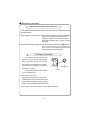
Operation of wireless remote control
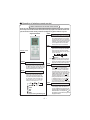
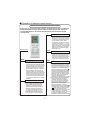
Names and functions of wireless remote control
Notice: This is a general use remote controller, it could be used for the air conditioners
with multifunction; For some function, which the model dosen't have, if press the
corresponding button on the remote controller that the unit will keep the original
running status.
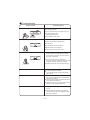
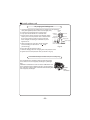
+
Remote control
BLOW
-
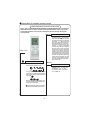
For presetting temperature increasing.
Press this button,can set up the temperature,
when unit is on . Continuously press and
hold this button for more than 2 seconds,
the corresponding contents will be
changed rapidly, until unpress the button
then send the information, ć˄̧˅is displaying all along. In Auto mode, the temperature can not be set up, but operate this
button can send the signal. Centigrade
setting range :16-30; Fahrenheit scale
setting range 61-86.
ƽ
In Cool or Heat mode, press this button
can turn on or turn off the Turbo function.
After turned on the Turbo function, its
signal will be displayed. When switching
the mode or changing fan speed, this
function will be canceled automatically.
TURBO
BLOW button
ƽ
+ button
ƽ
TEMP
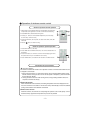
Press this button, can turn on or turn off
the drying.In Cool and Dehumidifying mode,
press this button and will display "BLOW",
at this time the Blow is turned on. If repress
this button,"BLOW" will be concealed, at
this time the Blow function is turned off.
After powered on, Blow OFF is defaulted.
When operating the ON/OFF button, or
switching mode to Cool or Dehumidifying
mode,the Blow function will keep the original
status. If unit is turned off, Blow OFF only
can be set up and send the signal. In Auto,
Fan as well as Heat mode, Blow function
can not be set up and there is no "BLOW"
displaying.
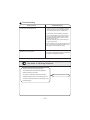
- button
ƽ Presetting temperature can be decreased.
Press this button, the temperature can be
set up, continuously press this button
and hold for two seconds, the relative
contents can quickly change, until unhold
this button and send the order that the ć
R
) signal will be displayed all the time.
The temperature adjustment is unavailable under the Auto mode, but the order
can be sent by if pressing this button.
TURBO button
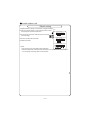
TEMP button
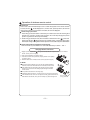
ƽ Press
this button, could select displaying
the indoor setting temperature or indoor
ambient temperature.When the indoor unit
firstly power on it will display the setting
temperature, if the temperature's displaying
status is changed from other status to"
",
displays the ambient temperature, 5s later
or within 5s, it receives other remote control
signal that will return to display the setting
temperature. if the users haven't set up the
temperature displaying status,that will
display the setting temperature.
(This function is applicable to partial of models)
ƽ After powered on, the setting temperature
displaying is defaulted, (according to
customers requirements to display, if
there is no requirement that will default
to display the presetting temperature
and there is no icon displayed on wireless
remote control). Press this button,
(When displaying
) , will display
presetting temperature; (when displaying )
will display indoor ambient temperature,
current displaying status will not be
changed. If current displays indoor
ambient temperature, if received the other
remote control signal, it will display
presetting temperature, 5s later, will back
to display the ambient temperature.
(This function is applicable to partial of models)