1
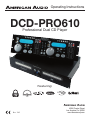
Operating Instructions
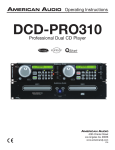
DCD-PRO610
Professional Dual CD Player
Featuring:
FLIPFLOP
Rev. 3/05
4295 Charter Street
Los Angeles Ca. 90058
www.americandj.com
CONTENTS
CAUTIONS REGARDING HANDLING.................................................................................................3
PRODUCT INFORMATION......................................................................................................................5
CUSTOMER SUPPORT .........................................................................................................................6
SET-UP................................................................................................................................................6
FEATURES............................................................................................................................................7
FUNCTIONS AND CONTROLS
REMOTE UNIT.............................................................................................................................8
PLAYER UNIT.............................................................................................................................12
LIQUID CRYSTAL DISPLAY..................................................................................................................14
BASIC OPERATION
LOADING/EJECTING DISC.......................................................................................................16
SELECTING TRACKS................................................................................................................16
STARTING/STOPPING PLAYBACK...........................................................................................16
FRAME SEARCH.......................................................................................................................17
ADJUSTING TIME DISPLAY......................................................................................................17
MAKING PITCH CHANGES ....................................................................................................18
SETTING CUE POINTS.............................................................................................................20
CREATING SEAMLESS LOOPS..............................................................................................21
EDITING LOOPS.......................................................................................................................22
PROGRAMMING AND PROGRAM PLAY.................................................................................23
ADVANCED OPERATION
CREATING A BOP EFFECT.......................................................................................................24
REVERSE PLAY.........................................................................................................................24
FLIP-FLOP.............................................................................................................................25
USING THE BUILT-IN EFFECTS
SCRATCH.............................................................................................................................26
COAST.............................................................................................................................26
FILTER.....................................................................................................................................27
CHANGING EFFECT PARAMETERS.......................................................................................27
OPTIONAL SCRATCH BOX SET-UP......................................................................................................28
SHUT DOWN PROCEDURES..............................................................................................................29
HANDLING COMPACT DISC...............................................................................................................29
WARRANTY.......................................................................................................................................30
SPECIFICATIONS.............................................................................................................................31
Please Note: All specifications and improvements to and in the design of this unit and this manuals
are subject to change at any time without any prior written or published noticed.
FOR BEST CD-R DISC PLAYBACK RESULTS IN THIS CD PLAYER PLEASE FOLLOW THESE
GUIDELINES:
1. High quality CD-R Audio discs (should conform to the standards of the Orange Book 2).
2. Use a high quality bit rate when recording discs. (At least 160kbps)
3. Record discs in the slowest speed possible. (i.e. 2x or 4x speed)
©American
Audio® - www.americanaudio.us - DCD-PRO610™ Instruction Manual Page 2
ELECTRICAL SAFETY PRECAUTIONS
NOTE: This CD player uses a semiconductor
laser. It is recommended for use in a room at
the following temperature: 41˚F - 95˚F / 5˚C 35˚C
CAUTION:
1. Handle the power supply cord carefully. Do
not damage or deform; it may cause electric
shock or malfunction when used. Hold plug
attachment when removing from wall outlet.
Do not pull on the cord.
2. To avoid electric shock, do not open the top
cover when the unit is plugged in. If problems
occur with the unit, call your local American
Audio® dealer.
3. Do not place metal objects or spill liquid
inside the CD player. Electric shock or malfunction may occur.
The serial and model number for this unit is
located on the rear panel. Please write down
the numbers here and retain for future reference.
Model No._____________________________
Serial No._____________________________
NOTE: This product satisfies FCC regulations
when shielded cables and connectors are
used to connect the unit to other equipment.
To prevent electromagnetic interference with
electrical appliances such as radios and televisions, use shielded cables and connectors
for connections.
CAUTION:
USE OF CONTROLS OR ADJUSTMENTS
OTHER THAN THOSE SPECIFIED HEREIN
MAY RESULT IN HAZARDOUS RADIATION
EXPOSURE
THE COMPACT DISC PLAYER SHOULD NOT
BE ADJUSTED OR REPAIRED BY ANYONE
EXCEPT PROPERLY QUALIFIED SERVICE
PERSONNEL.
©American
CAUTION: TO PREVENT ELECTRIC SHOCK
DO NOT USE THIS (POLARIZED) PLUG WITH
AN EXTENSION CORD, RECEPTACLE, OR
OTHER OUTLET UNLESS THE BLADES CAN
BE CAREFULLY INSERTED TO PREVENT
BLADE EXPOSURE
ATTENTION: POUR PREVENIR LES CHOCS
ELECTRIQUES NE PAS UTILISER CETTE
FICHE POLARISEE AVEC UN PROLONGATEUR, UNE PRISE DE COURANT OU
UNE AUTRE SORTIE DE COURANT, SAUF
SI LES LAMES PEUVENT ETRE INSEREES A
FOND SANS EN LAISSER AUCUNE PARTIE A
DECOUVERT.
WARNING: TO PREVENT FIRE OR SHOCK
HAZARD, DO NOT EXPOSE THIS UNIT TO
WATER OR MOISTURE
This equipment has been tested and found
to comply with the limits for a Class B digital
device, pursuant to Part 15 of the FCC Rules.
These limits are designed to provide reasonable protection against harmful interference
in a residential installation. This equipment
generates, uses, and can radiate radio frequency energy and, if not installed and used
in accordance with the instructions, may cause
harmful interference to radio communications.
However, there is no guarantee that interference will not occur in a particular installation.
If this equipment does cause harmful interference to radio or television reception, which can
be determined by turning the equipment off
and on, the user is encouraged to try to correct
the interference by one or more of the following
measures:
– Reorient or relocate the receiving antenna.
– Increase the separation between the equipment and receiver.
– Connect the unit into an electrical outlet on
a circuit different from that to which the
receiver is connected.
– Consult the dealer or an experienced radio/
TV technician for help.
Audio® - www.americanaudio.us - DCD-PRO610™ Instruction Manual Page 3
ELECTRICAL SAFETY PRECAUTIONS
ELECTRICAL PRECAUTIONS
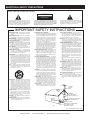
CAUTION
RISK OF ELECTRIC SHOCK
DO NOT OPEN
The lightning flash with arrowhead symbol, within an
equilateral triangle, is intended to alert the user to the
presence of uninsulated "dangerous voltage" within the
product's enclosure that may be of sufficient magnitude
to constitute a risk of electric shock to persons.
CAUTION: TO REDUCE THE RISK OF ELECTRIC
SHOCK, DO NOT REMOVE THE COVER (OR BACK).
THERE ARE NO USER SERVICEABLE PARTS
INSIDE REFER SERVICE TO YOUR AUTHORIZED
AMERICAN AUDIO® SERVICE TECHNICIAN.
The exclamation point within an equilateral triangle is
intended to alert the user to the presence of important
operating and maintenance (servicing) instructions in
the literature accompanying the appliance.
IMPORTANT SAFETY INSTRUCTIONS
READ INSTRUCTIONS — All the safety and operating
instructions should be read before the product is
operated.
RETAIN INSTRUCTIONS — The safety and operating
instructions should be retained for future reference.
HEED WARNINGS — All warnings on the product and
in the operating instructions should be adhered to.
FOLLOW INSTRUCTIONS — All operating and use
instructions should be followed.
CLEANING — The product should be cleaned only with
a polishing cloth or a soft dry cloth. Never clean with
furniture wax, benzine, insecticides or other volatile
liquids since they may corrode the cabinet.
ATTACHMENTS — Do not use attachments not
recommended by the product manufacturer as they
may cause hazards.
WATER AND MOISTURE — Do not use this product
near water — for example, near a bathtub, wash
bowl, kitchen sink, or laundry tub; in a wet basement;
or near a swimming pool; and the like.
ACCESSORIES — Do not place this product on an
unstable cart, stand, tripod, bracket, or table. The
product may fall, causing serious injury to a child or
adult, and serious damage to the product. Use only
with a cart, stand, tripod, bracket, or table
recommended by the manufacturer, or sold with
the product. Any mounting of the product should
follow the manufacturer’s instructions, and should
use a mounting accessory recommended by the
manufacturer.
CART — A product and cart combination should be
moved with care. Quick stops, excessive force, and
uneven surfaces may cause the product and cart
combination to overturn.
VENTILATION — Slots and openings in the cabinet are
provided for ventilation and to ensure reliable
operation of the product and to protect it from
overheating, and these openings must not be
blocked or covered. The openings should never be
blocked by placing the product on a bed, sofa, rug,
or other similar surface. This product should not be
placed in a built-in installation such as a bookcase or
rack unless proper ventilation is provided or the
manufacturer’s instructions have been adhered to.
POWER SOURCES —This product should be operated
only from the type of power source indicated on the
marking label. If you are not sure of the type of
power supply to your home, consult your product
dealer or local power company.
LOCATION – The appliance should be installed in a
stable location.
NONUSE PERIODS – The power cord of the appliance
should be unplugged from the outlet when left unused for a long period of time.
GROUNDING OR POLARIZATION
•
If this product is equipped with a polarized alternating
current line plug (a plug having one blade wider than
the other), it will fit into the outlet only one way. This
is a safety feature. If you are unable to insert the plug
fully into the outlet, try reversing the plug. If the plug
should still fail to fit, contact your electrician to
replace your obsolete outlet. Do not defeat the
safety purpose of the polarized plug.
•
If this product is equipped with a three-wire
grounding type plug, a plug having a third (grounding)
pin, it will only fit into a grounding type power outlet.
This is a safety feature. If you are unable to insert the
plug into the outlet, contact your electrician to
replace your obsolete outlet. Do not defeat the
safety purpose of the grounding type plug.
POWER-CORD PROTECTION - Power-supply cords
should be routed so that they are not likely to be
walked on or pinched by items placed upon or
against them, paying particular attention to cords at
plugs, convenience receptacles, and the point where
they exit from the product.
OUTDOOR ANTENNA GROUNDING — If an outside
antenna or cable system is connected to the product,
be sure the antenna or cable system is grounded so
as to provide some protection against voltage surges
and built-up static charges. Article 810 of the National
Electrical Code, ANSI/NFPA 70, provides information
with regard to proper grounding of the mast and
supporting structure, grounding of the lead-in wire
to an antenna discharge unit, size of grounding
conductors, location of antenna-discharge unit,
connection to grounding electrodes, and
requirements for the grounding electrode. See Figure
A.
LIGHTNING — For added protection for this product
during a lightning storm, or when it is left unattended
and unused for long periods of time, unplug it from
the wall outlet and disconnect the antenna or cable
system. This will prevent damage to the product
due to lightning and power-line surges.
POWER LINES — An outside antenna system should
not be located in the vicinity of overhead power lines
or other electric light or power circuits, or where it
can fall into such power lines or circuits. When
installing an outside antenna system, extreme care
should be taken to keep from touching such power
lines or circuits as contact with them might be fatal.
OVERLOADING — Do not overload wall outlets,
extension cords, or integral convenience receptacles
as this can result in a risk of fire or electric shock.
OBJECT AND LIQUID ENTRY - Never push objects of
any kind into this product through openings as they
may touch dangerous voltage points or short-out
parts that could result in a fire or electric shock.
Never spill liquid of any kind on the product.
SERVICING — Do not attempt to service this product
yourself as opening or removing covers may expose
you to dangerous voltage or other hazards. Refer all
servicing to qualified service personnel.
DAMAGE REQUIRING SERVICE - Unplug this product
from the wall outlet and refer servicing to qualified
service personnel under the following conditions:
•
When the power-supply cord or plug is damaged.
•
If liquid has been spilled, or objects have fallen into
the product.
•
If the product has been exposed to rain or water.
•
If the product does not operate normally by following
the operating instructions. Adjust only those controls
that are covered by the operating instructions as an
improper adjustment of other controls may result in
damage and will often require extensive work by a
qualified technician to restore the product to its
normal operation.
•
If the product has been dropped or damaged in any
way.
•
When the product exhibits a distinct change in
performance — this indicates a need for service.
REPLACEMENT PARTS -- W hen replacement parts
are required, be sure the service technician has used
replacement parts specified by the manufacturer or
have the same characteristics as the original part.
Unauthorized substitutions may result in fire, electric
shock, or other hazards.
SAFETY CHECK - Upon completion of any service or
repairs to this product, ask the service technician to
perform safety checks to determine that the product
is in proper operating condition.
WALL OR CEILING MOUNTING — The product should
not be mounted to a wall or ceiling.
HEAT — The product should be situated away from heat
sources such as radiators, heat registers, stoves, or
other products (including amplifiers) that produce
heat.
ANTENNA
LEAD IN
WIRE
GROUND
CLAMP
ANTENNA
DISCHARGE UNIT
(NEC SECTION 810-20)
ELECTRIC
SERVICE
EQUIPMENT
GROUNDING CONDUCTORS
(NEC SECTION 810-21)
GROUND CLAMPS
Fig. A
POWER SERVICE GROUNDING
ELECTRODE SYSTEM
(NEC ART 250, PART H)
NEC — NATIONAL ELECTRICAL CODE
©American
Audio® - www.americanaudio.us - DCD-PRO610™ Instruction Manual Page 4
PRODUCT INFORMATION
I. Heat - The CD player should be situated away
from heat sources such as radiators, heat registers, stoves, or other appliances (including amplifiers) that produce heat.
2. Do not let insecticides, benzene, or thinner
come in contact with the surface of the unit.
3. Never disassemble or modify your unit in any
way, doing so will void your manufactures warranty.
4. Never plug this unit in to a dimmer pack
5. Do not attempt to operate this unit if it becomes
damaged in any way.
6. This unit is intended for indoor use only, use of
this product outdoors voids all warranties.
7. Always mount this unit in safe and stable
matter.
8. Disconnect from main power before making
any type of connection.
This unit has been thoroughly tested and has
been shipped in perfect operating condition.
Carefully check the shipping carton for damage
that may have occurred during shipping. If
the carton appears to be damaged, carefully
inspect your unit for any damage. Be sure all
accessories needed to operate the unit has
arrived intact. In the event damage has been
found or parts are missing, please contact our
toll free customer support number for further
instructions. Please do not return the unit to
your dealer without first contacting customer
support.
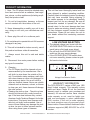
LINE VOLTAGE SELECTION
• The desired voltage may be set with the
VOLTAGE SELECTOR switch on the rear
panel (using a flat head screw driver).
• Do not force the VOLTAGE SELECTOR
switch as this may cause damage
• If the VOLTAGE SELECTOR switch does
not move smoothly, please contact a qualified service technician.
SCRATCH BOX
INPUT
DIGITAL
OUT
SCRATCH BOX
INPUT
DIGITAL
OUT
AC INPUT 115/230 V, 50/60 Hz
9. Cleaning • The CD Player should be cleaned only as
recommended by the manufacturer. Use a
soft cloth to wipe down the outside of the
unit. For stubborn stains moisten a soft cloth
with class cleaner or other mild detergent to
wipe away any stains. Use a soft cloth to
wipe any residual cleaner. Never use volatile
cleaners such as benzene, solvent, or thinner
to clean your unit, these cleaners will damage
the units surface.
• Cleaning the pick-up lens - The pick-up lens
should not become dirty under normal usage. If the lens does become dirty, contact
American Audio Technical Support for further
instructions. Third party lens cleaners available but not highly recommended. Use of
some of these cleaner may damage the pickup lens, be sure to follow extreme caution
when using these types of cleaners.
©American
CONNECT TO
CONTROL 2
CONNECT TO
CONTROL 1
AUDIO OUT
2
R
L
Voltage Selector
CAUTION
115V
230V
RISK OF ELECTRICAL SHOCK
DO NOT OPEN
AUDIO OUT
1
R
L
Voltage Line Selector Switch
WARRANTY INFORMATION
The DCD-PRO610™ carries a ONE year (365
days) limited warranty. This warranty covers
parts and labor. Please fill out the enclosed
warranty card to validate your purchase and
warranty. All returned service items whether
under warranty or not, must be freight prepaid and accompany a return authorization
(R.A.) number. If the unit is under warranty,
you must provide a copy of your proof of purchase invoice. Please contact American Audio®
customer support at (800) 322-6337 for a R.A.
number.
Audio® - www.americanaudio.us - DCD-PRO610™ Instruction Manual Page 5
CUSTOMER SUPPORT
Customer Support: American Audio® provides a toll free customer support line, to provide set up help and
to answer any question should you encounter problems during your set up or initial operation. You may also visit
us on the web at www.americanaudio.us for any comments or suggestions. For service related issue please
contact American Audio®. Service Hours are Monday through Friday 9:00 a.m. to 5:00 p.m. Pacific Standard
Time.
Voice:
(800) 322-6337
Fax:
(323) 582-2941
E-mail:
[email protected]
To purchase parts online visit http://parts.americandj.com
Warning! To prevent or reduce the risk of electrical shock or fire, do not expose this unit to rain or moisture.
Caution! There are no user serviceable parts inside this unit. Do not attempt any repairs yourself, doing so will
void your manufactures warranty. In the unlikely event your unit may require service please contact customer
support. Please do not return to your dealer without first contacting customer support.
SET-UP
1. Checking the Contents:
Be sure your DCD-PRO610™ was shipped with the following:
1) DCD-PRO610™ Dual CD player unit.
1) DCD-PRO610™ Controller Head Unit
2) Dual Male to Male RCA cable.
2) Q-Start 1/8" Male to Male Mini Plug
1) Warranty card.
1) Operating instructions (this booklet).
2. Installing the Units
1) Place your unit on a flat surface or mount it in a secure rack mount case.
2) Be sure the player is mounted in a well ventilated area where it will not be exposed to direct sunlight,
high temperatures, or high humidity.
3) Try to place the unit as far as possible from TVs and tuners, as the unit may cause undesirable
interference.
3. Connections
1) Be sure main power is connected last to prevent any electrical damage.
2) AUDIO CONNECTIONS: Use the included RCA cable to connect the DCD-PRO610™ outputs to the
line inputs of a mixer. Never connect a CD player's output to a mixers "phono" inputs.
3) CONTROL JACK CONNECTIONS: Use the supplied 1/8” mono mini plug cable to connect your DCDPRO610™ to a mini jack connection (A or B) on a compatible American Audio® or American DJ®
“Fader Q Start” mixer. (This will enable the Fader “Q” Start function - See “Q” start control page 7)
CAUTION: Be sure to use the supplied control cables. Using a different type of cable may result in unit damage.
To avoid server unit damage, be sure main power is off when connecting the control cables.
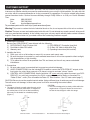
CAUTION:
• The player will work normally when the main unit is
mounted with the front panel within 15 degrees of
the vertical plane. If the unit is tilted excessively,
discs may not be loaded or unloaded properly.
(Figure 1)
Figure 1
©American
CAUTION:
• The LCD is designed to be clearly visible within the
angles shown in Figure 2. Mount the control unit
so that the visual angle is within this range.
Figure 2
Audio® - www.americanaudio.us - DCD-PRO610™ Instruction Manual Page 6
MAIN FEATURES
•
•
•
•
•
•
•
•
•
•
•
•
8 times over sampling 1 bit D/A converter
• Filter Effect
20 Seconds Digital Anti-Shock Protection
• 2 Coast Effect
4 Programmable Cue Points or Samples
• Auto cue Function (Sensitive to -48dB)
• Real-time Cue (“Cue on the Fly”)
Reverse Playback (Unlimited)
Selectable Time Display
• 4 different speed scan
S/PDIF Digital Audio RCA Coaxial Output
• 30 Programmable Tracks
Fader “Q” Start Control (a)
• Bop Effect (b)
Flip-Flop (Relay Playback) (c)
• 60 Second Transport Protection (d)
Sleep Mode (e)
• Memory Backup, Defaults to last setting (f)
Selectable Pitch: +/-8%, +/-12% or +/-16%
• Jog Wheel Pitch Bend +/-16% (g)
Seamless Loop - Uninterrupted Loop Playback
• Pitch Display
Large bright LCD Screen can be viewed from
• Single/Continuous/Repeat Play Modes
wide angles.
• 1/75 Frame Search
• Scratch Box Compatible (h)
• Tempo Lock
• Direct Track Access Buttons
• Tap Sync Beat Counter
• Instant Start within 10 msec (sound is produced immediately when the PLAY button is pressed)
(a) FADER “Q” START CONTROL: This feature is used in conjunction with American Audio® mixers that also feature “Fader Q
Start” control. Connect your DCD-PRO610’s as described in the set-up section of this manual. After set-up is completed, insert
CD's in to both drives. By moving the mixer’s crossfader from left to right you can start and pause your DCD-PRO610 playback
functions. For Example, if your mixer’s crossfader is all the way to the left (player one is playing, player two is in cue or pause
mode), and you move the fader at least 20% to the right, player two will begin to play and player one will return to cue mode.
When the crossfader is to the right, and you move it 20% to the left, player one (will begin to play and player two will return to
its’ cue point. You can create great effects similar to scratching with this feature. After storing cue points on each side of the CD
player, different songs or samples may quickly be recalled by moving the mixer crossfader back and forth. New cue points can
be easily selected on the DCD-PRO610 player (see setting cue points page 13). “Q” Start control is easy to use and mastering
this feature will help you create amazing effects with your music. Note for mixers with a Hamster Feature: For proper “Q” Start
operation be sure your mixers “Hamster” setting are set to 1/2 (Normal Setting).
(b) BOP EFFECT: The Bop Effect button serves two features. First, it is a stutter effect, creating a sound similar to a sampler.
Second, it will return to the last Cue point in memory instantly. This will allow you to create great effects. To create the BOP
Effect, see BOP Effect on page 22.
(c) FLIP-FLOP: This feature is used in conjunction with American Audio® mixers that also feature Fader “Q” Start. For FLIPFLOP results you must use two DCD-PRO610 players. Connect your DCD-PRO610’s as described in the set-up section of this
manual. This feature will start the next player once one player has ended. For example, if player one is playing a disc and it ends,
player two will instantly begin to play. You may set FLIP-FLOP to play track to track or disc to disc. For more information on this
feature, see FLIP-FLOP™ on page 23.
(d) 60 SECOND TRANSPORT PROTECTION: The CD transport tray will automatically close if left open for more than 60 seconds. If a CD is left in the tray it will immediately cue.
(e) SLEEP MODE: The DCD-PRO610’s laser and pick-up assembly will power down after 15 minutes of inactivity (when in
pause or cue mode). This will lengthen the life of your motor drive and laser. To initialize the player, just press the cue or play
buttons.
(f) MEMORY BACKUP: The DCD-PRO610 has a five year memory back-up, that will save your setting in case the power supply is accidentally disconnected. DCD-PRO610 will automatically remember your last setting (repeat, SGL, CTN) even if you
disconnect your main power.. The DCD-PRO610 will store your cue points in memory if you accidentally open transport tray or
shut off the power. Note: Memory cues are erased automatically when a new CD is played, or by holding memory button down
for 5 seconds.
(g) JOG WHEEL PITCH BEND: During normal playback, the inner jog wheel acts as a momentary pitch bend. Turing the wheel in
a clockwise direction will increase the speed and turning the wheel in a counter-clockwise direction will decrease the speed.
(h) SCRATCH BOX COMPATIBLE: This feature is used in conjunction with the optional American Audio® Scratch Box.™ mixers
that also feature “Fader Q Start” control. When the DCD-PRO610 is used in conjunction with the Scratch Box a turntable may
be used to control the CD functions. See Optional Scratch Box on page 25.
©American
Audio® - www.americanaudio.us - DCD-PRO610™ Instruction Manual Page 7
GENERAL FUNCTIONS AND CONTROLS - REMOTE UNIT
1
2
3
4
1 2 3
TRACK
5
4 5
6
7
8
S
7 8 9
10
11
BPM
12
1 2 3
9 10 11 12 13 14 15 16
TOTAL REMAIN
ELAPSED
M
6
TEMPO
LOCK
PITCH LOCK
TRACK
4 5
13
6
M
F
7
8
S
18
19
20
21 22
17
BPM
TEMPO
LOCK
PITCH LOCK
F
DTA /FX
DTA /FX
RELOOP
/BOP
15 16
9 10 11 12 13 14 15 16
TOTAL REMAIN
ELAPSED
14
1
RELOOP
/BOP
23
24
25
26
27 28 29 30
Figure 3
Figure 4
31
32
33
34
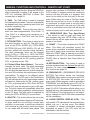
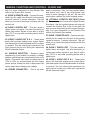
A. REMOTE CONTROL - FACE (FIGURE 3)
1. FILTER/COAST/ADJUST - This button allow
you to change the FILTER and Coast values. With
the FILTER/COAST/ADJUST button selected (on)
the FILTER value is one second and the COAST
value is five seconds. With the FILTER/COAST/
ADJUST deselected (off) the FILTER value is a 1/
2 second and the COAST value is three seconds.
A yellow LED will indicated on and off functions.
2. CUE MEMORY - This button allows you to
program up to 4 cue points on the CD. For more
information on setting a cue point see page 20.
3. FILTER - This button activates the FILTER
©American
effect. This effect simulates the sudden platter
stop of a turntable. Almost like pressing the stop
button on a turntable. When the FILTER effect is
selected a number 1 will appear in the LCD (14),
this indicates the FILTER effect is active. See
"FILTER" effect on page 27.
4. REV/PLAY - This button activates reverse
play mode. When this effect is selected the disc
will begin to play in reverse mode, and continue
to play in reverse until reverse play function is
turned off. If reverse play is not turned off the
disc will continue to play in reverse until it returns
Audio® - www.americanaudio.us - DCD-PRO610™ Instruction Manual Page 8
GENERAL FUNCTIONS AND CONTROLS - REMOTE UNIT (CONT)
to the beginning of the disc. When the REV/PLAY
effect is selected a number 3 will appear in the
LCD (14), indicating REV/PLAY is active. See
reverse play on page 24.
5. TIME - The TIME button is used to changed
the displayed time values. Time can be displayed
as elapsed track time, remaining track time, and
total disc remaining time.
6. CUE BUTTONS - These button are used to
store four user programmable “Cue Points.” A
“Cue Point” is a starting point anywhere on a
disc. To program a “Cue Point” see Cue Points
on page 18.
7. PITCH BUTTON - This button is used to turn
the pitch function on and off. The pitch functions of the PITCH SLIDER (21), PITCH BEND
BUTTONS (25) and JOG WHEEL (19) will not
function without this function being activated.
The pitch percentage value can be changed
from (+/- 8%), (+/- 12%) or (+/- 16%). The PITCH
BUTTON’s LED will indicate the maximum pitch
value by flashing red for 8%, glowing green for
12%, or glowing red for 16%.
8. P. Select (Pitch Select Button) - This button
changes the pitch value. The pitch percentage
can be changed between 8%, 12%, and 16%.
8% will allow the least amount of pitch manipulation and 16% will allow the most amount of pitch
manipulation. To adjust to the different values
tap this button. The LED next to the Pitch Button
(27) will indicate which pitch percentage mode is
activated by, flashing red for 8%, glowing green
for 12%, or glowing red for 16%. Note, the Pitch
Button (27) must be activated to get a LED reading. The pitch values will immediately reflect the
amount of pitch being applied to a music source
in the CD drive. The pitch value is adjusted by
sliding the PITCH SLIDER (21) up and down.
9. SGL/CTN - This button allows the unit's play
mode to change between Single and Continuous.
In single mode the unit will play a single track
and return to cue mode. In continuous mode the
unit continues to play track by track and returns
to cue mode after all tracks have played. This
©American
function also operates in PROGRAM and FLIP
FLOP modes. In program mode the continuous
function will play all tracks in a program, than
return to cue mode on the first track in the program. When using two units in Flip-Flop mode,
each unit may be set up to run in either single
or continuous. In single mode a unit will play a
single track and jump to the next unit. If the next
unit is in continuous mode, that unit will play all
tracks and jump back to next unit, and so on.
10. OPEN/CLOSE (Disc Tray Open/Close)
- This button is used to open and close the
disc transport tray door. NOTE: When a disc is
loaded, the tray will not open unless the unit is in
pause or cue mode.
11. COAST - This button activates the COAST
effect. This effect will simulates turning the
power off on a turntable, a turntable platter spinning until it slowly loses momentum and stops.
When the COAST effect is selected a number 2
will appear in the LCD (14), this will indicates the
COAST effect is selected. See Coast effect on
page 26.
12. OPTION BUTTON - This button is used to
activate and deactivate the Optional Scratch Box
function. For more information on the Scratch
Box function see page 24.
13. PRG/HOLD FX - (PROGRAM/FILTER HOLD
BUTTON) This button serves two functions.
PROGRAM: When used in conjunction with DTA/
FX BUTTON (22) this button will activate program mode. When program mode is activated a
“PROGRAM” icon will display in the LCD (14). For
programming information see “Programming” on
page 23. HOLD: This button will also allow you to
set and lock any new parameters you set for the
FILTER effects. If the hold function is not selected any changes to the FILTER effect parameters
will be momentary.
14. LIQUID CRYSTAL DISPLAY (LCD) - This
high quality LCD Indicates all the functions (play,
pause, cue, etc..,), as they occur. This display
is viewable at several comfortable angles as
described on page 6. The LCD icons will be
described in the next section.
Audio® - www.americanaudio.us - DCD-PRO610™ Instruction Manual Page 9
GENERAL FUNCTIONS AND CONTROLS - REMOTE UNIT CONT.
15. (-) PITCH BEND - The (-) pitch bend function
creates a momentary “Slow Down” in the CD’s
pitch speed (Beats per minute - BPM) when
the PITCH (7) function is activated. This functions allows the beats between two CD’s or any
other music source to match. This is a momentary function. When the button is depressed the
pitch speed will automatically return to PITCH
SLIDER'S (23) selected pitch. Holding down this
button will give a maximum of -16% pitch. Be
sure to remember that this function is a momentary pitch adjust-ment, for a more precise adjustment use the PITCH SLIDER'S (23) to match the
BPM’s with another playing music source.
16. (+) PITCH BEND - The (+) pitch bend function
creates a momentary “BUMP” in the CD’s pitch
speed (Beats per minute - BPM) when the PITCH
(7) function is activated. This functions allows
the beats between two CD’s or any other music
source to match. This is a momentary function.
When the button is depressed the pitch speed
will automatically return to PITCH SLIDER'S (23)
selected pitch. Holding down this button will give
a maximum of +16% pitch. Be sure to remember
that this function is a momentary pitch adjustment, for a more precise adjustment use the
PITCH SLIDER'S (23) to match the BPM’s with
another playing music source.
17. TEMPO LOCK - This button will activate the
Tempo Lock function. This function will allow you
to make adjustment to a track speed using the
pitch controls (7, 15, 16, & 23) without altering a
tracks perceived tonal pitch.
18. SHUTTLE WHEEL (OUTER RING) - This
wheel has two forward and two reverse speed
positions for speed searching through tracks.
The more you turn the wheel in either direction,
the faster you search.
19. JOG WHEEL (INNER WHEEL) - The jog
wheel serves two functions depending on the
operating mode:
A. The jog wheel will act as a slow frame search
control when the unit is in pause or cue mode
allowing you to set a specific cue point or
©American
find a particular starting point.
B. The inner wheel also works as a momentary
pitch bend during playback. Turning the
wheel clockwise will increase the pitch percentage up to 16%, and turning the wheel in
the counter-clockwise direction will decrease
the pitch percentage up to -16%. The pitch
bend will be determined on how fast you turn
the wheel.
20.
TRACK BUTTON - This buttons is
used to select a track. Tapping this button will
back-skip to the previous track, holding down
this button will rapidly back-skip through the
tracks on a CD.
21.
TRACK BUTTON - This buttons is
used to select your desired track. Tapping this
button will forward skip to the next track, holding
down this button will rapidly forward skip through
the tracks on your CD.
22. DTA/FX (DATA/EFFECTS) - This button
serves two functions. This button allows you to
change the functions of the effect and cue button
along the top of the LCD (14). DATA: The DATA
function will be indicated by small arrow icon in
the upper left hand corner of the LCD (14). When
unit is in DATA mode the effect and cue buttons
along the top of the LCD (14) may be used as
direct track access buttons. EFFECTS: When the
effect function is engaged (no arrow icon in the
upper left hand corner of the LCD) the buttons
along the top of the LCD (14) will function as they
are indicated.
23. PITCH SLIDER - This slider is used to adjust
the playback pitch percentage when the PITCH
(7) function is activated. The slider is a set adjustment and will remain set until the pitch slider is
moved or the PITCH (7) function has been turned
off. This adjustment can be made with or without a CD in the drive. The pitch adjustment will
remain even if a disc has been remove, and will
reflect on any other disc loaded into the unit.
That is to say, if you set a +2% pitch on one disc,
remove that disc and insert another, that disc too
will have a +2% pitch. The amount of pitch being
Audio® - www.americanaudio.us - DCD-PRO610™ Instruction Manual Page 10
GENERAL FUNCTIONS AND CONTROLS - REMOTE UNIT (CONT)
applied will be displayed in the LCD (14). Use this
slider to match the BPM’s of this unit to that of
another music source. By changing the pitch of
one disc with respect to the other in this way, the
beats can be matched.
24. BPM BUTTON - This changes toggles
between the PITCH function and BPM function
indicators in the LCD. When the BPM function
is engaged, the COUNTER (25) button may be
used to manually display a tracks BPM's in the
LCD (14). When the BPM function is disengage,
a tracks pitch value will be displayed in the LCD
(14).
25. COUNTER BUTTON - When the unit is BPM
mode, tapping this button to tracks beat will
determine a tracks BPM's. The BPM value will
be displayed in the LCD.
26. IN REAL-TIME CUE (SEAMLESS LOOP IN
BUTTON) - “CUE ON THE FLY” - This button
allows you to set a CUE POINT (see CUE POINT
page 18) without music interruption (“on the fly”).
This button also sets the starting point of a loop
(see SEAMLESS LOOP on page 21).
27. CUE - Pressing the CUE button during playback immediately pauses playback and returns
the track to the last set cue point (see setting a
CUE POINT, page 20). The red CUE LED will glow
when the unit is in cue mode The LED will also
flash every time a new CUE POINT is set. The
CUE button can be held down to momentarily
play the CD. When you release the CUE button it
instantly returns to the last set CUE POINT. You
can also tap the CUE button to create a BOP
EFFECT (for definition of BOP EFFECT, see page
24).
28. OUT/EXIT - This button serves two functions;
1) This button is used to set the ending point of
a loop. 2) During normal loop playback, a loop is
exited by pressing the OUT/EXIT BUTTON .
29. PLAY/PAUSE BUTTON - Each press of the
PLAY/PAUSE BUTTON causes the operation to
change from play to pause or from pause to play.
While in play mode the green play LED will glow,
©American
and while in pause mode the green play LED will
flash.
30. RELOOP/BOP BUTTON - This button controls two functions;
A. RELOOP; If a Loop has been made (see
setting a Seamless Loop on page 21), but
the unit is not actively in Loop mode (a loop
is not playing), pressing the RELOOP/BOP
BUTTON will instantly reactivate Loop mode.
To exit the Loop , press the OUT/EXIT BUTTON (28). LOOP (65) and RELOOP (64) will
display in the LCD (14) when the Reloop
function is available.
B. BOP; This button is used to activate the BOP
Effect. A Bop Effect is a stutter, creating a
sound similar to a CD skipping. This function will instantly play the last set cue point
during playback without music interruption.
The Bop Effect can be created in 2 ways.
See creating a BOP on page 24.
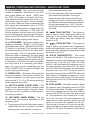
B. REMOTE CONTROL - REAR (FIGURE 4)
31. CHANNEL 2 CONTROLLER JACK - Connect
the supplied mini-plug from the CUE jack on the
rear of your CD unit to the CONTROL out jack of
a compatible American Audio® or American DJ®
mixer. This will enable the CD "Q-Start" function.
This feature is only available on American Audio®
or American DJ® “Q” series mixers.
32. CHANNEL 2 REMOTE JACK - Connect the
supplied 8 pin din cable from this jack to the
player's channel 2 remote connector. This will
allow you to control the player functions.
33. CHANNEL 1 CONTROLLER JACK - Connect
the supplied mini-plug from the CUE jack on the
rear of your CD unit to the CONTROL out jack of
a compatible American Audio® or American DJ®
mixer. This will enable the CD "Q-Start" function.
This feature is only available on American Audio®
or American DJ® “Q” series mixers.
34. CHANNEL 1 REMOTE JACK - Connect the
supplied 8 pin din cable from this jack to the
player's channel 1 remote connector. This will
allow you to control player 1's functions.
Audio® - www.americanaudio.us - DCD-PRO610™ Instruction Manual Page 11
GENERAL FUNCTIONS AND CONTROLS - PLAYER UNIT
35
36
SCRATCH BOX
INPUT
37
38
DIGITAL
OUT
Figure 5
39
SCRATCH BOX
INPUT
DIGITAL
OUT
AC INPUT 115/230 V, 50/60 Hz
CONNECT TO
CONTROL 2
2
40
41
CONNECT TO
CONTROL 1
AUDIO OUT
R
L
Voltage Selector
42 43
RISK OF ELECTRICAL SHOCK
DO NOT OPEN
230V
44
45
R
1
CAUTION
115V
AUDIO OUT
46 47
48
L
49
Figure 6
C. TRANSPORT UNIT - FACE (FIGURES 5)
35. DRIVE 1 TRANSPORT TRAY - This tray is
used to load and load compact disc in to the drive
1 mechanism. The tray is opened and closed by
pressing the DRIVE 1 OPEN/CLOSE BUTTON
(36). Never attempt to force the transport tray
open or closed when the power is turned off.
36. DRIVE 1 OPEN/CLOSE (Transport Tray
Open/Close) - This button is used to open and
close the drive 1 transport tray. NOTE: When a
disc is already loaded in the transport tray, the
tray will not open unless the unit is in pause or
cue mode.
37. POWER SWITCH - This switch is used to
control the unit's main power. A blue LED directly
above the power switch will glow to indicate main
power is active.
38. DRIVE 2 OPEN/CLOSE (Transport Tray
©American
Open/Close) - This button is used to open and
close the drive 2 transport tray. NOTE: When a
disc is already loaded in the transport tray, the
tray will not open unless the unit is in pause or
cue mode.
39. DRIVE 2 TRANSPORT TRAY - This tray is
used to load and load compact disc in to the drive
2 mechanism. The tray is opened and closed by
pressing the DRIVE 2 OPEN/CLOSE BUTTON
(38). Never attempt to force the transport tray
open or closed when the power is turned off.
D. TRANSPORT UNIT - REAR (FIGURES 6)
40. OPTIONAL SCRATCH BOX INPUT (Drive
2) - This jack is used to receive the digital Scratch
Box signal. Use the included stereo mini plugs to
connect the Scratch Box to the to this jack. Be
sure to use a dual stereo jack for proper function-
Audio® - www.americanaudio.us - DCD-PRO610™ Instruction Manual Page 12
GENERAL FUNCTIONS AND CONTROLS - PLAYER UNIT
ality. For more information on the Scratch Box
refer to the Scratch Box manual.
41. DRIVE 2 REMOTE JACK - Connect the supplied 8 pin din cable from this jack to the remote
control's channel 2 remote connector. This will
allow you to control the player functions with the
remote unit.
42. DRIVE 2 DIGITAL OUT - This jack sends a
digital stereo out signal. Use this connection to
create near perfect copies of your disc to a Mini
disc, CD-R, or any other recording device with a
digital input.
43. DRIVE 2 AUDIO OUT R & L - These jacks
send a left and right analog mono output signal.
Use these jacks to send standard audio to a mixer
or receiver. The red colored jack represents the
right channel output and white jack represents
the left channels output.
44. VOLTAGE SELECTOR - Because power
supplies vary from location to location a voltage
selector switch has been incorporated in the unit's
design. This switch can select a voltage input of
120v or 220v to accommodate the two major
power source. Always be sure to disconnect the
power plug before changing the voltage.
45. POWER CONNECTOR - This is the main
©American
power connection. Only use the supplied polarized power cord. Use of any other power may
result in sever damage to the unit. Be sure the
local power matches the unit’s required power.
46. OPTIONAL SCRATCH BOX INPUT (Drive
1)- This jack is used to receive the digital Scratch
Box signal. Use the included stereo mini plugs to
connect the Scratch Box to the to this jack. Be
sure to use a dual stereo jack for proper functionality. For more information on the Scratch Box
refer to the Scratch Box manual.
47. DRIVE 1 REMOTE JACK - Connect the supplied 8 pin din cable from this jack to the remote
control's channel 1 remote connector. This will
allow you to control the player functions with the
remote unit.
48. DRIVE 1 DIGITAL OUT - This jack sends a
digital stereo out signal. Use this connection to
create near perfect copies of your disc to a Mini
disc, CD-R, or any other recording device with a
digital input.
49. DRIVE 1 AUDIO OUT R & L - These jacks
send a left and right analog mono output signal.
Use these jacks to send standard audio to a mixer
or receiver. The red colored jack represents the
right channel output and white jack represents
the left channels output.
Audio® - www.americanaudio.us - DCD-PRO610™ Instruction Manual Page 13
LIQUID CRYSTAL DISPLAY (LCD)
LCD DISPLAY
69 68
67
66
65
64
63
50
51
52
62
53
61
s
54
55
56
57
58
59
60
Figure 7
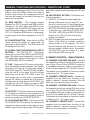
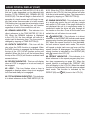
E. LCD DISPLAY (FIGURE 7)
50. FUNCTION INDICATORS - These indicators
serve two functions; Indicators 1-3 detail which
effect is active, Indicators 6-9 detail a cue point
stored in memory.
59) When the ELAPSE indicator is displayed in
the LCD (14), the time defined will refer to a single
track's elapsed time. The time mode is changed
by the tapping on the TIME BUTTON (5).
51. CUE INDICATOR - This indicator will glow
when the unit is in CUE mode and will flash every
time a new CUE POINT is recorded in memory
(see setting CUE POINTS on page 20).
57. MINUTES METER - This meter will display
the elapse, total, or remaining time in minutes.
The display time will be indirect reference to the
current time mode.
52. PROGRAM INDICATOR - This icon indicates
"Program Mode" is activated. See Program Play
on page 23 for more information on programing.
58. SECONDS METER - This meter will display
the elapse, total, or remaining time in seconds.
The display time will be indirect reference to the
current time mode.
53. PLAY INDICATOR - This indicator will glow
when the unit is in play mode.
54. PAUSE INDICATOR - This indicator will glow
when the unit is in pause or cue mode.
59. FRAME METER - This meter will display the
elapse, total, or frames. The displayed frames will
be indirect reference to the current time mode.
55. TRACK INDICATOR - This double digit indicator details a current track. The number displayed in the track indicator is a direct reference
to a track being selected for programming or a
track in play, pause, or cue mode.
60. PITCH METER - This meter displays the
pitch percentage being applied to playback by
the PITCH SLIDER (23). If the meter read zero
regardless of the PITCH SLIDER'S (23) position,
the PITCH (7) function is not activated.
56. ELAPSE INDICATOR - This indicator is in
direct reference to the TIME METER (57, 58, &
61. TIME BAR INDICATOR - This bar visually
details the time defined in the TIME METER (57,
©American
Audio® - www.americanaudio.us - DCD-PRO610™ Instruction Manual Page 14
LIQUID CRYSTAL DISPLAY (CONT)
58, & 59). As with the TIME METER (57, 58, & 59),
this bar is also dependent on the selected time
function TOTAL REMAIN (66), REMAIN (62) OR
ELAPSE (56). This bar will begin to flash when 15
seconds of a track remain and will begin to rapidly flash when three seconds of a track remain.
The flashing bar is a great visual reminder a track
is about to end. The flashing bar will function
regardless of which time mode the unit is in.
62. REMAIN INDICATOR - This indicator is in
direct reference to the TIME METER (57, 58, &
59). When the REMAIN indicator is displayed
in the LCD (14), the time defined will refer to a
single track's remaining time. The time mode is
changed by tapping on TIME BUTTON (5).
63. DATA/FX INDICATOR - This icon will display when the DATA function is engaged. When
the DATA function is engaged the buttons along
the top of the LCD (14) will function as they are
detailed. When this icon is off the buttons along
the top of the LCD (14) will function as direct track
access buttons.
64. RELOOP INDICATOR - This icon will display
when a LOOP is engaged or is set and ready to
be engaged.
65. LOOP - This icon flashes when a loop is
engaged or displays when a loop is not engaged
but is set and ready to be engaged.
& 59). When the TOTAL REMAIN indicator is displayed in the LCD (14), the time defined will refer
to a disc's total remaining time. The time mode is
changed by tapping on TIME BUTTON (5).
67. SINGLE INDICATOR - This indicates the unit
is in single play mode, the unit will play a single
and return to CUE mode. If the single indicator is
not displayed the unit is in continuous mode. In
continuous mode the drive will play through all
the tracks on the disc. Once all the tracks have
ended the unit will return to cue mode.
68. 1 INDICATOR - This indicator is in direct
reference to the REPEAT (69) indicator and repeat
program play function (see programming on page
23). When the repeat function is first activated,
the unit enters a repeat track mode. This mode
will repeat a single track over and over until the
repeat function is disengaged. The single track
repeat function is indicated by the REPEAT (69)
and 1 icons in the LCD (14).
69. REPEAT INDICATOR - This indicator is in
direct reference to the repeat program play function (see programming on page 23). When the
repeat function is activated the "REPEAT" (69)
icon will display in the LCD (14). When the repeat
function is first activated, the unit enters a repeat
track mode. This function is indicated by the
REPEAT (69) and 1 (68) icons in the LCD (14).
66. TOTAL REMAIN INDICATOR - This indicator
is in direct reference to the TIME METER (57, 58,
©American
Audio® - www.americanaudio.us - DCD-PRO610™ Instruction Manual Page 15
BASIC OPERATIONS
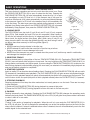
1. OPENING AND CLOSING THE DISC TRAY/LOADING DISCS
This is an electronic operation and can only work when the power is on. Press
the OPEN/CLOSE BUTTON (10) to open or close the disc tray. Pressing the
PLAY/PAUSE BUTTON (29), will also automatically close the tray if it is open
and immediately cue any CD that is in it. If the transport tray is left open for
more than 60 seconds it will close automatically to prevent accidental damage
to the transport. Again if a CD is left in the transport tray it will immediately cue
to the first song. The disc trays cannot be opened during playback to prevent
playback from being interrupted if the OPEN/CLOSE BUTTON (10) is pressed
accidentally. Stop playback, then press the OPEN/CLOSE BUTTON (10).
5 in. / 12cm disc
Figure 8
3 in. / 8cm disc
2. LOADING DISCS
The DCD-PRO610 can play both 3 inch (8 cm) and 5 inch (12 cm) compact
discs (CD’s). Odd shaped and oval CD’s are not compatible. When loading a
CD into the unit always hold the disc by its' edges and place it in the disc tray.
Never touch the signal surface (the glossy side). When using 5 inch/12 cm
discs, place the disc in the outer tray guides (figure 8), and when using 3 inch/8
cm discs, place them securely in the inner guides (figure 9).
CAUTION:
• NEVER insert any foreign objects in the disc tray.
Figure 9
• NEVER attempt to insert more than one disc in the disc tray at a time.
Doing so may result in severe damage to the unit.
• NEVER force the transport tray open or closed when the power is off, as this may result in malfunction
and damage the transport system.
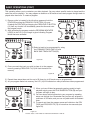
3. SELECTING TRACKS
Select a desired track by using either of the two TRACK BUTTONS (20 & 21). Tapping the TRACK BUTTONS
(20 & 21) once will select either a higher or lower track. You may hold down the TRACK BUTTONS (20 & 21) to
change tracks continuously at a higher speed. If you are using the TRACK BUTTONS (20 & 21) to select a new
track during playback (a track already playing) the new track you selected will immediately begin playback as
soon as the search operation is completed.
4. STARTING PLAYBACK
Insert an audio CD as describe above (loading discs). Pressing the PLAY/PAUSE BUTTON (29) with an audio
CD inserted will immediately start playback. The PLAY INDICATOR (53) will glow as soon as playback begins.
The point at which playback starts (cue point) will automatically be stored in the memory as the cue point. The
unit will return to this cue point (the point at which playback started) when the CUE BUTTON (27) is pressed.
5. STOPPING PLAYBACK
Stopping playback will not stop the drive mechanism, but merely pause or cue the track. There are two ways
to stop playback:
1) Press the PLAY/PAUSE BUTTON (29) during playback to pause at that point.
2) Press the CUE BUTTON (27) during playback to return the track to it’s last cue point.
6. PAUSING
Pausing temporarily stops playback. Pressing the PLAY/PAUSE BUTTON (29) changes the operating mode
between play and pause. The PAUSE INDICATOR (54) in the LCD (14) will glow when pause mode is activated
or when a track is in cue mode.
7. AUTO CUE
”Cueing” is the action of preparing for playback. When the unit is in cue mode the CUE INDICATOR (51) in
the LCD (14) will glow. The unit is designed to automatically cue at the first audible signal on the first of a disc
when a disc is inserted. If a track is selected before a disc is inserted, the unit will automatically cue to the first
audible signal for the selected track.
©American
Audio® - www.americanaudio.us - DCD-PRO610™ Instruction Manual Page 16
BASIC OPERATIONS (CONT)
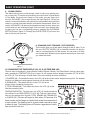
8. FRAME SEARCH
This feature allows you to scroll through a track to set a cue, starting sample, or loop point. To use the scroll function you must first be in Pause Mode
or Cue Mode. Once you are in Pause or Cue mode, use your finger tip to
turn the JOG WHEEL (19) to scroll through the track (figure 9). Turning the
wheel in a clockwise direction will advance the frame search and turning the
wheel in a counter-clockwise direction rewinds the frame search. When you
use the JOG WHEEL (19) the monitor (headphone level) function allows you
to here what you are scrolling through. Once you reach your desired starting point you can set a cue (starting) point by pressing the PLAY/PAUSE
BUTTON (29) as in figure 10. Pressing the CUE BUTTON (27) will return the
disc to the cue point just set.
Figure 10
9. SCANNING (FAST FORWARD / FAST REVERSE)
This function gives you a fast search through a disk or track. To do
this turn SHUTTLE WHEEL (18) in clockwise direction for fast forward or counterclockwise for fast reverse. You can scan in 6 different forward and 6 different reverse speeds depending on how much
you rotate the wheel.
Figure 11
10. CHANGING THE TIME DISPLAY (42, 43, & 44)/TIME BAR (46):
The time may be displayed in three different modes; Elapsed, Remain, and Total Remain. During normal playback, pressing the TIME BUTTON (5) as in figure 12, will change the time display information (57, 58, & 59) in
the LCD (14). The following is a break down of the time settings and their definitions:
1) ELAPSED (56) - This details the time in the LCD (14) as the current tracks’ elapsed running time. The elapsed
function only details a tracks elapsed time and not the entire disc.
2) REMAIN (62) - This details the time in the LCD (14) as the
current tracks’ remaining running time.
3) TOTAL REMAIN (66) - This details the time in the LCD (14) as the
total disc remaining time.
TIME BAR INDICATOR - The time bar in the LCD (14) visually details the
time defined in the TIME METER (57, 58, & 59). This bar is also dependent on the selected time function TOTAL REMAIN (66), REMAIN (62)
or ELAPSE (56). This bar will begin to flash when 15 seconds of a
track remain and will begin to rapidly flash when three seconds of
a track remain. The flashing bar is a great visual reminder a track
is about to end. The flashing bar will function regardless of which
time mode the unit is in.
Figure 12
©American
Audio® - www.americanaudio.us - DCD-PRO610™ Instruction Manual Page 17
BASIC OPERATIONS (CONT)
11. PITCH ADJUSTMENTS:
This function will increase or decrease a tracks playback speed or "PITCH," this is not a momentary change
as in "PITCH BENDING" (see page 19). The maximum pitch bend percentage allowed is +/-16%. The PITCH
SLIDER (21) is used to decrease or increase the playback pitch. If the slider is move up (towards the top of the
unit) the pitch will decrease, if the slider is moved down (towards the bottom of the unit) the pitch will increase.
The PITCH SLIDER (23) adjustment can be changed to range from +/-8%, +/-12%, or +/-16% (See changing
"PITCH SLIDER PERCENTAGE RANGE" figure 20/page 20). The pitch adjustments will effect playback, reverse
playback, and loops.
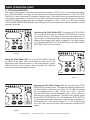
Activating the Pitch Slider (23): To activate the PITCH SLIDER
(23), turn the pitch function on. Press the PITCH BUTTON (7) to turn
on the pitch function, when the pitch function is activated a LED will
begin to glow (or flash depending on what pitch percentage value is
selected, see changing pitch values on page 18). If the pitch function
is not activated neither the PITCH SLIDER (23) nor the PITCH BEND
BUTTONS (15 & 16) will not function.
Figure 13
Using the Pitch Slider (21): To use the PITCH SLIDER (23) slide
the slider up and down. Down will increase the pitch and up will
decrease the pitch. When the slider is in the center position, a green
LED just left of the slider will glow. When this slider LED is glowing
there is zero pitch being applied to a track.
Figure 14
Adjusting the Pitch Slider's Range (21): You may change the PITCH
SLIDER'S (23) operating range. To change the operating range be sure
the pitch function is turned on, see figure 13. The pitch percentage
can be changed between +/-8%, +/-12%, and +/-16%. +/-8% will
allow the least amount of pitch manipulation and +/-16% will allow the
most amount of pitch manipulation. To adjust to the different values
tap the P.SELECT BUTTON (8). The LED beside the PITCH BUTTON
(7) will indicate which pitch percentage mode the unit is operating in.
Glowing green for +/-8%, glowing orange for +/-12%, or glowing red
for +/-16%. Note, the pitch function must be activated to receive a LED
reading.
Figure 15
©American
Audio® - www.americanaudio.us - DCD-PRO610™ Instruction Manual Page 18
BASIC OPERATIONS (CONT)
12. PITCH BEND:
This function will momentarily increase or decrease a tracks playback speed. There are two ways to operate
this function with the (-) & (+) PITCH BUTTONS (25) or with the JOG WHEEL (19). The maximum pitch bend
percentage allowed is +/- 16%. The pitch bend function will work in conjunction with the PITCH SLIDER (23)
pitch setting. The PITCH SLIDER (23) adjustment can be changed to range from +/-8%, +/-12%, or +/-16%
(See changing "PITCH SLIDER PERCENTAGE RANGE" on page 16). For example, if the PITCH SLIDER (23)
is set to a 2% pitch gain the pitch bending process will begin at 2% and will continue to the maximum of
-/+16%.
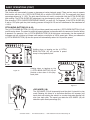
PITCH BEND BUTTONS (15 & 16):
The (+) PITCH BEND BUTTON (15 & 16) will provide a speed bump and the (-) PITCH BEND BUTTON (15) will
provide a slow down. The extent to which the speed changes is proportionate to the amount of time the button
is pressed. For example, if the (+) PITCH BEND BUTTON (16) is held down continuously, the disc speed will
increases and will continue to increase until reaches a maximum of 100% speed gain. When you release the
(+) PITCH BEND BUTTON (16) the disc speed will automati ally return to it’s previous speed.
c
Holding down or tapping on the (+) PITCH
BEND BUTTON (16) will provide a speed
bump in the playback pitch.
Holding down or tapping on the
(-) PITCH BEND BUTTON (15) will
provide a slow down in the playback pitch.
Figure 16
Figure 17
JOG WHEEL (19):
The JOG WHEEL (19) will temporarily bend the pitch if a track is in play
mode Rotating the wheel in a clockwise direction will increase your
track pitch and rotating the wheel in a counter-clockwise direction will
slow your track pitch. The speed you rotate the JOG WHEEL (19) will
determine pitch bend percentage (%).
Figure 18
©American
Audio® - www.americanaudio.us - DCD-PRO610™ Instruction Manual Page 19
BASIC OPERATIONS (CONT)
13. SETTING and STORING a CUE POINT:
Setting A Cue Point:
A cue point is the exact point playback will begin when the PLAY/PAUSE BUTTON (29) is pressed. A cue point
may be anywhere on a disc or in a track. You may set and store up to five independent cue points per disk.
Four cue points are stored in the CUE MEMORY BUTTONS (6) and one in the IN REAL-TIME CUE BUTTON
(26). Once a cue point is set it may be recalled at any time during normal playback. Figures 19 and 20 will detail
the procedures for setting your custom cue points. There are two ways to set a CUE point:
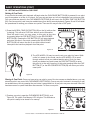
1) Press the IN REAL-TIME CUE BUTTON (26) on the fly (while a disc
is playing). This will set a CUE Point without music interruption.
Once this point is set, you may return to this point at any time
by pressing either the CUE BUTTON (27) or the RELOOP/BOP
BUTTON (30). Pressing the CUE BUTTON (27) will stop playback
and return the disc in cue mode, pressing the RELOOP/BOP
BUTTON (30) will return the disc to cue point without music
interruption and continue playback from that point.
Figure 19
2) The JOG WHEEL (19) may be used to set a cue point by frame. While
a disc is in pause or cue mode, use the JOG WHEEL (19) to scroll
through a track to find your desired starting point. Once you have
found your desired cue point press the PLAY BUTTON (29) to enter
this point in to the unit's memory. At this point pressing either the CUE
BUTTON (27) or the RELOOP/BOP BUTTON (30) will return you to this
exact point.
Figure 20
Storing A Cue Point: Once you have set a cue point by one of the two means as detailed above, you may
store this point in any one of the CUE MEMORY BUTTONS (6). Once a cue point is stored in to memory it may
be recalled at any time by pressing the cue button it was stored into. A cue point may even be recall if the disc
has been remove or power had been disconnected. To Store a cue point:
1) Create a cue point, press the CUE MEMORY BUTTON (6), as in
Figure 20. The yellow Cue Memory LED will glow. This indicates a
cue point is ready to be stored in to memory.
Figure 21
American Audio® • DCD-PRO610™ INSTRUCTION MANUAL • PAGE 20
BASIC OPERATIONS (CONT)
2) At this point pressing any one of the four CUE BUTTONS
(6) will store your cue point into memory (Figure 22), and the
yellow Cue Memory LED will shut off.
3) Repeat steps one and two to store up to four Cue Points.
Once all your four cue points have been stored you may
access them at any time.
4) During playback the cue points will instantly start without any
music interruption. During play or pause mode accessing a
stored cue point will cue to that point in pause mode.
Figure 22
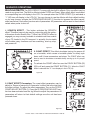
14. CREATING AND PLAYING A SEAMLESS LOOP
A seamless loop is a sound loop that plays continuously without sound interruption. You can use this loop to
create dramatic effect in your mixing. This loop has no time limit and you could actually loop the entire length
of disc. You create a seamless loop between two continuous points of a disc. The following steps illustrate the
procedures for creating a seamless loop:
1) Press the PLAY/PAUSE BUTTON (29) to activate
playback mode.
Figure 23
2) Press the IN REAL-TIME CUE BUTTON (26). This will set a
loops starting point. The IN REAL-TIME CUE BUTTON (26) LED
will briefly indicating a starting point has been set.
Figure 24
American Audio® • DCD-PRO610™ INSTRUCTION MANUAL • PAGE 21
BASIC OPERATIONS (CONT)
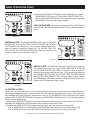
3) Press the OUT/EXIT BUTTON (28) to set the ending point for your
SEAMLESS LOOP (Figure 13). The IN REAL-TIME CUE BUTTON
(26) and OUT/EXIT BUTTON (28) LEDs will begin to flash indicating
SEAMLESS LOOP mode has been activated.
LOOP INDICATORS - During a seamless loop, the LOOP (65) and
RELOOP (64) INDICATORS will light in the LCD (14) indication a loop is
active.
Figure 25
EXITING A LOOP - To exit a SEAMLESS LOOP, press the OUT/EXIT
BUTTON (28). The IN REAL-TIME CUE BUTTON (26) and OUT/EXIT
BUTTON (28) LEDs will remain on, but will stop flashing. Music playback will resume normal play (Figure 26). The IN REAL-TIME CUE
BUTTON (26) and OUT/EXIT BUTTON (28) LEDs will remain on to
remind you that a loop is stored in memory.
Figure 26
REPLAY LOOP - The RELOOP (30) function allows you to return to
your stored loop at any time. The IN REAL-TIME CUE BUTTON (26)
and OUT/EXIT BUTTON (28) LEDs will indicate a loop is stored in
memory, and may be played at any time. To replay the loop, press the
RELOOP/BOP BUTTON (30). The IN REAL-TIME CUE BUTTON (26)
and OUT/EXIT BUTTON (28) LEDs will again begin to flash indicating SEAMLESS LOOP mode has been activated (Figure 26) and your
stored loop will immediately begin to play.
Figure 27
15. EDITING A LOOP:
Please note only the ending point of a loop may be edited, a loop may be made shorter or longer. Before you
can edit your seamless loop you obviously must first have created a seamless loop to edit. If you haven’t created a SEAMLESS LOOP, follow the instructions in step 10. If a SEAMLESS LOOP has already been created,
press the RELOOP/BOP BUTTON (30) to activate your SEAMLESS LOOP (Figure 27), if it is not already playing.
To edit a loop’s ending point:
1) Press the OUT/EXIT BUTTON (28) to return to normal play from the loops cue point (Figure 26). This will
disengage the SEAMLESS LOOP and allows you to edit the loops ending point.
2) Press the OUT/EXIT BUTTON (28) again when you reach your new ending point (Figure 26).
- FOR A SHORTER LOOP: Press the OUT/EXIT BUTTON (28) at sooner point in the track (Figure 26).
- FOR LONGER LOOP: Press the OUT/EXIT BUTTON (28) at later point in the track (Figure 26).
American Audio® • DCD-PRO610™ INSTRUCTION MANUAL • PAGE 22
BASIC OPERATIONS (CONT)
16. PROGRAM PLAY
This operation allows you to customize your disc playback. You may select specific tracks to played and the
order they will be played in. You may program a maximum of 30 tracks at once and program a single track to
played more than once. To create a program:
1) Be sure a disc is inserted in the drive then press and hold the
DTA/FX(22) and tap the PRG/HOLD FX BUTTON (13) once.
Pressing the DTA/FX(22) and tapping the PRG/HOLD FX BUTTON
(13) from any function will immediately pause the disc and enter
the program mode.
2) After activating the program mode the PROGRAM INDICATOR
LED(52) in the LCD (14) will begin to glow indicating Program
Mode has been activated.
Figure 28
3) Select a track to be programmed by using
the FORWARD TRACK SKIP (21) and
BACK SKIP TRACK BUTTON (20).
Figure 29
4) Once you reach the track you wish to place in to the program
memory pressing PRG/HOLD FX (13) will lock the track into
memory.
Figure 30
5) Repeat these steps three and four up to 29 times (up to 30 tracks may be programmed).
6) As you program tracks into memory, the LCD (14) will indicate how many tracks have been programmed.
7) When you have finished programming and are ready to begin
playback simply press the PLAY/PAUSE BUTTON (29) and your
program will begin to play.
8) You can always add more tracks to your program by repeating
steps one through four. Remember that you can only program a
maximum of 30 tracks, and you can only add tracks not subtract
them.
9) To cancel and clear the program press and hold down the DTA/
FX(22) and PRG/HOLD FX (13) for more than two seconds (see
figure 28).
Figure 31
American Audio® • DCD-PRO610™ INSTRUCTION MANUAL • PAGE 23
ADVANCED OPERATIONS
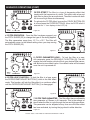
Creating a BOP Effect:
The Bop Effect is a stutter effect that is similar to a CD skipping. You can use this effect to create tricks in your
mixing. Creating a BOP effect is a simple process:
1) Press the PLAY/PAUSE BUTTON
(29) so music is playing (Figure 32).
Figure 32
2) Press the IN REAL-TIME CUE BUTTON
(26) at the point you want your BOP to
take place (Figure 33).
Figure 33
3) Now tap the RELOOP/BOP BUTTON (30). It will
produce a stutter effect as quickly as you tap on the
RELOOP/BOP BUTTON (30). See Figure 34.
Figure 34
Reverse Play:
Reverse play allows you to play a track, loop, or sample backwards. This function is activated by pressing the
REV/PLAY BUTTON (4) as in figure 35. This function will react differently to different playback modes:
- Reverse track/disc play. In this mode the unit will playback in
reverse until the reverse function is turned off. If the reverse function
is not turned off the unit will continue to play the remainder of the
disc in reverse mode until it reach the begging of the disc. When the
unit comes to the beginning it will automatically cue to the first track.
If the unit is paused in this mode it will continue to play in reverse
when playback begins again.
- Reverse loop play. In this mode the loop will play in reverse once
and turn off. If the reverse function is turned off at this point, the
loop will continue in regular play. If the OUT/EXIT BUTTON (28) is
pressed during reverse loop playback mode, playback will continue
in reverse until the reverse function.
Figure 35
American Audio® • DCD-PRO610™ INSTRUCTION MANUAL • PAGE 24
ADVANCED OPERATIONS
FLIP-FLOP™
This feature is a kind of “auto pilot." “Flip-Flop™” mode can only function with the both drives of
the DCD-PRO610. The “Flip-Flop™” function may be used with or without an American Audio® “Q”
deck mixer. With “Flip-Flop™” you can have one unit begin playback when the other ends. You can
“Flip Flop” single tracks, the entire disc, a combination of the two, or you can even “Flip-Flop” your
programmed tracks.
To FLIP-FLOP™ single tracks or programmed tracks:
1) Connect your system as described in the set up section on page 6.
2) Set your mixer’s crossfader to the center position.
3) Be sure your two units are single mode. SINGLE (67) should be indicated in the LCD (14).
4) Load your two DCD-PRO610 with audio disc.
5) After they have both cued, press the PLAY/
PAUSE BUTTON (29) on one of your drive to
begin playback.
6) After the first cds' single track has ended the
second cds' track will immediately begin playback.
7) Flip-Flop™ will continue until you stop it or
power is interrupted.
8) To deactivate Flip-Flop™ mode, repeat step 4.
Figure 36
To FLIP-FLOP entire CDs:
To FLIP-FLOP an entire disc, be sure both drives are in continuous play mode. The SINGLE ICON
(67) should not be displayed in the LCD (14). When both drives are in continuous play mode, follow
the directions for single track FLIP-FLOP as detailed above. When one the disc in one unit ends the
other unit will immediately begin playback.
Combining FLIP-FLOP modes:
Flip-Flop modes may combined. One unit may run in single mode and the other in continuous mode.
When the units are arranged in this fashion, the unit in single mode will play a single track and flip to
the next unit. The next unit will then play the entire disc and flip back to the other. The other will then
play the next track and flip back to the other unit, and so on.
Fader Q-Start™
This function works in conjunction with a compatible American Audio® or American DJ® “Q-Start"
mixer. When used with a compatible mixer, you can use the crossfader to start and stop the CD Player
with the slide of the mixer's crossfader.
Connecting your DCD-PRO610 to a “Q” Start mixer for “Q" Start control: Be sure to connect 1/8”
mono mini plugs from the control connection on the rear your DCD-PRO610 to the 1/8” control jack
on the rear of a American Audio® “Q” series mixer. That’s it, you’ll be set for "Q" Start!
Scratch Box™ Compatible
The optional American Audio® Scratch Box is a devices that simulates real time scratching of a CD.
The Scratch Box™ device is used in conjunction with any turntable and any Scratch Box™ compatible
American Audio® CD player. For details of the optional Scratch Box refer to page 28.
American Audio® • DCD-PRO610™ INSTRUCTION MANUAL • PAGE 25
ADVANCED OPERATIONS
BUILT-IN EFFECTS: The DCD-PRO610™ comes with two built in effects. Only one effect may be
used at any given time. The Built-in effects include FILTER and Coast. When either effect is activated
a corresponding icon will display in the LCD. For example when the FILTER EFFECT (3) is activated a
"1" (50) icon will display in the LCD (14). You can choose to use the effects with their default setting
or you may choose activate the FILTER/COAST/ADJUST (1) function to increase the effect parameters (see below). Each effect has two sets of parameters. All parameters will be reset to there default
values when power is shut off.
1. SCRATCH EFFECT - This button activates the SCRATCH
effect. This effect can only be used in conjunction with the optional American Audio® Scratch Box.™ When the SCRATCH effect is
engaged you may use any turntable to simulate real time scratch
of any CD loaded in the CD transport. In actuality the turntable
will simulate many functions such as scratching, start-up, stop,
and power-off.
Figure 37
2. COAST EFFECT: This effect simulates turning the power off
on a turntable, which cause a turntable platter to slowly spin
down until it loses momentum and stops. The COAST effect may
also be used to simulates a turntable slowly revving up to it's proper
speed.
To activate the COAST effect be sure the DTA/FX BUTTON (22)
(22) is off and press the COAST BUTTON (11). When the COAST
effect is selected the "2" icon displays in the LCD (14).
Figure 38
3. COAST EFFECT Parameters: The coast effect parameters can be
adjust to 10msec of second to 9.9 seconds. In effect this is the total time
the effect will last. To adjust the effect parameters; Turn on the FILTER/
COAST/ADJUST BUTTON (1). Once the FILTER/COAST/ADJUST function has been activated use the Jog Wheel to adjust the parameters. All
parameters will return to their default settings once the unit has been
powered down.
Figure 39
American Audio® • DCD-PRO610™ INSTRUCTION MANUAL • PAGE 26
Figure 38
ADVANCED OPERATIONS (CONT)
FILTER EFFECT: The filter is a type of dampening effect that
tweaks with the harmonics of a track. This effect uses a low and
high filter to distort the an audio track. The effect works with both
the low and high filters simultaneously.
To activate the FILTER effect be sure the DTA/FX BUTTON (22)
is off and press the FILTER BUTTON (3). When the FILTER effect is
selected the "1" icon displays in the LCD (14).
Figure 40
4. FILTER OPERATION - Once the filter has been engaged, use
the PITCH SLIDER (23) to change the type of filer being applied.
The filter parameters range from -12.7 to +12.7. The filter will
automatically return to the default setting when you stop moving
the PITCH SLIDER (23).
Figure 41
5. FILTER PARAMETER HOLD - To lock the filter at a specific parameter press the PRG/HOLD FX BUTTON (13). This will
engage the hold function which will lock your desired filter parameter and set a new default value. Your default value will be erased
once the unit is powered off.
Figure 42
6. FILTER LOOP FUNCTION - To lock the filter in a loop, press
the FILTER/COAST/ADJUST BUTTON (1) while in the filter effect
mode. This function will lock the filter effect in a continuos effect
until the FILTER/COAST/ADJUST BUTTON (1) is disengaged.
Figure 43
7. FILTER TIME PARAMETER - The filter effect has an adjustable
time parameter of 10msec to 9.9 seconds. This is the amount of
time it takes the filter to cycle through the low and high pass filters.
This parameter can be adjusted at any time once the filter effect
has been activated, by turning the jog wheel in either direction.
Figure 44
American Audio® • DCD-PRO610™ INSTRUCTION MANUAL • PAGE 27
OPTIONAL SCRATCH BOX SET UP
Warning! Be sure to make all connections before powering the unit!
GND
R
Scratch Box
CLK OUT
1
L
CLK OUT
2
DC 12V
Scratch Box
T U R N TA B L E
SB-12 Vinyl Record Only
CLK OUT
1
Stereo Mini Plug Only
CLK OUT
2
DC 12V
SCRATCH BOX
INPUT
DIGITAL
OUT
SCRATCH BOX
INPUT
DIGITAL
OUT
AC INPUT 115/230 V, 50/60 Hz
CONNECT TO
CONTROL 2
CONNECT TO
CONTROL 1
AUDIO OUT
2
R
L
Voltage Selector
230V
R
1
CAUTION
115V
AUDIO OUT
RISK OF ELECTRICAL SHOCK
DO NOT OPEN
Scratch Box™ - The Scratch Box™ is compatible with any turntable. The above diagram briefly
details set-up procedures. See page 26 for scratch
effect.
Note: The Scratch Box™ will only function with
the included SB-12 Blue Vinyl Record. Replacement Vinyl is available from American Audio.
L
DCD-PRO610 ONLY
72
73
GND
CLK OUT
1
CLK OUT
2
R
74
DC 12V
L
70
GND
71
R
L
76
75
75
70. PHONO INPUTS - These are stereo phono
inputs. Connect a turntable's output RCAs to
these jacks. The right stereo channel is represented by the red female RCA and labeled with
"R."
71. PHONO GROUND - This ground connector is
used to extend the reach of the turntables ground
connector. Connect the turntable ground cable to
this connector to avoid hum and pops associated
with phono cartridges.
72. CHANNEL 2 CONTROL OUTPUT - This
control jack is used to send the signal coming
from the turntable to the CD player. Connect this
output to the channel two scratch box insert on
the rear of the CD transport unit. Be sure to only
use the supplied stereo mini plugs. Using mono
mini plugs may cause your CD to play in reverse.
73. CHANNEL 1 CONTROL OUTPUT - This
control jack is used to send the signal coming
from the turntable to the CD player. Connect this
output to the channel one scratch box insert on
the rear of the CD transport unit. Be sure to only
use the supplied stereo mini plugs. Using mono
GND
mini plugs may cause your CD to play in reverse.
74. POWER SUPPLY INPUT - Connect the
power supply included with the unit to power the
R
L
Scratch Box.™
75. PHONO OUTPUTS - These outputs are used
to send the turntable analog signal to your mixer.
The left channel is represented by the white RCA
connector, the red represents the right channel.
76. GROUND OUTPUT - Connect the turntable
ground cable to this connector to avoid hum and
pops associated with phono cartridges.
American Audio® • DCD-PRO610™ INSTRUCTION MANUAL • PAGE 28
BEFORE SWITCHING OFF THE POWER
• When you have finished using the CD unit, and before switching off the power, be sure that the disc
holder has been closed with the OPEN/CLOSE button.
• TRAY PROTECTION: If tray is not closed after 60 seconds, it will close automatically and pause.
CAUTION: DO NOT forcibly close the disc holder when the power is off.
Do not switch off the power
when the disc holder is open.
Switch off the power after the
disc holder has been closed
with the OPEN/CLOSE button.
DO NOT switch off the power when the disc holder is
open. Switch off the power after the disc holder has
been closed with the OPEN/CLOSE BUTTON (10).
COMPACT DISCS
1. PRECAUTIONS ON HANDLING COMPACT DISCS
Compact disc are constructed of the same types of plastic record are. To avoid severe damage to you valuable
disc please observe the following guide lines. Following the these guide lines will ensure long disc life.
• Do not allow fingerprints, oil or dust to get on the surface of the disc. If the disc is dirty, wipe it off with
a soft dry cloth.
• Do not use benzene, thinner, water, record spray, electrostatic-proof chemicals, or silicone-treated cloths
to clean discs.
• Always handle discs carefully to prevent damaging the surface; in particular when removing a disc from
the jewel case.
• Do not bend the disc.
• Do not apply heat.
• Do not enlarge the hole in the center of the disc.
• Do not write on the label (printed side) with a hard tipped implement such as a pencil or ball point pen.
• Condensation will form if a disc is brought into a warm area from a colder one, such as outdoors in
winter. Do not attempt to dry the disc with a hair dryer, etc.
2.
•
•
•
PRECAUTION ON STORAGE
After playing a disc, always unload it from the unit.
Always store the compact disc in the jewel case, protecting from dirt or damage.
Do not place discs in the following areas:
a) Areas exposed to direct sunlight for a considerable time.
b) Areas subject to accumulation of dust or high humidity.
c) Areas affected by heat from indoor heaters, etc.
American Audio® • DCD-PRO610™ INSTRUCTION MANUAL • PAGE 29
WARRANTY
1-YEAR LIMITED WARRANTY
A. American Audio® hereby warrants, to the original purchaser, American Audio® products to
be free of manufacturing defects in material and workmanship for a period of 1 Year (365 days)
from the date of purchase. This warranty shall be valid only if the product is purchased within the
United States of America, including possessions and territories. It is the owner’s responsibility to
establish the date and place of purchase by acceptable evidence, at the time service is sought.
B. For warranty service, send the product only to the American Audio® factory. All shipping
charges must be pre-paid. If the requested repairs or service (including parts replacement) are
within the terms of this warranty, American Audio® will pay return shipping charges only to a
designated point within the United States. If the entire instrument is sent, it must be shipped
in its original package. No accessories should be shipped with the product. If any accessories
are shipped with the product, American Audio® shall have no liability whatsoever for loss of
or damage to any such acces-sories, nor for the safe return thereof.
C. This warranty is void if the serial number has been altered or removed; if the product is
modified in any manner which American Audio® concludes, after inspection, affects the reliability of the product; if the product has been repaired or serviced by anyone other than the
American Audio® factory unless prior written authorization was issued to purchaser by American Audio®; if the product is damaged because not properly maintained as set forth in the
instruction manual.
D. This is not a service contract, and this warranty does not include maintenance, cleaning
or periodic check-up. During the period specified above, American Audio® will replace defective parts at its expense, and will absorb all expenses for warranty service and repair labor by
reason of defects in material or workmanship. The sole responsibility of American Audio®under
this warranty shall be limited to the repair of the product, or replacement thereof, including
parts, at the sole discretion of American Audio®. All products covered by this warranty were
manufactured after January 1, 1990, and bear identifying marks to that effect.
E. American Audio® reserves the right to make changes in design and/or improvements upon
its products without any obligation to include these changes in any products theretofore manufactured.
F. No warranty, whether expressed or implied, is given or made with respect to any accessory supplied with products described above. Except to the extent prohibited by applicable
law, all implied warranties made by American Audio® in connection with this product, including
warranties of merchantability or fitness, are limited in duration to the warranty period set forth
above. And no warranties, whether expressed or implied, including warranties of merchantability or fitness, shall apply to this product after said period has expired. The consumer’s and
or Dealer’s sole remedy shall be such repair or replacement as is expressly provided above;
and under no circumstances shall American Audio® be liable for any loss or damage, direct or
consequential, arising out of the use of, or inability to use, this product.
G. This warranty is the only written warranty applicable to American Audio® Products and
supersedes all prior warranties and written descriptions of warranty terms and conditions heretofore published.
©American
Audio® - www.americanaudio.us - DCD-PRO610™ Instruction Manual Page 30
SPECIFICATIONS
GENERAL
System:
Disc type:
Dimensions:
Installation:
Weight:
Power supply:
Power consumption:
Pitch control range:
Pitch bend:
Pitch accuracy:
Environmental conditions:
Accessories:
AUDIO SECTION
Quantization:
Sampling rate:
Over sampling rate:
D/A conversion
Frequency response:
Output level:
Load impedance:
Model: American Audio® DCD-PRO610™ - Professional Compact Disc Player
Dual, CD Tray Loading, Digital Compact Disc Audio Player.
Standard compact discs (5 in / 12cm and 3in/8cm discs)
Player unit: 19” (W) x 3 15/32” (H) x 9 55/64” (D)
482mm (W) x 88mm (H) x 264mm (D) (without feet)
Control unit: 19”(W) x 5 3/4” (H) x 1 37/64” (D)
482mm (W) x 132mm (H) x 74mm (D) (without feet)
Place on flat surface or mount in flat case
5.3 Lbs. / 2.4 kgs
AC 115v/230v, 50/60Hz
25W
+/-8%, +/-12%, +/-16%
+/-16%
+/- 0.1%
Operational temperature: 5 to 35˚C (41 to 95˚F)
Operational humidity: 25 to 85% RH (non-condensation)
Storage temperature: -20 to 60˚C (4 to 140˚F)
Dual RCA Cable (for left and right channels)
Control 1/8” miniplug type (3 feet)
16 bit linear per channel
44.1 kHz at normal pitch
8 times over sampling 1 bit D/A converter
16 bit
+/- 1 dB 20 Hz to 20,000 KHz
1.0V +/- 1dB
47k ohm or more
AUDIO CHARACTERISTICS (TEST DISC: TCD-782, LOAD=47Kohm)
ITEM
NOMINAL
LIMIT
CONDITION
Output level
1.0Vrms+/-1dB
1.0V+/-1dB 1KHz,0dB
Channel balance
0.5dB
1.0dB
1KHz,0dB
Frequency response
+/-0.5dB
+/-1.0dB
20Hz-20KHz,0dB
De-emphasis response
+/-2.5dB
+/-3dB
16KHz, -20dB
Channel separation*
82dB
75dB
1KHz,0dB
T.H.D. + NOISE*
0.02%
0.025%
1KHz,0dB
S/N ratio (IHF-A)*
84dB
75dB
1KHz.0dB
NOTE: *With 20KHz low pass filter.
SEARCHING TIME (TEST DISC: TCD-792)
ITEM
NOMINAL
Short access time
1.7 sec
Long access time
3 sec
CD recover time
1 sec
LIMITS CONDITION
4 sec
Play next track
6 sec
Track 1 ->Track 20 / Track 20 ->Track 1
2 sec
CD play interrupted by mechanical shock
PLAYABILITY
ITEM
Interruption
Black dot
Finger prints
Eccentricity
Vertical deviation
NOMINAL
1000um
1000um
75um
210um
1mm
LIMIT
700um
600um
65um
140um
0.54mm
PICK-UP
System
Object lens drive system
Tracking detection
Optical source
Wave length
Object lens drive system optical pick-up
2 dimensional parallel drive
3 spot beam detection
Semiconductor laser
780nm
CONDITION
TCD-725
TCD-725
TCD-725
TCD-712,713 NO TRACK JUMP
TCD-731R
American Audio® • DCD-PRO610™ INSTRUCTION MANUAL • PAGE 31
©American Audio®
A Division of the American DJ® Group of Companies
American Audio® World Headquarters:
4295 Charter Street
Los Angeles, CA 90058 USA
Tel: 323-582-2650 Fax: 323-582-2610
Web: www.americanaudio.us E-mail: [email protected]