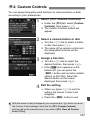
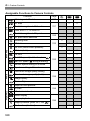
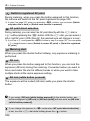
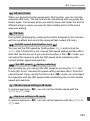
1
INSTRUCTION MANUAL
E
●
●
This manual is for the EOS 5D Mark III installed with firmware
version 1.2.0 or later.
The “Software Start Guide” is included at the end of this manual.
E
INSTRUCTION
MANUAL
Introduction
The EOS 5D Mark III is a digital single-lens reflex camera featuring a
fine-detail, full-frame (approx. 36 x 24 mm) CMOS sensor with approx.
22.3 effective megapixels, DIGIC 5+, approx. 100% viewfinder
coverage, high-precision and high-speed 61-point AF, approx. 6 fps
continuous shooting, Live View shooting, and Full High-Definition (Full
HD) movie shooting.
Before Starting to Shoot, Be Sure to Read the Following
To avoid botched pictures and accidents, first read the “Safety
Precautions” (p.389-391) and “Handling Precautions” (p.14-15).
Refer to This Manual while Using the Camera to Further
Familiarize Yourself with the Camera
While reading this manual, take a few test shots and see how they
come out. You can then better understand the camera.
Testing the Camera Before Use and Liability
After shooting, play images back and check whether they have been
properly recorded. If the camera or memory card is faulty and the
images cannot be recorded or downloaded to a computer, Canon
cannot be held liable for any loss or inconvenience caused.
Copyrights
Copyright laws in your country may prohibit the use of your recorded
images of people and certain subjects for anything but private
enjoyment. Also be aware that certain public performances, exhibitions,
etc., may prohibit photography even for private enjoyment.
Memory Cards
In this manual, “CF card” refers to CompactFlash cards and “SD card”
refers to SD/SDHC/SDXC cards. “Card” refers to all memory cards
used to record images or movies. The camera does not come with a
card for recording images/movies. Please purchase it separately.
2
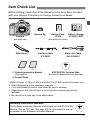
Item Check List
Before starting, check that all the following items have been included
with your camera. If anything is missing, contact your dealer.
Camera
Battery Pack
LP-E6
(with body cap)
(with protective cover)
Eyecup Eg
Interface Cable
IFC-200U
Wide Strap
(1)
Battery Charger
LC-E6/LC-E6E*
Stereo AV Cable
AVC-DC400ST
(2)
(1) Camera Instruction Manual
(this booklet)
(2) Pocket Guide
EOS DIGITAL Solution Disk
(Software/Software Instruction Manuals)
* Battery Charger LC-E6 or LC-E6E is provided. (The LC-E6E comes with a power cord.)
Attach Eyecup Eg to the viewfinder eyepiece.
If you purchased a Lens Kit, check that the lens is included.
Depending on the Lens Kit type, a lens instruction manual may also be
included.
Be careful not to lose any of the above items.
Software Instruction Manuals
The Software Instruction Manuals are included on the EOS DIGITAL
Solution Disk as PDF files. See page 396 for instructions to look up
information in the Software Instruction Manuals.
3
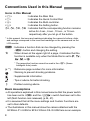
Conventions Used in this Manual
Icons in this Manual
<6>
<5>
<9>
<0>
0, 9, 7, 8
: Indicates the Main Dial.
: Indicates the Quick Control Dial.
: Indicates the Multi-controller.
: Indicates the Setting button.
: Indicates that the corresponding function remains
active for 4 sec., 6 sec., 10 sec., or 16 sec.
respectively after you let go of the button.
* In this manual, the icons and markings indicating the camera’s buttons, dials,
and settings correspond to the icons and markings on the camera and on the
LCD monitor.
3 : Indicates a function that can be changed by pressing the
<M> button and changing the setting.
M
: When shown at the upper right of a page, it indicates that the
function is available only when the Mode Dial is set to d, s,
f, a, or F.
* The respective function cannot be used in the <A> (Scene
Intelligent Auto) mode.
(p.**) : Reference page numbers for more information.
: Warning to prevent shooting problems.
: Supplemental information.
: Tips or advice for better shooting.
: Problem-solving advice.
Basic Assumptions
All operations explained in this manual assume that the power switch
has been set to <1> and the <R> switch has been set to the
left (Multi function lock released) (p.34, 47).
It is assumed that all the menu settings and Custom Functions are
set to their defaults.
The illustrations in this manual show the camera attached with the
EF50mm f/1.4 USM or EF24-105mm f/4L IS USM lens as an example.
4
Chapters
For first-time DSLR users, Chapters 1 and 2 explain the camera’s
basic operations and shooting procedures.
Introduction
1
2
3
4
5
6
7
8
9
10
11
12
13
14
15
2
Getting Started
27
Basic Shooting
63
Setting the AF and Drive Modes
69
Image Settings
117
Advanced Operations
161
Flash Photography
189
Shooting with the LCD Monitor (Live View Shooting)
199
Shooting Movies
219
Image Playback
249
Post-Processing Images
287
Sensor Cleaning
295
Printing Images and Transferring Images to a Computer
301
Customizing the Camera
319
Reference
341
Software Start Guide
393
5
Contents
Introduction
2
Item Check List................................................................................. 3
Conventions Used in this Manual..................................................... 4
Chapters........................................................................................... 5
Index to Features ........................................................................... 12
Handling Precautions ..................................................................... 14
Quick Start Guide ........................................................................... 16
Nomenclature ................................................................................. 18
1
Getting Started
27
Charging the Battery ...................................................................... 28
Installing and Removing the Battery............................................... 30
Installing and Removing the Card .................................................. 31
Turning on the Power ..................................................................... 34
Setting the Date, Time, and Zone .................................................. 36
Selecting the Interface Language................................................... 38
Attaching and Detaching a Lens .................................................... 39
About the Lens Image Stabilizer .................................................... 42
Basic Operation.............................................................................. 43
Q Quick Control for Shooting Functions ....................................... 49
3 Menu Operations .................................................................. 51
Before You Start............................................................................. 53
Formatting the Card..................................................................... 53
Setting the Power-off Time/Auto Power Off ................................. 55
Setting the Image Review Time ................................................... 55
Reverting the Camera to the Default Settings ............................. 56
Displaying the Grid and Electronic Level........................................ 59
Feature Guide............................................................................ 61
6
Contents
2
Basic Shooting
63
A Fully Automatic Shooting (Scene Intelligent Auto) ...................64
A Full Auto Techniques (Scene Intelligent Auto) ......................... 67
3
Setting the AF and Drive Modes
69
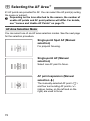
f: Selecting the AF Mode ............................................................ 70
S Selecting the AF Area............................................................... 72
AF Area Selection Modes ............................................................... 75
About the AF Sensor.......................................................................78
Lenses and Usable AF Points.........................................................79
Selecting AI Servo AF Characteristics (For a Subject) ...................87
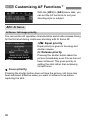
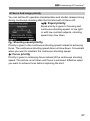
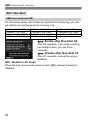
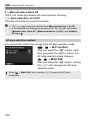
Customizing AF Functions .............................................................. 96
Fine Adjustment of AF’s Point of Focus (AF Microadjustment) .... 106
When Autofocus Fails ................................................................... 112
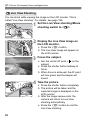
MF: Manual Focusing................................................................. 113
i Selecting the Drive Mode........................................................114
j Using the Self-timer ................................................................. 115
4
Image Settings
117
Selecting the Card for Recording and Playback ...........................118
Setting the Image-Recording Quality ............................................ 121
i: Setting the ISO Speed...........................................................126
A Selecting a Picture Style.......................................................131
A Customizing a Picture Style .................................................. 134
A Registering a Picture Style ................................................... 137
B: Setting the White Balance....................................................139
O Custom White Balance ........................................................140
P Setting the Color Temperature ............................................ 141
u White Balance Correction ........................................................142
Correcting the Brightness and Contrast Automatically (Auto Lighting Optimizer) .. 144
7
Contents
Noise Reduction Settings ............................................................. 145
Highlight Tone Priority .................................................................. 148
Lens Peripheral Illumination / Chromatic Aberration Correction........ 149
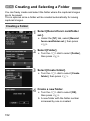
Creating and Selecting a Folder................................................... 152
Changing the File Name............................................................... 154
File Numbering Methods .............................................................. 156
Setting Copyright Information....................................................... 158
Setting the Color Space ............................................................... 160
5
Advanced Operations
161
d: Program AE ........................................................................... 162
s: Shutter-Priority AE................................................................ 164
f: Aperture-Priority AE ............................................................. 166
Depth of Field Preview............................................................... 167
a: Manual Exposure ................................................................... 168
q Selecting the Metering Mode.................................................. 169
Setting Exposure Compensation .................................................. 171
h Auto Exposure Bracketing (AEB)........................................... 172
A AE Lock................................................................................... 173
F: Bulb Exposures....................................................................... 174
w: HDR (High Dynamic Range) Shooting .............................. 175
P Multiple Exposures ................................................................. 179
2 Mirror Lockup ........................................................................ 186
Using the Eyepiece Cover............................................................ 187
F Using a Remote Switch ............................................................ 187
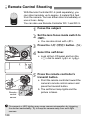
R Remote Control Shooting .......................................................... 188
6
Flash Photography
189
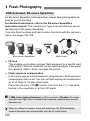
D Flash Photography ................................................................... 190
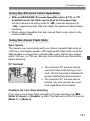
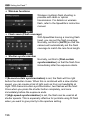
Setting the Flash .......................................................................... 193
8
Contents
7
Shooting with the LCD Monitor (Live View Shooting)
199
A Shooting with the LCD Monitor ............................................... 200
Shooting Function Settings ...........................................................204
Menu Function Settings ................................................................ 205
Using AF to Focus ........................................................................ 209
Focusing Manually ........................................................................ 216
8
Shooting Movies
219
k Shooting Movies .....................................................................220
Autoexposure Shooting ..............................................................220
Shutter-priority AE ......................................................................221
Aperture-priority AE.................................................................... 222
Manual Exposure Shooting ........................................................225
Shooting Still Photos ..................................................................230
Shooting Function Settings ...........................................................232
Setting the Movie-Recording Size.................................................233
Setting the Sound Recording ........................................................236
Silent Control ................................................................................238
Setting the Time Code ..................................................................239
Menu Function Settings ................................................................ 243
9
Image Playback
249
x Image Playback ......................................................................250
B: Shooting Information Display.............................................252
H I Searching for Images Quickly ........................................... 255
u Magnified View ........................................................................ 257
X Comparing Images (Two-image Display)................................ 259
b Rotating the Image ..................................................................260
Setting Ratings.............................................................................. 261
Q Quick Control During Playback ............................................... 263
9
Contents
k Enjoying Movies ..................................................................... 265
k Playing Movies ....................................................................... 267
X Editing the Movie’s First and Last Scenes .............................. 269
Slide Show (Auto Playback) ......................................................... 271
Viewing the Images on TV ........................................................... 274
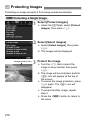
K Protecting Images................................................................... 278
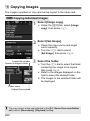
a Copying Images ...................................................................... 280
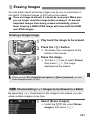
L Erasing Images........................................................................ 283
Changing Image Playback Settings ............................................. 285
Adjusting the LCD Monitor Brightness....................................... 285
Auto Rotation of Vertical Images ............................................... 286
10
Post-Processing Images
287
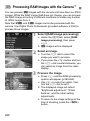
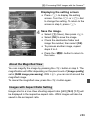
R Processing RAW Images with the Camera .......................... 288
S Resize..................................................................................... 293
11
Sensor Cleaning
295
f Automatic Sensor Cleaning .................................................. 296
Appending Dust Delete Data ........................................................ 297
Manual Sensor Cleaning .............................................................. 299
12
Printing Images and Transferring Images to a Computer 301
Preparing to Print ......................................................................... 302
wPrinting .................................................................................... 304
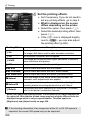
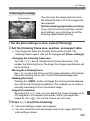
Trimming the Image ................................................................... 309
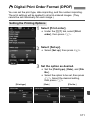
W Digital Print Order Format (DPOF) ......................................... 311
W Direct Printing with DPOF....................................................... 314
d Transferring Images to a Personal Computer........................ 315
10
Contents
13
Customizing the Camera
319
Custom Functions .........................................................................320
Custom Function Settings............................................................. 321
C.Fn1: Exposure ........................................................................ 321
C.Fn2: Disp./Operation ..............................................................324
C.Fn3: Others.............................................................................326
82: Custom Controls ..................................................................327
Registering My Menu .................................................................... 337
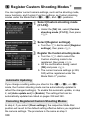
w Register Custom Shooting Modes ..........................................338
14
Reference
341
B Button Functions................................................................. 342
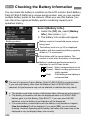
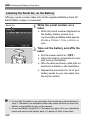
Checking the Battery Information.................................................. 344
Using a Household Power Outlet.................................................. 348
Replacing the Date/Time Battery .................................................. 349
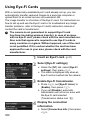
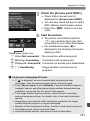
Using Eye-Fi Cards....................................................................... 350
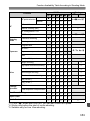
Function Availability Table According to Shooting Mode .............. 352
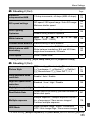
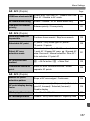
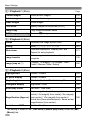
Menu Settings ............................................................................... 354
System Map .................................................................................. 362
Troubleshooting Guide..................................................................364
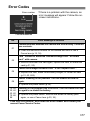
Error Codes...................................................................................377
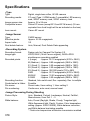
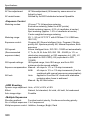
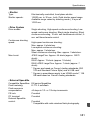
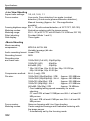
Specifications................................................................................378
Safety Precautions........................................................................ 389
15
Software Start Guide
393
Software Start Guide.....................................................................394
Index ............................................................................................. 397
11
Index to Features
Power
Charging the battery
Battery check
Battery information check
Power outlet
Auto power off
AF
Î p.28
Î p.35
Î p.344
Î p.348
Î p.55
Card
Format
Î p.53
Select card
Î p.118
Release shutter without card Î p.32
Î p.39
Î p.40
Î p.42
Î p.38
Î p.36
Î p.354
Î p.158
Î p.56
Viewfinder
Dioptric adjustment
Eyepiece cover
Grid display
Electronic level
Î p.43
Î p.187
Î p.59
Î p.59
LCD Monitor
Brightness adjustment
Electronic level
Feature guide
12
Metering
Metering mode
Î p.169
Drive mode
Self-timer
Maximum burst
Î p.114
Î p.115
Î p.125
Recording Images
Basic Settings
Language
Date/Time/Zone
Beeper
Copyright information
Clear all camera settings
Î p.70
Î p.72
Î p.74
Î p.87
Î p.96
Î p.106
Î p.113
Drive
Lens
Attaching/Detaching
Zoom
Image Stabilizer
AF mode
AF area selection mode
AF point selection
AI Servo AF characteristics
AF Custom Functions
AF Microadjustment
Manual focusing
Î p.285
Î p.60
Î p.61
Record func.
Create/select a folder
File name
File No.
Î p.118
Î p.152
Î p.154
Î p.156
Image Quality
Image-recording quality
ISO speed
Picture Style
White balance
Auto Lighting Optimizer
Noise reduction for high
ISO speeds
Noise reduction for long
exposures
Î p.121
Î p.126
Î p.131
Î p.139
Î p.144
Highlight tone priority
Î p.148
Peripheral illumination
correction
Î p.149
Î p.145
Î p.146
Index to Features
Chromatic aberration
correction
Color space
Playback
Î p.150
Î p.160
Shooting
Shooting mode
HDR
Multiple exposures
Mirror lockup
Depth-of-field preview
Remote control
Quick Control
Î p.24
Î p.175
Î p.179
Î p.186
Î p.167
Î p.188
Î p.49
Exposure Adjustment
Exposure compensation
AEB
AE lock
Safety shift
Î p.171
Î p.172
Î p.173
Î p.323
Image Editing
Flash
External flash
External flash function
settings
External Speedlite
Custom Functions
Î p.189
Î p.193
Î p.198
Live View Shooting
Live View shooting
Focusing
Aspect ratio
Î p.199
Î p.209
Î p.206
Movie Shooting
Movie shooting
Movie recording size
Sound recording
Time code
HDMI output
Still photo shooting
Image review time
Î p.55
Single image display
Î p.250
Shooting information display Î p.252
Index display
Î p.255
Image browsing (Jump display) Î p.256
Magnified view
Î p.257
Two-image display
Î p.259
Image rotate
Î p.260
Rating
Î p.261
Movie playback
Î p.267
Slide show
Î p.271
Viewing images on TV
Î p.274
Protect
Î p.278
Copying
Î p.280
Erase
Î p.283
Î p.219
Î p.233
Î p.236
Î p.239
Î p.245
Î p.230
RAW image processing Î p.288
Resize
Î p.293
Printing and Transferring Images
PictBridge
Print Order (DPOF)
Image transfer
Î p.302
Î p.311
Î p.315
Customization
Custom Functions (C.Fn) Î p.320
Custom Controls
Î p.327
My Menu
Î p.337
Custom shooting mode Î p.338
Sensor Cleaning and Dust Reduction
Sensor cleaning
Î p.296
Append Dust Delete Data Î p.297
13
Handling Precautions
Camera Care
This camera is a precision instrument. Do not drop it or subject it to physical
shock.
The camera is not waterproof and cannot be used underwater. If you
accidentally drop the camera into water, promptly consult your nearest
Canon Service Center. Wipe off any water droplets with a dry cloth. If the
camera has been exposed to salty air, wipe it with a well-wrung wet cloth.
Never leave the camera near anything having a strong magnetic field such
as a magnet or electric motor. Also avoid using or leaving the camera near
anything emitting strong radio waves such as a large antenna. Strong
magnetic fields can cause camera misoperation or destroy image data.
Do not leave the camera in excessive heat such as in a car in direct sunlight.
High temperatures can cause the camera to malfunction.
The camera contains precision electronic circuitry. Never attempt to
disassemble the camera yourself.
Do not block the mirror operation with your finger, etc. Doing so may cause a
malfunction.
Use a blower to blow away dust on the lens, viewfinder, reflex mirror, and
focusing screen. Do not use cleaners that contain organic solvents to clean
the camera body or lens. For stubborn dirt, take the camera to the nearest
Canon Service Center.
Do not touch the camera’s electrical contacts with your fingers. This is to
prevent the contacts from corroding. Corroded contacts can cause camera
misoperation.
If the camera is suddenly brought in from the cold into a warm room,
condensation may form on the camera and internal parts. To prevent
condensation, first put the camera in a sealed plastic bag and let it adjust to
the warmer temperature before taking it out of the bag.
If condensation forms on the camera, do not use the camera. This is to avoid
damaging the camera. If there is condensation, remove the lens, card and
battery from the camera, and wait until the condensation has evaporated
before using the camera.
If the camera will not be used for an extended period, remove the battery
and store the camera in a cool, dry, well-ventilated location. Even while the
camera is in storage, press the shutter button a few times once in a while to
check that the camera is still working.
Avoid storing the camera where there are corrosive chemicals such as a
darkroom or chemical lab.
If the camera has not been used for an extended period, test all its functions
before using it. If you have not used the camera for some time or if there is
an important shoot coming up, have the camera checked by your Canon
dealer or check the camera yourself and make sure it is working properly.
14
Handling Precautions
LCD Panel and LCD Monitor
Although the LCD monitor is manufactured with very high precision
technology with over 99.99% effective pixels, there may be a few dead pixels
among the remaining 0.01% or less pixels. Dead pixels displaying only black
or red, etc., are not a malfunction. They do not affect the images recorded.
If the LCD monitor is left on for a prolonged period, screen burn-in may occur
where you see remnants of what was displayed. However, this is only
temporary and will disappear when the camera is left unused for a few days.
In low or high temperatures, the LCD monitor display may seem slow or it
may look black. It will return to normal at room temperature.
Cards
To protect the card and its recorded data, note the following:
Do not drop, bend, or wet the card. Do not subject it to excessive force,
physical shock, or vibration.
Do not touch the card’s electronic contacts with your fingers or anything
metallic.
Do not store or use the card near anything having a strong magnetic field
such as a TV set, speakers, or magnet. Also avoid places prone to having
static electricity.
Do not leave the card in direct sunlight or near a heat source.
Store the card in a case.
Do not store the card in hot, dusty, or humid locations.
Lens
After detaching the lens from the camera, attach the lens
caps and put down the lens with the rear end up to avoid
scratching the lens surface and electrical contacts.
Contacts
Cautions During Prolonged Use
If you use continuous shooting, Live View shooting, or movie shooting for a
prolonged period, the camera may become hot. Although this is not a
malfunction, holding the hot camera for a long period can cause slight skin
burns.
15
Quick Start Guide
1
2
Insert the battery (p.30).
To charge the battery, see page 28.
Insert a card (p.31).
The camera-front side slot is
for a CF card, and the
camera-back side slot is for
an SD card.
3
Attach the lens (p.39).
4
Set the lens focus mode switch
to <f> (p.39).
5
Set the power switch to <1>
(p.34).
16
Align it with the red dot.
Quick Start Guide
6
While holding down the center
of the Mode Dial, set it to <A>
(Scene Intelligent Auto) (p.64).
All the necessary camera settings
will be set automatically.
7
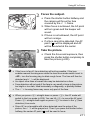
Focus the subject (p.44).
8
Take the picture (p.44).
9
Review the picture (p.55).
Look through the viewfinder and
aim the viewfinder center over the
subject.
Press the shutter button halfway,
and the camera will focus the
subject.
Press the shutter button completely
to take the picture.
The captured image will be
displayed for 2 sec. on the LCD
monitor.
To display the image again, press
the <x> button (p.250).
To shoot while looking at the LCD monitor, see “Live View
Shooting” (p.199).
To view the images captured so far, see “Image Playback” (p.250).
To delete an image, see “Erasing Images” (p.283).
17
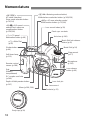
Nomenclature
<o>
AF mode selection/
Drive mode selection button
(p.70/114)
<m> ISO speed
setting/Flash exposure
compensation button
(p.126/190)
<U> LCD panel
illumination button (p.48)
<n> Metering mode selection/
White balance selection button (p.169/139)
<B> AF area selection mode/
Multi-function button (p.73/190)
Lens mount index (p.39)
Flash-sync contacts
Hot shoe (p.190)
Mode Dial lock release
button (p.45)
<6> Main Dial
(p.45)
Shutter button
(p.44)
Mode Dial (p.24)
Strap mount
(p.27)
Self-timer lamp
(p.115)
Microphone
(p.236)
Remote control
sensor (p.188)
Lens release
button (p.40)
Grip
(Battery
compartment)
DC coupler cord hole
(p.348)
Depth-of-field preview button
(p.167)
Mirror (p.186, 299)
Body cap (p.39)
18
Lens lock pin
Lens mount
Contacts (p.15)
Nomenclature
LCD panel (p.21, 22)
<p>
AF start button
(p.44, 70, 201, 228)
Eyecup (p.187)
Viewfinder eyepiece
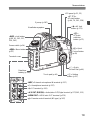
<A> AE lock
button (p.173)
<S>
AF point
selection
button (p.72)
<B> Info button
(p.60, 61, 202, 227,
250, 342)
Power switch (p.34)
<Q> Quick
Control button
(p.49)
<M> Menu button
(p.51)
Terminal cover
<5> Quick
Control Dial (p.46)
Date/time
battery (p.349)
Touch pad (p.46)
<0> Setting
button (p.51)
<Y> External microphone IN terminal (p.237)
<n> Headphone terminal (p.237)
<D> PC terminal (p.191)
<q/C> Audio/video OUT/Digital terminal (p.277/302, 315)
<D> HDMI mini OUT terminal (p.274)
<F> Remote control terminal (N3 type) (p.187)
19
Nomenclature
<V> Focal plane mark
Dioptric adjustment knob (p.43)
<b/m>
Creative Photo/
Comparative playback
(Two-image display)/
Direct print button
(p.131, 175, 179/259/
307)
<A/k>
Live View shooting/
Movie shooting switch
(p.199/219)
<0> Start/Stop button
(p.200, 220)
<9> Multi-controller
(p.47)
<c>
Rating button
(p.261, 279)
Strap mount
(p.27)
<u> Index/
Magnify/Reduce
button (p.255/257)
Card slot
cover (p.31)
<x> Playback
button (p.250)
<L> Erase button
(p.283)
Battery
compartment
cover release
lever (p.30)
Battery compartment
cover (p.30)
Speaker
Light sensor (p.285)
Access lamp (p.33)
LCD monitor (p.285)
Multi function lock switch (p.47)
Tripod socket
SD card slot (p.31)
CF card slot (p.31)
CF card ejection button (p.33)
20
Nomenclature
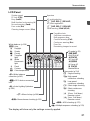
LCD Panel
Shutter speed
FE lock (FEL)
Busy (buSY)
Multi function lock warning (L)
No card warning (Card)
Error code (Err)
Cleaning image sensor (CLn)
White balance (p.139)
Q Auto
W Daylight
E Shade
R Cloudy
Y Tungsten
light
U White
fluorescent
light
I Flash
O Custom
P Color temperature
Aperture
AF point selection
([ -- -- -- ] AF, SEL [ ], SEL AF)
AF point registration
([ -- -- -- ] HP, SEL [ ], SEL HP)
Card warning (Card 1/2/1.2)
Possible shots
Self-timer countdown
Bulb exposure time
Card full warning (Full)
Card error warning (Err)
Error No.
Remaining images to record
AF mode (p.70)
X
One-Shot AF
9
AI Focus AF
Z
AI Servo AF
4 L
Manual focus
Drive mode (p.114)
u Single shooting
o High-speed
continuous shooting
i Low-speed
continuous shooting
B Silent single shooting
<u> White balance
correction (p.142)
<r> GPS device-connected
icon
<N> Auto Lighting Optimizer
(p.144)
M Silent continuous
shooting
Q 10-sec. Self-timer/
Remote control
<2> Mirror lockup (p.186)
k 2-sec. Self-timer/
Remote control
<0> Monochrome shooting (p.133)
<w> HDR shooting (p.175)
<P> Multiple-exposure shooting (p.179)
The display will show only the settings currently applied.
21
Nomenclature
<f> CF card indicator
<J> CF card selection icon
ISO speed (p.126)
<g> ISO speed (p.126)
<A> Highlight tone
priority (p.148)
Exposure level indicator
Exposure compensation amount (p.171)
AEB range (p.172)
Flash exposure compensation amount (p.190)
Image-recording quality (p.121)
3
Large
4
Medium
a
Small 1
b
Small 2 (Fine)
c
Small 3 (Fine)
1
RAW
41 Medium RAW
61 Small RAW
22
<J> SD card selection icon
<g> SD card indicator
<h> AEB (p.172)
Metering mode (p.169)
q Evaluative metering
w Partial metering
r Spot metering
e Center-weighted
average metering
Battery check (p.35)
<y> Flash exposure
compensation (p.190)
Nomenclature
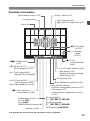
Viewfinder Information
Spot metering circle (p.170)
Focusing screen
Grid (p.59)
Area AF frame (p.73)
<S> Single AF point
<O> Spot AF (single point) (p.75)
<g> ISO speed
(p.126)
<h> Warning
symbol
(p.324)
<o> Focus
confirmation light
(p.64)
<z> Battery check
(p.35)
<A> AE lock (p.173) /
AEB in-progress (p.172)
<D> Flash-ready (p.190)
Improper FE lock warning
<e> AF status indicator (p.64)
Max. burst (p.125)
Number of remaining multiple
exposures (p.181)
ISO speed (p.126)
<d> FE lock (p.190) /
FEB in-progress (p.197)
<e> High-speed sync (p.196)
<y> Flash exposure
compensation (p.190)
Shutter speed (p.164)
FE lock (FEL)
Busy (buSY)
Multi function lock warning (L)
Aperture (p.166)
<A> Highlight tone priority (p.148)
Exposure level indicator
Exposure compensation amount (p.171)
AEB range (p.172)
Flash exposure compensation amount
(p.190)
AF point selection
([ -- -- --] AF, SEL [ ], SEL AF)
AF point registration
([ -- -- -- ] HP, SEL [ ], SEL HP)
Card warning (Card 1/2/1.2)
The display will show only the settings currently applied.
23
Nomenclature
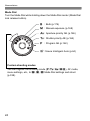
Mode Dial
Turn the Mode Dial while holding down the Mode Dial center (Mode Dial
lock release button).
F : Bulb (p.174)
a : Manual exposure (p.168)
f : Aperture-priority AE (p.166)
s : Shutter-priority AE (p.164)
d : Program AE (p.162)
A :Scene Intelligent Auto (p.64)
Custom shooting modes
You can register the shooting mode (d/s/f/a/F), AF mode,
menu settings, etc., to w, x, y Mode Dial settings and shoot
(p.338).
24
Nomenclature
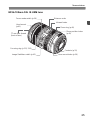
EF24-105mm f/4L IS USM lens
Focus mode switch (p.39)
Distance scale
Infrared index
Hood mount
(p.41)
77 mm filter thread
(front of lens)
Zoom ring (p.40)
Zoom position index
(p.40)
Focusing ring (p.113, 216)
Contacts (p.15)
Image Stabilizer switch (p.42)
Lens mount index (p.39)
25
Nomenclature
Battery Charger LC-E6
Charger for Battery Pack LP-E6/LP-E6N (p.28).
Power plug
Battery pack slot
Charge lamp
IMPORTANT SAFETY INSTRUCTIONS-SAVE THESE INSTRUCTIONS.
DANGER-TO REDUCE THE RISK OF FIRE OR ELECTRIC SHOCK,
CAREFULLY FOLLOW THESE INSTRUCTIONS.
For connection to a supply not in the U.S.A., use an attachment plug adapter
of the proper configuration for the power outlet, if needed.
Battery Charger LC-E6E
Charger for Battery Pack LP-E6/LP-E6N (p.28).
Power cord
Charge lamp
Battery pack slot
Power cord socket
26
1
Getting Started
This chapter explains preparatory steps before you start
shooting and basic camera operations.
Attaching the Strap
Pass the end of the strap through
the camera’s strap mount eyelet
from the bottom. Then pass it
through the strap’s buckle as shown
in the illustration. Pull the strap to
take up any slack and make sure
the strap will not loosen from the
buckle.
The eyepiece cover is also
attached to the strap (p.187).
Eyepiece cover
27
Charging the Battery
1
Remove the protective cover.
Detach the protective cover provided
with the battery.
the battery.
2 Attach
As shown in the illustration, attach the
battery securely to the charger.
To detach the battery, follow the
above procedure in reverse.
LC-E6
the battery.
3 Recharge
For LC-E6
As shown by the arrow, flip out the
battery charger’s prongs and insert
the prongs into a power outlet.
For LC-E6E
LC-E6E
Connect the power cord to the
charger and insert the plug into the
power outlet.
X Recharging starts automatically and
the charge lamp blinks in orange.
Charge Level
0 - 49%
50 - 74%
75% or higher
Fully charged
Color
Orange
Green
Charge Lamp
Indicator
Blinks once per second
Blinks twice per second
Blinks three times per second
Lights up
It takes approx. 2.5 hours to fully recharge a completely exhausted
battery at 23°C / 73°F. The time required to recharge the battery
depends on the ambient temperature and the battery’s charge level.
For safety reasons, recharging in low temperatures (5°C - 10°C /
41°F - 50°F) will take longer (up to 4 hours).
28
Charging the Battery
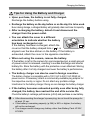
Tips for Using the Battery and Charger
Upon purchase, the battery is not fully charged.
Recharge the battery before using.
Recharge the battery on the day before or on the day it is to be used.
Even during storage, a charged battery will gradually drain and lose its capacity.
After recharging the battery, detach it and disconnect the
charger from the power outlet.
You can attach the cover in a different
orientation to indicate whether the battery
has been recharged or not.
If the battery has been recharged, attach the
cover so that the battery-shaped hole <
> is
aligned over the blue sticker on the battery. If the battery is
exhausted, attach the cover in the opposite orientation.
When not using the camera, remove the battery.
If the battery is left in the camera for a prolonged period, a small amount
of power current is released, resulting in excess discharge and shorter
battery life. Store the battery with the protective cover attached. Storing
the battery after it is fully charged can lower the battery’s performance.
The battery charger can also be used in foreign countries.
The battery charger is compatible with a 100 V AC to 240 V AC 50/60 Hz
power source. If necessary, attach a commercially-available plug adapter for
the respective country or region. Do not attach any portable voltage
transformer to the battery charger. Doing so can damage the battery charger.
If the battery becomes exhausted quickly even after being fully
charged, the battery has reached the end of its service life.
Check the battery’s recharge performance (p.344) and purchase a new battery.
After disconnecting the charger’s power plug, do not touch the prongs for
at least 10 sec.
If the battery’s remaining capacity (p.344) is 94% or higher, the battery
will not be recharged.
The charger cannot charge any battery other than Battery Pack LP-E6/
LP-E6N.
29
Installing and Removing the Battery
Load a fully-charged Battery Pack LP-E6 (or LP-E6N) into the camera.
The camera’s viewfinder becomes bright when a battery is
installed, and darkens when the battery is removed.
Installing the Battery
1
Open the cover.
Slide the lever as shown by the
arrows and open the cover.
the battery.
2 Insert
Insert the end with the battery
contacts.
Insert the battery until it locks in
place.
the cover.
3 Close
Press the cover until it snaps shut.
Only Battery Pack LP-E6/LP-E6N can be used.
Removing the Battery
Open the cover and remove the
battery.
Press the battery release lever as shown
by the arrow and remove the battery.
To prevent short circuiting of the
battery contacts, be sure to attach the
protective cover (provided, p.29) to
the battery.
30
Installing and Removing the Card
The camera can use a CF card and SD card. Images can be recorded
when at least one card is installed in the camera.
If a card is inserted in both slots, you can select which card to record
images to or record the same images simultaneously on both cards
(p.118, 120).
If you use an SD card, be sure the card’s write-protect switch
is set upward to enable writing/erasing.
Installing the Card
1
CF card
SD card
Write-protect switch
Open the cover.
Slide the cover as shown by the
arrow to open it.
the card.
2 Insert
The camera-front side slot is for a CF
card, and the camera-back side slot
is for an SD card.
Face the CF card’s label side
toward you and insert the end with
the small holes into the camera.
If the card is inserted in the wrong
way, it may damage the camera.
X The CF card eject button will stick
out.
With the SD card’s label facing
you, push in the card until it clicks
in place.
31
Installing and Removing the Card
the cover.
3 Close
Close the cover and slide it in the
Card selection icon
Possible
shots
direction shown by the arrows until it
snaps shut.
X When you set the power switch to
<1> (p.34), the number of possible
shots and the loaded card(s) will be
displayed on the LCD panel.
The images will be recorded to the
card with the < > icon next to the
respective card’s indicator.
CF card indicator
SD card indicator
The camera cannot use Type II CF cards or hard disk cards.
Although the camera does not comply with the UHS (Ultra-High Speed)
speed class standard, UHS SDHC/SDXC cards can be used.
SDHC/SDXC memory cards can be used with the camera.
Ultra DMA (UDMA) CF cards can also be used with the
camera. UDMA CF cards enable faster data writing.
The number of possible shots depends on the remaining capacity of the
card, image-recording quality, ISO speed, etc.
Setting [z1: Release shutter without card] to [Disable] will prevent
you from forgetting to insert a card (p.354).
32
Installing and Removing the Card
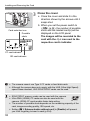
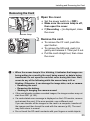
Removing the Card
1
Open the cover.
Set the power switch to <2>.
Make sure the access lamp is off,
then open the cover.
If [Recording ...] is displayed, close
the cover.
Access lamp
the card.
2 Remove
To remove the CF card, push the
eject button.
To remove the SD card, push it in
gently and release it. Then pull it out.
Pull the card straight out, then close
the cover.
When the access lamp is lit or blinking, it indicates that images are
being written to or read by the card, being erased, or data is being
transferred. Do not open the card slot cover during this time. Also,
never do any of the following while the access lamp is lit or
blinking. Otherwise, it can damage the image data, card, or camera.
• Removing the card.
• Removing the battery.
• Shaking or banging the camera around.
If the card already contains recorded images, the image number may not
start from 0001 (p.156).
If a card-related error message is displayed on the LCD monitor, remove
and reinsert the card. If the error persists, use a different card.
If you can transfer all the images on the card to a computer, transfer all
the images and then format the card with the camera (p.53). The card
may then return to normal.
Do not touch the SD card’s contacts with your fingers or metal objects.
33
Turning on the Power
If you turn on the power switch and the Date/Time/Zone setting
screen appears, see page 36 to set the Date/Time/Zone.
<1> : The camera turns on.
<2> : The camera is turned off and
does not operate. Set to this
position when not using the
camera.
About the Automatic Self-Cleaning Sensor
Whenever you set the power switch
to <1> or <2>, sensor cleaning
will be executed automatically. (A
small sound may be heard.) During
the sensor cleaning, the LCD monitor
will display <f>.
You can still shoot during sensor
cleaning by pressing the shutter
button halfway (p.44) to stop the
sensor cleaning and take a picture.
If you repeatedly turn the power switch <1>/<2> at a short
interval, the <f> icon may not be displayed. This is normal and
not a problem.
3 About Auto Power Off
To save battery power, the camera turns off automatically after 1
minute of non-operation. To turn on the camera again, just press the
shutter button halfway (p.44).
You can change the auto power-off time with [52: Auto power off]
(p.55).
If you set the power switch to <2> while an image is being recorded to
the card, [Recording ...] will be displayed and the power will turn off after
the card finishes recording the image.
34
Turning on the Power
z Checking the Battery Level
When the power switch is set to <1>, the battery level will be
indicated in one of six levels. A blinking battery icon (b) indicates
that the battery will be exhausted soon.
Icon
Level (%) 100 - 70 69 - 50 49 - 20 19 - 10
Battery Life
9-1
0
[Approx. number of shots]
Temperature
At 23°C / 73°F
At 0°C / 32°F
Possible shots
950
850
The figures above are based on a fully-charged Battery Pack LP-E6, no Live
View shooting, and CIPA (Camera & Imaging Products Association) testing
standards.
Possible shots with Battery Grip BG-E11
• With LP-E6 x 2: approx. twice the shots without the battery grip.
• With size-AA/LR6 alkaline batteries (at 23°C / 73°F): approx. 270 shots.
The number of possible shots will decrease with any of the following
operations:
• Pressing the shutter button halfway for a prolonged period.
• Activating the AF frequently without taking a picture.
• Using the lens Image Stabilizer.
• Using the LCD monitor often.
The number of possible shots may decrease depending on the actual
shooting conditions.
The lens operation is powered by the camera’s battery. Depending on
the lens used, the number of possible shots may be lower.
For the number of possible shots with Live View shooting, see page 201.
See [53: Battery info.] to check the battery’s condition in detail (p.344).
If size-AA/LR6 batteries are used in Battery Grip BG-E11, a four-level
indicator will be displayed. ([x/m] will not be displayed.)
35
3 Setting the Date, Time, and Zone
When you turn on the power for the first time or if the date/time has
been reset, the Date/Time/Zone setting screen will appear. Follow steps
3 to 6 to set the current date, time, and time zone.
Note that the date/time appended to recorded images will be based
on this date/time setting. Be sure to set the correct date/time.
You can also set the time zone of your current address. Then if you
travel to another time zone, you can simply set your destination’s time
zone so that the correct date/time will be recorded.
1
Display the menu screen.
Press the <M> button to display
the menu screen.
the [52] tab, select [Date/
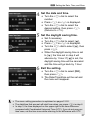
2 Under
Time/Zone].
Press the <Q> button and select the
[5] tab.
Turn the <6> dial to select the [52]
tab.
Turn the <5> dial to select [Date/
Time/Zone], then press <0>.
the time zone.
3 Set[London]
is set by default.
Turn the <5> dial to select [Time
zone].
Press <0> so <r> is displayed.
Turn the <5> dial to select the time
zone, then press <0>.
36
3 Setting the Date, Time, and Zone
the date and time.
4 SetTurn
the <5> dial to select the
number.
Press <0> so <r> is displayed.
Turn the <5> dial to select the
desired setting, then press <0>
(Returns to <s>).
daylight saving time.
5 SetSettheif necessary.
Turn the <5> dial to select [Y].
Press <0> so <r> is displayed.
Turn the <5> dial to select [Z], then
press <0>.
When the daylight saving time is set
to [Z], the time set in step 4 will
advance by 1 hour. If [Y] is set, the
daylight saving time will be canceled
and the time will go back by 1 hour.
6 ExitTurnthethesetting.
<5> dial to select [OK],
then press <0>.
X The Date/Time/Zone will be set and
the menu will reappear.
The menu setting procedure is explained on pages 51-52.
The date/time that was set will start from when you press <0> in step 6.
In step 3, the time displayed on the upper right is the time difference
compared with Coordinated Universal Time (UTC). If you do not see your
time zone, set the time zone while referring to the difference with UTC.
37
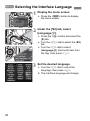
3 Selecting the Interface Language
1
Display the menu screen.
Press the <M> button to display
the menu screen.
the [52] tab, select
2 Under
[LanguageK].
Press the <Q> button and select the
[5] tab.
Turn the <6> dial to select the [52]
tab.
Turn the <5> dial to select
[LanguageK] (the fourth item from
the top), then press <0>.
the desired language.
3 SetTurn
the <5> dial to select the
language, then press <0>.
X The interface language will change.
38
Attaching and Detaching a Lens
The camera is compatible with all Canon EF lenses. The camera
cannot be used with EF-S or EF-M lenses.
1
Remove the caps.
Remove the rear lens cap and the
body cap by turning them as shown
by the arrows.
the lens.
2 Attach
Align the red dots on the lens and
camera and turn the lens as shown by
the arrow until it clicks in place.
the lens focus mode switch to
3 Set
<AF>.
<AF> stands for Autofocus.
If it is set to <MF> (manual focus),
autofocus will not operate.
4 Remove the front lens cap.
Do not look at the sun directly through any lens. Doing so may cause
loss of vision.
If the front part (focusing ring) of the lens rotates during autofocusing, do
not touch the rotating part.
39
Attaching and Detaching a Lens
Minimizing Dust
When changing lenses, do it quickly in a place with minimal dust.
When storing the camera without a lens attached, be sure to attach the
body cap to the camera.
Remove dust on the body cap before attaching it.
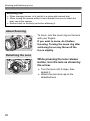
About Zooming
To zoom, turn the zoom ring on the lens
with your fingers.
If you want to zoom, do it before
focusing. Turning the zoom ring after
achieving focus may throw off the
focus slightly.
Detaching the Lens
While pressing the lens release
button, turn the lens as shown by
the arrow.
Turn the lens until it stops, then
detach it.
Attach the rear lens cap to the
detached lens.
40
Attaching and Detaching a Lens
Attaching a Lens Hood
When the dedicated EW-83H hood is attached to the EF24-105mm f/4L
IS USM lens, it blocks stray light and protects the front of the lens from
snow, rain, dust, etc. Before storing the lens in a bag, etc., you can
attach the hood in reverse.
1
Align the red dots on the hood
and lens edges.
the hood as shown in the
2 Turn
illustration.
Turn the lens hood clockwise until it
attaches securely.
If the hood is not properly attached, it may obstruct the image’s
periphery, making it look dark.
When attaching or detaching the lens hood, grasp the base of the hood
when turning it. Grasping the hood’s edges when turning it may deform
the hood.
41
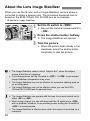
About the Lens Image Stabilizer
When you use the IS lens’ built-in Image Stabilizer, camera shake is
corrected to obtain a sharper shot. The procedure explained here is
based on the EF24-105mm f/4L IS USM lens as an example.
* IS stands for Image Stabilizer.
1
Set the IS switch to <1>.
Also set the camera’s power switch to
<1>.
the shutter button halfway.
2 Press
X The Image Stabilizer will operate.
the picture.
3 TakeWhen
the picture looks steady in the
viewfinder, press the shutter button
completely to take the picture.
The Image Stabilizer cannot correct “subject blur”, when the subject
moves at the time of exposure.
For bulb exposures, set the IS switch to <2>. If <1> is set instead,
Image Stabilizer misoperation may occur.
The Image Stabilizer may not be effective for excessive shaking such as
on a rocking boat.
The Image Stabilizer may not be effective when you use the EF24105mm f/4L IS USM lens for panned shots.
The Image Stabilizer can operate with the lens focus mode switch set to
either <AF> or <MF>.
When using a tripod, you can still shoot with the IS switch set to <1>
with no problem. However, to save battery power, setting the IS switch to
<2> is recommended.
The Image Stabilizer is effective even when the camera is mounted on a
monopod.
42
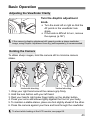
Basic Operation
Adjusting the Viewfinder Clarity
Turn the dioptric adjustment
knob.
Turn the knob left or right so that the
AF points in the viewfinder look
sharp.
If the knob is difficult to turn, remove
the eyecup (p.187).
If the camera’s dioptric adjustment still cannot provide a sharp viewfinder
image, using Dioptric Adjustment Lens Eg (sold separately) is recommended.
Holding the Camera
To obtain sharp images, hold the camera still to minimize camera
shake.
Horizontal shooting
Vertical shooting
1. Wrap your right hand around the camera grip firmly.
2. Hold the lens bottom with your left hand.
3. Rest your hand’s right index finger lightly on the shutter button.
4. Press your arms and elbows lightly against the front of your body.
5. To maintain a stable stance, place one foot slightly ahead of the other.
6. Press the camera against your face and look through the viewfinder.
To shoot while looking at the LCD monitor, see page 68.
43
Basic Operation
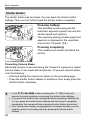
Shutter Button
The shutter button has two steps. You can press the shutter button
halfway. Then you can further press the shutter button completely.
Pressing halfway
This activates autofocusing and the
automatic exposure system that sets the
shutter speed and aperture.
The exposure setting (shutter speed and
aperture) is displayed in the viewfinder
and on the LCD panel (0).
Pressing completely
This releases the shutter and takes the
picture.
Preventing Camera Shake
Hand-held camera movement during the moment of exposure is called
camera shake. It can cause blurred pictures. To prevent camera shake,
note the following:
• Hold and steady the camera as shown on the preceding page.
• Press the shutter button halfway to autofocus, then slowly press the
shutter button completely.
In the d/s/f/a/F modes, pressing the <p> button will
execute the same operation as pressing the shutter button halfway.
If you press the shutter button completely without pressing it halfway first
or if you press the shutter button halfway and then press it completely
immediately, the camera will take a moment before it takes the picture.
Even during menu display, image playback, or image recording, you can
instantly go back to shooting-ready by pressing the shutter button
halfway.
44
Basic Operation
Mode Dial
Turn the dial while holding down
the lock release button at the
center of the dial.
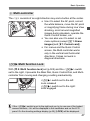
6 Main Dial
(1) After pressing a button, turn the
<6> dial.
When you press a button such as
<n> <o> <m>, the
respective function remains selected for
6 seconds (9). During this time, you
can turn the <6> dial to set the desired
setting.
When the function selection ends or if
you press the shutter button halfway, the
camera will be ready to shoot.
Use this dial to select or set the
metering mode, AF mode, ISO
speed, AF point, etc.
(2) Turn the <6> dial only.
While looking at the viewfinder or LCD
panel, turn the <6> dial to set the
desired setting.
Use this dial to set the shutter speed,
aperture, etc.
The operations in (1) are also possible while the <R> switch is set to
the right (Multi function lock, p.47).
45
Basic Operation
5 Quick Control Dial
(1) After pressing a button, turn the
<5> dial.
When you press a button such as <n>
<o> <m>, the respective function
remains selected for 6 seconds (9). During this time,
you can turn the <5> dial to set the desired setting.
When the function selection ends or if you press the
shutter button halfway, the camera will be ready to shoot.
Use this dial to select or set the white
balance, drive mode, flash exposure
compensation, AF point, etc.
(2) Turn the <5> dial only.
While looking at the viewfinder or LCD panel,
turn the <5> dial to set the desired setting.
Use this dial to set the exposure
compensation amount, the aperture
setting for manual exposures, etc.
The operations in (1) are also possible while the <R> switch is set to
the right (Multi function lock, p.47).
h Touch Pad
During movie shooting, the touch pad provides a quiet way to adjust the
shutter speed, aperture, ISO speed, exposure compensation, sound
recording level, and headphone volume (p.238). This function works
when [z5: Silent Control] is set to [Enable h].
After pressing the <Q> button,
tap the <5> dial’s inner ring at
the top, bottom, left, or right.
46
Basic Operation
9 Multi-controller
The <9> consists of an eight-direction key and a button at the center.
Use it to select the AF point, correct
the white balance, move the AF point
or magnifying frame during Live View
shooting, scroll around magnified
images during playback, operate the
Quick Control screen, etc.
You can also use it to select or set
menu options (except [31: Erase
images] and [51: Format card]).
For menus and the Quick Control
screen, the Multi-controller works
only in the vertical and horizontal
directions. It does not work in
diagonal directions.
R Multi function Lock
With [82: Multi function lock] set (p.325) and the <R> switch
set to the right, it prevents the Main Dial, Quick Control Dial, and Multicontroller from moving and changing a setting inadvertently.
<R> switch set to the left:
Lock released
<R> switch set to the right:
Lock engaged
If the <R> switch is set to the right and you try to use one of the locked
camera controls, <L> will be displayed in the viewfinder and on the LCD
panel. On the shooting settings display (p.48), [LOCK] will be displayed.
47
Basic Operation
U LCD Panel Illumination
Turn on (9)/off the LCD panel
illumination by pressing the <U> button.
During a bulb exposure, pressing the
shutter button completely will turn off the
LCD panel illumination.
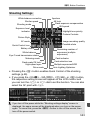
Displaying Shooting Settings
After you press the <B> button a
number of times, the shooting settings
will be displayed.
With the shooting settings displayed, you
can turn the Mode Dial to see the
settings for each shooting mode (p.343).
Pressing the <Q> button enables Quick
Control of the shooting settings (p.49).
Press the <B> button again to turn
off the display.
48
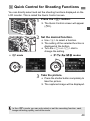
Q Quick Control for Shooting Functions
You can directly select and set the shooting functions displayed on the
LCD monitor. This is called the Quick Control screen.
1
Press the <Q> button.
X The Quick Control screen will appear
(7).
the desired function.
2 SetUse
<9> to select a function.
X The setting of the selected function is
displayed at the bottom.
Turn the <5> or <6> dial to
change the setting.
A mode
d/s/f/a/F modes
the picture.
3 TakePress
the shutter button completely to
take the picture.
X The captured image will be displayed.
In the <A> mode, you can only select or set the recording function, card,
image-recording quality, and drive mode.
49
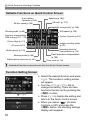
Q Quick Control for Shooting Functions
Settable Functions on Quick Control Screen
Auto Lighting
Optimizer (p.144)
Shutter speed (p.164)
Aperture (p.166)
AE lock* (p.173)
Highlight tone priority* (p.148)
Shooting mode* (p.24)
ISO speed (p.126)
Exposure compensation/
AEB setting (p.171, 172)
Custom Controls (p.327)
Picture Style (p.131)
AF mode (p.70)
White balance (p.139)
Metering mode (p.169)
White balance correction (p.142)
Image-recording quality
(p.121)
Recording function/
Card selection (p.118)
Flash exposure compensation
(p.190)
Drive mode (p.114)
Asterisked functions cannot be set with the Quick Control screen.
Function Setting Screen
Ð <0>
50
Select the desired function and press
<0>. The function’s setting screen
will appear.
Turn the <5> or <6> dial to
change the setting. There are also
functions that are set by pressing the
<B> button.
Press <0> to finalize the setting and
return to the Quick Control screen.
When you select <
> (Custom
Controls, p.327) and press the
<M> button, the shooting settings
display will reappear.
3 Menu Operations
With menus, you can set various functions such as the image-recording
quality, date/time, etc. While looking at the LCD monitor, use the
<M> and <Q> buttons on the camera back and the <6> <5>
dials.
<M> button
LCD monitor
<6> Main Dial
<Q> button
<5> Quick Control
Dial
<0> button
A Mode Menu Screen
* Some menu tabs and menu items are not displayed in the <A> mode.
d/s/f/a/F Mode Menu Screen
3: Playback
2: AF
z: Shooting
5: Set-up
8: Custom Functions
9: My Menu
Main tabs
Secondary
tabs
Menu settings
Menu items
51
3 Menu Operations
Menu Setting Procedure
1
Display the menu screen.
Press the <M> button to display
the menu screen.
a tab.
2 Select
Each time you press the <Q> button,
the main tab will switch.
Turn the <6> dial to select a
secondary tab.
For example, the [z4] tab refers to the
screen displayed when the z (Shooting)
tab’s fourth dot from the left is selected.
the desired item.
3 Select
Turn the <5> dial to select the item,
then press <0>.
the setting.
4 Select
Turn the <5> dial to select the
desired setting.
The current setting is indicated in blue.
the desired setting.
5 SetPress
<0> to set it.
the setting.
6 ExitPress
the <M> button to exit the
menu and return to shooting-ready.
The explanation of menu functions hereinafter assumes that you have
pressed the <M> button to display the menu screen.
You can also use <9> to set menu settings. (Except [31: Erase
images] and [51: Format card].)
To cancel, press the <M> button.
For details about each menu item, see page 354.
52
Before You Start
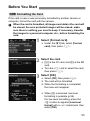
3 Formatting the Card
If the card is new or was previously formatted by another camera or
computer, format the card with the camera.
When the card is formatted, all images and data in the card will
be erased. As even protected images will be erased, make
sure there is nothing you need to keep. If necessary, transfer
the images to a personal computer, etc., before formatting the
card.
1
Select [Format card].
Under the [51] tab, select [Format
card], then press <0>.
the card.
2 Select
[f] is the CF card, and [g] is the SD
card.
Turn the <5> dial to select the card,
then press <0>.
[OK].
3 Select
Select [OK], then press <0>.
X The card will be formatted.
X When the formatting is completed,
the menu will reappear.
When [g] is selected, low-level
formatting is possible (p.54).
For low-level formatting, press the
<L> button to append [Low level
format] with a <X> checkmark, then
select [OK].
53
Before You Start
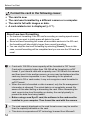
Format the card in the following cases:
The card is new.
The card was formatted by a different camera or a computer.
The card is full with images or data.
A card-related error is displayed (p.377).
About Low-level Formatting
Do low-level formatting if the SD card’s recording or reading speed seems
slow or if you want to totally erase all data in the card.
Since low-level formatting will erase all recordable sectors in the SD card,
the formatting will take slightly longer than normal formatting.
You can stop the low-level formatting by selecting [Cancel]. Even in this
case, normal formatting will be completed and you can use the SD card as
usual.
Cards with 128 GB or lower capacity will be formatted in FAT format.
Cards with a capacity higher than 128 GB will be formatted in exFAT
format. If you format a card with a capacity over 128 GB with this camera
and then insert it into another camera, an error may be displayed and the
card may become impossible to use. Depending on the personal
computer’s OS or card reader, it may not recognize a card formatted in
exFAT format.
When the card is formatted or data is erased, only the file management
information is changed. The actual data is not completely erased. Be
aware of this when selling or discarding the card. When discarding the
card, execute low-level formatting or destroy the card physically to
prevent the data from being leaked.
Before using a new Eye-Fi card, the software in the card must be
installed in your computer. Then format the card with the camera.
The card capacity displayed on the card format screen may be smaller
than the capacity indicated on the card.
This device incorporates exFAT technology licensed from Microsoft.
54
Before You Start
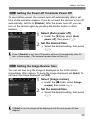
3 Setting the Power-off Time/Auto Power Off
To save battery power, the camera turns off automatically after a set
time of idle operation elapses. If you do not want the camera to turn off
automatically, set this to [Disable]. After the power turns off, you can
turn on the camera again by pressing the shutter button or other
buttons.
1
Select [Auto power off].
Under the [52] tab, select [Auto
power off], then press <0>.
the desired time.
2 SetSelect
the desired setting, then press
<0>.
Even if [Disable] is set, the LCD monitor will turn off automatically after 30
min. to save power. (The camera’s power does not turn off.)
3 Setting the Image Review Time
You can set how long the image is displayed on the LCD monitor
immediately after capture. To keep the image displayed, set [Hold]. To
not have the image displayed, set [Off].
1
Select [Image review].
Under the [z1] tab, select [Image
review], then press <0>.
the desired time.
2 SetSelect
the desired setting, then press
<0>.
If [Hold] is set, the image will be displayed until the auto power off time
elapses.
55
Before You Start
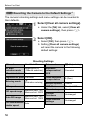
3 Reverting the Camera to the Default SettingsN
The camera’s shooting settings and menu settings can be reverted to
their defaults.
1
Select [Clear all camera settings].
Under the [54] tab, select [Clear all
camera settings], then press <0>.
[OK].
2 Select
Select [OK], then press <0>.
X Setting [Clear all camera settings]
will reset the camera to the following
default settings:
Shooting Settings
AF mode
One-Shot AF
Drive mode
u (Single shooting)
AF area
selection mode
Single-point AF
(Manual selection)
Canceled
AF point selection
Center
Exposure
compensation/
AEB
Flash exposure
compensation
0 (Zero)
Registered AF point Canceled
Metering mode
q
(Evaluative metering)
Multiple exposure
Disable
ISO speed
Auto
HDR Mode
Disable HDR
ISO speed range
Minimum limit: 100
Maximum limit: 25600
Mirror lockup
Disable
Custom
Functions
Unchanged
Flash function
settings
Unchanged
Auto ISO range
Minimum limit: 100
Maximum limit: 12800
ISO Auto minimum
Auto
shutter speed
56
Before You Start
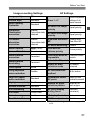
Image-recording Settings
AF Settings
Image quality
73
Picture Style
Standard
Auto Lighting
Optimizer
Standard
Peripheral
illumination
correction
Enable/
Correction data
retained
Chromatic
aberration
correction
Enable/
Correction data
retained
USM lens electronic Enable after
MF
One-Shot AF
White balance
Q (Auto)
Custom White Balance Canceled
One-Shot AF
release priority
White balance
correction
Canceled
Lens drive when AF Continue focus
search
impossible
White balance
bracketing
Canceled
Color space
sRGB
Long exposure
noise reduction
High ISO speed
noise reduction
Case1/Parameter
settings of all
cases cleared
AI Servo 1st image
priority
Equal priority
AI Servo 2nd image
Equal priority
priority
AF-assist beam firing Enable
Focus priority
Selectable AF point 61 points
Select AF area
selection mode
All modes
selected
Disable
AF area selection
method
B button
Standard
Orientation linked
AF point
Same for both
vertical/horizontal
Manual AF point
selection pattern
Stops at AF
area edges
Selected
(constant)
Highlight tone priority Disable
Record function
Case 1 - 6*
Standard
File numbering
Continuous
File name
Preset code
AF point display
during focus
Auto cleaning
Enable
VF display illumination Auto
Dust Delete Data
Erased
AF Microadjustment
Disable
* The default settings are shown on pages 88
to 91.
57
Before You Start
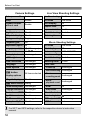
Camera Settings
Live View Shooting Settings
Auto power off
1 min.
Live View shooting Enable
Beep
Enable
AF mode
Live mode
Grid display
Off
Aspect ratio
3:2
Release shutter
without card
Enable
Image review
2 sec.
Exposure simulation Enable
Highlight alert
Disable
Silent LV shooting Mode 1
AF point display
Disable
Metering timer
16 sec.
Histogram display Brightness
Playback grid
Off
Magnification (Approx.) 2x
Image jump w/6
Auto rotate
Movie Shooting Settings
AF mode
Live mode
e (10 images)
Grid display
Off
OnzD
Movie recording size 1920x1080/IPB
Movie playback count Unchanged
Sound recording Auto
LCD brightness
Auto
Silent LV shooting Mode 1
Date/Time/Zone
Unchanged
Metering timer
Language
Unchanged
Time code
Video system
Unchanged
Count up
16 sec.
Unchanged
Start time setting Unchanged
z button
display options
All items selected
Movie
Unchanged
recording count
VF grid display
Disable
m button function Rating
Movie
Unchanged
playback count
Custom shooting modes Unchanged
HDMI
Off
Copyright information Unchanged
Drop frame
Unchanged
Control over HDMI Disable
Silent Control
Eye-Fi transmission Disable
Movie shooting button
Disable
My Menu settings Unchanged
HDMI output + LCD No mirroring
Display from My Menu Disable
HDMI frame rate Auto
For WFT and GPS settings, refer to the respective device’s instruction
manual.
58
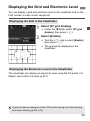
Displaying the Grid and Electronic Level
You can display a grid and electronic level in the viewfinder and on the
LCD monitor to help correct camera tilt.
Displaying the Grid in the Viewfinder
1
Select [VF grid display].
Under the [52] tab, select [VF grid
display], then press <0>.
[Enable].
2 Select
Turn the <5> dial to select [Enable],
then press <0>.
The grid will be displayed in the
viewfinder.
Displaying the Electronic Level in the Viewfinder
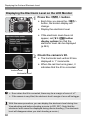
The viewfinder can display an electronic level using the AF points. For
details, see Custom Controls (p.327).
A grid can also be displayed on the LCD monitor during Live View shooting
and movie shooting (p.205, 243).
59
Displaying the Grid and Electronic Level
Displaying the Electronic Level on the LCD Monitor
1
Press the <B> button.
Each time you press the <B>
button, the screen display will
change.
Display the electronic level.
If the electronic level does not
appear, set [53: z button
display options] so that the
electronic level can be displayed
(p.342).
the camera’s tilt.
2 Check
The horizontal and vertical tilt are
displayed in 1° increments.
When the red line turns green, it
indicates that the tilt is corrected.
Vertical level
Horizontal level
Even when the tilt is corrected, there may be a margin of error of ±1°.
If the camera is very tilted, the electronic level’s margin of error will be bigger.
With this same procedure, you can display the electronic level during Live
View shooting and before shooting a movie (p.202, 227). Note that the
electronic level cannot be displayed during movie shooting. (The electronic
level will disappear when you start shooting a movie.)
60
Feature Guide
When [zHelp] is displayed at the bottom of the menu screen, the
Feature guide can be displayed. The Feature guide is displayed while
you hold down the <B> button. If the Feature guide fills two or more
screens, a scroll bar will appear on the right edge. To scroll, hold down
the <B> button and turn the <5> dial.
Example: [21] tab [Case 2]
B
Î
Scroll bar
Example: [23] tab [AF-assist beam firing]
B
Î
Example: [82] tab [Multi function lock]
B
Î
61
62
2
Basic Shooting
This chapter explains how to use the Mode Dial’s <A>
(Scene Intelligent Auto) mode for easy picture taking.
In the <A> mode, all you do is point and shoot and the
camera sets everything automatically (p.352). Also, to prevent
botched pictures due to mistaken operations, major shooting
settings cannot be changed.
Scene Intelligent Auto
About the Auto Lighting Optimizer
In the <A> mode, the Auto Lighting Optimizer (p.144) will adjust
the image automatically to obtain the optimum brightness and
contrast. It is also enabled by default in the d/s/f/F modes.
63
A Fully Automatic Shooting (Scene Intelligent Auto)
<A> is a fully-automatic mode. The camera analyzes the scene
and sets the optimum settings automatically. Detecting whether the
subject is still or moving, it also adjusts focus automatically.
1
Area AF frame
Set the Mode Dial to <A>.
Turn the Mode Dial while holding
down the lock release button at the
center.
the Area AF frame over the
2 Aim
target subject.
All the AF points will be used to focus,
and generally the closest object will
be focused.
Aiming the center of the Area AF
frame over the subject will make
focusing easier.
the subject.
3 Focus
Press the shutter button halfway, and
Focus confirmation light
64
the lens focusing ring will rotate to
focus.
X During the autofocus operation,
<e> will be displayed.
X The AF point(s) that achieve(s) focus
will be displayed. At the same time,
the beeper will sound and the focus
confirmation light <o> in the
viewfinder will light up.
X In low light, the AF point(s) will light
up briefly in red.
A Fully Automatic Shooting (Scene Intelligent Auto)
the picture.
4 TakePress
the shutter button completely to
take the picture.
X The captured image will be displayed
for 2 sec. on the LCD monitor.
The <A> mode makes the colors look more impressive in nature, outdoor,
and sunset scenes. If you did not obtain the desired color tones, change the
shooting mode to <d/s/f/a>, set a Picture Style other than <D>,
then shoot again.
FAQ
The focus confirmation light <o> blinks and focus is not
achieved.
Aim the center of the Area AF frame over a zone with good contrast, then
press the shutter button halfway (p.44). If you are too close to the
subject, move away and try again. If focus cannot be achieved, the AF
status indicator <e> will also blink.
Multiple AF points light up simultaneously.
All those AF points have achieved focus. As long as the AF point
covering the desired subject lights up, you can take the picture.
The beeper continues to beep softly. (The focus confirmation
light <o> does not light up.)
It indicates that the camera is focusing continuously on a moving subject.
(The AF status indicator <e> is displayed, but the focus confirmation
light <o> does not light up.) You can take sharp pictures of a moving
subject.
Note that focus lock (p.67) will not work in this case.
Pressing the shutter button halfway does not focus the subject.
If the focus mode switch on the lens is set to <MF> (Manual Focus), set it
to <AF> (Autofocus).
65
A Fully Automatic Shooting (Scene Intelligent Auto)
The shutter speed display is blinking.
Since it is too dark, taking the picture may result in a blurred subject due
to camera shake. Using a tripod or a Canon EX-series Speedlite (p.190)
(sold separately) is recommended.
When flash was used, the bottom part of the picture came out
unnaturally dark.
If a hood is attached to the lens, it can obstruct the flash coverage. If the
subject is close, detach the hood before taking the picture with flash.
66
A Full Auto Techniques (Scene Intelligent Auto)
Recomposing the Shot
Depending on the scene, position the subject toward the left or right to
create a balanced background and good perspective.
In the <A> mode, while you press the shutter button halfway to focus
a still subject, the focus will be locked. You can then recompose the
shot and press the shutter button completely to take the picture. This is
called “focus lock”.
Shooting a Moving Subject
In the <A> mode, if the subject moves (distance to camera changes)
while or after you focus, AI Servo AF will take effect to focus the subject
continuously. As long as the Area AF frame covers the subject while
you press the shutter button halfway, the focusing will be continuous.
When you want to take the picture, press the shutter button completely.
67
A Full Auto Techniques (Scene Intelligent Auto)
A Live View Shooting
You can shoot while viewing the image on the LCD monitor. This is
called “Live View shooting”. For details, see page 199.
1
Set the Live View shooting/Movie
shooting switch to <A>.
the Live View image on
2 Display
the LCD monitor.
Press the <0> button.
X The Live View image will appear on
the LCD monitor.
the subject.
3 Focus
Aim the center AF point <
> on the
subject.
Press the shutter button halfway to
focus.
X When focus is achieved, the AF point
will turn green and the beeper will
sound.
the picture.
4 TakePress
the shutter button completely.
X The picture will be taken and the
captured image is displayed on the
LCD monitor.
X After the image review ends, the
camera will return to Live View
shooting automatically.
Press the <0> button to end the
Live View shooting.
68
3
Setting the AF and
Drive Modes
The 61 AF points in the viewfinder
make AF shooting suitable for a
wide variety of subjects and
scenes.
You can also select the AF mode and drive mode that
best match the shooting conditions and subject.
A M icon at the upper right of a page title indicates that the
function can be used when the Mode Dial is set to <d/s/
f/a/F>.
In the <A> mode, the AF mode and AF point (AF area
selection mode) will be set automatically.
<AF> stands for autofocus. <MF> stands for manual focus.
69
f: Selecting the AF ModeN
You can select the AF mode to suit the shooting conditions or subject.
In the <A> mode, “AI Focus AF” is set automatically.
1
On the lens, set the focus mode
switch to <AF>.
2 Press the <o> button. (9)
the AF mode.
3 Select
While looking at the LCD panel, turn
the <6> dial.
X: One-Shot AF
9: AI Focus AF
Z: AI Servo AF
In the d/s/f/a/F shooting modes, AF is also possible by pressing
the <p> button.
One-Shot AF for Still Subjects
Suited for still subjects. When you press the shutter button
halfway, the camera will focus only once.
When focus is achieved, the AF point that achieved focus will be
displayed, and the focus confirmation light <o> in the viewfinder will
also light up.
With evaluative metering, the exposure setting will be set at the
same time focus is achieved.
While you hold down the shutter button halfway, the focus will be
locked. You can then recompose the shot if desired.
70
f: Selecting the AF ModeN
If focus cannot be achieved, the focus confirmation light <o> and AF
status indicator <e> in the viewfinder will blink. If this occurs, the
picture cannot be taken even if the shutter button is pressed completely.
Recompose the picture and try to focus again. Or see “When Autofocus
Fails” (p.112).
If [z1: Beep] is set to [Disable], the beeper will not sound when focus
is achieved.
After achieving focus with One-Shot AF, you can lock the focus on a subject
and recompose the shot. This is called “focus lock”. This is convenient when
you want to focus a subject not covered by the Area AF frame.
AI Servo AF for Moving Subjects
This AF mode is suited for moving subjects when the focusing
distance keeps changing. While you hold down the shutter button
halfway, the subject will be focused continuously.
The exposure is set at the moment the picture is taken.
When the AF area selection mode is set to 61-point automatic selection (p.72),
the camera first uses the manually-selected AF point to focus. During
autofocusing, if the subject moves away from the manually-selected AF point,
focus tracking continues as long as the subject is covered by the Area AF frame.
With AI Servo AF, the beeper will not sound even when focus is achieved.
Also, the focus confirmation light <o> in the viewfinder will not light up.
AI Focus AF for Automatic Switching of AF Mode
AI Focus AF switches the AF mode from One-Shot AF to AI Servo
AF automatically if a still subject starts moving.
After the subject is focused in One-Shot AF mode, if the subject
starts moving, the camera will detect the movement and change the
AF mode automatically to AI Servo AF.
When focus is achieved in the AI Focus AF mode with the Servo mode
active, the beeper will sound softly. However, the focus confirmation light
<o> in the viewfinder will not light up. Note that focus will not be locked in
this case.
71
S Selecting the AF AreaN
61 AF points are provided for AF. You can select the AF point(s) suiting
the scene or subject.
Depending on the lens attached to the camera, the number of
usable AF points and AF point patterns will differ. For details,
see “Lenses and Usable AF Points” on page 79.
AF Area Selection Mode
You can select one of six AF area selection modes. See the next page
for the selection procedure.
Single-point Spot AF (Manual
selection)
For pinpoint focusing.
Single-point AF (Manual
selection)
Select one AF point to focus.
AF point expansion (Manual
selection )
The manually-selected AF point <S>
and four surrounding AF points <w>
(above, below, on the left and on the
right) are used to focus.
72
S Selecting the AF AreaN
AF point expansion (Manual
selection, surrounding points)
The manually-selected AF point <S>
and the surrounding AF points <w> are
used to focus.
Zone AF (Manual selection of
zone)
The 61 AF points are divided into nine
zones for focusing.
61-point automatic selection AF
All the AF points are used to focus. This
mode is set automatically in the <A>
mode.
Select the AF Area Selection Mode
Select the AF area selection
mode.
Press the <S> button.
Look through the viewfinder and
press the <B> button.
X Press the <B> button to switch the
AF area selection mode.
With [24: Select AF area selec. mode], you can limit the selectable
AF area selection modes (p.101).
If you set [24: AF area selection method] to [ →Main Dial], you can
select the AF area selection mode by pressing the <S> button, then
turning the <6> dial (p.102).
73
S Selecting the AF AreaN
Selecting the AF Point Manually
You can manually select the AF point or zone. With 61-point automatic
selection AF, you can set the starting AF point for AI Servo AF.
1
Press the <S> button.
X The AF points will be displayed in the
viewfinder.
In AF point expansion modes, effective
adjacent AF points will also be displayed.
In the Zone AF mode, the selected
zone will be displayed.
an AF point.
2 Select
The AF point selection will change in the
direction you tilt the <9>. If you press
<9> straight down, the center AF point
(or center Zone) will be selected.
The <6> dial selects an AF point in the
horizontal direction, and the <5> dial
selects an AF point in the vertical direction.
In the Zone AF mode, turning the
<6> or <5> dial will change the
Zone in a looping sequence.
AF Point Display Indications
Pressing the <S> button lights up the AF points that are cross-type AF
points for high-precision autofocusing. The blinking AF points are
horizontal-line sensitive. For details, see page 78.
When you press the <S> button, the LCD panel displays the following:
• 61-point automatic selection AF and Zone AF (manual selection of
zone):
AF
• Single-point Spot AF and Single-point AF: SEL
(Center)/SEL AF
(Off-center)
With [25: Manual AF pt. selec. pattern], you can set either [Stops at
AF area edges] or [Continuous] (p.104).
74
AF Area Selection ModesN
Single-point Spot AF (Manual selection)
Although this is the same as single-point AF, the
selected AF point <O> covers a smaller area to
focus. Effective for pinpoint focusing of
overlapping subjects such as an animal in a cage.
Since Spot AF covers a very small area, focusing
may be difficult during hand-held shooting or for a
moving subject.
Single-point AF (Manual selection)
Select one AF point <S> to be used for focusing.
AF point expansion (Manual selection
)
The manually-selected AF point <S> and adjacent AF points <w>
(above, below, on the left and on the right) are used to focus. Effective
when it is difficult to track a moving subject with just one AF point.
With AI Servo AF, the manually-selected AF point <S> must focustrack the subject first. However, it is easier to focus the target subject
than with Zone AF.
With One-Shot AF, when focus is achieved with an expanded AF point,
the expanded AF point <S> will also be displayed along with the
manually-selected AF point <S>.
75
AF Area Selection ModesN
AF point expansion (Manual selection, surrounding points)
The manually-selected AF point <S> and adjacent AF points <w> are
used to focus. The AF point expansion is larger than with AF point
expansion (Manual selection ), so the focusing is executed over a
wider area. Effective when it is difficult to track a moving subject with
just one AF point.
AI Servo AF and One-Shot AF work in the same way as with AF point
expansion (Manual selection ) mode (p.75).
Zone AF (Manual selection of zone)
The 61 AF points are divided into nine zones for focusing. All the AF
points in the selected zone are used for the automatic selection of the
point of focus. It makes achieving focus easier than with single-point AF
or AF point expansion and it is effective for moving subjects.
However, since it is inclined to focus the nearest subject, focusing a
specific target is harder than with single-point AF or AF point expansion.
The AF point(s) achieving focus is displayed as <S>.
76
AF Area Selection ModesN
61-point automatic selection AF
All the AF points are used to focus. This mode is set automatically in the
<A> mode.
With One-Shot AF, pressing the shutter button
halfway will display the AF point(s) <S> that
achieved focus. If multiple AF points are displayed,
it means they all have achieved focus. This mode
tends to focus the nearest subject.
With AI Servo AF, the manually-selected (p.74) AF
point <S> is used first to achieve focus. The AF
point(s) achieving focus is displayed as <S>.
With 61-point automatic selection AF or Zone AF, the active AF point
<S> will keep switching to track the subject in AI Servo AF mode.
However, under certain shooting conditions (such as when the subject is
small), it may not be able to track the subject. Also, in low temperatures,
the tracking response is slower.
With Single-point Spot AF, focusing with the Speedlite’s AF-assist beam
may be difficult.
If you are using a peripheral AF point or a wide-angle lens, achieving
focus with the EOS-dedicated Speedlite’s AF-assist beam may be
difficult. In such a case, select an AF point close to the center.
When the AF point(s) light up, part or all of the viewfinder may light up in
red. This is a characteristic of AF point display (using liquid crystal).
In low temperatures, the AF point’s blinking (p.74) may be difficult to see.
This is a characteristic of AF point display (using liquid crystal).
If you set [24: Orientation linked AF point] to [
Select separate
AF points], you can set the AF area selection mode and manuallyselected AF point (or Zone) separately for vertical and horizontal
shooting (p.103).
With [24: Selectable AF point], you can change the number of
manually selectable AF points (p.100).
77
About the AF Sensor
The camera’s AF sensor has 61 AF points. The illustration below shows
the AF sensor pattern corresponding to each AF point. With f/2.8 or
larger maximum aperture lenses, high-precision AF is possible at the
viewfinder center.
Depending on the lens attached to the camera, the number of
usable AF points and AF pattern will differ. For details, see pages
79 to 85.
Diagram
Cross-type focusing: f/4 horizontal + f/5.6 vertical
Cross-type focusing:
f/5.6 vertical + f/5.6 horizontal
f/5.6 vertical
focusing
Dual cross-type focusing:
f/2.8 right diagonal + f/2.8 left diagonal
f/5.6 vertical + f/5.6 horizontal
These focusing sensors are geared to obtain higher precision
focusing with f/2.8 or larger maximum aperture lenses. A diagonal
cross pattern makes it easier to focus subjects that may be difficult
to focus. They cover the five vertical AF points at the center.
These focusing sensors are geared to obtain high-precision
focusing with f/4 or larger maximum aperture lenses. Since
they have a horizontal pattern, they can detect vertical
lines.
These focusing sensors are geared for f/5.6 or larger
maximum aperture lenses. Since they have a horizontal
pattern, it can detect vertical lines. They cover the three
columns of AF points at the viewfinder’s center. The center
AF point, and the AF points above and under the center AF
point are geared for f/8 or larger maximum aperture.
These focusing sensors are geared for f/5.6 or larger
maximum aperture lenses. They can detect horizontal lines
and cover all 61 AF points in a vertical pattern. The center
AF point, and the AF points on the left and right of the center
AF point are geared for f/8 or larger maximum aperture.
78
Lenses and Usable AF Points
Although the camera has 61 AF points, the number of usable AF
points and focusing patterns will differ depending on the lens. The
lenses are thereby classified into nine groups from A to I. Check
which group your lens belongs to.
When using a lens in Groups F to H, fewer AF points will be usable.
When you press the <S> button, the AF points indicated by the mark
will blink. (The / / AF points will stay lit.)
When using a lens marked with “*”, see page 86.
Regarding new lenses marketed after the EOS 5D Mark III, check
Canon’s Web site to see which group they belong to.
Some lenses may not be available in certain countries or regions.
Group A
Autofocusing with 61 points is possible. All of the AF area selection
modes are selectable.
: Dual cross-type AF point. Subject
tracking is superior and the focusing
precision is higher than with other AF
points.
: Cross-type AF point. Subject
tracking is superior and highprecision focusing is achieved.
: AF points sensitive to horizontal
lines.
EF24mm f/1.4L USM
EF50mm f/1.8
EF24mm f/1.4L II USM
EF50mm f/1.8 II
EF28mm f/1.8 USM
EF85mm f/1.2L USM
EF35mm f/1.4L USM
EF85mm f/1.2L II USM
EF35mm f/2
EF35mm f/2 IS USM
EF50mm f/1.0L USM
EF85mm f/1.8 USM
EF100mm f/2 USM
EF135mm f/2L USM
EF135mm f/2L USM
+ Extender EF1.4x
EF135mm f/2.8 (Softfocus)
EF50mm f/1.2L USM
EF50mm f/1.4 USM
EF200mm f/1.8L USM
EF200mm f/1.8L USM
+ Extender EF1.4x*
EF200mm f/2L IS USM
EF200mm f/2L IS USM
+ Extender EF1.4x
EF200mm f/2.8L USM
EF200mm f/2.8L II USM
EF300mm f/2.8L USM
EF300mm f/2.8L IS USM
EF300mm f/2.8L IS II USM
79
Lenses and Usable AF Points
EF400mm f/2.8L USM
EF400mm f/2.8L II USM
EF400mm f/2.8L IS USM
EF400mm f/2.8L IS II USM
TS-E45mm f/2.8
TS-E90mm f/2.8
EF16-35mm f/2.8L USM
EF16-35mm f/2.8L II USM
EF17-35mm f/2.8L USM
EF20-35mm f/2.8L
EF24-70mm f/2.8L II USM
EF28-70mm f/2.8L USM
EF70-200mm f/2.8L USM
EF70-200mm f/2.8L IS USM
EF70-200mm f/2.8L IS II USM
EF80-200mm f/2.8L
• With a TS-E lens, when focusing manually without tilt/shift.
Group B
Autofocusing with 61 points is possible. All of the AF area selection
modes are selectable.
: Dual cross-type AF point. Subject
tracking is superior and the focusing
precision is higher than with other AF
points.
: Cross-type AF point. Subject
tracking is superior and highprecision focusing is achieved.
: AF points sensitive to horizontal
lines.
EF14mm f/2.8L USM
EF14mm f/2.8L II USM
EF15mm f/2.8 Fisheye
EF20mm f/2.8 USM
EF24mm f/2.8
EF24mm f/2.8 IS USM
EF28mm f/2.8 IS USM
EF24-70mm f/2.8L USM
Group C
Autofocusing with 61 points is possible. All of the AF area selection
modes are selectable.
: Cross-type AF point. Subject
tracking is superior and highprecision focusing is achieved.
: AF points sensitive to horizontal
lines.
80
Lenses and Usable AF Points
EF50mm f/2.5 Compact Macro
TS-E24mm f/3.5L
EF100mm f/2.8 Macro
TS-E24mm f/3.5L II
EF200mm f/2.8L USM
+ Extender EF1.4x
EF200mm f/2.8L II USM
+ Extender EF1.4x
EF300mm f/2.8L USM
+ Extender EF1.4x*
EF300mm f/2.8L IS USM
+ Extender EF1.4x
EF300mm f/2.8L IS II USM
+ Extender EF1.4x
EF400mm f/2.8L USM
+ Extender EF1.4x*
EF400mm f/2.8L II USM
+ Extender EF1.4x*
EF400mm f/2.8L IS USM
+ Extender EF1.4x
EF400mm f/2.8L IS II USM
+ Extender EF1.4x
EF135mm f/2L USM
+ Extender EF2x
EF200mm f/1.8L USM
+ Extender EF2x*
EF100mm f/2.8L Macro IS USM
EF300mm f/4L USM
EF300mm f/4L IS USM
EF400mm f/4 DO IS USM
EF400mm f/4 DO IS II USM
EF500mm f/4L IS USM
EF500mm f/4L IS II USM
EF600mm f/4L USM
EF600mm f/4L IS USM
EF600mm f/4L IS II USM
TS-E17mm f/4L
EF200mm f/2L IS USM
+ Extender EF2x
EF8-15mm f/4L Fisheye USM
EF16-35mm f/4L IS USM
EF17-40mm f/4L USM
EF24-70mm f/4L IS USM
EF24-105mm f/4L IS USM
EF28-80mm f/2.8-4L USM
EF70-210mm f/4
EF70-200mm f/4L USM
EF70-200mm f/4L IS USM
EF70-200mm f/2.8L USM
+ Extender EF1.4x*
EF70-200mm f/2.8L IS USM
+ Extender EF1.4x
EF70-200mm f/2.8L IS II USM
+ Extender EF1.4x
• With a TS-E lens, when focusing manually without tilt/shift.
Group D
Autofocusing with 61 points is possible. All of the AF area selection
modes are selectable.
: Dual cross-type AF point. Subject
tracking is superior and the focusing
precision is higher than with other AF
points.
: Cross-type AF point. Subject
tracking is superior and highprecision focusing is achieved.
: AF points sensitive to horizontal
lines.
EF28mm f/2.8
EF40mm f/2.8 STM
81
Lenses and Usable AF Points
Group E
Autofocusing with 61 points is possible. All of the AF area selection
modes are selectable.
: Cross-type AF point. Subject
tracking is superior and highprecision focusing is achieved.
: AF points sensitive to horizontal
lines.
EF50mm f/2.5 Compact
EF300mm f/2.8L IS USM
Macro + LIFE SIZE Converter + Extender EF2x
EF300mm f/2.8L IS II USM
EF100mm f/2.8 Macro USM
+ Extender EF2x
EF400mm f/2.8L USM
EF400mm f/5.6L USM
+ Extender EF2x*
EF400mm f/2.8L II USM
EF500mm f/4.5L USM
+ Extender EF2x*
EF300mm f/4L USM
EF400mm f/2.8L IS USM
+ Extender EF1.4x
+ Extender EF2x
EF300mm f/4L IS USM
EF400mm f/2.8L IS II USM
+ Extender EF1.4x
+ Extender EF2x
EF400mm f/4 DO IS USM
EF20-35mm f/3.5-4.5 USM
+ Extender EF1.4x
EF400mm f/4 DO IS II USM
EF24-85mm f/3.5-4.5 USM
+ Extender EF1.4x
EF500mm f/4L IS USM
EF24-105mm f/3.5-5.6 IS STM
+ Extender EF1.4x
EF500mm f/4L IS II USM
EF28-90mm f/4-5.6
+ Extender EF1.4x
EF600mm f/4L USM
EF28-90mm f/4-5.6 USM
+ Extender EF1.4x*
EF600mm f/4L IS USM
EF28-90mm f/4-5.6 II
+ Extender EF1.4x
EF600mm f/4L IS II USM
EF28-90mm f/4-5.6 II USM
+ Extender EF1.4x
EF200mm f/2.8L USM
EF28-90mm f/4-5.6 III
+ Extender EF2x
EF200mm f/2.8L II USM
EF28-105mm f/3.5-4.5 USM
+ Extender EF2x
EF300mm f/2.8L USM
+ Extender EF2x*
82
EF28-105mm f/3.5-4.5 II USM
EF28-135mm f/3.5-5.6 IS USM
EF28-200mm f/3.5-5.6
EF28-200mm f/3.5-5.6 USM
EF28-300mm f/3.5-5.6L IS USM
EF35-105mm f/3.5-4.5
EF35-135mm f/3.5-4.5
EF35-135mm f/4-5.6 USM
EF38-76mm f/4.5-5.6
EF50-200mm f/3.5-4.5
EF50-200mm f/3.5-4.5L
EF55-200mm f/4.5-5.6 USM
EF55-200mm f/4.5-5.6 II USM
EF200-400mm f/4L IS USM
Extender 1.4x: With built-in Ext. 1.4x
EF200-400mm f/4L IS USM
Extender 1.4x + Extender EF1.4x
Lenses and Usable AF Points
EF70-200mm f/2.8L USM
+ Extender EF2x*
EF70-200mm f/2.8L IS USM
+ Extender EF2x
EF70-200mm f/2.8L IS II USM
+ Extender EF2x
EF70-200mm f/4L USM
+ Extender EF1.4x
EF70-200mm f/4L IS USM
+ Extender EF1.4x
EF70-210mm f/3.5-4.5 USM
EF70-300mm f/4-5.6 IS USM
EF70-300mm f/4-5.6L IS USM
EF70-300mm f/4.5-5.6 DO IS USM EF80-200mm f/4.5-5.6
EF75-300mm f/4-5.6
EF90-300mm f/4.5-5.6
EF75-300mm f/4-5.6 USM
EF90-300mm f/4.5-5.6 USM
EF75-300mm f/4-5.6 II
EF100-200mm f/4.5A
EF75-300mm f/4-5.6 II USM
EF100-300mm f/4.5-5.6 USM
EF75-300mm f/4-5.6 III
EF75-300mm f/4-5.6 III USM
EF75-300mm f/4-5.6 IS USM
EF100-300mm f/5.6
EF100-300mm f/5.6L
EF100-400mm f/4.5-5.6L IS USM
Group F
Autofocusing with only 47 points is possible. (Not possible with all 61
AF points.) All of the AF area selection modes are selectable. During
automatic AF point selection, the outer frame marking the AF area
(Area AF frame) will be different from 61-point automatic selection AF.
: Cross-type AF point. Subject
tracking is superior and highprecision focusing is achieved.
: AF points sensitive to horizontal
lines.
: Disabled AF points (not displayed).
EF800mm f/5.6L IS USM
EF22-55mm f/4-5.6 USM
EF28-70mm f/3.5-4.5
EF28-70mm f/3.5-4.5 II
EF28-80mm f/3.5-5.6
EF28-80mm f/3.5-5.6 USM
EF28-80mm f/3.5-5.6 II
EF28-80mm f/3.5-5.6 II USM
EF28-80mm f/3.5-5.6 III USM
EF28-80mm f/3.5-5.6 IV USM
EF28-80mm f/3.5-5.6 V USM
EF28-105mm f/4-5.6
EF28-105mm f/4-5.6 USM
EF35-70mm f/3.5-4.5
EF35-70mm f/3.5-4.5A
EF35-80mm f/4-5.6
EF35-80mm f/4-5.6 II
EF35-80mm f/4-5.6 III
EF35-80mm f/4-5.6 PZ
EF35-80mm f/4-5.6 USM
EF35-350mm f/3.5-5.6L USM
EF80-200mm f/4.5-5.6 II
EF80-200mm f/4.5-5.6 USM
83
Lenses and Usable AF Points
Group G
Autofocusing with only 33 points is possible. (Not possible with all 61
AF points.) All of the AF area selection modes are selectable. During
automatic AF point selection, the outer frame marking the AF area
(Area AF frame) will be different from 61-point automatic selection AF.
: Cross-type AF point. Subject
tracking is superior and highprecision focusing is achieved.
: AF points sensitive to horizontal lines.
: Disabled AF points (not displayed).
EF180mm f/3.5L Macro USM
EF180mm f/3.5L Macro USM
+ Extender EF1.4x
EF1200mm f/5.6L USM
Group H
Only the AF point at the center of the viewfinder, and the surrounding
AF points (above, below, on the right and on the left) can be used for
autofocusing. Only the following AF area selection modes are
selectable: Single-point AF (Manual selection), Single-point Spot AF
(Manual selection), and AF point expansion (Manual selection ).
: Cross-type AF point. Subject
tracking is superior and highprecision focusing is achieved.
: AF points sensitive to horizontal lines
(on the right and on the left of the
center AF point) or vertical lines
(above and under the center AF
point). Manual selection is not
possible. Only available when “AF
point expansion (Manual selection
)” is selected.
: Disabled AF points (not displayed).
EF35-105mm f/4.5-5.6
84
EF35-105mm f/4.5-5.6 USM
Lenses and Usable AF Points
AF when the maximum aperture is f/8
When an extender is attached to the lens, AF is possible even when
the maximum aperture value is larger than f/5.6 up to f/8. Selectable
AF area selection modes are the same as that of group H (p.84).
EF400mm f/5.6L USM
+ Extender EF1.4x
EF500mm f/4.5L USM
+ Extender EF1.4x*
EF800mm f/5.6L IS USM
+ Extender EF1.4x
EF1200mm f/5.6L USM
+ Extender EF1.4x*
EF300mm f/4L USM
+ Extender EF2x
EF300mm f/4L IS USM
+ Extender EF2x
EF400mm f/4 DO IS USM
+ Extender EF2x
EF400mm f/4 DO IS II USM
+ Extender EF2x
EF500mm f/4L IS USM
+ Extender EF2x
EF500mm f/4L IS II USM
+ Extender EF2x
EF600mm f/4L USM
+ Extender EF2x*
EF600mm f/4L IS USM
+ Extender EF2x
EF600mm f/4L IS II USM
+ Extender EF2x
EF70-200mm f/4L USM
+ Extender EF2x
EF70-200mm f/4L IS USM
+ Extender EF2x
EF100-400mm f/4.5-5.6L IS USM
+ Extender EF1.4x
EF200-400mm f/4L IS USM
Extender 1.4x:
With built-in Ext. 1.4x + Ext. EF1.4x
EF200-400mm f/4L IS USM
Extender 1.4x + Extender EF2x
If the maximum aperture is smaller than f/5.6 (the maximum aperture
value is larger than f/5.6 up to f/8), focus may not be achieved with AF
when shooting low-contrast or low-light subjects.
When Extender EF2x is attached to the EF180mm f/3.5L Macro USM
lens, AF is not possible.
If the maximum aperture is smaller than f/8 (the maximum aperture value
exceeds f/8), AF is not possible during viewfinder shooting. Also, AF is
not possible with f during Live View shooting and movie shooting.
85
Lenses and Usable AF Points
Group I
Autofocusing with 61 points is possible. All of the AF area selection
modes are selectable.
: Cross-type AF point. Subject
tracking is superior and highprecision focusing is achieved.
: AF points sensitive to horizontal
lines.
EF200-400mm f/4L IS USM Extender 1.4x
When using a lens and an Extender in the combination marked with *,
precise focus may not be achieved with AF. In such a case, refer to the
instruction manual of the lens or Extender used.
Both “Extender EF1.4x” and “Extender EF2x” apply to all the I/II/III models
(under this grouping).
86
3 Selecting AI Servo AF Characteristics (For a Subject)N
You can easily fine-tune AI Servo AF to suit a particular subject or
scene just by selecting between case 1 to case 6. This feature is called
the “AF Configuration Tool.”
1 Select the [21] tab.
a case.
2 Select
Turn the <5> dial to select a case
icon, then press <0>.
X The selected case will be set. The
selected case is indicated in blue.
About Case 1 to 6
As explained on pages 92 to 94, case 1 to 6 are six setting
combinations of subject-tracking sensitivity, acceleration/deceleration
tracking, and AF point auto switching. Refer to the table below to select
the case applicable to the subject or scene.
Case
Icon
Description
Applicable Subjects
Page
Case 1
Versatile multi purpose
setting
For any moving subject.
88
Case 2
Continue to track the
subject, ignoring possible
obstacles
Tennis players, butterfly
swimmers, freestyle skiers,
etc.
88
Case 3
Instantly focus on subjects
suddenly entering AF
points
Starting line of a bicycle
race, alpine downhill skiers,
etc.
89
Case 4
For subjects that accelerate Soccer, motor sports,
or decelerate quickly
basketball, etc.
89
Case 5
For erratic subjects moving
Figure skaters, etc.
quickly in any direction
90
Case 6
For subjects that change
Rhythm gymnastics, etc.
speed and move erratically
91
87
3 Selecting AI Servo AF Characteristics (For a Subject)N
Case 1: Versatile multi purpose setting
Default settings
• Tracking sensitivity: [0]
• Accel./decel. tracking: [0]
• AF pt auto switching: [0]
Standard setting suited for any moving
subject. Works with many subjects and
scenes.
Select [Case 2] to [Case 6] in the
following cases: when obstacles enter
AF points, when the subject tends to
stray from AF points, when you want to
focus a subject that suddenly appears, or
when the subject moves dramatically up,
down, left, or right.
Case 2: Continue to track subject, ignoring possible obstacles
The camera will try to continue focusing
the subject even if an obstacle enters the
AF points or if the subject strays from the
AF points. Effective when there may be
an obstacle blocking the subject or when
you do not want to focus the
background.
Default settings
• Tracking sensitivity:
[Locked on: -1]
• Accel./decel. tracking: [0]
• AF pt auto switching: [0]
If an obstacle gets in the way or if the subject moves away from the AF
points for a prolonged period and the default setting is unable to track the
target subject, setting [Tracking sensitivity] to [Locked on: -2] may give
better results (p.92).
88
3 Selecting AI Servo AF Characteristics (For a Subject)N
Case 3: Instantly focus on subjects suddenly entering AF points
Default settings
• Tracking sensitivity:
[Responsive: +1]
• Accel./decel. tracking: [+1]
• AF pt auto switching: [0]
Once an AF point starts tracking the
subject, this setting enables the camera
to focus consecutive subjects at different
distances. If a new subject appears in
front of the target subject, the camera will
start focusing the new subject. Also
effective when you want to always focus
on the closest subject.
If you want to quickly focus a subject appearing suddenly, setting [Tracking
sensitivity] to [+2] may give better results (p.92).
Case 4: For subjects that accelerate or decelerate quickly
Geared for tracking moving subjects
whose speed can change dramatically
and suddenly.
Effective for subjects having sudden
movements, sudden acceleration/
deceleration, or sudden stops.
Default settings
• Tracking sensitivity: [0]
• Accel./decel. tracking: [+1]
• AF pt auto switching: [0]
If the moving subject suddenly and greatly changes speed, setting [Accel./
decel. tracking] to [+2] may give better results (p.93).
89
3 Selecting AI Servo AF Characteristics (For a Subject)N
Case 5: For erratic subjects moving quickly in any direction
Default settings
• Tracking sensitivity: [0]
• Accel./decel. tracking: [0]
• AF pt auto switching: [+1]
Even if the target subject moves
dramatically up, down, left, or right, the
AF point will switch automatically to
focus-track the subject. Effective for
shooting subjects that move dramatically
up, down, left, or right. This setting takes
effect when the following AF area
selection modes are set: AF point
expansion (Manual selection
), AF
point expansion (Manual selection,
surrounding points), Zone AF (Manual
selection), 61-point automatic selection
AF.
This setting is not available with the
Single-point Spot AF (Manual
selection) and Single-point AF
(Manual selection) modes.
If the subject moves erratically up, down, left, or right, setting [AF pt auto
switching] to [+2] may give better results (p.94).
90
3 Selecting AI Servo AF Characteristics (For a Subject)N
Case 6: For subjects that change speed and move erratically
Default settings
• Tracking sensitivity: [0]
• Accel./decel. tracking: [+1]
• AF pt auto switching: [+1]
Geared for tracking moving subjects
whose speed can change dramatically
and suddenly. Also, if the target subject
moves dramatically up, down, left or right
and it is difficult to focus, the AF point
switches automatically to track the
subject.
This setting takes effect when the
following AF area selection modes are
set: AF point expansion (Manual
selection
), AF point expansion
(Manual selection, surrounding points),
Zone AF (Manual selection), 61-point
automatic selection AF.
This setting is not available with the
Single-point Spot AF (Manual
selection) and Single-point AF
(Manual selection) modes.
If the moving subject suddenly and greatly changes speed, setting
[Accel./decel. tracking] to [+2] may give better results (p.93).
If the subject moves erratically up, down, left, or right, setting [AF pt auto
switching] to [+2] may give better results (p.94).
91
3 Selecting AI Servo AF Characteristics (For a Subject)N
About the Parameters
Tracking sensitivity
Sets the subject-tracking sensitivity
during AI Servo AF when an obstacle
enters the AF points or when the AF
points stray from the subject.
[0]
Standard setting suited for most moving subjects.
[Locked on: -2 / Locked on: -1]
The camera will try to continue focusing the subject even if an
obstacle enters the AF points or if the subject strays from the AF
points. The -2 setting makes the camera track the target subject
longer than with the -1 setting.
However, if the camera focuses the wrong subject, it may take slightly
longer to switch and focus the target subject.
[Responsive: +2 / Responsive:+1]
Once an AF point tracks a subject, the camera can focus consecutive
subjects at different distances. Also effective when you want to
always focus on the closest subject. The +2 setting makes it quicker
to focus the next consecutive subject than with +1.
However, the camera will be more prone to focus on the wrong
subject.
[Tracking sensitivity] is the feature named [AI Servo tracking sensitivity]
in the EOS-1D Mark III/IV, EOS-1Ds Mark III, and EOS 7D.
92
3 Selecting AI Servo AF Characteristics (For a Subject)N
Accel./decel. tracking
This sets the tracking sensitivity for
moving subjects whose speed can
suddenly change dramatically by starting
or stopping suddenly, etc.
[0]
Suited for subjects that move at a fixed speed.
[+2 / +1]
Effective for subjects having sudden movements, sudden
acceleration/deceleration, or sudden stops. Even if the moving
subject’s speed suddenly changes dramatically, the camera
continues to focus the target subject. For example, for an
approaching subject, the camera becomes less prone to focus
behind it, which would result in a blurred subject. For a subject
stopping suddenly, the camera becomes less prone to focus in front
of it. Setting +2 can track dramatic changes in the moving subject’s
speed better than with +1.
However, since the camera will be sensitive to even slight
movements of the subject, the focusing may be unstable
momentarily.
93
3 Selecting AI Servo AF Characteristics (For a Subject)N
AF pt auto switching
This sets the switching sensitivity of the
AF points as they track the subject
moving dramatically up, down, left, or
right.
This setting takes effect in the following
AF area selection modes: AF point
expansion (Manual selection
), AF
point expansion (Manual selection,
surrounding points), Zone AF (Manual
selection), 61-point automatic selection
AF.
[0]
Standard setting for gradual AF point switching.
[+2 / +1]
Even if the target subject moves dramatically up, down, left, or right
and moves away from the AF point, the AF point switches to another
one to continue focusing the subject. The camera switches to the AF
point deemed most likely to focus the subject based on the subject’s
continual movement, contrast, etc. Setting +2 makes the camera
more prone to switch the AF point than with +1.
However, with a wide-angle lens having a wide depth of field or if the
subject is too small in the frame, the camera may focus with the
wrong AF point.
94
3 Selecting AI Servo AF Characteristics (For a Subject)N
Changing Cases’ Parameter Settings
You can adjust each case’s three parameters (1. Tracking sensitivity, 2.
Accel./decel. tracking, and 3. AF pt auto switching) as desired.
1
Select a case.
Turn the <5> dial to select the icon
of the case you want to adjust.
the <c> button.
2 Press
The selected case will have a purple
frame.
the desired item.
3 Select
Turn the <5> dial to select a
parameter, then press <0>.
When Tracking sensitivity is selected,
the setting screen will appear.
the adjustment.
4 Make
Turn the <5> dial to adjust as
desired, then press <0>.
X The adjustment is saved.
The default setting is indicated by the
light gray [C] mark.
setting.
5 ExitTothe
return to the screen in step 1,
press the <c> button.
In step 2, pressing the <L> button will reset the respective case’s three
parameters to their default settings.
You can also register the 1, 2, and 3 parameter settings to My Menu
(p.337). Doing so will change the selected case’s settings.
When shooting with a case whose parameters you adjusted, select the
adjusted case and then take the picture.
95
3 Customizing AF FunctionsN
With the [22] to [25] menu tabs, you
can set the AF functions to suit your
shooting style or subject.
22: AI Servo
AI Servo 1st image priority
You can set the AF operation characteristics and shutter-release timing
for the first shot during continuous shooting with AI Servo AF.
: Equal priority
Equal priority is given to focusing and
shutter release.
: Release priority
Pressing the shutter button takes the
picture immediately even if focus has not
been achieved. This gives priority to
getting the shot rather than achieving
correct focus.
: Focus priority
Pressing the shutter button does not take the picture until focus has
been achieved. Effective when you want to achieve focus before
capturing the shot.
96
3 Customizing AF FunctionsN
AI Servo 2nd image priority
You can set the AF operation characteristics and shutter-release timing
during continuous shooting after the first shot with AI Servo AF.
: Equal priority
Equal priority is given to focusing and
continuous shooting speed. In low light
or with low-contrast subjects, shooting
speed may slow down.
: Shooting speed priority
Priority is given to the continuous shooting speed instead of achieving
focus. The continuous shooting speed does not slow down. Convenient
when you want to maintain the continuous shooting speed.
: Focus priority
Priority is given to achieving focus instead of the continuous shooting
speed. The picture is not taken until focus is achieved. Effective when
you want to achieve focus before capturing the shot.
97
3 Customizing AF FunctionsN
23: One Shot
USM lens electronic MF
For the lenses below, which have an electronic focusing ring, you can
set whether to use the electronic focusing ring.
EF50mm f/1.0L USM
EF85mm f/1.2L USM
EF85mm f/1.2L II USM
EF200mm f/1.8L USM
EF300mm f/2.8L USM
EF400mm f/2.8L USM
EF400mm f/2.8L II USM
EF500mm f/4.5L USM
EF600mm f/4L USM
EF1200mm f/5.6L USM
EF28-80mm f/2.8-4L USM
: Enable after One-Shot AF
After AF operates, if you keep pressing
the shutter button, you can focus
manually.
: Disable after One-Shot AF
After AF operates, manual focusing is
disabled.
OFF: Disable in AF mode
When the lens’ focus mode switch is set to [AF], manual focusing is
disabled.
98
3 Customizing AF FunctionsN
AF-assist beam firing
Enables or disables the EOS-dedicated Speedlite’s AF-assist beam.
ON: Enable
The external Speedlite emits the AFassist beam when necessary.
OFF: Disable
The external Speedlite will not emit the
AF-assist beam. This prevents the AFassist beam from disturbing others.
IR: IR AF assist beam only
Among external Speedlites, only models with an infrared AF-assist
beam will be able to emit the beam. Set this if you do not want the AF
assist to be emitted as small flashes.
If the external Speedlite’s Custom Function [AF-assist beam firing] is set to
[Disable], this function’s setting will be overridden and the AF-assist beam
will not be emitted.
One-Shot AF release priority
You can set the AF operation characteristics and shutter-release timing
for One-Shot AF.
: Focus priority
The picture is not taken until focus is
achieved. Effective when you want to
achieve focus before capturing the shot.
: Release priority
Priority is given to taking the picture
instead of achieving focus. This gives
priority to getting the shot rather than
achieving correct focus.
Note that the picture will be taken
even if focus has not been achieved.
99
3 Customizing AF FunctionsN
24
Lens drive when AF impossible
If focus cannot be achieved with autofocus, you can have the camera
keep searching for the correct focus or have it stop searching.
ON: Continue focus search
If focus cannot be achieved with
autofocus, the lens is driven to search for
the correct focus.
OFF: Stop focus search
If autofocus starts and the focus is far off
or if focus cannot be achieved, the lens
drive stops. This prevents the lens from
becoming grossly out of focus due to
focus searching.
Super telephoto lenses can become grossly out of focus during continuous
focus search, taking more time to achieve focus the next time. Therefore,
setting [Stop focus search] is recommended for super telephoto lenses.
Selectable AF point
You can change the number of manually selectable AF points. In the
case of automatic AF point selection, all 61 AF points will remain active
regardless of this setting.
: 61 points
All 61 AF points will be manually
selectable.
: Only cross-type AF points
Only cross-type AF points will be
manually selectable. The number of
selectable cross-type AF points will differ
depending on the lens.
100
3 Customizing AF FunctionsN
: 15 points
Fifteen major AF points will be manually selectable.
: 9 points
Nine major AF points will be manually selectable.
With a lens from groups F to H (p.83-85), the number of manually selectable
AF points will be fewer.
Even with settings other than [61 points], AF point expansion (Manual
selection ), AF point expansion (Manual selection, surrounding points),
and Zone AF (manual selection of Zone) are still possible.
When you press the <S> button, the AF points that are not manually
selectable will not be displayed.
Select AF area selection mode
You can limit the selectable AF area selection modes to suit your
shooting preferences. Turn the <5> dial to select a selection mode,
then press <0> to append a <X> checkmark. Then select [OK] to
register the setting.
: Manual select.:Spot AF
For pinpoint focusing with a narrower AF
point than single-point AF.
: Manual selection:1 pt AF
One of the AF points set by [Selectable
AF point] setting can be selected.
: Expand AF area:
The camera will focus with the manually-selected AF point and the
adjacent AF points (above, below, left and right).
: Expand AF area:Surround
The camera will focus with the manually-selected AF point and the
surrounding AF points.
101
3 Customizing AF FunctionsN
: Manual select.:Zone AF
The 61 AF points are divided into nine zones for focusing.
: Auto selection: 61 pt AF
All of the AF points are used for focusing.
The <X> mark cannot be deleted from [Manual selection:1 pt AF].
If the attached lens belongs to group H (p.84, 85), you can only select
[Manual select.:Spot AF], [Manual selection:1 pt AF], and [Expand
AF area: ].
AF area selection method
You can set the method for changing the AF area selection mode.
→ M-Fn button
After you press the <S> button, each
time you press the <B> button, the
AF area selection mode changes.
→ Main Dial
After you press the <S> button, turning
the <6> dial changes the AF area
selection mode.
When [ → Main Dial] is set, use the <9> to move the AF point
horizontally.
102
3 Customizing AF FunctionsN
Orientation linked AF point
You can set the AF area selection mode and manually-selected AF
point separately for vertical shooting and horizontal shooting.
: Same for both vert/horiz
The same AF area selection mode and
manually-selected AF point (or Zone) are
used for both vertical shooting and
horizontal shooting.
: Select separate AF points
The AF area selection mode and manually-selected AF point (or Zone)
can be set separately for each camera orientation (1. Horizontal, 2.
Vertical with the camera grip at the top, 3. Vertical with the camera grip
at the bottom). Convenient when, for instance, you want to keep using
the right AF point during all camera orientations.
When you manually select the AF area selection mode and AF point (or
Zone with Zone AF) for each of the three camera orientations, they will
be set for the respective orientation. Whenever you change the camera
orientation, the camera will switch to the AF area selection mode and
manually-selected AF point (or Zone) set for that orientation.
If you clear the camera settings to their defaults (p.56), the setting will be
[Same for both vert/horiz]. Also, your settings for the three camera
orientations will be cleared and all three will revert to Single-point AF
(Manual selection) with the center AF point selected.
If you set this and later attach a lens from a different AF group (p.79-85,
especially Group H), the setting may be cleared.
103
3 Customizing AF FunctionsN
25
Manual AF point selection pattern
During manual AF point selection, the selection can either stop at the
outer edge or it can move to the opposite AF point. This function works
in AF area selection modes other than 61-point automatic selection AF
and Zone AF. (It works in 61-point automatic selection AF only with AI
Servo AF.)
: Stops at AF area edges
Convenient if you often use an AF point
along the edge.
: Continuous
Instead of stopping at the outer edge, the
selected AF point continues to the
opposite side.
AF point display during focus
You can set whether or not to display the AF point(s) in the following
cases: 1. When selecting the AF point(s), 2. When the camera is ready
to shoot (before AF operation), 3. During AF operation, and 4. When
focus is achieved.
: Selected (constant)
The selected AF point(s) is always
displayed.
: All (constant)
All 61 AF points are always displayed.
: Selected (pre-AF, focused)
The selected AF point(s) is displayed for 1, 2, and 4.
: Selected (focused)
The selected AF point(s) is displayed for 1 and 4.
OFF: Disable display
For 2, 3, and 4, the selected AF point(s) will not be displayed.
104
3 Customizing AF FunctionsN
If [Selected (pre-AF, focused)] or [Selected (focused)] is set, the AF point
will not be displayed even when focus is achieved with AI Servo AF.
VF display illumination
The AF points and grid in the viewfinder can be illuminated in red when
focus is achieved.
AUTO: Auto
The AF points and grid are automatically
illuminated in red under low light.
ON: Enable
The AF points and grid are illuminated in
red regardless of the ambient light level.
OFF: Disable
The AF points and grid are not
illuminated in red.
The setting here is not applied to the electronic level display (p.59) in the
viewfinder.
When you press the <S> button, the AF points and grid will be illuminated
in red regardless of this setting.
AF Microadjustment
You can make fine adjustments for the AF’s point of focus. For details,
see “Fine Adjustment of AF’s Point of Focus” on page 106.
105
3 Fine Adjustment of AF’s Point of FocusN
Fine adjustment of the AF’s point of focus is possible for viewfinder
shooting and Live View shooting in the Quick mode. This is called “AF
Microadjustment”. Before making the adjustment, read “Notes for AF
Microadjustment” on page 111.
Normally, this adjustment is not required. Do this adjustment
only if necessary. Note that doing this adjustment may prevent
correct focusing from being achieved.
Adjust All by Same Amount
Set the adjustment manually by adjusting, shooting, and checking the
result. Repeat this until the desired adjustment is made. During AF,
regardless of the lens used, the point of focus will always be shifted by
the adjustment amount.
1
Select [AF Microadjustment].
Under the [25] tab, select [AF
Microadjustment], then press <0>.
[All by same amount].
2 Select
Turn the <5> dial to select [All by
same amount].
the <B> button.
3 Press
X The [All by same amount] screen
will appear.
106
3 Fine Adjustment of AF’s Point of FocusN
the adjustment.
4 Make
Turn the <5> dial to make the
adjustment. The adjustable range is
±20 steps.
Setting it toward “–: ” will shift the
point of focus in front of the standard
point of focus.
Setting it toward “+: ” will shift the
point of focus to the rear of the
standard point of focus.
After making the adjustment, press
<0>.
Turn the <5> dial to select [All by
same amount], then press <0>.
The menu will reappear.
the result of the
5 Check
adjustment.
Take a picture and play back the
image (p.250) to check the
adjustment result.
When the resulting picture is focused
in front of the targeted point, adjust
toward the “+: ” side. When the
resulting picture is focused behind the
targeted point, adjust toward the “–
: ” side.
If necessary, do the adjustment
again.
If [All by same amount] is selected, AF adjustment will not be possible for
the wide-angle and telephoto ends of zoom lenses.
107
3 Fine Adjustment of AF’s Point of FocusN
Adjust by Lens
You can make the adjustment for each lens and register the adjustment
in the camera. You can register the adjustment for up to 40 lenses.
When you autofocus with a lens whose adjustment has been registered,
the point of focus will always be shifted by the adjustment amount.
Set the adjustment manually by adjusting, shooting, and checking the
result. Repeat this until the desired adjustment is made. If you use a
zoom lens, make the adjustment for the wide-angle (W) and telephoto
(T) ends.
1
Select [Adjust by lens].
Turn the <5> dial to select [Adjust
by lens].
the <B> button.
2 Press
X The [Adjust by lens] screen will
appear.
and change the lens
3 Check
information.
Check the lens information.
Press the <B> button.
X The screen will show the lens name and a 10digit serial number. When the serial number is
displayed, select [OK] and go to step 4.
If the lens’ serial number cannot be
confirmed, “0000000000” will be displayed.
Enter the number as indicated below. See
the next page about the asterisk “ * ”
displayed in front of the lens serial number.
108
3 Fine Adjustment of AF’s Point of FocusN
Enter the serial number.
Turn the <5> dial to select the digit,
then press <0> to display <r>.
Turn the <5> dial to enter the
number, then press <0>.
After entering all the digits, turn the
<5> dial to select [OK], then press
<0>.
About the Lens Serial Number
In step 3, if “ * ” appears in front of the 10-digit lens serial
number, you cannot register several copies of the same lens
model. Even if you enter the serial number, “ * ” will remain
displayed.
The lens serial number on the lens may differ from the serial
number displayed on the screen in step 3. This is not a defect.
If the lens serial number is eleven digits or longer, enter only the last
ten digits.
If the lens serial number includes letters, enter only the numbers in
step 3.
The location of the serial number differs depending on the lens.
Some lenses may not have a serial number inscribed. To register a
lens that has no serial number inscribed, enter any serial number in
step 3.
If [Adjust by lens] is selected and an Extender is used, the adjustment
will be registered for the lens and Extender combination.
If 40 lenses have already been registered, a message will appear. After
you select a lens whose registration is to be erased (overwritten), you
can register another lens.
109
3 Fine Adjustment of AF’s Point of FocusN
Single focal length lens
Zoom lens
the adjustment.
4 Make
For a zoom lens, turn the <5> dial and
select the wide-angle (W) or telephoto (T)
end. Pressing <0> will turn off the purple
frame and make the adjustment possible.
Turn the <5> dial to adjust as
desired, then press <0>. The
adjustable range is ±20 steps.
Setting it toward “–: ” will shift the
point of focus in front of the standard
point of focus.
Setting it toward “+: ” will shift the
point of focus to the rear of the
standard point of focus.
For a zoom lens, repeat step 4 and
adjust it for the wide-angle (W) and
telephoto (T) ends.
After completing the adjustment,
press the <M> button to return to
the screen in step 1.
Turn the <5> dial to select [Adjust by lens],
then press <0>. The menu will reappear.
the result of the adjustment.
5 Check
Take a picture and play back the image
(p.250) to check the adjustment result.
When the resulting picture is focused in front of
the targeted point, adjust toward the “+: ” side.
When the resulting picture is focused behind the
targeted point, adjust toward the “– : ” side.
If necessary, do the adjustment again.
When shooting with the intermediate range (focal length) of a zoom lens, the AF’s point of focus is corrected
relative to the adjustments made for the wide-angle and telephoto ends. Even if only the wide-angle or
telephoto end has been adjusted, a correction will be made automatically for the intermediate range.
110
3 Fine Adjustment of AF’s Point of FocusN
Clearing All AF Microadjustments
When [ Clear all] appears at the bottom of the screen, pressing the
<L> button will clear all the adjustments made for [All by same
amount] and [Adjust by lens].
Notes for AF Microadjustment
The AF’s point of focus will vary slightly depending on the subject
conditions, brightness, zoom position, and other shooting conditions.
Therefore, even if you perform AF Microadjustment, focus may still not
be achieved at the suitable position.
The adjustments will be retained even if you clear all the camera settings
(p.56). However, the setting itself will be [Disable].
It is best to make the adjustment at the actual location where you will
shoot. This will make the adjustment more precise.
Using a tripod when making the adjustment is recommended.
For checking the adjustment result, shooting at the 73 image-recording
quality is recommended.
The adjustment amount of one step varies depending on the maximum
aperture of the lens. Keep adjusting, shooting, and checking the focus
repeatedly to adjust the AF’s point of focus.
AF adjustment is not possible for the Live mode and u Live mode
(contrast AF).
111
When Autofocus Fails
Autofocus can fail to achieve focus (viewfinder’s focus confirmation light
<o> blinks) with certain subjects such as the following:
Subjects difficult to focus
Very low-contrast subjects
(Example: Blue sky, solid-color walls, etc.)
Subjects in very low light
Extremely backlit or reflective subjects
(Example: Car with a highly reflective body, etc.)
Near and far subjects covered by an AF point
(Example: Animal in a cage, etc.)
Repetitive patterns
(Example: Skyscraper windows, computer keyboards, etc.)
In such cases, do either of the following:
(1) With One-Shot AF, focus on an object at the same distance as the
subject and lock the focus before recomposing (p.67).
(2) Set the lens focus mode switch to <MF> and focus manually (p.113).
For conditions where AF can fail to achieve focus with [Live mode]/[u Live
mode] during Live View shooting, see page 213.
112
When Autofocus Fails
MF: Manual Focusing
1
Set the lens focus mode switch to
<MF>.
X <4 L> will be displayed on the
LCD panel.
Focusing ring
the subject.
2 Focus
Focus by turning the lens focusing
ring until the subject looks sharp in
the viewfinder.
When you press the shutter button halfway while focusing manually, the
focus confirmation light <o> will light up when focus is achieved.
With 61-point automatic selection, when the center AF point achieves
focus, the focus confirmation light <o> will light up.
113
i Selecting the Drive Mode
Single and continuous drive modes are provided.
1
Press the <o> button. (9)
the drive mode.
2 Select
While looking at the LCD panel, turn
the <5> dial.
u : Single shooting
When you press the shutter button completely, only one shot will
be taken.
o: High-speed continuous shooting (Max. approx. 6 shots/sec.)
i : Low-speed continuous shooting (Max. approx. 3 shots/sec.)
While you hold down the shutter button completely, shots will be
taken continuously.
B : Silent single shooting
The shooting sound for single shooting is quieter than <u>.
M : Silent continuous shooting (Max. approx. 3 shots/sec.)
The shooting sound for continuous shooting is quieter than <i>.
Q : 10-sec. self-timer/Remote control
k: 2-sec. self-timer/Remote control
For self-timer shooting, see the next page. For remote control
shooting, see page 188.
If the image-recording quality settings of card f and card g are different
when [51: Record func.] is set to [Rec. separately] (p.118), the maximum
burst for continuous shooting will decrease greatly (p.123). When internal
memory becomes full during continuous shooting, the continuous shooting
speed may drop during shooting since shooting will be temporally disabled
(p.125).
114
j Using the Self-timer
If <B> or <M> is set, the time lag from when you press the shutter
button completely until the picture is taken will be longer than normal.
When the battery level is low, the continuous shooting speed may become slightly slower.
o: The maximum continuous shooting speed of approx. 6 shots/sec.
is attained under the following conditions*: At 1/500 sec. or faster shutter
speed, and at the maximum aperture (varies depending on the lens). The
continuous shooting speed may be slower depending on the shutter
speed, aperture, subject conditions, brightness, lens type, flash use, etc.
* With the AF mode set to One-Shot AF and the Image Stabilizer turned off when
using the following lenses: EF300mm f/4L IS USM, EF28-135mm f/3.5-5.6 IS USM,
EF75-300mm f/4-5.6 IS USM, EF100-400mm f/4.5-5.6L IS USM.
j Using the Self-timer
Use the self-timer when you want to be in the picture.
1 Press the <o> button. (9)
the self-timer.
2 Select
While looking at the LCD panel, turn
the <5> dial to select the self-timer.
Q : 10-sec. self-timer
k : 2-sec. self-timer
picture.
3 TakeLookthethrough
the viewfinder, focus the subject,
then press the shutter button completely.
X You can check the self-timer operation with the
self-timer lamp, beeper, and countdown display
(in seconds) on the LCD panel.
X Two seconds before the picture is
taken, the self-timer lamp will stay on
and the beeper will sound faster.
115
j Using the Self-timer
If you will not look through the viewfinder when you press the shutter button,
attach the eyepiece cover (p.187). If stray light enters the viewfinder when
the picture is taken, it may throw off the exposure.
The <k> enables you to shoot while not touching the camera
mounted on a tripod. This prevents camera shake while you shoot still
lifes or bulb exposures.
After taking self-timer shots, playing back the image (p.250) to check
focus and exposure is recommended.
When using the self-timer to shoot only yourself, use focus lock (p.67) on
an object at about the same distance as where you will stand.
To cancel the self-timer after it starts, press the <o> button.
116
4
Image Settings
This chapter explains image-related function settings:
Image-recording quality, ISO speed, Picture Style, white
balance, Auto Lighting Optimizer, lens peripheral
illumination correction, chromatic aberration correction,
and other functions.
A M icon at the upper right of a page title indicates that the
function can be used when the Mode Dial is set to <d/s/
f/a/F>.
* The function cannot be used in the <A> mode.
117
3 Selecting the Card for Recording and Playback
If either a CF card or SD card is already inserted, you can start
shooting. When only one card is inserted, the procedures
described on pages 118 to 120 are not necessary.
If you insert both a CF card and SD card, you can select the recording
method and select which card to use for recording and playing back
images.
Recording Method with Two Cards Inserted
1
Select [Record func+card/folder
sel.].
Under the [51] tab, select [Record
func+card/folder sel.], then press
<0>.
[Record func.].
2 Select
Turn the <5> dial to select [Record
func.], then press <0>.
the recording method.
3 Select
Turn the <5> dial to select the
recording method, then press <0>.
118
3 Selecting the Card for Recording and Playback
Standard
Images will be recorded to the card selected with [Record/play].
Auto switch card
Same as with the [Standard] setting, but if the card becomes full,
the camera will automatically switch to the other card to record
images. When the camera switches to the other card, a new folder
will be created automatically.
Rec. separately
You can set the image-recording quality for each card (p.121). Each
image is recorded to both the CF and SD cards at the imagerecording quality you have set. You can freely set the imagerecording quality to 73 and 1, c and 41, etc.
Rec. to multiple
Each image is recorded to both the CF and SD cards simultaneously
at the same image size. You can also select RAW+JPEG.
If the image-recording quality settings of card f and card g are different
when [Rec. separately] is set, the maximum burst will decrease greatly
(p.123).
When [Rec. separately] or [Rec. to multiple] is set, the image will be
recorded under the same file number to both the CF and SD cards. Also, the
LCD panel will display the number of possible shots of the card having the
lower number. If one of the cards becomes full, [Card* full] will be displayed
and shooting will be disabled. If this happens, either replace the card or set
the recording method to [Standard] or [Auto switch card] and select the
card with space remaining to continue shooting.
119
3 Selecting the Card for Recording and Playback
Selecting the CF or SD Card for Recording and Playback
If [Record func.] is set to [Standard] or [Auto switch card], select the
card for recording and playing images.
If [Record func.] is set to [Rec. separately] or [Rec. to multiple],
select the card for playing images.
If [Standard] or [Auto switch card] is set:
Select [Record/play].
Turn the <5> dial to select [Record/
play], then press <0>.
f : Record images to and play
images back from the CF card.
g : Record images to and play
images back from the SD card.
Turn the <5> dial to select the card,
then press <0>.
If [Rec. separately] or [Rec. to multiple] is set:
Select [Playback].
Turn the <5> dial to select
[Playback], then press <0>.
f : Play back the CF card’s images.
g : Play back the SD card’s
images.
Turn the <5> dial to select the card,
then press <0>.
120
3 Setting the Image-Recording Quality
You can select the pixel count and the image quality. There are eight
JPEG image-recording quality settings: 73, 83, 74, 84, 7a,
8a, b, c. There are three RAW image quality settings: 1, 41,
61 (p.124).
1
With [Standard / Auto
switch card / Rec. to
multiple] set:
Select [Image quality].
Under the [z1] tab, select [Image
quality], then press <0>.
the image-recording
2 Select
quality.
To select a RAW setting, turn the
<6> dial. To select a JPEG setting,
turn the <5> dial.
On the upper right, the “**M
(megapixels) **** x ****” number
indicates the recorded pixel count,
and [***] is the number of possible
shots (displayed up to 9999).
Press <0> to set it.
With [Rec. separately]
set:
Under [51: Record func+card/
folder sel.], if [Record func.] is set to
[Rec. separately], turn the <5> dial
to select <f> or <g>, then press
<0>.
On the screen that appears, turn the
<5> dial to select the imagerecording quality, then press <0>.
121
3 Setting the Image-Recording Quality
Image-recording Quality Setting Examples
73 only
1 only
1 + 73
61 + 74
If [–] is set for both RAW and JPEG, 73 will be set.
The number of possible shots will be displayed up to 1999 on the LCD
panel.
122
3 Setting the Image-Recording Quality
Guide to Image-Recording Quality Settings (Approx.)
Pixels Recorded
(megapixels)
Printing
Size
22M
A2 or
larger
7.0
1010
65 (16270)
3.7
1930
1930 (30990)
9.8M
A3 or
larger
3.8
1860
1860 (29800)
2.0
3430
3430 (55000)
5.5M
A4 or
larger
2.5
2810
2810 (45140)
1.3
5240
5240 (83980)
1
b*
2.5M
Around
9x13 cm
1.4
5030
5030 (80520)
c*2
0.3M
—
0.3
19520
19520 (312420)
1
22M
A2 or
larger
27.1
260
13 (18)
10M
A3 or
larger
19.1
370
10 (11)
61
5.5M
A4 or
larger
15.1
480
12 (15)
1
73
22M
22M
A2 or larger
27.1+7.0
A2 or larger
210
7 (7)
10M
22M
A3 or larger
19.1+7.0
A2 or larger
270
7 (7)
5.5M
22M
A4 or larger
15.1+7.0
A2 or larger
320
7 (7)
Image Quality
73
83
74
84
JPEG 7a
8a
RAW 41
RAW
41
+
73
JPEG
61
73
File Size Possible
(MB)
Shots
Maximum
Burst
*1: b is suitable for playing the images on a digital photo frame.
*2: c is suitable for emailing the image or using it on a Web site.
b and c will be in 7 (Fine) quality.
The file size, possible shots, and maximum burst during continuous shooting
are based on Canon’s testing standards (3:2 aspect ratio, ISO 100 and
Standard Picture Style) using an 8 GB CF card. These figures will vary
depending on the subject, card brand, aspect ratio, ISO speed, Picture
Style, Custom Functions, and other settings.
The maximum burst applies to <o> high-speed continuous shooting.
Figures in parentheses apply to an Ultra DMA (UDMA) mode 7, 128 GB card
based on Canon’s testing standards.
123
3 Setting the Image-Recording Quality
If you select both RAW and JPEG, the same image will be recorded
simultaneously to the card in both RAW and JPEG at the imagerecording quality that was set. The two images will be recorded with the
same file numbers (file extension .JPG for JPEG and .CR2 for RAW).
The image-recording quality icons are as follows: 1 (RAW), 41
(Medium RAW), 61 (Small RAW), JPEG, 7 (Fine), 8 (Normal), 3
(Large), 4 (Medium), and 6 (Small).
About RAW
A RAW image is raw data output by the image sensor converted to
digital data. It is recorded to the card as is, and you can select the
quality as follows: 1, 41, or 61.
A 1 image can be processed with [31: RAW image processing]
(p.288) and saved as a JPEG image. (41 and 61 images cannot
be processed with the camera.) While the RAW image itself does not
change, you can process the RAW image according to different
conditions to create any number of JPEG images from it.
With all RAW images, you can use Digital Photo Professional (provided
software, p.394) to make various adjustments and then generate a
JPEG, TIFF, etc., image incorporating those adjustments.
Commercially-available software may not be able to display RAW images.
Using the provided software is recommended.
124
3 Setting the Image-Recording Quality
One-touch Image Quality Setting
With Custom Controls, you can assign the image-recording quality to
the <B> button or depth-of-field preview button so you can switch to
it momentarily. If you assign [One-touch image quality setting] to the
<B> button or depth-of-field preview button, you can quickly switch
to the desired image-recording quality and shoot.
For details, see Custom Controls (p.327).
If [51: Record func+card/folder sel.] is set to [Rec. separately], you
cannot switch to the One-touch image quality setting.
Maximum Burst During Continuous Shooting
The maximum burst is displayed on the
bottom right in the viewfinder.
If the maximum burst for continuous
shooting is 99 or higher, “99” will be
displayed.
The maximum burst is displayed even when a card is not inserted in the
camera. Make sure that a card is inserted before taking a picture.
If the viewfinder displays “99” for the maximum burst, it means the
maximum burst is 99 or higher. If the maximum burst decreases to 98 or
lower and the internal buffer memory becomes full, “buSY” will be
displayed in the viewfinder and on the LCD panel. Shooting will then be
disabled temporarily. If you stop continuous shooting, the maximum burst
will increase. After all the captured images are written to the card, the
maximum burst will be as listed on page 123.
The maximum burst indicator in the viewfinder will not change even
when you use a UDMA CF card. However, the maximum burst shown in
parentheses on page 123 will apply.
125
i: Setting the ISO SpeedN
Set the ISO speed (image sensor’s sensitivity to light) to suit the
ambient light level. With the <A> mode selected, the ISO speed will
be set automatically (p.127).
Regarding the ISO speed during movie shooting, see pages 223 and 226.
1 Press the <m> button. (9)
the ISO speed.
2 SetWhile
looking at the LCD panel or
viewfinder, turn the <6> dial.
ISO speed can be set within ISO 100
- 25600 in 1/3-stop increments.
“A” indicates ISO Auto. The ISO
speed will be set automatically
(p.127).
ISO Speed Guide
ISO Speed
Shooting Situation (No flash)
L, 100 - 400
Sunny outdoors
400 - 1600
1600 - 25600, H1, H2
Flash Range
The higher the ISO
Overcast skies or evening time speed, the farther the
flash range will extend.
Dark indoors or night
* Higher ISO speeds will result in grainier images.
If [z3: Highlight tone priority] has been set to [Enable], you cannot
select “L” (ISO 50), ISO 100/125/160, “H1” (ISO 51200), and “H2” (ISO
102400) (p.148).
Shooting in high temperatures may result in images that look grainier.
Long exposures can also cause irregular colors in the image.
When you shoot at high ISO speeds, noise (dots of light, banding, etc.)
may become noticeable.
When shooting in conditions that produce an extreme amount of noise,
such as a combination of high ISO speed, high temperature and long
exposure, images may not be recorded properly.
126
i: Setting the ISO SpeedN
As H1 (equivalent to ISO 51200) and H2 (equivalent to 102400) are
expanded ISO speed settings, noise (dots of light, banding, etc.) and
irregular colors will be more noticeable, and the resolution lower than usual.
If you use a high ISO speed and flash to shoot a close subject,
overexposure may result.
If you shoot a movie when [Maximum: 25600] is set with [ISO speed range]
and ISO speed is set to ISO 16000/20000/25600, the ISO speed will switch to
ISO12800 (during movie shooting with manual exposure). Even if you switch
back to still photo shooting, the ISO speed will not revert to the original setting.
If you shoot a movie when 1. L (50) or 2. H1 (51200)/H2 (102400) is set, the ISO
speed setting will switch to 1. ISO 100 or 2. H (25600) respectively (during movie
shooting with manual exposure). Even if you switch back to still photo shooting,
the ISO speed will not revert to the original setting.
Under [z2: ISO speed settings], you can use [ISO speed range] to
expand the settable ISO speed range from ISO 50 (L) to ISO 102400 (H2) (p.128).
<h> can be displayed in the viewfinder when you set an expanded ISO
speed (L, H1, or H2) (p.324).
ISO Auto
If the ISO speed is set to “A” (Auto), the
actual ISO speed to be set will be displayed
when you press the shutter button halfway.
As indicated below, the ISO speed will be
set automatically to suit the shooting mode.
Shooting Mode
ISO Speed Setting
A
d/ s / f / a
Automatically set within ISO 100 - 12800
F
Fixed at ISO 400*1
With flash
Fixed at ISO 400*1*2*3
Automatically set within ISO 100 - 25600*1
*1: The actual ISO speed range depends on the [Minimum] and [Maximum]
settings set in [Auto ISO range].
*2: If fill flash will result in overexposure, ISO 100 or a higher ISO will be set.
*3: When using bounce flash with an external Speedlite in the <A> and <d>
modes, the ISO speed will be set automatically within ISO 400 - 1600.
127
i: Setting the ISO SpeedN
3 Setting the ISO Speed Range
You can set the manually-settable ISO speed range (minimum and
maximum limits). You can set the minimum limit within L (ISO 50) to H1
(ISO 51200), and the maximum limit within ISO 100 to H2 (ISO 102400).
1
Select [ISO speed settings].
Under the [z2] tab, select [ISO
speed settings], then press <0>.
[ISO speed range].
2 Select
Select [ISO speed range], then press
<0>.
the minimum limit.
3 SetSelect
the minimum limit box, then
press <0>.
Turn the <5> dial to select the minimum
limit ISO speed, then press <0>.
the maximum limit.
4 SetSelect
the maximum limit box, then
press <0>.
Turn the <5> dial to select the maximum
limit ISO speed, then press <0>.
5 ExitTurnthethesetting.
<5> dial to select [OK],
then press <0>.
X The menu reappears.
128
i: Setting the ISO SpeedN
3 Setting the ISO Speed Range for Auto ISO
You can set the automatic ISO speed range for Auto ISO within ISO 100
- 25600. You can set the minimum limit within ISO 100 - 12800, and the
maximum limit within ISO 200 - 25600 in whole-stop increments.
1
Select [Auto ISO range].
Select [Auto ISO range], then press
<0>.
the minimum limit.
2 SetSelect
the minimum limit box, then
press <0>.
Turn the <5> dial to select the
minimum limit ISO speed, then press
<0>.
the maximum limit.
3 SetSelect
the maximum limit box, then
press <0>.
Turn the <5> dial to select the
maximum limit ISO speed, then press
<0>.
4 ExitTurnthethesetting.
<5> dial to select [OK],
then press <0>.
X The menu reappears.
The [Minimum] and [Maximum] settings will also apply to the ISO speed
safety shift’s minimum and maximum ISO speed (p.323).
129
i: Setting the ISO SpeedN
3 Setting the Minimum Shutter Speed for Auto ISO
When Auto ISO is set, you can set the minimum shutter speed (1/250
sec. to 1 sec.) so that the automatically-set shutter speed is not too
slow.
This is convenient in the <d> and <f> modes when you use a wideangle lens to shoot a moving subject. You can minimize both camera
shake and subject blur.
1
Select [Min. shutter spd.].
Select [Min. shutter spd.], then
press <0>.
the desired minimum shutter
2 Set
speed.
Turn the <5> dial to select the
shutter speed, then press <0>.
X The menu reappears.
If a correct exposure cannot be obtained with the maximum ISO speed
limit set with [Auto ISO range], a shutter speed slower than the [Min.
shutter spd.] will be set to obtain a standard exposure.
With flash photography, [Min. shutter spd.] will not be applied.
130
A Selecting a Picture StyleN
By selecting a Picture Style, you can obtain image characteristics
matching your photographic expression or the subject.
The Picture Style is set automatically to <D> (Auto) in the <A>
mode.
1
Press the <b> button.
[A].
2 Select
Turn the <5> dial to select [A],
then press <0>.
X The Picture Style selection screen will
appear.
a Picture Style.
3 Select
Turn the <5> dial to select the
desired Picture Style, then press
<0>.
X The Picture Style will be set and the
camera will be ready to shoot.
You can also select the Picture Style with [z3: Picture Style].
131
A Selecting a Picture StyleN
Picture Style Characteristics
D Auto
The color tone will be adjusted automatically to suit the scene.
The colors will look vivid, especially for blue skies, greenery, and
sunsets in nature, outdoor, and sunset scenes.
P Standard
The image looks vivid, sharp, and crisp. This is a general-purpose
Picture Style suitable for most scenes.
Q Portrait
For nice skin tones. The image looks softer. Suited for close-up
portraits.
By changing the [Color tone] (p.134), you can adjust the skin
tone.
R Landscape
For vivid blues and greens, and very sharp and crisp images.
Effective for impressive landscapes.
S Neutral
This Picture Style is for users who prefer to process images with
their computer. For natural colors and subdued images.
U Faithful
This Picture Style is for users who prefer to process images with
their computer. When the subject is captured under a daylight
color temperature of 5200K, the color is adjusted colorimetrically
to match the subject’s color. Images will appear dull and subdued.
If the desired color tone is not obtained with [Auto], use another Picture
Style.
132
A Selecting a Picture StyleN
V Monochrome
Creates black-and-white images.
Black-and-white images shot in JPEG cannot be reverted to color. If you
want to later shoot pictures in color, make sure the [Monochrome] setting
has been canceled. When [Monochrome] is selected, <0> will appear
on the LCD panel.
<h> can be displayed in the viewfinder when [Monochrome] is set
(p.324).
W User Def. 1-3
You can register a basic style such as [Portrait], [Landscape], a
Picture Style file, etc., and adjust it as desired (p.137). Any User
Defined Picture Style that has not been set will have the same
settings as the [Standard] Picture Style.
About the Symbols
The symbols of the Picture Style selection screen refer to parameters
such as [Sharpness] and [Contrast]. The numerals indicate the
parameter settings, such as for [Sharpness] and [Contrast], for each
Picture Style.
Symbols
g
Sharpness
h
Contrast
i
Saturation
j
Color tone
k
Filter effect (Monochrome)
l
Toning effect (Monochrome)
133
A Customizing a Picture StyleN
You can customize a Picture Style by adjusting individual parameters
such as [Sharpness] and [Contrast]. To see the resulting effects, take
test shots. To customize [Monochrome], see page 136.
1 Press the <b> button.
[A].
2 Select
Turn the <5> dial to select [A],
then press <0>.
X The Picture Style selection screen will
appear.
a Picture Style.
3 Select
Turn the <5> dial to select the
desired Picture Style, then press
<B>.
a parameter.
4 Select
Turn the <5> dial to select a
parameter such as [Sharpness], then
press <0>.
134
A Customizing a Picture StyleN
the parameter.
5 SetTurn
the <5> dial to set the
parameter as desired, then press
<0>.
Press the <M> button to save the
adjusted parameters. The Picture
Style selection screen will reappear.
X Any settings different from the default
will be displayed in blue.
Parameter Settings and Effects
g Sharpness
0: Less sharp outline
+7: Sharp outline
h Contrast
-4: Low contrast
+4: High contrast
i Saturation
-4: Low saturation
+4: High saturation
j Color tone
-4: Reddish skin tone
+4: Yellowish skin tone
By selecting [Default set.] in step 4, you can revert the respective
Picture Style to its default parameter settings.
To use the adjusted Picture Style, first select the adjusted Picture Style,
then shoot.
135
A Customizing a Picture StyleN
V Monochrome Adjustment
For Monochrome, you can also set [Filter effect] and [Toning effect] in
addition to [Sharpness] and [Contrast] explained on the preceding
page.
kFilter Effect
With a filter effect applied to a
monochrome image, you can make
white clouds or green trees stand out
more.
Filter
Sample Effects
N : None
Normal black-and-white image with no filter effects.
Ye: Yellow
The blue sky will look more natural, and the white clouds will look
crisper.
Or : Orange
The blue sky will look slightly darker. The sunset will look more
brilliant.
R : Red
The blue sky will look quite dark. Fall leaves will look crisper and
brighter.
G : Green
Skin tones and lips will appear muted. Tree leaves will look
crisper and brighter.
Increasing the [Contrast] will make the filter effect more pronounced.
lToning Effect
By applying a toning effect, you can
create a monochrome image in that
color. It can make the image look more
impressive.
The following can be selected: [N:None],
[S:Sepia], [B:Blue], [P:Purple] or
[G:Green].
136
A Registering a Picture StyleN
You can select a base Picture Style such as [Portrait] or [Landscape],
adjust its parameters as desired and register it under [User Def. 1],
[User Def. 2], or [User Def. 3].
You can create Picture Styles whose parameter settings such as
sharpness and contrast are different.
You can also adjust the parameters of a Picture Style that has been
registered to the camera with EOS Utility (provided software, p.394).
1 Press the <b> button.
[A].
2 Select
Turn the <5> dial to select [A],
then press <0>.
X The Picture Style selection screen will
appear.
[User Def.].
3 Select
Turn the <5> dial to select [User
Def. *], then press <B>.
<0>.
4 Press
With [Picture Style] selected, press
<0>.
the base Picture Style.
5 Select
Turn the <5> dial to select the base
Picture Style, then press <0>.
To adjust the parameters of a Picture
Style that has been registered to the
camera with EOS Utility (provided
software), select the Picture Style
here.
137
A Registering a Picture StyleN
a parameter.
6 Select
Turn the <5> dial to select a
parameter such as [Sharpness], then
press <0>.
the parameter.
7 SetTurn
the <5> dial to set the
parameter as desired, then press
<0>.
For details, see “Customizing a
Picture Style” on pages 134-136.
Press the <M> button to register
the modified Picture Style. The
Picture Style selection screen will
then reappear.
X The base Picture Style will be
indicated on the right of [User Def. *].
If a Picture Style has already been registered under [User Def. *],
changing the base Picture Style in step 5 will nullify the parameter
settings of the registered Picture Style.
If you execute [Clear all camera settings] (p.56), all the [User Def. *]
settings will revert to their defaults. Any Picture Style registered via EOS
Utility (provided software) will have only its modified parameters reverted
to their default settings.
To use the adjusted Picture Style, select the registered [User Def. *],
then shoot.
For the procedure to register a Picture Style file to the camera, refer to
the EOS Utility Instructions (p.396).
138
B: Setting the White BalanceN
White balance (WB) is for making the white areas look white. Normally, the
<Q> (Auto) setting will obtain the correct white balance. If natural-looking
colors cannot be obtained with <Q>, you can select the white balance to
match the light source or set it manually by shooting a white object.
<Q> is automatically set in the <A> mode.
1 Press the <n> button. (9)
the white balance.
2 Select
While looking at the LCD panel, turn
the <5> dial.
Display
Q
W
E
R
Y
U
D
O
P
Mode
Auto
Daylight
Shade
Cloudy, twilight, sunset
Tungsten light
White fluorescent light
Flash use
Custom (p.140)
Color temperature (p.141)
Color Temperature (Approx. K: Kelvins)
3000 - 7000
5200
7000
6000
3200
4000
Automatically set*
2000 - 10000
2500 - 10000
* Applicable with Speedlites having a color temperature transmission function.
Otherwise, it will be fixed to approx. 6000K.
About White Balance
To the human eye, a white object looks white regardless of the type of lighting.
With a digital camera, the color temperature is adjusted with software to make
the white areas look white. This adjustment serves as the basis for the color
correction. The result is natural-looking colors in the pictures.
You can also set this with [z2: White balance].
139
B: Setting the White BalanceN
O Custom White Balance
Custom white balance enables you to manually set the white balance
for a specific light source for better accuracy. Do this procedure under
the actual light source to be used.
1
Photograph a white object.
The plain, white object should fill the
spot metering circle.
Focus manually and set the standard
exposure for the white object.
You can set any white balance.
Spot metering circle
[Custom White Balance].
2 Select
Under the [z2] tab, select [Custom
White Balance], then press <0>.
X The custom white balance selection
screen will appear.
the white balance data.
3 Import
Turn the <5> dial to select the
image captured in step 1, then press
<0>.
X On the dialog screen that appears,
select [OK] and the data will be
imported.
When the menu reappears, press the
<M> button to exit the menu.
4 Press the <n> button. (9)
the custom white balance.
5 Select
Look at the LCD panel and turn the
<5> dial to select <O>.
140
B: Setting the White BalanceN
If the exposure obtained in step 1 differs greatly from the standard
exposure, a correct white balance may not be obtained.
In step 3, the following images cannot be selected: images captured
while the Picture Style was set to [Monochrome], multiple-exposure
images, and images taken with another camera.
Instead of a white object, an 18% gray card (commercially available) can
produce a more accurate white balance.
The personal white balance registered with the provided software will be
registered under <O>. If you execute step 3, the data for the registered
personal white balance will be erased.
P Setting the Color Temperature
You can set the white balance’s color temperature numerically in
kelvins. This is for advanced users.
1
Select [White balance].
Under the [z2] tab, select [White
balance], then press <0>.
the color temperature.
2 SetTurn
the <5> dial to select [P].
Turn the <6> dial to set the color
temperature, then press <0>.
The color temperature can be set
from approx. 2500K to 10000K in
100K increments.
When setting the color temperature for an artificial light source, set white
balance correction (magenta or green) as necessary.
If you set <P> to the reading taken with a commercially-available color
temperature meter, take test shots and adjust the setting to compensate
for the difference between the color temperature meter’s reading and the
camera’s color temperature reading.
141
u White Balance CorrectionN
You can correct the white balance that has been set. This adjustment
will have the same effect as using a commercially-available color
temperature conversion filter or color compensating filter. Each color
can be corrected to one of nine levels.
This function is for advanced users who are familiar with using color
temperature conversion or color compensating filters.
White Balance Correction
1
Select [WB Shift/Bkt.].
Under the [z2] tab, select [WB
Shift/Bkt.], then press <0>.
the white balance correction.
2 SetUse
<9> to move the “ ” mark to the
Sample setting: A2, G1
desired position.
B is for blue, A is amber, M is
magenta, and G is green. The color in
the respective direction will be
corrected.
On the upper right, “Shift” indicates
the direction and correction amount.
Pressing the <L> button will cancel
all the [WB Shift/Bkt.] settings.
Press <0> to exit the setting and
return to the menu.
During the white balance correction, <u> will be displayed on the LCD panel.
<h> can be displayed in the viewfinder when white balance correction
is set (p.324).
One level of the blue/amber correction is equivalent to approx. 5 mireds
of a color temperature conversion filter. (Mired: Measuring unit indicating
the density of a color temperature conversion filter.)
142
u White Balance CorrectionN
White Balance Auto Bracketing
With just one shot, three images having a different color balance can be
recorded simultaneously. Based on the color temperature of the current white
balance setting, the image will be bracketed with a blue/amber bias or
magenta/green bias. This is called white balance bracketing (WB-BKT). White
balance bracketing is possible up to ±3 levels in single-level increments.
Set the white balance bracketing amount.
B/A bias ±3 levels
In step 2 for white balance correction,
when you turn the <5> dial, the “ ”
mark on the screen will change to “
”
(3 points). Turning the dial to the right
sets the B/A bracketing, and turning it to
the left sets the M/G bracketing.
X On the right, “Bracket” indicates the
bracketing direction and correction amount.
Pressing the <L> button will cancel
all the [WB Shift/Bkt.] settings.
Press <0> to exit the setting and
return to the menu.
Bracketing Sequence
The images will be bracketed in the following sequence: 1. Standard
white balance, 2. Blue (B) bias, and 3. Amber (A) bias, or 1. Standard
white balance, 2. Magenta (M) bias, and 3. Green (G) bias.
During WB bracketing, the maximum burst for continuous shooting will
be lower and the number of possible shots will also decrease to approx.
one-third the normal number.
You can also set white balance correction and AEB together with white
balance bracketing. If you set AEB in combination with white balance
bracketing, a total of nine images will be recorded for a single shot.
Since three images are recorded for one shot, the card will take longer to record the shot.
When white balance bracketing is set, the white balance icon will blink.
You can change the number of shots for white balance bracketing (p.322).
“BKT” stands for bracketing.
143
3 Correcting the Brightness and Contrast AutomaticallyN
If the image comes out dark or the contrast is low, the brightness and
contrast can be corrected automatically. This function is called Auto
Lighting Optimizer. The default setting is [Standard]. With JPEG
images, the correction is applied when the image is captured.
[Standard] is automatically set in the <A> mode.
1
Select [Auto Lighting Optimizer].
Under the [z2] tab, select [Auto
Lighting Optimizer], then press
<0>.
the setting.
2 Select
Turn the <5> dial to select the
desired setting, then press <0>.
picture.
3 TakeThetheimage
will be recorded with the
brightness and contrast corrected if
necessary.
If [z3: Highlight tone priority] is set to [Enable], the Auto Lighting
Optimizer will be set automatically to [Disable] and the setting cannot be
changed.
Depending on the shooting conditions, noise may increase.
If a setting other than [Disable] is set and you use exposure
compensation or flash exposure compensation to darken the exposure,
the image may still come out bright. If you want a darker exposure, set
this to [Disable].
If the HDR mode (p.175) or multiple exposure shooting (p.179) is set, the
Auto Lighting Optimizer will be set automatically to [Disable]. When the
HDR mode or multiple exposure shooting is canceled, the Auto Lighting
Optimizer will revert to the original setting.
In step 2, if you press the <B> button and uncheck <X> the [Disable
during man expo] setting, the Auto Lighting Optimizer can be set in the
<a> mode.
144
3 Noise Reduction SettingsN
High ISO Speed Noise Reduction
This function reduces the noise generated in the image. Although noise
reduction is applied at all ISO speeds, it is particularly effective at high
ISO speeds. At low ISO speeds, the noise in the shadow areas is
further reduced.
1
Select [High ISO speed NR].
Under the [z3] tab, select [High ISO
speed NR], then press <0>.
the desired setting.
2 SetTurn
the <5> dial to select the
desired noise reduction setting, then
press <0>.
X The setting screen closes and the
menu will reappear.
picture.
3 TakeThetheimage
will be recorded with noise
reduction applied.
If you play back a 1 image with the camera, the effect of the high ISO
speed noise reduction may look minimal. Check the noise reduction effect
with Digital Photo Professional (provided software, p.394).
145
3 Noise Reduction SettingsN
Long Exposure Noise Reduction
Noise reduction is possible with images exposed for 1 sec. or longer.
1
Select [Long exp. noise
reduction].
Under the [z3] tab, select [Long
exp. noise reduction], then press
<0>.
the desired setting.
2 SetTurn
the <5> dial to select the
desired setting, then press <0>.
X The setting screen closes and the
menu will reappear.
[Auto]
For 1 sec. or longer exposures, noise reduction is performed
automatically if noise typical of long exposures is detected. This
[Auto] setting is effective in most cases.
[Enable]
Noise reduction is performed for all exposures of 1 sec. or longer.
The [Enable] setting may be able to reduce noise that otherwise
cannot be detected with the [Auto] setting.
picture.
3 TakeThetheimage
will be recorded with noise
reduction applied.
146
3 Noise Reduction SettingsN
With [Auto] and [Enable], after the picture is taken, the noise reduction
process may take the same amount of time as the exposure. During
noise reduction, shooting is still possible as long as the maximum burst
indicator in the viewfinder shows “1” or higher.
Images taken at ISO 1600 or higher may look grainier with the [Enable]
setting than with the [Disable] and [Auto] settings.
With [Enable], if a long exposure is shot with the Live View image
displayed, “BUSY” will be displayed during the noise reduction process.
The Live View display will not appear until the noise reduction is
completed. (You cannot take another picture.)
147
3 Highlight Tone PriorityN
You can minimize overexposed highlight areas.
1
Select [Highlight tone priority].
Under the [z3] tab, select
[Highlight tone priority], then press
<0>.
[Enable].
2 Select
Turn the <5> dial to select [Enable],
then press <0>.
Highlight details are improved. The
dynamic range is expanded from the
standard 18% gray to bright
highlights. The gradation between the
grays and highlights becomes
smoother.
picture.
3 TakeThetheimage
will be recorded with
highlight tone priority applied.
With [Enable], the Auto Lighting Optimizer (p.144) is automatically set to
[Disable] and the setting cannot be changed. When [Highlight tone
priority] is set to [Disable], the Auto Lighting Optimizer will revert to its
original setting.
With [Enable], image noise may increase slightly more than with
[Disable].
With [Enable], the settable range will be ISO 200 - 25600 (ISO 200 - 12800
for movie shooting). Also, the <A> icon will be displayed in the viewfinder
and on the LCD panel when highlight tone priority is enabled.
148
3 Lens Peripheral Illumination / Chromatic Aberration Correction
Peripheral light fall-off occurs in lenses whose characteristics make the
image corners look darker. Color fringing along subject outlines also is a
chromatic aberration. Light fall-off and color fringing can be corrected.
The default setting is [Enable] for both corrections.
Peripheral Illumination Correction
1
Select [Lens aberration
correction].
Under the [z1] tab, select [Lens
aberration correction], then press
<0>.
the setting.
2 Select
Check that [Correction data
available] is displayed for the
attached lens.
Turn the <5> dial to select
[Peripheral illumin.], then press
<0>.
Select [Enable], then press <0>.
If [Correction data not available] is
displayed, see “About the Lens
Correction Data” on page 151.
picture.
3 TakeThetheimage
will be recorded with the
peripheral illumination corrected.
Depending on shooting conditions, noise may appear on the image periphery.
The correction amount applied will be slightly lower than the maximum
correction amount settable with Digital Photo Professional (provided
software).
The higher the ISO speed, the lower the correction amount will be.
149
3 Lens Peripheral Illumination / Chromatic Aberration Correction
Chromatic Aberration Correction
1
Select the setting.
Check that [Correction data
available] is displayed for the
attached lens.
Turn the <5> dial to select
[Chromatic aberration], then press
<0>.
Select [Enable], then press <0>.
If [Correction data not available] is
displayed, see “About the Lens
Correction Data” on the next page.
picture.
2 TakeThetheimage
will be recorded with the
chromatic aberration corrected.
If you play back a 1 image shot with the chromatic aberration corrected,
the image will be displayed on the camera without the chromatic aberration
correction applied. Check the chromatic aberration correction with Digital
Photo Professional (provided software, p.394).
150
3 Lens Peripheral Illumination / Chromatic Aberration Correction
About the Lens Correction Data
The camera already contains lens peripheral illumination correction
data and chromatic aberration correction data for approx. 25 lenses. If
you select [Enable], the peripheral illumination correction and
chromatic aberration correction will be applied automatically for any
lens whose correction data has been registered in the camera.
With EOS Utility (provided software), you can check which lenses have
their correction data registered in the camera. You can also register the
correction data for unregistered lenses. For details, refer to the EOS
Utility Instruction Manual (p.396).
Notes for peripheral illumination correction and chromatic aberration
correction
Corrections cannot be applied to JPEG images captured when [Disable]
was set.
When using a non-Canon lens, setting the corrections to [Disable] is
recommended, even if [Correction data available] is displayed.
If you use the magnified view during Live View shooting, the peripheral
illumination correction and chromatic aberration correction will not be
reflected in the image.
If the effect of the correction is not so visible magnify the image and
check it.
The corrections are also applied when an Extender is attached.
If the correction data for the attached lens is not registered to the
camera, the result will be the same as when the correction is set to
[Disable].
If the lens does not have distance information, the correction amount will
be lower.
151
3 Creating and Selecting a Folder
You can freely create and select the folder where the captured images
are to be saved.
This is optional since a folder will be created automatically for saving
captured images.
Creating a Folder
1
Select [Record func+card/folder
sel.].
Under the [51] tab, select [Record
func+card/folder sel.], then press
<0>.
[Folder].
2 Select
Turn the <5> dial to select [Folder],
then press <0>.
[Create folder].
3 Select
Turn the <5> dial to select [Create
folder], then press <0>.
a new folder.
4 Create
Turn the <5> dial to select [OK],
then press <0>.
X A new folder with the folder number
increased by one is created.
152
3 Creating and Selecting a Folder
Selecting a Folder
Lowest file number
Number of images
in folder
With the folder selection screen
displayed, turn the <5> dial to select
the desired folder, then press <0>.
X The folder where the captured
images will be saved is selected.
Subsequent captured images will be
recorded into the selected folder.
Folder name
Highest file number
About Folders
As with “100EOS5D” for example, the folder name starts with three digits (the
folder number) followed by five alphanumeric characters. A folder can contain
up to 9999 images (file number 0001 - 9999). When a folder becomes full, a
new folder with the folder number increased by one is created automatically.
Also, if manual reset (p.157) is executed, a new folder will be created
automatically. Folders numbered from 100 to 999 can be created.
Creating Folders with a Personal Computer
With the card open on the screen, create a new folder named “DCIM”. Open
the DCIM folder and create as many folders as necessary to save and
organize your images. The folder name must follow the format “100ABC_D”.
The first three digits are the folder number, from 100 to 999. The final five
characters can be any combination of upper- and lower-case letters from A to
Z, numerals, and the underscore “_”. The space cannot be used. Also note
that two folder names cannot share the same three-digit folder number (for
example, “100ABC_D” and “100W_XYZ”), even if the other five characters in
each name are different.
153
3 Changing the File Name
The file name has four alphanumeric
characters followed by a four-digit image
(Ex.) BE3B0001.JPG
number (p.156) and extension. The first four
alphanumeric characters are set upon factory
shipment and unique to the camera. However,
you can change them.
With “User setting1”, you can change and register the four characters
as desired. With “User setting2”, if you register three characters, the
fourth character from the left will be appended automatically to indicate
the image size.
Registering or Changing the File Name
1
Select [File name].
Under the [51] tab, select [File
name], then press <0>.
[Change User setting].
2 Select
Turn the <5> dial to select [Change
User setting*], then press <0>.
any alphanumeric
3 Enter
characters.
For User setting1, enter four characters.
For User setting2, enter three characters.
Press the <L> button to delete any
unnecessary characters.
Press the <Q> button, and the text
palette will be highlighted in a color
frame. Text can be entered.
Operate the <5/6> dial or <9>
to move the and select the desired
character. Then press <0> to enter
it.
154
3 Changing the File Name
the setting.
4 ExitEnter
the required number of
alphanumeric characters, then press
the <M> button.
X The new file name will be registered
and the screen in step 2 will reappear.
the registered file name.
5 Select
Turn the <5> dial to select [File
Settings
name], then press <0>.
Turn the <5> dial to select the
registered file name, then press
<0>.
If User setting2 has been registered,
select “*** (the 3 characters
registered) + image size”.
About User setting2
When you select the “*** + image size” registered with User setting2 and
take pictures, the image-recording quality character will be automatically
appended as the file name’s fourth character from the left. The meaning of
the image-recording quality characters is as follows:
“***L” = 73, 83, 1
“***M” = 74, 84, 41
“***S” = 7a, 8a, 61
“***T” = b
“***U” = c
When the image is transferred to a personal computer, the automatically
appended fourth character will be included. You can then see the image size
without having to open the image. RAW or JPEG images can be
distinguished with the extension.
The first character cannot be an underscore “_”.
The extension will be “.JPG” for JPEG images, “.CR2” for RAW images,
and “.MOV” for movies.
When you shoot a movie with User setting2, the file name’s fourth
character will be an underscore “_”.
155
3 File Numbering Methods
The four-digit file number is like the frame
number on a roll of film. The captured images
(Ex.) BE3B0001.JPG
are assigned a sequential file number from
0001 to 9999 and saved in one folder. You can
change how the file number is assigned.
1
Select [File numbering].
Under the [51] tab, select [File
numbering], then press <0>.
the file numbering method.
2 Select
Turn the <5> dial to select the
desired setting, then press <0>.
Continuous
Continues the file numbering sequence even after the card is
replaced or a new folder is created.
Even after you replace the card, create a folder, or switch the target
card (such as f → g), the file numbering continues in sequence up to
9999 for the images saved. This is convenient when you want to save
images numbered anywhere between 0001 to 9999 in multiple cards or
folders into one folder in your personal computer.
If the replacement card or existing folder already contains images
recorded previously, the file numbering of the new images may continue
from the file numbering of the existing images in the card or folder. If
you want to use continuous file numbering, you should use a newlyformatted card each time.
File numbering after
replacing the card
Card-A (f)
File numbering after
creating a folder
Card-B (g)
Card-A
100
0051
0052
Next sequential file number
156
101
0051
0052
3 File Numbering Methods
Auto Reset
The file numbering restarts from 0001 each time the card is
replaced or a new folder is created.
When you replace the card, create a folder, or switch the target card
(such as f → g), the file numbering continues in sequence from 0001
for the images saved. This is convenient if you want to organize images
according to cards or folders.
If the replacement card or existing folder already contains images
recorded previously, the file numbering of the new images may continue
from the file numbering of the existing images in the card or folder. If
you want to save images with the file numbering starting from 0001, use
a newly formatted card each time.
File numbering after
replacing the card
Card-A (f)
File numbering after
creating a folder
Card-A
Card-B (g)
100
0051
0001
101
0051
0001
File numbering is reset
Manual Reset
To reset the file numbering to 0001 or to start from file number
0001 in a new folder.
When you reset the file numbering manually, a new folder is created
automatically and the file numbering of images saved to that folder
starts from 0001.
This is convenient if you want to use different folders for the images
taken yesterday and the ones taken today, for example. After the
manual reset, the file numbering returns to continuous or auto reset.
(There will be no Manual reset confirmation screen.)
If the file number in folder 999 reaches 9999, shooting will not be possible
even if the card still has storage capacity. The LCD monitor will display a
message telling you to replace the card. Replace it with a new card.
157
3 Setting Copyright InformationN
When you set the copyright information, it will be recorded to the image
as Exif information.
1
Select [Copyright information].
Under the [54] tab, select [Copyright
information], then press <0>.
the option to be set.
2 Select
Turn the <5> dial, select either
[Enter author’s name] or [Enter
copyright details], then press <0>.
text.
3 Enter
Press the <Q> button, and the text
palette will be highlighted in a color
frame. Text can be entered.
Operate the <5/6> dial or <9>
to move the and select the desired
character. Then press <0> to enter
it.
You can enter up to 63 characters.
To delete a character, press the <L>
button.
the setting.
4 ExitAfter
entering the text, press the
<M> button.
X The information will be saved and the
screen will return to step 2.
158
3 Setting Copyright InformationN
Checking the Copyright Information
When you select [Display copyright
info.] in step 2 on the preceding page,
you can check the [Author] and
[Copyright] information that you
entered.
Deleting the Copyright Information
When you select [Delete copyright information] in step 2 on the
preceding page, you can delete the [Author] and [Copyright]
information.
You can also set or check the copyright information with EOS Utility
(provided software, p.394).
159
3 Setting the Color SpaceN
The range of reproducible colors is called the color space. With this
camera, you can set the color space for captured images to sRGB or
Adobe RGB. For normal shooting, sRGB is recommended.
The color space is set automatically to sRGB in the <A> mode.
1
Select [Color space].
Under the [z2] tab, select [Color
space], then press <0>.
the desired color space.
2 SetSelect
[sRGB] or [Adobe RGB], then
press <0>.
About Adobe RGB
This color space is mainly used for commercial printing and other
industrial uses. This setting is not recommended if you do not know
about image processing, Adobe RGB, and Design rule for Camera File
System 2.0 (Exif 2.21 or higher). The image will look very subdued in a
sRGB personal computer environment and with printers not compatible
with Design rule for Camera File System 2.0 (Exif 2.21 or higher). Postprocessing of the image with software will therefore be required.
If the captured still photo was shot in the Adobe RGB color space, the
first character in the file name will be an underscore “_”.
The ICC profile is not appended. Refer to explanations about the ICC
profile in the Digital Photo Professional Instruction Manual (p.396).
160
5
Advanced Operations
In the d/s/f/a/F
shooting modes, you can select
the shutter speed, aperture, and
other camera settings to change
the exposure and obtain the
desired result.
AM icon at the upper right of a page title indicates that the
function can be used when the Mode Dial is set to <d/s/
f/a/F>.
* The function cannot be used in the <A> mode.
After you press the shutter button halfway and let go, the
exposure values will remain displayed in the viewfinder and
on the LCD panel for 4 sec. (0).
For the functions settable in each shooting mode, see page
352.
Set the <R> switch to the left.
161
d: Program AE
The camera automatically sets the shutter speed and aperture to suit
the subject’s brightness. This is called Program AE.
* <d> stands for Program.
* AE stands for autoexposure.
1
Set the Mode Dial to <d>.
the subject.
2 Focus
Look through the viewfinder and aim
the AF point over the subject. Then
press the shutter button halfway.
X When focus is achieved, the focus
confirmation light <o> on the
viewfinder’s bottom right will light up.
(In One-Shot AF mode.)
X The shutter speed and aperture will
be set automatically and displayed in
the viewfinder and on the LCD panel.
the display.
3 Check
A standard exposure will be obtained
as long as the shutter speed and
aperture display do not blink.
the picture.
4 TakeCompose
the shot and press the
shutter button completely.
162
d: Program AE
If the “30"” shutter speed and the maximum aperture
blink, it indicates underexposure.
Increase the ISO speed or use flash.
If the “8000” shutter speed and the minimum aperture
blink, it indicates overexposure.
Lower the ISO speed or use an ND filter (sold
separately) to reduce the amount of light entering the
lens.
Differences Between <d> and <A> Modes
In the <A> mode, many functions such the AF mode and metering mode
are set automatically to prevent spoiled shots. The functions you can set are
limited. With <d> mode, only the shutter speed and aperture are set
automatically. You can freely set the AF mode, metering mode, and other
functions (p.352).
About Program Shift
In the Program AE mode, you can freely change the shutter speed and
aperture combination (Program) set automatically by the camera while
maintaining the same exposure. This is called Program shift.
To shift the program, press the shutter button down halfway, then turn the
<6> dial until the desired shutter speed or aperture is displayed.
Program shift is canceled automatically after the picture is taken.
Program shift cannot be used with flash.
163
s: Shutter-Priority AE
In this mode, you set the shutter speed and the camera automatically
sets the aperture to obtain the standard exposure suiting the brightness
of the subject. This is called shutter-priority AE. A faster shutter speed
can freeze the action or a moving subject. A slower shutter speed can
create a blurred effect, giving the impression of motion.
* <s> stands for Time value.
Blurred motion
(Slow shutter speed: 1/30 sec.)
1
Frozen action
(Fast shutter speed: 1/2000 sec.)
Set the Mode Dial to <s>.
the desired shutter speed.
2 SetWhile
looking at the LCD panel, turn
the <6> dial.
the subject.
3 Focus
Press the shutter button halfway.
X The aperture is set automatically.
the viewfinder display and
4 Check
shoot.
As long as the aperture is not
blinking, a standard exposure will be
obtained.
164
s: Shutter-Priority AE
If the maximum aperture blinks, it indicates
underexposure.
Turn the <6> dial to set a slower shutter speed until
the aperture stops blinking or set a higher ISO speed.
If the minimum aperture blinks, it indicates
overexposure.
Turn the <6> dial to set a faster shutter speed until
the aperture stops blinking or set a lower ISO speed.
Shutter Speed Display
The shutter speeds from “8000” to “4” indicate the denominator of the
fractional shutter speed. For example, “125” indicates 1/125 sec. Also, “0"5”
indicates 0.5 sec. and “15"” is 15 sec.
165
f: Aperture-Priority AE
In this mode, you set the desired aperture and the camera sets the
shutter speed automatically to obtain the standard exposure suiting the
subject brightness. This is called aperture-priority AE. A higher
f/number (smaller aperture hole) will make more of the foreground and
background fall within acceptable focus. On the other hand, a lower
f/number (larger aperture hole) will make less of the foreground and
background fall within acceptable focus.
* <f> stands for Aperture value (aperture opening).
Blurred background
(With a low aperture f/number: f/5.6)
1
Sharp foreground and background
(With a high aperture f/number: f/32)
Set the Mode Dial to <f>.
the desired aperture.
2 SetWhile
looking at the LCD panel, turn
the <6> dial.
the subject.
3 Focus
Press the shutter button halfway.
X The shutter speed is set automatically.
the viewfinder display and
4 Check
shoot.
As long as the shutter speed is not blinking,
a standard exposure will be obtained.
166
f: Aperture-Priority AE
If the “30"” shutter speed blinks, it indicates
underexposure.
Turn the <6> dial to set a larger aperture (lower
f/number) until the shutter speed blinking stops or set a
higher ISO speed.
If the “8000” shutter speed blinks, it indicates
overexposure.
Turn the <6> dial to set a smaller aperture (higher
aperture f/number) until the shutter speed blinking stops
or set a lower ISO speed.
Aperture Display
The higher the f/number, the smaller the aperture opening will be. The
apertures displayed will differ depending on the lens. If no lens is attached to
the camera, “00” will be displayed for the aperture.
Depth of Field PreviewN
The aperture opening (diaphragm) changes only at the moment when
the picture is taken. Otherwise, the aperture remains fully open.
Therefore, when you look at the scene through the viewfinder or on the
LCD monitor, the depth of field will look narrow.
Press the depth-of-field preview button
to stop down the lens to the current
aperture setting and check the depth of
field (range of acceptable focus).
A higher f/number will make more of the foreground and background fall
within acceptable focus. However, the viewfinder will look darker.
The depth-of-field effect can be clearly seen on the Live View image as
you change the aperture and press the depth-of-field preview button
(p.200).
The exposure will be locked (AE lock) while the depth-of-field preview
button is pressed.
167
a: Manual Exposure
In this mode, you set both the shutter speed and aperture as desired. To
determine the exposure, refer to the exposure level indicator in the
viewfinder or use a commercially-available exposure meter. This
method is called manual exposure.
* <a> stands for Manual.
1 Set the Mode Dial to <a>.
2 Set the ISO speed (p.126).
speed and aperture.
3 SetTotheset shutter
the shutter speed, turn the <6> dial.
To set the aperture, turn the <5> dial.
If it cannot be set, set the <R> switch
to the left, then turn the <6> or <5> dial.
Standard exposure index
Exposure level mark
the subject.
4 Focus
Press the shutter button halfway.
X The exposure setting will be displayed
in the viewfinder and on the LCD panel.
The exposure level mark <h> indicates
how far the current exposure level is
from the standard exposure level.
the exposure and take the
5 Set
picture.
Check the exposure level and set the
desired shutter speed and aperture.
If the exposure compensation amount
exceeds ±3 stops, the end of the exposure
level indicator will display <I> or <J>.
If ISO Auto is set, the ISO speed setting will change to suit the shutter speed
and aperture to obtain a standard exposure. Therefore, you may not obtain
the desired exposure effect.
168
q Selecting the Metering ModeN
In [z2: Auto Lighting Optimizer], if the checkmark <X> for [Disable
during man expo] is removed, it can be set in the <a> mode (p.144).
When ISO Auto is set, you can press the <A> button to lock the ISO speed.
After recomposing the picture, you can see the exposure level difference
on the exposure level indicator (p.22, 23) compared to when you pressed
the <A> button.
q Selecting the Metering ModeN
You can select one of four methods to measure the subject brightness.
The metering mode is set automatically to evaluative metering in the
<A> mode.
1 Press the <n> button. (9)
the metering mode.
2 Select
While looking at the LCD panel, turn
the <6> dial.
q: Evaluative metering
w: Partial metering
r: Spot metering
e: Center-weighted average
metering
q Evaluative metering
This is a general-purpose metering mode suited
even for backlit subjects. The camera sets the
exposure automatically to suit the scene.
w Partial metering
Effective when the background is much brighter
than the subject due to backlighting, etc. Partial
metering covers approx. 6.2% of the viewfinder
area at the center.
169
q Selecting the Metering ModeN
r Spot metering
This is for metering a specific spot of the subject or
scene. The metering is weighted at the center
covering approx. 1.5% of the viewfinder area.
e Center-weighted average metering
The metering is weighted at the center and then
averaged for the entire scene.
When <r> is set, <h> can be displayed in the viewfinder (p.324).
170
Setting Exposure CompensationN
Exposure compensation can brighten (increased exposure) or darken
(decreased exposure) the standard exposure set by the camera.
Exposure compensation can be set in the d/s/f shooting modes.
Although you can set the exposure compensation up to ±5 stops in 1/3stop increments, the exposure compensation indicator in the viewfinder
and on the LCD panel can only display the setting up to ±3 stops. If you
want to set the exposure compensation setting beyond ±3 stops, you
should use the Quick Control (p.49) or follow the instructions for [z2:
Expo.comp./AEB] on the next page.
1
Increased exposure for a
brighter image
Check the exposure level indicator.
Press the shutter button halfway (0)
and check the exposure level indicator.
the exposure compensation
2 Set
amount.
While looking at the viewfinder or
LCD panel, turn the <5> dial.
If it cannot be set, set the <R>
switch to the left, then turn the <5> dial.
Decreased exposure for a
darker image
the picture.
3 TakeTo cancel
the exposure
compensation, set the exposure
compensation amount back to <E>.
If [z2: Auto Lighting Optimizer] (p.144) is not set to [Disable], the image
may still look bright even if a darker exposure compensation amount has been set.
The exposure compensation amount will remain in effect even after you
set the power switch to <2>.
After setting the exposure compensation amount, you can set the
<R> switch to the right to prevent the exposure compensation
amount from changing accidentally.
If the exposure compensation amount exceeds ±3 stops, the end of the
exposure level indicator will display <I> or <J>.
171
h Auto Exposure Bracketing (AEB)N
By changing the shutter speed or aperture automatically, the camera
brackets the exposure up to ±3 stops in 1/3-stop increments for three
successive shots. This is called AEB. * AEB stands for Auto Exposure Bracketing.
1
Select [Expo.comp./AEB].
Under the [z2] tab, select [Expo.
comp./AEB], then press <0>.
the AEB range.
2 SetTurn
the <6> dial to set the AEB
AEB range
range. If you turn <5>, you can set
the exposure compensation.
Press <0> to set it.
X When you exit the menu, <h> and the AEB
range will be displayed on the LCD panel.
picture.
3 TakeThethe
three bracketed shots will be taken
according to the drive mode set in this
sequence: Standard exposure, decreased
exposure, and increased exposure.
AEB will not be automatically
canceled. To cancel AEB, follow step
2 to turn off the AEB range display.
During AEB shooting, <A> and <h> will blink respectively in the
viewfinder and on the LCD panel.
If the drive mode is set to <u> or <B>, press the shutter button three times for
each shot. When <o>, <i>, or <M> is set and you hold down the shutter
button completely, the three bracketed shots will be taken continuously and the
camera will automatically stop shooting. When <Q> or <k> is set, the three
bracketed shots will be taken continuously after a 10-sec. or 2-sec. delay.
You can set AEB in combination with exposure compensation.
If the AEB range exceeds ±3 stops, the end of the exposure level indicator will display <I> or <J>.
AEB cannot be set for bulb exposures or used with flash.
AEB will be canceled automatically when you set the power switch to
<2> or when the flash is ready to fire.
172
A AE LockN
Use AE lock when the area of focus is to be different from the exposure
metering area or when you want to take multiple shots at the same
exposure setting. Press the <A> button to lock the exposure, then
recompose and take the shot. This is called AE lock. It is effective for
backlit subjects.
1
Focus the subject.
Press the shutter button halfway.
X The exposure setting will be displayed.
the <A> button. (0)
2 Press
X The <A> icon lights up in the
viewfinder to indicate that the
exposure setting is locked (AE lock).
Each time you press the <A> button,
it locks the current autoexposure
setting.
and take the picture.
3 Recompose
If you want to maintain the AE lock
while taking more shots, hold down
the <A> button and press the shutter
button to take another shot.
AE Lock Effects
Metering Mode
(p.169)
q*
wre
AF Point Selection Method (p.74)
Automatic Selection
Manual Selection
AE lock is applied at the AF AE lock is applied at the
point that achieved focus.
selected AF point.
AE lock is applied at the center AF point.
* When the lens’ focus mode switch is set to <MF>, AE lock is applied at the
center AF point.
AE lock is not possible with bulb exposures.
173
F: Bulb Exposures
When bulb is set, the shutter stays open as long as you hold down the
shutter button completely, and closes when you let go of the shutter
button. This is called bulb exposure. Use bulb exposures for night
scenes, fireworks, the heavens, and other subjects requiring long
exposures.
1
Set the Mode Dial to <F>.
the desired aperture.
2 SetWhile
looking at the LCD panel, turn
the <6> or <5> dial.
3
Elapsed exposure time
Take the picture.
While you hold down the shutter
button, the exposure will continue.
X The elapsed exposure time will be
displayed on the LCD panel.
Do not point the camera toward an intense light source, such as the sun
on a sunny day or an intense artificial light source. Doing so may
damage the image sensor or the camera’s internal components.
Long exposures produce more noise than usual.
If ISO Auto is set, the ISO speed will be fixed at ISO 400 (p.127).
When [z3: Long exp. noise reduction] is set to [Auto] or [Enable],
noise generated by the long exposure can be reduced (p.146).
For bulb exposures, using a tripod and Remote Switch RS-80N3 (sold
separately) or Timer Remote Controller TC-80N3 (sold separately) is
recommended (p.187).
You can also use a remote controller (sold separately, p.188) for bulb
exposures. When you press the remote controller’s transmit button, the
bulb exposure will start immediately or 2 sec. later. Press the button
again to stop the bulb exposure.
174
w: HDR (High Dynamic Range) ShootingN
You can take artistic photos having a high dynamic range and
preserving detail in highlight and shadow areas. HDR shooting is
effective for landscape and still-life shots.
With HDR shooting, three images of different exposures (standard
exposure, underexposure, and overexposure) are captured for
each shot and then merged together automatically. The HDR
image is recorded as a JPEG image.
* HDR stands for High Dynamic Range.
HDR Shooting
1 Press the <b> button.
the HDR mode.
2 Select
Turn the <5> dial to select [w],
then press <0>.
X The HDR mode screen will appear.
[Adjust dyn range].
3 SetSelect
the desired dynamic range
setting, then press <0>.
Selecting [Auto] will have the dynamic range
set automatically the image’s overall tonal range.
The higher the number, the wider the
dynamic range will be.
To disable HDR shooting, select
[Disable HDR].
[Effect].
4 SetSelect
the desired effect, then press
<0>.
The HDR mode cannot be set if you use any of the following: AEB, white
balance bracketing, multiple exposures, bulb exposure, or movie
shooting.
Flash will not fire during HDR shooting.
175
w: HDR (High Dynamic Range) ShootingN
About Effects
Natural
For images preserving a wide tonal range where the highlight and
shadow detail would otherwise be lost.
Art standard
While the highlight and shadow detail will be better preserved than
with [Natural], the contrast will be lower and the gradation flatter to
have the picture look like a painting. The subject outlines will have
bright (or dark) edges.
Art vivid
The colors are more saturated than with [Art standard] and the low
contrast and flat gradation create a graphic art effect.
Art bold
The colors are the most saturated, making the subject pop out and
the picture look like an oil painting.
Art embossed
The color saturation, brightness, contrast and gradation are
decreased to make the picture look flat. The picture looks faded and
old. The subject outlines will have bright (or dark) edges.
Art standard
Art vivid
Art bold
Saturation
Standard
High
Higher
Low
Bold outline
Standard
Weak
Strong
Stronger
Brightness
Standard
Standard
Standard
Dark
Flat
Flat
Flat
Flatter
Tone
Art embossed
Each effect will be applied while based on the characteristics of the Picture
Style currently set.
176
w: HDR (High Dynamic Range) ShootingN
[Continuous HDR].
5 SetSelect
either [1 shot only] or [Every
shot], then press <0>.
With [1 shot only], HDR shooting will
be canceled automatically after the
shooting ends.
With [Every shot], HDR shooting
continues until the setting in step 3 is
set to [Disable HDR].
Image Align].
6 SetFor[Auto
handheld shooting, select
[Enable]. When using a tripod, select
[Disable]. Then, press <0>.
to be saved.
7 SetTothesaveimages
all three images and the
merged HDR image, select [All
images], then press <0>.
To save only the HDR image, select
[HDR img only], then press <0>.
picture.
8 TakeHDRtheshooting
is possible with viewfinder
shooting and Live View shooting.
X <w> will be displayed on the LCD
panel.
When you press the shutter button
completely, three consecutive images
will be captured, and the HDR image
will be recorded to the card.
HDR shooting is not possible with ISO expansion. (HDR shooting is
possible within the range of ISO 100 - 25600.)
When shooting HDR images with [Auto Image Align] set to [Enable],
AF point display information (p.253) and Dust Delete data (p.297) will not
be appended to the image.
177
w: HDR (High Dynamic Range) ShootingN
Using a tripod is recommended. For handheld shooting, using a fast
shutter speed is recommended.
HDR shooting of a moving subject is not recommended because the
movement of the subject will appear as afterimages in the merged
image. HDR shooting is suited for still subjects.
In HDR shooting, 3 images are captured with different shutter speeds set
automatically. Therefore, even in s and a shooting modes, the
shutter speed will be shifted based on the shutter speed you set.
To prevent camera shake, the ISO speed may be set higher than usual.
If [Auto Image Align] is set to [Enable] and the HDR picture is shot
handheld, the edges of the photos will be cropped, lowering the
resolution slightly. Also, if the images cannot be aligned properly due to
camera shake, etc., auto image alignment may not take effect. Note that
when shooting with excessively bright or dark exposure settings, auto
image alignment may not work properly.
If you perform handheld HDR shooting while [Auto Image Align] is set
to [Disable], the 3 images may not be properly aligned and the HDR
effect may be minimal.
Auto image alignment may not work properly with repetitive patterns
(lattice, stripes, etc.) or flat, single-tone images.
The color gradation of the sky or white walls may not be reproduced
correctly. Irregular colors or noise may appear.
HDR shooting under fluorescent or LED lighting may result in unnatural
color reproduction of the illuminated areas.
With HDR shooting, the three images will be merged after you take a
picture. Therefore, it will take a longer time to record the HDR image to
the card than with normal shooting. During the merging of the images,
“BUSY” will be displayed and you cannot take another picture until the
merging is completed.
In HDR mode, the options dimmed in the camera menu cannot be set.
When you set HDR mode, the Auto Lighting Optimizer will be set
automatically to [Disable]. It will revert to the original setting when you
cancel the HDR mode.
If the image-recording quality is set to RAW, the HDR image will be
recorded in 73 quality. If the image-recording quality is set to
RAW+JPEG, the HDR image will be recorded in the JPEG quality set.
You can also set HDR shooting with [z3: HDR Mode].
178
P Multiple ExposuresN
You can shoot two to nine exposures to be merged into one image. If you
shoot multiple-exposure images with Live View shooting (p.199), you
can see how the single exposures merge while shooting.
1 Press the <b> button.
multiple exposure.
2 Select
Turn the <5> dial to select [P],
then press <0>.
X The multiple exposure setting screen
will appear.
[Multiple exposure].
3 SetSelect
[On:Func/Ctrl] or
[On:ContShtng], then press <0>.
To quit shooting multiple exposures,
select [Disable].
On: Func/Ctrl (Function and control priority)
Convenient when you want to shoot multiple exposures while
checking the result as you proceed. During continuous shooting, the
continuous shooting speed will decrease greatly.
On: ContShtng (Continuous shooting priority)
Geared for continuous multiple-exposure shooting of a moving
subject. Continuous shooting is possible, but the following
operations are disabled during shooting: menu viewing, Live View
display, image review after image capture, image playback, and
undo last image (p.184).
Also, only the multiple-exposure image will be saved. (The single
exposures merged in the multiple-exposure image will not be
saved.)
If you set white balance bracketing, the HDR mode or if you shoot a
movie, multiple exposure shooting cannot be set.
If you perform Live View shooting while [On:ContShtng] is set, the Live
View function will stop automatically after the first shot is taken. From the
second shot onward, shoot while looking through the viewfinder.
179
P Multiple ExposuresN
[Multi-expos ctrl].
4 SetSelect
the desired multiple-exposure
control method, then press <0>.
Additive
The exposure of each single exposure is added cumulatively. Based on
the [No. of exposures], set a negative exposure compensation. Refer
to the basic guide below to set a negative exposure compensation.
Exposure Compensation Setting Guide for Multiple Exposures
Two exposures: -1 stop, three exposures: -1.5 stop, four exposures:
-2 stops
If [On:Func/Ctrl] and [Additive] are both set, the image displayed during shooting
may look noisy. However, when you finish shooting the set number of exposures, noise
reduction will be applied and the final multiple-exposure image will look less noisy.
Average
Based on the [No. of exposures], negative exposure compensation
is set automatically as you shoot multiple exposures. If you shoot
multiple exposures of the same scene, the exposure of the subject’s
background will be automatically controlled to obtain a standard
exposure. If you want to change the exposure of each single
exposure, select [Additive].
Bright/Dark
The brightness (or darkness) of the base image and the images to
be added are compared at the same position, and then the bright (or
dark) part will be left in the picture. Depending on the overlapping
colors, the colors may be mixed depending on the brightness (or
darkness) ratio of the compared images.
the [No. of exposures].
5 SetTurn
the <5> dial to select the
number of exposures, then press
<0>.
You can set it from 2 to 9 exposures.
180
P Multiple ExposuresN
to be saved.
6 SetTothesaveimages
all the single exposures and
the merged multiple-exposure image,
select [All images], then press <0>.
To save only the merged multipleexposure image, select [Result
only], then press <0>.
[Continue Mult-exp].
7 SetSelect
either [1 shot only] or
[Continuously], then press <0>.
With [1 shot only], the setting in step 3
will be set automatically to [Disable].
Multiple-exposure shooting will be canceled
automatically after the shooting ends.
With [Continuously], multipleexposure shooting continues until the
setting in step 3 is set to [Disable].
the first exposure.
8 Take
X When [On:Func/Ctrl] is set, the
Remaining number of
exposures
captured image will be displayed.
X The <P> icon will blink.
The number of remaining exposures
is displayed in brackets [ ] in the
viewfinder or on the screen.
Pressing the <x> button enables you
to view the captured image (p.184).
During multiple-exposure shooting, Auto Lighting Optimizer, highlight
tone priority, peripheral illumination correction and chromatic aberration
correction will be disabled.
The image-recording quality, ISO speed, Picture Style, high ISO speed
noise reduction and color space, etc. set for the first single exposure will
also be set for the subsequent exposures.
If the Picture Style is [Auto], the [Standard] Picture Style will be set for
shooting.
181
P Multiple ExposuresN
9 Shoot subsequent exposures.
X When [On:Func/Ctrl] is set, the merged multiple-exposure
image will be displayed.
With Live View shooting, the multiple-exposure images merged
so far will be displayed. By pressing the <B> button, you can
display only the Live View image.
After you shoot the set number of exposures, multiple-exposure
shooting will be canceled. With continuous shooting, after you
finish shooting the set number of exposures while holding down
the shutter button, the shooting will stop.
With multiple exposures, the more exposures there are, the more noticeable
the noise, irregular colors, and banding will be. Also, as noise increases with
higher ISO speeds, shooting at low ISO speeds is recommended.
If [Additive] is set, the image processing after taking the multiple exposures
will take time. (The access lamp will light up for longer than usual.)
If you perform Live View shooting while [On:Func/Ctrl] and [Additive] are
both set, the Live View function will stop automatically when the multiple
exposure shooting ends.
In step 9, the brightness and noise of the multiple-exposure image
displayed during Live View shooting will be different from the final multipleexposure image recorded.
If [On:ContShtng] is set, let go of the shutter button after shooting the set
number of exposures.
If the power switch is set to <2> or the battery is replaced after you set
multiple exposure settings, multiple-exposure shooting will be canceled.
If you switch the shooting mode to <A> <w/x/y> while shooting,
multiple-exposure shooting will end.
When multiple exposure is set or during multiple-exposure shooting, you
cannot use the functions dimmed in the camera menu.
If you connect the camera to a personal computer or printer, multipleexposure shooting is not possible.
When [On:Func/ctrl] is set, you can press the <x> button to view the
multiple exposures taken so far or delete the last single exposure (p.184).
You can also set multiple exposure with [z3: Multiple exposure].
182
P Multiple ExposuresN
Merging multiple exposures with an image recorded in the card
You can select an image recorded in the card as the first single
exposure. The original of the selected image will remain intact.
You can only select 1 images. You cannot select 41/61 or
JPEG images.
1
Select [Select image for multi. expo.].
Select [Select image for multi.
expo.], then press <0>.
X The images in the card will be displayed.
an image.
2 Select
Turn the <5> dial to select the
image to be used as the first single
exposure, then press <0>.
Turn the <5> dial to select [OK].
X The file No. of the selected image will be
displayed at the bottom of the screen.
the picture.
3 TakeWhen
you select the first image, the
number of remaining exposures as
set with [No. of exposures] will
decrease by 1. For example, if [No. of
exposures] is 3, you can shoot two
exposures.
Images shot with highlight tone priority set to [Enable], images of which
the aspect ratio is other than 3:2 (p.206), or those with cropping information
appended (p.326) cannot be selected as the first single exposure.
Auto Lighting Optimizer, peripheral illumination correction and chromatic
aberration correction will be disabled, regardless of the settings of the
1 image selected as the first single exposure.
The ISO speed, Picture Style, high ISO speed noise reduction, and color space,
etc. set for the first 1 image will also be set for the subsequent images.
If the first 1 image’s Picture Style is [Auto], the [Standard] Picture
Style will be set for the subsequent images.
You cannot select an image taken with another camera.
183
P Multiple ExposuresN
You can also select a 1 multiple-exposure image as the first single
exposure.
If you select [Deselect img], the selected image will be canceled.
Checking and Deleting Multiple Exposures During Shooting
When [On:Func/ctrl] is set and you
have not finished shooting the set
number of exposures, you can press the
<x> button to view the merged
multiple-exposure image so far. You can
check how it looks and the exposure.
(Not possible when [On:ContShtng] is
set.)
If you press the <L> button, the
operations possible during multipleexposure shooting will be displayed.
Operation
Description
2Return to
The operations will disappear and the screen before you
previous screen pressed the <L> button will reappear.
qUndo last image
Deletes the last image you shot (shoot another image).
The number of remaining exposures will increase by 1.
WSave and exit
If [Save source imgs: All images] is set, all of the single
exposures and the merged multiple-exposure image will
be saved before exiting.
If [Save source imgs: Result only] is set, only the
merged multiple-exposure image will be saved before
exiting.
rExit without
saving
None of the images will be saved before exiting.
During multiple-exposure shooting, you can only play back multipleexposure images.
184
P Multiple ExposuresN
FAQ
Are there any restrictions on the image-recording quality?
All JPEG image-recording quality settings can be selected. If 41 or
61 is set, the merged multiple-exposure will be a 1 image.
Image-Recording
Quality Setting
Single Exposures
Merged MultipleExposure
JPEG
JPEG
JPEG
1
1
1
41/61
41/61
1
1+JPEG
1+JPEG
1+JPEG
41/61+JPEG
41/61+JPEG
1+JPEG
Can I merge images recorded in the card?
With [Select image for multi. expo.], you can select the first single
exposure from the images recorded on the card (p.183). Note that you
cannot merge multiple images already recorded on the card.
Are multiple exposures possible with Live View shooting?
With [On:Func/Ctrl] set, you can shoot multiple exposures with Live
View shooting (p.199). Note that [z4: Aspect ratio] will be fixed at [3:2].
What file numbers are used for saving merged multipleexposures?
If all images are set to be saved, the merged multiple-exposure image file
number will be the serial number coming after the file number of the final
single exposure used to create the merged multiple-exposure image.
Will auto power off take effect during multiple-exposure
shooting?
As long as [52: Auto power off] is not set to [Disable], the power will
turn off automatically after 30 min. of non-operation. If the auto power off
takes effect, multiple-exposure shooting will end, and multiple-exposure
settings will be canceled. Before starting the multiple-exposure shooting,
the auto power off will take effect as set with the camera, and multipleexposure settings will be canceled.
185
2 Mirror LockupN
Although using the self-timer or Remote Switch can prevent camera
shake, using mirror lockup to prevent camera vibrations (mirror shock)
can also help when you use a super telephoto lens or shoot close ups
(macro photography).
1 Set [Mirror lockup] to [Enable].
Under the [z1] tab, select [Mirror lockup], then press <0>.
Select [Enable], then press <0>.
2 Focus the subject, then press the shutter button
completely.
X The mirror will swing up, and the <2> icon will blink on the LCD panel.
3 Press the shutter button completely again.
X The picture is taken and the mirror goes back down.
In very bright light such as at the beach or a ski slope on a sunny day,
take the picture promptly after mirror lockup.
Do not point the camera toward an intense light source, such as the sun
on a sunny day or an intense artificial light source. Doing so may
damage the image sensor or the camera’s internal components.
If you use the self-timer and mirror lockup in combination with a bulb exposure,
keep pressing the shutter button completely (self-timer delay time + bulb
exposure time). If you let go of the shutter button during the self-timer
countdown, there will be a shutter-release sound, but no picture will be taken.
During mirror lockup, shooting function settings and menu operations, etc. are disabled.
Even if the drive mode is set to continuous shooting, only one shot can
be taken.
You can also use the self-timer with mirror lockup.
If 30 seconds elapse after the mirror has locked up, it will go back down
automatically. Pressing the shutter button completely again locks up the mirror again.
For mirror lockup, using a tripod and Remote Switch RS-80N3 (sold
separately) or Timer Remote Controller TC-80N3 (sold separately) is
recommended (p.187).
You can also use a remote controller (sold separately, p.188). Setting the
remote controller to a 2-sec. delay is recommended.
186
Using the Eyepiece Cover
When you use the self-timer or shoot bulb exposures and do not look
through the viewfinder, stray light entering the viewfinder can cause the
image to come out dark. To prevent this, use the eyepiece cover (p.27)
attached to the camera strap.
During Live View shooting and movie shooting, attaching the eyepiece
cover is not necessary.
1
Remove the eyecup.
While grasping both sides of the
eyecup, slide it upward to remove.
the eyepiece cover.
2 Attach
Slide the eyepiece cover down into
the eyepiece groove to attach it.
F Using a Remote Switch
You can connect the Remote Switch RS-80N3 or Timer Remote
Controller TC-80N3 (both sold separately) or any EOS accessory
equipped with an N3-type terminal to the camera for shooting (p.362).
To operate the accessory, refer to its instruction manual.
1 Open the terminal cover.
the plug to the remote
2 Connect
control terminal.
Connect the plug as shown in the
illustration.
To disconnect the plug, grasp the
silver part and pull.
187
R Remote Control Shooting
With Remote Controller RC-6 (sold separately), you
can shoot remotely up to approx. 5 meters/16.4 feet
from the camera. You can either shoot immediately or
use a 2-sec. delay.
You can also use Remote Controller RC-1 and RC-5.
1 Focus the subject.
the lens focus mode switch to
2 Set
<MF>.
You can also shoot with <f>.
3 Press the <o> button. (9)
the self-timer.
4 Select
Look at the LCD panel and turn the
<5> dial to select <Q> or <k>.
the remote controller’s
5 Press
transmit button.
Remote
control
sensor
Point the remote controller toward the
camera’s remote control sensor and
press the transmit button.
X The self-timer lamp lights and the
picture is taken.
Fluorescent or LED lighting may cause camera misoperation by triggering
the shutter inadvertently. Try to keep the camera away from such light
sources.
188
6
Flash Photography
This chapter explains how to shoot with an EOSdedicated, EX-series Speedlite (sold separately) or nonCanon flash unit and how to set flash functions on the
camera’s menu screen.
189
D Flash Photography
EOS-dedicated, EX-series Speedlites
An EX-series Speedlite (sold separately) makes flash photography as
easy as normal shooting.
For detailed instructions, refer to the EX-series Speedlite’s
instruction manual. This camera is a Type-A camera that can use all
the features of EX-series Speedlites.
To set the flash functions and flash Custom Functions with the camera’s
menu, see pages 193-198.
Shoe-mount Speedlites
Macro Lites
FE lock
This enables you to attain a proper flash exposure for a specific part
of the subject. Aim the viewfinder center over the subject, then press
the camera’s <B> button and take the picture.
Flash exposure compensation
In the same way as normal exposure compensation, flash exposure
compensation can be set. You can set flash exposure compensation
up to ±3 stops in 1/3-stop increments.
Press the camera’s <m> button, then turn the <5> dial while
looking in the viewfinder or at the LCD panel.
If [z2: Auto Lighting Optimizer] (p.144) is not set to [Disable], the image
may still look bright even if a darker flash exposure compensation amount
has been set.
When it is difficult to achieve focus with autofocus, the EOS-dedicated,
external Speedlite may automatically emit the AF-assist beam.
190
D Flash Photography
Using Non-EX-series Canon Speedlites
With an EZ/E/EG/ML/TL-series Speedlite set to A-TTL or TTL
autoflash mode, the flash can be fired at full output only.
Set the camera’s shooting mode to <a> (manual exposure) or
<f> (aperture-priority AE) and adjust the aperture setting before
shooting.
When using a Speedlite that has manual flash mode, shoot in the
manual flash mode.
Using Non-Canon Flash Units
Sync Speed
The camera can synchronize with non-Canon compact flash units at
1/200 sec. and slower speeds. With large studio flash units, since the
flash duration is longer than compact flash units, set the sync speed
within 1/60 sec. to 1/30 sec. Be sure to test the flash synchronization
before shooting.
PC Terminal
The camera’s PC terminal can be
used with flash units having a sync
cord. The PC terminal is threaded to
prevent inadvertent disconnection.
The camera’s PC terminal has no
polarity. You can connect any sync
cord regardless of its polarity.
Cautions for Live View shooting
If you use a non-Canon flash unit with Live View shooting, set [z4:
Silent LV shoot.] to [Disable] (p.208). The flash will not fire if it is set to
[Mode 1] or [Mode 2].
191
D Flash Photography
If the camera is used with a flash unit or flash accessory dedicated to
another camera brand, the camera may not operate properly and
malfunction may result.
Do not connect to the camera’s PC terminal any flash unit requiring
250 V or more.
Do not attach a high-voltage flash unit on the camera’s hot shoe. It may
not fire.
A flash unit attached to the camera’s hot shoe and a flash unit connected to
the PC terminal can both be used at the same time.
192
3 Setting the FlashN
With an EX-series Speedlite having compatible flash function settings,
you can use the camera’s menu screen to set the Speedlite’s functions
and Custom Functions. Attach the Speedlite to the camera and turn
on the Speedlite.
For details on the Speedlite’s functions, refer to the Speedlite’s
instruction manual.
1
Select [External Speedlite
control].
Under the [z1] tab, select [External
Speedlite control], then press <0>.
X The external Speedlite control screen
will appear.
the desired item.
2 Select
Select the menu option to be set, then
press <0>.
[Flash firing]
To enable flash photography, set
[Enable]. To enable only the AF-assist
beam to be emitted, set [Disable].
[E-TTL II meter.]
For normal flash exposures, set it to
[Evaluative]. If [Average] is set, the flash
exposure will be averaged for the entire
metered scene. Flash exposure
compensation may be necessary. This
setting is for advanced users.
193
3 Setting the FlashN
[Flash sync. speed in Av mode]
You can set the flash-sync speed for
flash photography in the aperture-priority
AE (f) mode.
: Auto
The flash sync speed is set automatically within a range of 1/200
sec. to 30 sec. to suit the scene’s brightness. High-speed sync is
also possible.
: 1/200-1/60 sec. auto
Prevents a slow shutter speed from being set in low-light conditions.
It is effective for preventing subject blur and camera shake.
However, while the subject will be properly exposed with the flash,
the background may come out dark.
: 1/200 sec. (fixed)
The flash-sync speed is fixed at 1/200 sec. This more effectively
prevents subject blur and camera shake than with [1/200-1/60 sec.
auto]. However, in low light, the subject’s background will come out
darker than with [1/200-1/60 sec. auto].
If [1/200-1/60 sec. auto] or [1/200 sec. (fixed)] has been set, high-speed
sync is not possible in the <f> mode.
194
3 Setting the FlashN
[Flash function settings]
On the screen, the settable functions and the display will differ
depending on the Speedlite, current flash mode, flash Custom
Function settings, etc.
For details on your Speedlite’s flash functions, refer to the Speedlite’s
instruction manual.
Sample display
Wireless functions
Flash mode
Shutter
synchronization
Flash zoom
(Flash coverage)
Flash exposure
bracketing
Flash exposure
compensation
Flash mode
You can select the flash mode to suit your desired flash shooting.
[E-TTL II flash metering] is the standard
mode of EX-series Speedlites for
automatic flash shooting.
The [Manual flash] mode is for setting
the Speedlite’s [Flash output level]
yourself.
For other flash modes, refer to the
Speedlite’s instruction manual.
195
3 Setting the FlashN
Wireless functions
Wireless (multiple) flash shooting is
possible with radio or optical
transmission. For details on wireless
flash, refer to the Speedlite’s instruction
manual.
Flash zoom (Flash coverage)
With Speedlites having a zooming flash
head, you can set the flash coverage.
Normally, set this to [AUTO] so that the
camera will automatically set the flash
coverage to match the lens focal length.
Shutter synchronization
Normally, set this to [First-curtain
synchronization] so that the flash fires
immediately after the exposure starts.
If [Second-curtain synchronization] is set, the flash will fire right
before the shutter closes. When this is combined with a slow shutter
speed, you can create a trail of light such as from car headlights at
night. With Second-curtain synchronization, two flashes will be fired:
Once when you press the shutter button completely, and once
immediately before the exposure ends.
If [High-speed synchronization] is set, the flash can be used at all
shutter speeds. This is especially effective for portraits using fill flash
when you want to give priority to the aperture setting.
196
3 Setting the FlashN
Flash exposure compensation
The same setting as “Flash exposure
compensation” on page 190 can be set.
For details, refer to the Speedlite’s
instruction manual.
Flash exposure bracketing
While the flash output is changed
automatically, three shots are taken.
For details on FEB (Flash Exposure
Bracketing), refer to the Speedlite’s
instruction manual.
When using second-curtain synchronization, set the shutter speed to 1/25
sec. or slower. If the shutter speed is 1/30 sec. or faster, first-curtain
synchronization will be applied even if [Second-curtain synchronization]
is set.
By selecting [Clear flash settings], you can revert the flash settings to
their defaults.
With an EX-series Speedlite not compatible with flash function settings,
you can only set the following: [Flash firing], [E-TTL II meter.], and
[Flash exposure compensation] under [Flash function settings].
([Shutter synchronization] can also be set with certain EX-series
Speedlites.)
If flash exposure compensation is set with the Speedlite, you cannot set
the flash exposure compensation on the camera (with the <m>
button or flash function settings). If it is set with both the camera and
Speedlite, the Speedlite’s setting overrides the camera’s.
197
3 Setting the FlashN
Flash Custom Function Settings
For details on the Speedlite’s Custom Functions, refer to the Speedlite’s
instruction manual.
1
Select [Flash C.Fn settings].
Select [Flash C.Fn settings], then
press <0>.
the functions.
2 SetTurn
the <5> dial to select the
number, then press <0>.
Turn the <5> dial to select the menu
option, then press <0>.
Clearing Flash Custom Function Settings
Selecting [Clear all Speedlite C.Fn’s] will clear all the Speedlite’s
Custom Function settings (except [C.Fn-00: Distance indicator
display]).
With an EX-series Speedlite, if the [Flash metering mode] Custom
Function is set to [TTL] (autoflash), the Speedlite will always fire at full
output.
The Speedlite’s Personal Functions (P.Fn) cannot be set or canceled with
the camera’s [External Speedlite control] screen. Set it with the Speedlite.
198
7
Shooting with the LCD Monitor
(Live View Shooting)
You can shoot while viewing the
picture on the camera’s LCD
monitor. This is called “Live View
shooting”.
Live View shooting is enabled by
setting the Live View shooting/
Movie shooting switch to <A>.
Live View shooting is effective for photos of still subjects.
If you handhold the camera and shoot while viewing the
LCD monitor, camera shake can cause blurred images.
Using a tripod is recommended.
About Remote Live View Shooting
With EOS Utility (provided software, p.394) installed in your
computer, you can connect the camera to the computer and shoot
remotely while viewing the computer screen. For details, refer to
the EOS Utility Instruction Manual (p.396).
199
A Shooting with the LCD Monitor
1
Set the Live View shooting/Movie
shooting switch to <A>.
the Live View image.
2 Display
Press the <0> button.
X The Live View image will appear on
the LCD monitor.
The Live View image will closely reflect the
brightness level of the actual image you capture.
the subject.
3 Focus
When you press the shutter button
halfway, the camera will focus with
the current AF mode (p.209).
the picture.
4 TakePress
the shutter button completely.
X The picture will be taken and the captured
image is displayed on the LCD monitor.
X After the image review ends, the camera will
return to Live View shooting automatically.
Press the <0> button to end the
Live View shooting.
The image’s field of view is approx. 100% (when the image-recording
quality is set to JPEG 73).
The metering mode will be fixed to evaluative metering for Live View shooting.
In the <d/s/f/a/F> shooting modes, you can check the depth of
field by pressing the depth-of-field preview button.
During continuous shooting, the exposure set for the first shot will also
be applied to subsequent shots.
You can also use a remote controller (sold separately, p.188) for Live View shooting.
200
A Shooting with the LCD Monitor
Enabling Live View Shooting
Set [z4: Live View shoot.] to [Enable].
In the <A> mode, it is displayed under
[z2].
Battery Life with Live View Shooting [Approx. number of shots]
Temperature
At 23°C / 73°F
At 0°C / 32°F
Possible shots
200
180
The figures above are based on a fully-charged Battery Pack LP-E6 and CIPA
(Camera & Imaging Products Association) testing standards.
With a fully-charged Battery Pack LP-E6, continuous Live View shooting is
possible for approx. 1 hr. 30 min. at 23°C / 73°F.
Do not point the camera toward an intense light source, such as the sun
on a sunny day or an intense artificial light source. Doing so may
damage the image sensor or the camera’s internal components.
Cautions for using Live View shooting are on pages 217-218.
You can also focus by pressing the <p> button.
When flash is used, there will be two shutter sounds, but only one shot
will be taken.
If the camera is not operated for a prolonged period, the power will turn
off automatically as set with [52: Auto power off] (p.55). If [52: Auto
power off] is set to [Disable], Live View shooting will end automatically
after 30 min. (camera power remains on).
With the stereo AV cable (provided) or HDMI cable (sold separately), you
can display the Live View image on a TV (p.274, 277).
201
A Shooting with the LCD Monitor
About the Information Display
Each time you press the <B> button, the information display will
change.
AF mode
• d : Live mode
• c : Face detection Live
mode
• f: Quick mode
Auto Lighting Optimizer
Eye-Fi card transmission status
AF point (Live mode)
GPS connection indicator
Shooting mode
Histogram
Drive mode
White balance
Picture Style
Card for recording/
playback
Flash exposure
compensation
Digital compass
FEB
Magnification/
Magnifying position
Exposure
simulation
AE lock
Flash-ready
Image-recording quality
Shutter speed
HDR shooting/
Multiple exposures
Aperture
Battery check
Highlight tone priority
AEB
ISO speed
Possible shots
Exposure level
The histogram can be displayed when [Expo. simulation: Enable] is set
(p.207).
You can display the electronic level by pressing the <B> button (p.60).
Note that if the AF mode is set to [u Live mode] or the camera is connected
to a TV set with an HDMI cable, the electronic level cannot be displayed.
When <g> is displayed in white, it indicates that the Live View image
brightness is close to what the captured image will look like.
If <g> is blinking, it indicates that the Live View image is not being
displayed at the suitable brightness due to low- or bright-light conditions.
However, the actual image recorded will reflect the exposure setting.
If flash is used or bulb is set, the <g> icon and histogram will be
grayed out (for your reference). The histogram may not be properly
displayed in low- or bright-light conditions.
202
A Shooting with the LCD Monitor
Final Image Simulation
The final image simulation reflects the effects of the Picture Style, white
balance, etc., in the Live View image so you can see what the captured
image will look like.
During shooting, the Live View image will automatically reflect the
function settings listed below.
Final image simulation during Live View shooting
Picture Style
* All parameters such as sharpness, contrast, color saturation, and color tone
are reflected.
White balance
White balance correction
Exposure (with [Expo. simulation: Enable])
Depth of field (with depth-of-field preview button ON)
Auto Lighting Optimizer
Peripheral illumination correction
Highlight tone priority
Aspect ratio (image area confirmation)
203
Shooting Function Settings
i / y / f / R / B / S / A Settings
While the Live View image is displayed, if you press the <m>,
<o>, <n>, <S>, or <b> button, the setting screen will
appear on the LCD monitor and you can turn the <6> or <5> dial to
set the respective shooting function.
When f is set, you can press the <S> button to select the AF area
selection mode and AF point. The procedure is the same as with
viewfinder shooting. Note that the <q> metering mode cannot be set.
Q Quick Control
While the Live View image is displayed, you can press the <Q> button
to set the Auto Lighting Optimizer, card selection, recording function,
and image-recording quality.
1
Press the <Q> button.
X The settable functions will be
displayed.
a function and set it.
2 Select
Use <9> to select a function.
X The setting of the selected function is
displayed at the bottom.
Turn the <5> or <6> dial to set it.
To set the recording function, press
<0>, then turn the <5> or <6>
dial to set it.
204
3 Menu Function Settings
Function settings particular to Live View
shooting are explained here. The menu
options under the [z4] tab are
explained on pages 205-208. In the
<A> mode, it is displayed under [z2].
The functions settable on this menu
screen only apply during Live View
shooting. These functions do not take
effect during viewfinder shooting.
Live View shooting
You can set Live View shooting to [Enable] or [Disable].
AF mode
You can select [Live mode] (p.209), [u Live mode] (p.210), or
[Quick mode] (p.214).
Grid display
By displaying a [3x3 l] or [6x4 m] grid, you can check for any
picture tilting. Also, with [3x3+diag n], the grid is displayed
together with diagonal lines to help you align the intersections over
the subject for better balance in the composition.
205
3 Menu Function Settings
Aspect ratioN
The image’s aspect ratio can be set to [3:2], [4:3], [16:9], or [1:1].
The area surrounding the Live View image is masked in black when
the following aspect ratios are set: [4:3] [16:9] [1:1].
JPEG images will be saved with the set aspect ratio. RAW images
will always be saved with the [3:2] aspect ratio. Since the aspect
ratio information is appended to the RAW image, the image can be
generated in the respective aspect ratio when you process the RAW
image with the provided software.
When [83: Add cropping information] is not set to [Off], the
aspect ratio will be 3:2. (The aspect ratio cannot be changed.)
Image
Quality
3
1
4
41
a
61
b
c
206
Aspect Ratio and Pixel Count (approx.)
3:2
4:3
16:9
1:1
5760x3840
5120x3840
5760x3240
3840x3840
(22.1 megapixels) (19.7 megapixels) (18.7 megapixels) (14.7 megapixels)
3840x2560
3408x2560*
3840x2160
2560x2560
(9.8 megapixels) (8.7 megapixels) (8.3 megapixels) (6.6 megapixels)
3960x2640
3520x2640
3960x2228*
2640x2640
(10.5 megapixels) (9.3 megapixels) (8.8 megapixels) (7.0 megapixels)
2880x1920
2560x1920
2880x1624*
1920x1920
(5.5 megapixels) (4.9 megapixels) (4.7 megapixels) (3.7 megapixels)
2880x1920
2560x1920
2880x1620
1920x1920
(5.5 megapixels) (4.9 megapixels) (4.7 megapixels) (3.7 megapixels)
1920x1280
1696x1280*
1920x1080
1280x1280
(2.5 megapixels) (2.2 megapixels) (2.1 megapixels) (1.6 megapixels)
720x480
640x480
720x400*
480x480
(350,000 pixels) (310,000 pixels) (290,000 pixels) (230,000 pixels)
3 Menu Function Settings
For asterisked image-recording quality, the pixel count does not exactly
match the set aspect ratio.
The image area displayed for the asterisked aspect ratio is slightly larger
than the recorded area. Check the captured images on the LCD monitor
when shooting.
If you use a different camera to directly print images shot with this
camera in the 1:1 aspect ratio, the images may not be correctly printed.
With [82: LV shooting area display], you can set the display method for
the shooting area (p.324).
Exposure simulationN
Exposure simulation displays and simulates how the brightness of the
actual image (exposure) will look.
• Enable (g)
The displayed image brightness will be close to the actual
brightness (exposure) of the resulting image. If you set exposure
compensation, the image brightness will change accordingly.
• During e
Normally, the image is displayed at the standard brightness to
make the Live View image easy to see. The image will be
displayed close to the actual brightness (exposure) of the resulting
image only while you hold down the depth-of-field preview button.
• Disable (E)
The image is displayed at the standard brightness to make the Live
View image easy to see. Even if you set exposure compensation,
image is displayed at the standard brightness.
If you set an expanded ISO speed setting as [Maximum] in [ISO speed
range], Live View shooting will be possible under darker conditions.
Even if a low ISO speed is set, noise may be noticeable in the displayed
Live View image under low light. However, when you shoot, the image
recorded will have minimal noise. (The image quality of the Live View
image is different from that of the recorded image.)
207
3 Menu Function Settings
Silent LV shootingN
• Mode 1
The shooting operation noise is quieter than with normal shooting.
Continuous shooting is also possible. If <o> is set, you can
shoot at a maximum continuous shooting speed of approx. 6 fps.
• Mode 2
When the shutter button is pressed completely, only one shot will be
taken. While you keep holding down the shutter button, the camera
operation will be suspended. Then when you return to the shutter
button’s halfway position, the camera operation will resume. The
shooting noise is thereby minimized. Even if continuous shooting is
set, only a single shot will be taken.
• Disable
Be sure to set it to [Disable] if you use a TS-E lens (other than
those listed in
below) for shifting or tilting the lens or if you
use an Extension tube. Setting it to [Mode 1] or [Mode 2] will result
in incorrect or irregular exposures.
If you use flash, silent shooting will not be possible regardless of the
[Silent LV shoot.] setting.
When using a non-Canon flash unit, set it to [Disable]. The flash will not
fire if it is set to [Mode 1] or [Mode 2].
If [Mode 2] is set and you use remote control shooting (p.188), the
operation will be the same as with [Mode 1].
With the TS-E17mm f/4L or TS-E24mm f/3.5L II lens, you can use [Mode 1]
or [Mode 2].
Metering timerN
You can change how long the exposure setting is displayed (AE lock
time).
If you select [z3: Dust Delete Data], [53: Sensor cleaning], [54: Clear
all camera settings], or [54: Firmware Ver.], the Live View shooting will be
terminated.
208
Using AF to Focus
Selecting the AF Mode
The AF modes available are [Live mode], [u Live mode] (face
detection, p.210), and [Quick mode] (p.214).
If you want to achieve precise focus, set the lens focus mode switch to
<MF>, magnify the image, and focus manually (p.216).
Select the AF mode.
Under the [z4] tab, select [AF
mode]. In the <A> mode, it is
displayed under [z2].
While the Live View image is
displayed, you can press the
<o> button to select the AF
mode on the setting screen displayed.
Live Mode: d
The image sensor is used to focus. Although AF is possible with the
Live View image displayed, the AF operation will take longer than
with the Quick mode. Also, achieving focus may be more difficult than
with the Quick mode.
1
AF point
Display the Live View image.
Press the <0> button.
X The Live View image will appear on
the LCD monitor.
X The AF point < > will appear.
the AF point.
2 Move
You can use <9> to move the AF
point to where you want to focus. (It
cannot go to the edges of the picture.)
Pressing <9> straight down will
return the AF point to the image
center.
209
Using AF to Focus
the subject.
3 Focus
Aim the AF point over the subject and
press the shutter button halfway.
X When focus is achieved, the AF point
will turn green and the beeper will
sound.
X If focus is not achieved, the AF point
will turn orange.
the picture.
4 TakeCheck
the focus and exposure, then
press the shutter button completely to
take the picture (p.200).
u (Face detection) Live Mode: c
With the same AF method as the Live mode, human faces are detected
and focused. Have the target person face the camera.
1
210
Display the Live View image.
Press the <0> button.
X The Live View image will appear on
the LCD monitor.
When a face is detected, the <p>
frame will appear over the face to be
focused.
If multiple faces are detected, <q>
will be displayed. Use <9> to move
the <q> frame over the target face.
Using AF to Focus
the subject.
2 Focus
Press the shutter button halfway and
the camera will focus the face
covered by the <p> frame.
X When focus is achieved, the AF point
will turn green and the beeper will
sound.
X If focus is not achieved, the AF point
will turn orange.
If a face cannot be detected, the AF
point < > will be displayed and AF
will be executed at the center.
the picture.
3 TakeCheck
the focus and exposure, then
press the shutter button completely to
take the picture (p.200).
If the focus is far off, face detection will not be possible. If the lens
enables manual focusing even while the lens focus mode switch is set to
<AF>, turn the focusing ring to attain rough focus. The face will then be
detected and <p> will be displayed.
An object other than a human face may be detected as a face.
Face detection will not work if the face is very small or large in the picture,
too bright or too dark, titled horizontally or diagonally, or partially hidden.
The <p> focusing frame may cover only part of the face.
When you press <9> straight down or press <0>, the AF mode will
switch to the Live mode (p.209). You can tilt <9> to move the AF point.
Press <9> straight down again or press <0> to return to the u (face
detection) Live mode.
Since AF is not possible with a face detected near the edge of the
picture, the <p> will be grayed out. Then if you press the shutter button
halfway, the center AF point < > will be used to focus.
211
Using AF to Focus
Live Mode and u (Face Detection) Live Mode Notes
AF operation
Focusing will take slightly longer.
Even when focus has been achieved, pressing the shutter button
halfway will focus again.
The image brightness may change during and after the AF
operation.
If the light source changes while the Live View image is displayed,
the screen may flicker and focusing may be difficult. If this happens,
stop the Live View shooting and autofocus under the actual light
source.
If you press the <u> button in the Live mode, the image will be
magnified at the AF point. If focusing is difficult in the magnified view,
return to the normal view and autofocus. Note that the AF speed
may differ between the normal and magnified views.
If you autofocus in the Live mode’s normal view and then magnify
the image, the focus may no longer be correct.
In the u Live mode, pressing the <u> button will not magnify the
image.
In the Live mode or u (face detection) Live mode, if you shoot a
peripheral subject and it is slightly out of focus, aim the center AF point
over the subject to focus, then take the picture.
The external Speedlite will not emit the AF-assist beam. However, if an
EX-series Speedlite (sold separately) equipped with a LED light is used,
the LED light will turn on automatically for AF-assist when necessary in
the Live mode and u (face detection) Live mode.
212
Using AF to Focus
Shooting conditions that can make focusing difficult
Low-contrast subjects such as the blue sky and solid-color, flat
surfaces.
Subjects in low light.
Stripes and other patterns where there is contrast only in the
horizontal direction.
Under a light source whose brightness, color, or pattern keeps
changing.
Night scenes or points of light.
Under fluorescent or LED light sources or when the image flickers.
Extremely small subjects.
Subjects at the edge of the picture.
Subjects strongly reflecting light.
The AF point covers both a near and faraway subject (such as an
animal in a cage).
Subjects that keep moving within the AF point and cannot keep still
due to camera shake or subject blur.
A subject approaching or moving away from the camera.
Autofocusing while the subject is way out of focus.
Soft focus effect is applied with a soft focus lens.
A special effects filter is used.
If you use AF with any of the following lenses, using [Quick mode] is
recommended. If you use the [Live mode] or [u Live mode] for AF, it may
take a longer time to achieve focus or the camera may not be able to
achieve correct focus.
EF50mm f/1.4 USM, EF50mm f/1.8 II, EF50mm f/2.5 Compact Macro,
EF75-300mm f/4-5.6 III, EF75-300mm f/4-5.6 III USM
For information on discontinued lenses, refer to your local Canon Web site.
213
Using AF to Focus
Quick Mode: f
The dedicated AF sensor is used to focus in One-Shot AF mode (p.70),
using the same AF method as with viewfinder shooting.
Although you can focus the target area quickly, the Live View image
will be interrupted momentarily during the AF operation.
In AF area selection modes other than 61-point automatic selection AF,
you can manually select the AF point or zone. In the <A> mode, “61point automatic selection AF” is set automatically.
Area AF frame
Magnifying frame
1
Display the Live View image.
Press the <0> button.
X The Live View image will appear on
the LCD monitor.
If the AF area selection mode is set to
“61-point automatic selection AF”, the
Area AF frame will be displayed.
In other modes, the AF point will be
displayed as a small frame.
The larger rectangular frame is the
magnifying frame.
the AF area selection
2 Select
mode.
Press the <S> button.
Each time you press the <B>
button, the AF area selection mode
changes.
214
Using AF to Focus
the AF point.
3 Select
The AF point selection will change in
the direction you tilt the <9>. If you
press <9> straight down, the center
AF point (or center Zone) will be
selected.
You can also use the <6> and <5>
dials to select the AF point. The <6>
dial selects an AF point in the horizontal
direction, and the <5> dial selects an
AF point in the vertical direction.
the subject.
4 Focus
Aim the AF point over the subject and
press the shutter button halfway.
X The Live View image will turn off, the
reflex mirror will go back down, and
AF will be executed. (No picture is
taken.)
X When focus is achieved, the beeper
will sound and the Live View image
will reappear.
X The AF point used to focus will light
up in green.
X If focus is not achieved, the AF point
will blink in orange.
the picture.
5 TakeCheck
the focus and exposure, then
press the shutter button completely to
take the picture (p.200).
You cannot take a picture during autofocusing. Take the picture while the
Live View image is displayed.
215
Focusing Manually
You can magnify the image and focus precisely with manual focus.
1
Set the lens focus mode switch to
<MF>.
Turn the lens focusing ring to focus
roughly.
the magnifying frame.
2 Move
Use <9> to move the magnifying
Magnifying frame
frame to the position where you want
to focus.
Pressing <9> straight down will
return the magnifying frame to the
image center.
the image.
3 Magnify
Press the <u> button.
X The area within the magnifying frame
will be magnified.
Each time you press the <u> button,
the view will change as follows:
Approx.
5x
Approx.
10x
Normal
view
manually.
4 Focus
While looking at the magnified image,
AE lock
Magnified area position
Magnification
turn the lens focusing ring to focus.
After achieving focus, press the <u>
button to return to the normal view.
the picture.
5 TakeCheck
the focus and exposure, then
press the shutter button completely to
take the picture (p.200).
216
Live View Shooting Cautions
Image Quality
When you shoot at high ISO speeds, noise (dots of light, banding, etc.)
may become noticeable.
Shooting in high temperatures may cause noise and irregular colors in
the image.
If Live View shooting is used continuously for a long period, the camera’s
internal temperature may rise, degrading image quality. Stop Live View
shooting when not shooting images.
If you shoot a long exposure while the camera’s internal temperature is
high, image quality may be degraded. Stop Live View shooting and wait
a few minutes before shooting again.
White <s> and Red <E> Internal Temperature Warning
If the camera’s internal temperature increases due to prolonged Live
View shooting or a high ambient temperature, a white icon <s> will
appear. If you continue shooting while this icon is displayed, the image
quality may degrade. You should stop the Live View shooting and allow
the camera to cool down before shooting again.
If the camera’s internal temperature further increases while the white icon
<s> is displayed, a red icon <E> will start blinking. This blinking icon is a
warning that the Live View shooting will soon end automatically. If this
happens, you will not be able to shoot again until the camera’s internal
temperature decreases. Turn off the power and let the camera rest for a while.
Using Live View shooting at a high temperature for a prolonged period
will cause the <s> and <E> icons to appear earlier. When you are not
shooting, turn off the camera.
If the camera’s internal temperature is high, the image quality of high ISO
speed images or long exposures may be degraded even before the
white icon <s> is displayed.
Shooting Result
If you take the picture in magnified view, the exposure may not come out
as desired. Return to the normal view before taking the picture. In
magnified view, the shutter speed and aperture will be displayed in
orange. Even if you take the picture in magnified view, the image will be
captured in the normal view.
If [z2: Auto Lighting Optimizer] (p.144) is not set to [Disable], the
image may look bright even if a decreased exposure compensation or
decreased flash exposure compensation has been set.
217
Live View Shooting Cautions
Live View Image
Under low- or bright-light conditions, the Live View image may not reflect
the brightness of the captured image.
If the light source within the image changes, the screen may flicker. If this
happens, stop the Live View shooting and resume shooting under the
actual light source to be used.
If you point the camera in a different direction, it may throw off the Live
View image’s correct brightness momentarily. Wait until the brightness
level stabilizes before shooting.
If there is a very bright light source in the picture, the bright area may
appear black on the LCD monitor. However, the actual captured image
will correctly show the bright area.
In low light, if you set the [52: LCD brightness] to a bright setting, noise
or irregular colors may appear in the Live View image. However, the
noise or irregular colors will not be recorded in the captured image.
When you magnify the image, the image sharpness may look more
pronounced than it really is.
Custom Functions
During Live View shooting, certain Custom Function settings will not take
effect (p.320).
Lens and Flash
The focus preset function is possible during Live View shooting only
when using a (super) telephoto lens equipped with the focus preset
mode marketed since the second half of 2011.
FE lock and modeling flash will not work if an external Speedlite is used.
218
8
Shooting Movies
Movie shooting is enabled by
setting the Live View shooting/
Movie shooting switch to <k>.
The movie recording format will
be MOV.
Cards that can record movies
When shooting movies, use a large-capacity card with a
fast writing/reading speed as shown in the table.
Compression
Method (p.233)
CF Card
SD Card
IPB
10 MB/sec. or faster
6 MB/sec. or faster
ALL-I (I-only)
30 MB/sec. or faster 20 MB/sec. or faster
If you use a slow-writing card when shooting movies, the movie
may not be recorded properly. Also, if you play back a movie on
a card with a slow reading speed, the movie may not play back
properly.
If you want to shoot still photos while shooting a movie, you will
need an even faster card.
To check the card’s reading/writing speed, refer to the card
manufacturer’s Web site.
219
k Shooting Movies
Autoexposure Shooting
When the shooting mode is set to <A>, <d>, or <F>, autoexposure
control will take effect to suit the scene’s current brightness. Exposure
control will be the same for the three shooting modes.
the Mode Dial to <A>, <d>,
1 Set
or <F>.
the Live View shooting/Movie
2 Set
shooting switch to <k>.
X The reflex mirror will make a sound,
then the image will appear on the
LCD monitor.
the subject.
3 Focus
Before shooting, focus with AF or
manual focus (p.209-216).
When you press the shutter button
halfway, the camera will focus with
the current AF mode.
the movie.
4 Shoot
Press the <0> button to start
Recording movie
shooting a movie.
X While the movie is being shot, the
“o” mark will be displayed on the
upper right of the screen.
To stop shooting the movie, press the
<0> button again.
Microphone
Regarding the cautions for movie shooting, see page 228.
220
k Shooting Movies
Shutter-priority AE
When the shooting mode is <s>, you can manually set the shutter
speed for movie shooting. The ISO speed and aperture will be set
automatically to suit the brightness and obtain a standard exposure.
1
Set the Mode Dial to <s>.
the Live View shooting/Movie
2 Set
shooting switch to <k>.
the desired shutter speed.
3 SetWhile
looking at the LCD monitor,
turn the <6> dial. The settable
shutter speeds depend on the frame
rate <9>.
• 6 5 4 : 1/4000 sec. - 1/30 sec.
•87
: 1/4000 sec. - 1/60 sec.
Shutter speed
4
Focus and shoot the movie.
The procedure is the same as steps 3
and 4 for “Autoexposure Shooting”
(p.220).
Changing the shutter speed during movie shooting is not recommended
since the changes in the exposure will be recorded.
When shooting a movie of a moving subject, a shutter speed of 1/30 sec.
to 1/125 sec. is recommended. The faster the shutter speed, the less
smooth the subject’s movement will look.
If you change the shutter speed while shooting under fluorescent or LED
lighting, image flicker may be recorded.
221
k Shooting Movies
Aperture-priority AE
When the shooting mode is <f>, you can manually set the aperture
for movie shooting. The ISO speed and shutter speed will be set
automatically to suit the brightness and obtain a standard exposure.
1
Set the Mode Dial to <f>.
the Live View shooting/Movie
2 Set
shooting switch to <k>.
the desired aperture.
3 SetWhile
looking at the LCD monitor,
turn the <6> dial.
Aperture
4
Focus and shoot the movie.
The procedure is the same as steps 3
and 4 for “Autoexposure Shooting”
(p.220).
Changing the aperture during movie shooting is not recommended since
variations in the exposure, due to the drive of the lens aperture, will be
recorded.
222
k Shooting Movies
ISO speed in the A mode
In the A mode, the ISO speed will be set automatically within ISO
100 - 12800.
ISO speed in the d, s, f, and F modes
The ISO speed will be set automatically within ISO 100 - 12800.
Under [z2: ISO speed settings] (p.128), if you set the [ISO speed
range]’s [Maximum] setting to [25600/H] in the d, f, or F mode,
the automatic ISO range will be expanded to H (equivalent to ISO
25600). Be aware that when you set [Maximum] to [25600], the
maximum ISO speed will not be expanded and remains ISO 12800.
If [z3: Highlight tone priority] is set to [Enable] (p.148), the ISO
speed will be ISO 200 - 12800.
Under [z2: ISO speed settings], [Auto ISO range] and [Min.
shutter spd.] cannot be set (p.129, 130) for movie shooting. Also,
[ISO speed range] cannot be set in the s mode.
If [Minimum] is set to [L(50)] and [Maximum] to [H1(51200)] or
[H2(102400)] in [ISO speed range], and you switch from still photo shooting
to movie shooting, the minimum setting for automatic ISO range will be ISO
100 and the maximum will be H (ISO 25600, except in A and s shooting
modes). The ISO speed cannot be expanded to ISO 50 or ISO 51200/
102400.
223
k Shooting Movies
Notes for Autoexposure, Shutter-priority AE, and Aperture-priority
AE
You can lock the exposure (AE lock) by pressing the <A> button
(except in the A mode, p.173). After applying AE lock during movie
shooting, you can cancel it by pressing the <S> button. (AE lock setting
is retained until you press <S>)
You can set exposure compensation by setting the <R> switch to
the left and turning the <5> dial (except in the <A> mode).
Pressing the shutter button halfway displays the ISO speed and shutter
speed at the screen bottom. This is the exposure setting for taking a still
photo (p.227). The exposure setting for movie shooting is not displayed.
Note that the exposure setting for movie shooting may differ from that for
still photo shooting.
Using an EX-series Speedlite (Sold Separately) Equipped
with an LED Light
During movie shooting in the A, d, s, f or F mode, this camera
supports the function that turns the Speedlite’s LED light automatically
in low-light conditions. For details, refer to the Speedlite’s
instruction manual.
224
k Shooting Movies
Manual Exposure Shooting
You can manually set the shutter speed, aperture, and ISO speed for
movie shooting. Using manual exposure to shoot movies is for
advanced users.
1 Set the Mode Dial to <a>.
the Live View shooting/Movie
2 Set
shooting switch to <k>.
the ISO speed.
3 SetPress
the <m> button.
X The ISO speed setting screen will
appear on the LCD monitor.
Turn the <6> dial to set the ISO speed.
For details on the ISO speed, see the
next page.
the shutter speed and
4 Set
aperture.
Shutter speed
Aperture
Press the shutter button halfway and
check the exposure level indicator.
To set the shutter speed, turn the
<6> dial. The settable shutter speeds
depend on the frame rate <9>.
• 6 5 4 : 1/4000 sec. - 1/30 sec.
•87
: 1/4000 sec. - 1/60 sec.
To set the aperture, turn the <5> dial.
If it cannot be set, set the <R>
switch to the left, then turn the <6>
or <5> dial.
and shoot the movie.
5 Focus
The procedure is the same as steps 3
and 4 for “Autoexposure Shooting”
(p.220).
225
k Shooting Movies
ISO speed during manual-exposure shooting
With [Auto] (A), the ISO speed will be set automatically within ISO
100 - 12800.
You can set the ISO speed manually within ISO 100 - 12800 in 1/3stop increments. Under [z2: ISO speed settings], if you set [ISO
speed range]’s [Maximum] setting to [25600/H], the maximum ISO
speed for manual ISO speed setting will be expanded to H
(equivalent to 25600). Be aware that when you set [Maximum] to
[25600], the maximum ISO speed will not be expanded and remains
ISO 12800.
If [z3: Highlight tone priority] is set to [Enable] (p.148), you can
set the ISO speed within ISO 200 - 12800 (depending on the [ISO
speed range] setting).
Under [z2: ISO speed settings], [Auto ISO range] and [Min.
shutter spd.] cannot be set (p.129, 130) for movie shooting.
Since shooting a movie at ISO 16000/20000/25600 may result in much
noise, it is designated as an expanded ISO speed (displayed as [H]).
If [Minimum] is set to [L(50)] and [Maximum] to [H1(51200)] or
[H2(102400)] in [ISO speed range], and you switch from still photo
shooting to movie shooting, the minimum setting for manual ISO range
will be ISO 100 and the maximum will be H (ISO 25600). The ISO speed
cannot be expanded to ISO 50 or ISO 51200/102400.
Changing the shutter speed or aperture during movie shooting is not
recommended since the changes in the exposure will be recorded.
When shooting a movie of a moving subject, a shutter speed of 1/30 sec.
to 1/125 sec. is recommended. The faster the shutter speed, the less
smooth the subject’s movement will look.
If you change the shutter speed while shooting under fluorescent or LED
lighting, image flicker may be recorded.
If ISO Auto is set, you can press the <A> button to lock the ISO speed.
When you press the <A> button and then recompose the picture, you
can see the exposure level difference on the exposure level indicator
(p.22, 227) compared to when you first press the <A> button.
By pressing the <B> button, you can display the histogram.
226
k Shooting Movies
Information Display
Each time you press the <B> button, the information display will
change.
AF mode
•d : Live mode
•c : Face detection Live mode
•f: Quick mode
Shooting mode
Drive mode
White balance
Picture Style
Auto Lighting Optimizer
Time code
AF point (Live mode)
Recording movie
Eye-Fi card
transmission
status
GPS connection
indicator
Magnification/
Magnifying position
Card for recording/
playback
Image-recording
quality
Movie recording size
Recording level: Manual
AE lock
Battery check
Shooting mode
L: Autoexposure
Frame rate
Shutter speed
Compression method
Aperture
Movie shooting remaining time*/
Elapsed time
: Shutter-priority AE
: Aperture-priority AE
K: Manual exposure
Highlight tone priority
Digital compass
ISO speed
Possible shots
Level meter
Exposure level
* Applies to a single movie clip.
You can display the electronic level by pressing the <B> button (p.60).
Note that if the AF mode is set to [u Live mode] or the camera is connected
to a TV set with an HDMI cable (p.274), the electronic level cannot be displayed.
If there is no card in the camera, the movie shooting remaining time will
be displayed in red.
When movie shooting starts, the movie shooting remaining time will
change to the elapsed time.
227
k Shooting Movies
Notes on Movie Shooting
The camera cannot autofocus continuously like a camcorder.
Autofocusing during movie shooting may momentarily throw the focus far
off or change the exposure.
During movie shooting, do not point the lens toward the sun. The sun’s
heat can damage the camera’s internal components.
Under [51: Record func+card/folder sel.], even if [Record func.] is set
to [Rec. to multiple] (p.118), the movie cannot be recorded to both the
CF card <f> and SD card <g>. If [Rec. separately] or [Rec. to
multiple] is set, the movie will be recorded to the card which has been
set for [Playback].
If <Q> is set and the ISO speed or aperture changes during movie
shooting, the white balance may also change.
If you shoot a movie under fluorescent or LED lighting, the movie may flicker.
Zooming the lens during movie shooting is not recommended. Zooming
the lens can cause changes in the exposure regardless of whether the
lens’ maximum aperture changes or not. Exposure changes may be
recorded as a result.
Cautions for movie shooting are on pages 247 and 248.
If necessary, also read the Live View shooting cautions on pages
217 and 218.
Movie-related settings are under the [z4] and [z5] tabs (p.243). In the
<A> mode, they are under the [z2] and [z3] tabs.
A movie file is recorded each time you shoot a movie. If the file size
exceeds 4 GB, a new file will be created.
The movie image’s field of view is approx. 100% (with movie recording
size set to [A]).
You can also focus the image by pressing the <p> button.
To focus during movie shooting, press the <p> button. You cannot
focus by pressing the shutter button.
Under [z5: Movie shoot. btn], if [V/ ] is selected, you can press the
shutter button completely to start or stop the movie shooting (p.244).
Monaural sound is recorded by the camera’s built-in microphone (p.220).
By connecting a stereo microphone (commercially available) equipped
with a 3.5 mm mini plug to the camera’s external microphone IN terminal
(p.19), stereo sound recording is possible.
228
k Shooting Movies
Notes on Movie Shooting
By connecting stereo headphones (commercially available) equipped
with a 3.5 mm mini plug to the camera’s headphone terminal (p.19), you
can listen to the sound during movie shooting.
You can use Remote Controller RC-6 (sold separately, p.188) to start
and stop the movie shooting if the drive mode is <Q> or <k>. Set
the shooting timing switch to <2> (2-sec. delay), then press the transmit
button. If the switch is set to <o> (immediate shooting), still photo
shooting will take effect.
With a fully-charged Battery Pack LP-E6, the total movie shooting time
will be as follows: approx. 1 hr. 30 min. at room temperature (23°C/73°F),
and approx. 1 hr. 20 min. at low temperatures (0°C/32°F).
The focus preset function is possible for movie shooting when using a
(super) telephoto lens equipped with the focus preset mode marketed
since the second half of 2011.
Final Image Simulation
The final image simulation is a function that allows you to see the
effects of the Picture Style, white balance, etc., on the image.
During movie shooting, the image displayed will automatically reflect
the effects of the settings listed below.
Final image simulation for movies
Picture Style
* All settings such as sharpness, contrast, color saturation, and color tone will
be reflected.
White balance
White balance correction
Exposure
Depth of field
Auto Lighting Optimizer
Peripheral illumination correction
Chromatic aberration correction
Highlight tone priority
229
k Shooting Movies
Shooting Still Photos
While shooting a movie, you can also
take a still photo by pressing the shutter
button completely.
Taking still photos during movie shooting
If you take a still photo during movie shooting, the movie will record
a still moment lasting approx. 1 sec.
The captured still photo will be recorded to the card, and the movie
shooting will resume automatically when the Live View image is
displayed.
The movie and still photo will be recorded as separate files on the
card.
If [Record func.] (p.118) is set to [Standard] or [Auto switch card],
the movies and still photos will be recorded to the same card. If
[Rec. separately] or [Rec. to multiple] is set, the movies will be
recorded to the card set for [Playback]. The still photos will be
recorded at the image-recording quality set for the respective card.
Functions particular to still photo shooting are shown below. Other
functions will be the same as for movie shooting.
Function
Settings
ImageRecording
Quality
As set in [z1: Image quality].
When the movie recording size is [1920x1080] or [1280x720],
the aspect ratio will be 16:9. When the size is [640x480], the
aspect ratio will be 4:3.
ISO Speed*
• <A/d/s/f/F>: 100 - 12800
• <a>: See “ISO speed during manual-exposure shooting” on
page 226.
Exposure
Setting
•
•
•
•
<A/d/F>: Automatically-set shutter speed and aperture.
<s> : Manually set shutter speed and automatically set aperture.
<f> : Manually set aperture and automatically set shutter speed.
<a> : Manually set shutter speed and aperture.
* If highlight tone priority is set, the ISO speed range will start from ISO 200.
230
k Shooting Movies
AEB cannot be used.
Even if an external Speedlite is used, it will not fire.
Continuous still photo shooting is possible during movie shooting.
However, the captured images will not be displayed on the screen.
Depending on the still photo’s image-recording quality, number of shots
during continuous shooting, card performance, etc., movie shooting may
stop automatically.
If [z5: Movie shoot. btn] is set to [V/ ], you cannot take still photos.
If you want to shoot still photos continuously during movie shooting,
using a high-speed card is recommended. Setting a smaller imagerecording quality for still photos and shooting fewer continuous still
photos are also recommended.
You can shoot still photos in all drive modes.
The self-timer can be used before you start shooting a movie. If used
during movie shooting, the self-timer will switch to single-image shooting.
231
Shooting Function Settings
f / R / B / i / S / A Settings
If you press the <o>, <n>, <m>, <S>, or <b>
button while the image is displayed on the LCD monitor, the setting
screen will appear on the LCD monitor and you can turn the <6> or
<5> dial to set the respective function.
When f is set, you can press the <S> button to select the AF area
selection mode and AF point. The procedure is the same as with
viewfinder shooting. During manual-exposure shooting (p.225), you can
press the <m> button to set the ISO speed.
Note that the following cannot be set: <q> Metering mode, <y>
Flash exposure compensation, <w> HDR mode, and <P> Multiple
exposures.
Q Quick Control
While the image is displayed on the LCD monitor, you can press the
<Q> button and set the following: Auto Lighting Optimizer, card
selection, recording function, image-recording quality (still photos),
movie-recording size, and sound-recording level (with [Sound
recording: Manual] set).
1 Press the <Q> button.
X The settable functions will be displayed.
2 Select a function and set it.
Use <9> to select a function.
X The setting of the selected function is displayed at the bottom.
Turn the <5> or <6> dial to set it.
To set the card selection or recording function, press <0>, then
turn the <5> or <6> dial to set it.
During movie shooting, you can set the following: Shutter speed, aperture,
ISO speed, exposure compensation, and sound-recording level. (Settable
functions may differ depending on the shooting mode and [Sound
recording] setting.)
232
3 Setting the Movie-Recording Size
With [z4: Movie rec. size], you can set
the movie’s image size, frame rate per
second, and compression method. The
frame rate switches automatically
depending on the [53: Video system]
setting.
In the <A> mode, these menu options
are displayed under [z2].
Image size
A [1920x1080] : Full High-Definition (Full HD) recording quality.
The aspect ratio will be 16:9.
B [1280x720]
: High-Definition (HD) recording quality. The
aspect ratio will be 16:9.
C [640x480]
: Standard-definition recording quality. The
aspect ratio will be 4:3.
Frame rate (fps: frames per second)
6/8 : For areas where the TV format is NTSC (North America,
Japan, Korea, Mexico, etc.).
5/7 : For areas where the TV format is PAL (Europe, Russia,
China, Australia, etc.).
4
: Mainly for motion pictures.
Compression method
X IPB
: Compresses multiple frames at a time
efficiently for recording. Since the file size will
be smaller than with ALL-I, you can shoot
longer.
W ALL-I (I-only) : Compresses one frame at a time for recording.
Although the file size will be bigger than with
IPB, the movie will be more suited for editing.
233
3 Setting the Movie-Recording Size
Total Movie Recording Time and File Size Per Minute
Movie-Recording
Size
Total Recording Time (approx.)
File Size
(approx.)
4 GB Card
8 GB Card
16 GB Card
654 X
16 min.
32 min.
1 hr. 4 min.
235 MB/min.
654 W
5 min.
11 min.
22 min.
685 MB/min.
87
X
18 min.
37 min.
1 hr. 14 min.
205 MB/min.
87
W
6 min.
12 min.
25 min.
610 MB/min.
C 65
X
48 min.
1 hr. 37 min.
3 hr. 14 min.
78 MB/min.
A
B
About Movies Exceeding 4 GB
Even if you shoot a movie exceeding 4 GB, you can keep shooting
without interruption.
Approx. 30 sec. before the movie reaches the 4 GB file size, the
elapsed shooting time or time code displayed in the movie-shooting
image will start blinking. If you keep shooting the movie and the file
size exceeds 4 GB, a new movie file will be created automatically
and the elapsed shooting time or time code will stop blinking.
When you play back the movie, you will have to play the individual
movie files. Movie files cannot play back consecutively
automatically. After the movie playback ends, select the next movie
to play.
Movie Shooting Time Limit
The maximum recording time of one movie clip is 29 min. 59 sec. If
the movie shooting time reaches 29 min. 59 sec., the movie shooting
will stop automatically. You can start shooting a movie again by
pressing the <0> button. (A new movie file starts being recorded.)
234
3 Setting the Movie-Recording Size
An increase of the camera’s internal temperature may cause movie
shooting to stop before the maximum recording time shown in the
preceding page (p.247).
Even if [Record func.] is set to [Auto switch card], the card cannot be
switched automatically during movie shooting.
About Full HD 1080
Full HD 1080 indicates compatibility with High-Definition
featuring 1080 vertical pixels (scanning lines).
235
3 Setting the Sound Recording
You can shoot movies while recording
sound with the built-in monaural
microphone or a commercially-available
stereo microphone. You can also freely
adjust the sound-recording level.
Set the sound recording with [z4:
Sound recording]. In the <A> mode,
this setting is displayed in [z2].
Sound Recording/Sound-Recording Level
[Auto]
[Manual]
[Disable]
: The sound-recording level is adjusted automatically. Auto
level control will operate automatically in response to the
sound level.
: For advanced users. You can adjust the sound recording
level to one of 64 levels. Select [Rec. level] and look at
the level meter while turning the <5> dial to adjust the
sound-recording level. While looking at the peak hold
indicator (3 sec.), adjust so that the level meter
sometimes lights up the “12” (-12 dB) mark on the right for
the loudest sounds. If it exceeds “0”, the sound will be
distorted.
: Sound will not be recorded.
Wind Filter
When set to [Enable], it reduces wind noise when there is wind
outdoors. This works only with the built-in microphone.
Note that [Enable] will also reduce low bass sounds, so set it to
[Disable] when there is no wind. It will make sound more natural than
with [Enable].
236
3 Setting the Sound Recording
Using the microphone
The built-in microphone records monaural sound. Stereo sound
recording is possible by connecting an external stereo microphone
(commercially-available) equipped with a miniature stereo plug (3.5
mm) to the camera’s external microphone IN terminal (p.19). When
an external microphone is connected, sound recording will switch
automatically to the external microphone.
Using headphones
By connecting stereo headphones (commercially available)
equipped with a 3.5 mm mini plug to the camera’s headphone
terminal (p.19), you can listen to the sound during movie shooting. If
you are using an external stereo microphone, you can listen to the
sound in stereo.
You can also use headphones during movie playback.
The audio output to the headphones will not have noise reduction applied. It
will therefore be different from the sound recorded with the movie.
In the <A> shooting mode, [Sound recording] settings will be [On/Off].
If [On] is set, the sound-recording level will be adjusted automatically
(same as with [Auto]), but the wind filter function will not take effect.
To adjust the headphones’ volume, press the <Q> button, then tilt the
multi-controller up or down while pressing the <c> button. Note that
the headphone’s volume will not be displayed on the screen. Adjust it
while listening to the sound.
The sound volume balance between L (left) and R (right) cannot be
adjusted.
The 48 kHz sampling frequency will be 16-bit recordings for both L and
R.
If [z5: Silent Control] is set to [Enable h] (p.238), you can adjust the
sound-recording level with the <h> touch pad to reduce the operation
noise during movie shooting.
237
3 Silent Control
This function is convenient when you want to change the ISO speed, soundrecording level, etc., silently while shooting a movie.
When [z5: Silent Control] is set to
[Enable h], you can use the touch pad
<h> on the inner ring of the Quick
Control Dial.
In the <A> mode, this function is
displayed in [z3].
You can just touch the top, bottom, left,
or right of <h> for silent operation.
During movie shooting, you can press the
<Q> to display the Quick Control screen
and change the settings below with <h>.
Settable
Functions
Shooting Mode
d/F
s
f
1. Shutter speed
–
k
–
a
k
2. Aperture
–
–
k
k
3. ISO speed
–
–
–
k
4. Exposure
compensation
k
k
k
–
5. Soundrecording level
k
k
k
k
If [z5: Silent Control] is set to [Enable h], you cannot adjust the
sound-recording level with the <5> Quick Control dial during movie
shooting.
Even if you change the aperture silently with <h>, the movie will still
record the lens aperture-driving sound.
If there is water or dirt on the <h>, the touch operation may not work. In
such a case, use a clean cloth to clean the <h>. If it still does not work,
wait a while and try again.
Before shooting a movie, use the <h> to adjust the sound-recording level
in the Quick Control and [Rec. level] screens.
238
3 Setting the Time Code
The time code is a time reference
recorded automatically to synchronize
the video and audio during movie
shooting. It is recorded at all times in the
following units: hours, minutes, seconds,
and frames. It is mainly used during
movie editing.
Set the time code with [z5: Time
code]. In the <A> mode, this function
is displayed in [z3].
Count Up
[Rec run]
: The time code counts up only while you are shooting a
movie. The time code will be continuous across
sequential movie files.
[Free run] : The time code counts up whether you are shooting or not.
Start Time Setting
You can set the time code’s start time.
[Manual input setting]: You can freely set the hour, minute, second,
and frames.
[Reset]
: The time set with [Manual input setting] and
[Set to camera time] is reset to 00:00:00:00.
[Set to camera time] : Sets hours, minutes, and seconds to match
the camera’s internal clock. “Frames” will be
set to 00.
If [Free run] is set and you change the time, zone, or daylight saving time
(p.36), the time code will be affected.
239
3 Setting the Time Code
Movie Recording Count
You can select what to display on the movie-shooting screen.
[Rec time] : Indicates the elapsed time from the start of the movie
shooting.
[Time code] : Indicates the time code during movie shooting.
Shooting still photos during movie shooting will cause a discrepancy
between the actual time and time code.
Regardless of the [Movie rec count] setting, the time code will always be
recorded to the movie file.
Movie Playback Count
You can select what to display on the movie playback screen.
[Rec time] : Displays the recording time and playback time during
movie playback.
[Time code] : Displays the time code during movie playback.
With [Time code] set:
During movie shooting
During movie playback
If you change the setting for either [Movie play count] in [z5 (movie):
Time code] or for [x3: Movie play count], the other setting will also
change automatically.
“Frames” are not displayed during movie shooting and movie playback.
240
3 Setting the Time Code
HDMI
Time code
You can append the time code to a movie that was output from
HDMI (p.246).
[On]: Time code is appended to the HDMI output image.
[Off]: Time code is not appended to the HDMI output image.
Recording command
When you record a movie that is output from HDMI to an external
recording device, you can synchronize the camera’s movie shooting
start/stop with the external recording device’s recording operation.
[On]: Synchronize external recording device’s recording start/stop
with camera’s movie shooting start/stop.
[Off]: Control external device’s recording start/stop from external
recording device.
If the movie-recording quality’s frame rate (p.233) and HDMI output frame
rate are set manually to NTSC and PAL frame rates in a combination that
does not function properly, the time code will not be appended to the HDMI
output image.
241
3 Setting the Time Code
Drop Frame
If the frame rate setting is 6(29.97fps) or 8(59.94fps), the time code’s
frame count causes a discrepancy between the actual time and time
code. This discrepancy can be corrected automatically. This correction
function is called drop frame.
[Enable] : The discrepancy is corrected automatically by skipping
time code numbers (DF: Drop frame).
[Disable] : The discrepancy is not corrected (NDF: Non-drop frame).
When the frame rate is set to 4 (23.976fps), 5 (25.00fps), or 7
(50.00fps), the drop frame function does not take effect. (If 4 is set or [53:
Video system] is set to [PAL], [Drop frame] option will not be displayed.)
242
3 Menu Function Settings
[z4] Menu
When the Live View shooting/Movie
shooting switch is set to <k>, the [z4]
and [z5] tabs dedicated to movie
shooting will be displayed. The menu
options are as follows.
In the <A> mode, [z2] and [z3] will
be displayed.
AF mode
The AF modes will be the same as described on pages 209-215.
You can select [Live mode], [u Live mode], or [Quick mode]. Note
that continuous focusing of a moving subject is not possible.
Even if the AF mode is set to [Quick mode], it will switch to [Live
mode] during movie shooting.
Grid display
With [3x3 l] or [6x4 m], you can display grid lines. It can help
you level the camera vertically or horizontally. Also, with [3x3+diag
n], the grid is displayed together with diagonal lines to help you
align the intersections over the subject for better balance in the
composition.
Movie recording size
You can set the movie recording size (image size, frame rate, and
compression method). For details, see pages 233 to 235.
Sound recording
You can set sound recording settings. For details, see pages 236
and 237.
243
3 Menu Function Settings
Silent LV shootingN
This function applies to still photo shooting. For details, see page
208.
Metering timerN
You can change how long the exposure setting is displayed (AE lock
time).
[z5] Menu
Time code
You can set the time code. For details, see pages 239-242.
Silent Control
When [Enable h] is set, you can use the touch pad <h> and
Quick Control screen to change settings silently during movie
shooting. For details, see page 238.
Movie shooting button
When [V/ ] is set, besides pressing the <0> button, you can
also press the shutter button completely or use Remote Switch RS80N3 (sold separately) or Timer Remote Controller TC-80N3 (sold
separately) to start/stop the movie shooting (p.187). However, when
[V/ ] is set, still photo shooting is not possible (p.230).
244
3 Menu Function Settings
HDMI output + LCD
This is for recording the HDMI output image to an external recording
device. [No mirroring] is set by default.
If you set [Mirroring], the movie displayed on the LCD monitor as it
is being recorded can also be displayed from the HDMI output. Note
that the video from the HDMI output will be displayed without the
shooting information or masking for indicating image area (output
without information overlay: through display).
If [No mirroring] is set, the movie will be displayed on the LCD
monitor, but if there is HDMI output, the LCD monitor will turn off.
With this setting, the movie from the HDMI output will show the
shooting information and masking for indicating image area.
However, by pressing the <B> button, you can eliminate the
information from the output.
If the HDMI movie is output without information, the card’s remaining
capacity, battery level, internal temperature increase (p.247) and other
indicators will not appear on the HDMI output screen. Be aware of this if
[No mirroring] is set. If [Mirroring] is set, you can check these
indicators on the LCD monitor.
When you are not shooting movies, the power will turn off automatically
in accordance with the auto power off time. If you are recording the HDMI
output image to an external recording device, setting [52: Auto power
off] to [Disable] (p.55) is recommended.
Audio is not output during HDMI output.
Even if [Mirroring] is set, no image will be displayed through the HDMI
output when a movie is played back or menu is displayed.
When you stop movie shooting, the HDMI output image will pause (frame
stop) while the movie is being recorded to the card. After the recording is
completed, the image will be displayed normally.
Simultaneous output from both HDMI and A/V OUT is not possible. The
movie will be output to the cable that was connected to the terminal last.
During A/V OUT output, nothing will be displayed on the LCD monitor.
The brightness of a movie shot by the camera and that of a recorded
HDMI output image on the external recording device may differ
depending on the viewing environment.
245
3 Menu Function Settings
By pressing the <B> button, you can change the information
displayed on the screen.
You can append a time code to the HDMI output image (p.241).
[52] Menu
HDMI frame rate
You can set the HDMI output frame rate to [Auto], [24p], or [60i/50i].
When you record movie from the HDMI output to a commerciallyavailable external recording device, set the frame rate to match the
external recording device’s frame rate.
If the frame rate set manually is not compatible with the external
recording device, the frame rate will be set automatically.
If [Movie recording size] is set to frame rate 4 when [HDMI frame
rate: 60i] is set, “2-3 pulldown” will be performed.
246
Movie Shooting Cautions
White <s> and Red <E> Internal Temperature Warning Icons
If the camera’s internal temperature increases due to prolonged movie
shooting or a high ambient temperature, a white icon <s> will appear.
Even if you shoot a movie while this icon is displayed, the movie’s image
quality will hardly be affected. However, if you shoot still photos, the
image quality of the still photos may degrade. You should stop shooting
still photos for a while and allow the camera to cool down.
If the camera’s internal temperature further increases while the white
icon <s> is displayed, a red icon <E> may start blinking. This blinking
icon is a warning that movie shooting will soon end automatically. If this
happens, you will not be able to shoot again until the camera’s internal
temperature decreases. Turn off the power and let the camera rest for a
while.
Shooting a movie at a high temperature for a prolonged period will cause
the <s> and <E> icons to appear earlier. When you are not shooting,
turn off the camera.
Recording and Image Quality
If the attached lens has an Image Stabilizer, the Image Stabilizer will
operate at all times even if you do not press the shutter button halfway.
The Image Stabilizer consumes battery power and may shorten the total
movie shooting time or decrease the number of possible shots. If you
use a tripod or if the Image Stabilizer is not necessary, you should set the
IS switch to <2>.
The camera’s built-in microphone will also pick up camera operation
noise. Using a commercially-available external microphone can prevent
(or reduce) these noises from being recorded.
Do not connect anything other than an external microphone to the
camera’s external microphone IN terminal.
If there is a very bright light source in the picture, the bright area may
appear black on the LCD monitor. In movies, the bright areas will be
recorded in almost the same way you see it on the LCD monitor.
In low light, noise or irregular colors may appear in the image. In movies,
the bright areas will be recorded in almost the same way you see it on
the LCD monitor.
247
Movie Shooting Cautions
Recording and Image Quality
If you use a card having a slow writing speed, a five-level
indicator may appear on the right of the screen during movie
shooting. It indicates how much data has not yet been
written to the card (remaining capacity of the internal buffer
memory). The slower the card, the faster the indicator will
climb upward. If the indicator becomes full, movie shooting
will stop automatically.
Indicator
If the card has a fast writing speed, the indicator will either
not appear or the level (if displayed) will hardly go upward.
First, shoot a few test movies to see if the card can write fast enough.
Still Photo Shooting During Movie Shooting
Regarding the image quality of still photos, see “Image Quality” on page
217.
Playback and TV connection
In autoexposure shooting, shutter-priority AE, or aperture-priority AE
modes, if the brightness changes during movie shooting, the movie may
freeze temporarily. In such cases, shoot movies with manual exposure.
If you connect the camera to a TV set (p.274, 277) and shoot a movie,
the TV will not output any sound during the shooting. However, the
sound will be properly recorded.
248
9
Image Playback
This chapter explains how to play back and erase
photos and movies, how to display them on a TV
screen, and other playback-related functions.
About images taken with another camera
The camera may not be able to properly display images captured
with a different camera or edited with a computer or whose file name
was changed.
249
x Image Playback
Single-Image Display
1
Play back the image.
Press the <x> button.
X The last captured image or last image
viewed will appear.
an image.
2 Select
To play back images starting with the
last image, turn the <5> dial
counterclockwise. To play back
images starting with the first captured
image, turn the dial clockwise.
Each time you press the <B>
button, the display format will change.
No information
Histogram
250
With basic information
Shooting information display
x Image Playback
the image playback.
3 ExitPress
the <x> button to exit the
image playback and return to
shooting-ready state.
3 Grid Display
In single-image display and two-image
display (p.259) display, you can overlay
the grid on the image playback.
With [33: Playback grid], you can
select [3x3 l], [6x4 m], or [3x3+diag
n].
This function is convenient for checking
the image’s tilt and composition.
The grid is not displayed during movie playback.
251
B: Shooting Information Display
Sample Information for Still Photos
AF Microadjustment
Exposure compensation amount
Flash exposure
compensation amount
Aperture
Protect images
Rating
Folder number - File number
Card
Histogram
(Brightness/RGB)
Shutter speed
Picture Style/Settings
Metering mode
Shooting mode
ISO speed
Highlight tone priority
White balance
Image-recording
quality
Playback number/
Total images
recorded
Color temperature
when <P> is set
Color space
Shooting date and
time
White balance correction
File size
Eye-Fi transfer
* When you shoot in RAW+JPEG image quality, the RAW image file size will be
displayed.
* During flash photography without flash exposure compensation, <0> will be
displayed.
* <w> and the dynamic range adjustment amount will be displayed for images
taken in the HDR mode.
* <P> will be displayed for multiple-exposure photos.
* For still photos taken during movie shooting, <G> will be displayed.
* For JPEG images developed with the camera’s RAW processing function or
resized, and then saved, <u> will be displayed.
252
B: Shooting Information Display
Sample Information for Movies
Shooting time, Playback time/
Time code
Playback
Shutter speed
Aperture
Shooting mode
Movie file size
Movie recording
size
Frame rate
Compression method
About the Highlight Alert
When [33: Highlight alert] is set to [Enable], overexposed
highlight areas will blink. To obtain more image detail in the
overexposed areas, set the exposure compensation to a negative
amount and shoot again.
About the AF Point Display
When [33: AF point disp.] is set to [Enable], the AF point that
achieved focus will be displayed in red. If automatic AF point
selection was used, multiple AF points may be displayed in red.
253
B: Shooting Information Display
About the Histogram
The brightness histogram shows the exposure level distribution and
overall brightness. The RGB histogram is for checking the color
saturation and gradation. The display can be switched with [33:
Histogram disp].
[Brightness] Display
Sample Histograms
This histogram is a graph showing the
distribution of the image’s brightness level. The
horizontal axis indicates the brightness level
Dark image
(darker on the left and brighter on the right),
while the vertical axis indicates how many
pixels exist for each brightness level. The more
pixels there are toward the left, the darker the
Normal brightness
image. And the more pixels there are toward the
right, the brighter the image. If there are too
many pixels on the left, the shadow detail will be
Bright image
lost. And if there are too many pixels on the
right, the highlight detail will be lost. The
gradation in-between will be reproduced. By checking the image and
its brightness histogram, you can see the exposure level inclination
and the overall gradation.
[RGB] Display
This histogram is a graph showing the distribution of each primary
color’s brightness level in the image (RGB or red, green, and blue).
The horizontal axis indicates the color’s brightness level (darker on
the left and brighter on the right), while the vertical axis indicates
how many pixels exist for each color brightness level. The more
pixels there are toward the left, the darker and less prominent the
color. And the more pixels there are toward the right, the brighter
and denser the color. If there are too many pixels on the left, the
respective color information will be lacking. And if there are too
many pixels on the right, the color will be too saturated with no
gradation. By checking the image’s RGB histogram, you can see the
color’s saturation and gradation condition and white balance
inclination.
254
x Searching for Images Quickly
H Display Multiple Images on One Screen (Index Display)
You can search for images quickly with the index display showing four
or nine images on one screen.
1
Press the <u> button.
During image playback, press the
<u> button.
X [6u] will be displayed on the lower
right of the screen.
to the index display.
2 Switch
Turn the <6> dial counterclockwise.
X The 4-image index display will
appear. The currently-selected image
will be highlighted in a blue frame.
If you turn the <6> dial further
counterclockwise, the 9-image index
display will appear. Turning the <6>
dial clockwise will switch the display from
9 images, 4 images and to one image.
Ä
Ä
an image.
3 Select
Turn the <5> dial to move the blue
frame and select the image.
Press the <u> button to turn off the
[6u] icon, then turn the <6> dial
to go to the next or preceding screen.
Press <0> in the index display, and the selected
image will be displayed as a single image.
255
x Searching for Images Quickly
I
Jump through Images (Jump Display)
With the single image display, you can turn the <6> dial to jump
through the images forward or back according to the jump method set.
1
Select [Image jump w/6].
Under the [32] tab, select [Image
jump w/6], then press <0>.
the jump method.
2 Select
Turn the <5> dial to select the jump
method, then press <0>.
d:
e:
f:
g:
h:
i:
j:
k:
Display images one by one
Jump 10 images
Jump 100 images
Display by date
Display by folder
Display movies only
Display stills only
Display by image rating (p.261)
Turn the <6> dial to select the
rating.
by jumping.
3 Browse
Press the <x> button to play back
Jump method
Playback position
images.
On the single-image display, turn the
<6> dial.
To search images according to the shooting date, select [Date].
To search images according to folder, select [Folder].
If the card contains both movies and still photos, select [Movies] or
[Stills] to display only either ones.
If no images match the selected [Rating], you cannot browse through the
images with the <6> dial.
256
u Magnified View
You can magnify a captured image by approx. 1.5x to 10x on the LCD
monitor.
1
Magnified area position
Magnify the image.
The image can be magnified during
image playback (single-image display),
during image review after image
capture, and from shooting-ready state.
Press the <u> button.
X The magnified view will appear. The
magnified area and [6u] will be
displayed on the lower right of the screen.
The image magnification increases
as you turn the <6> dial clockwise.
You can magnify the image up to 10x.
The image magnification decreases as
you turn the <6> dial counterclockwise.
Turning the dial further will display the
index display (p.255).
around the image.
2 Scroll
Use <9> to scroll around the
magnified image.
To exit the magnified view, press the
<u> button or <x> button and the
single image display will return.
In magnified view, you can turn the <5> dial to view another image at the same magnification.
The image can be magnified also during the image review immediately after shooting.
A movie cannot be magnified.
257
u Magnified View
3 Magnification Settings
Under the [33] tab, when you select
[Magnificatn (apx)], you can set the
starting magnification and initial position
for the magnified view.
1x (no magnification)
The image will not be magnified. The magnified view will start with
the single-image display.
2x, 4x, 8x, 10x (magnify from center)
The magnified view will start at the image center at the selected
magnification.
Actual size (from selected point)
The recorded image’s pixels will be displayed at approx. 100%. The
magnified view will start at the AF point that achieved focus. If the
photo was taken with manual focus, the magnified view will start at
the image center.
Same as last magnification (from center)
The magnification will be the same as the last time you exited the
magnified view with the <x> or <u> button. The magnified view
starts from the image center.
With images taken with [Live mode] or [u Live mode] (p.209), the
magnified view starts from the image center.
258
X Comparing Images (Two-Image Display)
You can compare two images side by side on the LCD monitor.
1
Set the two-image display.
During image playback, press the
<m> button.
X Two images will be displayed. The
currently-selected image will be
highlighted in a blue frame.
the images to be
2 Select
compared.
Pressing <0> switches the blue
frame between the two images.
Turn the <5> dial to select an
image.
Repeat step 2 to select the other
image to be compared.
By pressing the <Q> button, you can
set the same magnification and
magnified area for both images. (The
magnification settings will match
those of the image not highlighted in
blue.)
By holding the <x> button, you can
display the image highlighted in blue
as a single image.
To return to the single-image display,
press the <m> button.
Magnified view, jump display, setting ratings, protecting the image, and
deleting the image are possible.
By pressing the <B> button, you can change the shooting
information display.
You cannot play back movies in the two-image display.
259
b Rotating the Image
You can rotate the displayed image to the desired orientation.
1
Select [Rotate image].
Under the [31] tab, select [Rotate
image], then press <0>.
an image.
2 Select
Turn the <5> dial to select the
image to be rotated.
You can also select an image on the
index display (p.255).
the image.
3 Rotate
Each time you press <0>, the
image will rotate clockwise as follows:
90° → 270° → 0°
To rotate another image, repeat steps
2 and 3.
Press the <M> button to return to
the menu.
If you have set [51: Auto rotate] to [OnzD] (p.286) before taking
vertical shots, you need not rotate the image as described above.
If the rotated image is not displayed in the rotated orientation during
image playback, set [51: Auto rotate] to [OnzD].
A movie cannot be rotated.
260
Setting Ratings
You can rate images and movies with one of five rating marks: l/m/
n/o/p. This function is called rating.
Set ratings with the <c> Button
1
Select an image or movie.
During image playback, turn the
<5> dial to select an image or movie
to be rated.
You can also select an image or
movie on the index display (p.255).
or movie.
2 RateEachthetimeimage
you press the <c>
button, the rating mark will change:
l/m/n/o/p/None.
To rate another image or movie,
repeat steps 1 and 2.
If [53: m btn function] is set to [Protect], change it to [Rating].
If you press the <Q> button when [Rating] is selected in [53: m btn
function], you can set the rating marks that can be selected when you
press the <c> button.
3 Set ratings with the menu
1
Select [Rating].
Under the [32] tab, select [Rating],
then press <0>.
261
Setting Ratings
an image or movie.
2 Select
Turn the <5> dial to select the
image or movie to be rated.
If you press the <u> button and turn
the <6> dial counterclockwise, you
can select an image or movie from a
three-image display. To return to the
single-image display, turn the <6>
dial clockwise.
the image or movie.
3 RatePressing
<0> will turn off the [s]
icon.
Turn the <5> dial to select a rating.
X The total number of images and
movies rated will be counted for each
rating.
To rate another image or movie,
repeat steps 2 and 3.
Press the <M> button to return to
the menu.
The total number of images with a given rating can be displayed up to 999. If
there are more than 999 images with a given rating, [###] will be displayed
for that rating.
Taking advantage of ratings
With [32: Image jump w/6], you can display only rated images and
movies.
With [32: Slide show], you can play back only rated images and
movies.
With Digital Photo Professional (provided software, p.394), you can
select only rated images and movies.
With Windows 8.1, Windows 8, or Windows 7 etc., you can see each
file’s rating as part of the file information display or in the provided image
viewer.
262
Q Quick Control During Playback
During playback, you can press the <Q> button to set the following:
[K: Protect images, b: Rotate image, 9: Rating, R: RAW image
processing (RAW images only), S: Resize (JPEG image only), :
Highlight alert, :AF point display, e: Image jump w/6].
For movies, only the functions in bold above can be set.
1
Press the <Q> button.
During image playback, press the
<Q> button.
X The Quick Control screen will appear.
a function and set it.
2 Select
Tilt <9> up or down to select a
function.
X The setting of the selected function is
displayed at the bottom.
Turn the <5> dial to set the function.
For RAW image processing and
Resize, press <0> and set the
function. For details, see page 288 for
RAW image processing and page 293
for Resize. To cancel, press the
<M> button.
the setting.
3 ExitPress
the <Q> button and the Quick
Control screen will turn off.
263
Q Quick Control During Playback
To rotate an image, set [51: Auto rotate] to [OnzD]. If [51: Auto rotate]
is set to [OnD] or [Off], the [b Rotate image] setting will be recorded to
the image, but the camera will not rotate the image for display.
Pressing the <Q> button during the index display will switch to the
single-image display and the Quick Control screen will appear. Pressing
the <Q> button again will return to the index display.
For images taken with another camera, selectable functions may be
limited.
264
k Enjoying Movies
You can play back movies in the following three ways:
Playback on a TV set
(p.274, 277)
Use the provided AV cable or an HDMI
Cable HTC-100 (sold separately) to
connect the camera to a TV set. Then
you can play back captured movies and
still photos on the TV.
If you have a High-Definition TV set and
connect your camera with an HDMI
cable, you can watch Full High-Definition
(Full HD: 1920x1080) and HighDefinition (HD: 1280x720) movies with
higher image quality.
Movies on a card can be played only by devices compatible with MOV
files.
Since hard disk recorders do not have an HDMI IN terminal, the camera
cannot be connected to a hard disk recorder with an HDMI cable.
Even if the camera is connected to a hard disk recorder with a USB
cable, movies and still photos cannot be played nor saved.
Playback on the Camera’s LCD Monitor
(p.267-273)
You can play back movies on the
camera’s LCD monitor. You can also edit
out the movie’s first and last scenes, and
play back the still photos and movies on
the card in an automatic slide show.
A movie edited with a personal computer cannot be rewritten to the card and
played back with the camera.
265
k Enjoying Movies
Playback and Editing with a Personal Computer
(p.394)
The movie files recorded on the card can
be transferred to a personal computer
and played with ImageBrowser EX.
To have the movie play back smoothly on a personal computer, use a
high-performance personal computer. Regarding the computer hardware
requirements for ImageBrowser EX, refer to the PDF file ImageBrowser
EX User Guide.
If you want to use commercially-available software to play back or edit
the movies, be sure it is compatible with MOV files. For details on
commercially-available software, contact the software maker.
266
k Playing Movies
1
Play back the image.
Press the <x> button to display
images.
a movie.
2 Select
Turn the <5> dial to select the
movie to be played.
With the single-image display, the
<1s> icon displayed on the
upper left indicates a movie.
On the index display, the perforations on
the left edge of the image indicates a
movie. As movies cannot be played on
the index display, press <0> to
switch to the single-image display.
the single-image display,
3 On
press <0>.
X The movie playback panel will appear
on the bottom.
the movie.
4 PlayTurnback
the <5> dial to select [7]
Speaker
(Play), then press <0>.
X The movie will start playing.
You can pause the movie playback by
pressing <0>.
During movie playback, you can adjust the
sound volume by turning the <6> dial.
For more details on the playback
procedure, see the next page.
Before listening to a movie through headphones, tone down the volume to
prevent hurting your ears.
267
k Playing Movies
Function
Playback Description
2 Exit
Returns to the single-image display.
7 Play
Pressing <0> toggles between play and stop.
8 Slow motion
Adjust the slow motion speed by turning the <5> dial.
The slow-motion speed is indicated on the upper right.
5 First frame
Displays the movie’s first frame.
3 Previous frame
Each time you press <0>, the previous frame is
displayed. If you hold down <0>, it will rewind the movie.
6 Next frame
Each time you press <0>, the movie will play frame-byframe. If you hold down <0>, it will fast forward the
movie.
4 Last frame
Displays the movie’s last frame.
X Edit
Displays the editing screen (p.269).
Playback position
mm’ ss”
Playback time (minutes:seconds with [Movie play count:
Rec time] set)
hh:mm:ss:ff
Time code (hours:minutes:seconds:frames with [Movie
play count: Time code] set)
Volume
You can adjust the built-in speaker’s (p.267) volume by
turning the <6> dial.
With a fully-charged Battery Pack LP-E6, the continuous playback time
at 23°C/73°F will be as follows: approx. 3 hr. 30 min.
By connecting commercially-available headphones equipped with a 3.5
mm stereo mini plug to the camera’s headphone terminal (p.19), you can
listen to the movie’s sound (p.237).
If you connect the camera to a TV set (p.274, 277) to play back a movie,
adjust the sound volume with the TV set. (Turning the <6> dial will not
adjust the sound volume.)
If you took a still photo while you shot the movie, the movie image
displayed will look still for approx. 1 sec..
268
X Editing the Movie’s First and Last Scenes
You can edit out the first and last scenes of a movie in 1-sec.
increments.
1
On the movie playback screen,
select [X].
X The movie editing panel will be
displayed at the bottom of the screen.
the part to be edited out.
2 Specify
Select either [U] (Cut beginning) or
[V] (Cut end), then press <0>.
Tilt <9> to the left or right to see the
previous or next frames. Holding it
down will fast forward the frames.
Turn the <5> dial for frame-byframe playback.
After deciding which part to edit out,
press <0>. The portion highlighted
in blue on the top of the screen is
what will remain.
the edited movie.
3 Check
Select [7] and press <0> to play
back the portion highlighted in blue.
To change the editing, go back to step
2.
To cancel the editing, select [2] and
press <0>.
269
X Editing the Movie’s First and Last Scenes
the movie.
4 Save
Select [W], then press <0>.
X The save screen will appear.
To save it as a new movie, select
[New file]. To save it and overwrite
the original movie file, select
[Overwrite]. Then press <0>.
On the confirmation screen, select
[OK], then press <0> to save the
edited movie and return to the movie
playback screen.
Since the editing is performed in 1-sec. increments (position indicated by
[X]), the exact position where the movie is edited may differ slightly from
the position you specified.
If the card does not have enough free space, [New file] will not be
available.
270
3 Slide Show (Auto Playback)
You can play back the images on the card as an automatic slide show.
1
Number of images to be played
Select [Slide show].
Under the [32] tab, select [Slide
show], then press <0>.
the images to be played.
2 Select
Turn the <5> dial to select the
desired option, then press <0>.
[All images/Movies/Stills]
Turn the <5> dial to select one of
the following: [jAll images/
kMovies/zStills]. Then press
<0>.
[Date/Folder/Rating]
Turn the <5> dial to select one of
the following: [iDate/nFolder/
9Rating].
When <zH> is highlighted,
press the <B> button.
Turn the <5> dial to select the
desired setting, then press <0>.
[Date]
[Folder]
[Rating]
271
3 Slide Show (Auto Playback)
Item
Playback Description
jAll images
All the still photos and movies on the card will be played
back.
iDate
Still photos and movies taken on the selected shooting
date will be played back.
nFolder
Still photos and movies in the selected folder will be
played back.
kMovies
Only the movies on the card will be played back.
zStills
Only the still photos on the card will be played back.
9Rating
Only the still photos and movies with the selected rating
will be played back.
the play time and repeat
3 Set
option.
Turn the <5> dial to select [Set up],
then press <0>.
For still photos, set the [Display time]
and [Repeat] options, then press the
<M> button.
[Display time]
272
[Repeat]
3 Slide Show (Auto Playback)
show.
4 StartTurnthetheslide
<5> dial to select [Start],
then press <0>.
X After [Loading image...] is displayed,
the slide show will start.
slide show.
5 QuitTo the
quit the slide show and return to
the setting screen, press the <M>
button.
To pause the slide show, press <0>. During pause, [G] will be
displayed on the upper left of the image. Press <0> again to resume
the slide show.
During auto playback, you can press the <B> button to change the
still photo display format (p.250).
During movie playback, you can adjust the sound volume by turning the
<6> dial.
During auto playback or pause, you can turn the <5> dial to view
another image.
During auto playback, auto power off will not work.
The display time may vary depending on the image.
To view the slide show on a TV set, see pages 274 and 277.
273
Viewing the Images on TV
You can view the still photos and movies on a TV set.
Adjust the movie’s sound volume with the TV set. The sound volume
cannot be adjusted with the camera.
Before connecting or disconnecting the cable between the camera and
television, turn off the camera and TV set.
Depending on the TV set, part of the image displayed may be cut off.
Viewing on High-Definition (HD) TV Sets
HDMI Cable HTC-100 (sold separately) is required.
1
Connect the HDMI cable to the
camera.
With the plug’s <dHDMI MINI> logo
facing the front of the camera, insert it
into the <D> terminal.
the HDMI cable to the TV
2 Connect
set.
Connect the HDMI cable to the TV’s
HDMI IN port.
on the TV and switch the
3 Turn
TV’s video input to select the
connected port.
the camera’s power switch to
4 Set
<1>.
274
Viewing the Images on TV
the <x> button.
5 Press
X The image will appear on the TV
screen. (Nothing will be displayed on
the camera’s LCD monitor.)
The images will automatically be
displayed at the TV’s optimum
resolution.
By pressing the <B> button, you
can change the display format.
To play back movies, see page 267.
The movie cannot be output at the same time from both the <D>
and <q> terminals.
Do not connect any other device’s output to the camera’s <D>
terminal. Doing so may cause a malfunction.
Certain TVs may not be able to play back the captured images. In such a
case, use the provided AV cable to connect to the TV.
Using HDMI CEC TV Sets
If the TV set connected to the camera with an HDMI cable is compatible
with HDMI CEC*, you can use the TV set’s remote control for playback
operations.
* An HDMI-standard function enabling HDMI devices to control each other so that
you can control them with one remote control unit.
1
Set [Ctrl over HDMI] to [Enable].
Under the [33] tab, select [Ctrl over
HDMI], then press <0>.
Select [Enable], then press <0>.
275
Viewing the Images on TV
the camera to a TV set.
2 Connect
Use an HDMI cable to connect the
camera to the TV.
X The TV’s input will switch automatically to
the HDMI port connected to the camera.
the camera’s <x> button.
3 Press
X An image will appear on the TV
screen and you can use the TV’s
remote control to play back images.
an image or movie.
4 Select
Point the remote control toward the
TV set and press the / button to
select an image.
Still photo playback menu
the remote control’s Enter button.
5 Press
X The menu appears and you can perform
Movie playback menu
: Return
: 9-image index
: Play movie
: Slide show
: Disp. shooting info
: Rotate
the playback operations shown on the left.
Press the / button to select the
desired option, then press the Enter
button. For a slide show, press the remote
control’s / button to select an option,
then press the Enter button.
If you select [Return] and press the Enter
button, the menu will disappear and you can
use the / button to select an image.
During the two-image display (p.259), playback with the TV’s remote control
is not possible. To use the TV’s remote control for playback, first press the
<m> button to return to the single-image display.
Some TV sets require you to first enable the HDMI CEC connection. For
details, refer to the TV set’s instruction manual.
Certain TV sets, even those compatible with HDMI CEC, may not operate
properly. In such a case, set [33: Ctrl over HDMI] to [Disable], and use
the camera to control the playback operation.
276
Viewing the Images on TV
Viewing on Non High-Definition (HD) TV Sets
1
Connect the provided AV cable to
the camera.
With the plug’s <Canon> logo facing
the back of the camera, insert it into
the <q> terminal.
(Red)
(White)
(Yellow)
the AV cable to the TV
2 Connect
set.
Connect the AV cable to the TV’s
video IN terminal and audio IN
terminal.
on the TV and switch the
3 Turn
TV’s video input to select the
connected port.
the camera’s power switch to
4 Set
<1>.
the <x> button.
5 Press
X The image will appear on the TV
screen. (Nothing will be displayed on
the camera’s LCD monitor.)
To play back movies, see page 267.
Do not use any AV cable other than the one provided. Images may not
be displayed if you use a different cable.
If the video system format does not match the TV’s, the images will not
be displayed properly. Set the proper video system format with [53:
Video system].
277
K Protecting Images
Protecting an image prevents it from being erased accidentally.
3 Protecting a Single Image
1
Select [Protect images].
Under the [31] tab, select [Protect
images], then press <0>.
[Select images].
2 Select
Select [Select images], then press
<0>.
X The images will be displayed.
Image protect icon
the image.
3 Protect
Turn the <5> dial to select the
image to be protected, then press
<0>.
X The image will be protected, and the
<K> icon will appear at the top of
the screen.
To cancel the image protection, press
<0> again. The <K> icon will
disappear.
To protect another image, repeat
step 3.
Press the <M> button to return to
the menu.
278
K Protecting Images
3 Protecting All Images in a Folder or Card
You can protect all the images in a folder or on a card at one time.
Under [31: Protect images], when
you select [All images in folder] or [All
images on card], all the images in the
folder or on a card will be protected.
To cancel the image protection, select
[Unprotect all images in folder] or
[Unprotect all images on card].
Set with the <c> Button
During image playback, you can use the <c> button to protect an
image.
Set [53: m btn function] to
[Protect].
Play back the images and select the
image to be protected.
When you press the <c> button,
the image will be protected and the
<K> icon will appear at the top of
the screen.
To cancel the image protection, press
the <c> button again. The <K>
icon will disappear.
If you format the card (p.53), the protected images will also be erased.
Movies can also be protected.
Once an image is protected, it cannot be erased by the camera’s erase
function. To erase a protected image, you must first cancel the protection.
If you erase all the images (p.284), only the protected images will
remain. This is convenient when you want to erase unnecessary images
all at once.
279
a Copying Images
The images recorded on one card can be copied to the other card.
3 Copying Individual Images
1
Select [Image copy].
Under the [31] tab, select [Image
copy], then press <0>.
[Sel.Image].
2 Select
Check the copy source and target
card’s capacity.
Turn the <5> dial to select
[Sel.Image], then press <0>.
Lowest file number
Number of images in folder
the folder.
3 Select
Turn the <5> dial to select the folder
containing the image to be copied,
then press <0>.
Refer to the images displayed on the
right to select the desired folder.
X The images in the selected folder will
be displayed.
Folder name
Highest file number
The copy source is the card selected in the [51: Record func+card/folder
sel.] menu’s [Record/play] ([Playback]) setting.
280
a Copying Images
Total images selected
the images to be copied.
4 Select
Turn the <5> dial to select an image
to be copied, then press <0>.
X The <X> icon will appear on the
upper left of the screen.
If you press the <u> button and turn
the <6> dial counterclockwise, you
can select an image from a threeimage display. To return to the singleimage display, turn the <6> dial
clockwise.
To select other images to be copied,
repeat step 4.
the <c> button.
5 Press
After selecting all the images to be
copied, press the <c> button.
6
Select [OK].
Check the target card and press
<0>.
the target folder.
7 Select
Turn the <5> dial to select the folder
to copy the images to, then press
<0>.
To create a new folder, select [Create
folder].
281
a Copying Images
[OK].
8 Select
Check the copy source and target
card’s information.
Turn the <5> dial to select [OK],
then press <0>.
X The copying will start and the
progress will be displayed.
When the copying is completed, the
result will be displayed.
Select [OK] to return to the screen in
step 2.
3 Copying All Images in a Folder or Card
You can copy all the images in a folder or on a card at one time. Under
[x1: Image copy], when you select [Sel.n] or [All image], you can
copy all the images in the folder or on a card.
The file name of the copied image will be the same as the source image’s file name.
If [Sel.Image] is set, you cannot copy images in multiple folders at one
time. Select images in each folder to copy them folder by folder.
If an image is being copied to a target folder/card which has an image with the same file
number, the following will be displayed: [Skip image and continue] [Replace
existing image] [Cancel copy]. Select the copying method, then press <0>.
• [Skip image and continue]:
Any images in the source folder having the same file number as
images in the target folder will be skipped and not copied.
• [Replace existing image]:
Any images in the target folder having the same file number as the
source images (including protected images) will be overwritten.
If an image with a print order (p.311) is overwritten, you will have to set
the print order again.
The image’s print order information and image transfer information will
not be retained when the image is copied.
Shooting is not possible during the copying operation. Select [Cancel]
before shooting.
282
L Erasing Images
You can either select and erase images one by one or erase them in
one batch. Protected images (p.278) will not be erased.
Once an image is erased, it cannot be recovered. Make sure
you no longer need the image before erasing it. To prevent
important images from being erased accidentally, protect
them. Erasing a RAW+JPEG image will erase both the RAW
and JPEG images.
Erasing a Single Image
1 Play back the image to be erased.
the <L> button.
2 Press
X The Erase menu will appear at the
bottom of the screen.
the image.
3 Erase
Turn the <5> dial to select [Erase],
then press <0>. The image
displayed will be erased.
When you set [83: Default Erase option] to [[Erase] selected], you can
erase images quicker (p.326).
3 Checkmarking <X> Images to be Erased in a Batch
By appending <X> checkmarks to the images to be erased, you can
erase multiple images at one time.
1
Select [Erase images].
Under the [31] tab, select [Erase
images], then press <0>.
283
L Erasing Images
[Select and erase images].
2 Select
Select [Select and erase images],
then press <0>.
X The images will be displayed.
If you press the <u> button and turn
the <6> dial counterclockwise, you
can select an image from a three-image
display. To return to the single-image
display, turn the <6> dial clockwise.
the images to be erased.
3 Select
Turn the <5> dial to select the
image to be erased, then press
<0>.
X A <X> checkmark will be displayed
on the upper left.
To select other images to be erased,
repeat step 3.
the images.
4 Erase
Press the <L> button.
Select [OK], then press <0>.
X The selected images will be erased.
3 Erasing All Images in a Folder or Card
You can erase all the images in a folder or on a card at one time. When
[31: Erase images] is set to [All images in folder] or [All images on
card], all the images in the folder or card will be erased.
To also erase protected images, format the card (p.53).
When [All images on card] is selected, the images will be erased on the
card selected under [51: Record func+card/folder sel.] with [Record/
play] ([Playback]).
284
Changing Image Playback Settings
3 Adjusting the LCD Monitor Brightness
The LCD monitor’s brightness is adjusted automatically for optimum
viewing. You can set the automatic adjustment’s brightness level
(brighter or darker) or adjust the brightness manually.
1
Select [LCD brightness].
Under the [52] tab, select [LCD
brightness], then press <0>.
[Auto] or [Manual].
2 Select
Turn the <6> dial to make the
selection.
the brightness.
3 Adjust
While referring to the gray chart, turn
the <5> dial, then press <0>.
You can adjust [Auto] to one of three
levels, and [Manual] to one of seven
levels.
Automatic adjustment
Manual adjustment
While [Auto] is set, be careful not to obstruct the round, external light sensor
(p.20) on the right of the LCD monitor with your finger, etc.
To check the image’s exposure, looking at the histogram is recommended
(p.254).
285
Changing Image Playback Settings
3 Auto Rotation of Vertical Images
Vertical images are rotated automatically so they
are displayed vertically on the camera’s LCD
monitor and on the personal computer instead of
horizontally. The setting of this feature can be
changed.
1
Select [Auto rotate].
Under the [51] tab, select [Auto
rotate], then press <0>.
the auto rotation.
2 SetSelect
the desired option, then press
<0>.
OnzD
The vertical image is automatically rotated during playback on both
the camera’s LCD monitor and on the computer.
OnD
The vertical image is automatically rotated only on the computer.
Off
The vertical image is not automatically rotated.
Auto rotation will not work with vertical images captured while auto rotation
was [Off]. They will not rotate even if you later switch it to [On] for playback.
Immediately after image capture, the vertical image will not be
automatically rotated for the image review.
If the vertical image is taken while the camera is pointed up or down, the
image may not be rotated automatically for playback.
If the vertical image is not automatically rotated on the personal
computer screen, it means the software you are using is unable to rotate
the image. Using the provided software is recommended.
286
10
Post-Processing
Images
You can process RAW images with the camera or
resize (shrink) JPEG images.
A M icon at the upper right of a page title indicates that the
function can be used when the Mode Dial is set to <d/s/
f/a/F>.
* The function cannot be used in the <A> mode.
The camera may not be able to process images taken with
another camera.
Post-processing images as described in this chapter is not
possible if the camera is set for HDR shooting or multiple
exposures, or while it is connected to a personal computer via
the <C> terminal.
287
R Processing RAW Images with the CameraN
You can process 1 images with the camera and save them as JPEG
images. While the RAW image itself does not change, you can process
the RAW image according to different conditions to create any number
of JPEG images from it.
Note that 41 and 61 images cannot be processed with the
camera. Use Digital Photo Professional (provided software, p.394) to
process those images.
1
Select [RAW image processing].
Under the [31] tab, select [RAW
image processing], then press
<0>.
X 1 images will be displayed.
an image.
2 Select
Turn the <5> dial to select the
image you want to process.
If you press the <u> button and turn
the <6> dial counterclockwise, you
can select an image from the index
display.
the image.
3 Process
Press <0> and the RAW-processing
options will appear (p.290-292).
Use <9> to select an option, then
turn the <5> dial to set it.
X The displayed image will reflect
“Brightness adjustment”, “White
balance”, and the other setting
adjustments.
To return to the image settings at the
time of shooting, press the <B>
button.
288
R Processing RAW Images with the CameraN
Displaying the setting screen
Press <0> to display the setting
screen. Turn the <5> or <6> dial
to change the setting. To return to the
screen in step 3, press <0>.
the image.
4 Save
Select [W] (Save), then press <0>.
Select [OK] to save the image.
Check the destination folder and
image file number, then select [OK].
To process another image, repeat
steps 2 to 4.
Press the <M> button to return to
the menu.
About the Magnified View
You can magnify the image by pressing the <u> button in step 3. The
magnification will differ depending on the pixel count of [Image quality]
set in [RAW image processing]. With <9>, you can scroll around the
magnified image.
To cancel the magnified view, press the <u> button again.
Images with Aspect Ratio Setting
Images shot in a Live View shooting aspect ratio ([4:3] [16:9] [1:1]) will
be displayed in the respective aspect ratio. JPEG images will also be
saved in the set aspect ratio.
289
R Processing RAW Images with the CameraN
RAW Image-processing Options
Brightness adjustment
You can adjust the image brightness up to ±1 stop in 1/3-stop
increments. The displayed image will reflect the setting’s effect.
White balance (p.139)
You can select the white balance. If you select [P], turn the <6>
dial to set the color temperature on the setting screen. The displayed
image will reflect the setting’s effect.
Picture Style (p.131)
You can select the Picture Style. To set the parameters such as
Sharpness, press <0> to display the setting screen. Turn the
<6> dial to select the Picture Style. Turn the <5> dial to select a
parameter to be adjusted, then turn the <6> dial to set it. To return
to the screen in step 3, press <0>. The displayed image will reflect
the setting’s effect.
Auto Lighting Optimizer (p.144)
You can set the Auto Lighting Optimizer. The displayed image will
reflect the setting’s effect.
High ISO speed noise reduction (p.145)
You can set the noise reduction for high ISO speeds. The displayed
image will reflect the setting’s effect. If the effect is difficult to discern,
press the <u> button to magnify the image. (Press the <u> button
to return to the normal view.)
Image quality (p.121)
You can set the image quality of the JPEG image to be saved when
converting the RAW image. The image size displayed, such as [***M
****x****], has a 3:2 aspect ratio. The pixel count of each aspect ratio
is indicated on page 294.
290
R Processing RAW Images with the CameraN
Color space (p.160)
You can select either sRGB or Adobe RGB. Since the camera’s LCD
monitor is not compatible with Adobe RGB, the image will not look
very different when either color space is set.
Peripheral illumination correction (p.149)
If [Enable] is set, the corrected image will be displayed. If the effect
is difficult to discern, press the <u> button to magnify the image
and check the corners. (Press the <u> button to return to the
normal view.) The peripheral illumination correction applied with the
camera will be less pronounced than with Digital Photo Professional
(provided software) and may be less apparent. In such a case, use
Digital Photo Professional to apply the peripheral illumination
correction.
Distortion correction
When [Enable] is set, image distortion due to the lens
characteristics is corrected. If [Enable] is set, the corrected image
will be displayed. The image periphery will be cropped in the
corrected image.
Since the image resolution may look slightly lower, use the Picture
Style’s Sharpness parameter to make adjustments as necessary.
When processing images with [Distortion correction] set to [Enable], AF
point display information (p.253) and Dust Delete data (p.297) will not be
appended to the image.
291
R Processing RAW Images with the CameraN
Chromatic aberration correction
When [Enable] is set, the lens’ chromatic aberrations (color fringing
along the subject’s outline) can be corrected. If [Enable] is set, the
corrected image will be displayed. If the effect is difficult to discern,
press the <u> button to magnify the image. (Press the <u> button
to return to the normal view.)
About peripheral illumination correction, distortion
correction, and chromatic aberration correction
To execute peripheral illumination correction, distortion correction, and
chromatic aberration correction with the camera, the data of the lens used
for the shot must be registered in the camera. If the lens data has not been
registered in the camera, use EOS Utility (provided software, p.394) to
register the lens data.
Processing RAW images in the camera will not produce the same results as
processing RAW images with Digital Photo Professional.
292
S Resize
You can resize an image to make the pixel count lower and save it as a
new image. Resizing an image is possible only with JPEG 3/4/a/b
images. JPEG c and RAW images cannot be resized.
1
Select [Resize].
Under the [32] tab, select [Resize],
then press <0>.
X The images will be displayed.
an image.
2 Select
Turn the <5> dial to select the
image you want to resize.
If you press the <u> button and turn
the <6> dial counterclockwise, you
can select an image from the index
display.
the desired image size.
3 Select
Press <0> to display the image
sizes.
Turn the <5> dial to select the
desired image size, then press <0>.
Target sizes
the image.
4 Save
Select [OK] to save the resized
image.
Check the destination folder and
image file number, then select [OK].
To resize another image, repeat steps
2 to 4.
Press the <M> button to return to
the menu.
293
S Resize
Resize Options According to Original Image Size
Original Image Size
3
Available Resize Settings
4
a
b
c
k
k
k
k
k
k
k
k
k
4
a
k
b
About Image Sizes
The image size displayed in step 3 on the preceding page, such as [**M
****x****], has a 3:2 aspect ratio. The image size according to aspect
ratios is shown in the table below.
The asterisked image-recording quality figures do not exactly match the
aspect ratio. The image will be cropped slightly.
Image
Quality
Aspect Ratio and Pixel Count
3:2
4:3
16:9
1:1
4
3840x2560
3408x2560*
3840x2160
2560x2560
(9.8 megapixels) (8.7 megapixels) (8.3 megapixels) (6.6 megapixels)
a
2560x1920
2880x1920
2880x1624*
1920x1920
(5.5 megapixels) (4.9 megapixels) (4.7 megapixels) (3.7 megapixels)
b
1920x1280
1696x1280*
1920x1080
1280x1280
(2.5 megapixels) (2.2 megapixels) (2.1 megapixels) (1.6 megapixels)
c
720x480
640x480
720x400*
480x480
(350,000 pixels) (310,000 pixels) (290,000 pixels) (230,000 pixels)
294
11
Sensor Cleaning
The camera has a Self Cleaning Sensor Unit attached
to the image sensor’s front layer (low-pass filter) to
shake off dust automatically.
The Dust Delete Data can also be appended to the
image so that the dust spots remaining can be erased
automatically by Digital Photo Professional (provided
software, p.394).
About smudges adhering to the front of the sensor
Besides dust entering the camera from outside, in rare cases
lubricant from the camera’s internal parts may adhere to the front of
the sensor. If visible spots still remain after the automatic sensor
cleaning, having the sensor cleaned by a Canon Service Center is
recommended.
Even while the Self Cleaning Sensor Unit is operating, you can
press the shutter button halfway to interrupt the cleaning and start
shooting immediately.
295
f Automatic Sensor Cleaning
Whenever you set the power switch to <1> or <2>, the Self
Cleaning Sensor Unit operates to automatically shake off the dust on
the front of the sensor. Normally, you need not pay attention to this
operation. However, you can choose to perform sensor cleaning at any
time, or disable it.
Cleaning the Sensor Now
1
Select [Sensor cleaning].
Under the [53] tab, select [Sensor
cleaning], then press <0>.
[Clean nowf].
2 Select
Select [Clean nowf], then press
<0>.
Select [OK] on the dialog screen,
then press <0>.
X The screen will indicate that the
sensor is being cleaned. Although
there will be a shutter sound during
the cleaning, a picture is not taken.
For best results, perform the sensor cleaning while the camera bottom is
placed on a table or other flat surface.
Even if you repeat the sensor cleaning, the result will not improve much.
Immediately after the sensor cleaning is finished, the [Clean nowf]
option will remain disabled temporarily.
Disabling Automatic Sensor Cleaning
In step 2, select [Auto cleaningf] and set it to [Disable].
X The sensor cleaning will no longer be executed when you set the
power switch to <1> or <2>.
296
3 Appending Dust Delete DataN
Normally, the Self Cleaning Sensor Unit will eliminate most of the dust
that may be visible on captured images. However, in case visible dust
still remains, you can append the Dust Delete Data to the image for
erasing the dust spots later. The Dust Delete Data is used by Digital
Photo Professional (provided software, p.394) to erase the dust spots
automatically.
Preparation
Prepare a solid white object such as a sheet of paper.
Set the lens focal length to 50 mm or longer.
Set the lens focus mode switch to <MF> and set the focus to infinity
(∞). If the lens has no distance scale, look at the front of the lens and
turn the focusing ring clockwise all the way.
Obtain the Dust Delete Data
1
Select [Dust Delete Data].
Under the [z3] tab, select [Dust
Delete Data], then press <0>.
[OK].
2 Select
Select [OK] and press <0>. After
the automatic self-cleaning of the
sensor is performed, a message will
appear. Although there will be a
shutter sound during the cleaning, no
picture is taken.
297
3 Appending Dust Delete DataN
a solid-white object.
3 Photograph
At a distance of 20 cm - 30 cm (0.7 ft.
- 1.0 ft.), fill the viewfinder with a
patternless, solid-white object and
take a picture.
X The picture will be taken in aperturepriority AE mode at an aperture of f/22.
Since the image will not be saved, the
data can still be obtained even if there
is no card in the camera.
X When the picture is taken, the camera will
start collecting the Dust Delete Data.
When the Dust Delete Data is obtained, a
message will appear. Select [OK], and
the menu will reappear.
If the data was not obtained
successfully, a message to that effect
will appear. Follow the “Preparation”
procedure on the preceding page, then
select [OK]. Take the picture again.
About the Dust Delete Data
After the Dust Delete Data is obtained, it is appended to all the JPEG
and RAW images captured thereafter. Before an important shoot, you
should update the Dust Delete Data by obtaining it again.
For details about using Digital Photo Professional (provided software,
p.394) to erase dust spots, refer to the Digital Photo Professional
Instruction Manual (p.396).
The Dust Delete Data appended to the image is so small that it hardly
affects the image file size.
Be sure to use a solid-white object such as a new sheet of white paper. If the
paper has any pattern or design, it may be recognized as dust data and
affect the accuracy of the dust deletion with the software.
298
3 Manual Sensor CleaningN
Dust that could not be removed by the automatic sensor cleaning can
be removed manually with a blower, etc. Before cleaning the sensor,
detach the lens from the camera.
The surface of the image sensor is extremely delicate. If the
sensor needs to be cleaned directly, having it done by a Canon
Service Center is recommended.
1
Select [Sensor cleaning].
Under the [53] tab, select [Sensor
cleaning], then press <0>.
[Clean manually].
2 Select
Select [Clean manually], then press
<0>.
[OK].
3 Select
Select [OK], then press <0>.
X In a moment, the reflex mirror will
lockup and the shutter will open.
“CLn” will blink on the LCD panel.
4 Clean the sensor.
5 EndSetthethecleaning.
power switch to <2>.
If you use a battery, make sure it is fully charged. If the battery grip with sizeAA/LR6 batteries is attached, manual sensor cleaning will not be possible.
As power source, using the AC Adapter Kit ACK-E6 (sold separately) is
recommended.
299
3 Manual Sensor CleaningN
While cleaning the sensor, never do any of the following. Doing any
of the following will cut off the power and close the shutter. The
shutter curtains and image sensor may then get damaged.
• Setting the power switch to <2>.
• Removing or inserting the battery.
The surface of the image sensor is extremely delicate. Clean the sensor
with care.
Use a plain blower without any brush attached. A brush can scratch the
sensor.
Do not insert the blower tip inside the camera beyond the lens mount. If
the power is cut off, the shutter will close and the shutter curtains or
reflex mirror may get damaged.
Never use canned air or gas to clean the sensor. The blowing force can
damage the sensor or the spray gas can freeze on the sensor.
If the battery level becomes low while you clean the sensor, the beeper
will sound as a warning. Stop cleaning the sensor.
If a smudge that cannot be removed with a blower remains, having the
sensor cleaned by a Canon Service Center is recommended.
300
12
Printing Images and Transferring
Images to a Computer
Printing (p.304)
You can connect the camera directly to a printer and print
out the images on the card. The camera is compatible with
“wPictBridge” which is the standard for direct printing.
Digital Print Order Format (DPOF) (p.311)
DPOF (Digital Print Order Format) enables you to print
images recorded on the card according to your printing
instructions such as the image selection, quantity to print,
etc. You can print multiple images in one batch or give the
print order to a photofinisher.
Transferring Images to a Personal Computer (p.315)
You can connect the camera to a personal computer and
operate the camera to transfer images recorded on the card
to the personal computer.
301
Preparing to Print
The direct printing procedure can be performed entirely with the
camera while you look at the LCD monitor.
Connecting the Camera to a Printer
1
Set the camera’s power switch to
<2>.
the printer.
2 SetForupdetails,
refer to the printer’s
instruction manual.
the camera to the
3 Connecting
printer.
Use the interface cable provided with
the camera.
Connect the cable to the camera’s
<C> terminal with the cable
plug’s <D> icon facing the front of
the camera.
To connect to the printer, refer to the
printer’s instruction manual.
4 Turn on the printer.
the camera’s power switch to
5 Set
<1>.
X Some printers may make a beeping
sound.
302
Preparing to Print
wPictBridge
back the image.
6 PlayPress
the <x> button.
X The image will appear, and the <w>
icon will appear on the upper left to
indicate that the camera is connected
to a printer.
Movies cannot be printed.
The camera cannot be used with printers compatible only with CP Direct
or Bubble Jet Direct.
Do not use any interface cable other than the one provided.
If there is a long beeping sound in step 5, it indicates a problem with the
printer. Resolve the problem displayed by the error message (p.310).
Printing is not possible in the HDR mode.
You can also print RAW images taken with this camera.
If you use a battery pack to power the camera, make sure it is fully
charged. With a fully-charged battery, printing up to approx. 4 hours is
possible.
Before disconnecting the cable, first turn off the camera and printer. Hold
the plug (not the cord) to pull out the cable.
For direct printing, using AC Adapter Kit ACK-E6 (sold separately) to
power the camera is recommended.
303
wPrinting
The screen display and setting options will differ depending on the
printer. Some settings may not be available. For details, refer to the
printer’s instruction manual.
Printer-connected icon
1
Select the image to be printed.
Check that the <w> icon is
displayed on the upper left of the LCD
monitor.
Turn the <5> dial to select the
image to be printed.
<0>.
2 Press
X The print settings screen will appear.
Print setting screen
Sets the printing effects (p.306).
Sets the date or file number imprinting to on
or off.
Sets the quantity to be printed.
Sets the trimming (cropping) (p.309).
Sets the paper size, type, and layout.
Returns to the screen in step 1.
Starts the printing.
The paper size, type, and layout you have set are displayed.
* Depending on the printer, certain settings such as the date and file
number imprinting and trimming may not be selectable.
[Paper settings].
3 Select
Select [Paper settings], then press
<0>.
X The paper settings screen will
appear.
304
wPrinting
Q Setting the Paper Size
Select the size of the paper loaded in
the printer, then press <0>.
X The paper type screen will appear.
Y Setting the Paper Type
Select the type of the paper loaded in
the printer, then press <0>.
X The page layout screen will appear.
U Setting the Page Layout
Select the page layout, then press
<0>.
X The print settings screen will
reappear.
Bordered
The print will have white borders along the edges.
Borderless
The print will have no borders. If your printer cannot print
borderless prints, the print will have borders.
Borderedc
The shooting information*1 will be imprinted on the border on
9x13 cm and larger prints.
xx-up
Option to print 2, 4, 8, 9, 16, or 20 images on one sheet.
20-upc
35-upp
Default
Twenty or 35 images will be printed as thumbnails on A4 or Letter size paper*2.
• [20-upc] will have the shooting information*1 imprinted.
The page layout will vary depending on the printer model or its settings.
*1: From the Exif data, the camera name, lens name, shooting mode, shutter speed, aperture,
exposure compensation amount, ISO speed, white balance, etc., will be imprinted.
*2: After ordering the prints with “Digital Print Order Format (DPOF)” (p.311), you should
print by following “Direct Printing with DPOF” (p.314).
If the image’s aspect ratio is different from the printing paper’s aspect ratio, the
image may be cropped significantly if you print it as a borderless print. If the image
is cropped, it may look more grainy on the paper due to the fewer number of pixels.
305
wPrinting
printing effects.
4 SetSettheif necessary.
If you do not need to
set any printing effects, go to step 5.
What is displayed on the screen
differs depending on the printer.
Select the option, then press <0>.
Select the desired printing effect, then
press <0>.
If the <e> icon is displayed brightly
next to <z>, you can also adjust
the printing effect (p.308).
Printing Effect
Description
EOn
The image will be printed according to the printer’s standard colors.
The image’s Exif data is used to make automatic corrections.
EOff
No automatic correction will be applied.
EVIVID
The image will be printed with higher saturation to produce
more vivid blues and greens.
ENR
Image noise is reduced before printing.
0 B/W
Prints in black-and-white with true blacks.
0 Cool tone
Prints in black-and-white with cool, bluish blacks.
0 Warm tone Prints in black-and-white with warm, yellowish blacks.
zNatural
Prints the image in the actual colors and contrast. No
automatic color adjustments are applied.
zNatural M
The printing characteristics are the same as the “Natural” setting. However,
this setting enables finer printing adjustments than with “Natural.”
EDefault
The printing will differ depending on the printer. For details,
refer to the printer’s instruction manual.
* When you change the printing effects, it is reflected in the image displayed on
the upper left. Note that the printed image may look slightly different from the
displayed image which is only an approximation. This also applies to
[Brightness] and [Adjust levels] on page 308.
If the shooting information of an image shot at the H1 or H2 ISO speed is
imprinted, the correct ISO speed may not be imprinted.
306
wPrinting
the date and file number
5 Set
imprinting.
Set if necessary.
Select <I>, then press <0>.
Set as desired, then press <0>.
number of copies.
6 SetSettheif necessary.
Select <R>, then press <0>.
Set the number of copies, then press
<0>.
printing.
7 StartSelect
[Print], then press <0>.
With Easy printing, you can print another image using the same settings.
Just select the image and press the <m> button. With Easy printing,
the number of copies will always be 1. (You cannot set the number of
copies.) Also, any trimming (p.309) will not be applied.
The [Default] setting for printing effects and other options are the printer’s
own default settings as set by the printer’s manufacturer. Refer to the
printer’s instruction manual to find out what the [Default] settings are.
Depending on the image’s file size and image-recording quality, it may
take some time for the printing to start after you select [Print].
If image tilt correction (p.309) is applied, it may take longer to print the
image.
To stop the printing, press <0> while [Stop] is displayed, then select
[OK].
If you execute [54: Clear all camera settings] (p.56), all the settings
will revert to their defaults.
307
wPrinting
e Adjustment of Printing Effects
In step 4 on page 306, select the printing
effect. When the <e> icon is displayed
brightly next to <z>, you can press
the <B> button. You can then adjust
the printing effect. What can be adjusted
or what is displayed will depend on the
selection made in step 4.
Brightness
The image brightness can be adjusted.
Adjust levels
When you select [Manual], you can change
the histogram’s distribution and adjust the
image’s brightness and contrast.
With the Adjust levels screen displayed, press the
<B> button to change the position of the <h>.
Turn the <5> dial to freely adjust the shadow
level (0 - 127) or highlight level (128 - 255).
kBrightener
Effective in backlit conditions that can make the subject’s face look
dark. When [On] is set, the face will be brightened for printing.
Red-eye corr.
Effective in flash images where the subject has red eye. When [On]
is set, the red eye will be corrected for printing.
The [kBrightener] and [Red-eye corr.] effects will not show on the
screen.
When [Detail set.] is selected, you can adjust the [Contrast],
[Saturation], [Color tone], and [Color balance]. To adjust the [Color
balance], use <9>. B is for blue, A is amber, M is magenta, and G is
green. The color in the respective direction will be corrected.
If you select [Clear all], all the printing effect settings will be reverted to
their defaults.
308
wPrinting
Trimming the Image
Tilt correction
You can crop the image and print only
the trimmed portion as if the image was
recomposed.
Set the trimming right before printing.
If you set the trimming and then set the
print settings, you may have to set the
trimming again before printing.
1 On the print settings screen, select [Trimming].
2 Set the trimming frame size, position, and aspect ratio.
The image area within the trimming frame will be printed. The
trimming frame’s aspect ratio can be changed with [Paper settings].
Changing the trimming frame size
Turn the <6> dial to change the trimming frame size. The
smaller the trimming frame, the larger the image magnification will
be for printing.
Moving the trimming frame
Use <9> to move the frame over the image vertically or horizontally.
Move the trimming frame until it covers the desired image area.
Rotating the frame
Pressing the <B> button will toggle the trimming frame between
the vertical and horizontal orientations. This enables you to create a
vertically oriented print from a horizontal image.
Image tilt correction
By turning the <5> dial, you can adjust the image tilt angle up to
±10 degrees in 0.5-degree increments. When you adjust the
image tilt, the <O> icon on the screen will turn blue.
3 Press <0> to exit the trimming.
X The print settings screen will reappear.
You can check the trimmed image area on the upper left of the
print settings screen.
309
wPrinting
Depending on the printer, the trimmed image area may not be printed as
you specified.
The smaller you make the trimming frame, the grainier the picture will
look in the print.
While trimming the image, look at the camera’s LCD monitor. If you look
at the image on a TV screen, the trimming frame may not be displayed
accurately.
Handling Printer Errors
If you resolve a printer error (no ink, no paper, etc.) and select [Continue] to
resume printing but it does not resume, operate the buttons on the printer to
resume printing. For details on resuming the printing, refer to the printer’s
instruction manual.
Error Messages
If a problem occurs during printing, an error message will appear on the
camera’s LCD monitor. Press <0> to stop printing. After fixing the
problem, resume printing. For details on how to fix a printing problem, refer
to the printer’s instruction manual.
Paper Error
Check whether the paper is properly loaded in the printer.
Ink Error
Check the printer’s ink level, and check the waste ink tank.
Hardware Error
Check for any printer problems other than paper and ink problems.
File Error
The selected image cannot be printed via PictBridge. Images taken with a
different camera or images edited with a computer may not be printable.
310
W Digital Print Order Format (DPOF)
You can set the print type, date imprinting, and file number imprinting.
The print settings will be applied to all print-ordered images. (They
cannot be set individually for each image.)
Setting the Printing Options
1
Select [Print order].
Under the [31] tab, select [Print
order], then press <0>.
[Set up].
2 Select
Select [Set up], then press <0>.
as desired.
3 SetSetthetheoption
[Print type], [Date], and [File
No.].
Select the option to be set, then press
<0>. Select the desired setting,
then press <0>.
[Print type]
[Date]
[File No.]
311
W Digital Print Order Format (DPOF)
Print type
Date
File number
K
L
K
L
Standard Prints one image on one sheet.
Index
Multiple thumbnail images are printed on one sheet.
Both
Prints both the standard and index prints.
On
Off
On
Off
[On] imprints the recorded date on the print.
[On] imprints the file number on the print.
4
Exit the setting.
Press the <M> button.
X The print order screen will reappear.
Next, select [Sel.Image], [Byn], or
[All image] to order the images to be
printed.
Even if [Date] and [File No.] are set to [On], the date or file number may
not be imprinted depending on the print type setting and printer model.
With [Index] prints, both the [Date] and [File No.] cannot be set to [On]
at the same time.
When printing with DPOF, you must use the card whose print order
specifications have been set. It will not work if you just extract images
from the card and try to print them.
Certain DPOF-compatible printers and photofinishers may not be able to
print the images as you specified. If this happens with your printer, refer
to the printer’s instruction manual. Or check with your photofinisher
about compatibility when ordering prints.
Do not insert into the camera a card whose print order was set by a
different camera and then try to specify a print order. The print order may
not work or may be overwritten. Also, depending on the image type, the
print order may not be possible.
RAW images and movies cannot be print ordered. You can print RAW
images with PictBridge (p.302).
312
W Digital Print Order Format (DPOF)
Print Ordering
Sel.Image
Select and order images one by one.
If you press the <u> button and turn the
<6> dial counterclockwise, you can
select an image from a three-image
display. To return to the single-image
display, turn the <6> dial clockwise.
Press the <M> button to save the
print order to the card.
Quantity
Total images selected
[Standard] [Both]
Press <0> and a print order for one
copy of the displayed image will be
placed. By turning the <5> dial, you
can set the quantity up to 99.
[Index]
Press <0> to include images with a
checkmark <X> in the index print.
Checkmark
Index icon
Byn
Select [Mark all in folder] and select the folder. A print order for one
copy of all the images in the folder will be placed. If you select [Clear
all in folder] and select the folder, the print order for that folder will
all be canceled.
All image
If you select [Mark all on card], one copy of all the images on the
card will be set for printing. If you select [Clear all on card], the print
order will be cleared for all the images on the card.
Note that RAW images and movies will not be included in the print order
even if you set “Byn” or “All image.”
When using a PictBridge printer, print no more than 400 images for one print
order. If you specify more than this, all the images may not be printed.
313
W Direct Printing with DPOF
With a PictBridge printer, you can easily
print images with DPOF.
1
Prepare to print.
See page 302. Follow the “Connecting the Camera to a Printer”
procedure up to step 5.
2 Under the [31] tab, select [Print order].
3 Select [Print].
[Print] will be displayed only if the camera is connected to a
printer and printing is possible.
4 Set the [Paper settings] (p.304).
Set the printing effects (p.306) if necessary.
5 Select [OK].
Before printing, be sure to set the paper size.
Certain printers cannot imprint the file number.
If [Bordered] is set, certain printers may imprint the date on the border.
Depending on the printer, the date may appear faint if it is imprinted on a
bright background or on the border.
Under [Adjust levels], [Manual] cannot be selected.
If you stopped the printing and want to resume printing the remaining
images, select [Resume]. Note that printing will not resume if you stop
the printing and any of the following occurs:
• Before resuming the printing, you changed the print order or deleted
print-ordered images.
• When you set the index, you changed the paper setting before
resuming the printing.
• When you paused the printing, the card’s remaining capacity was low.
If a problem occurs during printing, see page 310.
314
d Transferring Images to a Personal Computer
You can connect the camera to a personal computer and operate the
camera to transfer images on the card to the personal computer. This is
called direct image transfer.
The direct image transfer can be performed with the camera while
you look at the LCD monitor.
The images transferred to the personal computer will be saved in the
[Pictures] or [My Pictures] folder and organized in folders by shooting
date.
Before connecting the camera to the personal computer, be
sure to install the provided software (EOS DIGITAL Solution
Disk on CD-ROM) on the personal computer.
For the procedure to install the provided software, see page 395.
Preparation for Image Transfer
the camera’s power switch to
1 Set
<2>.
the camera to a personal
2 Connect
computer.
Use the interface cable provided with
the camera.
Connect the cable to the camera’s
<C> terminal with the cable
plug’s <D> icon facing the front of
the camera.
Connect the cord’s plug to the
personal computer’s USB terminal.
315
d Transferring Images to a Personal Computer
the camera’s power switch to
3 Set
<1>.
When the personal computer displays
a screen to select the program, select
[EOS Utility].
X The EOS Utility screen will appear on
the personal computer.
After the EOS Utility screen appears, do not operate EOS Utility. If any
screen other than EOS Utility’s main window is displayed, [Direct transfer]
in step 5 on page 318 will not be displayed. (The image transfer function will
not be available.)
If the EOS Utility screen does not appear, refer to the EOS Utility
Instruction Manual (p.396).
Before disconnecting the cable, turn off the camera. Hold the plug (not
the cord) to pull out the cable.
3 Transferring RAW+JPEG Images
For RAW+JPEG images, you can specify
which image to transfer. On the next
page in step 2, select [RAW+JPEG
transfer], and select the image to be
transferred: [JPEG only], [RAW only], or
[RAW+JPEG].
316
d Transferring Images to a Personal Computer
3 Select the Images to be Transferred
Sel.Image
1
Select [Image transfer].
Under the [32] tab, select [Image
transfer], then press <0>.
[Image sel./transfer].
2 Select
Select [Image sel./transfer], then
press <0>.
[Sel.Image].
3 Select
Select [Sel.Image], then press <0>.
the images to be
4 Select
transferred.
Turn the <5> dial to select the image
to be transferred, then press <0>.
Turn the <5> dial to display the <X> on
the screen’s upper left, then press <0>.
If you press the <u> button and turn the <6>
dial counterclockwise, you can select an image
from a three-image display. To return to the singleimage display, turn the <6> dial clockwise.
To select other images to be
transferred, repeat step 4.
To return to the screen in step 3,
press the <M> button.
When [Sel.Image] is selected, you can check the image’s transfer status
on the upper left of the screen: No mark: Not selected. X: Selected for
transfer. l: Transfer failed. k: Transfer succeeded.
On page 316, the procedures for [RAW+JPEG transfer] and steps 1 to 4
can also be performed while the camera is not connected to a personal
computer.
317
d Transferring Images to a Personal Computer
the image.
5 Transfer
On the computer screen, check that
EOS Utility’s main window is
displayed.
Select [Direct transfer], then press <0>.
On the confirmation screen, select
[OK] and the images will be
transferred to the personal computer.
Images selected with [Sel.n] and [All
image] can also be transferred in this way.
Sel.n
Select [Sel.n] and select [Folder images not transfer’d]. When
you select a folder, all the images in that folder not yet transferred to
the personal computer will be selected.
Selecting [Folder images failed transf.] will select the selected
folder’s images that failed to transfer.
Selecting [Clear folder transf. history] will clear the transfer history
of the images in the selected folder. After clearing the transfer
history, you can select [Folder images not transfer’d] and again
transfer all the images in the folder.
All image
If [All image] is selected and you select [Card images not
transferred], all the images on the card not yet transferred to a
personal computer will be selected.
For a description of [Card images failed transfer] and [Clear
card’s transf. history], see “Sel.n” above.
If any screen other than EOS Utility’s main window is displayed on the
personal computer, [Direct transfer] is not displayed.
During the image transfer, certain menu options cannot be used.
You can also transfer movies.
Up to 9,999 images can be transferred in one batch.
Shooting is possible during the image transfer.
318
13
Customizing the
Camera
You can customize various camera features to suit your
picture-taking preferences with Custom Functions.
Also, the current camera settings can be saved under
the Mode Dial’s <w>, <x>, and <y> positions.
The features explained in this chapter can be set and
used in the following shooting modes: d/s/f/a/
F.
319
3 Custom FunctionsN
A LV
Shooting
81: Exposure
Exposure level increments
ISO speed setting increments
p.321
Bracketing auto cancel
p.322
Number of bracketed shots
Safety shift
k
k
k
In a
k
(Still photo,
with WB
bracketing
set)
k
Bracketing sequence
p.323
k Movie
Shooting
k
k
82: Display/Operation
Warnings z in viewfinder
p.324
LV shooting area display
k
Dial direction during Tv/Av
k
k
k
k
Multi function lock
p.325
Custom Controls
Depends on setting
83: Others
k
Add cropping information
p.326
Default Erase option
(During playback)
84: Clear
Selecting [84: Clear all Custom Func. (C.Fn)] will clear all the Custom
Function settings.
The shaded Custom Functions do not function during Live View (LV
shooting) nor movie shooting. (Settings are disabled.)
Even if all the Custom Functions are cleared, the settings for [82:
Custom Controls] will remain unchanged.
320
3 Custom Function SettingsN
Under the [8] tab, you can customize
various camera features to suit your
picture-taking preferences. Any settings
different from the default will be
displayed in blue.
C.Fn1: Exposure
Exposure level increments
1/3: 1/3-stop
1/2: 1/2-stop
Sets 1/2-stop increments for the shutter speed, aperture, exposure
compensation, AEB, flash exposure compensation, etc. Effective when
you prefer to control the exposure in less fine increments than 1/3-stop
increments.
With [1/2-stop] set, the exposure level will be displayed in the viewfinder
and on the LCD panel as shown below.
ISO speed setting increments
1/3: 1/3-stop
1/1: 1-stop
Bracketing auto cancel
ON: Enable
When you set the power switch to <2>, the AEB and white balance
bracketing settings will be canceled. AEB will also be canceled when the
flash is ready to fire or if you switch to movie shooting.
OFF: Disable
The AEB and white balance bracketing settings will not be canceled
even if you set the power switch to <2>. (If the flash is ready to fire or
if you switch to movie shooting, AEB will be canceled temporarily, but
the AEB range will be retained.)
321
3 Custom Function SettingsN
Bracketing sequence
The AEB shooting sequence and white balance bracketing sequence can
be changed.
0-+: 0, -, +
-0+: -, 0, +
+0-: +, 0, White Balance Bracketing
B/A Direction
M/G Direction
0 : Standard exposure 0 : Standard white balance 0 : Standard white balance
- : Decreased exposure - : Blue bias
- : Magenta bias
+ : Increased exposure + : Amber bias
+ : Green bias
AEB
Number of bracketed shots
The number of shots taken with AEB and white balance bracketing can be
changed from the usual 3 shots to 2, 5, or 7 shots.
When [Bracketing sequence: 0, -, +] is set, the bracketed shots will be
taken as shown in the table below.
3: 3 shots
2: 2 shots
5: 5 shots
7: 7 shots
(1-stop increments)
1st Shot 2nd Shot 3rd Shot 4th Shot 5th Shot 6th Shot 7th Shot
Standard
3: 3 shots
(0)
-1
2: 2 shots
Standard
(0)
±1
5: 5 shots
Standard
(0)
-2
-1
+1
+2
7: 7 shots
Standard
(0)
-3
-2
-1
+1
+1
+2
If [2 shots] is set, you can select the + or - side when setting the AEB
range.
322
+3
3 Custom Function SettingsN
Safety shift
OFF: Disable
Tv/Av: Shutter speed/Aperture
This takes effect in the shutter-priority AE (s) and aperture-priority AE
(f) modes. If the subject brightness changes and the standard
exposure cannot be obtained within the autoexposure range, the
camera will automatically change the manually-selected setting to obtain
a standard exposure.
ISO: ISO speed
This works in the Program AE (d), shutter-priority AE (s), and
aperture-priority AE (f) modes. If the subject brightness changes and
the standard exposure cannot be obtained within the autoexposure
range, the camera will automatically change the manually set ISO speed
to obtain a standard exposure.
Under [z2: ISO speed settings], even if [ISO speed range] or [Min.
shutter spd.] is changed from the default setting, safety shift will
override it if a standard exposure cannot be obtained.
The minimum and maximum ISO speeds of the safety shift using the ISO
speed will be determined by the [Auto ISO range] setting (p.129).
However, if the manually set ISO speed exceeds the [Auto ISO range],
the safety shift will take effect up to the manually set ISO speed.
If [Shutter speed/Aperture] or [ISO speed] is set, safety shift will take
effect if necessary even when flash is used.
323
3 Custom Function SettingsN
C.Fn2: Disp./Operation
Warnings z in viewfinder
When any of the following functions are set, the <h> icon can be
displayed on the viewfinder’s bottom right (p.23).
Select the function for which you want the warning icon to appear, press
<0> to append a <X>, then select [OK].
When monochrome V is set
If the Picture Style is set to [Monochrome] (p.133), the warning icon will
appear.
When WB is corrected
If white balance correction (p.142) is set, the warning icon will appear.
When one-touch image quality is set
If you change the image-recording quality with the one-touch image
quality function (p.334), the warning icon will appear.
When ISO expansion is used
If the ISO speed is set manually to L (50), H1 (51200), or H2 (102400)
(p.127), the warning icon will appear.
When spot metering is set
If the metering mode is set to [Spot metering] (p.170), the warning icon
will appear.
LV shooting area display
When the aspect ratio for Live View shooting is set to [4:3], [16:9], or [1:1]
(p.206), you can set the display method for the shooting area.
Masked
Outlined
324
3 Custom Function SettingsN
Dial direction during Tv/Av
Normal
Reverse direction
The dial’s turning direction for setting the shutter speed and aperture
can be reversed.
In the <a> shooting mode, the turning direction of the <6> and <5>
dial will be reversed. In the other shooting modes, the turning direction
of only the <6> dial will be reversed. The <5> dial’s turning direction
will be the same for the <a> mode and for setting the exposure
compensation.
Multi function lock
When the <R> switch is set to the right, it will prevent the <6>,
<5>, and <9> from accidentally changing a setting.
Select the camera control you want to lock, then press <0> to append a
checkmark <X> and select [OK].
6Main Dial
5Quick Control Dial
9Multi-controller
If the <R> switch is set and you try to use one of the locked
camera controls, <L> will be displayed in the viewfinder and on the LCD
panel. Also, on the shooting settings display (p.48), [LOCK] will be
displayed.
By default, when the <R> switch is set to the right, the <5> dial
will be locked.
Even if the <5> dial is appended with a <X> checkmark, you can still
use the touch pad <h>.
Custom Controls
You can assign often-used functions to camera buttons or dials according
to your preferences. For details, see page 327.
325
3 Custom Function SettingsN
C.Fn3: Others
Add cropping information
If you set cropping information, vertical lines for the aspect ratio you have
set will appear on the Live View image. You can then compose the shot as
if you were shooting with a medium- or large-format camera (6x6 cm, 4x5
inch, etc.).
When you take a picture, the aspect ratio information for cropping the
image with the provided software will be appended to the image. (The
image is recorded to the card without being cropped.)
After the image is transferred to a personal computer, you can use Digital
Photo Professional (provided software, p.394) to easily crop the image to
the aspect ratio that was set.
OFF : Off
6:7 : Aspect ratio 6:7
6:6 : Aspect ratio 6:6
5:6 : Aspect ratio 10:12
3:4 : Aspect ratio 3:4
5:7 : Aspect ratio 5:7
4:5 : Aspect ratio 4:5
If [z4: Aspect ratio] is not set to [3:2], you cannot add cropping
information to the image.
If cropping information has been added to a 1 image, the image
cannot be cropped with the camera’s RAW image processing.
Default Erase option
During image playback and image review after image capture, when you
press the <L> button, the erase menu appears (p.283). You can set which
option, [Cancel] or [Erase], is to be preselected on this screen.
If [Erase] is set, you can just press <0> to quickly erase the image.
[Cancel] selected
L [Erase] selected
If [Erase] is set, be careful not to erase an image accidentally.
326
82: Custom Controls
You can assign frequently-used functions to camera buttons or dials
according to your preferences.
1
Select [82: Custom Controls].
Under the [82] tab, select [Custom
Controls], then press <0>.
X The Custom Controls screen will
appear.
a camera button or dial.
2 Select
Turn the <5> dial to select a button
or dial, then press <0>.
X The name of the camera control and
the assignable functions will be
displayed.
a function.
3 Assign
Turn the <5> dial to select the
desired function, then press <0>.
If the [z] icon appears on the
bottom left, you can press the
<B> button and set other related
options (p.330-336). Select the
desired option on the screen
displayed, then press <0>.
the setting.
4 ExitWhen
you press <0> to exit the
setting, the screen in step 2 will
reappear.
Press the <M> button to exit.
With the screen in step 2 displayed, you can press the <L> button to cancel
the Custom Control settings. Note that the [82: Custom Controls]
settings will not be canceled even if you select [84: Clear all Custom
Func. (C.Fn)].
327
82: Custom Controls
Assignable Functions to Camera Controls
Function
Page
k*1
k*1
k
k
k
k
AE lock (hold)
k
k
FE lock
k
k
k
k
Metering and AF start
330
k
AF stop
AF
331
Switch to registered AF function
ONE SHOT z AI SERVO
Switch to registered AF point
332
AF point direct selection
k
Metering start
332
AE lock
k
AE lock (while button pressed)
Exposure
Set ISO speed (hold button, turn
Set ISO speed (
)
during metering)
333
Shutter speed setting in M mode
Aperture setting in M mode
One-touch image quality setting
Image
One-touch image quality (hold)
334
Image quality
Picture Style
Depth-of-field preview
335
IS start
Operation
VF electronic level
Menu display
Image playback
Magnify/Reduce (press SET, turn
No function (disabled)
328
)
336
82: Custom Controls
*
k
k
k
k*2
k*2
k
k
k*3
k*3
k
k
k
k
k
k
k
k
k*4
k
k
k
k*5
k*5
k*
k*5
5
k
k
k
k
k
k
k
k
k
k
k
k
k
k
k
* The AF stop button (
k
k
) is provided only on super telephoto IS lenses.
329
82: Custom Controls
: Metering and AF start
When you press the button assigned to this function, metering and AF
are executed.
*1: If you assign the [Metering and AF start] function to the <p> and <A>
buttons and add the function to switch to the registered AF point, you can instantly
switch to the registered AF point. To enable this function, press the <B> button in
step 3 on page 327. On the [AF start point] selection screen, select [Registered AF
point].
Registering and using an AF point
1. Set the AF area selection mode to one of the following: Single-point
Spot AF, Single-point AF, AF point expansion (manual selection,
surrounding points), or 61-point automatic selection AF. (Zone AF
cannot be registered.)
2. Select an AF point manually (p.74).
3. Hold down the <S> button and press the <U> button. A beep will
sound and the AF point will be registered. If the AF area selection
mode is not set to 61-point automatic selection AF, the registered AF
point will blink.
If [24: Orientation linked AF point] is set to [Select separate AF
points], you can register the AF point separately for the vertical
(camera grip at top or bottom) and horizontal orientations.
4. When you press the <p> button assigned to this function or
press the <A> button, the camera will switch to the manuallyselected AF point when you registered.
To cancel the registered AF point, hold down the <S> button and
press the <m> button. The registered AF point will also be
canceled if you select [54: Clear all camera settings].
When an AF point is registered, the following will be displayed:
• 61-point automatic selection AF:
HP
• Single-point Spot AF, Single-point AF, AF point expansion: SEL
(Center)/SEL HP (Off-center)
When registered with SEL or SEL HP, the registered AF point will blink.
330
82: Custom Controls
: AF stop
The AF will stop while you hold down the button assigned to this
function. Convenient when you want to lock the focus during AI Servo
AF.
: Switch to registered AF function
After setting AF area selection mode (p.72), Tracking sensitivity (p.92),
Acceleration/deceleration tracking (p.93), AF point auto switching
(p.94), AI Servo 1st image priority (p.96), and AI Servo 2nd image
priority (p.97) and assigning this function to a button, you can apply
these settings while you hold down the assigned button for AF.
Convenient when you want to change the AF characteristics during AI
Servo AF.
*2: In step 3 on page 327, if you press the <B>
button, the “Switch to registered AF func.” setting
screen will appear. Turn the <5> or <6> dial to
select the parameter to be registered, then press
<0> to append a checkmark <X>. When you
select a parameter and press <0>, you can set
the parameter.
By pressing the <L> button, you can revert the
settings to their defaults.
: ONE SHOT z AI SERVO
You can switch the AF mode. In One-Shot AF mode, when you hold
down the button to which this function is assigned, the camera switches
to AI Servo AF mode. In the AI Servo AF mode, the camera switches to
One-Shot AF mode only while you hold down the button. Convenient
when you need to keep switching between One-Shot AF and AI Servo
AF for a subject that keeps moving and stopping.
331
82: Custom Controls
: Switch to registered AF point
During metering, when you press the button assigned to this function,
the camera will switch to the AF point registered on page 330.
*3: In step 3 on page 327, when you press the <B> button, you can select [Switch
only when btn is held] or [Switch each time btn is pressed].
: AF point direct selection
During metering, you can select an AF point directly with the <5> dial or
<9> without pressing the <S> button. With the <5> dial, you can select a
left or right AF point. (With Zone AF, the selected zone will change in a loop.)
*4: If you use <9> and press the <B> button in step 3 on page 327, you can press
<9> straight down to select [Switch to center AF point] or [Switch to registered
AF point].
: Metering start
When you press the shutter button halfway, only exposure metering is
performed.
: AE lock
When you press the button assigned to this function, you can lock the
exposure (AE lock) during the metering. Convenient when you want to
focus and meter the shot at different areas or when you want to take
multiple shots at the same exposure setting.
: AE lock (while button pressed)
The exposure will be locked (AE lock) while you press the shutter
button.
If you assign [AE lock (while button pressed)] to the shutter button, any
buttons assigned to [AE lock] or [AE lock (hold)] will also work as [AE lock
(while button pressed)].
If you change the aperture in <a> mode when [AF point direct selection]
is set, turn the <6> dial while holding down the < > button.
332
82: Custom Controls
: AE lock (hold)
When you press the button assigned to this function, you can lock the
exposure (AE lock). The AE lock will be maintained until you press the
button again. Convenient when you want to focus and meter the shot at
different areas or when you want to take multiple shots at the same
exposure setting.
: FE lock
During flash photography, pressing the button assigned to this function
will fire a preflash and record the required flash output (FE lock).
: Set ISO speed (hold button, turn
)
You can set the ISO speed by holding down <0> and turning the
<6> dial. If Auto ISO is set, manual ISO speed setting will take effect.
Auto ISO cannot be set. If you use this function in the <a> mode, you
can adjust the exposure with the ISO speed while maintaining the
current shutter speed and aperture.
: Set ISO speed (
during metering)
During metering, you can set the ISO speed by turning the <5> dial.
If Auto ISO is set, manual ISO speed setting will take effect. Auto ISO
cannot be set. If you use this function in the <a> mode, you can adjust
the exposure with the ISO speed while maintaining the current shutter
speed and aperture.
: Shutter speed setting in M mode
In manual exposure <a>, you can set the shutter speed with the
<6> or <5> dial.
: Aperture setting in M mode
In manual exposure <a>, you can set the aperture with the <6> or
<5> dial.
333
82: Custom Controls
: One-touch image quality setting
When you press the button assigned to this function, you can switch to
the image-recording quality set here. While the camera switches the
image-recording quality, the image-recording quality will blink on the
LCD panel. After the shooting ends, the One-touch image quality setting
will be canceled and the camera will switch back to the previous imagerecording quality.
*5: In step 3 on page 327, if you press the <B> button, you can select the imagerecording quality for this function to switch to.
: One-touch image quality (hold)
When you press the button assigned to this function, you can switch to
the image-recording quality set here. While the camera switches the
image-recording quality, the image-recording quality will blink on the
LCD panel. Even after shooting, the One-touch image quality setting will
not be canceled. To revert to the previous image-recording quality
setting, press the button assigned to this function again.
*5: In step 3 on page 327, if you press the <B> button, you can select the imagerecording quality for this function to switch to.
: Image quality
Press <0> to display the image-recording quality setting screen
(p.121) on the LCD monitor.
: Picture Style
Press <0> to display the Picture Style selection setting screen (p.131)
on the LCD monitor.
During the switch to the One-touch image quality setting, <h> can be
displayed in the viewfinder (p.324).
334
82: Custom Controls
: Depth-of-field preview
When you press the depth-of-field preview button, the aperture will stop
down and you can check the depth of field (p.167).
: IS start
With the lens’ IS switch set to <1>, the lens’ Image Stabilizer
operates when you press the button assigned to this function.
: VF electronic level
When you press the button assigned to this function, the viewfinder will
display a grid and an electronic level using the AF points.
1°
Over 4°
1°
Over 6°
335
82: Custom Controls
: Menu display
Pressing <0> will display the menu on the LCD monitor.
: Image playback
Pressing <0> will play back images.
: Magnify/Reduce (press SET, turn
)
Press <0> to magnify the images recorded on the card. See p.257 for
the operation procedure. You can also magnify the Live View image
during Live View shooting and movie shooting when focusing with Live
Mode, Quick Mode, and manual focus (p.212, 216).
: No function (disabled)
Use this setting when you do not want to assign any function to the
button.
336
3 Registering My MenuN
Under the My Menu tab, you can register up to six menu options and
Custom Functions whose settings you change frequently.
1
Select [My Menu settings].
Under the [9] tab, select [My Menu
settings], then press <0>.
[Register to My Menu].
2 Select
Select [Register to My Menu], then
press <0>.
the desired items.
3 Register
Select an item to register, then press
<0>.
On the confirmation dialog, select [OK]
and press <0> to register the item.
You can register up to six items.
To return to the screen in step 2,
press the <M> button.
About My Menu Settings
Sort
You can change the order of the registered items in My Menu. Select
[Sort] and select the item whose order you want to change. Then
press <0>. With [z] displayed, turn the <5> dial to change the
order, then press <0>.
Delete item/items and Delete all items
You can delete any of the registered items. [Delete item/items]
deletes one item at a time, and [Delete all items] deletes all
registered items.
Display from My Menu
When [Enable] is set, the [9] tab will be displayed first when you
display the menu screen.
337
w Register Custom Shooting ModesN
You can register current camera settings, such as the shooting mode,
menu functions, and Custom Function settings, as Custom shooting
modes under the Mode Dial’s <w>, <x>, and <y> positions.
1
Select [Custom shooting mode
(C1-C3)].
Under the [54] tab, select [Custom
shooting mode (C1-C3)], then press
<0>.
[Register settings].
2 Select
Turn the <5> dial to select [Register
settings], then press <0>.
the Custom shooting mode.
3 Register
Turn the <5> dial to select the
Custom shooting mode to be
registered, then press <0>.
On the confirmation dialog, select
[OK] and press <0>.
X The current camera settings (p.339,
340) will be registered under the
Mode Dial’s C* position.
Automatic Updating
If you change a setting while you shoot in the <w>, <x>, or <y>
mode, the Custom shooting mode can be automatically updated to
reflect the changed setting(s). To enable this automatic update, in step
2, set [Auto update set.] to [Enable]. The settings that can be
automatically updated are listed on pages 339 and 340.
Canceling Registered Custom Shooting Modes
In step 2, if you select [Clear settings], the respective Mode Dial
position will revert to the default setting effective before you registered
the camera settings. The procedure is the same as step 3.
338
w Register Custom Shooting ModesN
Settings Registered
Shooting functions
Shooting mode + exposure setting, ISO speed, AF mode, AF area
selection mode, AF point, Metering mode, Drive mode, Exposure
compensation amount, Flash exposure compensation amount
Menu functions
[z1] Image quality, Image review, Beep, Release shutter without
card, Lens aberration correction (Peripheral illumination
correction, Chromatic aberration correction), External
Speedlite control, Mirror lockup
[z2] Exposure compensation/AEB, ISO speed settings, Auto
Lighting Optimizer, White balance, Custom White Balance,
White balance Shift/Bracketing, Color space
[z3] Picture Style, Long exp. noise reduction, High ISO speed NR,
Highlight tone priority, Multiple exposure (settings), HDR
Mode (settings)
[z4 (Live View shooting)]
Live View shooting, AF mode, Grid display, Aspect ratio,
Exposure simulation, Silent LV shooting, Metering timer
[z4 (Movie)]
AF mode, Grid display, Movie recording size, Sound
recording, Silent LV shooting, Metering timer
[z5 (Movie)]
Movie recording count, Movie play count, Silent Control,
Movie shooting button, HDMI output + LCD
[21] Case 1, Case 2, Case 3, Case 4, Case 5, Case 6
[22] AI Servo 1st image priority, AI Servo 2nd image priority
[23] USM lens electronic MF, AF-assist beam firing, One-Shot AF
release priority
[24] Lens drive when AF impossible, Selectable AF point, Select
AF area selec. mode, AF area selection method, Orientation
linked AF point
[25] Manual AF point selection pattern, AF point display during
focus, VF display illumination
339
w Register Custom Shooting ModesN
[x2] Slide show, Image jump with 6
[x3] Highlight alert, AF point disp., Playback grid, Histogram
display, Movie play count, Magnificatn (approx.)
[51] File numbering, Auto rotate, Eye-Fi settings
[52] Auto power off, LCD brightness, VF grid display, HDMI frame
rate
[53] Sensor cleaning (Auto cleaning), z button display options,
m button function
[81] Exposure level increments, ISO speed setting increments,
Bracketing auto cancel, Bracketing sequence, Number of
bracketed shots, Safety shift
[82] LV shooting area display, Dial direction during Tv/Av, Multi
function lock, Custom Controls
[83] Add cropping information, Default Erase option
My Menu settings will not be registered.
When the Mode Dial is set to <w>, <x>, or <y>, you cannot select
[54: Clear all camera settings] and [84: Clear all Custom Func.
(C.Fn)].
Even when the Mode Dial is set to <w>, <x>, or <y>, you can still
change shooting function settings and menu settings.
By pressing the <B> button, you can check which shooting mode is
registered under <w>, <x>, and <y> (p.342, 343).
340
14
Reference
This chapter provides reference information for camera
features, system accessories, etc.
341
B Button Functions
When you press the <B> button
while the camera is ready to shoot, you
can display [Displays camera settings],
[Electronic level] (p.60), and [Displays
shooting functions] (p.343).
Under the [53] tab, [z button display
options] enables you to select the options
displayed when the <B> button is
pressed.
Select the desired display option and press
<0> to append a checkmark <X>.
After making the selection, select
[OK], then press <0>.
Note that you cannot remove the <X> for all three display options.
The [Displays camera settings] sample screen is displayed in English
for all languages.
Even if you uncheck the [Electronic level] so it does not appear, it will still appear
for Live View shooting and movie shooting when you press the <B> button.
Camera Settings
Shooting mode registered
under the Mode Dial’s w,
x, and y
Color temperature
(p.141)
(p.142, 143)
(p.160)
Transfer of some
images failed*
(p.146)
(p.145)
(p.154)
(p.32, 123)
* This icon is displayed when the transfer of some images failed.
342
B Button Functions
Shooting Settings
White balance correction
Shutter speed
Shooting mode
Exposure level
indicator
Aperture
AE lock
Flash exposure compensation
ISO speed
Highlight tone priority
Custom Controls
Picture Style
AF mode
Quick Control icon
Battery check
White balance
Eye-Fi card transmission status
Metering mode
Flash-ready/FE lock/
High-speed sync
Drive mode
Image-recording quality
Possible shots
Remaining number of
exposures (multiple
exposures)
Card indicator
Card selection icon
Multiple exposures/HDR
Auto Lighting Optimizer
Pressing the <Q> button enables Quick Control of the shooting
settings (p.49).
If you press the <m>, <o>, <n>, or <S> button,
the respective setting screen will appear on the LCD monitor and
you can turn the <6> or <5> dial to set the function. You can also
select the AF point with <9>.
If you turn off the power while the “Shooting settings display” screen is
displayed, the same screen will be displayed when you turn on the power
again. To cancel this, press the <B> button to turn off the screen, then
turn off the power switch.
343
3 Checking the Battery Information
You can check the battery’s condition on the LCD monitor. Each Battery
Pack LP-E6/LP-E6N has a unique serial number, and you can register
multiple battery packs to the camera. When you use this feature, you
can check the registered battery pack’s remaining capacity and
operation history.
Select [Battery info.].
Under the [53] tab, select [Battery
info.], then press <0>.
X The battery info screen will appear.
Battery position
Battery model or household power source
being used.
The battery level icon (p.35) is displayed
together with the remaining battery capacity
shown in 1% increments.
Shots taken with the current battery. The
number is reset when the battery is recharged.
Battery’s recharge performance level is
displayed in one of three levels.
(Green): Battery’s recharge performance is fine.
(Green): Battery’s recharge performance is
slightly degraded.
(Red):
Purchasing a new battery is
recommended.
The use of a genuine Canon Battery Pack LP-E6/LP-E6N is recommended.
If you use any battery other than the Battery Pack LP-E6/LP-E6N, the
camera’s full performance may not be attained or malfunction may result.
The shutter count is the number of still photos taken. (Movies are not counted.)
The battery information will also be displayed when a LP-E6/LP-E6N
battery pack is in the Battery Grip BG-E11. If you use size-AA/LR6
batteries, only the battery level indicator will be displayed.
If for some reason, communication with the battery is not possible or irregular,
[Use this battery?] will be displayed. If you select [OK], you can continue
shooting. However, depending on the battery, the battery info screen may not be
displayed or may not display battery info correctly.
344
3 Checking the Battery Information
Registering the Battery to the Camera
You can register up to six LP-E6/LP-E6N battery packs to the camera.
To register multiple battery packs to the camera, do the procedure
below for each battery pack.
1
Press the <B> button.
With the battery info. screen
displayed, press the <B> button.
X The battery history screen will
appear.
X If the battery has not been registered,
it will be grayed out.
[Register].
2 Select
Select [Register], then press <0>.
X The confirmation dialog will appear.
[OK].
3 Select
Select [OK], then press <0>.
X The battery pack will be registered,
and the battery history screen will
reappear.
X The grayed-out battery number will
now be displayed in white letters.
Press the <M> button. The battery
info. screen will reappear.
Battery registration is not possible if size-AA/LR6 batteries are in the
Battery Grip BG-E11 or if you use the AC Adapter Kit ACK-E6.
If six battery packs have already been registered, [Register] cannot be
selected. To delete unnecessary battery information, see page 347.
345
3 Checking the Battery Information
Labeling the Serial No. on the Battery
Affixing a serial number label onto all the registered Battery Pack LPE6/LP-E6N’s makes it convenient.
1
Serial No.
Write the serial number on a
label.
Write the serial number displayed on
the battery history screen on a
commercially-available label approx.
25 mm x 15 mm / 1.0 in. x 0.6 in. in
size.
7c40
0300
out the battery and affix the
2 Take
label.
Set the power switch to <2>.
Open the battery compartment cover
and remove the battery.
Affix the label as shown (side with no
electrical contacts) in the illustration.
Repeat this procedure for all of your
battery packs so you can easily see
the serial number.
Do not affix the label on any part other than as shown in the illustration in
step 2. Otherwise, the misplaced label may make it difficult to insert the
battery or impossible to turn on the camera.
If you use Battery Grip BG-E11, the label may peel off as you repeatedly
insert and remove the battery pack. If it peels off, affix a new label.
346
3 Checking the Battery Information
Checking the Remaining Capacity of a Registered Battery Pack
You can check the remaining capacity of any battery pack (even when
not installed) and also when it was last used.
Serial No.
Date last used
Look for the serial number.
Refer to the battery’s serial number
label and look for the battery’s serial
number on the battery history screen.
X You can check the respective battery
pack’s remaining capacity and the
date when it was last used.
Remaining capacity
Deleting the Registered Battery Pack Information
1
Select [Delete info.].
Follow step 2 on page 345 to select [Delete info.], then press
<0>.
2 Select the battery pack information to be deleted.
Select the battery pack information to be deleted, then press
<0>.
X <X> will appear.
To delete information for another battery pack, repeat this
procedure.
3 Press the <L> button.
X The confirmation dialog will appear.
4 Select [OK].
Select [OK], then press <0>.
X The battery pack information will be deleted, and the screen in
step 1 will reappear.
347
Using a Household Power Outlet
With the AC Adapter Kit ACK-E6 (sold separately), you can connect the
camera to a household power outlet and not worry about the remaining
battery level.
1
Connect the DC Coupler’s plug.
Connect the DC Coupler’s plug to the
AC Adapter’s socket.
the power cord.
2 Connect
Connect the power cord as shown in
the illustration.
After using the camera, unplug the
power plug from the power outlet.
the cord in the groove.
3 Place
Insert the DC Coupler’s cord carefully
without damaging the cord.
the DC Coupler.
4 Insert
Open the battery compartment cover
DC Coupler cord hole
and open the DC Coupler cord hole
cover.
Insert the DC Coupler securely until it
locks and put the cord through the
hole.
Close the cover.
Do not connect or disconnect the power cord or DC Coupler while the
camera’s power switch is set to <1>.
348
Replacing the Date/Time Battery
The date/time (backup) battery maintains the camera’s date and time.
Its service life is approx. 5 years. If the date/time is reset when camera
is turned on, follow the procedure below to replace the backup battery
with a new CR1616 lithium battery.
The date/time/zone setting will also be reset, so be sure to set the
correct date/time/zone (p.36).
1 Set the power switch to <2>.
the battery holder
2 Unscrew
screw.
Use a small Phillips screwdriver.
Be careful not to lose the screw.
holder.
3 TakePushoffoutthethebattery
battery as shown by
arrow 2.
the battery in the battery
4 Replace
holder.
Make sure the new battery is in the
proper + – orientation.
the battery holder’s
5 Tighten
screw.
For the date/time battery, be sure to use a CR1616 lithium battery.
349
Using Eye-Fi Cards
With a commercially-available Eye-Fi card already set up, you can
automatically transfer captured images to a personal computer or
upload them to an online service via a wireless LAN.
The image transfer is a function of the Eye-Fi card. For instructions on
how to set up and use the Eye-Fi card or to troubleshoot any image
transfer problems, refer to the Eye-Fi card’s instruction manual or
contact the card’s manufacturer.
The camera is not guaranteed to support Eye-Fi card
functions (including wireless transfer). In case of an issue
with an Eye-Fi card, please check with the card manufacturer.
Also note that approval is required to use Eye-Fi cards in
many countries or regions. Without approval, use of the card
is not permitted. If it is unclear whether the card has been
approved for use in your area, please check with the card
manufacturer.
1 Insert an Eye-Fi card. (p.31)
[Eye-Fi settings].
2 Select
Under the [51] tab, select [Eye-Fi
settings], then press <0>.
This menu is displayed only when an
Eye-Fi card is inserted into the camera.
Eye-Fi transmission.
3 Enable
Press <0>, set [Eye-Fi trans.] to
[Enable], then press <0>.
If you set [Disable], automatic
transmission will not occur even with
the Eye-Fi card inserted
(Transmission status icon I).
the connection
4 Display
information.
Select [Connection info.], then press
<0>.
350
Using Eye-Fi Cards
the [Access point SSID:].
5 Check
Check that an access point is
displayed for [Access point SSID:].
You can also check the Eye-Fi card’s
MAC address and firmware version.
Press the <M> button to exit the
menu.
the picture.
6 Take
X The picture is transferred and the
Transmission status icon
H (Gray) Not connected :
H (Blinking) Connecting :
H (Displayed) Connected :
H ( ) Transferring
:
<H> icon switches from gray (Not
connected) to one of the icons below.
For transferred images, O is
displayed in the shooting information
display (p.252).
No connection with access point.
Connection with access point.
Connection to access point established.
Image transfer to access point in
progress.
Cautions for Using Eye-Fi Cards
If “ ” is displayed, an error occurred while retrieving the card
information. Turn the camera’s power switch off and on again.
Even if [Eye-Fi trans.] is set to [Disable], it may still transmit a signal. In
hospitals, airports, and other places where wireless transmissions are
prohibited, remove the Eye-Fi card from the camera.
If the image transfer does not function, check the Eye-Fi card and
personal computer settings. For details, refer to the card’s instruction
manual.
Depending on the wireless LAN’s connection conditions, the image
transfer may take longer or it may be interrupted.
Because of the transmission function, the Eye-Fi card may become hot.
The battery power will be consumed faster.
During the image transfer, auto power off will not take effect.
351
Function Availability Table According to Shooting Mode
o: Set automatically k: User selectable
Function
A
All image quality settings selectable
Automatically set/Auto ISO
ISO speed
F
k
k k k k k
o
k k k k k
k k k k k
Manual
Automatic selection
Picture Style
Movies
k
z*1
k
o Except a
kIn a
kIn a
A mode: D
D
k k k k k
k
k k k k k
k
Preset
k k k k k
k
Custom
k k k k k
k
Color temperature setting
k k k k k
k
Correction/Bracketing
k k k k k
Manual selection
o
Auto
White balance
: Not selectable/Disabled
Still Photos
d s f a
k
Auto Lighting Optimizer
o
k k k k k
k
Lens aberration Peripheral illumination correction
correction
Chromatic aberration correction
k
k k k k k
k
k
k k k k k
k
k k k k k
Long exposure noise reduction
k k k k k
k
Highlight tone priority
k k k k k
k
Multiple exposures
k k k k k
High ISO speed noise reduction
o
k k k k
HDR shooting
o
sRGB
Color space
k k k k k
One-Shot AF
k k k k k
AF mode AI Servo AF
AI Focus AF
AF area selection mode
o
k k k k k
Adobe RGB
AF
k k k k k
o
k k k k k
k k k k k
d
c
f*2*4
With f (except A)
*1: The z icon indicates still photo shooting in the movie shooting mode.
*2: If used during movie shooting, it will switch to d.
352
k
k
Function Availability Table According to Shooting Mode
Function
Auto
AF point selection
A
Still Photos
d s f a
o
k k k k k
k k k k k
Manual
AF-assist beam
o
Manual focusing (MF)
k
AF
Exposure
o
External
Speedlite
With f (except A)
k k k k k
k k k k k
Program shift
k
AE lock*3
k k k
Exposure compensation
k k k
AEB
k k k k
In d, s, f, F
k k k k k
Single shooting
k
k k k k k
k
High-speed continuous shooting
k
k k k k k
k
Low-speed continuous shooting
k
k k k k k
k
Silent single shooting
k
k k k k k
k
Silent continuous shooting
k
k k k k k
k
Q (10 sec.)
k
k k k k k
k*4
k (2 sec.)
k
k k k k k
k*4
k k k k k
FE lock
k k k k k
Flash exposure compensation
Live View shooting
k
k k k k k
k k k k k
Aspect ratio*5
Quick Control
k
k k k k k
Metering mode selection
Depth-of-field preview
Drive
k k k k k
k k k k k
AF Microadjustment
Metering
mode
With f (except A)
k k k k k
AF Configuration Tool
Evaluative metering
Movies
k
z*1
F
k
k k k k k
k
*3: In the <a> mode with Auto ISO, you can set a fixed ISO speed.
*4: Works only before the start of movie shooting.
*5: Settable only for Live View shooting.
353
Menu Settings
For Viewfinder Shooting and Live View Shooting
z: Shooting 1 (Red)
Page
1 / 41 / 61
Image quality
73 / 83 / 74 / 84 / 7a / 8a / b / c
121
Image review
Off / 2 sec. / 4 sec. / 8 sec. / Hold
Beep
Enable / Disable
-
Release shutter
without card
Enable / Disable
32
Lens aberration
correction
Peripheral illumination: Enable / Disable
Chromatic aberration: Enable / Disable
149
External Speedlite
control
Flash firing / E-TTL II metering / Flash sync.
speed in Av mode / Flash function settings /
Clear flash settings / Flash C.Fn settings /
Clear all Speedlite C.Fn’s
193
Mirror lockup
Disable / Enable
186
55
Shaded menu options are not displayed in the <A> mode.
What is displayed under [z1: Image quality] depends on the [Record
func.] (p.118) setting under [51: Record func+card/folder sel.]. If
[Rec. separately] is set, set the image quality for each card.
354
Menu Settings
z: Shooting 2 (Red)
Page
Exposure
compensation/AEB
1/3-stop increments, ±5 stops (AEB ±3 stops)
171
172
ISO speed settings
ISO speed / ISO speed range / Auto ISO range /
Minimum shutter speed
126
to
130
Auto Lighting
Optimizer
White balance
Disable / Low / Standard / High
Disable during manual exposure
Q/W/E/R/Y/U/D/O/P
(Approx. 2500 - 10000)
Custom White Balance Manual setting of white balance
144
139
140
White balance shift/
bracketing
White balance correction: B/A/M/G bias, 9 levels each
142
White balance bracketing: B/A and M/G bias,
143
single-level increments, ±3 levels
Color space
sRGB / Adobe RGB
160
* During movie shooting, [Expo.comp./AEB] will be [Exposure comp.].
z: Shooting 3 (Red)
Picture Style
DAuto / PStandard / QPortrait /
RLandscape / SNeutral / UFaithful /
VMonochrome / WUser Def. 1, 2, 3
131
to
138
Long exposure noise
reduction
Disable / Auto / Enable
146
High ISO speed noise
reduction
Standard / Low / High / Disable
145
Highlight tone priority
Disable / Enable
148
Dust Delete Data
Obtain data to be used by provided software to
delete dust spots
297
Multiple exposure
Multiple exposure / Multiple exposure control /
No. of exposures / Save source images /
Continue multiple exposure
179
HDR Mode
Adjust dynamic range / Effect / Continuous
HDR / Auto Image Align / Save source images
175
* For movie shooting, [Multiple exposure] and [HDR Mode] cannot be selected (grayed out).
355
Menu Settings
z: Shooting 4* (Red)
Page
Live View shooting
Enable / Disable
205
AF mode
Live mode / u Live mode / Quick mode
209
Grid display
Off / 3x3 l / 6x4 m / 3x3+diag n
205
Aspect ratio
3:2 / 4:3 / 16:9 / 1:1
206
Exposure simulation
Enable / During e / Disable
207
Silent LV shooting
Mode 1 / Mode 2 / Disable
208
Metering timer
4 sec. / 16 sec. / 30 sec. / 1 min. / 10 min. /
30 min.
208
* In the <A> mode, these menu options are displayed under [z2].
2: AF1 (Purple)
Case 1
Versatile multi purpose setting
88
Case 2
Continue to track subjects, ignoring possible
obstacles
88
Case 3
Instantly focus on subjects suddenly entering
AF points
89
Case 4
For subjects that accelerate or decelerate
quickly
89
Case 5
For erratic subjects moving quickly in any
direction (disabled in Single-point AF mode)
90
Case 6
For subjects that change speed and move
erratically (disabled in Single-point AF mode)
91
AI Servo 1st image
priority
Release priority / Equal priority / Focus priority
96
AI Servo 2nd image
priority
Shooting speed priority / Equal priority / Focus
priority
97
2: AF2 (Purple)
356
Menu Settings
2: AF3 (Purple)
Page
Enable after One-Shot AF / Disable after OneUSM lens electronic MF
Shot AF / Disable in AF mode
98
AF-assist beam firing
Enable / Disable / IR AF assist beam only
99
One-Shot AF release
priority
Release priority / Focus priority
99
Lens drive when AF
impossible
Continue focus search / Stop focus search
100
Selectable AF point
61 points / Only cross-type AF points /
15 points / 9 points
100
Select AF area
selection mode
Manual selection: Spot AF / Manual selection:
1 point AF / Expand AF area:
/ Expand AF
area: Surround / Manual selection: Zone AF /
Auto selection: 61 point AF
101
AF area selection
method
S → M-Fn button / S → Main Dial
102
Orientation linked AF
point
Same for both vertical/horizontal / Select
separate AF points
103
Stops at AF area edges / Continuous
104
2: AF4 (Purple)
2: AF5 (Purple)
Manual AF point
selection pattern
Selected (constant) / All (constant) / Selected
AF point display during
(pre-AF, focused) / Selected (focused) /
focus
Disable display
104
VF display illumination Auto / Enable / Disable
105
AF Microadjustment
106
Disable / All by same amount / Adjust by lens
357
Menu Settings
3: Playback 1 (Blue)
Page
Protect images
Erase-protect images
278
Rotate image
Rotate vertical images
260
Erase images
Erase images
283
Print order
Specify images to be printed (DPOF)
311
Image copy
Copy images between cards
280
RAW image processing Process 1 images
288
3: Playback 2 (Blue)
Resize
Downsize the image’s pixel count
293
Rating
[OFF] / l / m / n / o / p
261
Slide show
Playback description, Display time, and
Repeat for auto playback
271
Image transfer
Select images to be transferred to a personal
computer
315
Image jump w/6
1 image / 10 images / 100 images / Date /
Folder / Movies / Stills / Rating
256
Highlight alert
Disable / Enable
253
AF point display
Disable / Enable
253
Playback grid
Off / 3x3 l / 6x4 m / 3x3+diag n
251
Histogram display
Brightness / RGB
254
Movie play count*
Rec time / Time code
240
3: Playback 3 (Blue)
1x (no magnification) / 2x (magnify from
center) / 4x (magnify from center) / 8x (magnify
Magnification (Approx.) from center) / 10x (magnify from center) /
Actual size (from selected point) / Same as last
magnification (from center)
258
Control over HDMI
275
Disable / Enable
* The setting is linked to the [Time code]’s [Movie play count] under the [z5
(Movie)] tab.
358
Menu Settings
5: Set-up 1 (Yellow)
Page
Record function+card/
folder selection
[Record func.] Standard / Auto switch card /
Record separately / Record to
multiple
[Record/play] [Playback] f / g
[Folder] Creating and selecting a folder
118
120
152
File numbering
Continuous / Auto reset / Manual reset
156
File name
Preset code / User setting 1 / User setting 2
154
Auto rotate
OnzD / OnD / Off
286
Format card
Initialize and erase data on the card
53
Eye-Fi settings
Displayed when a commercially-available EyeFi card is inserted
350
Auto power off
1 min. / 2 min. / 4 min. / 8 min. / 15 min. /
30 min. / Disable
55
LCD brightness
Auto: Adjustable to one of three brightness levels
285
Manual: Adjustable to one of seven brightness levels
Date/Time/Zone
Date (year, month, day) / Time (hour, min.,
sec.) / Daylight saving time / Time zone
36
LanguageK
Select the interface language
38
VF grid display
Disable / Enable
59
GPS device settings
Settings available when the GPS Receiver GPE2 (sold separately) is attached
HDMI frame rate
Auto / 24p / 60i/50i
5: Set-up 2 (Yellow)
246
When using a GPS device or a Wireless File Transmitter, be sure to check
the countries and areas of use, and use the device in accordance with the
laws and regulations of the country or region.
359
Menu Settings
5: Set-up 3 (Yellow)
Page
Video system
NTSC / PAL
233
277
Battery info.
Power / Remaining capacity / Shutter count /
Recharge performance / Battery registration /
Battery history
344
to
347
Auto cleaning: Enable / Disable
296
Sensor cleaning
Clean now
Clean manually
299
z button display
options
Displays camera settings / Electronic level /
Displays shooting functions
342
m button function
Rating / Protect
261
279
Communication
settings
Displayed when WFT-E7 (sold separately) is
attached
-
5: Set-up 4 (Yellow)
Custom shooting mode Register current camera settings to the Mode
(C1-C3)
Dial’s w, x, and y positions
338
Clear all camera settings Resets the camera to the default settings
56
Copyright information
Display copyright information / Enter author’s name /
Enter copyright details / Delete copyright information
Firmware Ver.
For updating the firmware
158
-
8: Custom Functions (Orange)
C.Fn1: Exposure
321
C.Fn2: Display/Operation Customize camera functions as desired
324
C.Fn3: Others
326
C.Fn4: Clear
Clears all Custom Function settings
320
Register frequently-used menu options and Custom Functions
337
9: My Menu (Green)
My Menu settings
360
Menu Settings
For Movie Shooting
z: Shooting 4*1 (Movie) (Red)
Page
AF mode
Live mode / u Live mode / Quick mode
243
Grid display
Off / 3x3 l / 6x4 m / 3x3+diag n
243
Movie recording size
1920x1080 (6 / 5 / 4) (W / X)
1280x720 (8 / 7) (W / X)
640x480 (6 / 5) (X)
233
Sound recording: Auto / Manual / Disable
Sound recording*2
Recording level
236
Wind filter: Disable / Enable
Silent LV shooting
Mode 1 / Mode 2 / Disable
244
Metering timer
4 sec. / 16 sec. / 30 sec. / 1 min. / 10 min. /
30 min.
244
*1: In the <A> mode, these menu options are displayed under [z2].
*2: In the <A> mode, it will be [Sound recording]: [On/Off].
z: Shooting 5*1 (Movie) (Red)
Time code
Count up / Start time setting / Movie rec count /
Movie play count*2 / HDMI / Drop frame
239
Silent Control
Enable h / Disable h
238
Movie shooting button
HDMI output + LCD
/ V/
No mirroring / Mirroring
244
245
*1: In the <A> mode, these menu options are displayed under [z3].
*2: The setting is linked to [Movie play count] under the [x3] tab.
361
System Map
ST-E2 ST-E3-RT 90EX 270EX II
Dioptric Adjustment
Lenses Eg
320EX
430EX II 600EX-RT/ Macro Ring Lite Macro Twin Lite
600EX
MR-14EX II
MT-24EX
Bundled
Accessories
Anti-Fog
Eyepiece Eg
Eyecup Eg
Wide Strap
Angle
Finder C
Battery Pack
LP-E6*1
Date / time
CR1616
Battery Charger lithium battery
LC-E6 or LC-E6E
Hand Strap
E2
Battery Grip
BG-E11
AC Adapter DC Coupler
Battery Magazine
AC-E6
DR-E6
BGM-E11L for
AC Adapter Kit
LP-E6/LP-E6N
ACK-E6
(attached to BG-E11)
362
Car Battery
Cable CB-570
Car Battery
Charger
CBC-E6
Battery Magazine
BGM-E11A for
size-AA/LR6 batteries
(attached to BG-E11)
System Map
GPS Receiver Headphones Remote
Controller
GP-E2
RC-6
Timer Remote Remote
Switch
Controller
RS-80N3
TC-80N3
Wireless
Controller
LC-5
External microphone
EF lenses
HDMI Cable
HTC-100 (2.9 m/9.5 ft.)
Stereo AV Cable
AVC-DC400ST
(1.3 m/4.3 ft.)
Wireless File
Transmitter
WFT-E7
TV/Video
EOS DIGITAL
Solution Disk
Interface Cable
IFC-200U (1.9 m/6.2 ft.)
Wireless LAN
access point
Wireless LAN adapter
Interface Cable
IFC-500U (4.7 m/15.4 ft.)
Ethernet port
USB port
Computer
CF card
Card reader
PictBridge-compatible printer
SD/SDHC/SDXC
memory card
Leather Case EH20-L
*1: Battery Pack LP-E6N can also be used.
* The length of all cables is approx. **m/**ft.
363
Troubleshooting Guide
If a problem occurs with the camera, first refer to this Troubleshooting
Guide. If this Troubleshooting Guide does not resolve the problem,
contact your dealer or nearest Canon Service Center.
Power-Related Problems
The battery pack does not recharge.
If the battery’s remaining capacity (p.344) is 94% or higher, the battery
will not be recharged.
Do not recharge any battery pack other than genuine Canon Battery
Pack LP-E6/LP-E6N.
The charger’s lamp blinks at high speed.
If there is a problem with the battery charger or battery pack or if
communication with the battery pack (non-Canon battery packs) is not
possible, the protective circuit will terminate the charging and the orange
lamp will blink quickly at a regular interval. If there is a problem with the
battery charger or battery pack, unplug the charger’s power plug from the
power outlet. Detach and reattach the battery pack to the charger. Wait 2
to 3 minutes, then reconnect the power plug to the power outlet. If the
problem persists, contact your dealer or nearest Canon Service Center.
The charger’s lamp does not blink.
If the internal temperature of the battery pack attached to the charger is
high, the charger will not charge the battery for safety reasons (lamp off).
During the charging, if the battery’s temperature becomes high for any
reason, the charging will stop automatically (lamp blinks). When the
battery temperature goes down, the charging will resume automatically.
The camera does not operate even when the power switch is set to <1>.
The battery is not properly installed in the camera (p.30).
Make sure the battery compartment cover is closed (p.30).
Make sure the card slot cover is closed (p.31).
Recharge the battery (p.28).
364
Troubleshooting Guide
The access lamp still blinks even when the power switch is
set to <2>.
If the power is turned off while an image is being recorded to the card,
the access lamp will remain on/continue to blink for a few seconds.
When the image recording is completed, the power will turn off
automatically.
The battery becomes exhausted quickly.
Use a fully-charged battery pack (p.28).
The battery performance may have degraded. See [53: Battery info.]
to check the battery’s recharge performance level (p.344). If the
battery performance is poor, replace the battery pack with a new one.
The number of possible shots will decrease with any of the following
operations:
• Pressing the shutter button halfway for a prolonged period.
• Often activating only the AF without taking a picture.
• Using the lens’ Image Stabilizer.
• Using the LCD monitor often.
• Continuing Live View shooting or movie shooting for a prolonged
period.
The camera turns off by itself.
Auto power off is in effect. If you do not want auto power off to take
effect, set [52: Auto power off] to [Disable] (p.55).
Even if [52: Auto power off] is set to [Disable], the LCD monitor will
still turn off after the camera is left idle for 30 min. (The camera’s
power does not turn off.)
Shooting-Related Problems
The lens cannot be attached.
The camera cannot be used with EF-S or EF-M lenses (p.39).
365
Troubleshooting Guide
The viewfinder is dark.
Install a recharged battery pack in the camera (p.28).
No images can be shot or recorded.
The card is not properly inserted (p.31).
If you are using an SD card, slide the card’s write-protect switch to the
Write/Erase setting (p.31).
If the card is full, replace the card or delete unnecessary images to
make room (p.31, 283).
If you try to focus in the One-Shot AF mode while the focus
confirmation light <o> in the viewfinder blinks, a picture cannot be
taken. Press the shutter button halfway again to refocus automatically,
or focus manually (p.44, 113).
The card cannot be used.
If a card error message is displayed, see page 33 or 377.
An error message is displayed when the card is inserted in
another camera.
Cards with capacities greater than 128 GB are formatted in exFAT.
This means that if you format a card with a capacity over 128 GB with
this camera and then insert it into another camera, an error may be
displayed and it may not be possible to use the card.
The image is out of focus.
Set the lens focus mode switch to <AF> (p.39).
To prevent camera shake, press the shutter button gently (p.43, 44).
If the lens has an Image Stabilizer, set the IS switch to <1> (p.42).
In low light, the shutter speed may become slow. Use a faster shutter
speed (p.164), set a higher ISO speed (p.126), use flash (p.190), or
use a tripod.
366
Troubleshooting Guide
There are fewer AF points.
Depending on the attached lens, the number of usable AF points and
patterns will differ. The lenses are categorized into eight groups from A
to H. Check which group your lens belongs to. Using a lens in Groups
F to H will have fewer usable AF points (p.79).
The AF point is blinking.
When you press the <S> button, the blinking AF points are those that
are not cross-type AF points and are only horizontal line-sensitive. The
AF points that light up are cross-type AF points (p.74).
The AF point at the registered area is blinking (p.330).
I cannot lock the focus and recompose the shot.
Set the AF mode to One-Shot AF. Focus lock is not possible in the AI
Servo AF and AI Focus AF modes (p.70).
The continuous shooting speed is slow.
Depending on the shutter speed, aperture, subject conditions,
brightness, etc., the continuous shooting speed may become slower.
The maximum burst during continuous shooting is lower.
If you shoot something that has fine detail (such as a field of grass),
the file size will be larger and the actual maximum burst may be lower
than the number mentioned on page 123.
ISO 100 cannot be set. ISO speed expansion cannot be selected.
If [z3: Highlight tone priority] is set to [Enable], the settable ISO
speed range will be ISO 200-25600 (or up to 12800 for movie
shooting). Even if you expand the settable ISO speed range in [ISO
speed range], you cannot set expanded ISO speeds (L, H, H1, H2).
When [z3: Highlight tone priority] is set to [Disable], ISO 100/125/
160 can be set (p.148).
367
Troubleshooting Guide
The Auto Lighting Optimizer cannot be set.
If [z3: Highlight tone priority] is set to [Enable], the Auto Lighting
Optimizer cannot be set. When [z3: Highlight tone priority] is set to
[Disable], then the Auto Lighting Optimizer can be set (p.148).
Even though I set a decreased exposure compensation, the
image comes out bright.
Set [z2: Auto Lighting Optimizer] to [Disable]. When [Standard/
Low/High] is set, even if you set a decreased exposure compensation or
flash exposure compensation, the image may come out bright (p.171).
The Live View image or movie shooting image is not
displayed during multiple-exposure shooting.
If [On:ContShtng] is set, Live View display, image review after image
capture, and image playback are not possible during shooting (p.179).
The multiple-exposure image is shot in 1 quality.
When the image-recording quality is set to 41 or 61, the
multiple-exposure image will be recorded in 1 quality (p.185).
When I use the <f> mode with flash, the shutter speed
becomes slow.
If you shoot at night when the background is dark, the shutter speed
becomes slow automatically (slow-sync shooting) so that both the subject
and background are properly exposed. To prevent a slow shutter speed,
under [z1: External Speedlite control], set [Flash sync. speed in
Av mode] to [1/200-1/60 sec. auto] or [1/200 sec. (fixed)] (p.194).
The flash does not fire.
Make sure the flash (or PC sync cord) is securely attached to the camera.
If you use a non-Canon flash unit with Live View shooting, set [z4:
Silent LV shoot.] to [Disable] (p.208).
368
Troubleshooting Guide
The flash always fires at full output.
If you use a flash unit other than an EX-series Speedlite, the flash will
always be fired at full output (p.191).
When the [Flash metering mode] flash Custom Function is set to
[TTL (autoflash)], the flash will always be fired at full output (p.198).
Flash exposure compensation cannot be set.
If flash exposure compensation has already been set with the
Speedlite, flash exposure compensation cannot be set with the
camera. When the Speedlite’s flash exposure compensation is
canceled (set to 0), flash exposure compensation can be set with the
camera.
High-speed sync cannot be set in the <f> mode.
Under [z1: External Speedlite control], set [Flash sync. speed in
Av mode] to [Auto] (p.194).
The shutter makes two shooting sounds during
Live View shooting.
If you use flash, the shutter will make two sounds each time you shoot
(p.201).
During Live View and movie shooting, a white
icon is displayed.
or red E
It indicates that the camera’s internal temperature is high. If the white
< > icon displayed, the still photo’s image quality may deteriorate. If
the red <E> icon is displayed, it indicates that the Live View or movie
shooting will soon be terminated automatically (p.217, 247).
369
Troubleshooting Guide
Movie shooting terminates by itself.
If the card’s writing speed is slow, movie shooting may stop
automatically. When the compression method is set to [IPB], use a CF
card with a reading/writing speed of at least 10 MB per sec., and a SD
card with a reading/writing speed of at least 6 MB per sec. When the
compression method is set to [ALL-I (I-only)], use a CF card with a
reading/writing speed of at least 30 MB per sec., and a SD card with a
reading/writing speed of at least 20 MB per sec. To find out the card’s
reading/writing speed, refer to the card manufacturer’s Web site (p.219).
If the movie shooting time reaches 29 min. 59 sec., the movie shooting
will stop automatically.
The ISO speed cannot be set for movie shooting.
If the shooting mode is <A/d/s/f/F>, the ISO speed will be set
automatically. In the <a> mode, you can freely set the ISO speed (p.226).
ISO 16000/20000/25600 cannot be set for movie shooting.
Under [z2: ISO speed range], if you set the [ISO speed range]’s
[Maximum] setting to [25600/H], the maximum ISO speed for manual ISO
speed setting will be expanded and then ISO 16000/20000/25600 can be set.
However, since shooting a movie at ISO 16000/20000/256000 may result in
much noise, it is designated as an expanded ISO speed (displayed as [H]).
The manually set ISO speed changes when switching to
movie shooting.
If you shoot a movie when [Maximum: 25600] is set with [ISO speed range]
and ISO speed is set to ISO 16000/20000/25600, the ISO speed will switch to
ISO12800 (during movie shooting with manual exposure). Even if you switch
back to still photo shooting, the ISO speed will not revert to the original setting.
If you shoot a movie when 1. L (50) or 2. H1 (51200)/H2 (102400) is set, the
ISO speed setting will switch to 1. ISO 100 or 2. H (25600) respectively
(during movie shooting with manual exposure). Even if you switch back to
still photo shooting, the ISO speed will not revert to the original setting.
370
Troubleshooting Guide
The exposure changes during movie shooting.
If you change the shutter speed or aperture during movie shooting, the
changes in the exposure may be recorded.
Zooming the lens during movie shooting can cause changes in the
exposure regardless of whether the lens’ maximum aperture changes
or not. Changes in the exposure may be recorded as a result.
The subject looks distorted during movie shooting.
If you move the camera to the left or right quickly (high-speed panning)
or shoot a moving subject, the image may look distorted.
The image flickers or horizontal stripes appear during movie shooting.
Flickering, horizontal stripes (noise), or irregular exposures can be
caused by fluorescent light, LED bulbs, or other light sources during
movie shooting. Also, changes in the exposure (brightness) or color
tone may also be recorded. In the <a> mode, a slow shutter speed
may solve the problem.
When I shoot still photos during movie shooting, the movie shooting stops.
To shoot still photos during movie shooting, using a CF card
compatible with UDMA transfer rates is recommended.
Setting a lower image quality for still photos and shooting fewer
continuous still photos can also resolve the problem.
Time code is off.
Shooting still photos during movie shooting will cause a discrepancy
between the actual time and time code. When you want to edit a movie
using time code, it is recommended not to shoot still photos during
movie shooting.
371
Troubleshooting Guide
The time code cannot be appended during HDMI output.
If the movie-recording quality’s frame rate setting is set to a value that
does not function properly in combination with the NTSC/PAL frame
rate, the time code will not be appended to the HDMI output image.
The HDMI output image has a temporary frame stop.
When the movie shooting ends, the HDMI output image pauses (frame
stop). When writing to the card is completed, the movie is output
normally.
Movie shooting stops if I connect or disconnect the
HDMI cable.
If you connect or disconnect the HDMI cable during movie shooting,
the movie shooting will stop.
Operation Problems
I cannot change the setting with <6>, <5>, or <9>.
Set the <R> switch to the left (lock release, p.47).
Check the [82: Multi function lock] setting (p.325).
The camera button/dial’s function has changed.
Check the [82: Custom Controls] setting (p.327).
Display Problems
The menu screen shows few tabs and options.
In the <A> mode, only certain menu tabs and options are displayed.
Set the shooting mode to <d/s/f/a/F> (p.51).
372
Troubleshooting Guide
The file name’s first character is an underscore (“_”).
Set the color space to sRGB. If Adobe RGB is set, the first character
will be an underscore (p.160).
The fourth character in the file name changes.
With [51: File name], select the camera’s unique file name or the file
name registered under User setting 1 (p.154).
The file numbering does not start from 0001.
If the card already contains recorded images, the image number may
not start from 0001 (p.156).
The shooting date and time displayed is incorrect.
The correct date and time has not been set (p.36).
Check the time zone and daylight savings time (p.37).
The date and time is not in the picture.
The shooting date and time does not appear in the picture. The date and
time is instead recorded in the image data as shooting information. When
printing, you can imprint the date and time in the picture by using the date
and time recorded in the shooting information (p.307, 311).
[###] is displayed.
If the card has recorded a number of images greater than the camera
can display, [###] will be displayed (p.262).
In the viewfinder, the AF point display speed is slow.
In low temperatures, the display speed of the AF points may become
slower due to the AF point display device’s (liquid crystal)
characteristics. The display speed will return to normal at room
temperature.
373
Troubleshooting Guide
The LCD monitor does not display a clear image.
If the LCD monitor is dirty, use a soft cloth to clean it.
In low or high temperatures, the LCD monitor display may seem slow
or may look black. It will return to normal at room temperature.
[Eye-Fi settings] does not appear.
[Eye-Fi settings] will appear only when an Eye-Fi card is inserted into
the camera. If the Eye-Fi card has a write-protect switch set to the
LOCK position, you will not be able to check the card’s connection
status or disable Eye-Fi card transmission (p.350).
Playback Problems
Part of the image blinks in black.
[33: Highlight alert] is set to [Enable] (p.253).
A red box is displayed on the image.
[33: AF point disp.] is set to [Enable] (p.253).
The image cannot be erased.
If the image is protected, it cannot be erased (p.278).
The movie cannot play.
Movies edited with a personal computer cannot be played with the
camera.
When the movie is played, camera operation noise can be heard.
If you operate the camera’s dials or lens during movie shooting, the
operation noise will also be recorded. Use an external microphone
(commercially available) (p.237).
374
Troubleshooting Guide
The movie has still moments.
During autoexposure movie shooting, if there is a drastic change in the
exposure level, the recording will stop momentarily until the brightness
stabilizes. If this happens, shoot with <a> shooting mode (p.225).
No image appears on the TV screen.
Use the stereo AV cable that came with the camera (p.277).
Make sure the stereo AV cable or HDMI cable’s plug is inserted all the
way in (p.274, 277).
Set the video OUT system (NTSC/PAL) to the same video system as
the TV set (p.277).
Even if you play back an image when [z5: HDMI output + LCD] is
set to [Mirroring], the image will not appear on the TV specified as
HDMI output.
There are multiple movie files for a single movie shoot.
If the movie file size reaches 4 GB, another movie file will be created
automatically (p.234).
My card reader does not recognize the card.
If you format a card of 128 GB or higher with this camera, it will be
formatted in exFAT. This means that some card readers and computer
operating systems might not recognize the card properly. In such a
case, connect your camera to the computer with the provided interface
cable, then transfer the images to your computer using EOS Utility
(provided software, p.394).
I cannot process the RAW image.
41 and 61 images cannot be processed with the camera. Use
the provided software Digital Photo Professional to process the image
(p.394).
375
Troubleshooting Guide
I cannot resize the image.
c JPEG images and 1/41/61 images cannot be resized
with the camera (p.293).
Sensor Cleaning Problems
The shutter makes a noise during sensor cleaning.
If you selected [Clean nowf], the shutter will make a noise, but no
picture is taken (p.296).
Automatic sensor cleaning does not work.
If you repeatedly turn the power switch <1> and <2> at a short
interval, the <f> icon may not be displayed (p.34).
Printing-Related Problems
There are fewer printing effects than listed in the instruction
manual.
What is displayed on the screen differs depending on the printer. This
instruction manual lists all the printing effects available (p.306).
Image Transfer Problems
I cannot transfer images to a personal computer.
Install the provided software (EOS DIGITAL Solution Disk CD-ROM)
on the personal computer (p.395).
Check that EOS Utility’s main window is displayed.
376
Error Codes
Error number
If there is a problem with the camera, an
error message will appear. Follow the onscreen instructions.
Countermeasures
No.
Error Message & Solution
Communications between the camera and lens is faulty. Clean the
lens contacts.
01
Î Clean the electrical contacts on the camera and lens or use a
Canon lens (p.15, 18).
Card * cannot be accessed. Reinsert/change card * or format
card * with camera.
02
Î Remove and insert the card again, replace the card, or format the
card (p.31, 53).
Cannot save images because card * is full. Replace card *.
04
06
Î Replace the card, erase unnecessary images, or format the card
(p.31, 53, 283).
Sensor cleaning is not possible. Turn the camera off and on
again.
Î Operate the power switch (p.34).
10, 20, Shooting is not possible due to an error. Turn the camera off and
30, 40, on again or re-install the battery.
50, 60,
70, 80, Î Operate the power switch, remove and install the battery pack
again, or use a Canon lens (p.30, 34).
99
* If the error still persists, write down the error number and contact your
nearest Canon Service Center.
377
Specifications
• Type
Type:
Recording media:
Image sensor size:
Compatible lenses:
Lens mount:
Digital, single-lens reflex, AF/AE camera
CF card (Type I, UDMA mode 7-compatible), SD memory
card, SDHC memory card, SDXC memory card
Approx. 36 x 24 mm
Canon EF lenses (except EF-S and EF-M lenses) (35 mmequivalent lens focal length will be as indicated on the lens)
Canon EF mount
• Image Sensor
Type:
Effective pixels:
Aspect ratio:
Dust delete feature:
CMOS sensor
Approx. 22.30 megapixels
3:2
Auto, Manual, Dust Delete Data appending
• Recording System
Recording format:
Image type:
Recorded pixels:
Recording function:
Create/select a folder:
File name:
File numbering:
Design rule for Camera File System 2.0
JPEG, RAW (14-bit Canon original), RAW+JPEG
simultaneous recording enabled
L (Large)
: Approx. 22.10 megapixels (5760 x 3840)
M (Medium) : Approx. 9.80 megapixels (3840 x 2560)
S1 (Small 1) : Approx. 5.50 megapixels (2880 x 1920)
S2 (Small 2) : Approx. 2.50 megapixels (1920 x 1280)
S3 (Small 3) : Approx. 350,000 pixels (720 x 480)
RAW
: Approx. 22.10 megapixels (5760 x 3840)
M-RAW
: Approx. 10.50 megapixels (3960 x 2640)
S-RAW
: Approx. 5.50 megapixels (2880 x 1920)
Standard, Auto switch card, Rec. separately, Rec. to multiple
Possible
Preset code, User setting 1, User setting 2
Continuous, auto reset, manual reset
• Image Processing During Shooting
Picture Style:
White balance:
378
Auto, Standard, Portrait, Landscape, Neutral, Faithful,
Monochrome, User Def. 1 - 3
Auto, Preset (Daylight, Shade, Cloudy, Tungsten light,
White fluorescent light, Flash), Custom, Color temperature
setting (Approx. 2500-10000K), White balance correction,
and White balance bracketing possible
* Flash color temperature information transmission enabled
Specifications
Noise reduction:
Automatic image
brightness correction:
Highlight tone priority:
Lens aberration correction:
Applicable to long exposures and high ISO speed shots
Auto Lighting Optimizer
Provided
Peripheral illumination correction, Chromatic aberration
correction
• Viewfinder
Type:
Coverage:
Eye-level pentaprism
Vertical/Horizontal approx. 100% (with Eye point approx.
21 mm)
Magnification:
Approx. 0.71x (-1 m-1 with 50 mm lens at infinity)
Eye point:
Approx. 21 mm (from eyepiece lens center at -1 m-1)
Built-in dioptric adjustment: Approx. -3.0 - +1.0 m-1 (dpt)
Focusing screen:
Fixed
AF status indicator:
Provided
Grid display:
Provided
Electronic level:
Horizontal: 1° increments, ±6°
Vertical: 1° increments, ±4°
* During horizontal shooting
Mirror:
Quick-return type
Depth-of-field preview: Provided
• Autofocus
Type:
AF points:
TTL secondary image-registration, phase detection
61 points (Up to 41 cross-type points)
* Number of available AF points and cross-type points
vary depending on the lens.
Focusing brightness range: EV -2 - 18 (with center f/2.8 AF point, 23°C/73°F, ISO
100)
Focus modes:
One-Shot AF, AI Servo AF, AI Focus AF, Manual focusing
(MF)
AF area selection modes: Single-point Spot AF (manual selection), Single-point AF
(manual selection), AF point expansion (manual
selection; up, down, left, and right), AF point expansion
(manual selection; surround), Zone AF (manual
selection), Auto selection of 61 AF points
AF Configuration tool: Case 1 - 6
AI Servo characteristics: Tracking sensitivity, Acceleration/deceleration tracking,
AF point auto switching
379
Specifications
AF fine adjustment:
AF-assist beam:
AF Microadjustment (All lenses by same amount or
Adjust by lens)
Emitted by the EOS-dedicated external Speedlite
• Exposure Control
Metering modes:
63-zone TTL full-aperture metering
Evaluative metering (linked to all AF points)
Partial metering (approx. 6.2% of viewfinder at center)
Spot metering (approx. 1.5% of viewfinder at center)
Center-weighted average metering
Metering range:
EV 1 - 20 (at 23°C/73°F with EF50mm f/1.4 USM lens,
ISO 100)
Exposure control:
Program AE (Scene Intelligent Auto, Program), Shutterpriority AE, Aperture-priority AE, Manual exposure, Bulb
exposure
ISO speed:
Scene Intelligent Auto: ISO 100 - 12800 set automatically
(Recommended
P, Tv, Av, M, B: Auto ISO, ISO 100 - 25600 (in 1/3- or
exposure index)
whole-stop increments), or ISO expansion to L (50), H1
(equivalent to ISO 51200), H2 (equivalent to ISO
102400)
ISO speed settings:
ISO speed range, Auto ISO range, and Auto ISO
minimum shutter speed settable
Exposure compensation: Manual: ±5 stops in 1/3- or 1/2-stop increments
AEB:
±3 stops in 1/3- or 1/2-stop increments (Can be
combined with manual exposure compensation)
AE lock:
Auto:
Applied in One-Shot AF mode with evaluative
metering when focus is achieved
Manual: By AE lock button
• HDR Shooting
Dynamic range adjustment: Auto, ±1 EV, ±2 EV, ±3 EV
Effect:
Natural, Art standard, Art vivid, Art bold, Art embossed
Auto image align:
Possible
• Multiple Exposures
Shooting method:
Function/control priority, Continuous shooting priority
No. of multiple exposures: 2 to 9 exposures
Multiple-exposure control: Additive, Average, Bright, Dark
380
Specifications
• Shutter
Type:
Shutter speeds:
Electronically-controlled, focal-plane shutter
1/8000 sec. to 30 sec., bulb (Total shutter speed range.
Available range varies by shooting mode.), X-sync at
1/200 sec.
• Drive System
Drive modes:
Continuous shooting
speed:
Max. burst:
Single shooting, High-speed continuous shooting, Lowspeed continuous shooting, Silent single shooting, Silent
continuous shooting, 10-sec. self-timer/remote control, 2sec. self-timer/remote control
High-speed continuous shooting:
Max. approx. 6 shots/sec.
Low-speed continuous shooting:
Max. approx. 3 shots/sec.
Silent continuous shooting: Max. approx. 3 shots/sec.
JPEG Large/Fine: Approx. 65 shots (approx. 16270
shots)
RAW: Approx. 13 shots (approx. 18 shots)
RAW+JPEG Large/Fine: Approx. 7 shots (approx. 7
shots)
* Figures are based on Canon’s testing standards (ISO
100 and Standard Picture Style) and a 8 GB card.
* Figures in parentheses apply to an UDMA mode 7, 128
GB card based on Canon’s testing standards.
• External Speedlite
Compatible Speedlites:
Flash metering:
Flash exposure
compensation:
FE lock:
PC terminal:
External Speedlite
control:
EX-series Speedlites
E-TTL II autoflash
±3 stops in 1/3- or 1/2-stop increments
Provided
Provided
Provided
* Compatible with radio wireless flash photography.
381
Specifications
• Live View Shooting
Aspect ratio settings:
Focus modes:
3:2, 4:3, 16:9, 1:1
Live mode, Face detection Live mode (contrast
detection), Quick mode (phase-difference detection),
Manual focusing (Approx. 5x / 10x magnification
possible)
Focusing brightness range: EV 1 - 18 (with contrast detection, at 23°C/73°F, ISO 100)
Metering modes:
Evaluative metering with the image sensor
Metering range:
EV 0 - 20 (at 23°C/73°F with EF50mm f/1.4 USM lens, ISO 100)
Silent shooting:
Provided (Mode 1 and 2)
Grid display:
Three types
• Movie Shooting
Movie recording
compression:
MPEG-4 AVC/H.264
Variable (average) bit rate
Audio recording format: Linear PCM
Recording format:
MOV
Recording size
and frame rate:
1920x1080 (Full HD) : 30p/25p/24p
1280x720 (HD)
: 60p/50p
640x480 (SD)
: 30p/25p
* 30p: 29.97 fps, 25p: 25.00 fps, 24p: 23.976 fps,
60p: 59.94 fps, 50p: 50.00 fps
Compression method: ALL-I (I-only), IPB
File size:
1920x1080 (30p/25p/24p) / IPB : Approx. 235 MB/min.
1920x1080 (30p/25p/24p) / ALL-I : Approx. 685 MB/min.
1280x720 (60p/50p) / IPB
: Approx. 205 MB/min.
1280x720 (60p/50p) / ALL-I
: Approx. 610 MB/min.
640x480 (30p/25p) / IPB
: Approx. 78 MB/min.
* Card reading/writing speed necessary for movie
shooting:
CF card: IPB: at least 10 MB per sec./ALL-I: at least 30
MB per sec.
SD card: IPB: at least 6 MB per sec./ALL-I: at least 20
MB per sec.
Focus modes:
Same as focusing with Live View shooting
Metering modes:
Center-weighted average and Evaluative metering with
the image sensor
* Automatically set by the focusing mode.
382
Specifications
Metering range:
Exposure control:
EV 0 - 20 (at 23°C/73°F with EF50mm f/1.4 USM lens, ISO 100)
1. Autoexposure, 2. Shutter-priority AE, 3. Aperturepriority AE, 4. Manual exposure
* With 1, 2, and 3, exposure compensation and AE lock
are possible (except in Scene Intelligent Auto mode).
Exposure compensation: ±3 stops in 1/3-stop increments (±5 stops for still photos)
ISO speed:
Scene Intelligent Auto and Tv: Automatically set within ISO 100 - 12800
(Recommended
P, Av, and B:Automatically set within ISO 100 - 12800,
exposure index)
expandable to H (equivalent to ISO 25600)
M: Auto ISO (automatically set within ISO 100 - 12800), ISO
100 - 12800 set manually (in 1/3- or whole-stop increments),
expandable to H (equivalent to ISO 16000/20000/25600)
Time code:
Supported
Drop frames:
Compatible with 60p/30p
Sound recording:
Built-in monaural microphone, external stereo
microphone terminal provided
Sound recording level adjustable, wind filter provided
Headphones:
Headphone terminal provided
Grid display:
Three types
Still photos:
Possible
Two-screen display:
Simultaneous display of LCD monitor and HDMI output
image is possible.
HDMI output:
Image without information display can be output.
* Selectable from Auto, 24p, 60i, and 50i.
• LCD Monitor
Type:
Monitor size and dots:
Brightness adjustment:
Electronic level:
Interface languages:
Feature guide:
TFT color, liquid-crystal monitor
Wide, 8.1 cm (3.2-in.) (3:2) with approx. 1.04 million dots
Auto (Dark, Standard, Bright), Manual (7 levels)
Provided
25
Displayable
• Playback
Image display formats: Single image display, Single image + Info display (Basic
info, shooting info, histogram), 4-image index, 9-image
index, 2-image display
Highlight alert:
Overexposed highlights blink
AF point display:
Possible
383
Specifications
Grid display:
Three types
Zoom magnification:
Approx. 1.5x - 10x, starting magnification and position settable
Image browsing methods: Single image, jump by 10 or 100 images, by shooting
date, by folder, by movies, by stills, by rating
Image rotate:
Possible
Ratings:
Provided
Movie playback:
Enabled (LCD monitor, video/audio OUT, HDMI OUT),
built-in speaker
Slide show:
All images, by date, by folder, movies, stills, or by rating
Image protect:
Possible
Copying images:
Possible
• Post-Processing of Images
In-camera RAW image
processing:
Brightness correction, White balance, Picture Style, Auto Lighting
Optimizer, High ISO speed noise reduction, JPEG imagerecording quality, Color space, Peripheral illumination correction,
Distortion correction, and Chromatic aberration correction
Resize:
Possible
• Direct Printing
Compatible printers:
Printable images:
Print ordering:
PictBridge-compatible printers
JPEG and RAW images
DPOF Version 1.1 compatible
• Image Transfer
Transferrable images:
Still photos (JPEG, RAW, RAW+JPEG images), Movies
• Custom Functions
Custom Functions:
My Menu registration:
Custom shooting modes:
Copyright information:
13
Possible
Register under Mode Dial’s C1/C2/C3
Entry and inclusion enabled
• Interface
Audio/video OUT/
Digital terminal:
Analog video (Compatible with NTSC/PAL)/stereo audio output
Personal computer communication, Direct printing (HiSpeed USB or equivalent), Wireless File Transmitter
WFT-E7, GPS Receiver GP-E2 connection
HDMI mini OUT terminal: Type C (Auto switching of resolution), CEC-compatible
384
Specifications
External microphone IN
terminal:
Headphone terminal:
Remote control terminal:
Wireless remote control:
Eye-Fi card:
3.5 mm stereo mini-jack
3.5 mm stereo mini-jack
Compatible with N3-type remote controller
Remote Controller RC-6
Compatible
• Power
Battery:
Battery information:
Battery life:
(Based on CIPA
testing standards)
Movie shooting time:
Date/Time battery:
Battery Pack LP-E6/LP-E6N (Quantity 1)
* AC power can be supplied via AC Adapter Kit ACK-E6.
* With Battery Grip BG-E11 attached, size-AA/LR6
batteries can be used.
Remaining capacity, Shutter count, Recharge
performance, and Battery registration possible
With viewfinder shooting:
Approx. 950 shots at 23°C/73°F, approx. 850 shots at
0°C/32°F
With Live View shooting:
Approx. 200 shots at 23°C/73°F, approx. 180 shots at
0°C/32°F
Approx. 1 hr. 30 min. at 23°C/73°F
Approx. 1 hr. 20 min. at 0°C/32°F
* With fully-charged Battery Pack LP-E6
CR1616 lithium battery (Quantity 1)
• Dimensions and Weight
Dimensions (W x H x D): Approx. 152.0 x 116.4 x 76.4 mm / 6.0 x 4.6 x 3.0 in.
Weight:
Approx. 950 g / 33.5 oz. (CIPA Guidelines),
Approx. 860 g / 30.3 oz. (Body only)
• Operation Environment
Working temperature
range:
Working humidity:
0°C - 40°C / 32°F - 104°F
85% or less
• Battery Pack LP-E6
Type:
Rated voltage:
Battery capacity:
Dimensions (W x H x D):
Weight:
Rechargeable lithium-ion battery
7.2 V DC
1800 mAh
Approx. 38.4 x 21.0 x 56.8 mm / 1.5 x 0.8 x 2.2 in.
Approx. 80 g / 2.8 oz.
385
Specifications
• Battery Charger LC-E6
Compatible battery:
Battery Pack LP-E6/LP-E6N
Recharging time:
Approx. 2 hr. 30 min.
Rated input:
100 - 240 V AC (50/60 Hz)
Rated output:
8.4 V DC / 1.2 A
Working temperature
range:
5°C - 40°C / 41°F - 104°F
Working humidity:
85% or less
Dimensions (W x H x D):Approx. 69.0 x 33.0 x 93.0 mm / 2.7 x 1.3 x 3.7 in.
Weight:
Approx. 130 g / 4.6 oz.
• Battery Charger LC-E6E
Compatible battery:
Power cord length:
Recharging time:
Rated input:
Rated output:
Working temperature
range:
Working humidity:
Dimensions (W x H x D):
Weight:
Battery Pack LP-E6/LP-E6N
Approx. 1 m / 3.3 ft.
Approx. 2 hours 30 min.
100 - 240 V AC (50/60 Hz)
8.4 V DC/1.2A
5°C - 40°C / 41°F - 104°F
85% or less
Approx. 69.0 x 33.0 x 93.0 mm / 2.7 x 1.3 x 3.7 in.
Approx. 125 g / 4.4 oz. (excluding power cord)
• EF24-105mm f/4L IS USM
Angle of view:
Diagonal extent: 84° - 23°20’
Horizontal extent: 74° - 19°20’
Vertical extent: 53° - 13°
Lens construction:
18 elements in 13 groups
Minimum aperture:
f/22
Closest focusing distance: 0.45 m / 1.48 ft. (from image sensor plane)
Max. magnification:
0.23x (at 105 mm)
Field of view:
535 x 345 - 158 x 106 mm / 21.1 x 13.6 - 6.2 x 4.2 in. (at
0.45 m)
Image Stabilizer:
Lens shift type
Filter size:
77 mm
Lens cap:
E-77U/E-77 II
Max. diameter x length: 83.5 x 107 mm / 3.3 x 4.2 in.
Weight:
Approx. 670 g / 23.6 oz.
Hood
EW-83H
Case
LP1219
386
Specifications
All the data above is based on Canon’s testing standards and CIPA (Camera &
Imaging Products Association) testing standards and guidelines.
Dimensions, maximum diameter, length and weight listed above are based on
CIPA Guidelines (except weight for camera body only).
Product specifications and the exterior are subject to change without notice.
If a problem occurs with a non-Canon lens attached to the camera, consult the
respective lens maker.
Trademarks
Adobe is a trademark of Adobe Systems Incorporated.
Microsoft and Windows are trademarks or registered trademarks of Microsoft
Corporation in the United States and/or other countries.
Macintosh and Mac OS are trademarks of Apple Inc., registered in the U.S. and
other countries.
CompactFlash is a trademark of SanDisk Corporation.
SDXC logo is a trademark of SD-3C, LLC.
HDMI, HDMI logo, and High-Definition Multimedia Interface are trademarks or
registered trademarks of HDMI Licensing LLC.
All other trademarks are the property of their respective owners.
About MPEG-4 Licensing
“This product is licensed under AT&T patents for the MPEG-4 standard and may be
used for encoding MPEG-4 compliant video and/or decoding MPEG-4 compliant video
that was encoded only (1) for a personal and non-commercial purpose or (2) by a
video provider licensed under the AT&T patents to provide MPEG-4 compliant video.
No license is granted or implied for any other use for MPEG-4 standard.”
* Notice displayed in English as required.
387
Use of genuine Canon accessories is recommended
This product is designed to achieve excellent performance when used with
genuine Canon accessories. Canon shall not be liable for any damage to this
product and/or accidents such as fire, etc., caused by the malfunction of nongenuine Canon accessories (e.g., a leakage and/or explosion of a battery
pack). Please note that this warranty does not apply to repairs arising out of the
malfunction of non-genuine Canon accessories, although you may request
such repairs on a chargeable basis.
Battery Pack LP-E6/LP-E6N is dedicated to Canon products only. Using it
with an incompatible battery charger or product may result in malfunction or
accidents for which Canon cannot be held liable.
388
Safety Precautions
The following precautions are provided to prevent harm or injury to
yourself and others. Make sure to thoroughly understand and follow
these precautions before using the product.
If you experience any malfunctions, problems, or damage to the
product, contact the nearest Canon Service Center or the dealer
from whom you purchased the product.
Warnings:
Follow the warnings below. Otherwise, death or
serious injuries may result.
To prevent fire, excessive heat, chemical leakage, explosions, and electrical shock,
follow the safeguards below:
• Do not use any batteries, power sources, or accessories not specified in the
Instruction Manual. Do not use any home-made or modified batteries.
• Do not short-circuit, disassemble, or modify the battery. Do not apply heat or
solder to the battery. Do not expose the battery to fire or water. Do not subject the
battery to strong physical shock.
• Do not insert the battery’s plus and minus ends incorrectly.
• Do not recharge the battery in temperatures outside the allowable ambient
temperature range. Also, do not exceed the recharging time indicated in the
Instruction Manual.
• Do not insert any foreign metallic objects into the electrical contacts of the camera,
accessories, connecting cables, etc.
When disposing of a battery, insulate the electrical contacts with tape to prevent
contact with other metallic objects or batteries. This is to prevent a fire or an explosion.
If excessive heat, smoke, or fumes are emitted when recharging the battery,
immediately unplug the battery charger from the power outlet to stop recharging.
Otherwise, it may cause a fire, heat damage or electrical shock.
If the battery leaks, changes color, deforms, or emits smoke or fumes, remove it
immediately. Be careful not to get burned in the process. It may cause a fire,
electrical shock or skin burn if you keep using it.
Prevent any battery leakage from contacting your eyes, skin, and clothing. It can
cause blindness or skin problems. If the battery leakage contacts your eyes, skin, or
clothing, flush the affected area with lots of clean water without rubbing it. See a
physician immediately.
Do not leave any cords near a heat source. It can deform the cord or melt the
insulation and cause a fire or electrical shock.
Do not hold the camera in the same position for long periods of time. Even if the
camera does not feel too hot, prolonged contact with the same body part may cause
skin redness, blistering or low-temperature contact burns. Using a tripod is
recommended for people with circulation problems or very sensitive skin, or when
using the camera in very hot places.
Do not fire the flash at anyone driving a car or other vehicle. It may cause an accident.
Do not fire the flash near a person’s eyes. It may impair the person’s vision. When
using flash to photograph an infant, keep at least 1 meter/3.3 feet away.
389
Safety Precautions
When the camera or accessories are not in use, make sure to remove the battery
and disconnect the power plug from the equipment before storing. This is to prevent
electrical shock, excessive heat, fire, or corrosion.
Do not use the equipment where there is flammable gas. This is to prevent an
explosion or a fire.
If you drop the equipment and the casing breaks open to expose the internal parts,
do not touch the internal parts. There is a possibility of an electrical shock.
Do not disassemble or modify the equipment. High-voltage internal parts can cause
electrical shock.
Do not look at the sun or an extremely bright light source through the camera or
lens. Doing so may damage your vision.
Keep equipment out of the reach of children and infants, including when in use. Straps
or cords may accidentally cause choking, electrical shock, or injury. Choking or injury
may also occur if a child or infant accidentally swallows a camera part or accessory. If
a child or infant swallows a part or accessory, consult a physician immediately.
Do not store the equipment in dusty or humid places. Likewise, store the battery with
its protective cover attached to prevent short-circuit. This is to prevent a fire,
excessive heat, electrical shock, or burn.
Before using the camera inside an airplane or hospital, check if it is allowed.
Electromagnetic waves emitted by the camera may interfere with the plane’s
instruments or the hospital’s medical equipment.
To prevent a fire and electrical shock, follow the safeguards below:
• Always insert the power plug all the way in.
• Do not handle a power plug with wet hands.
• When unplugging a power plug, grasp and pull the plug instead of the cord.
• Do not scratch, cut, or excessively bend the cord or put a heavy object on the
cord. Also do not twist or tie the cords.
• Do not connect too many power plugs to the same power outlet.
Do not use a cord whose wire is broken or insulation is damaged.
Unplug the power plug periodically and clean off the dust around the power outlet
with a dry cloth. If the surrounding is dusty, humid, or oily, the dust on the power
outlet may become moist and short-circuit the outlet, causing a fire.
Do not connect the battery directly to an electrical outlet or a car’s cigarette lighter
outlet. The battery may leak, generate excessive heat or explode, causing a fire,
burns or injuries.
A thorough explanation of how to use the product by an adult is required when the
product is used by children. Supervise children while they are using the product.
Incorrect usage may result in electrical shock or injury.
Do not leave a lens or lens-attached camera in the sun without the lens cap
attached. Otherwise, the lens may concentrate the sun’s rays and cause a fire.
Do not cover or wrap the product with a cloth. Doing so may trap heat within and
cause the casing to deform or catch fire.
Be careful not to get the camera wet. If you drop the product in the water or if water
or metal get inside the product, promptly remove the battery. This is to prevent a fire
and an electrical shock.
Do not use paint thinner, benzene, or other organic solvents to clean the product.
Doing so may cause fire or a health hazard.
390
Safety Precautions
Cautions:
Follow the cautions below. Otherwise physical injury
or property damage may result.
Do not use or store the product inside a car under the hot sun or near a heat source. The
product may become hot and cause skin burns. Doing so may also cause battery leakage
or explosion, which will degrade the performance or shorten the life of the product.
Do not carry the camera around when it is attached to a tripod. Doing so may cause
injury. Also make sure the tripod is sturdy enough to support the camera and lens.
Do not leave the product in a low-temperature environment for an extended period of
time. The product will become cold and may cause injury when touched.
Never play the provided CD-ROM in a drive that is not compatible with the CD-ROM.
If you use it in a music CD player, you may damage the speakers and other
components. When using headphones, there is also a risk of injury to your ears from
excessively loud volume.
Digital Camera Model DS126321 Systems
This device complies with Part 15 of the FCC Rules. Operation is subject to the
following two conditions: (1) This device may not cause harmful interference,
and (2) this device must accept any interference received, including
interference that may cause undesired operation.
Note: This equipment has been tested and found to comply with the limits for
class B digital devices, pursuant to Part 15 of the FCC Rules. These limits
are designed to provide reasonable protection against harmful
interference in a residential installation. This equipment generates, uses
and can radiate radio frequency energy and, if not installed and used in
accordance with the instructions, may cause harmful interference to radio
communications. However, there is no guarantee that interference will not
occur in a particular installation. If this equipment does cause harmful
interference to radio or television reception, which can be determined by
turning the equipment off and on, the user is encouraged to try to correct
the interference by one or more of the following measures:
— Reorient or relocate the receiving antenna.
— Increase the separation between the equipment and receiver.
— Connect the equipment into an outlet on a circuit different from
that to which the receiver is connected.
— Consult the dealer or an experienced radio/TV technician for help.
The cable with the ferrite core provided with the digital camera must be used
with this equipment in order to comply with Class B limits in Subpart B of Part
15 of the FCC rules.
Do not make any changes or modifications to the equipment unless otherwise
specified in the manual. If such changes or modifications should be made, you
could be required to stop operation of the equipment.
Canon U.S.A. Inc.
One Canon Park, Melville, NY 11747, U.S.A.
Tel No. 1-800-OK-CANON (1-800-652-2666)
391
CAN ICES-3 (B) / NMB-3 (B)
When connecting to and using a household power outlet, use only AC
Adapter Kit ACK-E6 (rated input: 100-240 V AC 50/60 Hz, rated output:
8.0 V DC). Using anything else can cause fire, overheating, or
electrical shock.
USA and Canada only:
The Lithium ion/polymer battery that powers the product is
recyclable. Please call 1-800-8-BATTERY for information on
how to recycle this battery.
For CA, USA only
Included lithium battery contains Perchlorate Material – special handling may apply.
See www.dtsc.ca.gov/hazardouswaste/perchlorate/ for details.
CAUTION
RISK OF EXPLOSION IF BATTERY IS REPLACED BY AN INCORRECT TYPE.
DISPOSE OF USED BATTERIES ACCORDING TO LOCAL REGULATION.
392
15
Software Start Guide
This chapter gives an overview of the software in the
EOS DIGITAL Solution Disk (CD-ROM) provided with
the camera and explains how to install the software on a
personal computer. It also explains how to view the
Software Instruction Manuals.
EOS DIGITAL Solution Disk
(Software/Software Instruction Manuals)
393
Software Start Guide
EOS DIGITAL Solution Disk
Various software for EOS DIGITAL cameras are contained
on the EOS DIGITAL Solution Disk.
EOS Utility
With the camera connected to a personal computer, EOS Utility enables
you to transfer still photos and movies shot with the camera to the
computer. You can also use the personal computer to set various camera
settings and shoot remotely with the computer connected to the camera.
Digital Photo Professional
This software is recommended for users who mainly shoot RAW images.
You can view, edit, process, and print RAW images at high speed. You
can also edit JPEG images while retaining the original images.
Picture Style Editor
You can edit Picture Styles and create and save original Picture Style
files. This software is aimed at advanced users who are experienced in
processing images.
ImageBrowser EX
Connect to the Internet to download and install the software*.
This software is recommended for users who mainly shoot JPEG
images. You can easily view and play back still photos and MOV
movies, and also print JPEG images.
* EOS DIGITAL Solution Disk is necessary for downloading and installing
ImageBrowser EX.
Note that the software ZoomBrowser EX/ImageBrowser provided with
previous cameras does not support still photos and movie files shot with this
camera (not compatible). Use ImageBrowser EX.
394
Software Start Guide
Installing the Software
Do not connect the camera to your computer before you install the
software. The software will not be installed correctly.
When downloading and installing ImageBrowser EX, follow the steps
below as with other EOS software included on the EOS DIGITAL
Solution Disk. Note that Internet connection is necessary. Downloading
or installing software is not possible in environments with no Internet
connection.
Even if your computer already has ImageBrowser EX installed, follow the
steps below to reinstall ImageBrowser EX. It will be updated to the latest
version with features optimized for your camera. Also, the latest
functions may be added with the auto update feature.
For software other than ImageBrowser EX, if a previous version is
installed, follow the steps below to reinstall the software. (The newer
version will overwrite the previous version.)
1
Insert the EOS DIGITAL Solution Disk into your
computer.
For Macintosh, double-click to open the CD-ROM icon displayed
on the desktop, then double-click on [setup].
2 Click [Easy Installation] and follow the on-screen
instructions to install.
If the install screen for “Microsoft Silverlight” is displayed during
installation, install “Microsoft Silverlight”.
3 Click [Restart] and remove the CD-ROM after the
computer restarts.
When the computer has restarted, the installation is complete.
395
Software Start Guide
Software Instruction Manual
Software Instruction Manuals are contained on the EOS
DIGITAL Solution Disk. Instructions for copying and
viewing the Software Instruction Manual PDFs are as
follows.
1
Insert the EOS DIGITAL Solution Disk into your
computer.
2 Close the install screen.
When the EOS DIGITAL Solution Disk install screen appears,
close the install screen.
3 Open the CD-ROM.
4 Open the [Manual] folder.
5 Copy the [English] folder to your computer.
Instruction Manual PDFs with the names below are copied.
Windows
Macintosh
EUx.xW_E_xx
EUx.xM_E_xx
Digital Photo Professional
DPPx.xW_E_xx
DPPx.xM_E_xx
Picture Style Editor
PSEx.xW_E_xx
PSEx.xM_E_xx
EOS Utility
Instruction manual for ImageBrowser EX (ImageBrowser EX
User Guide) is included in the software.
6 Double-click the copied PDF file.
Adobe Reader (latest version recommended) must be installed in
your computer.
Adobe Reader can be downloaded free from the Internet.
396
Index
10-sec. or 2-sec. delay..................115
1280x720 ......................................233
1920x1080 ....................................233
4- or 9-image index display...........255
61-point automatic
selection AF ..............................73, 77
640x480 ........................................233
AI SERVO (AI Servo AF)................ 71
Accel./decel. tracking ................. 93
AF pt auto switching................... 94
Tracking sensitivity..................... 92
AI Servo AF .............................. 67, 71
ALL-I (I-only)................................. 233
Ambient light sensor....................... 20
Aperture-priority AE.............. 166, 222
A
A ..........................................64, 220
AC Adapter Kit ..............................348
Access lamp....................................33
Adobe RGB...................................160
AE lock..........................................173
AEB.......................................172, 321
AF
AF area selection mode........72, 75
AF group.....................................79
AF Microadjustment..................106
AF mode .....................................70
AF point ................................72, 75
AF point selection ...............74, 332
AF status indicator......................64
AF-assist beam...........................99
Beeper ......................................354
Customization.............................96
Difficult-to-focus subjects..112, 213
f/8................................................85
Manual focusing ...............113, 216
Out of focus ..........42, 43, 112, 213
Recompose ................................67
Area AF frame .................... 23, 72, 77
Aspect ratio .................................. 206
Audio/video OUT .................. 265, 274
Auto Lighting Optimizer .......... 63, 144
Auto playback............................... 271
Auto power off .......................... 34, 55
Auto reset ..................................... 157
Auto rotate of vertical images....... 286
Auto switch card ........................... 119
Autofocus 9 AF
Automatic selection (AF) .......... 73, 77
Automatic selection of AF
point.......................................... 73, 77
Av (Aperture-priority AE) ...... 166, 222
A/V OUT ............................... 265, 277
B
B (Bulb) ................................ 174, 220
B/W....................................... 133, 136
Battery ................................ 28, 30, 35
Battery Grip ............................ 35, 362
AF area selection mode ............72, 75
Beeper.......................................... 354
AF Configuration Tool .....................87
Black-and-white image ......... 133, 136
AF point expansion ...................72, 75
Bracketing ............................ 143, 172
AF-ON (AF start) button..................44
Bulb exposures............................. 174
AI FOCUS (AI Focus AF)................71
397
Index
C
w (Custom shooting)...................338
Cable ........................3, 274, 277, 362
Camera
Camera shake ..........................186
Clear camera settings ................56
Holding the camera ....................43
Settings display ........................342
Camera shake ..........................42, 43
Card ....................................15, 31, 53
Card reminder ............................32
Format ........................................53
Low-level format .........................54
Problem ................................33, 54
Custom WB .................................. 140
D
Date/Time....................................... 36
Date/time battery
replacement ............................. 349
Daylight saving time ....................... 37
DC coupler ................................... 348
Depth-of-field preview .. 167, 200, 203
Dial
Main Dial.................................... 45
Quick Control Dial...................... 46
Digital terminal ..................... 302, 315
Dioptric adjustment ........................ 43
Center-weighted average
metering........................................170
Direct printing ............................... 314
CF card 9 Card
DPOF ........................................... 311
Charger.....................................26, 28
Drive mode................................... 114
Chromatic aberration correction ...150
Dust Delete Data.......................... 297
Cleaning........................................295
Clear camera settings.....................56
Color space...................................160
Color temperature.................139, 141
Color tone .....................................135
Continuous....................................156
Continuous shooting .....................114
Contrast ........................................135
Copyright information....................158
Creative Photo ..............131, 175, 179
M icon..............................................4
Cropping information ....................326
Cross-type focusing ..................74, 78
Custom Controls .....................50, 327
Custom Functions.........................320
Custom shooting mode.................338
398
Direct selection (AF point)............ 332
E
Electronic level ....................... 60, 335
Erase (image)............................... 283
Error codes................................... 377
Evaluative metering...................... 169
exFAT ............................................. 54
Exposure compensation............... 171
Exposure level increments ........... 321
Exposure level indicator ... 22, 23, 343
Exposure simulation..................... 207
Extension ..................................... 155
External Speedlite 9 Flash
Eyecup ......................................... 187
Eye-Fi card................................... 350
Eyepiece cover....................... 27, 187
Index
F
FE lock ..........................................190
Feature guide..................................61
File name ..............................154, 156
File size.........................123, 234, 252
Filter effect ....................................136
Final image simulation ..........203, 229
Fine (Image-recording quality) ......121
Firmware Ver.................................360
First-curtain synchronization .........196
Flash (Speedlite)
Custom Functions.....................198
External Speedlite.....................190
FE lock......................................190
Flash control .............................193
Flash exposure compensation..190
Flash-sync speed .....................191
Manual flash .............................195
Shutter synchronization
(1st/2nd curtain)........................196
Wireless....................................196
Flash exposure bracketing............197
Flash exposure
compensation........................190, 197
Flash mode ...................................195
Flash-sync contacts ........................18
Focus confirmation light ..................64
Focus lock.......................................67
Focus mode switch .........39, 113, 216
Focusing 9 AF
Folder Create/Select .....................152
Format (card initialization)...............53
Frame rate ............................233, 246
Full Auto (Scene Intelligent Auto) ...64
Full HD ..................................233, 235
Full High-Definition
(Full HD) ....................... 233, 265, 274
G
Grid display ............ 59, 205, 243, 251
H
HD ........................................ 233, 274
HDMI ............ 241, 245, 246, 265, 274
HDMI CEC.................................... 275
HDR.............................................. 175
Headphones ................................. 237
High ISO speed noise reduction... 145
High-Definition (HD) ..... 233, 265, 274
Highlight alert ............................... 253
Highlight detail loss ...................... 253
Highlight tone priority.................... 148
Histogram (Brightness/RGB)........ 254
Hot shoe ....................................... 190
Household power ......................... 348
I
ICC profile .................................... 160
Illumination (LCD panel)................. 48
Image
AF point display ....................... 253
Auto playback .......................... 271
Auto rotate ............................... 286
Copying.................................... 280
Erase........................................ 283
Highlight alert ........................... 253
Histogram................................. 254
Index ........................................ 255
Jump display
(Image browsing) ..................... 256
Magnified view ......................... 257
Manual rotate ........................... 260
399
Index
No.............................................156
Playback...................................249
Protect ......................................278
Rating .......................................261
Shooting information ................252
Slide show ................................271
Transfer ....................................315
Two-image display....................259
View on TV .......................265, 274
Image dust prevention ..................295
Image review ..................................55
Image Stabilizer (lens) ....................42
Image-recording quality ................121
Index display.................................255
INFO. button .........202, 227, 250, 342
IPB ................................................233
ISO speed.....................126, 223, 226
Automatic setting (Auto) ...........127
Automatic setting range............129
ISO expansion..........................128
Manual Setting range ...............128
Minimum shutter speed ............130
Setting increments....................321
J
JPEG ............................................121
Jump display.................................256
L
Lens ......................................... 25, 39
Chromatic aberration
correction ................................. 150
Lock release .............................. 40
Peripheral illumination
correction ................................. 149
Lens hood ...................................... 41
Live View shooting ................. 68, 199
Exposure simulation ................ 207
Face detection Live mode
(AF).......................................... 210
Grid display.............................. 205
Information display................... 202
Live mode (AF) ........................ 209
Manual focusing....................... 216
Metering timer.......................... 208
Possible shots.......................... 201
Quick Control ........................... 204
Quick mode (AF)...................... 214
Silent shooting ......................... 208
LOCK ............................................. 47
Long exposure noise reduction .... 146
Long exposures............................ 174
M
M (Manual exposure) ........... 168, 225
Magnification/Start position .......... 258
Magnified view ..................... 216, 257
Main Dial ........................................ 45
Language........................................38
Malfunction................................... 364
Large (Image-recording quality)....123
Manual exposure.................. 168, 225
LCD monitor....................................15
Brightness adjustment..............285
Electronic level ...........................60
Image playback ........................249
Menu screen.......................51, 354
Shooting settings display....48, 343
Manual focusing ................... 113, 216
LCD panel.......................................21
400
Manual reset ................................ 157
Manual selection (AF) .............. 72, 75
Maximum aperture ......................... 85
Maximum burst..................... 123, 125
Index
Microadjustment............................106
Microphone ...................... 220, 237
Movie recording size ................ 233
Movie shooting button.............. 244
Playback .................................. 267
Quick Control ........................... 232
Recording command................ 241
Recording time......................... 234
Shutter-priority AE.................... 221
Silent control ............................ 238
Silent shooting ......................... 244
Sound recording....................... 236
Still photos................................ 230
Time code ................................ 239
View on TV....................... 265, 274
Wind filter ................................. 236
Microphone ...........................220, 237
M-RAW (Medium RAW) ....... 121, 124
Mirror lockup .................................186
Multi function .................. 73, 190, 329
Mode Dial..................................24, 45
Multi-controller................................ 47
Monochrome image ..............133, 136
Multi-function lock........................... 47
Movie ............................................219
AE lock .....................................224
AF mode ...........................232, 243
Aperture-priority AE ..................222
Autoexposure shooting.............220
Compression method ...............233
Count ........................................240
Drop frame................................242
Edit ...........................................269
Editing out first and
last scenes................................269
Enjoying....................................265
External microphone.................237
File size ....................................234
Frame rate ................................233
Grid display...............................243
Headphones .............................237
Information display ...................227
Manual exposure shooting .......225
Metering timer...........................244
Multiple exposures ....................... 179
Medium
(Image-recording quality) ......123, 293
Memory card 9 Card
Menu ...............................................51
My Menu...................................337
Setting procedure .......................52
Settings.....................................354
3 icon .........................................4
Metering mode ..............................169
Metering timer .......................208, 244
MF (Manual focusing) ...........113, 216
M-Fn........................................73, 329
My Menu....................................... 337
N
Noise reduction
High ISO speed........................ 145
Long exposures ....................... 146
Nomenclature ................................. 18
Non-Canon flash units.................. 191
Normal
(Image-recording quality) ............. 121
NTSC.................................... 233, 360
O
ONE SHOT (One-Shot AF) ............ 70
One-Shot AF .................................. 70
One-touch image quality setting... 125
P
P (Program AE) .................... 162, 220
401
Index
PAL .......................................233, 360
R
Partial metering.............................169
Rating mark.................................. 261
PC terminal ...................................191
RAW ..................................... 121, 124
Peripheral illumination
correction ......................................149
RAW image processing................ 288
Personal white balance.................141
PictBridge .....................................301
Picture Style..................131, 134, 137
Pixels ............................................121
Playback .......................................249
Possible shots.................35, 123, 201
Power
Auto power off ............................55
Battery check......................35, 344
Battery info ...............................344
Household power .....................348
Possible shots ............35, 123, 201
Recharge....................................28
Recharge performance.............344
Pressing completely........................44
Pressing halfway.............................44
Printing..........................................301
Layout.......................................305
Paper settings ..........................305
Print Order (DPOF) ..................311
Printing effects..........................306
Tilt correction ............................309
Trimming...................................309
RAW+JPEG ................................. 121
Rec. separately ............................ 119
Rec. to multiple ............................ 119
Recharge........................................ 28
Record func.................................. 118
Recording level ............................ 236
Reduced display................... 255, 257
Registering and using an
AF point........................................ 330
Release shutter without card.......... 32
Remote control shooting .............. 188
Remote switch shooting ............... 187
Resize .......................................... 293
Rotate (image) ............. 260, 286, 309
S
Safety precautions ....................... 389
Safety shift ................................... 323
Saturation..................................... 135
SD, SDHC, SDXC card 9 Card
Second-curtain synchronization ... 196
Self-timer.............................. 115, 188
Program AE ..........................162, 220
Program shift ............................163
Sensor cleaning ........................... 295
Protect (image erase-protection) ..278
Sharpness .................................... 135
Q
Q ...........................49, 204, 232, 263
Quick Control ..........49, 204, 232, 263
Quick Control Dial...........................46
Quick mode (AF)...........................214
402
Sepia (Monochrome).................... 136
Shooting information display ........ 252
Shooting mode ............................... 24
Av (Aperture-priority AE).......... 166
B (Bulb).................................... 174
w (Custom shooting).............. 338
Index
M (Manual exposure)................168
P (Program AE) ........................162
Tv (Shutter-priority AE).............164
A (Scene Intelligent Auto) .......64
Shooting mode’s settable
functions........................................352
Shooting orientation registration ...103
Shooting settings display ........48, 343
Shutter button .................................44
Shutter synchronization ................196
Time code............................. 239, 241
Tone priority.................................. 148
Toning effect (Monochrome)......... 136
Touch pad............................... 46, 238
Trimming (printing) ....................... 309
Tripod socket .................................. 20
Tv (Shutter-priority AE)......... 164, 221
Two-image display........................ 259
U
Shutter-priority AE.................164, 221
Ultra DMA (UDMA)......................... 32
Silent shooting
Continuous shooting.................114
Silent LV shooting.............208, 244
Single shooting .........................114
USB (Digital) terminal........... 302, 315
Single image display .....................250
View on TV ........................... 265, 274
Single shooting .............................114
Viewfinder....................................... 23
Dioptric adjustment .................... 43
Electronic level................... 59, 335
Grid display ................................ 59
Single-point AF .........................72, 75
Single-point Spot AF .................72, 75
Slide show.....................................271
Small
(Image-recording quality) ......123, 293
Software........................................393
Speaker.........................................267
Spot AF point ..................................23
Spot metering................................170
S-RAW (Small RAW) ............121, 124
sRGB ............................................160
Stopped-down
aperture.........................167, 200, 203
Strap ...............................................27
System map ..................................362
T
V
Video system................ 233, 277, 360
Volume (Movie playback) ............. 268
W
Warning icon ................................ 324
WB (White balance) ..................... 139
White balance............................... 139
Bracketing ................................ 143
Color temperature setting ........ 141
Correction ................................ 142
Custom..................................... 140
Personal................................... 141
Wind filter ..................................... 236
Z
Zone ............................................... 36
Zone AF.......................................... 73
Temperature warning ............217, 247
403
The descriptions in this Instruction Manual are current as of October 2014. For
information on the compatibility with any products introduced after this date,
contact any Canon Service Center. For the latest version Instruction Manual, refer
to the Canon Web site.
CPH-E002-005
© CANON INC. 2014