1
Visit www.balances.com Your Authorized Seca Dealer
,
and
appear
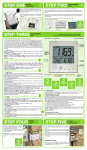
consecutively in the display. The scale is
then automatically set to zero and ready for
use.
• Switch weight display if required (see
below)
• Step on the scale and keep still.
• Read off the weighing result on the
digital display.
• If a load of over 200 kg or 440 Ibs is put
appears in the
on the scale,
display.
Automatic switch-off
The scale switches off automatically 20
seconds after the last weighing operation.
Switching weight display
The weight display can be switched
between kilogrames (kg) and pounds
(Ibs).
• Switch on the scale. The weight is first
displayed in the last setting selected
• In order to display weight in
kilogrammes, press the kg/lbs switch
until kg appears in the display.
• To display weight in English units, press
the kg/lbs switch until Ibs appears in the
display.
Cleaning
Clean the outside of the scale as required
using a domestic cleaning agent or a
commercially available disinfectant. Follow
the manufacturer’s instructions.
What do I do if…
… no weight is displayed when there is a
load on the scale?
• Is the scale switched on?
• Check the batteries.
… the scale keeps switching on, while
being transported, for example?
• The vibration switch has been
activated by the movement of the
scale. Due to the very low energy
requirement of the scale, the service
life of the batteries will not be
impaired. For longer journeys, you
can remove the batteries if necessary.
…
does not appear before weighing?
• Start the scale again after it switches
off automatically – there should not be
any load on the scale.
appears instead of
before
…
weighing?
• Start the scale again after it switches
off automatically – there should not be
any load on the scale.
… one segment is illuminated constantly or
not at all?
• The relevant segment. has a fault.
Inform Servicing.
… the display shows
?
• Battery voltage is running low.
Change the batteries in the next few
days.
appears in the display?
…
• Batteries are empty. Put in new
batteries.
appears in the display?
…
• Maximum load has been exceeded.
… the display flashes?
• Take the load off the scale and start
the scale again. Wait until
appears and then weigh again.
appears?
… the display
• The ambient temperature of the scale
is too high or too low. Place the scale
in an ambient temperature between
+10 °C and +40 °C. Wait about 15
minutes for the scale to adapt to the
ambient temperature and then weigh
again.
… the display and a number appear?
• Start the scale again after it switches
off automatically. The scale will then
work normally again. If this is not the
case, inform Servicing.
7