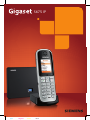
1
S675 IP
Cyan
Magenta
Yellow
Black
Gigaset S67x/S68x IP / en / A31008-xxxx-xxxx-x-xxxx / note en.fm / 2/19/09
Important information about the user guide
This user guide applies to Gigaset S685 IP devices that were manufactured from May 2009
onwards. These devices contain a label inside the battery compartment on the handset
stating "Gigaset S68H S2". The label can be found on the bottom of the battery compartment.
Version 6, 21.08.2008
If "S2" is missing from the label, the device was manufactured before May 2009, in which
case this user guide is not valid. In this case, please download the updated version of the
user guide from the Internet. In conjunction with the user guide found on the CD supplied
with your device, this updated version describes all of the possible functions relating to
your device.
ii
S675IP / USA-CAN eng / A31008-xxxx-xxxx-x-xxxx / overview.fm / 14.05.2009
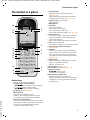
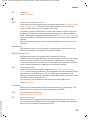
The handset at a glance
The handset at a glance
£
18
17
16
Ð
½Ã
V
1
2
INT 1
01/ 15 /2009 19:45
Phone
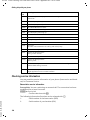
6 Pound key (#)
Keypad lock on/off (press and hold)
( Page 38)
Switch between upper/lower case letters
and digits for text input ( Page 204)
7 Quick list key (not for VoIP)
Open Quick list
8 Microphone
9 Flash key
Fixed line network:
Enter flash (press briefly)
Enter pause (press and hold)
VoIP: enter flash (adjustable,
Page 177)
10 Asterisk key (*)
Idle status: ringers on/off (press and hold)
Fixed line network: switch between dial
pulsing/tone dialing
Editor: open table with special characters
11 Key 1 (press and hold)
Call network mailbox or answering machine
12 Connection socket for headset
( Page 33)
13 Talk key
Answer call, open Last Number Redial list
(press briefly in idle status), select connection type and start dialing (press briefly/
press and hold after entering the number,
Page 46)
14 Speaker key
Switch between speaker/earpiece modes
Lights up: speaker activated
Flashes: incoming call
15 Control key ( Page 35)
16 Eco mode activated ( Page 110)
17 Signal strength
Ò Ñ i (low to high)
| flashes: no reception
18 Answering machine icon
Answering machine switched on;
Flashes: Answering machine is recording a
message or is being operated by another
internal party
IP
3
15
14
13
12
11
5
10
6
9
7
4
£
£
£
£
8
Handset keys
1 Display in idle status (example)
2 Charge status of the batteries
e V U (1/3 charged to fully charged)
= flashes: battery almost empty
e V U flashes: battery charging
3 Display keys ( Page 36)
4 Message key
Opens Calls and Message lists
Flashes: new message, new call or new
firmware/new provider profile available
5 End Call key, On/Off key
End call, cancel function, go back one menu
level (press briefly), back to idle status (press
and hold), activate/deactivate handset
(press and hold in idle status)
£
£
Version 8, 03.09.2008
£
1
S675IP / USA-CAN eng / A31008-xxxx-xxxx-x-xxxx / overview.fm / 14.05.2009
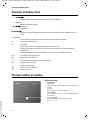
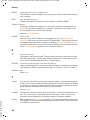
Overview of display icons
Overview of display icons
=eVU
Charge status of the batteries (empty to fully charged)
= (flashes)
Batteries almost empty
e V U (flashes)
Charging
ÒÑiÐ
Reception signal strength between the base station and the handset (low to
high)
| (flashes)
No reception signal between the base station and the handset
½
Eco mode switched on
Ã
In header:
Solid: Base station answering machine is switched on
Flashes: Answering machine is recording a message or is being operated
Otherwise:
New message on a network mailbox or the local answering machine
Å
Incoming call (ringer icon)
Á
New call in the Calls list
À
New message in Messenger or E-mail list
Ø
Keypad lock activated
Ú
Ringer deactivated
º
Alert tone switched on
¼
Alarm clock set
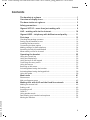
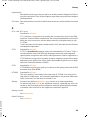
The base station at a glance
Base station key
1 Paging key
Lights up:
LAN connection active (phone is connected to
router)
Flashes:
data transfer to LAN connection
Press briefly:
Start paging ( Page 115), display IP address
on handset
Press and hold:
Set base station to registration mode
( Page 114)
£
Version 8, 03.09.2008
1
£
2
S675IP / USA-CAN eng / A31008-xxxx-xxxx-x-xxxx / S675-S685-IP_Lang_BAIVZ.fm / 14.05.2009
Contents
Contents
The handset at a glance
.................................1
Overview of display icons . . . . . . . . . . . . . . . . . . . . . . . . . . . . . . . . 2
The base station at a glance . . . . . . . . . . . . . . . . . . . . . . . . . . . . . . 2
Safety precautions . . . . . . . . . . . . . . . . . . . . . . . . . . . . . . . . . . . . . . 8
Gigaset S675 IP – more than just making calls . . . . . . . . . . . . . . . 9
VoIP – making calls via the Internet . . . . . . . . . . . . . . . . . . . . . . . 10
Gigaset HDSP – telephony with brilliant sound quality . . . . . . . 11
First steps . . . . . . . . . . . . . . . . . . . . . . . . . . . . . . . . . . . . . . . . . . . . 12
Checking the package contents . . . . . . . . . . . . . . . . . . . . . . . . . . . . . . . . . .
Setting up the handset for use . . . . . . . . . . . . . . . . . . . . . . . . . . . . . . . . . . .
Installing the base station . . . . . . . . . . . . . . . . . . . . . . . . . . . . . . . . . . . . . . .
Connecting the base station . . . . . . . . . . . . . . . . . . . . . . . . . . . . . . . . . . . . .
Making settings for VoIP telephony . . . . . . . . . . . . . . . . . . . . . . . . . . . . . . . .
Attaching the belt clip and headset . . . . . . . . . . . . . . . . . . . . . . . . . . . . . . .
What would you like to do next? . . . . . . . . . . . . . . . . . . . . . . . . . . . . . . . . . .
12
14
19
19
24
33
34
Operating the handset . . . . . . . . . . . . . . . . . . . . . . . . . . . . . . . . . 35
Using the Control key . . . . . . . . . . . . . . . . . . . . . . . . . . . . . . . . . . . . . . . . . .
Using the Display keys . . . . . . . . . . . . . . . . . . . . . . . . . . . . . . . . . . . . . . . . . .
Using the keys on the keypad . . . . . . . . . . . . . . . . . . . . . . . . . . . . . . . . . . . .
Correcting text entry errors . . . . . . . . . . . . . . . . . . . . . . . . . . . . . . . . . . . . . .
Using the menus . . . . . . . . . . . . . . . . . . . . . . . . . . . . . . . . . . . . . . . . . . . . . .
Reverting to idle status . . . . . . . . . . . . . . . . . . . . . . . . . . . . . . . . . . . . . . . . .
Activating/deactivating the handset . . . . . . . . . . . . . . . . . . . . . . . . . . . . . . .
Activating/deactivating the keypad lock . . . . . . . . . . . . . . . . . . . . . . . . . . . .
Using this guide . . . . . . . . . . . . . . . . . . . . . . . . . . . . . . . . . . . . . . . . . . . . . . .
35
36
36
36
37
38
38
38
38
Menu trees . . . . . . . . . . . . . . . . . . . . . . . . . . . . . . . . . . . . . . . . . . . 41
Phone menu . . . . . . . . . . . . . . . . . . . . . . . . . . . . . . . . . . . . . . . . . . . . . . . . . 41
Web configurator menu . . . . . . . . . . . . . . . . . . . . . . . . . . . . . . . . . . . . . . . . 45
Making calls with VoIP and the fixed line network . . . . . . . . . . 46
Version 8, 03.09.2008
Making an external call . . . . . . . . . . . . . . . . . . . . . . . . . . . . . . . . . . . . . . . . .
Ending a call . . . . . . . . . . . . . . . . . . . . . . . . . . . . . . . . . . . . . . . . . . . . . . . . .
Accepting a call . . . . . . . . . . . . . . . . . . . . . . . . . . . . . . . . . . . . . . . . . . . . . . .
Caller ID . . . . . . . . . . . . . . . . . . . . . . . . . . . . . . . . . . . . . . . . . . . . . . . . . . . . .
Using speaker mode . . . . . . . . . . . . . . . . . . . . . . . . . . . . . . . . . . . . . . . . . . .
Deactivating your handset's microphone . . . . . . . . . . . . . . . . . . . . . . . . . . .
Muting the handset . . . . . . . . . . . . . . . . . . . . . . . . . . . . . . . . . . . . . . . . . . . .
46
49
50
50
53
54
55
3
S675IP / USA-CAN eng / A31008-xxxx-xxxx-x-xxxx / S675-S685-IP_Lang_BAIVZ.fm / 14.05.2009
Contents
VoIP telephony via Gigaset.net . . . . . . . . . . . . . . . . . . . . . . . . . . . 55
Opening the Gigaset.net directory . . . . . . . . . . . . . . . . . . . . . . . . . . . . . . . .
Searching for subscribers in the Gigaset.net directory . . . . . . . . . . . . . . . . .
Managing your own entry . . . . . . . . . . . . . . . . . . . . . . . . . . . . . . . . . . . . . . .
Calling a Gigaset.net subscriber . . . . . . . . . . . . . . . . . . . . . . . . . . . . . . . . . .
56
57
59
60
Making calls via network services . . . . . . . . . . . . . . . . . . . . . . . . 61
Blocking your caller ID – Anonymous calling . . . . . . . . . . . . . . . . . . . . . . . . 61
Further network services in the fixed line network . . . . . . . . . . . . . . . . . . . 62
Further network services for VoIP . . . . . . . . . . . . . . . . . . . . . . . . . . . . . . . . . 62
Using lists . . . . . . . . . . . . . . . . . . . . . . . . . . . . . . . . . . . . . . . . . . . . 66
Using the Last Number Redial list . . . . . . . . . . . . . . . . . . . . . . . . . . . . . . . . . 66
Opening lists with the Message key . . . . . . . . . . . . . . . . . . . . . . . . . . . . . . . 67
Using directories and Quick list . . . . . . . . . . . . . . . . . . . . . . . . . . 71
Handset directory/Quick list . . . . . . . . . . . . . . . . . . . . . . . . . . . . . . . . . . . . . 71
Setting up Cost-effective calling . . . . . . . . . . . . . . . . . . . . . . . . . 77
Managing E-mails . . . . . . . . . . . . . . . . . . . . . . . . . . . . . . . . . . . . . . 78
Opening the Incoming Mail list . . . . . . . . . . . . . . . . . . . . . . . . . . . . . . . . . . .
Reading e-mail messages . . . . . . . . . . . . . . . . . . . . . . . . . . . . . . . . . . . . . . .
Viewing e-mail sender's address . . . . . . . . . . . . . . . . . . . . . . . . . . . . . . . . . .
Deleting e-mail messages . . . . . . . . . . . . . . . . . . . . . . . . . . . . . . . . . . . . . . .
78
80
81
81
Using the Instant Messenger (IM) . . . . . . . . . . . . . . . . . . . . . . . . 82
Establishing a connection, going online . . . . . . . . . . . . . . . . . . . . . . . . . . . .
Changing/checking your personal status, going offline . . . . . . . . . . . . . . . .
Opening the Buddy list . . . . . . . . . . . . . . . . . . . . . . . . . . . . . . . . . . . . . . . . .
Receiving messages . . . . . . . . . . . . . . . . . . . . . . . . . . . . . . . . . . . . . . . . . . . .
Writing and sending messages . . . . . . . . . . . . . . . . . . . . . . . . . . . . . . . . . . .
Calling a buddy . . . . . . . . . . . . . . . . . . . . . . . . . . . . . . . . . . . . . . . . . . . . . . .
Self-help with errors . . . . . . . . . . . . . . . . . . . . . . . . . . . . . . . . . . . . . . . . . . .
83
84
85
87
89
90
91
Info Center – with the handset always online . . . . . . . . . . . . . . 92
Starting Info Center, selecting info services . . . . . . . . . . . . . . . . . . . . . . . . .
Registering for personalized info services . . . . . . . . . . . . . . . . . . . . . . . . . . .
Operating the Info Center . . . . . . . . . . . . . . . . . . . . . . . . . . . . . . . . . . . . . . .
Displaying information from the Internet as a screensaver . . . . . . . . . . . . .
92
93
94
96
Operating the base station answering machine . . . . . . . . . . . . 97
Using the handset . . . . . . . . . . . . . . . . . . . . . . . . . . . . . . . . . . . . . . . . . . . . . 97
Activating/deactivating call screening . . . . . . . . . . . . . . . . . . . . . . . . . . . . . 103
Setting up the answering machine . . . . . . . . . . . . . . . . . . . . . . . . . . . . . . . 103
Configuring the answering machine for fast access . . . . . . . . . . . . . . . . . . 105
Operating remotely . . . . . . . . . . . . . . . . . . . . . . . . . . . . . . . . . . . . . . . . . . . 105
Version 8, 03.09.2008
Using the network mailbox . . . . . . . . . . . . . . . . . . . . . . . . . . . . . 107
Activating/deactivating the network mailbox, entering numbers . . . . . . . 107
Configuring the (network) mailbox for fast access . . . . . . . . . . . . . . . . . . . 108
Listening to messages on the network mailbox . . . . . . . . . . . . . . . . . . . . . 109
4
S675IP / USA-CAN eng / A31008-xxxx-xxxx-x-xxxx / S675-S685-IP_Lang_BAIVZ.fm / 14.05.2009
Contents
ECO DECT: Conserving energy . . . . . . . . . . . . . . . . . . . . . . . . . . 110
Setting an appointment (calendar) . . . . . . . . . . . . . . . . . . . . . . 111
Saving an appointment . . . . . . . . . . . . . . . . . . . . . . . . . . . . . . . . . . . . . . . .
Managing appointments . . . . . . . . . . . . . . . . . . . . . . . . . . . . . . . . . . . . . . .
Deactivating or answering an appointment reminder . . . . . . . . . . . . . . . .
Displaying missed appointments, anniversaries . . . . . . . . . . . . . . . . . . . . .
111
112
112
112
Setting the alarm clock . . . . . . . . . . . . . . . . . . . . . . . . . . . . . . . . 113
Activating/deactivating and setting the alarm clock . . . . . . . . . . . . . . . . . . 113
Deactivating the wake-up call/repeating after a pause (snooze mode) . . . 113
Using multiples handsets . . . . . . . . . . . . . . . . . . . . . . . . . . . . . . 114
Registering handsets . . . . . . . . . . . . . . . . . . . . . . . . . . . . . . . . . . . . . . . . . .
De-registering handsets . . . . . . . . . . . . . . . . . . . . . . . . . . . . . . . . . . . . . . .
Locating a handset ("paging") . . . . . . . . . . . . . . . . . . . . . . . . . . . . . . . . . . .
Changing the base station . . . . . . . . . . . . . . . . . . . . . . . . . . . . . . . . . . . . .
Changing a handset's internal number . . . . . . . . . . . . . . . . . . . . . . . . . . . .
Changing the name of a handset . . . . . . . . . . . . . . . . . . . . . . . . . . . . . . . .
Making internal calls . . . . . . . . . . . . . . . . . . . . . . . . . . . . . . . . . . . . . . . . . .
114
115
115
116
116
117
117
Using a handset as a room monitor . . . . . . . . . . . . . . . . . . . . . . 119
Handset settings . . . . . . . . . . . . . . . . . . . . . . . . . . . . . . . . . . . . . 122
Changing the display language . . . . . . . . . . . . . . . . . . . . . . . . . . . . . . . . . .
Setting the display . . . . . . . . . . . . . . . . . . . . . . . . . . . . . . . . . . . . . . . . . . . .
Setting the screensaver . . . . . . . . . . . . . . . . . . . . . . . . . . . . . . . . . . . . . . . .
Setting the display backlight . . . . . . . . . . . . . . . . . . . . . . . . . . . . . . . . . . . .
Quickly accessing functions and numbers . . . . . . . . . . . . . . . . . . . . . . . . .
Activating/deactivating auto answer . . . . . . . . . . . . . . . . . . . . . . . . . . . . . .
Changing the speaker/earpiece volume . . . . . . . . . . . . . . . . . . . . . . . . . . .
Changing ringers . . . . . . . . . . . . . . . . . . . . . . . . . . . . . . . . . . . . . . . . . . . . .
Activating/deactivating advisory tones . . . . . . . . . . . . . . . . . . . . . . . . . . . .
Managing My stuff . . . . . . . . . . . . . . . . . . . . . . . . . . . . . . . . . . . . . . . . . . .
Setting your own area code . . . . . . . . . . . . . . . . . . . . . . . . . . . . . . . . . . . .
Restoring the handset default settings . . . . . . . . . . . . . . . . . . . . . . . . . . . .
122
123
123
124
125
127
127
128
130
131
132
133
Setting the base station via the handset . . . . . . . . . . . . . . . . . . 133
Version 8, 03.09.2008
Protecting against unauthorized access . . . . . . . . . . . . . . . . . . . . . . . . . . .
Restoring the base station to the factory settings . . . . . . . . . . . . . . . . . . .
Activating/deactivating music on hold . . . . . . . . . . . . . . . . . . . . . . . . . . . .
Setting default connection . . . . . . . . . . . . . . . . . . . . . . . . . . . . . . . . . . . . .
Entering local and extra area codes . . . . . . . . . . . . . . . . . . . . . . . . . . . . . .
Updating the base station firmware . . . . . . . . . . . . . . . . . . . . . . . . . . . . . .
133
134
135
135
136
137
5
S675IP / USA-CAN eng / A31008-xxxx-xxxx-x-xxxx / S675-S685-IP_Lang_BAIVZ.fm / 14.05.2009
Contents
Making VoIP settings . . . . . . . . . . . . . . . . . . . . . . . . . . . . . . . . . . 138
Using the connection assistant . . . . . . . . . . . . . . . . . . . . . . . . . . . . . . . . . .
Changing settings without the connection assistant . . . . . . . . . . . . . . . . .
Setting the phone's IP address in LAN . . . . . . . . . . . . . . . . . . . . . . . . . . . . .
Activating/deactivating the display of VoIP status messages . . . . . . . . . . .
Checking the base station MAC address . . . . . . . . . . . . . . . . . . . . . . . . . . .
138
138
140
141
142
Operating the base station on the PABX . . . . . . . . . . . . . . . . . . 142
Changing the dialing mode . . . . . . . . . . . . . . . . . . . . . . . . . . . . . . . . . . . . .
Setting Flash . . . . . . . . . . . . . . . . . . . . . . . . . . . . . . . . . . . . . . . . . . . . . . . .
Setting access codes (external line prefixes) . . . . . . . . . . . . . . . . . . . . . . .
Setting pauses . . . . . . . . . . . . . . . . . . . . . . . . . . . . . . . . . . . . . . . . . . . . . . .
Switching temporarily to tone dialing (DTMF) . . . . . . . . . . . . . . . . . . . . . .
142
142
143
143
144
Version 8, 03.09.2008
Setting the phone with the PC . . . . . . . . . . . . . . . . . . . . . . . . . . 145
Connecting the PC with the telephone's Web configurator . . . . . . . . . . . . 145
Logging in, setting the Web configurator language . . . . . . . . . . . . . . . . . . 147
Logging off . . . . . . . . . . . . . . . . . . . . . . . . . . . . . . . . . . . . . . . . . . . . . . . . . 147
Using the Web pages . . . . . . . . . . . . . . . . . . . . . . . . . . . . . . . . . . . . . . . . . . 148
Menu bar . . . . . . . . . . . . . . . . . . . . . . . . . . . . . . . . . . . . . . . . . . . . . . . . . . . 148
Navigation area . . . . . . . . . . . . . . . . . . . . . . . . . . . . . . . . . . . . . . . . . . . . . . 149
Working area . . . . . . . . . . . . . . . . . . . . . . . . . . . . . . . . . . . . . . . . . . . . . . . . 149
Buttons . . . . . . . . . . . . . . . . . . . . . . . . . . . . . . . . . . . . . . . . . . . . . . . . . . . . . 150
Opening Web pages . . . . . . . . . . . . . . . . . . . . . . . . . . . . . . . . . . . . . . . . . . 150
Setting the phone with the Web configurator . . . . . . . . . . . . . . . . . . . . . . 151
Configuring the IP . . . . . . . . . . . . . . . . . . . . . . . . . . . . . . . . . . . . . . . . . . . . 152
Configuring telephone connections . . . . . . . . . . . . . . . . . . . . . . . . . . . . . . 155
Optimizing voice quality for VoIP connections . . . . . . . . . . . . . . . . . . . . . . 164
Setting the telephone's default connection . . . . . . . . . . . . . . . . . . . . . . . . 168
Activating the fixed line network connection as an alternate connection . 169
Assigning send and receive numbers to handsets . . . . . . . . . . . . . . . . . . . 169
Assigning receive numbers to the answering machine . . . . . . . . . . . . . . . 171
Activating Call Forwarding for VoIP connections . . . . . . . . . . . . . . . . . . . . 171
Entering your own area code, activating/deactivating an automatic area code
for VoIP . . . . . . . . . . . . . . . . . . . . . . . . . . . . . . . . . . . . . . . . . . . . . . . . . . . . 172
Defining dialing plans – cost control . . . . . . . . . . . . . . . . . . . . . . . . . . . . . 173
Activating/deactivating network mailbox, entering numbers . . . . . . . . . . 175
Setting DTMF signaling for VoIP . . . . . . . . . . . . . . . . . . . . . . . . . . . . . . . . . 176
Defining Flash key functions for VoIP (hook flash) . . . . . . . . . . . . . . . . . . . 177
Configuring call forwarding via VoIP . . . . . . . . . . . . . . . . . . . . . . . . . . . . . . 177
Defining local communication ports for VoIP . . . . . . . . . . . . . . . . . . . . . . . 178
Saving messenger access data . . . . . . . . . . . . . . . . . . . . . . . . . . . . . . . . . . 180
Configuring incoming e-mail . . . . . . . . . . . . . . . . . . . . . . . . . . . . . . . . . . . 182
Configuring info services/activating idle display . . . . . . . . . . . . . . . . . . . . . 182
Changing internal handset numbers and names . . . . . . . . . . . . . . . . . . . . 183
Transferring handset directories to/from the PC . . . . . . . . . . . . . . . . . . . . . 184
Activating VoIP status message display . . . . . . . . . . . . . . . . . . . . . . . . . . . . 186
Starting a firmware update . . . . . . . . . . . . . . . . . . . . . . . . . . . . . . . . . . . . . 187
6
S675IP / USA-CAN eng / A31008-xxxx-xxxx-x-xxxx / S675-S685-IP_Lang_BAIVZ.fm / 14.05.2009
Contents
Activating/deactivating the automatic version check . . . . . . . . . . . . . . . . . 188
Copying the date/time from time server . . . . . . . . . . . . . . . . . . . . . . . . . . . 188
Querying the phone status . . . . . . . . . . . . . . . . . . . . . . . . . . . . . . . . . . . . . 190
Getting help with your phone . . . . . . . . . . . . . . . . . . . . . . . . . . 191
Questions and answers . . . . . . . . . . . . . . . . . . . . . . . . . . . . . . . . . . . . . . . . 191
Using VoIP status codes . . . . . . . . . . . . . . . . . . . . . . . . . . . . . . . . . . . . . . . . 195
Checking service information . . . . . . . . . . . . . . . . . . . . . . . . . . . . . . . . . . . 198
Protecting our environment . . . . . . . . . . . . . . . . . . . . . . . . . . . . 200
Our environmental mission statement . . . . . . . . . . . . . . . . . . . . . . . . . . . . 200
Appendix . . . . . . . . . . . . . . . . . . . . . . . . . . . . . . . . . . . . . . . . . . . . 201
Care . . . . . . . . . . . . . . . . . . . . . . . . . . . . . . . . . . . . . . . . . . . . . . . . . . . . . . .
Contact with liquid . . . . . . . . . . . . . . . . . . . . . . . . . . . . . . . . . . . . . . . . . . .
Specifications . . . . . . . . . . . . . . . . . . . . . . . . . . . . . . . . . . . . . . . . . . . . . . . .
Writing and editing text . . . . . . . . . . . . . . . . . . . . . . . . . . . . . . . . . . . . . . . .
201
201
201
203
Industry Canada Certification . . . . . . . . . . . . . . . . . . . . . . . . . . . 207
FCC / ACTA Information . . . . . . . . . . . . . . . . . . . . . . . . . . . . . . . . 208
Safety precautions . . . . . . . . . . . . . . . . . . . . . . . . . . . . . . . . . . . . . . . . . . . . 210
Service (Customer Care) . . . . . . . . . . . . . . . . . . . . . . . . . . . . . . . 212
End-user limited warranty . . . . . . . . . . . . . . . . . . . . . . . . . . . . . . . . . . . . . . 212
Gigaset S675 IP – free software . . . . . . . . . . . . . . . . . . . . . . . . . 216
Accessories . . . . . . . . . . . . . . . . . . . . . . . . . . . . . . . . . . . . . . . . . . 224
Glossary . . . . . . . . . . . . . . . . . . . . . . . . . . . . . . . . . . . . . . . . . . . . . 225
Index . . . . . . . . . . . . . . . . . . . . . . . . . . . . . . . . . . . . . . . . . . . . . . . 238
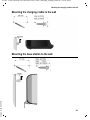
Mounting the charging cradle to the wall . . . . . . . . . . . . . . . . . 251
Version 8, 03.09.2008
Mounting the base station to the wall . . . . . . . . . . . . . . . . . . . 251
7
S675IP / USA-CAN eng / A31008-xxxx-xxxx-x-xxxx / security.fm / 14.05.2009
Safety precautions
Safety precautions
Warning
Be sure to read this user guide and the safety precautions before using your telephone.
Explain their content and the potential hazards associated with using the telephone to
your children.
$
Use only the power adapter supplied, as indicated on the underside of the base
station or charging cradle.
Use only the recommended, rechargeable batteries (£ Page 201). Using
conventional (non-rechargeable) batteries or other types of batteries could
result in significant health risks and personal injury. Do not charge the handset
in the charging unit or base station while the headset is connected.
Using your telephone may affect nearby medical equipment. Be aware of the
technical conditions in your particular environment, e.g. doctor's surgery.
Do not hold the rear of the handset to your ear when it is ringing or when the
speaker function is activated. Otherwise you risk serious and permanent damage to your hearing.
The handset may cause an unpleasant humming noise in hearing aids.
Do not install the base station or charging cradle in bathrooms or shower rooms.
The handset, base station and charging cradle are not waterproof
(£ Page 201).
Do not use the phone in environments with a potential explosion hazard,
e.g. paint shops.
ƒ
If you give your phone to a third party, make sure you also give them the user
guide.
Remove faulty base stations from use, as they could interfere with other wireless services.
Warning
When the keypad lock is active, you cannot call emergency numbers!
Version 8, 03.09.2008
Please note
Not all of the functions described in this user guide are available in all countries.
8
S675IP / USA-CAN eng / A31008-xxxx-xxxx-x-xxxx / starting.fm / 14.05.2009
Gigaset S675 IP – more than just making calls
Version 8, 03.09.2008
Gigaset S675 IP – more than just making calls
You can use your phone to make calls both via the fixed line network and also
(cost effectively) via the Internet (VoIP) without a PC.
Your phone can do much more:
u Make calls with brilliant sound quality using High Definition Sound
Performance (HDSP) for either internal calls or calls made via VoIP
(£ Page 11) – for internal calls or calls via VoIP.
u A simple press of a button each time you make a call indicates whether you
want to call via the fixed line network or the Internet (£ Page 46).
u Register up to six handsets on your base station. With your base station, you
can simultaneously conduct two calls via VoIP and one call via the fixed line
network.
u Multiline: Create up to six VoIP accounts with different VoIP providers.
Together with your fixed line number and the Gigaset.net number, your
phone can then be reached via up to eight different phone numbers.
u Assign each handset its own VoIP number as a send and receive number. If
a member of your family is called on their VoIP number, only their handset
will ring (£ Page 169).
u You can also use the VoIP accounts with different providers for cost control
purposes. When dialing, specify the VoIP connection/VoIP account that you
want to use for its lower rates (£ Page 48).
u Setting dialing plans for phone numbers or area codes enables you to
automate the selection of the most cost-effective VoIP connection
(£ Page 173).
u Specify the phone numbers for which the answering machine will accept
calls (£ Page 171).
u Use Gigaset.net for VoIP calls. Connect your phone to the electrical power
supply and the Internet and enjoy free phone calls on Gigaset.net – without
making any further settings (£ Page 55).
u Configure the phone connection for VoIP without a PC. Your phone's connection assistant downloads general data about your VoIP provider from the
Internet and guides you through entering your personal data (VoIP/SIP
account). This makes it easy for you to start using VoIP (£ Page 24).
u If necessary, make any further VoIP settings on a PC. The phone features a
Web interface (Web configurator) that can be accessed via your PC's Web
browser (£ Page 145).
u Use instant messaging on your handset. Go online and see which of your
messenger contacts (buddies) are also online. Exchange messages with
your buddies, or just call them (£ Page 82). A free messenger account has
already been set up for you on the Gigaset.net Jabber server (£ Page 181).
u Obtain information about new e-mail messages in your mailbox from your
phone without using a PC (£ Page 78). Use your handset to delete
unwanted e-mail messages from your mailbox.
9
S675IP / USA-CAN eng / A31008-xxxx-xxxx-x-xxxx / starting.fm / 14.05.2009
VoIP – making calls via the Internet
u Make sure your phone is always up-to-date. Keep yourself informed about
firmware updates on the Internet and download them onto your phone
(£ Page 137).
u Reduce your phone's transmission power by switching on Eco Mode
(£ Page 110).
Your Gigaset S675 IP has a protected operating system that offers increased security
against viruses from the Internet.
Have fun using your new phone!
VoIP – making calls via the Internet
Version 8, 03.09.2008
With VoIP (Voice over Internet Protocol), your calls are not made via a fixed connection as with the telephone network, but rather they are transmitted via the
Internet in the form of data packets.
You can take advantage of all the benefits of VoIP with your phone:
u You can make cost-effective calls in high voice quality with callers on the
Internet, the fixed line network or the cell phone network.
u VoIP providers will give you personal numbers, with which you can be
reached from the Internet, the fixed line network and any cell phone network.
To use VoIP, you need:
u A broadband Internet connection (e.g. DSL) with flat rate (recommended)
or volume-based price.
u Internet access, i.e. you need a router that will connect your phone to the
Internet.
You can find a list of recommended routers on the Internet at:
www.gigaset.com/customercare
From here, go to the FAQ page and select your Gigaset-IP phone. Search for
"Router", for example.
u Access the services of a VoIP provider. You can open up to six accounts with
different VoIP providers.
10
S675IP / USA-CAN eng / A31008-xxxx-xxxx-x-xxxx / starting.fm / 14.05.2009
Gigaset HDSP – telephony with brilliant sound quality
Gigaset HDSP – telephony with brilliant sound quality
Your Gigaset IP phone supports the broadband codec
G.722. With your base station and the corresponding
handset, you can make calls via VoIP with brilliant sound
quality (High Definition Sound Performance).
If you register further broadband-capable handsets
(e.g. Gigaset S67H, S68H or SL37H) with your base station, internal calls between these handsets will also be conducted via broadband.
Prerequisites for broadband connections to your base station are:
u For internal calls:
Both handsets are broadband-capable, i.e. both of them support
codec G.722.
u For external calls via VoIP:
– You make the call from a broadband-capable handset.
– You have selected codec G.722 for outgoing calls (£ Page 164).
– Your VoIP provider supports broadband connections.
– The recipient's phone supports codec G.722 and accepts broadband connections.
Version 8, 03.09.2008
Please note
The VoIP service Gigaset.net (£ Page 55) supports broadband connections.
11
S675IP / USA-CAN eng / A31008-xxxx-xxxx-x-xxxx / starting.fm / 14.05.2009
First steps
First steps
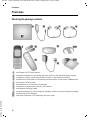
Checking the package contents
1
5
2
6
3
8
4
10
11
7
9
§§1§§
§§2§§
§§3§§
§§4§§
§§5§§
§§6§§
§§7§§
§§8§§
§§9§§
§§10§§
Version 8, 03.09.2008
§§11§§
12
one Gigaset S675 IP base station
one power adapter for connecting the base station to the electrical power supply
one phone cord for connecting the base station to the fixed line network
one Ethernet (LAN) cable for connecting the base station to the router (LAN/Internet)
one Gigaset S67H handset
two batteries for the handset (uncharged)
one battery compartment cover for the handset
one handset charging cradle
one power adapter for connecting the charging cradle to the electrical power supply
one belt clip for the handset
one quick guide and a CD containing this user guide
S675IP / USA-CAN eng / A31008-xxxx-xxxx-x-xxxx / starting.fm / 14.05.2009
First steps
Version 8, 03.09.2008
Firmware updates
This user guide describes the basic functions from firmware version 179.
Whenever there are new or improved functions for your Gigaset S675, base station
firmware updates are made available for you to download to your telephone
(£ Page 137). If this results in operational changes to your phone, a new version of this
user guide or the necessary amendments is published on the Internet at
www.gigaset.com
Select "Gigaset S675 IP" to open the relevant product page for your phone, where you will
find a link to the user guide.
For information on finding the current firmware version of your base station, £ Page 190
(using the Web configurator) or £ Page 198 (during an external call).
13
S675IP / USA-CAN eng / A31008-xxxx-xxxx-x-xxxx / starting.fm / 14.05.2009
First steps
Setting up the handset for use
The display is protected by a plastic film. Please remove the protective film!
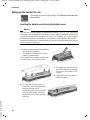
Inserting the batteries and closing the battery cover
Warning
Use only the recommended, rechargeable batteries (£ Page 201). Using conventional (non-rechargeable) batteries or other types of batteries could result
in significant health risks and personal injury. For example, the outer casing of
the batteries could be destroyed or the batteries could explode. The phone
could also malfunction or be damaged as a result of using batteries that are not
of the recommended type.
¤ Insert the batteries with the polarity
in the correct direction.
The polarity is indicated in/on the
battery compartment.
The handset is activated automatically.
You will hear a confirmation tone.
¤ First align the notches on the
¤
¤ To open the battery cover, for
Version 8, 03.09.2008
instance to replace the batteries,
remove the belt clip (if
attached). Insert a coin into the
cavity on the casing, then pull
the battery cover in an upward
direction.
14
side of the battery cover with
the lugs on the inside of the
casing.
Then press the cover until it
clicks into place.
S675IP / USA-CAN eng / A31008-xxxx-xxxx-x-xxxx / starting.fm / 14.05.2009
First steps
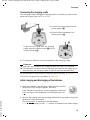
Connecting the charging cradle
The charging cradle is designed to be operated in enclosed, dry areas at temperatures ranging from +41°F to +113°F.
2
¤ Connect the empty plug from the
1
power adapter 1.
¤ Plug the electrical adapter into
the plug socket 2.
2
To disconnect the plug from the charging
cradle, press the release button 1 and disconnect the plug 2.
1
¤ To charge the batteries, leave the handset in the charging cradle.
Please note
u Only place the handset in the charging cradle for which it is intended.
u If the handset has turned itself off because the batteries are empty and is
then placed in the charging cradle, it will turn itself on automatically.
For information on attaching the charging cradle to the wall, £ Page 251.
If you have any questions or problems £ Page 191.
Initial charging and discharging of the batteries
¤ Place the handset in the charging cradle and wait until the
batteries are fully charged (approx. 10 hours).
If the handset is switched on, battery charging is indicated
in the top right of the display by the flashing battery icon
e.
10 h
Version 8, 03.09.2008
¤ Remove the handset from the charging cradle and do not replace it until the
batteries are fully discharged.
The charge status is displayed in the idle display.
= e V U (empty to full) = flashes, the batteries are almost empty.
15
S675IP / USA-CAN eng / A31008-xxxx-xxxx-x-xxxx / starting.fm / 14.05.2009
First steps
After the first battery charge and discharge, you may place your handset in the
charging cradle after every call.
Warning
u Always repeat the charging and discharging procedure if you remove the
batteries from the handset and reinsert them.
u The batteries may warm up during charging.
This is not dangerous.
u After a while, the charge capacity of the batteries will decrease for technical
reasons.
Setting the date and time
The date and time must be set to have the correct time for incoming calls and
to use the alarm clock and calendar.
Please note
The address of a time server on the Internet is stored on your telephone. The
date and time are taken from this time server provided that the base station is
connected to the Internet and synchronization with the time server is activated (£ Page 188). Manual settings are overwritten in this case.
If the date and time have not yet been set on the phone, the Display key §Time§
is displayed.
Setting up manually:
¤ Press the key below §Time§ (right Display
?
Time
Date/Time
Date:
[02/ 01/ 2007]
Time:
00:00 am
Version 8, 03.09.2008
Time Mode:
12 h
Ý
Save
16
key) on the display screen.
You will see the following display screen for
multiple line input. Each active line is marked
with [...].
¤ Overwrite the date currently displayed:
enter the month, day and year (8 digits)
via the keypad, e.g. Q 2 2
2 Q Q O for 1/ 22 /2009.
S675IP / USA-CAN eng / A31008-xxxx-xxxx-x-xxxx / starting.fm / 14.05.2009
First steps
¤ Press the bottom of the Control key s to
switch to the line for entering the time.
Date/Time
Date:
02/ 01/ 2007
¤ Overwrite the time currently displayed:
Time:
[ 00:00 ] am
Time Mode:
12 h
am/pm
Save
¤
enter hours and minutes (4 digits) via the
keypad, e.g. Q M 5 for 7:15.
If necessary, use the Control key to swap
between fields.
If necessary, press the left Display key
§am/pm§ to switch between am and pm.
¤ Press the bottom of the Control key s to
switch to the next line for setting the time
mode.
07:15 pm
Time Mode:
f12 h g
am/pm
Save
¤ Press the Control key r once on the left
Version 8, 03.09.2008
or right to switch from 12 h mode to 24 h
mode.
17
S675IP / USA-CAN eng / A31008-xxxx-xxxx-x-xxxx / starting.fm / 14.05.2009
First steps
Date/Time
Date:
02/ 01/ 2007
Time:
19:15
Time Mode:
f24 h g
Ý
Save
¤ Press the right Display key §Save§ to save the
date and time settings.
Saved
The display shows Saved.
You will hear a confirmation tone.
The date and time are shown in the handset's idle display mode (£ Page 1).
Registering the handset to the base station
Version 8, 03.09.2008
Your handset is registered to the base station by default.
For information on how to register additional handsets with the base station
and make free internal calls, see Page 114.
18
S675IP / USA-CAN eng / A31008-xxxx-xxxx-x-xxxx / starting.fm / 14.05.2009
First steps
Installing the base station
The base station is designed for use in closed, dry rooms with a temperature
range of +41°F to +113°F.
¤ Set or hang the base station up at a central location in your house or apartment.
Please note
Consider the range of the base station.
This is up to 328 yards in unobstructed outdoor areas and up to 54 yards inside
buildings. The range is reduced when eco mode is activated (£ Page 110).
The phone's feet do not usually leave any marks on surfaces. However, due to
the multitude of different varnishes and polishes used on today's furnishings,
the occurrence of marks on the surfaces cannot be completely ruled out.
For information on mounting the base station on the wall, see Page 251.
Warning
u Never expose the telephone to any of the following: heat sources, direct
sunlight or other electrical appliances.
u Protect your Gigaset from moisture, dust, corrosive liquids and fumes.
Connecting the base station
Version 8, 03.09.2008
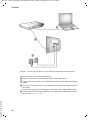
To make calls with your phone via the fixed line network and via VoIP, you
must connect the base station to the fixed line network and the Internet,
£ Figure 1.
19
S675IP / USA-CAN eng / A31008-xxxx-xxxx-x-xxxx / starting.fm / 14.05.2009
First steps
§§4§§
§§3§§
§§1§§
§§2§§
Figure 1 Connecting the phone to the fixed line network and the Internet
Version 8, 03.09.2008
Follow the steps in the order given below:
§§1§§ Connect the phone cord and power lead to the base station.
§§2§§ Connect the base station to the fixed line network and the electrical power
supply.
§§3§§ To connect the base station to the Internet, first connect the base station to
the router
(connection via router and modem or via router with integrated modem).
§§4§§ Connect the PC and router (optional) – for advanced configuration of the
base station (£ Page 145).
20
S675IP / USA-CAN eng / A31008-xxxx-xxxx-x-xxxx / starting.fm / 14.05.2009
First steps
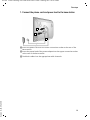
1. Connect the phone cord and power lead to the base station
2
1
3
§§1§§ Insert the phone cord into the lower connection socket at the rear of the
base station.
§§2§§ Insert the power lead of the power adapter into the upper connection socket
at the rear of the base station.
Version 8, 03.09.2008
§§3§§ Push both cables into the appropriate cable channels.
21
S675IP / USA-CAN eng / A31008-xxxx-xxxx-x-xxxx / starting.fm / 14.05.2009
First steps
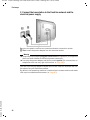
2. Connect the base station to the fixed line network and the
electrical power supply
§§2§§
§§1§§
§§1§§ Insert the phone cord into the fixed line network connection socket.
§§2§§ Then insert the power adapter into the electrical socket.
Warning
u Keep the power adapter plugged in at all times for operation, as the phone
does not work without an electrical power connection.
u Use only the power adapter and phone cord supplied. Pin connections on
telephone cords can vary (pin connections £ Page 203).
Version 8, 03.09.2008
You can now use your phone to make calls via the fixed line network and can
be reached on your fixed line number.
By default, the answering machine is switched on in answer and record mode
with a pre-recorded announcement (£ Page 97).
22
S675IP / USA-CAN eng / A31008-xxxx-xxxx-x-xxxx / starting.fm / 14.05.2009
First steps
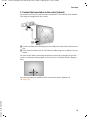
3. Connect the base station to the router (Internet)
For Internet access you need a router connected to the Internet via a modem
(this may be integrated in the router).
§§2§§
§§1§§
§§1§§ Connect an Ethernet cable plug into the LAN port at the side of the base sta-
tion.
§§2§§ Then insert the other end of the Ethernet cable plug into a LAN port on the
router.
As soon as the cable connecting the phone and router is plugged in and the
router is activated, the key lights up on the front of the base station (Paging
key).
Version 8, 03.09.2008
You are now ready to establish VoIP connections within Gigaset.net
(£ Page 55).
23
S675IP / USA-CAN eng / A31008-xxxx-xxxx-x-xxxx / starting.fm / 14.05.2009
First steps
Making settings for VoIP telephony
Before you can use the Internet (VoIP) to phone any other numbers on the
Internet, the fixed line network or the cellular phone network, you need the
services of a VoIP provider who supports the VoIP SIP standard.
Prerequisite: You have registered with such a VoIP provider (e.g. via your PC)
and set up at least one VoIP account.
To use VoIP, you need to enter the access data for your VoIP account. You will
receive all the necessary data from your VoIP provider. This will include:
Either:
u Your user name (if requested by the VoIP provider) is the user identification
(Caller ID) for your account, which is often identical to your phone number
u Your authentication name or login ID
u The (login) password registered with the VoIP provider
u General settings for your VoIP provider (server addresses, etc.)
Or:
u An auto-configuration code (Activation Code)
Your phone connection assistant can help you make these entries.
Starting the connection assistant
Prerequisite: The base station is connected to the electrical power supply and
a router. Your router is connected to the Internet (£ Page 23).
Please note
Your phone is preconfigured for dynamic assignment of the IP address. In
order for your router to "recognize" the phone, dynamic IP address assignment
must also be activated on the router, i.e. the router's DHCP server must be activated.
If the DHCP server cannot or should not be activated, you must first assign a
fixed IP address to the phone. For further information, see Page 140.
As soon as the handset battery is sufficiently
charged, the Message key f on the handset will flash (approx. 20 minutes after you
have put the handset in the charging cradle).
Version 8, 03.09.2008
¤ Press the Message key f.
24
S675IP / USA-CAN eng / A31008-xxxx-xxxx-x-xxxx / starting.fm / 14.05.2009
First steps
Connection Assist.
Start wizard
for entry of VoIP
connection data?
You will see the following display.
¤ Press the key below §Yes§ on the display
screen.
You are prompted to enter your phone's system PIN.
No
Yes
New firmware available appears in the display.
New/improved firmware is available for your phone on the Internet. First perform an automatic update of the firmware (£ Page 137). Once the update
has been completed (after approx. 3 minutes) the handset's idle display
appears again and the Message key f flashes. If you press f, the display
shown in the picture above appears and you can start the connection assistant.
Please note
To protect your phone and its system settings from unauthorized access,
please define a 4-digit number code (system PIN) known only to yourself. This
code must be entered before you can register/de-register handsets or alter
your phone's VoIP or LAN settings.
The default system PIN is 0000 (4 x zero). For further information, see
Page 133.
System PIN
The active line is marked [----].
¤ Enter your phone's current system PIN
Please enter
using the keypad.
System PIN:
[- - - -]
Version 8, 03.09.2008
Ý
¤ Press the key below §OK§ on the display
screen.
OK
The connection assistant is launched.
25
S675IP / USA-CAN eng / A31008-xxxx-xxxx-x-xxxx / starting.fm / 14.05.2009
First steps
Please note
u You can also call up the connection assistant at any time via the menu
(
£ Page 138).
u The connection assistant will also start automatically if you try to establish
a connection via the Internet before you have made the necessary settings.
Prerequisite: You have not activated the fixed line network connection as
a replacement connection (£ Page 169):
Entering an auto configuration code
Auto-Configuration
Enter code
¤ Enter your auto configuration code using
the keypad (max. 32 characters).
Ý
OK
¤ Press the key below §OK§ on the display
screen.
All data necessary for VoIP telephony is loaded directly from the Internet to your
phone.
When all the data has been successfully loaded onto your phone, Saved appears
on the display.
¤ For further information, please see "Completing the VoIP settings",
£ Page 30
Downloading VoIP provider data
The connection assistant establishes a connection with the Gigaset configuration server on the Internet. Various profiles with general access data for different VoIP providers can be downloaded here.
After a brief period you will see the following display:
Select Country
Germany
England
France
Version 8, 03.09.2008
Netherlands, the
26
A list of countries is loaded.
S675IP / USA-CAN eng / A31008-xxxx-xxxx-x-xxxx / starting.fm / 14.05.2009
First steps
¤ Press up or down on the Control key
repeatedly ...
Select Country
... until the country in which you are using
the phone is marked on the display.
Germany
England
France
Netherlands, the
Ý
OK
Select Provider
Provider 1
screen to confirm your selection.
A list is displayed of the VoIP providers for
which a profile is available on the configuration server with the general access data.
¤ Press the top or bottom of the Control key
Provider 2
q repeatedly until your VoIP provider
appears on the display.
Provider 3
Provider 4
Provider 5
Provider 6
Ý
¤ Press the key below §OK§ on the display
OK
¤ Press the key below §OK§ on the display
screen to confirm your selection.
Version 8, 03.09.2008
The general access data for your VoIP provider is be downloaded and saved on
the phone.
Please note
If the data for your VoIP provider is not available for downloading, press the ”
Display key twice. You can then carry out the following steps with the connection assistant.
You must then make the settings needed for the VoIP provider using the Web
configurator (£ Page 157).
Your VoIP provider will supply you with this data.
27
S675IP / USA-CAN eng / A31008-xxxx-xxxx-x-xxxx / starting.fm / 14.05.2009
First steps
Entering user data for your first VoIP account
You will now be prompted to enter your personal access data for your VoIP
accounts.
The following are provider-dependent:
u Username, User Name , Authent. Password
Or:
u User Name , Authent. Password
Please note
When entering case sensitive access data:
u To switch between upper and lower case and digits, press the # key
(several times if necessary). You can see briefly in the display whether
upper case, lower case or digits is selected.
u Characters entered incorrectly can be deleted using the left Display key
below X. The character to the left of the cursor is deleted.
u You can navigate within the input field using the Control key r (press left/
right).
Connection Assist.
If your VoIP provider does not require a user
name, skip this step.
Username:
Ý
¤ Using the keypad, enter the user name
OK
¤
that you received from your VoIP provider.
Press the key below §OK§ on the display
screen.
Connection Assist.
User Name :
Version 8, 03.09.2008
Ý
28
¤ Using the keypad, enter the authentication
OK
¤
name that you received from your VoIP
provider.
Press the key below §OK§ on the display
screen.
S675IP / USA-CAN eng / A31008-xxxx-xxxx-x-xxxx / starting.fm / 14.05.2009
First steps
Connection Assist.
Authent. Password:
Ý
OK
¤ Use the keypad to enter your password.
¤ Press the key below §OK§ on the display
screen.
Version 8, 03.09.2008
When you have made all the necessary settings the "Connection data complete"
message appears on the display.
29
S675IP / USA-CAN eng / A31008-xxxx-xxxx-x-xxxx / starting.fm / 14.05.2009
First steps
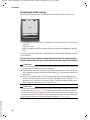
Completing the VoIP settings
After the entries have been completed, the handset reverts to idle status.
Ð
Ã
V
INT 1
01/ 15 /2009 19:45
Phone
IP
¤ Test whether your VoIP data is complete and has been stored in the phone
correctly.
Calling via VoIP:
Enter a number using the handset keypad and press and hold the Talk key
c.
If a VoIP connection cannot be established, a corresponding message is shown
in the display.
You can now use your phone to make calls via the fixed line network and the
Internet! Callers can reach you on your fixed line number and your VoIP number.
Please note
u To ensure that you can always be reached via the Internet, the router must
be permanently connected to the Internet.
u If you have started the connection assistant via the menu, once the entries
are completed, press and hold the End Call key a to return the handset to
idle status.
u If you try to make a call via a VoIP connection that is not configured correctly, the following VoIP status message will appear in the display: IP configuration error: xxx (xxx = VoIP status code). The various status codes and
their respective meanings are listed on Page 195.
Version 8, 03.09.2008
Please note
You can enter five additional VoIP accounts (VoIP phone numbers) via the Web
configurator later (£ Page 155). Including your fixed line network number,
your phone can then be reached via up to seven different phone numbers. You
can assign the phone numbers to the individual handsets that are registered
with the base station as send and receive numbers (£ Page 169).
30
S675IP / USA-CAN eng / A31008-xxxx-xxxx-x-xxxx / starting.fm / 14.05.2009
First steps
Icons on the idle display
The following is displayed:
u The internal number, e.g. INT 1.
u The quality of the reception signal between the base station and the handset:
– poor to good: Ò Ñ i Ð
– no reception: | flashes
u Battery charge status:
– = e V U (empty to full)
– = flashes: batteries almost empty
– e V U flashes: charging procedure
No connection to the Internet/VoIP server
If one of the following messages is displayed instead of the internal name after
the connection assistant is closed, errors have occurred:
u Server not accessible
u Provider registration failed
Below you will find possible causes and measures you can take.
Server not accessible
Version 8, 03.09.2008
The phone has no connection to the Internet.
¤ Check the cable connections between the base station and the router (the
LED on the base station must light up) and the connection between the
router and the Internet connection.
¤ Verify that the phone is connected to the LAN.
– It may not have been possible to dynamically assign an IP address to the
phone
or
– You have assigned a static IP address to the phone that has either already
been assigned to another LAN subscriber or does not belong to the
router's address block.
¤ Press the Paging key on the base station. The IP address appears on the
handset display.
¤ Press the Talk key on the handset to end paging call.
¤ Start the Web configurator with the IP address.
¤ If no connection can be established, change the settings on the router
(activate DHCP server) or the phone's IP address.
31
S675IP / USA-CAN eng / A31008-xxxx-xxxx-x-xxxx / starting.fm / 14.05.2009
First steps
Provider registration failed
u Your personal data for registering with the VoIP provider may have been
entered incompletely or incorrectly.
¤ Check your entries for Username, User Name and Authent. Password. Particularly check your use of upper and lower case.
To do this, open the following menu on your handset: v ¢ Ð
¢ Telephony ¢ VoIP (enter system PIN) ¢ Provider Registr.
(£ Page 139)
u The server address for the VoIP server has not yet been entered, or has been
entered incorrectly.
¤ Start the Web configurator.
¤ Open the following Web page: Settings ¢ Telephony ¢ Connections.
¤ Click the Edit button next to the first VoIP connection.
¤ Edit the server address where necessary.
Version 8, 03.09.2008
Please note
If port forwarding is activated on your router for the ports (£ Page 178) that
have been registered as the SIP and RTP ports, we recommend to deactivate
DHCP and assign the phone a static IP address (otherwise you may not be able
to hear the other party during VoIP calls):
u Assign an IP address via the handset menu:
v £ Ð £ Base £ Local Network
Or
u Assign an IP address via the Web configurator:
¤ Open the following Web page: Settings £ IP Configuration.
¤ Select IP address type.
Please note that the IP address and subnet mask depend on the router's
address block.
You must also enter the default gateway and DNS server. The IP address for the
router is generally entered here.
32
S675IP / USA-CAN eng / A31008-xxxx-xxxx-x-xxxx / starting.fm / 14.05.2009
First steps
Attaching the belt clip and headset
By using a belt clip and headset (optional), you can easily make your handset a
constant companion both inside the building and in its immediate vicinity.
Attaching the belt clip
There are notches for attaching
the belt clip on the side of the
handset at approximately the
same height as the display.
¤ Press the belt clip on the back
of the handset so that the lugs
of the belt clip click into place
in the notches.
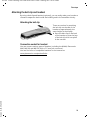
Connection socket for headset
Version 8, 03.09.2008
You can connect various types of headset, including the HAMA, Plantronics
M40, MX100 and MX150 (with a 2.5 mm jack connector).
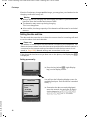
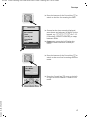
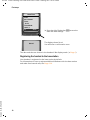
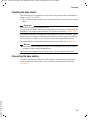
You can find a list of compatible headsets on the Internet at:
www.plantronics.com/productfinder
33
S675IP / USA-CAN eng / A31008-xxxx-xxxx-x-xxxx / starting.fm / 14.05.2009
First steps
What would you like to do next?
Now you have successfully started your phone, you will probably want to adapt
it to your personal requirements. Use the following guide to quickly locate the
most important subjects.
If you are unfamiliar with menu-driven devices such as other Gigaset telephones first read the section "Operating the handset" £ Page 35.
Information on ...
Making calls via VoIP or the fixed line network
Setting the ringer melody and volume
Setting the handset volume
Entering your local area code/extra codes
Setting Eco Mode
Operating the telephone on a PABX
Registering existing handsets to a base station
Transferring directory entries from existing Gigaset
handsets to the new handset(s)
Entering additional VoIP accounts
g
g
g
g
g
g
g
g
... is located here.
g
Page 46
Page 128
Page 127
Page 136
Page 110
Page 142
Page 114
Page 74
Page 155
Version 8, 03.09.2008
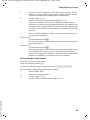
If you have any questions about using your phone, please read the
troubleshooting tips in the section "Questions and answers" (£ Page 191) or
contact our Customer Care team (£ Page 191).
34
S675IP / USA-CAN eng / A31008-xxxx-xxxx-x-xxxx / starting.fm / 14.05.2009
Operating the handset
Operating the handset
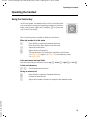
Using the Control key
In this user guide, the side/position of the Control key that
you must press in the given operating situation is shown in
black (top, bottom, right, left). Example: t for "press the
top of the Control key".
The Control key has a number of different functions:
When the handset is in idle status
s
v
u
t
Press briefly to open the handset directory.
Press and hold: open Gigaset.net directory.
Open the main menu.
Open the list of handsets.
Call up the menu for setting the handset's call volume
(£ Page 127), ringers (£ Page 128) and advisory tones
(£ Page 130).
In the main menu and input fields
Use the Control key to move the cursor up t, down s, right v or left u.
In lists and submenus
t/s
Scroll up/down line by line.
During an external call
Version 8, 03.09.2008
s
u
t
Press briefly to open the handset directory.
Initiate an internal call.
Adjust the handset volume for earpiece and speaker mode.
35
S675IP / USA-CAN eng / A31008-xxxx-xxxx-x-xxxx / starting.fm / 14.05.2009
Operating the handset
Using the Display keys
The function of the Display keys changes depending on the particular operating situation. Each of the current functions is shown in the bottom display line.
Example:
Calendar
EMail
Current Display key functions
Display keys
You can define your own Display key functions when the handset is in idle status (£ Page 125). If a Display key has not yet been given a function, §§?§§ is displayed above the key.
Important Display key functions include:
§Options§
Open a situation-dependent menu (context menu).
§§§§§§§§OK§§§§§§§§ Confirm selection.
§§§Save§§§
Store entry.
W
Delete key: deletes one character at a time from right to left.
Î
Go back one menu level or cancel operation.
Ó
Copy number to directory.
Ÿ
Forward external call to answering machine.
Using the keys on the keypad
c / Q / *, etc.
Press the matching key on the handset.
~
Enter digits or letters.
Correcting text entry errors
Version 8, 03.09.2008
You can correct incorrect characters in input fields by navigating to the incorrect entry using the Control key. You can then:
u Use the Display key X to delete the character to the left of the cursor.
u Insert new characters to the left of the cursor.
u Overwrite the highlighted flashing character, e.g. when entering date and
time or IP addresses.
36
S675IP / USA-CAN eng / A31008-xxxx-xxxx-x-xxxx / starting.fm / 14.05.2009
Operating the handset
Using the menus
Your telephone's functions are accessed using a menu that has a number of
levels.
Main menu (first menu level)
¤ When the handset is in idle status, press the Control key v to open the
main menu.
The main menu functions are shown on the display
with icons. The icon for the selected function is
shown enlarged, and the name of the associated
function appears in the display's heading.
Access a function, i.e. open the corresponding submenu (next menu level):
¤ Use the q/r Control key to navigate to the
function and press the §OK§ Display key.
To return to idle status, briefly press the Display key
Î or the End Call key a.
Settings
î
ê
ì
ç
Ì
Ï
Ý
í
Ð
OK
Submenus
The functions in the submenus are displayed as lists.
To access a function:
¤ Use the Control key q to scroll to the desired
function. The function is selected if it is marked
with a bar and shown in bold. Press the Display key
§OK§ to confirm your selection and open the next
menu level if necessary.
Settings
Date/Time
Audio Settings
Display
Handset
Base
Voice Mail
Ý
OK
This operating step is illustrated below:
Audio Settings
Select and press §OK§.
Version 8, 03.09.2008
To return to the previous menu level or cancel the operation, briefly press the
Display key Î or the End Call key a.
37
S675IP / USA-CAN eng / A31008-xxxx-xxxx-x-xxxx / starting.fm / 14.05.2009
Operating the handset
Reverting to idle status
You can revert to idle status from anywhere in the menu as follows:
¤ Press and hold the End Call key a.
Or:
¤ Do not press any key: after 2 minutes the display will automatically revert
to idle status.
Changes that you have not confirmed or saved by pressing §OK§, §Yes§, §Save§, §Send§
or Save Entry §OK§ are lost.
An example of the display in idle status is shown on Page 1.
Activating/deactivating the handset
a
With the phone in idle status, press and hold the End Call key to
deactivate the handset. You will hear the confirmation tone.
Press and hold the End Call key again to reactivate the handset.
Activating/deactivating the keypad lock
The keypad lock prevents any inadvertent use of the phone.
#
Press and hold the Pound key (#). You will hear the confirmation
tone.
When the keypad lock is activated, you will see the icon Ø on the display.
The keypad lock is deactivated automatically during an incoming call, and is
then reactivated.
Please note
If you inadvertently press a key while the keypad lock is activated, an advisory
message appears on the display. To deactivate the keypad lock, press and hold
the Pound key (#).
Using this guide
Version 8, 03.09.2008
The operating steps are shown in abbreviated form in the user guide.
Example of "Activating/deactivating auto answer":
The display
v ¢ Ð ¢ Handset ¢ Auto Answer ( ‰ = on)
38
S675IP / USA-CAN eng / A31008-xxxx-xxxx-x-xxxx / starting.fm / 14.05.2009
Operating the handset
means:
¤ When the handset is in idle status, press
the right of the Control key v to open the
main menu.
î
ê
ì
ç
Ì
í
Ï
Ð
Ý
OK
¤ Use the Control key to select the icon Ð.
For example, press once on the left of the
Control key u. Settings is shown in the
heading.
Ï
Ð
¤ To open the submenu, press the right
Display key §OK§.
Settings
¤ Press the bottom of the Control key s
Date/Time
Audio Settings
repeatedly until the menu item Handset is
selected.
Display
Handset
Base
Voice Mail
Ý
OK
¤ To open the submenu, press the right
Version 8, 03.09.2008
Display key §OK§.
39
S675IP / USA-CAN eng / A31008-xxxx-xxxx-x-xxxx / starting.fm / 14.05.2009
Operating the handset
¤ Press the bottom of the Control key s
Handset
Language
‰
Auto Answer
Register H/Set
Select Base
Area Codes
Reset Handset
Ý
OK
¤
repeatedly until the menu item Auto
Answer is selected.
The icon after Auto Answer tells you
whether auto answer is currently activated
or deactivated:
‰ = on
= off
To change the setting, press the right
Display key §OK§.
¤ Press and hold the End Call key a to
Version 8, 03.09.2008
return the handset to idle status.
40
S675IP / USA-CAN eng / A31008-xxxx-xxxx-x-xxxx / menuetree.fm / 14.05.2009
Menu trees
Menu trees
Phone menu
Open the main menu on your phone by clicking on the right of the Control key when the
handset is in idle status: v.
There are two ways to select a function:
Using number combinations ("shortcut")
¤ Enter the number combination that is in front of the function in the menu tree.
Example: v N 4 for "Set handset language".
Scrolling through the menus
¤ In the main menu: using the Control key q r (press top/bottom or left/right), navigate to the function and press §OK§.
¤ In the submenus: using the Control key q (press top/bottom), scroll to the function
and press §OK§.
î Messaging
1-2 E-mail
1-3 Messenger
£ Page 78
1-3-1 Buddies
1-3-2 User Status
£ Page 85
1-3-2-1 Change Status
1-3-2-2 Info
1-3-3 Messages
ê Info Center
Ì Calls List
í Add. Features
4-3 Room Monitor
4-4 Data Transfer
4-6 Missed Appts.
ì Alarm Clock
ç Calendar
Ï Resource Dir.
Version 8, 03.09.2008
7-1 Screensavers
7-2 Caller Pictures
7-3 Sounds
£ Page 92
£ Page 68
£ Page 119
4-4-3 Directory
£ Page 112
£ Page 87
£ Page 85
£ Page 85
£ Page 74
£ Page 113
£ Page 111
£ Page 131
£ Page 131
£ Page 131
41
S675IP / USA-CAN eng / A31008-xxxx-xxxx-x-xxxx / menuetree.fm / 14.05.2009
Menu trees
Ð Settings
8-1 Date/Time
8-2 Audio Settings
£ Page 16
8-2-1 Handset Volume
8-2-2 Ringer Settings
8-2-2-1 Ext. Calls
£ Page 128
8-2-2-2 Internal Calls
8-2-2-3 Appointments
8-2-2-4 All
8-2-3 Advisory Tones
8-3 Display
8-3-1 Screen Saver
8-3-2 Color Scheme
8-3-3 Contrast
8-3-4 Backlight
8-4 Handset
8-4-1 Language
8-4-2 Auto Answer
8-4-3 Register H/Set
8-4-4 Select Base
8-4-5 Area Codes
8-4-6 Reset Handset
8-5 Base
8-5-1 Calls List Type
£ Page 130
£ Page 123
£ Page 123
£ Page 123
£ Page 124
£ Page 122
£ Page 127
£ Page 114
£ Page 116
£ Page 132
£ Page 133
8-5-1-1 Missed Calls
£ Page 68
8-5-1-2 All Calls
8-5-2 Music on hold
8-5-3 System PIN
8-5-4 Base Reset
8-5-5 Add. Features
£ Page 135
£ Page 133
£ Page 134
8-5-5-4 Access Code
8-5-5-5 Eco Mode
8-5-6 Local Network
Version 8, 03.09.2008
8-5-8 Software Update
42
£ Page 140
£ Page 137
£ Page 143
£ Page 110
S675IP / USA-CAN eng / A31008-xxxx-xxxx-x-xxxx / menuetree.fm / 14.05.2009
Menu trees
8-6 Voice Mail
8-6-1 Local AM
8-6-1-1 Ans Machine
8-6-1-2 Call Screening
8-6-1-3 Announcements
8-6-1-4 Message
Length
8-6-1-5 Record Quality
8-6-1-6 Ring Delay
8-6-2 Network AM(s)
8-6-2-1 Net AM
Fixed Ln.
£ Page 98
£ Page 103
£ Page 99
£ Page 104
£ Page 104
£ Page 104
£ Page 107
8-6-2-2 Net AM IP1
:
(dependent on the number of
configured VoIP phone numbers and
receive numbers on the handset)
8-6-2-7 Net AM IP6
8-6-3 Set Key 1
Local AM
£ Page 105
Net AM Fixed Ln.
Net AM IP1
:
(dependent on the number of
configured VoIP phone numbers and
receive numbers on the handset)
Version 8, 03.09.2008
Net AM IP6
43
S675IP / USA-CAN eng / A31008-xxxx-xxxx-x-xxxx / menuetree.fm / 14.05.2009
Menu trees
8-7 Telephony
8-7-8 Sel. Services
8-7-8-1 VoIP
8-7-8-2 Fixed Line
8-7-8-4 Always anon.
8-7-8-5 Next Call
8-7-1 Default Line
8-7-1-1 VoIP
£ Page 62
£ Page 61
£ Page 61
£ Page 135
8-7-1-2 Fixed Line
8-7-2 Connection Assist.
8-7-4 Area Code
8-7-5 Extra Codes
8-7-6 Fixed Line
£ Page 138
£ Page 136
£ Page 136
8-7-6-1 Dialing Mode
8-7-6-2 Flash
8-7-7 VoIP
Enter Show Stat. on
system HS
PIN
Select Provider
Version 8, 03.09.2008
Provider Registr.
44
£ Page 142
£ Page 142
£ Page 141
£ Page 138
£ Page 139
S675IP / USA-CAN eng / A31008-xxxx-xxxx-x-xxxx / menuetree.fm / 14.05.2009
Menu trees
Web configurator menu
Home
Settings
£ Page 145
IP Configuration
Telephony
£ Page 152
Connections
Audio
Number Assignment
Call Forwarding
Dialling Plans
Network Mailbox
Advanced Settings
Messaging
Messenger
E-Mail
Services
Handsets
Miscellaneous
Version 8, 03.09.2008
Status
Device
£ Page 182
£ Page 183 and Page 184
£ Page 187 to Page 186
£ Page 190
£ Page 155
£ Page 164
£ Page 169
£ Page 171
£ Page 173
£ Page 175
£ Page 176
£ Page 180
£ Page 182
45
S675IP / USA-CAN eng / A31008-xxxx-xxxx-x-xxxx / telephony.fm / 14.05.2009
Making calls with VoIP and the fixed line network
Making calls with VoIP and the fixed line network
Making an external call
External calls are calls made via the public telephone network (fixed line network) or via the Internet (VoIP). You decide which connection you want to use
for a specific call when you dial the number. You have the following options:
u Select the connection type with the Talk key c (briefly press/press and
hold c), £ Page 46.
u Select the connection type via the Display keys by assigning VoIP and/or the
fixed line network to your Display key, £ Page 47
u Select a special connection via your line suffix, £ Page 48
Please note
u You can conduct three separate external calls via your base station (using
different handsets): two calls via VoIP and one via the fixed line network.
u During an external call, you can see from the color scheme of the display
u
u
u
u
whether you are connected to the other party via VoIP or the fixed line network. When you make or receive a call on the fixed line network, the display
color changes to orange.
You can define dialing plans for certain numbers or area codes by determining the connection and therefore the billing method to be used (cost control
£ Page 173) when these numbers are dialed.
Dialing with the Directory (£ Page 71), Quick dial (£ Page 125) or Last
Number Redial list (£ Page 66) saves repeated keying of phone numbers.
You can modify or add to these numbers on a call by call basis.
If you use VoIP to make a call to the fixed line network, you may also have
to dial your local area code for local calls (depending on the VoIP provider).
You can avoid having to dial your own area code by entering it into the configuration ( £ £ Page 136, Page 172) and activating the option Predial
area code for local calls through VoIP (£ Page 172).
Depending on the exchange, you may not have to dial your own area code
when making local calls via the fixed line network.
Use the Talk key to select the type of connection and make the call
Version 8, 03.09.2008
By briefly pressing or pressing and holding the Talk key c, you can determine
the type of connection for the call you want to make (fixed line network or
VoIP).
Prerequisite: You enter the number without a line suffix (£ Page 48) and
have not defined any dialing plans for this number.
~c
Enter number (without suffix) and briefly press/press and hold
the Talk key.
46
S675IP / USA-CAN eng / A31008-xxxx-xxxx-x-xxxx / telephony.fm / 14.05.2009
Making calls with VoIP and the fixed line network
A default connection is established on your phone (fixed line network or VoIP
£ Page 135/Page 168).
¤ Briefly press the Talk key c to make a call via this default connection.
¤ Press and hold the Talk key c to make the call via the other connection
type.
If you have assigned a number of VoIP numbers to your phone, you can define
which VoIP number (VoIP account) is used for external calls from each specific
handset (handset send number, £ Page 169).
Please note
u If you are using a GAP-compatible handset other than the Gigaset handsets
A58H, S67H, S68H, SL37H, S45 and C45, every call is made via the standard
connection, even if you press and hold the Talk key.
u If you have activated the option Automatic Fallback to Fixed Line with the Web
configurator (£ Page 169):
If the attempt to establish a connection fails, an attempt is made automatically to establish the connection via the fixed line network.
Selecting and dialing a connection type via your Display keys
Prerequisite: §Phone§ and/or §IP§ are assigned to the Display keys on your handset
(£ Page 125).
§Phone§ / §IP§
Press the Display key to select the connection type.
~s
Enter number or select from directory.
c / d Press the Talk or Speaker key.
The number is always dialed via the selected connection type.
Exception:
If you have activated the option "Automatic Fallback to Fixed Line" (Web configurator, £ Page 169) and the attempt to establish a connection via VoIP fails, an
attempt is made automatically to establish the connection via the fixed line
network.
Version 8, 03.09.2008
Please note
If you have pressed the Display key §IP§ before dialing and ...
u Dialed the number with suffix #1 to #6, your call is made via the VoIP
account assigned to the suffix. The number will not be dialed if the suffix is
invalid (e.g. no VoIP connection assigned).
u Dialed the number without a suffix or with the suffix #0, your call is made
via the handset's VoIP send number.
Do not enter a suffix if you have pressed the Display key §Phone§ prior to dialing.
Otherwise the suffix is dialed together with the number via the fixed line network. This may cause errors!
47
S675IP / USA-CAN eng / A31008-xxxx-xxxx-x-xxxx / telephony.fm / 14.05.2009
Making calls with VoIP and the fixed line network
Select and dial a connection via your line suffix
You can configure up to six VoIP numbers on your phone in addition to the fixed
line network number and the Gigaset.net number. A (line) suffix is assigned to
each number (line) of your phone:
u The fixed line network number has the suffix #0
u VoIP numbers have the suffixes #1 to #6 (£ Page 156)
u And the Gigaset.net number has the suffix #9
When dialing, you can use this line suffix to specify the connection via which
you would like to call or be charged.
~
Enter the number of the party you wish to call.
~
Add the suffix of the connection (your phone number) from which
the call is to be made and charged to.
c
Press the Talk key.
The connection is always made via the line with the assigned suffix, regardless
of whether you press the Talk key c briefly or press and hold.
Example
If you enter the number 1234567890#1 and press the Talk key c, the
number 1234567890 is dialed via the first VoIP connection in the configuration.
Please note
u If you specify a suffix for which no VoIP connection is configured in your
base station, the VoIP status code 0x33 is displayed. The number will not be
dialed.
u If you have activated the option Automatic Fallback to Fixed Line with the Web
configurator (£ Page 169):
If the attempt to establish a connection fails, an attempt is made automatically to establish the connection via the fixed line network.
Entering an IP address (provider-dependent)
You can also dial an IP address instead of a phone number using VoIP.
¤ Press the Asterisk key * to separate the sections of the IP address
(e.g. 149*246*122*28).
¤ If necessary press the Pound # key to attach the SIP port number of the
person you are calling to the IP address (e.g. 149*246*122*28#5060).
You cannot dial IP addresses using a line suffix.
If your VoIP provider does not support the choice of IP addresses, each part of
the address is interpreted as a normal phone number.
Version 8, 03.09.2008
Canceling the dialing operation
You can cancel the dialing operation with the End Call key a.
48
S675IP / USA-CAN eng / A31008-xxxx-xxxx-x-xxxx / telephony.fm / 14.05.2009
Making calls with VoIP and the fixed line network
Dialing emergency numbers – defining dialing plans
You can use the Web configurator to block certain numbers or to define which
of your numbers (fixed line network, VoIP) should be used to call specific numbers (Dialling Plans, £ Page 173).
If you enter a number that has a defined dialing plan, the call is made via the
line defined in the dialing plan – regardless of whether the Talk key is pressed
briefly or pressed and held. Any automatic area code will not be prefixed to the
number.
Emergency numbers
Dialing plans for emergency numbers (e.g. the local emergency service
number) are preset for certain countries. Emergency calls are then always
made via the fixed line network.
You cannot delete or deactivate these dialing plans. However, you can change
the connection through which each emergency number should be called (e.g.
if the phone is not connected to the fixed line network). You must make sure
that the VoIP provider for the selected connection supports emergency calls. If
the VoIP connection is deleted from the configuration, the emergency call can
no longer be made.
If your phone does not have default dialing plans for emergency calls, define
the rules yourself (£ Page 173). Assign them to a connection that you know
supports emergency calls. Calls to emergency numbers are always supported
by fixed line networks.
Please note
u If no rules are defined for emergency numbers and you have programmed
an automatic local area code (£ Page 172), the code is prefixed to emergency numbers as soon as they are dialed via a VoIP connection.
u Emergency numbers cannot be dialed if the keypad lock is activated. Before
dialing, press and hold the Pound key #, to release the keypad lock.
Ending a call
Version 8, 03.09.2008
a
Press the End Call key.
49
S675IP / USA-CAN eng / A31008-xxxx-xxxx-x-xxxx / telephony.fm / 14.05.2009
Making calls with VoIP and the fixed line network
Accepting a call
The handset indicates an incoming call in three ways: by ringing, by a display
on the screen and by the flashing Speaker key d.
Please note
Only calls to receive numbers assigned to your handset are signaled
(£ Page 169). The following conditions apply in particular:
u If a phone number is assigned to neither a handset nor the answering
machine as a receive number, calls to this number are signaled on all handsets.
u If the phone number is not assigned to a handset but is assigned to the
answering machine, the call will not be signaled on any handset and the
answering machine accepts the call.
u If you have not assigned receive numbers to any of the registered handsets
or the answering machine, calls to all connections are signaled on all handsets.
u Calls to your IP address are signaled on all handsets.
You can accept the call by:
¤ Pressing the Talk key c.
¤ Pressing the Speaker key d.
¤ Pressing the Display key Ÿ to forward the call to the answering
machine (£ Page 102).
If the handset is in the charging cradle and the Auto Answer function is activated
(£ Page 127), the handset will take a call automatically when you lift it out of
the cradle.
If the ringer is intrusive, press the Display key §Silence§. You can accept the call as
long as it is displayed on the screen.
Please note
You can reject VoIP calls by pressing the End Call key a. The caller receives
an appropriate message (provider-dependent).
In the case of fixed line network calls, pressing the End Call key deactivates the
ringer (like §Silence§).
Version 8, 03.09.2008
Caller ID
When you receive a call from the Internet, the caller's number or the name they
have specified is displayed on the screen.
When you receive a call from the fixed line network, the caller's number and/or
name is displayed on the screen if you have requested CID from your network
provider.
If the phone number is identified and the caller's number is saved in your handset's local directory, the name is displayed from the directory. A CID image
assigned to the name will also appear in the display.
50
S675IP / USA-CAN eng / A31008-xxxx-xxxx-x-xxxx / telephony.fm / 14.05.2009
Making calls with VoIP and the fixed line network
Call display
You can use the display to determine whether the call is for your fixed line network number or one of your VoIP numbers.
Calls to your fixed line number
Å
1234567890
for Fxd.Ln.
×
1
2
3
Silence
£
1 Ringer icon or the clip image assigned to the caller ( Page 72)
2 Number or name of the caller
3 Display of the receive number: the name that you have assigned to your fixed line network number is displayed ( Page 163).
£
Calls to your VoIP number
Å
1
1234567890
IP: 1234567890
for Anna
×
2
3
Silence
£
1 Ringer icon or the clip image assigned to the caller ( Page 72)
2 Number or name of the caller
3 Receive number: indicates which of your VoIP phone numbers the caller has dialed.
You assign the name when you enter the VoIP numbers in the phone ( Page 157).
For calls from Gigaset.net, for Gigaset.net is displayed.
£
Display when Caller ID is suppressed
Version 8, 03.09.2008
The number or name of the caller is not displayed if the caller has suppressed
Caller ID:
u VoIP: The caller has activated the "anonymous calling" function.
u Fixed line network: The caller has activated the "anonymous calling" function, or has suppressed Caller ID from his fixed line network provider.
51
S675IP / USA-CAN eng / A31008-xxxx-xxxx-x-xxxx / telephony.fm / 14.05.2009
Making calls with VoIP and the fixed line network
The following is displayed in place of the number:
u With a call to one of your VoIP phone numbers, the display is providerdependent.
Å
IP:Unavailable
Anonymous
or
for IP1
for IP1
×
Silence
u For a call to your fixed line network numbers:
Å
– If no number is transmitted:
External
for Fxd.Ln.
×
Silence
Å
– If the caller has blocked Caller ID:
Withheld
for Fxd.Ln.
×
Silence
Å
– If the caller has not arranged Caller ID:
Version 8, 03.09.2008
Unavailable
for Fxd.Ln.
×
52
External
Silence
×
Silence
S675IP / USA-CAN eng / A31008-xxxx-xxxx-x-xxxx / telephony.fm / 14.05.2009
Making calls with VoIP and the fixed line network
Screen display with CNIP (fixed line network)
Prerequisite: Call is made from a fixed line network connection to your fixed
line network number.
If you have CNIP, then the name (town/city) that is registered with your network provider for the caller's number will also be displayed. If the caller's
number is stored in your directory then the directory entry is shown.
The display shows:
u External if no number is transmitted.
u Withheld, if the caller has suppressed Caller ID.
u Unavailable, if the caller has not arranged Caller ID.
VoIP: Displaying the called party's phone number (COLP)
Prerequisites:
u Your VoIP provider supports COLP (Connected Line Identification Presenta-
tion). You may have to ask your provider to activate COLP (contact your VoIP
provider for more information).
u The called party has not activated COLR (Connected Line Identification
Restriction).
For outgoing VoIP calls, the phone number of the connection on which the call
is received is displayed on the handset.
The displayed number may differ from the number you have dialed. Examples:
u The called party has activated call forwarding.
u The call is answered by another connection within a PABX system.
If there is an entry in the directory for this phone number, the corresponding
name is displayed.
Please note
u The number of the connection you have reached (or the assigned name)
will also be displayed instead of the called number during call swap, conference calls and consultation calls.
u When the phone number is copied to the directory (§Options§ £ Copy to directory) and the Last Number Redial list, the dialed number (not the displayed
number) is copied.
Using speaker mode
Version 8, 03.09.2008
In speaker mode, instead of holding the handset to your ear you can put it
down, for example on the table in front of you. This allows others to participate
in the call.
53
S675IP / USA-CAN eng / A31008-xxxx-xxxx-x-xxxx / telephony.fm / 14.05.2009
Making calls with VoIP and the fixed line network
Activating/deactivating speaker mode
Activating while dialing
~d
¤
Enter number and briefly press/press and hold the Speaker key to
select the connection type (£ Page 46).
Inform your caller before you use the speaker function so that they know
someone else is listening.
Switching between earpiece and speaker mode
¤ Press the Speaker key d to activate or deactivate the speaker during a call
and when listening to the answering machine.
If you wish to place the handset in the charging cradle during a call:
¤ Press and hold the Speaker key d while placing the handset in the charging cradle.
¤ If the Speaker key d does not light up, press the key again.
For instructions on adjusting the handset volume, see £ Page 127.
Deactivating your handset's microphone
You can deactivate your handset's microphone during an external call (including during a conference call or when call swapping). The other party can no
longer hear you, but you can still hear them.
Deactivating the microphone
§Mute§
Press the Display key to deactivate the handset.
Your handset's microphone is deactivated. The display shows Microphone is off.
Reactivating the microphone
Version 8, 03.09.2008
§On§
Press the Display key to reactivate the microphone.
Please note
Under the following circumstances, the microphone is automatically reactivated:
u If, during an external call (you have deactivated the microphone), you
establish a second connection, either by accepting a waiting call or by successfully connecting to an external/internal consultation call, the microphone is activated. If you go back to the first party, the microphone remains
activated.
(If you reject a waiting call or are unable to connect to a consultation call,
the microphone remains deactivated.)
u If you have deactivated the microphone during call swapping, it is reactivated for both connections as soon as you swap to the other party.
u If you have deactivated the microphone during a conference call, the microphone is reactivated when you end the conference call by pressing §Options§
¢ End Conference (call swap).
54
S675IP / USA-CAN eng / A31008-xxxx-xxxx-x-xxxx / telephony.fm / 14.05.2009
VoIP telephony via Gigaset.net
Muting the handset
You can mute your handset during an external call. The other party can no
longer hear you, Likewise, you can no longer hear the other party. The other
party will hear music on hold, if activated (£ Page 135).
Muting the handset
u
Press left on the Control key to mute the handset.
Canceling muting
” / a Press the Display or End Call key to cancel the muting.
VoIP telephony via Gigaset.net
You can use Gigaset.net to make free phone calls via the Internet directly to
other Gigaset.net users, without having to set up an account with a VoIP provider or make any further settings. You simply have to connect your phone to
the power supply and the Internet connection and, if necessary, enter yourself
in the Gigaset.net online directory under a name of your choice (£ Page 56/
Page 59).
Gigaset.net is a VoIP service provided by Gigaset Communications GmbH* to
which all users of a Gigaset VoIP device can subscribe.
You can call other subscribers to Gigaset.net free of charge, i.e. there are no
telephone charges other than the costs for your Internet connection. Connections to/from other networks are not possible.
Please note
Gigaset.net supports broadband telephony: Gigaset.net calls that you make
from your Gigaset S675 IP (base station and handset) with another broadband-capable terminal have excellent sound quality.
Every Gigaset VoIP device is assigned a Gigaset.net phone number by default
(£ Page 198).
All registered subscribers are included in the Gigaset.net directory, which you
are able to access.
An echo service is available on the phone number 12341#9 (English),
12344#9 (French) or 12346#9 (Spanish) for you to check your VoIP connection.
After an announcement, the echo service sends back the voice data you have
received immediately in the form of an echo.
Version 8, 03.09.2008
Exclusion of liability
Gigaset.net is a voluntary service provided by Gigaset Communications GmbH
with no liability for or guarantee of network availability. This service can be terminated at any time with a notice period of three months.
* Gigaset Communications GmbH is a trademark licensee of Siemens AG
55
S675IP / USA-CAN eng / A31008-xxxx-xxxx-x-xxxx / telephony.fm / 14.05.2009
VoIP telephony via Gigaset.net
Please note
If you do not use your Gigaset.net connection for six weeks, it is automatically
deactivated. You cannot be reached for calls from Gigaset.net.
The connection is reactivated:
u As soon as you start a search in the Gigaset.net directory or
u Make a call via Gigaset.net (dial a number with #9 at the end) or
u Activate the connection via the Web configurator (£ Page 164).
Opening the Gigaset.net directory
Your handset is in idle status.
s
Press and hold.
Or:
¤ Open the directory with the s button.
¤ Select Gigaset.net from the directory and press the Talk key c. A connection to the Gigaset.net directory is established.
Please note
u The directory entry Gigaset.net is transferred to the handset when it is regis-
tered with the base station, if the handset can send and receive directory
entries.
u Calls to the Gigaset.net directory are always free of charge.
u You can also open the Gigaset.net directory by dialing 1188#9 (phone
number of the Gigaset.net directory) and pressing the Talk key c.
If a connection cannot be made to the Gigaset.net directory, a corresponding
message is sent and the handset will go into idle status.
After opening the Gigaset.net directory for the first time
When opening the Gigaset.net directory for the first time you can use the
Gigaset.net assistant to create an entry in the Gigaset.net directory for your
phone.
The following appears on the handset display:
Gigaset.net
Start assistant
for Gigaset.net?
Version 8, 03.09.2008
No
Yes
¤ Press the Display key §Yes§ to start the assistant.
56
S675IP / USA-CAN eng / A31008-xxxx-xxxx-x-xxxx / telephony.fm / 14.05.2009
VoIP telephony via Gigaset.net
Please note
If you press §No§ the assistant is canceled and will no longer be started. You
must then create your entry as described on Page 59.
Gigaset.net
Your Gigaset.net
nickname:
Ý
OK
¤ Using the keypad, enter the name that you would like to be listed under in
¤
the Gigaset.net directory. The name may contain a maximum of 25 characters.
Press §OK§ on the right Display key.
If there is already an entry under this name, you will receive a message to this
effect and you are asked to enter a name again.
If an entry was created successfully in the Gigaset.net directory, the message
"Your user name has been added to Gigaset.net." is displayed.
You have not been able to enter a name
If the attempt to create the entry fails you can create it via the Gigaset.net directory (£ Page 59).
Searching for subscribers in the Gigaset.net directory
Once the connection to the Gigaset.net directory has been established, you are
asked to enter a name that you want to search for.
Nickname search:
Enter the name or part of a name (maximum 25 characters).
§Options§
Press the Display key.
Start search Select and press §OK§.
Version 8, 03.09.2008
If the search has been successful, a Hit list is displayed of all the names that
begin with the specified character string.
57
S675IP / USA-CAN eng / A31008-xxxx-xxxx-x-xxxx / telephony.fm / 14.05.2009
VoIP telephony via Gigaset.net
Example:
Gigaset.net 3/50
Saal, Franz
Sailor, Ben
Sand, Anna
Sand, Marie Elisabe...
Sand, Otto
Sang, Joseph
View
Options
1
2
1. 3/50: Entry number/number of hits
2. Name of an entry, abbreviated if necessary
You can scroll through the Hit list with q.
If it has not been possible to find a matching entry, a corresponding message
is displayed. You have the following options:
¤ Press the Display key §New§ to start a new search.
Or
¤ Press the Display key §Change§ to change the search criteria. The previously
entered name is copied and can be edited.
If there are too many matching entries in the Gigaset.net directory, the message Too many entries found is displayed instead of a Hit list.
¤ Press the Display key §Detail§ to start a refined search. The previously entered
name is copied and can be edited/expanded.
Calling participants
qc
Select the subscriber from the Hit list and press the Talk key.
Viewing the subscriber's number
q
Select the subscriber from the Hit list.
§View§
Press the Display key.
The display shows the Gigaset.net number and the subscriber's name.
Depending on the length of the information, the name may cross several lines.
Please note
u Connections to Gigaset.net are always established via the Internet regard-
Version 8, 03.09.2008
less of which default connection is set on your phone. Pressing and holding
c or pressing it briefly have no effect.
u You can open the Gigaset.net directory and establish connections, even if
you have not entered yourself in the Gigaset.net directory.
58
S675IP / USA-CAN eng / A31008-xxxx-xxxx-x-xxxx / telephony.fm / 14.05.2009
VoIP telephony via Gigaset.net
Using other functions
Prerequisite: The Hit list is displayed.
q (Select entry) ¢ §Options§
The following functions can be selected with q:
Copy to directory
Copy the number to the handset directory. The number and name (abbreviated if necessary, maximum 16 characters) are copied to the directory.
¤ Edit and save entry where appropriate (£ Page 72).
The Hit list is displayed again.
New search
Start a search with a new name (£ Page 57).
Own details
See "Managing your own entry" on Page 59.
Please note
If you select a Gigaset.net number from the local directory, the connection is
automatically established via Gigaset.net (Internet).
Managing your own entry
You have the following options:
u Edit the name of your entry in the Gigaset.net directory
u Delete your entry from the Gigaset.net directory
u If you did not specify a name when you first opened the Gigaset.net directory (£ Page 56) or have deleted your name:
determine a name and enter it in the directory.
Viewing own entry
You are connected to the Gigaset.net directory:
¤ Select §Options§ ¢ Own details and press §OK§.
Your Gigaset.net number and, where applicable, your currently entered name
are displayed.
Entering/editing a name
Press the Display key.
Edit name or enter new name (maximum 25 characters) and
press §OK§.
You can delete the name with X.
If there is no existing entry with this name in the Gigaset.net directory, the
name is saved. A message to this effect is displayed. The handset switches to
idle status.
If there is an existing entry with this name, or the entered name contains
invalid characters, you are requested to enter a different name.
§Edit§
Version 8, 03.09.2008
~
59
S675IP / USA-CAN eng / A31008-xxxx-xxxx-x-xxxx / telephony.fm / 14.05.2009
VoIP telephony via Gigaset.net
Please note
If you delete the name, your entry is deleted from the directory. You are no
longer "visible" to other Gigaset.net subscribers. However, you can still be
reached via your Gigaset.net number. For instructions on displaying the
number, see Page 198.
Calling a Gigaset.net subscriber
Version 8, 03.09.2008
You can call a Gigaset.net subscriber directly via the Gigaset.net directory (see
above) or via their Gigaset.net number :
~ /s
Enter the Gigaset.net number (including the #9) or select from the
handset directory.
c
Press the Talk key.
Every number ending with #9 is dialed via Gigaset.net.
60
S675IP / USA-CAN eng / A31008-xxxx-xxxx-x-xxxx / netservices_SAG.fm / 14.05.2009
Making calls via network services
Making calls via network services
Network services are functions made available by your fixed line network or
VoIP provider.
Blocking your caller ID – Anonymous calling
Phone number identification can be blocked. Your phone number will not be
displayed when making outgoing calls. You are calling anonymously.
Prerequisites:
u For anonymous calls via your fixed line network connection you need to
have requested the relevant service (feature) from your fixed line network
provider.
u Anonymous calls are only possible via VoIP connections through providers
that support the "anonymous calling" function. You may have to ask your
VoIP provider to activate this function.
Activating/deactivating "anonymous calling" for all calls
Withholding caller ID can be activated/deactivated permanently for all of your
phone's connections (fixed line network and VoIP).
When this function is activated, the phone number is withheld both for fixed
line network calls and for calls via a VoIP connection. Withholding caller ID is
activated for all registered handsets.
v ¢ Ð ¢ Telephony ¢ Sel. Services
Always anon.
Select and press §OK§ ( ‰ = on).
Activating/deactivating "anonymous calling" for the next call
Version 8, 03.09.2008
You can change the setting for withholding caller ID for the next call.
v ¢ Ð ¢ Telephony ¢ Sel. Services ¢ Next Call
Anonymous:
Select Yes / No to activate/deactivate withholding caller ID and
press §Dial§.
~
If necessary, enter the phone number with the line suffix.
§Send§
Press the Display key. The phone number is dialed. If you have not
specified a line suffix, the number is dialed via the default connection.
61
S675IP / USA-CAN eng / A31008-xxxx-xxxx-x-xxxx / netservices_SAG.fm / 14.05.2009
Making calls via network services
Further network services in the fixed line network
The following network services can only be used for making calls via the fixed
line network. You will need to request them from your fixed line network provider.
¤ Contact your network provider for further assistance.
Functions during a call
Initiating ringback
You will hear the busy tone.
§Options§ ¢ Ringback
a
Press the End Call key.
Consultation calls
During a call:
§Options§ ¢ External Call
~
Enter a number or copy it from the directory and press §OK§.
The number is dialed via the fixed line network connection.
Please note
After a few seconds, the number selected for a consultation call is saved in the
Last Number Redial list.
u Conference call:
¤ Talk to both participants: §Options§ ¢ Conference.
¤ End conference call (call swap): §Options§ ¢ End Conference
¤ End call with both participants: press the End Call key a.
Further network services for VoIP
You can use the following network services to make calls via the VoIP connection.
Settings for all calls
Version 8, 03.09.2008
General call forwarding
Prerequisite: The VoIP provider supports call forwarding.
v ¢ Ð ¢ Telephony ¢ Sel. Services ¢ VoIP ¢ Call Diversion
The display shows a list of configured and activated VoIP phone numbers and
the Gigaset.net number of your telephone. Numbers for which call forwarding
is activated are marked with ‰ .
¤ Select the phone number for which you want to activate or deactivate call
forwarding and press §OK§.
¤ Change multiple line input:
62
S675IP / USA-CAN eng / A31008-xxxx-xxxx-x-xxxx / netservices_SAG.fm / 14.05.2009
Making calls via network services
When
Select All Calls / No Answer / When Busy.
All Calls: Calls are forwarded immediately, i.e. calls for this VoIP phone
number are no longer signaled on your phone.
No Answer: Calls are forwarded if there is no reply within several rings.
When Busy: Calls are forwarded if your line is busy.
Phone #
Press the Display key §Edit§. Enter the number to which the call is to be forwarded and press Save. You can specify a fixed line network, VoIP or cell
phone number for forwarding calls from a VoIP number.
You must specify another Gigaset.net number for call forwarding from your
Gigaset.net number.
Status
Activate/deactivate call forwarding.
¤ Press the Display key §Save§.
Please note
Forwarding VoIP phone numbers can incur additional costs. Please consult
your VoIP provider.
Activating/deactivating call waiting
Prerequisite: Your phone will permit two parallel VoIP connections ( £ Allow
1 VoIP call only on Page 165).
If call waiting is activated, a caller on one of your VoIP connections will hear the
ringer if you are already on a call using this VoIP connection. This call is
announced sound and visually on your handset screen.
Calls on the fixed line connection are not signaled as call waiting. They are signaled on other registered handsets to which the fixed line number has been
assigned as a receive number. If no other handset is available, the caller will
hear the busy tone.
Accepting/rejecting a waiting call, £ Page 65.
v ¢ Ð ¢ Telephony ¢ Sel. Services ¢ VoIP ¢ Call Waiting
Status
Activate/deactivate.
¤ Press the Display key §Save§.
Please note
The setting applies to all VoIP phone numbers. It does not affect the procedure
for call waiting on the fixed line network.
Functions during a call
Version 8, 03.09.2008
Prerequisite: Your phone will permit two parallel VoIP connections ( £ Allow 1
VoIP call only on Page 165).
63
S675IP / USA-CAN eng / A31008-xxxx-xxxx-x-xxxx / netservices_SAG.fm / 14.05.2009
Making calls via network services
Consultation calls
During a call:
§Options§ ¢ External Call
~c
Enter number or copy it from the directory and briefly press/press
and hold the Talk key c.
The number must be dialed via VoIP.
Please note
After a few seconds, the number selected for a consultation call is saved in the
Last Number Redial list.
If the participant ends the consultation call, press §End§ to return to the first call.
If the participant does not answer, press ” to return to the first call.
If the participant answers, you have the following options:
u Call swap:
¤ Use q to swap between the participants.
¤ End call with active participant: §Options§ End Active Call.
u Conference call:
¤ Talk to both participants: §Options§ ¢ Conference.
¤ End conference call (call swap): §Options§ ¢ End Conference
¤ End call with both participants: press the End Call key a.
u Transfer (provider-dependent):
Prerequisite:
– You are call swapping and you phoned the currently active participant
yourself.
– You are connected to an external participant whom you have called yourself and start an external consultation call.
¤ To connect the two external participants:
§Options§ Call Transfer
If the call transfer was successful, a message will appear to this effect. The
handset will then switch to idle.
If the call transfer was not successful, the party that was previously waiting
will call you back automatically.
You can also end the call before the second participant answers.
Version 8, 03.09.2008
Please note
You can configure your telephone so that you can also connect the participants together by pressing the S key or the End Call key a
(£ Page 177).
64
S675IP / USA-CAN eng / A31008-xxxx-xxxx-x-xxxx / netservices_SAG.fm / 14.05.2009
Making calls via network services
Accepting a waiting call
Prerequisite: Call waiting is activated (£ Page 63).
§Options§ ¢ Accept Call Wait
You have the option of call swapping or holding a conference call.
Please note
u If the first call was an internal call, the internal connection is ended.
u An internal, waiting call is shown on the display. You can neither accept the
internal call nor reject it.
Rejecting a waiting call
Version 8, 03.09.2008
§Options§
¢ Reject Call Wait
65
S675IP / USA-CAN eng / A31008-xxxx-xxxx-x-xxxx / directories_charges.fm / 14.05.2009
Using lists
Using lists
The options are:
u Last Number Redial list
u E-mail and Messenger list
u Calls list
u Answering Machine list
u Network mailbox
Using the Last Number Redial list
The Last Number Redial list contains the 20 numbers last dialed with the handset (maximum 32 digits). If one of the numbers is in the directory, the corresponding name is displayed.
Dialing from the Last Number Redial list
c
q
c
Press the key briefly.
Select entry.
Briefly press/press and hold the Talk key. The number is dialed using
the selected connection type (£ Page 46).
When a name is displayed, you can display the corresponding phone number
by pressing the §View§ Display key.
Managing entries in the Last Number Redial list
Version 8, 03.09.2008
c
q
Press the key briefly.
Select entry.
§Options§
Open menu.
The following functions can be selected with q:
Copy to directory
Copy an entry to the directory (£ Page 75).
Automatic Redial
The number selected is automatically dialed at fixed intervals (at least every
20 seconds). The Speaker key flashes; "open listening" is activated.
– Participant answers: Press Talk key c. The function is ended.
– No participant answers: The call is terminated after approx. 30 seconds.
The function ends after any key is pressed or after ten failed attempts.
Display Number
(as in the directory, £ Page 73)
Delete Entry
Delete selected entry.
Delete List
Delete complete list.
66
S675IP / USA-CAN eng / A31008-xxxx-xxxx-x-xxxx / directories_charges.fm / 14.05.2009
Using lists
Opening lists with the Message key
You can use the Message key f to call the following lists:
u Answering Machine list
u Network mailbox, £ Page 107
A separate list is displayed for each network mailbox.
Prerequisite: Its number is saved in the base station, it is switched on
(£ Page 107, Page 175) and the corresponding VoIP/fixed line network
number is assigned to the handset as a receive number.
u Incoming E-mail list, £ Page 78
The list is only displayed if there are new messages in the mailbox on the
incoming e-mail server.
u Calls list
u Messenger Message list, £ Page 87
The list is only displayed on the handset that is online.
An advisory tone sounds as soon as a new message arrives in a list. The f
key flashes (it goes off when the key is pressed). In idle status, an icon appears
on the display for the new message:
Icon
Ã
Á
À
New message...
... on one of your network mailboxes or
... in the Answering Machine list
... in the Calls list
... in the Messenger or E-mail list
The number of new entries is displayed below the relevant icon.
List selection
If you press the f key, only lists that contain messages are displayed, as well
as the lists of network mailboxes Net AM ....
Lists with new messages are displayed first, and are identified in bold. The
number of new messages contained in the list is displayed in brackets.
If a list does not contain any new messages, the number of old messages is displayed. Exception: In the case of Net AM ... network mailboxes (0) is displayed.
Example:
Messages & Calls
Net AM IP1
(1)
Ans M.
(2)
Calls List
(4)
Version 8, 03.09.2008
Net AM Phone(0)
Net AM IP2
(0)
Ý
OK
¤ Use q to select a list and press §OK§.
67
S675IP / USA-CAN eng / A31008-xxxx-xxxx-x-xxxx / directories_charges.fm / 14.05.2009
Using lists
Calls list
Depending on the list type set, the Calls list contains
u Answered calls (identified by ‰ )
u Missed calls
The numbers of the last 30 calls are saved.
Multiple calls from the same number are stored once in the list of missed calls
(the latest call). The number of calls from this number is shown in brackets
after the entry.
Multiple calls from the same number are stored several times in the list of
answered calls.
The list of missed calls contains unanswered calls and the calls recorded by the
answering machine.
Please note
u Only calls to the receive numbers assigned to your handset are stored in the
Calls list (£ Page 169).
If no receive numbers are assigned, all calls are stored in the Calls list for all
handsets.
u You can also call up the Calls list via the menu: v £ Ì
u Missed calls are not stored in the Calls list if they were taken on another
phone registered with the same VoIP access data.
Setting the Calls list type
v ¢ Ð ¢ Base ¢ Calls List Type
Missed Calls / All Calls
Select and press §OK§ ( ‰ = on).
a
Press and hold (idle status).
The Calls list entries are retained when you change the list type.
List entry in the Calls list
New messages appear at the top of the list.
Example of list entries:
All Calls
Susi Sorglos
01/ 14/ 08 12:20 ‰
Louise Miller
01/ 14/ 08
Version 8, 03.09.2008
Delete
11:15
Options
u The list type in the header: Missed Calls, All Calls
u Status of entry
Bold: New entry
68
S675IP / USA-CAN eng / A31008-xxxx-xxxx-x-xxxx / directories_charges.fm / 14.05.2009
Using lists
u Number or name of the caller
The number is always saved in the list with the area code.
You can copy the caller's number to the directory, £ Page 75.
u Date and time of the call (if set, £ Page 16).
Managing Calls list entries
Pressing the Display key §Delete§ deletes the highlighted entry.
After pressing the Display key §Options§ you can select other functions with q:
Copy to directory
Copy a displayed number to the directory.
Information
If a URI was received and stored for a VoIP call, this is shown. The URI is
dialed if you press the Talk key c. The URI is not entered on the Last
Number Redial list.
See also the following section "Display CNIP information".
Delete List
Delete complete list.
After exiting the calls list, all entries are set to "old" status and are no longer
shown in bold.
Displaying CNIP information
If you have CNIP, you can display the name and town/city that is registered with
your network provider for this number.
You have selected a list entry.
§Options§
Open menu.
Information Select and press §OK§.
If the name and town/city are not shown, it means that the caller has not
requested Caller ID or that Caller ID has been blocked.
Press §OK§ to return to the list.
Selecting from the Calls list
f ¢ Calls List (2)
q
Select entry.
c
Briefly press/press and hold the Talk key. The number is dialed using
the selected connection type (£ Page 46).
Version 8, 03.09.2008
Please note
Store your own area code on your phone (£ Page 136, Page 172) so that the
area code is automatically withheld during local calls on the fixed line network.
Answering Machine list
The Answering Machine list Ans M. is only displayed on handsets that have at
least one receive number with the answering machine.
69
S675IP / USA-CAN eng / A31008-xxxx-xxxx-x-xxxx / directories_charges.fm / 14.05.2009
Using lists
You can use the Answering Machine list to listen to messages on the base station's answering machine.
The first new message received is displayed at the start of the Answering
Machine list. Playback starts when the list is opened.
New messages are placed after old messages when they have been played
back.
All new messages are played back regardless of the associated receive number.
If the list does not contain any new messages, the old messages are played
back.
List entry in the Answering Machine list
Example of list entries:
Message Playback
Susi Sorglos
15.01.09
12:20
Louise Miller
14.01.09
Delete
11:15
Options
u Status of entry
Bold: New entry
u Number or name of the caller
You can copy the caller's number to the directory (£ Page 75).
u Date and time of the call (if set, £ Page 16).
For further information on managing your messages from the Answering
Machine list, £ Page 100.
Dialing numbers from the Answering Machine list
Version 8, 03.09.2008
f ¢ Ans M. (2)
q
Select entry.
c
Briefly press/press and hold the Talk key. The number is dialed using
the selected connection type (£ Page 46).
70
S675IP / USA-CAN eng / A31008-xxxx-xxxx-x-xxxx / directories_charges.fm / 14.05.2009
Using directories and Quick list
Using directories and Quick list
The options are:
u The handset's directory,
u The handset's Quick list
Handset directory/Quick list
You can store up to 250 entries on your handset's directory and Quick list (the
total number of entries depends on the size of the individual entries).
You can set up individual directories and Quick lists for your handset. However,
you can send the lists or individual entries to other handsets (£ Page 74).
Please note
For quick access to a number from the directory or Quick list (Quick dial), you
can assign the number to a key (£ Page 74).
Local handset directory
In the local directory you can save
u Up to three numbers and associated first names and last names,
u VIP designation and VIP ringer (optional),
u E-mail address (optional),
u Caller ID images (optional)
u Anniversaries with reminder.
¤ With the handset in idle status, open the directory by pressing the s key.
Length of entries (directory)
3 numbers: each up to 32 digits
First name and last name: each up to 16 characters
E-mail address: maximum 60 characters
Version 8, 03.09.2008
Please note
Some VoIP providers do not support local calls for calls to the fixed line network. In this case, always enter the fixed line number with the area code in
your directory. Alternately, you can also use the Web configurator to define an
area code, which is automatically prefixed to all numbers that are dialed via
VoIP without an area code (£ Page 172).
Please note that (depending on the fixed line network provider), when local
calls are made via the fixed line network the number cannot be dialed with an
area code.
71
S675IP / USA-CAN eng / A31008-xxxx-xxxx-x-xxxx / directories_charges.fm / 14.05.2009
Using directories and Quick list
Quick list
In the Quick list you can save area codes of network providers ("call-by-call
numbers") with which you can prefix the numbers when dialing via the fixed
line network.
¤ Opening the Quick list in idle status with the C key.
Entry length
Number:
Name:
maximum 32 digits
maximum 16 characters
Storing a number in the directory
s ¢ New Entry
¤ Change multiple line input:
First Name / Last Name:
Enter a name in at least one of the fields.
Phone / Phone (Office) / Phone (Mobile)
Enter a number in at least one of the fields.
E-mail
Enter e-mail address.
Annivers.
Select On or Off.
With the setting On:
Enter Anniversary (Date) and Annivers. (Time) (£ Page 75) and select reminder
type: Annivers. (Signal).
Caller Picture
Prerequisite: Caller ID (CID).
If required, select an image to be displayed when the caller calls.
The images are saved in the My Stuff section of the handset (£ Page 131).
§Save§
Press the Display key to save changes.
Please note
£
u For information on how to enter IP addresses,
Page 48.
u ITo dial a number using a certain line connection each time, you can add the
relevant line suffix to the number in question (£ Page 48).
u You can use the Web configurator to save the directory to a file on your PC,
Version 8, 03.09.2008
where it can be edited and then sent back to the handset (£ Page 184). Or
you can transfer Outlook contacts from the PC to the handset's directory.
72
S675IP / USA-CAN eng / A31008-xxxx-xxxx-x-xxxx / directories_charges.fm / 14.05.2009
Using directories and Quick list
Saving a number in the Quick list
C ¢ New Entry
¤ Change multiple line input:
Number:
Enter number.
Name:
Enter name.
Selecting a directory entry/Quick list entry
s / C Open the directory or Quick list.
You have the following options:
u Use q to scroll through the entries until the required name is selected.
u Enter the first character of the name (in the directory: first character of the
last name or of the first name if only the first name has been entered), or
scroll to the entry using s.
Dialing using the directory/Quick list
s / C ¢ q (Select entry; £ Page 73)
c
Briefly press/press and hold Talk key. The number is dialed using the
selected connection type (£ Page 46).
Please note
You can only dial IP addresses via VoIP.
Managing directory/Quick list entries
s/C
¢ q (Select entry; £ Page 73)
Viewing entries
§View§
Press the Display key. The entry is displayed.
Go back with §OK§.
Editing entries
§View§ §Edit§
Press the Display keys one after the other.
¤ Carry out changes and save.
Version 8, 03.09.2008
Using other functions
s / C ¢ q (Select entry; £ Page 73)
§Options§
Open menu.
The following functions can be selected with q:
Display Number
Edit or add to a saved number and then dial it (press Talk key c).
Edit Entry
Edit selected entry.
73
S675IP / USA-CAN eng / A31008-xxxx-xxxx-x-xxxx / directories_charges.fm / 14.05.2009
Using directories and Quick list
Delete Entry
Delete selected entry.
VIP Entry(directory only)
Mark the directory entry as VIP (Very Important Person) and assign it a specific ringer. You can then identify VIP calls by the ringer.
Prerequisite: Caller ID (£ Page 50).
Copy Entry
Send a single entry to a handset (£ Page 74).
Delete List
Delete all entries in the directory or the Quick list.
Copy List
Send complete list to a handset (£ Page 74).
Available Memory
Display the number of free entries in the directory and the Quick list.
Using Quick dial keys
How to assign numbers to the digit keys on your handset, £ Page 125.
¤ Press and hold the required Quick dial key.
If there is a valid line suffix at the end of the number in the directory (e.g.: #1),
the number is dialed via the line belonging to the suffix (£ Page 156).
If no suffix is entered, the number is dialed via the default connection. Exception: A dialing plan has been defined for the number (£ Page 173).
Transferring the directory/Quick list to another handset
Prerequisites:
u The sending and receiving handsets must both be registered to the same
Version 8, 03.09.2008
base station.
u The other handset can send and receive directory entries.
s / C ¢ q (Select entry; £ Page 73) ¢ §Options§ ¢ Copy Entry /
Copy List ¢ to Internal
s
Select the internal number of the receiving handset and press §OK§.
A successful transfer is confirmed by a message and by the confirmation tone
on the receiving handset.
You can transfer several individual entries one after the other by responding
§Yes§ to the Copy next entry? prompt.
74
S675IP / USA-CAN eng / A31008-xxxx-xxxx-x-xxxx / directories_charges.fm / 14.05.2009
Using directories and Quick list
Please note
You can also send the complete directory via data transfer without opening
the directory:
v ¢ í ¢ Data Transfer ¢ Directory
u Entries with identical numbers are not overwritten on the receiving
handset.
u The transfer is canceled if the phone rings or if the memory of the receiving
handset is full.
Copying a displayed number to the directory
You can copy numbers that are displayed in a list, e.g. the Calls list or Last
Number Redial list or during a call to the directory.
If you have CNIP, the first 16 characters of the transmitted name are copied to
the Last Name line.
A number is displayed:
§Options§ ¢ Copy to directory
Or:
Ó
Press Display key.
The directory is opened.
New Entry/ Directory entry
Select and press §OK§.
</=/>
Select and press §OK§.
The number is copied to the corresponding number field (Phone / Phone (Office)
/ Phone (Mobile)).
¤ Complete the entry if necessary, £ Page 72.
Message playback is interrupted while the number is being copied from the
voicemail list.
Copying a number or e-mail address from the directory
There are many operating situations in which you can open the directory, e.g.
to copy a number or e-mail address. Your handset need not be in idle status.
¤ Depending on the operating situation, open the directory with s or
Ò.
q
Select entry (£ Page 73).
Saving an anniversary in the directory
Version 8, 03.09.2008
You can save an anniversary for every number in the directory and specify the
time at which a reminder call is to be issued on that anniversary.
75
S675IP / USA-CAN eng / A31008-xxxx-xxxx-x-xxxx / directories_charges.fm / 14.05.2009
Using directories and Quick list
Anniversaries are automatically recorded in the calendar (£ Page 111).
s ¢ s (Select entry; £ Page 73)
§View§ §Edit§
Press the Display keys one after the other.
Skip to the line Annivers...
Select On.
s
v
Change multiple line input:
Anniversary (Date)
Enter day/month/year (8 digits).
Annivers. (Time)
Enter hour/minute for the reminder call (4 digits).
Annivers. (Signal)
Select type of reminder.
§Save§
Press the Display key to save the changes.
Please note
A time must be specified for reminder calls. If you select a visual signal, a time
is not required and is automatically set to 00:00.
Deactivating an anniversary
s
¢ s (Select entry; £ Page 73)
§View§ §Edit§
s
v
§Save§
Press the Display keys one after the other.
Skip to the line Annivers..
Select Off.
Press the Display key.
Reminder call on an anniversary
A reminder call is signaled on the handset with the selected ringer.
You have the following options:
§Off§
Press the Display key to acknowledge and end the reminder call.
Version 8, 03.09.2008
Viewing missed anniversaries
In idle status, you are reminded of an elapsed and unacknowledged anniversary by the one-off display of §Appoint.§.
¤ View appointment:
§Appoint.§
Press the Display key.
You have the following options:
§Delete§
Delete reminder.
After deleting, press the Display key ” or §Go Back§:
Back to idle status, §Appoint.§ is no longer displayed.
You can still view missed anniversaries (£ Page 112).
76
S675IP / USA-CAN eng / A31008-xxxx-xxxx-x-xxxx / directories_charges.fm / 14.05.2009
Setting up Cost-effective calling
Setting up Cost-effective calling
Using the Internet (VoIP) is the preferred cost-effective way of making calls.
You can also use your phone's cost control function for calls to fixed line or cellular phone networks. Open accounts with various VoIP providers who offer
favorable rates for calls to other networks. In the phone configuration, define
the most cost-effective VoIP connection (account), e.g. for specific regional,
national or cellular network prefixes, to be used when calls are made (Dialling
Plans£ Page 173). Or define the VoIP connection to be used when dialing the
number (dialing with line suffix, £ Page 48).
If you are using your fixed line network to make a call, choose a network provider that offers particularly favorable rates (call-by-call). You can manage callby-call numbers in the Quick list.
Linking a call-by-call number to a number
You can prefix a network provider's number ("chaining") to numbers dialed via
a fixed line network.
C
Open the Quick list.
s
Select entry (call-by-call number).
§Options§
Press the Display key.
Display Number
Select and press §OK§.
~ / s Enter number or select a number from the directory (£ Page 75).
c
Press the Talk key (briefly/press and hold) so that the number is
dialed via the fixed line network. Both numbers are dialed.
Please note
To enable the linked number to be dialed via the fixed line network, you can
also append the line suffix #0 (for the fixed line network) to the numbers. Or
you can define appropriate rules for call-by-call numbers (£ Page 173).
Displaying the call duration
The duration of each call appears in the display for calls made via a fixed line
network and VoIP
u During the conversation,
u Until about three seconds after the call has ended if you do not replace the
handset in the charging cradle.
Version 8, 03.09.2008
Please note
The actual duration of the call can vary from that shown by a few seconds.
77
S675IP / USA-CAN eng / A31008-xxxx-xxxx-x-xxxx / email.fm / 14.05.2009
Managing E-mails
Managing E-mails
Your phone informs you when new e-mail messages for you have arrived in
your incoming e-mail server. You can display the text (unstructured) contained
in the e-mail messages on the handset.
You can set your phone to periodically connect to your incoming e-mail server
and check whether you have new e-mail.
Any new messages that have been received are displayed on all Gigaset S67H
handsets that have been registered: you will hear an advisory tone, the Message key f will flash and the À icon is displayed in the idle display.
Please note
The icon À is also displayed when there are new messenger messages.
If there are new e-mail messages, the list E-mail: is displayed after pressing the
Message key f.
You can use your phone to connect to the incoming e-mail server and display
the sender, date and time of receipt, subject and message text for every e-mail
message in the list of incoming mail (£ Page 78).
Prerequisites:
u You have set up an e-mail account with an ISP.
u The incoming e-mail server uses the POP3 protocol.
u You have saved the name of the incoming e-mail server and your personal
access data (account name, password) in the phone (£ Page 182).
Opening the Incoming Mail list
Version 8, 03.09.2008
v ¢ î ¢ E-mail
Or, if new e-mail messages exist (the Message key f flashes):
f ¢ E-mail:
The phone sets up a connection to the incoming e-mail server. The list of e-mail
messages stored there is displayed.
The sequence in which the e-mail messages are displayed is dependent on your
POP3 server. Generally speaking, the new unread messages appear before old
messages that have been read.
The following details are displayed for each e-mail: name or e-mail address of
the sender (one line, abbreviated if necessary) and the date and time (date and
time will only display correct values if the sender and recipient are located in
the same time zone).
78
S675IP / USA-CAN eng / A31008-xxxx-xxxx-x-xxxx / email.fm / 14.05.2009
Managing E-mails
Typical display:
Inbox
Susi Sorglos
12/ 15/ 0812:20
1
2
Louise Miller
12/ 14/ 0811:15
Anna Sand
12/ 14/ 0810:45
View
Delete
1 E-mail address or the name transmitted by the sender (abbreviated if necessary)
Bold: Message is new.
All e-mail messages that were not present in the incoming e-mail server when the
Incoming Mail list was last opened are identified as "new". All other e-mails are not
marked, regardless of whether or not they have been read.
2 Date and time of receipt of the e-mail message
If the Incoming Mail list on the incoming e-mail server is empty, then No entries
is displayed.
Please note
Many e-mail providers operate standard spam protection measures. E-mail
messages classified as spam are stored in a separate folder, and are therefore
not displayed in the Incoming Mail list.
Some e-mail providers allow you to deactivate spam protection or show spam
e-mails on the list of incoming mail.
Others may send a message to the inbox when a new spam e-mail is received.
This is to inform you that a suspected spam e-mail has been received.
The date and sender of this mail are repeatedly updated, so that it is always displayed as a new message.
Version 8, 03.09.2008
Messages when establishing a connection
The following problems may arise when connecting to the incoming e-mail
server. The messages are displayed in the handset's display for a few seconds.
Server not accessible
It was not possible to set up a connection to the incoming e-mail server. The
reasons for this may include:
– Wrong information on the name of the incoming e-mail server
(£ Page 182)
– Temporary problems with the incoming e-mail server (not running or not
connected to the Internet)
¤ Check settings.
¤ Try again later.
Currently not possible
The resources your phone requires to make the connection are busy, e.g.:
– Two VoIP connections have already been made.
¤ Try again later.
79
S675IP / USA-CAN eng / A31008-xxxx-xxxx-x-xxxx / email.fm / 14.05.2009
Managing E-mails
Login failed
Error when logging into the incoming e-mail server. The reasons for this may
include:
– Wrong information on the name of the incoming e-mail server, user
name and/or password
¤ Check settings (£ Page 182).
Mailbox settings incomplete
Your information on the name of the incoming e-mail server, user name
and/or password is incomplete.
¤ Check settings and complete if necessary (£ Page 182).
Reading e-mail messages
Prerequisite: You have opened the Incoming Mail list (£ Page 78).
q
Select an e-mail entry.
§View§
Press the Display key.
The subject and text of the e-mail message are displayed. Any attachments to
the e-mail are not displayed.
Typical display:
E-mail Viewer
Subject: Invitation
Text: Hi Anna, Are
you coming to our
soccer match on
Friday?
Ý
1
2
Options
1 Subject of the e-mail message. A maximum of 120 characters are displayed.
2 Text of the e-mail message (abbreviated if necessary).
A maximum of the first 640 characters of the subject and message text are displayed
in total (Subject + Text + "Subject:" + "Text:" = 640 characters).
”
Press the Display key to return to the Incoming Mail list.
Please note
u If the e-mail message contains more than just text, a brief message to this
effect is displayed. The Subject of the message is then displayed.
u If the subject and/or message text are in HTML format, they may be dis-
Version 8, 03.09.2008
played differently to how they appear on the PC e-mail client.
80
S675IP / USA-CAN eng / A31008-xxxx-xxxx-x-xxxx / email.fm / 14.05.2009
Managing E-mails
Viewing e-mail sender's address
Prerequisite: You have opened the e-mail message to read (£ Page 80).
§Options§
Press the Display key.
From
Select and press §OK§.
The sender's e-mail address is displayed in full (if necessary over several lines).
”
Press the Display key to return to the Incoming Mail list.
Example:
From
Susi.Sorglos@mailp
rov.com
Ý
Options
Deleting e-mail messages
Version 8, 03.09.2008
You have opened the Incoming Mail list (£ Page 78):
q
Select an e-mail entry.
§Delete§
Press the Display key.
Or:
You have opened the e-mail message to read (£ Page 80) or to display the
email sender's address (£ Page 81):
§Options§
Press the Display key.
Delete E-mail
Select and press §OK§.
The e-mail message is deleted on the incoming e-mail server.
81
S675IP / USA-CAN eng / A31008-xxxx-xxxx-x-xxxx / messenger.fm / 14.05.2009
Using the Instant Messenger (IM)
Using the Instant Messenger (IM)
Your phone's messenger enables instant messaging (immediate message
transfer, chatting). The phone supports the XMPP messenger (Jabber).
Instant messaging refers to communication between "friends" on the Internet.
Subscribers exchange short messages, which are forwarded immediately. This
results in a flowing "conversation" similar to chatting.
The prerequisite for this form of communication is that both subscribers have
a connection to the message server of the same instant messaging provider.
Therefore, both subscribers must be "online". The message server forwards the
messages to the recipient.
The subscribers to instant messaging are called buddies.
Most message servers allow you to create Buddy lists. You can store the buddies you want to chat to in the Buddy list.
The message server informs you as soon as one of your buddies comes online
or goes offline. Offline means that the buddy has disconnected from the message server.
In addition to this, each buddy can determine their own (communication) status (state of presence, £ Page 85), from which buddies can tell whether they
are in the mood to chat or wish to remain undisturbed.
The Web configurator on your phone gives you the following options:
£
u Go online ( Page 83).
u Display the list of your contacts (buddies) on the handset that you previ-
ously created on the PC. This will indicate for each buddy whether they are
available (online) and ready to chat (state of presence, £ Page 85).
u Exchange messages with your buddies. Your handset notifies you about
new messages with a flashing Message key f and a beep.
u Call your buddies directly from your Buddy list (£ Page 90).
Prerequisites:
u You have registered with an instant messaging provider via the Web browser
on your PC and (optionally) agreed a Web name (nickname).
u You have created a Buddy list via the messenger client on the PC.
u You have saved the message server address and your access data for the
Version 8, 03.09.2008
message server (user ID, password) in the phone using the Web configurator (£ Page 180). The phone needs the data to establish a connection with
the message server.
82
S675IP / USA-CAN eng / A31008-xxxx-xxxx-x-xxxx / messenger.fm / 14.05.2009
Using the Instant Messenger (IM)
Please note
If your instant messaging provider doesn't support the phone's messenger client, you can open an account with an open Jabber server and use the Web
configurator to enter its address in your phone. Many of these Jabber servers
offer gateways to other message servers (e.g. AOL, ICQ, MSN, Yahoo!).
You can find a list of Jabber servers and an overview of the gateways to other
message servers on the Internet at
http://www.jabber.org.
You can find information on setting up a Jabber account with connections
from ICQ, MSN or Yahoo on the Internet, e.g. at:
http://web.swissjabber.ch
Establishing a connection, going online
When you go online, your Buddy list is displayed on the handset and you will
receive messages from your buddies.
Only one of the handsets connected to the base station can connect to the
message server. You can then only "chat" on this handset.
An external call will interrupt the chat, but you will still be online. You can continue your chat after you end or reject the call.
Prerequisite: You have saved the message server address and your access data
for the message server (user ID and password) in the phone using the Web configurator (£ Page 180).
v ¢ î ¢ Messenger
§Yes§
Press the Display key to confirm the prompt.
The phone attempts to establish a connection. You are informed about the status of the connection by messages on the display.
If the connection can be established, you are Online. The display will show the
submenu for your messenger. You can open your Buddy list, send and receive
messages and call your buddies.
The following is displayed when the handset is in idle status.
Ð
V
INT 1
12/ 15/ 09
Version 8, 03.09.2008
IP
09:45
Phone
You remain online until you set your status to Offline (£ Page 84) or the connection to the message server is terminated (£ Page 91).
You also remain online if you press the End Call key a.
83
S675IP / USA-CAN eng / A31008-xxxx-xxxx-x-xxxx / messenger.fm / 14.05.2009
Using the Instant Messenger (IM)
If the connection cannot be established, you will receive a message to that
effect. Please try again later (£ Page 91).
Please note
You can also assign the messenger to one of the Display keys on your handset
(£ Page 125). The connection is established when you press the Display key.
Lost connection
If your phone loses its connection to the message server, the Display key f
will flash on the handset that had been connected to the messenger. In idle status it will display "Messenger connection failed". All messages that you had previously received, as well as any message you were currently writing, is saved.
Reconnecting:
f
Press the Message key.
§Yes§
Press the Display key to confirm the prompt.
The phone will attempt to reconnect. You are informed about the status of the
connection by messages on the display.
If you reply to the request with §No§ the phone will behave as during regular disconnection. All messenger messages are deleted. The phone is offline.
Changing/checking your personal status, going offline
Version 8, 03.09.2008
You want to log off (go offline) or let your buddies know whether you wish to
chat or would prefer to remain undisturbed.
You have the following options:
Offline
You log off from the message server. The message server informs the other
buddies that you are no longer available.
The handset switches to idle status. You can neither send nor receive messages.
Online
(Setting after successful connection)
You are logged on to the message server and can send and receive messages.
Ready for chat
You are Online and can send and receive messages.
You invite your buddies to chat with you.
Away / Extended Away / Do not disturb
You are Online and can send and receive messages. You inform your buddies
that you currently cannot/do not wish to chat, i.e. will not reply to their messages immediately.
84
S675IP / USA-CAN eng / A31008-xxxx-xxxx-x-xxxx / messenger.fm / 14.05.2009
Using the Instant Messenger (IM)
Invisible
You are Online and can send and receive messages.
However, the message server indicates to your buddies that you are Offline.
Please note
All status settings apart from Offline only inform other buddies about your
communication status. Whether this information is passed on to your buddies
depends on the provider.
Changing status
v ¢ î ¢ Messenger ¢ User Status ¢ Change Status
s
Select status and press §OK§ ( ‰ = on).
a
Press and hold if necessary (idle status).
Disconnecting, going offline
¤ Select Offline status, and respond §Yes§ to the security prompt.
The connection to the message server is terminated. The handset returns to
idle status. New messenger messages are no longer sent to you. The Messenger's Message list is deleted. The Buddy list is no longer available.
Please note
Whether messages directed to you are deleted or stored in the message server
depends on the provider. Stored messages are sent to you when you go online
again.
Checking your status and user ID
v ¢ î ¢ Messenger ¢ User Status ¢ Info
If you are online, the following information may be displayed (depending on
your provider):
u Your Web name (nickname, abbreviated if necessary)
u Your current status
u Your user ID (format: userid@provider-domain; abbreviated if necessary)
Opening the Buddy list
Prerequisite: You are Online and have already created a Buddy list (using the
PC) on your provider's message server.
v ¢ î ¢ Messenger ¢ Buddies
Version 8, 03.09.2008
Only the first 20 (maximum) buddies on the Buddy list are read by the message
server and displayed on the handset. The number depends on the available
memory space.
The buddies that are displayed depend on which buddies were transferred from
the message server first.
85
S675IP / USA-CAN eng / A31008-xxxx-xxxx-x-xxxx / messenger.fm / 14.05.2009
Using the Instant Messenger (IM)
Please note
You can also receive and respond to messages from buddies who are not on
the list displayed on the handset.
Example:
Buddies
Mark
Julian
Lisa
Herbert
Chat
%
%
&
&
Info
The Web names (nicknames) of your buddies are displayed on the list. If they
do not have a Web name, the user ID is displayed.
If the name of a buddy is longer than one line, it is abbreviated. You can navigate the list with the Control key q.
The buddies appear on the list in the following order. Their status (£ Page 84)
is identifiable by the color of the % icon next to the buddies:
§§1§§ Buddies with Online status or Ready for chat in alphabetical order. The % icon
is green.
§§2§§ Buddies with Away, Extended Away or Do not disturb status in alphabetical order. The % icon is orange.
§§3§§ Buddies with Offline or Invisible status in alphabetical order. The % icon is red.
Please note
The Buddy list will remain open until you exit it (press and release or press and
hold a).
The handset will not automatically return to idle status.
Changes in the status of buddies
Version 8, 03.09.2008
You have opened the Buddy list and one of the buddies changes their status.
The following distinctions are made:
u A buddy changes to status Online/ Ready for chat:
You are informed via a message on the display. The Buddy list is updated.
u In the event of another status change, the Buddy list is updated. No message
is displayed.
Please note
If the buddy changes to Offline status, your messages are no longer sent to
them. Whether the message server stores the messages until the buddy is
Online again or deletes them depends on the provider.
86
S675IP / USA-CAN eng / A31008-xxxx-xxxx-x-xxxx / messenger.fm / 14.05.2009
Using the Instant Messenger (IM)
Requesting information about buddies
You have opened the Buddy list (£ Page 85).
q
Select buddy.
§Info§
Press the Display key.
The display depends on the provider.
Example:
Info
Julian
Online
1
2
[email protected]
3
Ý
Chat
1 Web name (nickname, abbreviated if necessary)
2 Status
3 User ID (format: userid@provider-domain; abbreviated if necessary). (Resource
names are not displayed)
Press ” to return to your Buddy list. Press §Chat§ to chat with the buddy.
Chatting to buddies
You want to chat to a buddy, i.e. send a message.
Prerequisite: You have opened the Buddy list (£ Page 85) and selected a
buddy with q.
¤ Press the Display key §Chat§. The text editor is opened.
¤ Write and send your message (£ Page 89).
The Buddy list is shown again.
Receiving messages
Prerequisite: You are online.
Newly arrived buddy or info messages (£ Page 88) are indicated by a flashing
Message key f and a beep, even if you are in a messenger menu or text editor.
The messages are stored in the Messenger: Message list.
Please note
The Messenger list is only displayed if you are online.
Version 8, 03.09.2008
Opening the Message list using the f key
The Message key flashes.
¤ Press the Message key f.
87
S675IP / USA-CAN eng / A31008-xxxx-xxxx-x-xxxx / messenger.fm / 14.05.2009
Using the Instant Messenger (IM)
¤ Select Messenger: (2) list if required and press §OK§. The number in brackets
indicates the number of new messages.
Please note
If you are in the messenger menu or one of its submenus/text editors and you
press the flashing Message key f, this will open the Messenger list directly.
To open the Message list from the menu:
When the handset is in idle status:
v ¢ î ¢ Messenger ¢ Messages
Select and press §OK§.
Message list
The messages on the list are sorted chronologically, with the oldest message at
the head of the list.
Example of a list display:
Messenger
Julian
01/ 15/ 09 15:25
1
2
INFO message
3
01/ 15/ 09
15:30
Delete
Read
1 Sender's Web name/user ID
Bold: new/unread message
2 Date and time of message
3 Message from the message server (
£ Page 88)
If the memory is full and new messages arrive, the oldest message(s) are overwritten. If there are no old (read) messages, the oldest new (unread) messages
are overwritten.
Version 8, 03.09.2008
Message types
In instant messaging, a distinction is made between the following types of
message:
u Buddy messages are the "instant messages" you receive from other
buddies. You can answer the messages.
u Info messages are special information from the provider. They are forwarded to you, but you cannot reply to them.
Example: With some messaging providers you receive an info message
when another subscriber tries to add you to their Buddy list. You are
prompted to check the messages on the messenger client on your PC.
Via the messenger client on your PC, you can agree to the action or refuse
permission. Without your agreement, the other subscriber cannot add you
to their Buddy list.
88
S675IP / USA-CAN eng / A31008-xxxx-xxxx-x-xxxx / messenger.fm / 14.05.2009
Using the Instant Messenger (IM)
Reading messages
Prerequisite: You have opened the Message list and selected a message
with q.
¤ Press the Display key §Read§.
The message is opened for you to read.
You have the following options:
§Delete§
Delete a message from the list. You will return to the Message list.
Or:
§Answer§
Or:
a
(for buddy messages only)
Reply to message. The text editor is opened. You can write a reply
( £ "Writing and sending messages" on Page 89).
Back to the Message list.
Delete message
Prerequisite: You have opened the Message list and selected a message with
q.
¤ Press the Display key §Delete§.
Writing and sending messages
Prerequisite:
u You are reading a buddy's message and press the Display key §Answer§ or
u You have pressed the Display key §Chat§ in the Buddy list or the buddy profiles.
A text editor is opened.
¤ Use the handset keys to enter a message (maximum 612 characters).
¤ © ¢ Send Select and press §OK§.
The message is sent to the buddy.
Please note
u Entering text with and without predictive text is described from Page 204.
u Predictive text is activated as a default setting. How to activate/deactivate
predictive text, £ Page 205.
Version 8, 03.09.2008
If the message server is unable to send the message to the buddy, a message
is displayed.
¤ Confirm the message by pressing §OK§.
The text editor will re-open with your message. You can then retry sending the
message.
89
S675IP / USA-CAN eng / A31008-xxxx-xxxx-x-xxxx / messenger.fm / 14.05.2009
Using the Instant Messenger (IM)
Interruption while writing
If you receive a call while you are writing a message or the connection to the
message server is interrupted, the text editor is terminated. Your message is
stored temporarily until ...
u ... You start up a chat with the same buddy (£ Page 87). The text editor is
opened with the stored text. You can finish writing the message and send it.
u ... You wish to write a message to another buddy. The stored text is deleted.
The text editor is empty.
u ... You go offline. The text is deleted.
Menu options for the text editor
Within the text editor © offers the following options:
Send
Send message to buddy.
Delete Text
Delete the whole text.
Predictive Text
Activate/deactivate predictive text, £ Page 204.
Select Language
For predictive text: select the language in which you wish to write the text
and press §OK§.
Calling a buddy
You can call a buddy directly.
Prerequisite: The message server supports calls using vCard and your buddy's
vCard contains a phone number.
Prerequisites:
u You have opened the Buddy list and selected a buddy
or
u You have opened the buddy's profile
or
u You have opened the Messenger: list and selected a buddy
or
u You are reading a message from a buddy
c / d Press and release/hold the talk or Speaker key.
The phone will try to establish a VoIP/fixed line connection.
The first number found on the vCard is dialed.
Version 8, 03.09.2008
Ending a call
a
90
Press the End Call key.
S675IP / USA-CAN eng / A31008-xxxx-xxxx-x-xxxx / messenger.fm / 14.05.2009
Using the Instant Messenger (IM)
Self-help with errors
While establishing a connection to the message server, during connection and
when sending messages the following errors may occur.
Behavior when the connection is lost
If the connection to the message server is interrupted, an appropriate message
is shown in the display. You are Offline.
If you are in a submenu of the messenger, the handset switches to the messenger menu.
¤ Try to re-establish the connection (£ Page 83).
Errors when sending
Version 8, 03.09.2008
If it is not possible to send a message, a distinction is made between the following situations:
u The connection to the message server is interrupted:
A message is shown in the display to indicate that the connection to the
message server has been interrupted.
The message is stored temporarily (£ Page 90).
¤ Try to re-establish the connection (£ Page 83) and send the message
again.
u The server is unable to send the message:
A message is shown in the display to indicate that the message could not be
sent. If, for example, the buddy is not available, the message you have sent
will also be displayed.
The message is stored temporarily (£ Page 90).
¤ If necessary, check the buddy's user ID and send the message again later.
91
S675IP / USA-CAN eng / A31008-xxxx-xxxx-x-xxxx / Info_Center.fm / 14.05.2009
Info Center – with the handset always online
Info Center – with the handset always online
You can use your handset to retrieve online content from the Internet, i.e.
request info services that are provided specially for the handset. The info services available are constantly updated. A preselection has already been made for
your handset, but you can change these settings and add new services. Visit
the Gigaset.net homepage www.gigaset.net on the Internet and compile your
personal info services.
Customizing info services
¤ On the PC, open the Settings ¢ Services page of the Web configurator.
¤ Click on the link gigaset.net/myaccount.
Or:
¤ Enter the following address in the address field of your PC's web browser:
www.gigaset.net
¤ Enter your Gigaset.net user ID and password on the Gigaset.net page. You
will find your user ID and password on the Web configurator page "Settings
¢ Services", £ Page 182).
In both cases a Web page is opened on which you can compile your info services.
Starting Info Center, selecting info services
v ¢ Info Center
The menu of your Info Center, i.e. a list of available info services is displayed.
You can navigate between the info services.
Example:
Info Center
Weather
News
Info service 3
Info service 4
Info service 5
Info service 6
Ý
s
OK
Select info service and press §OK§.
Version 8, 03.09.2008
To access certain info services (personalized services), you must register with a
user name and password. In this case, enter your access data as described in
the section "Registering for personalized info services" on Page 93.
92
S675IP / USA-CAN eng / A31008-xxxx-xxxx-x-xxxx / Info_Center.fm / 14.05.2009
Info Center – with the handset always online
Messages when loading requested information
The information is loaded from the Internet. Wait a few seconds until the information is displayed. The display shows Please wait.
If the information for an info service cannot be displayed, one of the following
messages appears:
Requested page cannot be reached.
Possible causes of this are:
u Time limit exceeded (timeout) when loading the information, or
u The Internet server for the info services cannot be accessed.
¤ Check your Internet connection and repeat the request at a later time.
Coding error on requested page.
The content of the requested info service is coded in a format which the handset cannot display.
Unable to show requested page.
General error when loading the info service.
Authorization failed.
Registration has failed. Possible causes of this are:
u You have not entered your registration data correctly.
¤ Reselect the info service and repeat the registration process. Please
remember that data is case sensitive.
u You are not entitled to access this info service.
Registering for personalized info services
If a special registration with user name and password is required to access an
info service, the following is displayed after the service has been called up:
Authorization
Username:
Password:
Ý
Username
Version 8, 03.09.2008
Password
§Save§
Save
Enter the user name supplied by the provider of the info service.
Enter the password associated with this user name.
Press the Display key to send the registration data.
If registration was successful, the requested info service is displayed.
93
S675IP / USA-CAN eng / A31008-xxxx-xxxx-x-xxxx / Info_Center.fm / 14.05.2009
Info Center – with the handset always online
If registration failed, a message to this effect appears on the display,
£ Messages when loading requested information, Page 93.
Please note
Please remember that registration data is case sensitive. To enter text
£ Page 203.
Operating the Info Center
Depending on the type of info service requested, you can carry out the following actions:
Scrolling within an info service
¤ You can use s to scroll downwards within an info service, and t to scroll
up (back).
Skipping back to the previous page
¤ Press the left Display key ”.
Skipping back to the Info Center menu
¤ Briefly press the End Call key a.
You want to go offline:
Press and hold the End Call key a to return the handset to idle status.
Selecting a hyperlink
Hyperlink to further information:
If the page contains a hyperlink to further information it is displayed using
the g icon.
¤ You can use the Control key to select the hyperlink: navigate with s and/
or t to the line containing the hyperlink. The hyperlink is then marked
(highlighted against colored bars).
¤ Press the right Display key §Link§ to open the associated page.
Version 8, 03.09.2008
Hyperlink to a phone number:
If a hyperlink contains a phone number, you can copy the number to the local
directory or call the number directly (Click-2-Call functionality).
¤ Select the hyperlink with s and/or t (navigate to the line containing the
hyperlink).
You can identify a hyperlink of this type by the fact that §Call§ is shown above
the right Display key.
¤ Press Ó to copy the phone number to your handset's local directory
(£ Page 75).
Or:
¤ Press §Call§ to call the stored number.
94
S675IP / USA-CAN eng / A31008-xxxx-xxxx-x-xxxx / Info_Center.fm / 14.05.2009
Info Center – with the handset always online
If you press §Call§, then, depending on the provider:
u The number is either dialed immediately or
u It appears first in the display, in which case you must first confirm the
number before it is dialed. Example:
Dial Number
12345678
No
Yes
¤ If you press §Yes§, the number is dialed.
Or:
¤ If you press §No§, the page is redisplayed with the hyperlink. The number
is not dialed.
Entering text
¤ Use q to mark the line containing the field into which you want to enter
text. The cursor flashes in the text field.
¤ Enter the text using the keys on your handset.
¤ If necessary, navigate to other text fields to complete them or set an option
(see below).
¤ Press the right Display key to complete the entry.
Making selections
¤ Use q to mark the line containing the field that you want to select.
¤ Press the left Display key to select the marked field.
¤ If necessary, navigate to other selection fields and make your selection as
described above.
¤ Press the right Display key to complete the selection.
Setting options
Version 8, 03.09.2008
¤ Use q to navigate to the line containing the option. The line is marked.
¤ Activate/deactivate the option using the Control key u or v.
¤ If necessary, navigate to other options or text fields to set or complete them.
¤ Press the right Display key to complete the entry.
95
S675IP / USA-CAN eng / A31008-xxxx-xxxx-x-xxxx / Info_Center.fm / 14.05.2009
Info Center – with the handset always online
Displaying information from the Internet as a screensaver
You can configure your handset to display a customized information feed (e.g.
weather reports, newsfeeds) in the device's idle display.
To do this, you must switch on the screensaver Clock on your handset
(£ Page 123) and activate the display of info services via the Web configurator
(£ Page 183).
Please note
For further information on selecting information, see Page 182. The weather
report is preset.
Version 8, 03.09.2008
The text information appears on the display approx. 10 seconds after the handset returns to idle status.
Depending on the information feed selected, a Display key appears on the right
of the screensaver (e.g. §More§),
¤ Press the right Display key to call up further information.
¤ Press and hold the End Call key a to return to idle status.
96
S675IP / USA-CAN eng / A31008-xxxx-xxxx-x-xxxx / answering_m.fm / 14.05.2009
Operating the base station answering machine
Operating the base station answering machine
You can operate the answering machine that is integrated in the base station
via the handset or via remote operation (other phone/cellular phone). You can
record your own announcement message or advisory message via the handset.
Please note
Connections to the answering machine (internal and external) are not established using broadband.
Receive numbers
You can use your phone's Web configurator to set which of your phone numbers your answering machine is to accept as soon as it is switched on
(£ Page 171). You can assign your phone any number of phone numbers as
receive numbers (VoIP, fixed line network, Gigaset.net).
All calls accepted by the answering machine are stored in sequence in the
answering machine independently of the receive number and displayed in the
same Answering Machine list.
Any registered handset can access the Answering Machine list if it is assigned
at least one receive number, by the answering machine, that is both a send and
receive number (£ Page 169).
After a new phone number is configured (a new VoIP account), it is first
assigned to the answering machine as a receive number.
Parallel calls
If a caller is connected to the answering machine and a second call for the
answering machine comes in on a different line (fixed line network or VoIP),
the second caller hears the ringing tone. The answering machine will answer
the second call if:
u The connection with the first caller has ended and
u The set time period for the answering machine to answer a call
(£ Page 104) has expired.
Announce only/answer and record mode
You can use the answering machine in two different modes.
u In Ans. & Record mode, the caller hears the announcement and can then
leave a message.
u In Announce Only mode, the caller hears your announcement but cannot
leave a message.
Version 8, 03.09.2008
Using the handset
The handset loudspeaker activates automatically if you receive an audible
prompt or message while operating. You can switch it off with the Speaker
key d.
97
S675IP / USA-CAN eng / A31008-xxxx-xxxx-x-xxxx / answering_m.fm / 14.05.2009
Operating the base station answering machine
Activating/deactivating the answering machine
v ¢ Ð ¢ Voice Mail ¢ Local AM ¢ Ans Machine ( ‰ = on)
When the answering machine is activated, the remaining memory time is
announced. If the time has not yet been set (£ Page 16), an appropriate
announcement is made. The × icon appears in the display.
The answering machine accepts calls for all the receive numbers assigned to it
(£ Page 171).
In answer and record mode
If the memory is full the answering machine automatically switches to
announce only mode.
¤ Delete old messages.
The answering machine reverts automatically to answer and record mode.
Selecting announcement mode
You can choose between Ans. & Record and Announce Only.
v ¢ Ð ¢ Voice Mail ¢ Local AM ¢ Announcements ¢ Set Ans. Mode
¢ Ans. & Record / Announce Only ( ‰ = on)
a
Press and hold (idle status).
The selected mode is saved even after the answering machine is deactivated.
The selection process is canceled if the message memory is already full when
you change to Ans. & Record mode. You is requested to delete old messages.
The answering machine stays in Announce Only mode.
¤ Delete old messages.
Only after messages have been deleted can you switch the answering machine
to answer and record mode.
Setting "Ans Mode Time" in "Ans. & Record" or "Announce Only" mode
Version 8, 03.09.2008
You can use the Ans Mode Time setting to automatically switch the announcement mode for a specific period of time.
Example: Ans. & Record mode is set. If you activate Ans Mode Time and set the
time period From18.00, Until 08:00 the answering machine will switch to
Announce Only mode every day at 18:00 (if it is switched on). It will switch back
to Ans. & Record mode at 08:00 the next day.
v ¢ Ð ¢ Voice Mail ¢ Local AM ¢ Announcements ¢ Set Ans. Mode ¢ Ans
Mode Time ( ‰ = on)
¤ Change multiple line input:
From
Enter hours/minutes for the start of the period in 4-digit format.
Until
Enter hours/minutes for the end of the period in 4-digit format.
98
S675IP / USA-CAN eng / A31008-xxxx-xxxx-x-xxxx / answering_m.fm / 14.05.2009
Operating the base station answering machine
Activation
Select On or Off.
¤ Save changes with §Save§.
If the messages memory is full and Activation On has been selected, saving is
interrupted and you will receive an instruction to delete old messages.
¤ Delete old messages and repeat the setting.
As soon as you change the announcement mode (£ Page 98), the Ans Mode
Time function is automatically deactivated. You may have to reactivate it if
required.
If you do not enter a time for From/Until, Ans Mode Time will still be activated but
the machine will not switch to announcement mode.
Recording a personal announcement/advisory message
Pre-recorded announcements are stored in your telephone for both announcement modes. The pre-recorded announcements are used if there is no personal
announcement for the mode concerned.
v ¢ Ð ¢ Voice Mail ¢ Local AM ¢ Announcements ¢ Rec. Announcement /
Record Ann Only
§OK§
Press the Display key to start the recording.
When the recording starts, the handset changes to speaker mode. You hear the
ready tone (short tone).
¤ Now speak your announcement (at least 3 seconds).
Use a or ” to cancel recording and §OK§ to restart the recording process.
The recording is canceled if the answering machine memory is full.
¤ Delete old messages and repeat recording if required.
Stop recording:
Press the Display key.
After recording, the announcement is played back for you to check.
You can re-record the announcement with §New§.
You can cancel playback by pressing a or ”.
§End§
Please note
u Recording ends automatically if the maximum recording time of 170 sec-
onds is exceeded or there is a break in speech for more than 2 seconds.
u If you cancel the recording, the previously recorded announcement is
deleted. The pre-recorded announcement is used again.
u The recording is canceled if the answering machine memory is full.
¤ Delete old messages and repeat recording if required.
Version 8, 03.09.2008
u If an external call is received during a recording for one of the handset's
receive numbers, the recording is interrupted and the call is signaled on the
handset.
99
S675IP / USA-CAN eng / A31008-xxxx-xxxx-x-xxxx / answering_m.fm / 14.05.2009
Operating the base station answering machine
Playing back announcements
v ¢ Ð ¢ Voice Mail ¢ Local AM ¢ Announcements ¢ Play Announcement/
Play Ann Only
If you have not recorded a personal announcement, the relevant pre-recorded
announcement is played.
Record a new announcement while playing back the announcement:
§New§
Press the Display key. For further information, £ Page 99.
Deleting announcements/advisory messages
v ¢ Ð ¢ Voice Mail ¢ Local AM ¢ Announcements ¢ Del. Announcement/
Del Ann Only
§Yes§
Press the Display key to confirm the prompt.
a
Press and hold (idle status).
Once you have deleted your announcement, the relevant pre-recorded
announcement is used again. You cannot delete the pre-recorded announcements.
Playing back messages
New messages that have not yet been heard are indicated by the à icon in the
display and by the f key flashing on the handset.
You can start to play back the messages in two ways:
u Open the Answering Machine list with the Message key.
u If the answering machine is set for fast access (£ Page 105): press and hold
key .
Please note
All messages are played back regardless of their receive number.
Version 8, 03.09.2008
Listening to messages via the Answering Machine list
Prerequisite: At least one of your handset's send/receive numbers matches the
receive number of a stored message.
The date and time of each message is logged in the Answering Machine list
(provided it has been set, £ Page 16) and displayed during the playback. If
Caller ID is activated, the caller's number or name is displayed. If the caller's
number is saved in the directory, their name is displayed.
f
Press the Message key.
Ans M.
Select and press §OK§.
An announcement informs you if there are new or old messages.
If there are new messages, playback begins with the first new message. If the
message has been saved with the date and time, you will hear an appropriate
announcement before playback begins. All messages are played back regardless of the receive number.
100
S675IP / USA-CAN eng / A31008-xxxx-xxxx-x-xxxx / answering_m.fm / 14.05.2009
Operating the base station answering machine
After the last new message you will hear the end tone and an announcement
about how much recording time remains.
You can listen to old messages if there are no more new messages. Begin or
resume playback as described above.
Listening to messages via key Prerequisites: The answering machine has been set to fast access
(£ Page 105). At least one of your handset's send/receive numbers matches
the receive number of a stored message (£ Page 171).
¤ Press and hold key .
The stored messages are now played back.
Pausing and controlling playback
During message playback:
2
Pause playback. Press 2 again to resume.
t or Skip to the previous message.
s or 3
Skip to the next message.
2xs
Skip to next-but-one message.
If playback is interrupted for over a minute, the answering machine returns to
idle status.
Reading CNIP information of a message
¤ Please see Page 69.
Marking a message as "new"
A previously played back "old" message is displayed as a "new" message again.
During message playback or pause:
*
Press the Asterisk key.
Or:
§Options§
Open menu.
Mark as New
Select and press §OK§.
Playback of the current message is canceled. Playback of next message starts,
if applicable.
The f key on the handset flashes.
Copying the phone number of a message to the directory
Version 8, 03.09.2008
See "Copying a displayed number to the directory", £ Page 75.
101
S675IP / USA-CAN eng / A31008-xxxx-xxxx-x-xxxx / answering_m.fm / 14.05.2009
Operating the base station answering machine
Deleting messages
You can either delete all old messages together or individually.
Deleting all old messages
During playback or pause:
§Options§
Press the Display key.
Del All Old Msgs
Select and press §OK§.
§Yes§
Press the Display key to confirm the prompt.
All old messages are deleted regardless of the receive number.
Deleting individual old messages
During playback or pause:
§Delete§ / Q
Press the Display key or Q key.
Please note
You can delete a new message as soon as playback has started.
Picking up a call from the answering machine
You can pick up a call while the answering machine is recording or is being
operated via remote operation:
c / §Accept§
Press the Talk or Display key.
Recording stops and you can speak to the caller.
If 3 seconds of the call have already been recorded when you pick it up, the call
is displayed as a new message. The f key on the handset flashes.
Forwarding an external call to the answering machine
You can forward an incoming external call to the answering machine.
Prerequisites: There is sufficient free memory space. One of your handset's
send/receive numbers matches a receive number of the answering machine.
An external call is signaled on the handset:
Ÿ
Press the Display key.
The answering machine immediately starts in recording mode and records the
call. The set time for the call acceptance (£ Page 104) is ignored.
The Display key Ÿ will not be displayed if the memory is full.
Version 8, 03.09.2008
Activating/deactivating two-way record
You can record an external call with the answering machine.
Prerequisite: You are conducting an external call. At least one of the handset's
send/receive numbers is assigned to the answering machine as a receive
number (£ Page 171).
102
S675IP / USA-CAN eng / A31008-xxxx-xxxx-x-xxxx / answering_m.fm / 14.05.2009
Operating the base station answering machine
¤ Inform the caller that the call is being recorded.
Press the Display key.
Two-way Record
Select and press §OK§.
Two-way record is indicated on the display by an advisory text and is added to
the answering machine list as a new message.
§End§
Press the Display key to stop two-way record.
The maximum recording time depends on the memory available on the
answering machine. If the memory is full, you will hear an end tone and the
recording is aborted. The conversation recorded up to the end tone is then
assigned to the answering machine list as a new message.
§Options§
Please note
You can activate two-way record for conference calls and call swap with two
external callers when making calls via a fixed line network.
Activating/deactivating call screening
During recording of a message you can screen a call via the handset loudspeaker.
Prerequisite: The number called is assigned to the handset as a receive
number (£ Page 169).
Permanently activating/deactivating call screening
v ¢ Ð ¢ Voice Mail ¢ Local AM
Call Screening
Select and press §OK§ ( ‰ = activated)
a
Press and hold (idle status).
Deactivating call screening for the current recording
You can deactivate the Call Screening function for the current call during recording via the handset.
a
Briefly press the End Call key.
Setting up the answering machine
Version 8, 03.09.2008
The answering machine has already been preset at the factory. Make individual
settings using the handset.
103
S675IP / USA-CAN eng / A31008-xxxx-xxxx-x-xxxx / answering_m.fm / 14.05.2009
Operating the base station answering machine
Ring delay/cost saving function for remote operation
You can set when you want the answering machine to accept a call.
The options are: No delay, after 10 sec., 18 sec. or 30 sec. and the cost-saving setting Auto.
In Auto mode, the following applies for ring delay:
u If there are no new messages, the answering machine answers a call after
20 seconds.
u If new messages are present, the answering machine accepts a call after
10 seconds.
When operating remotely you can tell after approx. 15 seconds that there are
no new messages (otherwise the answering machine would already have
accepted your call). There is no call charges if you hang up now.
v ¢ Ð ¢ Voice Mail ¢ Local AM ¢ Ring Delay
Select r No delay / 10 sec. / 18 sec. / 30 sec. / Auto.
§Save§
Press the Display key.
a
Press and hold (idle status).
Setting the recording time
You can set the maximum recording time of a message. You can choose
between: 30 sec, 60 sec, 120 sec or Maximum.
v ¢ Ð ¢ Voice Mail ¢ Local AM ¢ Message Length
r
Select the recording time.
§Save§
Press the Display key.
Setting the recording quality
Set the quality you require for your recordings. The options are: Long Play, High,
Excellent. If the quality is higher, the maximum recording time is reduced.
v ¢ Ð ¢ Voice Mail ¢ Local AM ¢ Record Quality
r
Select the recording quality.
§Save§
Press the Display key.
Please note
Your announcements are always recorded at the Excellent setting.
Version 8, 03.09.2008
Changing the language for voice prompt and pre-recorded
announcement
vN5O2
Enter digits and press
§OK§ to set English.
2 §OK§
to set French.
104
S675IP / USA-CAN eng / A31008-xxxx-xxxx-x-xxxx / answering_m.fm / 14.05.2009
Operating the base station answering machine
Configuring the answering machine for fast access
You can assign the local answering machine or one of your network mailboxes
to key for fast access (£ Page 108). This setting is handset-specific.
Configuring the local answering machine for fast access
Prerequisite: At least one of your handset's send/receive numbers matches a
receive number of the answering machine.
v ¢ Ð ¢ Voice Mail ¢ Set Key 1
Local AM Select and press §OK§.
a
Press and hold (idle status).
Listening to messages on the answering machine
Prerequisite: The answering machine is set for fast access on the handset.
Press and hold.
The messages are now played back. Hands-free operation is activated. You will
hear the answering machine announcement.
d
If necessary, press the Speaker key to switch it off.
Operating remotely
You can check and activate your answering machine from any other telephone
(hotel, pay phone, etc.).
Prerequisites:
£
u You have set a system PIN other than 0000 ( Page 133).
u The phone you are using for remote operation has tone dialing (DTMF), i.e.
you hear different tones when you press the keys. Alternately, you can use
a code transmitter (available from your cellular phone retailer).
Please note
Remote operation via VoIP connections is possible as long as DTMF signals are
transmitted (depending on the provider) as SIP info messages, audible signals
in the voice channel (inband or audio) or as special RTP data packets (pursuant
to RFC2833).
Version 8, 03.09.2008
Calling the answering machine and playing back messages
Prerequisite: Your answering machine is activated.
~
Dial your own number that is assigned to the answering machine
as a receive number.
9~
When you hear your announcement, press 9 and enter the system
PIN.
You is informed whether any new messages have been recorded. The messages
are now played back. All messages are played back regardless of their receive
number. After the new messages, the old messages are played back. Finally,
the remaining memory time is specified.
105
S675IP / USA-CAN eng / A31008-xxxx-xxxx-x-xxxx / answering_m.fm / 14.05.2009
Operating the base station answering machine
You can control message playback using the keypad.
Please note
The answering machine will terminate the connection under the following circumstances:
u An incorrect system PIN has been entered.
u There are no messages in the answering machine.
u After the remaining memory announcement
Operating the answering machine via the keypad
The following keys are used for operation:
A
Previous:
Go to the start of the current message. Press repeatedly to go to the
previous messages.
B
Stop/resume:
Stop playback. Press again to resume.
If there is a pause lasting longer than one minute, the connection
to the answering machine is terminated.
3
Next:
Skip to next message. Press several times to go to the following
messages.
:
New:
Mark current message as "new". Start playback of the following
message.
0
Delete:
Delete current message.
Canceling remote operation
¤ Press the End Call key or replace the receiver.
Activating the answering machine
¤ Phone home and allow the phone to ring for around a minute. Use a phone
Version 8, 03.09.2008
number that has been assigned to the answering machine as a receive
number.
You will hear: "Please enter PIN".
~
Enter system PIN.
Your answering machine is activated in the set mode (£ Page 98). It tells you
how much memory time is left.
The messages are now played back.
The answering machine cannot be deactivated remotely.
106
S675IP / USA-CAN eng / A31008-xxxx-xxxx-x-xxxx / T-NetBox_SAG-registration.fm / 14.05.2009
Using the network mailbox
Using the network mailbox
Some fixed network providers and VoIP providers offer answering machines on
the network – these are known as network mailboxes.
Each network mailbox accepts incoming calls made via the corresponding line
(fixed line network or corresponding VoIP phone number). To record all calls,
you should therefore set up network mailboxes for both the fixed line network
and for each of your VoIP connections.
You need to have requested the network mailbox for your fixed line network
connection from your fixed line network provider. You can store the phone
number for the fixed line network mailbox in the base station.
You can activate/deactivate the network mailboxes for your VoIP connections
using your handset or the Web configurator. To do this, you only need the network mailbox phone number.
Activating/deactivating the network mailbox, entering numbers
You can manage the network mailboxes on your handset that are assigned to
a receive number on the handset.
v ¢ Ð Settings ¢ Voice Mail ¢ Network AM(s)
The list of the connections (VoIP and fixed line network) assigned to the handset as receive numbers is displayed, Net AM xxx is displayed where xxx is
replaced by the standard name in the connection (IP1 to IP6, Fixed Ln. ).
s
Select connection and press §OK§.
You have selected a VoIP connection:
¤ Change multiple line input:
Status
Select On to activate the network mailbox. Select Off to deactivate.
Call No.
The number that is currently stored for the network mailbox is displayed.
Enter or change the phone number for the network mailbox if necessary.
With some VoIP providers your network mailbox phone number is downloaded together with the general VoIP provider data (£ Page 157), saved to
your base station and displayed under Call No..
§Save§
Press the Display key.
Version 8, 03.09.2008
You have selected the fixed line network connection:
Call No.
Enter or change the phone number for the network mailbox.
§Save§
Press the Display key.
You cannot activate/deactivate the network mailbox for the fixed line network
connection via the handset. For how to activate/deactivate the network mailbox for the fixed line network connection please refer to the fixed line network
provider's information.
107
S675IP / USA-CAN eng / A31008-xxxx-xxxx-x-xxxx / T-NetBox_SAG-registration.fm / 14.05.2009
Using the network mailbox
Please note
For information on how to activate and deactivate network mailboxes via the
Web configurator and to change their assigned numbers, £ Page 175.
Configuring the (network) mailbox for fast access
You can use fast access to make direct calls to a network mailbox or the integrated answering machine on the base station.
Assigning key 1 of the handset, changing assignments
The setting for fast access is handset-specific. You can assign a different mailbox to key on each registered handset.
No mailbox is preconfigured for fast access in the default settings.
Fast access is not yet set on the handset: Press and hold key .
Or:
v ¢ Ð Settings ¢ Voice Mail ¢ Set Key 1
The list of the connections (VoIP and fixed line network) assigned to the handset as receive numbers is displayed, Net AM xxx is displayed where xxx is
replaced by the standard name in the connection (IP1 to IP6, Fixed Ln. ).
For the integrated answering machine of the base station, the entry Local AM
is offered in the list (£ Page 105).
s
Select entry and press §OK§ ( ‰ = on).
When selecting a network mailbox:
If a number is already saved to the base station for the network mailbox, fast
access is activated.
a
Press and hold (idle status).
If no number has been saved for the network mailbox, a message is displayed
to this effect.
You are prompted to enter the number for the network mailbox.
s
Jump to the Call No. line.
~
Enter the number for the network mailbox.
§Save§
Press the Display key.
a
Press and hold (idle status).
Fast access is automatically activated.
Version 8, 03.09.2008
Please note
You can only assign fast access to one answering machine.
However, you can also call the network mailbox assigned to a handset's
receive numbers directly via the Message key (£ Page 109).
108
S675IP / USA-CAN eng / A31008-xxxx-xxxx-x-xxxx / T-NetBox_SAG-registration.fm / 14.05.2009
Using the network mailbox
Call the network mailbox
Press and hold.
If you have set a network mailbox for fast access you are connected straight to
this network mailbox.
d
If necessary, press the Speaker key.
You will hear the network mailbox announcement.
If you have set the integrated answering machine on the base station for fast
access, message playback begins (£ Page 105).
Listening to messages on the network mailbox
Under the Message key f you will find a list for each network mailbox that
fulfills the following requirements:
u The corresponding connections are assigned to the handset as receive numbers.
u The network mailbox phone number is saved on the base station.
You can call and check the network mailbox directly from the list.
When you press the Message key f, the following is displayed:
Messages & Calls
Calls List
(4)
Net AM IP1
(1)
Net AM Phone(1)
Net AM IP2
(0)
Ans M.
(0)
Ý
1
2
3
OK
1 "Fixed Ln. ", "IP1", etc. are the default names for the associated connections. The default names are always displayed regardless of which connection name you specified
when configuring via the Web configurator.
2 If there are new messages in the network mailbox, the list entry is shown in bold. The
number of new messages is shown in brackets following the list entry.
3 If there are no new messages, (0) is shown after the list entry for the network mailbox. The number of messages stored in the network mailbox is not displayed.
Displaying new messages in the handset's idle status
If a new message is present on one of the network mailboxes to which the
handset is assigned via its receive number, or there is a new message on the
integrated answering machine, the à icon and the number of new messages
are shown on the handset's idle display. The f Message key flashes.
Version 8, 03.09.2008
Calling the network mailbox and checking messages
f
Press the Message key.
Net AM Fixed Ln. / Net AM IP1 / ...
Select the network mailbox and press §OK§.
109
S675IP / USA-CAN eng / A31008-xxxx-xxxx-x-xxxx / T-NetBox_SAG-registration.fm / 14.05.2009
ECO DECT: Conserving energy
You are connected directly to the network mailbox and hear its announcement.
Messages can generally be played back using your handset keypad (digit
codes). Listen to the announcement.
Please note
u The network mailbox is automatically called via the corresponding connec-
tion. An area code predefined for your phone is not prefixed.
u Network mailbox messages can generally be played back using your hand-
set keypad (digit codes). You need to define how the digit codes for VoIP
should be converted to DTMF signals and transmitted (£ Page 176).
Ask your VoIP provider which type of DTMF transmission it supports.
ECO DECT: Conserving energy
The base station of your phone is an ECO DECT base station, this means that:
u The base station uses less power because it is equipped with a power-saving
electrical adaptor.
u The reduction of the handset's transmission power is dependent on the
handset's proximity to the base station.
u The base station can also be switched to Eco Mode. Eco mode reduces the
transmission power and the power consumption of the base station further.
Eco Mode means:
80% reduction of the transmission power in standby mode and when making calls. Eco Mode is available when the handset(s) and the base station are
close together, e.g. when the phone is being used in an office.
The setting can be made on the handset.
Activating/deactivating Eco Mode
v ¢ Ð ¢ Base ¢ Add. Features
Eco Mode Select and press §OK§ ( ‰ = on).
If eco mode is activated, the ½ icon is displayed at the top of the handset screen
(header) in idle display.
The reception strength icon in the idle display header indicates whether the
handset is connected to the base station:
Ò ÑiÐ
| (flashes)
Please note
– reception poor to good
– no reception
Version 8, 03.09.2008
u Activating Eco Mode reduces the base station's range.
110
S675IP / USA-CAN eng / A31008-xxxx-xxxx-x-xxxx / T-NetBox_SAG-registration.fm / 14.05.2009
Setting an appointment (calendar)
Setting an appointment (calendar)
You can use your handset to remind yourself of up to 30 appointments.
Anniversaries entered in the directory (£ Page 75) are automatically recorded
in the calendar.
Saving an appointment
If you have already saved 30 appointments, you must first delete an existing
appointment.
Prerequisite: The date and time have already been set (£ Page 16).
v ¢ ç Open the graphical calendar.
Days on which appointments have already been saved are highlighted in black.
r/q
Select day and press §OK§.
If appointments have already been saved for the day, the list of appointments
is displayed: select <New Entry> and press §OK§.
¤ Change multiple line input:
Appoint.
Select On or Off.
Date
Enter day/month/year (8 digits).
Time
Enter hours/minutes in 4-digit format.
Notes
Enter text (maximum of 16 characters). The text appears as the appointment name in the list and is displayed on the screen during the appointment
reminder. If you do not enter any text, only the date and time of the appointment are displayed.
Save
Press the Display key.
Version 8, 03.09.2008
The list of appointments for the day selected is displayed. Activated appointments are marked in the appointments list with ‰ . The list of appointments is
sorted by time.
a
Press and hold (idle status).
111
S675IP / USA-CAN eng / A31008-xxxx-xxxx-x-xxxx / T-NetBox_SAG-registration.fm / 14.05.2009
Setting an appointment (calendar)
Managing appointments
v¢ç
r/q
Select the day in the graphical calendar and press §OK§ or v. Days
on which appointments have already been saved are highlighted in
black in the calendar.
q
Select appointment for the day.
§Options§
Open menu
Back with Ӥ.
You have the following options:
View Entry
View selected appointment.
Options Open the menu for editing, deleting and activating/deactivating.
Edit Entry
Edit selected appointment.
Delete Entry
Delete selected appointment.
Activate / Deactivate
Activate/deactivate the selected appointment.
Delete List
Delete all appointments.
Deactivating or answering an appointment reminder
An appointment reminder is signaled with the selected ringer (£ Page 128).
The appointment reminder sounds for 60 seconds. The entered text, date and
time are displayed.
During a call, the appointment reminder is signaled by a short tone.
Prerequisite: An appointment reminder is sounding.
¤ Press the Display key §§OFF§§ to switch off the appointment reminder.
Version 8, 03.09.2008
Displaying missed appointments, anniversaries
Missed appointments/anniversaries (£ Page 75) are displayed in the Missed
Appts. list if:
u You do not accept an appointment/anniversary.
u The appointment/anniversary was signaled during a phone call.
u The handset is deactivated at the time of the appointment/anniversary.
u Automatic redial was activated at the time of an appointment/anniversary
(£ Page 66).
The most recent entry is at the head of the list.
If there is a new appointment/anniversary in the list, the display shows §Appoint.§.
Pressing the Display key will also open the Missed Appts. list.
To open the list from the menu:
112
S675IP / USA-CAN eng / A31008-xxxx-xxxx-x-xxxx / T-NetBox_SAG-registration.fm / 14.05.2009
Setting the alarm clock
v ¢ í ¢ Missed Appts.
Select appointment/anniversary.
Information about the appointment/anniversary is displayed. A
missed appointment is displayed with the appointment name and
a missed anniversary is displayed with the last name and first
name. The date and time will also be given.
Delete
Delete appointment
a
Press and hold (idle status).
If 10 entries are already stored in the list, the next appointment reminder will
delete the oldest entry.
Setting the alarm clock
Prerequisite: The date and time have already been set (£ Page 16).
Activating/deactivating and setting the alarm clock
v¢ì
¤ Change multiple line input:
Activation
Select On or Off.
Time
Enter the wake-up time in 4-digit format.
Period:
Select Daily or Monday-Friday.
Volume:
Set the volume (1–6).
Melody:
Select melody.
¤ Press the Display key §Save§ to save the changes.
You will see the ì icon.
A wake-up call with the selected ringer is signaled on the handset. The wakeup call sounds for 60 seconds. ì is shown in the display. If no key is pressed,
the wake-up call is repeated twice at five-minute intervals and then turned off.
During a call, the wake-up call is only signaled by a short tone.
Version 8, 03.09.2008
Deactivating the wake-up call/repeating after a pause (snooze mode)
Prerequisite: A wake-up call is sounding.
§OFF§
Press the Display key. The wake-up call is deactivated.
or
§Snooze§
Press the Display key or any key. The wake-up call is deactivated and
then repeated after 5 minutes. After the second repetition the
wake-up call is deactivated completely.
113
S675IP / USA-CAN eng / A31008-xxxx-xxxx-x-xxxx / T-NetBox_SAG-registration.fm / 14.05.2009
Using multiples handsets
Using multiples handsets
Registering handsets
You can register up to six handsets to your base station.
You can register your Gigaset S67H handset on up to four base stations.
When you register a new Gigaset handset, the base station transfers the
Gigaset.net entry for the Gigaset.net directory to its local directory to enable
you to use the Gigaset.net directory on your new handset.
Prerequisite: The handset can send and receive directory entries. See the
handset’s user guide for further information.
Successful registration is acknowledged with the message Data Transfer x entries
received for this reason.
Please note
u If a number of handsets are registered on your base station, you can simul-
taneously make two calls via the Internet and one via the fixed line network.
Up to two additional internal connections are also possible.
u Selecting the connection via the Talk key (£ Page 46) is not supported on
GAP handsets. This means that if you enter a number without a line suffix
and without defining a dialing plan for the phone number, it is dialed via
Default Line (£ Page 135).
u After registration, all the phone numbers for the phone are assigned to the
handset as receive numbers. It will use the fixed line network number and
the first VoIP number as send numbers. For information on how to change
the assignments, £ Page 169.
Registering another Gigaset S67H handset on the Gigaset S675 IP
Before you can use your handset, you must register it to the base station.
You must initiate handset registration on the handset and on the base station.
If the handset has been registered successfully, the handset returns to idle status. The handset's internal number is shown in the display e.g. Int 1. If not,
repeat the procedure. Registration can take up to one minute.
¤ Select v ¢ Ð ¢ Handset ¢ Register H/Set on the handset.
¤ Enter the system PIN of the base station (the default is 0000) and press §OK§.
The display shows e.g. Base 1 and flashes.
Version 8, 03.09.2008
¤ Within the next 60 seconds press and hold (for approx. 3 seconds) the Registration/Paging key (£ Page 2) on the base station.
The handset is assigned the lowest available internal number (1-6). If a number
of handsets are registered on the base station, the internal number appears in
the display after registration, e.g. INT 2. This means that the internal number 2
was assigned to the handset.
114
S675IP / USA-CAN eng / A31008-xxxx-xxxx-x-xxxx / T-NetBox_SAG-registration.fm / 14.05.2009
Using multiples handsets
Please note
If six handsets are already registered to the base station, there are two options:
u The handset with the internal number 6 is in idle status: the handset you
wish to register is assigned the number 6. The handset that was previously
number 6 is de-registered.
u The handset with the internal number 6 is being used: the handset you
wish to register cannot be registered.
Registering other handsets on the Gigaset S675 IP
You can register other Gigaset handsets and handsets for other devices with
GAP functionality as follows.
¤ Start the registration procedure on the handset in accordance with the
handset's operating instructions.
¤ Press and hold (for approx. 3 seconds) the Registration/Paging key
(£ Page 2) on the base station.
Please note
You can also make changes on the base station with a Gigaset S45 or C47H
handset.
De-registering handsets
You can de-register any registered handset from any registered Gigaset S67H
handset.
u
Open list of internal participants.
The handset you are currently using is highlighted with <
q
Select the handset to be de-registered.
§Options§
Press the Display key.
De-reg. H/Set No.
Select and press §OK§.
~
Enter the base station system PIN (default setting: 0000).
§Yes§
Press the Display key to confirm the prompt.
a
Press and hold (idle status).
The handset is de-registered immediately, even if it is not in idle status.
Version 8, 03.09.2008
Locating a handset ("paging")
You can locate your handset using the base station.
¤ Briefly press the Registration/Paging key on the base station (£ Page 2).
¤ All handsets will ring simultaneously ("paging"), even if ringers are switched
off.
The current (local) IP address for the base station appears in the handset displays.
115
S675IP / USA-CAN eng / A31008-xxxx-xxxx-x-xxxx / T-NetBox_SAG-registration.fm / 14.05.2009
Using multiples handsets
Ending paging
¤ Briefly press the Registration/Paging key on the base station (£ Page 2).
Or
¤ On a handset: press the Talk key c or End Call key a or Display key
§Silence§.
Changing the base station
If your handset is registered to more than one base station, you can set it to a
particular base station or to the base station that has the best reception (Best
Base).
v ¢ Ð ¢ Handset ¢ Select Base
s
Select one of the registered base stations or Best Base and press §OK§.
Changing a handset's internal number
Version 8, 03.09.2008
A handset is automatically assigned the lowest free number when it is registered. In the list of internal participants, the handsets are sorted according to
their internal number.
You can change the internal number of all registered handsets (1–6). Numbers
1-6 can only be assigned once each.
u
Open the list of handsets. Your own handset is indicated by <.
§Options§
Press the Display key.
Edit H/Set No.
Select and press §OK§. The list of handsets and their internal numbers
are displayed.
The internal number for the first handset flashes.
q
Select handset.
~
Enter the new internal number (1–6). The handset's old number is
overwritten.
q~
If necessary, select further handsets and change numbers.
After all the changes are completed:
§Save§
Press the Display key to save the input.
a
Press and hold (idle status).
You will hear the error tone if an internal number has been assigned twice.
¤ Repeat the procedure with a free number.
116
S675IP / USA-CAN eng / A31008-xxxx-xxxx-x-xxxx / T-NetBox_SAG-registration.fm / 14.05.2009
Using multiples handsets
Changing the name of a handset
The names "INT 1", "INT 2", etc. are assigned automatically at registration. You
can change these names. The changed name is displayed in every handset's
list.
u
Open the list of handsets. Your own handset is indicated by <.
s
Select handset.
§Edit§
Press the Display key.
X
Delete previous name if necessary.
~
Enter the new name (maximum 10 characters).
§Save§
Press the Display key.
a
Press and hold (idle status).
Please note
If you delete the current handset name and then press §Save§ without entering
a new name, the handset will automatically be assigned the standard name
"INT x" (x= internal number).
Making internal calls
Internal calls to other handsets registered on the same base station are free.
If both handsets are broadband-capable, internal calls will always be made via
broadband.
Calling a specific handset
u
~
Or:
u
s
c
Initiate internal call.
Enter the number of the handset.
Initiate internal call.
Select handset.
Press the Talk key.
Calling all handsets ("group call")
u
*
Initiate internal call.
Press the Asterisk key. All handsets are called.
Ending a call
a
Press the End Call key.
Please note
You can reject an internal call by pressing the End Call key a.
Version 8, 03.09.2008
Other handsets will continue to signal an internal "group call".
117
S675IP / USA-CAN eng / A31008-xxxx-xxxx-x-xxxx / T-NetBox_SAG-registration.fm / 14.05.2009
Using multiples handsets
Transferring a call to another handset
You can forward (connect) an external call, made via the fixed line network or
VoIP, to another handset.
u
Open the list of handsets.
The external participant hears hold music if activated
(£ Page 135).
s
Select handset or Call All and press §OK§.
When the internal participant answers:
¤ If necessary announce the external call.
a
Press the End Call key.
The external call is transferred to the other handset.
If the internal participant does not answer or the line is busy, press the Display
key §End§ to return to the external call.
When transferring a call you can also press the End Call key a before the
internal participant answers.
Then, if the internal participant does not answer or the line is busy, the call will
automatically return to you (the display will show Recall).
Initiating internal consultation call, conference call
You are talking to an external participant (via fixed line network or VoIP) and
can call an internal participant at the same time to hold a consultation call.
u
Open the list of handsets.
The external participant hears hold music if activated
(£ Page 135).
s
Select handset and press §OK§.
When an internal participant answers you can speak to them.
You have the following options:
Ending a consultation call
Press the Display key.
You are reconnected with the external subscriber.
§End§
Initiating a conference call
Press the Display key.
You are in a three-way conference call with the external participant and the
internal participant.
If the internal participant who has been called ends the call (press End Call key
a), you are connected with the external participant. If you press End Call key
a, the external call is transferred to the internal subscriber.
Version 8, 03.09.2008
§Conf.§
118
S675IP / USA-CAN eng / A31008-xxxx-xxxx-x-xxxx / T-NetBox_SAG-registration.fm / 14.05.2009
Using a handset as a room monitor
Accepting/rejecting call waiting during an internal call
If you receive an external call during an internal call, you will hear the call
waiting tone (short tone). With Caller ID, the caller's number or name will
appear in the display.
Ending an internal call, accepting an external call
Press the Display key.
The internal call is ended. You are connected to the external caller.
§Accept§
Rejecting the external call
Press the Display key.
The call waiting tone is turned off. You remain connected with the internal participant. The ringer can still be heard on other registered handsets.
§Reject§
Using a handset as a room monitor
When the room monitor function is activated and the handset detects a specific
noise level, the handset automatically calls a destination phone number. That
phone number can be either another handset or an external number.
The room monitor call to an external number stops after around 90 seconds.
The room monitor call to an internal number (handset) stops after approx. 3
minutes (depending on the base station). When the room monitor function is
activated, all of the handset keys are deactivated except for the End Call key
a. The speaker of the handset is muted.
When the room monitor is activated, incoming calls to the handset are indicated without a ringer and are only shown on the screen. The display and keypad are not illuminated and advisory tones are also turned off.
If you accept an incoming call, the room monitor is suspended for the duration
of the call, but the function remains activated.
If you deactivate then reactivate the handset, the room monitor remains activated.
Warning
Version 8, 03.09.2008
u Always check the operation of the room monitor before use. For example,
test its sensitivity. Check the connection if you are forwarding the room
monitor to an outside number.
u When the function is switched on, the handset's operating time is considerably reduced. If necessary, place the handset in the charging cradle. This
ensures that the batteries do not run down.
u Ideally the handset should be positioned 1 to 2 yards away from the baby.
The microphone must be directed towards the baby.
u The connection to which the room monitor is diverted must not be blocked
by an activated answering machine.
119
S675IP / USA-CAN eng / A31008-xxxx-xxxx-x-xxxx / T-NetBox_SAG-registration.fm / 14.05.2009
Using a handset as a room monitor
Activating the room monitor and entering the destination number
v ¢ í ¢ Room Monitor
¤ Change multiple line input:
Room M.
Select On to activate.
Call to
External number:
¤ Select the number from the directory (press Display key Ò) or enter
it directly. Only the last 4 characters are displayed.
Internal number:
¤ Press the Display key §Options§.
Select INT and press §OK§.
¤ Use s to select the handset or Call All (if all registered handsets are to
be called) and press §OK§.
Level
Set noise level sensitivity (Low or High).
¤ Press the Display key §Save§ to save the changes.
The function is now activated.
You can use the §Options§ Display key to switch directly to the room monitor
settings.
Please note
£ Page 48) and you do not define any
dialing plans for the number (£ Page 173), an external number is dialed
via the set standard connection (VoIP or fixed line network).
u The handset remains in room monitor mode even after deactivating and
then reactivating.
u If you do not specify a line suffix (
Changing the set destination number
Version 8, 03.09.2008
v ¢ í ¢ Room Monitor
s
Skip to the line Call to.
X
Delete existing number.
¤ Enter number as described in "Activating the room monitor and entering
the destination number" (£ Page 120).
120
S675IP / USA-CAN eng / A31008-xxxx-xxxx-x-xxxx / T-NetBox_SAG-registration.fm / 14.05.2009
Using a handset as a room monitor
Deactivating the room monitor remotely
Prerequisites: The room monitor call is sent to an external destination number.
The telephone called supports tone dialing.
¤ Accept a call at the handset acting as the room monitor and press
keys 9 ;.
Your base station sends a confirmation tone and ends the connection.
Please note
External deactivating via VoIP connections is possible as long as the DTMF signals are transmitted (depending on the provider) either as SIP info messages,
audible signals in the voice channel (inband or audio) or as special RTP data
packets (in compliance with RFC2833).
Version 8, 03.09.2008
The room monitor function is deactivated on the handset. There will be no further room monitor calls. The other room monitor settings (e.g. no ringer) on
the handset will remain activated until you press the Display key §OFF§ on the
handset.
To reactivate the room monitor with the same phone number:
¤ Turn on the activation again and save with §Save§ (£ Page 120).
121
S675IP / USA-CAN eng / A31008-xxxx-xxxx-x-xxxx / settings_bs_hs_pabx.fm / 14.05.2009
Handset settings
Handset settings
Your handset is preconfigured, but you can change the settings to suit your
individual requirements.
Changing the display language
You can view the display texts in different languages.
v ¢ Ð ¢ Handset ¢ Language
The current language is indicated by ‰ .
s
Select a language and press §OK§.
a
Press and hold (idle status).
If you accidentally choose a language you do not understand:
v N 4
Press keys in sequence.
s
Select the correct language and press §OK§.
Version 8, 03.09.2008
Parts of the menu are not displayed in the language selected ...
... and three or more handsets are registered on your base station. A language
that is not one of the standard languages for the base station (= English (North
America), Français (Amér. du Nord), Español) is set on at least three handsets.
Cause: Some display texts are only stored for the standard languages English,
Français and Español on your base station. In addition, these display texts can
be stored in the base station in two other languages or in another language
for two different types of Gigaset handsets. When selecting the language on
the handset, these texts are downloaded to the base station from the Internet.
If another non-standard language is set on a third handset, then display texts
appear in one of the standard languages on this handset.
Both non-standard languages, which are set with the lowest internal numbers,
are stored on the base station.
If there is no further handset registered on the base station whose type and
language setting correspond to an additionally loaded language, then the
memory is freed up. If necessary, the language set for another registered
handset is loaded onto the base station.
122
S675IP / USA-CAN eng / A31008-xxxx-xxxx-x-xxxx / settings_bs_hs_pabx.fm / 14.05.2009
Handset settings
Setting the display
You have a choice of four color schemes and several different contrasts.
v ¢ Ð ¢ Display
Color Scheme
Select and press §OK§.
s
Select a color scheme and press §OK§ ( ‰ = current color).
a
s
Contrast
r
§Save§
a
Press briefly.
Skip to the Contrast line.
Select and press §OK§.
Select contrast.
Press the Display key.
Press and hold (idle status).
Setting the screensaver
Version 8, 03.09.2008
You can select a picture from the Resource Dir. (£ Page 131) to be displayed
as a screensaver in idle status. This will replace the idle status display. It may
conceal the date, time and name.
The screensaver is not displayed in certain situations, e.g. during a call or if the
handset is de-registered.
If a screensaver is activated, the Screen Saver menu option is marked with ‰ .
v ¢ Ð ¢ Display ¢ Screen Saver
The current setting is displayed.
¤ Change multiple line input:
Activation
Select On (screensaver is displayed) or Off (no screensaver).
Selection:
If required, change the screensaver (see below).
¤ Press the Display key §Save§ to save the changes.
If the screensaver conceals the display, briefly press a to show the idle display with time and date.
123
S675IP / USA-CAN eng / A31008-xxxx-xxxx-x-xxxx / settings_bs_hs_pabx.fm / 14.05.2009
Handset settings
Changing the screensaver
v ¢ Ð ¢ Display ¢ Screen Saver
s
Skip to the Selection line.
§View§
Press the Display key. The active screensaver is displayed.
s
Select screensaver and press §Change§.
¤ Press the Display key §Save§ to save the changes.
Please note
u If you have activated the Clock screensaver on your handset and activated
the display of info services via the Web configurator (£ Page 183), the
backlight on the handset in idle status is switched off ( £ Setting the display backlight, £ Page 124):
If the backlight is off and you want to make a call or change settings on the
handset, you must repeat the first key press (e.g. press the Control key v
twice on the right to open the main menu). The first key press switches the
backlight on and the info service text information is displayed.
u The screensaver is not displayed in certain situations, e.g. during a call or if
the handset is de-registered.
Setting the display backlight
Depending on whether or not the handset is in the charging cradle, you can
activate or deactivate the display backlight in idle status.
Regardless of the setting that you have made, the display lights up with full
intensity after you have pressed a key on the handset or when the handset signals a call, appointment or anniversary or carries out a wake-up call.
If you do not make any further entries or there is no signaling, the backlight is
dimmed after approx. 15 seconds (including during a call). If the handset is in
room monitor mode, the backlight switches off after 15 seconds.
u If you have switched the display backlight on, the display is permanently
dimmed in idle status.
u If you have switched the display backlight off, the display remains dimmed
for 45 seconds before switching off.
Version 8, 03.09.2008
Activating/deactivating the display backlight in idle status
v ¢ Ð ¢ Display ¢ Backlight
The current setting is displayed.
¤ Change multiple line input:
In Charger
Select On or Off.
without Charger
Select On or Off.
§Save§
Press the Display key.
a
Press and hold (idle status).
124
S675IP / USA-CAN eng / A31008-xxxx-xxxx-x-xxxx / settings_bs_hs_pabx.fm / 14.05.2009
Handset settings
Please note
The handset's standby time can be significantly reduced if the display backlight (On) is activated.
Quickly accessing functions and numbers
You can assign the left Display key and each of the digit keys Q and 2 to
O a number or a function. The right Display key has a function pre-selected
by default. You can change the assignment.
The number is then dialed or the function started by simply pressing a key.
Assigning a digit key/left Display key
Prerequisite: The digit key or the left Display key has not yet been assigned a
number or a function.
¤ Press the Display key } or press and hold the digit key.
The list of possible key assignments is opened (see below).
¤ Select the function with the Control key q and press §OK§. The handset
returns to idle status.
The following features are available:
Quick Dial / Call-by-Call
Assign key to a number from the directory or Quick list.
The directory or Quick list is opened.
¤ Select an entry and press §OK§.
If you delete or edit an entry in the directory or Quick list, this has no effect
on the assignment to the digit/Display key.
Please note
A number from the directory with a pound (#) at the end is dialed via the
standard connection, otherwise it is always dialed via the non-standard
connection (£ Page 135).
u INT (§INT§)
Opens the list of internal participants.
Version 8, 03.09.2008
u Room Monitor (§Room M.§)
Assign menu for setting and activating the room monitor to a key
(£ Page 120).
u Alarm Clock (§Alarm§)
Assign menu for setting and activating the alarm clock to a key
(£ Page 113).
u Calendar (§Calendar§)
Opens the calendar to enter new or view saved appointments: ç
u Withhold No. (§Withhold§)
If you press the Display key §Withhold§, your phone number will not be transmitted for the next call and will therefore not appear in the recipient's display.
125
S675IP / USA-CAN eng / A31008-xxxx-xxxx-x-xxxx / settings_bs_hs_pabx.fm / 14.05.2009
Handset settings
u
u
u
u
If you press the Display key §Withhold§, a number editor is opened.
Enter the phone number and press the Display key §Send§.
The number is always dialed via the fixed line network. This function does
not support dialing with a line suffix.
E-mail (§EMail§)
Opens the e-mail submenu for receiving and reading e-mail notifications
(£ Page 78):
î ¢ E-mail
Messenger (§Messgr.§)
Opens the Messenger submenu for chatting with friends on the Internet
(£ Page 82):
î ¢ Messenger
Phone Call (§Phone§)
Opens the predialing option for making a call via the fixed line network.
IP Call (§IP§)
Opens the predialing option for making a call via VoIP.
If the Display keys have been assigned a shortcut, the selected function or
name of the phone number in the directory or Quick list is displayed (abbreviated if necessary) in the bottom display line via the relevant Display key.
Starting the function, dialing the number
If the handset is in idle status, press and hold the digit key or press the Display
key briefly.
Depending on the key assignment:
u Numbers are dialed directly.
u The function menu is opened.
Changing key assignments
Display key
¤ Press and hold the left or right Display key.
The list of possible key assignments is opened.
¤ Proceed as described when first assigning the key (£ Page 125).
Digit key
¤ Press the digit key briefly.
Press the Display key. The list of possible key assignments is displayed.
Proceed as described when first assigning the key (£ Page 125).
§Change§
Version 8, 03.09.2008
¤
126
S675IP / USA-CAN eng / A31008-xxxx-xxxx-x-xxxx / settings_bs_hs_pabx.fm / 14.05.2009
Handset settings
Activating/deactivating auto answer
If you activate this function, when you receive a call you can simply lift the
handset out of the charging cradle without having to press the Talk key c.
v ¢ Ð ¢ Handset
Auto Answer
Select and press §OK§ ( ‰ = on).
a
Press and hold (idle status).
Changing the speaker/earpiece volume
You can set the handset volume for speaker mode to five different levels and
the earpiece volume to three different levels.
When the handset is in idle status:
t
Press the Control key at the top.
Handset Volume
Select and press §OK§.
r
Set the earpiece volume.
s
Skip to the Spkrphone Volume line.
r
Set the speaker volume.
§Save§
Press the Display key if necessary to save the setting permanently.
Setting the volume during a call:
t
Press the Control key.
r
Select volume.
§Save§
Press the Display key if necessary to save the setting permanently.
The setting is automatically saved after approx. 3 seconds.
If t is assigned with another function:
§Options§
Open menu.
Volume
Select and press §OK§.
Configure setting (see above).
Version 8, 03.09.2008
Please note
You can also adjust the call volume via the menu
v £ Ð £ Audio Settings £ Handset Volume.
127
S675IP / USA-CAN eng / A31008-xxxx-xxxx-x-xxxx / settings_bs_hs_pabx.fm / 14.05.2009
Handset settings
Changing ringers
u Volume:
You can choose between five volumes (1–5; e.g. volume 2 = ˆ)
and the "crescendo" ring (6; volume increases with each ring = ‰).
u Ringers:
You can select various ringers, melodies or any sound from My stuff
(£ Page 131).
You can set different ringers for the following functions:
u Ext. Calls: for external calls
u Internal Calls: for internal calls
u Appointments: for set appointments (£ Page 111)
u All: the same ringer for all functions
Settings for individual functions
Set the volume and melody depending on the type of signaling required.
When the handset is in idle status:
t
Press the Control key at the top.
Ringer Settings
Select and press §OK§.
Ext. Calls / Internal Calls / Appointments
Select and press §OK§.
¤ Change multiple line input:
r
Set volume (1–6).
s
Skip to the next line.
r
Select ringer.
§Save§
Press the Display key to save the setting.
Same ringer for all functions
When the handset is in idle status:
t ¢ Ringer Settings ¢ All
¤ Set volume and ringer (see "Settings for individual functions").
§Save§
Press the Display key to confirm the prompt.
a
Press and hold (idle status).
Version 8, 03.09.2008
Please note
You can also adjust the ringers via the menu
v £ Ð £ Audio Settings £ Ringer Settings.
128
S675IP / USA-CAN eng / A31008-xxxx-xxxx-x-xxxx / settings_bs_hs_pabx.fm / 14.05.2009
Handset settings
Activating/deactivating the ringer
You can deactivate the ringer on your handset before you answer a call or when
the handset is in idle status; the ringer can be deactivated permanently or just
for the current call. The ringer cannot be re-activated while an external call is
in progress.
Deactivating the ringer permanently
*
Press and hold the Asterisk key.
The Ú icon appears in the display.
Reactivating the ringer
*
Press and hold the Asterisk key.
Deactivating the ringer for the current call
§Silence§
Press the Display key.
Activating/deactivating the alert tone
Version 8, 03.09.2008
In place of the ringer you can activate an alert tone. When you get a call, you
will hear a short tone ("Beep") instead of the ringer.
*
Press and hold the Asterisk key and within 3 seconds:
§Beep§§
Press the Display key. A call will now be signaled by one short alert
tone. º appears in the display.
129
S675IP / USA-CAN eng / A31008-xxxx-xxxx-x-xxxx / settings_bs_hs_pabx.fm / 14.05.2009
Handset settings
Activating/deactivating advisory tones
Your handset uses advisory tones to tell you about different activities and statuses. The following advisory tones can be activated/deactivated independently of each other:
u Key tones: every key press is confirmed.
u Acknowledge tones:
– Confirmation tone (ascending tone sequence): at the end of an entry/
setting and when a new entry arrives in the Calls list or Voicemail list.
– Error tone (descending tone sequence): when you make an incorrect
entry
– Menu end tone: when scrolling to the end of a menu
u Battery tone: the batteries need to be charged.
When the handset is in idle status:
t
Press the Control key at the top.
Advisory Tones
Select and press §OK§.
¤ Change multiple line input:
Key Tones
Select On or Off.
Confirm.
Select On or Off.
Battery
Select On, Off or In Call. The battery warning tone is only activated/deactivated and only sounds during a call.
¤ Press the Display key §Save§ to save the changes.
You cannot deactivate the confirmation tone for placing the handset in the
charging cradle.
Version 8, 03.09.2008
Please note
You can also adjust the ringers via the menu
v £ Ð £ Audio Settings £ Advisory Tones.
130
S675IP / USA-CAN eng / A31008-xxxx-xxxx-x-xxxx / settings_bs_hs_pabx.fm / 14.05.2009
Handset settings
Managing My stuff
My stuff on the handset manages sounds, which you can use as ringers, and
pictures (CID pictures and screensavers), which you can use as caller pictures or
as screensavers. Prerequisite: Caller ID (CID).
My stuff can manage the following media types:
Icon
Ù
Ö
×
Sound
Format
Ringers
Standard
Monophonic
Standard
Polyphonic
.mid
Picture:
Caller ID picture
BMP
128 x 128 px
or
128 x 66 px (px = pixels)
Screensaver
The icon is displayed in front of the name in My stuff. The handset arrives with
various mono- and polyphonic sounds already installed.
You can listen to the available sounds and view the pictures.
The previously installed pictures are labeled with è. You cannot rename or
delete them.
Playing back sounds/viewing Caller ID pictures
v ¢ Ï ¢ Screensavers / Caller Pictures / Sounds (select entry)
§Play§ / View
Press the Display key. Sounds are played back or pictures are displayed. Press the q key to switch between entries.
§End§ / ” Press the Display key. Playback of the sound or display of the picture
ends.
While you are playing back sounds, you can also interrupt playback
with the u key.
a
Press and hold (idle status).
If you have saved a picture in an invalid data format, you will see an error message after selecting the entry. Cancel the operation with Î. Delete the
picture with §Delete§.
Sounds: Setting the volume
Version 8, 03.09.2008
During playback:
Volume
Press the Display key.
r
Set volume.
Save
Press the Display key.
131
S675IP / USA-CAN eng / A31008-xxxx-xxxx-x-xxxx / settings_bs_hs_pabx.fm / 14.05.2009
Handset settings
Renaming/deleting a picture
You have selected an entry.
Options§
Open menu.
If a picture cannot be deleted (è), these options are not available. Depending
on the situation, you can select the following functions:
Delete Entry
The selected entry is deleted.
Delete List
All entries in the list that can be deleted are deleted.
Rename
Change the name (maximum 16 characters) and press §Save§. The entry is
stored with the new name.
Setting your own area code
These numbers may already be preset.
v ¢ Ð ¢ Handset ¢ Area Codes
Check that the (pre)set area code is correct.
¤ Change multiple line input:
q
Select/change input field.
r
Navigate in the input field.
X
Delete number if necessary:
Press the Display key.
~
Enter number.
Save
Press the Display key.
Example:
Area Codes
International code
011- 1
Local area code
1-972
X
Save
Version 8, 03.09.2008
Please note
For further information about entering your own area code using the Web configurator, £ Page 172.
132
S675IP / USA-CAN eng / A31008-xxxx-xxxx-x-xxxx / settings_bs_hs_pabx.fm / 14.05.2009
Setting the base station via the handset
Restoring the handset default settings
Each individual handset setting is reset – in particular the language, display,
volume, ringers and alarm clock settings ( £ Page 122). The Last Number
Redial list is cleared.
Entries in the directory, the Quick list, the Calls list and the handset's registration to the base station as well as the content of My stuff are retained.
v ¢ Ð ¢ Handset ¢ Reset Handset
§Yes§
Press the Display key.
You can cancel the factory reset by pressing a or the Display
key §No§.
a
Press and hold (idle status).
Setting the base station via the handset
The base station settings are performed using a registered Gigaset S67H handset.
Protecting against unauthorized access
Protect the system settings of the base station with a PIN known only to yourself. You have to enter the system PIN if, among other things, you register and
de-register a handset, change VoIP settings or reset the phone to factory settings.
Changing the system PIN
Version 8, 03.09.2008
You have to enter the system pin when, for example, you register a handset
with the base station, change VoIP settings or start the Web configurator.
You can change the 4-digit system PIN set on the base station (default setting:
0000) to a 4-digit system PIN known only by you.
v ¢ Ð ¢ Base ¢ System PIN
~
Enter the current system PIN and press §OK§.
~
Enter new system PIN.
s
Skip to the line Re-enter PIN.
~
Now re-enter the new system PIN and press §OK§.
For security reasons, "****" is displayed instead of the system PIN.
a
Press and hold (idle status).
133
S675IP / USA-CAN eng / A31008-xxxx-xxxx-x-xxxx / settings_bs_hs_pabx.fm / 14.05.2009
Setting the base station via the handset
Resetting the system PIN
If you have forgotten your system PIN, you can reset the base station to the
original PIN 0000. To do this, you must reset your base station using the key on
the base station ( £ Resetting the base station using a key on the base station on Page 135).
Please note that this will restore all other base station settings too
(£ Page 135).
Restoring the base station to the factory settings
Resetting the base station via the menu
Each individual setting is reset, in particular:
u VoIP settings such as VoIP provider and account data and DTMF settings
(£ Page 138, Page 155, Page 176)
u Settings for the local network (£ Page 140, Page 152)
u Default connection (£ Page 135)
u The names of the handsets (£ Page 117)
u Eco Mode is deactivated (£ Page 110),
u Settings for the connection to the PABX (£ Page 142)
u Answering machine settings (£ Page 103), and own announcements are
deleted
The following lists are deleted:
u Calls list
u Answering machine lists
Version 8, 03.09.2008
The following are not reset:
u Date and time
u System PIN
The handsets are still registered.
v ¢ Ð ¢ Base ¢ Base Reset
~
Enter the system PIN and press §OK§.
§Yes§
Press the Display key to confirm.
134
S675IP / USA-CAN eng / A31008-xxxx-xxxx-x-xxxx / settings_bs_hs_pabx.fm / 14.05.2009
Setting the base station via the handset
Resetting the base station using a key on the base station
As with resetting the base station via the menu, all individual settings are reset.
The system PIN will also be reset to 0000 and only the handsets registered
to the base station at delivery are registered.
Please note
For further information about reregistering the handsets after resetting,
where applicable, £ Page 114.
¤ Remove the cable connections from the base station to the router
(£ Page 23) and fixed line network (£ Page 22).
¤ Remove the base station power adapter from the socket (£ Page 22).
¤ Press and hold the Registration/Paging key (£ Page 2).
¤ Plug the power adapter back into the electrical socket.
¤ Continue to press and hold the registration/paging key (at least 2 seconds).
¤ Release the Registration/Paging key. The base station has now been reset.
Activating/deactivating music on hold
v ¢ Ð ¢ Base
Music on hold
Select and press §OK§ to activate or deactivate music on hold
( ‰ = on).
Setting default connection
You can make settings according to whether you want to make calls via VoIP or
the fixed line network by default.
Please note
The standard connection is only relevant when dialing numbers that are not
subject to dialing plans (£ Page 173) and are entered without a line suffix
(£ Page 48).
Version 8, 03.09.2008
v ¢ Ð ¢ Telephony ¢ Default Line
VoIP / Fixed Line
Select and press §OK§ ( ‰ = on).
135
S675IP / USA-CAN eng / A31008-xxxx-xxxx-x-xxxx / settings_bs_hs_pabx.fm / 14.05.2009
Setting the base station via the handset
When making calls:
¤ Press the Talk key c briefly to make the call via the default connection.
¤ Press and hold the Talk key c to make the call via the other connection
type.
ú For information on how to make the setting on the Web configurator,
£ Page 168.
Entering local and extra area codes
Use the following guidelines to make local calls (calls to the local fixed line network):
u Depending on the exchange, area codes are not dialed for local calls via your
fixed line network. However, all calls are stored in the Calls list with access
codes. To be able to call back a caller using the Calls list, you must store the
local area code in the phone in whose area your phone is being used. If your
phone is in a "multiple area code" area, you must also enter the other area
codes that belong to this area as extra codes.
u With local calls via your VoIP connection the area code must also be dialed.
If you have stored your area code in the phone and activated the Predial area
code for local calls through VoIP option (£ Page 172), the area code entered
is dialed automatically when dialing numbers without an area code (e.g.
when dialing from the directory).
ú How to enter the area code with the Web configurator, £ Page 172.
Entering a local area code
v ¢ Ð ¢ Telephony ¢ Area Code
~
Enter the local area code.
§Save§
Press the Display key.
a
Press and hold (idle status).
Entering extra codes
Version 8, 03.09.2008
v ¢ Ð ¢ Telephony ¢ Extra Codes
q
Select an entry ("–––" = blank entry) and press §Edit§.
~
Enter the extra code.
§Save§
Press the Display key.
Repeat the above steps until all the extra codes have been entered for your
area. A maximum of 5 extra codes can be stored.
a
Press and hold (idle status).
136
S675IP / USA-CAN eng / A31008-xxxx-xxxx-x-xxxx / settings_bs_hs_pabx.fm / 14.05.2009
Setting the base station via the handset
Updating the base station firmware
If necessary, you can update your base station firmware.
The firmware update is downloaded directly from the Internet by default. The
relevant Web page is preconfigured in your phone.
Prerequisite:
The base station is in idle status, i.e.:
u No calls are being made via the fixed line network or VoIP.
u There is no internal connection between registered handsets or to GHC
devices.
u No other handset has opened the base station menu.
Starting the firmware update manually
v ¢ Ð ¢ Base
Software Update
Select and press §OK§.
~
Enter the system PIN and press §OK§.
The base station establishes a connection to the Internet or to the local PC.
§Yes§
Press the Display key to start the firmware update.
Please note
u The firmware update can last up to 3 minutes.
u When updating from the Internet, checks are made to ensure that no newer
version of the firmware exists. If this is not the case, the operation is terminated and a message is issued to that effect.
Automatic firmware update
Your phone will check daily whether a more recent firmware version is available
on the Gigaset configuration server on the Internet. If this is the case, the message New firmware available is displayed when the handset is in idle status and
the Message key f flashes.
f
Press the Message key.
§Yes§
Press the Display key to confirm the prompt.
The firmware is loaded onto your phone.
Version 8, 03.09.2008
If you respond to the prompt with §No§, the handset changes to idle status. Your
phone will then remind you again about the firmware update at a later date
(New firmware available is displayed again). However, you can also carry out a
firmware update manually (£ Page 137).
Please note
If the telephone is not connected to the Internet at the time when the check
for new firmware is to be carried out (e.g. because the router is deactivated),
the check is carried out as soon as the phone is reconnected to the Internet.
137
S675IP / USA-CAN eng / A31008-xxxx-xxxx-x-xxxx / settings_bs_hs_pabx.fm / 14.05.2009
Making VoIP settings
ú You can deactivate the automatic version check via the Web configurator
(£ Page 188).
Making VoIP settings
To use VoIP, you must set a few parameters for your phone.
You can make the following settings using your handset.
u Download the general access data for your VoIP provider from the Gigaset
configuration server and store it on your phone.
u Enter your personal access data for your first VoIP account (first VoIP phone
number). You can configure the access data for five further VoIP accounts
via the phone's Web configurator.
u Set the phone's IP address in the LAN.
The connection assistant on your phone can help you make the settings.
ú You can set these and other parameters conveniently via the Web configurator
on a PC connected to your local network (£ Page 155).
Using the connection assistant
The connection assistant starts automatically when you set the handset and
base station up for the first time, or when you try to connect to the Internet
before making the necessary settings.
You can also start the connection assistant via the menu:
v ¢ Ð ¢ Telephony
Connection Assist.
Select and press §OK§.
~
Enter the system PIN and press §OK§.
For how to enter VoIP settings using the connection assistant, £ Page 24.
Changing settings without the connection assistant
You can change your provider's VoIP settings and the VoIP user data via the
menu without starting the connection assistant.
Version 8, 03.09.2008
Downloading your VoIP provider's settings
The general settings for various VoIP providers are available to download on the
Internet. The relevant Web page is preconfigured in your phone.
Prerequisite: Your phone is connected to the Internet.
v ¢ Ð ¢ Telephony ¢ VoIP
~
Enter the system PIN and press §OK§.
Select Provider
Select and press §OK§.
The phone establishes a connection to the Internet.
138
S675IP / USA-CAN eng / A31008-xxxx-xxxx-x-xxxx / settings_bs_hs_pabx.fm / 14.05.2009
Making VoIP settings
q
Select country and press §OK§.
q
Select your VoIP provider and press §OK§.
Your VoIP provider data is downloaded and saved in your phone.
If only one provider is available, the countries and providers lists are not displayed. Only the name of this provider will then appear in the display. To start
the download, confirm with §OK§.
ú If your VoIP provider is not included in the list, you need to enter or adjust the
general VoIP settings manually via your phone's Web configurator,
£ Page 157.
Please note
If an error occurs during the download, an error message is displayed. You can
find possible messages and measures in the table on Page 191.
Automatic update for the VoIP provider settings
After the first download of the VoIP provider settings, your phone will check
daily whether a newer version of the file for your VoIP provider is available via
the Internet on the Gigaset configuration server. If this is the case, the message
New profile available is displayed when the handset is in idle status, and the Message key f flashes.
f
Press the Message key.
§Yes§
Press the Display key to confirm the prompt.
~
Enter the system PIN and press §OK§.
The new data for your VoIP provider is downloaded and saved on the phone.
If you respond to the prompt with §No§, the display will not be repeated. The
message New profile available will only be shown again if a newer version of the
VoIP settings than the one rejected is available.
Entering/changing VoIP user data
You must complete the VoIP settings with your personal data. You will receive
all necessary data from your VoIP provider.
Please note
When making these entries, please remember the VoIP user data is case sensitive. To enter text £ Page 203.
Version 8, 03.09.2008
v ¢ Ð ¢ Telephony ¢ VoIP (Enter system PIN) ¢ Provider Registr.
¤ Change multiple line input:
Username:
Enter the user name (caller ID) for your VoIP provider account. Username is
often identical to your Internet telephone number (the first part of your SIP
address, £ Page 159).
139
S675IP / USA-CAN eng / A31008-xxxx-xxxx-x-xxxx / settings_bs_hs_pabx.fm / 14.05.2009
Making VoIP settings
User Name :/Authent. Password:
Enter the provider-dependent access data that has to be transferred by the
phone to the SIP service at registration.
¤ Press §Save§ to save the settings.
Please note
A previously set password is not displayed.
Setting the phone's IP address in LAN
The base station requires an IP address to be "recognized" by the LAN.
The IP address can be assigned to the base station automatically (by the router)
or manually.
u If performed dynamically, the router's DHCP server automatically assigns
the base station an IP address. The base station's IP address can be changed
according to router settings.
u If performed manually/statically, you assign the base station a static IP
address. This may be necessary depending on your network configuration.
ú For further information about making local network settings on the Web configurator, turn to Page 152.
Please note
To assign the IP address dynamically, the DHCP server on the router must be
activated. Please also read the user guide for your router.
Version 8, 03.09.2008
v ¢ Ð ¢ Base ¢ Local Network
~
Enter the system PIN and press §OK§.
¤ Change multiple line input:
IP Address Type:
Select Static or Dynamic.
If you select Static, you must manually define the IP address and the subnet
mask for the base station in the next lines, as well as the standard gateway
and DNS server.
IP Address:
For IP Address Type = Dynamic:
The IP address that is currently assigned to the base station is displayed. It
cannot be changed.
For IP Address Type = Static:
Enter the IP address that is to be assigned to the base station (overwriting
the current settings).
192.168.2.2 is the default.
For information on the IP address, please see Page 152 and the glossary on
Page 231.
140
S675IP / USA-CAN eng / A31008-xxxx-xxxx-x-xxxx / settings_bs_hs_pabx.fm / 14.05.2009
Making VoIP settings
Subnet Mask:
For IP Address Type = Dynamic:
The subnet mask that is currently assigned to the base station is displayed.
It cannot be amended.
For IP Address Type = Static:
Enter the subnet mask to be assigned to the base station (overwriting the
current settings).
The default setting is 255.255.255.0
For information on the IP address, please see Page 236 and the glossary on
Page 236.
DNS Server:
For IP Address Type = Static:
Enter the IP address for the preferred DNS server. The DNS server (Domain
Name System) converts the symbolic name of a server (DNS name) to the
public IP address for the server when the connection is made.
You can specify your router's IP address here. The router forwards phone
address requests to its DNS server.
192.168.2.1 is the default.
Default Gateway:
For IP Address Type = Static:
Enter the IP address for the default gateway, by means of which the local
network is connected to the Internet. This is generally the local (private) IP
address for your router (e.g. 192.168.2.1). Your phone requires this information to be able to access the Internet.
192.168.2.1 is the default.
¤ Press §Save§ to save the settings.
Activating/deactivating the display of VoIP status messages
If the function is activated, a VoIP status code for your service provider is displayed.
Activate the function if, for example, you have problems with VoIP connections.
You will receive a provider-specific status code, which supports the service
when the problem is analyzed. You will find a table with the possible status
screens in the appendix (£ Page 195).
v ¢ Ð ¢ Telephony ¢ VoIP
~
Enter the system PIN and press §OK§.
Show Stat. on HS
Select and press §OK§ ( ‰ = on).
Version 8, 03.09.2008
ú For information on how to make the setting on the Web configurator,
£ Page 190.
141
S675IP / USA-CAN eng / A31008-xxxx-xxxx-x-xxxx / settings_bs_hs_pabx.fm / 14.05.2009
Operating the base station on the PABX
Checking the base station MAC address
Depending on your network configuration, you may have to enter your base
station MAC address, for example, into your router's access Control list. You can
check your base station MAC address:
v N5OM5
The base station MAC address is displayed.
a
Press and hold (idle status).
ú For information on how to check your MAC address on the Web configurator,
£ Page 190.
Operating the base station on the PABX
The following settings are only necessary when your PABX requires them; see
the PABX user guide. The settings only concern fixed line network connections.
Changing the dialing mode
You can set the dialing mode.
v ¢ Ð ¢ Telephony ¢ Fixed Line ¢ Dialing Mode
Tone / Pulse
Select and press §OK§ ( ‰ = on).
a
Press and hold (idle status).
Please note
u Suffix dialing (to select the connection) is not possible in pulse dialing
mode:
A pound "#" is displayed when dialing, but is ignored when pulse dialing.
u Enter an asterisk "*" to switch temporarily to tone dialing. The asterisk is not
displayed.
Setting Flash
Version 8, 03.09.2008
You can set the Flash option.
v ¢ Ð ¢ Telephony ¢ Fixed Line ¢ Flash
q
Select Flash and press §OK§.
The current setting is indicated by ‰ .
a
Press and hold (idle status).
142
S675IP / USA-CAN eng / A31008-xxxx-xxxx-x-xxxx / settings_bs_hs_pabx.fm / 14.05.2009
Operating the base station on the PABX
Setting access codes (external line prefixes)
Depending on your PABX, you must dial an access code before making external
calls to obtain an external line. You can store this access code in your phone. It
is then added automatically to the numbers, e.g. when dialing using the Calls
list.
v ¢ Ð ¢ Base ¢ Add. Features
Access Code
Select and press §OK§.
~
Enter or edit the access code (maximum three characters) and
press §OK§.
a
Press and hold (idle status).
If an access code is set, the following applies:
u The access code is added automatically when dialing from the Calls list/
Answering Machine list and when dialing emergency numbers.
u When dialing manually and dialing numbers from the directory, you must
add the access code yourself.
Setting pauses
Changing pause after line activity
You can set the length of the pause inserted between pressing the Talk key c
and sending the phone number.
v N5O
L
~
Enter a number for the length of the pause (1 = 1 sec.; 2 = 3 sec.;
3 = 7 sec.) and press §OK§.
Changing the pause after the Flash key, access code
Version 8, 03.09.2008
You can change the length of the pause if your PABX requires this ( £ refer to
the user guide for your PABX).
v N5O
~
Enter a number for the length of the pause (1 = 800 ms;
2 = 1600 ms; 3 = 3200 ms) and press §OK§.
143
S675IP / USA-CAN eng / A31008-xxxx-xxxx-x-xxxx / settings_bs_hs_pabx.fm / 14.05.2009
Operating the base station on the PABX
Switching temporarily to tone dialing (DTMF)
Version 8, 03.09.2008
If your PABX still operates with dial pulsing (DP), but you need tone dialing for
a connection (e.g. to listen to the network mailbox for your fixed line network
connection), you must switch to tone dialing for the call.
Prerequisite: You are currently conducting an external call via the fixed line
network or you have dialed an external fixed line network number or an external call is signaled.
§Options§
Open menu.
Tone Dialing
Select and press §OK§.
Tone dialing is now activated for this call only.
144
S675IP / USA-CAN eng / A31008-xxxx-xxxx-x-xxxx / web_server.fm / 14.05.2009
Setting the phone with the PC
Setting the phone with the PC
The Web configurator is the Web interface for your phone. It allows you to
select the settings for your phone's base station via your PC's Web browser.
The Web configurator on your phone provides you with the following options:
u Configure your phone access to the local network (IP address, gateway to
the Internet).
u Configure your phone for VoIP. Assign up to six VoIP phone numbers to your
telephone.
u Load new firmware onto the phone if necessary.
u Use Internet services: display text information on the handset (info ser-
vices).
u Synchronize the telephone's date/time with a time server on the Internet.
u Copy contacts from the Outlook address book on your PC into the handset
directories or back up your handsets' directories on your PC.
u Manage the names and internal numbers of registered handsets and your
local directories
u Obtain information about your phone's status (firmware version, MAC
address, etc.).
Prerequisites:
u A standard Web browser is installed on the PC, e.g. Internet Explorer version
6.0 or higher, or Firefox version 1.0.4 or higher.
u The phone and PC are connected with each other via a router.
Please note
u Depending on your VoIP provider, it is possible that you are unable to
change individual settings in the Web configurator.
u The phone is not blocked while you select your settings in the Web config-
urator. You can also use your phone to make calls or change base station or
handset settings on your handset at the same time.
u While you are connected to the Web configurator, it is blocked to other
users. It cannot be accessed by more than one user at any time.
Connecting the PC with the telephone's Web configurator
Prerequisite: The settings of an available firewall installed on your PC allow the
PC and phone to communicate with each other.
Version 8, 03.09.2008
There are two ways of connecting your PC to the base station Web configurator:
u Via the (local) IP address of the base station
u Via Gigaset config
145
S675IP / USA-CAN eng / A31008-xxxx-xxxx-x-xxxx / web_server.fm / 14.05.2009
Setting the phone with the PC
Establishing a connection via the IP address:
¤ Establish the telephone's current IP address on the handset:
You can see the phone's current IP address in the handset display by briefly
pressing the Registration/Paging key on the base station.
Your phone's IP address can change if you have activated dynamic IP address
assignment (£ Page 152).
Warning
If one of the four parts of the IP address contains leading zeros (e.g. 002),
these zeros must not be entered in the Web browser address field. Otherwise the Web browser will not be able to establish a connection to the Web
configurator.
Example: The IP address 192.168.002.002 is displayed on the handset. Enter
192.168.2.2 in the address field.
¤ Launch the Web browser on your PC.
¤ Enter http:// and the telephone's current IP address (for example: http://
192.168.2.2) into the address field of the Web browser.
¤ Press the Return key.
A connection is established to the phone's Web configurator.
Establish a connection via Gigaset config:
Prerequisite: The router is connected to the Internet and your PC can access
the Internet via the router.
¤ Launch the Web browser on your PC.
¤ Enter one of the following URLs into the Web browser's address field:
¤
http://www.gigaset-config.com
http://www.gigaset-device.com
Press the Return key.
You will receive a message stating that the connection will be forwarded to
your base station.
If several Gigaset VoIP phones can be reached via your Internet connection, you
are asked to which one of these phones you would like to be connected.
After successfully forwarding the connection, the Login Web page of the Web
configurator is displayed in the Web browser.
Version 8, 03.09.2008
Please note
The connection between the PC and the Web configurator is a local connection
(LAN connection). The Internet is only accessed to establish the connection.
146
S675IP / USA-CAN eng / A31008-xxxx-xxxx-x-xxxx / web_server.fm / 14.05.2009
Setting the phone with the PC
Logging in, setting the Web configurator language
Once you have successfully established the connection, the Login Web page is
displayed in the Web browser.
You can select the language you want the menus and Web configurator dialogs
to be displayed in. The language that is currently selected is displayed in the top
field of the Web page.
¤ If necessary, click to open the list of available languages.
¤ Select the language.
¤ Enter your phone's system PIN (default setting: 0000) in the bottom field of
the Web page, to access the Web configurator functions.
¤ Select OK.
Once you have successfully logged in, a Home screen opens with general information on the Web configurator.
If you enter an incorrect system PIN, a corresponding message is displayed. You
are prompted to re-enter the PIN.
If you enter an incorrect system PIN a second time, the PIN field is blocked for
a short time (grayed out). The duration of the block will double each time a PIN
is subsequently entered incorrectly.
Please note
u If you have forgotten your system PIN, you must restore your device's fac-
tory settings. Please note that this will restore all other settings too
(£ Page 135).
u After approximately 10 minutes of inactivity, you are automatically logged
off. The next time you try to make an entry or open a Web page, the Login
Web page is displayed. Enter the system PIN again to log back in.
u Any entries that you did not save on the phone before automatic log-off are
lost.
Logging off
In the menu bar (£ Page 148) at the top right of every Web page in the Web
configurator, you will see the Log Off command. Select Log Off to log off from
the Web configurator.
Version 8, 03.09.2008
Warning
Always use the Log Off command to end the connection to the Web configurator. If, for example, you close the Web browser without logging off beforehand, it is possible that access to the Web configurator is blocked for a few
minutes.
147
S675IP / USA-CAN eng / A31008-xxxx-xxxx-x-xxxx / web_server.fm / 14.05.2009
Setting the phone with the PC
Using the Web pages
The Web pages contain the UI elements displayed in Figure 1.
Navigation area
Working area
Buttons
Menu bar
Figure 1Example of the structure of a Web page
Menu bar
In the menu bar, the Web configurator menus are displayed in the form of tab
pages.
The following menus are available:
Home
Settings
Status
Version 8, 03.09.2008
Log Off
The start screen is opened once you have registered with the Web configurator.
It contains information on the Web configurator functions.
This menu allows you to make settings on your phone (£ Page 151).
If you select the Settings menu, a list with this menu's functions is displayed in
the navigation area (£ Page 149).
This menu provides you with information about your phone (£ Page 190).
You will find the Log Off function to the right of the menu bar on every Web
page (£ Page 147).
Please note
For an overview of the Web configurator menus, £ Page 45.
148
S675IP / USA-CAN eng / A31008-xxxx-xxxx-x-xxxx / web_server.fm / 14.05.2009
Setting the phone with the PC
Navigation area
In the navigation area, the functions of the menu selected in the menu bar
(£ Page 148) are listed.
If you select a function, the associated page opens in the working area with
information and/or fields for your inputs.
If a function is assigned subfunctions, these are displayed with the function as
soon as you select the function. The relevant page for the first subfunction is
displayed in the working area.
Working area
Depending on the function selected, information or dialog boxes are displayed
in the working area, which allow you to make or change your phone settings.
Making changes
Settings can be changed via input fields, lists or options.
u There may be restrictions regarding the possible values for a field, e.g. the
maximum number of characters, entering special characters or certain value
ranges.
u To open a list, select
. You can select from preset values.
u There are two kinds of options:
– Options in a list, from which you can activate one or several options.
Active, i.e. selected options are highlighted with , non-active options
with . You can activate an option by selecting . The status of the
other options in the list does not change. You can deactivate an option by
selecting .
– Alternate options. The active option in the list is highlighted with
, and
the non-active with . You can activate an option by selecting . The
previously activated option is deactivated. You can only deactivate an
option by activating another option.
Entering Cyrillic and Arabic characters
Version 8, 03.09.2008
In the following, the specified maximum number of characters permitted in a
field refers to Latin characters and digits (1 character = 1 byte), i.e. 1 character
means 1 byte.
Cyrillic and Arabic characters require 2 bytes each, i.e. with a field length of
16 characters, for example, you can enter a maximum of 8 Cyrillic or Arabic
characters.
If you enter too many characters into a field, the entry is rejected (not saved on
the base station). The "old" field content (e.g. the default settings) will remain
in place and is displayed again when the web page is updated. No warning/confirmation is given.
149
S675IP / USA-CAN eng / A31008-xxxx-xxxx-x-xxxx / web_server.fm / 14.05.2009
Setting the phone with the PC
Applying changes
As soon as you have made your change on a page, activate the new setting on
the phone by selecting Set.
If your input in a field does not comply with the rules for this field, an appropriate error message is displayed. You can then repeat the input.
Warning
Changes that have not been saved on your phone are lost if you move to
another Web page or if the Web configurator is logged off, e.g. due to exceeding the time limit (£ Page 147).
Buttons
Buttons are displayed in the bottom section of the working area.
Set
Save entries on the phone.
Cancel
Reject changes made on the Web page and reload the settings that are currently saved in your phone to the Web page.
Opening Web pages
A brief outline of the navigation to the individual Web configurator functions is
given below.
Version 8, 03.09.2008
Example
Setting DTMF signaling
Settings ¢ Telephony ¢ Advanced Settings
To open the Web page, carry out the following steps after registration:
¤ Select the Settings menu in the menu bar.
¤ Select the Telephony function in the navigation area.
The Telephony subfunctions are displayed in the navigation tree.
¤ Click the Advanced Settings subfunction.
The Web page from Figure 1 is shown in the Web browser.
150
S675IP / USA-CAN eng / A31008-xxxx-xxxx-x-xxxx / web_server.fm / 14.05.2009
Setting the phone with the PC
Setting the phone with the Web configurator
Version 8, 03.09.2008
You can make the following settings using the Web configurator:
u Connect your phone to the local network (£ Page 152)
u Configuration for telephony
– Enter settings for the VoIP provider and configure or activate/deactivate
VoIP accounts (£ Page 157)
– Specify the name of the fixed line network (£ Page 163)
– Activate/deactivate the Gigaset.net connection (£ Page 164)
– Activate/deactivate call forwarding for calls to your VoIP numbers or to
your Gigaset.net number (£ Page 171)
– Configure settings to improve voice quality for the VoIP connections
(£ Page 164)
– Define the default connection for your telephone (fixed line network or
VoIP) (£ Page 168)
– Assign VoIP phone numbers to individual handsets as send/receive numbers (£ Page 169)
– Determine fixed line network and VoIP phone numbers for which the
answering machine of the base station should record calls
(£ Page 171).
– Define user-specific dialing plans for emergency numbers and for cost
control purposes (£ Page 173)
– Enter and activate/deactivate the network mailbox for each number
assigned to the telephone (£ Page 175)
– Define the type of DTMF signaling (e.g. for remote operation of a VoIP
network mailbox) and the Flash key function for VoIP (£ Page 176).
– Enter settings for call forwarding via VoIP (call placing, i.e. connecting
two external callers to each other, £ Page 177)
u Output of information from an IP info service on the handset (£ Page 182)
u Synchronize date and time on the base station with a time server on the
Internet (£ Page 188)
u Start firmware updates (£ Page 187)
u Manage registered handsets
– Change names and internal numbers of the registered handsets
(£ Page 183)
– Copy contacts from your PC's Outlook address book to the handset directories or save handset directories to your PC (£ Page 184)
– Activate/deactivate the display of VoIP status messages on your handset
(£ Page 186)
151
S675IP / USA-CAN eng / A31008-xxxx-xxxx-x-xxxx / web_server.fm / 14.05.2009
Setting the phone with the PC
Configuring the IP
Assigning the IP address
Select the necessary settings for operating your phone in your local network
and to connect it to the Internet. For more detailed explanations of the individual components/terms, see the glossary (£ Page 225).
¤ Open the following Web page: Settings ¢ IP Configuration.
¤ In the Address Assignment area, select the IP address type.
Select Obtained automatically to use a dynamic IP address assigned by a DHCP
server in your local network. No further settings are necessary for the local network.
Select Static to set up a static local IP address for your phone. A static IP address
is, for example, useful if port forwarding or a DMZ is set up on the router for
the phone.
The following fields are displayed when you select IP address type = Static:
IP address Enter an IP address for your phone. This IP address allows your phone to be
reached by other subscribers in your local network (e.g. PC).
192.168.2.2 is the default.
Please note the following:
u The IP address must be from the address block for private use that is used in
the router. This is generally in the range 192.168.0.1 – 192.168.255.254
with Subnet mask 255.255.255.0. The subnet mask determines that the first
three parts of the IP address must be identical for all subscribers in your LAN.
u The static IP address must not belong to the address block (IP pool range)
that is reserved for the DHCP server of the router. It must also not be used
by another device on the router.
If necessary, check the settings on the router.
Subnet mask
Enter the subnet mask for your device's IP address. For addresses from the
address block 192.168.0.1 – 192.168.255.254, the subnet mask
255.255.255.0 is generally used. This is preconfigured when the phone is supplied.
Version 8, 03.09.2008
Default gateway
Enter the IP address for the default gateway uses to connect the local network
to the Internet. This is generally the local (private) IP address for your router
(e.g. 192.168.2.1). Your phone requires this information to be able to access
the Internet.
192.168.2.1 is the default.
152
S675IP / USA-CAN eng / A31008-xxxx-xxxx-x-xxxx / web_server.fm / 14.05.2009
Setting the phone with the PC
Preferred DNS server
Enter the IP address for the preferred DNS server. DNS (Domain Name System)
allows you to assign public IP addresses to symbolic names. The DNS server is
required to convert the DNS name into the IP address when a connection is
being established to a server.
You can specify your router's IP address here. The router forwards phone
address requests to its DNS server.
192.168.2.1 is the default.
Alternate DNS server (optional)
Enter the IP address for the alternate DNS server that should be used in situations where the preferred DNS server cannot be reached.
¤ Select Set to save the changes.
Or
¤ Select Cancel to reject the changes.
After you have changed the IP configuration the base station is rebooted. You
are logged off by the Web configurator. The Login Web page is displayed again
after the reboot.
Allowing access from other networks
The default setting for your phone is set so that you can only access your
phone's Web configurator via a PC that is in the same local network as your
phone. The subnet mask of the PC must match that of the phone.
You can also allow access from PCs in other networks.
Warning
Expansion of access entitlement to other networks increases the risk of unauthorized access. It is therefore recommended that you deactivate remote
access again if you no longer require it.
¤ Open the following Web page: Settings ¢ IP Configuration.
Area: Remote Management
Version 8, 03.09.2008
¤ Activate the Yes option to permit access from other networks.
To deactivate remote access, activate the No option. Access is then limited to
PCs in your own local network.
Access to the Web configurator services from other networks is only possible if
your router is set accordingly. The router must pass on the service requests
from "outside" to Port 80 (default port) of the phone. Please also read the user
guide for your router.
To establish a connection, the public IP address or the DNS name of the router
and, where applicable, the port number on the router must be indicated in the
Web browser of the remote PC.
153
S675IP / USA-CAN eng / A31008-xxxx-xxxx-x-xxxx / web_server.fm / 14.05.2009
Setting the phone with the PC
Entering an HTTP proxy server
(only when connected to an internal company network)
Direct connections between network participants and the Internet are often
not permitted within internal company or organization networks (intranet). In
such cases, all HTTP calls from the network are "transferred" by a proxy server.
The proxy server is a computer or program within the network.
If your phone is connected to such a network, you must store the address of this
HTTP proxy server on the phone and activate handling of HTTP calls via the
HTTP proxy server.
Only then will you be able to access, for example, the Gigaset.net directory or
obtain weather information, etc. in idle display (information services).
¤ Open the following Web page: Settings ¢ IP Configuration.
Area: HTTP proxy
Enable proxy
Click the Yes option if your phone is to handle HTTP calls via your network's
HTTP proxy server.
If you select No, the phone attempts to access the Internet directly.
Proxy server address
Enter the URL (£ Page 237) of the proxy server to which your phone is to send
HTTP calls. The proxy server then creates the connection to the Internet.
Proxy server port
Specify the communication port used on the HTTP proxy server (number
between 0 and 55000). Port 80 is usually assigned.
Version 8, 03.09.2008
¤ Now select Set to save your settings.
154
S675IP / USA-CAN eng / A31008-xxxx-xxxx-x-xxxx / web_server.fm / 14.05.2009
Setting the phone with the PC
Configuring telephone connections
You can configure up to eight numbers on your phone: your fixed line network
number, your Gigaset.net number and six VoIP numbers.
You need to set up a VoIP account with a VoIP provider for each VoIP phone
number. You must save the access data for each account and for the relevant
VoIP provider in the phone. You can assign a name to each connection (VoIP
and fixed line network).
To configure the connections:
¤ Open the following Web page: Settings ¢ Telephony ¢ Connections.
A list (£ Figure 2) is shown containing all the possible connections that you
can configure, or have already configured, on your phone.
Figure 2 List of possible connections
Version 8, 03.09.2008
The list will show the following:
Name / Provider
Name of the connection. This will show the name that you have defined for the
connection (£ Page 157, Page 163) or the default name (IP1 to IP6 for VoIP
connections, Fixed Line for the fixed line network connection and Gigaset.net).
VoIP connections also display the name of the VoIP provider with which you
have opened the account. If the name is unknown the display will show Other
Provider.
155
S675IP / USA-CAN eng / A31008-xxxx-xxxx-x-xxxx / web_server.fm / 14.05.2009
Setting the phone with the PC
Suffix
Line suffix that you have to add to the phone number of an outgoing call to
allow the account assigned to the suffix to be used as the sending account.
Example
If you dial 123456765#1, the connection is made and billed through the first
VoIP account, regardless of the VoIP number you have assigned to your handset as the send number and whether you briefly press/press and hold the Talk
key.
If you dial 123456765#0, the connection is made via the fixed line network.
Status
The status of the connection is shown for VoIP connections:
Registered
The connection is activated. The phone has been successfully registered.
You can use the connection to make calls.
Disabled
The connection is deactivated. The phone is not registering with the corresponding account with the VoIP service. You cannot use the connection to
make or receive calls.
Registration failed / Server not accessible
Your phone was unable to register with the VoIP service, e.g. because the
VoIP access data is incorrect or incomplete or the phone is not connected to
the Internet. You can find further information in the section "Questions and
answers", £ Page 191.
Active
You can use the option in the Active column to activate ( ) and deactivate ( )
VoIP connections. If a connection is deactivated, the phone will not register for
this connection. The connection can be activated/deactivated by clicking
directly on the option. The change does not need to be saved.
Version 8, 03.09.2008
To configure a connection or to change the configuration of a connection:
¤ Select Edit button next to the connection.
This will open a Web page where you can make the settings needed. More
information is available
u In the section "Configuring the VoIP connection", £ Page 157 or
u In the section "Configuring the fixed line connection", £ Page 163 or
u In the section "Configuring the Gigaset.net connection", £ Page 164.
156
S675IP / USA-CAN eng / A31008-xxxx-xxxx-x-xxxx / web_server.fm / 14.05.2009
Setting the phone with the PC
Configuring the VoIP connection
¤ Open the following Web page: Settings ¢ Telephony ¢ Connections.
¤ Select the Edit button next to the VoIP connection that you want to configure
or the configuration you wish to change.
This will open a Web page where you can make the settings that your phone
needs to access your provider's VoIP server.
The Web page always displays the following areas:
£
u IP Connection ( Page 157),
u Auto Configuration ( Page 157)
u Personal Provider Data ( Page 159).
£
£
The areas
u General Provider Data (£ Page 160) and
u Network (£ Page 161)
can be shown and hidden by selecting the Show Advanced Settings and Hide
Advanced Settings buttons.
You must enter the VoIP provider's general access data in these areas. You can
download this data for many VoIP providers from the Internet ( £ "Area: Auto
Configuration", Page 157).
¤ Make the settings on the Web page.
¤ Save them in the phone £ Page 163.
¤ Activate the connection if necessary £ Page 163.
Area: IP Connection
Connection Name or Number
Enter a name for the VoIP connection or the VoIP phone number (maximum
16 characters). This name is used to display the connection on the handset and
the Web configurator interface, e.g. during allocation of send and receive numbers (£ Page 169), for the call display (£ Page 51).
Version 8, 03.09.2008
Area: Auto Configuration
The entire configuration process or a large part of the configuration for a VoIP
connection is automated for many VoIP providers. You can download the necessary VoIP access data to your phone from the Internet.
You have the following options:
u Fully automated configuration
Prerequisites:
– You have received an auto configuration code from your VoIP provider.
– The general access data for your VoIP provider is available for downloading.
You can download all the data required for VoIP access from the Internet:
¤ Enter the auto configuration code you received from your VoIP provider
in the Auto Configuration area in the Auto Configuration Code field (maximum 32 characters).
157
S675IP / USA-CAN eng / A31008-xxxx-xxxx-x-xxxx / web_server.fm / 14.05.2009
Setting the phone with the PC
¤ Select the Start Auto Configuration button.
The telephone establishes a connection to the Internet and downloads all
data required for the VoIP connection, i.e. the general provider information
and your personal provider data (account data) are saved to your base station.
If you have already entered details on the Web page, this is deleted as soon
as Start Auto Configuration is selected. The fields in the Personal Provider Data
and General Provider Data areas and the server addresses in the Network area
are overwritten by the downloaded data.
Generally, you should not have to enter any additional data on this Web
page.
Please note
If the message Download of settings not possible! File is corrupt! appears, no
data is loaded onto the phone. Possible causes of this are:
u The incorrect code has been entered (e.g. upper/lower case rules have
not been followed). If necessary, enter the code again.
u The file that has been downloaded is invalid. Please consult your VoIP
provider.
When the download is complete, the Connections list is displayed.
¤ Activate the connection as described on Page 163.
You can then be reached on the corresponding VoIP phone number.
u Automatic configuration of general VoIP provider data
Prerequisite: You have received your account details from your VoIP provider (e.g. Authentication Name, Authentication password).
Profile files for the most important VoIP providers are available to download
from the Internet via the Gigaset configuration server. The address for the
server is stored in your phone (£ Page 187).
To load the data onto your telephone, proceed as follows:
¤ Select Select VoIP Provider in the Auto Configuration area. This will display
information on the download procedure.
Please note
If you select the Select VoIP Provider button, any changes that have been
made to the Web page are saved and checked. Values may need to be corrected before the Select VoIP Provider operation is started.
The download procedure consists of several steps:
¤ Select the Next button.
¤ From the list, select the country for which the list of VoIP providers is to
Version 8, 03.09.2008
be loaded.
¤ Select the Next button.
¤ Select your VoIP provider from the list.
If your provider is not included in the list, select Other Provider. In this case
you will have to enter the general provider data by hand (see "Area: General Provider Data" and "Area: Network" below).
158
S675IP / USA-CAN eng / A31008-xxxx-xxxx-x-xxxx / web_server.fm / 14.05.2009
Setting the phone with the PC
¤ Select the Finish button.
Please note
If only one provider is available, the countries and providers lists are not
displayed. The name of the provider is then displayed directly.
The details of the selected provider are loaded to your phone and saved
under General Provider Data (£ Page 160) and Network (£ Page 161). You
cannot make any further entries in these areas.
The Provider field shows the name of the selected provider or Other Provider.
A link to the provider's homepage is displayed where available.
To complete configuration of your VoIP connection, enter your account data
in the Personal Provider Data area.
Please note
After the first download of the VoIP provider settings, your phone will check
daily whether a newer version of the file for your VoIP provider is available via
the Internet on the Gigaset configuration server (£ Page 139).
Area: Personal Provider Data
Enter the configuration data that is necessary for accessing your VoIP provider's
SIP service. This data can be obtained from your VoIP provider.
The field names in this area (Authentication Name, etc.) listed in the following are
standard names and may change. If you have already downloaded the provider's general details ("Select VoIP Provider" button, see above), field entries are
replaced by provider-specific names to facilitate orientation (e.g. SIP-ID instead
of Authentication Name).
Authentication Name
Specify the registration or authentication ID agreed with your VoIP provider
(maximum 32 digits). The registration ID serves as the access ID that your
phone must specify when registering with the SIP proxy/registrar server. The
Authentication Name is usually identical to the Username, i.e. to your Internet
phone number.
Authentication password
Enter the password that you have agreed with your VoIP provider in the Authentication password field (maximum 32 characters). The phone needs the password when registering with the SIP proxy/registrar server.
Username
Enter the caller ID for your VoIP provider account (maximum 32 characters).
This ID is usually identical to the first part of your SIP address (URI, your Internet
phone number).
Version 8, 03.09.2008
Example
Example: If your SIP address is "[email protected]", enter
"987654321" as the Username.
159
S675IP / USA-CAN eng / A31008-xxxx-xxxx-x-xxxx / web_server.fm / 14.05.2009
Setting the phone with the PC
Display name (optional)
Enter any name that should be shown in the other caller's display when you call
them via the Internet (example: Anna Sand). All characters in the UTF8 character set (Unicode) are permitted. The name must not exceed 32 characters.
If you do not enter a name, your Username or your VoIP phone number is displayed.
Ask your VoIP provider if this feature is supported.
Area: General Provider Data
If you have downloaded the general settings for the VoIP provider from the
Gigaset configuration server (£ Page 157), then the fields in this area are preset with the data from the download. Generally, you do not need to configure
any settings in this area.
Domain
Specify the last part of your SIP address (URI) here (maximum 74 characters).
Example
For the SIP address "[email protected]", enter "provider.com" in
Domain.
Proxy server address
The SIP proxy is your VoIP provider's gateway server. Enter the IP address or the
(fully-qualified) DNS name of your SIP proxy server (maximum 74 characters).
Example: myprovider.com.
Proxy server port
Enter the number of the communication port that the SIP proxy uses to send
and receive signaling data (SIP port).
Port 5060 is used by most VoIP providers.
Registrar server
Enter the (fully-qualified) DNS name or the IP address of the registrar server
(maximum 74 characters).
The registrar is needed when the phone is registered. It assigns the public IP
address/port number to your SIP address (Username@Domain) used by the
phone to log in. With most VoIP providers, the registrar server is identical to the
SIP server. Example: reg.myprovider.com.
Version 8, 03.09.2008
Registrar server port
Enter the communication port used in the registrar. Usually, port 5060 is used.
Registration refresh time
Enter the time intervals (in seconds) at which the phone should repeat the registration with the VoIP server (SIP proxy) (a request is sent to establish a session). The repeat is required so that the entry of the phone in the tables of the
SIP proxy is retained and the phone can therefore be reached. The repeat is carried out for all activated VoIP phone numbers.
The default is 180 seconds.
If you enter 0 seconds, the registration will not be repeated periodically.
160
S675IP / USA-CAN eng / A31008-xxxx-xxxx-x-xxxx / web_server.fm / 14.05.2009
Setting the phone with the PC
Area: Network
Please note
If you have downloaded the general settings for your VoIP provider from the
Gigaset configuration server (£ Page 158), then some fields in this area are
preset with the data from the download (e.g. the settings for the STUN server
and outbound proxy).
If your phone is connected to a router with NAT (Network Address Translation)
and/or a firewall, you must select some settings in this area so that your phone
can be reached from the Internet (i.e. can be addressed).
Through NAT, the IP addresses of subscribers in the LAN are concealed behind
the public IP address of the router.
For incoming calls
If port forwarding is activated or a DMZ is set up for the phone on the router,
no special settings are required for incoming calls.
If this is not the case, an entry in the NAT routing table (in the router) is necessary in order for the phone to be reached. This entry is created when the phone
is registered with the SIP service. In the interest of security, this entry is automatically deleted at certain intervals (session timeout). The phone must therefore confirm its registration at certain intervals ( £ NAT refresh time on
Page 162) so that the entry stays in the routing table.
For outgoing calls
The phone needs its public address to receive caller voice data.
There are two possibilities:
u The phone requests the public address from a STUN server on the Internet
(Simple Transversal of UDP over NAT). STUN can only be used with asymmetric NATs and non-blocking firewalls.
u The phone does not direct the connection request to the SIP proxy but to an
outbound proxy on the Internet that supplies the data packets along with
the public address.
The STUN server and outbound proxy are used alternately to work around the
NAT/firewall in the router.
STUN enabled
Select Yes if you want your phone to use STUN as soon as it is used on a router
with asymmetric NAT.
STUN server
Version 8, 03.09.2008
Enter the (fully-qualified) DNS name or the IP address of the STUN server on the
Internet (maximum 74 characters).
If you selected Yes in the STUN enabled field, you must enter a STUN server here.
STUN port Enter the number of the communication port on the STUN server. The default
port is 3478.
161
S675IP / USA-CAN eng / A31008-xxxx-xxxx-x-xxxx / web_server.fm / 14.05.2009
Setting the phone with the PC
STUN refresh time
Enter the time intervals at which the phone should repeat the registration with
the STUN server. The repeat is required so that the entry of the phone in the
tables of the STUN server is retained. The repeat is carried out for all activated
VoIP phone numbers.
Ask your VoIP provider for the STUN refresh time.
The default is 240 seconds.
If you enter 0 seconds, the registration will not be repeated periodically.
NAT refresh time
Specify the intervals at which you want the phone to update its entry in the
NAT routing table. Specify an interval in seconds that is a little shorter than the
NAT session timeout.
You should not need to change the preconfigured value for the NAT refresh time.
Outbound proxy mode
Specify when the outbound proxy should be used.
Always
All signaling and voice data sent by the phone is sent to the outbound proxy.
Auto
Data sent by the phone is only sent to the outbound proxy when the phone
is connected to a router with symmetric NAT or blocking firewall. If the
phone is behind an asymmetric NAT, the STUN server is used.
If you have set STUN enabled = No or have not entered a STUN server, the outbound proxy is always used.
Never
The outbound proxy is not used.
If you do not make an entry in the Outbound proxy field, the phone behaves
independently of the selected mode, as with Never.
Outbound proxy
Enter the (fully qualified) DNS name or the IP address of your provider's outbound proxy (maximum 74 characters).
Please note
With many providers, the outbound proxy is identical to the SIP proxy.
Version 8, 03.09.2008
Outbound proxy port
Enter the number of the communication port used by the outbound proxy.
The default port is 5060.
162
S675IP / USA-CAN eng / A31008-xxxx-xxxx-x-xxxx / web_server.fm / 14.05.2009
Setting the phone with the PC
Saving settings on the phone
¤ Select Set to save the changes.
The Connections list is shown after saving (£ Figure 2 on Page 155).
To discard the changes:
¤ Select the Cancel button.
If all fields are to be reset to the default settings:
¤ Select the Delete button.
Fields without default settings are empty.
Please note
If you do not make any entries for a longer period, the connection to the Web
configurator is automatically terminated. Unsaved entries are lost. If necessary, save intermittently. You can subsequently continue the entry and make
changes if necessary.
Activating a new connection
If you have configured a new VoIP connection, you must also activate it.
In the Connections list:
¤ Activate the relevant option in the Active column (
= activated).
Your phone will register itself with the VoIP provider using the relevant access
data. Refresh the Web page (e.g. by pressing F5).
The Status Registered column will appear if registration was successful. You can
now be reached on this VoIP phone number.
Please note
Once the new entry has been made, the VoIP phone number is assigned to
each handset and the integrated answering machine as a receive number. For
how to adjust the assignment, £ Page 169.
Configuring the fixed line connection
Version 8, 03.09.2008
You can assign a name to your fixed line connection. This name is used to display the connection on the handset and the Web configurator interface, e.g.
during allocation of send and receive numbers (£ Page 169), for the call display (£ Page 51).
¤ Open the following Web page: Settings ¢ Telephony ¢ Connections.
¤ Select the Edit button in the Fixed Line Connection area.
¤ Enter your fixed line network number or the name of your choice (maximum
16 characters) for your fixed line connection in the Connection Name or
Number field. The default is "Fixed Line".
163
S675IP / USA-CAN eng / A31008-xxxx-xxxx-x-xxxx / web_server.fm / 14.05.2009
Setting the phone with the PC
Configuring the Gigaset.net connection
Your phone is assigned a Gigaset.net phone number by default. As soon as you
have connected your phone to the Internet, you can make calls using the
Gigaset.net and receive calls from other Gigaset.net subscribers, provided that
your Gigaset.net connection has been activated. You can deactivate the
Gigaset.net connection.
Activating/deactivating the Gigaset.net connection
¤ Open the following Web page: Settings ¢ Telephony ¢ Connections. The list
of connections is displayed (£ Figure 2 on Page 155).
¤ In the Gigaset.net area: use the option in the Active column to activate ( )
or deactivate (
) the Gigaset.net connection.
Please note
If you do not use your Gigaset.net connection for six weeks, it is automatically
deactivated. You cannot be reached for calls from Gigaset.net.
The connection is reactivated:
u As soon as you start a search in the Gigaset.net directory (£ Page 57) or
u Make a call via Gigaset.net, i.e. dial a number ending in #9 (two attempts
may be necessary) or
u Activate the connection via the Web configurator as described above.
Activating/deactivating the STUN server of the Gigaset.net connection
The Gigaset.net connection is preconfigured in your phone. The Gigaset.net
uses a STUN server as standard. In the sent data packets, Gigaset.net replaces
the private IP address of your phone with its public IP address.
If you operate your phone behind a router with symmetrical NAT, STUN cannot
be used. Otherwise, when making Gigaset.net calls you will not be able to hear
the caller.
In this case, deactivate STUN for the Gigaset.net connection.
¤ Open the following Web page: Settings ¢ Telephony ¢ Connections.
¤ Select Edit in the Gigaset.net area.
STUN enabled
Click No to deactivate STUN.
Select Yes if you want your phone to use STUN.
¤ Select Set to save the changes.
Version 8, 03.09.2008
Optimizing voice quality for VoIP connections
You can make general and connection-specific settings to improve the voice
quality for VoIP telephony.
¤ Open the following Web page: Settings ¢ Telephony ¢ Audio.
The voice quality for VoIP connections is mainly determined by the voice codec
used for transferring the data and the available bandwidth of your DSL connection.
164
S675IP / USA-CAN eng / A31008-xxxx-xxxx-x-xxxx / web_server.fm / 14.05.2009
Setting the phone with the PC
In the case of the voice codec, the voice data is digitalized (coded/decoded) and
compressed. A "better" codec (better voice quality) means more data needs to
be transferred, i.e. perfect voice data transfer requires a DSL connection with a
larger bandwidth.
The following voice codecs are supported by your phone:
G.722
Excellent voice quality. The broadband speech codec G.722 works at the same
bit rate as G.711 (64 kbit/s per speech connection) but with a higher sampling
rate. This allows higher frequencies to be played back. The speech tone is therefore clearer and better than for the other codecs (High Definition Sound Performance).
Gigaset S67H, S68H, SL37H and A58H are examples of HDSP-compatible handsets.
G.711 a law / G.711 µ law
Excellent voice quality (comparable with ISDN). The necessary bandwidth is 64
kbit/s per voice connection.
G.726
Good voice quality (inferior to that with G.711 but better than with G.729).
Your phone supports G726 with a transmission rate of 32 kbit/s per voice connection.
G.729
Average voice quality. The necessary bandwidth is less than or equal to 8 kbit/
s per voice connection.
Both parties involved in the telephone connection (caller/sender and recipient
side) must use the same voice codec. The voice codec is negotiated between
the sender and the recipient when establishing a connection.
You can influence the voice quality by selecting (bearing in mind the bandwidth of your DSL connection) the voice codecs your phone is to use, and specifying the order in which the codecs are to be suggested when a VoIP connection is established.
Area: Settings for Bandwidth
The settings in this area influence all VoIP connections (VoIP phone numbers).
Version 8, 03.09.2008
Allow 1 VoIP call only
You can usually make two VoIP calls at the same time on your phone. If, however, your DSL connection has a narrow bandwidth, there may be problems if
two VoIP calls are made at the same time. The data is no longer transferred
properly (long voice delay, data losses, etc.).
¤ Select Yes next to Allow 1 VoIP call only to prevent any further parallel VoIP
phone connections being established.
¤ If you wish to permit two VoIP connections, select No.
165
S675IP / USA-CAN eng / A31008-xxxx-xxxx-x-xxxx / web_server.fm / 14.05.2009
Setting the phone with the PC
Please note
If only one VoIP connection is permitted, the following VoIP network services
will no longer be available:
u Call waiting is not displayed during a call via VoIP.
u External consultation call from a VoIP call
u Call swap and initiating a conference call via VoIP
Voice Quality
Default settings for the codecs used are stored in your phone: one setting optimized for narrow and one for wide bandwidths.
¤ Activate one of the options Optimized for low bandwidth / Optimized for high
bandwidth if you wish to accept a default setting for all VoIP connections. The
settings are shown in the Settings for Connections area and cannot be
changed.
¤ Activate the Own Codec preference option if you wish to select and set connection-specific voice codecs yourself (see "Area: Settings for Connections").
Area: Settings for Connections
In this area you can make specific settings for each of your VoIP phone numbers.
You can make the following settings for each VoIP phone number configured
on your phone:
Version 8, 03.09.2008
Volume for VoIP Calls
Depending on the VoIP provider, it is possible that the received handset/earpiece volume is too low or too high, so that adjusting the volume via the handset is not adequate.
Specify whether the received volume range is too high or too low. The following options are available:
Low
Handset/earpiece volume is too high. Activate this option to reduce the volume by 6 dB.
Normal
The handset/earpiece volume does not need to be raised/lowered.
High
Handset/earpiece volume is too low. Activate this option to increase the volume by 6 dB.
166
S675IP / USA-CAN eng / A31008-xxxx-xxxx-x-xxxx / web_server.fm / 14.05.2009
Setting the phone with the PC
Voice codecs
Prerequisite: The Own Codec preference option is activated for the Voice Quality
in the Settings for Bandwidth area.
Select the voice codecs your phone is to use, and specify the order in which the
codecs are to be suggested when a VoIP connection is established via this VoIP
phone number.
¤ Apply the voice codecs that your phone is to suggest for outgoing calls into
the Selected codecs list.
To do this, in the Available codecs list select the voice codec that you want to
apply (you can mark several entries using the Shift key or the Ctrl key).
Select <Add.
¤ Move the voice codecs that you do not want the phone to use into the
Available codecs list.
Select the voice codecs in the Selected codecs list (see above) and click the
Remove> button.
¤ Sort the voice codecs in the Selected codecs list into the order in which they
should be suggested to the receiving device when a connection is established. To do this, use the Up and Down buttons.
When establishing a VoIP connection, the phone suggests the 1st voice codec
in the Selected codecs list to the receiving device to begin with. If the receiving
device does not accept this voice codec (e.g. because it is not supported), the
2nd voice codec on the list is suggested, and so on.
If the receiving device does not accept any of the voice codecs in the Selected
codecs list, the connection is not established. An appropriate message is displayed on the handset.
If the phone always starts by trying to establish a broadband connection, put
the G.722 codec at the top of the Selected codecs list.
Please note
u Only deactivate codecs (put them in the Available codecs list) if there is a par-
ticular reason. The more codecs that are deactivated increases the risk of
calls not being established due to unsuccessful codec negotiations. In particular you can only establish broadband connections if you permit the
G.722 codec.
u With incoming calls, all supported voice codecs are always permitted.
Area: Settings for Codecs
Version 8, 03.09.2008
To save additional bandwidth and transmission capacity, on VoIP connections
that use the G.729 codec you can suppress the transmission of voice packets in
pauses ("Silence Suppression"). Then, instead of the background noises in your
environment, your caller hears a synthetic noise generated in the receiver.
Please note: "Silence Suppression" can sometimes lead to deterioration in the
voice quality.
¤ In the Enable Annex B for codec G.729 field, state whether the transmission of
data packets during pauses should be suppressed when using the G.729
codec, (select Yes).
167
S675IP / USA-CAN eng / A31008-xxxx-xxxx-x-xxxx / web_server.fm / 14.05.2009
Setting the phone with the PC
Saving settings on the phone
¤ Select Set to save the settings for the voice quality.
Please note
Please observe the following for good voice quality:
u When making calls using VoIP, avoid performing other Internet activities
(e.g. surfing the Internet).
u Please note that voice delays can occur depending on the codec used and
the network capacity utilization.
Voice quality and infrastructure
With your Gigaset S675 IP, you have the opportunity to make calls with good
voice quality via VoIP.
However, your phone's performance with VoIP – and therefore the voice quality
– also depends on the properties of the entire infrastructure.
The following VoIP provider components are just some of the things that can
influence performance:
u Router
u DSLAM
u DSL transmission line and speed
u Connection paths over the Internet
u If applicable, other applications that also use the DSL connection
In VoIP networks, voice quality is affected by various things including the "Quality of Service" (QoS). If the entire infrastructure demonstrates QoS, voice quality is higher (fewer delays, less echoing, less crackling, etc.).
If, for example, the router does not have QoS, then the voice quality is not as
good. Please see the specialist documentation for further information.
Setting the telephone's default connection
The default telephone connection defines which line type (VoIP or fixed line
network) is used to dial numbers when you briefly press the c Talk key. The
default connection is applied to all registered handsets.
¤ Open the following Web page: Settings ¢ Telephony ¢ Number Assignment.
Area Default Connection
¤ Select the default connection for your phone. This can be done by selecting
option VoIP or Fixed Line after Linetype for outgoing calls.
¤ Select Set to activate your settings.
Please note
Version 8, 03.09.2008
u The default connection is only relevant when dialing numbers that are not
subject to dialing plans and are entered without a line suffix.
u You can change the settings for the default connection via any registered
handset (£ Page 135).
168
S675IP / USA-CAN eng / A31008-xxxx-xxxx-x-xxxx / web_server.fm / 14.05.2009
Setting the phone with the PC
Activating the fixed line network connection as an alternate
connection
You can activate the fixed line network connection on your phone as an alternate connection. If an attempt to establish a connection via VoIP then fails, an
attempt is made automatically to establish the connection via the fixed line
network.
An alternate connection would be used in the following cases:
u Your VoIP connections are busy.
u The SIP server for the VoIP connection cannot be accessed.
u The dialed VoIP connection has not (yet) been configured correctly
(e.g. incorrect password).
u The base station does not have a connection to the Internet, e.g. because
your router is deactivated or not connected to the Internet.
Exceptions
If a URI or IP address is dialed instead of a phone number, the connection cannot be created via the fixed line network.
¤ Open the following Web page: Settings ¢ Telephony ¢ Number Assignment.
Area Default Connection
¤ To activate the fixed line network connection as an alternate connection,
¤
click the Yes option next to Automatic Fallback to Fixed Line. Select No to deactivate the function.
Select Set to activate your settings.
Assigning send and receive numbers to handsets
Version 8, 03.09.2008
You can assign up to eight phone numbers on your phone: your fixed line network number, your Gigaset.net number and up to six VoIP numbers.
You can assign as many of these numbers as you like to each handset as receive
numbers. Receive numbers determine which handset(s) will ring when a call is
received.
You can assign one of your VoIP numbers to each handset as a (VoIP) send
number. Send numbers define which VoIP account should be used generally to
make and pay for outgoing VoIP calls. Exceptions:
u A phone number is dialed with a line suffix (£ Page 156) or
u A dialing plan has been defined for the phone number (£ Page 173).
The Gigaset.net number and fixed line network number are permanently
assigned to each registered handset as send numbers.
169
S675IP / USA-CAN eng / A31008-xxxx-xxxx-x-xxxx / web_server.fm / 14.05.2009
Setting the phone with the PC
Please note
A handset is assigned the following numbers after it is registered on the base
station:
u Receive numbers: all phone numbers assigned to the phone (fixed line network, Gigaset.net and VoIP).
u Send numbers: the fixed line network number and the VoIP phone number
that you entered at the start of the phone configuration.
¤ Open the following Web page: Settings ¢ Telephony ¢ Number Assignment.
The display shows all registered handsets. A list is displayed for each handset
showing the phone numbers that are configured and activated for the phone.
The connection names are shown in the column Connections. The fixed line network connection is always at the end of the list.
¤ Define a VoIP phone number as the send number for each handset. To do
this, click the option following the phone number in the for outgoing calls column. The previous assignment will automatically be deactivated.
Please note
The fixed line network number is permanently assigned to each handset as a
send number. This assignment cannot be deactivated. It ensures that emergency numbers can be called from every handset.
The Gigaset.net number is also permanently assigned to each handset.
¤ Select the phone numbers for each handset (fixed line network, VoIP) that
¤
are to be assigned to the handset as receive numbers. To do this, click the
option following the phone number in the for incoming calls column. Every
handset can be assigned several phone numbers or no phone number
( = assigned).
Select Set to save your settings.
Please note
u If a VoIP phone number that has been assigned to a handset as a send
Version 8, 03.09.2008
number is deleted, the handset will automatically be assigned the first configured VoIP phone number.
u Calls made to a number that is not assigned to a handset as a receive
number will not be signaled on any handset.
u If you have not assigned receive numbers to any of the handsets, calls to all
connections are signaled on all handsets.
170
S675IP / USA-CAN eng / A31008-xxxx-xxxx-x-xxxx / web_server.fm / 14.05.2009
Setting the phone with the PC
Assigning receive numbers to the answering machine
You can specify for which of your phone numbers your telephone's answering
machine is to accept calls. To do this, assign receive numbers to the answering
machine.
Please note
u Once the new entry has been made, each VoIP phone number is assigned
to the integrated answering machine as a receive number.
u If no receive number is assigned to the answering machine, it will not
accept any calls – even if it is activated.
u For details of how to set and operate the answering machine, £ Page 97.
¤ Open the following Web page: Settings ¢ Telephony ¢ Number Assignment.
¤ In the Answering machine area, select the phone numbers (fixed line network,
¤
VoIP) for which the answering machine is to accept calls (if it is activated,
£ Page 98). To do this, click the option following the phone number in the
for incoming calls column. You can assign as many numbers as you wish to
the answering machine ( = assigned).
Select Set to save your settings.
Activating Call Forwarding for VoIP connections
You can forward calls to your VoIP numbers and to your Gigaset.net number.
You can forward calls to your VoIP numbers to any external number (VoIP, fixed
line or cellular network number). The forwarding is done via a VoIP connection.
You can forward calls to your Gigaset.net number within the Gigaset.net, i.e. to
another Gigaset.net number.
You can define if and when calls to your Gigaset.net number and some of your
VoIP numbers (VoIP account) should be forwarded to this VoIP number.
You can also use the handset to define call forwarding and activate/deactivate
it, £ Page 62.
¤ Open the following Web page: Settings ¢ Telephony ¢ Call Forwarding.
The display shows a list of all your configured VoIP connections and your
Gigaset.net number.
Connections
Select the name you have assigned to the VoIP number, or select Gigaset.net.
When
Select when a call to this VoIP number should be forwarded:
When busy / No reply / Always. Select Off to deactivate call forwarding.
Version 8, 03.09.2008
Call number
Enter the phone number to which the calls should be forwarded. Please note
that you may have to enter the area code when forwarding to a fixed line network number in the same area (depending on your VoIP provider and the setting for the automatic area code £ Page 172).
The settings only affect the phone number selected in Connections.
171
S675IP / USA-CAN eng / A31008-xxxx-xxxx-x-xxxx / web_server.fm / 14.05.2009
Setting the phone with the PC
Entering your own area code, activating/deactivating an automatic
area code for VoIP
On the base station, save the complete code (with international code) for the
area in which you are using the phone.
For VoIP calls you must generally always dial the area code – even for local calls.
You can avoid having to dial the area code for local calls by setting your phone
to prefix this code for all VoIP calls made in the same local area
( £ option Predial area code for local calls through VoIP).
For calls made via VoIP, the area code entered is then prefixed to all numbers
that do not begin with 0 – even when dialing numbers from the directory and
other lists.
Exceptions: Phone numbers for which you have defined dialing plans and
deactivated the Use Area Codes (£ Page 173) option.
When making calls via the fixed line network, the area code entered is withheld, e.g. when dialing using the Calls list (£ Page 68).
Please note
For information on how to enter your area code via the handset, £ Page 136
¤ Open the following Web page: Settings ¢ Telephony ¢ Dialing Plans.
Area Area Codes
Make the following settings here:
¤ From the Country list, select the country in which you are using your phone.
This way the country code and the prefix of the area code are automatically
set (in International Prefix / Area Code and Local Prefix fields).
¤ In the Local Area Code field, enter the area code for your town/city without a
prefix (maximum 8 characters 0–9, *, #, R, P, r, p), e.g. 617 (for Boston).
¤ Select Yes next to Predial area code for local calls through VoIP to activate the
¤
function.
Select No to deactivate the function. You will then need to enter the area
code for local calls made via VoIP. Numbers in the directory must always contain the area code when dialing via VoIP.
Select Set to save the settings.
Please note
u The area code will also be prefixed to VoIP calls made to emergency num-
bers if there are no defined dialing plans for these numbers.
u The numbers of your network mailbox saved in the base station are not pre-
Version 8, 03.09.2008
fixed with an area code (£ Page 175).
172
S675IP / USA-CAN eng / A31008-xxxx-xxxx-x-xxxx / web_server.fm / 14.05.2009
Setting the phone with the PC
Defining dialing plans – cost control
You can define dialing plans to reduce costs:
u You can define the connection (one of your VoIP accounts, the fixed line network) through which calls to specific numbers should be made and paid for.
If you enter just a few digits (e.g. local area, national or cellular network
code), any call to a number beginning with these digits is made via the
elected connection.
u You can block specific numbers, i.e. your phone will not establish a connection to these numbers (e.g. 1900 numbers).
These dialing plans apply to all registered handsets. The settings for the default
connection (briefly press/press and hold c) and the send numbers of handsets do not apply to numbers governed by a dialing plan.
Please note
You can override dialing plans, with the exception of blocks, as follows:
u Dial the number with a line suffix (e.g. 123456789#3, £ Page 48).
u Before entering the number, define another connection type by pressing
the §Phone§ or §IP§ Display key (£ Page 125).
If, for example, you press §Phone§, the number is dialed via the fixed line network, even if the dialing plan states that a VoIP connection should be used.
Tips:
u Compare the rates for long-distance calls (especially for international calls)
offered by your fixed line network and VoIP providers, and determine which
connection should be used specifically for these countries/locations, e.g. a
dialing plan for the Phone Number "01133" would apply to every call made to
France.
u Use dialing plans to define that numbers starting with a call-by-call number
are always made via your fixed line network connection. To do so, enter the
call-by-call number in the Phone Number field.
Defining dialing plans
¤ Open the following Web page: Settings ¢ Telephony ¢ Dialing Plans.
Area Dialing Plans
Specify dialing plans for your phone. Specify the following:
Version 8, 03.09.2008
Phone Number
Enter the number or the first digits of the phone number (e.g. an area code) to
which the dialing plan should apply (maximum 15 digits).
Use Area Codes
Activate this option if the area code is to be added automatically for all calls via
VoIP for the phone number in Phone Number or all phone numbers that begin
with the digits in Phone Number (£ Page 172).
173
S675IP / USA-CAN eng / A31008-xxxx-xxxx-x-xxxx / web_server.fm / 14.05.2009
Setting the phone with the PC
Connection Type
The list shows all the VoIP connections that you have configured as well as your
fixed line network connection. It also displays the name assigned to each connection.
¤ From the list, select the connection via which the number or numbers that
start with the specified sequence of digits should be dialed.
Or:
¤ Select Block if the number or numbers that start with the sequence of digits
should be blocked.
The display will show Not possible if an attempt is made to dial a blocked
number.
Comment (optional)
You can enter a description of the dialing plan here (maximum of 20 characters).
¤ Select Add.
The dialing plan is activated immediately.
A new empty line for a new dialing plan will appear if your phone still has
enough space to add further plans.
Please note
If dialing plans overlap, the one with the greatest concordance will apply.
Example:
There is a dialing plan for the number "21" and one for the number "217". If
you dial "2171..." the second plan will apply; if you dial "2101..." the first plan
will apply.
Examples
u You want to block your phone for all 1900 numbers.
Dialing plan:
Phone Number = 0190 Connection Type = Block
u All calls to the cellular phone network should be made via your VoIP connection with provider B.
Dialing plans:
Phone Number = 020 Connection Type = IP3, provider B
and the corresponding entries for "030" and "040", etc.
Activating/deactivating dialing plans
¤ Select the option in the Active column to activate/deactivate the correspondVersion 8, 03.09.2008
ing dialing plan ( = activated).
A deactivated dialing plan will not take effect until it is reactivated.
174
S675IP / USA-CAN eng / A31008-xxxx-xxxx-x-xxxx / web_server.fm / 14.05.2009
Setting the phone with the PC
Deleting dialing plans
¤ Select Delete next to the dialing plan you wish to delete.
The dialing plan is deleted from the list immediately. The space in the list is
released.
Please note
Predefined dialing plans set as defaults (for emergency numbers) cannot be
deactivated and cannot be deleted.
Emergency numbers
Dialing plans for emergency numbers (e.g. the local emergency service
number) are preset for certain countries. The fixed line network is determined
as the Connection Type.
These dialing plans cannot be deleted, deactivated or blocked. However, you
can change the Connection Type.
This should only be changed if the phone is not connected to the fixed line network. If you choose a VoIP connection, please make sure the VoIP provider supports calls to emergency numbers. If the VoIP connection is deleted from the
configuration, the emergency call can no longer be made.
If no emergency numbers are set by default, define dialing plans for emergency
numbers yourself and assign them to a connection that you know supports
emergency calls. Deactivate the Use Area Codes option for these dialing plans.
Calls to emergency numbers are always supported by fixed line networks.
Warning
u Emergency numbers cannot be dialed if the keypad lock is activated. Before
dialing, press and hold the Pound key #, to release the keypad lock.
£ Page 172) and if no dialing plan for emergency numbers is defined, the area code will also be prefixed to emergency calls made via VoIP.
u If you have activated an automatic area code (
Activating/deactivating network mailbox, entering numbers
Many fixed network providers and VoIP providers offer answering machines on
the network – these are known as network mailboxes.
Each network mailbox accepts incoming calls made via the corresponding line
(fixed line network or corresponding VoIP phone number).
You can enter the relevant network mailbox for each configured connection
(VoIP, fixed line network) via the Web configurator. You can activate or deactivate the network mailbox for your VoIP connections.
Version 8, 03.09.2008
¤ Open the following Web page: Settings ¢ Telephony ¢ Network Mailbox.
A list with all possible connections is displayed on the Web page. The names of
the connections are displayed in the Connection column.
175
S675IP / USA-CAN eng / A31008-xxxx-xxxx-x-xxxx / web_server.fm / 14.05.2009
Setting the phone with the PC
Entering numbers
¤ Enter the network mailbox number in the Call number column after the
¤
desired connection.
With some VoIP providers your mailbox number is downloaded together
with the general VoIP provider data (£ Page 158), saved to your base station and displayed under Call number.
Select Set to save your settings.
Activating/deactivating the network mailbox
¤ You can activate ( ‰ ) and deactivate (
) individual network mailboxes
using the option in the Active column. Activating/deactivating is carried out
by selecting the appropriate option. The change does not need to be saved.
Please note
u You need to have requested the network mailbox for your fixed line net-
work connection from your fixed line network provider.
u For details of how to enter the network mailbox numbers and activate/deac-
tivate network mailboxes, please see Page 107.
Setting DTMF signaling for VoIP
DTMF signaling is required, for example, for querying and controlling certain
network mailboxes via digit codes or for remote operation of the local answering machine.
To send DTMF signals via VoIP you must first define how key codes should be
converted into and sent as DTMF signals: as audible information via the speech
channel or as a "SIP Info" message.
Ask your VoIP provider which type of DTMF transmission it supports.
¤ Open the following Web page: Settings ¢ Telephony ¢ Advanced Settings.
Area DTMF over VoIP connections
Make the required settings for sending DTMF signals.
¤ Activate Audio or RFC 2833, if DTMF signals are to be transmitted acoustically
(in voice packets).
¤ Activate SIP Info if DTMF signals are to be transmitted as code.
¤ Select Set to save your settings.
Please note
u The settings for DTMF signaling apply to all VoIP connections (VoIP
accounts).
u DTMF signals cannot be transmitted in the audio path (Audio) on broadband
Version 8, 03.09.2008
connections (the G.722 codec is used).
176
S675IP / USA-CAN eng / A31008-xxxx-xxxx-x-xxxx / web_server.fm / 14.05.2009
Setting the phone with the PC
Defining Flash key functions for VoIP (hook flash)
Your VoIP provider may support special performance features. To make use of
these features, your phone needs to send a specific signal (data packet) to the
SIP server. You can assign this "signal" to your phone's Flash key.
If you press the Flash key during a VoIP call the signal is sent to the server.
Prerequisite:
u DTMF reminders via SIP info messages is activated, i.e. the option SIP Info on
this Web page is activated (£ Page 176).
u The S key is not used for call forwarding, i.e. Use the R key to initiate call
transfer with the SIP Refer method. = No is set for call forwarding (£ Page 177).
If one of these prerequisites is not fulfilled, the field in the Hook Flash (R-key)
area is hidden.
¤ Open the following Web page: Settings ¢ Telephony ¢ Advanced Settings.
Area Hook Flash (R-key)
¤ In the Application Type fields, (maximum 31 characters) and Application Signal
fields (maximum 15 characters) enter the data that you have received from
your VoIP provider.
¤ Select Set to save your settings.
The setting for the Flash key applies to all registered handsets.
Configuring call forwarding via VoIP
If you are swapping calls via VoIP connections, you can connect the two external callers (provider-dependent). You can configure settings for this type of call
forwarding.
¤ Open the following Web page: Settings ¢ Telephony ¢ Advanced Settings.
Area Call Transfer
¤ Make your settings for call forwarding via VoIP in the following fields:
Use the R key to initiate call transfer with the SIP Refer method.
If you activate the Yes option, the two external parties you are swapping
between are connected when you press the End Call key S. Your connections
with the callers are terminated.
Version 8, 03.09.2008
Transfer Call by On-Hook
If you select Yes, the external parties you are swapping between is connected
when you press the End Call key a. Your connections with the callers are terminated.
177
S675IP / USA-CAN eng / A31008-xxxx-xxxx-x-xxxx / web_server.fm / 14.05.2009
Setting the phone with the PC
Preferred Refer To
Define the protocol (the contents of the "Refer To" information) that should be
used with preference when forwarding calls:
Target’s contact info
This protocol is recommended for "closed" networks (internal company and
business networks).
Original URL
This protocol is recommended when the base station is connected to the
Internet via a router with NAT.
Automatic Refer To
If you select Yes, the base station will automatically attempt to determine the
best protocol.
If the base station cannot determine the best protocol, it will use the protocol
defined in Preferred Refer To.
¤ Select Set to save your settings.
Please note
For information on how to forward a call when you deactivate both Use the R
key to initiate call transfer with the SIP Refer method. and Transfer Call by On-Hook,
£ Page 64.
Defining local communication ports for VoIP
Specify which local communication ports (port numbers) the telephone is to
use for VoIP telephony. The ports must not be used by any other subscriber in
the LAN.
The following communication ports are used for VoIP telephony:
u SIP port
Communication port via which the phone receives (SIP) signaling data
u RTP port
Two consecutive RTP ports (consecutive port numbers) are required for each
VoiP connection. Voice data is received via one port and control data via the
other.
You can set port numbers or port number areas for SIP and RTP ports, or set
your telephone so that it can use any number of free ports from a predefined
range of port numbers.
Version 8, 03.09.2008
¤ Open the following Web page: Settings ¢ Telephony ¢ Advanced Settings.
178
S675IP / USA-CAN eng / A31008-xxxx-xxxx-x-xxxx / web_server.fm / 14.05.2009
Setting the phone with the PC
Area Listen ports for VoIP connections
Use random ports
Click No if you want the phone to use the ports specified in the fields SIP port
and RTP port.
Click Yes if you do not want the phone to use fixed ports for SIP port and RTP
port, but rather to use any free ports from predefined ranges of port numbers.
The use of random ports makes sense if you want several phones to be operated on the same router with NAT. The phones must then use different ports so
that the router's NAT is only able to forward incoming calls and voice data to
one (the intended) phone.
Use random ports = No
SIP port
Specify the port number for the SIP port. Enter a number between 1024 and
49152 in the field.
The default port number for SIP signaling is 5060.
The port number specified must not be in the RTP port number range.
RTP port
Specify a range of port numbers that are to be used as RTP ports. This range
must be used in the LAN (router) for the phone.
Enter the lowest port number in the left-hand field and the highest number in
the right-hand field (numbers between 1024 and 55000).
Size of the port number range:
The difference between the port numbers must be at least 6 if you permit two
simultaneous VoIP calls on your phone. The difference must be at least 4 if you
only permit one VoIP call ( ¢ option Allow 1 VoIP call only on Page 165).
The lower of the port numbers in the range (in the left-hand field) must be an
even number. If you enter an odd number, the next lower even number is
selected automatically (e.g. if you enter 5003, then 5002 is set automatically).
The default port number for voice transmission is 5004.
Version 8, 03.09.2008
Use random ports = Yes
SIP port
Enter the port number range from which the SIP port is to be selected.
Specify the lowest port number in the left-hand field and the highest number
in the right-hand field (number between 1024 and 49152).
This port number range must not overlap the range specified for RTP port.
The default range is 5060 to 5076.
RTP port
Specify a range of port numbers from which the RTP ports are to be selected.
Specify the lowest port number in the range in the left-hand field and the highest number in the right-hand field.
The default range is 5004 to 5020.
¤ Select Set to save your settings.
179
S675IP / USA-CAN eng / A31008-xxxx-xxxx-x-xxxx / web_server.fm / 14.05.2009
Setting the phone with the PC
Saving messenger access data
The messenger client in your base station enables instant messaging (immediate message transfer, chatting). The phone supports the XMPP messenger
(Jabber).
In order for you to use your phone's messenger to "go online" and "chat" on the
Internet, the access data of a message server must be saved on your phone.
Your phone is already registered with the Gigaset.net Jabber server. An account
has been assigned to your phone. You can chat to other Gigaset.net subscribers
via this account. To do this you need to create a buddy list on the PC
( £ "Setting up a Gigaset.net Jabber account" on Page 181).
You can also register with another instant messaging provider that supports
XMPP Messenger (Jabber). You must then save the message server address and
your access data on your phone.
You can define a Resource name and a Priority for your phone. Both are required
if you are logged in (online) with the message server with several devices
(phone, desktop PC and laptop) at the same time using the same Jabber ID.
The Resource name is used to distinguish between these devices. The phone
cannot log in to the message server if it does not have a resource name.
Assign a Priority as each message will only be sent to one device for each Jabber
ID. The Priority determines which of the devices receives the message.
Example
You are online using one of your phone's handsets and your PC both at the
same time. You have assigned your phone (Resource name "phone") Priority 5
and your PC (Resource name "PC") priority 10. In this case, any message
addressed to your Jabber ID is sent to your phone.
¤ Open the following Web page: Settings ¢ Messaging ¢ Messenger.
¤ In the Messenger Account field, select whether you wish to use the Gigaset.net
¤
Version 8, 03.09.2008
¤
180
Jabber server or another provider's message server (Other).
The access data for Gigaset.net is already stored in the base station. It is displayed in Jabber ID, Authentication password and Jabber server. With this data
you can also register with the Gigaset.net Jabber server through your PC.
Enter the user ID (maximum 50 characters) and password (maximum
20 characters) that you used to register with the message server in the Jabber ID andAuthentication password fields. If you have selected Messenger
Account = Gigaset.net, the fields are preset with your Gigaset.net account.
In the Jabber server field, enter the IP address or the DNS name of the message server with which you are registered for instant messaging.
Max. 74 alphanumeric characters.
If you have selected Messenger Account = Gigaset.net, the field is preconfigured with the name of the Gigaset.net server.
S675IP / USA-CAN eng / A31008-xxxx-xxxx-x-xxxx / web_server.fm / 14.05.2009
Setting the phone with the PC
¤ Enter the number of the communication port on the Jabber server in the
¤
¤
¤
Jabber server port field. The default port is 5222.
If you have selected Messenger Account = Gigaset.net, the port number is preconfigured.
Enter a resource name (maximum 20 characters) in the Resource field.
The default is phone.
Enter the priority for your phone in the Priority field. Select a number
between -128 (highest priority) and 127 (lowest priority) for the priority.
The default is: 5
Select Set.
Setting up a Gigaset.net Jabber account
Your phone is already registered with the Gigaset.net Jabber server. An account
has been assigned to your phone.
To chat with other Gigaset.net subscribers via this account, you must transfer
the required Gigaset.net subscribers to a Contact list (Buddy list) on your PC.
You can use any conventional Jabber client for this (e.g. PSI, Miranda; see e.g.
http://www.swissjabber.ch).
Do the following to use your Gigaset.net Jabber account:
¤ Start the Web configurator, open the Settings ¢ Messaging ¢ Messenger
Web page and select the Messenger Account Gigaset.net field. Your account
data is displayed in Jabber ID and Authentication password. You will need these
to create a Buddy list via the Jabber client on the PC.
¤ Start your Jabber client on the PC.
¤ Enter your Gigaset.net Jabber ID on the Jabber client as a new account. The
Jabber ID consists of your Gigaset.net number and "@jabber.gigaset.net"
Example: 12345678901#[email protected]
¤ Then enter your Authentication password.
Please note
u Do not select the option "Create new account". Your Gigaset.net Jabber
account has already been created in Gigaset.net.
u The option "SSL connection" must be deactivated in the Jabber client.
Version 8, 03.09.2008
¤ Now you can enter Gigaset.net subscribers as contacts (buddies).
For the Jabber ID of each subscriber, enter the subscriber's Gigaset.net
number with "@jabber.gigaset.net" (example: 2141524901#[email protected]).
A request to "Add to Contact list" is sent to the subscriber.
If the subscriber accepts this request, they are added to your Buddy list. This
updated buddy list is displayed on the handset the next time the messenger is
rebooted. To restart: If necessary, close your connection to the message server
(£ Page 85) and then go back online (£ Page 83).
181
S675IP / USA-CAN eng / A31008-xxxx-xxxx-x-xxxx / web_server.fm / 14.05.2009
Setting the phone with the PC
Please note
For details of how to use your handset to go online and chat with or call buddies, £ Page 82.
Configuring incoming e-mail
You can use your phone to be notified about new e-mail messages on your
incoming e-mail server and display the incoming mail list and the text of the
e-mail messages on the handset (£ Page 78).
You must store the address or DNS name of your incoming e-mail server and
your personal access data in the phone and activate the e-mail check with the
incoming e-mail server, so that the phone can establish a connection to the
incoming e-mail server and connect to your mailbox.
¤ Open the following Web page: Settings ¢ Messaging ¢ E-Mail.
¤ Enter the user name (account name) agreed with the Internet provider
(maximum 74 characters) in the Authentication Name field.
¤ Enter the password agreed with your provider for accessing the incoming
¤
¤
¤
e-mail server (maximum 32 characters; case sensitive) in the Authentication
password field.
Enter the name of the incoming e-mail server (POP3 server) (maximum
74 characters) in the POP3 Server field. Example: pop.theserver.com.
Select from the Check for new e-mail list the time interval at which your phone
should check whether new messages have arrived in your incoming e-mail
server. Select Never to deactivate the request. Select one of the other values
to activate the prompt for new e-mail messages.
Select the Set button to save the settings in your phone.
Please note
For details of how you can display e-mail notifications on your handset and
open e-mails to read, £ Page 78.
Configuring info services/activating idle display
You can configure your handset to display customized text information (e.g.
weather reports, news feeds, E-bay messages, traffic reports) in the idle display. To do this you must set the Clock screensaver on the handset
(£ Page 124).
Configuring info services
Version 8, 03.09.2008
Please note
The weather report is preset. It is shown in the handset's idle display as soon
as you set the Clock as a screensaver.
¤ Open the following Web page: Settings ¢ Services.
182
S675IP / USA-CAN eng / A31008-xxxx-xxxx-x-xxxx / web_server.fm / 14.05.2009
Setting the phone with the PC
Area Info Services Configuration
¤ Click the link.
www.gigaset.net/myaccount
The Web page for Gigaset.net info services is opened. You are now registered with your Gigaset.net user ID. Your Gigaset.net user ID and password
are displayed in the Info Services Configuration area of the Web configurator
Services page.
This will open a website where you can compile your info service.
¤ Define which information should be sent regularly to your handset.
Activating display info services
¤ Open the following Web page: Settings ¢ Services.
Area Activate Info Services
¤ In the area, select Yes / No to activate or deactivate the display of text information.
¤ Select the Set button to save the settings in your phone.
If text information is available it is displayed (in idle display) on all registered
Gigaset S67H/S68H, SL37H or C47H handsets for which the digital clock is set
as the screensaver.
The text information overwrites the digital clock.
Please note
On the Gigaset A58H and C38H handsets you can activate/deactivate the info
services by activating/deactivating the corresponding screensaver on the
handset. The setting in the Activate Info Services area has no effect on how
these handsets behave.
Changing internal handset numbers and names
Each handset is automatically assigned an internal number (1 to 6) and an
internal name ("INT 1", "INT 2", etc.) when it registers with the base station
(£ Page 114).
The internal numbers and names of all registered handsets can be changed.
Please note
For information on how to change internal names and numbers, £ Page 116.
Version 8, 03.09.2008
¤ Open the following Web page: Settings ¢ Handsets.
183
S675IP / USA-CAN eng / A31008-xxxx-xxxx-x-xxxx / web_server.fm / 14.05.2009
Setting the phone with the PC
In the Registered Handsets area
The names and internal numbers of all registered handsets are displayed.
¤ Select the handset whose number/name you want to change.
¤ Changing numbers: Select the internal number that you want to assign to
the handset in the No. column of the handset. If a handset with this internal
number already exists, you will also have to change the number assigned for
this handset. The internal numbers 1-6 can only be assigned once each.
¤ Changing names: If necessary, change the name of the handset in the Name
column. The name may contain up to 10 characters.
¤ If necessary, repeat the process for other handsets.
¤ Select Set to save the settings.
The changes are saved in the internal lists of all registered handsets. Handsets
are sorted by their internal numbers in the internal list. The order of the handsets in the list can be changed.
Please note
If you have entered an internal number twice, a message will appear. The
internal numbers are not changed.
Transferring handset directories to/from the PC
The Web configurator has the following options for editing the directories of
the registered handsets.
u Store the handset directories on a PC. Entries are stored in vCard format in a
vcf file on the PC. You can edit these files with an ASCII editor (e.g. Notepad/
Editor in Windows Accessories) and load them onto any registered handset.
You can also transfer directory entries to your PC address book (e.g. Outlook
Express™ address book).
u Transfer contact details from your PC address book to handset directories.
Export the contacts, e.g. with Outlook Express ™ to vcf files (vCards) and
transfer them to handset directories using the Web configurator.
u Delete the directory on the handset. If you have edited the directory file (vcf
file) on the PC and would like to use this modified directory on the handset,
you can delete the current directory from the handset first.
Tip: Back up the current directory on your PC before deleting it. You can then
reload it onto the handset if the modified directory is affected by formatting
errors and some, or all, of it cannot be loaded onto the handset.
Please note
Version 8, 03.09.2008
u You can find information on the vCard format (vcf) on the Internet, e.g. at:
www.en.wikipedia.org/wiki/VCard or www.de.wikipedia.org/wiki/VCard
(You can set the display language at the bottom left-hand side in the navigation area of the Web page.)
To transfer a handset directory (vcf file) saved on the PC that contains
numerous entries to a Microsoft Outlook™ address book, be aware that
Microsoft Outlook™ only transfers the first (directory) entry from the vcf file
to its address book.
184
S675IP / USA-CAN eng / A31008-xxxx-xxxx-x-xxxx / web_server.fm / 14.05.2009
Setting the phone with the PC
Prerequisites:
u The handset can send and receive directory entries.
u The handset is activated and is in idle status.
¤ Open the following Web page: Settings ¢ Handsets.
The names of all registered handsets are displayed in the Directory area.
¤ Select the handset for which you want to save or edit the directory. To do
this, click on the option before the handset.
Loading the directory file from the PC to the handset
¤ In the Transfer directory to handset area, specify the vcf file you want to load
on to the handset (complete path name), or select Browse... and navigate
your way to the file.
¤ Select Transfer button to start the transfer.
The display will show how many of the entries from the vcf file are being transferred to the directory.
Transfer rules
The directory entries from a vcf file that are loaded onto the handset are added
to the directory. If an entry already exists for a name, it will either be supplemented or a new entry for the name is created. The process will not overwrite
or delete any phone numbers.
Please note
Depending on your handset type, up to three entries with the same name is
created in the handset directory for each vCard – one entry per entered
number.
Loading the directory from the handset to the PC
¤ Select Save in the Handset Directory area. A Windows dialog box is shown to
save the file.
¤ Enter the directory on the PC (complete path name) in which the directory
file is to be stored. Select Save or OK.
Deleting the directory
¤ Select Delete in the Handset Directory area.
¤ Confirm the security prompt Telephone directory of the selected handset will be
deleted. Continue? with OK.
All directory entries are deleted.
Version 8, 03.09.2008
Please note
For how to delete the directory on the handset, £ Page 74.
185
S675IP / USA-CAN eng / A31008-xxxx-xxxx-x-xxxx / web_server.fm / 14.05.2009
Setting the phone with the PC
Directory file content (vcf file)
The following data (if available) is written into the vcf file for entry into the
directory or transferred from a vcf file into the handset directory.
u Name
u First name
u Number
u Number (office)
u Number (cell)
u E-mail address
u Date (YYYY-MM-DD) and time of the reminder call (HH:MM) separated by a
"T" (example: 2008-01-12T11:00).
u Identification as VIP (X-SIEMENS-VIP:1)
Other information that a vCard may contain is not entered into the handset
directory.
Example for an entry in vCard format:
BEGIN:VCARD
VERSION:2.1
N:Smith;Anna
TEL;HOME:1234567890
TEL;WORK:0299123456
TEL;CELL:0175987654321
EMAIL:[email protected]
BDAY:2008-12-24T11:00
X-SIEMENS-VIP:1
END:VCARD
Activating VoIP status message display
You can display VoIP status messages on your handset when there are VoIP connection problems. These messages give you information on the status of a connection and contain a provider-specific status code that helps the service team
when they are analyzing the problem.
¤ Open the following Web page: Settings ¢ Handsets.
Area VoIP Status
¤ Select Yes after Show VoIP status on handset to activate the status message dis-
Version 8, 03.09.2008
¤
play.
If you select No, no VoIP status messages are displayed.
Select Set to save the changes.
Please note
This user guide contains a table with possible status codes and their definitions, £ Page 195.
186
S675IP / USA-CAN eng / A31008-xxxx-xxxx-x-xxxx / web_server.fm / 14.05.2009
Setting the phone with the PC
Starting a firmware update
If necessary, you can load updates of the base station firmware onto your
phone.
The server on which Gigaset Communications makes new firmware versions
available for your base station is set by default. The URL of the Internet server
is displayed in the Data server field.
Only change this URL when requested by Customer Care. This address is
also used to load provider information from the Internet. Make sure you write
down the default URL exactly before changing it. Otherwise, you will only be
able to reactivate the default URL by resetting the base station back to the
default settings (£ Page 134).
Please note
u When updating from the Internet, checks are made to ensure that no
newer version of the firmware exists. If this is not the case, the operation
is terminated.
u The firmware is only loaded from the Internet if you have not entered a local
file in the User defined firmware file field prior to the update.
Prerequisites:
u No calls are being made via the fixed line network or VoIP.
u There is no internal connection between registered handsets or to GHC
devices.
u The base station menu is not open in any of the handsets.
¤ Open the following Web page: Settings ¢ Miscellaneous.
¤ Select the Update Firmware button.
The firmware is updated. This process can take up to three minutes.
Please note
You can also start the firmware update on the handset (£ Page 137).
Firmware update from local firmware file
In extraordinary circumstances you may receive, for example, a firmware file
from Service that you can upload from your PC to your telephone (e.g. because
the firmware update via the Internet did not work).
Prerequisite: A Web server is running on the local PC (e.g. Apache).
Version 8, 03.09.2008
¤ First load the firmware file onto your PC.
¤ In the User defined firmware file field enter the IP address of the PC in your local
network and the complete path and name of the firmware file on the PC
(maximum 74 characters).
Example: 192.168.2.105/S670IP/FW_Datei.bin.
Select Set to save the changes.
¤
¤ Click the Update Firmware button to start the update.
187
S675IP / USA-CAN eng / A31008-xxxx-xxxx-x-xxxx / web_server.fm / 14.05.2009
Setting the phone with the PC
This setting is automatically used for this particular firmware update. The URL
in the Data server field is saved and used again for subsequent firmware
updates. You will have to re-enter the IP address and file name to carry out
another update with a firmware file on your local PC.
Please note
If an error occurs during a firmware update from a local PC, the most recent
version of the firmware is automatically downloaded from the Internet.
Activating/deactivating the automatic version check
When the version check is activated, the phone checks on a daily basis whether
the Gigaset configuration server has a new version of the phone firmware/provider profile (general provider data),
If a new version is available, a notification is sent to the handset and the Message key flashes. You can then perfom an automatic update of the firmware
(£ Page 137) or carry out a provider data update.
¤ Open the following Web page: Settings ¢ Miscellaneous.
¤ Select Yes after Automatic check for software/profile updates to activate the
¤
automatic version check.
Select No if you do not want a version check to be carried out.
Select Set to save the changes.
Please note
If the telephone is not connected to the Internet at the time when the check
for new firmware is to be carried out (e.g. because the router is deactivated),
the check is carried out as soon as the phone is reconnected to the Internet.
Copying the date/time from time server
The date and time are shown in the idle display of registered handsets. They are
important, for example, for stating the correct time in the Calls list and for the
"anniversary", "appointments" and "alarm clock" functions.
There are two methods for updating the time and date on your base station:
manually with one of the registered handsets (£ Page 16) or automatically by
synchronization with a time server on the Internet.
Activate/deactivate synchronization with a time server as follows:
¤ Open the following Web page: Settings ¢ Miscellaneous.
¤ In the Automatic adjustment of System Time with Time Server field select Yes to
Version 8, 03.09.2008
activate synchronization between base station and a time server. If you
select No the base station will not adopt time settings from a time server. In
this case set the time and date manually using a handset.
¤ The Last synchronisation with time server field shows the last time the base station compared the time and date settings with a time server.
¤ In the Time Server field, enter the Internet address or name of the time server
from which the base station should adopt its time and date settings (maxi-
188
S675IP / USA-CAN eng / A31008-xxxx-xxxx-x-xxxx / web_server.fm / 14.05.2009
Setting the phone with the PC
¤
¤
¤
¤
mum 74 characters). The time server "europe.pool.ntp.org" is set as default
on the base station. You can overwrite the setting.
From the Country list, select the country in which your base station is being
operated.
The Time Zone field shows the valid time zone for the Country. It shows the
deviation between local time (not daylight saving time) and Greenwich
Mean Time (GMT).
If a country is divided into various time zones, they will all appear in the list.
Select the appropriate Time Zone for the base station from the list.
The Automatically adjust clock to summer-time changes field is displayed if your
time zone differentiates between daylight saving time and standard time.
Select On to change the time automatically to daylight saving time or standard time when daylight saving time begins and ends respectively.
Select Off if you do not want to change to daylight saving time.
Please note: If the date and time are updated by a time server that automatically switches between daylight saving time and standard time, you must
always select Off here.
Select the Set button to save the settings in your phone.
Once you have activated synchronization, the time and date are compared with
a time server as soon as an Internet connection is established.
Synchronization will usually occur once a day (at night) if synchronization is
activated. Any additional synchronization will take place only after each new
system start of the base station (e.g. after a firmware update or a power cut).
If you register a new handset on your base station it will assume the time and
date of the base station without any additional synchronization with the time
server.
Date and time settings are transferred to every handset after synchronization.
Please note
u The default time server "europe.pool.ntp.org" will remain stored in the base
Version 8, 03.09.2008
station even if you overwrite it. If you delete your time server from the Time
Server field and synchronization is still activated, the base station will continue to synchronize with the default time server. However, it will no longer
appear in the Time Server field.
u If you have entered your own time server in the Time Server field and the
base station is unable to synchronize for ten consecutive attempts, the base
station will synchronize with the default time server.
u If you have deactivated synchronization with a time server, and if the date
and time are not set on any handset, then the base station will attempt to
reference date and time settings from the CID information of an incoming
call.
189
S675IP / USA-CAN eng / A31008-xxxx-xxxx-x-xxxx / web_server.fm / 14.05.2009
Setting the phone with the PC
Querying the phone status
General information about your phone is displayed.
¤ In the menu list, select the Status tab.
The following information is displayed:
Area: IP Configuration
IP address The phone's current IP address within the local network. For information on
how to assign the IP address, £ Page 152.
MAC address
The phone's device address.
Area: Software
Firmware version
Version of the firmware currently downloaded. You can download updates of
the firmware to your phone (£ Page 137). Firmware updates are available on
the Internet.
Version 8, 03.09.2008
EEPROM version
Version of your phone's EEPROM storage chip (£ Page 228).
190
S675IP / USA-CAN eng / A31008-xxxx-xxxx-x-xxxx / appendix.fm / 14.05.2009
Getting help with your phone
Getting help with your phone
Questions and answers
If you have any questions about the use of your phone, you can contact us
24/7 at www.gigaset.com/customercare. The table below contains a list of
common problems and possible solutions.
Please note
To ensure the quickest and most efficient response from Customer Service,
please have the following information available:
u Version of firmware, EEPROM and your phone's MAC address
You can check this information with the Web configurator (£ Page 190).
For how to display the MAC address on your handset, £ Page 142.
u VoIP status code (£ Page 195)
For problems with VoIP connections, set VoIP status messages to be displayed on your handset (£ Page 139, Page 186). These messages contain
a status code that helps when the problem is analyzed.
The display is blank.
1. The handset is not switched on.
Press and hold the End Call key a.
¥
2. The battery is empty.
Charge the battery or replace it (
¥
£ Page 14).
The handset keys do not respond when pressed.
The keypad lock is activated.
Press and hold the Pound key # (
¥
£ Page 38).
"Base X" flashes on the display.
1. The handset is out of range of the base station or the base station's range has
decreased because Eco mode is active.
Move the handset closer to the base station.
If necessary deactivate Eco Mode ( Page 110).
¥
¥
£
2. The handset has been deregistered.
Register the handset ( Page 114).
¥
£
3. The base station is not turned on.
Check the base station's power adapter (
¥
£ Page 19).
4. The base station firmware is currently being updated (£ Page 137/Page 187).
¥ Please wait until the update is complete.
Version 8, 03.09.2008
"Base Search" flashes in the display.
The handset is set to Best Base and no base station is turned on or within range.
Move the handset closer to the base station.
Check the base station mains adapter.
¥
¥
191
S675IP / USA-CAN eng / A31008-xxxx-xxxx-x-xxxx / appendix.fm / 14.05.2009
Getting help with your phone
Handset does not ring.
1. The ringer is deactivated.
Activate the ringer ( Page 129).
¥
£
2. Call forwarding set to All Calls.
Deactivate call forwarding (VoIP: Page 62/Page 171).
¥
You cannot hear a ringer/dialing tone from the fixed line network.
Base station's phone cord has been replaced.
When purchasing a new cord, ensure that it has the correct jack pin connections
( Page 203).
¥
£
Error tone sounds after system PIN prompt.
You have entered the wrong system PIN.
Re-enter system PIN.
Have you forgotten the system PIN?
Reset the base station to set the system PIN back to 0000 (
¥
¥
£ Page 135).
The other party cannot hear you.
You have pressed the u (INT) key or the Display key §Mute§. The handset is "muted".
Activate the microphone again (
Page 54, Page 55).
¥
£
When making calls from the fixed line network, the caller's phone number is not
displayed although CID ( Page 50) is set.
£
Caller ID is not enabled.
The caller should ask his network provider to enable Caller ID (CID).
¥
You hear an error tone when keying an input
(a descending tone sequence).
Action has failed/invalid input.
Repeat the operation.
Watch the display and refer to the user guide if necessary.
¥
You cannot connect to the router and the phone is assigned a static IP address.
¥
¥
Check on the router whether the IP address is already being used by another device
in the LAN or belongs to the block of IP addresses that is reserved on the router for
dynamic address assignment.
If necessary, change the phone's IP address ( Page 140).
£
You have made a call via VoIP but cannot hear the other caller.
Your phone is connected to a router with NAT/firewall.
Your STUN server ( Page 161) or outbound proxy ( Page 162) settings are
incomplete or incorrect. Check the settings.
No outbound proxy is entered or the outbound proxy mode Never is activated
( Page 162) and your phone is connected to a router with symmetric NAT or a
blocking firewall.
Port forwarding is activated on your router, but no permanent IP address has been
assigned to your phone.
¥
¥
Version 8, 03.09.2008
¥
192
£
£
£
S675IP / USA-CAN eng / A31008-xxxx-xxxx-x-xxxx / appendix.fm / 14.05.2009
Getting help with your phone
You cannot make calls via VoIP. Server not accessible is displayed.
¥
First wait a few minutes. This is often a short-term event that corrects itself after a
short time.
If the message continues to be displayed, proceed as follows:
Check whether your phone's Ethernet cable is correctly connected to the router.
Check your router's cable connection to the Internet.
Check whether the phone is connected to the LAN. Send a ping command, e.g. from
your PC, to the phone (ping s <local IP address of the phone>). It may be that no IP
address could be assigned to the phone or a permanently set IP address is already
assigned to another LAN subscriber. Check the settings on the router, you may have
to activate the DHCP server.
¥
¥
¥
You cannot make calls via VoIP. Either Provider registration failed or Registration failed is
shown.
First wait a few minutes. This is often a short-term event that corrects itself after a
short time.
The message may still be displayed for the following reasons:
¥
1. The personal VoIP access data (Username, User Name and Authent. Password) you have
entered may be incomplete or wrong.
Check your information. Particularly check your use of upper and lower case.
¥
2. The general settings for your VoIP provider are incomplete or incorrect (incorrect
server address).
Start the Web configurator and check the settings.
¥
You cannot make calls via VoIP. IP configuration error: xxx (xxx = VoIP status code)
appears in the display.
You are trying to make a call via a VoIP connection that is not properly configured.
Start the Web configurator and check the settings. Possible status codes and their
meanings are listed
Page 195.
¥
£
The phone does not dial an entered number. The display shows Not possible.
The number may be blocked (dialing plan).
Open the Dialling Plans Web page of the Web configurator and delete or deactivate
the block if necessary.
¥
You cannot establish a connection to the phone with your PC's Web browser.
¥
¥
¥
¥
When establishing a connection, check the phone's local IP address that has been
entered. You can check the IP address on your handset.
Check the LAN connections for the PC and phone.
Check that your phone can be reached. Send a ping command, e.g. from your PC, to
the phone (ping s <local IP address of the phone>).
You have tried to reach the phone via a secure http (https://…).
Try again with http://…
You cannot be reached for calls from the Internet.
Version 8, 03.09.2008
¥
¥
¥
There is no entry for your phone in your router's routing table. Check the settings for
the NAT refresh time ( Page 162).
Your phone is not registered with the VoIP provider.
You have entered the wrong user ID or an incorrect domain ( Page 159).
£
£
193
S675IP / USA-CAN eng / A31008-xxxx-xxxx-x-xxxx / appendix.fm / 14.05.2009
Getting help with your phone
No firmware update or VoIP profile download is carried out.
1. If Currently not possible is displayed, the VoIP connections may be busy or a download/
update is already being carried out.
Repeat the process at a later time.
¥
2. If File corrupted is displayed, the firmware or profile file may be invalid.
Please only use firmware and downloads that are available on the preconfigured
Gigaset configuration server ( Page 187) or at www.gigaset.com/customercare.
¥
£
3. If Server not accessible is displayed, the download server may not be accessible.
The server is currently not accessible. Repeat the process at a later time.
You have changed the preconfigured server address ( Page 187). Correct the
address. If necessary, reset the base station.
¥
¥
£
4. If Transmission error XXX is displayed, an error has occurred during the transmission
of the file. An HTTP error code is displayed for XXX.
Repeat the process. If the error occurs again, consult the Service department.
¥
5. If Check IP settings. is displayed, your phone may not be connected to the Internet.
Check the cable connections between the phone and router and between the
router and the Internet.
Check whether the phone is connected to the LAN, i.e. it can be reached at its IP
address.
¥
¥
You cannot listen to or control a network mailbox.
VoIP:
Your VoIP provider does not support the type of DTMF signaling set up on your phone.
Ask your VoIP provider which signaling it supports and change the settings on your
phone ( Page 176) if necessary.
Operating the base station within a PABX:
Your PABX is set for dial pulsing.
Set your PABX to tone dialing.
¥
£
¥
No time is specified for a message in the Calls list.
Date and time have not been set.
Set date/time ( Page 16) or
Activate base station synchronization with a time server on the Internet
( Page 188).
¥
¥
£
£
The local answering machine announces "PIN is incorrect" during remote operation.
1. You have entered the wrong system PIN.
Enter the system PIN again.
¥
2. The system PIN is still set to 0000.
Change the system PIN ( Page 133).
Version 8, 03.09.2008
¥
194
£
S675IP / USA-CAN eng / A31008-xxxx-xxxx-x-xxxx / appendix.fm / 14.05.2009
Getting help with your phone
The local answering machine is not recording any messages/has switched over to
answer only.
Its memory is full.
Delete old messages.
Play back new messages and delete.
¥
¥
The local answering machine will not record a call or interrupts the recording.
1. An error tone sounds and the display shows Not possible.
¥
You are making the call via a broadband VoIP connection. A recording is not possible in this case. The attempt by the base station to establish a non-broadband
connection instead has failed (rearranging the codec).
If necessary, you or the other caller must change the setting for the codecs used
( Page 164).
£
2. The display shows Delete messages
The answering machine's memory is full.
Use a different handset to delete messages from the answering machine and
restart two-way record.
Or:
Finish the call, delete old messages from the answering machine and re-establish
the connection.
¥
¥
Using VoIP status codes
Version 8, 03.09.2008
If you have problems with your VoIP connections, activate the Show Stat. on HS
function (£ Page 139, Page 186). You will then receive a VoIP status code that
will support you during the problem analysis. Provide the code to the Service
department during the problem analysis.
In the following tables you will find the meaning of the most important status
codes and messages.
Status
code
Meaning
0x31
IP configuration error:
IP domain not entered.
0x33
IP configuration error:
SIP user name (Authentication Name) not entered.
This is shown, for example, when dialing with a line suffix, if no connection is
configured for the suffix on the base station.
0x34
IP configuration error:
SIP password (Authentication password) not entered.
0x300
The called party can be reached under several phone numbers. If the VoIP provider supports this, a list of the phone numbers is transmitted as well as the
status code. The caller can select to which number he wants to make the connection.
0x301
Permanently redirected.
The called party can no longer be reached under this number. The new
number is transferred to the phone together with the status code, and the
phone then no longer accesses the old number but dials the new address
immediately.
195
S675IP / USA-CAN eng / A31008-xxxx-xxxx-x-xxxx / appendix.fm / 14.05.2009
Version 8, 03.09.2008
Getting help with your phone
196
Status
code
Meaning
0x302
Temporarily redirected.
The phone is informed that the called party cannot be reached under the
dialed number. The call is redirected for a limited period. The phone is also
notified of the length of the redirection.
0x305
The query is sent to a different "proxy server", e.g. to balance incoming queries. The phone will make the same query once again to another proxy server.
This is not a redirection of the address per se.
0x380
Other service:
The query or call could not be transferred. However the phone is notified what
other options are available to connect the call.
0x400
Wrong call
0x401
Not authorized
0x403
The requested service is not supported by the VoIP provider.
0x404
Wrong phone number.
No connection on this number.
Example: In a local call you have not dialed the area code although your VoIP
provider does not support local calls.
0x405
Method not permitted.
0x406
Not acceptable.
The requested service cannot be provided.
0x407
Proxy authentication required.
0x408
The party cannot be reached (e.g. account has been deleted).
0x410
The requested service is not available from the VoIP provider.
0x413
Message is too long.
0x414
URI is too long.
0x415
Query format is not supported.
0x416
URI is faulty.
0x420
Incorrect ending
0x421
Incorrect ending
0x423
The requested service is not supported by the VoIP provider.
0x480
The dialed number is temporarily unavailable.
0x481
The recipient is not available.
0x482
Double service query
0x483
Too many "jumps":
The query was rejected because the service server (proxy) has decided that
this query has already passed through too many service servers. The maximum number is defined beforehand by the original sender of the query.
S675IP / USA-CAN eng / A31008-xxxx-xxxx-x-xxxx / appendix.fm / 14.05.2009
Version 8, 03.09.2008
Getting help with your phone
Status
code
Meaning
0x484
Wrong number:
In most cases this response means that you have simply omitted one or more
digits in the phone number.
0x485
The URI dialed is not unique and cannot be processed by the VoIP provider.
0x486
The called party is busy.
0x487
General faults:
The call was canceled before a call was established. The status code confirms
receipt of the interruption signal.
0x488
The server cannot process the query because the data entered in the media
description is not compatible.
0x491
The server notifies that the query will be processed as soon as a previous
query has been completed.
0x493
The server rejects the query because the phone cannot decrypt the message.
The sender has used an encryption method that neither the server nor the
receiver phone can decrypt.
0x500
The proxy or the receiving device has discovered a fault while executing the
query. It is therefore impossible to execute the query. If this occurs, the caller
or the phone displays the fault and repeats the query after a few seconds. The
number of seconds after which the query can be repeated may be transmitted
to the caller or phone by the receiving device.
0x501
The query cannot be processed by the recipient because the recipient does
not have the functionality that the caller requires. If the recipient understands
the query but does not process it because the sender does not have the necessary rights or the query is not permitted in the current context, status code
405 is transmitted instead of 501.
0x502
In this case, the receiving device that transmits this error code is a proxy or a
gateway and has received an invalid response from its gateway via which this
query is to be processed.
0x503
The query can currently not be processed by the receiving device or the proxy
because the server is either overloaded or is being serviced. If it is possible for
the query to be repeated in the foreseeable future, the server informs the
caller or the phone to this effect.
0x504
Time limit exceeded at the gateway.
0x505
The server rejects the query because the indicated version number of the SIP
protocol does not at least concur with the version that is used by server or the
SIP device involved in this query.
197
S675IP / USA-CAN eng / A31008-xxxx-xxxx-x-xxxx / appendix.fm / 14.05.2009
Getting help with your phone
Status
code
Meaning
0x515
The server rejects the query because the message exceeds the maximum permitted size.
0x600
The called party is busy.
0x603
The called party has rejected the call.
0x604
The called URI does not exist.
0x606
The communication settings are not acceptable.
0x701
The called party has hung up.
0x703
Connection canceled because of time-out.
0x704
Connection interrupted because of a SIP error.
0x705
Wrong dialing tone
0x706
No connection established
0x751
Busy tone:
No codec match between the calling and called party.
0x810
General socket layer error: User is not authorized.
0x811
General socket layer error:
Wrong socket number
0x812
General socket layer error: Socket is not connected.
0x813
General socket layer error:
Memory error
0x814
General socket layer error: Socket not available – check IP settings/connection
problem/VoIP setting incorrect.
0x815
General socket layer error:
Illegal application on the socket interface.
Checking service information
You may need the service information of your phone (base station and handset) for Customer Service.
Version 8, 03.09.2008
Base station service information
Prerequisite: You are conducting an external call. The connection has been
established for at least 8 seconds.
§Options§ ¢ Service Info
Confirm selection with §OK§.
The following information/functions can be selected with q:
1:
Serial number of the base station (RFPI)
2:
Serial number of your handset (IPUI)
198
S675IP / USA-CAN eng / A31008-xxxx-xxxx-x-xxxx / appendix.fm / 14.05.2009
Getting help with your phone
Informs the service employee of the base station settings (in hex
format), e.g. the number of registered handsets. The last 4 digits
indicate the number of operating hours (hexadecimal).
4:
Variant (digits 1 to 2),
Version of the base station firmware (digits 3 to 5).
5:
Gigaset.net number of your phone. With this number a service
employee can call you over the Internet without you needing to be
registered with a VoIP provider. This means that the employee can
test online connections and VoIP telephony regardless of the VoIP
provider.
6:
Device number of the base station. Contains further information
for the service employee.
Unlock System
Confirm selection with §OK§.
You can use a code to cancel any provider-specific device lock that
may have been set.
3:
Update Profile
Confirm selection with §OK§.
The current profiles of your VoIP providers (general provider data of
all configured VoIP connections) are automatically loaded onto
your phone. The general settings for all VoIP connections for which
profiles are available on the Gigaset server are updated.
Service information of the handset
When the handset is in idle status:
Open the menu by pressing v
¤ Press the following keys one after the other: *#QL#
Version 8, 03.09.2008
The information displayed on the handset includes:
1:
Serial number (IPUI)
2:
Number of operating hours
3:
Variant (digits 1 to 2),
Version of the handset software (digits 3 to 5).
199
S675IP / USA-CAN eng / A31008-xxxx-xxxx-x-xxxx / appendix.fm / 14.05.2009
Protecting our environment
Protecting our environment
Our environmental mission statement
We, Gigaset Communications GmbH, bear social responsibility and are actively
committed to a better world. Our ideas, technologies and actions serve people,
society and the environment. The aim of our global activity is to secure sustainable life resources for humanity. We are committed to a responsibility for our
products that comprises their entire life cycle. The environmental impact of
products, including their manufacture, procurement, distribution, utilization,
service and disposal, are already evaluated during product and process design.
Further information on environmentally friendly products and processes is
available on the Internet at www.gigaset.com.
Environmental management system
Gigaset Communications GmbH is certified pursuant to the
international standards EN 14001 and ISO 9001.
ISO 14001 (Environment): certified since September 2007 by
TüV SÜD Management Service GmbH.
ISO 9001 (Quality): certified since 17/02/1994 by TüV Süd
Management Service GmbH.
Ecological energy consumption
The use of ECO DECT (£ Page 110) saves energy and is an active contribution
towards protecting the environment.
Disposal
Version 8, 03.09.2008
Batteries should not be disposed of in general household waste. Observe the
local waste disposal regulations, details of which can be obtained from your
local authority or the dealer you purchased the product from.
All electrical and electronic equipment must be disposed of separately from
general household waste using the sites designated by local authorities.
If a product displays this icon of a crossed-out trash can, the
product is subject to European Directive 2002/96/EC.
The appropriate disposal and separate collection of used
equipment serve to prevent potential harm to the environment
and to health. They are a prerequisite for the re-use and recycling of used electrical and electronic equipment.
For further information on disposing of your used equipment,
please contact your local authority, your refuse collection service or the dealer
you purchased the product from.
200
S675IP / USA-CAN eng / A31008-xxxx-xxxx-x-xxxx / appendix.fm / 14.05.2009
Appendix
Appendix
Care
¤ Wipe down the base station and handset with a damp cloth (no solvents) or
an antistatic cloth.
Never use a dry cloth as This can cause static.
Contact with liquid !
If the handset should come into contact with liquid:
¤ Switch the handset off and remove the batteries immediately.
¤ Allow the liquid to drain from the handset.
¤ Pat all parts dry, then with the battery compartment open and the keypad
facing down, place the handset in a dry, warm place for at least 72 hours
(not in a microwave, oven, etc.).
¤ Do not switch on the handset again until it is completely dry.
When it has fully dried out, you will normally be able to use it again.
Specifications
Recommended batteries
Technology:
Size:
Voltage:
Capacity:
Nickel-metal-hydride (NiMH)
AAA (Micro, HR03)
1.2 V
600 – 1200 mAh
Version 8, 03.09.2008
We recommend the following battery types, because these are the only ones
that guarantee the specified operating times, full functionality and long service
life:
u Sanyo NiMH 800
u GP 850 mAh
u Yuasa Technologies AAA 800
The device is supplied with two recommended rechargeable batteries.
201
S675IP / USA-CAN eng / A31008-xxxx-xxxx-x-xxxx / appendix.fm / 14.05.2009
Appendix
Handset operating times/charging times
The operating time of your Gigaset depends on the capacity and age of the batteries and the way they are used. (All times are maximum possible times and
apply when the display backlight is switched off).
Capacity (mAh)
Standby time (hours)
600
800
1000
1200
130
175
220
265
Talktime (hours)
7
10
12
14
Operating time for 1.5 hrs of calls per day
(hours)
70
90
115
135
Charging time, base station (hours)
6
9
11
13
Charging time, charging cradle (hours)
5
7
8
10
At the time of going to print, batteries up to 900 mAh were available and had
been tested in the system. Due to the constant progression in battery development, the list of recommended batteries in the FAQ section of the Gigaset Customer Care pages is regularly updated:
www.gigaset.com/customercare
Base station power consumption
The power consumption for the base station is approx. 1.3 watt.
General specifications
Interfaces
Fixed line network, Ethernet
No. of channels
60 duplex channels
Radio frequency range
1880–11900 MHz
Duplex method
Time multiplex, 10 ms frame length
Channel grid
1728 kHz
Bit rate
1152 kbit/s
Modulation
GFSK
Language code
32 kbit/s
Transmission power
10 mW, average power per channel
Range
up to 328 yards outdoors, up to 55 yards indoors
Base station power supply 230 V ~/50 Hz
Version 8, 03.09.2008
Environmental conditions +41°F to +113°F;
in operation
20% to 75% relative humidity
202
Codecs
G.711, G.726, G.729AB with VAD/CNG, G.722
Quality of Service
TOS, DiffServ
Protocols
DECT, GAP, SIP, RTP, DHCP, NAT Traversal (STUN), HTTP
S675IP / USA-CAN eng / A31008-xxxx-xxxx-x-xxxx / appendix.fm / 14.05.2009
Appendix
Pin connections on the telephone jack
If you buy a replacement phone cord from a retailer, pay attention to the wiring
of the phone jack.
Correct pin assignment on the phone jack
1
2
3
4
5
6
4
5
6
3
2
1
unused
unused
a
b
unused
unused
Writing and editing text
The following rules apply when writing text:
u Control the cursor with u v t s.
u Characters are inserted to the left of the cursor.
u Press the Asterisk key * to display the table of special characters
( £ "Entering special characters".)
u The first letter of the name of directory entries is automatically capitalized,
followed by lower case letters.
Entering special characters
¤ Press the Asterisk key *.
A table is opened containing all the special characters. The cursor is positioned on the character " . " (period).
s
_
!
?
@
,
’
"
¤
(
)
;
:
§.§
-
&
%
*
=
<
>
/
â
+
£
$
¥
\
~
^
¿
¡
[
]
§
Â
{
}
#
|
¤ Navigate to the required character with the Control key r, q. Example: to
select * press 4 x u and 1 x s.
¤ Press the Display key §Insert§. The character is inserted into the text.
Version 8, 03.09.2008
Pressing ” again closes the table without inserting a character.
203
S675IP / USA-CAN eng / A31008-xxxx-xxxx-x-xxxx / appendix.fm / 14.05.2009
Appendix
Writing a text/name (without predictive text)
Press the relevant key several times to enter letters/characters.
Standard characters
1x
1)
2 a
3 d
4 g
5 j
L m
M p
N t
O w
Q .
2x
3x
4x
5x
6x
7x
8x
9x
10x
2)
1
c
f
i
l
o
r
v
y
?
2
3
4
5
6
s
8
z
!
ä
ë
ï
á
é
í
à
è
ì
â
ê
î
ã
ç
ö
7
ü
9
0
ñ
ß
ú
ÿ
ó
ò
ô
õ
ù
ý
û
æ
ø
å
b
e
h
k
n
q
u
x
,
1) Space
2) Line break
When you press and hold a key, the characters of the corresponding key are displayed in the bottom display line and marked one after another. When you
release the key, the highlighted character is inserted into the input field.
Setting upper/lower case or digits
Press the Pound key # before entering the character to switch from "Abc"
mode to "123", from "123" to "abc" and from "abc" to "Abc" (upper case:
1st letter upper case, all others lower case).
The display shows whether upper case, lower case or digits is selected. The bottom right of the display (above the right Display key) shows "Abc", "abc" or
"123".
Writing a text/name (with predictive text)
Version 8, 03.09.2008
The predictive text function helps you when you are writing messenger messages.
204
S675IP / USA-CAN eng / A31008-xxxx-xxxx-x-xxxx / appendix.fm / 14.05.2009
Appendix
Each key between Q and O is assigned several letters and characters
( £ Entering special characters, Page 203). These appear in a selection line
immediately under the text panel (above the Display keys) as soon as you press
a key. The letter you are most likely looking for is reverse highlighted and is at
the beginning of the selection line. It is copied to the text panel.
Messenger
Hi Peter, I cannot
come today.
Sorr
wxy z
X
1
2
3
4
Ç Abc
1
2
3
4
Options
Message text
Selection line
Predictive text is activated
Upper/lower case or digits
If this letter is the one you want, confirm it by pressing the next key. If it does
not match the one you want, press the Pound key # briefly until the letter
you are looking for is reverse highlighted in the display line and then transferred to the text field.
If you press and hold the Pound key # you switch from "Abc" mode to "123"
and from "123" to "abc" and from "abc" to "Abc".
Deactivating/activating predictive text
¤ You are writing a messenger message (£ Page 89).
©
Press the Display key.
Predictive Text
Select and press §OK§ ( ‰ = on).
a
Press the End Call key briefly to return to the text field. Enter the
text.
Setting input language
¤ You are writing a messenger message (£ Page 89).
Version 8, 03.09.2008
©
Press the Display key.
Select Language
Select and press §OK§.
s
Select input language and press §OK§.
a
Press the End Call key briefly twice to return to the input field.
The input language setting only applies to the current message.
205
S675IP / USA-CAN eng / A31008-xxxx-xxxx-x-xxxx / appendix.fm / 14.05.2009
Appendix
Order of directory entries
Version 8, 03.09.2008
Directory entries are generally sorted alphabetically by last name. Spaces and
digits take first priority. If only the first name was entered in the directory, this
is incorporated into the sort order instead of the last name.
The sort order is as follows:
§§1§§ Space
§§2§§ Digits (0–9)
§§3§§ Letters (alphabetical)
§§4§§ Other characters
To get round the alphabetical order of the entries, insert a space or a digit in
front of the first letter of the last name. These entries will then move to the
beginning of the directory. Names that you have prefixed with an asterisk will
move to the end of the directory.
206
S675IP / USA-CAN eng / A31008-xxxx-xxxx-x-xxxx / appendix.fm / 14.05.2009
Industry Canada Certification
Industry Canada Certification
Operation is subject to the following two conditions (1) this device may not cause interference, and (2) this device must accept any interference, including interference that
may cause undesired operation of the device.
NOTICE: The Industry Canada label identifies certified equipment. This certification
means that the equipment meets certain telecommunications network, protective, operational and safety requirements as prescribed in the appropriate Terminal Equipment
Technical Requirements document(s). The Department does not guarantee the equipment will operate to the user’s satisfaction.
Before installing this equipment, users should ensure that it is permissible to be connected to the facilities of the local telecommunications company. The equipment must
also be installed using an acceptable method of connection. The customer should be
aware that compliance with the above conditions may not prevent degradation of service
in some situations.
Repairs to certified equipment should be coordinated by a representative designated by
the supplier. Any repairs or alterations made by the user to this equipment, or equipment
malfunctions, may give the telecommunications company cause to request the user to
disconnect the equipment.
Users should ensure for their own protection that the electrical ground connections of
the power utility, telephone lines and internal metallic water pipe system, if present, are
connected together.
This precaution may be particularly important in rural areas
NOTE: Users should not attempt to make such connections themselves, but should contact the appropriate electric inspection authority, or electrician, as appropriate.
This product meets the applicable Industry Canada technical specifications.
The Ringer Equivalence Number is an indication of the maximum number of devices
allowed to be connected to a telephone interface. The termination of an interface may
consist of any combination of devices subject only to the requirement that the sum of the
RENs of all devices does not exceed five.
This Class B digital apparatus complies with Canadian ICES-003.
Version 8, 03.09.2008
Cet appareil numérique de la classe B est conforme à la norme NMB-003 du
Canada.
207
S675IP / USA-CAN eng / A31008-xxxx-xxxx-x-xxxx / appendix.fm / 14.05.2009
FCC / ACTA Information
Version 8, 03.09.2008
FCC / ACTA Information
Warning: Changes or modifications to this unit not expressly approved by Gigaset Communications USA LLC could void the FCC authority to operate the equipment. This
includes the addition of any external antenna device.
This equipment complies with Part 68 of the FCC rules and the requirements adopted by
the ACTA. On the bottom of the base station is a label that contains, among other information, a product identifier in the format US:AAAEQ##TXXXX. If requested, this number
must be provided to the telephone company.
A plug and jack used to connect this equipment to the premises wiring and telephone
network must comply with the applicable FCC Part 68 rules and requirements adopted
by the ACTA. A compliant telephone cord and modular plug is provided with this product.
It is designed to be connected to a compatible modular jack that is also compliant. See
installation instructions for details.
The REN is used to determine the number of devices that may be connected to a telephone line. Excessive RENs on a telephone line may result in the devices not ringing in
response to an incoming call. In most but not all areas, the sum of RENs should not
exceed five (5.0). To be certain of the number of devices that may be connected to a line,
as determined by the total RENs, contact the local telephone company. For products
approved after July 23, 2001, the REN for this product is part of the product identifier that
has the format US:AAAEQ##TXXXX. The digits represented by ## are the REN without a
decimal point (e.g., 03 is a REN of 0.3). For earlier products, the REN is separately shown
on the label.
A copy of the supplier's Declaration of Conformity (SDoC) is available at this Internet
address: www.gigaset.com/docs.
If this equipment causes harm to the telephone network, the telephone company will
notify you in advance, that temporary discontinuance of service may be required. But if
advance notice isn’t practical, the telephone company will notify the customer as soon
as possible. Also, you will be advised of your right to file a complaint with the FCC if you
believe it is necessary.
The telephone company may make changes in its facilities, equipment, operations or
procedures that could affect the operation of the equipment. If this happens the telephone company will provide advance notice in order for you to make necessary modifications to maintain uninterrupted service. If you experience trouble with this telephone
system, disconnect it from the network until the problem has been corrected or until you
are sure that the equipment is not malfunctioning.
If trouble is experienced with this equipment, for repair or warranty information, please
contact Support at 1-866-247-8758. If the equipment is causing harm to the telephone
network, the telephone company may request that you disconnect the equipment until
the problem is resolved. This equipment is of a type that is not intended to be repaired
by the Customer (user).
This telephone system may not be used on coin service provided by the telephone company. Connection to party line service is subject to state tariffs. Contact the state public
utility commission, public service commission or corporation commission for information. Privacy of communications may not be ensured when using this phone.
If your home has specially wired alarm equipment connected to the telephone line,
ensure the installation of this equipment does not disable your alarm equipment. If you
have questions about what will disable alarm equipment, consult your telephone
company or a qualified installer.
This telephone system equipment has been tested and found to comply with the limits
for Class B digital device, pursuant to Part 15 of the FCC Rules. Operation is subject to the
following two conditions: (1) This device may not cause harmful interference, and (2)
This device must accept any interference received, including interference that may cause
undesired operation. These limits are designed to provide reasonable protection against
harmful interference in a residential installation. Some cordless telephones operate at
frequencies that may cause interference to nearby TV’s and VCR’s; to minimize or prevent
208
S675IP / USA-CAN eng / A31008-xxxx-xxxx-x-xxxx / appendix.fm / 14.05.2009
FCC / ACTA Information
such interference, the system base should not be placed near or on top of a TV or VCR;
and, if interference is experienced, moving the base farther away from the TV or VCR will
often reduce or eliminate the interference.
However, there is no guarantee that interference will not occur in a particular installation. If this telephone system does cause harmful interference to radio or television
reception, which can be determined by turning the system off and on, the user is encouraged to try to correct the interference by one or more of the following measures:
1. Reorient or relocate the receiving antenna.
2. Increase the separation between the base station and receiver.
3. Connect the base station into an outlet on a circuit different from that to which the
receiver is connected.
4. Consult the dealer or an experienced radio TV technician for help.
Notice for Direct Inward Dialing ("DID")
ALLOWING THIS EQUIPMENT TO BE OPERATED IN SUCH A MANNER AS TO NOT PROVIDE
FOR PROPER ANSWER SUPERVISION IS A VIOLATION OF PART 68 OF THE FCC‘S RULES.
Notice to Hearing Aid Wearers:
This phone system is compatible with inductively coupled hearing aids.
Power Outage:
In the event of a power outage, your cordless telephone will not operate. The cordless
telephone requires electricity for operation. You should have a telephone that does not
require electricity available for use during power outages.
Notice:
The installation of the base unit should allow at least 8 inches between the base and persons to be in compliance with FCC RF exposure guidelines.
For body worn operation, the portable part (handset) has been tested and meets FCC RF
exposure guidelines. Use with an accessory that contains metal parts may not ensure
compliance with FCC RF exposure guidelines.
Version 8, 03.09.2008
Notice to telephone company service:
If you need service from your telephone company, please provide them with the information
– Facility interface Code (FIC)
– Service Order Code (SOC)
– Universal Service Order Code (USOC)
as indicated on the label on the bottom side of the base station.
209
S675IP / USA-CAN eng / A31008-xxxx-xxxx-x-xxxx / appendix.fm / 14.05.2009
FCC / ACTA Information
Safety precautions
Version 8, 03.09.2008
Before using your telephone equipment, basic safety instructions should always be followed to reduce the risk of fire, electric shock and injury to persons.
1. Read and understand all instructions.
2. Follow all warnings and instructions marked on the product.
3. Unplug this product from the wall telephone jack and power outlet before cleaning.
Do not use liquid cleaners or aerosol cleaners. Use damp cloth for cleaning.
4. Do not use this product near water, for example, near a bathtub, wash bowl, kitchen
sink, or laundry tub, in a wet basement or near a swimming pool.
5. Place this product securely on a stable surface. Serious damage and/or injury may
result if the unit falls.
6. Slots or openings in the cabinet and the back and bottom are provided for ventilation,
to protect it from overheating. These openings must not be blocked or covered. This
product should never be placed near or over a radiator or heat register, or in a place
where proper ventilation is not provided.
7. This product should be operated only from the type of power source indicated on the
marking label. If you are not sure of the type of AC line power to your home, consult your
dealer or local power company.
8. Do not place objects on the power cord. Install the unit where no one can step or trip
on the cord.
9. Do not overload wall outlets and extension cords as this can result in the risk of fire or
electric shock.
10. Never push objects of any kind into this product through cabinet slots as they may
touch dangerous voltage points or short out parts that could result in the risk of fire or
electric shock. Never spill liquid of any kind on this product.
11. To reduce the risk of electric shock or burns, do not disassemble this product. Take it
to a qualified service center when service is required. Opening or removing covers may
expose you to dangerous voltages, dangerous electrical current or other risks. Incorrect
reassembly can cause electric shock when the appliance is subsequently used.
12. Unplug the product from the wall outlet and refer servicing to qualified service personnel under the following conditions:
a.) When the power cord is damaged or frayed.
b.) If liquid has been spilled into the product.
c.) If the product has been exposed to rain or water.
d.) If the product does not operate normally by following the operating instructions.
Adjust only those controls that are covered by the operating instructions because
improper adjustment of other controls may result in damage and may require extensive
work by a qualified technician to restore the product to normal operation.
e.) If the product has been dropped or physically has been damaged.
f.) If the product exhibits a distinct change in performance.
13. Avoid using a telephone (other than a cordless type) during a thunderstorm. There
may be a remote risk of electrical shock from lightning. Therefore we suggest a surge
arrestor.
14. Do not use the telephone to report a gas leak in the vicinity of the leak.
15. Emergency/911 numbers may not be dialed if the keypad is locked.
16. Minimum No. 26 AWG telecommunication line cord must be used with this phone.
210
S675IP / USA-CAN eng / A31008-xxxx-xxxx-x-xxxx / appendix.fm / 14.05.2009
FCC / ACTA Information
BATTERY SAFETY PRECAUTIONS
Version 8, 03.09.2008
To reduce the risk of fire, injury or electric shock, and to properly dispose of batteries,
please read and understand the following instructions.
CONTAINS NICKEL METAL HYDRIDE BATTERY. BATTERY MUST BE RECYCLED OR DISPOSED
OF PROPERLY. DO NOT DISPOSE OF IN MUNICIPAL WASTE.
1. Only use the batteries specified for use with this product.
2. DO NOT USE NICKEL CADMIUM OR LITHIUM BATTERIES, or mix batteries of different
sizes or from different manufacturers in this product. DO NOT USE NONRECHARGEABLE
BATTERIES.
3. Do not dispose of the batteries in a fire; the cells may explode. Do not expose batteries
to water. Check with local codes for special disposal instructions.
4. Do not open or mutilate the batteries. Released electrolyte is corrosive and may cause
damage to the eyes or skin. The electrolyte may be toxic if swallowed.
5. Exercise care in handling the batteries in order not to short the batteries with conducting materials such as rings, bracelets, and keys. The batteries or conducting material may
overheat and cause burns or fire.
6. Charge the batteries provided with, or identified for use with, this product only in
accordance with the instructions and limitations specified in the user’s manual. Do not
attempt to charge the batteries with any means other than that specified in the users
manual.
7. Periodically clean the charge contacts on both the charger and handset.
211
S675IP / USA-CAN eng / A31008-xxxx-xxxx-x-xxxx / appendix.fm / 14.05.2009
Service (Customer Care)
Service (Customer Care)
Customer Care Warranty for Cordless Products
To obtain Customer Care Warranty service,
product operation information, or for problem resolution, call:
Toll Free: 1-866-247-8758
7:00 a.m. – 7:00 p.m. EST Monday-Saturday excluding holidays (English)
7:00 a.m. - 12:00 p.m. (noon) EST Monday-Saturday excluding holidays (French)
End-user limited warranty
This product is covered by a one year limited warranty. Any repair replacement or warranty service, and all questions about this product should be directed to: 1-866-2478758.
This limited, non-transferable warranty is provided to the original buyer/end-consumer
("you") for systems, handsets and accessories (collectively, "Product") provided by Gigaset
Communications USA LLC or Gigaset Communications Canada Inc. (collectively "Gigaset
NAM"). Gigaset NAM warrants to you that at the date of purchase, the Product is free of
defects in workmanship and materials and the software included in the Product will perform in substantial compliance to its program specifications.
1. WARRANTY PERIOD
The Product warranty period is one (1) year from the original date of purchase by you.
Proof of purchase (e.g., sales slip or invoice) must be provided with any Product returned
during the warranty period. Batteries supplied with the Products are warranted to be free
from defects at the time of purchase only.
2. EXCLUSIVE REMEDY
Gigaset NAM's entire liability and your exclusive remedy if the Product is defective in
materials or workmanship during the warranty period and is returned shall be that the
Product will be repaired or replaced as set forth in Section 4 below. Reconditioned
replacement components, parts or materials may be used in the replacement or repair.
Data in the memory of the Product may be lost during repair.
Version 8, 03.09.2008
3. THIS LIMITED WARRANTY DOES NOT COVER AND IS VOID WITH RESPECT
TO THE FOLLOWING:
– Cosmetic damage, physical damage to the surface of the Product, including, without
limitation, breakage, cracks, dents, scratches or adhesive marks on the LCD screen or
outside casing of the Product.
– Products which have been repaired, maintained or modified (including the antenna)
by anyone other than Gigaset NAM or a Gigaset NAM-approved repair facility, or that
have been improperly installed.
– Cost of installation, removal or reinstallation.
– Damage due to any telephone, electronic, hardware or software program, network,
Internet or computer malfunctions, failures, or difficulties of any kind, including without limitation, server failure or incomplete, incorrect, garbled or delayed computer
transmissions.
– Equipment and components not manufactured, supplied or authorized by Gigaset
NAM.
– Modification of the Product's components, or operation of the Product in an unsuitable environment or in a manner for which it is not intended, including but not limited
212
S675IP / USA-CAN eng / A31008-xxxx-xxxx-x-xxxx / appendix.fm / 14.05.2009
Service (Customer Care)
–
–
–
–
–
–
–
–
to failures or defects caused by misuse, abuse, accidents, physical damage, abnormal
operation, improper handling or storage, neglect, alterations, unauthorized installation, removal or repairs, failure to follow instructions, problems caused by the carrier's
network coverage, exposure to fire, water or excessive moisture or dampness, floods,
or extreme changes in climate or temperature, acts of God, riots, acts of terrorism,
spills of food or liquids, viruses or other software flaws introduced into the Product or
other acts which are not the fault of Gigaset NAM and which the Product is not specified to tolerate, including damage caused by mishandling or blown fuses.
Products which have had warranty stickers, electronic serial number and/or serial
number label removed, altered, rendered illegible or fraudulently applied to other
equipment.
Signal reception problems (unless caused by defect in material or workmanship in the
Product).
Products operated outside published maximum ratings.
Performance of the Products when used in combination with other products or equipment not manufactured, supplied or authorized by Gigaset NAM.
Consumables (such as batteries and fuses).
Payments for labor or service to representatives or service centers not authorized to
perform product maintenance by Gigaset NAM.
Loss of data.
Testing and examination discloses that the alleged defect or malfunction in the Product does not exist.
This warranty does not cover customer education, instruction, installation or removal,
set up adjustments, problems related to service(s) provided by a carrier or other service
provider, and/or signal reception problems. Gigaset NAM shall not be responsible for software, firmware, information, or memory data contained in, stored on, or integrated with
any Products returned for repair, whether under warranty or not. This warranty is valid
only in the country in which it is purchased (i.e., the United States of America or Canada
respectively, but not both).
USE WITH ACCESSORIES NOT SUPPLIED BY GIGASET NAM OR NOT OTHERWISE
EXPRESSLY AUTHORIZED BY GIGASET NAM MAY VOID WARRANTY.
4. WARRANTY CLAIM PROCEDURE
All warranty claims must be made by notifying Gigaset NAM prior to the expiration of the
warranty period. Gigaset NAM's obligation to provide warranty support shall not extend
past the end of the warranty period, except that any product repaired or replaced during
the warranty period shall continue to be warranted for the balance of such warranty
period or thirty (30) days, whichever is greater.
Throughout the warranty period, Support will be available 7:00 a.m. – 7:00 p.m. EST
Monday-Saturday (English) and 7:00 a.m. - 12:00 p.m. (noon) EST Monday-Saturday
(French), excluding National holidays. Support service will be provided for you by accessing the toll free customer service number:
1-866-247-8758
Version 8, 03.09.2008
5. LIMITATION OF WARRANTY
Gigaset NAM makes no warranty or representation that the software in the Products will
meet your requirements or will work in combination with any hardware or applications
software products provided by third parties, that the operation of the software will be
uninterrupted or error free, or that all defects in the software products will be corrected.
213
S675IP / USA-CAN eng / A31008-xxxx-xxxx-x-xxxx / appendix.fm / 14.05.2009
Service (Customer Care)
6. LIMITATION ON REMEDIES; NO CONSEQUENTIAL OR OTHER DAMAGES
Your exclusive remedy for any breach of this limited warranty is as set forth above. Except
for any refund elected by Gigaset NAM, YOU ARE NOT ENTITLED TO ANY DAMAGES,
INCLUDING BUT NOT LIMITED TO CONSEQUENTIAL DAMAGES, if the Product does not
meet the limited warranty , and, to the maximum extent allowed by applicable law, even
if any remedy fails of its essential purpose. The terms below ("Exclusion of Incidental,
Consequential and Certain Other Damages") are also incorporated into this limited warranty . Some states/jurisdictions/provinces do not allow the exclusion or limitation of incidental or consequential damages, so the above limitation or exclusion may not apply to
you. This limited warranty gives you specific legal rights. You may have others which vary
from state/jurisdiction/province to state/jurisdiction/province.
7. DISCLAIMER OF WARRANTIES
GIGASET NAM AND ITS SUPPLIERS PROVIDE THE PRODUCT AND SUPPORT SERVICES (IF
ANY) AS IS AND WITH ALL FAULTS. THE LIMITED WARRANTY IS IN LIEU OF ANY OTHER
EXPRESS WARRANTIES (IF ANY) CREATED BY ANY DOCUMENTATION OR PACKAGING
EXCEPT FOR THE LIMITED WARRANTY, AND TO THE MAXIMUM EXTENT PERMITTED BY
APPLICABLE LAW IS IN LIEU OF ANY IMPLIED OR STATUTORY WARRANTIES, INCLUDING,
BUT NOT LIMITED TO, THE IMPLIED WARRANTIES OF MERCHANTABILITY AND FITNESS
FOR A PARTICULAR PURPOSE, OF ACCURACY OR COMPLETENESS OR RESPONSES, OF
RESULTS, OF WORKMANLIKE EFFORT, OF LACK OF VIRUSES AND OF LACK OF NEGLIGENCE, ALL WITH REGARD TO THE PRODUCT, AND THE PROVISION OF OR FAILURE TO
PROVIDE SUPPORT SERVICES. ALSO, THERE IS NO WARRANTY OR CONDITION OF TITLE,
QUIET ENJOYMENT, QUIET POSSESSION, OR CORRESPONDENCE TO DESCRIPTION OR
NONINFRINGEMENT WITH REGARD TO THE PRODUCT. Some states/jurisdictions/provinces do not allow limitations on how long an implied warranty lasts or the exclusion or
limitation of incidental or consequential damages, so the above exclusions or limitations
may not apply to you. If an implied warranty or condition is created by your state/province and federal or state/provincial law prohibits disclaimer of it, you also have an implied
warranty or condition, BUT ONLY AS TO DEFECTS DISCOVERED DURING THE PERIOD OF
THIS LIMITED WARRANTY (ONE YEAR). AS TO ANY DEFECTS DISCOVERED AFTER THE ONE
YEAR PERIOD, THERE IS NO WARRANTY OR CONDITION OF ANY KIND. This limited warranty gives you specific legal rights, and you may also have other rights which vary from
state to state/province to province. In no event shall Gigaset NAM's liability exceed the
cost of repairing or replacing defective Products as provided herein, and any such liabilities will terminate upon expiration of the warranty period.
Version 8, 03.09.2008
Any supplements or updates to the Product or the software in the Product, including
without limitation, any (if any) software fixes or upgrades or bug fixes provided to you
after the expiration of the one year limited warranty period are not covered by any warranty or condition, express, implied or statutory.
214
S675IP / USA-CAN eng / A31008-xxxx-xxxx-x-xxxx / appendix.fm / 14.05.2009
Service (Customer Care)
8. EXCLUSION OF INCIDENTAL, CONSEQUENTIAL AND CERTAIN OTHER
DAMAGES
TO THE MAXIMUM EXTENT PERMITTED BY APPLICABLE LAW, IN NO EVENT SHALL
GIGASET NAM, SELLER OR THEIR SUPPLIERS BE LIABLE FOR ANY SPECIAL, INCIDENTAL,
INDIRECT, OR CONSEQUENTIAL DAMAGES WHATSOEVER (INCLUDING, BUT NOT LIMITED
TO, DAMAGES FOR LOSS OF PROFITS OR CONFIDENTIAL OR OTHER INFORMATION, FOR
BUSINESS INTERRUPTION, FOR PERSONAL INJURY, FOR LOSS OF PRIVACY, FOR FAILURE TO
MEET ANY DUTY INCLUDING OF GOOD FAITH OR OF REASONABLE CARE, FOR NEGLIGENCE, AND FOR ANY OTHER PECUNIARY OR OTHER LOSS WHATSOEVER) ARISING OUT
OF OR IN ANY WAY RELATED TO THE USE OF OR INABILITY TO USE THE PRODUCT, THE
PROVISION OF OR FAILURE TO PROVIDE SUPPORT SERVICES, OR OTHERWISE UNDER OR IN
CONNECTION WITH ANY PROVISION OF THIS LIMITED WARRANTY, EVEN IN THE EVENT OF
THE FAULT, TORT (INCLUDING NEGLIGENCE), STRICT LIABILITY, BREACH OF CONTRACT OR
BREACH OF WARRANTY OF GIGASET NAM OR SELLER OR ANY SUPPLIER, AND EVEN IF
GIGASET NAM OR SELLER OR ANY SUPPLIER HAS BEEN ADVISED OF THE POSSIBILITY OF
SUCH DAMAGES. REPAIR OR REPLACEMENT, AS PROVIDED UNDER THE WARRANTY, IS
YOUR SOLE AND EXCLUSIVE REMEDY FOR BREACH OF THE LIMITED WARRANTY.
9. LIMITATION OF LIABILITY AND REMEDIES
NOTWITHSTANDING ANY DAMAGES THAT YOU MIGHT INCUR FOR ANY REASON WHATSOEVER (INCLUDING, WITHOUT LIMITATION, ALL DAMAGES REFERENCED ABOVE AND ALL
DIRECT OR GENERAL DAMAGES), THE ENTIRE LIABILITY OF GIGASET NAM, SELLER AND
ANY OF THEIR SUPPLIERS UNDER ANY PROVISION OF THIS LIMITED WARRANTY AND YOUR
EXCLUSIVE REMEDY FOR ALL OF THE FOREGOING (EXCEPT FOR ANY REMEDY OF REPAIR
OR REPLACEMENT ELECTED BY GIGASET NAM OR SELLER OR SUPPLIER WITH RESPECT TO
ANY BREACH OF THE LIMITED WARRANTY) SHALL BE LIMITED TO THE GREATER OF THE
AMOUNT ACTUALLY PAID BY YOU FOR THE PRODUCT OR FIVE DOLLARS ($5.00 USD/CAN).
THE FOREGOING LIMITATIONS, EXCLUSIONS AND DISCLAIMERS SHALL APPLY TO THE
MAXIMUM EXTENT PERMITTED BY APPLICABLE LAW, EVEN IF ANY REMEDY FAILS ITS
ESSENTIAL PURPOSE.
10. GOVERNING LAW
If this Product was purchased in the United States of America this limited warranty will
be governed by the laws of Texas, and exclude the United Nations Convention on Contracts for the International Sale of Goods. If this Product was purchased in Canada this
limited warranty will be governed by the laws of the Province of Ontario and the federal
laws of Canada applicable therein, and exclude the United Nations Convention on Contracts for the
International Sale of Goods.
If you want to learn more about Gigaset Service or for Support on your Gigaset phone,
visit our web site at http://www.gigaset.com or please call
1-866-247-8758.
Version 8, 03.09.2008
Issued by
Gigaset Communications GmbH
Schlavenhorst 66, D-46395 Bocholt
Gigaset Communications GmbH is a licensee of the Siemens trademark.
© Gigaset Communications GmbH 2009
All rights reserved.
Subject to availability. Rights of modifications reserved.
Product attributes subject to change.
We reserve the right, to make changes without notice in equipment design and/or components.
Part Number: none, © Copyright 2009.
215
S675IP / USA-CAN eng / A31008-xxxx-xxxx-x-xxxx / appendix.fm / 14.05.2009
Gigaset S675 IP – free software
Gigaset S675 IP – free software
Your Gigaset S675 IP's firmware includes free software that is licensed under
the GNU Lesser General Public License. This free software was developed by a
third party and is protected by copyright. You will find the license text in its original English version on the pages that follow.
The software is provided free of charge. You are authorized to use this free software in accordance with the above-mentioned license conditions. In the event
of contradictions between these license conditions and the Gigaset Communications GmbH license conditions that apply for the software, the aforementioned license conditions shall take precedence for the free software.
The GNU Lesser General Public License (LGPL) is supplied with this product. You
can also download the license conditions from the Internet:
u The LGPL is available on the Internet at:
http://www.gnu.org/copyleft/lesser.html
u The source text, including copyright notices for free software, is currently available on the Internet at:
http://www.gigaset.com/developer
For more information and Internet links to the source text of the free software,
see the Online Support pages on the Internet at:
www.gigaset.com/customercare
If it is not already supplied with the product, you can request the source text,
including copyright notices, from Gigaset Communications GmbH. There is a
charge to cover the cost of copying and postage. Please submit this request by
e-mail or fax to the following address or fax number within 3 years of purchasing this product. Please state the exact device type plus the version number of
the installed device software.
Small Parts Dispatch Bocholt
E-mail: [email protected]
Version 8, 03.09.2008
Fax:
0049 2871 / 91 30 29
Use of the free software contained in this product extending beyond the program sequence intended by Gigaset Communications GmbH is at the user's
own risk – i.e. there shall be no claims for liability for defects against Gigaset
Communications GmbH. The GNU Lesser General Public License contains references to the liability for defects of authors or other proprietors of the free software.
You shall have no right to assert a claim against Gigaset Communications
GmbH based on liability for defects if a defect in the product is or could be due
to changes you have made to the programs or their configuration. Furthermore, you shall have no right to assert a claim against Gigaset Communications
GmbH based on liability for defects if the free software violates the copyright
of third parties.
Gigaset Communications GmbH shall not provide technical support for the
software, including the free software included within it, if it has been changed.
216
S675IP / USA-CAN eng / A31008-xxxx-xxxx-x-xxxx / appendix.fm / 14.05.2009
Gigaset S675 IP – free software
GNU LESSER GENERAL PUBLIC LICENSE
Version 2.1, February 1999
Copyright (C) 1991, 1999 Free Software Foundation, Inc., 59 Temple Place, Suite 330,
Boston, MA 02111-1307 USA
Everyone is permitted to copy and distribute verbatim copies of this license document,
but changing it is not allowed.
[This is the first released version of the Lesser GPL. It also counts as the successor of the
GNU Library Public License, version 2, hence the version number 2.1.]
Version 8, 03.09.2008
Preamble
The licenses for most software are designed to take away your freedom to share and
change it. By contrast, the GNU General Public Licenses are intended to guarantee your
freedom to share and change free software--to make sure the software is free for all its
users.
This license, the Lesser General Public License, applies to some specially designated software packages—typically libraries—of the Free Software Foundation and other authors
who decide to use it. You can use it too, but we suggest you first think carefully about
whether this license or the ordinary General Public License is the better strategy to use
in any particular case, based on the explanations below.
When we speak of free software, we are referring to freedom of use, not price. Our General Public Licenses are designed to make sure that you have the freedom to distribute
copies of free software (and charge for this service if you wish); that you receive source
code or can get it if you want it; that you can change the software and use pieces of it in
new free programs; and that you are informed that you can do these things.
To protect your rights, we need to make restrictions that forbid distributors to deny you
these rights or to ask you to surrender these rights. These restrictions translate to certain
responsibilities for you if you distribute copies of the library or if you modify it.
For example, if you distribute copies of the library, whether gratis or for a fee, you must
give the recipients all the rights that we gave you. You must make sure that they, too,
receive or can get the source code. If you link other code with the library, you must provide complete object files to the recipients, so that they can relink them with the library
after making changes to the library and recompiling it. And you must show them these
terms so they know their rights.
We protect your rights with a two-step method: (1) we copyright the library, and (2) we
offer you this license, which gives you legal permission to copy, distribute and/or modify
the library.
To protect each distributor, we want to make it very clear that there is no warranty for the
free library. Also, if the library is modified by someone else and passed on, the recipients
should know that what they have is not the original version, so that the original author's
reputation will not be affected by problems that might be introduced by others.
Finally, software patents pose a constant threat to the existence of any free program. We
wish to make sure that a company cannot effectively restrict the users of a free program
by obtaining a restrictive license from a patent holder. Therefore, we insist that any patent license obtained for a version of the library must be consistent with the full freedom
of use specified in this license.
Most GNU software, including some libraries, is covered by the ordinary GNU General
Public License. This license, the GNU Lesser General Public License, applies to certain designated libraries, and is quite different from the ordinary General Public License. We use
this license for certain libraries in order to permit linking those libraries into non-free programs.
When a program is linked with a library, whether statically or using a shared library, the
combination of the two is legally speaking a combined work, a derivative of the original
library. The ordinary General Public License therefore permits such linking only if the
entire combination fits its criteria of freedom. The Lesser General Public License permits
more lax criteria for linking other code with the library.
217
S675IP / USA-CAN eng / A31008-xxxx-xxxx-x-xxxx / appendix.fm / 14.05.2009
Gigaset S675 IP – free software
We call this license the "Lesser" General Public License because it does less to protect the
user's freedom than the ordinary General Public License. It also provides other free software developers less of an advantage over competing non-free programs. These disadvantages are the reason we use the ordinary General Public License for many libraries.
However, the Lesser license provides advantages in certain special circumstances.
For example, on rare occasions, there may be a special need to encourage the widest
possible use of a certain library, so that it becomes a de-facto standard. To achieve this,
non-free programs must be allowed to use the library. A more frequent case is that a free
library does the same job as widely used non-free libraries. In this case, there is little to
gain by limiting the free library to free software only, so we use the Lesser General Public
License.
In other cases, permission to use a particular library in non-free programs enables a
greater number of people to use a large body of free software. For example, permission
to use the GNU C Library in non-free programs enables many more people to use the
whole GNU operating system, as well as its variant, the GNU/Linux operating system.
Although the Lesser General Public License is Less protective of the users' freedom, it
does ensure that the user of a program that is linked with the Library has the freedom
and the wherewithal to run that program using a modified version of the Library.
The precise terms and conditions for copying, distribution and modification follow. Pay
close attention to the difference between a "work based on the library" and a "work that
uses the library". The former contains code derived from the library, whereas the latter
must be combined with the library in order to run.
Version 8, 03.09.2008
GNU LESSER GENERAL PUBLIC LICENSE
TERMS AND CONDITIONS FOR COPYING, DISTRIBUTION AND MODIFICATION
0. This License Agreement applies to any software library or other program which contains a notice placed by the copyright holder or other authorized party saying it may be
distributed under the terms of this Lesser General Public License (also called "this
License"). Each licensee is addressed as "you".
A "library" means a collection of software functions and/or data prepared so as to be conveniently linked with application programs (which use some of those functions and data)
to form executables.
The "Library", below, refers to any such software library or work which has been distributed under these terms. A "work based on the Library" means either the Library or any
derivative work under copyright law: that is to say, a work containing the Library or a portion of it, either verbatim or with modifications and/or translated straightforwardly into
another language. (Hereinafter, translation is included without limitation in the term
"modification".)
"Source code" for a work means the preferred form of the work for making modifications
to it. For a library, complete source code means all the source code for all modules it contains, plus any associated interface definition files, plus the scripts used to control compilation and installation of the library.
Activities other than copying, distribution and modification are not covered by this
License; they are outside its scope. The act of running a program using the Library is not
restricted, and output from such a program is covered only if its contents constitute a
work based on the Library (independent of the use of the Library in a tool for writing it).
Whether that is true depends on what the Library does and what the program that uses
the Library does.
1. You may copy and distribute verbatim copies of the Library's complete source code as
you receive it, in any medium, provided that you conspicuously and appropriately publish
on each copy an appropriate copyright notice and disclaimer of warranty; keep intact all
the notices that refer to this License and to the absence of any warranty; and distribute
a copy of this License along with the Library.
You may charge a fee for the physical act of transferring a copy, and you may at your
option offer warranty protection in exchange for a fee.
218
S675IP / USA-CAN eng / A31008-xxxx-xxxx-x-xxxx / appendix.fm / 14.05.2009
Version 8, 03.09.2008
Gigaset S675 IP – free software
2. You may modify your copy or copies of the Library or any portion of it, thus forming a
work based on the Library, and copy and distribute such modifications or work under the
terms of Section 1 above, provided that you also meet all of these conditions:
a) The modified work must itself be a software library.
b) You must cause the files modified to carry prominent notices stating that you changed
the files and the date of any change.
c) You must cause the whole of the work to be licensed at no charge to all third parties
under the terms of this License.
d) If a facility in the modified Library refers to a function or a table of data to be supplied
by an application program that uses the facility, other than as an argument passed when
the facility is invoked, then you must make a good faith effort to ensure that, in the event
an application does not supply such function or table, the facility still operates, and performs whatever part of its purpose remains meaningful.
(For example, a function in a library to compute square roots has a purpose that is
entirely well-defined independent of the application. Therefore, Subsection 2d requires
that any application-supplied function or table used by this function must be optional: if
the application does not supply it, the square root function must still compute square
roots.)
These requirements apply to the modified work as a whole. If identifiable sections of that
work are not derived from the Library, and can be reasonably considered independent
and separate works in themselves, then this License, and its terms, do not apply to those
sections when you distribute them as separate works. But when you distribute the same
sections as part of a whole which is a work based on the Library, the distribution of the
whole must be on the terms of this License, whose permissions for other licensees
extend to the entire whole, and thus to each and every part regardless of who wrote it.
Thus, it is not the intent of this section to claim rights or contest your rights to work written entirely by you; rather, the intent is to exercise the right to control the distribution of
derivative or collective works based on the Library.
In addition, mere aggregation of another work not based on the Library with the Library
(or with a work based on the Library) on a volume of a storage or distribution medium
does not bring the other work under the scope of this License.
3. You may opt to apply the terms of the ordinary GNU General Public License instead of
this License to a given copy of the Library. To do this, you must alter all the notices that
refer to this License, so that they refer to the ordinary GNU General Public License, version 2, instead of to this License. (If a newer version than version 2 of the ordinary GNU
General Public License has appeared, then you can specify that version instead if you
wish.) Do not make any other change in these notices.
Once this change is made in a given copy, it is irreversible for that copy, so the ordinary
GNU General Public License applies to all subsequent copies and derivative works made
from that copy.
This option is useful when you wish to copy part of the code of the Library into a program
that is not a library.
4. You may copy and distribute the Library (or a portion or derivative of it, under Section
2) in object code or executable form under the terms of Sections 1 and 2 above provided
that you accompany it with the complete corresponding machine-readable source code,
which must be distributed under the terms of Sections 1 and 2 above on a medium customarily used for software interchange.
If distribution of object code is made by offering access to copy from a designated place,
then offering equivalent access to copy the source code from the same place satisfies the
requirement to distribute the source code, even though third parties are not compelled
to copy the source along with the object code.
5. A program that contains no derivative of any portion of the Library, but is designed to
work with the Library by being compiled or linked with it, is called a "work that uses the
Library". Such a work, in isolation, is not a derivative work of the Library, and therefore
falls outside the scope of this License.
219
S675IP / USA-CAN eng / A31008-xxxx-xxxx-x-xxxx / appendix.fm / 14.05.2009
Version 8, 03.09.2008
Gigaset S675 IP – free software
However, linking a "work that uses the Library" with the Library creates an executable
that is a derivative of the Library (because it contains portions of the Library), rather than
a "work that uses the library". The executable is therefore covered by this License.
Section 6 states terms for distribution of such executables.
When a "work that uses the Library" uses material from a header file that is part of the
Library, the object code for the work may be a derivative work of the Library even though
the source code is not.
Whether this is true is especially significant if the work can be linked without the Library,
or if the work is itself a library. The threshold for this to be true is not precisely defined
by law.
If such an object file uses only numerical parameters, data structure layouts and accessors, and small macros and small inline functions (ten lines or less in length), then the
use of the object file is unrestricted, regardless of whether it is legally a derivative work.
(Executables containing this object code plus portions of the Library will still fall under
Section 6.)
Otherwise, if the work is a derivative of the Library, you may distribute the object code
for the work under the terms of Section 6.
Any executables containing that work also fall under Section 6, whether or not they are
linked directly with the Library itself.
6. As an exception to the Sections above, you may also combine or link a "work that uses
the Library" with the Library to produce a work containing portions of the Library, and
distribute that work under terms of your choice, provided that the terms permit modification of the work for the customer's own use and reverse engineering for debugging
such modifications.
You must give prominent notice with each copy of the work that the Library is used in it
and that the Library and its use are covered by this License. You must supply a copy of
this License. If the work during execution displays copyright notices, you must include
the copyright notice for the Library among them, as well as a reference directing the user
to the copy of this License. Also, you must do one of these things:
a) Accompany the work with the complete corresponding machine-readable source code
for the Library including whatever changes were used in the work (which must be distributed under Sections 1 and 2 above); and, if the work is an executable linked with the
Library, with the complete machine-readable "work that uses the Library", as object code
and/or source code, so that the user can modify the Library and then relink to produce a
modified executable containing the modified Library. (It is understood that the user who
changes the contents of definitions files in the Library will not necessarily be able to recompile the application to use the modified definitions.)
b) Use a suitable shared library mechanism for linking with the Library. A suitable mechanism is one that (1) uses at run time a copy of the library already present on the user's
computer system, rather than copying library functions into the executable, and (2) will
operate properly with a modified version of the library, if the user installs one, as long as
the modified version is interface-compatible with the version that the work was made
with.
c) Accompany the work with a written offer, valid for at least three years, to give the same
user the materials specified in Subsection 6a, above, for a charge no more than the cost
of performing this distribution.
d) If distribution of the work is made by offering access to copy from a designated place,
offer equivalent access to copy the above specified materials from the same place.
e) Verify that the user has already received a copy of these materials or that you have
already sent this user a copy.
For an executable, the required form of the "work that uses the Library" must include any
data and utility programs needed for reproducing the executable from it. However, as a
special exception, the materials to be distributed need not include anything that is normally distributed (in either source or binary form) with the major components (compiler,
kernel, and so on) of the operating system on which the executable runs, unless that
component itself accompanies the executable.
220
S675IP / USA-CAN eng / A31008-xxxx-xxxx-x-xxxx / appendix.fm / 14.05.2009
Version 8, 03.09.2008
Gigaset S675 IP – free software
It may happen that this requirement contradicts the license restrictions of other proprietary libraries that do not normally accompany the operating system. Such a contradiction
means you cannot use both them and the Library together in an executable that you distribute.
7. You may place library facilities that are a work based on the Library side-by-side in a
single library together with other library facilities not covered by this License, and distribute such a combined library, provided that the separate distribution of the work based
on the Library and of the other library facilities is otherwise permitted, and provided that
you do these two things:
a) Accompany the combined library with a copy of the same work based on the Library,
uncombined with any other library facilities. This must be distributed under the terms of
the Sections above.
b) Give prominent notice with the combined library of the fact that part of it is a work
based on the Library, and explaining where to find the accompanying uncombined form
of the same work.
8. You may not copy, modify, sublicense, link with, or distribute the Library except as
expressly provided under this License. Any attempt otherwise to copy, modify, sublicense, link with, or distribute the Library is void, and will automatically terminate your
rights under this License. However, parties who have received copies, or rights, from you
under this License will not have their licenses terminated so long as such parties remain
in full compliance.
9. You are not required to accept this License, since you have not signed it. However,
nothing else grants you permission to modify or distribute the Library or its derivative
works. These actions are prohibited by law if you do not accept this License. Therefore,
by modifying or distributing the Library (or any work based on the Library), you indicate
your acceptance of this License to do so, and all its terms and conditions for copying, distributing or modifying the Library or works based on it.
10. Each time you redistribute the Library (or any work based on the Library), the recipient automatically receives a license from the original licensor to copy, distribute, link
with or modify the Library subject to these terms and conditions. You may not impose
any further restrictions on the recipients' exercise of the rights granted herein.
You are not responsible for enforcing compliance by third parties with this License.
11. If, as a consequence of a court judgment or allegation of patent infringement or for
any other reason (not limited to patent issues), conditions are imposed on you (whether
by court order, agreement or otherwise) that contradict the conditions of this License,
they do not excuse you from the conditions of this License. If you cannot distribute so as
to satisfy simultaneously your obligations under this License and any other pertinent
obligations, then as a consequence you may not distribute the Library at all. For example,
if a patent license would not permit royalty-free redistribution of the Library by all those
who receive copies directly or indirectly through you, then the only way you could satisfy
both it and this License would be to refrain entirely from distribution of the Library.
If any portion of this section is held invalid or unenforceable under any particular circumstance, the balance of the section is intended to apply, and the section as a whole is
intended to apply in other circumstances.
It is not the purpose of this section to induce you to infringe any patents or other property
right claims or to contest validity of any such claims; this section has the sole purpose of
protecting the integrity of the free software distribution system which is implemented by
public license practices. Many people have made generous contributions to the wide
range of software distributed through that system in reliance on consistent application
of that system; it is up to the author/donor to decide if he or she is willing to distribute
software through any other system and a licensee cannot impose that choice.
This section is intended to make thoroughly clear what is believed to be a consequence
of the rest of this License.
12. If the distribution and/or use of the Library is restricted in certain countries either by
patents or by copyrighted interfaces, the original copyright holder who places the Library
under this License may add an explicit geographical distribution limitation excluding
those countries, so that distribution is permitted only in or among countries not thus
221
S675IP / USA-CAN eng / A31008-xxxx-xxxx-x-xxxx / appendix.fm / 14.05.2009
Gigaset S675 IP – free software
Version 8, 03.09.2008
excluded. In such case, this License incorporates the limitation as if written in the body
of this License.
13. The Free Software Foundation may publish revised and/or new versions of the Lesser
General Public License from time to time. Such new versions will be similar in spirit to the
present version, but may differ in detail to address new problems or concerns.
Each version is given a distinguishing version number. If the Library specifies a version
number of this License which applies to it and "any later version", you have the option of
following the terms and conditions either of that version or of any later version published
by the Free Software Foundation. If the Library does not specify a license version
number, you may choose any version ever published by the Free Software Foundation.
14. If you wish to incorporate parts of the Library into other free programs whose distribution conditions are incompatible with these, write to the author to ask for permission.
For software which is copyrighted by the Free Software Foundation, write to the Free
Software Foundation; we sometimes make exceptions for this. Our decision will be
guided by the two goals of preserving the free status of all derivatives of our free software and of promoting the sharing and reuse of software generally.
NO WARRANTY
15. BECAUSE THE LIBRARY IS LICENSED FREE OF CHARGE, THERE IS NO WARRANTY FOR
THE LIBRARY, TO THE EXTENT PERMITTED BY APPLICABLE LAW.
EXCEPT WHEN OTHERWISE STATED IN WRITING THE COPYRIGHT HOLDERS AND/OR OTHER
PARTIES PROVIDE THE LIBRARY "AS IS" WITHOUT WARRANTY OF ANY KIND, EITHER
EXPRESSED OR IMPLIED, INCLUDING, BUT NOT LIMITED TO, THE IMPLIED WARRANTIES OF
MERCHANTABILITY AND FITNESS FOR A PARTICULAR PURPOSE. THE ENTIRE RISK AS TO
THE QUALITY AND PERFORMANCE OF THE LIBRARY IS WITH YOU. SHOULD THE LIBRARY
PROVE DEFECTIVE, YOU ASSUME THE COST OF ALL NECESSARY SERVICING, REPAIR OR
CORRECTION.
16. IN NO EVENT UNLESS REQUIRED BY APPLICABLE LAW OR AGREED TO IN WRITING WILL
ANY COPYRIGHT HOLDER, OR ANY OTHER PARTY WHO MAY MODIFY AND/OR REDISTRIBUTE THE LIBRARY AS PERMITTED ABOVE, BE LIABLE TO YOU FOR DAMAGES, INCLUDING
ANY GENERAL, SPECIAL, INCIDENTAL OR CONSEQUENTIAL DAMAGES ARISING OUT OF
THE USE OR INABILITY TO USE THE LIBRARY (INCLUDING BUT NOT LIMITED TO LOSS OF
DATA OR DATA BEING RENDERED INACCURATE OR LOSSES SUSTAINED BY YOU OR THIRD
PARTIES OR A FAILURE OF THE LIBRARY TO OPERATE WITH ANY OTHER SOFTWARE), EVEN
IF SUCH HOLDER OR OTHER PARTY HAS BEEN ADVISED OF THE POSSIBILITY OF SUCH
DAMAGES.
END OF TERMS AND CONDITIONS
222
S675IP / USA-CAN eng / A31008-xxxx-xxxx-x-xxxx / appendix.fm / 14.05.2009
Gigaset S675 IP – free software
How to Apply These Terms to Your New Libraries
If you develop a new library, and you want it to be of the greatest possible use to the public, we recommend making it free software that everyone can redistribute and change.
You can do so by permitting redistribution under these terms (or, alternately, under the
terms of the ordinary General Public License).
To apply these terms, attach the following notices to the library. It is safest to attach them
to the start of each source file to most effectively convey the exclusion of warranty; and
each file should have at least the "copyright" line and a pointer to where the full notice is
found.
<one line to give the library's name and a brief idea of what it does.>
Copyright (C) <year> <name of author>
This library is free software; you can redistribute it and/or modify it under the terms of
the GNU Lesser General Public License as published by the Free Software Foundation;
either version 2.1 of the License, or (at your option) any later version.
This library is distributed in the hope that it will be useful, but WITHOUT ANY WARRANTY; without even the implied warranty of MERCHANTABILITY or FITNESS FOR A PARTICULAR PURPOSE. See the GNU Lesser General Public License for more details.
You should have received a copy of the GNU Lesser General Public License along with this
library; if not, write to the Free Software Foundation, Inc., 59 Temple Place, Suite 330,
Boston, MA 02111-1307 USA
Also add information on how to contact you by electronic and paper mail.
You should also get your employer (if you work as a programmer) or your school, if any,
to sign a "copyright disclaimer" for the library, if necessary. Here is a sample; alter the
names:
Version 8, 03.09.2008
Yoyodyne, Inc., hereby disclaims all copyright interest in the library 'Frob' (a library for
tweaking knobs) written by James Random Hacker. <signature of Ty Coon>, 1 April 1990
Ty Coon, President of Vice
223
S675IP / USA-CAN eng / A31008-xxxx-xxxx-x-xxxx / accessories_SAG.fm / 14.05.2009
Accessories
Accessories
Gigaset handsets
Upgrade your Gigaset to a cordless PABX:
Gigaset S67H handset
u
u
u
u
u
u
u
u
u
HDSP ready
Illuminated graphical color display (65k colors)
Illuminated keypad
Speaker
Polyphonic ringer melodies
Directory for around 250 entries
Picture Caller ID
Headset socket
Room monitor
www.gigaset.com/gigasets67h
www.gigaset.com/gigasets68h
Gigaset A58H handset
u
u
u
u
u
Illuminated graphic display
Illuminated keypad
Speaker
Polyphonic ringer melodies
Directory for around 150 entries
www.gigaset.com/gigaseta58h
Version 8, 03.09.2008
All accessories are available from your phone retailer.
Use only original accessories. This will avoid possible health risks and damage to property, and also ensure that all the relevant regulations are complied with.
224
S675IP / USA-CAN eng / A31008-xxxx-xxxx-x-xxxx / glossary.fm / 14.05.2009
Glossary
Glossary
A
ADSL
Asymmetric Digital Subscriber Line
Special form of DSL.
ALG
Application Layer Gateway
NAT control mechanism of a router.
Many routers with integrated NAT use ALG. ALG lets the data packets in a VoIP
connection pass and adds the public IP address of the secure private network.
The router's ALG should be deactivated if the VoIP provider offers a STUN server
or an outbound proxy.
See also: Firewall, NAT, Outbound proxy, STUN.
Authentication
Restriction of access to a network/service by use of an ID and password to
log in.
Automatic ringback
See Ringback when the number is busy.
B
Block dialing
Enter the complete phone number, and correct it if necessary. Then pick up the
handset or press the Speaker key to dial the phone number.
Broadband Internet access
See DSL.
Buddy
Subscriber with whom you exchange brief messages on the Internet in real
time (chatting).
See also: Instant messaging.
C
Call forwarding
Version 8, 03.09.2008
CF
Automatic forwarding (CF) of a call to a different telephone number. There are
three kinds of call forwarding:
– CFU, Call Forwarding Unconditional
– CFB, Call Forwarding Busy
– CFNR, Call Forwarding No Reply
Call diversion
See Call forwarding.
225
S675IP / USA-CAN eng / A31008-xxxx-xxxx-x-xxxx / glossary.fm / 14.05.2009
Glossary
Call swap
Call swap allows you to switch between two callers or between a conference
call and an individual caller without allowing the waiting caller to listen to the
call.
Call waiting = CW.
VoIP provider feature. A beep during a call indicates that another caller is waiting. You can accept or reject the second call. You can activate/deactivate the
feature.
CF
Call forwarding
See Call forwarding.
Chatting
Form of communication on the Internet. During a chat, brief messages are
exchanged between the communicating parties in real time. Chatting in this
sense is understood to be a written form of communication.
Client
Application that requests a service from a server.
Codec
Coder/decoder
Codec is a procedure that digitizes and compresses analog voice before it is
sent via the Internet, and decodes – i.e. translates into analog voice – digital
data when voice packets are received. There are different codecs, with differing
degrees of compression, for instance.
Both parties involved in the telephone connection (caller/sender and recipient)
must use the same codec. This is negotiated between the sender and the recipient when establishing a connection.
The choice of codec is a compromise between voice quality, transmission speed
and the necessary bandwidth. A high level of compression, for example, means
that the bandwidth required for each voice connection is low. However, it also
means that the time needed to compress/decompress the data is greater, which
increases execution time for data in the network and thus impairs voice quality.
The time required increases the delay between the sender speaking and the
recipient hearing what has been said.
COLP / COLR
Connected Line Identification Presentation/Restriction
Version 8, 03.09.2008
Service characteristic of a VoIP connection for outgoing calls.
COLP displays the phone number accepting the call on the calling party's display unit.
The number of the party accepting the call is different to the dialed number,
e.g. if the call is forwarded or transferred.
The called party can use COLR (Connected Line Identification Restriction) to
prevent the number from appearing on the calling party's display.
Consultation call
You are on a call. With a consultation call, you interrupt the conversation briefly
to establish a second connection to another participant. If you terminate the
connection to this participant immediately, then this was a consultation call. If
you switch between the first and second participant, it is called Call swap.
226
S675IP / USA-CAN eng / A31008-xxxx-xxxx-x-xxxx / glossary.fm / 14.05.2009
Glossary
CW
Call Waiting
See Call waiting.
D
DHCP
Dynamic Host Configuration Protocol
Internet protocol which regulates the automatic assignment of IP addresses to
Network subscribers. The protocol is made available in the network by a
server. A DHCP server can, for example, be a router.
The phone contains a DHCP client. A router that contains a DHCP server can
assign the IP addresses for the phone automatically from a defined address
block. The dynamic assignment means that several Network subscribers can
share one IP address, although they can only use it alternately and not simultaneously.
With some routers you can specify that the IP address for the phone is never
changed.
Displayed name
VoIP provider feature. You can specify any name that is to be shown to the
other party during a call instead of your phone number.
DMZ (Demilitarized Zone)
DMZ describes a part of a network that is outside the firewall.
A DMZ is set up, as it were, between a network you want to protect (e.g. a LAN)
and a non-secure network (e.g. the Internet). A DMZ permits unrestricted
access from the Internet to only one or a few network components, while the
other network components remain secure behind the firewall.
DNS
Domain Name System
Hierarchical system that enables assignment of IP addresses to Domain
names that are easier to memorize. This assignment must be managed in each
(W)LAN from a local DNS server. The local DNS server determines the IP
address, if necessary by enquiring about superordinate DNS servers and other
local DNS servers on the Internet.
You can specify the IP address of the primary/secondary DNS server.
See also: DynDNS.
Domain name
Name of one (several) Web server(s) on the Internet (e.g. gigaset.net). The
domain name is assigned to the relevant IP address by DNS.
DSCP
Differentiated Service Code Point
See Quality of Service (QoS).
Version 8, 03.09.2008
DSL
Digital Subscriber Line
Data transfer technology that allows Internet access with, for e.g. 1.5 Mbps
over a conventional telephone line. Prerequisites: DSL modem and the appropriate service offered by the Internet provider.
227
S675IP / USA-CAN eng / A31008-xxxx-xxxx-x-xxxx / glossary.fm / 14.05.2009
Glossary
DSLAM
Digital Subscriber Line Access Multiplexer
The DSLAM is a switch cabinet in an exchange at which all subscriber connectors converge.
DTMF
Dual Tone Multi-Frequency
Another description for dual tone multi-frequency dialing (DTMF).
Dynamic IP address
A dynamic IP address is assigned to a network component automatically via
DHCP. The dynamic IP address for a network component can change every
time it registers or at certain time intervals.
See also: Static IP address
DynDNS
Dynamic DNS
Domain names and IP addresses are assigned via DNS. For Dynamic IP
addresses this service is enhanced with "DynamicDNS". This permits the use of
a network component with a dynamic IP address as a Server on the Internet.
DynDNS ensures that a service can always be addressed on the Internet at the
same Domain name, regardless of the current IP address.
E
ECT
Explicit Call Transfer
Participant A calls participant B. The participant puts the connection on hold
and calls participant C. Rather than connect everyone in a three-party conference, A now transfers participant B to C and hangs up.
EEPROM
Electrically Erasable Programmable Read Only Memory
Memory building block in your phone with fixed data (e.g. default and customized settings) and data saved automatically (e.g. entries to the list of callers).
Ethernet network
Wired LAN.
Version 8, 03.09.2008
F
Firewall
You can use a firewall to protect your network against unauthorized external
access. This involves combining various measures and technologies (hard and/
or software) to control the flow of data between a private network you wish to
protect and an unprotected network (e.g., the Internet).
See also: NAT.
Firmware
Software for a device in which basic information is stored for the device's function. To correct errors or update the device software, a new version of the
firmware can be loaded into the device's memory (firmware update).
Flat rate
Billing system for an Internet connection. The Internet provider charges a set
monthly fee. There are no additional charges for the duration of the connection
or number of connections.
228
S675IP / USA-CAN eng / A31008-xxxx-xxxx-x-xxxx / glossary.fm / 14.05.2009
Glossary
Fragmentation
Data packets that are too big are split into smaller packets (fragments) before
they are transferred. They are put together again when they reach the recipient
(defragmented).
Full duplex Data transmission is a mode in which data can be sent and received at the same
time.
G
G.711 a law, G.711 µ law
Standard for a Codec.
G.711 delivers a very good voice quality that corresponds to that in the ISDN
fixed line. As there is little compression, the necessary bandwidth is around 64
kbit/s per voice connection, but the delay caused by coding/decoding is only
0.125 ms.
"a law" describes the European standard and "µ law" describes the North American/Japanese equivalent.
G.722
Standard for a Codec.
G.722 is a broadband language codec with a bandwidth of 50 Hz to 7 kHz, a
net transmission rate of 64 kbit/s per language connection and integrated
speech pause recognition and comfort noise generation (silence suppression).
G.722 delivers very good voice quality. A higher sampling rate provides clearer
and better voice quality than other codecs and enables a speech tone in High
Definition Sound Performance (HDSP).
G.726
Standard for a Codec.
G.726 delivers a good voice quality. It is inferior to the quality with codec G.711
but better than with G.729.
G.729A/B
Standard for a Codec.
The voice quality is more likely to be lower with G.729A/B. As a result of the
high level of compression, the necessary bandwidth is only around 8 kbit/s per
voice connection, but the delay is around 15 ms.
Gateway
Connects two different Networks, e.g. a router as an Internet gateway.
For phone calls from VoIP to the telephone network, a gateway has to be connected to the IP network and the telephone network (gateway/VoIP provider).
It forwards calls from VoIP to the telephone network as required.
Gateway provider
See SIP provider.
Version 8, 03.09.2008
Global IP address
See IP address.
229
S675IP / USA-CAN eng / A31008-xxxx-xxxx-x-xxxx / glossary.fm / 14.05.2009
Glossary
GSM
Global System for Mobile Communication
Originally, a European standard for mobile networks. GSM can now be
described as a worldwide standard. In the USA and Japan national standards
are now more frequently supported than in the past.
H
Headset
Combination of microphone and headphone. A headset makes using the
speaker more convenient. There are headsets available that can be connected
to the handset by a cable.
HTTP Proxy Server via which the Network subscribers can process their Internet traffic.
Hub
Uses one Infrastructure network to connect several Network subscribers. All
data sent to the hub by one network subscriber is forwarded to all network subscribers.
See also: Gateway, Router.
I
IEEE
Institute of Electrical and Electronics Engineers
International body that defines standards in electronics and electro-technology, concerned in particular with the standardization of LAN technology, transmission protocols, data transfer rate and wiring.
Infrastructure network
Network with central structure: All Network subscribers communicate via a
central Router.
Instant messaging
Service that uses a client program to allow chatting in real time, i.e. to send
brief messages to other subscribers on the Internet.
Internet
Global WAN. A series of protocols have been defined for exchanging data,
known by the name TCP/IP.
Each Network subscriber is identifiable via his IP address. DNS assigns a
Domain name to the IP address.
Important services on the Internet include the World Wide Web (WWW), e-mail,
file transfer and discussion forums.
Internet Service Provider
Enables access to the Internet for a fee.
Version 8, 03.09.2008
IP (Internet Protocol)
TCP/IP protocol on the Internet. IP is responsible for addressing subscribers in
a Network using IP addresses and transfers data from the sender to the recipient. IP determines the paths (routing) along which the data packets travel.
230
S675IP / USA-CAN eng / A31008-xxxx-xxxx-x-xxxx / glossary.fm / 14.05.2009
Glossary
IP address A unique address for a network component within a network based on the TCP/
IP protocols (e.g. LAN, Internet). On the Internet, domain names are usually
assigned instead of IP addresses. DNS assigns the corresponding IP address to
the domain name.
The IP address has four parts (decimal numbers between 0 and 255) separated
by periods (e.g. 230.94.233.2).
The IP address is made up of the network number and the number of the Network subscriber (e.g. phone). Depending on the Subnet mask, the front one,
two or three parts make up the network number and the rest of the IP address
addresses the network component. The network number of all the components
in any one network must be identical.
IP addresses can be assigned automatically with DHCP (dynamic IP addresses)
or manually (static IP addresses).
See also: DHCP.
IP pool range
Range of IP addresses that the DHCP server can use to assign dynamic IP
addresses.
L
LAN
Local Area Network
Network with a restricted physical range. A LAN can be wireless (WLAN) and/or
wired.
Local IP address
The local or private IP address is the address for a network component in the
local network (LAN). The network operator can assign any address he or she
wants. Devices that act as a link from a local network to the Internet (gateway
or router) have a public and a private IP address.
See also IP address.
Local SIP Port
See SIP port/Local SIP port.
M
MAC address
Media Access Control Address
Hardware address by means of which each network device (e.g. network card,
switch, phone) can be uniquely identified worldwide. It consists of 6 parts
(hexadecimal numbers) separated by a "-" (e.g. 00-90-65-44-00-3A).
The MAC address is assigned by the manufacturer and cannot be changed.
Version 8, 03.09.2008
Mbps
Million bits per second
Unit of the transmission speed in a network.
231
S675IP / USA-CAN eng / A31008-xxxx-xxxx-x-xxxx / glossary.fm / 14.05.2009
Glossary
MRU
Maximum Receive Unit
Defines the maximum user data volume within a data packet.
MTU
Maximum Transmission Unit
Defines the maximum length of a data packet that can be carried over the network at a time.
Music on hold
Music that is played while you are on a Consultation call or Call swap. The
waiting participant hears music while on hold.
N
NAT
Network Address Translation
Method for converting (private) IP addresses to one or more (public) IP
addresses. NAT enables the IP addresses of Network subscribers (e.g. VoIP telephones) in a LAN to be concealed behind a shared IP address for the Router
on the Internet.
VoIP telephones behind a NAT router cannot be reached by VoIP servers (on
account of the private IP address). To "get around" NAT, it is possible to use
(alternately) ALG in the router, STUN in the VoIP telephone, or for the VoIP provider to use an Outbound proxy.
If an outbound proxy is made available you must allow for this in the VoIP settings for your phone.
Network
Group of devices. Devices can be connected in either wired or wireless mode.
Networks can also differ in range and structure:
– Range: local networks (LAN) or wide-area networks (WAN)
– Structure: Infrastructure network or ad-hoc network
Network subscriber
Devices and PCs that are connected to each other in a network, e.g. servers, PCs
and phones.
O
Version 8, 03.09.2008
Outbound proxy
Alternate NAT control mechanism to STUN and ALG.
Outbound proxies are implemented by the VoIP provider in firewall/NAT environments as an alternate to SIP proxy server. They control data traffic through
the firewall.
Outbound proxy and STUN servers should not be used simultaneously.
See also: STUN and NAT.
232
S675IP / USA-CAN eng / A31008-xxxx-xxxx-x-xxxx / glossary.fm / 14.05.2009
Glossary
P
Paging
(handset search)
A base station function to locate registered handsets. The base station establishes a connection to every registered handset. The handsets start to ring. Paging is activated by briefly pressing the button on the base station and is deactivated by briefly pressing the same button again.
PIN
Personal Identification Number
Protects against unauthorized use. When the PIN is activated, a number combination has to be entered to access a protected area.
You can protect your base station configuration data with a system PIN (4-digit
number combination).
Port
Data is exchanged between two applications in a Network via a port.
Port forwarding
The Internet gateway (e.g. your router) forwards data packets from the
Internet that are directed to a certain Port to the port concerned. This allows
servers in the LAN to offer services on the Internet without you needing a public IP address.
Port number
Indicates a specific application of a Network subscriber. Depending on the setting in the LAN, the port number is permanently assigned or else it is newly
assigned with each access.
The combination of IP address/Port number uniquely identifies the recipient
or sender of a data packet within a network.
Predialing
See Block dialing.
Private IP address
See Public IP address.
Protocol
Describes the agreements for communicating within a Network. It contains
rules for opening, administering and closing a connection, about data formats,
time frames and possible error handling.
Version 8, 03.09.2008
Proxy/Proxy server
Computer program that controls the exchange of data between Client and
Server in computer networks. If the phone sends a query to the VoIP server, the
proxy acts as a server towards the phone and as a client towards the server. A
proxy is addressed via IP addresses/Domain names and Ports.
Public IP address
The public IP address is the address for a network component on the Internet.
It is assigned by the Internet Service Provider. Devices that act as a link from a
local network to the Internet (gateway, router) have a public and a local IP
address.
See also: IP address, NAT
233
S675IP / USA-CAN eng / A31008-xxxx-xxxx-x-xxxx / glossary.fm / 14.05.2009
Glossary
Q
Quality of Service (QoS)
Quality of service
Describes the Quality of Service in communication networks. Differentiations
are made between various Quality of Service classes.
QoS influences the flow of data packets on the Internet, e.g. by prioritizing data
packets, reserving bandwidth and data packet optimization.
In VoIP networks, QoS influences the voice quality. If the whole infrastructure
(router, network server, etc.) has QoS, the voice quality is better, i.e. fewer
delays, less echoing, less crackling.
R
RAM
Random Access Memory
Memory in which you have reading and storage rights. Items such as melodies
and screen pictures are saved in the RAM after you have loaded them onto the
phone via the Web configurator.
Registrar
The registrar manages the Network subscribers' current IP addresses. When
you register with your VoIP provider, your current IP address is saved on the registrar. This means you can also be reached when on the move.
Ringback when the call is not answered
= CCNR (Completion of Calls on No Reply). If a participant does not respond
when called, a caller can arrange an automatic ringback. As soon as the destination phone has completed a call and is free again, the caller is rung back. This
feature must be supported by the exchange. The ringback request is automatically canceled after about 2 hours (depending on the VoIP provider).
Ringback when the number is busy
= CCBS (Completion of Calls to Busy Subscriber). If a caller hears the busy tone,
he or she can activate the ringback function. As soon as the connection is free
the caller is rung back. As soon as the caller lifts the receiver the connection is
made automatically.
ROM
Read Only Memory
A type of memory that can only be read.
Version 8, 03.09.2008
Router
234
Routes data packets within a network and between different networks via the
quickest route. Can connect Ethernet networks and WLAN. Can be a Gateway
to the Internet.
S675IP / USA-CAN eng / A31008-xxxx-xxxx-x-xxxx / glossary.fm / 14.05.2009
Glossary
Routing
Routing is the transfer of data packets to another subscriber in your network.
On their way to the recipient, the data packets are sent from one router to the
next until they reach their destination.
If data packets were not forwarded in this way, a network like the Internet
would not be possible. Routing connects the individual networks to this global
system.
A router is a part of this system; it transfers data packets both within a local network and from one network to the next. Transfer of data from one network to
another is performed on the basis of a common protocol.
RTP
Realtime Transport Protocol
Global standard for transferring audio and video data. Often used in conjunction with UDP. In this case, RTP packets are embedded in UDP packets.
RTP port
(Local) Port that is used to send and receive voice data packets for VoIP.
S
Server
Provides a service to other Network subscribers (Clients). The term can indicate a computer/PC or an application. A server is addressed via IP addresses/
Domain names and Ports.
SIP (Session Initiation Protocol)
Signaling protocol independent of voice communication. Used for establishing
and ending a call. It is also possible to define parameters for voice transmission.
SIP address
See URI.
SIP port/Local SIP port
(Local) Port that is used to send and receive SIP signaling data for VoIP.
SIP provider
See VoIP provider.
SIP proxy server
IP address of your VoIP provider's gateway server.
Static IP address
A static IP address is assigned to a network component manually during network configuration. Unlike a Dynamic IP address, a static IP address does not
change.
Version 8, 03.09.2008
STUN
Simple Transversal of UDP over NAT
NAT control mechanism.
STUN is a data protocol for VoIP telephones. STUN replaces the private IP
address in the data packets of the VoIP telephone with the public address of the
secure private network. To control data transfer, a STUN server is also required
on the Internet. STUN cannot be implemented with symmetric NATs.
See also: ALG, Firewall, NAT, Outbound proxy.
235
S675IP / USA-CAN eng / A31008-xxxx-xxxx-x-xxxx / glossary.fm / 14.05.2009
Glossary
Subnet
Segment of a Network.
Subnet mask
IP addresses consist of a fixed network number and a variable subscriber
number. The network number is identical for all Network subscribers. The size
of the network number part is determined in the subnet mask. In the subnet
mask 255.255.255.0, for example, the first three parts of the IP address are the
network number and the last part the subscriber number.
Symmetric NAT
A symmetric NAT assigns different external IP addresses and port numbers to
the same internal IP addresses and port numbers – depending on the external
target address.
T
TCP
Transmission Control Protocol
Transport protocol. Session-based transmission protocol: it sets up, monitors
and terminates a connection between sender and recipient for transporting
data.
TLS
Transport Layer Security
Protocol for encrypting data transmissions on the Internet. TLS is a superordinated Transport protocol.
Transmission rate
Speed at which data is transmitted in the WAN or LAN. The transmission rate
is measured in data units per unit of time (Mbit/s).
Transport protocol
Controls data transport between two communication partners (applications).
See also: UDP, TCP, TLS.
U
UDP
User Datagram Protocol
Transport protocol. Unlike TCP, UDP is a non session-based protocol. UDP
does not establish a fixed connection. The data packets ("datagrams") are sent
as a broadcast. The recipient is solely responsible for making sure the data is
received. The sender is not notified about whether it is received or not.
Version 8, 03.09.2008
URI
Uniform Resource Identifier
Character sequence for identifying resources (e.g. e-mail recipient, http://
gigaset.com, files).
On the Internet, URIs are used as a uniform identification for resources. URIs
are also described as SIP addresses.
URIs can be entered in the phone as a number. By dialing a URI you can call an
Internet subscriber with VoIP equipment.
236
S675IP / USA-CAN eng / A31008-xxxx-xxxx-x-xxxx / glossary.fm / 14.05.2009
Glossary
URL
Universal Resource Locator
Globally unique address of a domain on the Internet.
A URL is a subtype of URI. URLs identify a resource by its location on the
Internet. For historical reasons the term is often used as a synonym for URI.
User ID
See User identification.
User identification
Name/number combination for access, e.g. to your VoIP account.
V
Voice codec
See Codec.
VoIP
Voice over Internet Protocol
Telephone calls are no longer placed and transmitted over the telephone network but over the Internet (or other IP networks).
VoIP provider
A VoIP, SIP or Gateway provider is an Internet service provider that provides a
Gateway for Internet telephony. As the phone works with the SIP standard,
your provider must support the SIP standard.
The provider routes calls from VoIP to the telephone network (analog, ISDN and
cellular) and vice versa.
W
WAN
Wide Area Network
Version 8, 03.09.2008
Wide-area network that is unrestricted in terms of area (e.g. Internet).
237
S675IP / USA-CAN eng / A31008-xxxx-xxxx-x-xxxx / S675-S685-IP_Lang_BASIX.fm / 14.05.2009
Index
Index
Version 8, 03.09.2008
A
Access code (PABX) . . . . . . . . . . . . . 143
Access protection . . . . . . . . . . . . . . . 133
Access to Web configurator
from other networks . . . . . . . . . 153
Accessories . . . . . . . . . . . . . . . . . . . 224
Account name (e-mail) . . . . . . . . . . . 182
Acknowledge tones . . . . . . . . . . . . . 130
Activating
advisory tones . . . . . . . . . . . . . . . 130
annex B for G.729 . . . . . . . . . . . . . 167
answering machine . . . . . . . . . . . . 98
answering machine from external
location . . . . . . . . . . . . . . . . . 106
appointment . . . . . . . . . . . . . . . . 111
auto answer . . . . . . . . . . . . . . . . . 127
call forwarding (VoIP) . . . . . . . . . . . 62
handset . . . . . . . . . . . . . . . . . . . 1, 38
keypad lock . . . . . . . . . . . . . . . . . . 38
network mailbox . . . . . . . . . . 107, 175
room monitor . . . . . . . . . . . . . . . . 120
speaker . . . . . . . . . . . . . . . . . . . . . 54
two-way record . . . . . . . . . . . . . . 102
withholding phone numbers . . . . . . 61
Address assignment (IP address) . . . . 152
ADSL . . . . . . . . . . . . . . . . . . . . . . . . 225
Advisory tones . . . . . . . . . . . . . . . . . 130
Alarm clock . . . . . . . . . . . . . . . . . . . 113
Alert tone
activating/deactivating . . . . . . . . . 129
ALG . . . . . . . . . . . . . . . . . . . . . . . . . 225
Alternate DNS server
(Web configurator) . . . . . . . . . . 153
Anniversary
deactivating . . . . . . . . . . . . . . . . . . 76
displaying missed ones . . . . . . . . . 112
missed . . . . . . . . . . . . . . . . . . 76, 112
storing . . . . . . . . . . . . . . . . . . . . . . 75
Announce only mode
(ans. mach.) . . . . . . . . . . . . . . . . 97
Announcement (answering
machine) . . . . . . . . . . . . . . . . . 100
Anonymous calling . . . . . . . . . . . . . . 61
Answer and record mode
(ans. mach.) . . . . . . . . . . . . . . . . 97
Answering machine . . . . . . . . . . . . . . 97
238
activating/deactivating . . . . . . . . . . 98
assigning receive numbers . . . . . . 171
deleting messages . . . . . . . . . . . . 102
playing back messages . . . . . . . . . 100
record announcement/
notification . . . . . . . . . . . . . . . 99
remote operation . . . . . . . . . . . . . 105
scrolling back. . . . . . . . . . . . . . . . 101
scrolling forward . . . . . . . . . . . . . 101
Answering Machine list . . . . . . . . . . . 69
Application Layer Gateway (ALG) . . . 225
Application signal (Flash key). . . . . . 177
Application type (Flash key) . . . . . . . 177
Appointment call . . . . . . . . . . . . . . 112
Appointments . . . . . . . . . . . . . . . . . 111
activating/deactivating . . . . . . . . . 112
deleting. . . . . . . . . . . . . . . . . . . . 112
displaying missed ones. . . . . . . . . 112
managing . . . . . . . . . . . . . . . . . . 112
Arabic characters, entering . . . . . . . 149
Area code
dialing automatically . . . . . . . . . . 172
entering own . . . . . . . . . . . . . . . . 172
setting own area code . . . . . . . . . 132
Area code predialing
activating/deactivating . . . . . . . . . 172
Area codes . . . . . . . . . . . . . . . . . . . 136
extra area codes . . . . . . . . . . . . . 136
extra codes . . . . . . . . . . . . . . . . . 136
local area code . . . . . . . . . . . . . . 136
own area code . . . . . . . . . . . . . . . 136
Assigning a key . . . . . . . . . . . . . . . . 125
Assigning send number to
handset . . . . . . . . . . . . . . . . . . 169
Asterisk key . . . . . . . . . . . . . . . . 1, 129
Asymmetric Digital Subscriber
Line . . . . . . . . . . . . . . . . . . . . . 225
Attaching the belt clip . . . . . . . . . . . . 33
Audio (DTMF signaling) . . . . . . . . . . 176
Authentication . . . . . . . . . . . . . . . . 225
Authentication name
e-mail . . . . . . . . . . . . . . . . . . . . . 182
Auto answer . . . . . . . . . . . . . . . . . . . 50
activating/deactivating . . . . . . . . . 127
Auto configuration code . . . . . . . . . . 24
Auto-configuration code . . . . . . . . . 157
Automatic configuration
of a VoIP connection . . . . . . . . . . 157
Automatic redial . . . . . . . . . . . . . . . . 66
Automatic version check . . . . . . . . . 188
S675IP / USA-CAN eng / A31008-xxxx-xxxx-x-xxxx / S675-S685-IP_Lang_BASIX.fm / 14.05.2009
Index
Available codecs . . . . . . . . . . . . . . . 167
Away from computer (messenger) . . . 84
Version 8, 03.09.2008
B
Base station
activating/deactivating
eco mode . . . . . . . . . . . . . . . 110
best base station . . . . . . . . . . . . . 116
changing system PIN . . . . . . . . . . . 133
checking service information . . . . . 198
connecting . . . . . . . . . . . . . . . . . . . 19
connecting to electrical power
supply . . . . . . . . . . . . . . . . . . . 21
connecting to fixed line network . . . 21
connecting to router . . . . . . . . . . . . 23
operating on PABX . . . . . . . . . . . . 142
power consumption . . . . . . . . . . . 202
reducing power consumption . . . . 110
reducing transmission power . . . . 110
restoring factory settings . . . . . . . 134
selecting . . . . . . . . . . . . . . . . . . . 116
setting . . . . . . . . . . . . . . . . . . . . . 133
setting default connection . . 135, 168
setting up . . . . . . . . . . . . . . . . . . . . 19
system PIN . . . . . . . . . . . . . . . . . . 134
updating firmware . . . . . . . . 137, 187
wall mounting . . . . . . . . . . . . . . . 251
Base station selection . . . . . . . . . . . . 116
Battery
charge status . . . . . . . . . . . . . . . . . . 2
charging. . . . . . . . . . . . . . . . . . . 1, 15
display . . . . . . . . . . . . . . . . . . . . 1, 15
icon . . . . . . . . . . . . . . . . . . . . . . 1, 15
inserting . . . . . . . . . . . . . . . . . . . . 14
recommended batteries . . . . . . . . 201
tone . . . . . . . . . . . . . . . . . . . . . . . 130
Beep . . . . . . . . . . . . . . . . . . . . . . . . 129
Best base station . . . . . . . . . . . . . . . 116
Birthday, see Anniversary
Block dialing . . . . . . . . . . . . . . . . . . 225
Blocking your caller ID . . . . . . . . . . . . 61
Broadband connections . . . . . . . . . . . 11
Broadband Internet access . . . . . . . . 225
Broadband voice codec . . . . . . 165, 229
Browser
operating . . . . . . . . . . . . . . . . . . . . 94
Buddy . . . . . . . . . . . . . . . . . . . . 82, 225
buddy messages . . . . . . . . . . . . . . . 88
calling . . . . . . . . . . . . . . . . . . . . . . 90
checking information . . . . . . . . . . . 87
list . . . . . . . . . . . . . . . . . . . . . . . . 82
opening list . . . . . . . . . . . . . . . . . . 85
status changes. . . . . . . . . . . . . . . . 86
Busy (messenger) . . . . . . . . . . . . . . . 84
Buttons (Web configurator) . . . . . . . 150
C
Calendar . . . . . . . . . . . . . . . . . . . . . 111
Call
accepting . . . . . . . . . . . . . . . . . . . 50
disconnecting (call swap) . . . . . . . . 64
ending . . . . . . . . . . . . . . . . . . . . . 49
external . . . . . . . . . . . . . . . . . . . . . 52
incoming . . . . . . . . . . . . . . . . . . . . . 2
internal . . . . . . . . . . . . . . . . . . . . 117
number/name display . . . . . . . . . . 50
picking up from answering
machine . . . . . . . . . . . . . . . . 102
rejecting external . . . . . . . . . . . . . 119
transfer (VoIP) . . . . . . . . . . . . . . . . 64
transferring (connecting) . . . . . . . 118
two-way record . . . . . . . . . . . . . . 102
Call acceptance
automatic . . . . . . . . . . . . . . . . . . 127
Call display . . . . . . . . . . . . . . . . . . . . 51
fixed line network . . . . . . . . . . . . . 51
VoIP . . . . . . . . . . . . . . . . . . . . . . . 51
Call duration display . . . . . . . . . . . . . 77
Call forwarding . . . . . . . . . . . . 225, 226
Gigaset.net . . . . . . . . . . . . . . 62, 171
VoIP (handset) . . . . . . . . . . . . . . . . 62
VoIP (Web configurator) . . . . . . . . 171
Call screening during recording . . . . 103
Call swap . . . . . . . . . . . . . . . . . . . . 226
disconnecting call . . . . . . . . . . . . . 64
VoIP . . . . . . . . . . . . . . . . . . . . . . . 64
Call transfer
VoIP . . . . . . . . . . . . . . . . . . . . . . . 64
Call waiting . . . . . . . . . . . . . . 226, 227
accepting/rejecting (VoIP) . . . . . . . . 65
activating/deactivating (VoIP) . . . . . 63
internal call . . . . . . . . . . . . . . . . . 119
Call-by-call numbers . . . . . . . . . . 72, 77
Caller ID . . . . . . . . . . . . . . . . . . . . . . 50
Calling
anonymously . . . . . . . . . . . . . . . . . 61
entering IP address . . . . . . . . . . . . 48
external . . . . . . . . . . . . . . . . . . . . . 46
Gigaset.net . . . . . . . . . . . . . . . 58, 60
internal . . . . . . . . . . . . . . . . . . . . 117
239
S675IP / USA-CAN eng / A31008-xxxx-xxxx-x-xxxx / S675-S685-IP_Lang_BASIX.fm / 14.05.2009
Version 8, 03.09.2008
Index
via VoIP/fixed line network . . . . . . . 46
Calls list . . . . . . . . . . . . . . . . . . . . . . . 68
Cancel operation . . . . . . . . . . . . . . . . 36
Canceling
dialing . . . . . . . . . . . . . . . . . . . . . . 48
operation . . . . . . . . . . . . . . . . 36, 150
Care of the telephone . . . . . . . . . . . 201
Changing
dialing mode . . . . . . . . . . . . . . . . 142
earpiece volume . . . . . . . . . . . . . . 127
internal number . . . . . . . . . . 116, 183
speaker volume . . . . . . . . . . . . . . 127
system PIN . . . . . . . . . . . . . . . . . . 134
Changing PIN
system PIN . . . . . . . . . . . . . . . . . . 134
Changing to daylight saving time . . . 189
Character set table, see Special characters
Charge saving function (remote
operation) . . . . . . . . . . . . . . . . . 104
Charge status display (battery) . . . . 1, 15
Charge status of the batteries . . . . . . . . 2
Charging cradle
connecting . . . . . . . . . . . . . . . 15, 251
wall mounting . . . . . . . . . . . . . . . 251
Chatting . . . . . . . . . . . . . . . . . . 82, 226
with buddies . . . . . . . . . . . . . . . . . 87
Checking EEPROM version . . . . . . . . 190
Checking service information . . . . . . 198
CID picture. . . . . . . . . . . . . . 50, 72, 131
Client . . . . . . . . . . . . . . . . . . . . . . . 226
Codecs . . . . . . . . . . . . . . . . . . . . . . 226
Codecs, available . . . . . . . . . . . . . . . 167
Color scheme (display) . . . . . . . . . . . 123
COLP . . . . . . . . . . . . . . . . . . . . . 53, 226
COLR . . . . . . . . . . . . . . . . . . . . . 53, 226
Conference . . . . . . . . . . . . . . . . . . . 118
Conference call
fixed line network . . . . . . . . . . . . . . 62
VoIP . . . . . . . . . . . . . . . . . . . . . . . . 64
Configuration
via PC . . . . . . . . . . . . . . . . . . . . . . 145
VoIP connection (automatic) . . . . . 157
Configuring
VoIP connection (handset) . . . . . . 139
VoIP connection (Web config.). . . . 155
Confirmation tone . . . . . . . . . . . . . . 130
Connected Line Identification
Presentation/Restriction . . . . 53, 226
Connecting
to the Web configurator . . . . . . . . 146
240
Connecting phone to internal
company network . . . . . . . . . . . 154
Connecting the PC to the Web
configurator . . . . . . . . . . . . . . . 145
Connection
activating (VoIP) . . . . . . . . . . . . . 163
Internet (troubleshooting) . . . . . . . 31
name/provider (Web config.) . . . . 155
selecting (line suffix) . . . . . . . . 46, 48
to Gigaset.net . . . . . . . . . . . . . . . 164
Connection assistant
starting (getting started) . . . . . . . . 24
Connection name
fixed line network . . . . . . . . . . . . 163
VoIP . . . . . . . . . . . . . . . . . . . . . . 157
Connection socket for headset . . . . 1, 33
Connection to an internal company
network . . . . . . . . . . . . . . . . . . 154
Connection to message server . . . . . . 83
Connection type
selecting (Display key) . . . . . . . 46, 47
selecting (Talk key). . . . . . . . . . . . . 46
Consultation call . . . . . . . . . . . . . . . 226
ending . . . . . . . . . . . . . . . . . . . . 118
external (fixed line network) . . . . . 62
external (VoIP) . . . . . . . . . . . . . . . . 64
internal . . . . . . . . . . . . . . . . . 35, 118
Contrast (display) . . . . . . . . . . . . . . 123
Control key . . . . . . . . . . . . . . . . . . . . . 1
functions . . . . . . . . . . . . . . . . . . . . 35
Correcting incorrect entries . . . . . . . . 36
Cost control . . . . . . . . . . . . . . . . . 9, 77
defining dialing plans. . . . . . . . . . 173
Customer Care . . . . . . . . . . . . . . . . 212
Customer Service . . . . . . . . . . . . . . 191
CW . . . . . . . . . . . . . . . . . . . . . . . . . 227
Cyrillic characters, entering . . . . . . . 149
D
Data packets, fragmentation . . . . . . 229
Data server for firmware update . . . 187
Date
set manually . . . . . . . . . . . . . . . . . 16
transferring from time server . . . . 188
Daylight saving time
changing automatically . . . . . . . . 189
Deactivating
advisory tones . . . . . . . . . . . . . . . 130
answering machine . . . . . . . . . . . . 98
appointment . . . . . . . . . . . . . . . . 111
S675IP / USA-CAN eng / A31008-xxxx-xxxx-x-xxxx / S675-S685-IP_Lang_BASIX.fm / 14.05.2009
Version 8, 03.09.2008
Index
appointment reminder . . . . . . . . . 112
auto answer . . . . . . . . . . . . . . . . . 127
call forwarding (VoIP) . . . . . . . . . . . 62
handset . . . . . . . . . . . . . . . . . . . 1, 38
keypad lock . . . . . . . . . . . . . . . . . . 38
network mailbox . . . . . . . . . . 107, 175
room monitor . . . . . . . . . . . . . . . . 121
speaker . . . . . . . . . . . . . . . . . . . . . 54
two-way record . . . . . . . . . . . . . . 102
withholding phone numbers . . . . . . 61
Default settings
handset . . . . . . . . . . . . . . . . . . . . 133
Delete key . . . . . . . . . . . . . . . . . . . . . 36
Deleting
announcement for answering
machine . . . . . . . . . . . . . . . . 100
message . . . . . . . . . . . . . . . . . . . . 102
Deleting an e-mail . . . . . . . . . . . . . . . 81
Deleting characters . . . . . . . . . . . . . . 36
Demilitarized Zone . . . . . . . . . . . . . . 227
De-registering
from Web configurator . . . . . . . . . 147
handset from base station . . . . . . . 115
Destination number (room
monitor) . . . . . . . . . . . . . . . . . . 120
DHCP . . . . . . . . . . . . . . . . . . . . 227, 228
Dialing
canceling . . . . . . . . . . . . . . . . . . . . 48
IP address . . . . . . . . . . . . . . . . . . . . 48
using Quick dial . . . . . . . . . . . 74, 125
with directory . . . . . . . . . . . . . . . . . 73
Dialing plans . . . . . . . . . . . . . 9, 77, 173
activating/deactivating . . . . . . . . . 174
defining . . . . . . . . . . . . . . . . . . . . 173
deleting . . . . . . . . . . . . . . . . . . . . 175
for emergency numbers . . . . . . . . 175
Differentiated Service Code Point . . . 227
Digit key
assigning a number/function . . . . . 125
changing assignment . . . . . . . . . . 126
Digital Subscriber Line . . . . . . . . . . . 227
Access Multiplexer . . . . . . . . . . . . 228
Directory . . . . . . . . . . . . . . . . . . . . . . 71
copying number . . . . . . . . . . . . . . . 75
deleting (Web configurator) . . . . . 185
editing via PC . . . . . . . . . . . . . . . . 184
Gigaset.net . . . . . . . . . . . . . . . . . . . 57
loading from PC . . . . . . . . . . . . . . 185
opening . . . . . . . . . . . . . . . . . . . . . 35
order of entries . . . . . . . . . . . . . . . 206
saving anniversary . . . . . . . . . . . . . 75
saving entry . . . . . . . . . . . . . . . . . 72
selecting entry . . . . . . . . . . . . . . . . 73
sending entry/list to handset . . . . . 74
transferring to/from PC . . . . . . . . . 184
using to enter numbers . . . . . . . . . 75
Directory file
content (vCard format) . . . . . . . . 186
Display
appointment/alarm
activated . . . . . . . . . . . . . . . . . . 2
backlight . . . . . . . . . . . . . . . . . . . 124
call duration . . . . . . . . . . . . . . . . . 77
caller’s number (CID) . . . . . . . . . . . 50
changing display language . . . . . . 122
charge status of the batteries . . . . . . 2
color scheme/contrast . . . . . . . . . 123
in idle status . . . . . . . . . . . . . . . . . . 1
incoming call . . . . . . . . . . . . . . . . . . 2
keypad lock . . . . . . . . . . . . . . . . . . . 2
memory (directory) . . . . . . . . . . . . 74
missed appointment/
anniversary . . . . . . . . . . . . . . 112
name (CNIP) . . . . . . . . . . . . . . . . . 53
ringer deactivated . . . . . . . . . . . . . . 2
screensaver . . . . . . . . . . . . . . . . . 123
setting . . . . . . . . . . . . . . . . . . . . 123
wrong language . . . . . . . . . . . . . 122
Display keys . . . . . . . . . . . . . . . . . 1, 36
assigning a number/function . . . . 125
changing assignment . . . . . . . . . . 126
Displayed name (VoIP). . . . . . . 160, 227
Disposal . . . . . . . . . . . . . . . . . . . . . 200
DMZ . . . . . . . . . . . . . . . . . . . . . . . . 227
DNS . . . . . . . . . . . . . . . . . . . . . . . . 227
DNS server
alternate (Web configurator) . . . . 153
preferred (handset) . . . . . . . . . . . 141
preferred (Web configurator) . . . . 153
Do not disturb (messenger) . . . . . . . . 84
Domain . . . . . . . . . . . . . . . . . . . . . 160
Domain name . . . . . . . . . . . . . . . . . 227
Domain Name System . . . . . . . . . . . 227
DSCP . . . . . . . . . . . . . . . . . . . . . . . 227
DSL . . . . . . . . . . . . . . . . . . . . . . . . 227
DSLAM . . . . . . . . . . . . . . . . . . . . . . 228
DTMF (tone dialing) . . . . . . . . . . . . 144
DTMF signaling for VoIP . . . . . . . . . . 176
Dynamic DNS . . . . . . . . . . . . . . . . . 228
Dynamic Host Configuration
241
S675IP / USA-CAN eng / A31008-xxxx-xxxx-x-xxxx / S675-S685-IP_Lang_BASIX.fm / 14.05.2009
Version 8, 03.09.2008
Index
Protocol . . . . . . . . . . . . . . . . . . 227
Dynamic IP address . . . . . . . . . 152, 228
DynDNS . . . . . . . . . . . . . . . . . . . . . . 228
External line prefix (PABX) . . . . . . . . 143
Extra area codes . . . . . . . . . . . . . . . 136
Extra codes . . . . . . . . . . . . . . . . . . . 136
E
F
Earpiece mode . . . . . . . . . . . . . . . . . . 54
Earpiece volume . . . . . . . . . . . . . . . 127
EATONI (predictive text) . . . . . . . . . . 204
Echo service of Gigaset.net. . . . . . . . . 55
ECO DECT . . . . . . . . . . . . . . . . . . . . 110
Eco mode . . . . . . . . . . . . . . . . . . . . 110
E-mail
account name . . . . . . . . . . . . . . . 182
authentication name/password . . . 182
e-mail list . . . . . . . . . . . . . . . . . . . . 78
entering access data . . . . . . . . . . . 182
incoming e-mail server . . . . . . . . . 182
messages while making
a connection . . . . . . . . . . . . . . 79
notification. . . . . . . . . . . . . . . . . . . 78
settings (Web config.) . . . . . . . . . . 182
viewing the sender's address . . . . . . 81
Emergency number
dialing . . . . . . . . . . . . . . . . . . . . . . 49
when keypad lock is active . . . . . . . . 8
Emergency numbers
dialing plans for . . . . . . . . . . . . . . 175
End Call key . . . . . . . . . . . . . . . 1, 48, 49
Ending, call . . . . . . . . . . . . . . . . . . . . 49
Entering access data
(e-mail) . . . . . . . . . . . . . . . . . . . 182
Entering Cyrillic/Arabic
characters . . . . . . . . . . . . . . . . . 149
Entering flash . . . . . . . . . . . . . . . . . . . 1
Entering pause. . . . . . . . . . . . . . . . . . . 1
Entering user data (VoIP)
with handset . . . . . . . . . . . . . . . . . 28
Error handling
messenger . . . . . . . . . . . . . . . . . . . 91
Error tone . . . . . . . . . . . . . . . . . . . . 130
Ethernet network . . . . . . . . . . . . . . . 228
Example
menu input . . . . . . . . . . . . . . . . . . 38
Explicit Call Transfer . . . . . . . . . . . . . 228
External call
accepting . . . . . . . . . . . . . . . . . . . . 50
forwarding to ans. mach. . . . . . . . 102
External consultation call
fixed line network . . . . . . . . . . . . . . 62
VoIP . . . . . . . . . . . . . . . . . . . . . . . . 64
Factory settings
base station . . . . . . . . . . . . . . . . . 134
Fast access . . . . . . . . . . . . . . . . . . . 108
answering machine . . . . . . . . . . . 105
directory entries . . . . . . . . . . . . . . 74
Firewall . . . . . . . . . . . . . . . . . . . . . 228
Firmware . . . . . . . . . . . . . . . . . . . . 228
automatic update . . . . . . . . 137, 188
checking version . . . . . . . . . 190, 199
starting update (handset) . . . . . . . 137
starting update (Web conf.) . . . . . 187
updates . . . . . . . . . . . . . . . . . . . . . 13
Fixed line network
anonymous calling . . . . . . . . . . . . . 61
conference call . . . . . . . . . . . . . . . 62
connection name . . . . . . . . . . . . . 163
entering network mailbox . . . . . . 107
external consultation call . . . . . . . . 62
settings for calls . . . . . . . . . . . . . . . 62
withholding phone numbers . . . . . 61
Fixed line network connection
line suffix . . . . . . . . . . . . . . . . . . 156
Flash . . . . . . . . . . . . . . . . . . . . . . . 118
Flash key . . . . . . . . . . . . . . . . . . . . . . 1
function for VoIP . . . . . . . . . . . . . 177
Flat rate . . . . . . . . . . . . . . . . . . . . . 228
Fragmentation of data packets. . . . . 229
Free software, licenses . . . . . . . . . . 216
Full duplex . . . . . . . . . . . . . . . . . . . 229
242
G
G.711 µ law . . . . . . . . . . . . . . . . . . 165
G.711 a law . . . . . . . . . . . . . . . . . . 165
G.722 . . . . . . . . . . . . . . . . . . . . 11, 165
G.722 Broadband language
codec . . . . . . . . . . . . . . . . . . . . 165
G.726 . . . . . . . . . . . . . . . . . . . . . . . 165
G.729 . . . . . . . . . . . . . . . . . . . . . . . 165
Gateway . . . . . . . . . . . . . . . . . . . . . 229
Gateway provider . . . . . . . . . . . . . . 229
Getting help with your phone . . . . . 191
Gigaset config. . . . . . . . . . . . . 145, 146
Gigaset HDSP see HDSP
Gigaset.net . . . . . . . . . . . . . . . . . . . . 55
(de)activating connection . . . . . . 164
S675IP / USA-CAN eng / A31008-xxxx-xxxx-x-xxxx / S675-S685-IP_Lang_BASIX.fm / 14.05.2009
Version 8, 03.09.2008
Index
call forwarding . . . . . . . . . . . . 62, 171
calling participant . . . . . . . . . . . 58, 60
changing/deleting own name . . . . . 59
directory . . . . . . . . . . . . . . . . . . . . 57
Echo service . . . . . . . . . . . . . . . . . . 55
entering name . . . . . . . . . . . . . 56, 59
Jabber server . . . . . . . . . . . . . . . . 181
messaging . . . . . . . . . . . . . . . . . . 181
searching for subscriber . . . . . . . . . 57
Global IP address . . . . . . . . . . . . . . . 229
Global System for
Mobile Communication . . . . . . . 230
GNU Lesser General Public
License . . . . . . . . . . . . . . . . . . . 216
Going online (messenger) . . . . . . . . . 83
Group call . . . . . . . . . . . . . . . . . . . . 117
GSM . . . . . . . . . . . . . . . . . . . . . . . . 230
setting up . . . . . . . . . . . . . . . . . . . 14
speaker volume . . . . . . . . . . . . . . . 35
using room monitor . . . . . . . . . . . 119
using several . . . . . . . . . . . . . . . . 114
volume . . . . . . . . . . . . . . . . . . . . . 35
Handset directory see Directory
Handset operating time
in room monitor mode . . . . . . . . . 119
Handset operating times . . . . . . . . . 202
HDSP . . . . . . . . . . . . . . . . . . 9, 11, 165
Headset . . . . . . . . . . . . . . . . 1, 33, 230
Hearing aids . . . . . . . . . . . . . . . . . . . . 8
Help . . . . . . . . . . . . . . . . . . . . . . . . 191
High Definition Sound Performance
see HDSP
HTTP Proxy . . . . . . . . . . . . . . . 154, 230
Hub . . . . . . . . . . . . . . . . . . . . . . . . 230
H
I
Handset
activating/deactivating . . . . . . . . 1, 38
activating/deactivating
advisory tones . . . . . . . . . . . . 130
assigning receive number . . . . . . . 169
assigning send number . . . . . . . . . 169
base station selection . . . . . . . . . . 116
changing internal names. . . . 117, 183
changing internal number . . . 116, 183
changing name . . . . . . . . . . 117, 183
changing to a different base
station . . . . . . . . . . . . . . . . . . 116
changing to best reception . . . . . . 116
checking service information . . . . . 199
contact with liquid . . . . . . . . . . . . 201
de-registering . . . . . . . . . . . . . . . . 115
display backlight . . . . . . . . . . . . . . 124
display language . . . . . . . . . . . . . . 122
earpiece volume . . . . . . . . . . . . . . 127
forwarding a call . . . . . . . . . . . . . . 118
handset volume . . . . . . . . . . . . . . 127
idle status . . . . . . . . . . . . . . . . . . . 38
list . . . . . . . . . . . . . . . . . . . . . 35, 184
locating . . . . . . . . . . . . . . . . . . . . 115
muting . . . . . . . . . . . . . . . . . . . . . . 55
operating . . . . . . . . . . . . . . . . . . . . 35
registering . . . . . . . . . . . . . . . 18, 114
resetting . . . . . . . . . . . . . . . . . . . 133
restoring to factory settings. . . . . . 133
screensaver . . . . . . . . . . . . . . . . . 123
setting (individual) . . . . . . . . . . . . 122
Icon
alarm clock . . . . . . . . . . . . . . . . . 113
answering machine . . . . . . . . . . . . 98
battery . . . . . . . . . . . . . . . . . . . . . 15
new message . . . . . . . . . . . . . . . 100
new messenger message . . . . . . . . 87
ringer deactivated . . . . . . . . . . . . 129
Idle status
back to . . . . . . . . . . . . . . . . . . . . . 38
display . . . . . . . . . . . . . . . . . . . . . . 1
IEEE . . . . . . . . . . . . . . . . . . . . . . . . 230
Incoming e-mail server (e-mail) . . . . 182
Incoming Mail list
opening (e-mail) . . . . . . . . . . . . . . 78
Incorrect input (correction) . . . . . . . . 36
Info Center . . . . . . . . . . . . . . . . . . . . 92
Info messages (messenger) . . . . . . . . 88
Info services . . . . . . . . . . . . . . . . . . 182
configuring . . . . . . . . . . . . . . . . . 182
Infrastructure network . . . . . . . . . . 230
Input language (message) . . . . . . . . 205
Installing, base station . . . . . . . . . . . 19
Instant messaging . . . . . . . 82, 180, 230
prerequisites . . . . . . . . . . . . . . . . . 82
Institute of Electrical and
Electronics Engineers . . . . . . . . 230
Interface language
handset . . . . . . . . . . . . . . . . . . . . 122
Web configurator . . . . . . . . . . . . . 147
Internal call. . . . . . . . . . . . . . . . . . . 117
call waiting . . . . . . . . . . . . . . . . . 119
243
S675IP / USA-CAN eng / A31008-xxxx-xxxx-x-xxxx / S675-S685-IP_Lang_BASIX.fm / 14.05.2009
Index
Internal company network . . . . . . . . 154
Internal consultation call . . . . . . 35, 118
Internet . . . . . . . . . . . . . . . . . . . . . . 230
no connection to . . . . . . . . . . . . . . 31
Internet access (broadband) . . . . . . . 225
Internet protocol . . . . . . . . . . . . . . . 230
Internet Service Provider . . . . . . . . . 230
Intranet . . . . . . . . . . . . . . . . . . . . . . 154
IP . . . . . . . . . . . . . . . . . . . . . . . . . . 230
IP address . . . . . . . . . . . . . . . . . . . . 231
assigning (handset) . . . . . . . . . . . 140
assigning (Web configurator) . . . . 152
checking (handset) . . . . . . . . . . . . 140
checking (Web configurator) . . . . . 190
dialing . . . . . . . . . . . . . . . . . . . . . . 48
display on handset . . . . . . . . . . . . . . 2
dynamic . . . . . . . . . . . . . . . . . . . . 228
global . . . . . . . . . . . . . . . . . . . . . 229
local . . . . . . . . . . . . . . . . . . . . . . . 231
obtaining automatically . . . . 140, 152
private . . . . . . . . . . . . . . . . . . . . . 233
public. . . . . . . . . . . . . . . . . . . . . . 233
static . . . . . . . . . . . . . . . . . . . . . . 235
type . . . . . . . . . . . . . . . . . . . 140, 152
IP configuration
handset . . . . . . . . . . . . . . . . . . . . 140
Web configurator . . . . . . . . . . . . . 152
IP pool range . . . . . . . . . . . . . . . . . . 231
J
Jabber ID (messenger) . . . . . . . . . . . 180
Jabber server (messenger) . . . . . . . . 180
Jabber server port (messenger) . . . . 181
Version 8, 03.09.2008
K
Key 1 (fast access)
assigning . . . . . . . . . . . . . . . . . . . 108
Key 1 (quick dial) . . . . . . . . . . . . . 1, 105
Key click . . . . . . . . . . . . . . . . . . . . . 130
Keypad lock . . . . . . . . . . . . . . . . . . 8, 38
Keys
assigning directory entry . . . . . . . . . 74
Asterisk key . . . . . . . . . . . . . . . 1, 129
Cancel key . . . . . . . . . . . . . . . . . . . 36
Control key . . . . . . . . . . . . . . . . . 1, 35
Delete key . . . . . . . . . . . . . . . . . . . 36
Display keys . . . . . . . . . . . . . . . . 1, 36
End Call key . . . . . . . . . . . . . 1, 48, 49
Flash key . . . . . . . . . . . . . . . . . . . . . 1
Keypad lock . . . . . . . . . . . . . . . . . . 38
244
Message key . . . . . . . . . . . . . . . 1, 67
On/Off key . . . . . . . . . . . . . . . . . . . . 1
Paging key (base station) . . . . . . . . . 2
Pound key . . . . . . . . . . . . . . . . . 1, 38
Quick dial . . . . . . . . . . . . . 1, 74, 105
Quick list . . . . . . . . . . . . . . . . . . . . . 1
Speaker key . . . . . . . . . . . . . . . . . . . 1
Talk key . . . . . . . . . . . . . . . . . . . . . . 1
L
LAN . . . . . . . . . . . . . . . . . . . . . . . . 231
Language
handset/display . . . . . . . . . . . . . . 122
Web configurator . . . . . . . . . . . . . 147
Last number redial . . . . . . . . . . . . . . 66
LGPL . . . . . . . . . . . . . . . . . . . . . . . . 216
Licenses, free software . . . . . . . . . . 216
Line suffix
dialing with . . . . . . . . . . . . . . . 46, 48
display (Web configurator) . . . . . . 156
Line type
for outgoing calls . . . . . . . . . . . . . 168
Liquid . . . . . . . . . . . . . . . . . . . . . . . 201
List
Answering Machine list . . . . . . . . . 69
Calls List . . . . . . . . . . . . . . . . . . . . 68
e-mail notifications . . . . . . . . . . . . 78
handsets . . . . . . . . . . . . . . . . 35, 184
Last Number Redial list . . . . . . . . . . 66
Missed Calls . . . . . . . . . . . . . . . . . . 68
Network Mailbox . . . . . . . . . . . . . 109
Local area code . . . . . . . . . . . . . . . . 136
Local Area Network . . . . . . . . . . . . . 231
Local communication ports . . . . . . . 178
Local IP address . . . . . . . . . . . . . . . . 231
Local network . . . . . . . . . . . . . . . . . 152
Local SIP port . . . . . . . . . . . . . . . . . 235
Lock (keypad lock). . . . . . . . . . . . . . . 38
Login password
e-mail . . . . . . . . . . . . . . . . . . . . . 182
messenger. . . . . . . . . . . . . . . . . . 180
Lost connection
messenger. . . . . . . . . . . . . . . . 84, 91
M
MAC address . . . . . . . . . . . . . . . . . .
checking (handset) . . . . . . . . . . .
checking (Web configurator) . . . .
Mailbox
defining for fast access. . . . . . . . .
231
142
190
108
S675IP / USA-CAN eng / A31008-xxxx-xxxx-x-xxxx / S675-S685-IP_Lang_BASIX.fm / 14.05.2009
Version 8, 03.09.2008
Index
Main menu . . . . . . . . . . . . . . . . . 37, 41
Making calls
accepting a call . . . . . . . . . . . . . . . . 50
external (VoIP, fixed line network) . . 46
internal . . . . . . . . . . . . . . . . . . . . 117
Making cost-effective calls . . . . . . . . . 77
Making internal calls . . . . . . . . . . . . 117
Maximum Receive Unit. . . . . . . . . . . 232
Maximum Transmission Unit. . . . . . . 232
Mbps . . . . . . . . . . . . . . . . . . . . . . . . 231
Media Access Control . . . . . . . . . . . . 231
Medical appliances . . . . . . . . . . . . . . . . 8
Memory
directory . . . . . . . . . . . . . . . . . . . . 74
Menu
end tone . . . . . . . . . . . . . . . . . . . 130
going back one menu level . . . . . . . 36
menu guidance . . . . . . . . . . . . . . . 37
menu input . . . . . . . . . . . . . . . . . . 38
opening . . . . . . . . . . . . . . . . . . . . . 35
phone overview . . . . . . . . . . . . . . . 41
Web configurator overview . . . . . . . 45
Menu bar (Web configurator) . . . . . . 148
Message
Answering Machine list . . . . . . . . . . 69
deleting (answering machine) . . . . 102
deleting (e-mail) . . . . . . . . . . . . . . . 81
deleting (messenger) . . . . . . . . . . . 89
marking as "new" (answering
machine) . . . . . . . . . . . . . . . . 101
new message icon . . . . . . . . . . . . 100
playback via remote operation . . . . 106
playing (network mailbox) . . . . . . 109
playing back (answering
machine) . . . . . . . . . . . . . 70, 100
receiving (messenger). . . . . . . . . . . 87
writing/sending (messenger) . . . . . . 89
Message key . . . . . . . . . . . . . . . . . . . . 1
opening lists . . . . . . . . . . . . . . . . . . 67
Message list
answering machine . . . . . . . . 69, 100
e-mail . . . . . . . . . . . . . . . . . . . . . . 78
messenger . . . . . . . . . . . . . . . . . . . 88
network mailbox . . . . . . . . . . . . . . 109
Message server . . . . . . . . . . . . . . . . . 82
establishing a connection . . . . . . . . 83
Messaging
Gigaset.net . . . . . . . . . . . . . . . . . . 181
Messenger . . . . . . . . . . . . . . . . . . . . . 82
account . . . . . . . . . . . . . . . . . . . . 180
calling buddy . . . . . . . . . . . . . . . . . 90
changing own status . . . . . . . . . . . 84
entering access data . . . . . . . . . . 180
error handling . . . . . . . . . . . . . . . . 91
errors when sending . . . . . . . . . . . 91
lost connection . . . . . . . . . . . . 84, 91
message list. . . . . . . . . . . . . . . . . . 88
priority . . . . . . . . . . . . . . . . . . . . 180
resource name . . . . . . . . . . . . . . . 180
Messenger message
deleting. . . . . . . . . . . . . . . . . . . . . 89
reading . . . . . . . . . . . . . . . . . . . . . 89
receiving . . . . . . . . . . . . . . . . . . . . 87
writing/sending . . . . . . . . . . . . . . . 89
Microphone . . . . . . . . . . . . . . . . . . . . 1
Million bits per second . . . . . . . . . . 231
Missed
anniversary . . . . . . . . . . . . . . . . . 112
appointment . . . . . . . . . . . . . . . . 112
Missed calls . . . . . . . . . . . . . . . . . . . 68
MRU . . . . . . . . . . . . . . . . . . . . . . . . 232
MTU . . . . . . . . . . . . . . . . . . . . . . . . 232
Music . . . . . . . . . . . . . . . . . . . . . . . 232
Music on hold . . . . . . . 54, 55, 135, 232
Muting the handset. . . . . . . . . . . . . . 55
Muting the microphone. . . . . . . . 54, 55
My stuff . . . . . . . . . . . . . . . . . . . . . 131
N
Name
changing name of the
handset . . . . . . . . . . . . 117, 183
displayed (VoIP) . . . . . . . . . . . . . . 227
displaying caller's name (CNIP) . . . . 53
fixed line network connection . . . 163
NAT . . . . . . . . . . . . . . . . . . . . . . . . 232
symmetric . . . . . . . . . . . . . . . . . . 236
updating . . . . . . . . . . . . . . . . . . . 162
Navigation area
(Web configurator) . . . . . . . . . . 149
Network . . . . . . . . . . . . . . . . . . . . . 232
Ethernet . . . . . . . . . . . . . . . . . . . 228
Network Address Translation . . . . . . 232
Network area . . . . . . . . . . . . . . . . . 161
Network mailbox. . . . . . . . . . . . . . . 107
activating/deactivating . . . . . 107, 175
calling . . . . . . . . . . . . . . . . . . . . . 109
defining for fast access. . . . . . . . . 108
entering number . . . . . . . . . 107, 175
list . . . . . . . . . . . . . . . . . . . . . . . 109
245
S675IP / USA-CAN eng / A31008-xxxx-xxxx-x-xxxx / S675-S685-IP_Lang_BASIX.fm / 14.05.2009
Index
Network MB, see network mailbox
Network provider (numbers list) . . . . . 72
Network services
fixed line network . . . . . . . . . . . . . . 62
fixed line network and VoIP . . . . . . . 61
settings for fixed line
network calls . . . . . . . . . . . . . . 62
settings for VoIP calls . . . . . . . . 62, 63
VoIP . . . . . . . . . . . . . . . . . . . . . . . . 62
Notification
incoming e-mail . . . . . . . . . . . . . . . 78
Number
as destination for room monitor . . 120
copying from directory . . . . . . . . . . 75
copying to directory . . . . . . . . . . . . 75
displaying caller’s number (CID) . . . 50
entering network mailbox
number . . . . . . . . . . . . . 107, 175
entering with directory . . . . . . . . . . 75
saving in the directory. . . . . . . . . . . 72
Number assignment . . . . . . . . . 170, 171
Numbers list, network provider . . . . . . 72
O
Offline (messenger) . . . . . . . . . . . 82, 84
On/Off key . . . . . . . . . . . . . . . . . . . . . . 1
Online (messenger) . . . . . . . . . . . 82, 84
Online directory
Gigaset.net . . . . . . . . . . . . . . . . . . . 57
Opening the Incoming Mail list . . . . . . 78
Opening/closing the battery cover . . . 14
Operation (preparing to use
the phone) . . . . . . . . . . . . . . . . . 12
Order in directory . . . . . . . . . . . . . . . 206
Outbound proxy. . . . . . . . . . . . 162, 232
mode . . . . . . . . . . . . . . . . . . . . . . 162
port . . . . . . . . . . . . . . . . . . . . . . . 162
Own area code
area code . . . . . . . . . . . . . . . . . . . 136
entering . . . . . . . . . . . . . . . . . . . . 172
setting . . . . . . . . . . . . . . . . . . . . . 132
Version 8, 03.09.2008
P
PABX
access code (external line
prefix) . . . . . . . . . . . . . . . . . . 143
operating base station on PABX . . . 142
pauses . . . . . . . . . . . . . . . . . . . . . 143
setting dialing mode . . . . . . . . . . . 142
setting Flash . . . . . . . . . . . . . . . . . 142
246
Pack contents . . . . . . . . . . . . . . . . . . 12
Paging . . . . . . . . . . . . . . . . 2, 115, 233
Pauses (PABX) . . . . . . . . . . . . . . . . . 143
Personal Identification Number . . . . 233
Personal provider data . . . . . . . . . . . 159
Phone
configuring via PC . . . . . . . . . . . . 145
menu overview . . . . . . . . . . . . . . . 41
protecting (PIN) . . . . . . . . . . . . . . 133
setting (Web configurator) . . . . . . 151
setting base station
(on handset) . . . . . . . . . . . . . 133
setting up . . . . . . . . . . . . . . . . . . . 12
Phone connection
configuring (handset) . . . . . . . . . 138
Phone functions, overview . . . . . . . . 41
Phone jack pin connections . . . . . . . 203
Phone status (Web configurator) . . . 190
Picture
deleting. . . . . . . . . . . . . . . . . . . . 132
renaming . . . . . . . . . . . . . . . . . . 132
Picture CID, see CIDpicture
PIN . . . . . . . . . . . . . . . . . . . . . . . . . 233
changing . . . . . . . . . . . . . . . . . . . 133
Playback (ans. mach.) . . . . . . . . . . . . 69
remote operation . . . . . . . . . . . . . 106
Playing back
announcement (answering
machine) . . . . . . . . . . . . . . . 100
message (answering machine) . . . 100
POP3 server . . . . . . . . . . . . . . . . . . 182
Port . . . . . . . . . . . . . . . . . . . . . . . . 233
Port forwarding. . . . . . . . . . . . . . . . 233
Port number . . . . . . . . . . . . . . . . . . 233
Pound key . . . . . . . . . . . . . . . . . . . 1, 38
Power adapter . . . . . . . . . . . . . . . . . . 8
Power consumption
of base station . . . . . . . . . . . . . . . 202
reducing for the base station . . . . 110
Predialing . . . . . . . . . . . . . . . . . . . . 233
Predictive text . . . . . . . . . . . . . . . . . 204
Preferred DNS server
entering (handset) . . . . . . . . . . . . 141
entering (Web configurator) . . . . . 153
Priority (messenger) . . . . . . . . . . . . 180
Private IP address . . . . . . . . . . . . . . 233
Problems and solutions . . . . . . . . . . 191
Protocol . . . . . . . . . . . . . . . . . . . . . 233
Proxy . . . . . . . . . . . . . . . . . . . . . . . 233
Proxy server address . . . . . . . . . . . . 160
S675IP / USA-CAN eng / A31008-xxxx-xxxx-x-xxxx / S675-S685-IP_Lang_BASIX.fm / 14.05.2009
Index
Proxy-Server . . . . . . . . . . . . . . . . . . 233
Public IP address . . . . . . . . . . . . . . . 233
Q
Quality of Service . . . . . . . . . . . . . . . 234
Questions and answers . . . . . . . . . . 191
Quick dial . . . . . . . . . . . . . . . . . 71, 125
Quick dial keys . . . . . . . . . . . . . . . . . . 74
Quick list . . . . . . . . . . . . . . . . . . . . . . 71
key . . . . . . . . . . . . . . . . . . . . . . . . . . 1
Version 8, 03.09.2008
R
RAM . . . . . . . . . . . . . . . . . . . . . . . . 234
Random Access Memory . . . . . . . . . 234
Read Only Memory . . . . . . . . . . . . . 234
Reading message (messenger) . . . . . . 89
Reading the subject (e-mail) . . . . . 80, 81
Ready to chat (messenger) . . . . . . . . . 84
Receive number
answering machine . . . . . . . . . . . . 97
assigning to answering
machine . . . . . . . . . . . . . . . . 171
assigning to handset . . . . . . . . . . . 169
display on the handset . . . . . . . . . . 51
Recording
announcement/notification
(ans. mach.). . . . . . . . . . . . . . . 99
two-way record . . . . . . . . . . . . . . 102
Recording quality (ans. mach.) . . . . . 104
Recording time (ans. mach.) . . . . . . . 104
Registering
handset . . . . . . . . . . . . . . . . . 18, 114
with the Web configurator . . . . . . 147
Registrar . . . . . . . . . . . . . . . . . . . . . 234
Registrar server . . . . . . . . . . . . . . . . 160
Registrar server port. . . . . . . . . . . . . 160
Registration name
VoIP account . . . . . . . . . . . . 140, 159
Registration password
VoIP account . . . . . . . . . 28, 140, 159
Registration refresh time . . . . . . . . . 160
Reminder call (anniversary) . . . . . . . . 76
Remote access to Web
configurator . . . . . . . . . . . . . . . 153
Remote management . . . . . . . . . . . . 153
Remote operation . . . . . . . . . . . . . . 105
Resetting
base station . . . . . . . . . . . . . . . . . 134
handset . . . . . . . . . . . . . . . . . . . . 133
Resource name (messenger). . . . . . . 180
RFC 2833 (DTMF signaling) . . . . . . . 176
Ring delay . . . . . . . . . . . . . . . . . . . . 104
Ringback
initiating (fixed line network) . . . . . 62
when busy . . . . . . . . . . . . . . . . . 234
when the call is not answered . . . 234
Ringer
changing . . . . . . . . . . . . . . . . . . . 128
deactivating permanently. . . . . . . 129
icon . . . . . . . . . . . . . . . . . . . . . . . . 2
muting . . . . . . . . . . . . . . . . . . . . . 50
setting . . . . . . . . . . . . . . . . . . . . 128
setting volume . . . . . . . . . . . . . . 128
ROM . . . . . . . . . . . . . . . . . . . . . . . . 234
Room monitor. . . . . . . . . . . . . . . . . 119
Router . . . . . . . . . . . . . . . . . . . . . . 234
connecting base station . . . . . . . . . 23
Routing . . . . . . . . . . . . . . . . . . . . . 235
RTP . . . . . . . . . . . . . . . . . . . . . . . . . 235
RTP port . . . . . . . . . . . . . . . . . 179, 235
S
Safety precautions . . . . . . . . . . . . . . . 8
Scope of delivery . . . . . . . . . . . . . . . 12
Screensaver . . . . . . . . . . . . . . . . . . 123
Search for subscriber on
Gigaset.net. . . . . . . . . . . . . . . . . 57
Searching
handset . . . . . . . . . . . . . . . . . . . . 115
in directory . . . . . . . . . . . . . . . . . . 73
Selecting announcement mode
(ans. mach.) . . . . . . . . . . . . . . . . 98
Send number
selecting via line suffix . . . . . . . . . . 48
Sender's address (e-mail) . . . . . . . . . . 81
Sensitivity (room monitor) . . . . . . . . 120
Server . . . . . . . . . . . . . . . . . . . . . . 235
for firmware update . . . . . . . . . . . 187
Server port . . . . . . . . . . . . . . . . . . . 160
Service (Customer Care) . . . . . . . . . 212
Setting
base station . . . . . . . . . . . . . . . . . 133
date/time on handset . . . . . . . . . . . 16
handset . . . . . . . . . . . . . . . . . . . . 122
screensaver . . . . . . . . . . . . . . . . . 123
Setting default connection . . . 135, 168
Setting Flash (PABX) . . . . . . . . . . . . 142
Setting ringer . . . . . . . . . . . . . . . . . 128
Setting the time zone . . . . . . . . . . . 189
Settings for VoIP telephony . . . . . . . 157
247
S675IP / USA-CAN eng / A31008-xxxx-xxxx-x-xxxx / S675-S685-IP_Lang_BASIX.fm / 14.05.2009
Version 8, 03.09.2008
Index
Shortcut (digit combination) . . . . . . . 41
Signal strength . . . . . . . . . . . . . . . . . . 1
Signal tone, see Advisory tones
Simple Transversal of UDP over
NAT . . . . . . . . . . . . . . . . . . . . . 235
SIP . . . . . . . . . . . . . . . . . . . . . . . . . 235
SIP address . . . . . . . . . . . . . . . . . . . 235
SIP Info (DTMF signaling) . . . . . . . . . 176
SIP port . . . . . . . . . . . . . . . . . . 179, 235
SIP provider . . . . . . . . . . . . . . . . . . . 235
SIP proxy server . . . . . . . . . . . . . . . . 235
Snooze (alarm clock) . . . . . . . . . . . . 113
Snooze mode (alarm clock) . . . . . . . 113
Sound, see Ringer
Speaker . . . . . . . . . . . . . . . . . . . . . . . 54
activating/deactivating . . . . . . . . . . 54
key . . . . . . . . . . . . . . . . . . . . . . . . . . 1
mode . . . . . . . . . . . . . . . . . . . . . . . 54
Special characters . . . . . . . . . . . . . . 203
Specifications . . . . . . . . . . . . . . . . . 201
Standard gateway
entering (handset) . . . . . . . . . . . . 141
entering (Web configurator) . . . . . 152
Starting connection assistant
(menu) . . . . . . . . . . . . . . . . . . . 138
State of presence (messenger) . . . 82, 84
setting own . . . . . . . . . . . . . . . . . . 84
Static IP address . . . . . . . . . . . . 152, 235
Status
buddy . . . . . . . . . . . . . . . . . . . . . . 82
changing own (messenger) . . . . . . . 84
VoIP connection . . . . . . . . . . . . . . 156
Status codes
activating display (Web config.) . . . 186
Status codes (VoIP)
activating display (handset) . . . . . . 141
codes table . . . . . . . . . . . . . . . . . . 195
Structure of IP address . . . . . . . . . . . 231
STUN . . . . . . . . . . . . . . . . . . . . . . . . 235
STUN port . . . . . . . . . . . . . . . . . . . . 161
STUN refresh time . . . . . . . . . . . . . . 162
STUN server . . . . . . . . . . . . . . . . . . . 161
Submenu. . . . . . . . . . . . . . . . . . . . . . 37
Subnet . . . . . . . . . . . . . . . . . . . . . . 236
Subnet mask . . . . . . . . . . . . . . . . . . 236
defining (handset) . . . . . . . . . . . . 141
defining (Web configurator) . . . . . 152
Suffix . . . . . . . . . . . . . . . . . . . . . . . 156
dialing with . . . . . . . . . . . . . . . 46, 48
Suppressing
248
speech pauses (VoIP) . . . . . . . . . .
Suppressing silence . . . . . . . . . . . . .
Suppressing speech pauses . . . . . . .
Symmetric NAT . . . . . . . . . . . . . . . .
Synchronization with time server . . .
System settings . . . . . . . . . . . . . . . .
167
167
167
236
188
133
T
Talk key . . . . . . . . . . . . . . . . . . . . . . . 1
TCP. . . . . . . . . . . . . . . . . . . . . . . . . 236
Telephone connection
configuring (Web config.) . . . . . . 155
Telephone jack pin connections . . . . 203
Text information
in idle display mode . . . . . . . . . . . 182
Time
set manually . . . . . . . . . . . . . . . . . 16
transferring from time server . . . . 188
Time server. . . . . . . . . . . . . . . . . . . 188
TLS . . . . . . . . . . . . . . . . . . . . . . . . . 236
Tone dialing . . . . . . . . . . . . . . . . . . 144
Transferring PC address book
to directory . . . . . . . . . . . . . . . 184
Transmission Control Protocol . . . . . 236
Transmission power
reducing for the base station . . . . 110
Transmission rate . . . . . . . . . . . . . . 236
Transport Layer Security . . . . . . . . . 236
Transport protocol . . . . . . . . . . . . . . 236
Troubleshooting . . . . . . . . . . . . . . . 191
e-mail . . . . . . . . . . . . . . . . . . . . . . 79
general (table) . . . . . . . . . . . . . . . 191
Internet connection . . . . . . . . . . . . 31
U
UDP . . . . . . . . . . . . . . . . . . . . . . . . 236
Uniform Resource Identifier . . . . . . . 236
Universal Resource Locator . . . . . . . 237
Unknown . . . . . . . . . . . . . . . . . . . . . 52
Unknown caller . . . . . . . . . . . . . . . . . 52
URI . . . . . . . . . . . . . . . . . . . . . . . . . 236
Use random ports . . . . . . . . . . . . . . 179
User Datagram Protocol . . . . . . . . . . 236
User ID . . . . . . . . . . . . . . . . . . . . . . 237
User identification. . . . . . . . . . . . . . 237
User name (VoIP-Account) . . . . 139, 159
V
vCard format. . . . . . . . . . . . . . . . . . 186
vcf file . . . . . . . . . . . . . . . . . . . . . . 184
S675IP / USA-CAN eng / A31008-xxxx-xxxx-x-xxxx / S675-S685-IP_Lang_BASIX.fm / 14.05.2009
Version 8, 03.09.2008
Index
Version check, automatic . . . . . . . . . 188
VIP (directory entry) . . . . . . . . . . . . . . 74
Voice over Internet Protocol . . . . 10, 237
Voice quality . . . . . . . . . . . . . . . . . . 164
Voice quality and infrastructure . . . . 168
VoIP . . . . . . . . . . . . . . . . . . . . . . . . 237
accepting/rejecting call waiting . . . . 65
activating/deactivating call
waiting . . . . . . . . . . . . . . . . . . 63
activating/deactivating network
mailbox . . . . . . . . . . . . . . . . . 107
activating/deactivating status
message . . . . . . . . . . . . . . . . 141
advantages. . . . . . . . . . . . . . . . . . . 10
anonymous calling . . . . . . . . . . . . . 61
assigning IP address . . . . . . . . . . . 140
call forwarding . . . . . . . . . . . . . . . . 62
call swap . . . . . . . . . . . . . . . . . . . . 64
call transfer . . . . . . . . . . . . . . . . . . 64
completing settings . . . . . . . . . . . . 30
conference call . . . . . . . . . . . . . . . . 64
configuring account . . . . . . . . . . . 157
configuring account (first) . . . . . . . 28
connection name . . . . . . . . . . . . . 157
displaying called party's number . . . 53
entering network mailbox . . . . . . . 107
external consultation call . . . . . . . . 64
loading provider data . . . 26, 138, 158
making call settings . . . . . . . . . . . . 62
network services . . . . . . . . . . . . . . . 62
phone number . . . . . . . . . . . . 30, 157
prerequisites. . . . . . . . . . . . . . . . . . 10
settings (on handset) . . . . . . . . . . 138
starting connection
assistant . . . . . . . . . . . . . 24, 138
status codes (table) . . . . . . . . . . . 195
withholding phone numbers . . . . . . 61
VoIP connection
activating/deactivating . . . . . 156, 163
automatic configuration . . . . . . . . 157
configuring (handset) . . . . . . . . . . 138
configuring (Web configurator) . . . 157
line suffix . . . . . . . . . . . . . . . . . . . 156
name (Web configurator) . . . . . . . 157
name/provider (Web config.) . . . . . 155
VoIP provider . . . . . . . . . . . . . . . . . . 237
downloading data. . . . . . 26, 138, 158
selecting (handset) . . . . . . . . . 26, 138
selecting (Web configurator) . . . . . 158
VoIP status messages
activating display (handset) . . . . . 141
activating display (Web config.) . . 186
status codes table . . . . . . . . . . . . 195
VoIP telephony
settings (Web config.) . . . . . . . . . 157
VoIP user data
entering (connection assistant) . . . 28
entering (handset) . . . . . . . . . . . . 139
entering (Web configurator) . . . . . 159
Volume
earpiece volume . . . . . . . . . . 35, 127
handset . . . . . . . . . . . . . . . . . . . . 127
handsfree . . . . . . . . . . . . . . . 35, 127
ringer . . . . . . . . . . . . . . . . . . . . . 128
W
Wall mounting
base station . . . . . . . . . . . . . . . . . 251
charging cradle . . . . . . . . . . . . . . 251
WAN . . . . . . . . . . . . . . . . . . . . . . . . 237
Warning tone, see Advisory tones
Weather forecasts, in idle
display mode . . . . . . . . . . . 96, 182
Web configurator . . . . . . . . . . . . . . 145
activating VoIP connection . . . . . . 156
alternate DNS server . . . . . . . . . . 153
assigning receive number. . . 169, 171
assigning receive number to
ans. mach. . . . . . . . . . . . . . . 171
assigning send number . . . . . . . . 169
checking EEPROM version . . . . . . 190
checking firmware version . . . . . . 190
checking IP address . . . . . . . . . . . 190
checking MAC address . . . . . . . . . 190
connecting with PC . . . . . . . . . . . 145
creating e-mail settings . . . . . . . . 182
deactivating VoIP connection . . . . 156
defining IP address . . . . . . . . . . . . 152
defining standard gateway . . . . . . 152
de-registering . . . . . . . . . . . . . . . 147
directory transfer . . . . . . . . . . . . . 184
DTMF signaling for VoIP . . . . . . . . 176
firmware update . . . . . . . . . . . . . 187
interface language . . . . . . . . . . . . 147
IP configuration . . . . . . . . . . . . . . 152
local network . . . . . . . . . . . . . . . . 152
menu . . . . . . . . . . . . . . . . . . . . . . 45
messenger access data . . . . . . . . . 180
name of a VoIP connection . . . . . . 157
name/provider of a connection . . . 155
249
S675IP / USA-CAN eng / A31008-xxxx-xxxx-x-xxxx / S675-S685-IP_Lang_BASIX.fm / 14.05.2009
Index
Version 8, 03.09.2008
number assignment . . . . . . . 170, 171
opening web page . . . . . . . . . . . . 150
phone status . . . . . . . . . . . . . . . . 190
preferred DNS server . . . . . . . . . . . 153
remote access . . . . . . . . . . . . . . . . 153
selecting IP address type . . . . . . . . 152
setting phone . . . . . . . . . . . . . . . . 151
specifying dialing plans . . . . . . . . . 173
status of a VoIP connection . . . . . . 156
structure of the web pages . . . . . . 148
subnet mask . . . . . . . . . . . . . . . . . 152
Web interface, see Web configurator
Web page (Web configurator)
opening . . . . . . . . . . . . . . . . . . . . 150
structure . . . . . . . . . . . . . . . . . . . 148
Web server see Web configurator
Wide Area Network . . . . . . . . . . . . . 237
Withholding
phone number display . . . . . . . . . . 61
Withholding number display . . . . . . . . 61
Withholding phone number
display . . . . . . . . . . . . . . . . . . . . 61
Working area (Web configurator) . . . 149
Writing, editing text . . . . . . . . . . . . . 203
250
S675IP / USA-CAN eng / A31008-xxxx-xxxx-x-xxxx / montage_charger_base.fm / 14.05.2009
Mounting the charging cradle to the wall
Mounting the charging cradle to the wall
Version 8, 03.09.2008
Mounting the base station to the wall
251
Issued by
Gigaset Communications GmbH
Schlavenhorst 66, D-46395 Bocholt
Gigaset Communications GmbH is a licensee of the Siemens trademark
© Gigaset Communications GmbH 2009
All rights reserved. Subject to availability.
Rights of modification reserved.
www.gigaset.com