1
Chapter 1
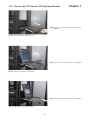
1.11 How to Use the Slides
■
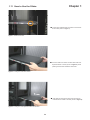
A white arrow release button is located on the outside
of each slide (shown in Figure 7).
Figure 7. White arrow button.
■
Push the white arrow button on either side of the LCD
keyboard drawer to unlock (shown in Figure 8). Avoid
pressing the red button located on either side.
Figure 8. Pushing the white arrow button.
■
Figure 9. Pushing the LCD keyboard drawer into the rack.
P.8
Hold down the white arrow button until the LCD keyboard drawer is located in the rack (shown in Figure 9).