1
Driver and Software Installation
Uninstalling the drivers and software
To uninstall the Barco drivers, software or documentation for your
Barco Coronis 5MP Mammo Display Systems, please use the Windows
Add/Remove Programs or Uninstall utility. This can be found in the
Windows Control Panel. For Vista use Programs & Features.
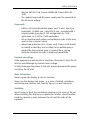
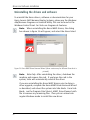
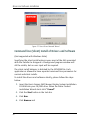
Note: When uninstalling the Barco MXRT drivers, the dialog
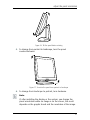
box shown in figure 24 will appear, and select the driver listed.
Figure 24: Barco MXRT Driver Removal Wizard (driver version may be different than what is
pictured)
Note: Vista Only: After uninstalling the driver, shutdown the
machine and remove the card. If you leave the card in the
system, Vista will automatically reinstall the driver.
If you are uninstalling the Barco MXRT drivers prior to doing a
driver upgrade, complete the Barco MXRT Driver Removal Wizard
as described, and reboot the system into Safe Mode. From Safe
Mode, run the Program Files\Barco\ MXRT_DriverCleaner batch
file to remove any remaining files. Then you can reboot into
regular Windows mode to install the new driver.
62