1
Epson Research and Development
Vancouver Design Center
Page 3
OS/2 800x600x16 and Virtual Driver
This device driver is for use with the SPC8100 LCD VGA. It will provide a significant
increase in functionality over the standard Presentation Manager VGA driver delivered
with OS/2 1.2 and OS/2 1.3.
This driver operates with a screen resolution of 800x600 pixels. If the driver determines that a multifrequency monitor is attached to the analog connector, the display driver will show 800x600 directly.
On a system using the LCD display, or one not using a multi-frequency monitor, the driver will
create a physical display of 640x480, but will draw on a virtual display of 800x600. Hardware
panning and scrolling techniques are used to keep the mouse pointer visible on the screen.
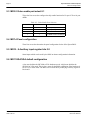
Program Requirements
Video Controller
: SPC8100
Display Type
: LCD
OS/2 Version
: Version 1.2 and 1.3
Installation
During the install process, an attempt will be made to overwrite the current Presentation
Manager driver, since this file is held open and locked during normal operation an error
condition will occur. The device driver install process will successfully handle this error
condition by asking the user to insert the original OS/2 operating system install disk into
drive a:, and restart the system. There is no interaction required from the user except to
restart the system when asked to do so.
On systems with OS/2 already installed.
1. Place driver diskette in floppy drive. Type:
A:>INSTALME
2. Follow the directions on screen.
On systems where OS/2 is being installed for the first time.
1. Proceed normally and install OS/2 as a standard VGA.
2. Place driver diskette in floppy drive. Type:
A:>INSTALME
3. Follow the directions on screen.
OS/2 Display Drivers
Issue Date: 99/03/25
SPC8100
X03A-E-002-01