1
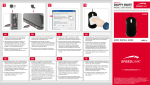
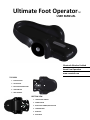
BLUETOOTH INSTALLATION WINDOWS XP PAIRING /RESET BUTTON Press the pairing/reset button, the Bluetooth pairing light will glow blue. Click the “Next” button. Right click the Bluetooth task tray icon. Click “Add Bluetooth Device”. Windows searches discoverable Bluetooth devices. Check “My device is set up and ready to be found. Select “BT500” when it becomes
available and click “Next”. Note: If your Ultimate Foot Operator is not working, try the installation process again. If the problem persists, view the Windows Bluetooth Checklist. Click on “Use the passkey found in the documentation”, enter 0000 and hit “Next”. Your Ultimate Foot Operator is now paired with the computer and it should be functional, click “Finish”.