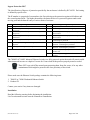
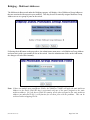
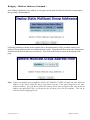
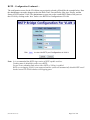
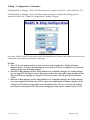
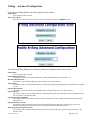
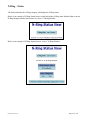
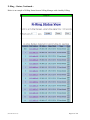
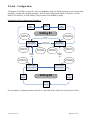
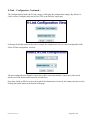
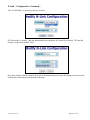
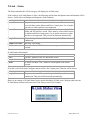
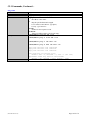
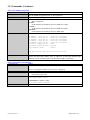
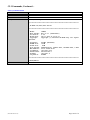
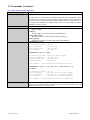
1
708M12 & 716M12 Managed Industrial Ethernet Switch User Manual & Installation Guide (Revised 2014-03-31) Page 1 of 170 708M12 & 716M12 Industrial Ethernet Switch Installation Guide ............................................................................. 5 708M12 & 716M12 Industrial Ethernet Switch Accessories....................................................................................... 6 SAFETY WARNINGS ................................................................................................................................................ 8 Ingress Protection IP67 .............................................................................................................................................. 10 Installation .................................................................................................................................................................. 10 Bulkhead Mounting.................................................................................................................................................... 12 Front Panel ................................................................................................................................................................. 14 Applying Power ......................................................................................................................................................... 15 N-TRON 708M12 Grounding Techniques ................................................................................................................ 16 N-TRON 716M12 Grounding Techniques ................................................................................................................ 16 OVERVIEW OF ADVANCED FEATURES ............................................................................................................ 18 Mode of Operation .................................................................................................................................................................. 18 Port Mirroring ......................................................................................................................................................................... 18 Port Trunking .......................................................................................................................................................................... 18 Quality of Service (QoS) ......................................................................................................................................................... 18 Virtual LAN ............................................................................................................................................................................ 19 Rapid Spanning Tree Protocol ................................................................................................................................................ 20 SNMP Traps ............................................................................................................................................................................ 20 IGMP Snooping ...................................................................................................................................................................... 20 N-Ring ..................................................................................................................................................................................... 21 N-Link ..................................................................................................................................................................................... 21 CIP .......................................................................................................................................................................................... 21 DHCP ...................................................................................................................................................................................... 21 DHCP Client ........................................................................................................................................................................... 22 DHCP Relay Agent ................................................................................................................................................................. 22 DHCP Server........................................................................................................................................................................... 22 LLDP....................................................................................................................................................................................... 22 Port Security—MAC Address Based ...................................................................................................................................... 22 XML Settings Download ........................................................................................................................................................ 22 Rate Limiting .......................................................................................................................................................................... 22 Web Software Configuration ..................................................................................................................................... 25 Web Management ................................................................................................................................................................... 25 Web Management - Home ...................................................................................................................................................... 26 Administration – System ......................................................................................................................................................... 28 Administration – SNMP .......................................................................................................................................................... 32 Administration – Fault ............................................................................................................................................................ 34 DHCP – Server – Setup Profiles ............................................................................................................................................. 35 DHCP – Server – Setup IP Maps ............................................................................................................................................ 37 DHCP – Server – View Bindings ............................................................................................................................................ 43 DHCP – Relay & Local IP - Setup .......................................................................................................................................... 44 LLDP - Configuration ............................................................................................................................................................. 46 LLDP - Ports ........................................................................................................................................................................... 47 LLDP - Status.......................................................................................................................................................................... 48 LLDP - Statistics ..................................................................................................................................................................... 49 Ports – Configuration .............................................................................................................................................................. 50 Ports – MAC Security – Learning ........................................................................................................................................... 52 Ports – MAC Security – Intruder Log ..................................................................................................................................... 56 Ports – Mirroring ..................................................................................................................................................................... 57 Ports – Trunking ...................................................................................................................................................................... 59 Ports – QOS ............................................................................................................................................................................ 60 Statistics – Port Statistics ........................................................................................................................................................ 62 Statistics – Port Utilization ...................................................................................................................................................... 63 VLAN – Configuration ........................................................................................................................................................... 64 Bridging – Aging Time ........................................................................................................................................................... 67 Bridging – Unicast Addresses ................................................................................................................................................. 68 Bridging – Multicast Addresses .............................................................................................................................................. 70 Bridging – Show MAC by Port ............................................................................................................................................... 72 RSTP – Configuration ............................................................................................................................................................. 74 IGMP – Configuration ............................................................................................................................................................ 77 (Revised 2014-03-31) Page 2 of 170 IGMP – RFilter ....................................................................................................................................................................... 83 N-View – Configuration.......................................................................................................................................................... 85 N-View – Ports ........................................................................................................................................................................ 86 N-Ring – Configuration .......................................................................................................................................................... 87 N-Ring – Advanced Configuration ......................................................................................................................................... 90 N-Ring – Status ....................................................................................................................................................................... 92 N-Link – Configuration ........................................................................................................................................................... 96 N-Link – Status ..................................................................................................................................................................... 100 CIP – Configuration .............................................................................................................................................................. 105 CIP – Status ........................................................................................................................................................................... 106 Firmware/Config – TFTP ...................................................................................................................................................... 107 Support – Web Site and E-mail ............................................................................................................................................. 109 Rate Limiting Configuration ................................................................................................................................................. 110 User Management – Adding Users ....................................................................................................................................... 114 User Management – Removing Users ................................................................................................................................... 115 LogicalView .......................................................................................................................................................................... 116 Configuration – Save or Reset............................................................................................................................................... 118 Help – Overview ................................................................................................................................................................... 119 Help – Administration ........................................................................................................................................................... 120 Help – DHCP ........................................................................................................................................................................ 121 Help – LLDP ......................................................................................................................................................................... 122 Help – Ports ........................................................................................................................................................................... 123 Help – Statistics..................................................................................................................................................................... 124 Help – VLAN ........................................................................................................................................................................ 125 Help – Bridging ..................................................................................................................................................................... 126 Help – RSTP ......................................................................................................................................................................... 127 Help – IGMP ......................................................................................................................................................................... 128 Help – N-View ...................................................................................................................................................................... 129 Help – N-Ring ....................................................................................................................................................................... 130 Help – N-Link ....................................................................................................................................................................... 131 Help – CIP ............................................................................................................................................................................. 132 Help – Firmware/Config ....................................................................................................................................................... 133 Help – Rate Limiting ............................................................................................................................................................. 134 Help – User Management ...................................................................................................................................................... 135 Help – Other .......................................................................................................................................................................... 136 CLI Commands ........................................................................................................................................................ 137 “?” (Help) .............................................................................................................................................................................. 137 Logout ................................................................................................................................................................................... 137 Show, Add, or Delete ARL Entries ....................................................................................................................................... 138 Save or Reset the Configuration Settings .............................................................................................................................. 139 Configuration Device Operations .......................................................................................................................................... 140 Show or Set CIP Configuration ............................................................................................................................................. 141 Show or Set IGMP Configuration ......................................................................................................................................... 142 Show or Set Mirror Configuration ........................................................................................................................................ 143 Show or Set N-Ring Configuration ....................................................................................................................................... 144 Show or Set N-View Configuration ...................................................................................................................................... 144 Ping a Host ............................................................................................................................................................................ 145 Show or Set Port Configuration ............................................................................................................................................ 146 Reset the Switch .................................................................................................................................................................... 146 Show or Set SNMP Configuration ........................................................................................................................................ 147 Show or Clear the Last System Error .................................................................................................................................... 147 Show System Information ..................................................................................................................................................... 148 Set or Show the System IP Configuration ............................................................................................................................. 149 Show or Set System Configuration ....................................................................................................................................... 150 VLAN Addition and Deletion Example ................................................................................................................... 151 VLAN Configuration Examples .............................................................................................................................. 157 Example 1 – Basic understanding of port-based VLANs...................................................................................................... 157 Example 2 – Basic understanding of tagged VLANs (Admit – Tagged Only) ..................................................................... 158 Example 3 – Basic understanding of tagged VLANs (Admit – All) ..................................................................................... 159 Example 4 – Basic understanding of Hybrid VLANs ........................................................................................................... 160 Example 5 – Basic understanding of Overlapping VLANs................................................................................................... 161 (Revised 2014-03-31) Page 3 of 170 Example 6 – Basic understanding of VLANs with Multicast Filtering ................................................................................. 162 KEY SPECIFICATION – 708M12 ......................................................................................................................... 163 KEY SPECIFICATION – 716M12 ......................................................................................................................... 165 Appendix A. XML Settings File Example .............................................................................................................. 167 N-TRON Limited Warranty ..................................................................................................................................... 170 (Revised 2014-03-31) Page 4 of 170 708M12 & 716M12 Industrial Ethernet Switch Installation Guide The N-TRON 708M12 & 716M12 Industrial Ethernet Switch offers outstanding performance and ease of use. It is ideally suited for connecting Ethernet enabled industrial and or security equipment and is a fully managed switch. PRODUCT FEATURES MANAGEMENT FEATURES • Full IEEE 802.3 Compliance • Eight 10/100 BaseTX D Coded M12 Copper Ports (708M12) • Sixteen 10/100 BaseTX D Coded M12 Copper Ports (716M12) • Extended Environmental Specifications • IP65 Rated for protection against low pressure jets of water from any direction • IP66 Rated for protection against high pressure jets of water from any direction • IP67 Rated for protection against temporary immersion in water • Autosensing 10/100BaseTX, Duplex, and MDIX • Offers Rapid Spanning Tree Protocol • Trunk with other N-Tron trunking capable switches over two ports • Store & Forward Technology • Plug and Play IGMP Support • Rugged Din-Rail Enclosure • Redundant Power Inputs (10-30 VDC) (708M12) • Redundant Power Inputs (10-49 VDC) (716M12) • Web Browser Management with detailed ring map and fault location charting. • Web Browsing and N-View Switch Monitoring • SNMP v1, v2 and v3 • Configuration backup via Optional Configuration Device (NTCD) • EtherNet/IP™ CIP Messaging • IGMP Auto Configuration and Plug and Play Support • 802.1Q tag VLAN and Port VLAN • 802.1p QoS, Port QoS, and DSCP • Trunk with other N-Tron trunking capable switches over two ports • Mirroring • N-RING™ (N-Tron proprietary Ring Management) • N-LINK™ (N-Tron proprietary Coupling Management) • 802.1d, 802.1w, 802.1D RSTP (Rapid Spanning Tree Protocol) • DHCP Client, Server, Option 82 relay, Option 61 • Local Port IP Addressing • Port Security—MAC Address Based • 802.1AB™-2005 Link Layer Discovery Protocol (LLDP) • XML Settings Download for some configuration parameters. • Broadcast and /or Mulitcast Rate Limiting. High Voltage Models Only (Revised 2014-03-31) Page 5 of 170 708M12 & 716M12 Industrial Ethernet Switch Accessories Configuration Device Ideal for saving, or restoring switch configuration parameters quickly without the need for a computer or software. Straight M12 A-Coded 4-pin male connector. Includes connection status LED. One configuration device per switch is recommended. 700-NTCD-M12 Serial Interface Cable See section “Serial Interface” for additional details. SERIAL-DB9-M12 (Revised 2014-03-31) Page 6 of 170 Copyright, © N-Tron Corp., 2012 3101 International Drive East, Building 6 Mobile, AL 36606 USA All rights reserved. Reproduction, adaptation, or translation without prior written permission from N-Tron Corp. is prohibited, except as allowed under copyright laws. Ethernet is a registered trademark of Xerox Corporation. All other product names, company names, logos or other designations mentioned herein are trademarks of their respective owners. The information contained in this document is subject to change without notice. N-Tron Corp. makes no warranty of any kind with regard to this material, including, but not limited to, the implied warranties of merchantability or fitness for a particular purpose. In no event shall N-Tron Corp. be liable for any incidental, special, indirect or consequential damages whatsoever included but not limited to lost profits arising out of errors or omissions in this manual or the information contained herein. WARNING ALERTE Do not perform any services on the unit unless qualified to do so. Do not substitute unauthorized parts or make unauthorized modifications to the unit. Ne pas effectuer de services sur l'appareil s'il n'est pas qualifié pour le faire. Ne pas remplacer les pièces non autorisées ou de modifications non autorisées de l'appareil. Do not operate the unit with the top cover removed, as this could create a shock or fire hazard. Ne pas faire fonctionner l'unité avec le couvercle retiré, ce qui pourrait créer une décharge électrique ou un incendie. Do not operate the equipment in the presence of flammable gasses or fumes. Operating electrical equipment in such an environment constitutes a definite safety hazard. Ne pas utiliser le matériel en présence de gaz ou de vapeurs inflammables. L'utilisation de matériel électrique dans un tel environnement constitue un danger certain. Do not operate the equipment in a manner not specified by this manual. Ne pas utiliser le matériel en présence de gaz ou de vapeurs inflammables. L'utilisation de matériel électrique dans un tel environnement constitue un danger certain. Do not service the equipment without first disconnecting the power connector. Ne pas réparer l'équipement sans d'abord débrancher le connecteur d'alimentation. (Revised 2014-03-31) Page 7 of 170 SAFETY WARNINGS AVERTISSEMENTS DE SÉCURITÉ GENERAL SAFETY WARNINGS GÉNÉRAL AVERTISSEMENTS DE SÉCURITÉ WARNING: If the equipment is used in the manner not specified by N-Tron Corporation, the protection provided by the equipment may be impaired. ALERTE : Si l'équipement est utilisé d'une manière non spécifiée par N-Tron Corporation, la protection fournie par l'équipement peut être compromise. Contact Information N-Tron Corp. 3101 International Drive East Building 6 Mobile, AL 36606 TEL: (251) 342-2164 FAX: (251) 342-6353 WEBSITE: www.n-tron.com E-MAIL: [email protected] ENVIRONMENTAL SAFETY WARNING: Disconnect the power and allow to cool 5 minutes before touching. ALERTE: Déconnectez le câble d'alimentation et laisser refroidir 5 minutes avant de la toucher. WARNING: Must be installed in a pollution degree 2 environment. ALERTE: Doit être installé dans un degré de pollution 2 environnement. ELECTRICAL SAFETY WARNING: Disconnect the power cable before removing any enclosure panel. ALERTE: Débrancher le câble d'alimentation avant de retirer le panneau du chassis. WARNING: Do not operate the unit with the any cover removed. ALERTE: Ne pas utiliser l'appareil avec n'importe quel couvercle retiré. WARNING: Properly ground the unit before connecting anything else to the unit. Units not properly grounded may result in a safety risk and could be hazardous and may void the warranty. See the grounding technique section of this user manual for proper ways to ground the unit. (Revised 2014-03-31) Page 8 of 170 ALERTE: Correctement à la terre de l'unité avant tout raccordement à l'unité. Unités pas correctement mise à la terre peut entraîner un risque de sécurité et pourraient être dangereux et peut annuler la garantie. Voir la section technique de mise à la terre de ce mode d'emploi des moyens appropriés à la masse de l'appareil. WARNING: Never install or work on electrical equipment or cabling during periods of lightning activity. ALERTE: Ne jamais installer ou de travailler sur un équipement électrique ou de câblage pendant les périodes d'activité de la foudre. WARNING: Do not perform any services on the unit unless qualified to do so. ALERTE: Ne pas effectuer de services sur l'appareil s'il n'est pas qualifié pour le faire. WARNING: Observe proper DC Voltage polarity when installing power input cables. Reversing voltage polarity can cause permanent damage to the unit and void the warranty. ALERTE: Respecter la polarité correcte de tension DC lors de l'installation des câbles d'alimentation d'entrée. Inversion de polarité de tension peut causer des dommages permanents à l'appareil et annule la garantie. WARNING: Explosion Hazard – Substitution of components may impair suitability for Class I, Division 2. ALERTE: Risque d'explosion - Remplacement d'un composant peut empêcher la conformité de Classe I, Division 2. WARNING: Explosion Hazard - Do not connect or disconnect any connections while circuit is live unless area is known to be non-hazardous. ALERTE: Risque d'explosion - Ne pas brancher ou débrancher les connexions lorsque le circuit est sous tension sauf si la zone est connue pour être non dangereux. WARNING: Use 110˚C or higher rated copper wire, (0.22Nm) 2lb/in tightening torque for field installed conductors. ALERTE : Utilisez 110 ˚ C ou fil de cuivre de niveau plus élevé, (0.22Nm) 2lb/in couple de serrage pour les conducteurs installés sur le terrain. WARNING: For redundant applications both inputs must be provided from the same Class 2 source. ALERTE : Pour les applications redondantes deux entrées doivent être fournis à partir de la même classe 2 la source. (Revised 2014-03-31) Page 9 of 170 Ingress Protection IP67 The classification of degrees of protection provided by the enclosures is defined by IEC 60529. Each rating is defined by specific tests. The IP number is comprised of two numbers, the first referring to the protection against solid objects and the second against fluids. The higher the number, the better the device is protected against contact with moving parts and the harmful entry of various forms of moisture. 1st IP 0 1 2 3 4 5 6 Protection against ingress of solids No protection Protected against solid objects over 50mm e.g. hands, large tools. Protected against solid objects over 12mm e.g. hands, large tools. Protected against solid objects over 2.5mm e.g. wire, small tools. Protected against solid objects over 1.0mm e.g. wires. Limited protection against dust ingress (no harmful deposit) Totally protected against dust ingress. 2nd IP 0 1 2 3 4 5 6 7 8 Protection against ingress of liquids No protection Protected against vertically falling drops of water. Protected against direct sprays of water up to 15° from vertical. Protected against direct sprays of water up to 60° from vertical. Protected against water sprayed from any direction. Limited ingress permitted. Protected against low pressure water jets from any direction. Limited ingress permitted. Protected against high pressure water jets from any direction. Limited ingress permitted. Protected against temporary immersion between 15cm to 1m. Protected against long periods of immersion under pressure. The 708M12 & 716M12 Industrial Ethernet Switches are fully protected against dust and will remain sealed when immersed in water to a depth of 1 meter for 1 hour when all the ports are properly mated or sealed. These IP67 caps seal off the unused ports protecting them from dirt, water, oil or any other contaminants which might be present in the close proximity of the switch. Please make sure the Ethernet Switch package contains the following items: 1. 708M12 or 716M12 Industrial Ethernet Switch 2. Product CD Contact your carrier if any items are damaged. Installation Read the following warning before beginning the installation: Lire l'avertissement suivant avant de commencer l'installation: (Revised 2014-03-31) Page 10 of 170 WARNING ALERTE Never install or work on electrical equipment or cabling during periods of lightning activity. Never connect or disconnect power when hazardous gasses are present. Ne jamais installer ou de travailler sur un équipement électrique ou de câblage pendant les périodes d'activité de la foudre. Ne jamais brancher ou débrancher l'alimentation en gaz dangereux sont présents. Disconnect the power cable before removing any enclosure panel. Débrancher le câble d'alimentation avant de retirer le panneau du chassis. WARNING: Observe proper DC Voltage polarity when installing power input cables. Reversing voltage polarity can cause permanent damage to the unit and void the warranty. ALERTE: Respecter la polarité correcte de tension DC lors de l'installation des câbles d'alimentation d'entrée. Inversion de polarité de tension peut causer des dommages permanents à l'appareil et annule la garantie. WARNING: Use 110˚C or higher rated copper wire, (0.22Nm) 2lb/in tightening torque for field installed conductors. ALERTE : Utilisez 110 ˚ C ou fil de cuivre de niveau plus élevé, (0.22Nm) 2lb/in couple de serrage pour les conducteurs installés sur le terrain. WARNING: For redundant applications both inputs must be provided from the same Class 2 source. ALERTE : Pour les applications redondantes deux entrées doivent être fournis à partir de la même classe 2 la source. UNPACKING Remove all the equipment from the packaging, and store the packaging in a safe place. File any damage claims with the carrier. CLEANING Clean only with a damp cloth. (Revised 2014-03-31) Page 11 of 170 Bulkhead Mounting The following are the mechanical dimensions and drill hole placements to consider when mounting the 708M12 & 716M12 Industrial Ethernet Switches within an enclosure: 708M12 (Revised 2014-03-31) Page 12 of 170 716M12 (Revised 2014-03-31) Page 13 of 170 Front Panel LNK/ACT M12 D-Coded Female Ports M12 A-Coded Male Port M12 A-Coded Female Port M12 A-Coded Female Port Link/Activity LED All 8 or 16 ports are Auto sensing 10/100BaseTX Redundant Power Input (10-30VDC, 708M12); (10-49VDC, 716M12) Green LED lights when Power is connected Serial COM Port (CLI) NTCD-M12 (N-Tron Configuration Device) LED’s: The table below describes the operating modes: LED LNK ACT (Revised 2014-03-31) Color Description GREEN Power is Applied with no active faults. RED Power is Applied with an active fault. OFF Power is not Applied. ON Link established. OFF No link established. BLINKING Link established, Activity on cable. OFF No link established. Page 14 of 170 Applying Power 708M12 716M12 The M12 A coded power connector is keyed, where the mating connection from the power supply can be made only when the male and female ends are lined up properly. When the power is first connected all LED’s will flash ON Momentarily. Verify the Power LED stays ON (GREEN). Note: Either V1 or V2 can be connected to power for minimal operation. For redundant applications both inputs must be provided from the same Class 2 source. The power cord should be limited to less than 10 meters in order to ensure optimum performance. Recommended 24V DC Power Supplies, similar to: 100VAC/240VAC: N-Tron NTPS-24-1.3, DC 24V/1.3A (Revised 2014-03-31) Page 15 of 170 N-TRON 708M12 Grounding Techniques Drain wire with lug connecting switch chassis to known grounding point. N-TRON 716M12 Grounding Techniques Drain wire with lug connecting switch chassis to known grounding point. CONNECTING THE UNIT For 10Base-T ports, plug a Category 3 (or greater) twisted pair cable into the M12 connector. For 100Base-T ports, plug a Category 5 (or greater) twisted pair cable into the M12 connector. Connect the other end to the far end station. Verify that the LNK LED’s are ON once the connection has been completed. To connect any other port to another Switch or Repeater, use a standard Cat5 straight through or crossover cable. Warning: Creating a port to port connection on the same switch (i.e. loop) is an illegal operation and will create a broadcast storm which will crash the network! (Revised 2014-03-31) Page 16 of 170 SERIAL INTERFACE The 708M12 & 716M12 Switch provides an EIA-232 interface accessed via an A Coded female connector (labeled ‘COM’ on the unit). This is used to access the Command Line Interpreter (CLI). The pin-outs are shown below: SERIAL-DB9-M12 Serial Cable Connect the serial COM port of your PC and the 708M12 or 716M12 Switch using N-Tron’s SERIAL-DB9M12 serial cable. You will require a cable with a 9-pin or 25-pin sub-D female connector for the PC end, and a 4-Pin A Coded M12 Male connector for the 708M12 or 716M12 end. The following table shows the pin-out and the connections for both types of cable: PC Port Signal Name TXD RXD GND 25-Pin Female Pin # 2 3 7 9-Pin Female Pin # 3 2 5 708M12 or 716M12 4-Pin A Coded M12 Male Pin # Signal Name 2 RXD 1 TXD 3/4 GND HyperTerminal The following configuration should be used in HyperTerminal: Port Settings: Data Bits: Parity: Stop bits: Flow Control: (Revised 2014-03-31) 115200 8 NONE 1 NONE Page 17 of 170 OVERVIEW OF ADVANCED FEATURES Mode of Operation Each port on the switch can be configured into different modes of operation as shown below: Copper Ports: - Half Duplex - Full Duplex - Auto Negotiation 100Base Fiber Ports: - Full Duplex Half Duplex In half duplex mode, the CSMA/CD media access method is the means by which two or more stations share a common transmission medium. To transmit, a station waits (defers) for a quiet period on the medium (that is, no other station is transmitting) and then sends the intended message in bit-serial form. If, after initiating a transmission, the message collides with that of another station, then each transmitting station intentionally transmits for an additional predefined period to ensure propagation of the collision throughout the system. The station remains silent for a random amount of time (back-off) before attempting to transmit again. Full Duplex Full duplex operation allows simultaneous communication between a pair of stations using point-to-point media (dedicated channel). Full duplex operation does not require that transmitters defer, nor do they monitor or react to receive activity, as there is no contention for a shared medium in this mode. Auto Negotiation In Auto Negotiation mode, the port / hardware detects the mode of operation of the station that is connected to this port and sets its mode to match the mode of the station. Port Mirroring A Mirroring Port is a dedicated port that is configured to receive the copies of Ethernet frames that are being transmitted out and also being received in from any other port that is being monitored. ‘Mirrored Data Only’ can be selected and this selects for mirrored data only to be transmitted to the destination port, as opposed to mirrored data and whatever other data is otherwise destined for the destination Port. Port Trunking Port Trunking is the ability to group two network ports to increase the bandwidth between two machines (switch or any work station). This feature allows grouping of high-speed connectivity and provides redundant connection between switches, so that a trunk can act as a single link between the switches. Quality of Service (QoS) Quality of service (QoS) refers to resource reservation control mechanisms. Quality of service is the ability to provide different priority to different applications, users, or data flows. Quality of service guarantees are important if the network capacity is insufficient, especially for real-time streaming multimedia applications (Revised 2014-03-31) Page 18 of 170 such as voice over IP, online games and IP-TV, since these often require fixed bit rate and are delay sensitive, and in networks where the capacity is a limited resource, for example in cellular data communication. In the absence of network congestion, QoS mechanisms are not required. Each of these three QOS methods below is included or not based on the settings on the relevant browser page: 1) Force High Priority (Port Based), 2) IEEE802.1p (Tagged QOS), or 3) DSCP (differentiated services code points) (RFC 2474). When Force High Priority is enabled, the port based priority is included in the decision for all ports and all frames received on a port will use the default QOS priority for that port in the decision. For example, if it is desired to have ingress frames on a port egress to the highest priority transmit queue regardless of other factors, then enable Force High Priority and the port's Priority will be 7. Virtual LAN The switch provides support for setting up tagged Virtual LANs (Local Area Networks). A port may belong to any number of Virtual LANs. The VLAN membership of a device is determined by the VLAN(s) that have been defined for the port to which the device is connected. If a device should move from one port to another, it loses its current VLAN membership and inherits that of the new port it is connected to. VLANs facilitate easy administration of logical groups of devices that can communicate as if they were on the same LAN. Traffic between VLANs is restricted, unless the ports are explicitly configured as overlapping VLANs. Switches forward unicast, multicast, and broadcast traffic only on LAN segments that serve the VLAN to which the traffic belongs. A Default Virtual LAN (VID=1) exists to which a port, which is not a member of any other Virtual LAN, will belong. This allows the switch to operate as a ‘normal’ switch when it is used in a network. A port is automatically removed from the Default VLAN when it is reconfigured to belong to another Virtual LAN, because that is the most common operation. But, if desired, the port can be included in VLAN 1 by configuring VLAN 1 last. If switch ports are configured to transmit and receive untagged frames, end devices are able to communicate throughout the LAN. Using Tagged VLANs, the switch has the ability to take non-tagged packets in some ports, add a VLAN tag to the packet and send it out tagged ports on the switch. The VLANs can also be configured to accept tagged packets in tagged ports, strip the tags off the packets, and send the packets back out other untagged ports. This allows a network administrator to set up the switch to support devices on the network that do not support VLAN Tagged packets. The administrator can also set up the ports to discard any packets that are tagged or to discard any packets that are untagged based on a hybrid VLAN of both tagged and untagged ports, and using the VLAN Ingress Filter on the switch. For each switch port there is one and only one PVID (port VLAN ID) setting. If an incoming frame is untagged and untagged frames are being accepted, then that frame will inherit the tag of the PVID value for that port. Subsequent switch routing and treatment will be in accordance with that VLAN switch map. By configuring PVIDs properly and configuring for all frames to exit untagged, the switch can achieve a ‘port VLAN’ configuration in which all frames in and out can be untagged, thus not requiring external devices to be VLAN cognizant. To understand how a VLAN configuration will perform, first look at the port on which the frame enters the switch, then the VLAN ID (if the frame is tagged) or the PVID (if the frame is untagged). The VLAN (Revised 2014-03-31) Page 19 of 170 defined by the VID or PVID defines a VLAN group with a membership of ports. This membership determines whether a port is included or excluded as to frame egress from the switch. The 708M12 & 716M12 Series switches also have the ability to allow overlapping VLANs. Overlapping VLANs give the user the ability to have one or more ports share two or more VLAN groups. For more information and examples on how this could be implemented, please see the ‘VLAN Configuration Examples’ in this document, and/or our website’s technical documents. Note that RSTP on overlapping VLANs is not supported and the system will automatically disable RSTP on all but the lowest VID VLANs that have overlapping ports. Rapid Spanning Tree Protocol The Rapid Spanning Tree Protocol as specified in IEEE 802.1D-2004 is supported. One Spanning Tree per non-overlapping VLAN is supported. The Rapid Spanning Tree Protocol (RSTP) supersedes the Spanning Tree Protocol (STP) which was described in IEEE 802.1D-1998. The RSTP is used to configure a simply connected active network topology from the arbitrarily connected bridges of a bridged network. Bridges effectively connect just the LANs to which their forwarding ports are attached. Ports that are in a blocking state do not forward frames. The bridges in the network exchange sufficient information to automatically derive a spanning tree. RSTP allows for much quicker learning of network topology changes than the older STP. RSTP supports new and improved features such as rapid transition to forwarding state. RSTP also sends out new BPDUs every hello time instead of just relaying them. RSTP interoperates with older STP switches by falling back to the older STP when the older BPDUs are detected on bridge ports. The user can also manually configure bridge ports to use the older STP when desired. SNMP Traps The 700 Series switch supports up to 5 SNMP Trap Stations to which SNMP Traps will be sent. The switch supports five standard traps; Link Up, Link Down, Cold Start, Warm Start and Authentication Errors. SNMP Traps will be sent to all the trap stations configured on the switch when the corresponding trap is enabled. IGMP Snooping IGMP Snooping is enabled by default, and the switch is Plug and Play for IGMP. IGMP snooping provides intelligent network support for multicast applications. In particular, unneeded traffic is reduced. IGMP Snooping is configured via the web console and if enabled, operates dynamically upon each power up. Also, there can be manual only or manual and dynamic operation. Note that “static multicast group address” can be used whether IGMP Snooping is enabled or not. IGMP Snooping will function dynamically without user intervention. If some of the devices in the LAN do not understand IGMP, then manual settings are provided to accommodate them. The Internet Group Management Protocol (IGMP) is a protocol that provides a way for a computer to report its multicast group membership to adjacent ‘routers’. In this case N-Tron 700 Series switches provide router-like functionality. Multicasting allows one computer to send content to multiple other computers that have identified themselves as interested in receiving the originating computer's content. Multicasting can be used to transmit only to an audience that has joined (and not left) a multicast group membership. IGMP version 2 is formally described in the Internet Engineering Task Force (IETF) Request for Comments (RFC) 2236. IGMP version 1 is formally described in the Internet Engineering Task Force (IETF) Request for Comments (RFC) 1112. The 700 Series supports v1 and v2. (Revised 2014-03-31) Page 20 of 170 N-Ring N-Ring is enabled by default, and the switch is Plug and Play for N-Ring except that initially one must enable an N-Ring enabled device to be the N-Ring Manager for a given N-Ring. Subsequently, N-Ring operates dynamically upon each power up. Using N-Tron's proprietary N-Ring technology offers expanded ring size capacity, detailed fault diagnostics, and a standard healing time of 30ms. The N-Ring Manager periodically checks the health of the N-Ring via health check packets. If the N-Ring Manager stops receiving the health check packets, it times out and converts the N-Ring to a backbone within 30ms. When using all N-Ring enabled switches in the ring, a detailed ring map and fault location chart is also provided on the N-Ring Manager’s web browser. N-Ring status is also sent from the N-Ring Manager to the N-View OPC Server to identify the health status of the ring. Up to 250 N-Ring enabled switches can participate in one N-Ring topology. Switches that do not have N-Ring capability may be used in an N-Ring, however the ring map and fault location chart cannot be as detailed at these locations. N-Link The purpose of N-Link is to provide a way to redundantly couple an N-Ring topology to one or more other topologies, usually other N-Ring topologies. Each N-Link configuration requires 4 switches: N-Link Master, N-Link Slave, N-Link Primary Coupler, and N-Link Standby Coupler. N-Link will monitor the link status of the Primary and Standby Coupler links. While the Primary Coupler link is healthy, it will forward network traffic and the Standby Coupler link will block network traffic. When a problem is detected on the Primary Coupler link, the Primary Coupler link will block network traffic and the Standby Coupler link will forward network traffic. While the N-Link Master and Slave are in communication via the Control link, only one Coupler link (Primary or Standby) will forward network traffic while the other Coupler link will block network traffic. CIP The CIP (Common Industrial Protocol) feature allows N-Tron switches to directly provide switch information and configuration access to Programmable Logic Controller (PLC) and Human Machine Interface (HMI) applications via a standardized communication protocol. For example, a PLC may be programmed to monitor port links or N-Ring status and cause a status indicator to turn red on an HMI if a port goes link down or if N-Ring has a fault. CIP is formally described in ODVA Publication Number PUB00001 (Volume 1: Common Industrial Protocol (CIP™)), and Publication Number: PUB00002 (Volume 2: EtherNet/IP Adaptation of CIP). N-Tron provides EDS and ICO files. N-TRON_CIP_Tags.pdf is for a particular environment, but reveals the tags available. DHCP The Dynamic Host Configuration Protocol (DHCP) provides configuration parameters to Internet hosts. DHCP is built on a client-server model, where designated DHCP server hosts allocate network addresses and deliver configuration parameters to dynamically configured hosts. DHCP is controlled by RFC 2131. The N-Tron DHCP Switch can be configured to be a DHCP Client. Alternately the N-Tron DHCP switch can be configured to be a DHCP Server, a DHCP Relay Agent, or both. For more detailed information on N-Tron DHCP features, reference: http://www.n-tron.com/tech_docs.php. Under ‘White papers’, see. “Using DHCP to Minimize Equipment Setup Time”. Under ‘Installation Guides and User Manuals’ see “DHCP Technical Instructions for 708 / 716/ 7018 / 7506 Series”. (Revised 2014-03-31) Page 21 of 170 DHCP Client The switch will automatically obtain an IP assignment from a DHCP Server, or optionally Fallback to a configured IP assignment if unable to get an IP assignment from a DHCP server. Communication between the client and server can optionally go through a DHCP Relay Agent. DHCP Relay Agent DHCP Relay Agent (Option 82) allows communication between the client and server to cross subnet and VLAN boundries. It also allows for a device on a specific port to receive a specific IP address and if the device is replaced, the replacement receives the same IP address as the original device. DHCP Server DHCP Server allows DHCP Client devices to automatically obtain an IP assignment. IP assignments can be set up as a dynamic range of IP addresses available to any client device; or specific IP addresses based on the clients MAC address, Client ID (Option 61), or Relay Agent connection (Option 82). LLDP Link Layer Discovery Protocol (LLDP) is a Layer 2 discovery protocol that allows devices attached to an IEEE802 LAN to advertise to other devices the major capabilities they have and to store information they discover in a MIB that can be accessed through SNMP. LLDP is formally described in IEEE Standard 802.1AB. Port Security—MAC Address Based The Port Security feature restricts access to the switch by only accepting dynamically learned MAC addresses and manually entered MAC addresses as authorized. Dynamically learned MAC addresses are those that the switch detects on any port while in ‘Learning’ mode. A manually entered MAC address must designate the ports that the address is authorized on. A non-authorized MAC address will be discarded and will be shown on the intruder log. Locking can be selected or not port by port. XML Settings Download XML settings can be downloaded to a switch to achieve some switch configurations. XML settings cover a subset of the settings available through the web browser. Reference Appendix A. XML Settings File Example for the complete set of configurations that can be done using XML Settings Download. There are several top level configuration sections and each of these sections is optional. Some sections have a ‘keep or delete’ choice such that one can load only those in the XML file deleting the pre-existing of those particular settings or one can add the settings in the XML file to the already existing settings. The example also shows field character limits, and provides other guidance. Rate Limiting Some systems generate a large amount of broadcast or multicast traffic occasionally. When it happens, the entire network may experience failures that persist until there is manual intervention. One way to address this problem is to control the broadcast or multicast traffic to remain below a user configured maximum limit. The most effective limit may be best obtained in test. Thus the user is provided with the capability to ‘tune’ the limit by switch port. These are ingress filters. The percentage values are repeatable to the purpose (Revised 2014-03-31) Page 22 of 170 and rise or fall as compared to each other, but are not meant to be as exact as in a piece of calibrated test equipment. (Revised 2014-03-31) Page 23 of 170 TROUBLESHOOTING 1. Make sure the 2. Make sure you are supplying sufficient current for the version chosen. Note: The Inrush current will exceed the steady state current by ~ 2X. 3. Verify that Link LEDs are ON for connected ports. 4. Verify cabling used between stations. 5. Verify that cabling is Category 5E or greater for 100Mbit operation. (Power LED) is ON. SUPPORT Contact N-Tron Corp. at: TEL: 251-342-2164 FAX: 251-342-6353 E-MAIL: [email protected] WEB: www.n-tron.com FCC STATEMENT This product complies with Part 15 of the FCC-A Rules. Operation is subject to the following conditions: (1) This device may not cause harmful Interference (2) This device must accept any interference received, including interference that may cause undesired operation. NOTE: This equipment has been tested and found to comply with the limits for a Class A digital device, pursuant to Part 15 of the FCC Rules. These limits are designed to provide reasonable protection against harmful interference in a residential installation. This equipment generates, uses, and can radiate radio frequency energy and, if not installed and used in accordance with the instructions, may cause harmful interference to radio communications. Operation of this device in a residential area is likely to cause harmful interference in which case the user will be required to correct the interference at his/her own expense. INDUSTRY CANADA This Class A digital apparatus meets all requirements of the Canadian Interference Causing Equipment Regulations. Operation is subject to the following two conditions; (1) this device digital apparatus meets all requirements of the Canadian Interference Causing Equipment Regulations. Operation is subject to the following two conditions; (1) this device may not cause harmful interference, and (2) this device must accept any interference received, including interference that may cause undesired operation. Cet appareillage numérique de la classe A répond à toutes les exigences de l'interférence canadienne causant des règlements d'équipement. L'opération est sujette aux deux conditions suivantes: (1) ce dispositif peut ne pas causer l'interférence nocive, et (2) ce dispositif doit accepter n'importe quelle interférence reçue, y compris l'interférence qui peut causer l'opération peu désirée. (Revised 2014-03-31) Page 24 of 170 Web Software Configuration Web Management Enter the switch’s IP address in any web browser and login to the web management feature of the 700 Series. Default: User Name: admin Password: admin (Revised 2014-03-31) Page 25 of 170 Web Management - Home When the administrator first logs onto a 700 Series switch the default home page will be displayed. On the left hand side of the screen there is a list of configurable settings that the 700 Series switch will support. This section of the manual will go through each and every choice listed on the left hand side of the screen and explain how to configure those settings. In the center of the main home page the administrator can see some basic information like what firmware revision the switch is running. The firmware can be upgraded at a later time in the field using TFTP. (Revised 2014-03-31) Page 26 of 170 Web Management – Menu Structure To the left, there is a menu which is shown fully opened below. The pages opened by each of the individual selections are described in the rest of this section. The use of each of these pages is also described in this section. In most of the descriptions, only the right side of the page is shown. (Revised 2014-03-31) Page 27 of 170 Administration – System The System tab under the Administration category, lists various information about the switch: When the IP Configuration is in either DHCP or Static Mode: IP Configuration Method used to obtain an IP Address, Subnet Mask and Gateway Address IP Address Contains the current IP Address of the device. Subnet Mask Contains the current Subnet Mask of the device. Gateway Contains the current Default Gateway of the device. MAC Address MAC Address of the device. System Up Time This parameter represents the total time count. This time has elapsed since the switch was turned ON or RESET. Name It shows the name of the product, which allows alphanumeric and special characters (#, _, -) only. Contact The person to contact for system issues, which should be someone within your organization. Location The physical location of the switch. (Revised 2014-03-31) Page 28 of 170 Administration – System, Continued… By selecting the Modify button from the ‘Static’ mode, you will be able to change the switch’s IP Configuration, IP Address, Subnet Mask, Gateway, Name, Contact information, and the Location of the switch through the web management features. It is recommended to change the TCP/IP information through the Command Line Interface (CLI) initially, but it defaults to the following: IP Configuration - Static IP Address – 192.168.1.201 Subnet Mask – 255.255.255.0 Gateway – 192.168.1.1 (Revised 2014-03-31) Page 29 of 170 Administration – System, Continued… When the IP Configuration is in DHCP Mode the following information is added: Client ID Option used by DHCP clients to specify their unique identifier. The identifier may be the MAC address, switch name, or entered as a text string or hex characters. Fallback IP Address Contains the configured Fallback IP Address of the device. Fallback Subnet Mask Contains the configured Fallback Subnet Mask of the device. Fallback Gateway Contains the configured Fallback Gateway of the device. (Revised 2014-03-31) Page 30 of 170 Administration – System, Continued… If the IP Configuration mode is set to DHCP and the Fallback IP address is changed from the default IP address, then the switch will use the Fallback addresses if the IP configuration isn’t received from a DHCP server in 2 minutes after initial boot. If Fallback address is used, DHCP Client will stop sending requests. If the IP Configuration is received from a DHCP server, it will never fallback, even if the lease is lost. (Revised 2014-03-31) Page 31 of 170 Administration – SNMP The SNMP tab under the Administration category allows SNMP to be disabled or enabled, and shows a list of IP Addresses that act as SNMP Traps. The Read-Only, Read-Write, and Trap Community Names are also shown here. By selecting the Modify button, you will be able to change any of the fields listed. This allows the user to set an IP address for a Trap station or change the Community Names. If the SNMP Notification Trap is enabled, systems that are listed as a Trap station will be sent the corresponding notification trap. To restore a Trap to “Value Not Configured”, enter ‘0.0.0.0’. (Revised 2014-03-31) Page 32 of 170 Administration – SNMP, Continued… The trap version can be selected by pulldown as version 1 or 2. There are five SNMP traps that can be sent or not per the selection below. (Revised 2014-03-31) Page 33 of 170 Administration – Fault The Fault tab under the Administration category provides configurable selections indicating the way to notify when a Power or N-Link, or Port Usage, or N-Ring Signal fault occurs. The notification may consist of any combination of the options: Show web, Show LED, and Contact. Power faults consist of V1 and V2. Port Usage faults are based on the settings of Usage Alarm Low [%] and Usage Alarm High [%] thresholds from the Ports Configuration Page. N-Ring signal faults consist of: Broken, Partial Break (Low), Partial Break (High), and Multiple Managers. (Revised 2014-03-31) Page 34 of 170 DHCP – Server – Setup Profiles The Setup Profiles tab under the DHCP/Server category lists the following information about the current state of the server and the existing network profiles: Server Enabled Indicates whether the DHCP server is active. Allow Broadcast Indicates whether the DHCP server will process broadcast messages. Delay Broadcast (Ms) The amount of time the DHCP server will delay processing a broadcast message. Server ID Descriptive name of the DHCP server. Profile Name Descriptive name of the network profile. Address Pool Range of IP addresses which the profile can use. Subnet Address The most restrictive subnet address calculated from the address pool range. Subnet Mask The most restrictive subnet mask calculated from the address pool range. Domain Name The domain name to be presented to the client. Has Profile IP Maps Indicates whether the profile has IP maps associated with it. Delete Deletes the profile along with all IP maps and bindings associated with it. The Default profile cannot be deleted. (Revised 2014-03-31) Page 35 of 170 DHCP – Server – Setup Profiles, Continued… (Revised 2014-03-31) Page 36 of 170 DHCP – Server – Setup IP Maps The Setup IP Maps tab provides the way to create IP mappings with an existing network profile. There are three types of mappings that can be created: Dynamic Range, Static Range, and Single IP. Before a non-default Network profile has been configured: After a non-default Network profile has been configured: (Revised 2014-03-31) Page 37 of 170 DHCP – Server – Setup IP Maps, Continued… The Dynamic Range type of mapping is used to create a range of dynamic IP addresses for requesting clients. The following information is required: Network Profile An existing network profile to which the IP map applies. Low IP The starting IP address of a range. High IP The ending IP address of a range. (Revised 2014-03-31) Page 38 of 170 DHCP – Server – Setup IP Maps, Continued… The Static Range type of mapping is used to create a range of static IP addresses dedicated to specific ports on a relay agent switch. There are two different data entry formats available according to whether the relay agent type is for an N-TRON or for a generic switch. To create a range of static IP addresses on an N-Tron relay agent switch: Network Profile An existing network profile to which the IP map applies. Relay Agent Type Should be set to N-TRON. Switch Model List of N-TRON models that support this feature. Remote ID A unique identifier that designates the N-TRON relay agent switch. Add Checkbox used to add an IP map for the corresponding port. Port No The actual port number. Port Name Descriptive name of the port. VLAN VLAN ID that the port is a member of. Circuit ID Auto-generated string based on the port name and VLAN ID. IP Address IP address to assign to the IP map. (Revised 2014-03-31) Page 39 of 170 DHCP – Server – Setup IP Maps, Continued… (Revised 2014-03-31) Page 40 of 170 DHCP – Server – Setup IP Maps, Continued… To create a range of static IP addresses on a generic relay agent switch: Network Profile An existing network profile to which the IP map applies. Relay Agent Type Should be set to Generic. Port Count The number of ports on the particular relay agent switch. Add Checkbox used to add an IP map for the corresponding port. Port No The actual port number. Remote ID The identifier that corresponds to an Option 82 Remote ID sub-option used by the particular relay agent switch. Circuit ID The identifier that corresponds to an Option 82 Circuit ID sub-option used by the particular relay agent switch. IP Address IP address to assign to the IP map. (Revised 2014-03-31) Page 41 of 170 DHCP – Server – Setup IP Maps, Continued… The Single IP type of mapping is used to create a static IP address for an individual client. The following information is required: Network Profile An existing network profile to which the IP map applies. IP The static IP address to offer to a client. Unique ID The unique identifier that must match either the client identifier (Option 61) or the client’s hardware address (MAC). Format Designates how the Unique ID is interpreted. (Revised 2014-03-31) Page 42 of 170 DHCP – Server – View Bindings The View Bindings tab lists the bindings of physical devices to IP addresses that are in use or offered: Network Profile The profile applied to the binding entry. Binding Identifier The client associated with the binding entry. Client Hardware Address (MAC) The client’s MAC address. Client IP Address The actual IP address assigned to the binding entry. Status Indicates the current status of the binding entry. Release Removes the corresponding binding. WARNING: By releasing an IP address, it is possible to end up with two physical devices with the same IP address which may cause network disruption to that IP address. (Revised 2014-03-31) Page 43 of 170 DHCP – Relay & Local IP - Setup The Setup tab under the DHCP/Relay & Local IP category shows the current state of the relay agent. By selecting the Modify button, you can configure general settings of the relay agent, as well as, configure settings on a per port basis. The following describes these settings: Relay Status Indicates whether the DHCP relay agent is active. Remote ID The unique identifier that designates the relay agent switch. Server # IP The configured IP address of the DHCP servers. Port No The actual port number. Port Name The descriptive name of the port. Relay Status The selection to designate whether the port will perform relay agent functionality. The choices are: Disabled The port will function without relay agent processing. Enabled The port will relay DHCP client-originated broadcast packets to the DHCP servers. Assign Local IP The port will not relay DHCP client-originated broadcast packets. Instead the relay agent will offer the port’s locally assigned IP address to the client. (Revised 2014-03-31) Page 44 of 170 DHCP – Relay & Local IP – Setup, Continued… Other Data When the Relay Status is set to Enabled, the Circuit ID for the port can be specified. When the Relay Status is set to Assign Local IP, the IP address for the port can be specified. (Revised 2014-03-31) Page 45 of 170 LLDP - Configuration Mode: Enables or Disables LLDP on the Switch. Default: Disabled Transmit Interval: Specifies the interval at which LLDP frames are transmitted. Default = 30 seconds. Transmit Hold Multiplier: Specifies a multiplier on the Transmit Interval when calculating a Time-to-Live value. Default = 4. Re-Initialization Delay: Specifies a minimum time an LLDP port will wait before re-initializing after setting the port to disable followed by setting a port to Tx-Only or Tx/Rx. This prevents excessive Notifications if someone toggles between Disabled and Enabled on LLDP Port settings. Default = 2 Seconds. Notification Interval Specifies the interval between successive Notifications generated by the switch. If a port sends out a notification and another port tries to send out a notification, the notification will not be sent until the interval expires. Default = 5 Seconds. Note: A redundant network topology will have one or more blocking ports to prevent looping and broadcast storms. LLDP will not receive neighbor information into a blocked port, though the LLDP information will be transmitted out of a blocked port. Therefore, the switch that has the blocked port will not know about the neighbor on the other side of the blocked port, but the neighbor will know about the switch that has the blocked port. (Revised 2014-03-31) Page 46 of 170 LLDP - Ports LLDP Ports View Port Name Descriptive name of the port on the local switch. Transmit Enables or Disables LLDP Transmission on the switch. Receive Enables or Disables Receiving of LLDP Frames from neighbor switches. Allow Management Data Allow the Transmission of Management type information. For example: IP Address of switch, Port Description, System Name and Vlan information. Allow Notifications Notifications are transmitted when local or remote data changes. (Revised 2014-03-31) Page 47 of 170 LLDP - Status LLDP Ports Neighbor View The Status View shows the results of LLDP discovery. The LLDP Ethernet frames received from neighboring ports are composed of a collection of data units called TLVs. Each TLV contains a defined type of information such as the Chassis ID described below, which contains the MAC address of the device sending the frame. The maximum number of neighbors displayed per port is four. Port Name The name of the local port on which the neighbor information was received. Neighbor MAC MAC address of neighbor switch. Corresponds to the LLDP Chassis ID TLV. Neighbor IP IP address of neighbor switch. Corresponds to the LLDP Management Address TLV. Neighbor Port Description Description of the neighbor Port from which the LLDP frame was sent. Neighbor System Name The system's administratively assigned name on the neighbor switch. Neighbor VLAN PVID The Port VLAN identifier (PVID) associated with the neighbor port. Neighbor VLAN ID/Name A list of all VLAN's for which the neighbor port is a member. Neighbor TTL Indicates the number of seconds that the information associated with this neighbor will be valid. Time to Live (TTL) (Revised 2014-03-31) Page 48 of 170 LLDP - Statistics LLDP Local Port Statistics View Port Name Descriptive name of the port on the local switch. Transmitted Frames The total number of LLDP Frames sent out from the local switch. Received Frames Total number of LLDP frames received by the local switch. Discarded Frames The total number of frames discarded due to incorrect TLV's in frame. Error Frames Total count of all LLDP frames received with one or more detectable errors. Neighbor Age Outs Total count of the times that a neighbor's information has been deleted from the switch because the Time to Live (TTL) has expired. LLDP Port Status Local Port setting (Receive-Rx/Transmit-Tx/Disable). (Revised 2014-03-31) Page 49 of 170 Ports – Configuration The Configuration tab under the Ports category will show a detailed overview of all the active ports on the switch. The overview will display the following information: Port Number This is the port index. Port Name This field displays the name of the port. The designation of TX is for copper ports. Admin Status This configurable field displays the existing status of the port whether it is Enabled/Disabled. Link Status Current Link state of the port. Auto Negotiation State This configurable field displays the current auto-negotiation state whether it is Enabled/Disable. Port Speed This configurable field displays the speed of each port 10/100/1000 Mbps. Duplex Mode This configurable field displays the existing mode of the port whether it is Full Duplex/Half Duplex. Crossover Mode This configurable field displays the existing crossover mode of the port. This can be Yes, No, or Auto. Auto is the default. Flow Control State This configurable field displays the existing flow control status of each port. When enabled, the individual port supports half-duplex back pressure and full-duplex flow control. The default is Disabled. Port State The current RSTP status of a port. It may contain Disable/Discarding/Learning/Forwarding. PVID This configurable field displays the existing port VLAN ID setting. The allowable range is 1-4094. Usage Alarm Low (%) The bandwidth utilization percentage below which a fault will be triggered if enabled. For half duplex the bandwidth utilization percentage is the sum of both RX and TX bandwidth utilization, and for full duplex this is the higher of TX or RX bandwidth utilization. See Port Utilization View and Port Usage Fault on Fault Configuration View. Usage Alarm High (%) The bandwidth utilization percentage above which a fault will be triggered if enabled. For half duplex the bandwidth utilization percentage is the sum of both RX and TX bandwidth utilization, and for full duplex this is the higher of TX or RX bandwidth utilization. See Port Utilization View and Port Usage Fault on Fault Configuration View. (Revised 2014-03-31) Page 50 of 170 Ports – Configuration, Continued… The User can click on the Port Number to configure each port individually. This will allow the user to change the port’s settings for the following fields which are explained above: Admin Status Speed and Duplex Flow Control Cross Over PVID Usage Alarm Low Usage Alarm High (Revised 2014-03-31) Page 51 of 170 Ports – MAC Security – Learning MAC Security is reached from the left hand navigation under ‘Ports’: The Learning tab allows the administrator to control the learning or locking modes for the ports. ‘Locked’ is the secure mode. ‘Learning’ builds an internal list of authorized MAC addresses based on an approved LAN. When the current mode is ‘Learning’, no ports are secured. (Revised 2014-03-31) Page 52 of 170 Ports – MAC Security – Learning, Continued… In ‘Locked’ mode, the selected ports under “Secure Ports” are secured. Note: when N-Ring and/or N-Link are used, the N-Ring/N-Link ports will not have MAC Security enabled. (Revised 2014-03-31) Page 53 of 170 Ports – MAC Security – Learning, Continued… The Modify button allows the administrator to change the current mode and/or to change the ports selected for MAC Security. When transitioning from ‘Learning’ to ‘Locked’, the Address Resolution Logic (ARL) table represents the authorized MAC addresses, with the addition of any manually entered addresses (refer to Authorization List section below). Transitioning from ‘Locked’ to ‘Learning’ clears the ARL for all ports. (Revised 2014-03-31) Page 54 of 170 Ports – MAC Security – Authorization List The Authorization List tab allows for manual entry or deletion of authorized MAC source addresses with associated authorized ports. Selecting Modify displays the MAC Authorization Configuration page, which allows the administrator to add new entries, delete existing entries, or edit authorized ports of existing entries. Selecting Delete removes the associated entry. Selecting Add displays the MAC Authorization Entry page, showing default values for the administrator to modify (see below). When an entry number hyperlink is selected, this same page is displayed except it shows the associated MAC address and authorized ports. (Revised 2014-03-31) Page 55 of 170 Ports – MAC Security – Intruder Log The Intruder Log tab displays a list of unauthorized MAC addresses that attempted to access the secured device. Each intruder entry in the log is unique, and is based on the combination of MAC address, VLAN, and port. Only the first occurrence of the intruder is listed. The log is ordered by most recent first, based on the system time. The maximum number of entries is 100. If more than 100 intruders are detected, the oldest entries are deleted. The log is not saved through a power cycle. An entry can be individually removed from the log by selecting the associated Delete button. All entries or entries specific to a port can also be removed from the log by choosing the option in the dropdown list and then selecting the Clear button. (Revised 2014-03-31) Page 56 of 170 Ports – Mirroring A mirroring port is a dedicated port that is configured to receive the copies of Ethernet frames that are being transmitted out and also being received in from any other port that is being monitored. The Mirroring tab under the Ports category displays the status including the list of Source Ports and the Destination Port that the Sources are being mirrored to. ‘Mirrored Data Only’ can be selected and this selects for mirrored data only to be transmitted to the destination port, as opposed to mirrored data and whatever other data is otherwise destined for the destination Port. (Revised 2014-03-31) Page 57 of 170 Ports – Mirroring, Continued… Following the Modify button, you can enable the status of port mirroring and select source ports and the destination port that the source ports will be mirrored to. (Revised 2014-03-31) Page 58 of 170 Ports – Trunking The Trunking tab under the Ports category displays the following details: Trunk Ports This field displays the ports associated with the trunk. Trunk Status This configurable field displays the existing status of the trunk. It can be either Enabled/Disabled. By selecting the Modify button, you can select a trunk group. Note: RSTP must be disabled in order to use the Trunking feature. Two ports of the same speed can constitute a valid trunk. Only 1 Trunk per switch can be created. All trunk ports must be at the same speed and duplex mode. If a port is not linked, there could be difficulty as to similar speed and duplex mode. It is best to hard code speed and duplex mode for each trunking link, at both ends. Do not use Trunking on an N-Ring manager. Do not connect the N-Ring to actively Trunking ports on an Auto Member. (Revised 2014-03-31) Page 59 of 170 Ports – QOS The QOS decision tree chooses the highest priority Transmit Queue (TQ) of the following criteria: Force High Priority (Port Based) TQ mapping, IEEE 8021.p TQ mapping, or DSCP TQ mapping. The QOS tab under the Ports category displays the following details: Port Number This is the port index. Port Name This field displays the name of the port. Include DSCP This field displays the status of whether or not to include the RFC 2474 DSCP TOS (Type of Service) in the TQ decision. When enabled, the DSCP TOS is included when evaluating traffic priority. Include 802.1p This field displays the status of whether or not to include the IEEE 802.1p COS (Class of Service) in the TQ decision. When enabled, the IEEE 802.1p COS is included when evaluating traffic priority. Force High Priority This field displays the Force High Priority status. When enabled, the port based priority is included in the TQ decision for all ports and all frames received on a port will use the default QOS priority for that port in the TQ decision. Port Priority This field displays the default QOS priority for that port. This is the IEEE 802.1p COS (Class of Service) assigned to all untagged ingress frames, or all ingress frames if Force High Priority is enabled. The range is 0-7. (Revised 2014-03-31) Page 60 of 170 Ports – QOS, Continued… Following the Modify button, the administrator can independently configure the ports for different QOS functionality. Once these fields are filled in to meet the needs of the administrator’s network, the changes may be updated by clicking the Update button at the bottom of the page. (Revised 2014-03-31) Page 61 of 170 Statistics – Port Statistics The Ports Statistics tab under the Statistics category displays a list of MIB parameters. Each port has a separate counter for each parameter. This gives users the ability to see what kind of packets are going over which ports. At the bottom of the page for each port there are two buttons. Refresh will update the statistics for that port number and Clear will reset all the counters for that port number. (Revised 2014-03-31) Page 62 of 170 Statistics – Port Utilization The Ports Utilization tab under the Statistics category shows all the ports on the switch and will display a bar graph showing the percentage of bandwidth being used. These figures and bars are for a general feeling of what the bandwidth usage is. N-Tron recommends the use of N-View in order to get a precise bandwidth usage figure. The scale can be adjusted for the task at hand: (Revised 2014-03-31) Page 63 of 170 VLAN – Configuration Replace VID Tag with Default Port VID Specifies whether or not to replace the incoming VID tag with the port's designated VID. Perform Ingress Filtering Specifies whether or not to filter out ingress frames when a VID violation is detected. Discard Non-Tagged for Ports Specifies whether or not non-tagged ingress frames are dropped by the selected ports. Remove Ports from Default VLAN when Added to Other VLAN Specifies whether or not to remove ports from Default VLAN when they are added to another VLAN. Note that for convenience in most frequent use: Ports are deleted from group1 as each port is added to another group. Ports are added to group1 if a deletion leaves a port with no group. If it is desired to have a port on group1 and also on other group(s) configure group1 last to achieve that. Note: RSTP on overlapping VLANs is not supported and the system will automatically disable RSTP on all but the lowest VID VLANs that have overlapping ports. (Revised 2014-03-31) Page 64 of 170 (Revised 2014-03-31) Page 65 of 170 VLAN – Group Configuration VLAN ID This field displays the VLAN ID. The range should be 1-4094. VLAN Name This configurable field displays the name of the VLAN, which accepts alphanumeric and special characters (#, _, -, .) only. Allow Management Specifies whether or not all ports in this VLAN are management ports. Change PVID of Member Ports Specifies whether or not the PVID of the member ports is set to this VLAN ID. Port No This is the port index. Port Name Descriptive name of the port Group Member Specifies whether or not the port is included in the group. Untag on Egress Specifies whether or not egress frames are tagged by the designated port. (Revised 2014-03-31) Page 66 of 170 Bridging – Aging Time The Aging Time tab under the Bridging category will display the currently configured Aging Time. This page allows users to modify this variable to meet their needs. After selecting the Modify button, the user will be presented with a page that allows the number to be entered and updated. The default aging time is 20 seconds. Note: If the switch is an active participant of an N-Ring, then the N-Ring Aging Time will be used instead of the Bridging Aging Time. (Revised 2014-03-31) Page 67 of 170 Bridging – Unicast Addresses The Unicast Addresses tab under the Bridging category will display a list of MAC addresses that are associated with each respective port number. This can be used to statically assign a MAC address access to a single port on the switch. Following the Add button on the page above, the administrator must enter a valid MAC address and associate it with a port number on the switch. Once the administrator hits the Add button, the changes will take effect instantly. (Revised 2014-03-31) Page 68 of 170 Bridging – Unicast Addresses, Continued… Once a static MAC address has been added, it will be displayed in a list on the main page under Unicast MACs tab. Following the Remove button on the example above, an administrator can select a static MAC address from the list using a pull-down menu. After selecting the MAC address, the administrator needs to press the Remove button on the page to remove the entry (Revised 2014-03-31) Page 69 of 170 Bridging – Multicast Addresses The Multicast Addresses tab under the Bridging category will display a list of Multicast Group Addresses that are associated with respective port numbers. This may be used to statically assign a Multicast Group Address access to a group of ports on the switch. Following the Add button on the page above, the administrator must enter a valid Multicast Group Address and associate it with a port number or list on the switch. Once the administrator clicks on the Add button, the changes will take effect instantly. Note: If there are multiple ports on different VLANs, the 708M12or 716M12 will apply the static multicast address to the lowest VLAN-ID that is associated with one of the ports assigned to the static multicast address. So if the lowest VLAN-ID contains all the ports assigned to the static multicast address (an umbrella VLAN), it will function for all those ports with no problems. This can be achieved with overlapping VLANs. (Revised 2014-03-31) Page 70 of 170 Bridging – Multicast Addresses Continued… After adding a Multicast Group Address, it will appear on the main list and will show the associated ports that go along with that address. Following the Remove button on the example above, the administrator will be presented with a list of Multicast Group Addresses that are configured on the switch. Using the pull-down menu, the administrator should select the desired address to be removed. Then click on the Remove button at the bottom of the page. Note: If there are multiple ports on different VLANs, the 708M12or 716M12 will apply the static multicast address to the lowest VLAN-ID that is associated with one of the ports assigned to the static multicast address. So if the lowest VLAN-ID contains all the ports assigned to the static multicast address (an umbrella VLAN), it will function for all those ports with no problems. This can be achieved with overlapping VLANs. (Revised 2014-03-31) Page 71 of 170 Bridging – Show MAC by Port This feature shows the MAC addresses of devices connected to each switch port and the IP Addresses associated with the MACs. The browser page ‘View MAC by Port’ shows the MAC for the device found on each port, and the IP for the MAC presented if available. If more than one device is on that port, then the lowest alphanumeric of those MAC addresses is shown and underlined. The ‘Active IP Probe’ field is configurable using the ‘Modify’ button, and also displays the existing Enabled or Disabled status of this feature. The default is disabled. When disabled the switch generates no Ethernet traffic for this purpose, but can still present some information gathered passively. The ‘IP’ field shows an Auto-detected or manually entered IP address. If there is a MAC address for the port and an IP address was not discovered there is an ‘Assign IP’ button to allow the user to enter an IP address. If ‘Active IP Probe’ is enabled, manually entered IP values are underlined and validated. A validated IP for that MAC is presented in green and if validation fails the IP will be red and underlined. Note that some devices do not have an IP Address, and that some devices that do have an IP Address may not respond to the methods used to detect their IP Address. (Revised 2014-03-31) Page 72 of 170 Invoking the ‘Assign IP’ button on the example above, the administrator will be presented with a form in which to enter a manually assigned IP, as below: When an IP has been manually entered a button is provided to ‘Delete IP’, and invoking it will allow the administrator to delete the manual association of an IP to that MAC. (Revised 2014-03-31) Page 73 of 170 RSTP – Configuration The Configuration tab under the RSTP category will display the RSTP information for the first VLAN. Using the pull-down menu at the top of the page an administrator can choose which VLAN to configure RSTP on. Once the VLAN is selected, the administrator may configure the bridge by clicking on the ‘Configuration’ link in the middle of the page. (Revised 2014-03-31) Page 74 of 170 RSTP – Configuration Continued… The configuration screen for the VLAN that was previously selected will look like the example below. Here the administrator can make changes such as the Hello Time, Forward Delay, Max Age, Priority, and the Status of RSTP on that VLAN. The administrator or user can see the current RSTP status of the ports on that VLAN by clicking on the ‘here’ link to view RSTP Port Configuration at VLAN#. Note: It is recommended that RSTP rings consist of RSTP capable switches. Trunking must be disabled in order to use RSTP. Do not create redundant links unless either RSTP or N-Ring is enabled. RSTP on overlapping VLANs is not supported and the system will automatically disable RSTP on all but the lowest VID VLANs that have overlapping ports. (Revised 2014-03-31) Page 75 of 170 RSTP – Configuration Continued… Following the link for the view RSTP Port Configuration at VLAN#, the administrator or user can see the current RSTP status of the ports on that VLAN. This will show information such as the Path Cost and the Port State. If the switch sees a redundant path it will put the port with the highest Path Cost into Blocking mode where it will discard packets coming in on that port. In the example below, TX3 is a redundant port with port TX2, therefore TX2 is forwarding and TX3 is discarding. If the administrator selects one of the ports on the previous screen, he or she can change the Port’s Path Cost, Priority, and the status of Admin Edge and Auto Edge. (Revised 2014-03-31) Page 76 of 170 IGMP – Configuration The Configuration tab under the IGMP category will display the IGMP basic configuration settings. By default, IGMP is enabled. Following the Modify button, the administrator will see a list of configurable fields for the IGMP configuration. Once these fields are filled in to meet the needs of the administrator’s network, the changes may be updated by clicking the Update button at the bottom of the page. (Revised 2014-03-31) Page 77 of 170 IGMP – Configuration, Continued… The Configuration tab under the IGMP category will display the IGMP basic configuration settings. By default, IGMP is enabled. Following the Modify button, the administrator will see a list of configurable fields for the IGMP configuration. Once these fields are filled in to meet the needs of the administrator’s network, the changes may be updated by clicking the Update button at the bottom of the page. (Revised 2014-03-31) Page 78 of 170 IGMP – Configuration, Continued… The IGMP Status pull-down allows the user to enable or disable IGMP completely. The Query Mode pull-down allows the user to set query mode for Automatic (the default), On (always), or Off (never): (Revised 2014-03-31) Page 79 of 170 IGMP – Configuration, Continued… The Router Mode pull-down allows the user to choose router mode. ‘Auto’ allows for dynamically detected and manually set router ports. ‘Manual’ allows only for manually set router ports. ‘None’ allows no router ports. (Revised 2014-03-31) Page 80 of 170 IGMP – Configuration, Continued… If Remove Unused Groups is checked then unused IGMP Groups will be removed and traffic with those multicast addresses will be treated as normal multicast. If unchecked, then unused IGMP Groups are not removed and traffic with those multicast addresses will be limited. The default is checked. Note that IGMP Groups are not retained through a power cycle. . The user can specify the manual router ports: (Revised 2014-03-31) Page 81 of 170 IGMP – Show Groups and Show Router The Show Groups tab under the IGMP category will display a list of IGMP groups based on the Group IP and the port number that it is associated with. The Show Routers tab under the IGMP category will display a list of Auto-detected Router IPs and the port numbers that they are associated with. (Revised 2014-03-31) Page 82 of 170 IGMP – RFilter The ‘rfilter’ (Router Multicast Data Filter) function allows you to choose whether or not DATA frames with KNOWN group multicast addresses are sent to the ‘router’ ports (links to other switches). Control packets (Join, Leave) will be sent to the router(s) regardless of this setting. “KNOWN” is known from dynamic IGMP Snooping operations. The factory default is that the Router Multicast Data Filter is enabled for all ports, so any router ports do NOT get DATA frames with KNOWN multicast destination addresses unless a join to a specific multicast address has been received on that port. Joins override an rfilter. If rfilter is disabled, router ports do get DATA frames with KNOWN multicast destination addresses Rfilter can be set for individual ports: any, all, or none. For each port, rfilter will have an impact only if that port is manually or dynamically chosen as a router port. Default configuration: (Revised 2014-03-31) Page 83 of 170 IGMP – RFilter, Continued… Modifying rfilter port settings: (Revised 2014-03-31) Page 84 of 170 N-View – Configuration The Configuration tab under the N-View category will display two basic variables for N-View, the status and the interval between packets. Following the Modify button on the above example, the administrator can modify the variable to change the frequency with which N-View reports information. Increasing the interval will slow the update rate. Decreasing the interval will allow N-View to report more frequently. Additionally, you may Disable or Enable N-View altogether. (Revised 2014-03-31) Page 85 of 170 N-View – Ports The Ports tab under the N-View category will display a list of all the configured ports on the 708M12 or 716M12 unit along with the ports transmitting multicast packets and MIB stats respectively. Following the Modify button on the above example, the administrator can modify these two variables to enable or disable multicast out of the port and if MIB stats are sent out for those ports. (Revised 2014-03-31) Page 86 of 170 N-Ring – Configuration The Configuration tab under the N-Ring category will display the N-Ring basic configuration settings. By default, N-Ring is in Auto Member mode and the N-Ring Aging Time is 20 seconds. Following the Modify button on the above example, the administrator will see a list of configurable fields for the N-Ring configuration, as below. The N-Ring Aging Time has a default of 20 seconds and is separate from the Bridging Aging Time. N-Ring Aging Time is used when the switch is an N-Ring Manager or becomes an active N-Ring Member, and in either case N-Ring status includes for example: “Switch is currently using N-Ring Aging Time = 20 Seconds” Once these fields are filled in to meet the needs of the administrator’s network, the changes may be saved by clicking the Update button at the bottom of the page. NOTES: 1. N-Ring Manager cannot have RSTP or Trunking enabled. 2. RSTP & N-Ring are different modes and cannot share links or segments along those lines. See the examples in the RSTP configuration section. 3. Do not use Trunking on an N-Ring manager. Do not connect the N-Ring to actively Trunking ports on an Auto Member. 4. Do not create redundant links unless either RSTP or N-Ring is enabled. 5. Any one 708M12 or 716M12 can only participate in one N-Ring. 6. N-Ring copper ports must be run at 100Mb full duplex, including the default ‘autonegotiate’ as long as all switches in the ring support 100Mb full duplex. (Revised 2014-03-31) Page 87 of 170 N-Ring – Configuration, Continued… The “N-Ring Mode” is one of three, as below: If N-Ring Mode is “Manager”, then a pull-down allows selection as available of ports TX1 and TX2, or TX7 and TX8 (FX1 and FX2 on 708FX2) (TX15 & TX16 on 716M12) as N-Ring ports. (Revised 2014-03-31) Page 88 of 170 N-Ring – Configuration, Continued… If N-Ring Mode is “Manager”, then VLAN ID can be set to a unique VLAN id (1 ~ 4094). Default is 3333. If N-Ring Mode is “Manager”, then a pull-down allows selection as to whether the N-Ring ports are members of the VLAN’s Tagged or Untagged ports. Default is Tagged. Once these fields are filled in to meet the needs of the administrator’s network, the changes may be saved by clicking the Update button at the bottom of the page. NOTES: 1. Since VLANs are implemented for security reasons as well as traffic flow, N-Ring only makes minimal changes. It is up to the administrator to ensure that VLANs are configured correctly on the N-Ring manager and all N-Ring members. 2. When the N-Ring manager and all N-Ring Members are in defaults, changing the N-Ring manager to use a Tagged VLAN requires no user interaction to allow non-ring traffic to pass through the ring. This works because changing to a Tagged VLAN does not remove the ring ports from the default VLAN. 3. When the N-Ring manager and all N-Ring Members are in defaults, changing the N-Ring manager to use an Untagged VLAN other than VID 1, requires the administrator to add non-ring ports to the N-Ring VLAN to allow non-ring traffic to pass through the ring. This occurs because the N-Ring ports must be removed from VID 1 because an untagged port may only be a member of one VLAN. (Revised 2014-03-31) Page 89 of 170 N-Ring – Advanced Configuration If switch is an N-Ring Member, the following data will be shown: N-Ring Mode Current N-Ring mode of switch. Keep-Alive Timeout: Keep-Alive timeout is used when switch is active in an N-Ring. The range is 5-1000000 seconds. If switch is an N-Ring Manager, the following advanced configuration data will be shown: N-Ring Mode Current N-Ring mode of switch. Self Health Packet Interval: The amount of time to wait in milliseconds before sending Self-Health packets. The default is 10. Maximum Missed Packets The number of missed Self-Health packets that constitute a fault. The default is 2. Sign-On Delay The amount of time to wait in milliseconds before requesting initial sign-on information from ring members. The default is 1000. Sign-On Match Packets The number of times the switch count must match before starting the sign-on process. The default is 3. Sign-On Interval The interval of time to wait in milliseconds before requesting subsequent sign-on information from ring members when the ring is broken. The default is 3000. Sign-On Info Spacing Multiplier The amount of time to wait in milliseconds, scaled by switch number, before sending information to the ring manager. The default is 5. Sign-On Info Retry Timeout The amount of time the ring member will wait in milliseconds for the ring manager to acknowledge receipt of the member's information before the member tries to re-send the information. The default is 1500. Delay Before Re-Entering Broken State The amount of time, in milliseconds, that must elapse before the ring is allowed to go back into the broken state. The default is 3000. (Revised 2014-03-31) Page 90 of 170 N-Ring – Advanced Configuration, Continued… (Revised 2014-03-31) Page 91 of 170 N-Ring – Status The Status tab under the N-Ring category will display the N-Ring status. Below is an example of N-Ring Status from a switch in defaults (N-Ring Auto Member) that is not an N-Ring Manager and has not become an “Active” N-Ring Member: Below is an example of N-Ring Status from an “Active” N-Ring Member: (Revised 2014-03-31) Page 92 of 170 N-Ring – Status, Continued… Below is an example of N-Ring Status from an N-Ring Manager with a healthy N-Ring: (Revised 2014-03-31) Page 93 of 170 N-Ring – Status, Continued… Below is an example of N-Ring Status from an N-Ring Manager with a faulted N-Ring. The red fields on the N-Ring Map show problems. Ports that are red indicate that the port is not linked. MAC addresses that are red indicate that there is no communication to that switch. The red “Ring Broken” line shows where the N-Ring is broken. (Revised 2014-03-31) Page 94 of 170 N-Ring – Status, Continued… In rare cases an N-Ring can have a “Partial Fault”. An example of this is to have a break in just one fiber in a duplex channel fiber pair. The screenshot below shows N-Ring Manager Status when a ‘Higher’ N-Ring Port (TX2, TX8, or TX16) is not receiving self health frames all the way around the N-Ring, though the other (low TX1, TX7, or TX15) N-Ring port is: The screenshot below shows N-Ring Manager Status when a ‘Lower’ N-Ring Port (TX1, TX7, or TX16) is not receiving self health frames all the way around the N-Ring, though the other (high TX2 , TX8, or TX15) N-Ring port is: (Revised 2014-03-31) Page 95 of 170 N-Link – Configuration The purpose of N-Link is to provide a way to redundantly couple an N-Ring topology to one or more other topologies, usually other N-Ring topologies. Each N-Link configuration requires 4 switches: N-Link Master, N-Link Slave, N-Link Primary Coupler, and N-Link Standby Coupler. Standard N-Link Configuration (Example): N-Ring Auto Member N-Ring Auto Member N-Rng Manager N-Ring #1 Control Port Default: TX3 Control Port (Auto-Detected) Control Link N-Link Master N-Ring Member Coupler Port (Default: TX4) Partner Link (N-Ring Segment) Partner Port (Auto-Detcted) N-Link Slave N-Ring Member Coupler Port (Default: TX4) Partner Port (Auto-Detcted) Primary Coupler Link Standby Coupler Link Coupler Port (Auto-Detected) Coupler Port (Auto-Detected) N-Link Couper N-Ring Member N-Ring Auto Member N-Link Coupler N-Ring Member N-Ring #2 N-Ring Auto Member N-Rng Manager For convenience, a diagram similar to the above is provided in the switch’s browser help for N-Link. (Revised 2014-03-31) Page 96 of 170 N-Link – Configuration, Continued… Complex N-Link Configuration (Example): Configuration Notes: The Master and Slave must be part of the N-Ring topology. If using default configuration choices, the administrator only needs to configure the N-Link Master. The N-Link Slave and both Coupler switches will auto-detect any needed configuration. If not using default configuration choices, the administrator may also need to configure the Default Coupler port on the N-Link Slave. There must be a direct link between the Master and Slave Control ports. Use of media converters or other switches is not supported. There must be a direct link between the Master and Slave Partner ports. Use of media converters or other switches is not supported. There must be at least one other switch, besides the Master and Slave, that supports N-Link on the N-Ring. N-Link will only support a single point of failure. Multiple points of failure and misconfiguration are not supported and may cause a network storm under some circumstances. Configuration Steps to redundantly couple 2 N-Ring networks: 1. Ensure the Coupler and Control cables are disconnected at this point. 2. Get Both N-Rings working with a status of OK. 3. Configure N-Link Slave: Ensure that the N-Link Slave is set to Auto Configure and select a Default Coupler Port. Save Configuration. 4. Configure N-Link Master: Select the Control and Coupler ports. Save the Configuration. 5. Connect the Control Link cable. Ensure that the Slave switch status now shows a state of “Slave” 6. Connect the Coupler Link cables. 7. Check N-Link status by selecting the N-Link Status View page. (Revised 2014-03-31) Page 97 of 170 N-Link – Configuration, Continued… The Configuration tab under the N-Link category will display the configuration settings. By default, NLink is in Auto Configure mode and will use TX4 as the Default Coupler port. Following the Modify button on the above example, the administrator will see a list of configurable fields for the N-Link configuration, as below. The port configured as the Default Coupler Port will be used as the Standby Coupler port if the switch detects an N-Link Master and becomes an N-Link Slave. Once these fields are filled in to meet the needs of the administrator’s network, the changes may be saved by clicking the Update button at the bottom of the page. (Revised 2014-03-31) Page 98 of 170 N-Link – Configuration, Continued… The “N-Link Mode” is one of two choices, as below: If N-Link mode is “Master”, then the administrator must configure the Control Port (default: TX3) and the Primary Coupler Port (default: TX4). Once these fields are filled in to meet the needs of the administrator’s network, the changes may be saved by clicking the Update button at the bottom of the page. (Revised 2014-03-31) Page 99 of 170 N-Link – Status The Status tab under the N-Link category will display the N-Link status. If the switch is an N-Link Master or Slave, the following switch status and partner status information will be shown. Fields with a red background designate a fault condition. Current N-Link mode of switch. State: The port being used to convey control information. There must be a Control Port: direct link between the Master and Slave Control ports. Use of media converters or other switches is not supported. The port being used for normal communication between the N-Link Partner Port: Master and N-Link Slave switch. There must be a direct link between the Master and Slave Partner ports. Use of media converters or other switches is not supported. This port will be detected automatically. The port being used to establish a redundant path for Ethernet data Coupler Port: transmission. Coupler Port State: Blocking, Forwarding. No errors will show "OK", otherwise a description of the Faults Status: detected. N-Link Partner Information Current N-Link mode of switch. State: The MAC Address of the N-Link Partner switch. MAC: Coupler Port State: Blocking, Forwarding. No errors will show "OK", otherwise a description of the Faults Status: detected. If switch is an N-Link Auto Configure and not a Slave, the Coupler port, if known, will be shown. Current N-Link mode of switch. N-Link State: The port used to establish a redundant path for Ethernet data Coupler Port: transmission. This port will be detected automatically. Below is an example of N-Link Status from a switch in defaults (N-Link Auto Configure) that is not an N-Link Master and has not become an N-Link Slave or an N-Link Coupler: (Revised 2014-03-31) Page 100 of 170 N-Link – Status, Continued… Below is an example of N-Link Status from an N-Link Coupler switch: Below is an example of N-Link Status from an N-Link Master switch: (Revised 2014-03-31) Page 101 of 170 N-Link – Status, Continued… Below is an example of N-Link Status from an N-Link Slave switch: Below is an example of N-Link Status from an N-Link Master and Slave where the Primary Coupler link is broken: (Revised 2014-03-31) Page 102 of 170 N-Link – Status, Continued… Below is an example of N-Link Status from an N-Link Master and Slave where the Standby Coupler link is broken: Below is an example of N-Link Status from an N-Link Master and Slave where the Control link is broken: (Revised 2014-03-31) Page 103 of 170 N-Link – Status, Continued… Below is an example of N-Link Status from an N-Link Master and Slave where the Partner link is broken: (Revised 2014-03-31) Page 104 of 170 CIP – Configuration The Configuration tab under the CIP category will display basic variables for CIP, and the status: Cip Status: Enables or Disables CIP on the Switch. Default: Enabled. Multicast RPI: The minimum Requested Packet Interval for Class 1 (multicast) connections, in milliseconds. Requests for less than this value will be rejected. Default = 1 second. Unicast RPI: The minimum Requested Packet Interval for Class 3 (unicast) connections, in milliseconds. Requests for less than this value will be rejected. Default = 1 second. Following the Modify button on the above example, the administrator can modify the variables. Additionally, you may Disable or Enable CIP altogether. (Revised 2014-03-31) Page 105 of 170 CIP – Status The Status tab under the CIP category will display the CIP status. The following switch status and partner status information will be shown: Identity Information: Product Name: Switch Model Number. Vendor: This is N-Tron's ODVA Ethernet/IP Vendor ID (1006). Device Type: The ODVA Device Type is Communications Adapter (= 0x0C hex). Major Revision: The Major Revision of the CIP implementation. Minor Revision: The Minor Revision of the CIP implementation. Serial Number (hex): CIP Serial number, unique across all N-Tron CIP devices. This is the last 4 octets of the base switch MAC. Connection Information: Number of Multicast Current number of CIP Ethernet/IP class 1 (multicast) connections. Connections: Number of Unicast Current number of CIP Ethernet/IP class 3 (unicast) connections. Connections: (Revised 2014-03-31) Page 106 of 170 Firmware/Config – TFTP The TFTP tab under the Firmware/Config category gives the administrator the ability to upload or download a config file for a 700 Series switch. This allows administrators to backup their configurations to a server offsite in case they need to reload their custom configurations at a later time. Administrators are also given the ability to flash the switch allowing them to update the firmware in the field without losing their current configurations and without having to send the unit back to N-Tron for updates in the future. It is important not to cycle power on the switch or interrupt the data connection between the TFTP server and the switch while you are flashing or uploading/downloading a config file. The switch will not stop working if this does occur, but the administrator will have to retransfer the file. Also, an XML file can be downloaded to a switch to achieve some switch configurations. XML settings cover a subset of the settings available through the web browser. Reference Appendix A. XML Settings File Example for the complete set of configurations that can be done using XML Settings Download. (Revised 2014-03-31) Page 107 of 170 Firmware/Config – TFTP, Continued… In some cases the administrator may choose to upload or down load only certain configuration settings or to retain his current network settings. These choices are available as below. For more detail on the choices, reference ‘Help – Firmware/Config’ in this user manual or from the actual switch. (Revised 2014-03-31) Page 108 of 170 Support – Web Site and E-mail If at any point in time you get confused or would like additional support directly from N-Tron, you may visit N-Tron’s web site, or e-mail N-Tron directly with the links provided for more information. (Revised 2014-03-31) Page 109 of 170 Rate Limiting Configuration From the left hand navigation, one can choose Broadcast or Multicast Rate Limiting. These are ingress filters. The Broadcast Rate Limit View displays all the ports in the 700Series unit and lists the percentage pass rate for each port. The factory defaults for 10/100 ports are 3% and for gigabit ports are 1%. A Modify button is provided to change these fields. (Revised 2014-03-31) Page 110 of 170 Following the Modify button on the above example, the administrator can modify the percentage for each and every port independently. A selection is provided for all ports to be set at once when that is more convenient. (Revised 2014-03-31) Page 111 of 170 The Multicast Rate Limit View displays all the ports in the 700 Series unit and lists the percentage pass rate for each port. A Modify button is provided to change these fields. The factory default for multicast rate limiting is 100% pass rate on all ports. Following the Modify button on the above example, the administrator can modify the percentage for each and every port independently. A selection is provided for all ports to be set at once when that is more convenient. (Revised 2014-03-31) Page 112 of 170 (Revised 2014-03-31) Page 113 of 170 User Management – Adding Users The User Management link will display a list of all the users who have access to the management features of the switch and their access permissions. Following the Add button on the above example, the administrator can add another user and assign the user a username, a password, and the user’s permissions (user/administrator). A page should display after the administrator clicks the Add button indicating that the user was successfully added. (Revised 2014-03-31) Page 114 of 170 User Management – Removing Users In order to remove a user, simply click on the Remove button at the bottom of the page. Following the Remove button on the above example, the administrator can remove a user by entering in the user’s name and clicking the Remove button. A page should follow indicating that the user was successfully removed from the list. Note: There are a maximum number of 5 users per switch. User permissions have the right to view switch configurations and to view current port settings, but cannot make any changes to these settings. Admin permissions have the right to change and view any switch configuration and to change and view any current port settings. (Revised 2014-03-31) Page 115 of 170 LogicalView The 708M12 and 716M12 Web Management offers a logical view of the switch. Here a user or administrator can see a graphical depiction of the switch. Ports that are linked will appear in green, while ports that are not linked will appear in black. The example directly below shows ports 2, 4, 7, and 8 linked. The other ports are currently in the down state (not being used). The NTCD-M12 connection at the lower left will be green as below only if a configuration device is present. (Revised 2014-03-31) Page 116 of 170 (Revised 2014-03-31) Page 117 of 170 Configuration – Save or Reset The Configuration section of web management gives an administrator the ability to save a running configuration into the NVRAM. This step is needed in order for the switch to remember any changes after a power cycle. The “Save” button will save all current changes to the configuration for use after the next power cycle. Note: The current configuration will also be saved to the configuration device when connected. This page reveals whether the configuration device is installed or not. The “Reset” button will discard all unsaved changes, reset the switch and load the most recently saved configuration settings. Note: Upon restart, if a configured configuration device is connected, the switch will load the configured settings from it and save them into NVRAM. The “Factory” button will reload N-Tron’s factory default configuration settings. Doing so will reconfigure the 700 Series switch to factory defaults. In many cases it is desirable to restore factory defaults but retain the IP address, subnet mask, and gateway address settings as well as user names and passwords. Checkboxes are provided to select the desired behavior. Note: The factory default configuration settings will also be saved to the configuration device when connected. (Revised 2014-03-31) Page 118 of 170 Help – Overview When the Help link is clicked on, you will see the Overview page that will have some basic definitions and more specific choices at the top of the screen. Although this page is not as detailed as the manual, it gives you a basic feel for different features the 708M12 or 716M12 offer. (Revised 2014-03-31) Page 119 of 170 Help – Administration Following the Administration link on the help page, the administrator or user can see some information regarding the configuration options in the Administration category on the left side of the web management. (Revised 2014-03-31) Page 120 of 170 Help – DHCP Following the DHCP link on the help page, the administrator or user can see some information regarding the configuration options under the DHCP categories on the left side of the web management. (Revised 2014-03-31) Page 121 of 170 Help – LLDP Following the LLDP link on the help page, the administrator or user can see some information regarding the configuration options in the LLDP category on the left side of the web management. (Revised 2014-03-31) Page 122 of 170 Help – Ports Following the Ports link on the help page, the administrator or user can see some information regarding the configuration options in the Ports category on the left side of the web management. (Revised 2014-03-31) Page 123 of 170 Help – Statistics Following the Statistics link on the help page, the administrator or user can see some information regarding the configuration options in the Statistics category on the left side of the web management. (Revised 2014-03-31) Page 124 of 170 Help – VLAN Following the VLAN link on the help page, the administrator or user can see some information regarding the configuration options in the VLAN category on the left side of the web management. (Revised 2014-03-31) Page 125 of 170 Help – Bridging Following the Bridging link on the help page, the administrator or user can see some information regarding the configuration options in the Bridging category on the left side of the web management. (Revised 2014-03-31) Page 126 of 170 Help – RSTP Following the RSTP link on the help page, the administrator or user can see some information regarding the configuration options in the RSTP category on the left side of the web management. (Revised 2014-03-31) Page 127 of 170 Help – IGMP Following the IGMP link on the help page, the administrator or user can see some information regarding the configuration options in the IGMP category on the left side of the web management. (Revised 2014-03-31) Page 128 of 170 Help – N-View Following the N-View link on the help page, the administrator or user can see some information regarding the configuration options in the N-View category on the left side of the web management. (Revised 2014-03-31) Page 129 of 170 Help – N-Ring Following the N-Ring link on the help page, the administrator or user can see some information regarding the configuration options in the N-Ring category on the left side of the web management. (Revised 2014-03-31) Page 130 of 170 Help – N-Link Following the N-Link link on the help page, the administrator or user can see some information regarding the configuration options in the N-Link category on the left side of the web management. (Revised 2014-03-31) Page 131 of 170 Help – CIP Following the CIP link on the help page, the administrator or user can see some information regarding the configuration options in the CIP category on the left side of the web management. (Revised 2014-03-31) Page 132 of 170 Help – Firmware/Config Following the Firmware/Config link on the help page, the administrator or user can see some information regarding the configuration options in the Firmware/Config category on the left side of the web management. (Revised 2014-03-31) Page 133 of 170 Help – Rate Limiting Following the Rate Limiting link on the help page, the administrator or user can see some information regarding the configuration options in the Rate Limiting category on the left side of the web management. (Revised 2014-03-31) Page 134 of 170 Help – User Management Following the User Management link on the help page, the administrator or user can see some information regarding the configuration options in the User Management category on the left side of the web management. (Revised 2014-03-31) Page 135 of 170 Help – Other Following the Other link on the help page, the administrator or user can see some information regarding other links or categories on the left hand side of the web manager, as above. (Revised 2014-03-31) Page 136 of 170 CLI Commands “?” (Help) Command Name Description “?” Show a list of all commands or get help on a specific command. Without cmd, this command will list all the available commands. If cmd is specified and if it matches a specific command, the usage of the command will be displayed; otherwise, if cmd matches the prefix of a command, the name of the command will be listed. If ? is preceded by another ?, the usage and description of this command will be displayed. Syntax Parameters Examples ? [cmd] cmd The command for which to get help. N-TRON/Admin> ? The above command displays all the available commands. N-TRON/Admin> abcd ? Unknown Command: "abcd" Type "?" for a list of available commands. N-TRON/Admin> logout ? Logout Log out of console interface. SYNTAX: Logout N-TRON/Admin> ? pi Ping Ping a host. … N-TRON/Admin> ? ? ? Show a list of all commands or get help on a specific command. SYNTAX: ? [cmd] OPTIONS: cmd : The command for which to get help. NOTES Logout Command Name Description Syntax Parameters Examples NOTES (Revised 2014-03-31) logout Log out of console interface logout None N-TRON/Admin> logout Page 137 of 170 CLI Commands, Continued… Show, Add, or Delete ARL Entries Command Name arl Description Show, Add, or Delete Arl Entries. Syntax arl show | showmct | add mac port cpu static vid | del[ete] mac vid Parameters show Show entire ARL table. showmct Show entire ARL MCT (Multicast Index) table. delete Delete MAC address. add Add MAC address. mac MAC Address. port Port Number. cpu 1 = Send to CPU also. static 1 = This is a static address; 0 = Non-Static. vid VLAN ID (0-4095) N-TRON/Admin> arl show Example No. Val Age Pri Mod Usr Sta VLAN MAC Port(s) ---- --- --- --- --- --- --- ---- ----------------- ---------1 1 1 0 0 0 1 1 00:07:af:ff:b8:00 CPU 2 1 0 0 0 0 0 1 00:19:b9:03:aa:77 TX3 N-TRON/Admin> arl showmct No. Idx Val Port Mask Port(s) --- --- --- ---------- ---------1 0 1 0x00000000 (None) 2 1 1 0x00000001 TX1 N-TRON/Admin> arl add 00:19:b9:03:aa:79 3 0 1 1 N-TRON/Admin> arl del 00:19:b9:03:aa:79 1 Notes (Revised 2014-03-31) Page 138 of 170 CLI Commands, Continued… Save or Reset the Configuration Settings Command Name config Description Save or reset configuration settings Syntax config s[ave] | r[eset] Parameters save save current running configuration settings. reset reset configuration settings to factory defaults. N-TRON/Admin> config save Examples Save Settings... Writing 'B:\settings\settings.dat'. Settings have been saved. N-TRON/Admin> config reset Resetting to factory defaults... Load factory default settings [y/n]?y Keep IP, subnet mask, and gateway addresses [y/n]?y Keep current user names and passwords [y/n]?y Keep current SNMP settings [y/n]?y Keep current DHCP Server settings [y/n]?y Keep current MAC Security settings [y/n]?y *** Model Number Changed ***: Forcing reset of settings values. *** Expected (per HW) = 0x87080000, *** Found (Saved) = 0x00000000, WARNING: Settings will be reset to factory default values. Writing 'B:\settings\settings.dat'. Done. You should now reset the device. N-TRON/Admin>… NOTES (Revised 2014-03-31) Page 139 of 170 Configuration Device Operations Command Name cfgdev Description Info, Format, Compare and Erase Configuration Device. Syntax CfgDev info | format [-m model] | compare | erase Parameters Info Show information about the configuration device. Compare Compare the configuration of the switch to the configuration device. Erase Erase the switch configuration on the configuration device. N-TRON/Admin> cfgdev info Example Port A: Board ID: 0xb0c0 0x0006 (6) Configuration device information: Name : At64Kb Model : 2 Version : 1 Page Size : 128 Total Size : 65536 Max Clock (Hz) : 1000000 Write Cycles (ns): 5000000 Flags : 0x00000001 N-TRON/Admin>cfgdev compare Comparing switch configuration to the configuration device... The configurations are different. N-TRON/Admin> cfgdev erase Erasing configuration device... Configuration device erase completed. Notes (Revised 2014-03-31) Page 140 of 170 Show or Set CIP Configuration Command Name Cip Description Show or set CIP configuration. If no parameters are specified, this command will show the CIP configuration (same as -show parameter). Syntax -Cip [-e[nable] | -d[isable] | -show] Parameters -Cip -show Show CIP configuration. -Cip [-e[nable] | -d[isable]] Set the CIP status to e(nabled) or d(isabled). N-TRON/Admin> cip -show Examples CIP Configuration: -----------------Status: EthIp Interval: Cache Interval: Identity Information: --------------------Product Name: Vendor: Device Type: Major Revision: Minor Revision: Serial Number: Enabled 10 ms 2000 ms N-TRON 708M12 1006 (N-TRON) 0x0C (Communications Adapter) 1 2 0xAFFBE400 Connection Information: ----------------------Multicast Connections: 0 Unicast Connections: 0 N-TRON/Admin> cip -disable Changing CIP configuration... CIP Configuration: -----------------Status: EthIp Interval: Cache Interval: Disabled 10 ms 2000 ms Identity Information: --------------------Product Name: Vendor: Device Type: Major Revision: Minor Revision: Serial Number: N-TRON 708M12 1006 (N-TRON) 0x0C (Communications Adapter) 1 2 0xAFFBE400 Connection Information: ----------------------Multicast Connections: 0 Unicast Connections: 0 Changes have been made that have not been saved. N-TRON/Admin> NOTES (Revised 2014-03-31) Page 141 of 170 Show or Set IGMP Configuration Command Name igmp Description Show or set IGMP configuration. If no parameters are specified, this command will show the IGMP configuration (same as -show parameter). Syntax Igmp [-show] [-status state] Parameters -show Show configuration. -status state Set the IGMP status to e(nabled) or d(isabled). N-TRON/Admin> igmp -show Examples IGMP Status : Enabled IGMP Version : 2 Query Mode : Auto CIP Querier Status : 2, Active-Auto Active Querier IP : 192.168.2.214 Router Mode : Auto Manual Router Ports : (None) IGMP Resource Usage % : 1 IGMP multicast destination addresses: 1 IGMP Number Of Active IP Group Memberships: 1 Changes have been made that have not been saved. N-TRON/Admin> igmp -status disabled IGMP Status : Disabled IGMP Version : 2 Query Mode : Auto CIP Querier Status : 2, Active-Auto Active Querier IP : 0.0.0.0 Router Mode : Auto Manual Router Ports : (None) IGMP Resource Usage % : 1 IGMP multicast destination addresses: 0 IGMP Number Of Active IP Group Memberships: 0 Changes have been made that have not been saved. N-TRON/Admin>… NOTES (Revised 2014-03-31) Page 142 of 170 CLI Commands, Continued… Show or Set Mirror Configuration Command Name Mirror Description Show or set Mirror configuration. If no parameters are specified, this command will show the Mirror configuration (same as -show parameter). Syntax mirror [-show] [-status state] [-dp portno] [-tx portlist] [-rx portlist] Parameters -show Show configuration. -status state Set the Mirror status to e(nabled) or d(isabled). -dp portno Set the destination port number for mirrored frames. -tx portlist Set the source ports to mirror frames that are transmitted. -rx portlist Set the source ports to mirror frames that are received. N-TRON/Admin> mirror –show Examples Mirror Status Destination Port Tx Source Ports Rx Source Ports : : : : Disabled TX1 (None) (None) N-TRON/Admin> mirror –status enabled –dp 6 –tx 1,3-5 –rx 1,3,5 Mirror Status Destination Port Tx Source Ports Rx Source Ports : : : : Enabled TX6 TX1, TX3-TX5 TX1, TX3, TX5 Changes have been made that have not been saved. … NOTES (Revised 2014-03-31) The portlist consists of port numbers and ranges, separated by commas. It may not contain space characters. Use “all” to set all ports as source ports, and use “none” to clear all ports from source ports. Page 143 of 170 CLI Commands, Continued… Show or Set N-Ring Configuration Command Name Nring Description Show or set N-Ring configuration. If no parameters are specified, this command will show the N-Ring configuration (same as -show parameter). Syntax nring [-show] [-mode d | a | m] [-ports set_id] Parameters -show Show configuration. -mode Set the N-Ring mode. d = disabled, a = auto member, m = manager -ports set_id Set the ring ports for N-Ring manager mode. Specify port set identifier or use ‘?’ to list available port sets. N-TRON/Admin> nring –show Examples N-Ring Mode Aging Time : Auto Member : 20 N-TRON/Admin> nring –ports ? ID -1 2 Port Set -------TX1 / TX2 TX7 / TX8 N-TRON/Admin> nring –mode m –ports 2 Do you Want to Save Changes and Restart the System Now [y/n]? … NOTES Show or Set N-View Configuration Command Name Nview Description Show or set N-View configuration. If no parameters are specified, this command will show the N-View configuration (same as -show parameter). Syntax nview [-show] [-status state] Parameters -show Show configuration. -status state Set the N-View status to e(nabled) or d(isabled). N-TRON/Admin> nview –show Examples N-View Status : Enabled N-View Interval : 5 N-TRON/Admin> nview –status disabled N-View Status : Disabled N-View Interval : 5 Changes have been made that have not been saved. … NOTES (Revised 2014-03-31) Page 144 of 170 CLI Commands, Continued… Ping a Host Command Name Description Syntax Parameters Example Ping Ping a host ping [-t] [-n count] [-w timeout] target_name target_name IP Address or host name. -t Ping the specified host until stopped. To see statistics and continue - type Space; To stop - type Control-C. -n count Number of echo requests to send. -w timeout Timeout in milliseconds to wait for each reply. N-TRON/Admin> … N-TRON/Admin> … N-TRON/Admin> … N-TRON/Admin> ping 192.168.1.119 ping –n 6 192.168.1.119 ping –t 192.168.1.119 ping –w 2000 192.168.1.119 Reply from 192.168.1.119: time=970ms Reply from 192.168.1.119: time<10ms Reply from 192.168.1.119: time<10ms Ping statistics for 192.168.1.119: Packets: Sent = 4, Received = 3, Lost = 1 (25% loss) Approximate round trip times in milliseconds: Minimum = 0ms, Maximum = 970ms, Average = 320ms Notes (Revised 2014-03-31) Page 145 of 170 CLI Commands, Continued… Show or Set Port Configuration Command Port Name Description Show or set Port configuration. Syntax Port [-show] [-admin state] [-sd auto | 10h | 10f | 100h | 100f | 1000f] [-flow state][-fhp state][-dp prio] [-dscp state] [-8021p state] [-pvid vid] [-ual percent][-uah percent] [-security state] portno Parameters portno Port number to configure or show. Specify “all” to show all ports. -show Show configuration. -admin state Set the admin status for the port to e(nabled) or d(isabled). -sd Set the speed and duplex mode for the port. auto = enable auto-negotiation -flow state Set the flow control for the port to e(nabled) or d(isabled). -fhp state Set force high priority for the port to e(nabled) or d(isabled). -dp prio Set the default QOS priority for the port. The range is 0-7. -dscp Include DSCP Priority for the port. -8021p Include 802.1p Priority for the port. -pvid vid Set the VLAN ID for the port. The range is 1-4094. -ual percent Set the usage alarm low percentage. The range is 0-100. -uah percent Set the usage alarm high percentage. The range is 0-100. -security Set the security status for all supported ports. Examples N-TRON/Admin> port -sd 100f -flow enabled -dp 7 -pvid 2 5 Usage Usage Port Port Admin No Name Status ---- ---- -------5 TX5 Enabled Link Auto Port Dupl Flow Force Include Include Def Port Alarm Alarm Security Stat Nego Spd Mode Control High Pri DSCP 802.1p Pri State PVID Low % High % Status ---- -------- ---- ---- -------- -------- -------- -------- --- ---------- ---- ----- ------ -------Up Disabled 100 Full Enabled Disabled Enabled Enabled 7 Forwarding 2 0 100 Disabled Changes have been made that have not been saved. N-TRON/Admin> NOTES Reset the Switch Command Name Description Syntax Parameters Example Reset Reset (reboot) the switch Reset None N-TRON/Admin> reset Preparing for reset. Cleaning up... Browser will be redirected to 192.168.2.214. Disabling SNMP... Disabling DHCP... Disabling CIP... Locking out other processes... Disable preemption... Resetting device... … Notes (Revised 2014-03-31) Page 146 of 170 CLI Commands, Continued… Show or Set SNMP Configuration Command Name Snmp Description Show or set SNMP configuration. If no parameters are specified, this command will show the SNMP configuration (same as -show parameter). Syntax snmp [-show] [-ro name] [-rw name] [-trap name] Parameters -show Show configuration. -ro name Set the Authorized Community Name for SNMP Get requests. -rw name Set the Authorized Community Name for SNMP Set requests. -trap name Set the Authorized Community Name for SNMP Traps. N-TRON/Admin> snmp –ro users Examples IP Address - Trap Stn.#1 IP Address - Trap Stn.#2 IP Address - Trap Stn.#3 IP Address - Trap Stn.#4 IP Address - Trap Stn.#5 Read-Only Community Name Read-Write Community Name Trap Community Name : : : : : : : : Value Not Value Not Value Not Value Not Value Not users private public Configured Configured Configured Configured Configured Changes have been made that have not been saved. … NOTES Community names may only contain alphanumeric, space, ‘-‘, ‘_’, and ‘#’ characters, and may not begin with a number, space, or underscore. A name with embedded space characters must be enclosed in quotes. The maximum length is 15 characters. Show or Clear the Last System Error Command Name Syserr Description Show or clear the last system error Syntax Parameters If clear is not supplied, then the last system error is displayed. syserr [clear] Clear Clear the last system error. Example N-TRON/Admin> syserr Last System Error: None. N-TRON/Admin> syserr clear Last System Error: Cleared. Notes (Revised 2014-03-31) Page 147 of 170 CLI Commands, Continued… Show System Information Command Name Description Syntax Parameters Example Sysinfo Show system information Sysinfo None N-TRON/Admin> Sysinfo +++++++++++++++++++++++++++++++++++++++++++++++++++++++++++++++ + + N-TRON 700/7000/7500 Series + +++++++++++++++++++++++++++++++++++++++++++++++++++++++++++++++ + + Model: 708M12 + Boot Loader: BL 2.0.5.1 (0x02000501) + OS Version: 3.4.2 + Build Date: Jun 17 2010 at 16:31:37 + Copyright: Copyright (c) 2008-2010 N-TRON Corp. All rights reserved. + + Processor: 66 MHz (66000000) + SDRAM Size: 16 MB + Flash Size: 8 MB + File System: 6422528 Bytes, 348160 Free, 6074368 Used, 0 Bad + MAC Address: 00:07:af:fb:e4:00 + IP Address: 192.168.2.214 + Subnet Mask: 255.255.255.0 + Gateway: 192.168.1.9 + Cfg Device: At64Kb + +++++++++++++++++++++++++++++++++++++++++++++++++++++++++++++++ N-TRON/Admin> Notes (Revised 2014-03-31) Page 148 of 170 CLI Commands, Continued… Set or Show the System IP Configuration Command Name Sysip Description Set system IP configuration mode, IP address, subnet mask, and gateway Syntax Parameters Example If no parameters are specified, this command will show the system IP addresses. Static IP, subnet mask, or gateway can be set while in either DHCP or static configuration mode as they will be used with IP fallback when in DHCP mode. If the Static IP is set to the default system IP address, IP fallback will not occur. All system addresses must be formatted as: xxx.xxx.xxx.xxx. sysip [-c config_mode] [-i static_ip] [-s static_subnet_mask] [-g static_gateway] -c config_mode s(tatic) or d(hcp). -i static_ip Static IP address (for static config mode and IP fallback ). -s static_subnet_mask Static sub net mask (for static config mode and IP fallback ). -g static_gateway Static gateway address ( for static config mode and IP fallback ). N-TRON/Admin> sysip IP Configuration Mode Static IP Address Static subnet Mask Static gateway : : : : Static 192.168.1.225 255.255.255.0 192.168.1.1 N-TRON/Admin> sysip -c dhcp IP Configuration Mode Fallback IP Address Fallback Subnet Mask Fallback Gateway : : : : DHCP (has been changed) 192.168.1.225 255.255.255.0 192.168.1.1 Press <ENTER> to Save Changes and Restart the System Now … N-TRON/Admin> sysip -i 192.168.2.119 -s 255.255.252.0 -g 192.168.1.1 IP Configuration Mode Static IP Address Static Subnet Mask Static Gateway : : : : Static 192.168.2.119 (has been changed) 255.255.252.0 (has been changed) 192.168.1.1 (has been changed) Press <ENTER> to Save Changes and Restart the System Now … NOTES (Revised 2014-03-31) If mode is set to DHCP and IP fallback occurs, DHCP requests will stop. If mode is set to DHCP and IP Configuration is retrieved from a DHCP server, IP fallback will not occur, even if lease is lost. Page 149 of 170 CLI Commands, Continued… Show or Set System Configuration Command Name System Description Show or set System configuration. If no parameters are specified, this command will show the System configuration (same as -show parameter). Syntax system [-show] [-name label] [-browser state] Parameters -show Show configuration. -name label Set the switch name. -browser state Set the browser access status to e(nabled) or d(isabled). N-TRON/Admin> system -name "Private Switch" -browser disabled Examples IP Configuration Client ID (hex) IP Address Subnet Mask Gateway MAC Address System Up Time Name Contact Location Browser Access : : : : : : : : : : : Static 0007affbe400 192.168.2.214 255.255.255.0 192.168.1.9 00:07:af:fb:e4:00 0 days, 0 hours, 17 mins, 2 secs Private Switch N-TRON Admin Mobile, AL 36609 Disabled Changes have been made that have not been saved. N-TRON/Admin> NOTES (Revised 2014-03-31) A switch name may only contain alphanumeric, space, ‘:’, ‘-‘, ‘_’, and ‘#’ characters, and may not begin with a number, space, or underscore. A name with embedded space characters must be enclosed in quotes. Page 150 of 170 VLAN Addition and Deletion Example The screen capture below is the factory default VLAN configuration. Clicking on the “Modify” button allows one to add a new VLAN: (Revised 2014-03-31) Page 151 of 170 When creating a new VLAN, a numeric ID is required, Name is entered. Note that N-Ring VLAN is a reserved name with a special meaning. Choices such as “Allow Management” and “Change PVID of Member Ports” are made at this time as well as the ports which are going to belong to the new VLAN. Additionally, the ports may be “Untagged on Egress”. (Revised 2014-03-31) Page 152 of 170 The result of add is a “New VLAN”. In this case, it does not overlap the “Default VLAN” ports. (Revised 2014-03-31) Page 153 of 170 The ports of ”New VLAN” may be added back to “Default VLAN” to create overlapping VLANs. Note: If there are multiple ports on different VLANs, the 708 will apply the static multicast address to the lowest VLAN-ID that is associated with one of the ports assigned to the static multicast address. If the lowest VLAN-ID contains all the ports assigned to the static multicast address (an umbrella VLAN), it will function for all those ports with no problems. This can be achieved with overlapping VLANs. But notice that the ports in “New VLAN” are not marked as “Untag on Egress” and are thus still tagged. And the “New VLAN” may be deleted when it is no longer required: (Revised 2014-03-31) Page 154 of 170 (Revised 2014-03-31) Page 155 of 170 And the “New VLAN” is removed. Note that the new configuration of the switch must be saved if the configuration must survive a power cycle. (Revised 2014-03-31) Page 156 of 170 VLAN Configuration Examples A VLAN is an administratively configured LAN segment that limits the traffic in multiple broadcast domains. Instead of physically reconnecting a device to a different LAN, network administrators can accomplish this task by configuring a VLAN compliant switch to create logical network segments. Tagged VLAN allows switch segmentation to span across multiple managed switches. This type of VLAN is ideal for LANs that consist of various types of communication groups such as Office LANs, Controls Systems, and IP Cameras. When used properly, it will effectively isolate two or more groups from each other in a logical manner. This means that Broadcast, Multicast, and Unicast frames in one VLAN will not interfere with another isolated VLAN group. The examples in this section are shown as configured on a 708TX switch, but the 7012FX2 series may be configured similarly with the additional ports. Example 1 – Basic understanding of port-based VLANs Receiving Port # Tagged VID in packet Destination Address Transmitting Port #s Notes TX1 TX1 TX1 TX3 TX3 TX3 Untagged Untagged VID 4 Untagged Untagged VID 4 MAC on port TX2 Unknown MAC MAC on port TX2 MAC on port TX5 Unknown MAC MAC on port TX6 TX2 TX2 -TX5 TX4-TX8 -- Unicast Traffic Floods VLAN 2 Packet Discarded Unicast Traffic Floods VLAN 1 Packet Discarded (Revised 2014-03-31) Page 157 of 170 Example 2 – Basic understanding of tagged VLANs (Admit – Tagged Only) Receiving Port # Tagged VID in packet Destination Address Transmitting Port #s Notes TX1 TX1 TX1 TX1 TX3 TX3 TX3 TX3 Untagged VID 2 VID 4 VID 2 Untagged VID 1 VID 1 VID 4 MAC on port TX2 MAC on port TX2 MAC on port TX2 MAC on port TX5 MAC on port TX1 MAC on port TX6 Unknown MAC MAC on port TX8 -TX2 -TX2 -TX6 TX5-TX8 -- Packet Discarded Unicast Traffic Packet Discarded Floods VLAN 2 Packet Discarded Unicast Traffic Floods VLAN 1 Packet Discarded (Revised 2014-03-31) Page 158 of 170 Example 3 – Basic understanding of tagged VLANs (Admit – All) Receiving Port # Tagged VID in packet Destination Address Transmitting Port #s Notes TX1 TX1 TX1 TX1 TX3 TX3 TX3 TX3 Untagged VID 2 VID 4 VID 2 Untagged VID 1 VID 1 VID 4 MAC on port TX2 MAC on port TX2 MAC on port TX2 Unknown MAC Unknown MAC MAC on port TX6 Unknown MAC MAC on port TX7 TX2 TX2 -TX2 TX4-TX8 TX6 TX4-TX8 -- Adds VID 2 to packet Unicast Traffic Packet Discarded Floods VLAN 2 Adds VID 1 to packet & Floods VLAN 1 Unicast Traffic Floods VLAN 1 Packet Discarded (Revised 2014-03-31) Page 159 of 170 Example 4 – Basic understanding of Hybrid VLANs Receiving Port # Tagged VID in packet Destination Address Transmitting Port #s Notes TX1 TX1 TX1 TX1 TX1 TX3 TX3 TX3 TX3 TX3 TX3 Untagged Untagged VID 4 VID 4 VID 2 Untagged Untagged VID 4 VID 4 VID 2 VID 2 MAC on port TX2 MAC on port TX3 MAC on port TX2 MAC on port TX3 MAC on port TX2 MAC on port TX6 Unknown MAC MAC on port TX5 MAC on port TX4 MAC on port TX4 MAC on port TX1 TX2 TX3 --TX2 TX6 TX4-TX8 --TX4 TX1 Unicast Traffic Adds VID 2 in the packet Packet Discarded Packet Discarded Strips VID off packet Unicast Traffic Floods VLAN 1 Packet Discarded Packet Discarded Does not strip VID off packet Strips VID off packet (Revised 2014-03-31) Page 160 of 170 Example 5 – Basic understanding of Overlapping VLANs Receiving Port # Tagged VID in packet Destination Address Transmitting Port #s Notes TX1 Untagged TX2 Unicast Traffic TX1 TX1 Untagged VID 4 TX2 TX2 Floods VLAN 4 Strips VID off packet TX1 TX2 VID 4 Untagged TX2 TX1 Strips VID off packet & Floods VLAN 4 Unicast Traffic TX2 Untagged TX5 Unicast Traffic TX2 VID 2 or 3 TX5 TX2 TX3 Untagged Untagged TX1, TX3-TX8 TX2, TX4-TX8 Strips VID off packet (or floods if MAC is unknown for VID) Floods VLAN 2 Floods VLAN 3 TX3 Untagged TX2 Unicast Traffic TX3 Untagged TX5 Unicast Traffic TX3 VID 2 or 3 MAC on port TX2, VID=4 MAC on port TX3 MAC on port TX2, VID=4 Unknown MAC MAC on port TX1, VID=2 MAC on port TX5, VID=2 MAC on port TX5, VID=2 and 3 Unknown MAC MAC on port TX1, VID=3 MAC on port TX2, VID=3 MAC on port TX5, VID=3 MAC on port TX2, VID=2 and 3 TX2 Strips VID off packet (or floods if MAC is unknown for VID) (Revised 2014-03-31) Page 161 of 170 Example 6 – Basic understanding of VLANs with Multicast Filtering Receiving Port # Tagged VID in packet Destination Address Transmitting Port #s TX1 Untagged 01:00:00:00:00:01 TX2 TX3 Untagged 01:00:00:00:00:02 TX6, TX8 TX2 Untagged 01:00:00:00:00:01 TX1,TX3-TX8 TX2 TX3 TX6 TX3 Untagged Untagged Untagged Untagged 01:00:00:00:00:02 01:00:00:00:00:01 01:00:00:00:00:02 01:00:00:00:00:02 TX1,TX3-TX8 TX2, TX4-TX8 TX8 TX6, TX8 Notes Goes to ports TX1-TX8, but TX1 can only send to TX2 (VLAN 4) Goes to ports TX2, TX6-TX8 (VLAN 3) but filter keeps it on ports TX6 and TX8 only Goes to ports TX1-TX8, but won’t go back out the port it came in on Goes to ports TX1,TX3-TX8 Goes to ports TX2, TX4-TX8 Goes to port TX8 Goes to ports TX6 and TX8 Note: If there are multiple ports on different VLANs, the 708 will apply the static multicast address to the lowest VLAN-ID that is associated with one of the ports assigned to the static multicast address. If the lowest VLAN-ID contains all the ports assigned to the static multicast address (an umbrella VLAN), it will function for all those ports with no problems. This can be achieved with overlapping VLANs. For further information and examples on overlapping vlans, see: http://www.n-tron.com/pdf/overlappingportvlan.pdf (Revised 2014-03-31) Page 162 of 170 KEY SPECIFICATION – 708M12 Switch Properties Number of MAC Addresses: Aging Time: Latency Type: Switching Method: 8,000 Programmable 2.9 µs Store & Forward Physical Height: Width: Depth: Weight: DIN Rail 6.7” (16.9 cm) 6.7” (16.9 cm) 1.8” (4.6 cm) 3.4 lbs. (1.6 kg) 35 mm (Optional) Electrical Redundant Input Voltage: High Voltage: Input Current (max): Inrush @ 24VDC: Input Ripple: N-TRON Power Supply: 10-30VDC (Regulated) 40-160VDC (Regulated) Redundant applications both inputs must be provided from the same Class 2 source. 250mA max. @ 24VDC 15.0A/1.0ms @ 24VDC Less than 100 mV NTPS-24-1.3 (1.3 Amp@24VDC) (NOTE: Not appropriate for use with M12, POE, and HV models.) Connectors Environmental Operating Temperature: Storage Temperature: -40°C to 80°C -40°C to 85°C Operating Humidity: 5% to 100% (Non Condensing) Operating Altitude: 0 to 10,000 ft. 10/100BaseTX: POWER: COM: NTCD-M12: Recommended Wiring Clearance: Front: 4" (10.16 cm) Shock and Vibration (bulkhead mounting) Network Media Shock: Vibration/Seismic: 10BaseT: 100BaseTX: 200g @ 10ms 50g, 5-200Hz,Triaxial Reliability (8) M12 D Coded Female Copper Ports (1) M12 A Coded Male Port (1) M12 A Coded Female CLI Port (1) M12 A Coded Female Configuration Device Port >Cat3 Cable >Cat5 Cable minimum length : 1 meter maximum length : 100 meters MTBF: >2 Million Hours Pin Assignments Warranty: 3 years from the date of purchase. (Revised 2014-03-31) Page 163 of 170 Regulatory Approvals: Safety: UL Listed per ANSI/ISA-12.12.01-2007 (US and Canada) This equipment is suitable for use in Class I, Div 2, Groups A, B, C, D, or non-hazardous locations, T4A The high voltage model is TÜV approved GS per EN 60950-1. EMI: EN61000-6-4, EN55011 – Class A CFR Title 47, Part 15, Subpart B - Class A ICES-003 – Class A EMS: EN61000-6-2 EN61000-4-2 (ESD) EN61000-4-3 (RS) EN61000-4-4 (EFT) EN61000-4-5 (Surge) EN61000-4-6 (Conducted Disturbances) IEC 61000-4-8 (Power-frequency Magnetic Field) IEC 61000-4-11 (Voltage Dips and Interruptions) (Revised 2014-03-31) Page 164 of 170 KEY SPECIFICATION – 716M12 Switch Properties Number of MAC Addresses: Aging Time: Latency Type: Switching Method: 8,000 Programmable 2.9 µs Store & Forward Physical Height: Width: Depth: Weight: DIN Rail 6.7” (16.9 cm) 6.7” (16.9 cm) 2.2” (5.6 cm) 4.6 lbs. (2.1 kg) 35 mm (Optional) Electrical Redundant Input Voltage: High Voltage: Input Current (max): Inrush @ 24VDC: Input Ripple: N-TRON Power Supply: 10-49VDC (Regulated) 40-160VDC (Regulated) Redundant applications both inputs must be provided from the same Class 2 source. 350mA max. @ 24VDC 18.0A/1.0ms @ 24VDC Less than 100 mV NTPS-24-1.3 (1.3 Amp@24VDC) (NOTE: Not appropriate for use with M12, POE, and HV models.) Connectors Environmental Operating Temperature: Storage Temperature: High Voltage: -40°C to 85°C -40°C to 85°C -40°C to 80°C Operating Humidity: 5% to 100% (Non Condensing) Operating Altitude: 0 to 10,000 ft. Shock and Vibration (bulkhead mounting) Shock: Vibration/Seismic: 200g @ 10ms 50g, 5-200Hz,Triaxial 10/100BaseTX: POWER: COM: NTCD-M12: (16) M12 D Coded Female Copper Ports (1) M12 A Coded Male Port (1) M12 A Coded Female CLI Port (1) M12 A Coded Female Configuration Device Port Recommended Wiring Clearance: Front: 4" (10.16 cm) Network Media 10BaseT: 100BaseTX: >Cat3 Cable >Cat5 Cable minimum length : 1 meter maximum length : 100 meters Reliability MTBF: >2 Million Hours Pin Assignments Warranty: 3 years from the date of purchase. (Revised 2014-03-31) Page 165 of 170 Regulatory Approvals: Safety: UL Listed per ANSI/ISA-12.12.01-2007 (US and Canada) This equipment is suitable for use in Class I, Div 2, Groups A, B, C, D, or non-hazardous locations, T4A The high voltage model is TÜV approved GS per EN 60950-1. EMI: EN61000-6-4, EN55011 – Class A CFR Title 47, Part 15, Subpart B - Class A ICES-003 – Class A EMS: EN61000-6-2 EN61000-4-2 (ESD) EN61000-4-3 (RS) EN61000-4-4 (EFT) EN61000-4-5 (Surge) EN61000-4-6 (Conducted Disturbances) IEC 61000-4-8 (Power-frequency Magnetic Field) IEC 61000-4-11 (Voltage Dips and Interruptions) (Revised 2014-03-31) Page 166 of 170 Appendix A. XML Settings File Example <!-- Overview of XML settings for N-TRON switches --> <!-- XML settings can be downloaded to a switch to configure the switch. XML settings cover a subset of the settings available through a web browser. --> <!-- There are several top level configuration sections. Each section is optional. <SystemConfiguration> <Switches/> <Administration/> <IPConfiguration/> <Users/> <Ports/> <DHCPServer/> <MACSecurity/> </SystemConfiguration> --> <SystemConfiguration version="1" minSwVer="3.4.2"> <!-- The minSwVer attribute is optional. If present, the XML settings are ignored if the switch software version does not meet the minimum version requirement --> <!-- ______________________________________________________________________________________ --> <!-- The Switches block is optional. If present, the model name of the target switch must be in the list for the file to be processed. --> <Switches> <Switch minSwVer="3.2.10">708TX</Switch> <!-- If the minSwVer attribute is present, it overrides the minSwVer attribute of SystemConfiguration. --> <Switch>7506GX2</Switch> </Switches> <!-- ______________________________________________________________________________________ --> <!-- Administration --> <Administration> <SwitchName>myname</SwitchName> <!-- optional --><!--255 character limit--> <SwitchLocation>mylocation</SwitchLocation><!-- optional --><!--255 character limit--> <SwitchContact>mycontact</SwitchContact> <!-- optional --><!--255 character limit--> </Administration> <!-- ______________________________________________________________________________________ --> <!-- IP configuration --> <IPConfiguration> <Mode>static OR dhcp</Mode> <!-- Mode must be static or dhcp --> <!-- If dhcp mode, these elements are the "Fallback" Address, Subnet, and Gateway. Note: For an IP address of 192.168.1.201, there is no fallback address. --> <!-- All IP addresses have a 15 character <Address>192.168.1.222</Address> <!-<Subnet>255.255.255.0</Subnet> <!-<Gateway>192.168.1.1</Gateway> <!-- limit (xxx.xxx.xxx.xxx) --> 15 character limit --> 15 character limit --> 15 character limit --> <!-- If dhcp mode, this is the dhcp client id --> <ClientID> <!-- Use one of the elements (MACAddress, SwitchName, OtherText, OtherHex). MACAddress and SwitchName use current switch values. --> <MACAddress/> <SwitchName/> <OtherText>myClientID</OtherText> <!-- 255 character limit --> (Revised 2014-03-31) Page 167 of 170 <OtherHex>0102de03ad00be09ef</OtherHex> <!-- 255*2 character limit --> </ClientID> </IPConfiguration> <!-- ______________________________________________________________________________________ --> <!-- User management --> <!-- A list of logon accounts (5 maximum) to add to the switch. --> <Users mode="keep or delete"> <!-- mode must be "keep" or "delete" --> <!-- mode=delete - delete existing accounts before adding accounts (default) --> <!-- mode=keep - do not delete existing accounts before adding accounts --> <!-- All User elements (name, password, access) are required. --> <User> <Name>Joe</Name> <!-- 3-15 character limit --> <Password>xxx</Password> <!-- 3-15 character limit --> <Access>admin OR user</Access> <!-- Access must be admin or user --> </User> </Users> <!-- ______________________________________________________________________________________ --> <!-- Port configuration --> <!-- You may uses this block to define port VLAN identifiers (PVIDs) --> <Ports> <ValidatePorts>yes OR no</ValidatePorts> <!-- optional --> <!-- Must be yes(default) or no. If no, invalid ports are ignored. --> <!-- Use PortNumber or PortName --> <Port> <PortNumber>4</PortNumber> <!-- PortNumber ranges from 1 to the maximum port number for the switch --> <PVID>1</PVID> <!-- PVID ranges from 1 to 4094 --> </Port> <Port> <PortName>TX6</PortName> <!-- Name of port on switch --> <PVID>26</PVID> <!-- PVID ranges from 1 to 4094 --> </Port> </Ports> <!-- ______________________________________________________________________________________ --> <!-- DHCP server --> <DHCPServer mode="keep or delete"> <!-- mode must be "keep" or "delete" --> <!-- mode=delete - delete existing profiles before adding profiles (default) --> <!-- mode=keep - do not delete existing profiles before adding profiles --> <Enabled>yes OR no</Enabled> <!-- Enabled must be yes or no --> <!-- If the server is enabled (enabled=yes), you can add DHCP server profiles. (If not enabled, can not add profiles.) --> <Profile> <!-- Required: Name, LowIP, HighIP, defaults to 0. --> <Name>prof1</Name> <!-<LowIP>192.168.2.1</LowIP> <!-<HighIP>192.168.2.254</HighIP> <!-<LeaseDays>28</LeaseDays> <!-<LeaseHours>0</LeaseHours> <!-- LeaseDays. LeaseHours is optional, and required required required required optional --> --> --> --> --> <!-- 19 character limit --> <!--The Advanced block is optional, and all elements within the block are optional.--> <Advanced> <!-- optional --> <!-- All elements below are optional --> <BroadcastAddress>192.168.2.255</BroadcastAddress> (Revised 2014-03-31) Page 168 of 170 <DomainName>N-TRON.com</DomainName> <DNSServer1>192.168.2.10</DNSServer1> <DNSServer2>192.168.2.11</DNSServer2> <Gateway1>192.168.2.1</Gateway1> <Gateway2>192.168.2.2</Gateway2> </Advanced> <!-- 63 character limit --> <IPMaps> <!-- The DynamicRange is the only IP Map supported. You may have 0 or more. --> <DynamicRange> <!-- low and high within range of profile --> <LowIP>192.168.2.1</LowIP> <!-- required --> <HighIP>192.168.2.4</HighIP> <!-- required --> </DynamicRange> </IPMaps> </Profile> </DHCPServer> <!-- ______________________________________________________________________________________ --> <!-- MAC security --> <MACSecurity> <Mode>learning OR locked</Mode> <!-- Mode must be learning or locked --> <!-- Authorized entries --> <Authorized mode="keep or delete"> <!-- mode must be "keep" or "delete" --> <!-- mode=delete - delete existing authorized MACs before adding authorized MACs (default) --> <!-- mode=keep - do not delete existing authorized MACs before adding authorized MACs --> <ValidatePorts>yes OR no</ValidatePorts> <!-- optional --> <!-- Must be yes(default) or no. If no, invalid ports are ignored. --> <Entry> <MACAddress>00:07:af:ff:5b:c0</MACAddress> <!-- 17 character limit --> <!-- MAC is valid on all ports listed in the ports list. If the ports list is missing, then the MAC is valid on all ports. --> <Ports> <Port> <!-- Use PortNumber or PortName --> <PortNumber>4</PortNumber> <!-- 1 to maximum port for switch --> </Port> <Port> <PortName>TX5</PortName> <!-- Name of port on switch --> </Port> </Ports> </Entry> <Entry> <MACAddress>0007af1d6460</MACAddress> <!-- Example of a MAC with no delimiters, valid on all ports. --> </Entry> </Authorized> </MACSecurity> </SystemConfiguration> (Revised 2014-03-31) Page 169 of 170 N-TRON Limited Warranty N-TRON, Corp. warrants to the end user that this hardware product will be free from defects in workmanship and materials, under normal use and service, for the applicable warranty period from the date of purchase from N-TRON or its authorized reseller. If a product does not operate as warranted during the applicable warranty period, N-TRON shall, at its option and expense, repair the defective product or part, deliver to customer an equivalent product or part to replace the defective item, or refund to customer the purchase price paid for the defective product. All products that are replaced will become the property of N-TRON. Replacement products may be new or reconditioned. Any replaced or repaired product or part has a ninety (90) day warranty or the remainder of the initial warranty period, whichever is longer. N-TRON shall not be responsible for any custom software or firmware, configuration information, or memory data of customer contained in, stored on, or integrated with any products returned to N-TRON pursuant to any warranty. OBTAINING WARRANTY SERVICE: Customer must contact N-TRON within the applicable warranty period to obtain warranty service authorization. Dated proof of purchase from N-TRON or its authorized reseller may be required. Products returned to N-TRON must be pre-authorized by N-TRON with a Return Material Authorization (RMA) number marked on the outside of the package, and sent prepaid and packaged appropriately for safe shipment. Responsibility for loss or damage does not transfer to N-TRON until the returned item is received by N-TRON. The repaired or replaced item will be shipped to the customer, at N-TRON’s expense, not later than thirty (30) days after N-TRON receives the product. N-TRON shall not be responsible for any software, firmware, information, or memory data of customer contained in, stored on, or integrated with any products returned to N-TRON for repair, whether under warranty or not. ADVANCE REPLACEMENT OPTION: Upon registration, this product qualifies for advance replacement. A replacement product will be shipped within three (3) days after verification by N-TRON that the product is considered defective. The shipment of advance replacement products is subject to local legal requirements and may not be available in all locations. When an advance replacement is provided and customer fails to return the original product to N-TRON within fifteen (15) days after shipment of the replacement, N-TRON will charge customer for the replacement product, at list price. WARRANTIES EXCLUSIVE: IF AN N-TRON PRODUCT DOES NOT OPERATE AS WARRANTED ABOVE, CUSTOMER'S SOLE REMEDY FOR BREACH OF THAT WARRANTY SHALL BE REPAIR, REPLACEMENT, OR REFUND OF THE PURCHASE PRICE PAID, AT N-TRON'S OPTION. TO THE FULL EXTENT ALLOWED BY LAW, THE FOREGOING WARRANTIES AND REMEDIES ARE EXCLUSIVE AND ARE IN LIEU OF ALL OTHER WARRANTIES, TERMS, OR CONDITIONS, EXPRESS OR IMPLIED, EITHER IN FACT OR BY OPERATION OF LAW, STATUTORY OR OTHERWISE, INCLUDING WARRANTIES, TERMS, OR CONDITIONS OF MERCHANTABILITY, FITNESS FOR A PARTICULAR PURPOSE, SATISFACTORY QUALITY, CORRESPONDENCE WITH DESCRIPTION, AND NON-INFRINGEMENT, ALL OF WHICH ARE EXPRESSLY DISCLAIMED. NTRON NEITHER ASSUMES NOR AUTHORIZES ANY OTHER PERSON TO ASSUME FOR IT ANY OTHER LIABILITY IN CONNECTION WITH THE SALE, INSTALLATION, MAINTENANCE OR USE OF ITS PRODUCTS. N-TRON SHALL NOT BE LIABLE UNDER THIS WARRANTY IF ITS TESTING AND EXAMINATION DISCLOSE THAT THE ALLEGED DEFECT OR MALFUNCTION IN THE PRODUCT DOES NOT EXIST OR WAS CAUSED BY CUSTOMER'S OR ANY THIRD PERSON'S MISUSE, NEGLECT, IMPROPER INSTALLATION OR TESTING, UNAUTHORIZED ATTEMPTS TO OPEN, REPAIR OR MODIFY THE PRODUCT, OR ANY OTHER CAUSE BEYOND THE RANGE OF THE INTENDED USE, OR BY ACCIDENT, FIRE, LIGHTNING, POWER CUTS OR OUTAGES, OTHER HAZARDS, OR ACTS OF GOD. LIMITATION OF LIABILITY: TO THE FULL EXTENT ALLOWED BY LAW, N-TRON ALSO EXCLUDES FOR ITSELF AND ITS SUPPLIERS ANY LIABILITY, WHETHER BASED IN CONTRACT OR TORT (INCLUDING NEGLIGENCE), FOR INCIDENTAL, CONSEQUENTIAL, INDIRECT, SPECIAL, OR PUNITIVE DAMAGES OF ANY KIND, OR FOR LOSS OF REVENUE OR PROFITS, LOSS OF BUSINESS, LOSS OF INFORMATION OR DATA, OR OTHER FINANCIAL LOSS ARISING OUT OF OR IN CONNECTION WITH THE SALE, INSTALLATION, MAINTENANCE, USE, PERFORMANCE, FAILURE, OR INTERRUPTION OF ITS PRODUCTS, EVEN IF N-TRON OR ITS AUTHORIZED RESELLER HAS BEEN ADVISED OF THE POSSIBILITY OF SUCH DAMAGES, AND LIMITS ITS LIABILITY TO REPAIR, REPLACEMENT, OR REFUND OF THE PURCHASE PRICE PAID, AT NTRON'S OPTION. THIS DISCLAIMER OF LIABILITY FOR DAMAGES WILL NOT BE AFFECTED IF ANY REMEDY PROVIDED HEREIN SHALL FAIL OF ITS ESSENTIAL PURPOSE. DISCLAIMER: Some countries, states, or provinces do not allow the exclusion or limitation of implied warranties or the limitation of incidental or consequential damages for certain products supplied to consumers, or the limitation of liability for personal injury, so the above limitations and exclusions may be limited in their application to you. When the implied warranties are not allowed to be excluded in their entirety, they will be limited to the duration of the applicable written warranty. This warranty gives you specific legal rights which may vary depending on local law. GOVERNING LAW: This Limited Warranty shall be governed by the laws of the State of Delaware, U.S.A (Revised 2014-03-31) Page 170 of 170