1
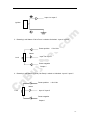
Before inserting SIM card, cut off the power for the AVL unit.
om
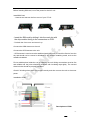
Install SIM Card
- Unscrew and remove the front cover of your VT310.
- Insert the SIM card by sliding it into the card slot with
the chip module facing to the connectors on PCB.
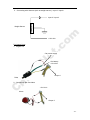
Connect the GSM Antenna to the unit.
.c
- Put back the front cover and screw it up.
uy
N
et
Connect the GPS Antenna to the unit.
- GPS antenna is used to receive satellite signals in the sky. It should be fixed to face the
sky and should not be covered or shielded by any objects containing metal, such as the
metallic windshield.
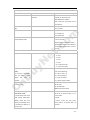
Find a suitable place inside the car for installing the unit. Wiring connections must be firm
and reliable and the joints should be wrapped with insulating tape tightly. The unused
electrical wire should be properly insulated.
nB
Check if all wirings have been connected correctly and then connect the unit to the motor
power.
C
Installation Guide:
Power key
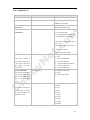
Descriptions of PINs
-7-