1
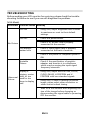
(DVI Mode)
Prob lems
Curren t Status Remed y
LED ON
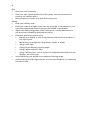
·
Using OSD, adjust brightness and
contrast to maximum or reset to their
default settings.
LED OFF
·
Check the power switch.
·
Check if AC power cord is properly
connected to the monitor.
·
Check if video signal cable is properly
connected at the back of monitor.
·
Check if the power of computer system
is ON.
No Picture
LED displays
amber color
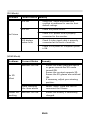
(HDMI Mode)
Problems
Current Status
Remedy
Monitor LED ON
·
Ensure the video playback device
or game console has 3D mode
turned ON.
Ensure the content supports 3D.
Ensure the 3D glasses are switched
ON.
If necessary, adjust your viewing
position.
After checking
the items above
·
Select “Auto” from the OSD to
reconnect the Glasses.
Monitor LED ON
·
Ensure the battery is sufficiently
charged.
No 3D
effect
Glasses not
working
EN-20