1
_____________________________________________________________________ 21
5 Edit programs
Select program as described in section 4.2.
Note: During operation of the cycler the active program can be viewed but not modified. If you
want to change settings of the active program for further experiments you have to save a copy
of this program to another memory. For further information about copying programs see section
5.3.
5.1 Delete program steps
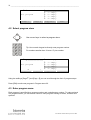
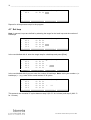
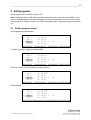
The programming spreadsheet:
Temp[C]
1: 62.0
2: 62.0
3: 80.0
4: 34.0
Info
Time
# Options -->
←
0h 5m 0s
0h 1m 0s
0h 1m 0s 2
24
0h 1m 0s
Insert/Del
Save Pgm
Enter
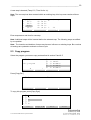
To delete a program step press [Insert/Del]
Insert / Delete step:
1: 62.0
0h 5m 0s
2: 62.0
0h 1m 0s
3: 80.0
0h 1m 0s
4: 34.0
0h 1m 0s
Cancel
← Del.
2
24
Delete
Insert
Insert / Delete step: 3
1: 62.0
0h 5m 0s
2: 62.0
0h 1m 0s
3: 80.0
0h 1m 0s 2
24
4: 34.0
0h 1m 0s
Cancel
Delete
← Del.
Insert
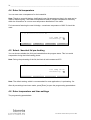
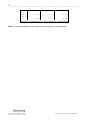
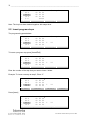
Enter the number of the step that you want to delete.
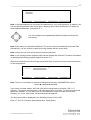
Press [Delete]
Insert / Delete step: 3
1: 62.0
0h 5m 0s
2: 62.0
0h 1m 0s
3: 80.0
0h 1m 0s 2
4: 34.0
0h 1m 0s
>>> Deleting step 3... <<<
User manual T3000 Thermocycler June 2009
24