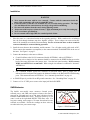
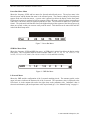
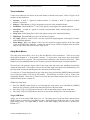
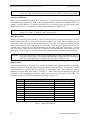
1
IntelliTuner
Automatic Antenna Tuner
TM
Model MFJ-993
INSTRUCTION MANUAL
CAUTION: Read All Instructions Before Operating Equipment
MFJ ENTERPRISES, INC.
300 Industrial Park Road
Starkville, MS 39759 USA
Tel: 662-323-5869 Fax: 662-323-6551
VERSION 1C
COPYRIGHT
C
2004 MFJ ENTERPRISES, INC.
MFJ-993 IntelliTuner Automatic Antenna Tuner
Instruction Manual
Contents
THE BASICS
Introduction...................................................................................................................................... 1
Features............................................................................................................................................ 2
Specifications................................................................................................................................... 2
Fast Start .......................................................................................................................................... 3
Front Panel....................................................................................................................................... 4
SWR/Wattmeter.................................................................................................................. 4
LCD Display ....................................................................................................................... 4
LCD Contrast Control......................................................................................................... 4
ANT Button ........................................................................................................................ 4
MODE Button..................................................................................................................... 4
C-UP and C-DN Buttons .................................................................................................... 4
L-UP and L-DN Buttons..................................................................................................... 5
AUTO Button ..................................................................................................................... 5
TUNE Button...................................................................................................................... 5
VOL Control ....................................................................................................................... 5
POWER Button................................................................................................................... 5
Back Panel ....................................................................................................................................... 6
Power .................................................................................................................................. 6
Remote Port ........................................................................................................................ 6
Radio Interface.................................................................................................................... 6
Transmitter.......................................................................................................................... 7
Balanced Line ..................................................................................................................... 7
Wire .................................................................................................................................... 7
Ground ................................................................................................................................ 7
Antenna 1............................................................................................................................ 7
Antenna 2............................................................................................................................ 7
Installation ....................................................................................................................................... 8
SWR/Wattmeter............................................................................................................................... 8
THE MENUS
Main Mode Menus........................................................................................................................... 9
Digital Wattmeter Menu ..................................................................................................... 9
Power Bar Meter Menu..................................................................................................... 10
SWR Bar Meter Menu ...................................................................................................... 10
L-Network Menu .............................................................................................................. 10
Tuner Indicators ............................................................................................................................. 13
Antenna............................................................................................................................. 13
Memory............................................................................................................................. 13
IntelliTune......................................................................................................................... 13
Auto/Semi ......................................................................................................................... 13
StickyTune ........................................................................................................................ 13
SWR Beep......................................................................................................................... 13
© 2003-2004 MFJ Enterprises, Inc.
i
MFJ-993 IntelliTuner Automatic Antenna Tuner
Instruction Manual
LC Limit ........................................................................................................................... 13
Meter Range...................................................................................................................... 13
Setup Mode Menus ........................................................................................................................ 13
Target SWR Menu ............................................................................................................ 13
Auto Tune SWR Menu ..................................................................................................... 14
Meter Range Menu ........................................................................................................... 14
Memory Menu .................................................................................................................. 14
IntelliTune Menu .............................................................................................................. 15
SWR Beep Menu .............................................................................................................. 15
Beep Menu........................................................................................................................ 15
Peak Hold Menu ............................................................................................................... 15
Refresh Menu.................................................................................................................... 15
LC Limit Menu ................................................................................................................. 15
OPERATION
Manual Tuning............................................................................................................................... 16
Meter Codes and Audible Beeps.................................................................................................... 16
Grounding Hints ............................................................................................................................ 18
Antenna System Hints.................................................................................................................... 19
Location ............................................................................................................................ 19
Matching Problems ........................................................................................................... 19
APPENDICES
Resetting the Tuner ........................................................................................................................ 21
Factory Defaults................................................................................................................ 21
Delete Antenna Memory................................................................................................... 22
Total Reset ........................................................................................................................ 22
Self Test ......................................................................................................................................... 22
Power Down Circuit Test............................................................................................................... 23
Relay Test ...................................................................................................................................... 24
Firmware Version Number via Meter............................................................................................ 24
Setting the Speaker Volume........................................................................................................... 24
Wattmeter Calibration.................................................................................................................... 25
SWR Bridge Calibration ................................................................................................................ 25
Frequency Counter Calibration...................................................................................................... 26
In Case of Difficulty ...................................................................................................................... 27
Technical Assistance...................................................................................................................... 27
List of Accessories......................................................................................................................... 27
Circuit Block Diagram................................................................................................................... 28
FIGURES
Figure 1.
Figure 2.
Figure 3.
Figure 4.
Figure 5.
Figure 6.
ii
Installation Block Diagram.............................................................................................. 3
MFJ-993 Front Panel....................................................................................................... 4
MFJ-993 Back Panel ....................................................................................................... 6
Alinco Interface Cable..................................................................................................... 7
Icom Interface Cable ....................................................................................................... 7
SWR/Wattmeter .............................................................................................................. 8
© 2003-2004 MFJ Enterprises, Inc.
MFJ-993 IntelliTuner Automatic Antenna Tuner
Instruction Manual
Figure 7. Power Bar Meter............................................................................................................ 10
Figure 8. SWR Bar Meter ............................................................................................................. 10
Figure 9. Mode Button Flow Chart and Button Action ................................................................ 11
Figure 10. Main Mode Menus Display ......................................................................................... 12
Figure 11. Power-On Operations .................................................................................................. 21
Figure 12. MFJ-993 Circuit Block Diagram................................................................................. 28
TABLES
Table 1.
Table 2.
Table 3.
Table 4.
Memory Resolution ........................................................................................................ 14
Meter Needle Stationary Codes ...................................................................................... 17
Meter Needle Bounce Codes .......................................................................................... 18
Failure Messages............................................................................................................. 23
© 2003-2004 MFJ Enterprises, Inc.
iii
MFJ-993 IntelliTuner Automatic Antenna Tuner
Instruction Manual
THIS PAGE IS LEFT BLANK INTENTIONALLY
iv
© 2003-2004 MFJ Enterprises, Inc.
MFJ-993 IntelliTuner Automatic Antenna Tuner
Instruction Manual
The Basics
Introduction
The MFJ-993 IntelliTunerTM lets you rapidly tune any antenna automatically: balanced, unbalanced, or
single-wire. The MFJ-993 is a comprehensive automatic antenna tuning center with SWR/wattmeter,
antenna switch for two antennas, and a 4:1 current balun for balanced lines.
MFJ's exclusive InstantRecallTM, IntelliTuneTM and AdaptiveSearchTM algorithms give you fast automatic
tuning with more than 2000 non-volatile memories.
The tuner includes a highly efficient switching L-network with wide matching capability, 1.8 to 30 MHz
coverage, cross-needle power meters, backlight LCD display, a port for an accessory remote control, a
radio interface port, and heavy-duty 16 amp/1000 volt relays. It is rated at 300 watts PEP SSB and 150
watts CW.
A maximum of 256 values of capacitance and 256 values of inductance are available. With the
inductance switched between the input and output side, this provides a total of 131,072 L/C tuning
combinations. The nominal tuning ranges are 0 to 3900 pF and 0 to 24 µH.
All MFJ IntelliTunersTM learn and remember. When you transmit, they automatically adjust for minimum
SWR and remember the frequency and tuner settings, safely stored in non-volatile memory. The next
time you operate on that frequency (or close to it) and antenna, these tuner settings are instantly restored
and you’re ready to operate in milliseconds. Each of two antenna selections can learn and remember
more than a thousand frequencies and tuner settings.
When you key your transmitter, MFJ’s InstantRecallTM checks its memory to see if you have operated that
frequency before. If so, tuning is instantaneous and you’re ready to operate. If not, MFJ’s IntelliTuneTM
algorithm (based on MFJ’s famous SWR Analyzer technology) kicks in. It measures the complex
impedance of your antenna. Next, it calculates the components it needs and instantly snaps them in.
Finally, it fine-tunes to minimize SWR, and you’re ready to operate--all in a fraction of a second.
If the antenna impedance is not within the tuner’s measurement range, MFJ’s AdaptiveSearchTM
algorithm goes into action. Frequency is measured and relevant components values are determined. Only
those values are searched for fast tuning. If it still cannot find a match, the search is performed again
using a different search pattern.
The target SWR can be set at 1.0 through 2.0. The minimum power to tune is approximately five watts.
You can manually tune where you can’t transmit (for listening out of ham bands).
The optional MFJ-993RC Remote Control provides most tuner controls, allowing convenient remote
locating of the tuner itself.
All MFJ’s IntelliTunersTM support radio tuner interfaces that are compatible with Icom AH-3 and AH-4
tuners and Alinco EDX-2 tuner. Optional interface cables MFJ-5124A (for Alinco) and MFJ-5124I (for
Icom) are available from MFJ Enterprises, Inc. Interface cables for compatible Kenwood and Yaesu
radios will be available in the future.
The tuners enter a “sleep” mode when idle and when no transmit signal is present, turning off the
microprocessor clock to avoid the generation of spurious signals.
© 2003-2004 MFJ Enterprises, Inc.
1
MFJ-993 IntelliTuner Automatic Antenna Tuner
Instruction Manual
Features
•
•
•
•
•
•
•
•
•
•
•
•
•
•
•
•
•
•
•
Automatically matches antennas from 6 to 1600 ohms impedance
Handles 300 watts PEP SSB, 150 watts CW
Tune in less than 15 seconds, usually less than 5 seconds
Over 2000 non-volatile memories for tuner settings
Highly efficient switching L-network matching circuit
1.8 to 30 MHz continuous frequency coverage
Adjustable target SWR 1.0 to 2.0
Adjustable SWR threshold 0.5 to 1.5
Lighted cross-needle SWR/wattmeter with high, low, and auto range options
Multifunction backlit LCD display with contrast control
Built-in frequency counter
Numeric readings for SWR, forward and reflected power
Bar meters for SWR, forward and reflected power
Aural SWR meter with volume control
Two SO-239 coax fed antenna connectors
Connector for random wire or single wire antennas
Built-in 4:1 current balun for balanced line antennas
Optional remote control
Optional radio interface for compatible radios
Specifications
•
•
•
•
•
•
•
•
•
•
•
•
•
•
•
•
•
•
Impedance matching range: 6 to 1600 ohms
Minimum power for tuning: 5 watts
Maximum power while tuning: 100 watts with foldback, 20 watts without foldback
RF power limit: 300 watts PEP SSB, 150 watts CW
Frequency range: 1.8 to 30 MHz continuous coverage
Frequency counter accuracy: ±1 kHz across HF bands
Frequency counter range: up to 50 MHz
Capacitance range: 0 to 3908 pF nominal (256 values)
Inductance range: 0 to 24.86 µH nominal (256 values)
Relay rating: 16 amp 1000 volts
Relay electrical life: 100,000 operations
Relay mechanical life: 10 million operations
Memory endurance: 1 million write cycles
Memory data retention: 100 years
Power requirements: 12 - 15 volts DC, 2.1 × 5.5 mm coaxial plug, center pin positive
Current consumption: 1 amp or less
Dimensions (approx.): 10.1 × 2.8 × 9.2 in. (257 × 71 × 234 mm) (width/height/depth)
not including connectors
Weight (approx.): 3.9 lb (1.77 kg)
†
Specifications and design are subject to change without notice.
2
© 2003-2004 MFJ Enterprises, Inc.
MFJ-993 IntelliTuner Automatic Antenna Tuner
Instruction Manual
Fast Start
WARNING
●
●
●
●
●
●
Never operate the tuner with its cover removed. Contact with the components inside the
tuner while transmitting will result in painful RF burns.
Locate the tuner so that the rear terminals are not accessible during operation. The single
wire and balanced line connection may have high voltage while transmitting.
Disconnect all antennas from the tuner during lightning storms.
Always tune with low power (about 10 watts). Apply maximum power only after tuning up.
Never exceed tuner specifications.
Do not transmit with a high SWR for extended periods of time.
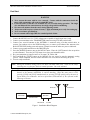
1. Connect the MFJ-993 to a 12-15 VDC voltage source capable of supplying at least 1 amp.
2. Connect your transmitter to the TRANSMITTER connector using a 50-ohm coaxial cable.
3. Connect your coax-fed antenna to the ANTENNA 1 connector using a 50-ohm coaxial cable, or
connect your random wire to the WIRE binding post, or connect your balanced line antenna to the
BALANCED LINE binding posts and connect a jumper between the other two posts as indicated.
4. Connect your ground connection to the GROUND post.
5. Press the [POWER] button to turn on the MFJ-993 tuner. Place the [ANT] button in the out position
to select antenna 1. Press the [AUTO] button in to select semi-automatic mode.
6. Key your transmitter to output a carrier of 10 watts CW, FM or AM.
7. Press and hold the [TUNE] button on the MFJ-993 for one second to start the automatic tuning
process. When completed, check to ensure an SWR of 2.0 or less before increasing RF power.
8. You are ready to transmit.
Note:
During the automatic tuning process, the tuner will make some noise. These are the relays
switching at a very fast pace and it is normal operation. Do not be alarmed.
Note:
When the tuner power is OFF, the tuner is in bypass mode and RF from the transmitter goes
directly to the antenna (ANTENNA 1) with no matching. When the tuner power is ON,
pressing [C-DN] and [L-DN] simultaneously or pressing [TUNE] quickly places the tuner in
bypass mode (zero inductance and zero capacitance) and indicates by the reflected needle
bouncing to 20 watts.
Antenna 1
Transmitter
Antenna 2
MFJ-993
50-ohm Coax
RF Ground
12 VDC
Figure 1. Installation Block Diagram.
© 2003-2004 MFJ Enterprises, Inc.
3
MFJ-993 IntelliTuner Automatic Antenna Tuner
Instruction Manual
Front Panel
60 40
20
50
0
10
10
200 300
30
5
14.100 MHz
1.1
FWD=100 REF=0.5
8
1.5
2
1.
0
1
400-3083
MODEL
MFJ-993
0
10
3.0 2.0
5.0
ANT
SWR
Hi x1
Lo x.1
SWR
Pwr
1
0
1.2
25
1.5
50
2
75
3
5
100 300
MODE
Z
C-UP
L-UP
AUTO
C-DN
L-DN
TUNE
LCD
MFJ IntelliTunerTM
AUTOMATIC ANTENNA TUNER
300 Watts PEP SSB / 150 Watts CW
POWER
VOL
BYPASS
300 / 30
WATTS
AUTO RANGE
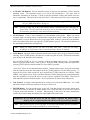
Figure 2. MFJ-993 Front Panel.
•
SWR/Wattmeter: The cross-needle meter measures forward power, reflected power, and SWR. It
operates whenever the tuner is power on. Full-scale readings are 300 watts forward and 60 watts
reflected. The meter can be set to low power range of 30 watts forward and 6 watts reflected. The
SWR is measured at the point where the two needles cross. See “SWR/Wattmeter” on page 8 for
more detailed information.
•
LCD Display: A 2-line by 16-character alphanumeric display. It displays the tuner’s various menus
and status. The display contrast can be adjusted by the [LCD] control on the front panel. Below the
display are the SWR and power bar meter scales. Refer to Figure 10 for descriptions of the various
displayed information.
•
LCD Contrast Control: A trimpot control that adjusts the contrast of the LCD display. Use a small
flat blade screwdriver and turn clockwise to increase contrast.
•
ANT Button: Used to select the antenna to tune. Button out selects Antenna 1; button in selects
Antenna 2. The Antenna indicator on the main display indicates the selected antenna. A balanced
feedline or a single-wire antenna is, by default, Antenna 1. Changing the [ANT] button will switch
the antenna only when there is no RF power.
•
MODE Button: Time-sensitive and used to navigate through the various main menus and to enter or
exit the setup menus.
•
C-UP and C-DN Buttons: Used to manually increase or decrease the capacitance of the L-network
matching circuit. The capacitance range is 0 to 3908 pF (picofarads). The upper limit of capacitance,
dependent on frequency, is used to limit the maximum voltage and current across the tuner’s
components. This limit can be removed in the LC Limit setup menu, but is not recommended.
Note:
4
Pressing [C-UP] and [C-DN] simultaneously toggles the capacitor between the input
and output sides of the L-network. Forward needle bounces to 30 watts when the
capacitor is on the transmitter side. Reflected needle bounces to 5 watts when the
capacitor is on the antenna side.
© 2003-2004 MFJ Enterprises, Inc.
MFJ-993 IntelliTuner Automatic Antenna Tuner
•
Instruction Manual
L-UP and L-DN Buttons: Used to manually increase or decrease the inductance of the L-network
matching circuit. The inductance range is 0 to 24.86 µH (microhenries). The upper limit of
inductance, dependent on frequency, is used to limit the maximum voltage and current across the
tuner’s components. This limit can be removed in the LC Limit setup menu, but is not recommended.
Shortcut: Press both [L-UP] and [L-DN] buttons simultaneously to toggle SWR Beep on and
off. See “SWR Beep Menu” on page 15.
Note:
•
AUTO Button: Used to select automatic or semi-automatic tuning mode. Button out selects
automatic mode--the tuning routine is automatically started when at least 5 watts of power is applied
and the SWR is a preset amount above the preset target SWR. Button in selects the semi-automatic
mode--the tuning routine starts only when the [TUNE] button is pressed. The Auto/Semi indicator on
the main display indicates the selected mode.
Note:
•
Pressing [C-DN] and [L-DN] (both DOWN buttons) simultaneously places the tuner in
bypass mode. The reflected needle bouncing to the 20-watt mark indicates this. RF from
the transmitter goes directly to the antenna with no matching.
During the tuning process, the tuner will make some noise. These are the relays
switching at a very fast pace and it is normal operation. Do not be alarmed.
TUNE Button: Has three different functions based on the length of time you press and hold it before
releasing. Press [TUNE] quickly (less than 0.5 second) to bypass the tuner. RF from the transmitter
goes directly to the antenna with no matching.
Press and hold [TUNE] for 0.5 to 2 seconds to start the automatic tuning process. The transmitter
must be keyed first with at least 5 watts of power. When the SWR is already below the target SWR,
pressing [TUNE] will fine-tune the match for a lower SWR, if possible.
“StickyTune” allows for one-handed tuning operation. Normal tuning requires keying the transmitter
with one hand and using the other hand to push the [TUNE] button to start the tuning process. To
toggle the StickyTune mode on and off, press and hold the [TUNE] button for two seconds. When
enabled, a bar appears on top of the Auto/Semi indicator, and the tuning process starts automatically
when the transmitter is keyed with at least 5 watts of power regardless of the SWR. This works in
both automatic and semi-automatic modes. One beep indicates on and two beeps indicate off.
•
VOL Control: A trimpot control that adjusts the volume level of the aural SWR meter. Use a small
flat blade screwdriver and turn clockwise to increase volume level.
•
POWER Button: Used to turn the power on and off. Note that during power-on the analog meter
bounces three times (to indicate the model number, 993). When the power is off, the tuner is placed
in bypass mode and Antenna 1 is selected. When turning on the power, the tuner automatically
restores all previous settings and displays the target SWR on the main screen.
WARNING: Do not turn the power on and off rapidly, otherwise the tuning setting
memory can be corrupted and the unit will have to be reset to factory defaults.
Note:
When the tuner power is OFF, the tuner is in bypass mode and RF from the transmitter
goes directly to the antenna (ANTENNA 1) with no matching.
© 2003-2004 MFJ Enterprises, Inc.
5
MFJ-993 IntelliTuner Automatic Antenna Tuner
Instruction Manual
Back Panel
*
TRANSMITTER
MFJ ENTERPRISES, INC.
STARKVILLE, MS USA
BALANCED LINE
POWER
12VDC
1A
+
ANTENNA 1
ANTENNA 2
WIRE
REMOTE
PORT
GROUND
RADIO
INTERFACE
*
Install Jumper When Using
BALANCED LINE Antenna
!
Do not connect WIRE and
ANTENNA 1 at same time!
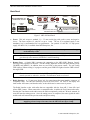
Figure 3. MFJ-993 Back Panel.
•
Power: This jack accepts a standard 2.1 × 5.5 mm coaxial plug with positive center and negative
sleeve. The tuner requires 12 volts DC at up to 1 amp. The use of a regulated supply is not
mandatory but is recommended for best performance. An optional 12 volts DC 1.5 amp power
supply, the MFJ-1316, is available from MFJ Enterprises, Inc.
WARNING: Do not apply voltages greater than 18 volts to this unit, or permanent damage
to the unit may result.
Note:
•
Remote Port: A female DB-9 connector for connecting to the MFJ-993RC Remote Control,
allowing remote operation of the tuner. The MFJ-993RC duplicates all the front panel buttons except
[POWER] and [MODE]. In addition, there are two LEDs on the remote control. The red Tuning
LED lights to indicate tuning is in progress and the green SWR LED lights when the SWR is below
the target SWR.
Note:
•
When the tuner power is OFF, the tuner is in bypass mode and RF from the transmitter
goes directly to the antenna (ANTENNA 1) with no matching.
To use the remote control, both the [ANT] and [AUTO] buttons on the automatic tuner
must be pressed in; otherwise, Antenna 1 and Automatic mode are selected.
Radio Interface: A 3.5 mm stereo phone jack for connecting to the tuner interface connector of
compatible radios. The MFJ-993 should be powered on first (TURN ON RADIO will display and
both needles will bounce) and then the radio, so the radio knows a remote tuner is present.
The Radio Interface works with radios that are compatible with the Icom AH-3, Icom AH-4 and
Alinco EDX-2 tuners. When connected to a compatible radio, it enables the Tune button on the radio.
Pressing the Tune button on the radio causes the radio to temporarily switch to CW mode, transmit 10
watts and start the tuning process. Once the tuning process is completed, the tuner signals the radio
and the radio will return to the previous mode and power setting.
WARNING: Make sure the +13.8 volts connection on the radio’s tuner port is capable of
supplying at least 1 amp of current, since the MFJ-993 uses up to 1 amp.
6
© 2003-2004 MFJ Enterprises, Inc.
MFJ-993 IntelliTuner Automatic Antenna Tuner
Instruction Manual
Interface cables for Alinco and Icom radios are available from MFJ Enterprises, Inc. Interface cables
for compatible Kenwood and Yaesu radios will be available in the future. The MFJ-5124A interface
cable provides power and control between an Alinco radio and the MFJ automatic tuner. Supported
Alinco radios are DX-70, DX-77, and any Alinco radio that supports the Alinco EDX-2 tuner.
Pin 1 (Ground) connects to the Sleeves of both 3.5 mm Stereo Phone Plug and Power Plug.
Pin 2 (+13.8V) connects to the Center Pin of Power Plug.
Pin 3 (Key) connects to the Tip of 3.5 mm Stereo Phone Plug.
Pin 4 is not connected.
Pin 5 (Start) connects to the Ring of 3.5 mm Stereo Phone Plug.
Figure 4. Alinco Interface Cable.
The MFJ-5124I interface cable provides power and control between an Icom radio and the MFJ
automatic tuner. Supported Icom radios are IC-706, IC-707, IC-718, IC-725, IC-728, IC-736, IC-738,
IC-746, IC-756, IC-765, IC-775, and any Icom radio that supports the Icom AH-3 and AH-4 tuners.
Push and hold the radio’s [TUNER] button for two seconds to start the tuning process. Push
[TUNER] quickly to bypass the tuner.
Pin 1 (Key) connects to the Tip of 3.5 mm Stereo Phone Plug.
Pin 2 (Start) connects to the Ring of 3.5 mm Stereo Phone Plug.
Pin 3 (+13.8V) connects to the Center Pin of Power Plug.
Pin 4 (Ground) connects to the Sleeves of both 3.5 mm Stereo Phone Plug and Power Plug.
Figure 5. Icom Interface Cable.
•
Transmitter: SO-239 connector for coax cable from transmitter or transceiver.
•
Balanced Line: Two binding posts for connecting balanced line antennas. To use balanced line
antenna, install a jumper as shown to the WIRE binding post.
•
Wire: Binding post for connecting single wire antennas. Notice the WIRE binding post is internally
connected to the ANTENNA 1 connector.
Note:
To use the WIRE binding post, make sure to remove the antenna, if any, from the
ANTENNA 1 connector.
•
Ground: Wing-nut terminal for RF ground wire connection.
•
Antenna 1: SO-239 connector for coax cable from antenna. Notice the ANTENNA 1 connector is
internally connected to the WIRE binding post.
Note:
•
To use the ANTENNA 1 connector, make sure to remove the jumper and wire antenna, if
any, from the WIRE binding post.
Antenna 2: SO-239 connector for coax cable from antenna.
© 2003-2004 MFJ Enterprises, Inc.
7
MFJ-993 IntelliTuner Automatic Antenna Tuner
Instruction Manual
Installation
WARNING
●
Never operate the tuner with its cover removed. Contact with the components inside the
tuner while transmitting will result in painful RF burns.
Locate the tuner so that the rear terminals are not accessible during operation. The single
wire and balanced line connection may have high voltage while transmitting.
Disconnect all antennas from the tuner during lightning storms.
Always tune with low power (about 10 watts). Apply maximum power only after tuning up.
Never exceed tuner specifications.
Do not transmit with a high SWR for extended periods of time.
●
●
●
●
●
1. Place the tuner in a convenient location at the operating position. With a random wire or balanced
line, the feed through insulators may have high RF voltages. These voltages can cause serious RF
burns if the terminals are touched when transmitting. Be sure to locate the tuner so these terminals
cannot accidentally be contacted during operation.
2. Install the tuner between the transmitter and the antenna. Use a 50-ohm coaxial cable (such as RG58) to connect the transmitter (or amplifier) to the connector marked TRANSMITTER on the rear of
the tuner. See Figure 1 on page 3.
3. Connect the antenna(s) to the tuner as follows:
•
Coaxial feedlines to the SO-239 connectors labeled ANTENNA 1 and/or ANTENNA 2.
•
Random wire or single wire line antennas should be connected to the WIRE binding post on the
back of the tuner (and remove the jumper wire). Note the back panel warning: Do not connect
WIRE and ANTENNA 1 at same time! When a single wire antenna is connected it “becomes”
ANTENNA 1.
Note:
•
Route all single and random wire antennas safely to prevent RF burn hazard.
For a balanced feedline (open wire, twinlead, or twin-axial lines), place a jumper wire as
indicated on the back panel and connect the balanced feedline to the BALANCED LINE binding
posts. This antenna becomes ANTENNA 1. See “Antenna System Hints” on page 19.
4. A GROUND post is provided for an RF ground connection. See “Grounding Hints” on page 18.
5. Connect a 12 to 15 VDC power source to the input jack labeled POWER.
SWR/Wattmeter
20
50
10 0
10
0
20 0 30
1.5
1. 2
0
10
30
5
1
400-3083
3.0 2.0
5 .0
8
8
60 40
0
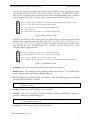
The backlit cross-needle meter measures forward power,
reflected power, and SWR, and operates whenever the tuner is
powered on. Forward power up to 300 watts is displayed on the
left-hand FORWARD meter scale. Reflected power up to 60
watts is read on the right-hand REFLECTED meter scale. For
low-power tuning, meter ranges of 30 watts forward and 6 watts
reflected are available. Divide the readings on these scales by
ten when in the low power meter range.
Hi x1
Lo x.1
Figure 6. SWR/Wattmeter.
© 2003-2004 MFJ Enterprises, Inc.
MFJ-993 IntelliTuner Automatic Antenna Tuner
Instruction Manual
To toggle between the high and low meter ranges, press the [TUNE] and [L-DN] buttons simultaneously.
The forward needle will read “300” for high range and “30” for low range until the buttons are released.
On the main LCD screen, in the high range a small dot appears in the lower right corner of the screen. No
dot appears in the low range. One beep indicates high range is selected; two beeps indicate low range is
selected. Refer to Figure 10 for the on-screen Meter Range indicator.
The meter can be set to auto range. Auto range automatically sets the meter scales according to the input
RF power to the tuner. Forward power greater than 30 watts or reflected power greater than six watts
automatically sets the meter to the high power range. Forward power less than 25 watts and reflected
power less than four watts automatically set the meter to the low power range. To toggle auto range on
and off, press the [TUNE] and [C-DN] buttons simultaneously. The reflected needle will read “60” for
auto range ON and “5” for auto range OFF. When auto range is on, a two-dot vertical segment appears in
the lower right corner of the screen. One beep indicates auto range on and two beeps indicate off. Refer
to Figure 10 for the on-screen Auto Range indicator.
The SWR is read from the eight red SWR curves that range from
1.0 to infinity. The SWR is measured by observing the point
where the forward and reflected power needles cross on the red
curved scales across the center of the meter. No cumbersome or
time-consuming SWR sensitivity adjustments are required with
this meter. Figure 6 shows an SWR of approximately 2.0.
reflected power
forward power
SWR =
reflected power
1−
forward power
1+
The meter also indicates various operational states of the tuner. Refer to “Meter Codes and Audible
Beeps” on page 16 for more details.
The MFJ-993 also includes an SWR bar meter and an aural SWR indicator, selectable by pressing [L-UP]
and [L-DN] buttons simultaneously. It also has bar meters for forward and reflected power.
The Menus
Main Mode Menus
The main mode menus show various tuner settings and status. There are four main mode menus arranged
in a “wrap-around” structure. When powered on, tuner operation starts with the main menu that was last
used. Within each main menu, press the [MODE] button briefly to view the next main menu. Press and
hold the [MODE] button for two seconds to enter the setup mode (see below). Various tuner indicators
are shown on all four main menus: Antenna 1/2, Memory, IntelliTuneTM, Auto/Semi, StickyTune, SWR
Beep, LC Limit, and Meter Range. Refer to Figures 9 and 10 for details on the displayed information.
Note:
In sideband mode, the frequency readout on the tuner display jumps around to different
frequencies while transmitting and stops on another frequency when un-keyed. This is
normal and is a characteristic of sideband mode, because sideband signals jump up and
down in frequency.
Digital Wattmeter Menu
Shows the frequency, SWR, and forward and reflected power in watts.
© 2003-2004 MFJ Enterprises, Inc.
9
MFJ-993 IntelliTuner Automatic Antenna Tuner
Instruction Manual
Power Bar Meter Menu
Shows the frequency, SWR, and bar meters for forward and reflected power. The top bar meter is the
forward power and the bottom bar meter is the reflected power. The numeric reading of forward power
appears at the end of the bar meters. A power scale is printed just below the display on the front panel.
Each power bar meter is consisted of 60 bar segments. Below 100 watts, each bar segment represents two
watts; above 100 watts, each bar segment represents 20 watts. The forward bar meter has a “peak hold”
feature. The peak meter hold function freezes the highest displayed bar segment of the forward power for
about one second, so that you can more easily read the meter. This function can be turned ON and OFF
in the Peak Hold setup mode.
Pwr
0
25
50
75
100 300
Figure 7. Power Bar Meter.
SWR Bar Meter Menu
Shows the frequency, SWR and SWR bar meter. A SWR scale is printed just below the display on the
front panel. The 15-segment SWR bar meter indicates SWR of 1.0, 1.1, 1.2, 1.3, 1.4, 1.5-1.6, 1.7-1.9,
2.0-2.4, 2.5-2.9, 3.0-3.9, 4.0-4.9, 5.0-9.9, 10.0-14.9, 15.0-19.9, and 20.0 to infinity.
SWR
1
1.2
1.5
2
3
5
Figure 8. SWR Bar Meter.
L-Network Menu
Shows the SWR and the configuration of the L-network matching circuit. The antenna symbol, on the
upper left corner, indicates the antenna side of the L-network. The capacitance value is displayed to the
left when it is on the antenna side and to the right when on the transmitter side. Inductance value is
shown in microhenries (µH) and capacitance value in picofarads (pF). See “Manual Tuning” on page 16.
10
© 2003-2004 MFJ Enterprises, Inc.
MFJ-993 IntelliTuner Automatic Antenna Tuner
Instruction Manual
MODE BUTTON FLOW CHART
MAIN MODES
MODE
SETUP MODES
14.100 MHz
1.1
FWD=100 REF=0.5
Digital
Wattmeter
14.100 MHz
1.1
100
Power
Bar Meter
1.1
SWR
Bar Meter
14.100 MHz
0.00uH
TARGET SWR
METER RANGE
For 2 sec.
MEMORY
MODE
MODE
L-Network
IntelliTune
SWR BEEP
1.1
0pF
AUTO TUNE SWR
MODE
BEEP
For 2 sec.
PEAK HOLD
REFRESH
MODE
+
BUTTON ACTION
MODE
C-UP
(while in the main modes)
Press
+
L-UP
in to turn power on, out to turn power off.
POWER
LC LIMIT
Press
ANT
in to select antenna 2, out to select antenna 1.
Press
MODE
to switch main modes and setup modes.
Press
C-UP
to increase capacitance.
Press
C-DN
to decrease capacitance.
Press
L-UP
to increase inductance.
Press
L-DN
to decrease inductance.
Press
AUTO
in to select semi-automatic mode, out to select automatic mode.
Press
TUNE
Press
C-UP or L-UP to turn on
or increase setting.
Press
C-DN or L-DN to turn off
or decrease setting.
less than 0.5 second to bypass the tuner; press and hold for 0.5 to 2 seconds to start the
tuning process; press and hold for more than two seconds to toggle the StickyTune on and off.
Press
C-UP
+
C-DN
to switch the capacitor between the input and output side.
Press
L-UP
+
L-DN
to toggle the SWR Beep on and off.
Press
C-UP
+
L-UP
to increase both capacitance and inductance.
Press
C-DN
+
L-DN
to bypass the antenna tuner.
Press
TUNE
+
C-UP
to toggle the Target SWR between 1.5 and 2.0.
Press
TUNE
+
L-UP
to cycle the Auto Tune SWR among 0.5, 1.0 and 1.5 above the target SWR.
Press
TUNE
+
C-DN
to toggle the Auto Range on and off.
Press
TUNE
+
L-DN
to toggle the Meter Range between 300 and 30 watts (disable Auto Range).
Figure 9. Mode Button Flow Chart and Button Action.
© 2003-2004 MFJ Enterprises, Inc.
11
MFJ-993 IntelliTuner Automatic Antenna Tuner
1
2
3
1
Frequency
2
Indicators: Antenna, Memory, IntelliTune
3
Indicators: Auto/Semi, StickyTune
4
SWR
5
Forward power in watts
6
Reflected power in watts
8
7
Indicators: SWR Beep, LC Limit, Meter Range
9
8
Forward power bar meter
9
Reflected power bar meter
5
4
Instruction Manual
6
1
2
7
3
4
10
1
3
2
7
4
10 Forward power in watts
11 SWR bar meter
12 Antenna symbol (antenna side of L-network)
11
12
13
13 Inductance value
7
2
3
14 Capacitance value when on antenna side
4
15 Capacitance value when on transmitter side
16 Appears when Antenna 1 is selected
14
15
17 Appears when Antenna 2 is selected
7
18 Appears when Memory is ON
Enlarged Views of Indicators
2
18 19
2
18 19
19 Appears when IntelliTune is ON
20 Appears when in Semi-Auto mode
16
21 Appears when StickyTune is ON
17
22 Appears when LC Limit is OFF
3
21
7
22 23
23 Appears when SWR Beep is ON
20
24
24 Appears when Meter Range is 300 watts
25
25 Appears when Auto Range is ON
Figure 10. Main Mode Menus Display.
12
© 2003-2004 MFJ Enterprises, Inc.
MFJ-993 IntelliTuner Automatic Antenna Tuner
Instruction Manual
Tuner Indicators
Various tuner indicators are shown on the main menus to indicate tuner status. Refer to Figure 10 for
locations of these indicators.
•
•
•
•
•
•
•
•
Antenna: A small “1” appears to indicate antenna 1 is selected; a small “2” appears to indicate
antenna 2 is selected.
Memory: When Memory is ON, a bar appears on top-left of the Antenna indicator.
IntelliTune: When IntelliTuneTM is ON, a bar appears on top-right of the Antenna indicator.
Auto/Semi: A small “S” appears to indicate semi-automatic mode; nothing appears to indicate
automatic mode.
StickyTune: When StickyTune is ON, a bar appears on top of the Auto/Semi indicator.
SWR Beep: When SWR Beep is ON, a musical note ♪ appears.
LC Limit: When LC Limit is OFF, a two-dot vertical bar segment appears on the upper left corner
of the SWR Beep indicator.
Meter Range: When Auto Range is ON, a two-dot vertical bar segment appears on the lower right
corner of the SWR Beep indicator. Another dot appears on top of this bar segment when the meter
range is high, and no dot when the meter range is low.
Setup Mode Menus
The setup mode menus allow you to set up how the MFJ-993 works and behaves. There are ten setup
mode menus arranged in a “wrap-around” structure. To access these setup menus, press and hold the
[MODE] button for two seconds. The setup menu that will display is the one that was last used. When
finished, press the [MODE] button for two seconds to go back to the main mode for normal operation.
The tuner goes into protective bypass mode in the setup mode and restores the matching network after
exiting the setup mode. If no button is pressed for more than eight seconds, the tuner automatically exits
the setup mode, restores the matching network, and returns to the main mode.
To access the LC Limit setup menu from any setup menu, press and hold the [MODE] button and within
two seconds press both [C-UP] and [L-UP] buttons. This difficulty is built-in so the LC Limit is not
accidentally disabled. Notice the LC Limit is not saved into non-volatile memory and will revert back to
default ON when power is turned off.
Within each setup menu:
•
•
•
Press the [MODE] button briefly to cycle through the setup menus; press and hold the [MODE]
button for two seconds to exit the setup mode and go back to the main mode.
Press the [C-UP] or [L-UP] button to increase or turn on the setting for the current setup menu.
Press the [C-DN] or [L-DN] button to decrease or turn off the setting for the current setup menu.
Target SWR Menu
Allows you to set the target SWR from 1.0 to 2.0. The tuning process will stop when a match with an
SWR less than or equal to the target SWR is found. Setting the target SWR lower than 1.5 may require
longer tuning times. The target SWR is shown on the initial display when the tuner is powered on.
Default is 1.5.
© 2003-2004 MFJ Enterprises, Inc.
13
MFJ-993 IntelliTuner Automatic Antenna Tuner
Instruction Manual
Shortcut: Press both [TUNE] and [C-UP] buttons simultaneously to toggle the target SWR between
1.5 and 2.0, which is indicated by the meter SWR scale. Refer to Table 2 for meter code.
Auto Tune SWR Menu
Allows you to set the SWR threshold in the range 0.5 to 1.5. In the automatic mode, the tuning process
will automatically start when the SWR is above the target SWR by this amount of SWR threshold. For
example, for target SWR of 1.5 and auto tune SWR of 1.0, the tuning process will start whenever the
SWR is above 2.5 (1.5 + 1.0) and there is at least 5 watts of RF power. Default is 1.0.
Shortcut: Press both [TUNE] and [L-UP] buttons simultaneously to cycle the auto tune SWR
among 0.5, 1.0 and 1.5. Refer to Table 2 for meter code.
Meter Range Menu
Allows you to select the meter scale range. In the 30 watts (low) range, the forward full scale is 30 watts
and the reflected full scale is 6 watts (divide the meter reading by 10). In the 300 watts (high) range, the
forward full scale is 300 watts and the reflected full scale is 60 watts. Auto range automatically sets the
meter scales according to the input RF power to the tuner. Forward power greater than 30 watts or
reflected power greater than six watts automatically sets the meter to the high power range. Forward
power less than 25 watts and reflected power less than four watts automatically set the meter to the low
power range. Refer to Figure 10 for the on-screen Meter Range indicators. Default is 300 watts range.
Shortcut: Press both [TUNE] and [C-DN] buttons simultaneously to toggle Auto Range on and off.
Press both [TUNE] and [L-DN] buttons simultaneously to toggle between 300 and 30
watts meter range and disable Auto Range. Refer to Table 2 for meter code.
Memory Menu
Turns the antenna memory on and off. The “memory resolution” is the width of frequency spectrum that
the tuner recognizes as being the same as a tuned frequency already in memory. The memory resolution
is approximately 0.1 percent of the lower frequency of each amateur band. For example, the memory
resolution on the 40-meter band (7000 to 7300 kHz) is 7 kHz; if the tuner has memorized a setting for
7050 kHz, it will automatically call up this setting for any frequency from 7047 to 7053 kHz. The
memory resolutons for the HF amateur bands 160 through 10 meters are:
Meter
160
75/80
60
40
30
20
17
15
12
10
Frequency Range (kHz)
1800 – 2000
3500 – 4000
5330.5, 5346.5, 5366.5; 5371.5 and 5403.5
7000 – 7300
10100 – 10150
14000 – 14350
18068 – 18168
21000 – 21450
24890 – 24990
28000 – 29700
Memory Resolution (kHz)
2
4
two memory locations
7
10
14
18
21
25
28
Table 1. Memory Resolution.
14
© 2003-2004 MFJ Enterprises, Inc.
MFJ-993 IntelliTuner Automatic Antenna Tuner
Instruction Manual
The memory resolution for non-amateur frequency bands between 160 and 10 meters is approximately
one percent of the lower frequency of that band. There are over a thousand memory locations for each
antenna. Tuner settings are stored in memory separately for Antenna 1 and Antenna 2 (settings for
balanced line or single-wire antennas are stored as Antenna 1). Refer to Figure 10 for the on-screen
Memory indicator. Default is ON.
To clear the memory for one antenna, select the antenna with the [ANT] button, turn off the power to the
tuner, then press and hold both [TUNE] and [C-DN] buttons while turning on the power. A DELETE
ANTENNA message will appear. “Total Reset” erases both antenna memories and returns all tuner
settings to their factory default states. To achieve this, turn power off, press and hold [TUNE], [L-DN]
and [C-DN] buttons while turning on the power. A TOTAL RESET message will appear.
IntelliTune Menu
Turns the IntelliTuneTM tuning algorithm on and off. When the tuner cannot find an appropriate setting in
its memory, it begins its calculation function. It measures the complex impedance of the antenna (load) at
that frequency, then it calculates the L/C components needed for a match. Then it fine-tunes the
component values. If for any reason the tuner cannot calculate the load impedance, it proceeds to yet
another method of calculation. If for any reason, this function can be turned off. Refer to Figure 10 for
the on-screen IntelliTuneTM indicator. Default is ON.
SWR Beep Menu
Turns the aural SWR meter on and off. The aural meter is a series of one to five beeps where one beep
indicates SWR of 1.5 or less, two beeps indicate SWR of 1.6 to 2.0, three beeps indicate SWR of 2.1 to
2.5, four beeps indicate SWR of 2.6 to 3.0, and five beeps indicate SWR above 3.0. This functions
independent of the acknowledgement beep setting. When ON, a musical note ♪ appears on the lower
right corner of the main menus (refer to Figure 10). Default is OFF.
Shortcut: Press both [L-UP] and [L-DN] buttons simultaneously to toggle SWR Beep on and off.
Beep Menu
Acknowledgement beep sounds each time a parameter is changed to acknowledge it. This function can
be turned OFF for silent operation, and this is independent of the SWR beep setting. Default is ON.
Peak Hold Menu
When the peak hold function is ON, the highest activated segment of the forward bar meter remains
visible for about one second, so that you can more easily read it. When OFF, the meter functions
normally. Default is ON.
Refresh Menu
When the refresh function is ON, the display is updated while tuning is in progress. Default is OFF.
Note:
Refresh slows tuning progress as it takes time to update the display.
LC Limit Menu
The upper limits of inductance (L) and capacitance (C) are factory-limited according to frequency and
maximum power rating; i.e., higher frequencies need less inductance and less capacitance when the Lnetwork is properly tuned. Pressing [C-UP] and/or [L-UP] allows capacitance and inductance to be
© 2003-2004 MFJ Enterprises, Inc.
15
MFJ-993 IntelliTuner Automatic Antenna Tuner
Instruction Manual
increased only to these limits. When a selected capacitance or inductance is higher than its allowed limit,
and the frequency is changed, that selection is automatically reduced to the value of its limit. These limits
are used to prevent matching of extreme load impedance outside the tuner’s specification, which may
result in excess voltage and/or current across the tuner’s components. This setting is not stored in nonvolatile memory and reverts back to the default when the tuner power is turned off. Refer to Figure 10 for
the on-screen LC Limit indicator. Default is ON.
WARNING: LC Limit is a safety precaution; the tuner is in danger of being damaged if this
function is turned off.
Operation
Manual Tuning
In certain cases the operator may wish to “touch up” the tuner’s settings. For example, if the target SWR
is set at the default of 1.5, the tuner will stop when a match of 1.5 is found. In all cases, manual tuning
gives the user control of the tuner if desired, and the L-Network menu provides a picture of the matching
network configuration. Manual tuning is accomplished by using the [C-UP], [C-DN], [L-UP], and [LDN] buttons. Since it is not known if more or less capacitance (or inductance) is needed, manual tuning
must be by trial-and-error. Press [C-UP] one time, and the reflected power will indicate if [C-UP] was the
right “direction.” If it was, press [C-UP] again and observe reflected power. If not, press [C-DN] twice
(once to return to the original setting of C, and once for one click past it).
Manual tuning of inductance is similarly accomplished, using [L-UP] and [L-DN]. Since the capacitance
and inductance are interdependent, some back-and-forth between the two may be needed, just as in a
conventional tuner with knobs. Once you are familiar with this process, you will learn how to match
certain antennas and frequencies.
Pressing [C-UP] and [C-DN] buttons simultaneously moves the capacitance back and forth from one side
of the inductance to the other. The L-Network menu displays the capacitance on the left to indicate that
the capacitance is on the antenna side (corresponding with the rear panel configuration of connectors); the
capacitance value moves to the right side of the display when the capacitance is on the transmitter side of
the inductance. A general rule of thumb is that loads with impedance higher than 50 ohms call for the
capacitance on the antenna side; loads with impedance lower than 50 ohms call for the capacitance on the
transmitter side.
Pressing [C-DN] and [L-DN] simultaneously or pressing [TUNE] quickly places the tuner in bypass
mode; i.e. zero inductance and zero capacitance. RF from the transmitter goes directly to the antenna
with no matching. The reflected needle bouncing to 20-watt mark indicates changing to bypass mode.
Meter Codes and Audible Beeps
In addition to displaying power and SWR, the meter also indicates tuner status. The meter needles
bounce, or rise to one point and stay, to provide information. In this mode the meters do not indicate
power levels. For example, when you press [C-DN] and [L-DN] simultaneously to place the tuner in
bypass mode, the reflected needle bounces to the 20 watts mark until you release the buttons. The
following tables show the meter needle stationary and bounce codes.
16
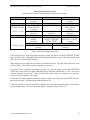
© 2003-2004 MFJ Enterprises, Inc.
MFJ-993 IntelliTuner Automatic Antenna Tuner
Instruction Manual
Meter Needle Stationary Codes
(Meter needles stay at the indicated mark until buttons are released.)
Forward
[TUNE] + [L-DN]
Reflected
[TUNE] + [C-DN]
[TUNE] 2 seconds
[TUNE] + [L-UP]
Both Needles
[TUNE] + [C-UP]
30 Watts Mark
Meter Range 30 Watts
[2 beeps]
5 Watts Mark
Auto Range Off
Sticky Tune Off
[2 beeps]
Auto Tune SWR +0.5
[1 beep]
Zero Scale
No
100 Watts Mark
Not Used
300 Watts Mark
Meter Range 300 Watts
[1 beep]
20 Watts Mark
60 Watts Mark
Not Used
Auto Range On
Sticky Tune On
[1 beep]
Auto Tune SWR +1.0
Auto Tune SWR +1.5
[2 beeps]
[3 beeps]
Mid Scale
Full Scale
Delete Confirmation?
Yes
CANCEL
DELETE ANTENNA
DELETED or RESET
[1 beep]
TOTAL RESET
[2 beeps]
Needles Intersect at SWR 1.5
Needles Intersect at SWR 2.0
Target SWR 1.5
Target SWR 2.0
[1 beep]
[2 beeps]
Table 2. Meter Needle Stationary Codes.
If not enough power is applied for tuning (less than 5 watts), the display will flash INCREASE POWER
three times and “QRO” (dah-dah-di-dah di-dah-dit dah-dah-dah) will be sent on CW. Increasing the input
power above five watts ends this message.
When input power is too high, the tuner enters a self-protection mode. The tuner will not allow any of its
relays to change. This feature is to prevent damage to your tuner.
If too much power is applied when tuning, the tuner will cease the tuning routine, flash DECREASE
POWER three times and send “QRP” (dah-dah-di-dah di-dah-dit di-dah-dah-dit) on CW. This occurs
when the forward power exceeds 75 watts and the SWR is greater than 3.0, or when the forward power
exceeds 125 watts regardless of the SWR.
If more than 300 watts is applied to the tuner, the tuner will go into bypass mode, flash OVERLOAD three
times and send “QRT” (dah-dah-di-dah di-dah-dit dah) on CW.
If the tuning process is activated under these conditions, the tuner will not start the tuning. It will indicate
the appropriate bounce code on the meter and display a warning message on the LCD.
© 2003-2004 MFJ Enterprises, Inc.
17
MFJ-993 IntelliTuner Automatic Antenna Tuner
Instruction Manual
Meter Needle Bounce Codes
(Meter needles bounce to the indicated mark until buttons are released.)
Forward
Reflected
Both Needles
30 Watts Mark
Capacitor
Switches To
Transmitter Side
[2 beeps]
5 Watts Mark
Capacitor
Switches To
Antenna Side
[1 beep]
30/5 Marks
Not Used
100 Watts Mark
Insufficient Power to
Tune
(Forward < 5 Watts)
300 Watts Mark
Power Too High to Tune
(Forward > 125 Watts, or
Forward > 75 Watts and SWR > 3)
INCREASE POWER
DECREASE POWER
[QRO]
20 Watts Mark
Bypass Mode
(L = 0 and C = 0)
[1 beep]
100/20 Marks
Not Used
[QRP]
60 Watts Mark
L or C at Its Limit During
Manual Adjustment
[1 beep at lower limit]
[2 beeps at upper limit]
300/60 Marks
Power Overload
(Forward > 300 Watts)
OVERLOAD
[QRT]
Table 3. Meter Needle Bounce Codes.
Grounding Hints
To minimize RFI, single wire feedlines (such as used with Windom or longwire antennas) should be kept
away from other wiring. Radiation will be minimized if the single wire feeder runs parallel and
reasonably close to the wire that connects the tuner to the outdoor ground. The antenna feed wire should
be adequately insulated to prevent arcing or accidental contact.
CAUTION
For operator safety, a good outside earth ground or water pipe ground should always be
installed and connected to the case of the MFJ-993. Make certain the safety ground also
connects to the transmitter and other station accessories. A wing-nut post marked GROUND is
provided for ground connections.
For safety, please use good DC and RF grounds. It is particularly important to have a good RF ground
when using a single wire feeder. When using a single wire feeder, the tuner needs something to "push"
against in order to force current into the single wire feedline. If a good RF ground is not available, RF
will usually find its way back into the power line (RFI), transmitter audio circuits (RF feedback), or the
operator (RF burns).
Metal water pipes and ground rods provide good DC and AC safety grounds, but they are often
inadequate for RF grounding because they are single conductors. Ground rods by themselves are almost
useless for dependable RF grounding.
RF grounds work much better when "spread out" over a large area, especially when they employ multiple
connections directly to the equipment ground point. Metal water pipes, heating ducts, and fences may
18
© 2003-2004 MFJ Enterprises, Inc.
MFJ-993 IntelliTuner Automatic Antenna Tuner
Instruction Manual
work (especially if they are connected together with multiple wires), but the best RF grounds are radial
systems or multi-wire counterpoises. Radials and counterpoises provide large, low resistance surfaces for
RF energy.
RF and lightning travel on the surface of conductors. Braided or woven conductors have high surface
resistance to lightning and RF. Ground leads for RF and lightning should have wide smooth surfaces.
Avoid the use of woven or braided conductors in RF and lightning grounds unless the lead needs to be
flexible.
Antenna System Hints
Location
For the best performance, an end-fed longwire wire antenna should be at least one quarter-wavelength
long at the operating frequency. Horizontal dipole antennas should be at least a half-wavelength long and
located as high and clear as possible. While good RF grounds help the signal in almost any transmitting
installation, it is extremely important to have good RF grounds with long wire or other Marconi-style
antennas.
Matching Problems
Most matching problems occur when the antenna system presents an extremely high impedance to the
tuner. When the antenna impedance is much lower than the feedline impedance, an odd quarterwavelength feedline converts the low antenna impedance to a very high impedance at the tuner. A similar
problem occurs if the antenna has an extremely high impedance and the transmission line is a multiple of
a half-wavelength. The half-wavelength line repeats the very high antenna impedance at the tuner.
Incorrect feedline and antenna lengths can make an otherwise perfect antenna system very difficult or
impossible to tune.
One example where this problem occurs is on 80 meters when an odd quarter-wave (60 to 70 feet) open
wire line is used to feed a half-wave (100 to 140 feet) dipole. The odd quarter-wave line transforms the
dipole's low impedance to over three thousand ohms at the tuner. This is because the mismatched
feedline is an odd multiple of 1/4 wavelength long. The line inverts (or teeter-totters) the antenna
impedance.
A problem also occurs on 40 meters with this same antenna example. The feedline is now a multiple of a
half-wave (60 to 70 feet) and connects to a full-wave high impedance antenna (100 to 140 feet). The halfwave line repeats the high antenna impedance at the tuner. The antenna system looks like several
thousand ohms at the tuner on 40 meters.
This places enormous strain on the balun and the insulation in the tuner, since voltages can reach several
thousand volts. This can cause component arcing and heating.
The following suggestions will reduce the difficulty in matching an antenna with a tuner:
•
Never center feed a half-wave multi-band antenna with a high impedance feedline that is close to an
odd multiple of a quarter-wave long.
•
Never center feed a full-wave antenna with a feedline close to a multiple of a half-wave long.
•
If this tuner will not "tune" a multi-band antenna, add or subtract 1/8 wave of feedline (for the band
that won't tune) and try again.
© 2003-2004 MFJ Enterprises, Inc.
19
MFJ-993 IntelliTuner Automatic Antenna Tuner
•
Instruction Manual
Never try to load a G5RV or center fed dipole on a band below the half-wave design frequency. If
you want to operate an 80-meter antenna on 160 meters, feed either or both conductors as a longwire
against the station ground.
To avoid problems matching or feeding any dipole antenna with high impedance open wire lines, keep the
lines around these lengths. [The worst possible line lengths are shown in brackets]:
160 meters dipole:
80 meters dipole:
40 meters dipole:
35-60, 170-195 or 210-235 feet
34-40, 90-102 or 160-172 feet
42-52, 73-83, 112-123 or 145-155 feet
[Avoid 130, 260 ft]
[Avoid 66, 135, 190 ft]
[Avoid 32, 64, 96, 128 ft]
Some slight trimming or adding of feedline may be necessary to accommodate the higher bands.
WARNING
To avoid problems, a dipole antenna should be a full half-wave on the lowest band. On 160
meters, an 80 or 40 meters antenna fed the normal way will be extremely reactive, with only a
few ohms of feedpoint resistance. Trying to load an 80 meters half-wave dipole (or shorter)
antenna on 160 meters can be a disaster for both your signal and the tuner. The best way to
operate 160 meters with an 80 or 40 meters antenna is to load either or both feedline wires (in
parallel) as a longwire. The antenna will act like a “T” antenna worked against station ground.
20
© 2003-2004 MFJ Enterprises, Inc.
MFJ-993 IntelliTuner Automatic Antenna Tuner
Instruction Manual
Appendices
POWER-ON OPERATIONS
(Press and hold buttons while turning on the power.)
Press and hold
C-UP
+
POWER
to get the firmware version number.
Press and hold
L-UP
+
POWER
to start the self test.
Press and hold
C-DN
+
POWER
to test the relays.
Press and hold
L-DN
+
POWER
to test the power-down circuitry.
Press and hold
TUNE
+
C-UP
+
POWER
to calibrate the wattmeter.
Press and hold
TUNE
+
L-UP
+
POWER
to calibrate the SWR bridge.
Press and hold
TUNE
+
C-DN
+
POWER
to delete the selected antenna memory.
Press and hold
TUNE
+
L-DN
+
POWER
to reset factory defaults.
Press and hold
TUNE
+
C-DN
+
L-DN
+
POWER
to perform total reset.
Press and hold
C-UP
+
L-UP
+
POWER
to calibrate the frequency counter.
Press and hold
L-UP
+
L-DN
+
POWER
to output audio for volume adjustment.
+
ANT
Figure 11. Power-On Operations.
Important:
The radio interface cable must be disconnected from the tuner, if the radio power is
off, before performing any of the following power-on operations.
Resetting the Tuner
Each time the tuner is powered off, the microprocessor saves all memories and configurations to nonvolatile memory ready to be used the next time the unit is turned on again. If the tuner is not working
properly, even on initial power on, try resetting to the factory defaults.
Factory Defaults
The unit is shipped with the following default settings:
•
•
Main Menu
Setup Menu
Digital Wattmeter
Target SWR
•
•
Inductance
Capacitance
0 µH
0 pF on transmitter side
•
•
•
•
•
•
•
Target SWR
Auto Tune SWR
Meter Range
Memory
IntelliTuneTM
SWR Beep
Beep
1.5
1.0 above target SWR
300 watts (high range)
on
on
off
on
© 2003-2004 MFJ Enterprises, Inc.
21
MFJ-993 IntelliTuner Automatic Antenna Tuner
•
•
Note:
Peak Hold
Refresh
Instruction Manual
on
off
Resetting to factory defaults does not erase the antenna memories.
To reset the tuner to these defaults:
1. Turn off the power to the tuner.
2. Press and hold both the [TUNE] and [L-DN] buttons while turning the power on.
3. Release the buttons when DEFAULTS RESET appears on the display and both meter needles read
full scale.
4. Resume with normal operation.
WARNING:
If the MFJ-993 is behaving weirdly or acting erratic, try resetting the tuner to
factory defaults.
Delete Antenna Memory
To delete an antenna memory, select Antenna 1 or Antenna 2 with the [ANT] button that you want to
delete. Turn off power to the tuner, and then press and hold both the [TUNE] and [C-DN] buttons while
turning the power back on. A confirmation message DELETE ANTENNA will display. Press the YES
[C-UP] button to delete the antenna memory (DELETED will display and both meter needles go to full
scale), or press the NO [L-UP] button to cancel (CANCEL will display and both meter needles go to zero
scale). Release the button to resume normal operation. Remember that the selected antenna memory will
be lost!
Total Reset
To erase both antenna memories and reset to factory defaults, press and hold down the [TUNE], [C-DN]
and [L-DN] buttons while turning the power on. A confirmation message TOTAL RESET will display.
Press the YES [C-UP] button to delete both antenna memories and reset factory defaults (RESET will
display and both meter needles go to full scale), or press the NO [L-UP] button to cancel (CANCEL will
display and both meter needles go to zero scale). Release the button to resume normal operation.
Remember that both antenna memories will be lost!
Self Test
A self-test routine will check the functions of the MFJ-993. This routine checks the display, the meter,
the front-panel buttons, the internal memory and the audio circuitry. During the self-test, you may stop
the test by turning off the unit; however, this should NOT be done during the memory test or the memory
could be corrupted. The self-test can be completed in approximately 30 seconds.
This test can also be used to test the optional MFJ-993RC Remote Control. Make sure to press both
[ANT] and [AUTO] buttons on the MFJ-993 tuner to the in position before starting the self-test, and press
the buttons on the MFJ-993RC instead of the front-panel buttons when prompted.
Note:
22
Performing the self-test will reset the unit to its factory default settings.
© 2003-2004 MFJ Enterprises, Inc.
MFJ-993 IntelliTuner Automatic Antenna Tuner
Instruction Manual
Here is the self-test procedure:
1. Turn off the power to the tuner, and press all buttons to the out position.
2. Unplug the radio interface cable, if one is connected, from the tuner.
3. If testing the MFJ-993RC Remote Control, connect it to the Remote Port and make sure both [ANT]
and [AUTO] buttons on the tuner are pressed to the in position.
4. Set volume to a comfortable listening level.
5. Press and hold only the [L-UP] button while turning the power on.
6. The test begins by displaying a copyright message and firmware version number, such as
COPYRIGHT (c) 2003-20YY MFJ ENTERPRISES, INC. VERSION YYWW. This is the
test of the display. At the same time, the forward needle of the meter also goes up slowly to full scale
and then drops to zero, followed by the reflected needle going up slowly to full scale and then drops
to zero. This tests the meter. Release the [L-UP] button before the message completes. To skip this
copyright message, press [C-DN] button.
7. You will be prompted to press each of the front-panel buttons. The forward needle should bounce
once for each press, and the reflected needle should move up a division for each press.
8. The unit then tests its non-volatile memory. Notice this step will reset the unit to its factory default
settings.
9. If the unit is okay, a repetitive message PASS will be displayed and sent as Morse code (di-dah-dahdit di-dah di-di-dit di-di-dit), and both meter needles will go to full scale. If there is a problem, a
failure message will be displayed and sent; also, the forward needle will bounce and the reflected
needle mark indicates the failure.
10. Once you have confirmed that the audio is okay, turn the unit off.
Failure
Message
ANT FAIL
MODE FAIL
C-UP FAIL
C-DN FAIL
L-UP FAIL
L-DN FAIL
AUTO FAIL
TUNE FAIL
Reflected
Needle (watts)
1
2
3
4
5
7.5
10
15
MEMORY FAIL
WAKEUP FAIL
PD FAIL
20
30
40
Indicates
[ANT] button is shorted or improperly connected.
[MODE] button is shorted or improperly connected.
[C-UP] button is shorted or improperly connected.
[C-DN] button is shorted or improperly connected.
[L-UP] button is shorted or improperly connected.
[L-DN] button is shorted or improperly connected.
[AUTO] button is shorted or improperly connected.
[TUNE] button is shorted or improperly connected.
Radio interface cable is connected but radio power is off.
Non-volatile memory circuitry is improperly connected.
Microprocessor wakeup circuitry problem.
Power down circuitry problem.
Table 4. Failure Messages.
Power-Down Circuit Test
When the 12 VDC power to the tuner is turned off, the tuner saves all settings to non-volatile memory.
The Power-Down Circuit Test checks the power down detection circuitry. It is recommended that this
test be done immediately after the regular self-test described above.
Note:
The tuner must be reset to factory defaults before performing this test.
© 2003-2004 MFJ Enterprises, Inc.
23
MFJ-993 IntelliTuner Automatic Antenna Tuner
Instruction Manual
Here is the test procedure:
1. Make sure power to the tuner is off.
2. If the tuner has been reset to factory defaults, skip to step 6; otherwise continue with step 3.
3. Press and hold both the [TUNE] and [L-DN] buttons while turning the power on.
4. Release both buttons when DEFAULTS RESET appears on the display.
5. Turn the power off.
6. Press and hold only the [L-DN] button while turning the power on.
7. If the power down detection circuitry is okay, a repetitive message PASS will be displayed and sent
as Morse code (di-dah-dah-dit di-dah di-di-dit di-di-dit). If there is a problem, message PD FAIL
will be displayed and sent as Morse code repetitively.
8. Turn the power off.
Relay Test
WARNING: Turn off the transmitter power or disconnect the transmitter before performing
this test; otherwise, damage to the tuner can result.
To test the relays and their control circuitry, press and hold the [C-DN] button while turning the power
on. The message RELAY TEST will appear. Four numbers representing the relays will be shown in the
center of the display. The [C-UP], [L-UP], [C-DN] and [L-DN] buttons, corresponding to the position of
the relay numbers on the display, are used to toggle each relay on and off. Press button to engage the
relay and release it to disengage the relay. Listen for relay clicks. Press the [TUNE] button to proceed to
the next group of four relays. There are 19 relays in the tuner. Repeat the above procedure to test all the
relays. Normal operation is resumed after this test.
Firmware Version Number via Meter
Make sure the meter is calibrated. The firmware version number is shown in the copyright message of
the self-test. To obtain a decimal firmware version number via the meter, press and hold the [C-UP]
button while turning the power on. The version number X.XY is represented by the meter forward needle
for X.X and the reflected needle for Y. For example, forward needle on 10 watts mark and reflected
needle on 2 watts mark represent firmware version number 1.02. Release button to resume normal
operation.
Setting the Speaker Volume
To set the speaker volume, press and hold both the [L-UP] and [L-DN] buttons while turning the power
on. The message SET VOLUME will display and send as Morse code repetitively. Insert a small flat
blade screwdriver into the VOL hole on the front panel to adjust the volume level. Turn clockwise to
increase volume level. Turn the power off.
24
© 2003-2004 MFJ Enterprises, Inc.
MFJ-993 IntelliTuner Automatic Antenna Tuner
Instruction Manual
Wattmeter Calibration
To calibrate the meter needles, you will need a Phillips screwdriver and a tuning tool or small flat blade
screwdriver.
WARNING: Never operate the MFJ-993 with its cover removed; dangerous voltages and
currents can be present during operation. Never exceed tuner specifications.
Note:
1.
2.
3.
4.
5.
6.
7.
8.
The trimmers involved in this calibration are located on the circuit board behind the front
panel; do not confuse these with the SWR bridge trimmers.
Turn off the power to the tuner and the transmitter.
Remove the cover from the tuner (12 screws) with a Phillips screwdriver.
Press and hold both the [TUNE] and [C-UP] buttons while turning the power on.
A message CAL FWD METER TO 100 WATTS will display and both meter needles will bounce.
Use a small flat blade screwdriver and adjust the FWD trimpot R75, located behind the display, to set
the forward needle to the 100-watt mark.
Press the [TUNE] button to calibrate the reflected needle.
A message CAL REF METER TO 20 WATTS will display. Adjust the REF trimpot R76, located
behind the display, to set the reflected needle to the 20-watt mark.
Press the [TUNE] button to end calibration.
Turn off the tuner power and secure the cover back onto the tuner.
SWR Bridge Calibration
To calibrate the SWR Bridge, you will need a transmitter capable of 100 watts output, a precise calibrated
wattmeter, a 50-ohm dummy load, three 50-ohm SO-239 coax cables, a Phillips screwdriver, and a tuning
tool or small flat blade screwdriver.
WARNING: Do not touch anything inside the tuner during operation! Serious, painful RF
burns can result.
WARNING: Never operate the MFJ-993 with its cover removed; dangerous voltages and
currents can be present during operation. Never exceed tuner specifications.
Note:
The trimmers involved in this calibration are located on the main circuit board in front of the
TRANSMITTER connector; do not confuse these with the SWR/wattmeter trimmers.
1. Turn off the power to the tuner and the transmitter.
2. Remove the cover from the tuner (12 screws) with a Phillips screwdriver.
3. Connect the 50-ohm dummy load to the ANTENNA 1 connector; connect the wattmeter between the
transmitter and the TRANSMITTER connector on the tuner.
4. Turn on the power to the transmitter. Using a frequency in the middle of the HF band, such as 7.253
MHz, for calibration is recommended.
5. Press and hold both the [TUNE] and [L-UP] buttons while turning the tuner power on.
© 2003-2004 MFJ Enterprises, Inc.
25
MFJ-993 IntelliTuner Automatic Antenna Tuner
Instruction Manual
6. A message CAL CAP AND FWD will display and both meter needles will bounce. Key the
transmitter to output 100 watts and adjust trimmer capacitor C91 for minimum reflected power.
Notice the reflected meter movement is exaggerated for easier calibration.
7. Key the transmitter to 100 watts output and adjust the FWD trimpot R72 until the display shows
forward power of FWD=100 watts. The forward meter also should indicate 100 watts.
8. Press the [TUNE] button. A message REVERSE, CAL REF displays and the reflected meter goes
to full scale.
9. Turn off the transmitter and reverse the ANTENNA 1 and TRANSMITTER connections; that is,
connect the 50-ohm dummy load to the TRANSMITTER connector and connect the
transmitter/wattmeter to the ANTENNA 1 connector.
10. Turn on the transmitter’s power.
11. Key the transmitter to 100 watts output and adjust the REF trimpot R71 until the display shows
reflected power of REF=100 watts. The forward meter (yes, the forward meter) also should indicate
100 watts; the reflected meter is at full scale.
12. Press the [TUNE] button to end calibration.
13. Turn off the power to the tuner and the transmitter.
14. Remove the transmitter/wattmeter and the 50-ohm dummy load from the tuner.
15. Secure the cover back onto the tuner.
16. Connect your transmitter to the TRANSMITTER connector and connect your antenna to the
appropriate antenna connector on the tuner.
Frequency Counter Calibration
To calibrate the frequency counter, you will need a transmitter, a 50-ohm dummy load, two 50-ohm SO239 coax cables, a Phillips screwdriver, and a tuning tool or small flat blade screwdriver.
WARNING: Do not touch anything inside the tuner during operation! Serious, painful RF
burns can result.
WARNING: Never operate the MFJ-993 with its cover removed; dangerous voltages and
currents can be present during operation. Never exceed tuner specifications.
1. Turn off the power to the tuner and the transmitter.
2. Remove the cover from the tuner (12 screws) with a Phillips screwdriver.
3. Connect the 50-ohm dummy load to the ANTENNA 1 connector; connect the transmitter to the
TRANSMITTER connector on the tuner.
4. Turn on the power to the transmitter. Set and lock the frequency to exactly 29.000 MHz.
5. Press and hold both the [C-UP] and [L-UP] buttons while turning the tuner power on. Both meter
needles will go to full scale and a message CAL FREQ 29.000 will display.
6. Key the transmitter to output about 10 watts. Adjust trimmer capacitor C118 (located between the
two big integrated circuits) until the tuner displays a frequency of 29.000 MHz and the meter
needles settle at the 0 watt marks. Notice the meter movement is exaggerated for easier calibration.
Nominal tolerance of the frequency counter is ±1 kHz.
7. Turn off the power to the tuner and the transmitter.
8. Secure the cover back onto the tuner.
26
© 2003-2004 MFJ Enterprises, Inc.
MFJ-993 IntelliTuner Automatic Antenna Tuner
Instruction Manual
In Case of Difficulty
If the LCD screen is blank, check adjustment of the contrast control. If no audio is present (with audio
enabled) adjust the volume control.
If the tuner acts erratic, reset the tuner to factory defaults by pressing both the [TUNE] and [L-DN]
buttons while turning the power on.
If the tuner fails to tune, please double check all connections and follow the tuning procedures again. Be
sure you are using enough inductance (through manual adjustment) and minimum capacitance.
If the tuner arcs at the rated power levels, please double check all connections and follow the tuning
procedures again. Ensure you are not exceeding the tuner’s rated power handling capability. Be sure you
are using the least amount of inductance and the greatest capacitance possible that still allows matching
the load on the operating frequency.
Note:
If the tuner arcs when operating on the 160-meter band, it may be necessary to reduce
transmitter output power.
If you are still unsuccessful, but the tuner does adjust and operate when used with a dummy load or
another antenna, please read “Grounding Hints” on page 18 and “Antenna System Hints” on page 19.
Technical Assistance
If you have any problem with this unit first check the appropriate section of this manual. If the manual
does not reference your problem or your problem is not solved by reading the manual, you may call MFJ
Technical Service at 662-323-0549 or the MFJ Factory at 662-323-5869. You will be best helped if you
have your unit, manual and all information on your station handy so you can answer any questions the
technicians may ask.
You can also send questions by mail to MFJ Enterprises, Inc., 300 Industrial Park Road, Starkville, MS
39759; by facsimile (FAX) to 662-323-6551; or by email to [email protected]. Send a
complete description of your problem, an explanation of exactly how you are using your unit, and a
complete description of your station.
List of Accessories
•
•
•
•
•
•
•
•
MFJ-993RC: Remote control
MFJ-1316: 12 VDC 1.5 amp power supply
MFJ-5124A: Interface cable for compatible Alinco radios
MFJ-5124I: Interface cable for compatible Icom radios
MFJ-5409: 6 feet long RS-232 cable, female DB-9 to male DB9 connector
MFJ-5803: 3 feet long RG-58 A/U 50-ohm coax cable with a PL-259 connector on each end
MFJ-5806: 6 feet long RG-58 A/U 50-ohm coax cable with a PL-259 connector on each end
MFJ-5818: 18 feet long RG-58 A/U 50-ohm coax cable with a PL-259 connector on each end
© 2003-2004 MFJ Enterprises, Inc.
27
28
Ground
Balanced
Line
Wire
Antenna 1
Antenna 2
*
4:1
Current
Balun
SWR
Wattmeter
Memory
Relay
Drivers
Frequency
Counter
SWR
Sensor
Push
Buttons
User Interface
Contrast
LCD
Display
Microcontroller
Impedance
Sensor
Figure 12. MFJ-993 Circuit Block Diagram.
L-Network
Capacitors
0-3900 pF
Z
Inductors
0-24 uH
Volume
Speaker
Radio
Interface
Remote
Port
Transmitter
MFJ-993 IntelliTuner Automatic Antenna Tuner
Instruction Manual
© 2003-2004 MFJ Enterprises, Inc.
LIMITED 12 MONTH WARRANTY
MFJ Enterprises, Inc. warrants to the original owner of this product, if manufactured by MFJ Enterprises,
Inc. and purchased from an authorized dealer or directly from MFJ Enterprises, Inc. to be free from
defects in material and workmanship for a period of 12 months from date of purchase provided the
following terms of this warranty are satisfied.
1.
The purchaser must retain the dated proof-of-purchase (bill of sale, canceled check, credit card or
money order receipt, etc.) describing the product to establish the validity of the warranty claim and
submit the original or machine reproduction of such proof of purchase to MFJ Enterprises, Inc. at
the time of warranty service. MFJ Enterprises, Inc. shall have the discretion to deny warranty
without dated proof-of-purchase. Any evidence of alteration, erasure, or forgery shall be cause to
void any and all warranty terms immediately.
2.
MFJ Enterprises, Inc. agrees to repair or replace at MFJ's option without charge to the original
owner any defective product under warrantee provided the product is returned postage prepaid to
MFJ Enterprises, Inc. with a personal check, cashiers check, or money order for $7.00 covering
postage and handling.
3.
This warranty is NOT void for owners who attempt to repair defective units. Technical
consultation is available by calling the Service Department at 662-323-0549 or the MFJ Factory at
662-323-5869.
4.
This warranty does not apply to kits sold by or manufactured by MFJ Enterprises, Inc.
5.
Wired and tested PC board products are covered by this warranty provided only the wired and
tested PC board product is returned. Wired and tested PC boards installed in the owner's
cabinet or connected to switches, jacks, or cables, etc. sent to MFJ Enterprises, Inc. will be
returned at the owner's expense unrepaired.
6.
Under no circumstances is MFJ Enterprises, Inc. liable for consequential damages to person or
property by the use of any MFJ products.
7.
Out-of-Warranty Service: MFJ Enterprises, Inc. will repair any out-of-warranty product
provided the unit is shipped prepaid. All repaired units will be shipped COD to the owner. Repair
charges will be added to the COD fee unless other arrangements are made.
8.
This warranty is given in lieu of any other warranty expressed or implied.
9.
MFJ Enterprises, Inc. reserves the right to make changes or improvements in design or
manufacture without incurring any obligation to install such changes upon any of the products
previously manufactured.
10.
All MFJ products to be serviced in-warranty or out-of-warranty should be addressed to:
MFJ Enterprises, Inc.,
300 Industrial Park Road
Starkville, Mississippi 39759 USA
and must be accompanied by a letter describing the problem in detail along with a copy of your
dated proof-of-purchase.
11.
This warranty gives you specific rights, and you may also have other rights which vary from state
to state.
MFJ ENTERPRISES, INC.
300 Industrial Park Road
Starkville, MS 39759
MFJ-993 Manual
Version 1C
Printed In U.S.A. 03/2004