1
MAIN MENU Options
17.
TIMER
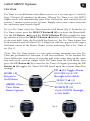
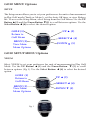
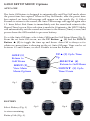
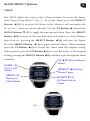
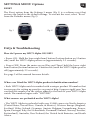
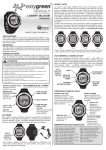
The WR72 Alpha also comes with a Timer feature. To access the Timer,
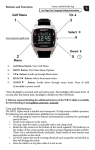
select Timer from Menu 2 (Fig. 1). To set the Timer, press the SELECT
Button ◄ (4) to activate the Hours field. Minutes will automatically
be set to 5, however can be adjusted. Use the UP Button ▲ (3) and the
DOWN Button ▼ (5) to toggle the time up and down. Press the SELECT
Button ◄ (4) to move to the next field after each field is set. After Minutes
have been set, pressing the SELECT Button ◄ (4) will start the Timer.
Press the SELECT Button ◄ 4) to pause/start the Timer. When running,
press the UP Button ▲ (3) to restart the Timer from the original setting.
When paused, press the UP Button ▲ (3) to reset the Timer to the original
setting; pressing the SELECT Button ◄ (4) will then cycle through the fields
normally.
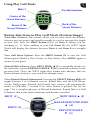
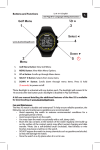
UP ▲(3) Restart/Reset
Timer
GOLF (1)
View Golf
Menu
SELECT ◄ (4) Start/
Pause Timer
MENU (2)
Return to
Main Menu
DOWN ▼ (5)
No Function in
Timer
Fig. 1