1
Aquadue Duplo
User manual
Page 1
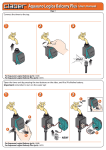
Connect the timer to the tap.
1
2
3
ING
RUNN
ING
RUNN
A
E
LIN
5
B
6
P
STO
ING
RUNN
P
STO
B
DAY
DAY
B
A
B
E
LIN
RT
STA
E
LIN
LOW
A
R
STA
TIME
6
5
3
5
T
B
A
4
3
2
1
B
A
B
A
2
A
4
3
2
DAY
B
1
4
TIME
A
B
A
B
A
B
1
6
TIME
A
B
OK
E
LIN
LOW
ET
RECASNCEL
OK
E
LIN
T
ESEEL
R CANC
OK
LOW
A
E
LIN
click!
For Aquadue Duplo (p/n): 8410
Open the timer unit by pressing the two buttons on the sides, and fit a 9V alkaline battery. When connecting the
battery, the display comes on, the valve opens for 2 seconds and the timer clock will be set automatically to
00:00. Important: Remember to turn on the water tap.
1
2
3
A
2
B
A
4
3
A
5
B
6
P
STO
DAY
c
B
1
TIME
ON!
B
E
LIN
T
NING
RUN
R
STA
A
LIN
LOW
OK
E
ET
CEL
RES
CAN
a
B
A
B
1
4
3
2
5
B
6
TIME
A
A
DAY
P
STO
VA
LV
. A
VA
LV
. B
BA
TT
ER
Y
B
NE
LI
RT
ING
RUNN
STA
A
LOW
RA
IN
OK
VA
LV
. A
VA
LV
. B
BA
TT
ER
Y
RA
IN
SE
NS
SE
NS
OR
OR
NE
LI
ET
RECASNCEL
Alc
ali
ne
b
a
9V
Alc
ali
For Aquadue Duplo (p/n): 8410
9V
a
ne
NEW!
b
Aquadue Duplo
User manual
Page 2
4
5
3
2
4
A
5
ON!
B
6
A
B
A
4
3
6
5
E
B
NE
LI
A
OK
B
1
B
A
2
4
3
A
5
ING
RUNN
LIN
B
6
ING
RUNN
DAY
E
LIN
LOW
A
LOW
A
TIME
NING
RUN
B
B
A
2
DAY
DAY
LOW
A
B
1
TIME
B
1
B
open
for 2”
TIME
A
A
6
OK
NE
LI
B
NE
LI
OK
NE
LI
A B A B A B
1
5
6
RUNNING
DAY
LINE
4
TIME
A
3
2
B
OK
LOW
LINE
For Aquadue Duplo (p/n): 8410
Pressing the ENTER button key, the message OK will appear. Set the current time using the FORWARD/BACK
button keys. Keeping the FORWARD or BACK key button pressed, the numbers will scroll more quickly. Having
set the time, press ENTER, and the “OK” icon will appear.
1
2
3
A B A B A B
5
6
A
B
A
3
B
4
A
6
NE
x1
NE
A
LINE
LOW
2
A
3
B
4
A
5
6
NE
OK
A
NE
NE
LI
LOW
LOW
B
LI
LI
back
B
1
OK
2
RUNNING
A
LINE
B
forward
For Aquadue Duplo (p/n): 8410
B
B
5
LI
LI
OK
A
ING
RUNN
ING
RUNN
OK
2
LOW
DAY
LOW
B
1
DAY
DAY
A
RUNNING
B
1
6
ING
RUNN
A
LINE
5
3
4
5
6
DAY
4
A
LINE
4
TIME
B
B
3
TIME
3
OK
2
DAY
A
1
TIME
2
LOW
A B A B A B
A B A B A B
6
TIME
B
1
5
TIME
A
4
DAY
LINE
3
TIME
A
2
RUNNING
1
B
NE
LI
x1
OK
B
LINE
Aquadue Duplo
User manual
Page 3
Programming of the two lines — line A (1-3-5) and line B (2-4-6) — is managed by way of pages presented in the
display. Each page has two functions: view programme and, pressing ENTER, modify programme. Pressing FORWARD, the display shows the programmes for the two lines.
2
3
b
Prog. for line A
3
A
B
5
4
B
6
3
4
B
E
LIN
E
LIN
DAY
B
OK
LOW
LINE
B
LINE
A
6
OK
LOW
LINE
B
A
A
B
1
3
2
B
4
5
DAY
A
a
OK
LOW
5
TIME
A
E
LIN
OK
A
2
4
DAY
OK
LOW
B
1
E
LIN
DAY
ING
RUNN
A
B
3
2
LINE
ING
RUNN
A
DAY
2
DAY
RUNNING
B
1
A
LOW
LINE
A
6
RUNNING
6
ING
RUNN
5
1
B
5
a
A B A B A B
6
5
TIME
4
4
TIME
3
TIME
A
2
TIME
1
3
2
1
TIME
A B A B A B
A
B
A B A B A B
RUNNING
1
LINE
LOW
A
B
NE
LI
b
OK
NE
LI
3
2
ING
RUNN
OK
c
NE
LI
Prog. for line B
3
4
5
6
B
1
A
3
A
B
5
4
ING
RUNN
RUNNING
2
6
B
OK
LOW
LINE
LINE
c
E
LIN
B
3
2
4
5
6
TIME
DAY
A B A B A B
1
LINE
OK
4
3
2
A
B
5
6
B
DAY
LINE
LOW
A
B
1
B
TIME
A
A
DAY
B
RUNNING
LINE
B
LINE
Ö ENTER
PROGRAMME 1 ON (OPEN)
d
E
LIN
OK
6
B
OK
LOW
5
B
DAY
A
LOW
LINE
A
TIME
A
2
A
ING
RUNN
1
4
TIME
A B A B A B
3
2
LI
DAY
LOW
A
1
NE
TIME
DAY
LINE
A B A B A B
B
RUNNING
B
1
4
ME
A
A
A
LOW
A
E
LIN
e
OK
E
LIN
PROGRAMME 1 OFF (CLOSED)
Ö ENTER
PROGRAMME 2 ON (OPEN)
Ö ENTER
PROGRAMME 2 OFF (CLOSED)
Ö ENTER
PROGRAMME … ON (OPEN)
Ö ENTER
PROGRAMME … OFF (CLOSED)
Ö ENTER
For Aquadue Duplo (p/n): 8410
Suppose watering on line (A) is to be programmed from the current time (e.g. 10:42). Press the FORWARD key button once. The
display shows “1=progr.1 OPEN”. The time appears as 00:00; press ENTER to set the opening time as required. The message OK means
that the OPEN time can now be selected with the FORWARD/BACK key buttons. The symbol for programme 1 also appears at the
top of the display. Having set the time (e.g. 5:00), press ENTER. The OK message disappears and the watering start time is saved.
2
6
ING
RUNN
E
5
3
B
4
A
5
4
5
ING
RUNN
4
5
E
LIN
d
A
For Aquadue Duplo (p/n): 8410
OK
1
LINE
2
B
4
5
LOW
OK
E
LIN
b
A
LOW
LINE
B
OK
LINE
A
B
2
A
3
B
4
A
5
B
LINE
2
LOW
B
A
4
3
A
5
B
6
B
6
B
E
LIN
d
A
LOW
B
NE
LI
b
OK
NE
LI
OK
E
LIN
e
6
B
1
A
LINE
3
B
E
1
A B A B A B
A
6
OK
LOW
6
c
A B A B A B
1
A
LINE
2
3
4
5
6
DAY
LINE
5
5
TIME
B
A
LIN
A
LOW
LINE
4
4
c
6
DAY
RUNNING
3
TIME
DAY
OK
B
e
6
TIME
LOW
OK
B
DAY
3
E
LIN
LOW
2
B
6
3
3
DAY
A
A
TIME
2
2
A
LINE
DAY
2
A
LINE
B
TIME
RUNNING
1
DAY
DAY
B
OK
A B A B A B
B
B
1
LOW
LINE
TIME
TIME
OK
A
c
6
1
LOW
b
A
2
TIME
4
LIN
1
DAY
3
E
LIN
a
A B A B A B
B
DAY
2
B
OK
LOW
A
LINE
6
ING
RUNN
5
5
RUNNING
A
4
DAY
RUNNING
4
3
TIME
B
3
2
TIME
B
A
1
LINE
A
DAY
OK
A B A B A B
A
2
TIME
DAY
1
LINE
B
1
A B A B A B
A
1
A
LOW
LINE
a
A B A B A B
B
RUNNING
6
ING
RUNN
5
RUNNING
4
RUNNING
3
TIME
A
2
RUNNING
1
TIME
a
A B A B A B
3
ING
RUNN
1
LOW
OK
B
LINE
Mem.
Aquadue Duplo
User manual
Page 4
Press the FORWARD key button once. The display shows “1=progr. 1 CLOSED”. The timer sets the ‘close’ time automatically one
minute after the ‘open’ time. (in the example: 05:01). Press the ENTER key button to set the ‘close’ time, in the same way as for the
‘open’ time (e.g. 05:20). Set the required ‘close’ time using the FORWARD/BACK key buttons. The symbol for programme 1 continues to be displayed after the programme has been stored. Press ENTER to conclude the programming procedure.
2
3
a
A B A B A B
5
ING
RUNN
A
OK
LOW
LINE
LOW
B
a
6
A
OK
LOW
LINE
B
LINE
c
6
2
B
A
4
3
2
A
ING
RUNN
B
LOW
A
LINE
A
3
B
4
A
5
B
6
DAY
B
B
6
5
DAY
OK
LOW
B
1
TIME
RUNNING
A
1
B
E
LIN
d
NE
LI
b
OK
LOW
A
OK
B
NE
LI
E
LIN
2
A
3
B
4
A
5
B
6
NE
LI
5
6
OK
LOW
LINE
c
A B A B A B
1
B
A
LINE
2
3
4
5
6
DAY
A
DAY
c
4
TIME
LOW
A
LINE
OK
3
2
1
NE
LI
TIME
ING
RUNN
DAY
DAY
B
OK
e
A B A B A B
B
RUNNING
B
1
RUNNING
A
TIME
RUNNING
5
TIME
5
DAY
6
TIME
LOW
LINE
4
b
A B A B A B
A
4
A
LINE
5
b
E
TIME
A
4
3
2
1
3
E
LIN
LIN
A B A B A B
2
B
OK
LOW
A
LINE
3
a
NE
LI
1
4
3
2
1
6
DAY
A
OK
A
B
A
2
B
5
DAY
NE
LI
DAY
DAY
B
A
ING
RUNN
4
1
B
ING
RUNN
B
RUNNING
3
6
A B A B A B
TIME
A
6
TIME
2
5
TIME
B
1
4
B
A
TIME
A
3
2
1
RUNNING
1
OK
LOW
LINE
Mem.
B
LINE
Repeat the same sequence of steps for programmes
and
For Aquadue Duplo (p/n): 8410
To programme watering on line (B), press the FORWARD key button once. The display reads 1=progr.2. Pressing ENTER, Duplo
will automatically preset the minimum opening time for line B, one minute after the closing time of line A. Follow the same
procedure done for line A, which can also be used for programmes 4 and 6 on line B.
2
3
a
A B A B A B
OK
LOW
4
3
ING
RUNN
DAY
E
OK
c
B
1
2
A
3
B
4
A
5
6
ING
RUNN
A
OK
ING
RUNN
B
LINE
A
2
3
4
5
6
LOW
LINE
A
B
1
2
A
3
B
4
A
5
B
6
OK
A
B
LOW
B
NE
LI
OK
NE
b
LI
LINE
f
NE
LI
NE
A
B
1
2
A
3
B
4
A
5
6
OK
B
E
LIN
e
A
LINE
3
4
5
LOW
OK
c
A B A B A B
6
1
2
B
LINE
A
LINE
3
4
5
6
DAY
E
LIN
2
B
DAY
A
LOW
1
DAY
c
ING
RUNN
LI
A B A B A B
TIME
LINE
LOW
LINE
TIME
OK
LOW
B
OK
TIME
LOW
B
A
B
DAY
RUNNING
A
a
6
TIME
DAY
LINE
6
1
LIN
b
TIME
A
5
b
E
DAY
LOW
5
A B A B A B
B
E
4
DAY
A
6
5
LIN
4
E
LIN
LIN
d
B
A
B
3
TIME
2
A
3
A
2
TIME
B
1
2
B
B
OK
LOW
LINE
TIME
A
1
3
a
NE
LI
A B A B A B
2
6
ING
RUNN
OK
B
1
5
RUNNING
ING
RUNN
A
LINE
LOW
A
A
DAY
NE
LI
DAY
DAY
A
B
4
RUNNING
5
B
RUNNING
4
RUNNING
B
1
A
B
DAY
3
6
A B A B A B
TIME
A
6
TIME
2
5
TIME
B
1
4
B
A
TIME
A
3
2
1
RUNNING
1
LOW
OK
Mem.
B
LINE
Repeat the same steps for programmes
For Aquadue Duplo (p/n): 8410
and
Aquadue Duplo
User manual
Page 5
Pressing the FORWARD key button, the display will move through to weekly programming. With weekly programming, the user can select in which
days watering is required. This programming function is the same for both lines. Warning: day (1) coincides with the day on which the first watering
cycle is set. Example: first programme set on Thursday = day (1). Warning: day (1) provides the reference point for weekly programming. Example: If
Thursday = day (1) and the intention is to skip watering on Friday, the day to deselect is day (2). To omit one day of the week, position the cursor of
the display under the number of the day in question, using the FORWARD/BACK key buttons. Press ENTER and the number will disappear.
3
a
1
LINE
5
A
3
4
6
E
LIN
d
E
5
6
B
6
5
4
3
2
A
B
A
B
1
B
OK
LOW
LINE
NE
1
LI
2
3
4
5
6
LOW
A
LIN
B
d
B
f
E
LIN
OK
E
A
3
4
6
LINE
E
LIN
f
OK
LOW
A
B
E
LIN
A
LINE
A
B
6
5
4
3
2
A
B
A
B
1
DAY
B
6
5
DAY
OK
4
B
TIME
2
5
DAY
LOW
LINE
B
1
DAY
A
A
A
3
2
1
B
TIME
NE
LI
e
A B A B A B
TIME
ING
RUNN
e
A B A B A B
B
OK
LOW
A
LINE
x3
B
A
TIME
B
A
LINE
b
E
B
OK
LOW
LINE
ING
RUNN
4
A
LIN
E
LIN
c
6
5
RUNNING
B
ING
RUNN
3
2
RUNNING
A
B
1
4
LOW
A
B
OK
DAY
LIN
B
OK
LOW
A
3
B
DAY
RUNNING
2
5
6
5
TIME
B
A
TIME
LINE
LINE
2
1
B
DAY
B
OK
LOW
LINE
B
A B A B A B
1
OK
A
B
A
4
3
2
1
B
A
B
A
c
6
6
5
ING
RUNN
b
E
TIME
A
DAY
RUNNING
4
TIME
DAY
OK
LOW
LINE
3
DAY
6
TIME
A
E
LIN
b
A B A B A B
5
LIN
B
OK
LOW
A
A
LOW
LINE
4
2
TIME
A
3
4
ING
RUNN
ING
RUNN
OK
B
A B A B A B
2
3
6
a
NE
LI
1
A
4
B
DAY
LOW
LINE
2
5
DAY
A
B
1
A
3
2
1
A
DAY
DAY
NE
LI
OK
LOW
A
B
RUNNING
5
4
a
A B A B A B
B
TIME
B
6
DAY
3
5
TIME
A
4
TIME
2
3
TIME
B
1
TIME
A
2
RUNNING
1
6
RUNNING
A B A B A B
B
A
ING
RUNN
2
ING
RUNN
1
LOW
A
E
LIN
x5
OK
E
LIN
For Aquadue Duplo (p/n): 8410
To quit the weekly programming page, position the cursor under EXIT and press ENTER. Press the FORWARD key
button to display the manual watering function. Press ENTER to activate the manual function; pressing the BACK
key button (OPEN), the timer valve opens, and pressing the FORWARD key button (CLOSED), the valve closes. To
quit the manual function, press the ENTER button. This function is useful for watering plants when required,
without deleting the programmes already set. In any case, the valve will close automatically after 15 minutes.
Similarly, press the FORWARD key button to display the manual watering function on line B.
A
5
3
4
B
E
LIN
b
OK
LOW
A
6
E
LIN
A
LINE
OK
LOW
2
For Aquadue Duplo (p/n): 8410
A
LINE
4
5
6
1
A
B
1
2
A
3
B
4
A
5
LOW
OK
B
LINE
2
A
3
B
4
A
5
A
E
LIN
LOW
A
E
LIN
B
6
B
E
LIN
B
6
DAY
c
3
B
B
LINE
DAY
1
E
LIN
OK
B
E
LIN
d
B
1
A
TIME
OK
B
6
A
c
A B A B A B
5
RUNNING
ING
RUNN
B
LINE
DAY
NING
RUN
OK
TIME
E
LIN
A
6
B
DAY
A
LOW
2
4
B
NING
RUN
4
LOW
LINE
B
1
ING
RUNN
B
A
5
3
2
1
A
2
A
3
B
4
A
5
B
6
DAY
2
3
A
a
A B A B A B
B
TIME
1
A
LOW
E
LIN
6
DAY
B
A
OK
5
DAY
LINE
b
4
TIME
A
B
E
LIN
3
DAY
DAY
OK
B
2
ING
RUNN
4
3
6
TIME
A
B
TIME
2
5
TIME
B
1
A
TIME
RUNNING
1
A
LOW
a
A B A B A B
B
RUNNING
6
5
DAY
LINE
4
TIME
A
3
2
RUNNING
1
TIME
a
A B A B A B
3
ING
RUNN
2
1
A
E
LIN
LOW
OK
c
LOW
OK
B
LIN
E
b
Aquadue Duplo
User manual
Page 6
To delete a programme, press the FORWARD key button until the display shows the “CLOSED” page of the
programme to be removed. Press ENTER, then press the FORWARD / BACK key buttons simultaneously.
1
2
3
a
A B A B A B
1
A
3
5
6
NING
RUN
3
4
5
6
NE
LI
A
a
OK
NE
LI
LINE
DAY
B
DAY
LOW
A
2
B
RUNNING
2
A
TIME
B
1
4
TIME
A
B
LOW
B
OK
LINE
A
B
1
2
A
3
B
4
A
5
B
6
TIME
x2
ING
RUNN
DAY
b
5
6
RUNNING
B
1
A
3
B
4
A
5
B
6
DAY
B
ING
RUNN
OK
2
TIME
A
LOW
LINE
A
3
B
4
A
LOW
ING
RUNN
4
DAY
LINE
3
TIME
A
2
2
A
5
A
B
LOW
Mem.
LOW
NE
B
6
DAY
1
B
1
NE
LI
LI
TIME
b
A B A B A B
A
A
B
OK
Programme 2 deleted
B
NE
LI
OK
NE
LI
E
LIN
OK
c
E
LIN
For Aquadue Duplo (p/n): 8410
The timer can also be connected to the Rain Sensor, using the socket provided, in which case the protective
jumper must be removed.
2
1
3
a
B
1
2
B
A
4
3
5
B
6
TIME
A
A
DAY
P
STO
NE
LI
ING
RUNN
LOW
RA
IN
OK
RA
IN
SE
NS
NE
LI
ET
RECASNCEL
a
b
For Aquadue Duplo (p/n): 8410
VA
LV
. A
VA
LV
. B
BA
TT
ER
Y
OR
SE
NS
A 9
lc V
al
in
e
A
A 9
lc V
al
in
e
VA
LV
. A
VA
LV
. B
BA
TT
ER
Y
B
T
R
STA
OR
Aquadue Duplo
User manual
Page 7
At the end of the warm season and before the first winter frosts, disconnect the timer from the tap and store it
indoors, bearing in mind to remove the battery.
1
2
3
B
1
2
B
A
4
3
B
A
6
5
TIME
A
P
STO
DAY
OFF!
T
NING
RUN
R
STA
a
A
LOW
OK
B
E
LIN
b
E
LIN
ET
CEL
RES
CAN
c
B
1
2
B
A
4
3
A
5
B
6
TIME
A
DAY
P
STO
B
E
LIN
ING
RUNN
RT
STA
A
LOW
VA
LV
. A
VA
LV
. B
BA
TT
ER
Y
OK
E
LIN
SET
RA
IN
RECANCEL
SE
NS
OR
b
9V
Alc
ali
LINE
A
ne
2
OK
A B A B A B
1
START
3
5
STOP
4
6
DAY
LINE
B
TIME
RESET
CANCEL
LOW
a
RUNNIN
G
For Aquadue Duplo (p/n): 8410
For more information and further details, please consult the instruction manual supplied with the product.