1
Aquadue Duplo
User manual
Page 2
4
5
3
2
4
A
5
ON!
B
6
A
B
A
4
3
6
5
E
B
NE
LI
A
OK
B
1
B
A
2
4
3
A
5
ING
RUNN
LIN
B
6
ING
RUNN
DAY
E
LIN
LOW
A
LOW
A
TIME
NING
RUN
B
B
A
2
DAY
DAY
LOW
A
B
1
TIME
B
1
B
open
for 2”
TIME
A
A
6
OK
NE
LI
B
NE
LI
OK
NE
LI
A B A B A B
1
5
6
RUNNING
DAY
LINE
4
TIME
A
3
2
B
OK
LOW
LINE
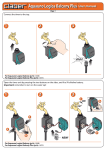
For Aquadue Duplo (p/n): 8410
Pressing the ENTER button key, the message OK will appear. Set the current time using the FORWARD/BACK
button keys. Keeping the FORWARD or BACK key button pressed, the numbers will scroll more quickly. Having
set the time, press ENTER, and the “OK” icon will appear.
1
2
3
A B A B A B
5
6
A
B
A
3
B
4
A
6
NE
x1
NE
A
LINE
LOW
2
A
3
B
4
A
5
6
NE
OK
A
NE
NE
LI
LOW
LOW
B
LI
LI
back
B
1
OK
2
RUNNING
A
LINE
B
forward
For Aquadue Duplo (p/n): 8410
B
B
5
LI
LI
OK
A
ING
RUNN
ING
RUNN
OK
2
LOW
DAY
LOW
B
1
DAY
DAY
A
RUNNING
B
1
6
ING
RUNN
A
LINE
5
3
4
5
6
DAY
4
A
LINE
4
TIME
B
B
3
TIME
3
OK
2
DAY
A
1
TIME
2
LOW
A B A B A B
A B A B A B
6
TIME
B
1
5
TIME
A
4
DAY
LINE
3
TIME
A
2
RUNNING
1
B
NE
LI
x1
OK
B
LINE