1
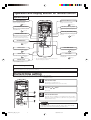
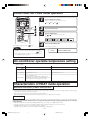
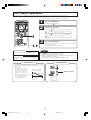
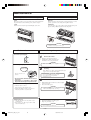
AUTO mode operation
■ Automatically selects the operation mode (COOL, HEAT, DRY) depending on the room temperature when switched on.
When the unit is not in AUTO mode:
1
Press MODE button.
Move the [
mark] to the
(Auto) position.
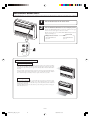
Point the remote control toward the air-conditioner, and
2
Press the ON/OFF button.
To stop:
Press the ON/OFF button.
NOTE
• In case air is not blowing out during
the operation.
AUTO mode can be
operated by simply
pressing the ON/OFF
button.
Page 21
• When the included clean filter is installed the air conditioner will clean
the air during automatic operation.
• If you do not want the AUTO mode program, change to
COOL, HEAT, DRY or FAN instead of AUTO.
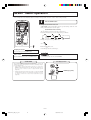
Display in OFF status
• The current time and preset OPERATION MODE are displayed while the
air conditioner is turned off.
Page 9
• Airflow direction adjustment procedure.
Page 10
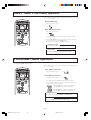
Temperature adjustment during AUTO
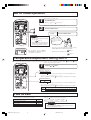
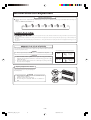
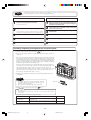
■ Air temperature adjustment is possible even during automatic operation. There are 6 levels of adjustment possible with the
button or the
button.
When a change in temperature is required.
1
Press the
or
button.
When it is a little cold
Press the
button.
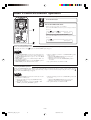
button is pressed, the switch over occurs in the following order
■ Each time the
–6 → –5 → ............ –1 → ±0 → +1 ............ +6.
When +6 is indicated, even if the button is pressed, the indicator does not change.
When it is a little hot
Press the
button.
■ Each time the
button is pressed, the switch over occurs in the following order
+6 → +5 → ............ +1 → ±0 → –1 ............ –6.
When –6 is indicated, even if the button is pressed, the indicator does not change.
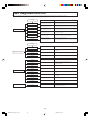
Setting
-6
temp.(°C) 20
-5
21
-4
22
-3
23
Remote Control display
+0 +1
-2
-1
+2
24 25
26 27
28
+3
29
+4
30
+5
31
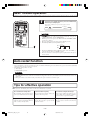
FAN SPEED
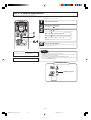
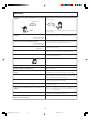
■ You can choose the capacity of your air-conditioner
when heating mode, cooling mode or fan mode.
Operation capacity by your choice
Press the FAN SPEED button.
Move the [
AUTO
FAN SPEED
Set automatically by microcomputer
AUTO
Powerful operation with high capacity
Standard operation
Energy-saving operation
HI
MED
LO
mark] to the preferred fan speed position.
HI
MED
NOTE
• When changing FAN SPEED from HI to LO, the sound of
refrigerant flowing may be heard.
–8–
RFB012A003_EN_001_024
8
LO
08/07/2009, 10:02
+6
32