1
10. Installation
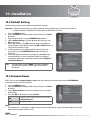
10.3 Default Setting
Default setting restores the product to the default settings.
Warning: Please note that once you perform default setting, all data such as channel list and user
configured data are deleted, no information on the HDD will be lost.
1. Press the MENU button.
2. Select Installation using the / button and press the OK or
button.
3. Enter the password using the NUMERIC(0-9) buttons.
4. Select Default Setting using the / button and press the
OK or button.
5. Select Yes and press the OK button to restore all setting to
factory default. Select No and press the OK or BACK button to
return to the previous menu.
6. Confirm again to start loading default setting. Enter the
password using the NUMERIC(0-9) buttons to perform
restoring.
7. When completing the default setting, press the OK button
to automatically run the installation wizard. For detailed
information about the installation wizard, refer to Chapter 3.
Installation Wizard.
Tip:
The default password is 0000. If you have forgotten
your password, please contact your local product
distributor.
10.4 Antenna Power
Make sure to set the Antenna Power to On when you connect an active antenna to the ANTENNA IN
connector on the rear of the product.
1. Press the MENU button.
2. Select Installation using the / button and press the OK or
button.
3. Select Antenna Power from the installation menu using the
/ button.
4. Press the OK or button to select On/Off.
On
Off
5V power supply from the active antenna cable.
+5V/50mA (max.)
No power supply.
Note:
• Active antenna is a portable or indoor antenna which needs power supply from the product because it
does not have power cord for itself.
GB56
User’s Manual