1
If something seems to be not working properly:
Symptom
The control box does not power up.
The system seems to operate
correctly but no satellite is found.
A satellite is found but there’s no
picture on your TV.
You can see a picture on the TV but
it is breaking up.
If you are near the edge of the
satellite’s transmission area
(footprint) this can happen.
The TV has sound but no picture.
You’ve tried the suggestions but the
system is still not working.
What you should do
1) Check the power supply.
2) Switch the control unit off and on again.
1) Make sure that the dish has a clear view of the satellite –
avoid trees, buildings, pylons, etc.
2) Check cables and connections.
3) Switch the control unit off and on again.
1) Check that you have selected the correct satellite and that
your receiver is set for the same one.
2) Check that cables and connectors between the sat-dome
controller, the receiver and the TV are all secure.
1) Check that there are no obstructions between the dish and
the satellite.
2) Check all cables and connectors.
1) Check that you have not selected radio on your receiver
instead of TV.
2) Check that the power to your TV is sufficient for it to
operate correctly.
1) Contact your installer or dealer.
2) If they are unable to fix the problem, contact RoadPro.
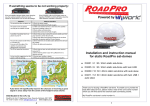
40cm Sat-dome
30cm Sat-dome
Installation and instruction manual
for in-motion RoadPro sat-domes
Ÿ D3203 / 4: 30 / 40cm in-motion sat-dome
Ÿ D3207 / 8: 30 / 40cm in-motion sat-dome with twin LNB
Ÿ D3213 / 14: 30 / 40cm in-motion sat-dome with twin LNB
+ auto skew
Auto-skew will significantly improve the chances of receiving a good
signal in areas away from the centre of the footprint areas shown.
Distributed in the U.K. by
Thank you for buying a RoadPro sat-dome. To enable us to provide the
best after-sales service, please make a note of the unit’s serial number
which you will find above the external cable connecting socket.
My RoadPro sat-dome’s serial number is:................................................
RoadPro Ltd, Unit 7, Stephenson Close, Daventry, Northants, NN11 8RF
Tel: 01327 312233 E-mail: [email protected] www.roadpro.co.uk
4
1
DELIVERY
RoadPro sat-domes come with the following parts in the box:
- Sat-dome
- Control box incl. power supply
- 1 HQ co-ax cable (10m) with F-plugs (2
cables are supplied with twin LNB models)
- 1 HQ co-ax cable (1m)
- 1 Cable-entry box
- 12 screws (3 in dome cover, 9 in bag)
- Installation and usage instructions
INSTALLATION
We strongly recommend getting the sat-dome fitted to your vehicle or boat by
a professional installer!
Preparation:
1.
2.
3.
4.
5.
6.
7.
8.
9.
10.
11.
12.
Ensure that the roof of your vehicle is able to carry the sat-dome. If you are not sure, check
with your dealer or the vehicle's manufacturer.
Check that you have all the parts that are listed above.
Find a suitable place on the roof of your vehicle to mount the sat-dome. The sat-dome’s
external cable connector must face towards the rear of the vehicle. The mounting place
must be level and even. Mark the outline of the sat-dome’s feet with a pencil.
Ensure that the underside of the mounting feet and the area of the roof where they will sit
is clean and dry. If necessary, clean with a suitable cleaning agent. Methylated spirits works
well on most surfaces and with many adhesive / sealants. If in doubt, test the surface first
and consult the manufacturer of the sealant / adhesive.
It may be necessary to roughen the underside of the feet and the fixing area on the roof:
follow the instructions that came with the adhesive / sealant and then apply it evenly to the
underside of the mounting feet. The minimum thickness of the adhesive layer must be at
least 2mm. Within 5 minutes of applying the adhesive, replace the sat-dome on the roof in
the pre-selected position. Press the feet onto the roof and trim off any excess adhesive.
It is essential that you give the adhesive enough time to harden completely. The time this
takes will vary according to the adhesive used and the ambient temperature and humidity.
Always follow the instructions that come with the adhesive / sealant and, if you are in any
doubt as to how it should be applied, seek professional advice.
We strongly advise screwing the mounting feet to the roof after the adhesive has been
applied.
At this point you should remove the cover of the dome, cut the cable tie and remove all
packaging. Replace the cover with the screws supplied.
Use the cable-entry box supplied to take the 10M cable from the sat-dome through the
roof to the controller. Ensure that the cable is secure and cannot be caught by obstacles.
Install the controller in a convenient position inside the vehicle and, using the power cable
supplied, connect to a reliable 12V or 24V power source.
Connect the cable from the sat-dome to the connector marked ANTENNA on the back of
the controller and the short cable supplied to the connector marked RECEIVER. Connect
the other end of that cable to your satellite receiver.
The installation is now complete and you can connect a TV to the receiver, turn everything
on and use your sat-dome for the first time.
Very important. Please read this!!
It is essential that your sat-dome is installed using the cables supplied and that these cables are not
cut or modified in any way. If any other cables or connectors are used, or if the cables are cut, the
system will not work correctly. This applies to both original and secondary installations.
2
BASIC OPERATION
The RoadPro sat-dome controller has a
red on/off switch, two “satellite selector”
buttons and a “sleep” button. These
control all operational functions of the
sat-dome. An LCD display shows the
status of the sat-dome including which
satellite is being searched for or has
been located. The controller is set for
Astra 2 (south) when it is first delivered
but other satellites can be chosen as required. Astra 2 is the satellite which carries all TV and radio channels
intended for viewing and listening in the U.K.
Before attempting to operate the system, make sure that the controller is connected to a 12V / 24V power
supply and that a suitable receiver is also connected. Make sure that the receiver is set to work with the
same satellite that you want the sat-dome to find and that a TV or monitor is connected to the receiver and is
switched to the appropriate “source”.
To switch the system on:
Press the red button on the left of the controller.
The system will immediately begin searching for the selected satellite - as shown on the display. It may find a
different satellite first and then after calculating its position, move to the chosen satellite and lock on. This can
take between 10 - 60 seconds depending on how far the system is from where it was when it was last used.
Fine tuning will then be carried out and, shortly afterwards, a picture will appear on the TV or monitor.
Even after the satellite has been found and you can see a picture on the screen, the dish
mechanism may continue to adjust itself for up to two minutes. It will then go into “sleep” mode. You
can manually put the system into “sleep” mode by pressing the sleep button for two seconds. The
dish will remain in the same position until the vehicle moves again or you turn the controller off.
Note: with in-motion sat-domes, the power must be left on when the system is in use, even if the
vehicle is stationary.
To select a different satellite:
The controller enables you to select a number of satellites: Astra 2, Astra 1, Hotbird, Sirius 4.8 (Astra 4),
Hispasat and Atlantic Bird 3.
To select a different satellite* from the one currently selected, press the white “satellite select” buttons on
the controller until the satellite you want is shown on the display. The system will now search for that
satellite and will return to the same satellite the next time you turn the system on.
*Make sure you’ve selected the same satellite on your receiver.
In-motion sat-domes on the road:
Your RoadPro in-motion sat-dome is a highly sophisticated and complex piece of equipment. However, like
any satellite dish, it can only receive a signal when there are no obstructions such as trees, buildings or
vehicles. As you drive along the road, even a lamp-post or an overhead gantry can block the signal and, if
there are tunnels along your route, you will definitely lose the signal immediately you enter one. The longer
the signal is lost, the longer it can take for it to be re-acquired.
There is absolutely nothing that can be done about this but, having lost the signal, RoadPro sat-domes are
intelligent enough to be able to find it again very quickly. Worth bearing in mind too is that the further south
you travel, the less likely the sat-dome is to lose the signal when passing trees, buildings, etc. This is
because, as you travel south, your relative elevation angle to the satellite will get steeper. Conversely, as
you travel north, signal blockage will get worse as the satellite will be lower in the sky relative to your
position.
3