1
Installing the Antenna
To choose a proper place for the antenna is the first and very important step for antenna
installing. You can use your mobile phone to search for the place where the strongest signal is.
Then put the antenna here.
Please do not make the antenna too close to the terminal. It will disturb the signal of the
terminal.
Please do not make the antenna and the terminal too close to the TV set,computer, and
radiogram. It will disturb the signal of the terminal.
Inserting a SIM Card
Make sure the terminal is switched off and the AC adapter is unplugged: insert the SIM card
only when the terminal is switched off and the AC adapter is unplugged.Follow the instructions
below to insert a SIM Card into the terminal.
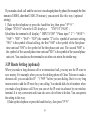
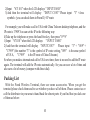
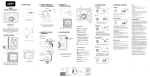
1). Screw off the screw of SIM card case, and open the cover.
2). Slide back the SIM card door and lift it up.
3). Slide the SIM card into the SIM door making sure that the clipped corner of the SIM card
lines up with the clipped corner of the SIM holder.
4). Close the SIM card door and slide it to lock the SIM card in place.
5). Replace the cover of SIM card case and fixes it with a screw.
4